lock LEXUS LS500 2019 Manual PDF
[x] Cancel search | Manufacturer: LEXUS, Model Year: 2019, Model line: LS500, Model: LEXUS LS500 2019Pages: 512, PDF Size: 9.71 MB
Page 222 of 512
222 4-5. Using the driving support systems
LS500_OM_(U)_1810 • If the wheels are misaligned
• If a wiper blade is blocking the front cam-
era
• The vehicle is being driven at extremely
high speeds
• When driving on a hill
• If the radar sensor or front camera is mis-
aligned●
In some situations such as the following,
sufficient braking force may not be
obtained, preventing the system from
performing properly:
• If the braking functions cannot operate to
their full extent, such as when the brake
parts are extremely cold, extremely hot,
or wet
• If the vehicle is not properly maintained
(brakes or tires are excessively worn,
improper tire inflation pressure, etc.)
• When the vehicle is being driven on a
gravel road or other slippery surface■
If VSC is disabled●
If VSC is disabled ( P.296), the pre-col-
lision brake assist and pre-collision brak-
ing functions are also disabled.●
The PCS warning light will turn on and
“VSC Turned Off Pre-Collision Brake
System Unavailable” will be displayed on
the multi-information display. *
: If equipped
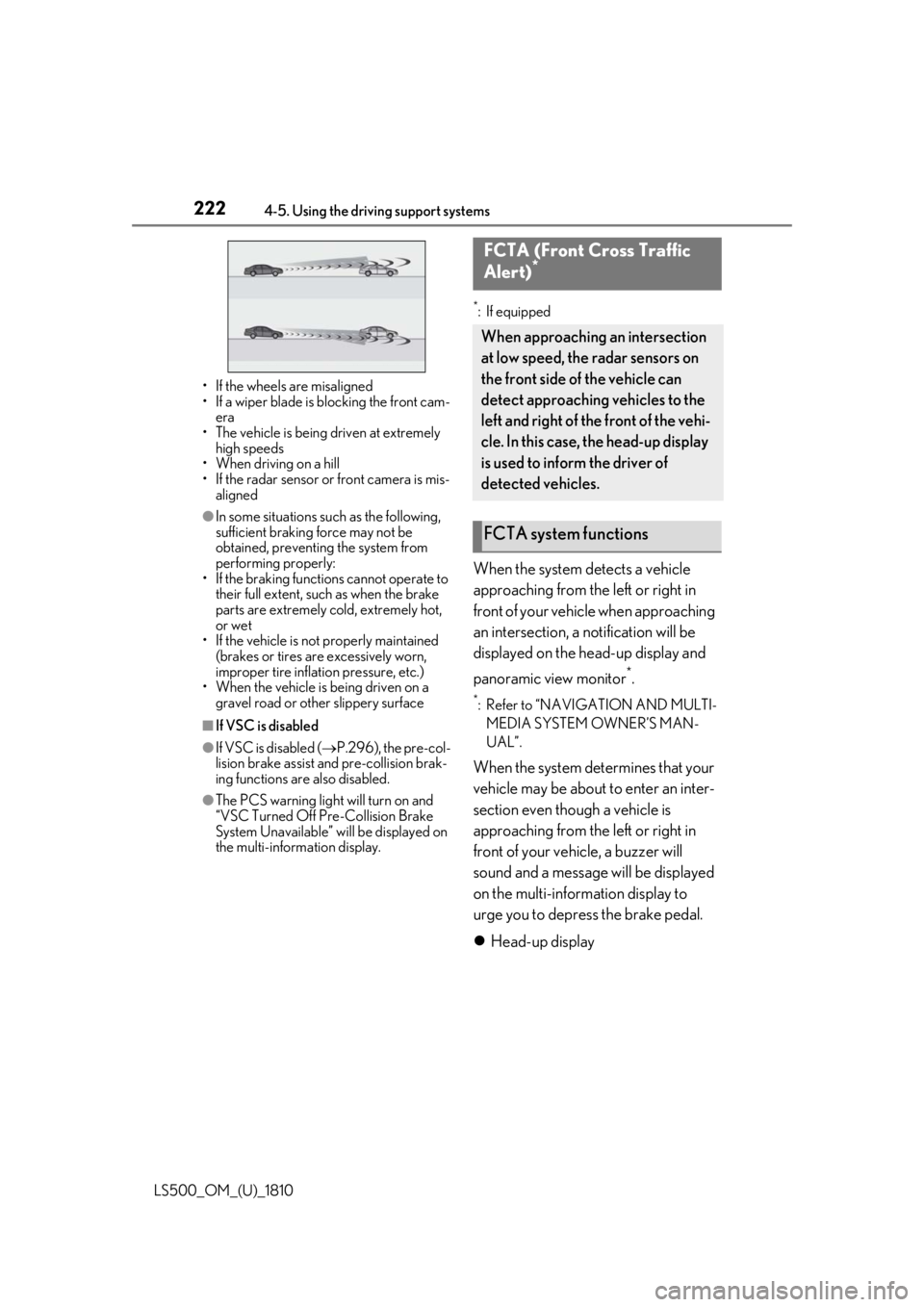
When the system detects a vehicle
approaching from the left or right in
front of your vehicle when approaching
an intersection, a notification will be
displayed on the head-up display and
panoramic view monitor *
. *
: Refer to “NAVIGATION AND MULTI-
MEDIA SYSTEM OWNER’S MAN-
UAL”.
When the system determines that your
vehicle may be about to enter an inter-
section even though a vehicle is
approaching from the left or right in
front of your vehicle, a buzzer will
sound and a message will be displayed
on the multi-information display to
urge you to depress the brake pedal.
Head-up displayFCTA (Front Cross Traffic
Alert) *
When approaching an intersection
at low speed, the radar sensors on
the front side of the vehicle can
detect approaching vehicles to the
left and right of the front of the vehi-
cle. In this case, the head-up display
is used to inform the driver of
detected vehicles.
FCTA system functions
Page 291 of 512
2914-5. Using the driving support systems
LS500_OM_(U)_1810 4
Driving *
:If equipped
■
Situations in which the vehicle height
control may not operate properly●
In the following situations, the vehicle
height may change slowly or may not
change to the correct height:
• When the vehicle comes into contact
with snow, ice, stone, etc.
• When the ambient temperature is low
• When the accumulator tank pressure is
low●
In the following situations, the vehicle
height may not change:
• If the hood or trunk is not fully closed
• If the brake pedal depressed and the
vehicle is stopped
• When the vehicle is on a significantly
uneven or undulating road
• When the vehicle is on a slanted road or a
slope
■
Operating sound of the air suspension
compressor and valves
When the vehicle height is changed, such
as due to passengers entering the vehicle or
cargo being loaded, or when the vehicle
height is changed using the vehicle height
adjustment switch, the air suspension com-
pressor and valves may operate and a sound may be heard. This does not indicate
a malfunction. ■
When the accumulator tank pressure is
low
When the accumulator tank pressure is low,
the air suspension compressor and valves
may operate repeatedly even though the
vehicle height is not being changed. This
does not indicate a malfunction.
Electronically modulated air
suspension *
The height of the vehicle when driv-
ing can be selected using the vehi-
cle height adjustment switch. The
selected height level will be main-
tained regardless of the number of
passengers or weight of cargo.
Additionally, setti ngs of the follow-
ing functions can be changed:
Enabling/Disabling controls of
access mode
Temporarily disabling vehicle
height control WARNING■
Situations in whic h the operation of
the electronically modulated air sus-
pension should be temporarily dis-
abled
In the following situations, make sure to
temporarily disable all functions of the
vehicle height control of the electroni-
cally modulated air suspension and then
stop the engine. Otherwise, the vehicle
height may change and part of your body
may be caught under the vehicle, possi-
bly causing injury. ●
When the vehicle is parked on a curb ●
If any of the wheels is not touching the
ground ●
If the vehicle needs to be jacked up
●
If the vehicle is to be tied down
●
If the vehicle is to be towed
■
Vehicle height control precautions
In the following situations, make sure to
check the safety of the area around the
vehicle, as the vehicle height may change
and part of someone’s body may be
caught in the vehicle, possibly causing
injury or the vehicle may be damaged.
●
When opening a door
●
When unlocking the doors using the
smart access system with push-button
start
●
When changing the vehicle height
using the vehicle height adjustment
switch
Page 292 of 512
292 4-5. Using the driving support systems
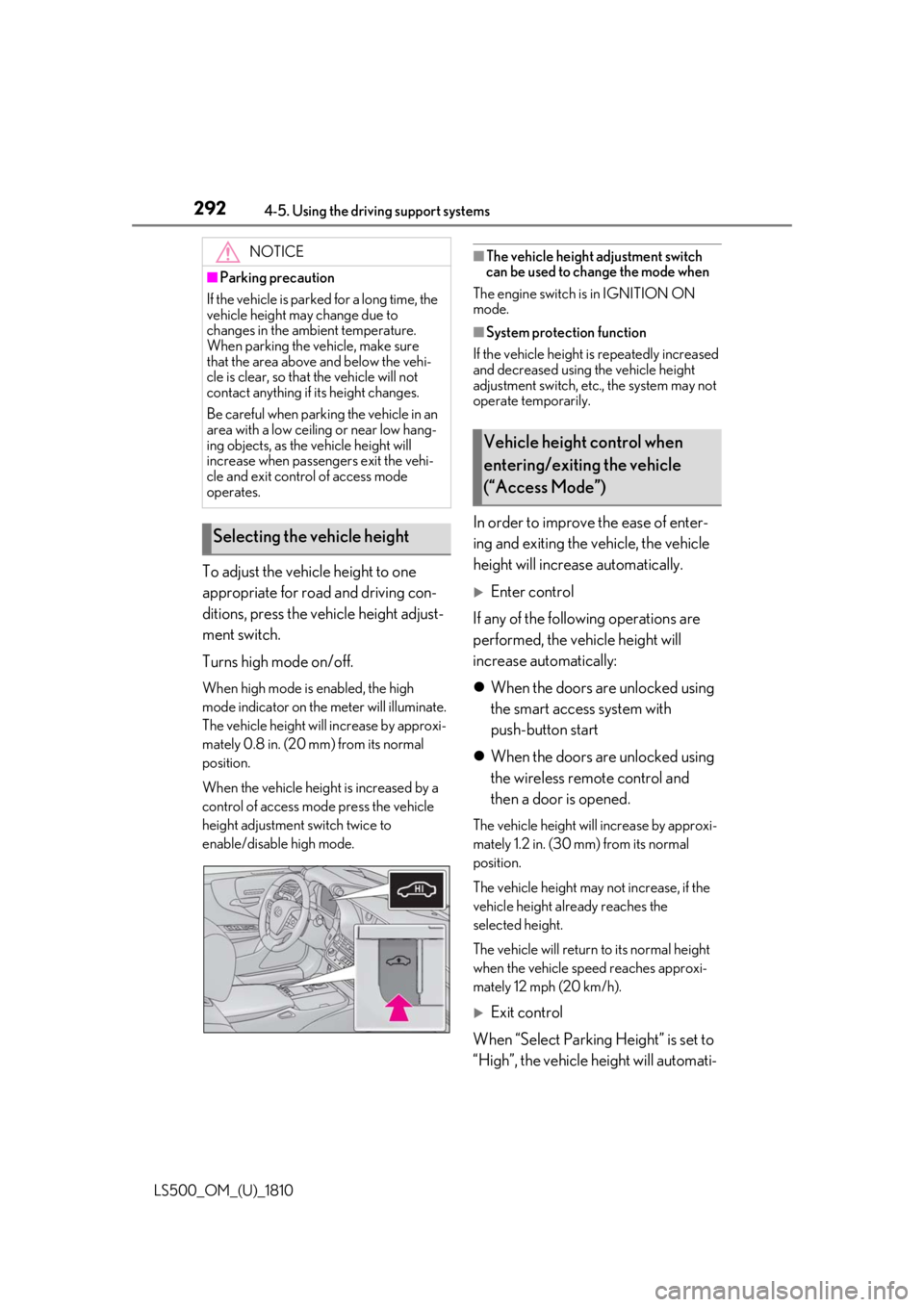
LS500_OM_(U)_1810 To adjust the vehicle height to one
appropriate for road and driving con-
ditions, press the vehicle height adjust-
ment switch.
Turns high mode on/off. When high mode is enabled, the high
mode indicator on the meter will illuminate.
The vehicle height will increase by approxi-
mately 0.8 in. (20 mm) from its normal
position.
When the vehicle height is increased by a
control of access mo de press the vehicle
height adjustment switch twice to
enable/disable high mode. ■
The vehicle height adjustment switch
can be used to change the mode when
The engine switch is in IGNITION ON
mode. ■
System protection function
If the vehicle height is repeatedly increased
and decreased using the vehicle height
adjustment switch, etc ., the system may not
operate temporarily.
In order to improve the ease of enter-
ing and exiting the vehicle, the vehicle
height will increase automatically.
Enter control
If any of the following operations are
performed, the vehicle height will
increase automatically:
When the doors are unlocked using
the smart access system with
push-button start
When the doors are unlocked using
the wireless remote control and
then a door is opened. The vehicle height will increase by approxi-
mately 1.2 in. (30 mm) from its normal
position.
The vehicle height may not increase, if the
vehicle height al ready reaches the
selected height.
The vehicle will return to its normal height
when the vehicle speed reaches approxi-
mately 12 mph (20 km/h).
Exit control
When “Select Parking Height” is set to
“High”, the vehicle height will automati-NOTICE■
Parking precaution
If the vehicle is parked for a long time, the
vehicle height may change due to
changes in the ambient temperature.
When parking the vehicle, make sure
that the area above and below the vehi-
cle is clear, so that the vehicle will not
contact anything if its height changes.
Be careful when parking the vehicle in an
area with a low ceiling or near low hang-
ing objects, as the vehicle height will
increase when passengers exit the vehi-
cle and exit control of access mode
operates.
Selecting the vehicle height Vehicle height control when
entering/exiting the vehicle
(“Access Mode”)
Page 293 of 512
2934-5. Using the driving support systems
LS500_OM_(U)_1810 4
Driving cally increase when the P shift position
is selected and a door is opened.
1 Press or to select .
2 Press or to select “Vehicle
Settings” and then press .
3 Press or to select
and then press .
4 Press or to select “Select
Parking Height” and then press
.The vehicle height will increase by approxi-
mately 0.4 in. (10 mm) from its normal
position.
The vehicle height may not increase, if the
vehicle height already reaches the
selected height.
The vehicle will return to its normal height
when the vehicle speed reaches approxi-
mately 12 mph (20 km/h). ■
Enabling/Disabling access mode
1 Press the or meter control
switch to select .
2 Press the or meter control
switch to select “Vehicle Settings”
and then press .
3 Press the or meter control
switch to select and then
press .
4 Press the or meter control
switch to select “Access Mode”
and then press .
The setting will change between enabled/disabled each time the
meter control switch is pressed. ■
When the vehicle height has been
increased by a control of access mode
Press the vehicle height adjustment switch
with the engine switch in any mode to return
the vehicle to its previous vehicle height. ■
Access mode operation ●
Access mode will not operate if the vehi-
cle is not parked on a level road surface. ●
When the P shift position is selected, if
the doors are not locked and any door is
opened from the outside, exit control will
operate.
Vehicle height control can be tempo-
rarily disabled using the meter control
switches. ( P.81)When to temporarily disable vehicle height
control: P.291
1 Press or to select .
2 Press or to select “Vehicle
Settings” and then press .
3 Press or to select
and then press .
4 Press or to select “Height
Control” and then press . This setting is memorized even if the
engine switch is turned off.
Even if the vehicle height control func-
tions are disabled, they will be enabled
automatically when the vehicle speed
reaches approximately 19 mph (30
km/h).Temporarily disabling vehicle
height control
Page 294 of 512
294 4-5. Using the driving support systems
LS500_OM_(U)_1810 ■
When “Check Air Suspension System”
is displayed on th e multi-information
display
The system may not operate properly. Have
the vehicle inspected by your Lexus dealer. ■
Customization
Some functions can be customized.
( P.466)
■
ECB (Electronically Controlled
Brake System) (vehicles with Lexus
Safety System + A)
The electronically controlled system
generates braking force correspond-
ing to the brake operation ■
ABS (Anti-lock Brake System)
Helps to prevent wheel lock when the
brakes are applied suddenly, or if the
brakes are applied while driving on a
slippery road surface ■
Brake assist
Generates an increased level of brak-
ing force after the brake pedal is
depressed when the system detects a
panic stop situation ■
VSC (Vehicle Stability Control)
Helps the driver to control skidding
when swerving sudden ly or turning on
slippery road surfaces. ■
Secondary Collision Brake
When the airbag sensor detects a colli-
sion, the brakes and stop lights are Driving assist systems To keep driving safety and perfor-
mance, the following systems oper-
ate automatically in response to
various driving situations. Be aware,
however, that these systems are
supplementary and should not be
relied upon too heavily when oper-
ating the vehicle.
Summary of the driving assist
systems
Page 301 of 512
3014-6. Driving tips
LS500_OM_(U)_1810 4
Driving Perform the following according to the
driving conditions:
Do not try to forcib ly open a window
or move a wiper that is frozen. Pour
warm water over the frozen area to
melt the ice. Wipe away the water
immediately to prevent it from
freezing.
To ensure proper operation of the
climate control system fan, remove
any snow that has accumulated on
the air inlet vents in front of the
windshield.
Check for and remove any excess
ice or snow that may have accumu-
lated on the exterior lights, vehicle’s
roof, chassis, around the tires or on
the brakes.
Remove any snow or mud from the
bottom of your shoes before getting
in the vehicle.
Accelerate the vehicle slowly, keep a
safe distance between you and the
vehicle ahead, and drive at a reduced
speed suitable to road conditions. Park the vehicle and shift the shift posi-
tion to P without setting the parking
brake. The parking brake may freeze
up, preventing it from being released. If
the vehicle is parked without setting
the parking brake, make sure to block
the wheels.
Failure to do so may be dangerous
because it may cause the vehicle to
move unexpectedly, possibly leading to
an accident.
Vehicles with front and rear tires of
the same size
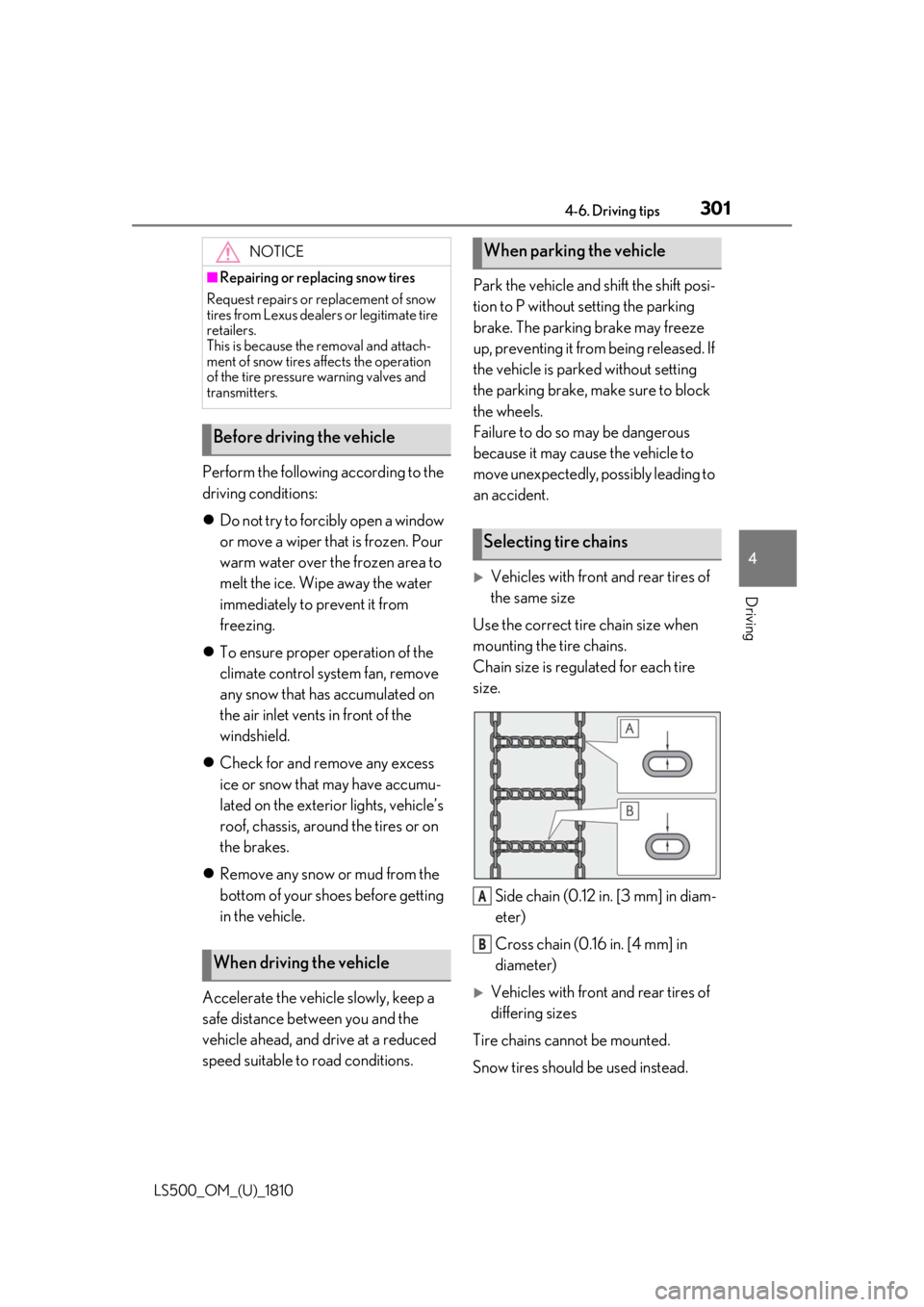
Use the correct tire chain size when
mounting the tire chains.
Chain size is regulated for each tire
size.
Side chain (0.12 in. [3 mm] in diam-
eter)
Cross chain (0.16 in. [4 mm] in
diameter)
Vehicles with front and rear tires of
differing sizes
Tire chains cannot be mounted.
Snow tires should be used instead.NOTICE■
Repairing or replacing snow tires
Request repairs or replacement of snow
tires from Lexus dealers or legitimate tire
retailers.
This is because the removal and attach-
ment of snow tires affects the operation
of the tire pressure warning valves and
transmitters.
Before driving the vehicle
When driving the vehicle When parking the vehicle
Selecting tire chains
A
B
Page 308 of 512
308 5-1. Remote Touch/Display
LS500_OM_(U)_1810 *
:If equipped
■
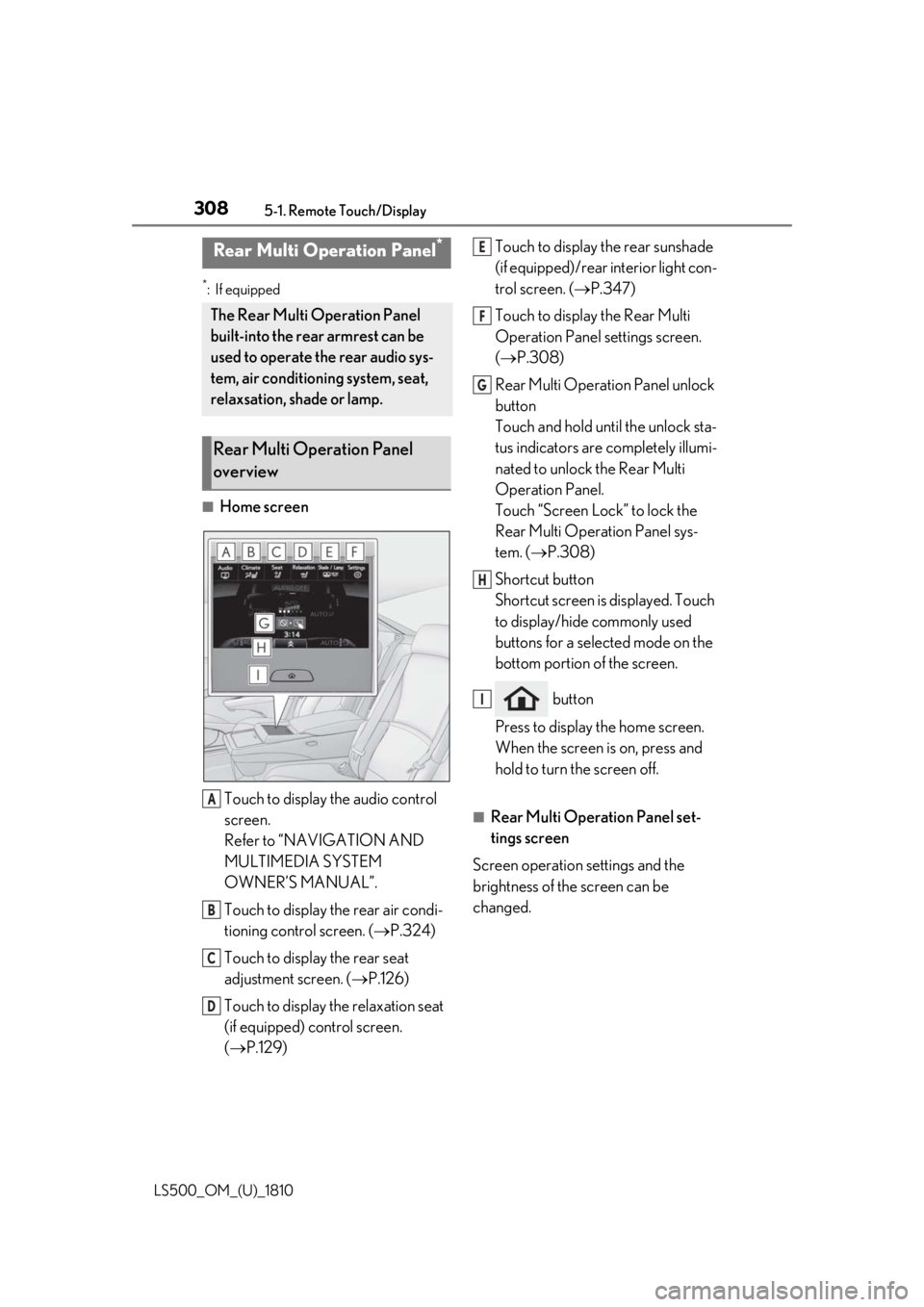
Home screen
Touch to display the audio control
screen.
Refer to “NAVIGATION AND
MULTIMEDIA SYSTEM
OWNER’S MANUAL”.
Touch to display the rear air condi-
tioning control screen. ( P.324)
Touch to display the rear seat
adjustment screen. ( P.126)
Touch to display the relaxation seat
(if equipped) control screen.
( P.129) Touch to display the rear sunshade
(if equipped)/rear interior light con-
trol screen. ( P.347)
Touch to display the Rear Multi
Operation Panel settings screen.
( P.308)
Rear Multi Operation Panel unlock
button
Touch and hold until the unlock sta-
tus indicators are completely illumi-
nated to unlock the Rear Multi
Operation Panel.
Touch “Screen Lock” to lock the
Rear Multi Operation Panel sys-
tem. ( P.308)
Shortcut button
Shortcut screen is displayed. Touch
to display/hide commonly used
buttons for a selected mode on the
bottom portion of the screen.
button
Press to display the home screen.
When the screen is on, press and
hold to turn the screen off. ■
Rear Multi Operation Panel set-
tings screen
Screen operation settings and the
brightness of the screen can be
changed.Rear Multi Operation Panel *
The Rear Multi Operation Panel
built-into the rear armrest can be
used to operate the rear audio sys-
tem, air conditioning system, seat,
relaxsation, shade or lamp.
Rear Multi Operation Panel
overview
A
B
C
D E
F
G
H
I
Page 309 of 512
3095-1. Remote Touch/Display
LS500_OM_(U)_1810 5
Interior features
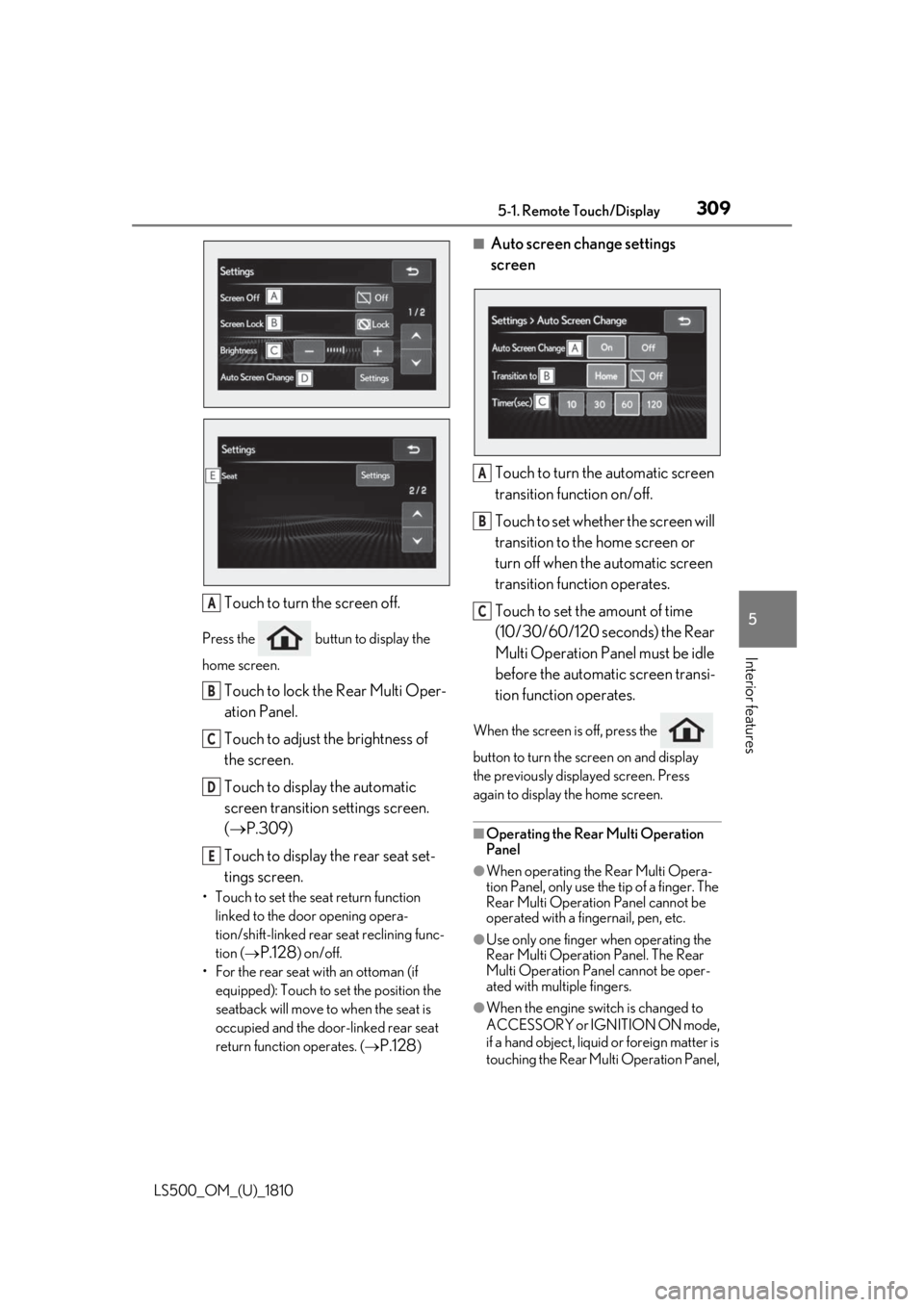
Touch to turn the screen off.Press the buttun to display the
home screen.
Touch to lock the Rear Multi Oper-
ation Panel.
Touch to adjust the brightness of
the screen.
Touch to display the automatic
screen transition settings screen.
( P.309)
Touch to display the rear seat set-
tings screen.• Touch to set the seat return function
linked to the door opening opera-
tion/shift-linked rear seat reclining func-
tion (
P.128 ) on/off.
• For the rear seat with an ottoman (if
equipped): Touch to set the position the
seatback will move to when the seat is
occupied and the door-linked rear seat
return function operates. (
P.128 ) ■
Auto screen change settings
screen
Touch to turn the automatic screen
transition function on/off.
Touch to set whether the screen will
transition to the home screen or
turn off when the automatic screen
transition function operates.
Touch to set the amount of time
(10/30/60/120 seconds) the Rear
Multi Operation Panel must be idle
before the automatic screen transi-
tion function operates. When the screen is off, press the
button to turn the screen on and display
the previously disp layed screen. Press
again to display the home screen.
■
Operating the Rear Multi Operation
Panel ●
When operating the Rear Multi Opera-
tion Panel, only use the tip of a finger. The
Rear Multi Operation Panel cannot be
operated with a fingernail, pen, etc.
●
Use only one finger when operating the
Rear Multi Operation Panel. The Rear
Multi Operation Panel cannot be oper-
ated with multiple fingers.
●
When the engine swit ch is changed to
ACCESSORY or IGNITION ON mode,
if a hand object, liquid or foreign matter is
touching the Rear Multi Operation Panel, A
B
C
D
E A
B
C
Page 314 of 512
314 5-3. Using the air conditioning system and defogger
LS500_OM_(U)_1810 ■
Changing the air flow mode
P.316 ■
Switching between outside air and
recirculated air modes
Press the outside/recirculated air
mode switch. The mode changes as follows each time
the switch is pressed.
automatic mode (outside air
mode) (recirculated air mode)
automatic mode
When the system is switched to automatic
mode, the air conditioning system operates
automatically. ■
Defogging the windshield
Defoggers are used to defog the wind-
shield and front side windows.
Press the windshield defogger switch. Set the outside/reci rculated air mode
switch to outside air mode if the recircu-
lated air mode is used. (It may switch auto-
matically.)
To defog the windshield and the side win-
dows quickly, turn the air flow and tem-
perature up.
To return to the previous mode, press the
windshield defogger switch again when the
windshield is defogged.
■
Defogging the rear window and
outside rear view mirrors
Defoggers are used to defog the rear
window, and to remove raindrops, dew
and frost from the outside rear view
mirrors.
Press the rear window and outside rear
view mirror defoggers switch.
The defoggers will automatically turn off after a while. The operation time changes
according to the ambient temperature and
vehicle speed. ■
Windshield wiper de-icer (if
equipped)
P.319 ■
When the outside temperature exceeds
75°F (24°C) and the air conditioning
system is on ●
In order to reduce the air conditioning
power consumption, the air conditioning
system may switch to recirculated air
mode automatically. This may also
reduce fuel consumption. ●
It is possible to switch to outside air mode
at any time by pressing the outside/recir-
culated air mode switch. ■
Fogging up of the windows
The windows will easily fog up when the
humidity in the vehicle is high. Turning
“A/C” on will dehumidify the air from the
outlets and defog the windshield effectively. ●
If you turn “A/C” off, the windows may
fog up more easily. ●
The windows may fog up if the recircu-
lated air mode is used. ■
Outside/recirculated air mode ●
When driving on dusty roads such as tun-
nels or in heavy traffic, set the out-
side/recirculated air mode switch to the
recirculated air mode. This is effective in
preventing outside air from entering the
vehicle interior. During cooling opera-
tion, setting the recirc ulated air mode will
also cool the vehicle interior effectively.
●
Outside/recirculated air mode may auto-
matically switch depending on the tem-
perature setting or the inside
temperature.
■
Registering air conditioning settings to
electronic keys
●
Unlocking the vehicle using an electronic
key and turning the engine switch to
IGNITION ON mode will recall that
key’s registered air conditioning settings.
Page 315 of 512
3155-3. Using the air conditio ning system and defogger
LS500_OM_(U)_1810 5
Interior features ●
When the engine switch is turned off, the
current air conditioning settings will auto-
matically be registered to the electronic
key that was used to unlock the vehicle.●
The system may not operate correctly if
more than one electr onic key is in the
vicinity or if the smart access system with
push-button start is used to unlock a pas-
senger door.●
The doors that can recall the air condi-
tioning setting *
when unlocked using the
smart access system with push-button
start can be changed. For details, contact
your Lexus dealer. *
: The doors that can recall the driving
position memory are changed at the
same time.■
Operation of the air conditioning sys-
tem in Eco drive mode
In Eco drive mode, the air conditioning sys-
tem is controlled as follows to prioritize fuel
efficiency: ●
Engine speed and compressor operation
controlled to restri ct heating/cooling
capacity●
Fan speed restricted when automatic
mode is selected
To improve air condit ioning performance,
perform the following operations: ●
Turn off eco air conditioning mode
( P.316) ●
Adjust the fan speed●
Turn off Eco drive mode ( P.289)
■
When the outside temperature falls to
nearly 32°F (0°C)
The dehumidification function may not
operate even when “A/C” is selected.
■
Ventilation and air conditioning odors
●
To let fresh air in, set the air conditioning
system to the outside air mode.
●
During use, various odors from inside and
outside the vehicle may enter into and
accumulate in the air conditioning sys-
tem. This may then cause odor to be
emitted from the vents.
●
To reduce potential odors from occur- ring:
• It is recommended that the air condition-
ing system be set to outside air mode
prior to turning the vehicle off.
• The start timing of the blower may be
delayed for a short pe riod of time imme-
diately after the air conditioning system is
started in automatic mode or with the
micro dust and pollen filter on. ●
When parking, the system automatically
switches to outside air mode to encour-
age better air circulation throughout the
vehicle, helping to reduce odors that
occur when starting the vehicle. ■
Using the voice command system
Air conditioning system can be operated
using voice commands. For details, refer to
the “NAVIGATION AND MULTIMEDIA
SYSTEM OWNER’S MANUAL”. ■
Air conditioning filter
P.398 ■
Customization
Some functions can be customized.
( P.466)
WARNING■
To prevent the windshield from fog-
ging up
Do not use the windshield defogger
switch during cool air operation in
extremely humid weather. The difference
between the temperature of the outside
air and that of the windshield can cause
the outer surface of the windshield to fog
up, blocking your vision.
■
When the outside rear view mirror
defoggers are operating
Do not touch the outside rear view mir-
ror surfaces, as they can become very
hot and burn you.