lane assist LEXUS LS500 2019 Owners Manual
[x] Cancel search | Manufacturer: LEXUS, Model Year: 2019, Model line: LS500, Model: LEXUS LS500 2019Pages: 512, PDF Size: 9.71 MB
Page 3 of 512
3TABLE OF CONTENTS
LS500_OM_(U)_1810 1
2
3
4
5
6
7
8
94-2. Driving procedures
Engine (ignition) switch .............. 164
Automatic transmission.............. 167
Turn signal lever............................. 173
Parking brake ................................. 174
Brake Hold....................................... 177
4-3. Operating the lights and wipers
Headlight switch ............................ 179
AHB (Automatic High Beam)
............................................................ 182
Windshield wipers and washer
............................................................ 184
4-4. Refueling
Opening the fuel tank cap......... 189
4-5. Using the driving support systems
Lexus Safety System + A............. 191
Lexus Safety System + 2.0 ........ 198
PCS (Pre-Collision System) (vehi-
cles with Lexus Safety System +
A) ..................................................... 204
PCS (Pre-Collision System) (vehi-
cles with Lexus Safety System +
2.0)................................................... 215
FCTA (Front Cross Traffic Alert)
........................................................... 222
LTA (Lane Tracing Assist)........ 225
Dynamic radar crui se control with
full-speed range......................... 237
RSA (Road Sign Assist) ............. 247
BSM (Blind Spot Monitor) ....... 250
PKSA (Parking Support Alert)
........................................................... 255
Intuitive parking assist ................ 257
RCTA (Rear cross traffic alert)
function .......................................... 263
RCD (Rear Camera Detection)
function .......................................... 267 PKSB (Parking Support Brake)
.......................................................... 270
Parking Support Brake function
(static objects) ............................ 276
Parking Support Brake function
(rear-crossing vehicles) ......... 282
Parking Support Brake function
(rear pedestrians) ..................... 286
Driving mode select switch ..... 289
Electronically modulated air sus-
pension ............................................ 291
Driving assist systems ................ 294
4-6. Driving tips
Winter driving tips ....................... 300
5-1. Remote Touch/Display
Remote Touch............................... 304
Center Display.............................. 306
Rear Multi Operation Panel ... 308
5-2. Lexus Climate Concierge
Lexus Climate Concierge........... 311
5-3. Using the air conditioning system
and defogger
Front automatic air conditioning
system ............................................. 313
Rear automatic air conditioning
system ............................................ 323
Heated steering wheel/seat heat-
ers/seat ventilators................... 32
6
5-4. Using the inte rior lights
Interior lights list ............................ 331
5-5. Using the storage features
List of storag e features .............. 335
Trunk features ............................... 3405
Interior features
Page 18 of 512
18 Pictorial index
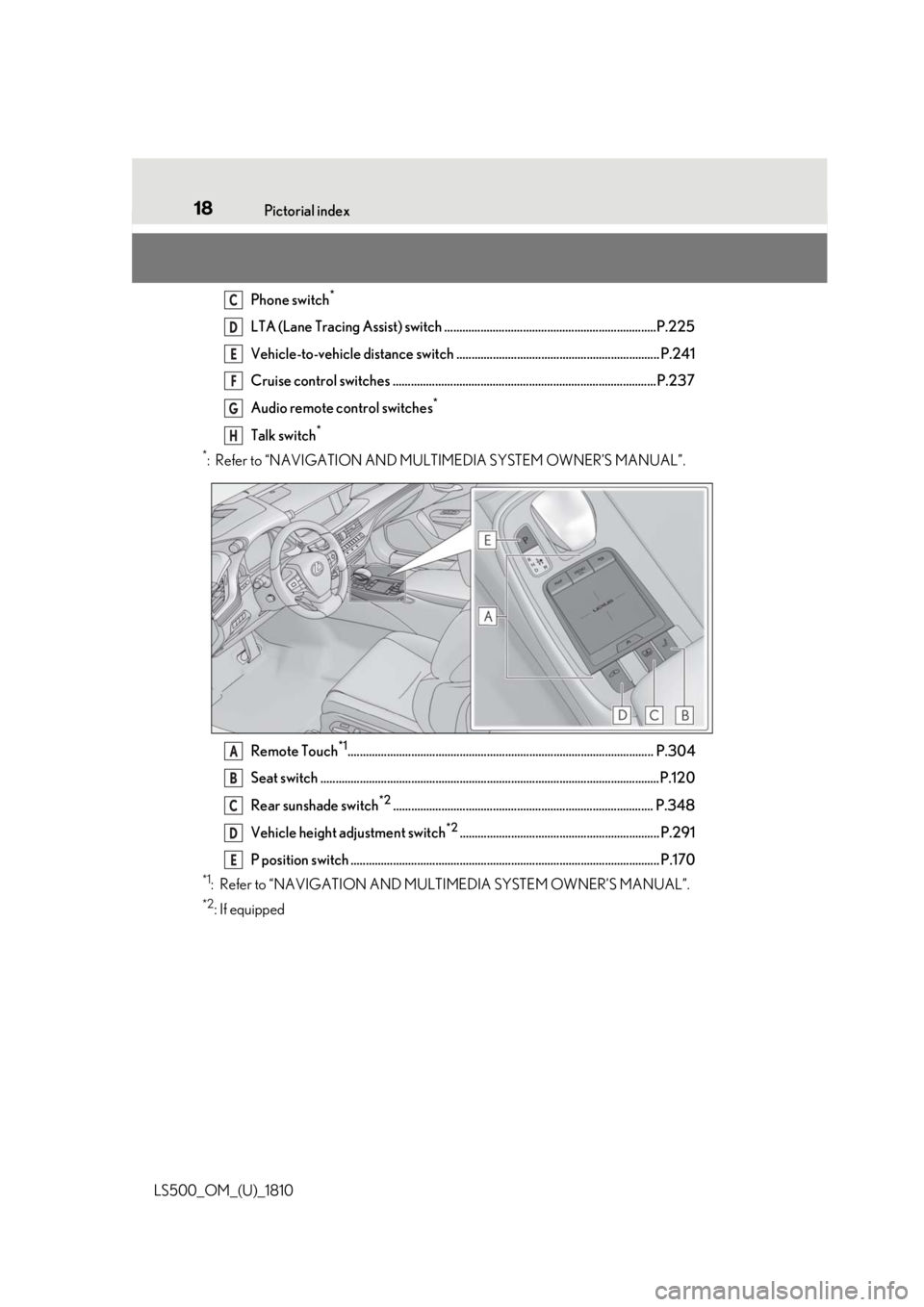
LS500_OM_(U)_1810 Phone switch *
LTA (Lane Tracing Assist) switch ......................................................................P.225
Vehicle-to-vehicle distance switch ................................................................... P.241
Cruise control switches ....................................................................................... P.237
Audio remote control switches *
Talk switch *
*
: Refer to “NAVIGATION AND MULTIMEDIA SYSTEM OWNER’S MANUAL”.
Remote Touch *1
..................................................................................................... P.304
Seat switch ................................................................................................................P.12 0
Rear sunshade switch *2
...................................................................................... P.348
Vehicle height adjustment switch *2
.................................................................. P.291
P position switch ...................................................................................................... P.170 *1
: Refer to “NAVIGATION AND MULTIMEDIA SYSTEM OWNER’S MANUAL”. *2
: If equipped C
D
E
F
G
H
A
B
C
D
E
Page 85 of 512
852-1. Instrument cluster
LS500_OM_(U)_1810 2
Vehicle status information and indicators display is enabled on the head-up display, it
will not be displayed on the multi-informa-
tion display. ( P.89)
Select to enable selection of an audio
source or track on the meter using the
meter control switches.
Select to display the operational status
of the following systems:
LTA (Lane Tracing Assist) ( P.225)
Dynamic radar cruise control with
full-speed range ( P.237)
RSA (Road Sign Assist) (if
equipped) ( P.247)■
Meter display settings that can be
changed
Language Select to change th e language displayed.
Units Select to change the units of measure dis-
played.
Speedometer display (except F
SPORT models) Select to set the display of the speedome-
ter to digital/analog/both digital and ana-
log.
Drive information 1/Drive informa-
tion 2
Select to select up to 2 items ( P.82) that
will be displayed on ea ch Drive information screen (Drive information 1 screen and
Drive information 2 sc reen) respectively.
Clock Select to switch between 12-hour display
and 24-hour display.
Pop-up display Select to enable/disable pop-up displays
for each relevant system.
Accent color Select to change the accent color on the
screen, such as the cursor color.
Rev indicator (F SPORT models) • Select to enable/disable the rev indica-
tor.
• Select to set the engine speed at which
the rev indicator (amber) will begin to be
displayed.
Rev peak (F SPORT models) Select to enable/disable the rev peak.
Eco Driving Indicator Light Select to enable/disable the Eco Driving
Indicator Light.
Default setting Select to reset the meter display settings to
the default setting.
■
Vehicle functions and settings that
can be changed
P.466 ■
Suspension of the settings display
●
Some settings cannot be changed while
driving. When changing settings, park
the vehicle in a safe place.
●
If a warning message is displayed, opera-
tion of the settings display will be sus-
pended.Audio system-linked display
Driving support system informa-
tion display
Settings display
Page 90 of 512
90 2-1. Instrument cluster
LS500_OM_(U)_1810 Displays the operational status of the
following systems:
LTA (Lane Tracing Assist) ( P.225)
Dynamic radar cruise control with
full-speed range ( P.237)Details of content displayed on the
head-up display may differ from that dis-
played on the multi-information display. For
details, refer to the explanation of each sys-
tem.
Pop-up displays for the following sys-
tems will be displayed when necessary. ■
Driving support systems
Displays a warning/suggestion/advice
message or the operating state of a rel-
evant system.
PCS (Pre-Collision System)
( P.204, 215)
FCTA (Front Cross Traffic Alert) (if
equipped) ( P.222)
Intuitive parking assist (if equipped)
( P.257)
Parking Support Brake function (for
static objects) (if equipped)
( P.276)
Brake Override System ( P.155)
Drive-Start Control ( P.155)Details of content displayed on the
head-up display may differ from that dis-
played on the multi-information display. For
details, refer to the explanation of each sys-
tem. ■
/ icons
These icons are linked to the
multi-information display
: Master warning icon Displayed when a warn ing message is dis-
played on the multi-information display.
( P.425)
: Information icon Displayed when a suggestion pop-up dis-
play ( P.86) or advice pop-up display is
displayed on the multi-information display. ■
Warning message
Some warning messages are displayed
when necessary, according to certain
conditions. Details of content displayed on the
head-up display may differ from that dis-
played on the multi-information display. ■
Audio system operation status
Displayed when an audio remote con-
trol switch on the steering wheel is
operated. ■
Hands-free system status
Displayed when the hands-free system
is operated. ■
When a pop-up display is displayed
When a pop-up display is displayed, a cur-
rent display may no long er be displayed. In
this case, the display will return after the
pop-up display disappears.
■
Tachometer
Displays the engine speed in revolu-Driving support system display
area
Pop-up display
Tachometer/Eco Driving Indica-
tor
Page 153 of 512
153
LS500_OM_(U)_1810 4 4
Driving Driving .
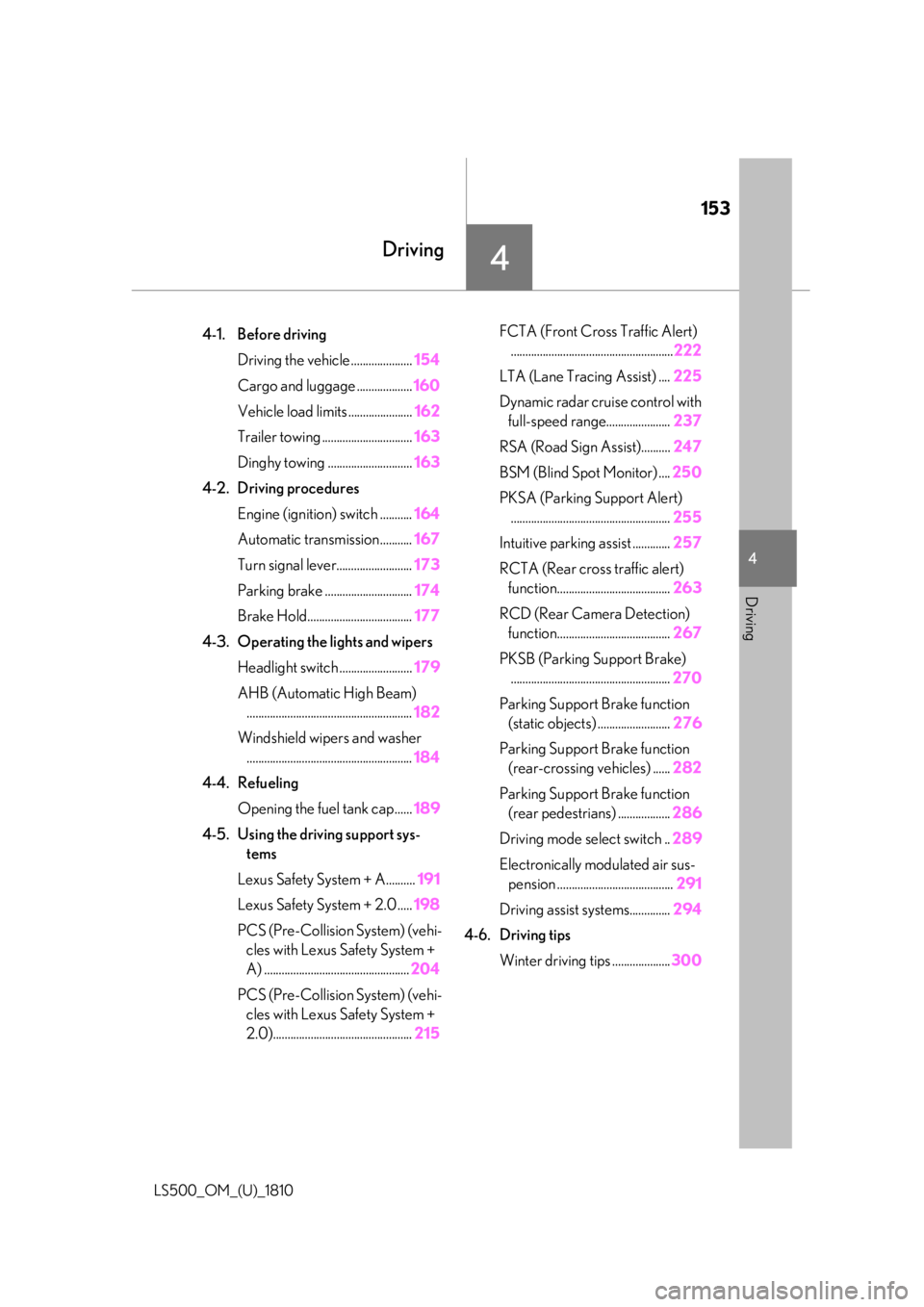
4-1. Before driving
Driving the vehicle ..................... 154
Cargo and luggage ................... 160
Vehicle load limits ...................... 162
Trailer towing ............................... 163
Dinghy towing ............................. 163
4-2. Driving procedures
Engine (ignition) switch ........... 164
Automatic transmission........... 167
Turn signal lever.......................... 173
Parking brake .............................. 174
Brake Hold.................................... 177
4-3. Operating the lights and wipers
Headlight switch ......................... 179
AHB (Automatic High Beam)
......................................................... 182
Windshield wipers and washer
......................................................... 184
4-4. Refueling
Opening the fuel tank cap...... 189
4-5. Using the driving support sys-
tems
Lexus Safety System + A.......... 191
Lexus Safety System + 2.0 ..... 198
PCS (Pre-Collision System) (vehi-
cles with Lexus Safety System +
A) .................................................. 204
PCS (Pre-Collision System) (vehi-
cles with Lexus Safety System +
2.0)................................................ 215 FCTA (Front Cross Traffic Alert)
........................................................ 222
LTA (Lane Tracing Assist) .... 225
Dynamic radar cruise control with
full-speed range...................... 237
RSA (Road Sign Assist).......... 247
BSM (Blind Spot Monitor) .... 250
PKSA (Parking Support Alert)
....................................................... 255
Intuitive parking assist ............. 257
RCTA (Rear cross traffic alert)
function....................................... 263
RCD (Rear Camera Detection)
function....................................... 267
PKSB (Parking Support Brake)
....................................................... 270
Parking Support Brake function
(static objects) ......................... 276
Parking Support Brake function
(rear-crossing vehicles) ...... 282
Parking Support Brake function
(rear pedestrians) .................. 286
Driving mode select switch .. 289
Electronically modulated air sus-
pension ........................................ 291
Driving assist systems.............. 294
4-6. Driving tips
Winter driving tips .................... 300
Page 191 of 512
1914-5. Using the driving support systems
LS500_OM_(U)_1810 4
Driving 4-5.Using the driving support systems
*
:If equipped
■
PCS (Pre-Collision System) (vehi-
cles with Lexus Safety System + A)
P.204 ■
FCTA (Front Cross Traffic Alert)
P.222 ■
LTA (Lane Tracing Assist)
P.225 ■
AHB (Automatic High Beam)
P.182 ■
RSA (Road Sign Assist) **
:If equipped
P.247 ■
Dynamic radar cruise control with
full-speed range
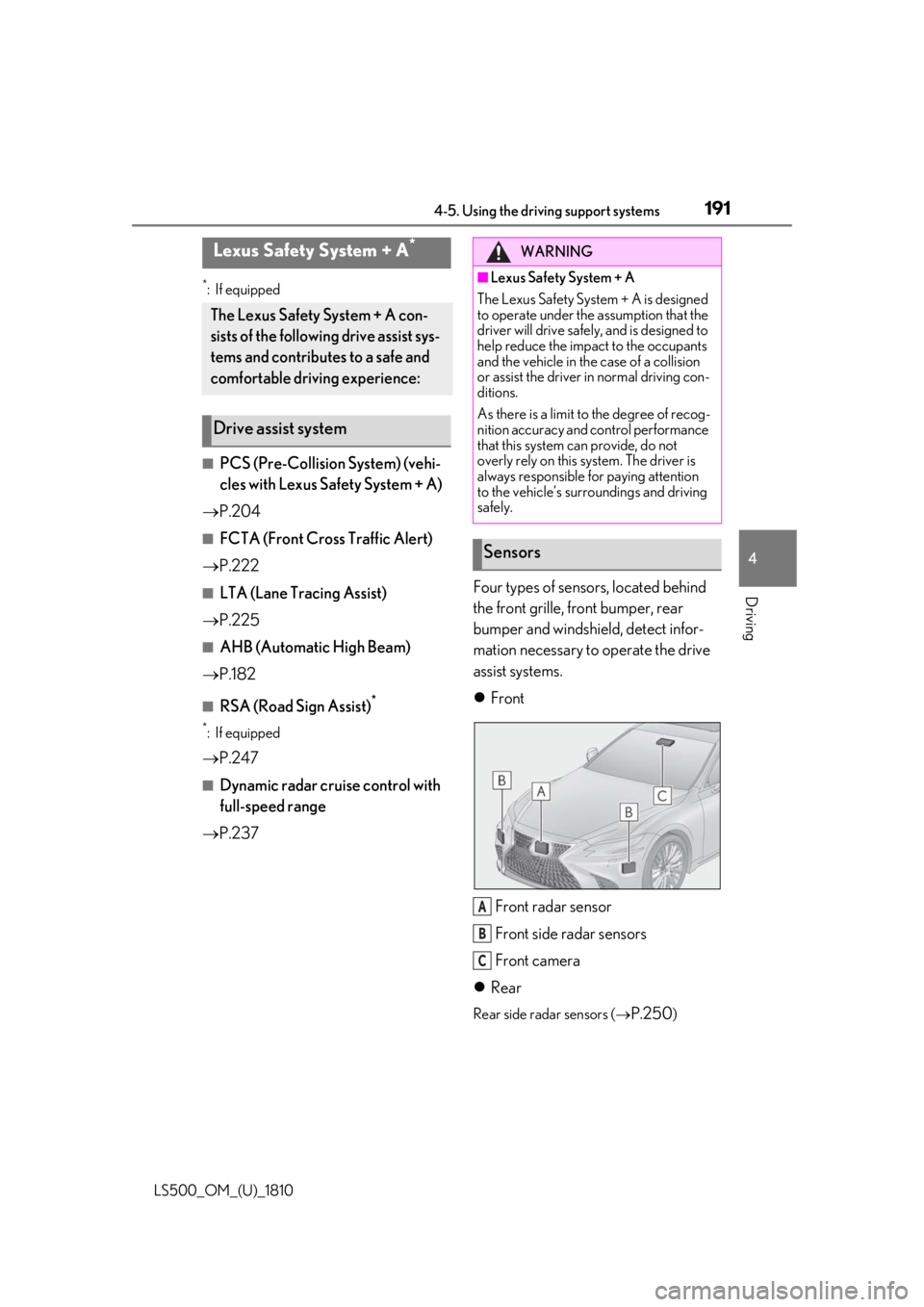
P.237 Four types of sensors, located behind
the front grille, front bumper, rear
bumper and windshield, detect infor-
mation necessary to operate the drive
assist systems.
Front
Front radar sensor
Front side radar sensors
Front camera
Rear Rear side radar sensors (
P.250 )Lexus Safety System + A *
The Lexus Safety System + A con-
sists of the following drive assist sys-
tems and contributes to a safe and
comfortable driving experience:
Drive assist system WARNING■
Lexus Safety System + A
The Lexus Safety System + A is designed
to operate under the assumption that the
driver will drive safely , and is designed to
help reduce the impact to the occupants
and the vehicle in the case of a collision
or assist the driver in normal driving con-
ditions.
As there is a limit to the degree of recog-
nition accuracy and control performance
that this system can provide, do not
overly rely on this system. The driver is
always responsible for paying attention
to the vehicle’s surroundings and driving
safely.
Sensors
A
B
C
Page 198 of 512
198 4-5. Using the driving support systems
LS500_OM_(U)_1810 *
:If equipped
■
PCS (Pre-Collision System) (vehi-
cles with Lexus Safety System +
2.0)
P.215 ■
LTA (Lane Tracing Assist)
P.225 ■
AHB (Automatic High Beam)
P.182 ■
RSA (Road Sign Assist) *
P.247 *
:If equipped ■
Dynamic radar cruise control with
full-speed range
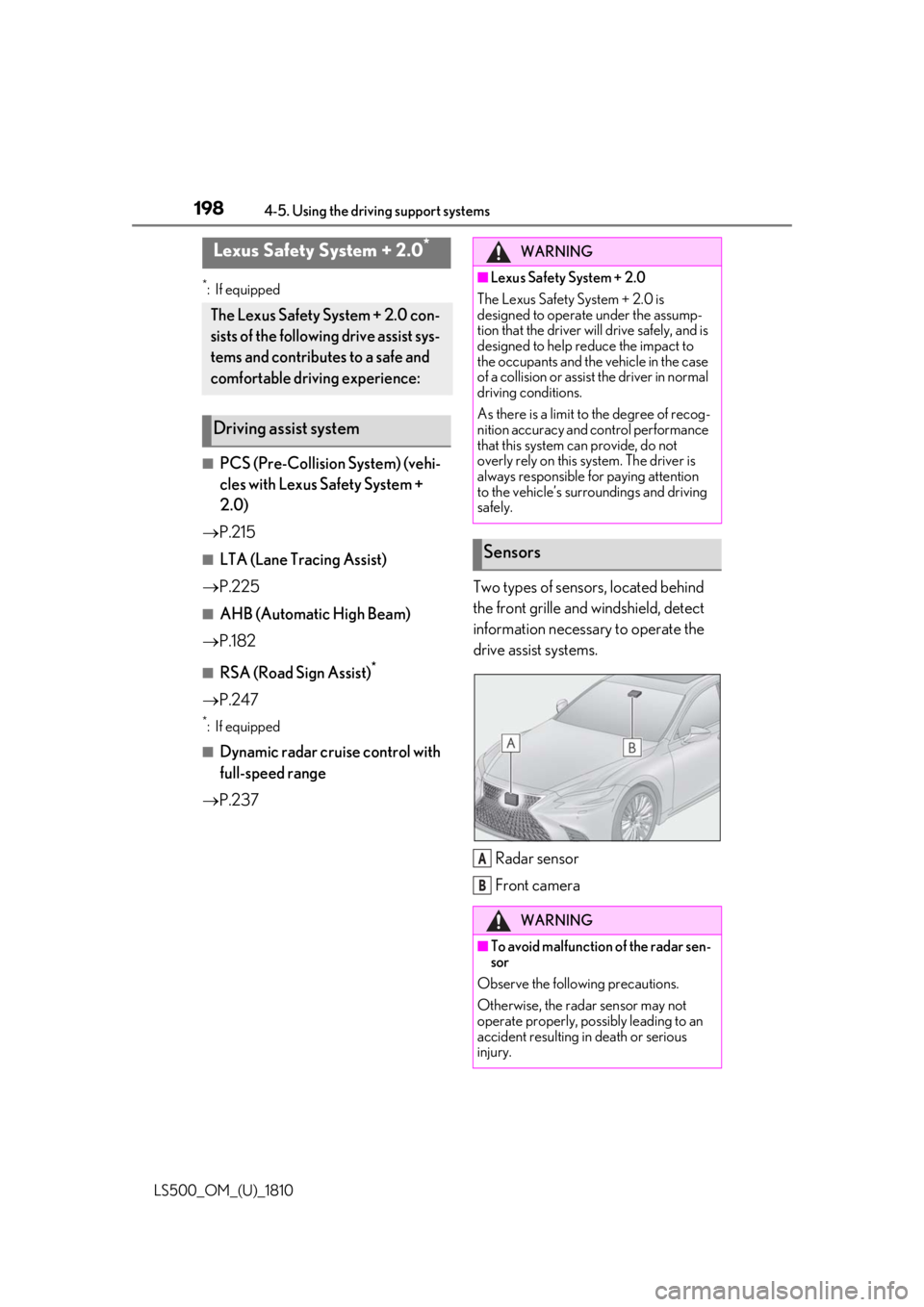
P.237 Two types of sensors, located behind
the front grille and windshield, detect
information necessary to operate the
drive assist systems.
Radar sensor
Front cameraLexus Safety System + 2.0 *
The Lexus Safety System + 2.0 con-
sists of the following drive assist sys-
tems and contributes to a safe and
comfortable driving experience:
Driving assist system WARNING■
Lexus Safety System + 2.0
The Lexus Safety System + 2.0 is
designed to operate under the assump-
tion that the driver will drive safely, and is
designed to help reduce the impact to
the occupants and the vehicle in the case
of a collision or assist the driver in normal
driving conditions.
As there is a limit to the degree of recog-
nition accuracy and control performance
that this system can provide, do not
overly rely on this system. The driver is
always responsible for paying attention
to the vehicle’s surroundings and driving
safely.
Sensors
WARNING
■
To avoid malfunction of the radar sen-
sor
Observe the following precautions.
Otherwise, the radar sensor may not
operate properly, possibly leading to an
accident resulting in death or serious
injury. A
B
Page 210 of 512
210 4-5. Using the driving support systems
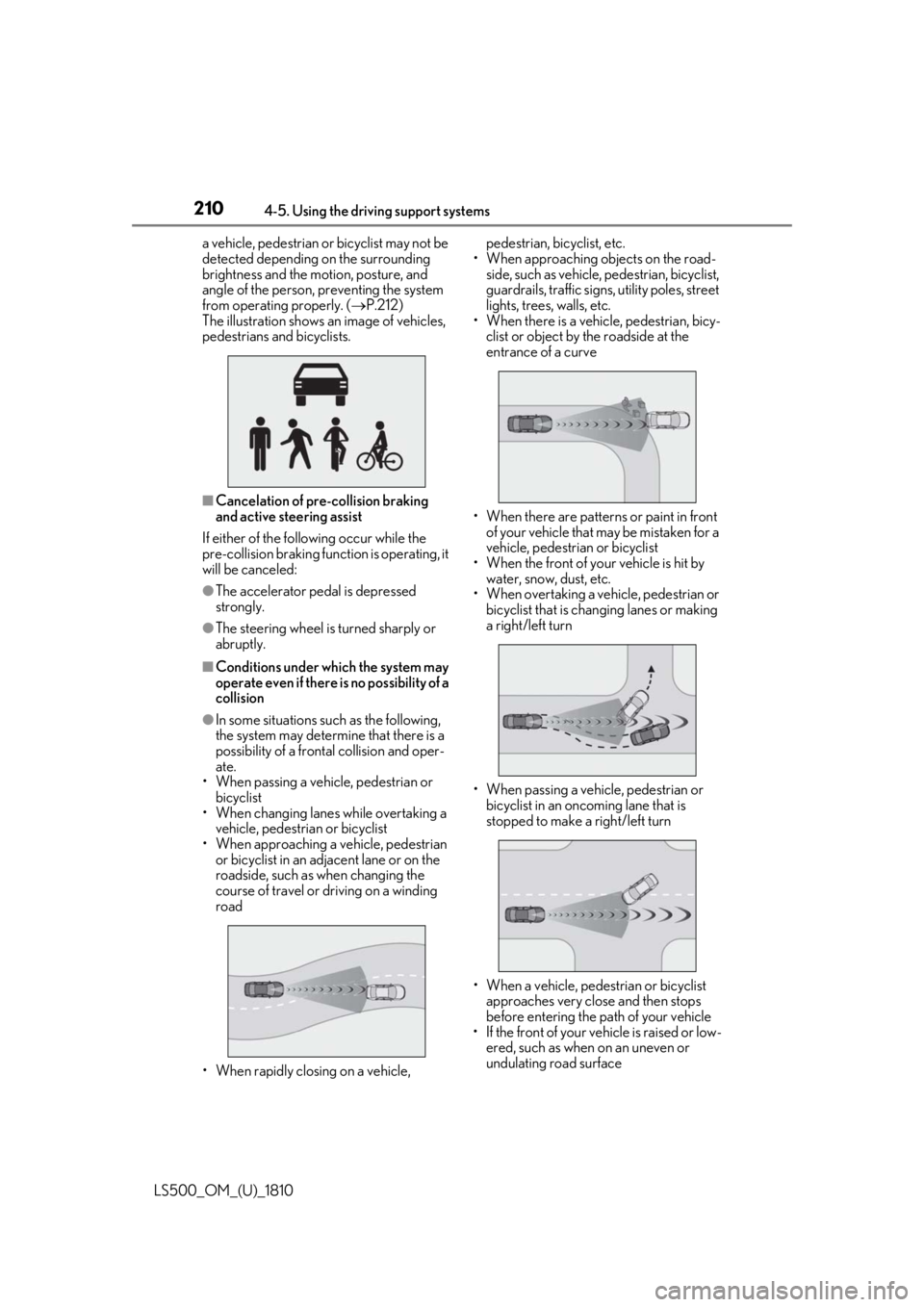
LS500_OM_(U)_1810 a vehicle, pedestrian or bicyclist may not be
detected depending on the surrounding
brightness and the motion, posture, and
angle of the person, preventing the system
from operating properly. ( P.212)
The illustration shows an image of vehicles,
pedestrians and bicyclists.
■
Cancelation of pre-collision braking
and active steering assist
If either of the following occur while the
pre-collision braking function is operating, it
will be canceled: ●
The accelerator pedal is depressed
strongly.●
The steering wheel is turned sharply or
abruptly.■
Conditions under which the system may
operate even if there is no possibility of a
collision●
In some situations such as the following,
the system may determine that there is a
possibility of a frontal collision and oper-
ate.
• When passing a vehicle, pedestrian or
bicyclist
• When changing lane s while overtaking a
vehicle, pedestrian or bicyclist
• When approaching a vehicle, pedestrian
or bicyclist in an adjacent lane or on the
roadside, such as when changing the
course of travel or driving on a winding
road
• When rapidly closing on a vehicle, pedestrian, bicyclist, etc.
• When approaching objects on the road-
side, such as vehicle, pedestrian, bicyclist,
guardrails, traffic signs, utility poles, street
lights, trees, walls, etc.
• When there is a vehicle, pedestrian, bicy-
clist or object by the roadside at the
entrance of a curve
• When there are patterns or paint in front
of your vehicle that may be mistaken for a
vehicle, pedestrian or bicyclist
• When the front of your vehicle is hit by
water, snow, dust, etc.
• When overtaking a vehicle, pedestrian or
bicyclist that is changing lanes or making
a right/left turn
• When passing a vehicle, pedestrian or
bicyclist in an onco ming lane that is
stopped to make a right/left turn
• When a vehicle, pedestrian or bicyclist
approaches very close and then stops
before entering the pa th of your vehicle
• If the front of your vehicle is raised or low-
ered, such as when on an uneven or
undulating road surface
Page 214 of 512

214 4-5. Using the driving support systems
LS500_OM_(U)_1810 ●
In some situations, such as the following,
the sensors may not detect the lane lines
or a safe space the vehicle can be steered
into, preventing the ac tive steering assist
from operating properly:
• When the white (yellow) lane lines are
difficult to see, such as when they are
faint, diverging/merging, or a shadow is
cast upon them
• When the lane is more wide or narrow
than normal
• When there is a light and dark pattern on
the road surface, such as due to road
repairs
• If the system determines that a collision
can be avoided by only using the brakes
• When a pedestrian is detected near the
centerline of the vehicle●
In some situations such as the following,
sufficient braking force or steering force
may not be obtained, preventing the sys-
tem from performing properly:
• If the braking functions cannot operate to
their full extent, such as when the brake
parts are extremely cold, extremely hot,
or wet
• If the vehicle is not properly maintained
(brakes or tires are excessively worn,
improper tire inflation pressure, etc.)
• When the vehicle is being driven on a
gravel road or other slippery surface
• If there are deep ruts in the road
• When driving on a slope
• When driving on a horizontally slanted
road●
Some guardrails, such as the following,
may not be detected by the sensors, pre-
venting the system from operating prop-
erly:
• Guardrails which are less than approxi-
mately 1.9 ft. (60 cm) tall
• Short guardrails
• Irregularly-shaped guardrails (wire cable
guardrails, guardrails made of thin poles,
etc.)
• Guardrails which are not illuminated by
the headlights at night, in a tunnel, etc.
• Guardrails which appear to be nearly the
same color or brig htness as their sur-
roundings
• Guardrails which appear to be nearly the
same shape as their surroundings (walls,
etc.) • Guardrails which are over a metal object
(manhole cover, steel plate, etc.)
• Guardrails which are hidden behind thick
grass
• Guardrails which are extremely close to
the side of the vehicle (outside rear view
mirror, etc.)
• Curved guardrails or guardrails at the
entrance of a curve ●
In some situations su ch as the following,
the system may detect a pedestrian and
display a warning on the head-up display,
even though no pedestrian exists:
• If the front of the vehicle is raised or low-
ered, such as when the road surface is
uneven or undulating (due to ruts, etc.)
• When driving on a slope
• When driving on a horizontally slanted
road
• If the driver’s posture (driver seat posi-
tion) is extreme, such as excessively
reclined
• If the head-up display position is set
extremely high ■
If VSC is disabled ●
If VSC is disabled ( P.294), the pre-col-
lision brake assist and pre-collision brak-
ing functions are also disabled. ●
The PCS warning light will turn on and
“VSC Turned Off Pre-Collision Brake
System Unavailable” will be displayed on
the multi-information display.
Page 225 of 512
2254-5. Using the driving support systems
LS500_OM_(U)_1810 4
Driving ■
If the PCS warning light illuminates and
a message is displayed on the
multi-information display
The system may be temporarily unavailable
or may be malfunctioning.
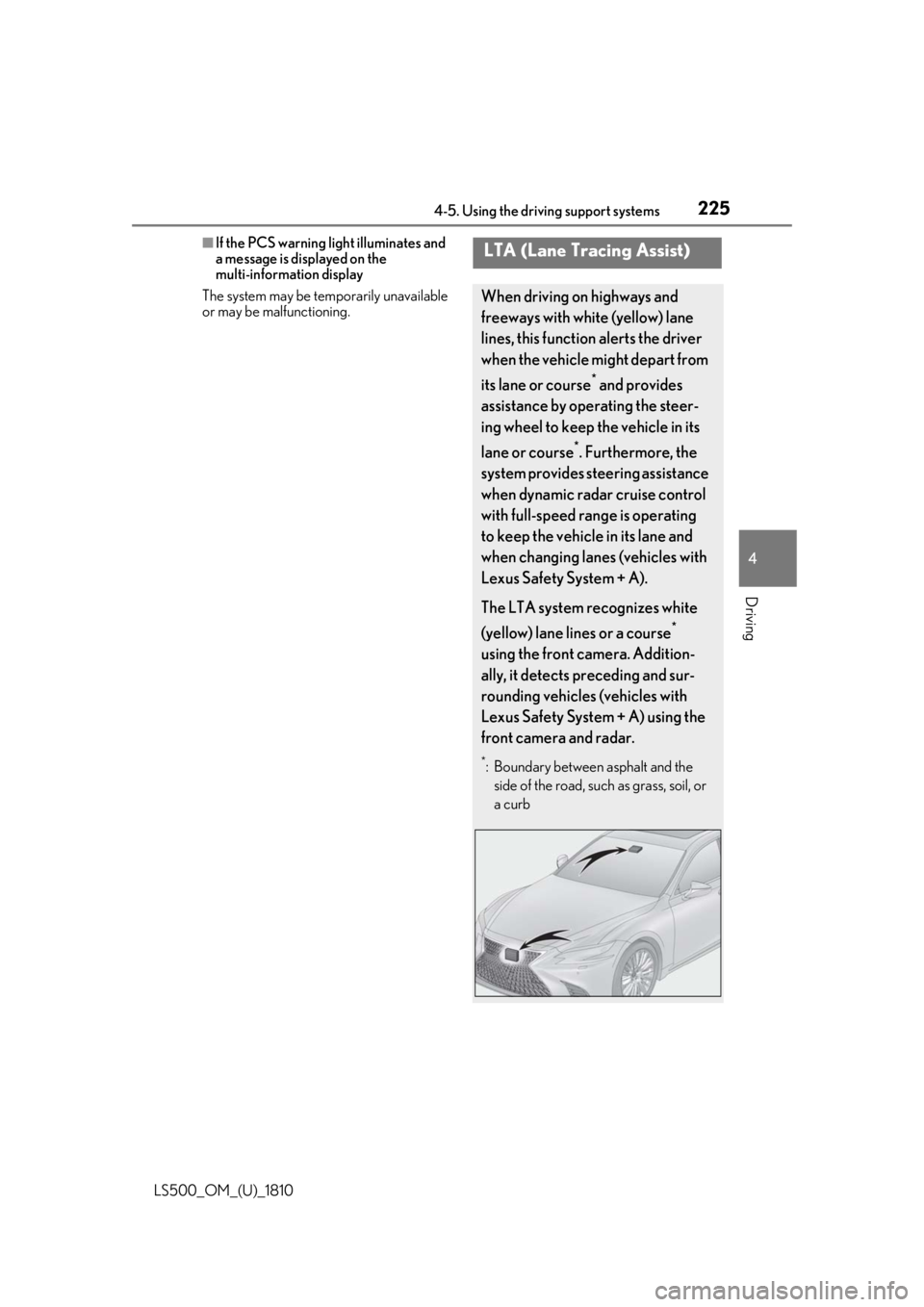
LTA (Lane Tracing Assist) When driving on highways and
freeways with white (yellow) lane
lines, this function alerts the driver
when the vehicle might depart from
its lane or course *
and provides
assistance by operating the steer-
ing wheel to keep the vehicle in its
lane or course *
. Furthermore, the
system provides steering assistance
when dynamic radar cruise control
with full-speed range is operating
to keep the vehicle in its lane and
when changing lanes (vehicles with
Lexus Safety System + A).
The LTA system recognizes white
(yellow) lane lines or a course *
using the front camera. Addition-
ally, it detects preceding and sur-
rounding vehicles (vehicles with
Lexus Safety System + A) using the
front camera and radar. *
: Boundary between asphalt and the
side of the road, such as grass, soil, or
a curb