sport mode LEXUS LS500 2020 User Guide
[x] Cancel search | Manufacturer: LEXUS, Model Year: 2020, Model line: LS500, Model: LEXUS LS500 2020Pages: 516, PDF Size: 10.38 MB
Page 81 of 516

812-1. Instrument cluster
2
Vehicle status information and indicators
Main meter moved to the right
By selecting menu icons on the
multi-information display, a variety of
driving-related information can be dis-
played. The multi-information display
can also be used to change display set-
tings and other vehicle settings.
Warning or suggestion/advice pop-up
displays are also displayed in certain
situations.
■Menu icons
The menu icons will be displayed by
pressing or of the meter con-
trol switch.
F SPORT models: The menu icons can be
displayed when the main meter is moved to
the right.
■Liquid crystal display
Small spots or light spots may appear on the
display. This phenomen on is characteristic
of liquid crystal disp lays, and there is no
problem continuing to use the display.
The multi-information display is oper-
ated using the meter control switches.
Driving information display
( P.82)
Navigation syst em-linked dis-
play (if equipped) ( P.84)
Audio system-linked display
( P.85)
Driving support system infor-
mation display ( P.85)
Warning message display
( P.429)
Settings display ( P.85)
WARNING
■Caution for use while driving
●When operating the multi-information
display while driving, pay extra atten-
tion to the safety of the area around the
vehicle.
●Do not look continuously at the
multi-information display while driving
as you may fail to see pedestrians,
objects on the road, etc. ahead of the
vehicle.
■The information display at low tem-
peratures
P.74, 78
Changing the meter display
Page 82 of 516

822-1. Instrument cluster
/ : Select menu icons
/ : Change displayed con-
tent, scroll up/down the screen and
move the cursor up/down
Press: Enter/Set
Press and hold: Reset
Move the main meter
* and return
to the previous screen
Call sending/receiving and history
display
Linked with the hands-free system, sending
or receiving call is displayed. For details
regarding the hands-fr ee system, refer to
the “NAVIGATION AND MULTIMEDIA
SYSTEM OWNER’S MANUAL”.
*:F SPORT models
■Display items (except F SPORT
models)
Press or of the meter control
switch and select . Then press
or to display the following items:
Drive information 1
Drive information 2
Eco Driving Indicator
Boost gauge
Tire pressure ( P.389)
Display off
■Display items (F SPORT models)
Main meter in center position
Press or of the meter control
switch to display the following items:
Drive information 1
Drive information 2
Tire pressure ( P.389)
Gear positions
Units
Display off
Driving support system information
*
( P.85)
*: Can be selected when a driving support
system is enabled. ( P.226, 241)
Main meter moved to the right
Press or of the meter control
switch and select . Then press
or to display the following items:
Drive information 1
Drive information 2
Eco Driving Indicator
Boost gauge
G-force
Gear Position
Tire pressure ( P.389)
Display off
■Drive information 1/Drive infor-
mation 2
Displays drive information such as the
following:
Use the displayed values as a reference
only.
Drive information 1
• Current fuel consumption
• Average fuel economy (after reset)
Drive information 2
Content of driving information
A
B
C
D
Page 84 of 516

842-1. Instrument cluster
Zone of Eco driving
■Boost gauge
Displays the boost pressure. The dis-
play will change color if the specified
pressure is exceeded.
This display is intended for use as a guide-
line. Depending on factors such as the road
surface condition, temperature and vehicle
speed, the display may not show the actual
condition of the vehicle.
■G-force (F SPORT models)
Displays lateral G-forces on the vehi-
cle. Also displays, around the periph-
ery of the G-force display, the left and
right steering amount, accelerator
pedal input, and brake fluid pressure.
Acceleration G-force on the vehi-
cle
Current G-force value (analyzed
value of front/rear and left/right
G-forces)
Record of the maximum G-forces
Accelerator pedal input
Brake fluid pressure
Steering amount
This display is intended for use as a guide-
line. Depending on factors such as the road
surface condition, temperature and vehicle
speed, the display may not show the actual condition of the vehicle.
Resetting the record of maximum
G-forces
Press and hold of the meter control
switch to reset the record.
Peak hold function
If lateral G-forces of 0.5 G or greater are
generated, the G-forc e value display will
turn amber and be held for 2 seconds.
■Gear Position (F SPORT models)
Displays the current shift range or gear
position when the shift position is in D
or M.
■Units (F SPORT models)
The units of measure used can be
changed while driving.
Unlike the units sett ing performed on the
settings display, th e units setting per-
formed on the drive information display
can be changed while driving.
■Eco Driving Indicator
Eco Driving Indicator will not operate
under the following conditions:
●The shift position is in any position other
than D.
●A paddle shift swit ch is operated.
●The driving mode is set to sport mode.
●The driving mode is set to custom mode
and the powertrain control is set to power
( P.292)
●Snow mode is selected.
●The vehicle speed is approximately 80
mph (130 km/h) or higher.
Select to display the following naviga-
D
A
B
C
D
E
FNavigation system-linked dis-
play (if equipped)
Page 85 of 516
852-1. Instrument cluster
2
Vehicle status information and indicators
tion system-linked information.
Route guidance to destination
Compass display (heading-up dis-
play)
■Route guidance to destination display
When the route guidance to destination
display is enabled on the head-up display, it
will not be displayed on the multi-informa-
tion display. ( P.89)
Select to enable selection of an audio
source or track on the meter using the
meter control switches.
Select to display the operational status
of the following systems:
LTA (Lane Tracing Assist) ( P.226)
Dynamic radar cruise control with
full-speed range ( P.241)
RSA (Road Sign Assist) (if
equipped) ( P.238)
■Meter display settings that can be
changed
Language
Select to change th e language displayed.
Units
Select to change the units of measure dis-
played.
Speedometer display (except F
SPORT models)
Select to set the display of the speedome-
ter to digital/analog/both digital and ana-
log.
Drive information 1/Drive informa-
tion 2
Select to select up to 2 items ( P.82) that
will be displayed on each Drive information
screen (Drive information 1 screen and
Drive information 2 sc reen) respectively.
Clock
Select to switch between 12-hour display
and 24-hour display.
Pop-up display
Select to enable/disable pop-up displays
for each relevant system.
Accent color
Select to change the accent color on the
screen, such as the cursor color.
Rev indicator (F SPORT models)
• Select to enable/disable the rev indica-
tor.
• Select to set the engine speed at which the rev indicator (amber) will begin to be
displayed.
Rev peak (F SPORT models)
Select to enable/disable the rev peak.
Eco Driving Indicator Light
Select to enable/disable the Eco Driving
Indicator Light.
Default setting
Select to reset the meter display settings to
the default setting.
■Vehicle functions and settings that
can be changed
P.470
Audio system-linked display
Driving support system informa-
tion display
Settings display
Page 170 of 516
1704-2. Driving procedures
ture is high, “Transmission Fluid Temp High
See Owner’s Manual” will be displayed on
the multi-information display and the vehi-
cle will go into transmission protection
mode automatically. Have the vehicle
inspected by your Lexus dealer.
■When driving with dynamic radar cruise
control with full-speed range activated
Even when performing the following
actions with the intent of enabling engine
braking, engine braking will not be acti-
vated because dynamic radar cruise con-
trol with full-speed range will not be
canceled.
●While driving in the D position, down-
shifting to 9, 8, 7, 6, 5 or 4.
●When switching the driving mode to
sport mode while driving in the D position
( P.292)
■Restraining sudden start (Drive-Start
Control)
P.155
■AI-SHIFT
The AI-SHIFT automatica lly selects the suit-
able gear according to driver performance
and driving conditions.
The AI-SHIFT automatically operates when
the shift position is in D. (Shifting the shift
position to the M position cancels the func-
tion.)
■If a message about a shift operation is
shown
To prevent the shift position from being
selected incorrectly or the vehicle from
moving unexpectedly, the shift position may
be changed automatically or operating the
shift lever may be required. In this case,
change the shift positi on following the mes-
sages on the multi-information display.
■After recharging/reconnecting the bat-
tery
P.385
■Customization
Some functions can be customized.
( P.470)
WARNING
■When driving on slippery road sur-
faces
Do not accelerate or shift the shift posi-
tion suddenly.
Sudden changes in engine braking may
cause the vehicle to sp in or skid, resulting
in an accident.
NOTICE
■Situations where sh ift control system
malfunctions are possible
If any of the following situations occurs,
shift control system malfunctions are
possible.
Immediately stop the vehicle in a safe
place on level ground, apply the parking
brake, and then contact your Lexus
dealer.
●When the warning message indicating
the shift control system appears on the
multi-information display.
●The display indicates that no shift posi-
tion is selected for more than a few
seconds.
Page 173 of 516
1734-2. Driving procedures
4
Driving
road surfaces, such as on snow.
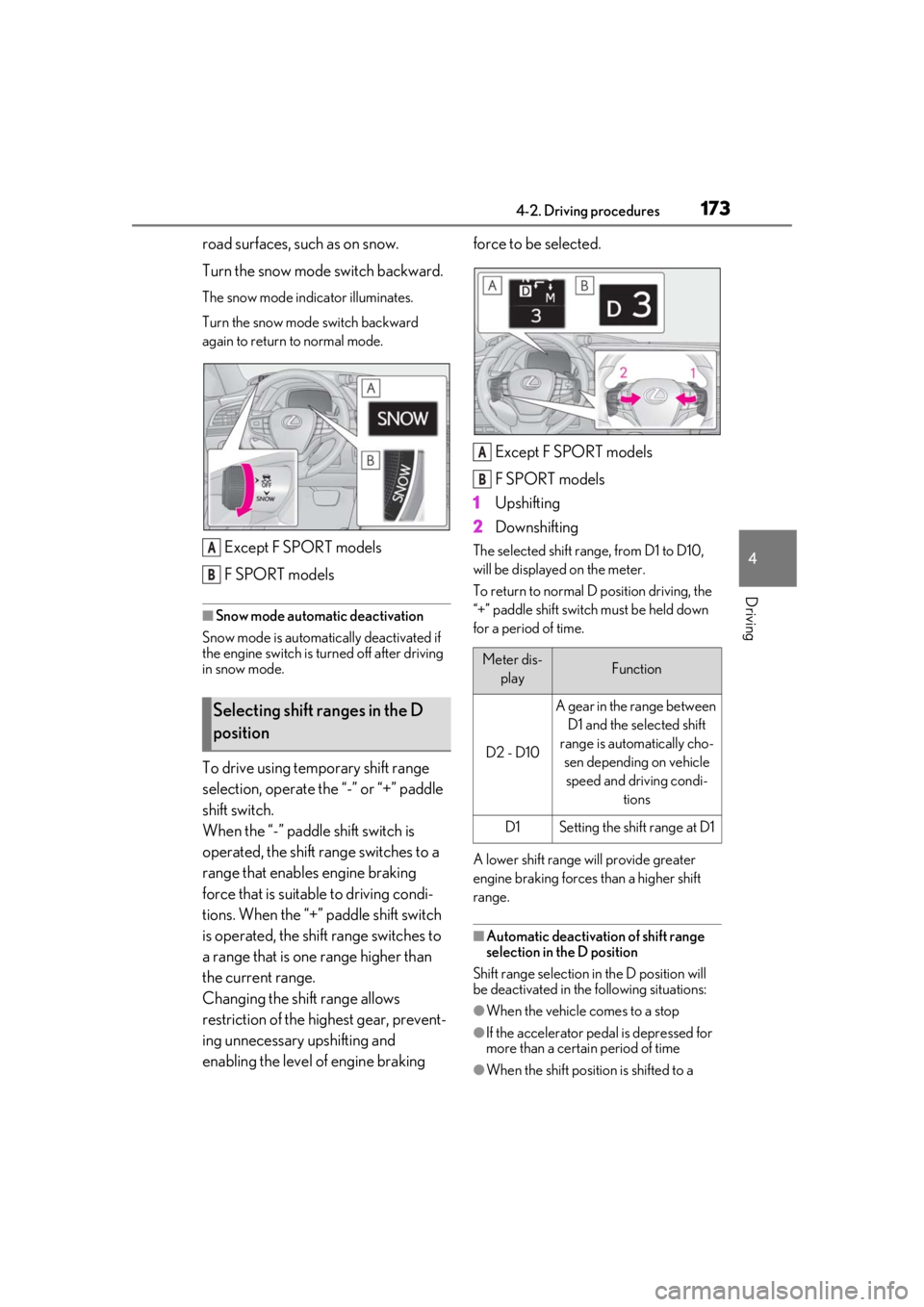
Turn the snow mode switch backward.
The snow mode indicator illuminates.
Turn the snow mode switch backward
again to return to normal mode.
Except F SPORT models
F SPORT models
■Snow mode automatic deactivation
Snow mode is automatically deactivated if
the engine switch is turned off after driving
in snow mode.
To drive using temporary shift range
selection, operate the “-” or “+” paddle
shift switch.
When the “-” paddle shift switch is
operated, the shift range switches to a
range that enables engine braking
force that is suitable to driving condi-
tions. When the “+” paddle shift switch
is operated, the shift range switches to
a range that is one range higher than
the current range.
Changing the shift range allows
restriction of the highest gear, prevent-
ing unnecessary upshifting and
enabling the level of engine braking force to be selected.
Except F SPORT models
F SPORT models
1 Upshifting
2 Downshifting
The selected shift rang e, from D1 to D10,
will be displayed on the meter.
To return to normal D position driving, the
“+” paddle shift switch must be held down
for a period of time.
A lower shift range will provide greater
engine braking forces than a higher shift
range.
■Automatic deactivation of shift range
selection in the D position
Shift range selection in the D position will
be deactivated in the following situations:
●When the vehicle comes to a stop
●If the accelerator pe dal is depressed for
more than a certai n period of time
●When the shift position is shifted to a
Selecting shift ranges in the D
position
A
B
Meter dis-
playFunction
D2 - D10
A gear in the range between D1 and the selected shift
range is automatically cho- sen depending on vehicle speed and driving condi- tions
D1Setting the shift range at D1
A
B
Page 174 of 516
1744-2. Driving procedures
position other than D.
●When pressing and holding the “+” pad-
dle shift switch
■Downshifting restriction warning
buzzer
To help ensure safety and driving perfor-
mance, downshifting operation may some-
times be restricted. In some circumstances,
downshifting may not be possible even
when the paddle shift switch is operated. (A
buzzer will sound twice.)
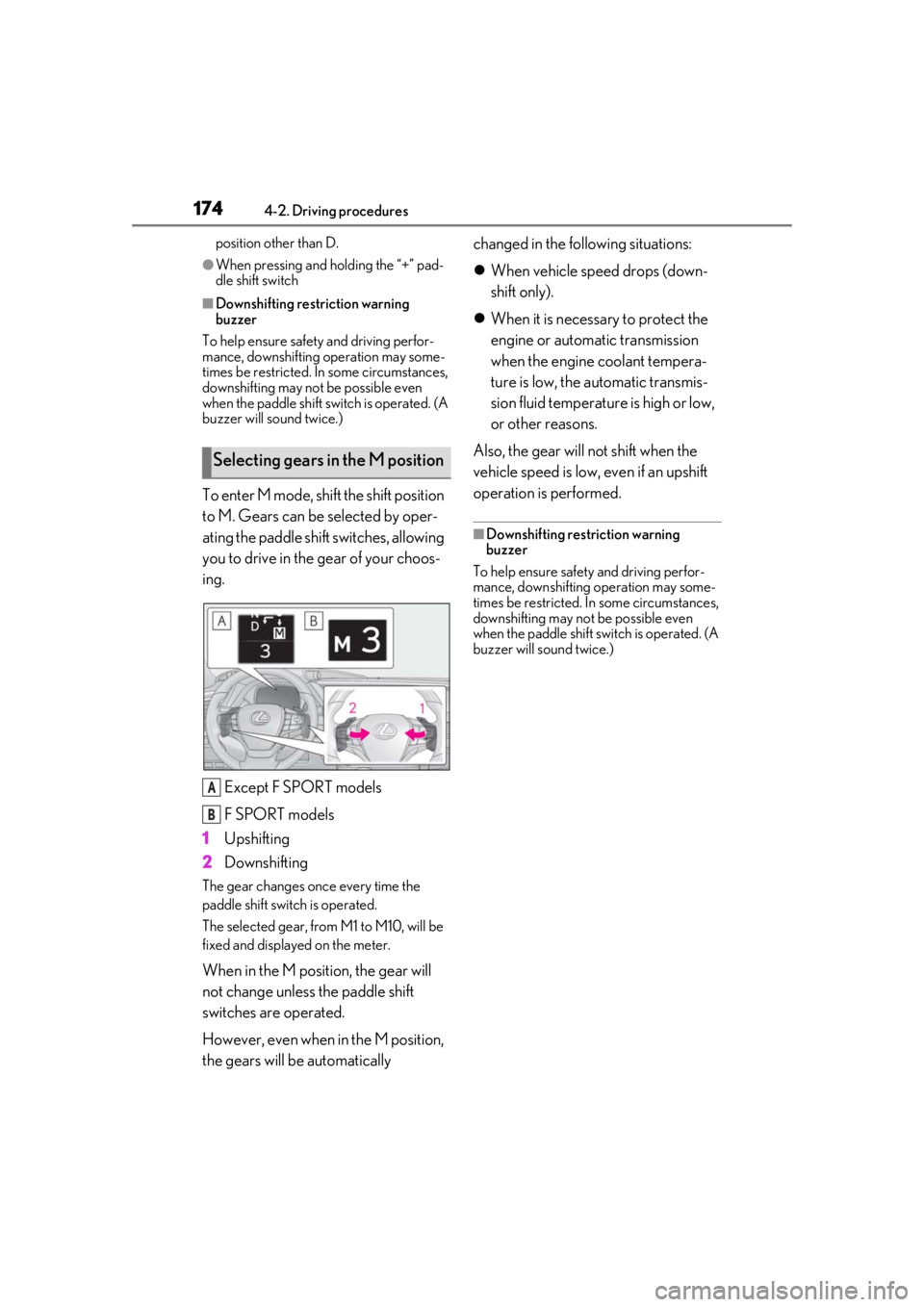
To enter M mode, shift the shift position
to M. Gears can be selected by oper-
ating the paddle shift switches, allowing
you to drive in the gear of your choos-
ing.
Except F SPORT models
F SPORT models
1 Upshifting
2 Downshifting
The gear changes once every time the
paddle shift switch is operated.
The selected gear, from M1 to M10, will be
fixed and displayed on the meter.
When in the M position, the gear will
not change unless the paddle shift
switches are operated.
However, even when in the M position,
the gears will be automatically changed in the following situations:
When vehicle speed drops (down-
shift only).
When it is necessary to protect the
engine or automatic transmission
when the engine coolant tempera-
ture is low, the automatic transmis-
sion fluid temperature is high or low,
or other reasons.
Also, the gear will not shift when the
vehicle speed is low, even if an upshift
operation is performed.
■Downshifting restriction warning
buzzer
To help ensure safety and driving perfor-
mance, downshifting operation may some-
times be restricted. In some circumstances,
downshifting may not be possible even
when the paddle shift switch is operated. (A
buzzer will sound twice.)
Selecting gears in the M position
A
B
Page 208 of 516
2084-5. Using the driving support systems
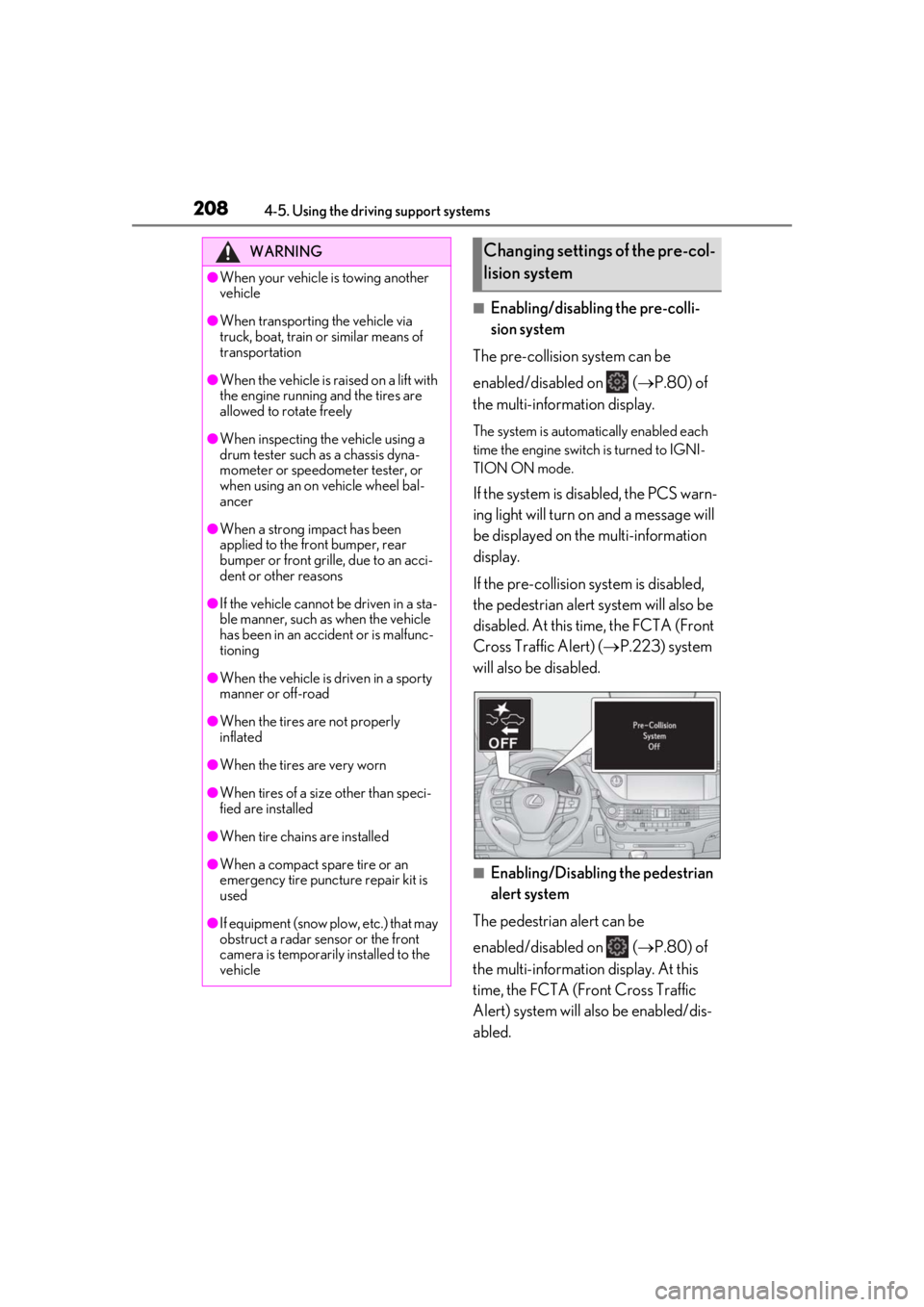
■Enabling/disabling the pre-colli-
sion system
The pre-collision system can be
enabled/disabled on ( P.80) of
the multi-information display.
The system is automatically enabled each
time the engine switch is turned to IGNI-
TION ON mode.
If the system is disabled, the PCS warn-
ing light will turn on and a message will
be displayed on the multi-information
display.
If the pre-collision sy stem is disabled,
the pedestrian alert system will also be
disabled. At this time, the FCTA (Front
Cross Traffic Alert) ( P.223) system
will also be disabled.
■Enabling/Disabling the pedestrian
alert system
The pedestrian alert can be
enabled/disabled on ( P.80) of
the multi-information display. At this
time, the FCTA (Front Cross Traffic
Alert) system will also be enabled/dis-
abled.
WARNING
●When your vehicle is towing another
vehicle
●When transporting the vehicle via
truck, boat, train or similar means of
transportation
●When the vehicle is raised on a lift with
the engine running and the tires are
allowed to rotate freely
●When inspecting the vehicle using a
drum tester such as a chassis dyna-
mometer or speedometer tester, or
when using an on vehicle wheel bal-
ancer
●When a strong impact has been
applied to the front bumper, rear
bumper or front grille, due to an acci-
dent or other reasons
●If the vehicle cannot be driven in a sta-
ble manner, such as when the vehicle
has been in an accident or is malfunc-
tioning
●When the vehicle is driven in a sporty
manner or off-road
●When the tires are not properly
inflated
●When the tires are very worn
●When tires of a size other than speci-
fied are installed
●When tire chains are installed
●When a compact spare tire or an
emergency tire puncture repair kit is
used
●If equipment (snow plow, etc.) that may
obstruct a radar sensor or the front
camera is temporarily installed to the
vehicle
Changing settings of the pre-col-
lision system
Page 218 of 516
2184-5. Using the driving support systems
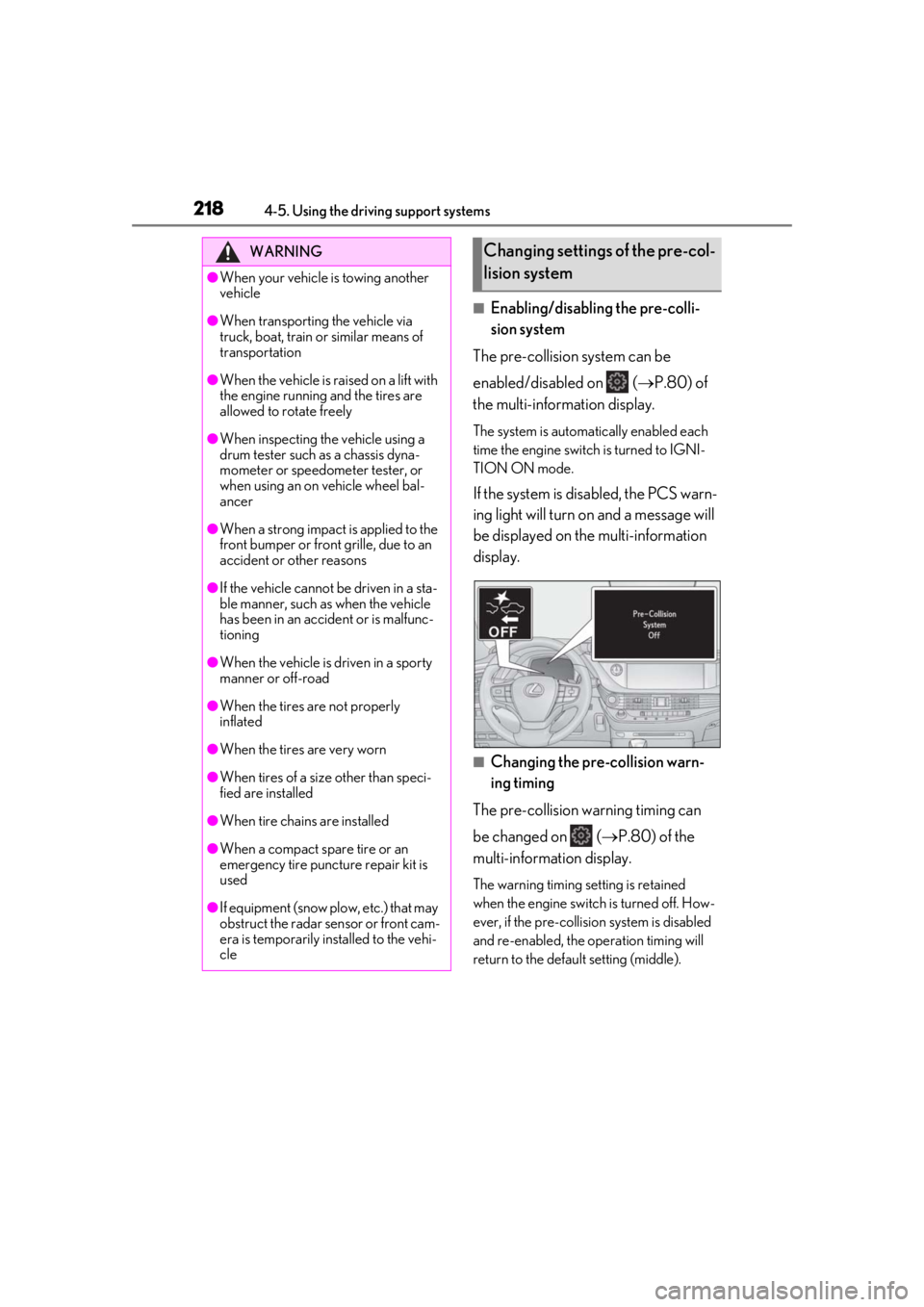
■Enabling/disabling the pre-colli-
sion system
The pre-collision system can be
enabled/disabled on ( P.80) of
the multi-information display.
The system is automatically enabled each
time the engine switch is turned to IGNI-
TION ON mode.
If the system is disabled, the PCS warn-
ing light will turn on and a message will
be displayed on the multi-information
display.
■Changing the pre-collision warn-
ing timing
The pre-collision warning timing can
be changed on ( P.80) of the
multi-information display.
The warning timing setting is retained
when the engine switch is turned off. How-
ever, if the pre-collisio n system is disabled
and re-enabled, the operation timing will
return to the default setting (middle).
WARNING
●When your vehicle is towing another
vehicle
●When transporting the vehicle via
truck, boat, train or similar means of
transportation
●When the vehicle is raised on a lift with
the engine running and the tires are
allowed to rotate freely
●When inspecting the vehicle using a
drum tester such as a chassis dyna-
mometer or speedometer tester, or
when using an on vehicle wheel bal-
ancer
●When a strong impact is applied to the
front bumper or front grille, due to an
accident or other reasons
●If the vehicle cannot be driven in a sta-
ble manner, such as when the vehicle
has been in an accident or is malfunc-
tioning
●When the vehicle is driven in a sporty
manner or off-road
●When the tires are not properly
inflated
●When the tires are very worn
●When tires of a size other than speci-
fied are installed
●When tire chains are installed
●When a compact spare tire or an
emergency tire puncture repair kit is
used
●If equipment (snow plow, etc.) that may
obstruct the radar sensor or front cam-
era is temporarily installed to the vehi-
cle
Changing settings of the pre-col-
lision system
Page 292 of 516
2924-5. Using the driving support systems
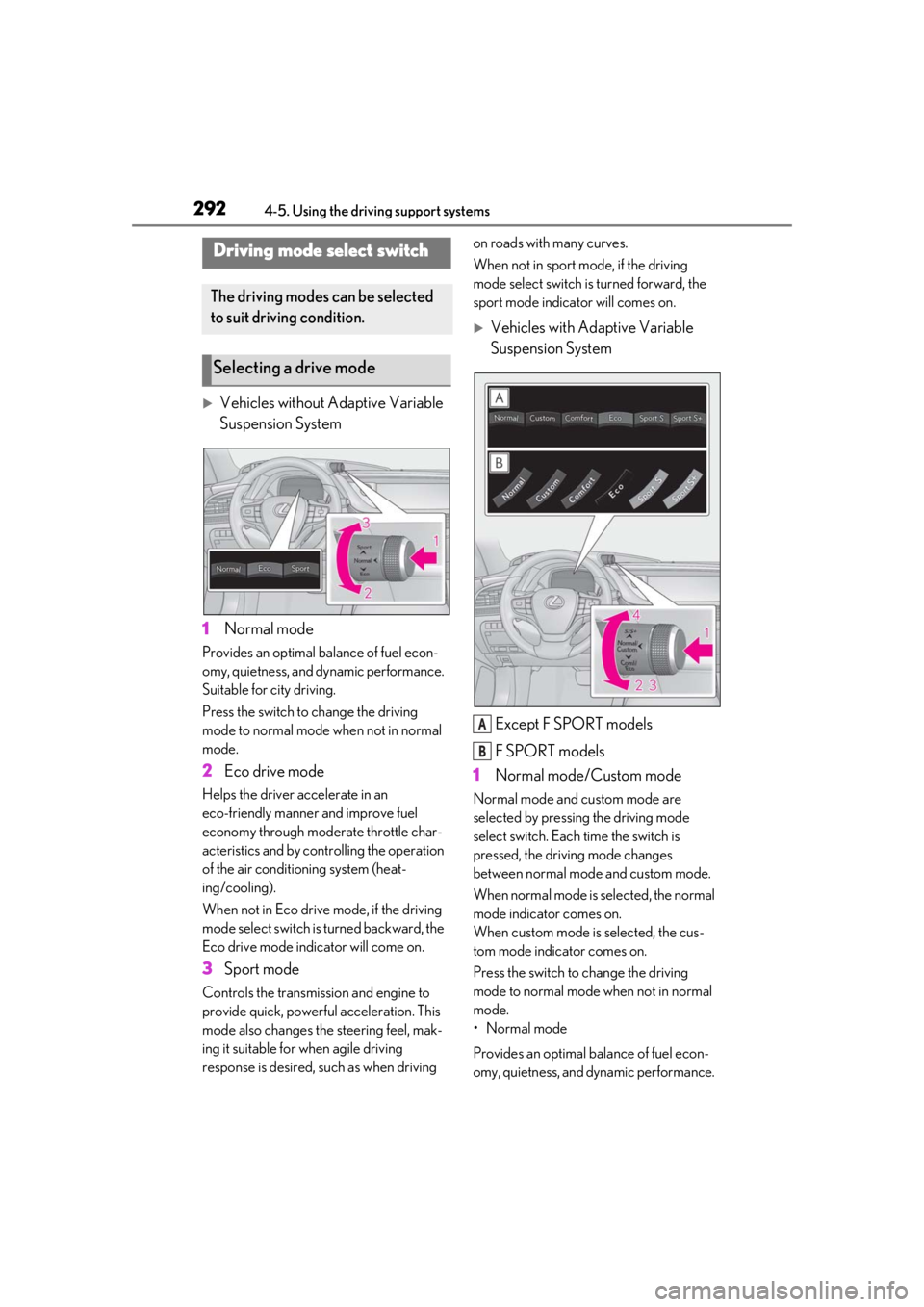
Vehicles without Adaptive Variable
Suspension System
1 Normal mode
Provides an optimal ba lance of fuel econ-
omy, quietness, and dynamic performance.
Suitable for city driving.
Press the switch to change the driving
mode to normal mode when not in normal
mode.
2 Eco drive mode
Helps the driver accelerate in an
eco-friendly manner and improve fuel
economy through moderate throttle char-
acteristics and by controlling the operation
of the air conditioning system (heat-
ing/cooling).
When not in Eco drive mode, if the driving
mode select switch is turned backward, the
Eco drive mode indicator will come on.
3Sport mode
Controls the transmission and engine to
provide quick, powerful acceleration. This
mode also changes the steering feel, mak-
ing it suitable for when agile driving
response is desired, such as when driving on roads with many curves.
When not in sport mode, if the driving
mode select switch is turned forward, the
sport mode indicator will comes on.
Vehicles with Adaptive Variable
Suspension System
Except F SPORT models
F SPORT models
1 Normal mode/Custom mode
Normal mode and custom mode are
selected by pressing the driving mode
select switch. Each time the switch is
pressed, the driving mode changes
between normal mode and custom mode.
When normal mode is selected, the normal
mode indicator comes on.
When custom mode is selected, the cus-
tom mode indicator comes on.
Press the switch to change the driving
mode to normal mode when not in normal
mode.
• Normal mode
Provides an optimal ba lance of fuel econ-
omy, quietness, and dynamic performance.
Driving mode select switch
The driving modes can be selected
to suit driving condition.
Selecting a drive mode
A
B