timing LEXUS LS500 2020 Owners Manual
[x] Cancel search | Manufacturer: LEXUS, Model Year: 2020, Model line: LS500, Model: LEXUS LS500 2020Pages: 516, PDF Size: 10.38 MB
Page 185 of 516
1854-3. Operating the lights and wipers
4
Driving
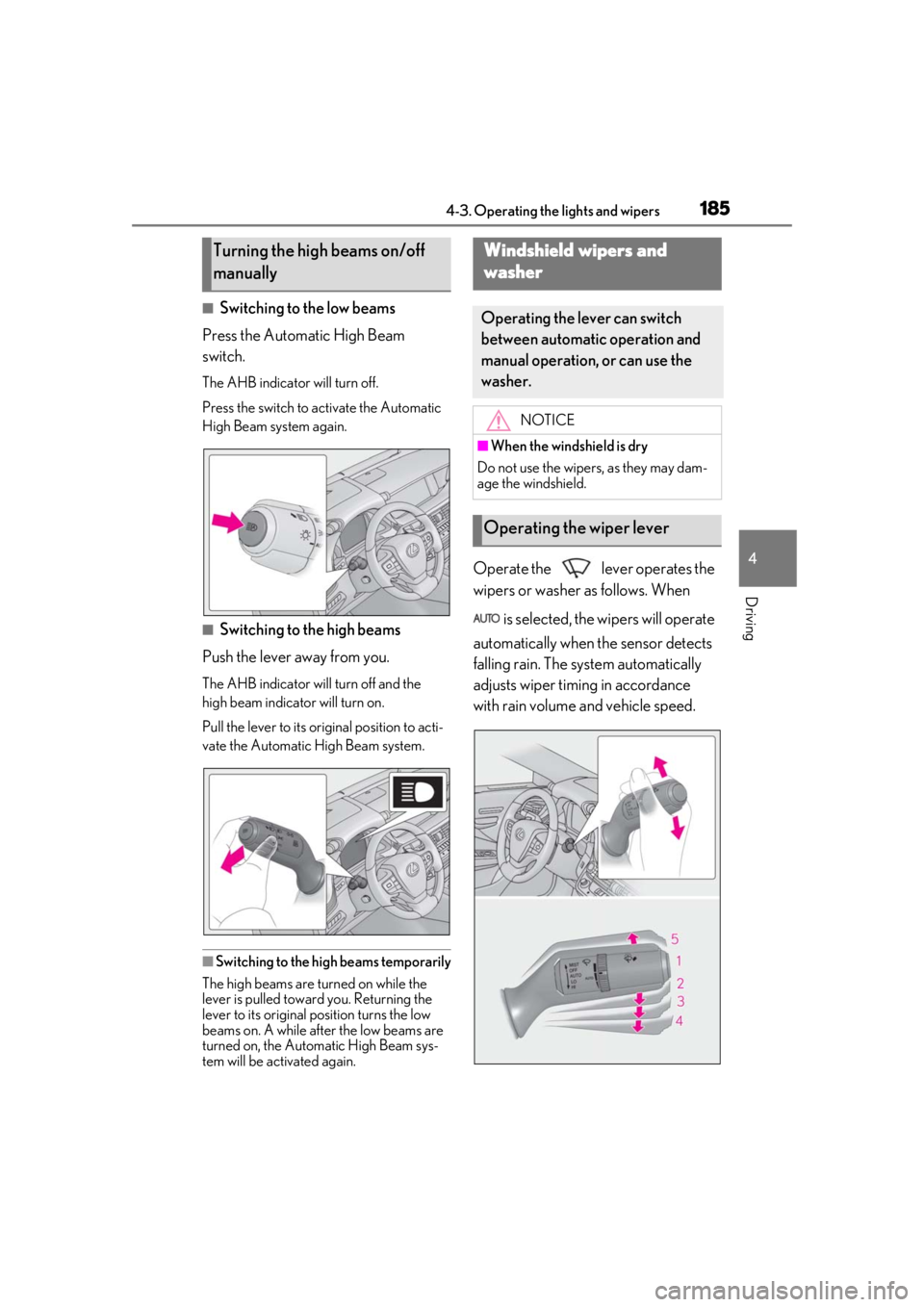
■Switching to the low beams
Press the Automatic High Beam
switch.
The AHB indicator will turn off.
Press the switch to activate the Automatic
High Beam system again.
■Switching to the high beams
Push the lever away from you.
The AHB indicator will turn off and the
high beam indicator will turn on.
Pull the lever to its original position to acti-
vate the Automatic High Beam system.
■Switching to the high beams temporarily
The high beams are turned on while the
lever is pulled toward you. Returning the
lever to its original position turns the low
beams on. A while after the low beams are
turned on, the Automatic High Beam sys-
tem will be activated again.
Operate the lever operates the
wipers or washer as follows. When
is selected, the wipers will operate
automatically when the sensor detects
falling rain. The system automatically
adjusts wiper timing in accordance
with rain volume and vehicle speed.
Turning the high beams on/off
manuallyWindshield wipers and
w
asher
Operating the lever can switch
between automatic operation and
manual operation, or can use the
washer.
NOTICE
■When the windshield is dry
Do not use the wipers, as they may dam-
age the windshield.
Operating the wiper lever
Page 186 of 516
1864-3. Operating the lights and wipers
1 (U.S.A.) or (Canada)
Off
2 Rain-sensing wiper operation
The wipers will operate automatically when
the sensor detects falling rain. The system
automatically adjusts wiper timing in
accordance with rain volume and vehicle
speed.
3 (U.S.A.) or (Canada)
Low speed wiper operation
4 (U.S.A.) or (Canada)
High speed wiper operation
5 (U.S.A.) or (Canada)
Temporary operation
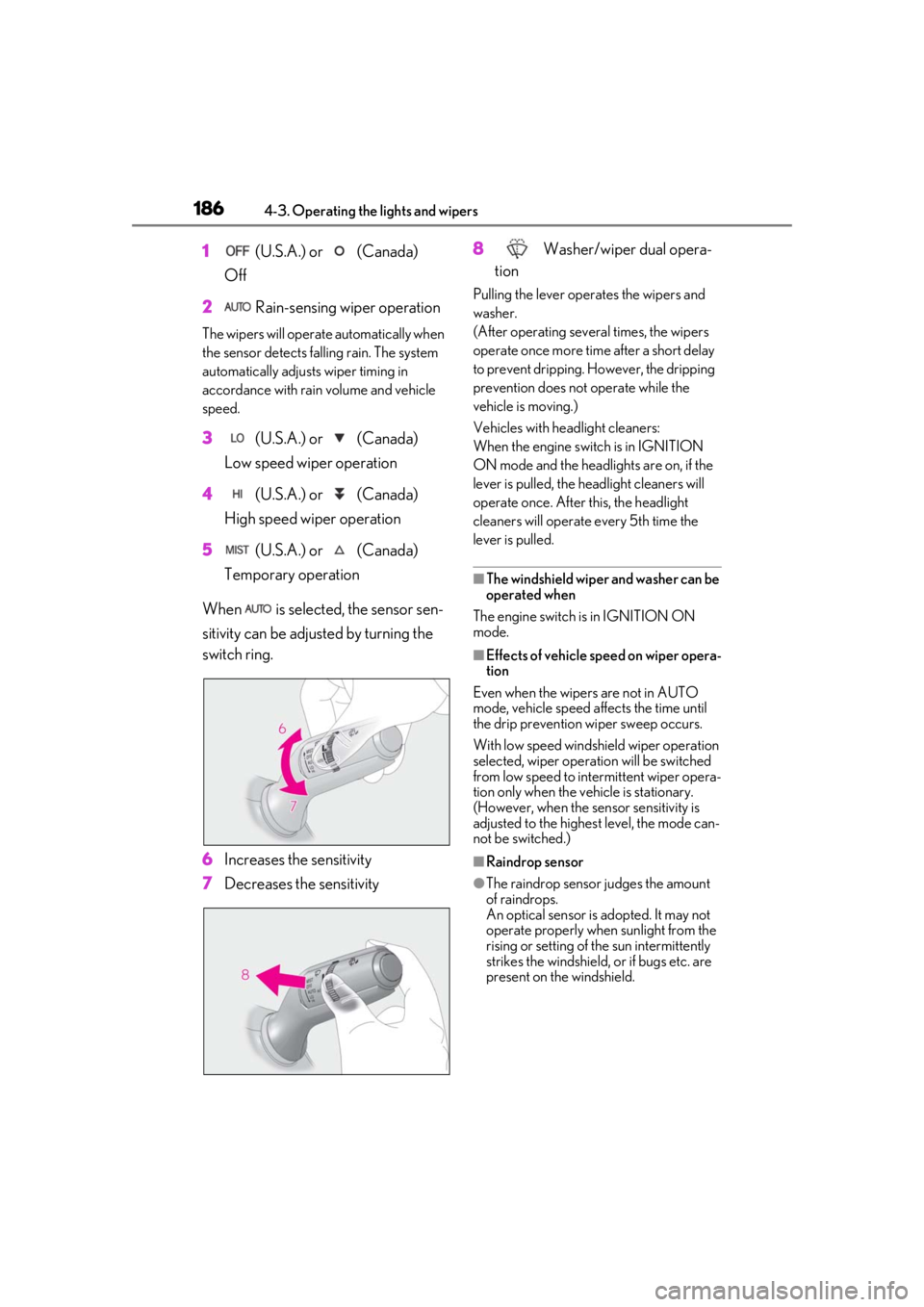
When is selected, the sensor sen-
sitivity can be adjusted by turning the
switch ring.
6 Increases the sensitivity
7 Decreases the sensitivity 8
Washer/wiper dual opera-
tion
Pulling the lever operates the wipers and
washer.
(After operating several times, the wipers
operate once more time after a short delay
to prevent dripping. However, the dripping
prevention does not operate while the
vehicle is moving.)
Vehicles with headlight cleaners:
When the engine swit ch is in IGNITION
ON mode and the headlights are on, if the
lever is pulled, the he adlight cleaners will
operate once. After this, the headlight
cleaners will operate every 5th time the
lever is pulled.
■The windshield wiper and washer can be
operated when
The engine switch is in IGNITION ON
mode.
■Effects of vehicle speed on wiper opera-
tion
Even when the wipers are not in AUTO
mode, vehicle speed affects the time until
the drip prevention wiper sweep occurs.
With low speed windsh ield wiper operation
selected, wiper operation will be switched
from low speed to intermittent wiper opera-
tion only when the vehicle is stationary.
(However, when the sensor sensitivity is
adjusted to the highes t level, the mode can-
not be switched.)
■Raindrop sensor
●The raindrop sensor judges the amount
of raindrops.
An optical sensor is adopted. It may not
operate properly when sunlight from the
rising or setting of the sun intermittently
strikes the windshield, or if bugs etc. are
present on the windshield.
Page 207 of 516
2074-5. Using the driving support systems
4
Driving
WARNING
■Pre-collision braking
●When the pre-collision braking func-
tion is operating, a large amount of
braking force will be applied.
●If the vehicle is stopped by the opera-
tion of the pre-collision braking func-
tion, the pre-collision braking function
operation will be canceled after
approximately 2 seconds. Depress the
brake pedal as necessary.
●The pre-collision braking function may
not operate if certain operations are
performed by the driver. If the acceler-
ator pedal is being depressed strongly
or the steering wheel is being turned,
the system may determine that the
driver is taking evasive action and pos-
sibly prevent the pre-collision braking
function from operating.
●In some situations, while the pre-colli-
sion braking function is operating,
operation of the function may be can-
celed if the accelerator pedal is
depressed strongly or the steering
wheel is turned and the system deter-
mines that the driver is taking evasive
action.
●If the brake pedal is being depressed,
the system may determine that the
driver is taking evasive action and pos-
sibly delay the operation timing of the
pre-collision braking function.
■Active steering assist
●The steering wheel may turn automati-
cally when active steering assist is
operating.
●As active steering assist operation will
be canceled when the system deter-
mines that a collision has been
avoided, operate the steering wheel as
necessary.
●In the following situations, the system
may determine that th e driver is taking
evasive action. In this case, the active
steering assist may not operate or may
be canceled.
• If the accelerator pedal is being depressed strongly or the steering
wheel is being operat ed. In this case
the system may determine that the
driver is taking evasive action and the
pre-collision braking may not operate.
• In some situations, while the active steering assist is operating, operation
of the function may be canceled if the
accelerator pedal is depressed
strongly or the steering wheel is turned
and the system determines that the
driver is taking evasive action.
• When the active steering assist is operating, if the steering wheel is held
firmly or is operated in the opposite
direction to that which the system is
generating torque, the function may be
canceled.
• If the brake pedal is depressed, the sys- tem may determine that the driver is
taking evasive action and the active
steering assist operation may be
delayed.
■Pre-collision seat belts with comfort
function
If the pre-collision seat belts have oper-
ated and the seat belts are locked in a
retracted position, immediately stop the
vehicle in a safe place, release and
retract the seat belts to unlock them and
then fasten them again.
Also, if a seat belt ca n be loosened, it can
be unlocked by slightly retracting it with-
out releasing it.
■When to disable the pre-collision sys-
tem
In the following situations, disable the
system, as it may not operate properly,
possibly leading to an accident resulting
in death or serious injury:
●When the vehicle is being towed
Page 209 of 516
2094-5. Using the driving support systems
4
Driving
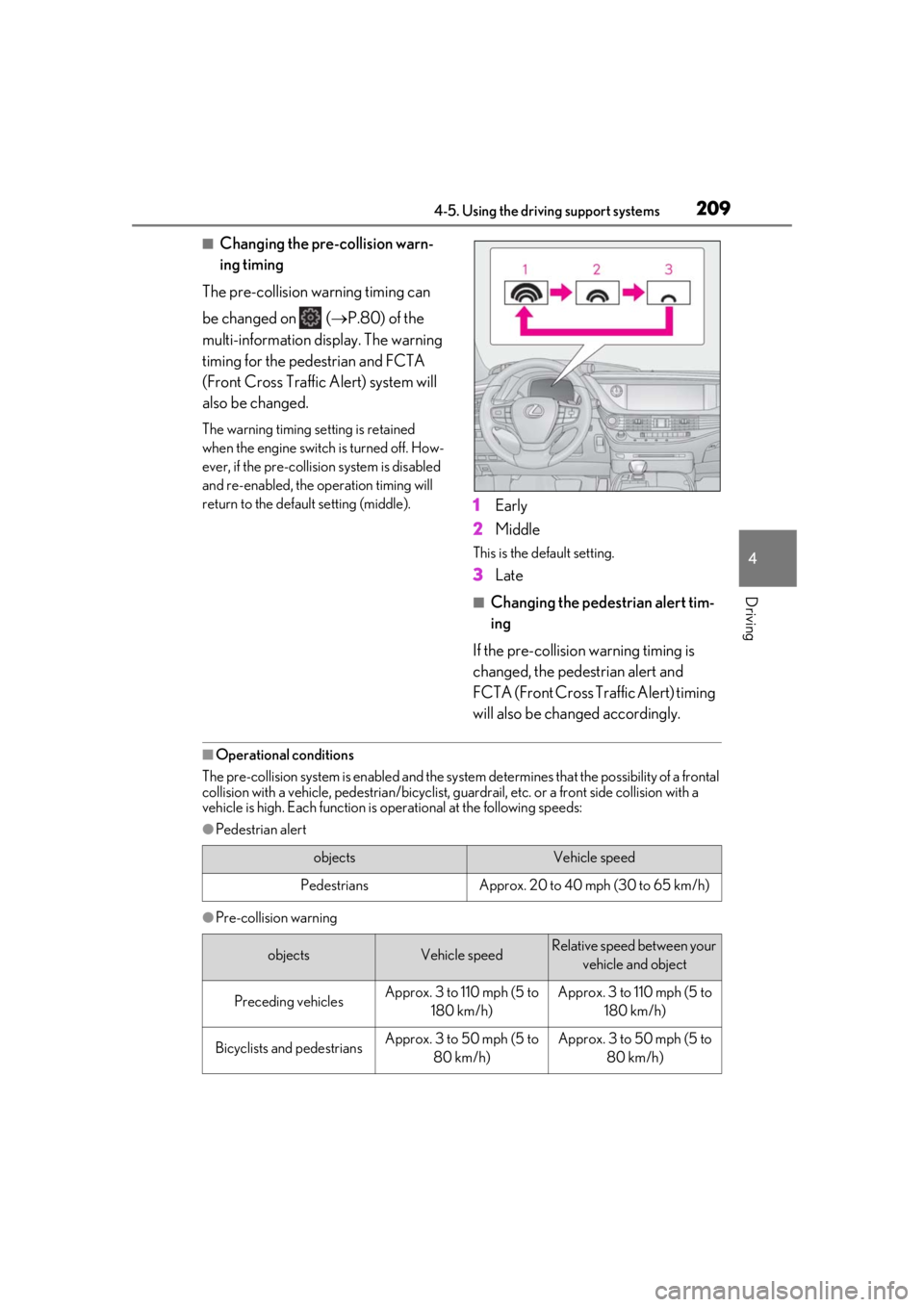
■Changing the pre-collision warn-
ing timing
The pre-collision warning timing can
be changed on ( P.80) of the
multi-information display. The warning
timing for the pedestrian and FCTA
(Front Cross Traffic Alert) system will
also be changed.
The warning timing se tting is retained
when the engine switch is turned off. How-
ever, if the pre-collision system is disabled
and re-enabled, the operation timing will
return to the default setting (middle).
1 Early
2 Middle
This is the default setting.
3Late
■Changing the pedestrian alert tim-
ing
If the pre-collision warning timing is
changed, the pedestrian alert and
FCTA (Front Cross Traffic Alert) timing
will also be changed accordingly.
■Operational conditions
The pre-collision system is enabled and the system determines that the possibility of a frontal
collision with a vehicle, pedestri an/bicyclist, guardrail, etc. or a front side collision with a
vehicle is high. Each function is operational at the following speeds:
●Pedestrian alert
●Pre-collision warning
objectsVehicle speed
PedestriansApprox. 20 to 40 mph (30 to 65 km/h)
objectsVehicle speedRelative speed between your
vehicle and object
Preceding vehiclesApprox. 3 to 110 mph (5 to 180 km/h)Approx. 3 to 110 mph (5 to 180 km/h)
Bicyclists and pedestriansApprox. 3 to 50 mph (5 to 80 km/h)Approx. 3 to 50 mph (5 to 80 km/h)
Page 217 of 516
2174-5. Using the driving support systems
4
Driving
the Adaptive Variable Suspension Sys-
tem (P.298) will control the damp-
ing force of the shock absorbers to
help maintain an appropriate vehicle
posture.
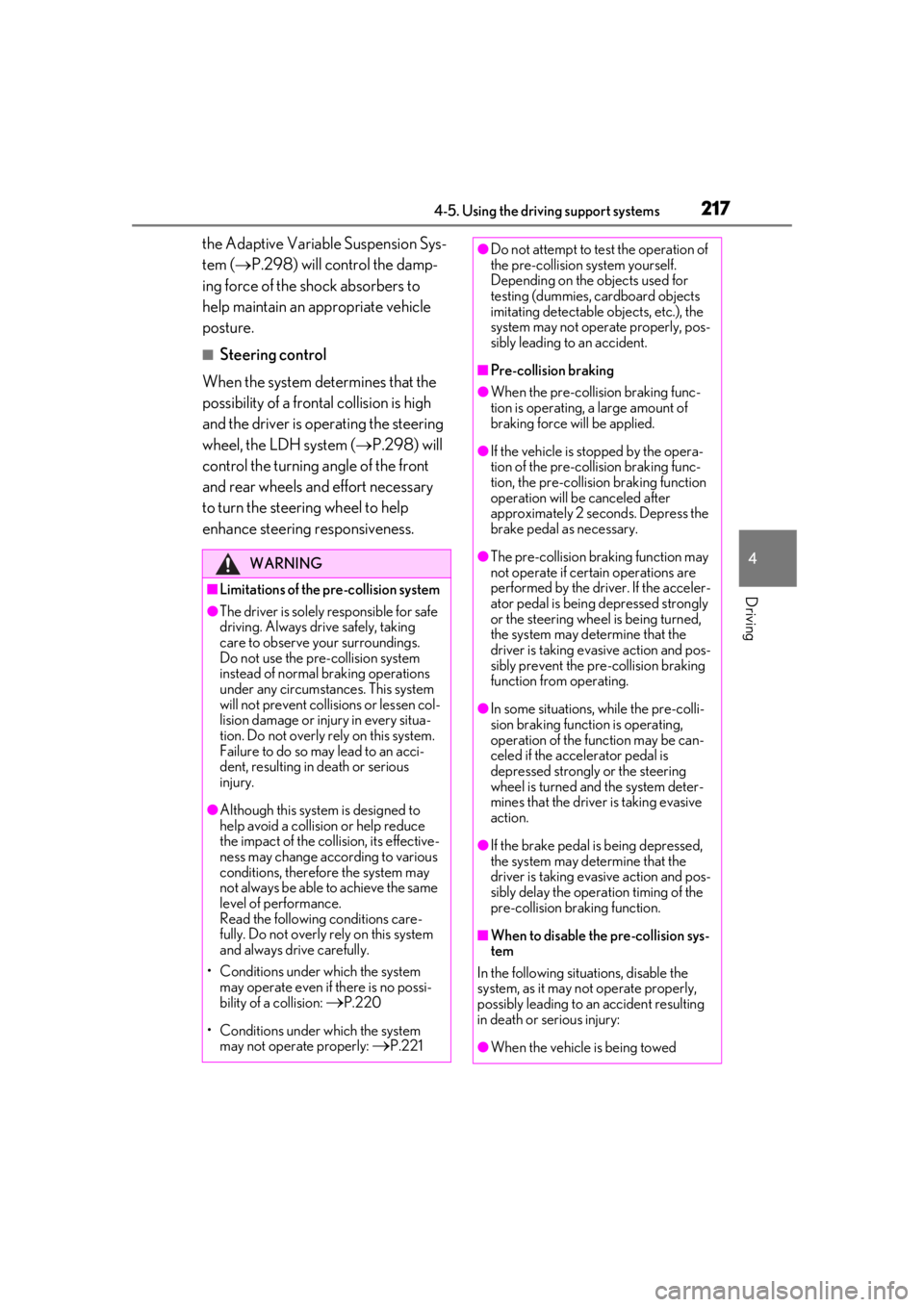
■Steering control
When the system determines that the
possibility of a frontal collision is high
and the driver is operating the steering
wheel, the LDH system ( P.298) will
control the turning angle of the front
and rear wheels and effort necessary
to turn the steering wheel to help
enhance steering responsiveness.
WARNING
■Limitations of the pre-collision system
●The driver is solely responsible for safe
driving. Always drive safely, taking
care to observe your surroundings.
Do not use the pre-collision system
instead of normal braking operations
under any circumstances. This system
will not prevent collisions or lessen col-
lision damage or injury in every situa-
tion. Do not overly rely on this system.
Failure to do so may lead to an acci-
dent, resulting in death or serious
injury.
●Although this system is designed to
help avoid a collision or help reduce
the impact of the coll ision, its effective-
ness may change according to various
conditions, therefore the system may
not always be able to achieve the same
level of performance.
Read the following conditions care-
fully. Do not overly rely on this system
and always drive carefully.
• Conditions under which the system may operate even if there is no possi-
bility of a collision:
P.220
• Conditions under which the system may not operate properly:
P.221
●Do not attempt to test the operation of
the pre-collision system yourself.
Depending on the objects used for
testing (dummies, cardboard objects
imitating detectable objects, etc.), the
system may not operate properly, pos-
sibly leading to an accident.
■Pre-collision braking
●When the pre-collision braking func-
tion is operating, a large amount of
braking force will be applied.
●If the vehicle is stopped by the opera-
tion of the pre-collision braking func-
tion, the pre-collision braking function
operation will be canceled after
approximately 2 seco nds. Depress the
brake pedal as necessary.
●The pre-collision braking function may
not operate if certain operations are
performed by the driver. If the acceler-
ator pedal is being depressed strongly
or the steering wheel is being turned,
the system may determine that the
driver is taking evasive action and pos-
sibly prevent the pre-collision braking
function from operating.
●In some situations, while the pre-colli-
sion braking function is operating,
operation of the function may be can-
celed if the accelerator pedal is
depressed strongly or the steering
wheel is turned and the system deter-
mines that the driver is taking evasive
action.
●If the brake pedal is being depressed,
the system may determine that the
driver is taking evasive action and pos-
sibly delay the operat ion timing of the
pre-collision braking function.
■When to disable the pre-collision sys-
tem
In the following situations, disable the
system, as it may not operate properly,
possibly leading to an accident resulting
in death or serious injury:
●When the vehicle is being towed
Page 218 of 516
2184-5. Using the driving support systems
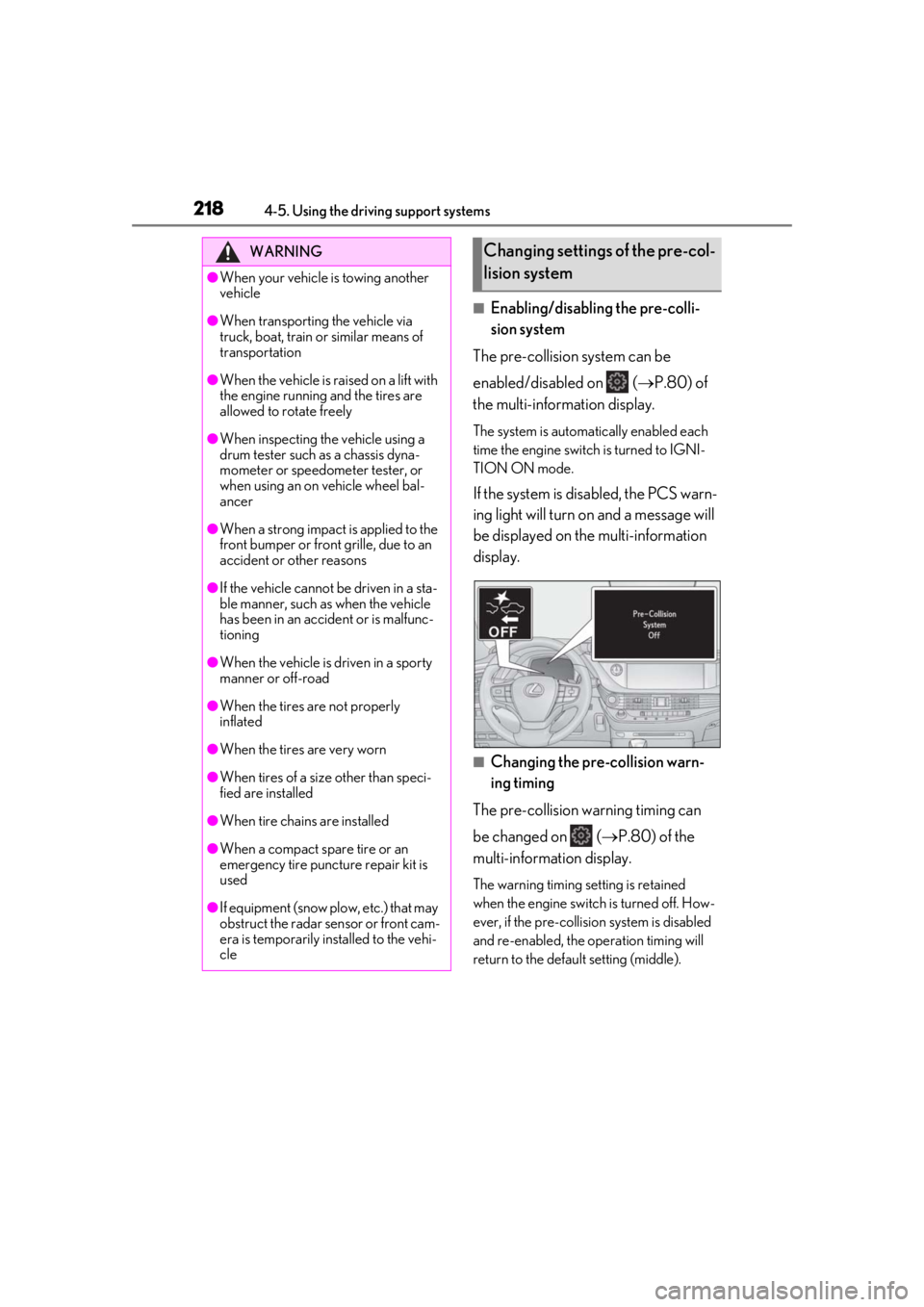
■Enabling/disabling the pre-colli-
sion system
The pre-collision system can be
enabled/disabled on ( P.80) of
the multi-information display.
The system is automatically enabled each
time the engine switch is turned to IGNI-
TION ON mode.
If the system is disabled, the PCS warn-
ing light will turn on and a message will
be displayed on the multi-information
display.
■Changing the pre-collision warn-
ing timing
The pre-collision warning timing can
be changed on ( P.80) of the
multi-information display.
The warning timing setting is retained
when the engine switch is turned off. How-
ever, if the pre-collisio n system is disabled
and re-enabled, the operation timing will
return to the default setting (middle).
WARNING
●When your vehicle is towing another
vehicle
●When transporting the vehicle via
truck, boat, train or similar means of
transportation
●When the vehicle is raised on a lift with
the engine running and the tires are
allowed to rotate freely
●When inspecting the vehicle using a
drum tester such as a chassis dyna-
mometer or speedometer tester, or
when using an on vehicle wheel bal-
ancer
●When a strong impact is applied to the
front bumper or front grille, due to an
accident or other reasons
●If the vehicle cannot be driven in a sta-
ble manner, such as when the vehicle
has been in an accident or is malfunc-
tioning
●When the vehicle is driven in a sporty
manner or off-road
●When the tires are not properly
inflated
●When the tires are very worn
●When tires of a size other than speci-
fied are installed
●When tire chains are installed
●When a compact spare tire or an
emergency tire puncture repair kit is
used
●If equipment (snow plow, etc.) that may
obstruct the radar sensor or front cam-
era is temporarily installed to the vehi-
cle
Changing settings of the pre-col-
lision system
Page 319 of 516

3195-3. Using the air conditioning system and defogger
5
Interior features
■Registering air conditioning settings to
electronic keys
●Unlocking the vehicle using an electronic
key and turning the engine switch to
IGNITION ON mode will recall that
key’s registered air conditioning settings.
●When the engine switch is turned off, the
current air conditioning settings will auto-
matically be registered to the electronic
key that was used to unlock the vehicle.
●The system may not operate correctly if
more than one electronic key is in the
vicinity or if the smart access system with
push-button start is used to unlock a pas-
senger door.
●The doors that can recall the air condi-
tioning setting* when unlocked using the
smart access system with push-button
start can be changed. For details, contact
your Lexus dealer.
*: The doors that can recall the driving
position memory are changed at the
same time.
■Operation of the air conditioning sys-
tem in Eco drive mode
In Eco drive mode, the air conditioning sys-
tem is controlled as follows to prioritize fuel
efficiency:
●Engine speed and compressor operation
controlled to restri ct heating/cooling
capacity
●Fan speed restricted when automatic
mode is selected
To improve air conditioning performance,
perform the following operations:
●Turn off eco air conditioning mode
( P.320)
●Adjust the fan speed
●Turn off Eco drive mode ( P.292)
■When the outside temperature falls to
nearly 32°F (0°C)
The dehumidification function may not
operate even when “A/C” is selected.
■Ventilation and air conditioning odors
●To let fresh air in, set the air conditioning
system to the outside air mode.
●During use, various odors from inside and
outside the vehicle may enter into and
accumulate in the air conditioning sys-
tem. This may then cause odor to be
emitted from the vents.
●To reduce potential odors from occur-
ring:
• It is recommended that the air condition-
ing system be set to outside air mode
prior to turning the vehicle off.
• The start timing of the blower may be
delayed for a short period of time imme-
diately after the air conditioning system is
started in automatic mode or with the
micro dust and pollen filter on.
●When parking, the system automatically
switches to outside air mode to encour-
age better air circulation throughout the
vehicle, helping to reduce odors that
occur when starting the vehicle.
■Using the voice command system
Air conditioning system can be operated
using voice commands. For details, refer to
the “NAVIGATION AND MULTIMEDIA
SYSTEM OWNER’S MANUAL”.
■Air conditioning filter
P.402
■Customization
Some functions can be customized.
( P.470)
WARNING
■To prevent the windshield from fog-
ging up
Do not use the windshield defogger
switch during cool air operation in
extremely humid weather. The difference
between the temperature of the outside
air and that of the windshield can cause
the outer surface of the windshield to fog
up, blocking your vision.
■When the outside rear view mirror
defoggers are operating
Do not touch the outside rear view mir-
ror surfaces, as they can become very
hot and burn you.
Page 480 of 516
4788-2. Customization
*1:Except for Canada
*2: If equipped
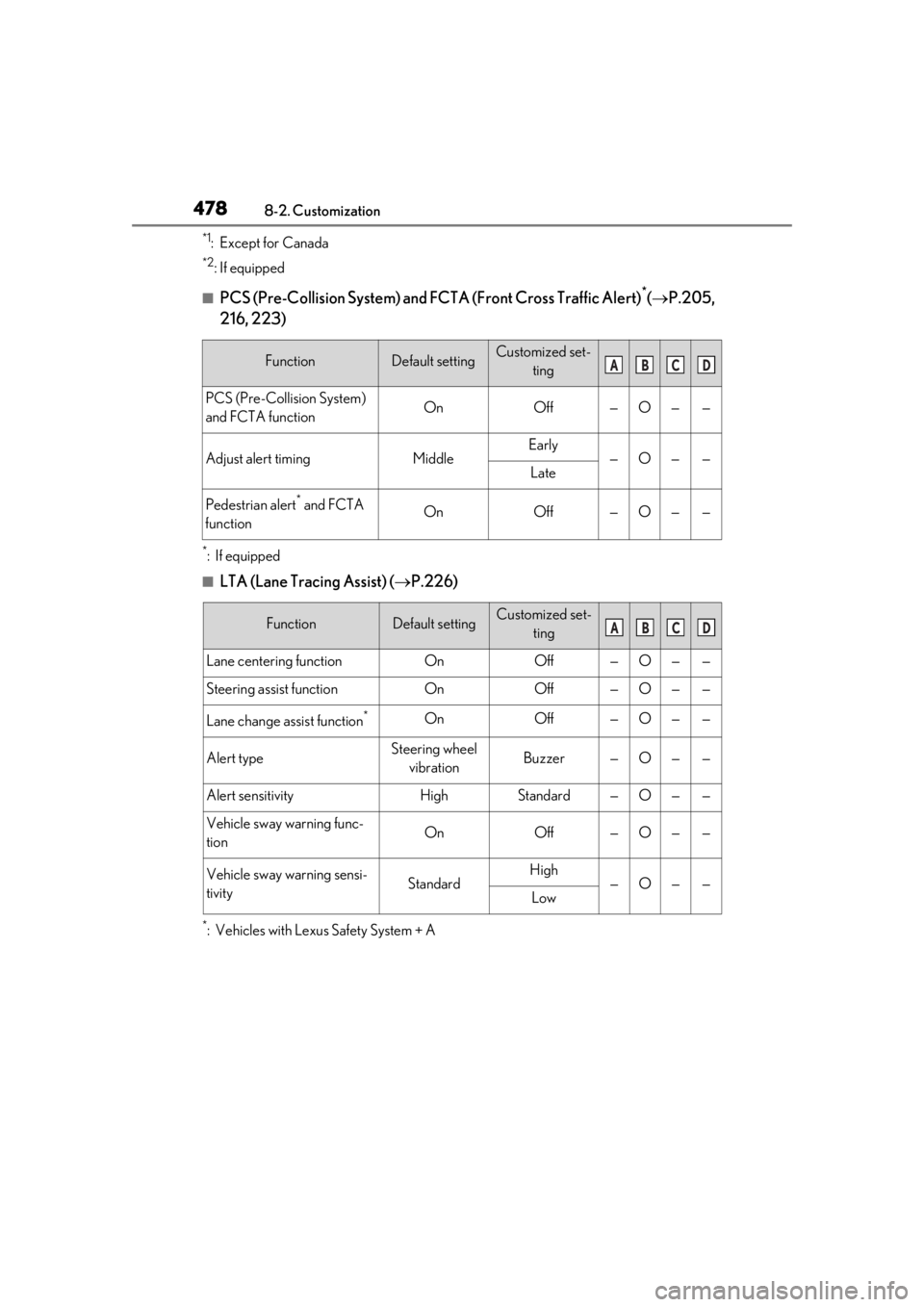
■PCS (Pre-Collision System) and FCTA (Front Cross Traffic Alert)*( P.205,
216, 223)
*:If equipped
■LTA (Lane Tracing Assist) ( P.226)
*: Vehicles with Lexus Safety System + A
FunctionDefault settingCustomized set-
ting
PCS (Pre-Collision System)
and FCTA functionOnOff—O——
Adjust alert timingMiddleEarly—O——Late
Pedestrian alert* and FCTA
functionOnOff—O——
FunctionDefault settingCustomized set- ting
Lane centering functionOnOff—O——
Steering assist functionOnOff—O——
Lane change assist function*OnOff—O——
Alert typeSteering wheel vibrationBuzzer—O——
Alert sensitivityHighStandard—O——
Vehicle sway warning func-
tionOnOff—O——
Vehicle sway warning sensi-
tivityStandardHigh—O——Low
ABCD
ABCD
Page 481 of 516
4798-2. Customization
8
Vehicle specifications
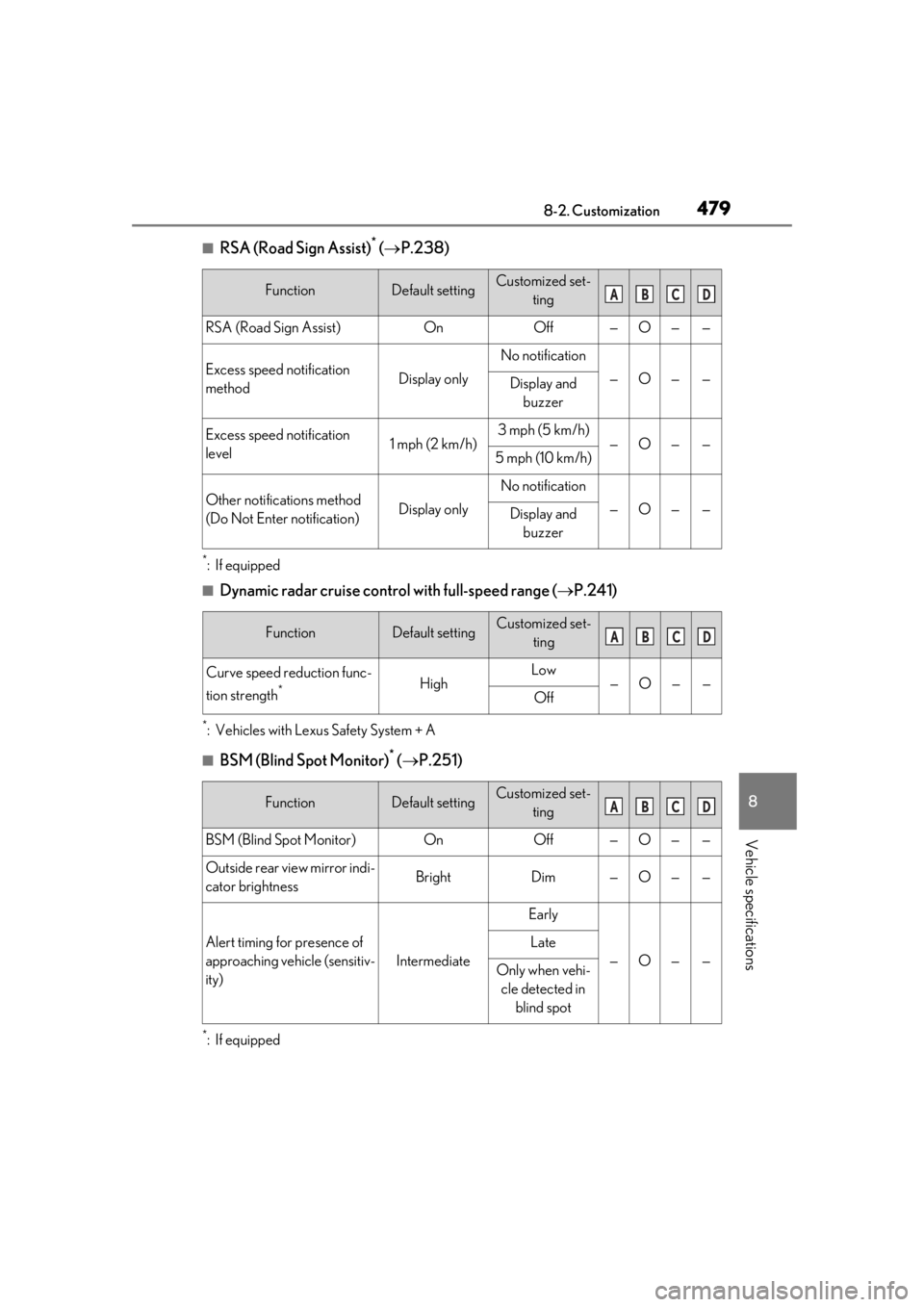
■RSA (Road Sign Assist)* ( P.238)
*:If equipped
■Dynamic radar cruise contro l with full-speed range (P.241)
*: Vehicles with Lexus Safety System + A
■BSM (Blind Spot Monitor)* ( P.251)
*:If equipped
FunctionDefault settingCustomized set-
ting
RSA (Road Sign Assist)OnOff—O——
Excess speed notification
methodDisplay only
No notification
—O——Display and buzzer
Excess speed notification
level1 mph (2 km/h)3 mph (5 km/h)—O——5 mph (10 km/h)
Other notifications method
(Do Not Enter notification)Display only
No notification
—O——Display and buzzer
FunctionDefault settingCustomized set- ting
Curve speed reduction func-
tion strength
*HighLow—O——Off
FunctionDefault settingCustomized set- ting
BSM (Blind Spot Monitor)OnOff—O——
Outside rear view mirror indi-
cator brightnessBrightDim—O——
Alert timing for presence of
approaching vehicle (sensitiv-
ity)
Intermediate
Early
—O——
Late
Only when vehi-cle detected in blind spot
ABCD
ABCD
ABCD