engine LEXUS LS500 2021 Owners Manual
[x] Cancel search | Manufacturer: LEXUS, Model Year: 2021, Model line: LS500, Model: LEXUS LS500 2021Pages: 520, PDF Size: 9.81 MB
Page 309 of 520
3094-6. Driving tips
4
Driving
4-6.Driving tips
Use fluids that are appropriate to
the prevailing outside temperatures.
•Engine oil
• Engine coolant
•Washer fluid
Have a service technician inspect
the condition of the battery.
Have the vehicle fitted with four
snow tires or purchase a set of tire
chains for the rear tires.
*
Ensure that all tires are the specified size
and brand, and that chains match the size
of the tires.
*: Tire chains cannot be mounted on vehi-
cles with front and rear tires of differing
sizes.
Winter driving tips
Carry out the necessary prepara-
tions and inspections before driving
the vehicle in winter. Always drive
the vehicle in a manner appropriate
to the prevailing weather condi-
tions.
Preparation for winter
WARNING
■Driving with snow tires
Observe the following precautions to
reduce the risk of accidents.
Failure to do so may result in a loss of
vehicle control and cause death or seri-
ous injury.
●Use tires of the specified size.
●Maintain the recommended level of air
pressure.
●Do not drive in excess of 75 mph (120
km/h), regardless of the type of snow
tires being used.
●Use snow tires on all, not just some
wheels.
■When installing tire chains
Before installing tire chains, make sure to
disable all functions of the vehicle height
control of the electronically modulated
air suspension. Otherwise, the vehicle
height may change while installing the
tire chains and part or your body may be
caught under the vehicle, possibly caus-
ing injury. ( P.303)
■Driving with tire chains
Observe the following precautions to
reduce the risk of accidents.
Failure to do so may result in the vehicle
being unable to be driven safely, and may
cause death or serious injury.
●Do not drive in excess of the speed
limit specified for the tire chains being
used, or 30 mph (50 km/h), which-
ever is lower.
●Avoid driving on bumpy road surfaces
or over potholes.
●Avoid sudden acceleration, abrupt
steering, sudden br aking and shifting
operations that cause sudden engine
braking.
●Slow down sufficiently before entering
a curve to ensure that vehicle control is
maintained.
●Do not use LTA (Lane Tracing Assist)
system.
Page 319 of 520
3195-1. Remote Touch/Display
5
Interior features
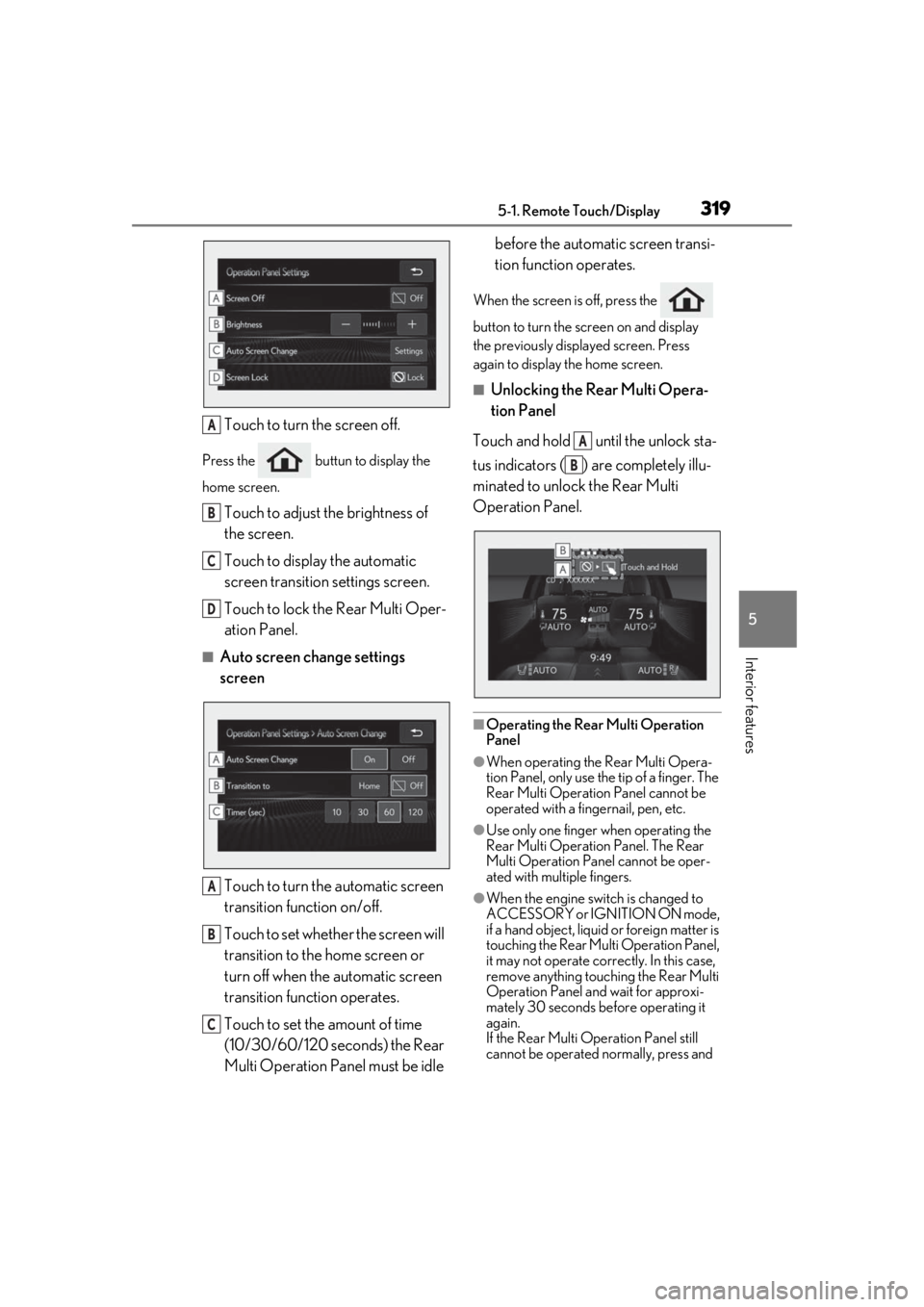
Touch to turn the screen off.
Press the buttun to display the
home screen.
Touch to adjust the brightness of
the screen.
Touch to display the automatic
screen transition settings screen.
Touch to lock the Rear Multi Oper-
ation Panel.
■Auto screen change settings
screenTouch to turn the automatic screen
transition function on/off.
Touch to set whether the screen will
transition to the home screen or
turn off when the automatic screen
transition function operates.
Touch to set the amount of time
(10/30/60/120 seconds) the Rear
Multi Operation Panel must be idle before the automatic screen transi-
tion function operates.
When the screen is off, press the
button to turn the screen on and display
the previously disp
layed screen. Press
again to display the home screen.
■Unlocking the Rear Multi Opera-
tion Panel
Touch and hold until the unlock sta-
tus indicators ( ) are completely illu-
minated to unlock the Rear Multi
Operation Panel.
■Operating the Rear Multi Operation
Panel
●When operating the Rear Multi Opera-
tion Panel, only use the tip of a finger. The
Rear Multi Operation Panel cannot be
operated with a fingernail, pen, etc.
●Use only one finger when operating the
Rear Multi Operation Panel. The Rear
Multi Operation Panel cannot be oper-
ated with multiple fingers.
●When the engine swit ch is changed to
ACCESSORY or IGNITION ON mode,
if a hand object, liquid or foreign matter is
touching the Rear Multi Operation Panel,
it may not operate correctly. In this case,
remove anything touching the Rear Multi
Operation Panel and wait for approxi-
mately 30 seconds be fore operating it
again.
If the Rear Multi Operation Panel still
cannot be operated normally, press and
A
B
C
D
A
B
C
A
B
Page 325 of 520
3255-3. Using the air conditioning system and defogger
5
Interior features
■Registering air conditioning settings to
electronic keys
●Unlocking the vehicle using an electronic
key and turning the engine switch to
IGNITION ON mode will recall that
key’s registered air conditioning settings.
●When the engine switch is turned off, the
current air conditioning settings will auto-
matically be registered to the electronic
key that was used to unlock the vehicle.
●The system may not operate correctly if
more than one electr onic key is in the
vicinity or if the smart access system with
push-button start is used to unlock a pas-
senger door.
●The doors that can recall the air condi-
tioning setting* when unlocked using the
smart access system with push-button
start can be changed. For details, contact
your Lexus dealer.
*: The doors that can recall the driving
position memory are changed at the
same time.
■Operation of the air conditioning sys-
tem in Eco drive mode
In Eco drive mode, the air conditioning sys-
tem is controlled as follows to prioritize fuel
efficiency:
●Engine speed and compressor operation
controlled to restri ct heating/cooling
capacity
●Fan speed restricted when automatic
mode is selected
To improve air condit ioning performance,
perform the following operations:
●Turn off eco air conditioning mode
( P.326)
●Adjust the fan speed
●Turn off Eco drive mode ( P.299)
■When the outside temperature falls to
nearly 32°F (0°C)
The dehumidification function may not
operate even when “A/C” is selected.
■Ventilation and air conditioning odors
●To let fresh air in, set the air conditioning
system to the outside air mode.
●During use, various odors from inside and
outside the vehicle may enter into and
accumulate in the air conditioning sys-
tem. This may then cause odor to be
emitted from the vents.
●To reduce potential odors from occur-
ring:
• It is recommended that the air condition-
ing system be set to outside air mode
prior to turning the vehicle off.
• The start timing of the blower may be
delayed for a short pe riod of time imme-
diately after the air conditioning system is
started in automatic mode or with the
micro dust and pollen filter on.
●When parking, the system automatically
switches to outside air mode to encour-
age better air circulation throughout the
vehicle, helping to reduce odors that
occur when starting the vehicle.
■Using the voice command system
Air conditioning system can be operated
using voice commands. For details, refer to
the “NAVIGATION AND MULTIMEDIA
SYSTEM OWNER’S MANUAL”.
■Air conditioning filter
P.409
■Air conditioning system refrigerant
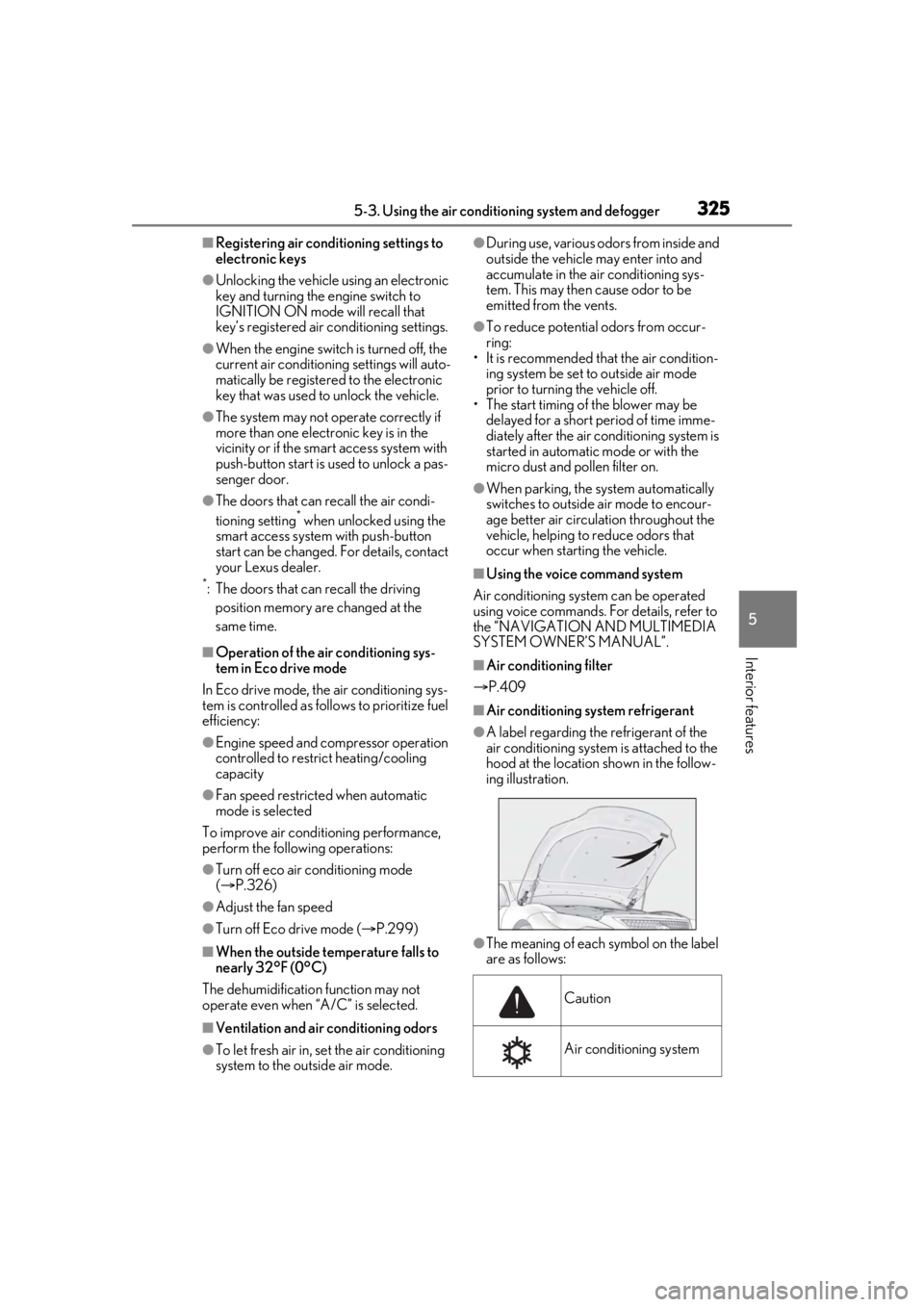
●A label regarding the refrigerant of the
air conditioning system is attached to the
hood at the location shown in the follow-
ing illustration.
●The meaning of each symbol on the label
are as follows:
Caution
Air conditioning system
Page 326 of 520
3265-3. Using the air conditioning system and defogger
■Customization
Some functions can be customized.
( P.476)
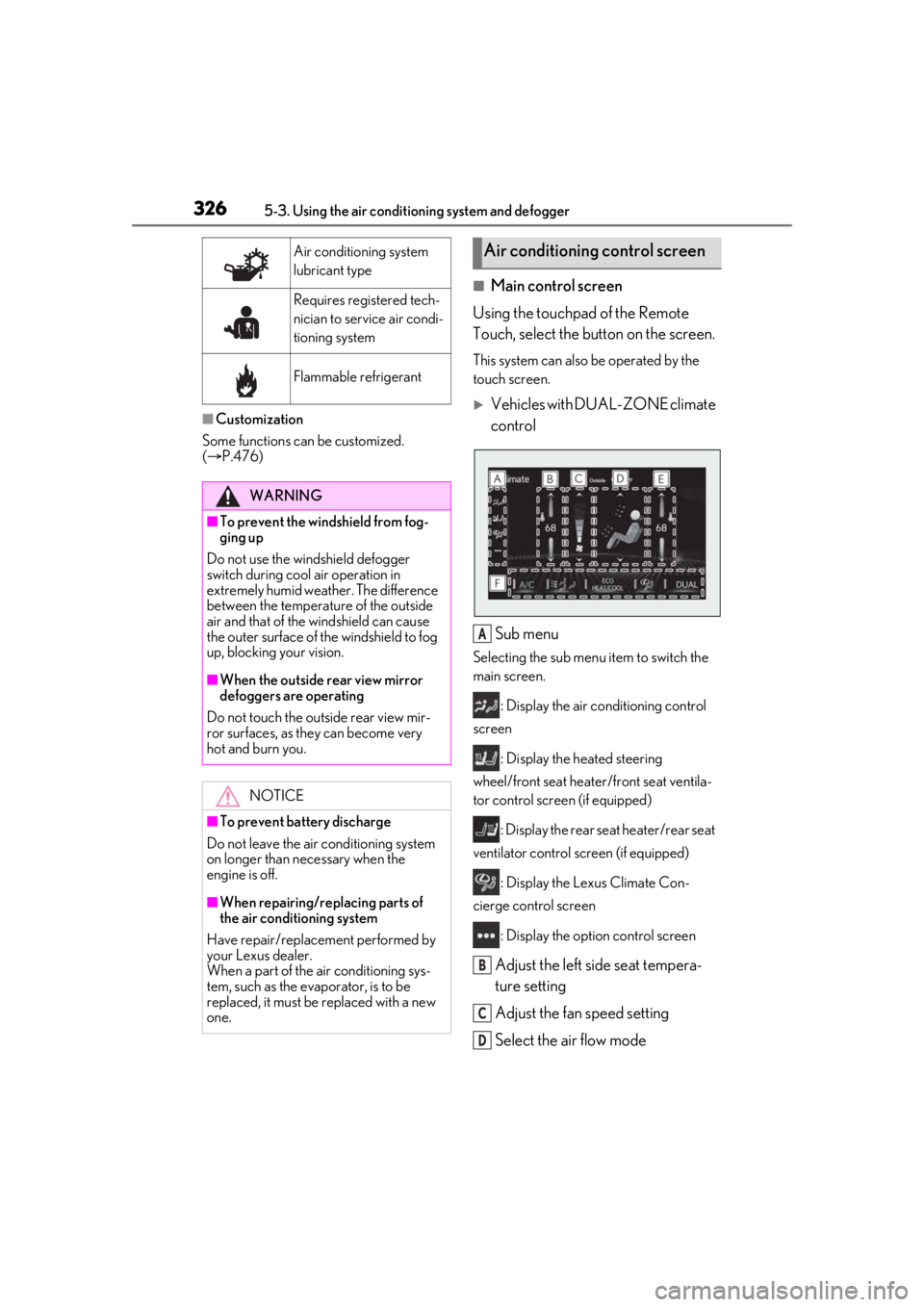
■Main control screen
Using the touchpad of the Remote
Touch, select the button on the screen.
This system can also be operated by the
touch screen.
Vehicles with DUAL-ZONE climate
control
Sub menu
Selecting the sub menu item to switch the
main screen. : Display the air co nditioning control
screen
: Display the heated steering
wheel/front seat heater /front seat ventila-
tor control screen (if equipped)
: Display the rear seat heater/rear seat
ventilator control screen (if equipped)
: Display the Lexus Climate Con-
cierge control screen
: Display the option control screen
Adjust the left side seat tempera-
ture setting
Adjust the fan speed setting
Select the air flow mode
Air conditioning system
lubricant type
Requires registered tech-
nician to service air condi-
tioning system
Flammable refrigerant
WARNING
■To prevent the windshield from fog-
ging up
Do not use the windshield defogger
switch during cool air operation in
extremely humid weather. The difference
between the temperature of the outside
air and that of the windshield can cause
the outer surface of the windshield to fog
up, blocking your vision.
■When the outside rear view mirror
defoggers are operating
Do not touch the outside rear view mir-
ror surfaces, as they can become very
hot and burn you.
NOTICE
■To prevent battery discharge
Do not leave the air conditioning system
on longer than necessary when the
engine is off.
■When repairing/replacing parts of
the air conditioning system
Have repair/replace ment performed by
your Lexus dealer.
When a part of the air conditioning sys-
tem, such as the evaporator, is to be
replaced, it must be replaced with a new
one.
Air conditioning control screen
A
B
C
D
Page 331 of 520
3315-3. Using the air conditioning system and defogger
5
Interior features
While operating, the indicator is turned
on.
■Manually turning front seat con-
centrated airflow mode on/off
In front seat concentrated airflow
mode, directing airflow to the front
seats only and to all seats can be
switched via switch operation. When
the mode has been switched manually,
automatic airflow control stops operat-
ing.
Select on the option control
screen ( P.328) and switch the air-
flow.
Indicator illuminated: Airflow to the
front seats only
Indicator off: Airflow to all the seats.
■Operation of automatic airflow control
●In order to maintain a comfortable inte-
rior, airflow may be directed to seats
without passengers immediately after the
engine is started and at other times
depending on the outside temperature.
●After the engine is st arted, if passengers
move around inside or enter/exit the vehi-
cle, the system cannot accurately detect
the presence of passengers and auto-
matic airflow control will not operate.
■Operation of manual airflow control
Even if the function is manually switched to
directing airflow to only the front seats,
when a rear seat is occupied, it may auto-
matically direct airflow to all seats.
■To return to automa tic airflow control
1 With the indicator off, turn the engine
switch off.
2 After 60 minutes or more elapse, turn
the engine switch to IGNITION ON
mode.
Vehicles with DUAL-ZONE climate
control
To turn on the “DUAL” mode, perform
any of the following procedures:
Select “DUAL” on the main control
screen. ( P.326)
Select “DUAL” on the option con-
trol screen.
Adjust the passenger’s side tem-
perature setting.
The indicator on the main control screen
comes on when the “DUAL” mode is on.
Vehicles with 4-ZONE climate con-
trol
To turn on the “4-ZONE” mode, per-
form any of the following procedures:
Select “4-ZONE” on the main con-
trol screen. ( P.326)
Select “4-ZONE” on the option
control screen.
Adjust a passenger seat tempera-
ture setting.
The indicator on the main control screen
comes on when the “4-ZONE” mode is on.
■Location of air outlets
The air outlets and air volume changes
according to the selected air flow
mode.
Adjusting the temperature for
the driver and passenger seats
separately
Air outlet layout and operations
Page 335 of 520
3355-3. Using the air conditioning system and defogger
5
Interior features
The temperature setting of the rear
seats can be adjusted using the follow-
ing methods:
When the “4-ZONE” indicator is
off: Adjust the driv er’s seat tempera-
ture.
Adjust the temperature setting of each
rear seat using the Center Display or Rear
Multi Operation Panel.
Adjust the temperature setting of
each rear seat using the Center Dis-
play (rear air conditioning control
screen) or Rear Multi Operation
Panel.
The temperature setting of each rear seat
can be changed independently.
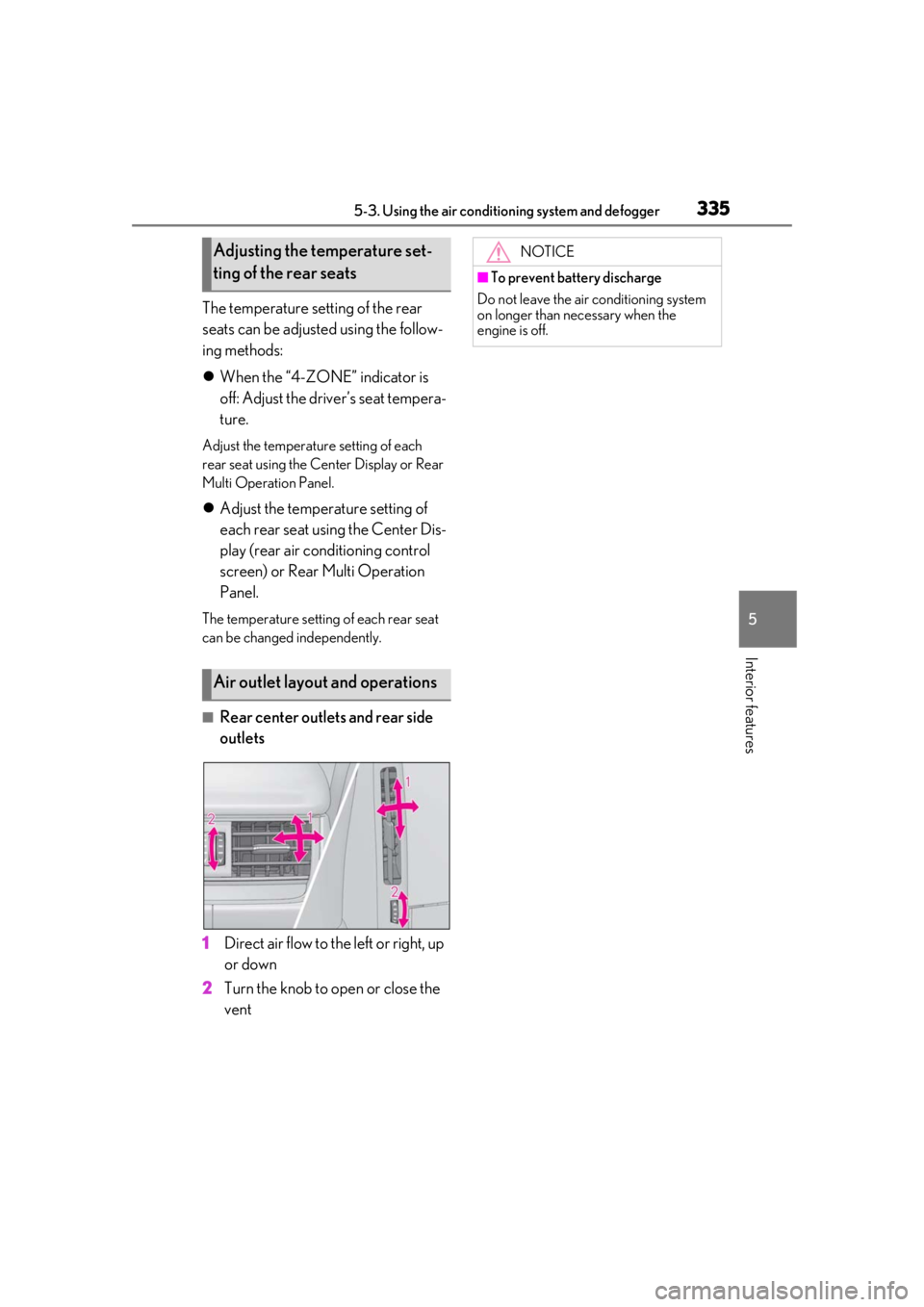
■Rear center outlets and rear side
outlets
1 Direct air flow to the left or right, up
or down
2 Turn the knob to open or close the
vent
Adjusting the temperature set-
ting of the rear seats
Air outlet layout and operations
NOTICE
■To prevent battery discharge
Do not leave the air conditioning system
on longer than necessary when the
engine is off.
Page 336 of 520
3365-3. Using the air conditioning system and defogger
*:If equipped
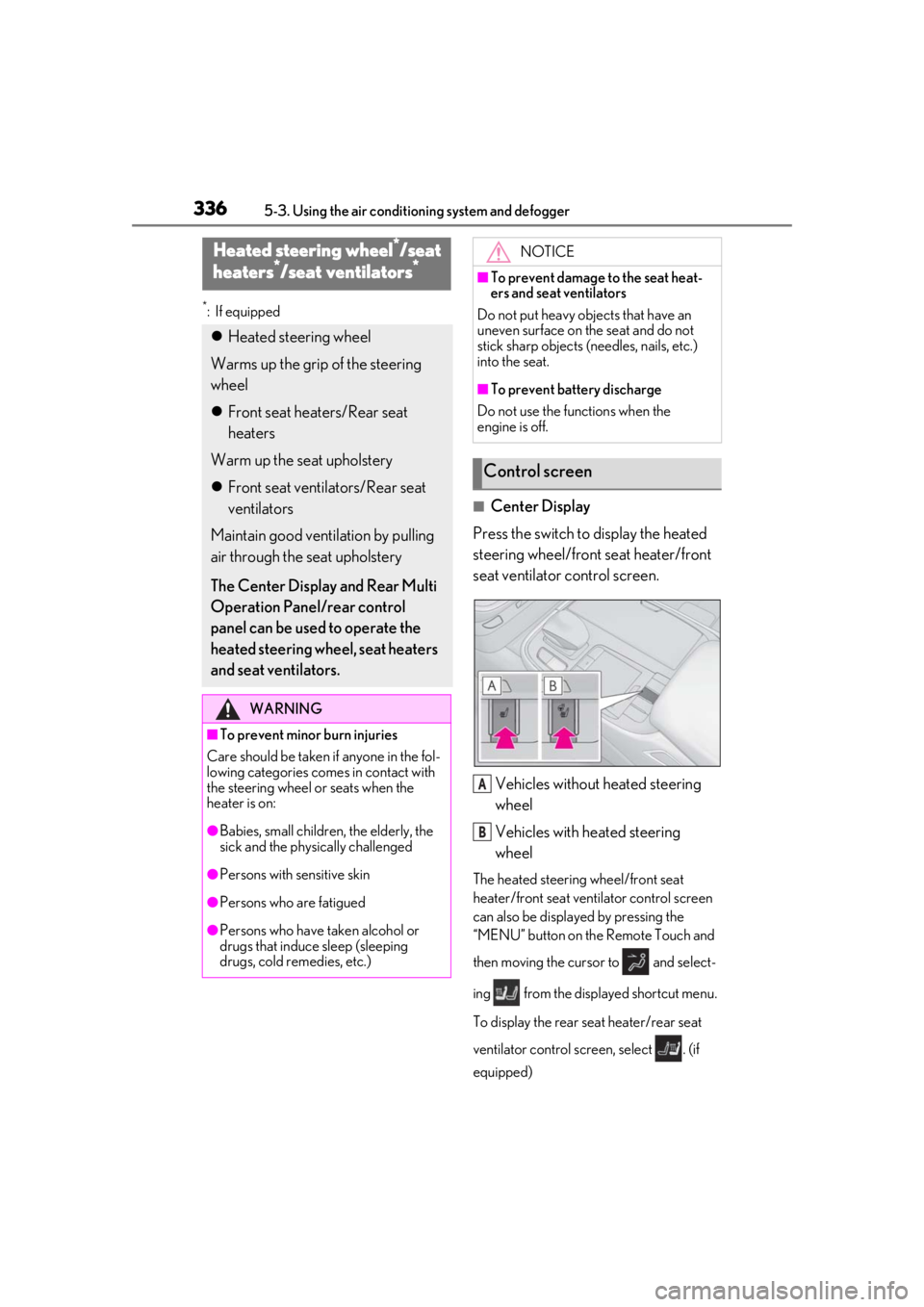
■Center Display
Press the switch to display the heated
steering wheel/front seat heater/front
seat ventilator control screen.
Vehicles without heated steering
wheel
Vehicles with heated steering
wheel
The heated steering wheel/front seat
heater/front seat ventilator control screen
can also be displayed by pressing the
“MENU” button on the Remote Touch and
then moving the cursor to and select-
ing from the displayed shortcut menu.
To display the rear seat heater/rear seat
ventilator control screen, select . (if
equipped)
Heated steering wheel*/seat
heaters*/seat ventilators*
Heated steering wheel
Warms up the grip of the steering
wheel
Front seat heaters/Rear seat
heaters
Warm up the seat upholstery
Front seat ventilators/Rear seat
ventilators
Maintain good ventilation by pulling
air through the seat upholstery
The Center Display and Rear Multi
Operation Panel/rear control
panel can be used to operate the
heated steering wheel, seat heaters
and seat ventilators.
WARNING
■To prevent minor burn injuries
Care should be taken if anyone in the fol-
lowing categories comes in contact with
the steering wheel or seats when the
heater is on:
●Babies, small children, the elderly, the
sick and the phys ically challenged
●Persons with sensitive skin
●Persons who are fatigued
●Persons who have taken alcohol or
drugs that induce sleep (sleeping
drugs, cold remedies, etc.)
NOTICE
■To prevent damage to the seat heat-
ers and seat ventilators
Do not put heavy objects that have an
uneven surface on the seat and do not
stick sharp objects (n eedles, nails, etc.)
into the seat.
■To prevent battery discharge
Do not use the functions when the
engine is off.
Control screen
A
B
Page 338 of 520
3385-3. Using the air conditioning system and defogger
used to operate the rear air conditioning
system if the function is disabled.
( P.333)
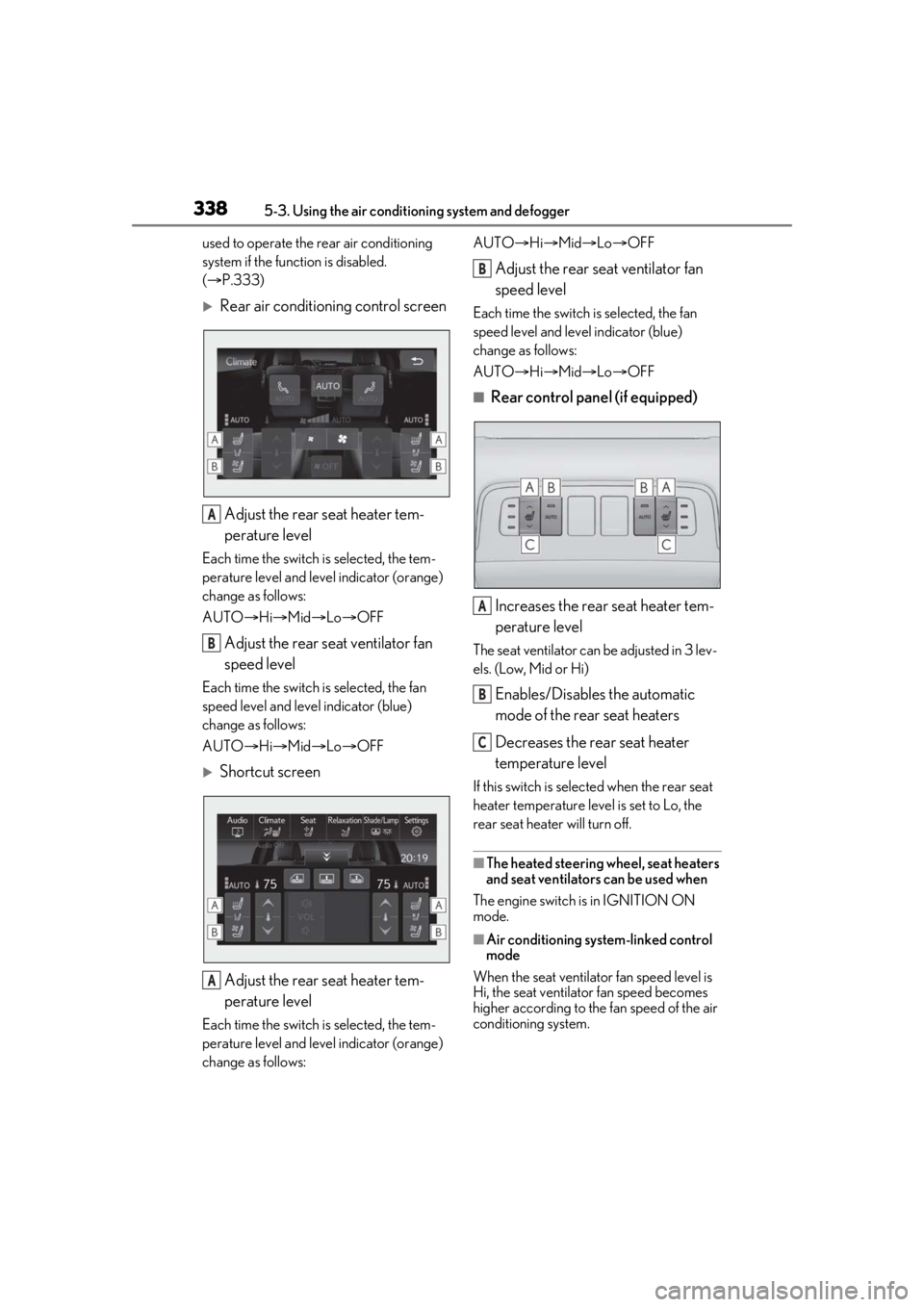
Rear air conditioning control screen
Adjust the rear seat heater tem-
perature level
Each time the switch is selected, the tem-
perature level and leve l indicator (orange)
change as follows:
AUTO Hi Mid Lo OFF
Adjust the rear seat ventilator fan
speed level
Each time the switch is selected, the fan
speed level and leve l indicator (blue)
change as follows:
AUTO Hi Mid Lo OFF
Shortcut screen
Adjust the rear seat heater tem-
perature level
Each time the switch is selected, the tem-
perature level and leve l indicator (orange)
change as follows: AUTO
Hi Mid Lo OFF
Adjust the rear seat ventilator fan
speed level
Each time the switch is selected, the fan
speed level and level indicator (blue)
change as follows:
AUTO Hi Mid Lo OFF
■Rear control panel (if equipped)
Increases the rear seat heater tem-
perature level
The seat ventilator can be adjusted in 3 lev-
els. (Low, Mid or Hi)
Enables/Disables the automatic
mode of the rear seat heaters
Decreases the rear seat heater
temperature level
If this switch is select ed when the rear seat
heater temperature level is set to Lo, the
rear seat heater will turn off.
■The heated steering wheel, seat heaters
and seat ventilators can be used when
The engine switch is in IGNITION ON
mode.
■Air conditioning system-linked control
mode
When the seat ventilator fan speed level is
Hi, the seat ventilato r fan speed becomes
higher according to the fan speed of the air
conditioning system.
A
B
A
B
A
B
C
Page 340 of 520
3405-4. Using the interior lights
5-4.Using the interior lights
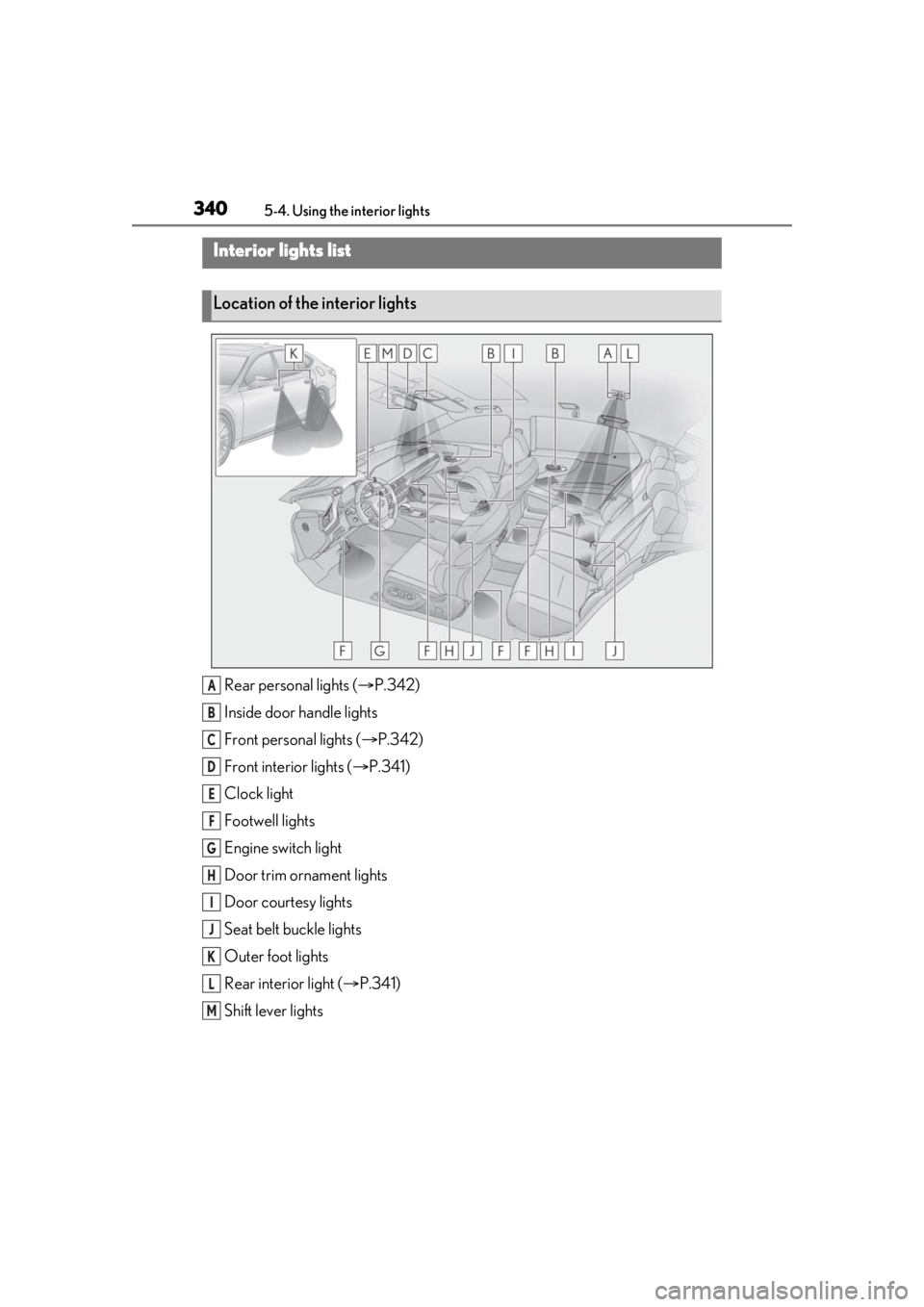
Rear personal lights ( P.342)
Inside door handle lights
Front personal lights ( P.342)
Front interi or lights ( P.341)
Clock light
Footwell lights
Engine switch light
Door trim ornament lights
Door courtesy lights
Seat belt buckle lights
Outer foot lights
Rear interior light ( P.341)
Shift lever lights
Interior lights list
Location of the interior lights
A
B
C
D
E
F
G
H
I
J
K
L
M
Page 343 of 520
3435-4. Using the interior lights
5
Interior features
■Illuminated entry system
The lights automatically turn on/off accord-
ing to the engine switch mode, the pres-
ence of the electronic key, whether the
doors are locked/unlocked, and whether
the doors are opened/closed.
■To prevent the battery from being dis-
charged
If the interior lights remain on when the
engine switch is turned off, the lights will go
off automatically after 20 minutes.
■When front interior light or front per-
sonal lights do not respond as normal
●When water, dirt, et c., have adhered to
the lens surface
●When operated with a wet hand
●When wearing gloves, etc.
■The interior lights may turn on automati-
cally when
If any of the SRS airbags deploy (inflate) or
in the event of a strong rear impact, the inte-
rior lights will turn on automatically.
The interior lights will turn off automatically
after approximately 20 minutes.
The interior lights can be turned off manu-
ally. However, in order to help prevent fur-
ther collisions, it is recommended that they
be left on until safety can be ensured.
(The interior lights may not turn on auto-
matically depending on the force of the
impact and conditions of the collision.)
■Customization
Some functions can be customized.
( P.476)
NOTICE
■To prevent battery discharge
Do not leave the lights on longer than
necessary when the engine is not run-
ning.
■Removing light lenses
Never remove th e lens for the front inte-
rior light and front personal lights. Other-
wise, the lights will be damaged. If a lens
needs to be removed, contact your Lexus
dealer.