display LEXUS LS500 2021 Owners Manual
[x] Cancel search | Manufacturer: LEXUS, Model Year: 2021, Model line: LS500, Model: LEXUS LS500 2021Pages: 520, PDF Size: 9.81 MB
Page 437 of 520
4377-2. Steps to take in an emergency
7
When trouble arises
■If “Maintenance Required Soon” is dis-
played
Indicates that all maintenance according to
the driven distance on the maintenance
schedule
* should be performed soon.
Comes on approximately 4500 miles
(7200 km) after the message has been
reset. If necessary, perform maintenance.
Please reset the message after the mainte-
nance is performed. ( P.374)
*: Refer to the separa te “Scheduled Main-
tenance” or “Owner’s Manual Supple-
ment” for the maintenance interval
applicable to your vehicle.
■If “Maintenance Required Visit Your
Dealer” is displayed
Indicates that all maintenance is required to
correspond to the driven distance on the
maintenance schedule
*.
Comes on approximately 5000 miles
(8000 km) after the message has been
reset. (The indicator will not work properly
unless the message ha s been reset.) Per-
form the necessary maintenance. Please
reset the message after the maintenance is
performed. ( P.374)
*: Refer to the separa te “Scheduled Main-
tenance” or “Owner’s Manual Supple-
ment” for the maintenance interval
applicable to your vehicle.
■If “Oil Maintenance Required Soon” is
displayed
Indicates that the engine oil should be
scheduled to be changed.
Check the engine oil and change it if neces-
sary. After changing the engine oil, make
sure to reset the message. ( P.387)
■If “Oil Maintenance Required” is dis-
played
Indicates that the engine oil should be
changed.
Check and change the en gine oil, and oil fil-
ter by your Lexus deal er. After changing the
engine oil, make sure to reset the message.
( P.387)
■If “Shift System Malfunction Driving
Unavailable” is displayed
There is a malfunction in the shift control
system. Have the vehicle inspected by your
Lexus dealer immediately.
■If a message that indicates the need for
the shift lever operation is displayed
To prevent the shift le ver from being oper-
ated incorrectly or the vehicle from moving
unexpectedly, a message that requires shift-
ing the shift position may be displayed on
the multi-information display. In that case,
follow the instruction of the message and
shift the shift position.
■If a message that indicates the need for
visiting your Lexus dealer is displayed
The system or part shown on the
multi-information display is malfunctioning.
Have the vehicle inspected by your Lexus
dealer immediately.
■If a message that indicates the need for
referring to Owner’ s Manual is dis-
played
●If any of the following messages are
shown on the multi-information display,
follow the instructions.
• “Engine Coolant Temp High” ( P.449)
•“Battery Low” ( P.444)
• “Transmission Fluid Temp High” ( P.179)
●If any of the following messages are
shown on the multi-info rmation display, it
may indicate a malfunction. Have the
vehicle inspected by your Lexus dealer
immediately.
• “Access System with Elec. Key Malfunc- tion”
• “Shift System Malfunction”
• “P Switch Malfunction”
• “Shift System Unavailable”
●If any of the following messages are
shown on the multi-info rmation display, it
may indicate a malfun ction. Immediately
stop the vehicle and contact your Lexus
dealer.
• “Braking Power Low”
• “Charging System Malfunction”
• “Oil Pressure Low”
Page 438 of 520
4387-2. Steps to take in an emergency
Take your vehicle to the nearest Lexus
dealer or authorized tire dealer as
soon as possible if any tire goes flat.
For XXX/XXRXX size tires
The vehicle can be driven for a maximum
of 50 miles (80 km) at a speed below 50
mph (80 km/h) after the tire pressure
warning light comes on. (P.431)
For XXX/XXRFXX size tires
The vehicle can be driven for a maximum
of 100 miles (160 km) at a speed below 50
mph (80 km/h) after the tire pressure
warning light comes on. ( P.431)
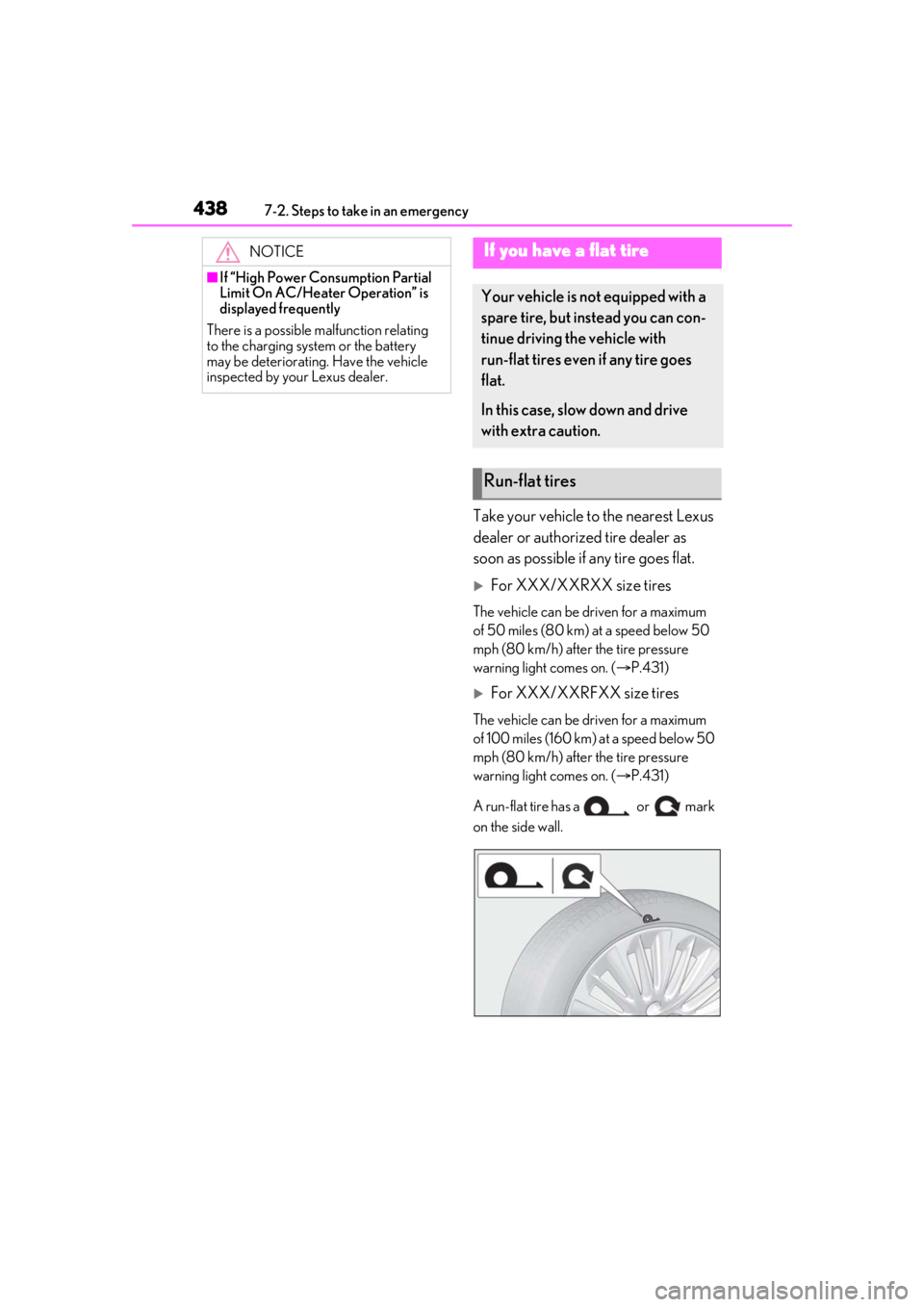
A run-flat tire has a or mark
on the side wall.
NOTICE
■If “High Power Consumption Partial
Limit On AC/Heater Operation” is
displayed frequently
There is a possible malfunction relating
to the charging system or the battery
may be deteriorating. Have the vehicle
inspected by your Lexus dealer.
If you have a flat tire
Your vehicle is not equipped with a
spare tire, but instead you can con-
tinue driving the vehicle with
run-flat tires even if any tire goes
flat.
In this case, slow down and drive
with extra caution.
Run-flat tires
Page 443 of 520
4437-2. Steps to take in an emergency
7
When trouble arises
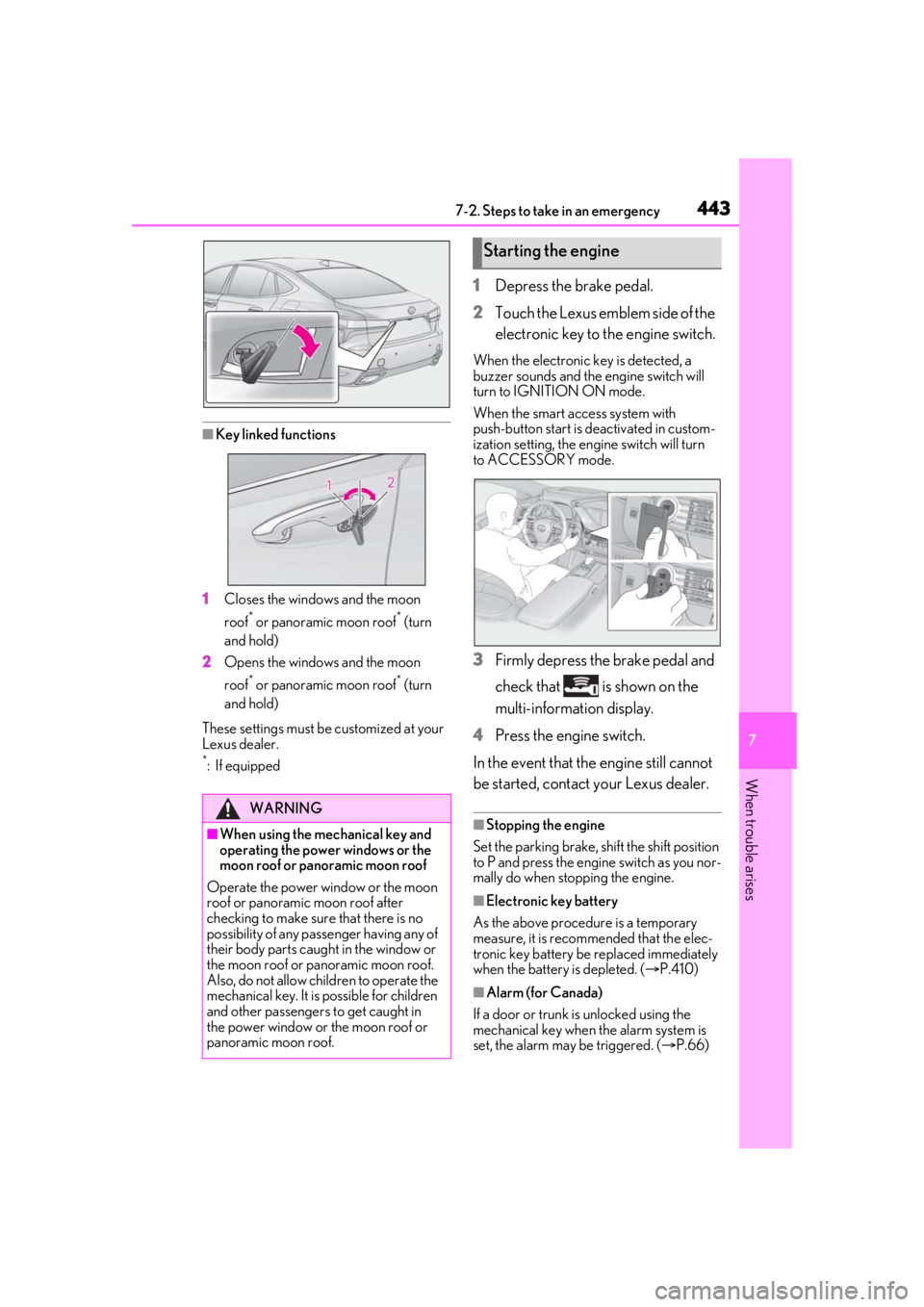
■Key linked functions
1 Closes the windows and the moon
roof
* or panoramic moon roof* (turn
and hold)
2 Opens the windows and the moon
roof
* or panoramic moon roof* (turn
and hold)
These settings must be customized at your
Lexus dealer.
*:If equipped
1 Depress the brake pedal.
2 Touch the Lexus emblem side of the
electronic key to the engine switch.
When the electronic key is detected, a
buzzer sounds and the engine switch will
turn to IGNITION ON mode.
When the smart access system with
push-button start is deactivated in custom-
ization setting, the engine switch will turn
to ACCESSORY mode.
3 Firmly depress the brake pedal and
check that is shown on the
multi-information display.
4 Press the engine switch.
In the event that the engine still cannot
be started, contact your Lexus dealer.
■Stopping the engine
Set the parking brake, shift the shift position
to P and press the engine switch as you nor-
mally do when stopping the engine.
■Electronic key battery
As the above procedure is a temporary
measure, it is recommended that the elec-
tronic key battery be replaced immediately
when the battery is depleted. ( P.410)
■Alarm (for Canada)
If a door or trunk is unlocked using the
mechanical key when the alarm system is
set, the alarm may be triggered. ( P.66)
WARNING
■When using the mechanical key and
operating the power windows or the
moon roof or panoramic moon roof
Operate the power window or the moon
roof or panoramic moon roof after
checking to make sure that there is no
possibility of any passe nger having any of
their body parts caught in the window or
the moon roof or panoramic moon roof.
Also, do not allow ch ildren to operate the
mechanical key. It is possible for children
and other passengers to get caught in
the power window or the moon roof or
panoramic moon roof.
Starting the engine
Page 449 of 520
4497-2. Steps to take in an emergency
7
When trouble arises
1Stop the vehicle in a safe place and
turn off the air conditioning system,
and then stop the engine.
2 If you see steam:
Carefully lift the hood after the
steam subsides.
If you do not see steam:
Carefully lift the hood.
3 After the engine has cooled down
sufficiently, inspect the hoses and
WARNING
■After recharging the battery
Have the battery inspected at your Lexus
dealer as soon as possible.
If the battery is dete riorating, continued
use may cause the battery to emit a mal-
odorous gas, which may be detrimental
to the health of passengers.
■When replacing the battery
●When the vent plug and indicator are
close to the hold down clamp, the bat-
tery fluid (sulfuric acid) may leak.
●For information regarding battery
replacement, contact your Lexus
dealer.
●After replacing, securely attach the
exhaust hose and exhaust hole plug to
the exhaust hole of the replaced bat-
tery. If not properly installed, gases
(hydrogen) may leak into the vehicle
interior, and there is the possible dan-
ger of the gas igniting and exploding.
NOTICE
■When handling jumper cables
When connecting the jumper cables,
ensure that they do not become entan-
gled in the cooling fan or engine drive
belt.
■To prevent damaging the vehicle
The exclusive jump starting terminal is to
be used when charging the battery from
another vehicle in an emergency. It can-
not be used to jump start another vehicle.
If your vehicle overheats
The following may indicate that
your vehicle is overheating.
The engine coolant temperature
gauge ( P.75, 78) is in the red
zone or a loss of engine power is
experienced. (For example, the
vehicle speed does not increase.)
“Engine Coolant Temp High Stop
in a Safe Place See Owner’s
Manual” is shown on the
multi-information display.
Steam comes out from under the
hood.
Correction procedures
Page 476 of 520
4768-2. Customization
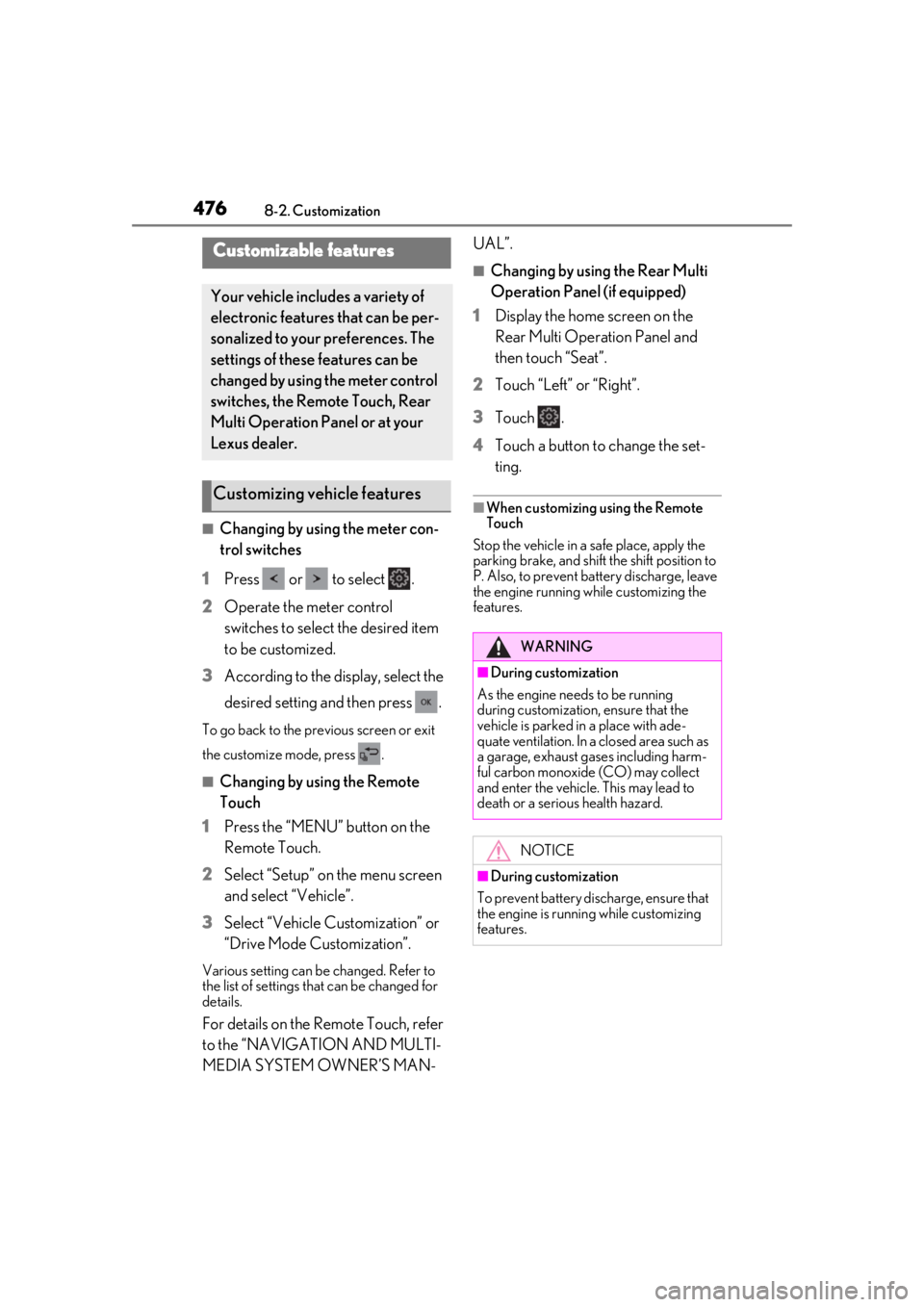
8-2.Customization
■Changing by using the meter con-
trol switches
1 Press or to select .
2 Operate the meter control
switches to select the desired item
to be customized.
3 According to the display, select the
desired setting and then press .
To go back to the previous screen or exit
the customize mode, press .
■Changing by using the Remote
Touch
1 Press the “MENU” button on the
Remote Touch.
2 Select “Setup” on the menu screen
and select “Vehicle”.
3 Select “Vehicle Customization” or
“Drive Mode Customization”.
Various setting can be changed. Refer to
the list of settings that can be changed for
details.
For details on the Remote Touch, refer
to the “NAVIGATION AND MULTI-
MEDIA SYSTEM OWNER’S MAN- UAL”.
■Changing by using the Rear Multi
Operation Panel (if equipped)
1 Display the home screen on the
Rear Multi Operation Panel and
then touch “Seat”.
2 Touch “Left” or “Right”.
3 Touch .
4 Touch a button to change the set-
ting.
■When customizing using the Remote
Touch
Stop the vehicle in a safe place, apply the
parking brake, and shift the shift position to
P. Also, to prevent battery discharge, leave
the engine running while customizing the
features.
Customizable features
Your vehicle includes a variety of
electronic features that can be per-
sonalized to your preferences. The
settings of these features can be
changed by using the meter control
switches, the Remote Touch, Rear
Multi Operation Panel or at your
Lexus dealer.
Customizing vehicle features
WARNING
■During customization
As the engine needs to be running
during customization, ensure that the
vehicle is parked in a place with ade-
quate ventilation. In a closed area such as
a garage, exhaust gases including harm-
ful carbon monoxide (CO) may collect
and enter the vehicle. This may lead to
death or a serious health hazard.
NOTICE
■During customization
To prevent battery discharge, ensure that
the engine is running while customizing
features.
Page 477 of 520
4778-2. Customization
8
Vehicle specifications
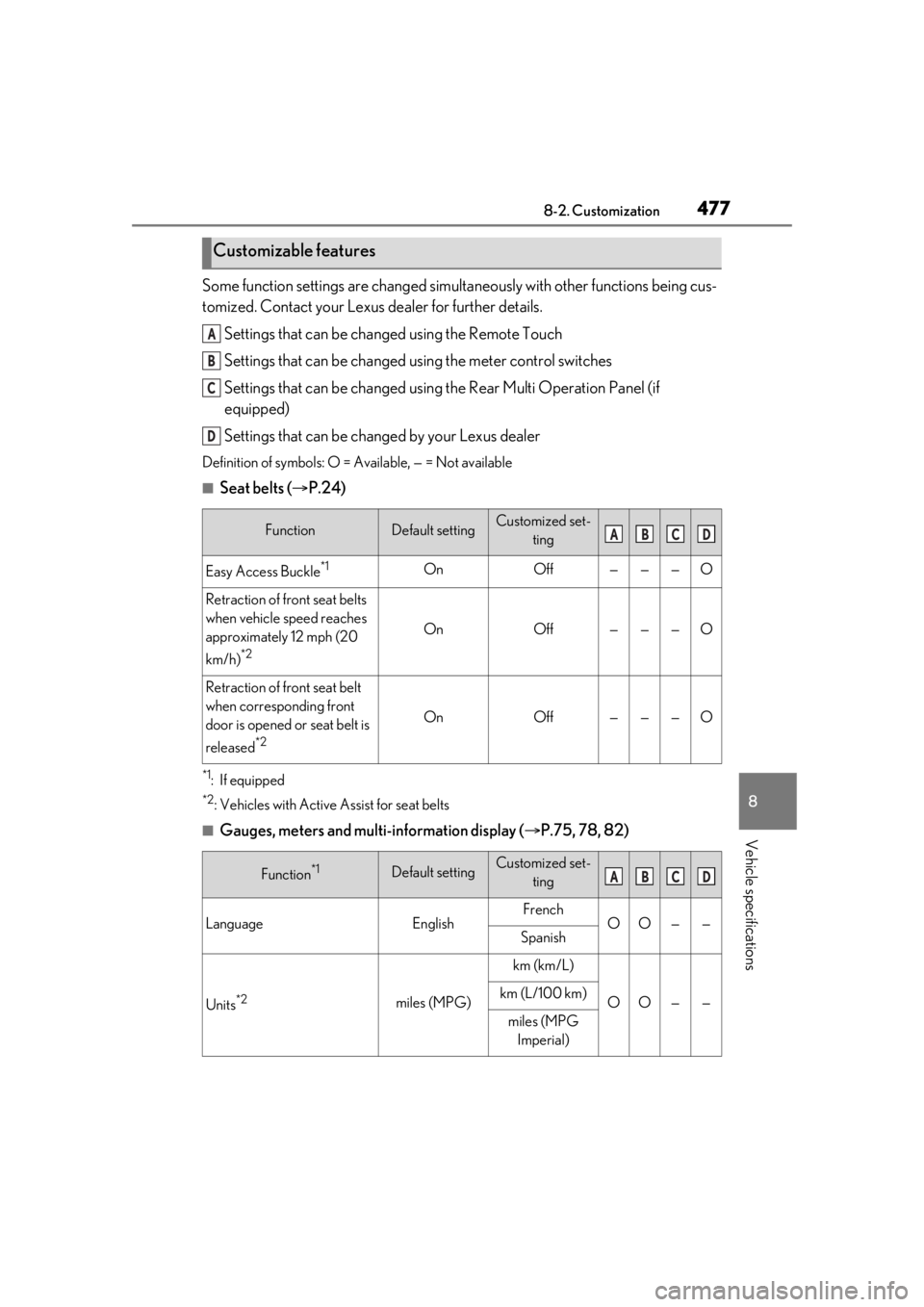
Some function settings are changed simultaneously with other functions being cus-
tomized. Contact your Lexus dealer for further details.
Settings that can be changed using the Remote Touch
Settings that can be changed using the meter control switches
Settings that can be changed using the Rear Multi Operation Panel (if
equipped)
Settings that can be changed by your Lexus dealer
Definition of symbols: O = Available, — = Not available
■Seat belts ( P.24)
*1: If equipped
*2: Vehicles with Active Assist for seat belts
■Gauges, meters and multi-information display ( P.75, 78, 82)
Customizable features
FunctionDefault settingCustomized set-
ting
Easy Access Buckle*1OnOff———O
Retraction of front seat belts
when vehicle speed reaches
approximately 12 mph (20
km/h)
*2
OnOff———O
Retraction of front seat belt
when corresponding front
door is opened or seat belt is
released
*2
OnOff———O
Function*1Default settingCustomized set-ting
LanguageEnglishFrenchOO——Spanish
Units*2miles (MPG)
km (km/L)
OO——km (L/100 km)
miles (MPG Imperial)
A
B
C
D
ABCD
ABCD
Page 478 of 520
4788-2. Customization
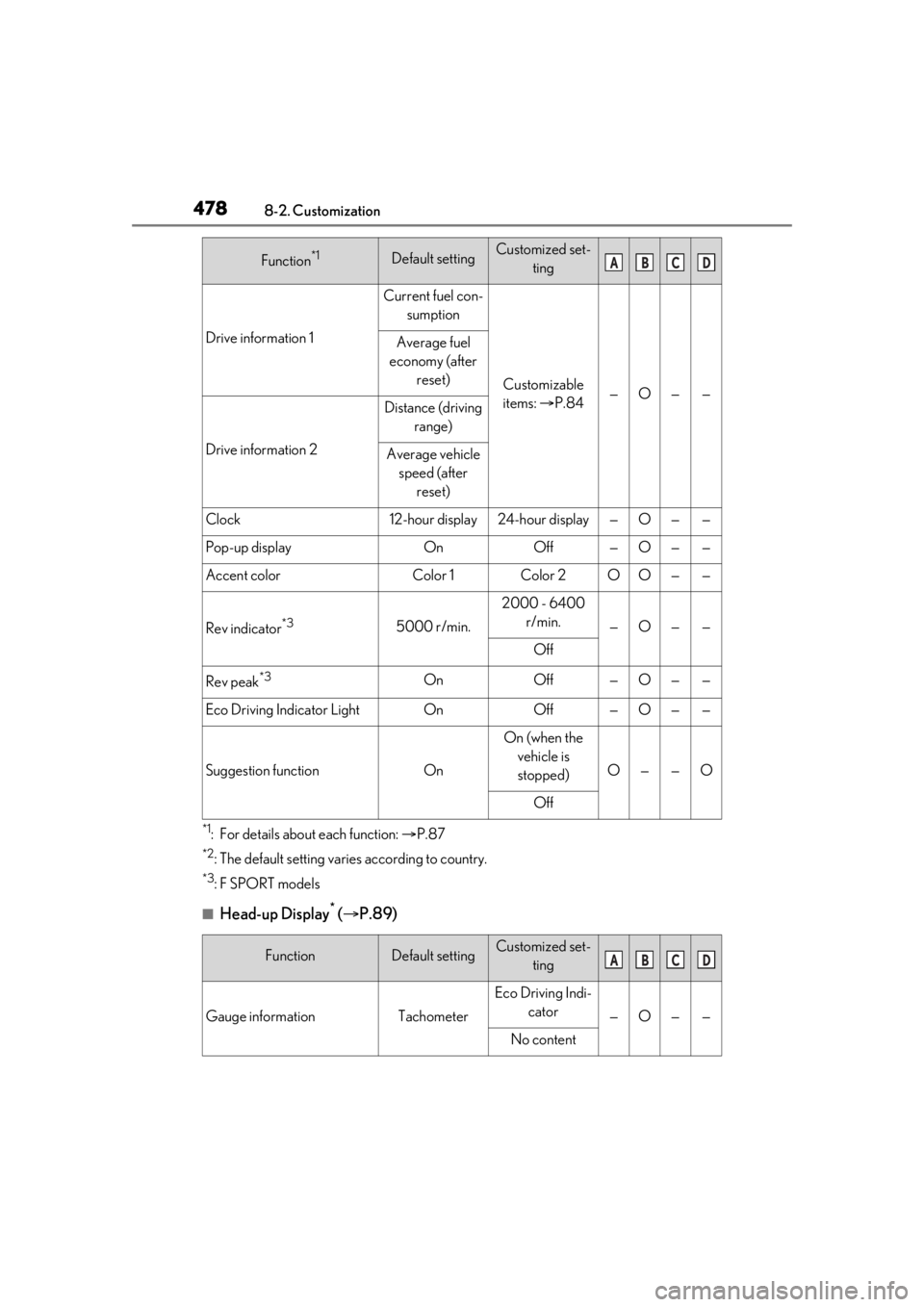
*1: For details about each function: P.87
*2: The default setting varies according to country.
*3:F SPORT models
■Head-up Display* ( P.89)
Drive information 1
Current fuel con-
sumption
Customizable
items: P.84—O——
Average fuel
economy (after reset)
Drive information 2
Distance (driving range)
Average vehicle speed (after reset)
Clock12-hour display24-hour display—O——
Pop-up displayOnOff—O——
Accent colorColor 1Color 2OO——
Rev indicator*35000 r/min.
2000 - 6400 r/min.
—O——
Off
Rev peak*3OnOff—O——
Eco Driving Indicator LightOnOff—O——
Suggestion functionOn
On (when the vehicle is stopped)
O——O
Off
FunctionDefault settingCustomized set- ting
Gauge informationTachometer
Eco Driving Indi-cator
—O——
No content
Function*1Default settingCustomized set- tingABCD
ABCD
Page 485 of 520
4858-2. Customization
8
Vehicle specifications
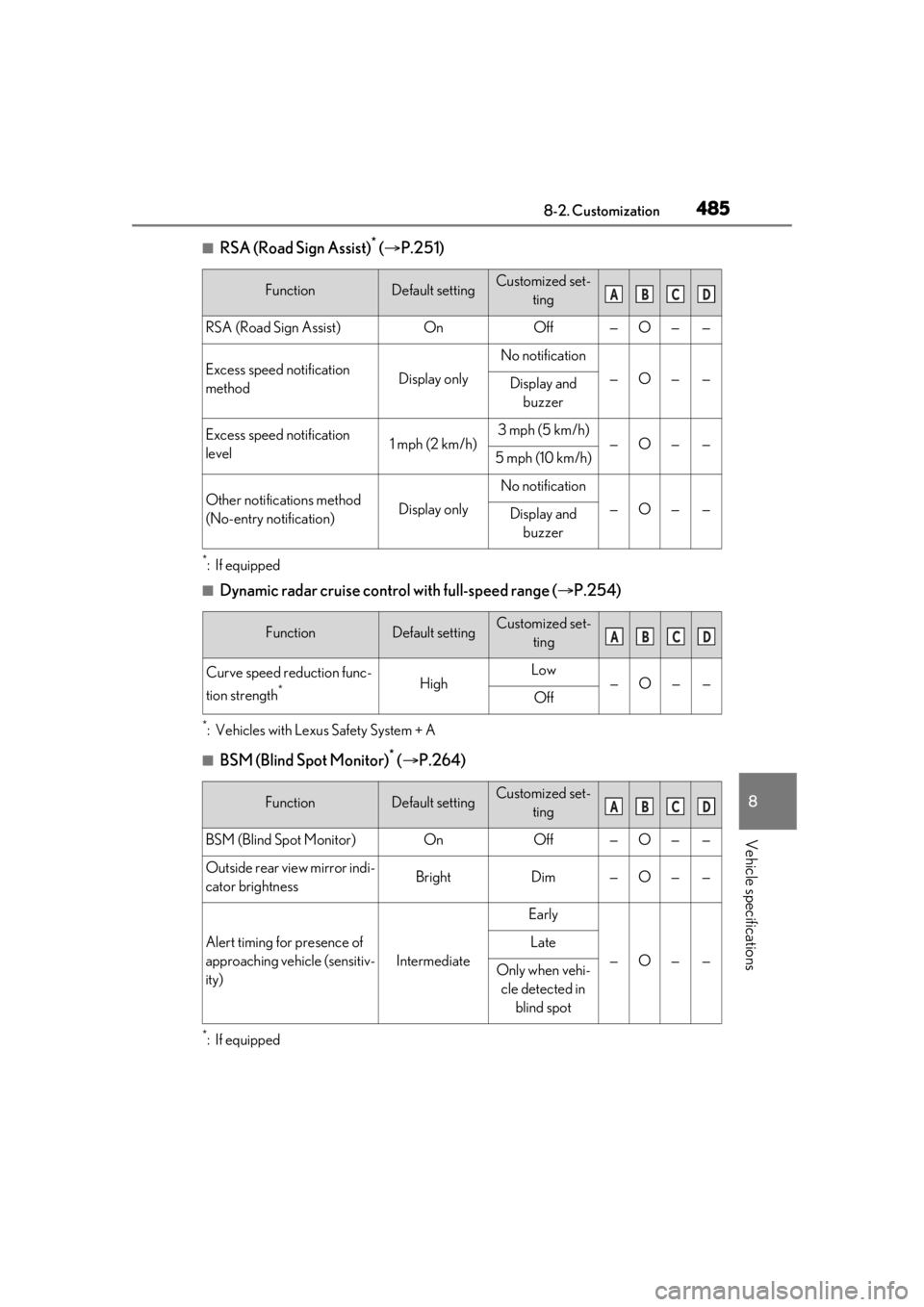
■RSA (Road Sign Assist)* ( P.251)
*:If equipped
■Dynamic radar cruise contro l with full-speed range (P.254)
*: Vehicles with Lexus Safety System + A
■BSM (Blind Spot Monitor)* ( P.264)
*:If equipped
FunctionDefault settingCustomized set-
ting
RSA (Road Sign Assist)OnOff—O——
Excess speed notification
methodDisplay only
No notification
—O——Display and buzzer
Excess speed notification
level1 mph (2 km/h)3 mph (5 km/h)—O——5 mph (10 km/h)
Other notifications method
(No-entry notification)Display only
No notification
—O——Display and buzzer
FunctionDefault settingCustomized set- ting
Curve speed reduction func-
tion strength
*HighLow—O——Off
FunctionDefault settingCustomized set- ting
BSM (Blind Spot Monitor)OnOff—O——
Outside rear view mirror indi-
cator brightnessBrightDim—O——
Alert timing for presence of
approaching vehicle (sensitiv-
ity)
Intermediate
Early
—O——
Late
Only when vehi-cle detected in blind spot
ABCD
ABCD
ABCD
Page 489 of 520
4898-2. Customization
8
Vehicle specifications
■Vehicle customization
●When the smart access system with
push-button start is off, the entry unlock
function cannot be customized.
●When the doors remain closed after
unlocking the doors and the timer acti-
vated automatic door lock function acti-
vates, signals will be generated in
accordance with the operation buzzer
volume and operational signal (Emer-
gency flashers) function settings.
●Some settings can be changed using a
switch or the audio system screen. If a
setting is changed using a switch, the
changed setting will not be reflected on
the audio system screen until the engine
switch is turned off and then to IGNI-
TION ON mode.
■Clock settings screen
If the clock adjustment screen is displayed
continuously when attempting to change
the clock settings, the system may be mal-
functioning. Have the vehicle inspected by
your Lexus dealer.
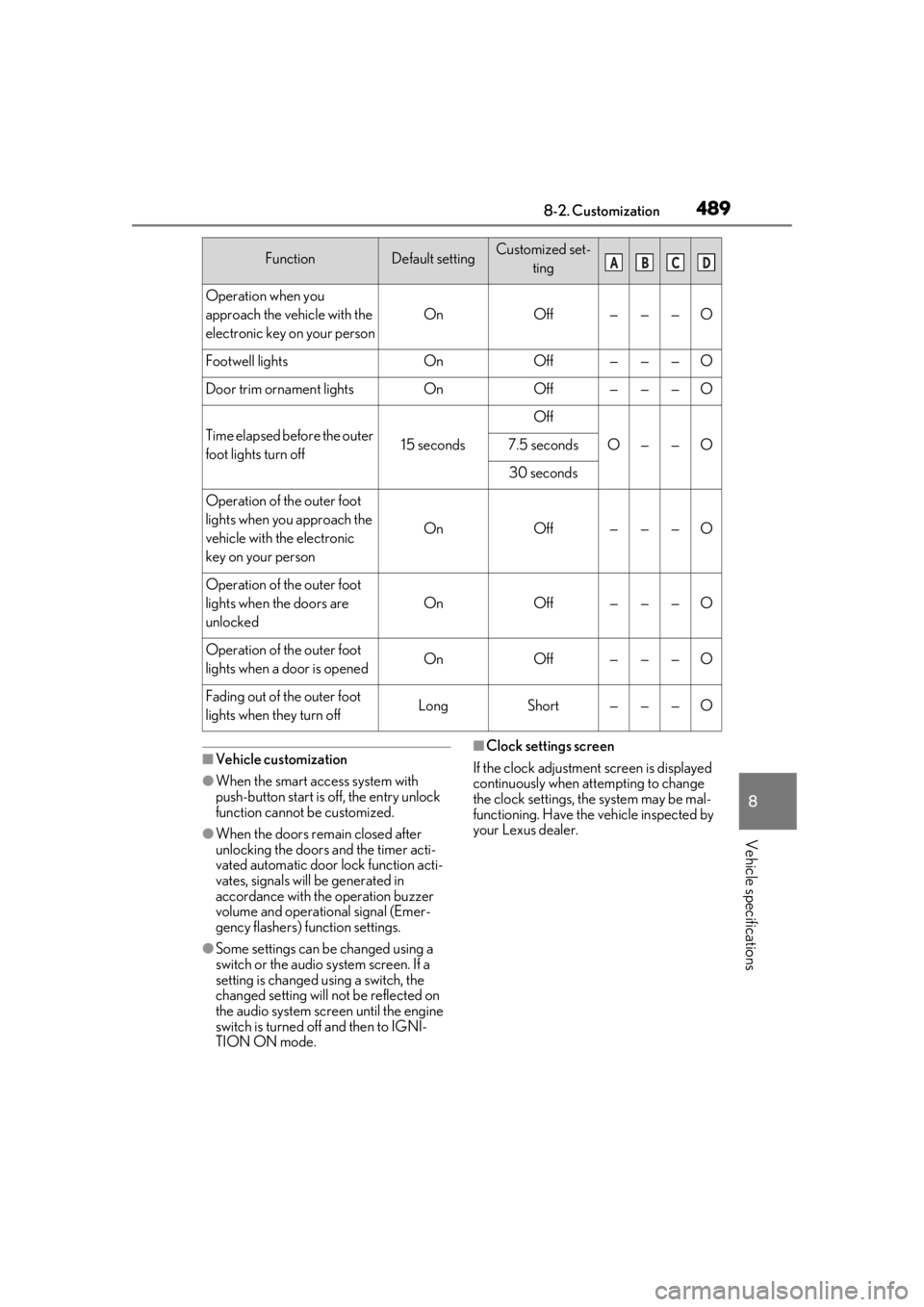
Operation when you
approach the vehicle with the
electronic key on your person
OnOff———O
Footwell lightsOnOff———O
Door trim ornament lightsOnOff———O
Time elapsed before the outer
foot lights turn off15 seconds
Off
O——O7.5 seconds
30 seconds
Operation of the outer foot
lights when you approach the
vehicle with the electronic
key on your person
OnOff———O
Operation of the outer foot
lights when the doors are
unlocked
OnOff———O
Operation of the outer foot
lights when a door is openedOnOff———O
Fading out of the outer foot
lights when they turn offLongShort———O
FunctionDefault settingCustomized set-
tingABCD
Page 505 of 520
505What to do if... (Troubleshooting)
In this case, the engine can be started in a
temporary way. (P.443)
Is the battery discharged?
( P.444)
It is locked automatically to prevent
theft of the vehicle. ( P.174)
Is the window lock switch pressed?
The power window except for the one at
the driver’s seat cannot be operated if the
window lock switch is pressed. ( P.155)
The auto power off function will be
operated if the vehicle is left in
ACCESSORY mode for a period of
time. ( P.177)
The seat belt reminder light is flash-
ing
Are the driver and the front passenger
wearing the seat belts? ( P.430)
The parking brake indicator is on
Is the parking brake released? ( P.186)
Depending on the situation, other
types of warning buzzer may also sound. (
P.427, 436)
Did anyone inside the vehicle open
a door during setting the alarm?
The sensor detects it and the alarm sounds.
( P.66)
Do one of the following to deactivate
or stop the alarms:
Except for Canada: Unlock the
doors.
Except for Canada: Open the trunk.
For Canada: Unlock the doors or
open the trunk using the entry func-
tion or wireless remote control.
Turn the engine switch to ACCES-
SORY or IGNITION ON mode, or
start the engine. (The alarm will be
deactivated or stopped after a few
seconds.)
Is the message displayed on the
multi-information display?
Check the message on the multi-informa-
tion display. ( P.436)
When a warning light turns on or a
warning message is displayed, refer
to P.427, 436.
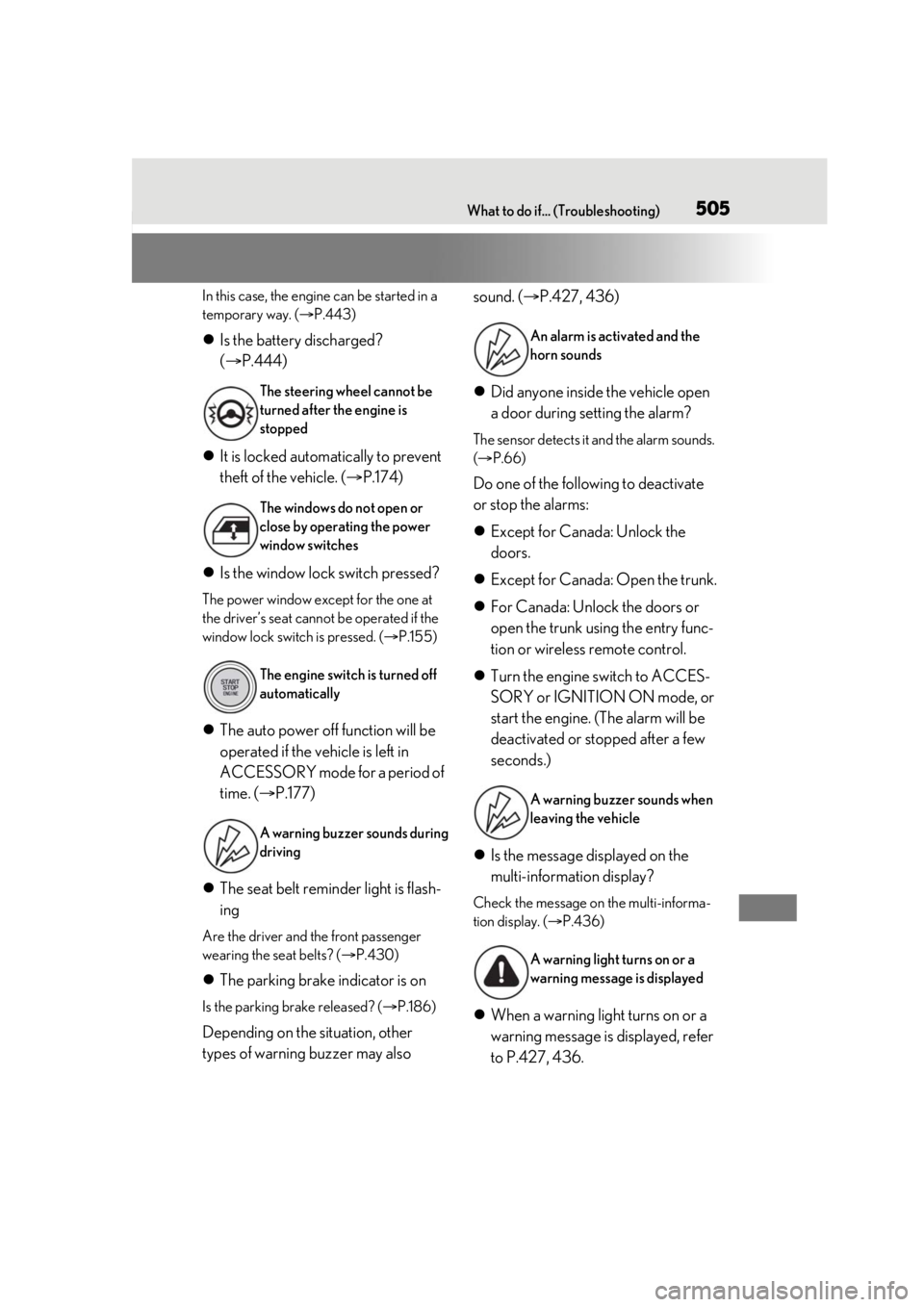
The steering wheel cannot be
turned after the engine is
stopped
The windows do not open or
close by operating the power
window switches
The engine switch is turned off
automatically
A warning buzzer sounds during
driving
An alarm is activated and the
horn sounds
A warning buzzer sounds when
leaving the vehicle
A warning light turns on or a
warning message is displayed