buttons LEXUS LS500 2021 User Guide
[x] Cancel search | Manufacturer: LEXUS, Model Year: 2021, Model line: LS500, Model: LEXUS LS500 2021Pages: 520, PDF Size: 9.81 MB
Page 129 of 520
1293-3. Adjusting the seats
3
Before driving
met, the preset buttons will be grayed out.
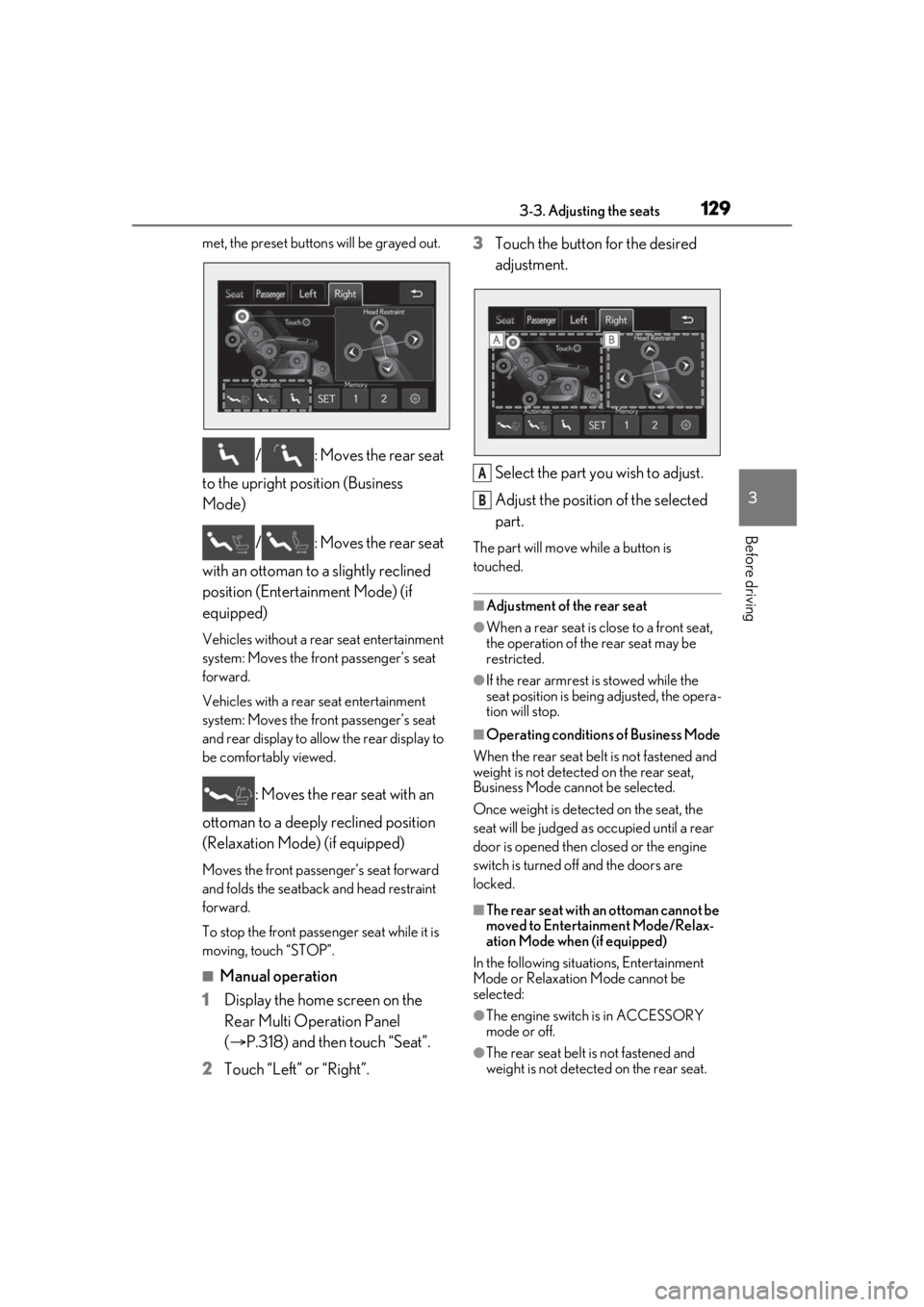
/ : Moves the rear seat
to the upright position (Business
Mode)
/ : Moves the rear seat
with an ottoman to a slightly reclined
position (Entertainment Mode) (if
equipped)
Vehicles without a rear seat entertainment
system: Moves the front passenger’s seat
forward.
Vehicles with a rear seat entertainment
system: Moves the front passenger’s seat
and rear display to allow the rear display to
be comfortably viewed.
: Moves the rear seat with an
ottoman to a deeply reclined position
(Relaxation Mode) (if equipped)
Moves the front passen ger’s seat forward
and folds the seatback and head restraint
forward.
To stop the front passenger seat while it is
moving, touch “STOP”.
■Manual operation
1 Display the home screen on the
Rear Multi Operation Panel
(P.318) and then touch “Seat”.
2 Touch “Left” or “Right”. 3
Touch the button for the desired
adjustment.
Select the part you wish to adjust.
Adjust the position of the selected
part.
The part will move while a button is
touched.
■Adjustment of the rear seat
●When a rear seat is close to a front seat,
the operation of the rear seat may be
restricted.
●If the rear armrest is stowed while the
seat position is bein g adjusted, the opera-
tion will stop.
■Operating conditions of Business Mode
When the rear seat belt is not fastened and
weight is not detected on the rear seat,
Business Mode cannot be selected.
Once weight is detected on the seat, the
seat will be judged as occupied until a rear
door is opened then closed or the engine
switch is turned off and the doors are
locked.
■The rear seat with an ottoman cannot be
moved to Entertainment Mode/Relax-
ation Mode when (if equipped)
In the following situations, Entertainment
Mode or Relaxation Mode cannot be
selected:
●The engine switch is in ACCESSORY
mode or off.
●The rear seat belt is not fastened and
weight is not detected on the rear seat.
A
B
Page 134 of 520
1343-3. Adjusting the seats
■Operation of the power easy access sys-
tem
●When exiting the vehicle, the power easy
access system may not operate if the seat
is already in the rearmost or uppermost
position or close to the rear seat.
●If the seat position is adjusted during
power easy access sy stem operation, the
automatic operation w ill stop. (The seat
will change to manual operation.)
●If the seat position is adjusted during or
after the power easy access system oper-
ation when the driver is exiting the vehi-
cle, the power easy access system will not
operate when entering the vehicle.
■Seat cushion side bo lster adjustment (if
equipped)
If the seat cushion si de bolsters have been
lowered, when the front door is closed, the
seat cushion side bolsters will move to their
default position.
If the seat is adjusted while the seat cushion
side bolsters are moving to the default posi-
tion, their movement will be temporarily
suspended. (The seat cushion side bolsters
will move to the default position after a cer-
tain amount of time.)
■Customization
Some functions can be customized.
( P.476)
1 Turn the engine switch to IGNI-
TION ON mode.
2 Check that the shift position is in P.
3 Adjust the driver’s seat, steering
wheel, outside rear view mirrors
and head-up display (if equipped)
to the desired positions.
4 While pressing the “SET” button, or
within 3 seconds after the “SET” button is pressed, press button “1”,
“2” or “3” until the buzzer sounds.
If the selected button has already been
preset, the previously recorded position
will be overwritten.
When the driver’s seat adjustment
switches are in front passenger mode
(
P.123), the position of the driver’s seat
cannot be registered.
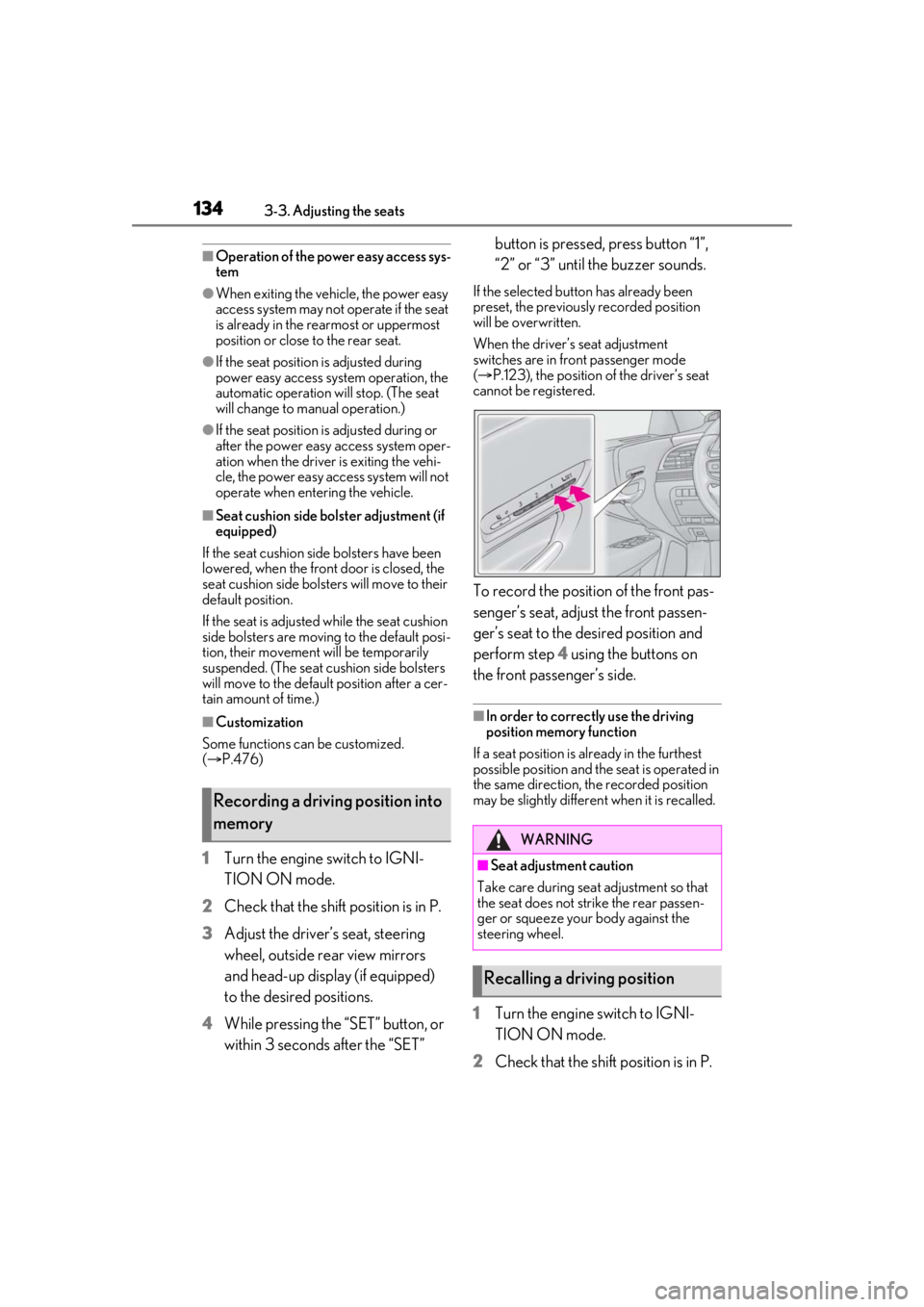
To record the position of the front pas-
senger’s seat, adjust the front passen-
ger’s seat to the desired position and
perform step 4 using the buttons on
the front passenger’s side.
■In order to correctly use the driving
position memory function
If a seat position is already in the furthest
possible position and the seat is operated in
the same direction, the recorded position
may be slightly differen t when it is recalled.
1Turn the engine switch to IGNI-
TION ON mode.
2 Check that the shift position is in P.
Recording a driving position into
memory
WARNING
■Seat adjustme nt caution
Take care during seat adjustment so that
the seat does not strike the rear passen-
ger or squeeze your body against the
steering wheel.
Recalling a driving position
Page 135 of 520
1353-3. Adjusting the seats
3
Before driving
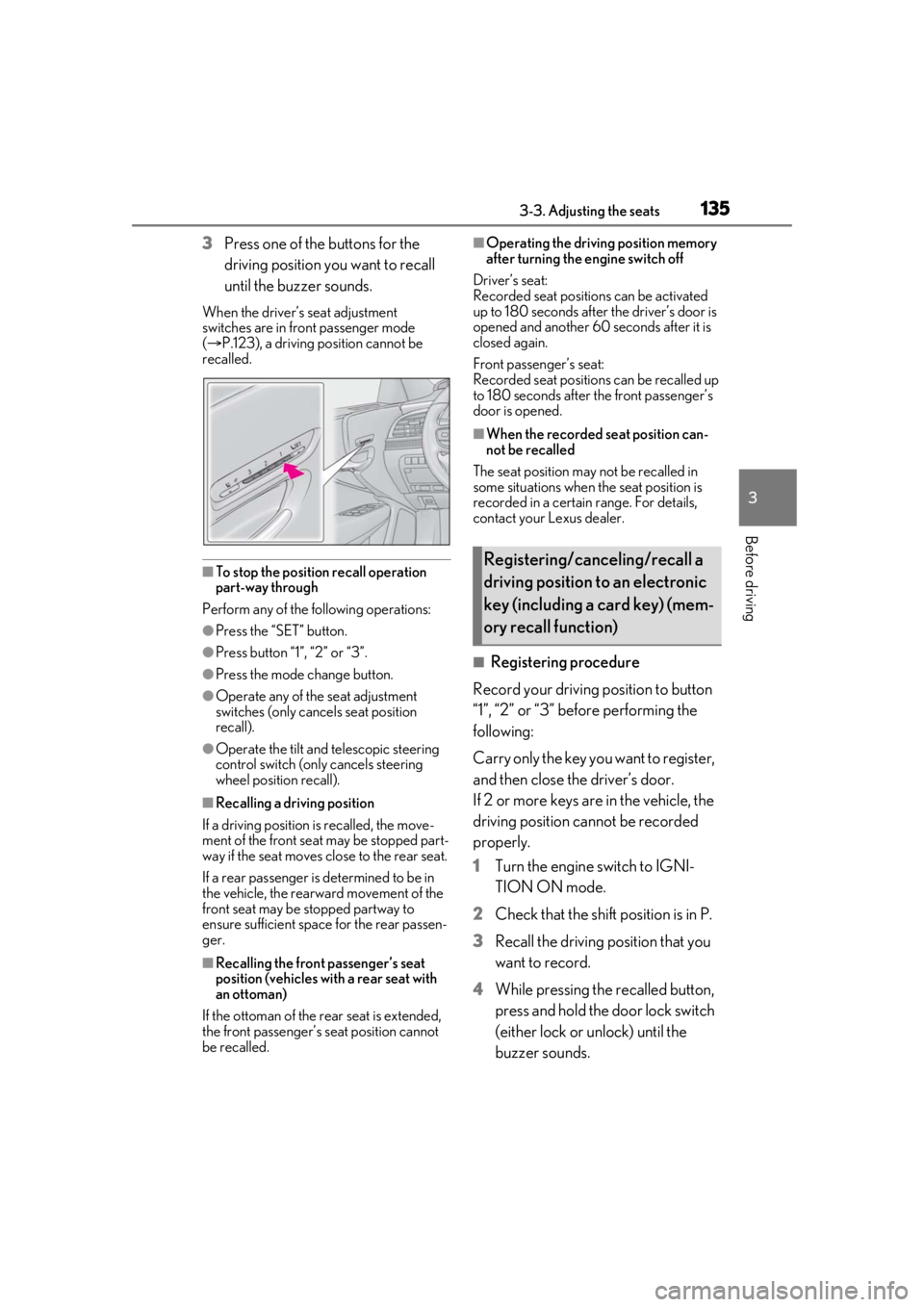
3Press one of the buttons for the
driving position you want to recall
until the buzzer sounds.
When the driver’s seat adjustment
switches are in front passenger mode
( P.123), a driving position cannot be
recalled.
■To stop the position recall operation
part-way through
Perform any of the fo llowing operations:
●Press the “SET” button.
●Press button “1”, “2” or “3”.
●Press the mode change button.
●Operate any of the seat adjustment
switches (only cancels seat position
recall).
●Operate the tilt and telescopic steering
control switch (only cancels steering
wheel position recall).
■Recalling a driving position
If a driving position is recalled, the move-
ment of the front seat may be stopped part-
way if the seat moves close to the rear seat.
If a rear passenger is determined to be in
the vehicle, the rearward movement of the
front seat may be stopped partway to
ensure sufficient space for the rear passen-
ger.
■Recalling the front passenger’s seat
position (vehicles with a rear seat with
an ottoman)
If the ottoman of the rear seat is extended,
the front passenger’s seat position cannot
be recalled.
■Operating the driving position memory
after turning the engine switch off
Driver’s seat:
Recorded seat positions can be activated
up to 180 seconds after the driver’s door is
opened and another 60 seconds after it is
closed again.
Front passenger’s seat:
Recorded seat positions can be recalled up
to 180 seconds after the front passenger’s
door is opened.
■When the recorded seat position can-
not be recalled
The seat position may not be recalled in
some situations when the seat position is
recorded in a certain range. For details,
contact your Lexus dealer.
■Registering procedure
Record your driving position to button
“1”, “2” or “3” before performing the
following:
Carry only the key yo u want to register,
and then close the driver’s door.
If 2 or more keys are in the vehicle, the
driving position cannot be recorded
properly.
1 Turn the engine switch to IGNI-
TION ON mode.
2 Check that the shift position is in P.
3 Recall the driving position that you
want to record.
4 While pressing the recalled button,
press and hold the door lock switch
(either lock or unlock) until the
buzzer sounds.
Registering/canceling/recall a
driving position to an electronic
key (including a card key) (mem-
ory recall function)
Page 137 of 520
1373-3. Adjusting the seats
3
Before driving
*:If equipped
1Turn the engine switch to IGNI-
TION ON mode.
2 Display the home screen on the
Rear Multi Operation Panel
(P.318) and then touch “Seat”.
3 Touch “Left” or “Right”.
4 Adjust the rear seat to the desired
position and then touch “SET”.
5 Touch “1” or “2”.
If the preset is being used, the previously
recorded seat position will be overwritten.
■In order to correctly use the position
memory function
If a seat position is already in the furthest
possible position and the seat is operated in
the same direction, the recorded position
may be slightly differen t when it is recalled.
1Turn the engine switch to IGNI-
TION ON mode. 2
Display the home screen on the
Rear Multi Operation Panel
(P.318) and then touch “Seat”.
3 Touch “Left” or “Right”.
4 Touch “1” or “2”.
When the operating conditions are not
met, the buttons will be grayed out.
To stop the operation touch “STOP”.
If the seat is adjust ed while a memorized
position is being recalled, the automatic
operation will stop. (The seat will change to
manual operation.)
■Operating condition
The weight of an occupant is detected on
the rear seat or the rear seat belt is fas-
tened.
Once weight is detected on the seat, the
seat will be judged as occupied until the
rear door is opened then closed or the
engine switch is turned off.
■Recalling a rear seat position
If a memorized rear seat position is recalled,
the seat may stop part-way to ensure suffi-
cient space for the rear passenger.
■Recalling the ottoman position (if
equipped)
When a seat position is recalled, the otto-
man will not raise or extend. The ottoman
position can only be recalled if the memo-
rized position is lower and shorter than the
current position.
Rear seat position memory*
The rear seat position can be mem-
orized and recalled with the touch
of a button.
Recording a position into mem-
ory
WARNING
■Seat adjustment caution
Take care during seat adjustment so that
the rear passengers do not strike the
front seats.
Recalling the memorized posi-
tion
Page 314 of 520
3145-1. Remote Touch/Display
5-1.Remote Touch/Display
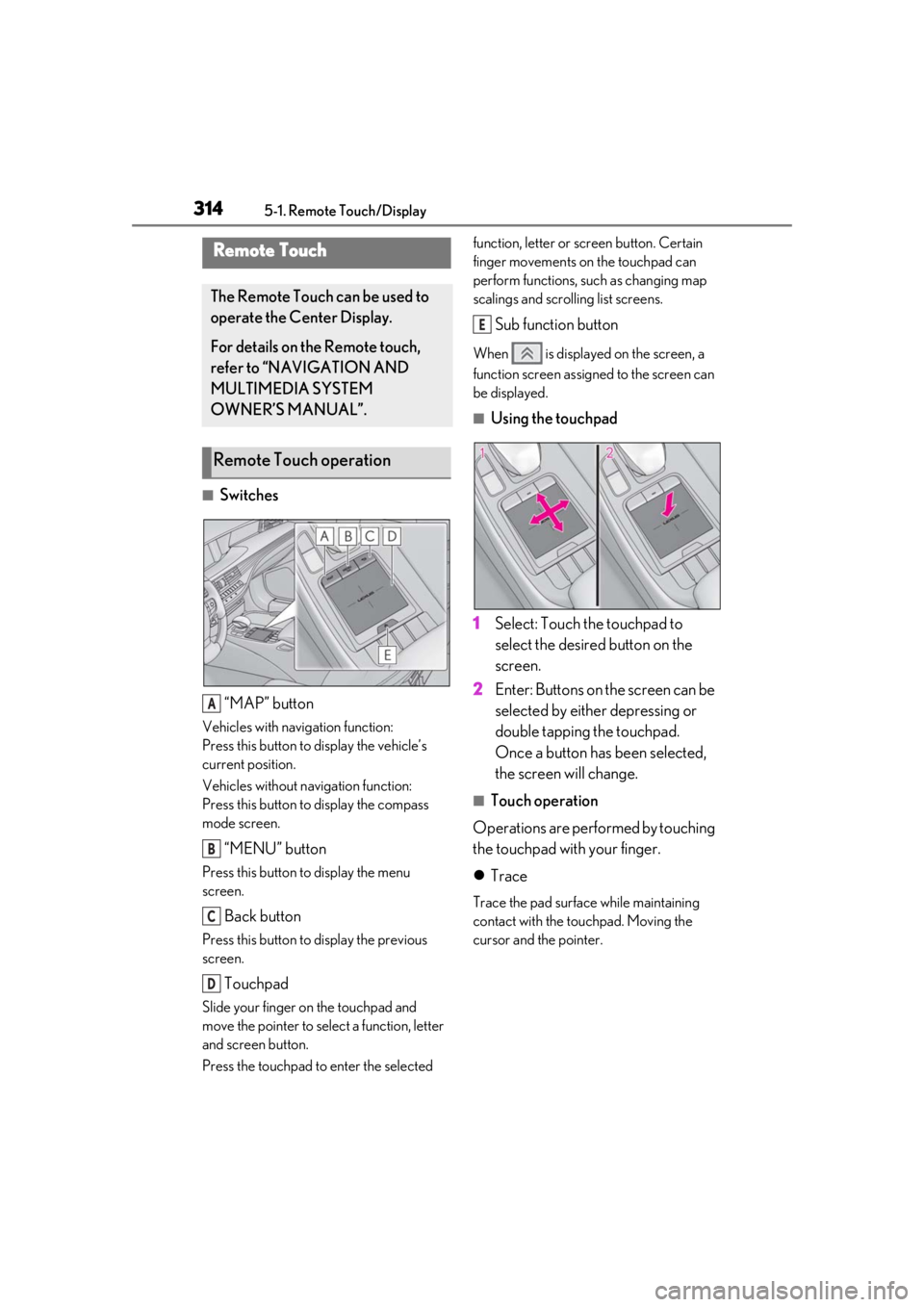
■Switches“MAP” button
Vehicles with navigation function:
Press this button to display the vehicle’s
current position.
Vehicles without navigation function:
Press this button to display the compass
mode screen.
“MENU” button
Press this button to display the menu
screen.
Back button
Press this button to display the previous
screen.
Touchpad
Slide your finger on the touchpad and
move the pointer to select a function, letter
and screen button.
Press the touchpad to enter the selected function, letter or screen button. Certain
finger movements on the touchpad can
perform functions, su
ch as changing map
scalings and scrolling list screens.
Sub function button
When is displayed on the screen, a
function screen assigned to the screen can
be displayed.
■Using the touchpad
1 Select: Touch the touchpad to
select the desired button on the
screen.
2 Enter: Buttons on the screen can be
selected by either depressing or
double tapping the touchpad.
Once a button has been selected,
the screen will change.
■Touch operation
Operations are performed by touching
the touchpad with your finger.
Trace
Trace the pad surface while maintaining
contact with the touchpad. Moving the
cursor and the pointer.
Remote Touch
The Remote Touch can be used to
operate the Center Display.
For details on the Remote touch,
refer to “NAVIGATION AND
MULTIMEDIA SYSTEM
OWNER’S MANUAL”.
Remote Touch operation
A
B
C
D
E
Page 321 of 520
3215-2. Lexus Climate Concierge
5
Interior features
5-2.Lexus Climate Concierge
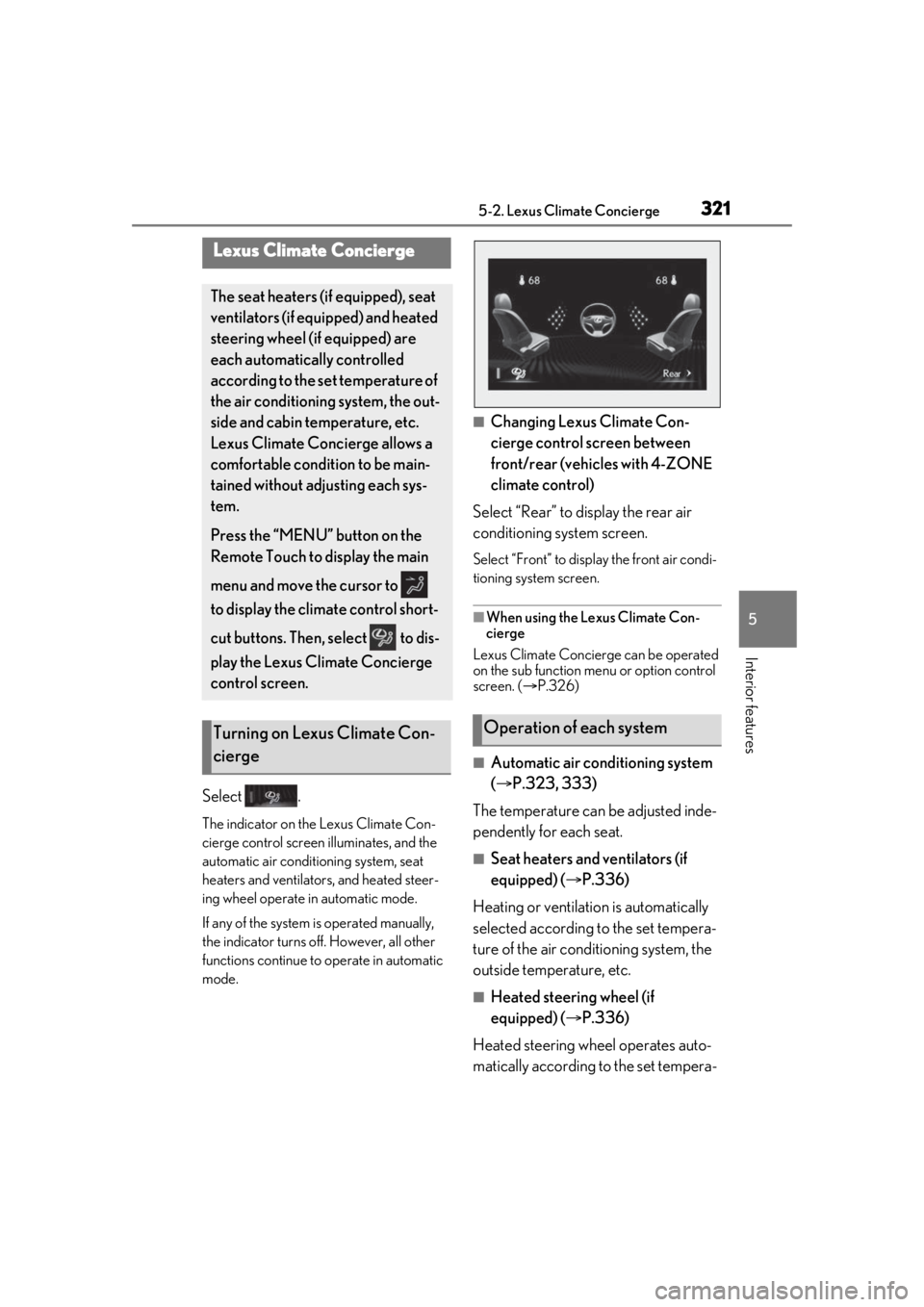
Select .
The indicator on the Lexus Climate Con-
cierge control screen illuminates, and the
automatic air conditioning system, seat
heaters and ventilators, and heated steer-
ing wheel operate in automatic mode.
If any of the system is operated manually,
the indicator turns off. However, all other
functions continue to operate in automatic
mode.
■Changing Lexus Climate Con-
cierge control screen between
front/rear (vehicles with 4-ZONE
climate control)
Select “Rear” to display the rear air
conditioning system screen.
Select “Front” to display the front air condi-
tioning system screen.
■When using the Lexus Climate Con-
cierge
Lexus Climate Concierge can be operated
on the sub function menu or option control
screen. ( P.326)
■Automatic air conditioning system
( P.323, 333)
The temperature can be adjusted inde-
pendently for each seat.
■Seat heaters and ventilators (if
equipped) ( P.336)
Heating or ventilation is automatically
selected according to the set tempera-
ture of the air conditioning system, the
outside temperature, etc.
■Heated steering wheel (if
equipped) ( P.336)
Heated steering wheel operates auto-
matically according to the set tempera-
Lexus Climate Concierge
The seat heaters (if equipped), seat
ventilators (if equipped) and heated
steering wheel (if equipped) are
each automatically controlled
according to the set temperature of
the air conditioning system, the out-
side and cabin temperature, etc.
Lexus Climate Concierge allows a
comfortable condition to be main-
tained without adjusting each sys-
tem.
Press the “MENU” button on the
Remote Touch to display the main
menu and move the cursor to
to display the climate control short-
cut buttons. Then, select to dis-
play the Lexus Climate Concierge
control screen.
Turning on Lexus Climate Con-
ciergeOperation of each system
Page 323 of 520
3235-3. Using the air conditioning system and defogger
5
Interior features
5-3.Using the air conditioning system and defogger
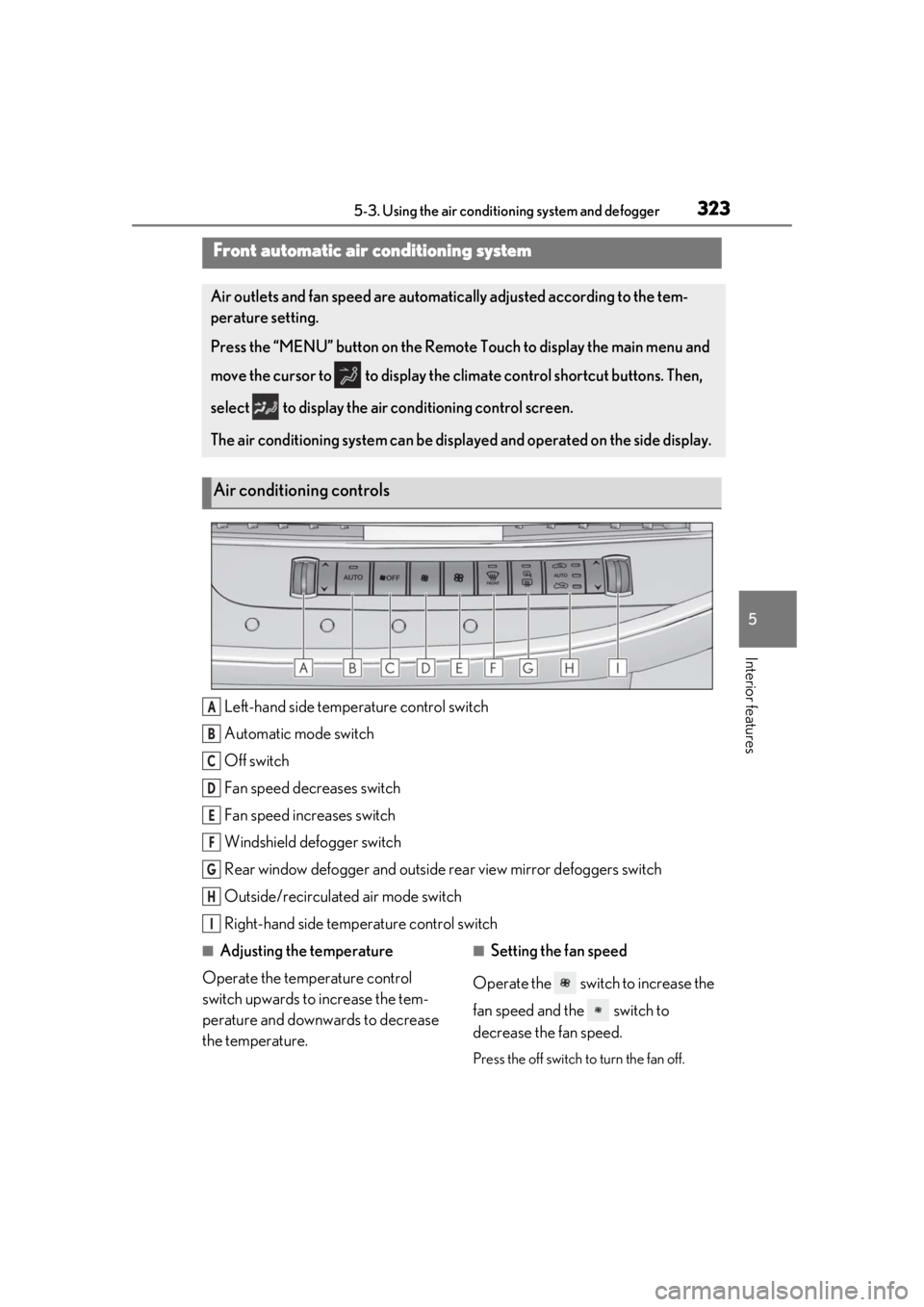
Left-hand side temperature control switch
Automatic mode switch
Off switch
Fan speed decreases switch
Fan speed increases switch
Windshield defogger switch
Rear window defogger and outside rear view mirror defoggers switch
Outside/recirculated air mode switch
Right-hand side temp erature control switch
■Adjusting the temperature
Operate the temperature control
switch upwards to increase the tem-
perature and downwards to decrease
the temperature.■Setting the fan speed
Operate the switch to increase the
fan speed and the switch to
decrease the fan speed.
Press the off switch to turn the fan off.
Front automatic air conditioning system
Air outlets and fan speed are automati cally adjusted according to the tem-
perature setting.
Press the “MENU” button on the Remote Touch to display the main menu and
move the cursor to to display the climate control shortcut buttons. Then,
select to display the air conditioning control screen.
The air conditioning system can be displa yed and operated on the side display.
Air conditioning controls
A
B
C
D
E
F
G
H
I
Page 333 of 520
3335-3. Using the air conditioning system and defogger
5
Interior features
*:If equipped
■Center Display
Press the “MENU” button on the
Remote Touch to display the main
menu and move the cursor to to
display the climate control shortcut
buttons. Then, select to display the
rear air conditioning control screen.
This system can also be operated by the
touch screen.
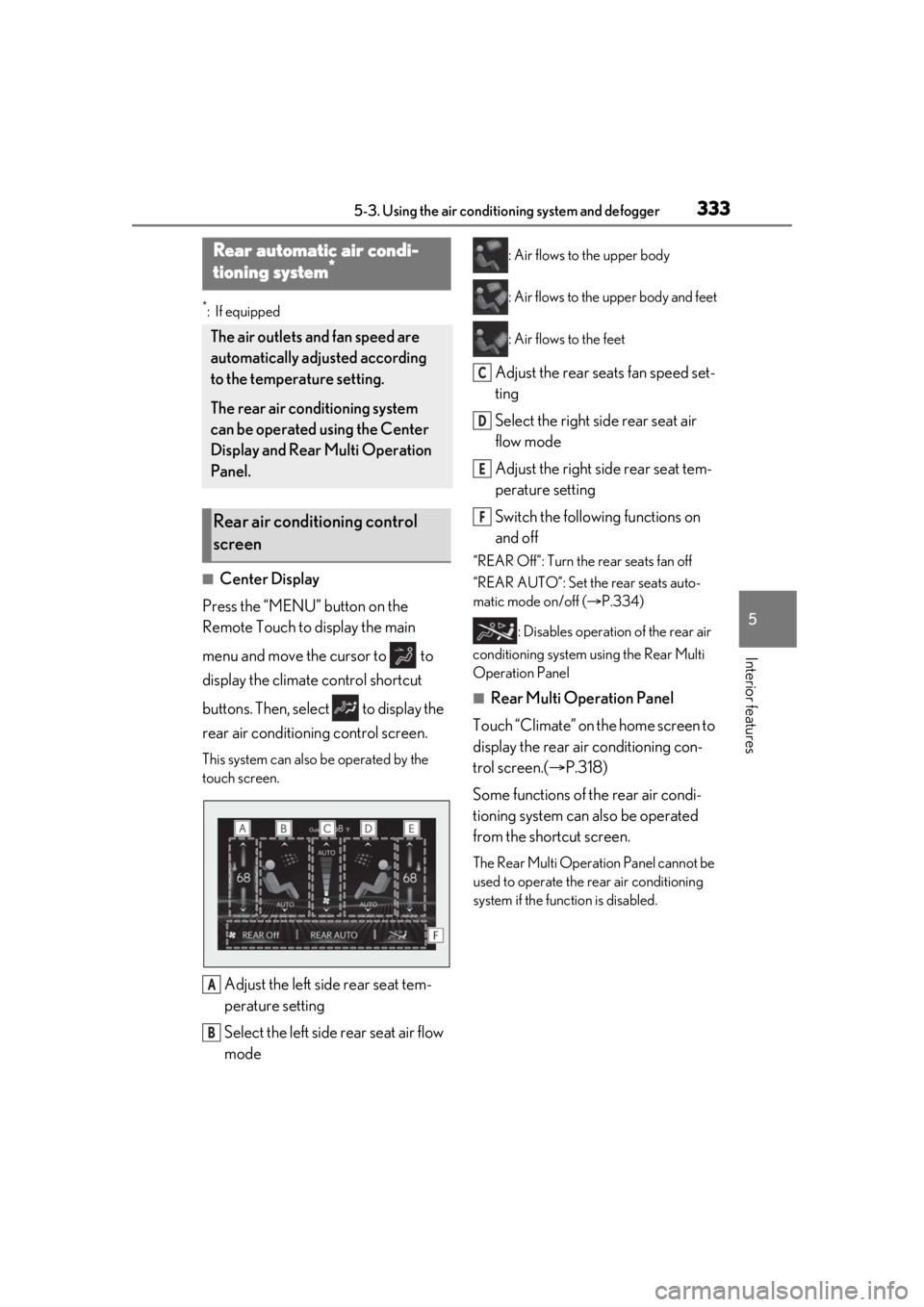
Adjust the left side rear seat tem-
perature setting
Select the left side rear seat air flow
mode
: Air flows to the upper body
: Air flows to the upper body and feet
: Air flows to the feet
Adjust the rear seats fan speed set-
ting
Select the right side rear seat air
flow mode
Adjust the right side rear seat tem-
perature setting
Switch the following functions on
and off
“REAR Off”: Turn the rear seats fan off
“REAR AUTO”: Set the rear seats auto-
matic mode on/off ( P.334)
: Disables operation of the rear air
conditioning system using the Rear Multi
Operation Panel
■Rear Multi Operation Panel
Touch “Climate” on the home screen to
display the rear air conditioning con-
trol screen.( P.318)
Some functions of the rear air condi-
tioning system can also be operated
from the shortcut screen.
The Rear Multi Operat ion Panel cannot be
used to operate the rear air conditioning
system if the func tion is disabled.
Rear automatic air condi-
tioning system*
The air outlets and fan speed are
automatically adjusted according
to the temperature setting.
The rear air conditioning system
can be operated using the Center
Display and Rear Multi Operation
Panel.
Rear air conditioning control
screen
A
B
C
D
E
F
Page 360 of 520
3605-6. Using the other interior features
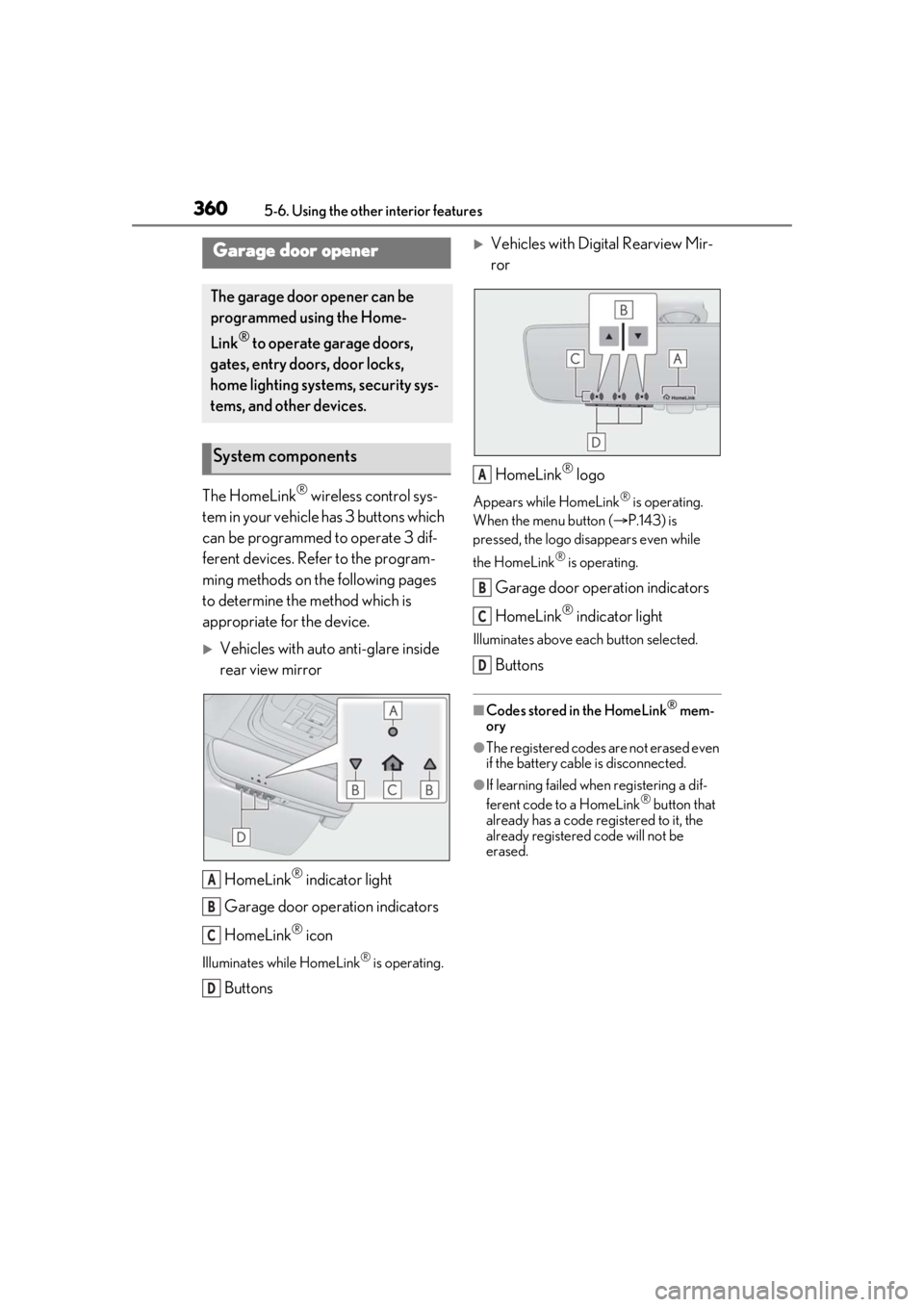
The HomeLink® wireless control sys-
tem in your vehicle has 3 buttons which
can be programmed to operate 3 dif-
ferent devices. Refer to the program-
ming methods on the following pages
to determine the method which is
appropriate for the device.
Vehicles with auto anti-glare inside
rear view mirror
HomeLink
® indicator light
Garage door operation indicators
HomeLink
® icon
Illuminates while HomeLink® is operating.
Buttons
Vehicles with Digital Rearview Mir-
ror
HomeLink
® logo
Appears while HomeLink® is operating.
When the menu button ( P.143) is
pressed, the logo disappears even while
the HomeLink
® is operating.
Garage door operation indicators
HomeLink
® indicator light
Illuminates above each button selected.
Buttons
■Codes stored in the HomeLink® mem-
ory
●The registered codes are not erased even
if the battery cable is disconnected.
●If learning failed when registering a dif-
ferent code to a HomeLink® button that
already has a code registered to it, the
already registered code will not be
erased.
Garage door opener
The garage door opener can be
programmed using the Home-
Link
® to operate garage doors,
gates, entry doors, door locks,
home lighting systems, security sys-
tems, and other devices.
System components
A
B
C
D
A
B
C
D
Page 361 of 520
3615-6. Using the other interior features
5
Interior features
■Certification for the garage door opener
■When support is necessary
Visit on the web at
www.homelink.com/lexus
or call
1-800-355-3515.
WARNING
■When programming a garage door or
other remote control device
The garage door or other device may
operate, so ensure people and objects
are out of danger to prevent potential
harm.
■Conforming to federal safety stan-
dards
Do not use the HomeLink
® compatible
transceiver with any garage door opener
or device that lacks safety stop and
reverse features as required by federal
safety standards.
This includes any garage door that can-
not detect an interf ering object. A door
or device without these features
increases the risk of death or serious
injury.
■When operating or programming
HomeLink®
Never allow a child to operate or play
with the HomeLink® buttons.