height LEXUS LS500 2021 User Guide
[x] Cancel search | Manufacturer: LEXUS, Model Year: 2021, Model line: LS500, Model: LEXUS LS500 2021Pages: 520, PDF Size: 9.81 MB
Page 225 of 520
2254-5. Using the driving support systems
4
Driving
sonal mobility vehicle
• If a preceding vehicle has a small rear end, such as an unloaded truck
• If a preceding vehicle has a low rear end, such as a low bed trailer
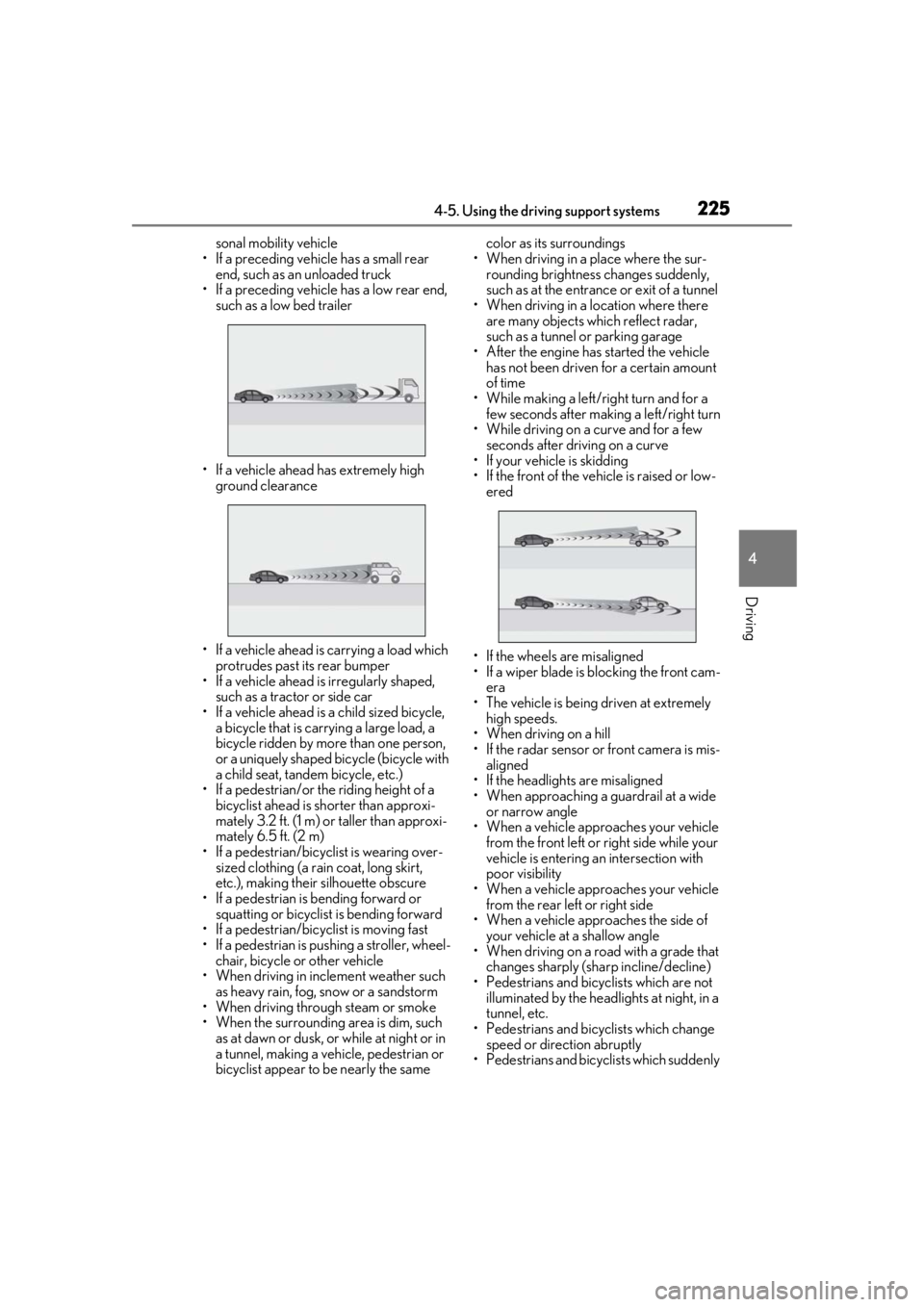
• If a vehicle ahead has extremely high ground clearance
• If a vehicle ahead is carrying a load which protrudes past its rear bumper
• If a vehicle ahead is irregularly shaped,
such as a tractor or side car
• If a vehicle ahead is a child sized bicycle, a bicycle that is carrying a large load, a
bicycle ridden by more than one person,
or a uniquely shaped bicycle (bicycle with
a child seat, tandem bicycle, etc.)
• If a pedestrian/or the riding height of a bicyclist ahead is shorter than approxi-
mately 3.2 ft. (1 m) or taller than approxi-
mately 6.5 ft. (2 m)
• If a pedestrian/bicyclist is wearing over- sized clothing (a rain coat, long skirt,
etc.), making their silhouette obscure
• If a pedestrian is bending forward or squatting or bicyclist is bending forward
• If a pedestrian/bicyclist is moving fast
• If a pedestrian is pushing a stroller, wheel- chair, bicycle or other vehicle
• When driving in incl ement weather such
as heavy rain, fog, snow or a sandstorm
• When driving through steam or smoke
• When the surrounding area is dim, such as at dawn or dusk, or while at night or in
a tunnel, making a vehicle, pedestrian or
bicyclist appear to be nearly the same color as its surroundings
• When driving in a place where the sur- rounding brightness changes suddenly,
such as at the entrance or exit of a tunnel
• When driving in a location where there are many objects which reflect radar,
such as a tunnel or parking garage
• After the engine has started the vehicle has not been driven for a certain amount
of time
• While making a left/right turn and for a few seconds after making a left/right turn
• While driving on a curve and for a few seconds after driving on a curve
• If your vehicle is skidding
• If the front of the vehicle is raised or low-
ered
• If the wheels are misaligned
• If a wiper blade is blocking the front cam- era
• The vehicle is being driven at extremely high speeds.
• When driving on a hill
• If the radar sensor or front camera is mis-
aligned
• If the headlights are misaligned
• When approaching a guardrail at a wide
or narrow angle
• When a vehicle approaches your vehicle
from the front left or right side while your
vehicle is entering an intersection with
poor visibility
• When a vehicle approaches your vehicle from the rear left or right side
• When a vehicle approaches the side of
your vehicle at a shallow angle
• When driving on a road with a grade that changes sharply (sha rp incline/decline)
• Pedestrians and bicyclists which are not
illuminated by the head lights at night, in a
tunnel, etc.
• Pedestrians and bicyclists which change
speed or direction abruptly
• Pedestrians and bicyclists which suddenly
Page 233 of 520
2334-5. Using the driving support systems
4
Driving
casting station, electric power plant, or
other location where strong radio waves
or electrical noise may be present
■Situations in which the system may not
operate properly
●In some situations such as the following,
an object may not be detected by the
radar sensor and front camera, prevent-
ing the system from operating properly:
• When a detectable object is approaching your vehicle
• When your vehicle or a detectable object
is wobbling
• If a detectable object makes an abrupt maneuver (such as sudden swerving,
acceleration or deceleration)
• When your vehicle approaches a detect- able object rapidly
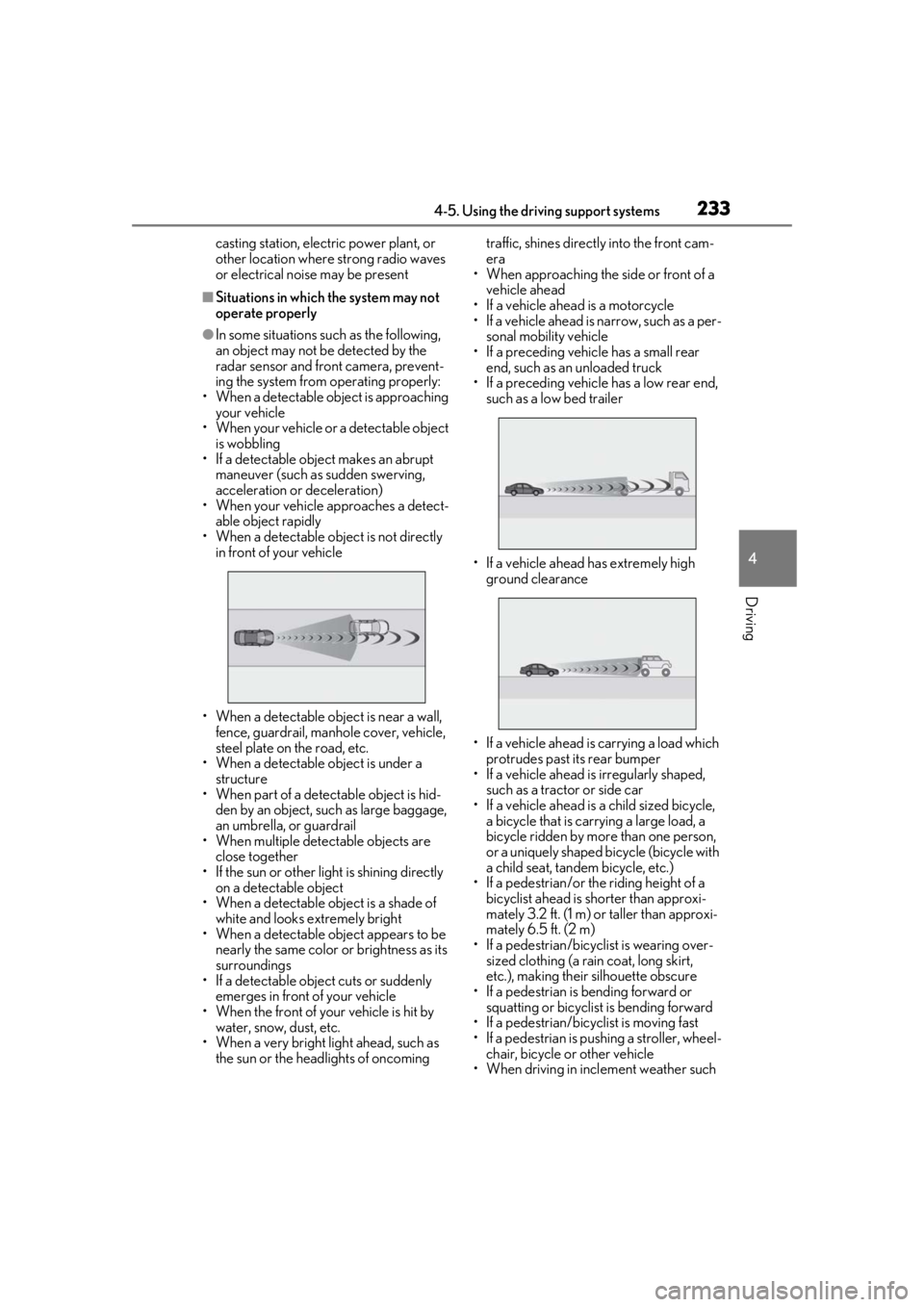
• When a detectable object is not directly in front of your vehicle
• When a detectable object is near a wall, fence, guardrail, manhole cover, vehicle,
steel plate on the road, etc.
• When a detectable object is under a structure
•When part of a detect able object is hid-
den by an object, such as large baggage,
an umbrella, or guardrail
• When multiple dete ctable objects are
close together
• If the sun or other light is shining directly on a detectable object
• When a detectable object is a shade of white and looks extremely bright
• When a detectable object appears to be
nearly the same color or brightness as its
surroundings
• If a detectable object cuts or suddenly emerges in front of your vehicle
• When the front of your vehicle is hit by water, snow, dust, etc.
• When a very bright light ahead, such as
the sun or the headlights of oncoming traffic, shines direct
ly into the front cam-
era
• When approaching the side or front of a
vehicle ahead
• If a vehicle ahead is a motorcycle
• If a vehicle ahead is narrow, such as a per- sonal mobility vehicle
• If a preceding vehicle has a small rear end, such as an unloaded truck
• If a preceding vehicle has a low rear end, such as a low bed trailer
• If a vehicle ahead has extremely high ground clearance
• If a vehicle ahead is carrying a load which protrudes past its rear bumper
• If a vehicle ahead is irregularly shaped,
such as a tractor or side car
• If a vehicle ahead is a child sized bicycle, a bicycle that is carrying a large load, a
bicycle ridden by more than one person,
or a uniquely shaped bicycle (bicycle with
a child seat, tandem bicycle, etc.)
• If a pedestrian/or the riding height of a bicyclist ahead is shorter than approxi-
mately 3.2 ft. (1 m) or taller than approxi-
mately 6.5 ft. (2 m)
• If a pedestrian/bicyclist is wearing over- sized clothing (a rain coat, long skirt,
etc.), making their silhouette obscure
• If a pedestrian is bending forward or squatting or bicyclist is bending forward
• If a pedestrian/bicyclist is moving fast
• If a pedestrian is pushing a stroller, wheel-
chair, bicycle or other vehicle
• When driving in incl ement weather such
Page 270 of 520

2704-5. Using the driving support systems
lane*
●Vehicles traveling 2 lanes away from your
vehicle*
●Vehicles which are being overtaken rap-
idly by your vehicle*
*
: Depending on the conditions, detection of a vehicle and/or object may occur.
■Conditions under wh ich the Blind Spot
Monitor may not fu nction correctly
●The Blind Spot Monitor may not detect
vehicles correctly in the following situa-
tions:
• When the sensor is misaligned due to a strong impact to the sensor or its sur-
rounding area
• When mud, snow, ice, a sticker, etc. is covering the sensor or surrounding area
on the rear bumper
• When driving on a road surface that is wet with standing water during bad
weather, such as heavy rain, snow, or fog
• When multiple vehicles are approaching with only a small gap between each vehi-
cle
• When the distance between your vehicle and a following vehicle is short
• When there is a significant difference in
speed between your vehicle and the vehi-
cle that enters the detection area
• When the difference in speed between
your vehicle and another vehicle is
changing
• When a vehicle enters a detection area
traveling at about the same speed as your
vehicle
• As your vehicle starts from a stop, a vehi-
cle remains in the detection area
• When driving up an d down consecutive
steep inclines, such as hills, dips in the
road, etc.
• When driving on roads with sharp bends, consecutive curves, or uneven surfaces
• When vehicle lanes are wide, or when driving on the edge of a lane, and the
vehicle in an adjacent lane is far away
from your vehicle
• When an accessory (such as a bicycle carrier) is installed to the rear of the vehi-
cle
• When there is a significant difference in height between your vehicle and the vehicle that enters the detection area
• Immediately after the Blind Spot Monitor is turned on
●Instances of the Blind Spot Monitor
unnecessarily detecting a vehicle and/or
object may increase in the following situ-
ations:
• When the sensor is misaligned due to a
strong impact to the sensor or its sur-
rounding area
• When the distance between your vehicle
and a guardrail, wall, etc. that enters the
detection area is short
• When driving up and down consecutive
steep inclines, such as hills, dips in the
road, etc.
• When vehicle lanes are narrow, or when
driving on the edge of a lane, and a vehi-
cle traveling in a lane other than the adja-
cent lanes enters the detection area
• When driving on roads with sharp bends, consecutive curves, or uneven surfaces
• When the tires are slipping or spinning
• When the distance between your vehicle
and a following vehicle is short
• When an accessory (such as a bicycle
carrier) is installed to the rear of the vehi-
cle
Page 289 of 520
2894-5. Using the driving support systems
4
Driving
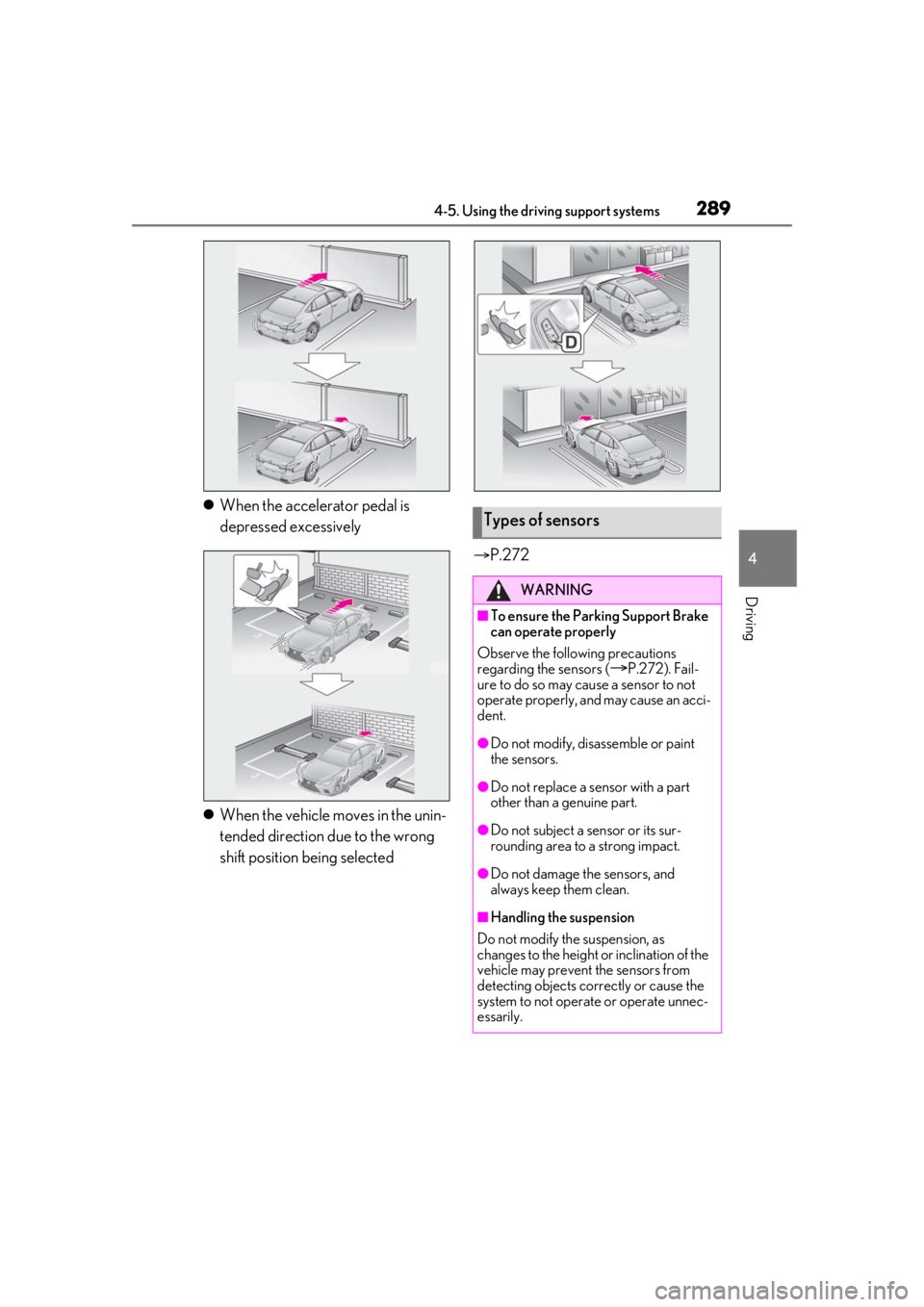
When the accelerator pedal is
depressed excessively
When the vehicle moves in the unin-
tended direction due to the wrong
shift position being selected
P.272Types of sensors
WARNING
■To ensure the Parking Support Brake
can operate properly
Observe the following precautions
regarding the sensors (
P.272). Fail-
ure to do so may cause a sensor to not
operate properly, and may cause an acci-
dent.
●Do not modify, disassemble or paint
the sensors.
●Do not replace a sensor with a part
other than a genuine part.
●Do not subject a sensor or its sur-
rounding area to a strong impact.
●Do not damage the sensors, and
always keep them clean.
■Handling the suspension
Do not modify the suspension, as
changes to the height or inclination of the
vehicle may prevent the sensors from
detecting objects correctly or cause the
system to not operate or operate unnec-
essarily.
Page 301 of 520
3014-5. Using the driving support systems
4
Driving
*:If equipped
■Situations in which the vehicle height
control may not operate properly
●In the following situations, the vehicle
height may change slowly or may not
change to the correct height:
• When the vehicle comes into contact with snow, ice, stone, etc.
• When the ambient temperature is low
• When the accumulator tank pressure is low
●In the following situations, the vehicle
height may not change:
• If the hood or trunk is not fully closed
• If the brake pedal depressed and the
vehicle is stopped
• When the vehicle is on a significantly
uneven or undulating road
• When the vehicle is on a slanted road or a slope
■Operating sound of the air suspension
compressor and valves
In the following situations the air suspension
compressor and valves may operate and a
sound may be heard, but this does not indi-
cate a malfunction.
●When passengers enter or exit the vehi-
cle or cargo is loaded or unloaded, caus- ing the vehicle height to change
●When the height of the vehicle is
changed using the vehicle height adjust-
ment switch
●When the doors are opened/closed
●When the doors are locked/unlocked
■When the accumulator
tank pressure is
low
When the accumulator tank pressure is low,
the air suspension compressor and valves
may operate repeatedly even though the
vehicle height is not being changed. This
does not indicate a malfunction.
■When “Air Suspension System Malfunc-
tion Visit Your Dealer” is displayed on
the multi-information display
The system may not operate properly. Have
the vehicle inspected by your Lexus dealer.
■Customization
Some functions can be customized.
( P.476)
Electronically modulated air
suspension*
The height of the vehicle when driv-
ing can be selected using the vehi-
cle height adjustment switch. The
selected height level will be main-
tained regardless of the number of
passengers or weight of cargo.
Additionally, setti ngs of the follow-
ing functions can be changed:
Enabling/Disabling controls of
access mode
Temporarily disabling vehicle
height control
WARNING
■Precautions for the electronically
modulated air suspension
●Even if the engine is not running, the
vehicle height may change through
vehicle height control. Be sure to keep
your hands and feet away from the
area underneath the vehicle and
between the tires and vehicle body.
Otherwise part of your body may get
caught, possibly causing an injury.
●In situations such as the following,
make sure to disable all functions of
the vehicle height control of the elec-
tronically modulated air suspension.
Otherwise, the vehicle height may
change and part or your body may be
caught under the vehicle, possibly
causing injury.
• When the vehicle is parked on a curb
• If any of the wheels is not touching the ground
Page 302 of 520
3024-5. Using the driving support systems
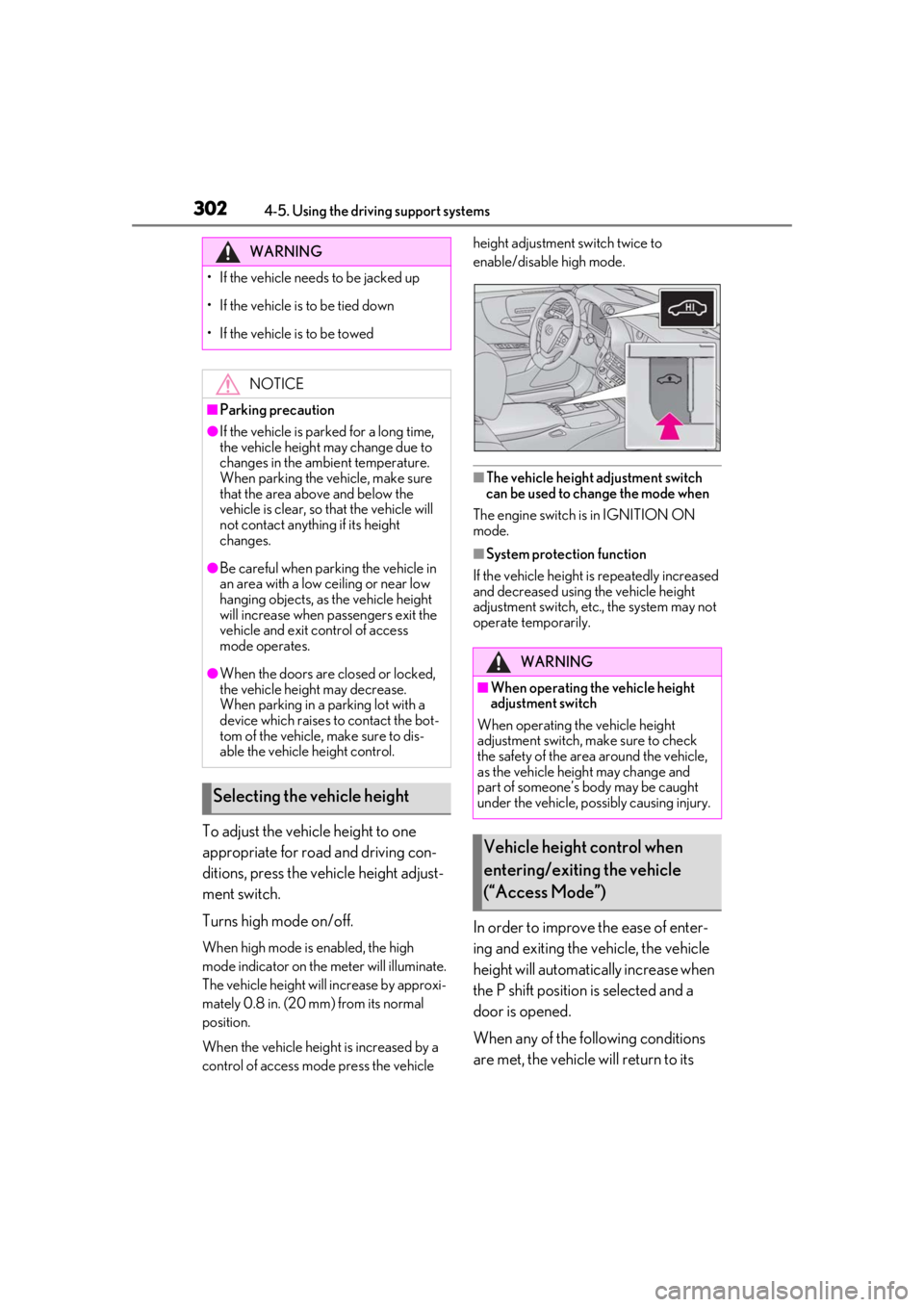
To adjust the vehicle height to one
appropriate for road and driving con-
ditions, press the vehicle height adjust-
ment switch.
Turns high mode on/off.
When high mode is enabled, the high
mode indicator on the meter will illuminate.
The vehicle height will increase by approxi-
mately 0.8 in. (20 mm) from its normal
position.
When the vehicle height is increased by a
control of access mo de press the vehicle height adjustment switch twice to
enable/disable high mode.
■The vehicle height adjustment switch
can be used to change the mode when
The engine switch is in IGNITION ON
mode.
■System protection function
If the vehicle height is repeatedly increased
and decreased using the vehicle height
adjustment switch, etc., the system may not
operate temporarily.
In order to improve the ease of enter-
ing and exiting the vehicle, the vehicle
height will automatically increase when
the P shift position is selected and a
door is opened.
When any of the following conditions
are met, the vehicle will return to its
WARNING
• If the vehicle needs to be jacked up
• If the vehicle is to be tied down
• If the vehicle is to be towed
NOTICE
■Parking precaution
●If the vehicle is parked for a long time,
the vehicle height may change due to
changes in the ambient temperature.
When parking the vehicle, make sure
that the area above and below the
vehicle is clear, so that the vehicle will
not contact anything if its height
changes.
●Be careful when parking the vehicle in
an area with a low ceiling or near low
hanging objects, as the vehicle height
will increase when passengers exit the
vehicle and exit control of access
mode operates.
●When the doors are closed or locked,
the vehicle height may decrease.
When parking in a parking lot with a
device which raises to contact the bot-
tom of the vehicle, make sure to dis-
able the vehicle height control.
Selecting the vehicle height
WARNING
■When operating the vehicle height
adjustment switch
When operating the vehicle height
adjustment switch, make sure to check
the safety of the area around the vehicle,
as the vehicle height may change and
part of someone’s body may be caught
under the vehicle, possibly causing injury.
Vehicle height control when
entering/exiting the vehicle
(“Access Mode”)
Page 303 of 520

3034-5. Using the driving support systems
4
Driving
previous height:
A certain amount of time has
elapsed since the doors were closed
The vehicle speed reaches approxi-
mately 3 mph (5 km/h)
The doors are locked using the
smart access system with push-but-
ton start or wireless remote control
■Enabling/Disabling access mode
1 Press the or meter control
switch to select .
2 Press the or meter control
switch to select “Vehicle Settings”
and then press .
3 Press the or meter control
switch to select and then
press .
4 Press the or meter control
switch to select “Access Mode” and
then press .
The setting will change between
enabled/disabled each time the
meter control switch is pressed.
■When the vehicle height has been
increased by a control of access mode
Press the vehicle height adjustment switch
with the engine switch in any mode to return
the vehicle to its previous vehicle height.
■Access mode operation
●Access mode will not operate if the vehi-
cle is not parked on a level road surface.
●Depending on the current vehicle height,
access mode may not operate.
●After the doors are unlocked, if access
mode operates, the vehicle height will increase by approximately 0.8 in. (20
mm) from its normal position. After the
vehicle has been driven, if access mode
operates, the vehicle height will increase
by approximately 0.4 in. (10 mm) from its
normal position.
●If the doors are opened and closed
repeatedly, the system may not operate
temporarily.
Vehicle height control can be tempo-
rarily disabled using the meter control
switches. (
P.83)
When to temporarily disable vehicle height
control: P.301
1Press or to select .
2 Press or to select “Vehicle
Settings” and then press .
3 Press or to select
and then press .
4 Press or to select “Height
Control” and then press .
This setting is memorized even if the
engine switch is turned off.
Even if the vehicle height control func-
tions are disabled, they will be enabled
automatically when the vehicle speed
reaches approximately 19 mph (30
km/h).
Temporarily disabling vehicle
height control
Page 309 of 520
3094-6. Driving tips
4
Driving
4-6.Driving tips
Use fluids that are appropriate to
the prevailing outside temperatures.
•Engine oil
• Engine coolant
•Washer fluid
Have a service technician inspect
the condition of the battery.
Have the vehicle fitted with four
snow tires or purchase a set of tire
chains for the rear tires.
*
Ensure that all tires are the specified size
and brand, and that chains match the size
of the tires.
*: Tire chains cannot be mounted on vehi-
cles with front and rear tires of differing
sizes.
Winter driving tips
Carry out the necessary prepara-
tions and inspections before driving
the vehicle in winter. Always drive
the vehicle in a manner appropriate
to the prevailing weather condi-
tions.
Preparation for winter
WARNING
■Driving with snow tires
Observe the following precautions to
reduce the risk of accidents.
Failure to do so may result in a loss of
vehicle control and cause death or seri-
ous injury.
●Use tires of the specified size.
●Maintain the recommended level of air
pressure.
●Do not drive in excess of 75 mph (120
km/h), regardless of the type of snow
tires being used.
●Use snow tires on all, not just some
wheels.
■When installing tire chains
Before installing tire chains, make sure to
disable all functions of the vehicle height
control of the electronically modulated
air suspension. Otherwise, the vehicle
height may change while installing the
tire chains and part or your body may be
caught under the vehicle, possibly caus-
ing injury. ( P.303)
■Driving with tire chains
Observe the following precautions to
reduce the risk of accidents.
Failure to do so may result in the vehicle
being unable to be driven safely, and may
cause death or serious injury.
●Do not drive in excess of the speed
limit specified for the tire chains being
used, or 30 mph (50 km/h), which-
ever is lower.
●Avoid driving on bumpy road surfaces
or over potholes.
●Avoid sudden acceleration, abrupt
steering, sudden br aking and shifting
operations that cause sudden engine
braking.
●Slow down sufficiently before entering
a curve to ensure that vehicle control is
maintained.
●Do not use LTA (Lane Tracing Assist)
system.
Page 347 of 520
3475-5. Using the storage features
5
Interior features
■When stowing the rear cup holders
(vehicles without power rear seat)
Stow the cup holder with the armrest down.
The cup holder cannot be stowed if the
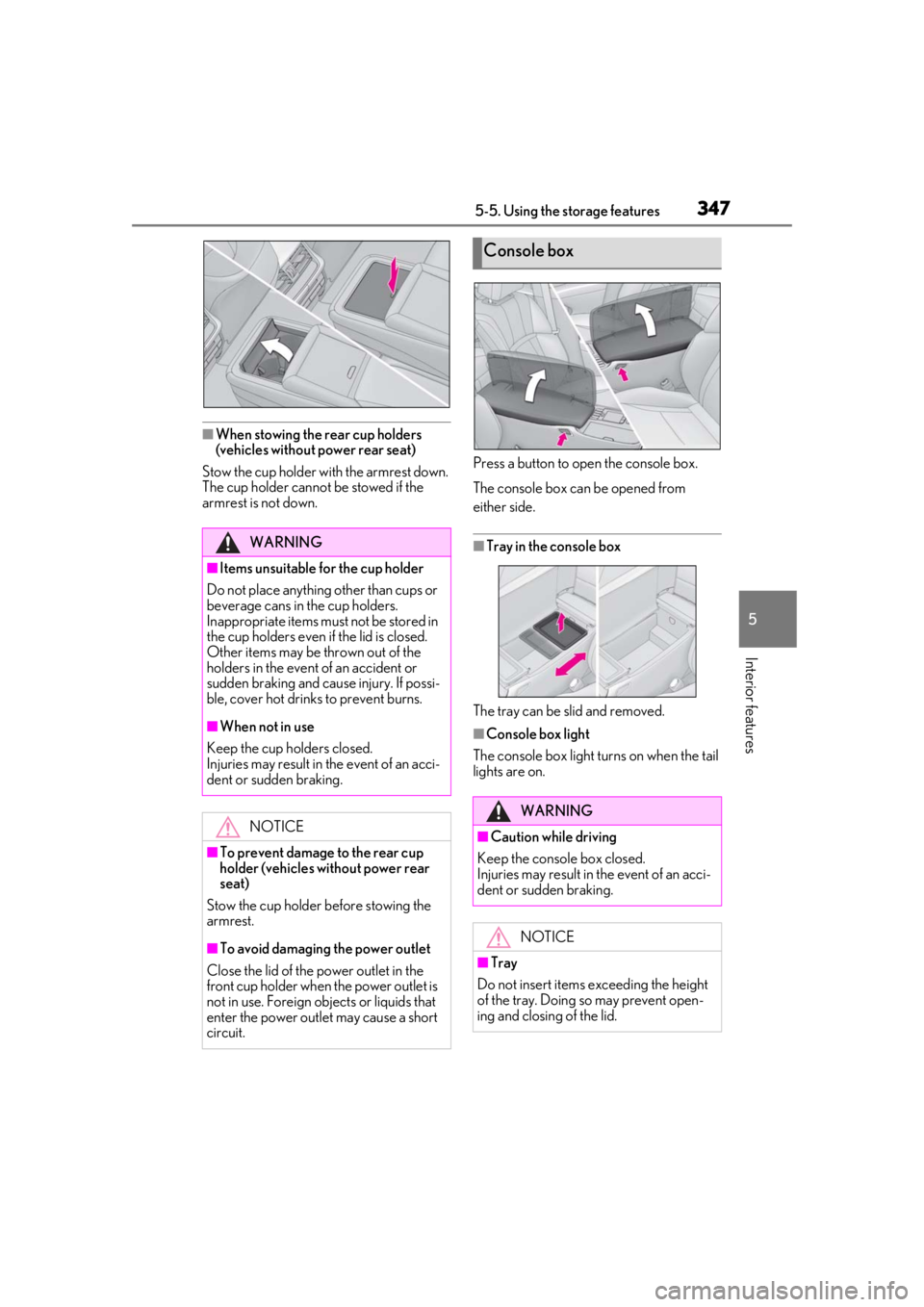
armrest is not down. Press a button to open the console box.
The console box can be opened from
either side.
■Tray in the console box
The tray can be slid and removed.
■Console box light
The console box light turns on when the tail
lights are on.
WARNING
■Items unsuitable for the cup holder
Do not place anything other than cups or
beverage cans in the cup holders.
Inappropriate items must not be stored in
the cup holders even if the lid is closed.
Other items may be thrown out of the
holders in the event of an accident or
sudden braking and cause injury. If possi-
ble, cover hot drinks to prevent burns.
■When not in use
Keep the cup holders closed.
Injuries may result in the event of an acci-
dent or sudden braking.
NOTICE
■To prevent damage to the rear cup
holder (vehicles without power rear
seat)
Stow the cup holder before stowing the
armrest.
■To avoid damaging the power outlet
Close the lid of the power outlet in the
front cup holder when the power outlet is
not in use. Foreign ob jects or liquids that
enter the power outlet may cause a short
circuit.
Console box
WARNING
■Caution while driving
Keep the console box closed.
Injuries may result in the event of an acci-
dent or sudden braking.
NOTICE
■Tray
Do not insert items exceeding the height
of the tray. Doing so may prevent open-
ing and closing of the lid.
Page 402 of 520
4026-3. Do-it-yourself maintenance
approximately 10 to 30 minutes to com-
plete ID code registration.)
If ID code registration is not complete
after driving for approximately 30 min-
utes, continue driving for a while.
• If the vehicle is driven on an unpaved
road, it may take longer than normal to
complete registration.
• If the vehicle is backed up while perform-
ing registration, data collected during
registration will be cleared, and it will take
longer than normal to complete.
• If the vehicle is driven in heavy traffic or another situation where other vehicles
are driven close by, it may take time for
the system to recognize the tire pressure
warning valve and tran smitters of your
vehicle over those of other vehicles.
• If a wheel with a tire pressure warning valve and transmitter installed is inside or
near the vehicle, registration of the ID
codes for the installed wheels may not be
possible.
If ID registration is not complete after driv-
ing for approximately 1 hour, park the vehi-
cle in a safe place for approximately 20
minutes and then perform the ID code reg-
istration procedure again.
●In the following situations, ID code regis-
tration will not be started or was not com-
pleted properly and the system will not
operate properly. Perform the ID code
registration procedure again.
• If, when attempting to start ID code regis-
tration, the tire pressure warning light
does not blink slowly 3 times.
• If, when the vehicle has been driven for
about 20 minutes after performing ID
code registration, the tire pressure warn-
ing light blinks for approximately 1 minute
and then illuminates.
●If ID code registration cannot be com-
pleted after performing the above proce-
dure, contact your Lexus dealer.
Stop the vehicle in a safe place on a
hard, flat surface.
Set the parking brake.
Shift the shift position to P.
Disabling the height control. (if
equipped) ( P.303)
Stop the engine.
■Jack and tools
As your vehicle is eq uipped with run-flat
tires, the following tools for replacing a tire
are not included with your vehicle. They can
be purchased at your Lexus dealer.
●Wheel nut wrench
●Jack
●Jack handle
Replacing the tire
When raising your vehicle with a
jack, position the jack correctly.
Improper placement may damage
your vehicle or cause injury.
If necessary tire replacement
seems difficult to perform, contact
your Lexus dealer.
Before jacking up the vehicle
WARNING
■Using the tire jack
Observe the following precautions.
Improper use of the tire jack may cause
the vehicle to suddenly fall off the jack,
leading to death or serious injury.
●Do not use the tire jack for any pur-
pose other than replacing tires or
installing and removing tire chains.
●Do not use other tire jacks for replac-
ing tires on this vehicle.