navigation LEXUS LS500 2021 User Guide
[x] Cancel search | Manufacturer: LEXUS, Model Year: 2021, Model line: LS500, Model: LEXUS LS500 2021Pages: 520, PDF Size: 9.81 MB
Page 253 of 520
2534-5. Using the driving support systems
4
Driving
●The sign is dirty, faded, tilted or bent.
●The contrast of electronic sign is low.
●All or part of the sign is hidden by the
leaves of a tree, a pole, etc.
●The sign is only visible to the front camera
for a short amount of time.
●The driving scene (turning, lane change,
etc.) is judged incorrectly.
●If a sign not appropriate for the currently
traveled lane, but the sign exists directly
after a freeway branches, or in an adja-
cent lane just before merging.
●Stickers are attached to the rear of the
preceding vehicle.
●A sign resembling a system compatible
sign is recognized.
●Side road speed signs may be detected
and displayed (if positioned in sight of the
front camera) while the vehicle is travel-
ing on the main road.
●Roundabout exit road speed signs may
be detected and displayed (if positioned
in sight of the front camera) while travel-
ing on a roundabout.
●The front of the vehicle is raised or low-
ered due to the carried load.
●The surrounding brightness is not suffi-
cient or changes suddenly.
●When a sign intended for trucks, etc. is
recognized.
●The navigation system map data is out-
dated.
●The navigation system is not operating.
●The speed information displayed on the
meter and on the navigation system may
be different due to the navigation system
using map data.
■Speed limit sign display
If the engine switch wa s last turned off while
a speed limit sign wa s displayed on the
multi-information display, the same sign dis-
plays again when the engine switch is
turned to IGNITION ON mode.
■If “RSA Malfunction Visit Your Dealer”
is shown
The system may be malfunctioning. Have the vehicle inspected by your Lexus dealer.
■Customization
Some functions can be customized. (Cus-
tomizable features: P.476)
Page 314 of 520
3145-1. Remote Touch/Display
5-1.Remote Touch/Display
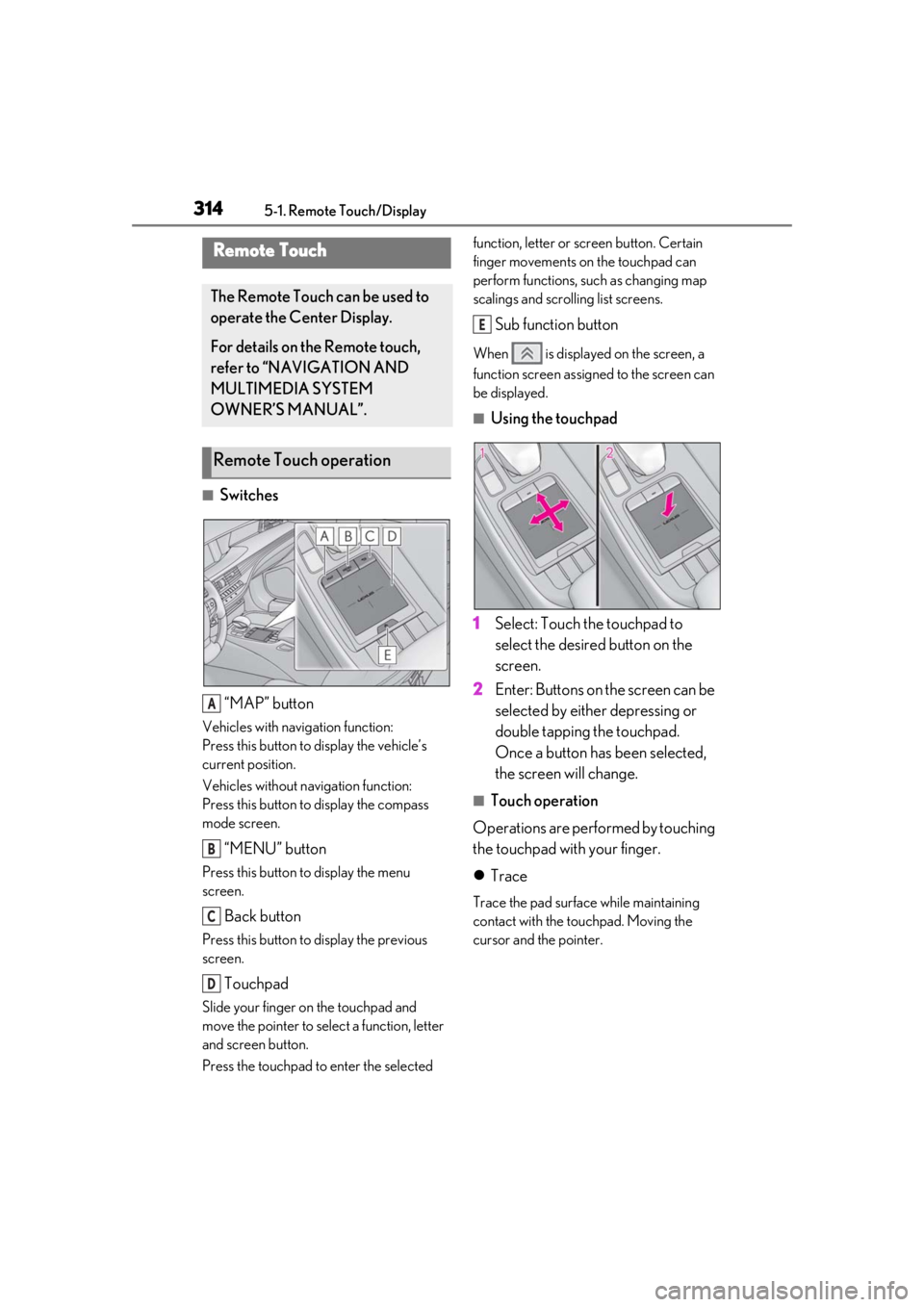
■Switches“MAP” button
Vehicles with navigation function:
Press this button to display the vehicle’s
current position.
Vehicles without navigation function:
Press this button to display the compass
mode screen.
“MENU” button
Press this button to display the menu
screen.
Back button
Press this button to display the previous
screen.
Touchpad
Slide your finger on the touchpad and
move the pointer to select a function, letter
and screen button.
Press the touchpad to enter the selected function, letter or screen button. Certain
finger movements on the touchpad can
perform functions, su
ch as changing map
scalings and scrolling list screens.
Sub function button
When is displayed on the screen, a
function screen assigned to the screen can
be displayed.
■Using the touchpad
1 Select: Touch the touchpad to
select the desired button on the
screen.
2 Enter: Buttons on the screen can be
selected by either depressing or
double tapping the touchpad.
Once a button has been selected,
the screen will change.
■Touch operation
Operations are performed by touching
the touchpad with your finger.
Trace
Trace the pad surface while maintaining
contact with the touchpad. Moving the
cursor and the pointer.
Remote Touch
The Remote Touch can be used to
operate the Center Display.
For details on the Remote touch,
refer to “NAVIGATION AND
MULTIMEDIA SYSTEM
OWNER’S MANUAL”.
Remote Touch operation
A
B
C
D
E
Page 316 of 520
3165-1. Remote Touch/Display
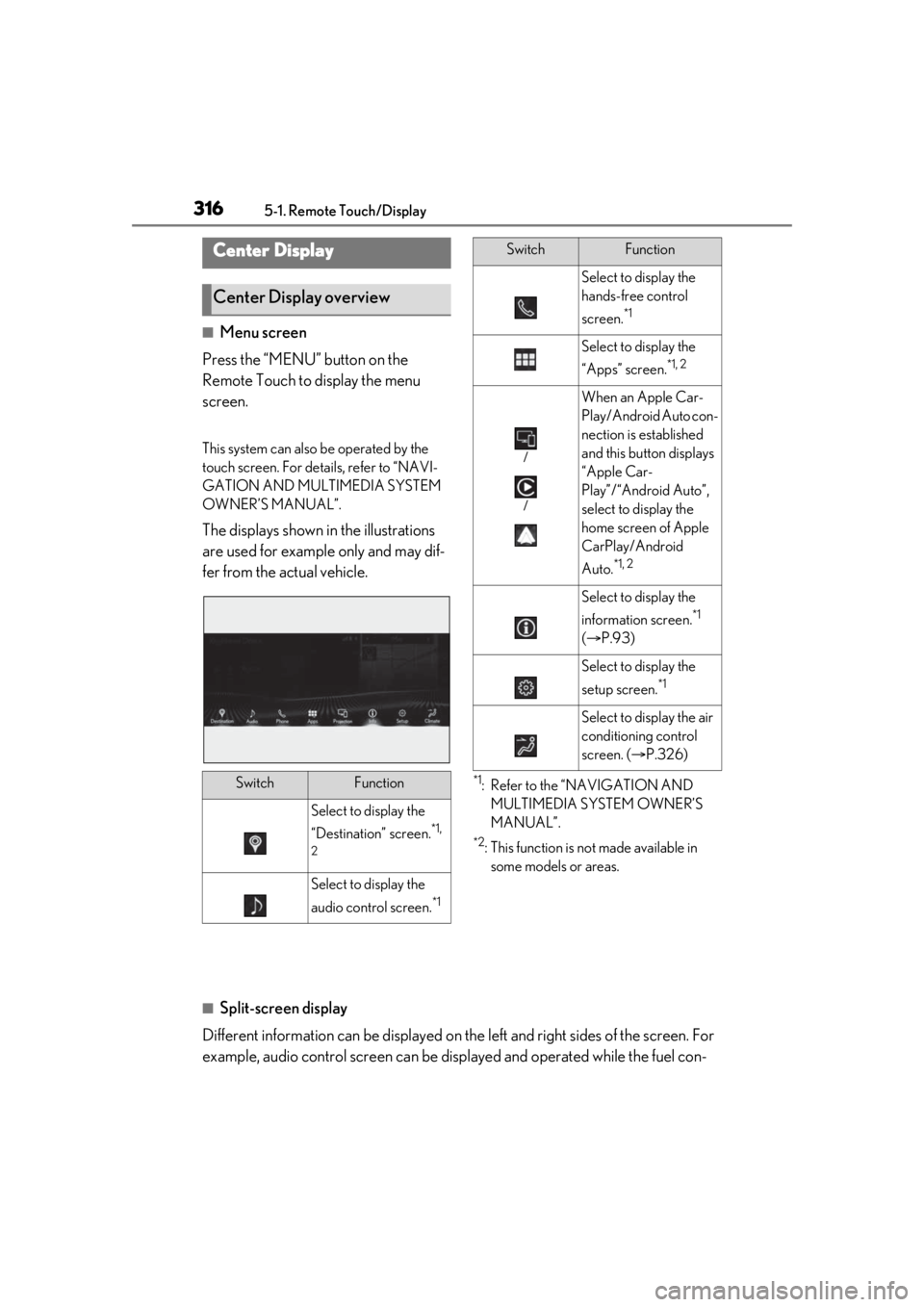
■Menu screen
Press the “MENU” button on the
Remote Touch to display the menu
screen.
This system can also be operated by the
touch screen. For deta ils, refer to “NAVI-
GATION AND MULTIMEDIA SYSTEM
OWNER’S MANUAL”.
The displays shown in the illustrations
are used for example only and may dif-
fer from the actual vehicle.
*1: Refer to the “NAVIGATION AND MULTIMEDIA SYSTEM OWNER’S
MANUAL”.
*2: This function is not made available in some models or areas.
■Split-screen display
Different information can be displayed on the left and right sides of the screen. For
example, audio control screen can be displayed and operated while the fuel con-
Center Display
Center Display overview
SwitchFunction
Select to display the
“Destination” screen.
*1,
2
Select to display the
audio control screen.
*1
Select to display the
hands-free control
screen.
*1
Select to display the
“Apps” screen.
*1, 2
/
/
When an Apple Car-
Play/Android Auto con-
nection is established
and this button displays
“Apple Car-
Play”/“Android Auto”,
select to display the
home screen of Apple
CarPlay/Android
Auto.
*1, 2
Select to display the
information screen.
*1
( P.93)
Select to display the
setup screen.
*1
Select to display the air
conditioning control
screen. ( P.326)
SwitchFunction
Page 317 of 520
3175-1. Remote Touch/Display
5
Interior features
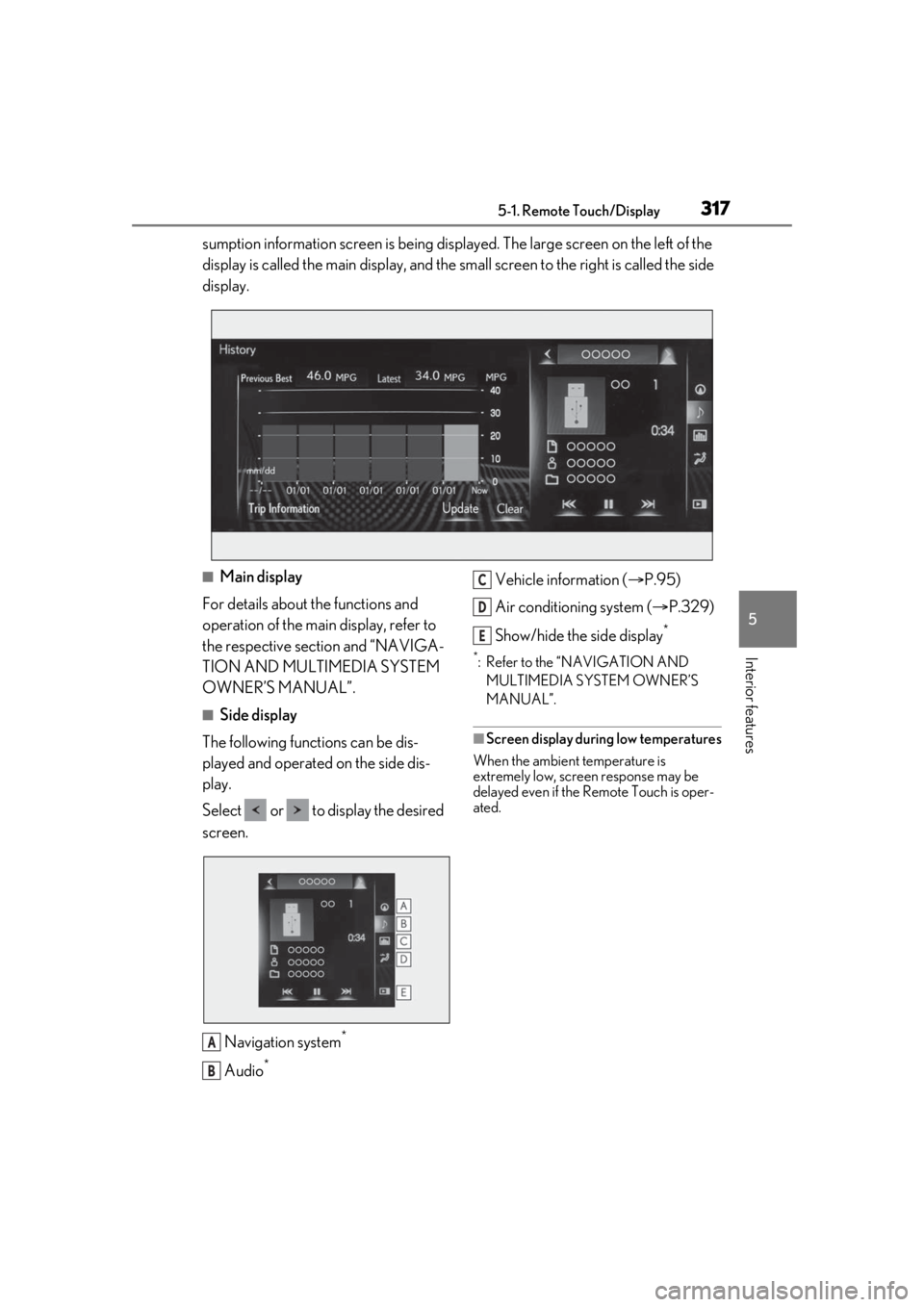
sumption information screen is being displayed. The large screen on the left of the
display is called the main display, and the small screen to the right is called the side
display.
■Main display
For details about the functions and
operation of the main display, refer to
the respective section and “NAVIGA-
TION AND MULTIMEDIA SYSTEM
OWNER’S MANUAL”.
■Side display
The following functions can be dis-
played and operated on the side dis-
play.
Select or to display the desired
screen.
Navigation system
*
Audio*
Vehicle information ( P.95)
Air conditioning system ( P.329)
Show/hide the side display
*
*: Refer to the “NAVIGATION AND MULTIMEDIA SYSTEM OWNER’S
MANUAL”.
■Screen display during low temperatures
When the ambient temperature is
extremely low, screen response may be
delayed even if the Remote Touch is oper-
ated.
A
B
C
D
E
Page 318 of 520
3185-1. Remote Touch/Display
*:If equipped
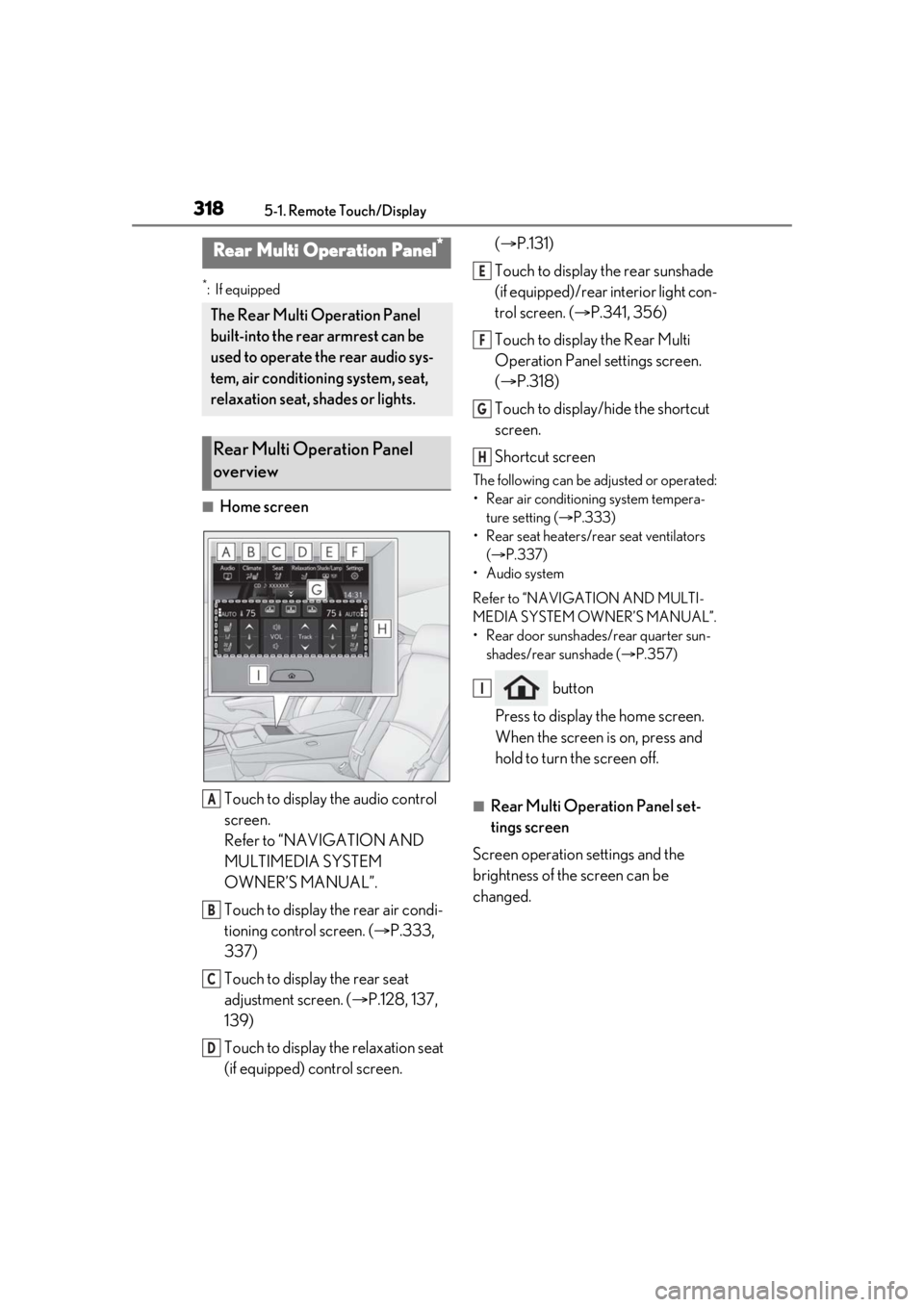
■Home screenTouch to display the audio control
screen.
Refer to “NAVIGATION AND
MULTIMEDIA SYSTEM
OWNER’S MANUAL”.
Touch to display the rear air condi-
tioning control screen. ( P.333,
337)
Touch to display the rear seat
adjustment screen. ( P.128, 137,
139)
Touch to display the relaxation seat
(if equipped) control screen. (
P.131)
Touch to display the rear sunshade
(if equipped)/rear interior light con-
trol screen. ( P.341, 356)
Touch to display the Rear Multi
Operation Panel settings screen.
( P.318)
Touch to display/hide the shortcut
screen.
Shortcut screen
The following can be adjusted or operated:
• Rear air conditioning system tempera- ture setting ( P.333)
• Rear seat heaters/rear seat ventilators ( P.337)
• Audio system
Refer to “NAVIGATION AND MULTI-
MEDIA SYSTEM OWNER’S MANUAL”.
• Rear door sunshades/rear quarter sun- shades/rear sunshade ( P.357)
button
Press to display the home screen.
When the screen is on, press and
hold to turn the screen off.
■Rear Multi Operation Panel set-
tings screen
Screen operation settings and the
brightness of the screen can be
changed.
Rear Multi Operation Panel*
The Rear Multi Operation Panel
built-into the rear armrest can be
used to operate the rear audio sys-
tem, air conditioning system, seat,
relaxation seat, shades or lights.
Rear Multi Operation Panel
overview
A
B
C
D
E
F
G
H
I
Page 325 of 520
3255-3. Using the air conditioning system and defogger
5
Interior features
■Registering air conditioning settings to
electronic keys
●Unlocking the vehicle using an electronic
key and turning the engine switch to
IGNITION ON mode will recall that
key’s registered air conditioning settings.
●When the engine switch is turned off, the
current air conditioning settings will auto-
matically be registered to the electronic
key that was used to unlock the vehicle.
●The system may not operate correctly if
more than one electr onic key is in the
vicinity or if the smart access system with
push-button start is used to unlock a pas-
senger door.
●The doors that can recall the air condi-
tioning setting* when unlocked using the
smart access system with push-button
start can be changed. For details, contact
your Lexus dealer.
*: The doors that can recall the driving
position memory are changed at the
same time.
■Operation of the air conditioning sys-
tem in Eco drive mode
In Eco drive mode, the air conditioning sys-
tem is controlled as follows to prioritize fuel
efficiency:
●Engine speed and compressor operation
controlled to restri ct heating/cooling
capacity
●Fan speed restricted when automatic
mode is selected
To improve air condit ioning performance,
perform the following operations:
●Turn off eco air conditioning mode
( P.326)
●Adjust the fan speed
●Turn off Eco drive mode ( P.299)
■When the outside temperature falls to
nearly 32°F (0°C)
The dehumidification function may not
operate even when “A/C” is selected.
■Ventilation and air conditioning odors
●To let fresh air in, set the air conditioning
system to the outside air mode.
●During use, various odors from inside and
outside the vehicle may enter into and
accumulate in the air conditioning sys-
tem. This may then cause odor to be
emitted from the vents.
●To reduce potential odors from occur-
ring:
• It is recommended that the air condition-
ing system be set to outside air mode
prior to turning the vehicle off.
• The start timing of the blower may be
delayed for a short pe riod of time imme-
diately after the air conditioning system is
started in automatic mode or with the
micro dust and pollen filter on.
●When parking, the system automatically
switches to outside air mode to encour-
age better air circulation throughout the
vehicle, helping to reduce odors that
occur when starting the vehicle.
■Using the voice command system
Air conditioning system can be operated
using voice commands. For details, refer to
the “NAVIGATION AND MULTIMEDIA
SYSTEM OWNER’S MANUAL”.
■Air conditioning filter
P.409
■Air conditioning system refrigerant
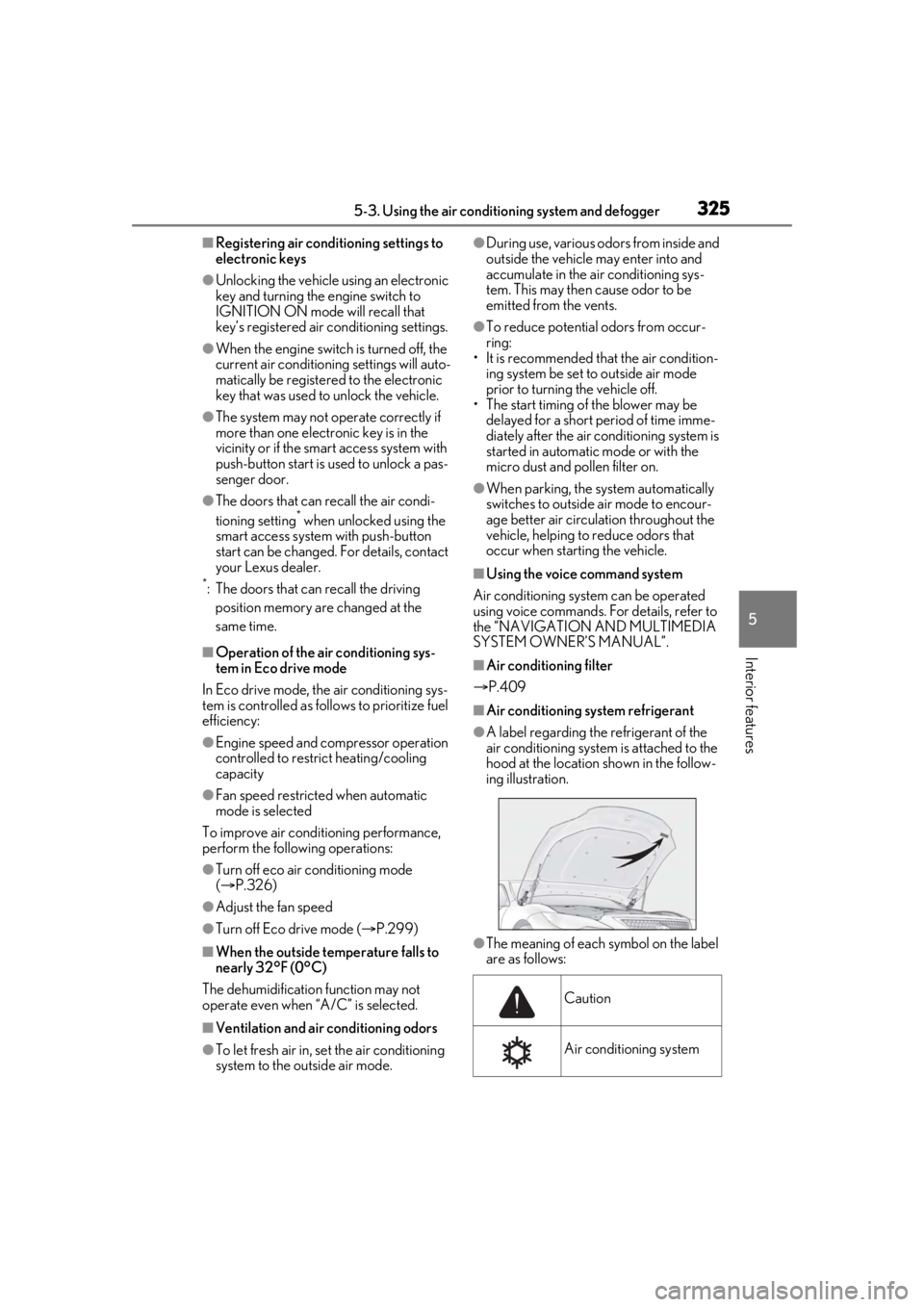
●A label regarding the refrigerant of the
air conditioning system is attached to the
hood at the location shown in the follow-
ing illustration.
●The meaning of each symbol on the label
are as follows:
Caution
Air conditioning system
Page 476 of 520
4768-2. Customization
8-2.Customization
■Changing by using the meter con-
trol switches
1 Press or to select .
2 Operate the meter control
switches to select the desired item
to be customized.
3 According to the display, select the
desired setting and then press .
To go back to the previous screen or exit
the customize mode, press .
■Changing by using the Remote
Touch
1 Press the “MENU” button on the
Remote Touch.
2 Select “Setup” on the menu screen
and select “Vehicle”.
3 Select “Vehicle Customization” or
“Drive Mode Customization”.
Various setting can be changed. Refer to
the list of settings that can be changed for
details.
For details on the Remote Touch, refer
to the “NAVIGATION AND MULTI-
MEDIA SYSTEM OWNER’S MAN- UAL”.
■Changing by using the Rear Multi
Operation Panel (if equipped)
1 Display the home screen on the
Rear Multi Operation Panel and
then touch “Seat”.
2 Touch “Left” or “Right”.
3 Touch .
4 Touch a button to change the set-
ting.
■When customizing using the Remote
Touch
Stop the vehicle in a safe place, apply the
parking brake, and shift the shift position to
P. Also, to prevent battery discharge, leave
the engine running while customizing the
features.
Customizable features
Your vehicle includes a variety of
electronic features that can be per-
sonalized to your preferences. The
settings of these features can be
changed by using the meter control
switches, the Remote Touch, Rear
Multi Operation Panel or at your
Lexus dealer.
Customizing vehicle features
WARNING
■During customization
As the engine needs to be running
during customization, ensure that the
vehicle is parked in a place with ade-
quate ventilation. In a closed area such as
a garage, exhaust gases including harm-
ful carbon monoxide (CO) may collect
and enter the vehicle. This may lead to
death or a serious health hazard.
NOTICE
■During customization
To prevent battery discharge, ensure that
the engine is running while customizing
features.
Page 511 of 520
511Alphabetical Index
Seat heaters .................................................. 336
Seat position memory ...............................133
Seat ventilators............................................ 336
Front side marker light Light switch .................................................... 190
Replacing light bulbs..................................416
Front turn signal lights Replacing light bulbs..................................416
Turn signal lever .......................................... 185
Fuel Capacity ......................................................... 457
Fuel gauge .............................................. 75, 78
Fuel pump shut off system .................... 426
Information ....................................................465
Refueling ........................................................200
Type.................................................................. 457
Warning light ...............................................430
Fuel consumption Average fuel economy .............................. 84
Current fuel consumption........................ 84
Fuel filler door If the fuel filler door cannot be opened........................................................................... 441
Refueling ........................................................200
Fuel gauge ................................................. 75, 78
Fuel pump shut off system........................ 426
Fuses ................................................................... 412
G
Garage door opener ................................. 360
Gauges ....................................................... 75, 78
Gear Position................................................... 86
G-force............................................................... 86
Glove box ....................................................... 345
Glove box light ............................................. 346
H
Hands Free Power Trunk Lid .................. 109
Head restraints .............................................. 138
Headlight aim ..................................................415 Headlights
Adaptive Front-lighting System (AFS)............................................................................192
Automatic High Beam system ............. 193
Light switch .................................................... 190
Replacing light bulbs ................................. 416
Head-up display.............................................. 89 Driving information display area ...........89
Driving support system display area .. 92
Eco Driving Indicator.................................. 93
HUD (Head-up display) switch ..............91
Navigation system-linked display ........89
Pop-up display ............................................... 92
Settings.................................................................91
Heated steering wheel .............................. 336
Heaters Front automatic air conditioning system.......................................................................... 323
Heated steering wheel ............................336
Outside rear view mirrors..................... 324
Rear automatic air conditioning system
..........................................................................333
Seat heaters ..................................................336
Height control Electronically modulated air suspension..........................................................................302
Hill-start assist control ............................... 304
Hood Open................................................................. 381
Pop Up Hood................................................. 37
Hooks Coat hooks ...................................................353
Retaining hooks (floor mat) ..................... 22
Horn ..................................................................... 141
HUD (Head-up display) switch .................. 91
I
I/M test ............................................................ 378
Identification Engine.............................................................. 457
Vehicle ........................................................... 456
Page 513 of 520
513Alphabetical Index
Lexus Safety System + AAHB (Automatic High Beam)..............193
Dynamic radar cruise control with full-speed range ............................251, 254
FCTA (Front Cross Traffic Alert) ..... 235
LTA (Lane Tracing Assist).................... 238
PCS (Pre-Collision System)..................215
RSA (Road Sign Assist) ...........................251
License plate lights Light switch .................................................... 190
Replacing light bulbs..................................416
Light bulbs Replacing .........................................................416
Lights Automatic High Beam system..............193
Front interior lights ...................................... 341
Front personal lights................................. 342
Headlight switch ......................................... 190
Interior lights.................................................340
Interior lights list..........................................340
Rear interior lights ....................................... 341
Rear personal lights.................................. 342
Replacing light bulbs..................................416
Trunk lid light................................................... 110
Trunk light......................................................... 110
Turn signal lever .......................................... 185
Vanity lights ..................................................356
Welcome light illumination control .... 192
Lock steering column .................................. 174
LTA (Lane Tracing Assist) Operation...................................................... 238
Warning messages ..................................250
Luggage mats ............................................... 349
M
Maintenance Do-it-yourself maintenance ................. 379
General maintenance ............................. 375
Maintenance data......................................456
Maintenance requirements .................. 374
Malfunction indicator lamp ..................... 428
Menu icons........................................................ 83 Meter
Changing the main meter location...... 82
Clock.......................................................... 75, 78
Indicators........................................................... 72
Instrument panel light control.......... 77, 81
Meter control switches ..............................83
Meters........................................................ 75, 78
Multi-information display .......................... 82
Settings............................................................... 87
Units.....................................................................86
Warning lights ............................................. 427
Warning message .....................................436
Micro dust and pollen filter ..................... 330
Mirrors Digital Rearview Mirror ............................143
Inside rear view mirror ..............................142
Outside rear view mirror defoggers324
Outside rear view mirrors........................ 151
Vanity mirrors ............................................. 356
Moon roof Door lock linked moon roof operation................................................................ 156, 160
Jam protection function ........................... 156
Operation ....................................................... 156
Multi-information display ............................ 82 Audio system-linked display ................... 87
Boost gauge ....................................................86
Drive information 1/Drive information 2.............................................................................84
Driving information display ......................84
Driving support system information dis- play.................................................................... 87
Dynamic radar cruise control with full-speed range ......................................254
Eco Driving Indicator..................................85
Gear Position .................................................86
G-force ..............................................................86
LTA (Lane Tracing Assist) .................... 244
Menu icons ......................................................83
Meter control switches ..............................83
Navigation system-linked display ........86
Pop-up display ............................................... 82
Page 514 of 520
514Alphabetical Index
Settings .............................................................. 87
Suggestion function.....................................88
Tire pressure ................................................395
Units .................................................................... 86
Warning message..................................... 436
N
Navigation system-linked display... 86, 89
Noise from under vehicle ...............................6
O
“ODO TRIP” switch ................................76, 81
Odometer ...................................................76, 81
Odometer and trip meter displayDisplay items ............................................ 76, 81
“ODO TRIP” switch ............................. 76, 81
Pop-up display........................................ 77, 81
Oil Engine oil .......................................................458
Front differential oil ...................................460
Rear differential oil ......................................461
Opener Fuel filler door..............................................200
Hood................................................................. 381
Trunk ................................................................. 108
Outer foot lights Location..........................................................340
Outside door handle lights...................... 340
Outside rear view mirrors Adjustment....................................................... 151
BSM (Blind Spot Monitor) ................... 264
Folding ..............................................................152
Linked mirror functi on when reversing
............................................................................ 151
Mirror position memory...........................133
Outside rear view mirror defoggers324
RCTA function .............................................277
Outside temperature............................ 75, 78
Overheating .................................................. 449
P
Paddle shift switches ......................... 182, 183
Panic mode ..................................................... 100
Panoramic moon roof Jam protection function ........................... 160
Operation ....................................................... 158
Parking assist sensors (intuitive parking assist) ..............................................................272
Parking brake Operation ....................................................... 186
Parking brake engaged warning buzzer........................................................................... 187
Warning light ...............................................433
Warning message ...................................... 187
Parking lights Light switch .................................................... 190
Replacing light bulbs ................................. 416
Parking Support Brake function (for rear-crossing vehicles) .......................... 293Function ..........................................................293
Parking Support Brake function (rear pedestrians) ................................................ 296Function ..........................................................296
Parking Support Brake function (static objects) .........................................................288Function ......................................................... 288
PCS (Pre-Collision System) Function ................................................ 215, 227
PCS OFF switch ........................................230
Warning light ............................................... 432
Personal lights............................................... 340
PKSA (Parking Support Alert) ................ 271
PKSB (Parking Support Brake)............. 284 Warning message ........................ 287, 288
Pop Up Hood....................................................37
Power easy access system ........................133
Power outlets ................................................ 354
Power rear seat ..............................................128
Power steering (Elect ric power steering
system) .......................................................... 304 Warning light .............................................. 430