ESP LEXUS LS500 2021 Owner's Manual
[x] Cancel search | Manufacturer: LEXUS, Model Year: 2021, Model line: LS500, Model: LEXUS LS500 2021Pages: 520, PDF Size: 9.81 MB
Page 142 of 520
1423-4. Adjusting the steering wheel and mirrors
*:If equipped
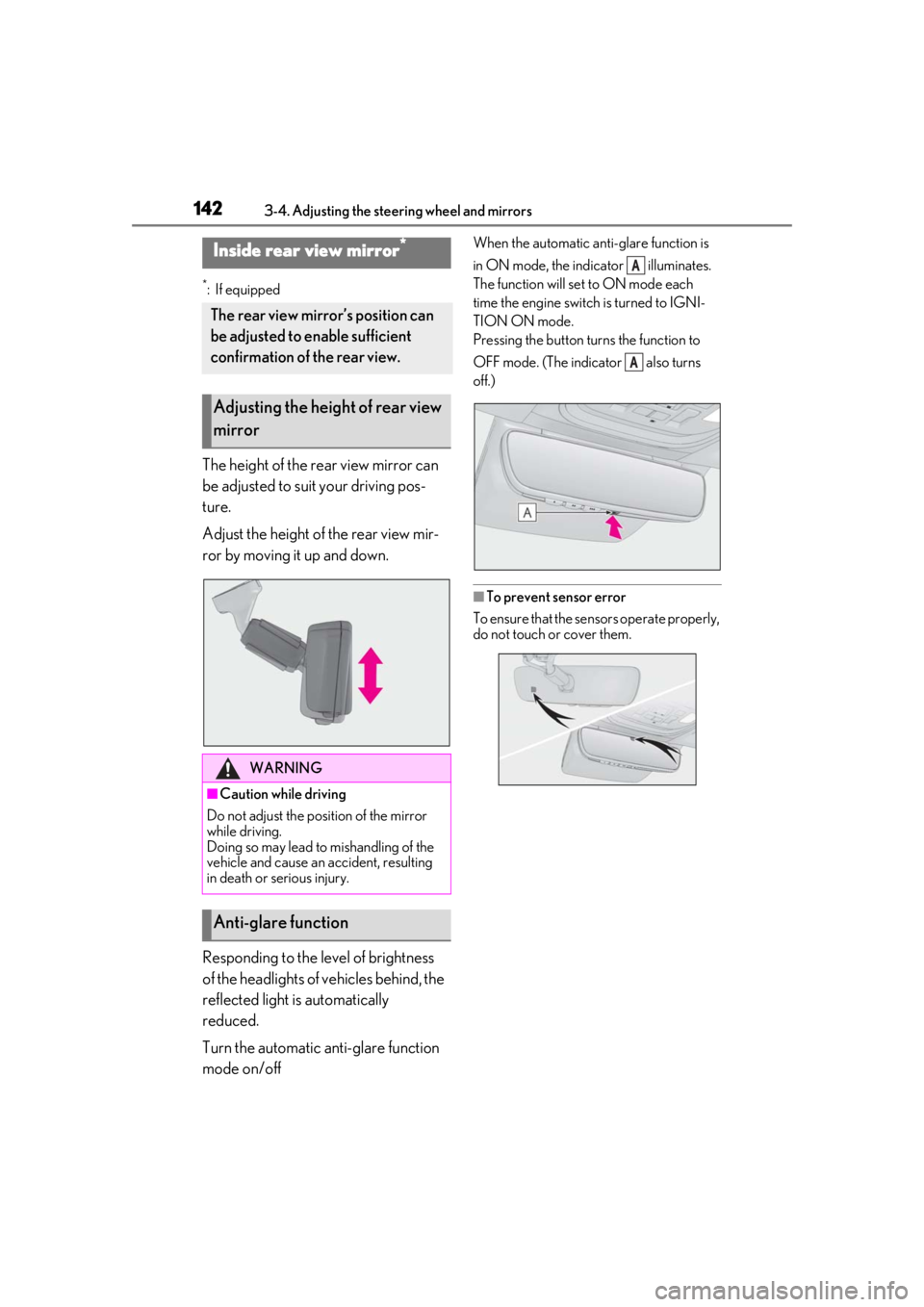
The height of the rear view mirror can
be adjusted to suit your driving pos-
ture.
Adjust the height of the rear view mir-
ror by moving it up and down.
Responding to the level of brightness
of the headlights of vehicles behind, the
reflected light is automatically
reduced.
Turn the automatic anti-glare function
mode on/off
When the automatic anti-glare function is
in ON mode, the indicator illuminates.
The function will set to ON mode each
time the engine switch is turned to IGNI-
TION ON mode.
Pressing the button turns the function to
OFF mode. (The indicator also turns
off.)
■To prevent sensor error
To ensure that the sensors operate properly,
do not touch or cover them.
Inside rear view mirror*
The rear view mirror’s position can
be adjusted to enable sufficient
confirmation of the rear view.
Adjusting the height of rear view
mirror
WARNING
■Caution while driving
Do not adjust the position of the mirror
while driving.
Doing so may lead to mishandling of the
vehicle and cause an accident, resulting
in death or serious injury.
Anti-glare function
A
A
Page 143 of 520
1433-4. Adjusting the steering wheel and mirrors
3
Before driving
*:If equipped
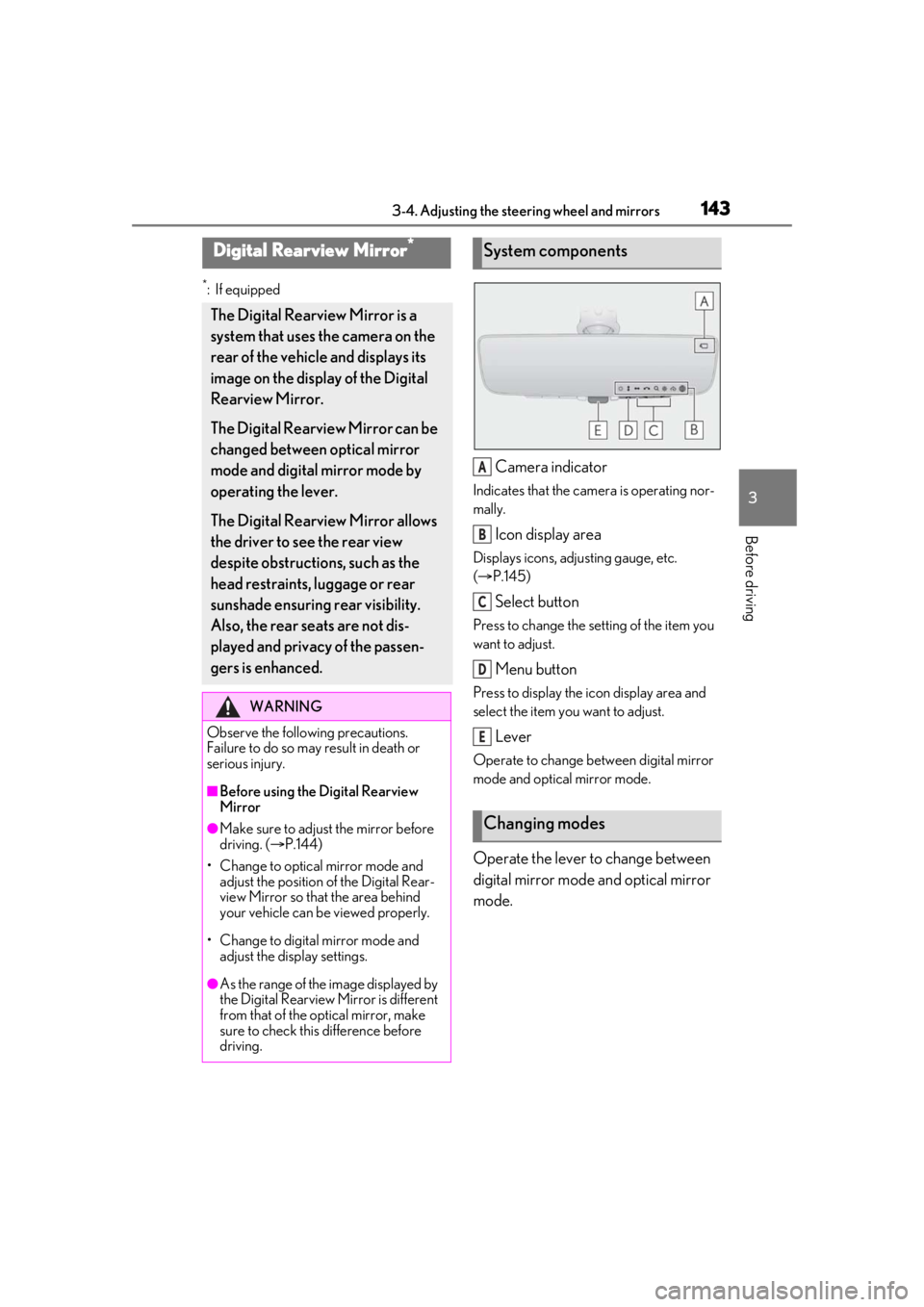
Camera indicator
Indicates that the camera is operating nor-
mally.
Icon display area
Displays icons, adjusting gauge, etc.
( P.145)
Select button
Press to change the setting of the item you
want to adjust.
Menu button
Press to display the ic on display area and
select the item you want to adjust.
Lever
Operate to change between digital mirror
mode and optical mirror mode.
Operate the lever to change between
digital mirror mode and optical mirror
mode.
Digital Rearview Mirror*
The Digital Rearview Mirror is a
system that uses the camera on the
rear of the vehicle and displays its
image on the display of the Digital
Rearview Mirror.
The Digital Rearview Mirror can be
changed between optical mirror
mode and digital mirror mode by
operating the lever.
The Digital Rearview Mirror allows
the driver to see the rear view
despite obstructions, such as the
head restraints, luggage or rear
sunshade ensuring rear visibility.
Also, the rear seats are not dis-
played and privacy of the passen-
gers is enhanced.
WARNING
Observe the following precautions.
Failure to do so may result in death or
serious injury.
■Before using the Digital Rearview
Mirror
●Make sure to adjust the mirror before
driving. ( P.144)
• Change to optical mirror mode and adjust the position of the Digital Rear-
view Mirror so that the area behind
your vehicle can be viewed properly.
• Change to digital mirror mode and adjust the display settings.
●As the range of the image displayed by
the Digital Rearview Mirror is different
from that of the optical mirror, make
sure to check this difference before
driving.
System components
Changing modes
A
B
C
D
E
Page 145 of 520
1453-4. Adjusting the steering wheel and mirrors
3
Before driving
ing the height of the rear view mirror by
moving it up and down.
■Display settings (digital mirror
mode)
Settings of the display in the digital mir-
ror mode, on/off operation of the auto-
matic anti-glare function, etc. can be
changed.
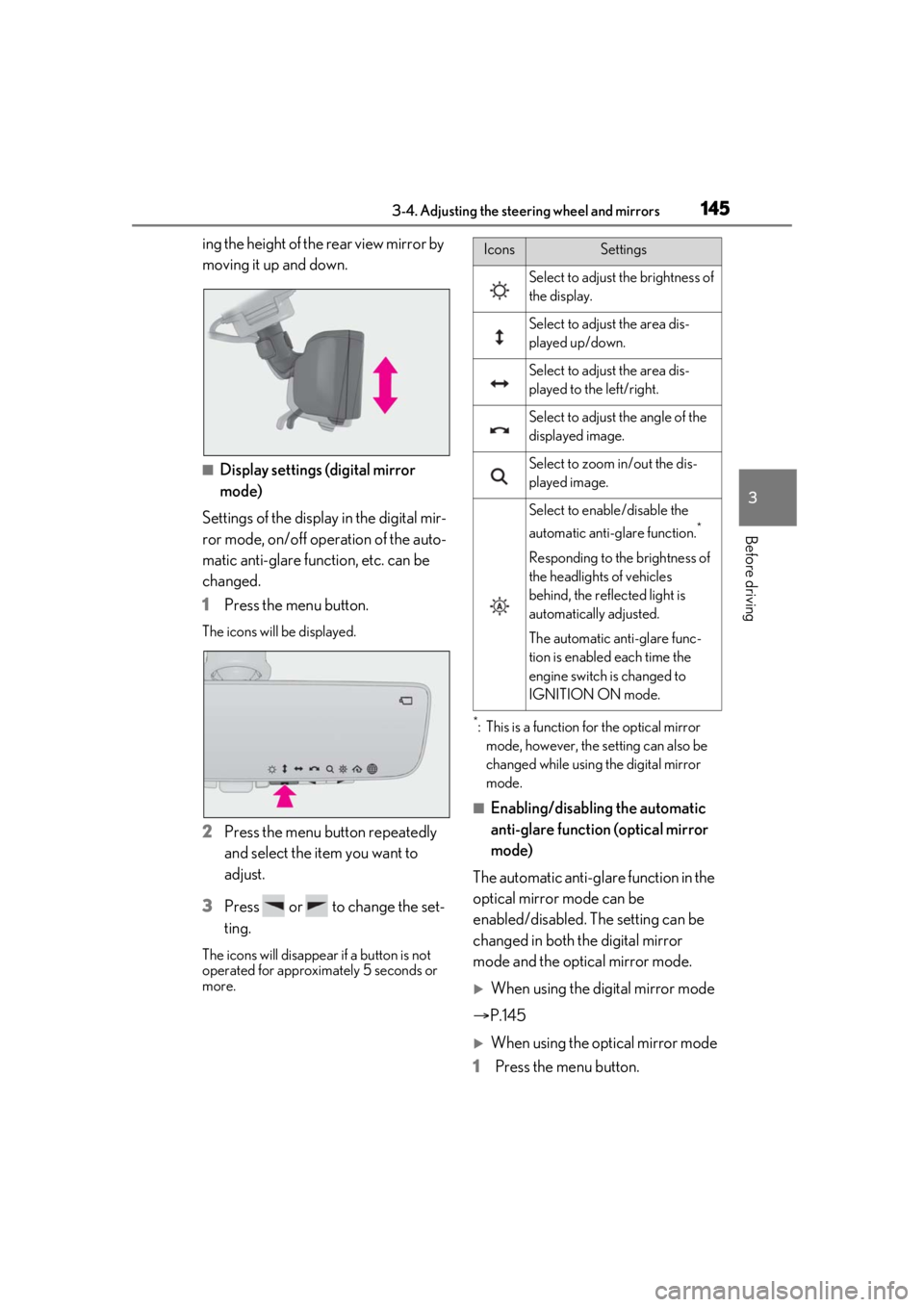
1 Press the menu button.
The icons will be displayed.
2Press the menu button repeatedly
and select the item you want to
adjust.
3 Press or to change the set-
ting.
The icons will disappear if a button is not
operated for approximately 5 seconds or
more.
*: This is a function for the optical mirror
mode, however, the setting can also be
changed while using the digital mirror
mode.
■Enabling/disabling the automatic
anti-glare function (optical mirror
mode)
The automatic anti-glare function in the
optical mirror mode can be
enabled/disabled. The setting can be
changed in both the digital mirror
mode and the optical mirror mode.
When using the digital mirror mode
P.145
When using the op tical mirror mode
1 Press the menu button.
IconsSettings
Select to adjust the brightness of
the display.
Select to adjust the area dis-
played up/down.
Select to adjust the area dis-
played to the left/right.
Select to adjust the angle of the
displayed image.
Select to zoom in/out the dis-
played image.
Select to enable/disable the
automatic anti-glare function.
*
Responding to the brightness of
the headlights of vehicles
behind, the reflected light is
automatically adjusted.
The automatic anti-glare func-
tion is enabled each time the
engine switch is changed to
IGNITION ON mode.
Page 146 of 520
1463-4. Adjusting the steering wheel and mirrors
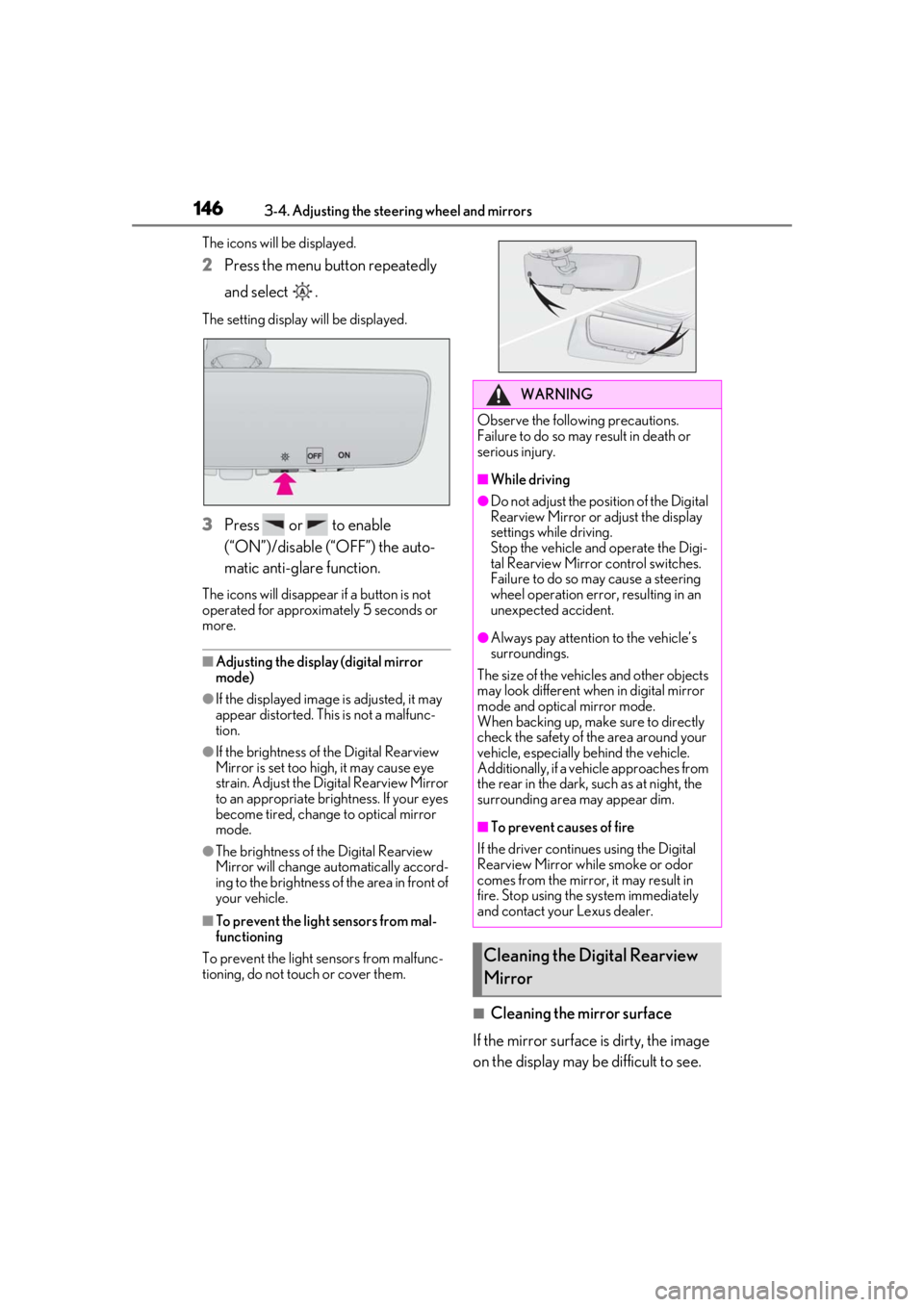
The icons will be displayed.
2Press the menu button repeatedly
and select .
The setting display will be displayed.
3Press or to enable
(“ON”)/disable (“OFF”) the auto-
matic anti-glare function.
The icons will disappear if a button is not
operated for approximately 5 seconds or
more.
■Adjusting the display (digital mirror
mode)
●If the displayed image is adjusted, it may
appear distorted. This is not a malfunc-
tion.
●If the brightness of the Digital Rearview
Mirror is set too high, it may cause eye
strain. Adjust the Di gital Rearview Mirror
to an appropriate brig htness. If your eyes
become tired, change to optical mirror
mode.
●The brightness of the Digital Rearview
Mirror will change automatically accord-
ing to the brightness of the area in front of
your vehicle.
■To prevent the light sensors from mal-
functioning
To prevent the light sensors from malfunc-
tioning, do not touch or cover them.
■Cleaning the mirror surface
If the mirror surface is dirty, the image
on the display may be difficult to see.
WARNING
Observe the following precautions.
Failure to do so may result in death or
serious injury.
■While driving
●Do not adjust the position of the Digital
Rearview Mirror or adjust the display
settings while driving.
Stop the vehicle and operate the Digi-
tal Rearview Mirror control switches.
Failure to do so may cause a steering
wheel operation error, resulting in an
unexpected accident.
●Always pay attention to the vehicle’s
surroundings.
The size of the vehicles and other objects
may look different when in digital mirror
mode and optical mirror mode.
When backing up, make sure to directly
check the safety of the area around your
vehicle, especially behind the vehicle.
Additionally, if a vehicle approaches from
the rear in the dark, such as at night, the
surrounding area may appear dim.
■To prevent causes of fire
If the driver contin ues using the Digital
Rearview Mirror while smoke or odor
comes from the mirror, it may result in
fire. Stop using the system immediately
and contact your Lexus dealer.
Cleaning the Digital Rearview
Mirror
Page 154 of 520
1543-5. Opening, closing the windows and moon roof
5Release the power window switch for a
moment, resume push ing the switch in
the one-touch opening direction, and
hold it there for approximately 4 sec-
onds or more.
6 Pull and hold the power window switch
in the one-touch closing direction
again. After the side window is com-
pletely closed, continue holding the
switch for a further 1 second or more.
If you release the switch while the window is
moving, start again from the beginning.
If the window reverses and cannot be fully
closed or opened, have the vehicle
inspected by your Lexus dealer.
■Door lock linked window operation
●The power windows can be opened and
closed using the mechanical key.*
( P.443)
●The power windows can be opened using
the wireless remote control.* ( P.102)
*: These settings must be customized at
your Lexus dealer.
■Power windows open warning buzzer
A buzzer sounds and a message is shown
on the multi-information display in the
instrument cluster when the engine switch
is turned off and the driver’s door is opened
with the power windows open.
■Customization
Some functions can be customized.
( P.476)
WARNING
Observe the following precautions.
Failure to do so may result in death or
serious injury.
■Closing the windows
●The driver is responsible for all the
power window operations, including
the operation for the passengers. In
order to prevent accidental operation,
especially by a child, do not let a child
operate the power windows. It is possi-
ble for children and other passengers
to have body parts caught in the power
window. Also, when riding with a child,
it is recommended to use the window
lock switch. (
P.155)
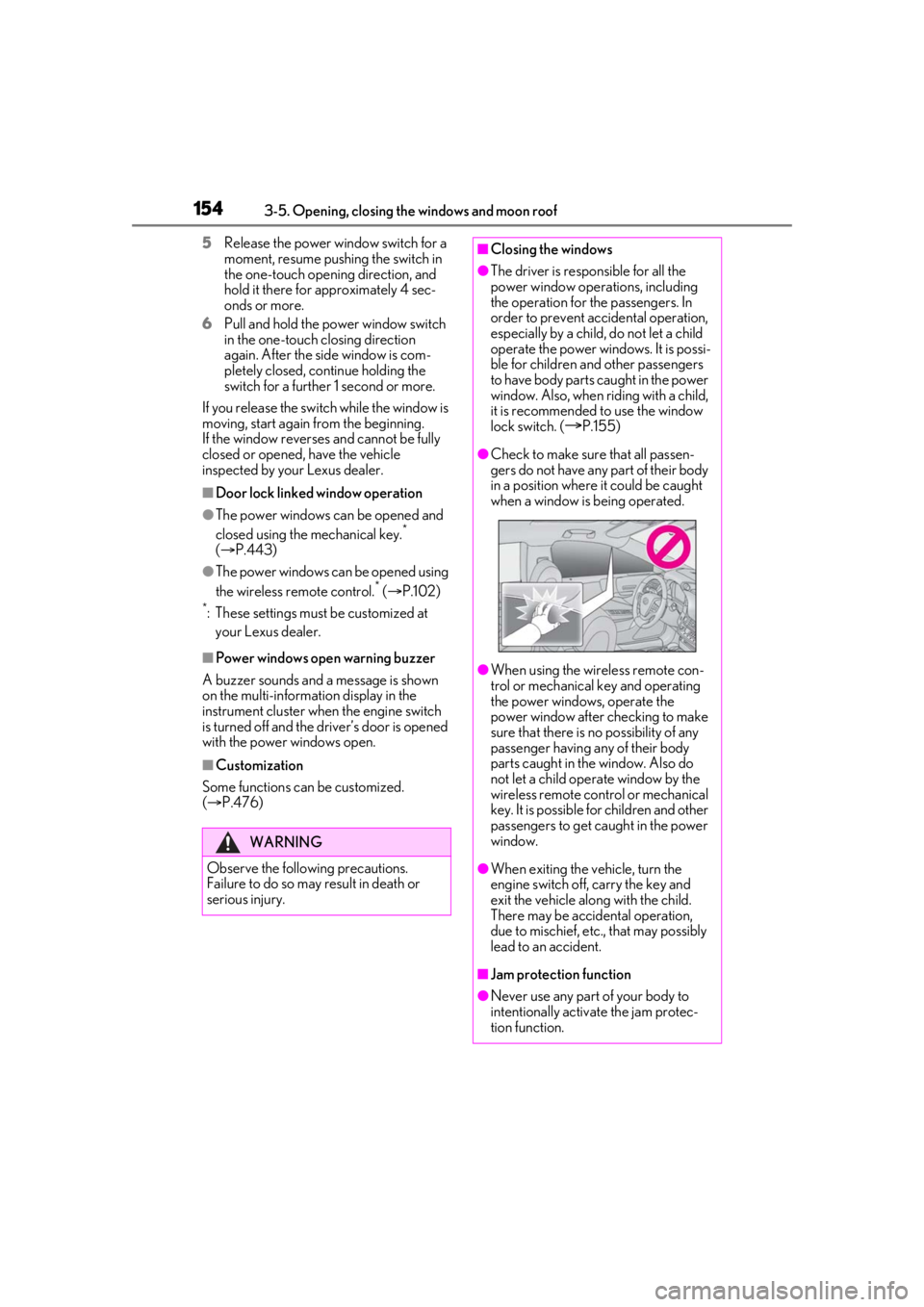
●Check to make sure that all passen-
gers do not have any part of their body
in a position where it could be caught
when a window is being operated.
●When using the wireless remote con-
trol or mechanical key and operating
the power windows, operate the
power window after checking to make
sure that there is no possibility of any
passenger having any of their body
parts caught in the window. Also do
not let a child operate window by the
wireless remote control or mechanical
key. It is possible for children and other
passengers to get caught in the power
window.
●When exiting the vehicle, turn the
engine switch off, carry the key and
exit the vehicle along with the child.
There may be accidental operation,
due to mischief, etc., that may possibly
lead to an accident.
■Jam protection function
●Never use any part of your body to
intentionally activa te the jam protec-
tion function.
Page 157 of 520
1573-5. Opening, closing the windows and moon roof
3
Before driving
after performing the above procedure cor-
rectly, have the vehicle inspected by your
Lexus dealer.
■If the moon roof does not move normally
If the moon roof does not open or close
normally or the automatic opening function
does not operate, perform the following ini-
tialization procedure.
1 Stop the vehicle.
2 Press and hold the “DOWN” switch.
*
The moon roof will stop at the tilt-up posi-
tion. After that, it will op en, close, tilt up, tilt
down, and stop at the fully closed position.
3 Confirm that the moon roof has com-
pletely stopped and release the switch.
*: If you release the switch while the moon
roof is moving, perform the procedure
again from the beginning.
If, after performing the above procedures
correctly, the moon roof still does not open
or close normally or the automatic opening
function does not operate, have the vehicle
inspected by your Lexus dealer.
■Moon roof open warning buzzer
A buzzer sounds and a message is shown
on the multi-information display in the
instrument cluster when the engine switch
is turned off and the driver’s door is opened
with the moon roof open.
■Customization
Some functions can be customized.
( P.476)
WARNING
Observe the following precautions.
Failure to do so may cause death or seri-
ous injury.
■Opening the moon roof
●Do not allow any passengers to put
their hands or heads outside the vehi-
cle while it is moving.
●Do not sit on top of the moon roof.
■Opening and closing the moon roof
●The driver is responsible for moon roof
opening and closing operations.
In order to prevent accidental opera-
tion, especially by a child, do not let a
child operate the moon roof. It is possi-
ble for children and other passengers
to have body parts caught in the moon
roof.
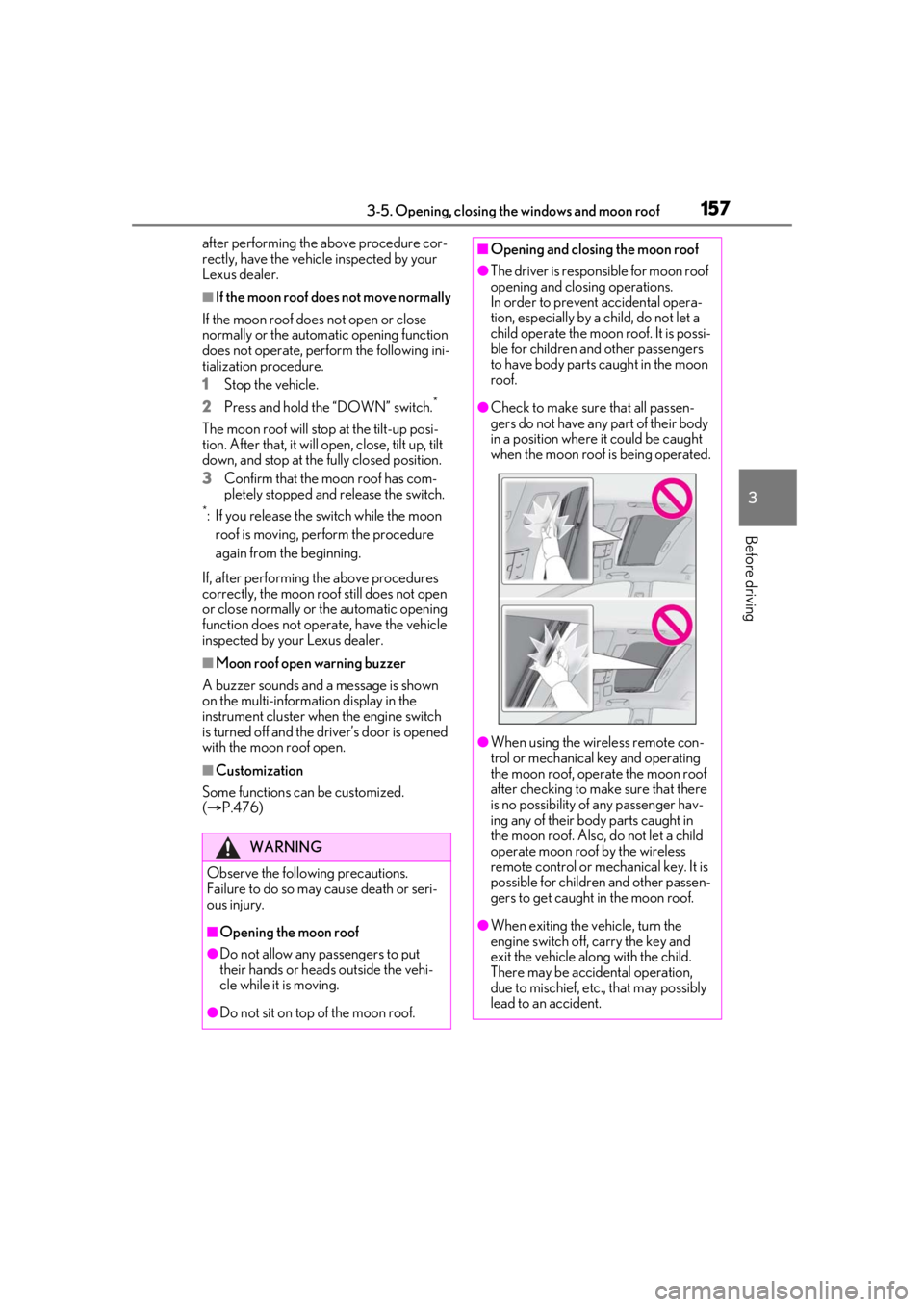
●Check to make sure that all passen-
gers do not have any part of their body
in a position where it could be caught
when the moon roof is being operated.
●When using the wireless remote con-
trol or mechanical key and operating
the moon roof, operate the moon roof
after checking to make sure that there
is no possibility of any passenger hav-
ing any of their body parts caught in
the moon roof. Also, do not let a child
operate moon roof by the wireless
remote control or mech anical key. It is
possible for children and other passen-
gers to get caught in the moon roof.
●When exiting the vehicle, turn the
engine switch off, carry the key and
exit the vehicle along with the child.
There may be accidental operation,
due to mischief, etc., that may possibly
lead to an accident.
Page 162 of 520
1623-5. Opening, closing the windows and moon roof
WARNING
●Do not sit on top of the panoramic
moon roof.
■Opening and closing the panoramic
moon roof
●The driver is responsible for pan-
oramic moon roof opening and closing
operations. In order to prevent acci-
dental operation, especially by a child,
do not let a child operate the pan-
oramic moon roof. It is possible for
children and other passengers to have
body parts caught in the panoramic
moon roof.
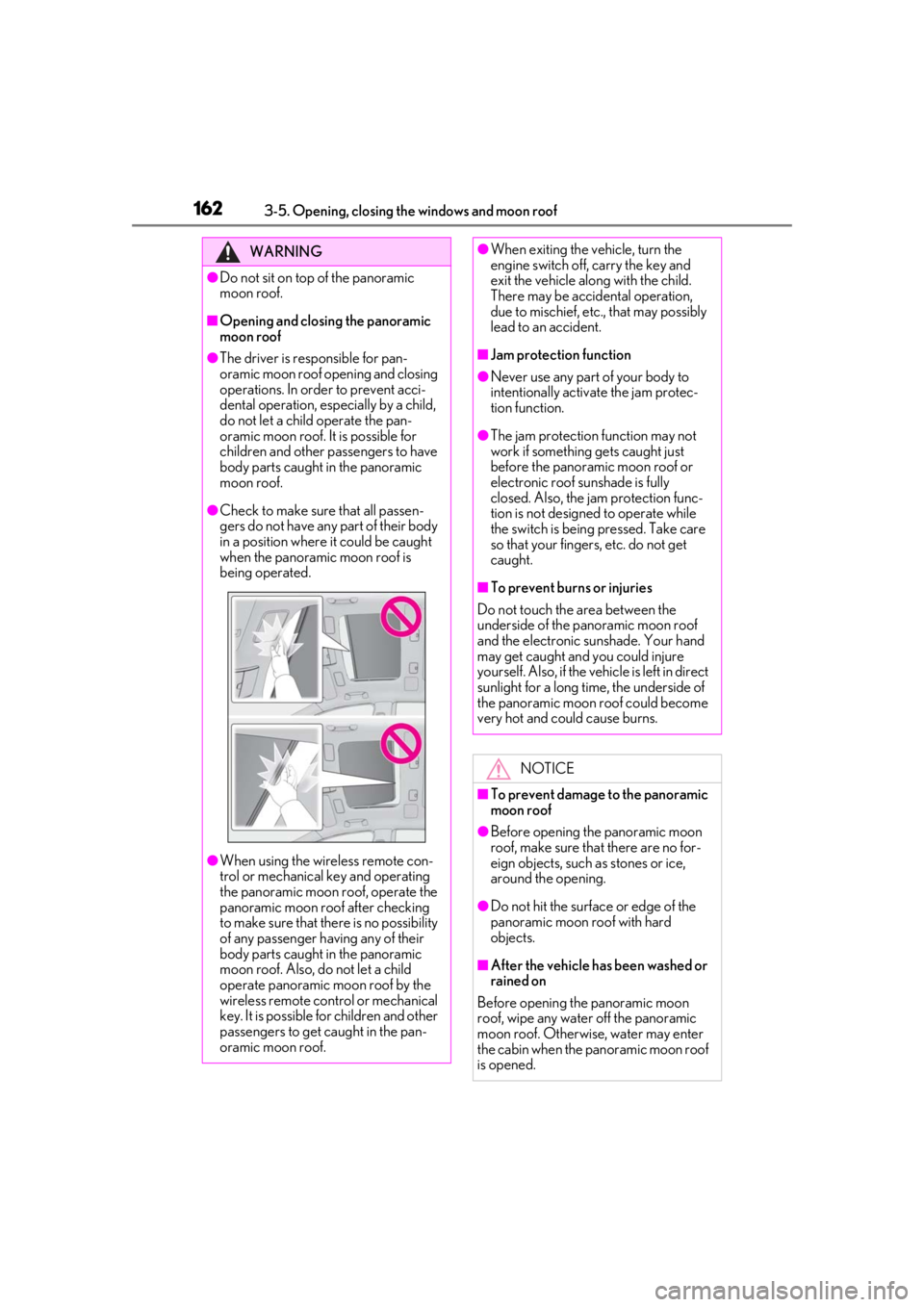
●Check to make sure that all passen-
gers do not have any part of their body
in a position where it could be caught
when the panoramic moon roof is
being operated.
●When using the wireless remote con-
trol or mechanical key and operating
the panoramic moon roof, operate the
panoramic moon roof after checking
to make sure that there is no possibility
of any passenger having any of their
body parts caught in the panoramic
moon roof. Also, do not let a child
operate panoramic moon roof by the
wireless remote control or mechanical
key. It is possible for children and other
passengers to get caught in the pan-
oramic moon roof.
●When exiting the vehicle, turn the
engine switch off, carry the key and
exit the vehicle along with the child.
There may be accidental operation,
due to mischief, etc., that may possibly
lead to an accident.
■Jam protection function
●Never use any part of your body to
intentionally activate the jam protec-
tion function.
●The jam protection function may not
work if something gets caught just
before the panoramic moon roof or
electronic roof sunshade is fully
closed. Also, the jam protection func-
tion is not designed to operate while
the switch is being pressed. Take care
so that your fingers, etc. do not get
caught.
■To prevent burns or injuries
Do not touch the area between the
underside of the panoramic moon roof
and the electronic sunshade. Your hand
may get caught and you could injure
yourself. Also, if the vehicle is left in direct
sunlight for a long time, the underside of
the panoramic moon roof could become
very hot and could cause burns.
NOTICE
■To prevent damage to the panoramic
moon roof
●Before opening the panoramic moon
roof, make sure that there are no for-
eign objects, such as stones or ice,
around the opening.
●Do not hit the surface or edge of the
panoramic moon roof with hard
objects.
■After the vehicle has been washed or
rained on
Before opening the panoramic moon
roof, wipe any water off the panoramic
moon roof. Otherwise, water may enter
the cabin when the panoramic moon roof
is opened.
Page 164 of 520
1644-1. Before driving
4-1.Before driving
■Starting the engine
P.174
■Driving
1 With the brake pedal depressed,
shift the shift position to D.
(P.178)
Check that the shift position indicator
shows D.
2 If the parking brake is in manual
mode, release the parking brake.
(P.186)
3 Gradually release the brake pedal
and gently depress the accelerator
pedal to accelerate the vehicle.
■Stopping
1 With the shift position in D, depress
the brake pedal.
2 If necessary, set the parking brake.
If the vehicle is to be stopped for an
extended period of time, shift the shift posi-
tion to P. ( P.180)
■Parking the vehicle
1 With the shift position in D, depress
the brake pedal to stop the vehicle
completely.
2 If the parking brake is in manual
mode, set the parking brake.
(P.186)
3 Shift the shift position to P.
(P.180)
Check that the shift position indicator
shows P and the parking brake indicator is
illuminated.
4 Press the engine switch to stop the
engine.
5 Slowly release the brake pedal.
6 Lock the door, making sure that you
have the electronic key on your
person.
If parking on a hill, block the wheels as
needed.
■Starting off on a steep uphill
1 Make sure that the parking brake is
set and shift the shift position to D.
2 Gently depress the accelerator
pedal.
3 Release the parking brake.
■Driving in the rain
●Drive carefully when it is raining, because
visibility will be reduced, the windows
may become fogged-up, and the road
will be slippery.
●Drive carefully when it starts to rain,
because the road surface will be espe-
cially slippery.
●Refrain from high speeds when driving on
an expressway in the rain, because there
may be a layer of wa ter between the tires
and the road surface, preventing the
steering and brakes from operating prop-
erly.
■Engine speed while driving
In the following conditions, the engine
speed may become high while driving. This
is due to automatic up-shifting control or
down-shifting implementation to meet driv-
ing conditions. It does not indicate sudden
acceleration.
●The vehicle is judged to be driving uphill
or downhill
●When the accelerato r pedal is released
●When the brake pedal is depressed
Driving the vehicle
The following procedures should be
observed to ensure safe driving:
Driving procedure
Page 165 of 520
1654-1. Before driving
4
Driving
■Restraining the engine output (Brake
Override System)
●When the accelerator and brake pedals
are depressed at the same time, the
engine output may be restrained.
●A warning message is displayed on the
multi-information display while the sys-
tem is operating.
■Breaking in your new Lexus
To extend the life of the vehicle, observing
the following precautions is recommended:
●For the first 186 miles (300 km):
Avoid sudden stops.
●For the first 621 miles (1000 km):
• Do not drive at extremely high speeds.
• Avoid sudden acceleration.
• Do not drive continuously in low gears.
• Do not drive at a constant speed for extended periods.
■Drum-in-disc type parking brake system
Your vehicle has a drum-in-disc type park-
ing brake system. This type of brake system
needs bedding-down of the brake shoes
periodically or whenev er the parking brake
shoes and/or drum are replaced. Have your
Lexus dealer perform the bedding down
operation.
■Operating your vehicle in a foreign
country
Comply with the relevant vehicle registra-
tion laws and confirm the availability of the
correct fuel. ( P.457)
■Idling time before engine stop
To prevent damage to the turbocharger,
allow the engine to id le immediately after
high-speed driving or hill climbing.
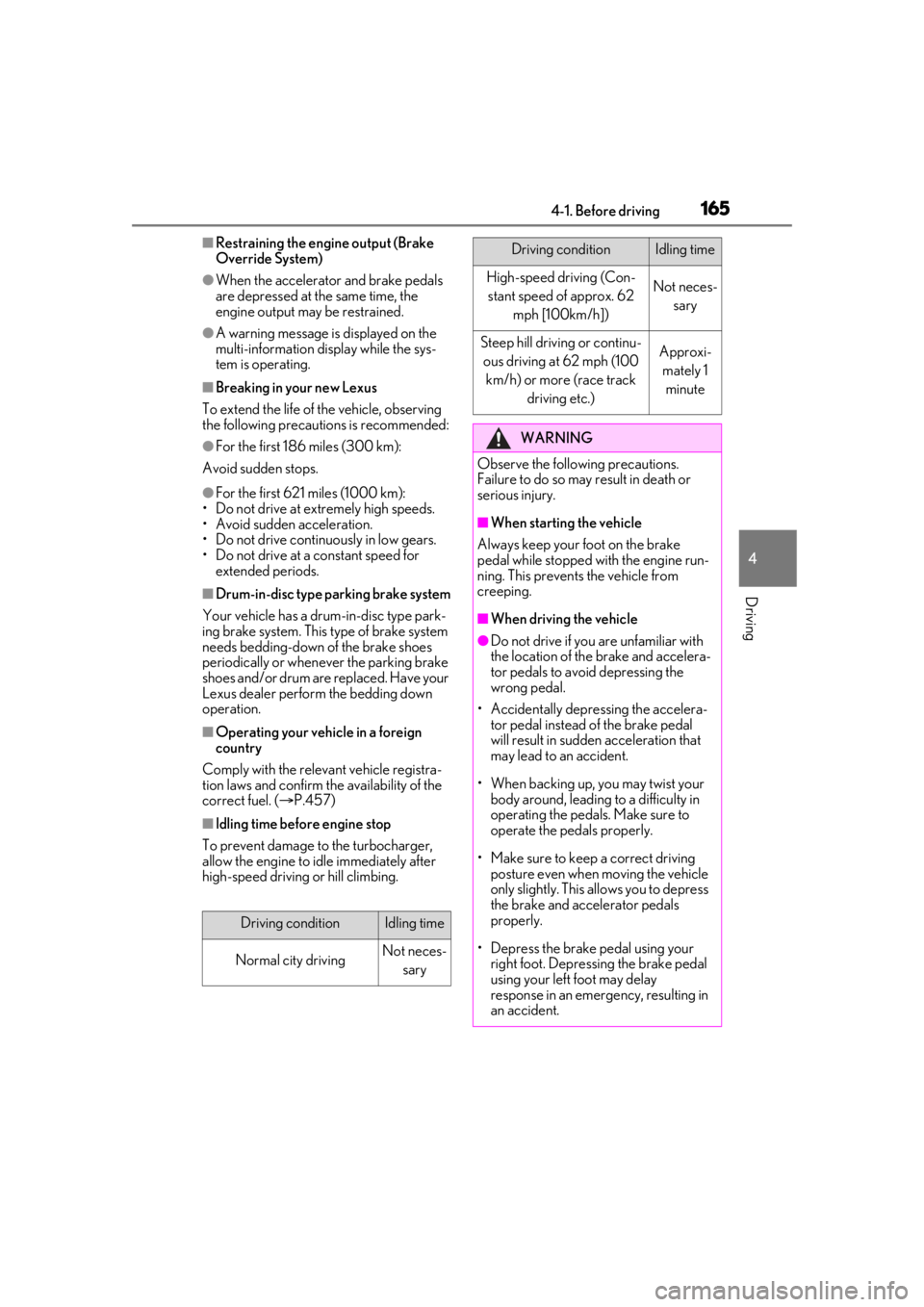
Driving conditionIdling time
Normal city drivingNot neces-
sary
High-speed driving (Con-stant speed of approx. 62
mph [100km/h])Not neces- sary
Steep hill driving or continu-ous driving at 62 mph (100 km/h) or more (race track driving etc.)Approxi-mately 1 minute
WARNING
Observe the following precautions.
Failure to do so may result in death or
serious injury.
■When starting the vehicle
Always keep your foot on the brake
pedal while stopped with the engine run-
ning. This prevents the vehicle from
creeping.
■When driving the vehicle
●Do not drive if you are unfamiliar with
the location of the brake and accelera-
tor pedals to avoid depressing the
wrong pedal.
• Accidentally depressing the accelera- tor pedal instead of the brake pedal
will result in sudden acceleration that
may lead to an accident.
• When backing up, you may twist your body around, leading to a difficulty in
operating the pedals. Make sure to
operate the pedals properly.
• Make sure to keep a correct driving posture even when moving the vehicle
only slightly. This allows you to depress
the brake and accelerator pedals
properly.
• Depress the brake pedal using your right foot. Depressing the brake pedal
using your left foot may delay
response in an emer gency, resulting in
an accident.
Driving conditionIdling time
Page 202 of 520
2024-5. Using the driving support systems
4-5.Using the driving support systems
*:If equipped
■PCS (Pre-Collision System) (vehi-
cles with Lexus Safety System + A)
P.215
■FCTA (Front Cross Traffic Alert)
P.235
■LTA (Lane Tracing Assist)
P.238
■AHB (Automatic High Beam)
P.193
■RSA (Road Sign Assist)*
*:If equipped
P.251
■Dynamic radar cruise control with
full-speed range
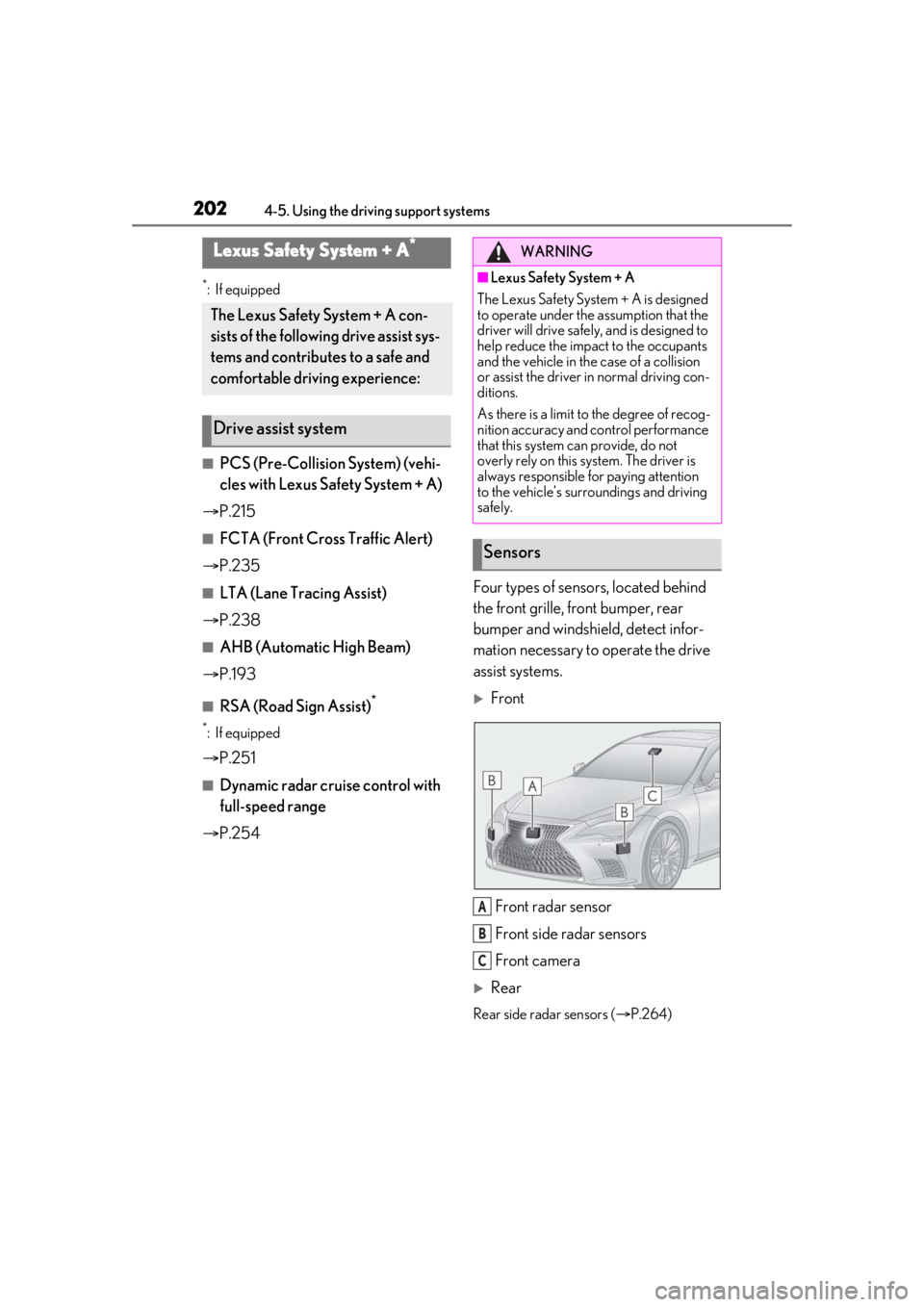
P.254 Four types of sensors, located behind
the front grille, front bumper, rear
bumper and windshield, detect infor-
mation necessary to operate the drive
assist systems.
Front
Front radar sensor
Front side radar sensors
Front camera
Rear
Rear side radar sensors ( P.264)
Lexus Safety System + A*
The Lexus Safety System + A con-
sists of the following drive assist sys-
tems and contributes to a safe and
comfortable driving experience:
Drive assist system
WARNING
■Lexus Safety System + A
The Lexus Safety System + A is designed
to operate under the assumption that the
driver will drive safely , and is designed to
help reduce the impact to the occupants
and the vehicle in the case of a collision
or assist the driver in normal driving con-
ditions.
As there is a limit to the degree of recog-
nition accuracy and control performance
that this system can provide, do not
overly rely on this system. The driver is
always responsible for paying attention
to the vehicle’s surroundings and driving
safely.
Sensors
A
B
C