lights LEXUS LS500 2021 Owner's Manual
[x] Cancel search | Manufacturer: LEXUS, Model Year: 2021, Model line: LS500, Model: LEXUS LS500 2021Pages: 520, PDF Size: 9.81 MB
Page 142 of 520
1423-4. Adjusting the steering wheel and mirrors
*:If equipped
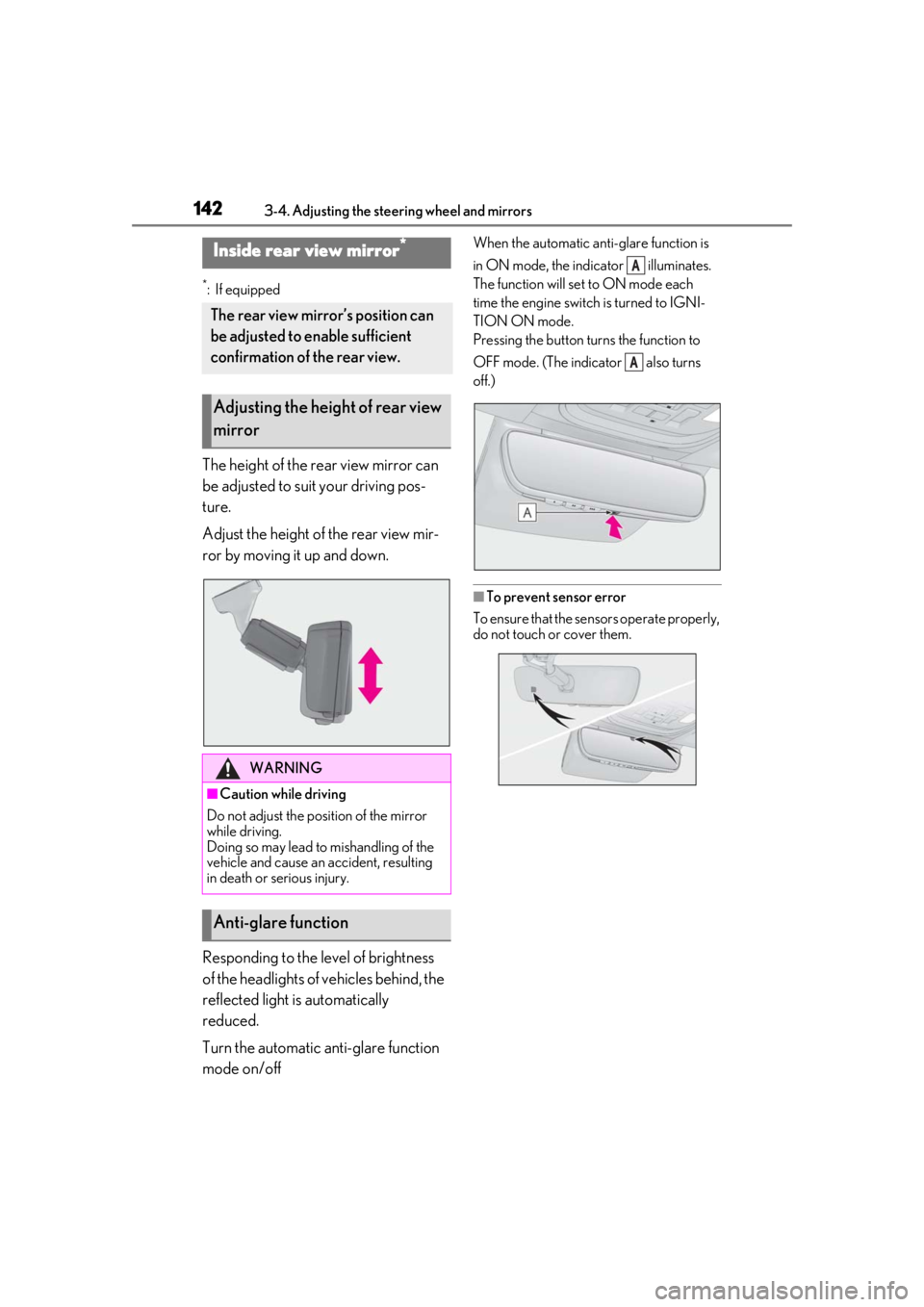
The height of the rear view mirror can
be adjusted to suit your driving pos-
ture.
Adjust the height of the rear view mir-
ror by moving it up and down.
Responding to the level of brightness
of the headlights of vehicles behind, the
reflected light is automatically
reduced.
Turn the automatic anti-glare function
mode on/off
When the automatic anti-glare function is
in ON mode, the indicator illuminates.
The function will set to ON mode each
time the engine switch is turned to IGNI-
TION ON mode.
Pressing the button turns the function to
OFF mode. (The indicator also turns
off.)
■To prevent sensor error
To ensure that the sensors operate properly,
do not touch or cover them.
Inside rear view mirror*
The rear view mirror’s position can
be adjusted to enable sufficient
confirmation of the rear view.
Adjusting the height of rear view
mirror
WARNING
■Caution while driving
Do not adjust the position of the mirror
while driving.
Doing so may lead to mishandling of the
vehicle and cause an accident, resulting
in death or serious injury.
Anti-glare function
A
A
Page 144 of 520
1443-4. Adjusting the steering wheel and mirrors
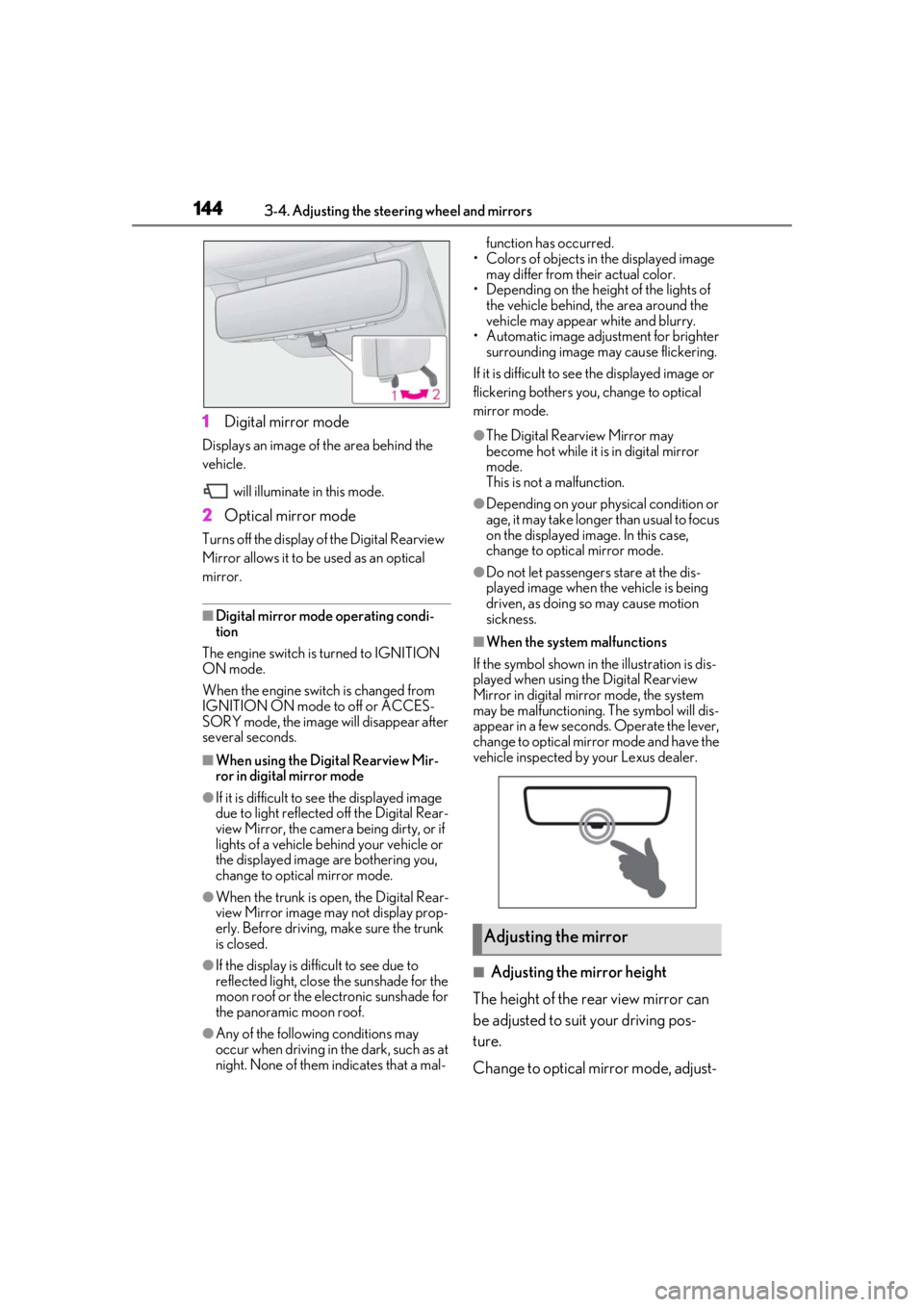
1Digital mirror mode
Displays an image of the area behind the
vehicle.
will illuminate in this mode.
2Optical mirror mode
Turns off the display of the Digital Rearview
Mirror allows it to be used as an optical
mirror.
■Digital mirror mode operating condi-
tion
The engine switch is turned to IGNITION
ON mode.
When the engine switch is changed from
IGNITION ON mode to off or ACCES-
SORY mode, the image will disappear after
several seconds.
■When using the Digital Rearview Mir-
ror in digital mirror mode
●If it is difficult to see the displayed image
due to light reflected off the Digital Rear-
view Mirror, the camera being dirty, or if
lights of a vehicle behind your vehicle or
the displayed image are bothering you,
change to optical mirror mode.
●When the trunk is open, the Digital Rear-
view Mirror image may not display prop-
erly. Before driving, make sure the trunk
is closed.
●If the display is difficult to see due to
reflected light, close the sunshade for the
moon roof or the electronic sunshade for
the panoramic moon roof.
●Any of the following conditions may
occur when driving in the dark, such as at
night. None of them indicates that a mal- function has occurred.
• Colors of objects in the displayed image may differ from their actual color.
• Depending on the height of the lights of the vehicle behind, the area around the
vehicle may appear white and blurry.
• Automatic image adjustment for brighter surrounding image may cause flickering.
If it is difficult to see the displayed image or
flickering bothers you, change to optical
mirror mode.
●The Digital Rearview Mirror may
become hot while it is in digital mirror
mode.
This is not a malfunction.
●Depending on your physical condition or
age, it may take longer than usual to focus
on the displayed image. In this case,
change to optical mirror mode.
●Do not let passengers stare at the dis-
played image when the vehicle is being
driven, as doing so may cause motion
sickness.
■When the system malfunctions
If the symbol shown in the illustration is dis-
played when using the Digital Rearview
Mirror in digital mirror mode, the system
may be malfunctioning. The symbol will dis-
appear in a few second s. Operate the lever,
change to optical mirror mode and have the
vehicle inspected by your Lexus dealer.
■Adjusting the mirror height
The height of the rear view mirror can
be adjusted to suit your driving pos-
ture.
Change to optical mirror mode, adjust-
Adjusting the mirror
Page 145 of 520
1453-4. Adjusting the steering wheel and mirrors
3
Before driving
ing the height of the rear view mirror by
moving it up and down.
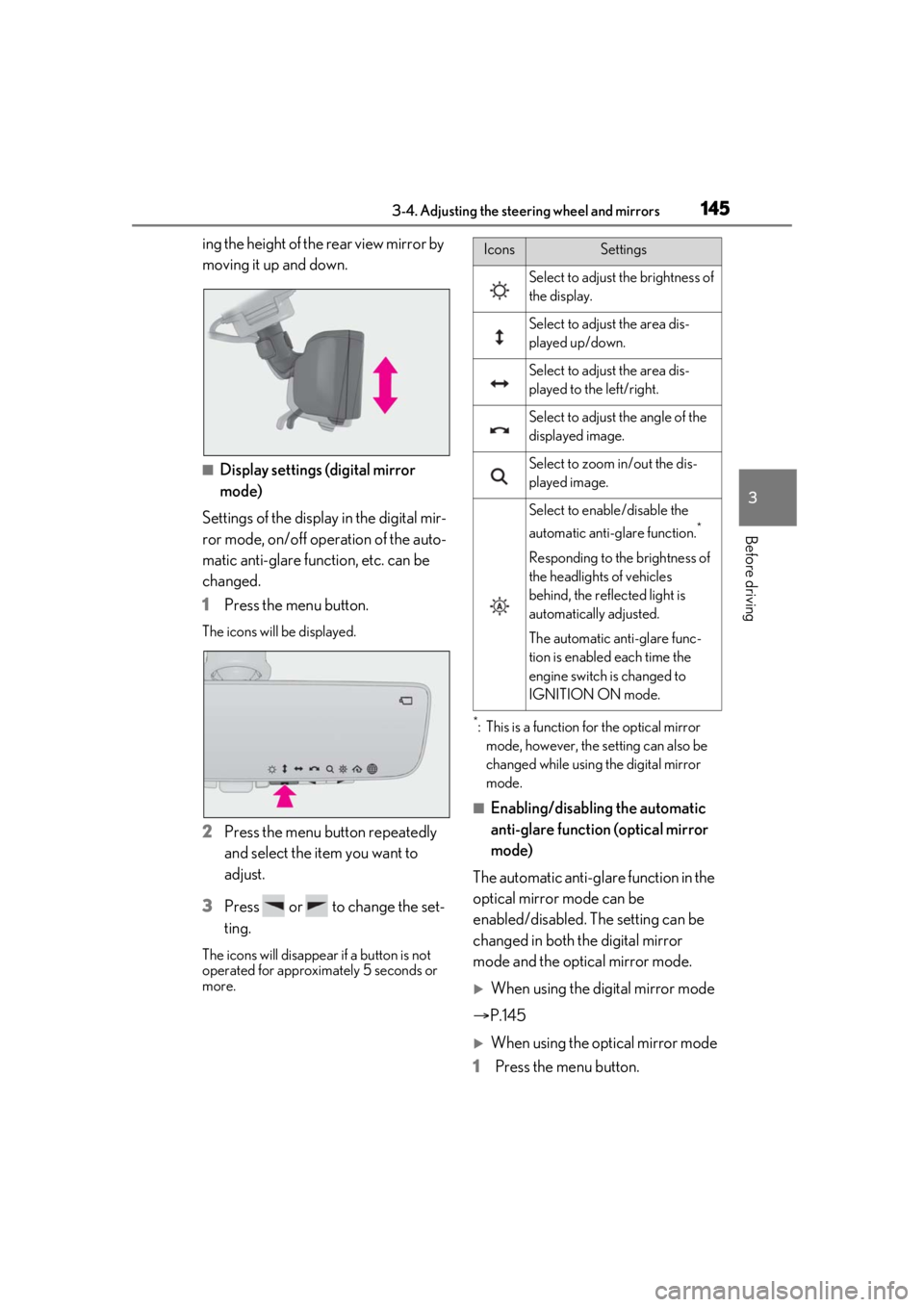
■Display settings (digital mirror
mode)
Settings of the display in the digital mir-
ror mode, on/off operation of the auto-
matic anti-glare function, etc. can be
changed.
1 Press the menu button.
The icons will be displayed.
2Press the menu button repeatedly
and select the item you want to
adjust.
3 Press or to change the set-
ting.
The icons will disappear if a button is not
operated for approximately 5 seconds or
more.
*: This is a function for the optical mirror
mode, however, the setting can also be
changed while using the digital mirror
mode.
■Enabling/disabling the automatic
anti-glare function (optical mirror
mode)
The automatic anti-glare function in the
optical mirror mode can be
enabled/disabled. The setting can be
changed in both the digital mirror
mode and the optical mirror mode.
When using the digital mirror mode
P.145
When using the op tical mirror mode
1 Press the menu button.
IconsSettings
Select to adjust the brightness of
the display.
Select to adjust the area dis-
played up/down.
Select to adjust the area dis-
played to the left/right.
Select to adjust the angle of the
displayed image.
Select to zoom in/out the dis-
played image.
Select to enable/disable the
automatic anti-glare function.
*
Responding to the brightness of
the headlights of vehicles
behind, the reflected light is
automatically adjusted.
The automatic anti-glare func-
tion is enabled each time the
engine switch is changed to
IGNITION ON mode.
Page 148 of 520
1483-4. Adjusting the steering wheel and mirrors
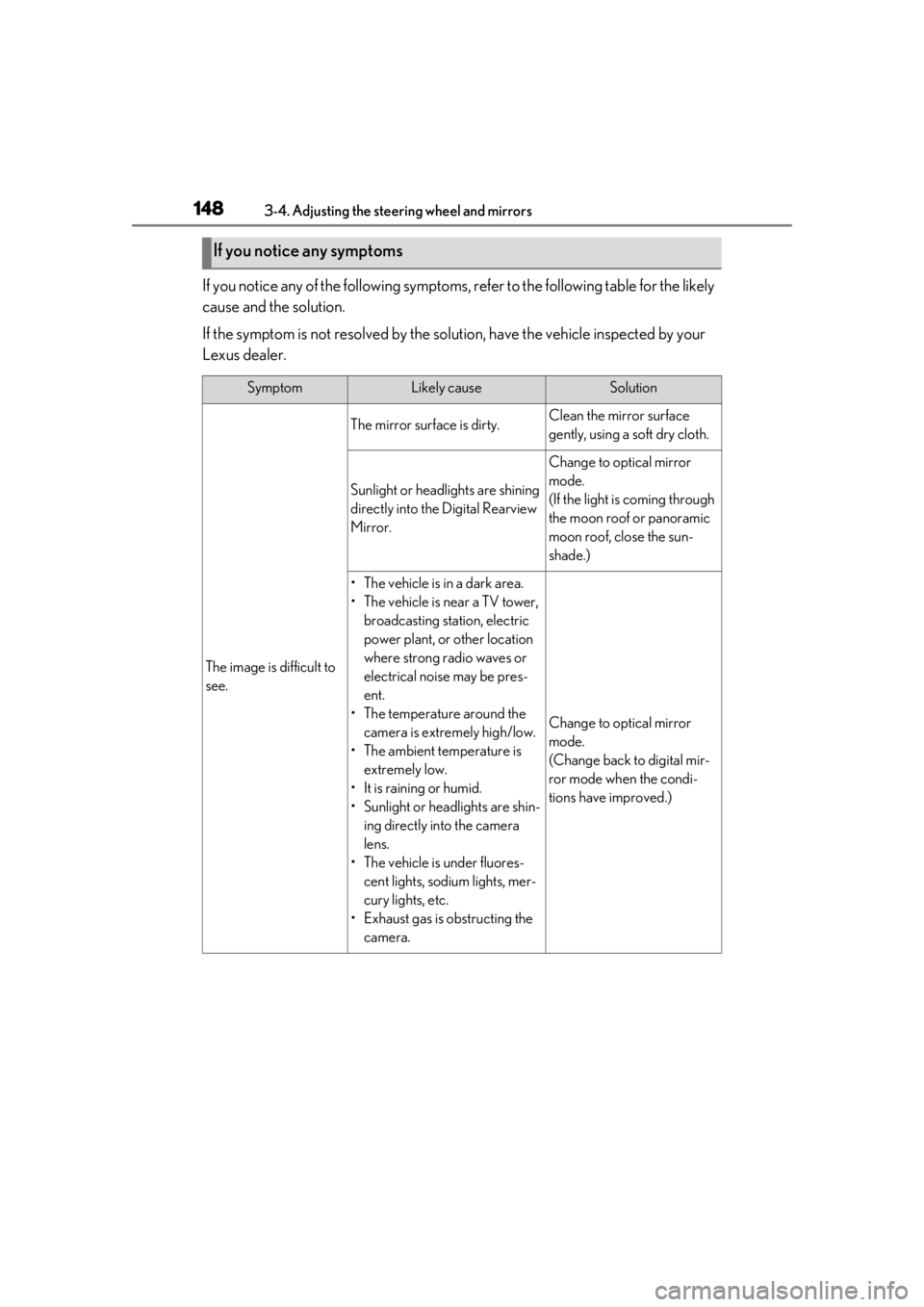
If you notice any of the following symptoms, refer to the following table for the likely
cause and the solution.
If the symptom is not resolved by the solu tion, have the vehicle inspected by your
Lexus dealer.
If you notice any symptoms
SymptomLikely causeSolution
The image is difficult to
see.
The mirror surface is dirty.Clean the mirror surface
gently, using a soft dry cloth.
Sunlight or headlights are shining
directly into the Digital Rearview
Mirror.
Change to optical mirror
mode.
(If the light is coming through
the moon roof or panoramic
moon roof, close the sun-
shade.)
• The vehicle is in a dark area.
• The vehicle is near a TV tower, broadcasting station, electric
power plant, or other location
where strong radio waves or
electrical noise may be pres-
ent.
• The temperature around the camera is extremely high/low.
• The ambient temperature is extremely low.
• It is raining or humid.
• Sunlight or headlights are shin- ing directly into the camera
lens.
• The vehicle is under fluores- cent lights, sodium lights, mer-
cury lights, etc.
• Exhaust gas is obstructing the
camera.
Change to optical mirror
mode.
(Change back to digital mir-
ror mode when the condi-
tions have improved.)
Page 163 of 520
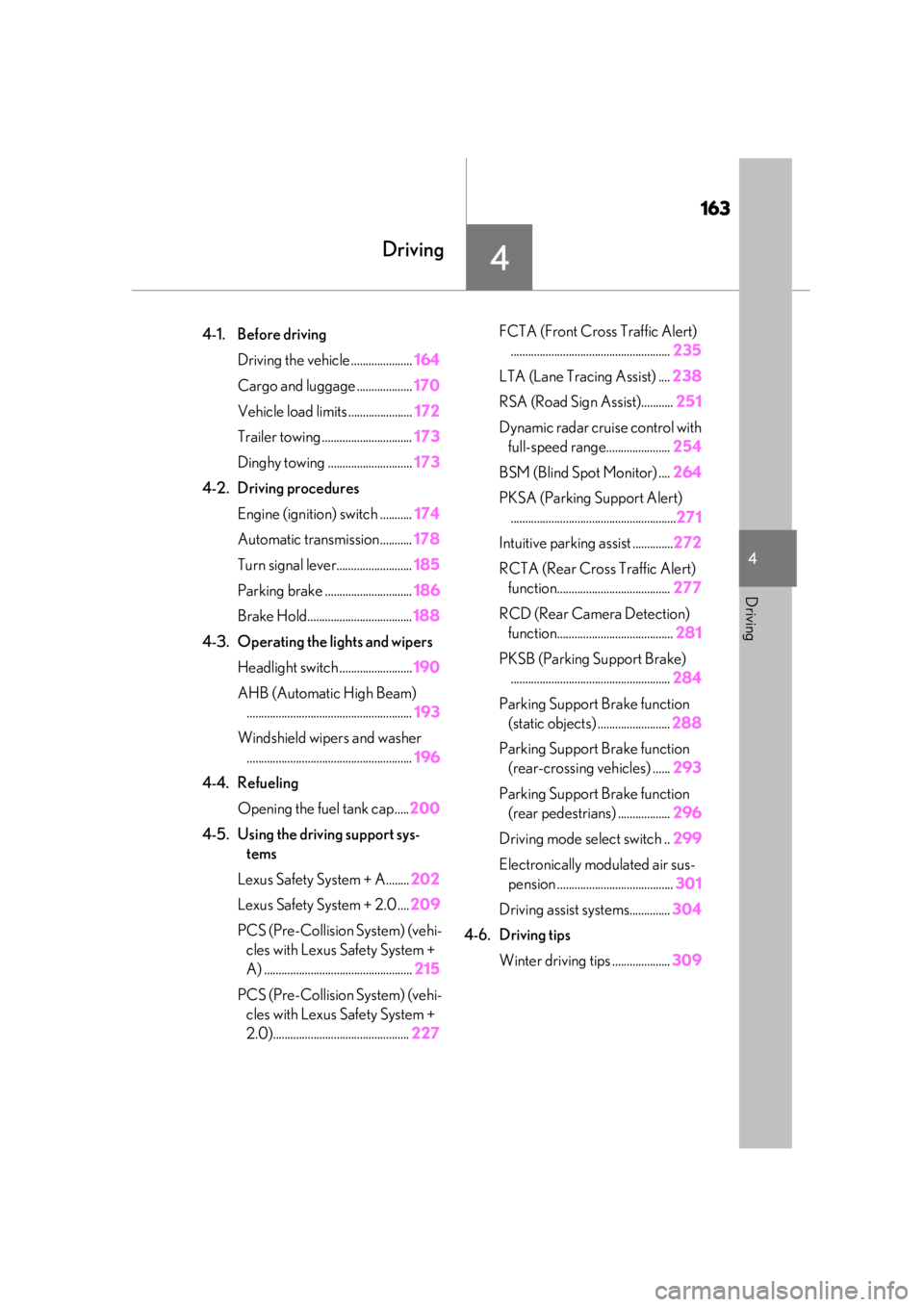
163
4
4
Driving
Driving
.4-1. Before drivingDriving the vehicle ..................... 164
Cargo and luggage ................... 170
Vehicle load limits ...................... 172
Trailer towing ............................... 173
Dinghy towing ............................. 173
4-2. Driving procedures Engine (ignition) switch ........... 174
Automatic transmission........... 178
Turn signal lever.......................... 185
Parking brake .............................. 186
Brake Hold.................................... 188
4-3. Operating the lights and wipers Headlight switch ......................... 190
AHB (Automatic High Beam) ......................................................... 193
Windshield wipers and washer ......................................................... 196
4-4. Refueling Opening the fuel tank cap..... 200
4-5. Using the driving support sys- tems
Lexus Safety System + A........ 202
Lexus Safety System + 2.0 .... 209
PCS (Pre-Collision System) (vehi- cles with Lexus Safety System +
A) ................................................... 215
PCS (Pre-Collision System) (vehi- cles with Lexus Safety System +
2.0)............................................... 227FCTA (Front Cross Traffic Alert)
....................................................... 235
LTA (Lane Tracing Assist) .... 238
RSA (Road Sign Assist)........... 251
Dynamic radar cruise control with full-speed range...................... 254
BSM (Blind Spot Monitor) .... 264
PKSA (Parking Support Alert) ......................................................... 271
Intuitive parking assist .............. 272
RCTA (Rear Cross Traffic Alert) function....................................... 277
RCD (Rear Camera Detection) function........................................ 281
PKSB (Parking Support Brake) ....................................................... 284
Parking Support Brake function (static objects) ......................... 288
Parking Support Brake function (rear-crossing vehicles) ...... 293
Parking Support Brake function (rear pedestrians) .................. 296
Driving mode select switch .. 299
Electronically modulated air sus- pension ........................................ 301
Driving assist systems.............. 304
4-6. Driving tips Winter driving tips .................... 309
Page 185 of 520
1854-2. Driving procedures
4
Driving
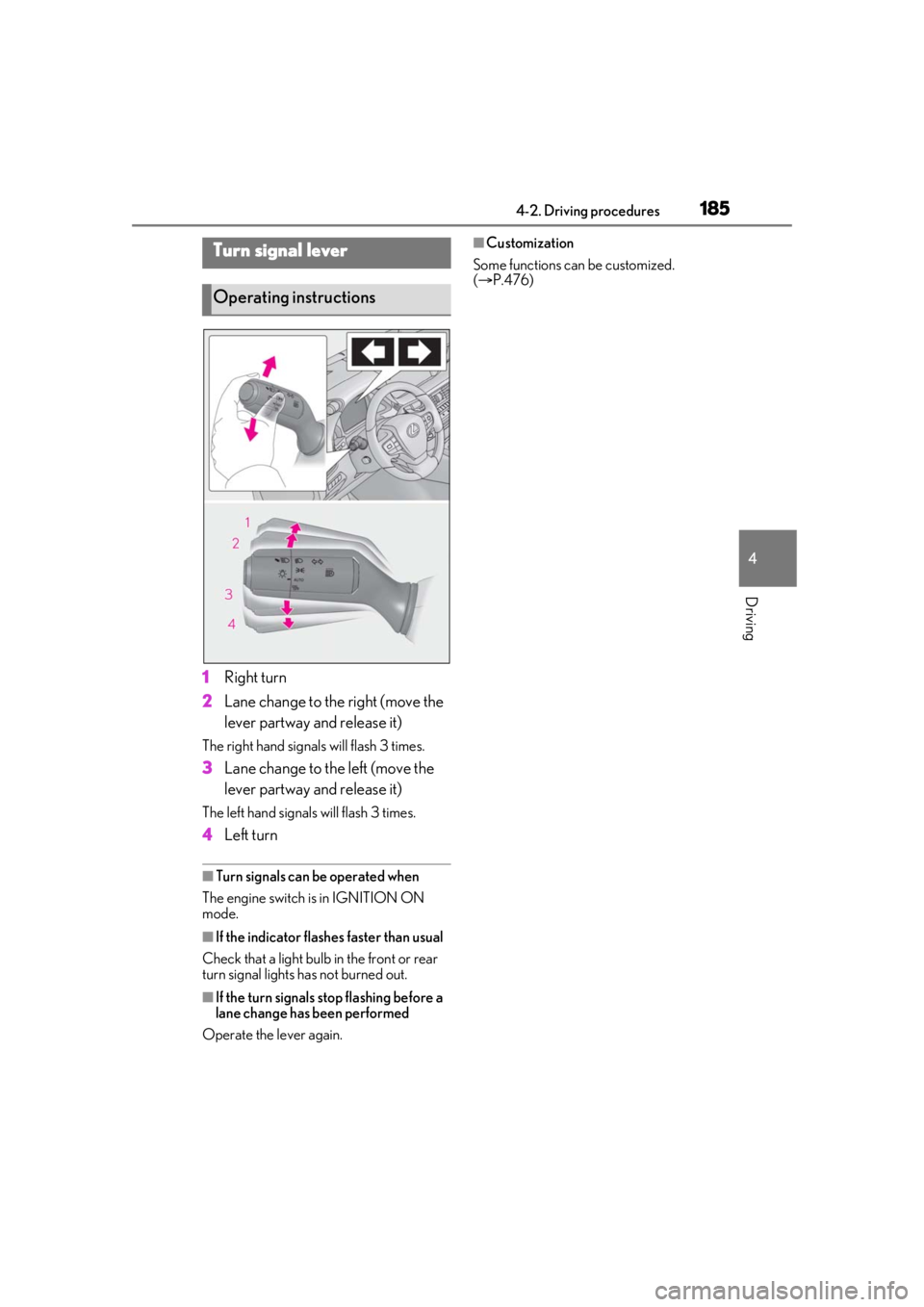
1Right turn
2 Lane change to the right (move the
lever partway and release it)
The right hand signals will flash 3 times.
3Lane change to the left (move the
lever partway and release it)
The left hand signals will flash 3 times.
4Left turn
■Turn signals can be operated when
The engine switch is in IGNITION ON
mode.
■If the indicator flashes faster than usual
Check that a light bulb in the front or rear
turn signal lights has not burned out.
■If the turn signals stop flashing before a
lane change has been performed
Operate the lever again.
■Customization
Some functions can be customized.
( P.476)Turn signal lever
Operating instructions
Page 190 of 520
1904-3. Operating the lights and wipers
4-3.Operating the lights and wipers
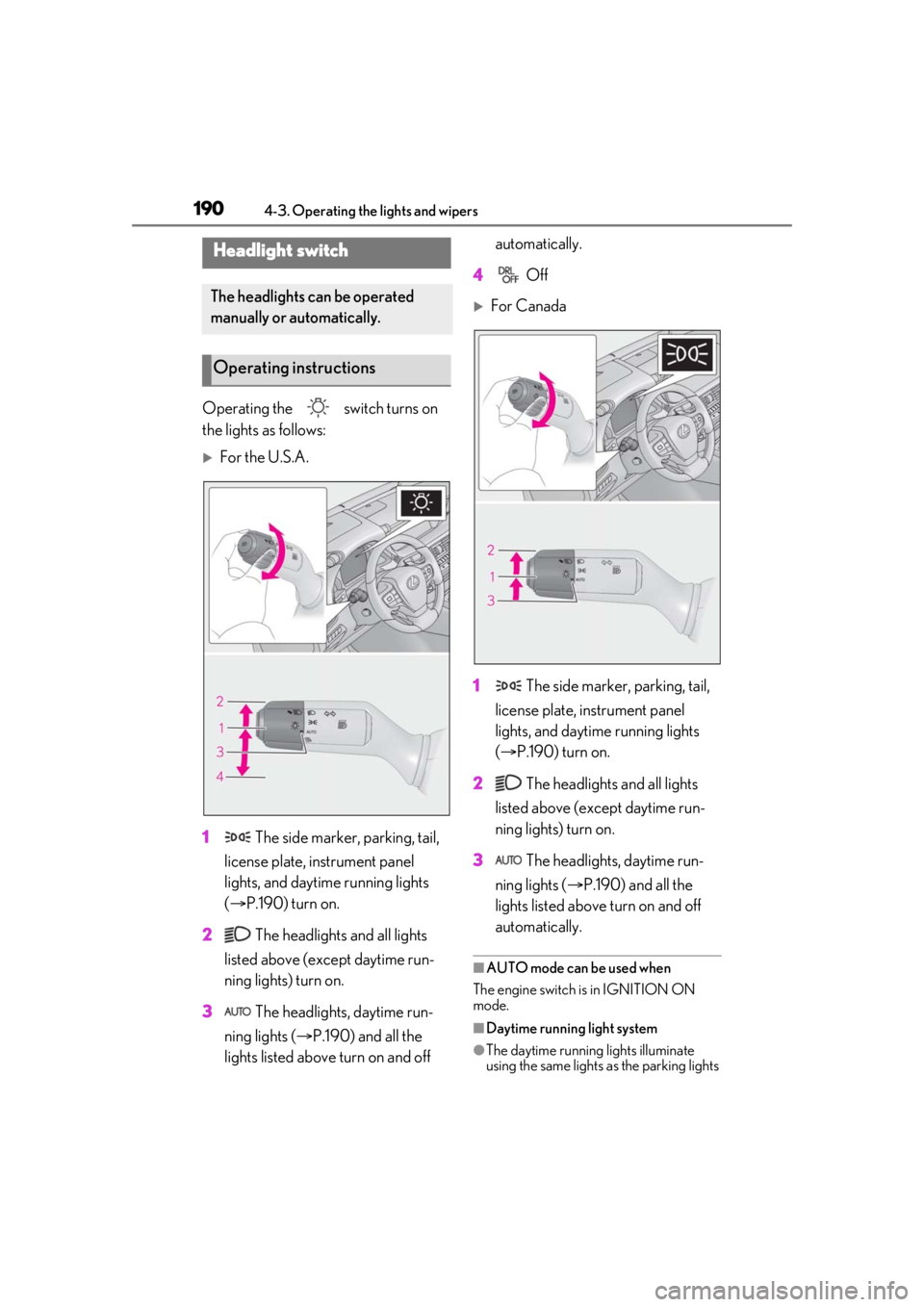
Operating the switch turns on
the lights as follows:
For the U.S.A.
1 The side marker, parking, tail,
license plate, instrument panel
lights, and daytime running lights
( P.190) turn on.
2 The headlights and all lights
listed above (except daytime run-
ning lights) turn on.
3 The headlights, daytime run-
ning lights ( P.190) and all the
lights listed above turn on and off automatically.
4 Off
For Canada
1 The side marker, parking, tail,
license plate, instrument panel
lights, and daytime running lights
( P.190) turn on.
2 The headlights and all lights
listed above (except daytime run-
ning lights) turn on.
3 The headlights, daytime run-
ning lights ( P.190) and all the
lights listed above turn on and off
automatically.
■AUTO mode can be used when
The engine switch is in IGNITION ON
mode.
■Daytime running light system
●The daytime running lights illuminate
using the same lights as the parking lights
Headlight switch
The headlights can be operated
manually or automatically.
Operating instructions
Page 191 of 520
1914-3. Operating the lights and wipers
4
Driving
and illuminate brighter than the parking
lights.
●To make your vehicle more visible to
other drivers during daytime driving, the
daytime running lights turn on automati-
cally when all of the following conditions
are met. (The daytime running lights are
not designed for use at night.)
• The engine is running
• The parking brake is released
• The headlight switch is in the or
* position
*: When the surroundings are bright
The daytime running lights remain on after
they illuminate, even if the parking brake is
set again.
●For the U.S.A.: Dayt ime running lights
can be turned off by operating the switch.
●Compared to turning on the headlights,
the daytime running light system offers
greater durability and consumes less
electricity, so it can help improve fuel
economy.
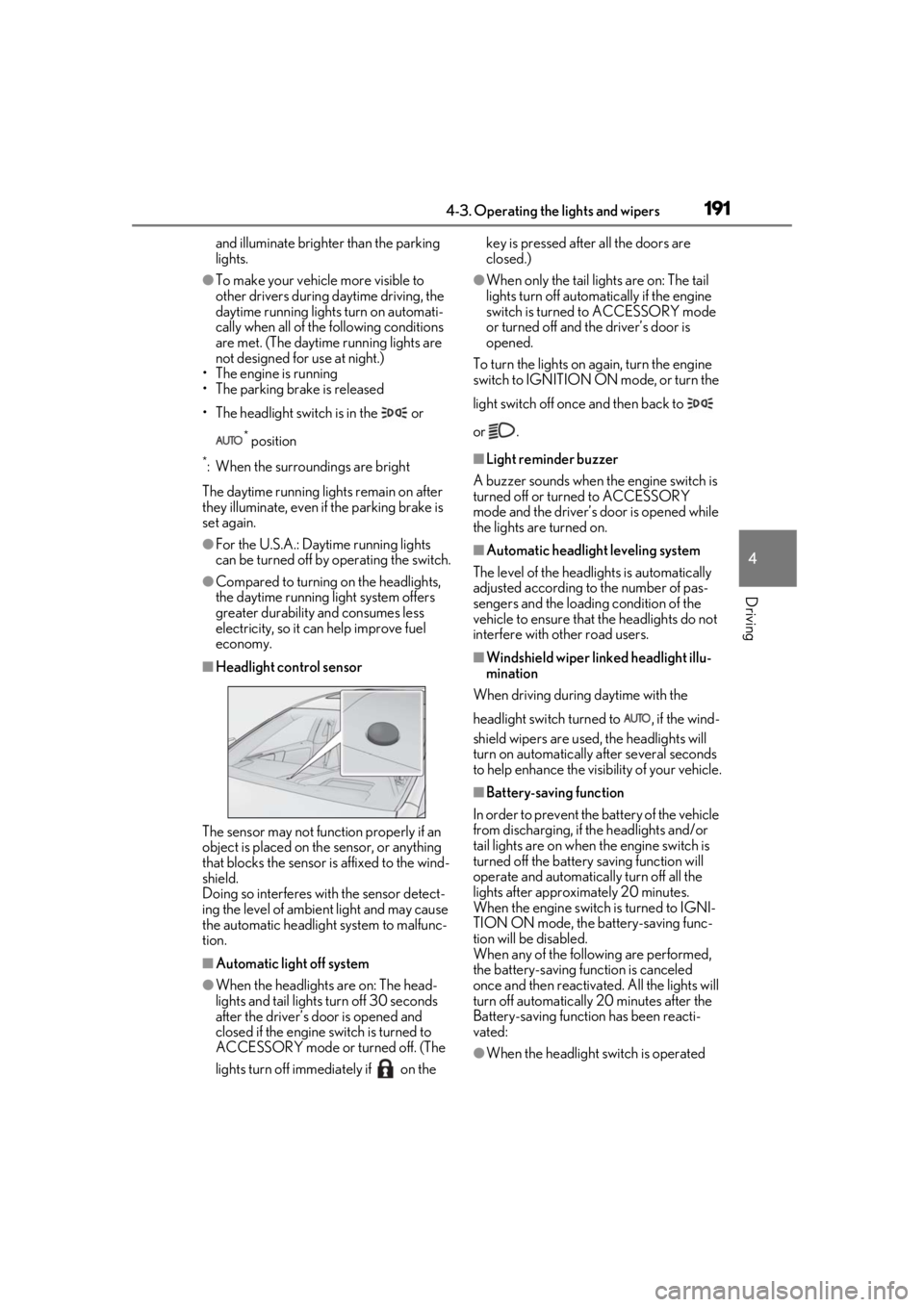
■Headlight control sensor
The sensor may not function properly if an
object is placed on th e sensor, or anything
that blocks the sensor is affixed to the wind-
shield.
Doing so interferes with the sensor detect-
ing the level of ambient light and may cause
the automatic headlight system to malfunc-
tion.
■Automatic light off system
●When the headlights are on: The head-
lights and tail lights turn off 30 seconds
after the driver’s door is opened and
closed if the engine switch is turned to
ACCESSORY mode or turned off. (The
lights turn off immediately if on the key is pressed after all the doors are
closed.)
●When only the tail lights are on: The tail
lights turn off automatically if the engine
switch is turned to ACCESSORY mode
or turned off and the driver’s door is
opened.
To turn the lights on again, turn the engine
switch to IGNITION ON mode, or turn the
light switch off once and then back to
or .
■Light reminder buzzer
A buzzer sounds when the engine switch is
turned off or turned to ACCESSORY
mode and the driver’s door is opened while
the lights are turned on.
■Automatic headlight leveling system
The level of the headlights is automatically
adjusted according to the number of pas-
sengers and the loadin g condition of the
vehicle to ensure that the headlights do not
interfere with other road users.
■Windshield wiper linked headlight illu-
mination
When driving during daytime with the
headlight switch turned to , if the wind-
shield wipers are used, the headlights will
turn on automatically after several seconds
to help enhance the visibility of your vehicle.
■Battery-saving function
In order to prevent the battery of the vehicle
from discharging, if the headlights and/or
tail lights are on when the engine switch is
turned off the battery saving function will
operate and automatically turn off all the
lights after approximately 20 minutes.
When the engine switch is turned to IGNI-
TION ON mode, the battery-saving func-
tion will be disabled.
When any of the following are performed,
the battery-saving function is canceled
once and then reactivated. All the lights will
turn off automatically 20 minutes after the
Battery-saving function has been reacti-
vated:
●When the headlight switch is operated
Page 192 of 520
1924-3. Operating the lights and wipers
●When a door or the trunk is opened or
closed
■Welcome light illumination control
The parking lights and tail lights automati-
cally turn on at night when the doors are
unlocked using the entry function or wire-
less remote control if the light switch is in
the position.
■Customization
Some functions can be customized.
( P.476)
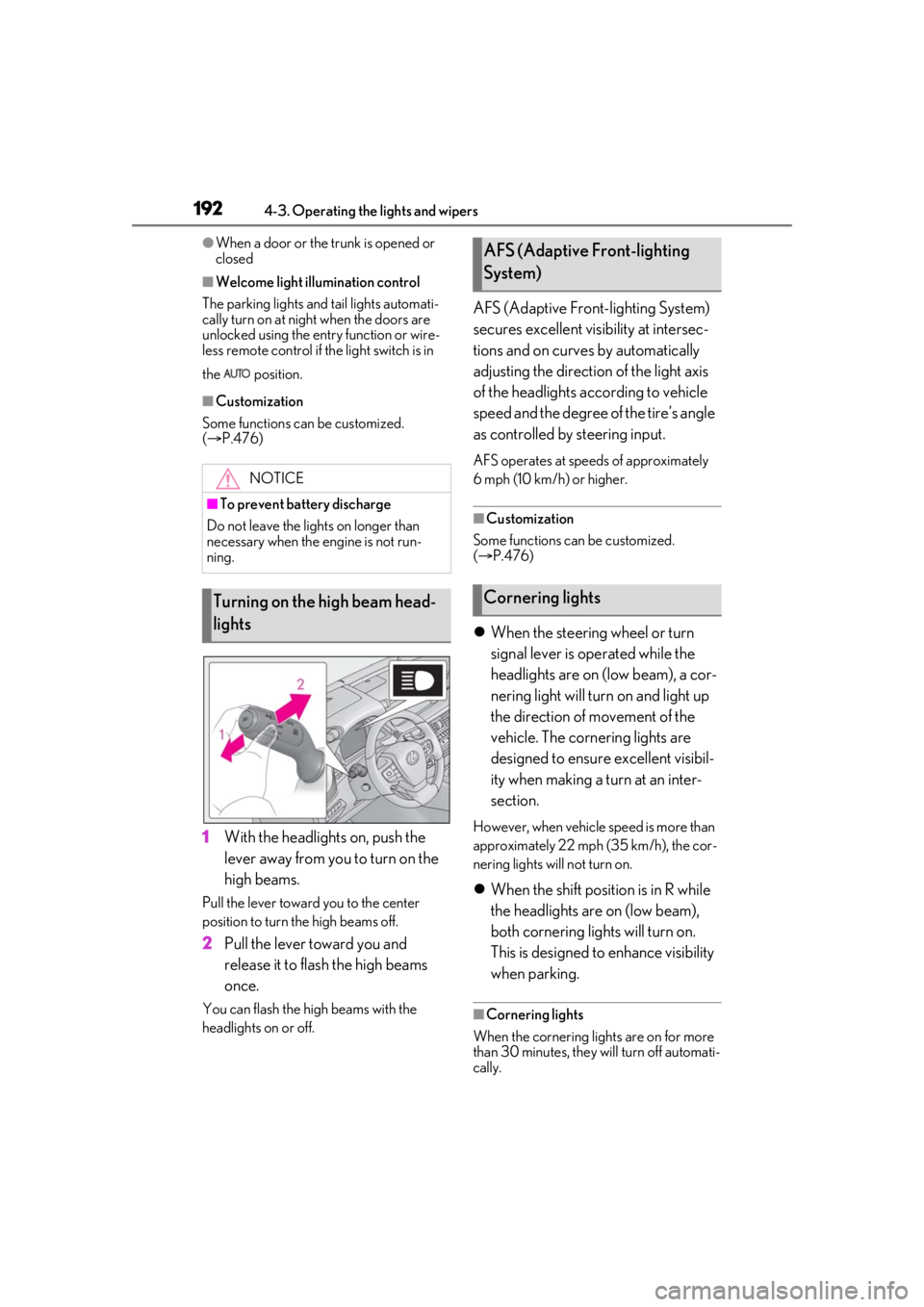
1 With the headlights on, push the
lever away from you to turn on the
high beams.
Pull the lever toward you to the center
position to turn the high beams off.
2Pull the lever toward you and
release it to flash the high beams
once.
You can flash the high beams with the
headlights on or off.
AFS (Adaptive Front-lighting System)
secures excellent visibility at intersec-
tions and on curves by automatically
adjusting the direction of the light axis
of the headlights according to vehicle
speed and the degree of the tire’s angle
as controlled by steering input.
AFS operates at speeds of approximately
6 mph (10 km/h) or higher.
■Customization
Some functions can be customized.
( P.476)
When the steering wheel or turn
signal lever is operated while the
headlights are on (low beam), a cor-
nering light will turn on and light up
the direction of movement of the
vehicle. The cornering lights are
designed to ensure excellent visibil-
ity when making a turn at an inter-
section.
However, when vehicle speed is more than
approximately 22 mph (35 km/h), the cor-
nering lights will not turn on.
When the shift position is in R while
the headlights are on (low beam),
both cornering lights will turn on.
This is designed to enhance visibility
when parking.
■Cornering lights
When the cornering lights are on for more
than 30 minutes, they will turn off automati-
cally.
NOTICE
■To prevent battery discharge
Do not leave the lights on longer than
necessary when the engine is not run-
ning.
Turning on the high beam head-
lights
AFS (Adaptive Front-lighting
System)
Cornering lights
Page 193 of 520
1934-3. Operating the lights and wipers
4
Driving
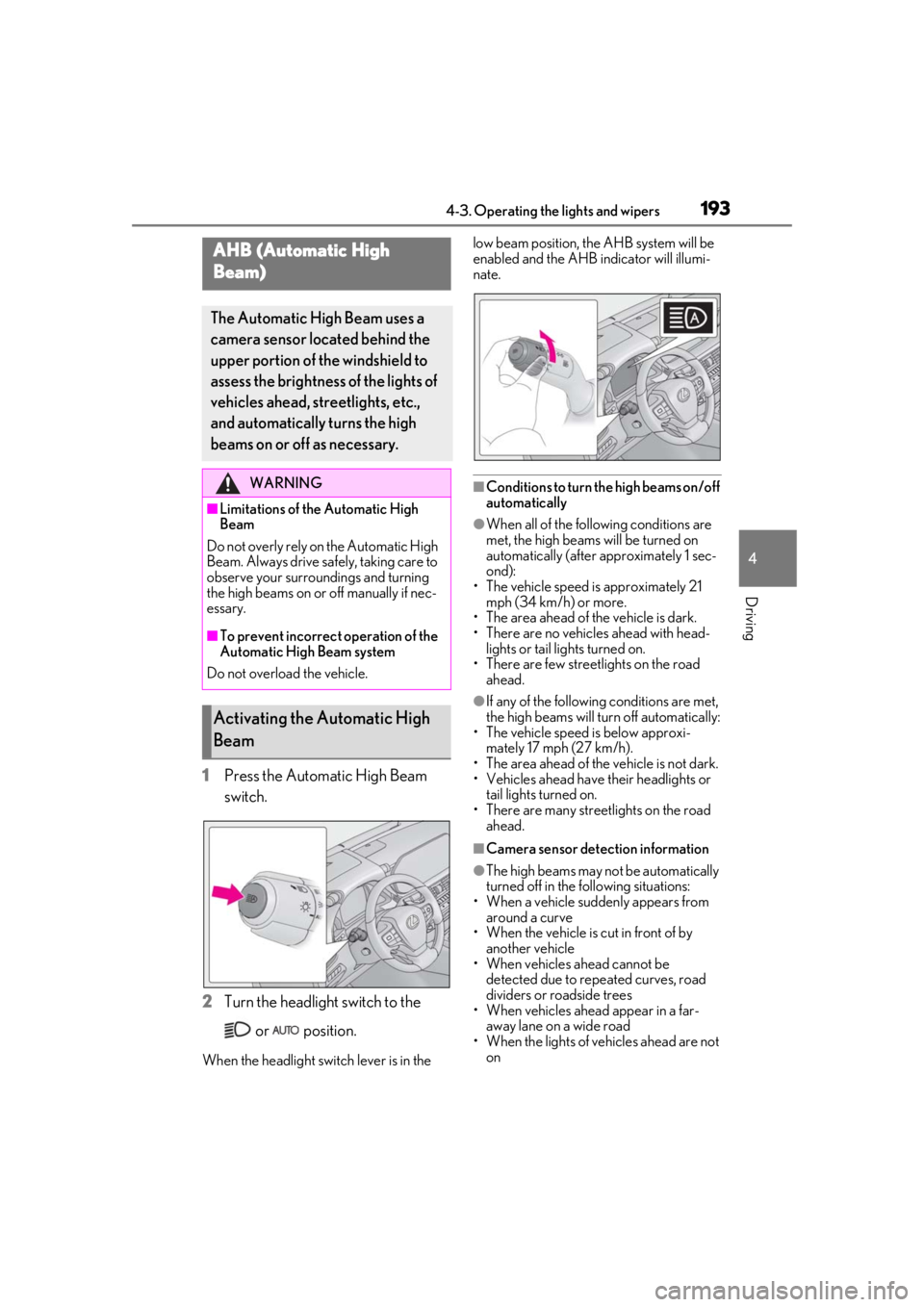
1Press the Automatic High Beam
switch.
2 Turn the headlight switch to the
or position.
When the headlight swit ch lever is in the low beam position, the AHB system will be
enabled and the AHB indicator will illumi-
nate.
■Conditions to turn the high beams on/off
automatically
●When all of the follo
wing conditions are
met, the high beams will be turned on
automatically (after approximately 1 sec-
ond):
• The vehicle speed is approximately 21 mph (34 km/h) or more.
• The area ahead of the vehicle is dark.
• There are no vehicles ahead with head-
lights or tail lights turned on.
• There are few streetlights on the road
ahead.
●If any of the following conditions are met,
the high beams will turn off automatically:
• The vehicle speed is below approxi- mately 17 mph (27 km/h).
• The area ahead of the vehicle is not dark.
• Vehicles ahead have their headlights or
tail lights turned on.
• There are many streetlights on the road ahead.
■Camera sensor dete ction information
●The high beams may not be automatically
turned off in the following situations:
• When a vehicle suddenly appears from
around a curve
• When the vehicle is cut in front of by another vehicle
• When vehicles ahead cannot be
detected due to repeated curves, road
dividers or roadside trees
• When vehicles ahead appear in a far-
away lane on a wide road
• When the lights of vehicles ahead are not on
AHB (Automatic High
Beam)
The Automatic High Beam uses a
camera sensor located behind the
upper portion of the windshield to
assess the brightness of the lights of
vehicles ahead, streetlights, etc.,
and automatically turns the high
beams on or off as necessary.
WARNING
■Limitations of the Automatic High
Beam
Do not overly rely on the Automatic High
Beam. Always drive sa fely, taking care to
observe your surroundings and turning
the high beams on or off manually if nec-
essary.
■To prevent incorrect operation of the
Automatic High Beam system
Do not overload the vehicle.
Activating the Automatic High
Beam