seats LEXUS LS500 2021 Workshop Manual
[x] Cancel search | Manufacturer: LEXUS, Model Year: 2021, Model line: LS500, Model: LEXUS LS500 2021Pages: 520, PDF Size: 9.81 MB
Page 331 of 520
3315-3. Using the air conditioning system and defogger
5
Interior features
While operating, the indicator is turned
on.
■Manually turning front seat con-
centrated airflow mode on/off
In front seat concentrated airflow
mode, directing airflow to the front
seats only and to all seats can be
switched via switch operation. When
the mode has been switched manually,
automatic airflow control stops operat-
ing.
Select on the option control
screen ( P.328) and switch the air-
flow.
Indicator illuminated: Airflow to the
front seats only
Indicator off: Airflow to all the seats.
■Operation of automatic airflow control
●In order to maintain a comfortable inte-
rior, airflow may be directed to seats
without passengers immediately after the
engine is started and at other times
depending on the outside temperature.
●After the engine is st arted, if passengers
move around inside or enter/exit the vehi-
cle, the system cannot accurately detect
the presence of passengers and auto-
matic airflow control will not operate.
■Operation of manual airflow control
Even if the function is manually switched to
directing airflow to only the front seats,
when a rear seat is occupied, it may auto-
matically direct airflow to all seats.
■To return to automa tic airflow control
1 With the indicator off, turn the engine
switch off.
2 After 60 minutes or more elapse, turn
the engine switch to IGNITION ON
mode.
Vehicles with DUAL-ZONE climate
control
To turn on the “DUAL” mode, perform
any of the following procedures:
Select “DUAL” on the main control
screen. ( P.326)
Select “DUAL” on the option con-
trol screen.
Adjust the passenger’s side tem-
perature setting.
The indicator on the main control screen
comes on when the “DUAL” mode is on.
Vehicles with 4-ZONE climate con-
trol
To turn on the “4-ZONE” mode, per-
form any of the following procedures:
Select “4-ZONE” on the main con-
trol screen. ( P.326)
Select “4-ZONE” on the option
control screen.
Adjust a passenger seat tempera-
ture setting.
The indicator on the main control screen
comes on when the “4-ZONE” mode is on.
■Location of air outlets
The air outlets and air volume changes
according to the selected air flow
mode.
Adjusting the temperature for
the driver and passenger seats
separately
Air outlet layout and operations
Page 333 of 520
3335-3. Using the air conditioning system and defogger
5
Interior features
*:If equipped
■Center Display
Press the “MENU” button on the
Remote Touch to display the main
menu and move the cursor to to
display the climate control shortcut
buttons. Then, select to display the
rear air conditioning control screen.
This system can also be operated by the
touch screen.
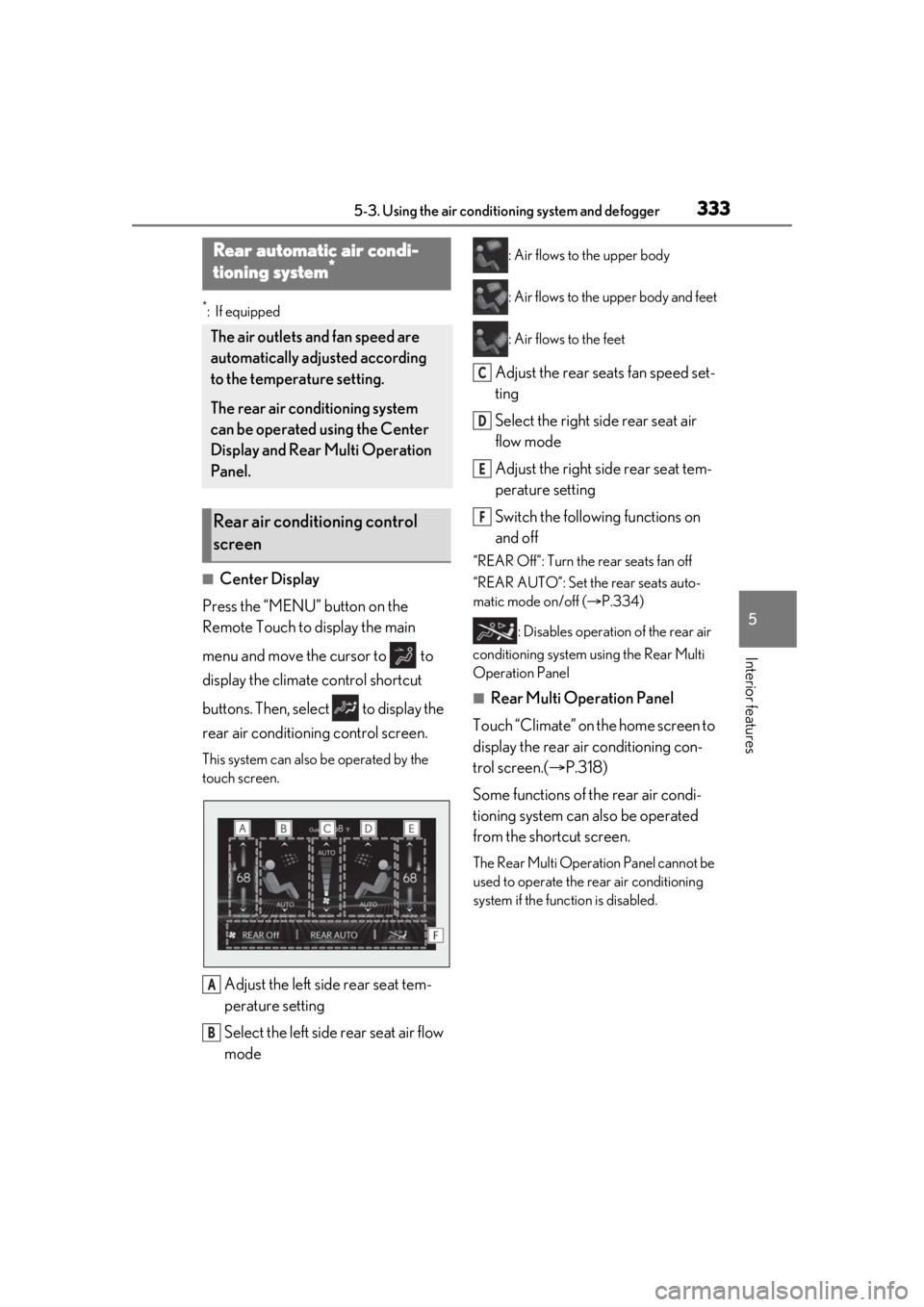
Adjust the left side rear seat tem-
perature setting
Select the left side rear seat air flow
mode
: Air flows to the upper body
: Air flows to the upper body and feet
: Air flows to the feet
Adjust the rear seats fan speed set-
ting
Select the right side rear seat air
flow mode
Adjust the right side rear seat tem-
perature setting
Switch the following functions on
and off
“REAR Off”: Turn the rear seats fan off
“REAR AUTO”: Set the rear seats auto-
matic mode on/off ( P.334)
: Disables operation of the rear air
conditioning system using the Rear Multi
Operation Panel
■Rear Multi Operation Panel
Touch “Climate” on the home screen to
display the rear air conditioning con-
trol screen.( P.318)
Some functions of the rear air condi-
tioning system can also be operated
from the shortcut screen.
The Rear Multi Operat ion Panel cannot be
used to operate the rear air conditioning
system if the func tion is disabled.
Rear automatic air condi-
tioning system*
The air outlets and fan speed are
automatically adjusted according
to the temperature setting.
The rear air conditioning system
can be operated using the Center
Display and Rear Multi Operation
Panel.
Rear air conditioning control
screen
A
B
C
D
E
F
Page 334 of 520
3345-3. Using the air conditioning system and defogger
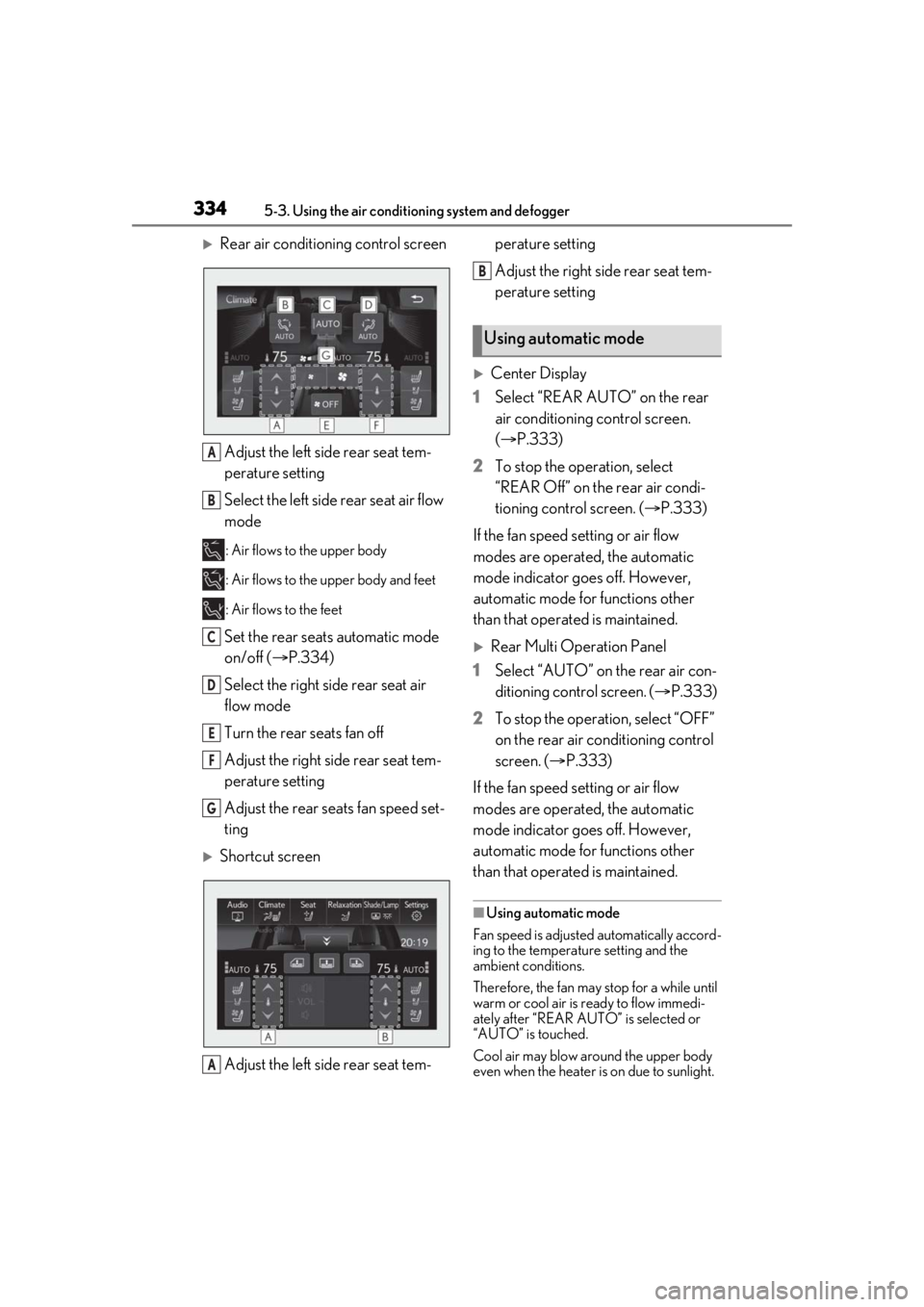
Rear air conditioning control screenAdjust the left side rear seat tem-
perature setting
Select the left side rear seat air flow
mode
: Air flows to the upper body
: Air flows to the upper body and feet
: Air flows to the feet
Set the rear seats automatic mode
on/off ( P.334)
Select the right side rear seat air
flow mode
Turn the rear seats fan off
Adjust the right side rear seat tem-
perature setting
Adjust the rear seats fan speed set-
ting
Shortcut screen
Adjust the left side rear seat tem- perature setting
Adjust the right side rear seat tem-
perature setting
Center Display
1 Select “REAR AUTO” on the rear
air conditioning control screen.
(P.333)
2 To stop the operation, select
“REAR Off” on the rear air condi-
tioning control screen. ( P.333)
If the fan speed setting or air flow
modes are operated, the automatic
mode indicator goes off. However,
automatic mode for functions other
than that operated is maintained.
Rear Multi Operation Panel
1 Select “AUTO” on the rear air con-
ditioning control screen. ( P.333)
2 To stop the operation, select “OFF”
on the rear air conditioning control
screen. ( P.333)
If the fan speed setting or air flow
modes are operated, the automatic
mode indicator goes off. However,
automatic mode for functions other
than that operated is maintained.
■Using automatic mode
Fan speed is adjusted automatically accord-
ing to the temperature setting and the
ambient conditions.
Therefore, the fan may stop for a while until
warm or cool air is ready to flow immedi-
ately after “REAR AUTO ” is selected or
“AUTO” is touched.
Cool air may blow around the upper body
even when the heater is on due to sunlight.
A
B
C
D
E
F
G
A
Using automatic mode
B
Page 335 of 520
3355-3. Using the air conditioning system and defogger
5
Interior features
The temperature setting of the rear
seats can be adjusted using the follow-
ing methods:
When the “4-ZONE” indicator is
off: Adjust the driv er’s seat tempera-
ture.
Adjust the temperature setting of each
rear seat using the Center Display or Rear
Multi Operation Panel.
Adjust the temperature setting of
each rear seat using the Center Dis-
play (rear air conditioning control
screen) or Rear Multi Operation
Panel.
The temperature setting of each rear seat
can be changed independently.
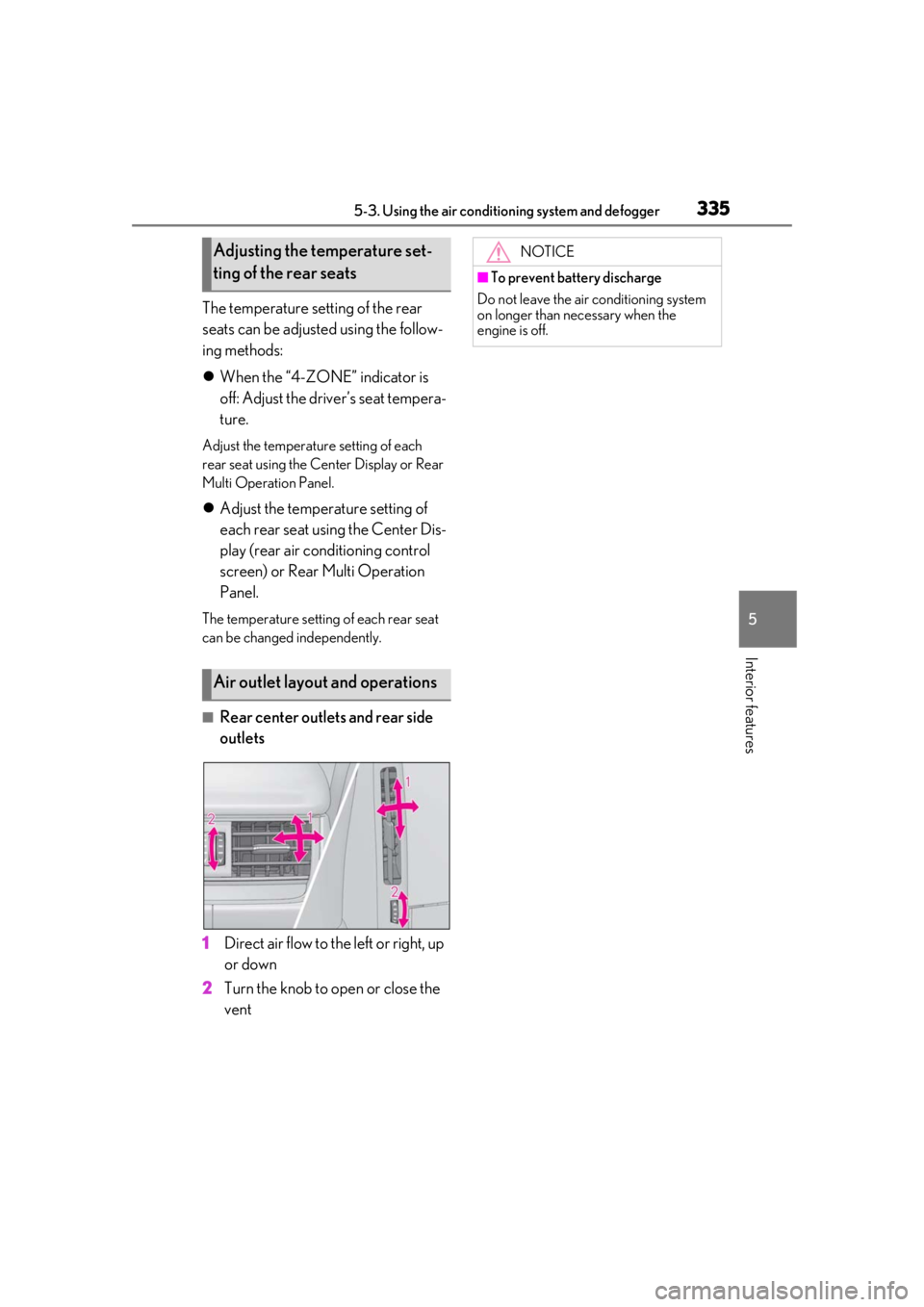
■Rear center outlets and rear side
outlets
1 Direct air flow to the left or right, up
or down
2 Turn the knob to open or close the
vent
Adjusting the temperature set-
ting of the rear seats
Air outlet layout and operations
NOTICE
■To prevent battery discharge
Do not leave the air conditioning system
on longer than necessary when the
engine is off.
Page 336 of 520
3365-3. Using the air conditioning system and defogger
*:If equipped
■Center Display
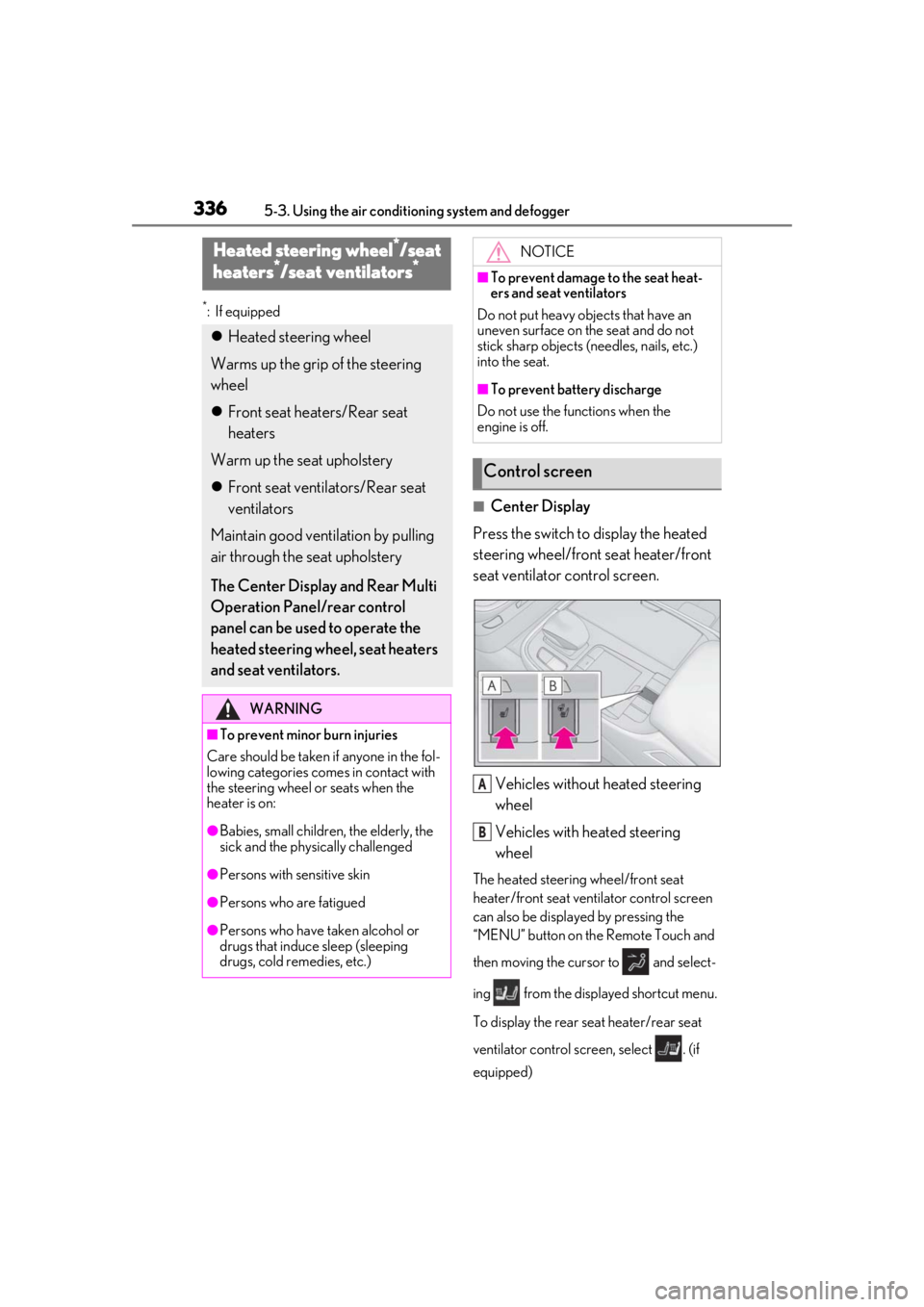
Press the switch to display the heated
steering wheel/front seat heater/front
seat ventilator control screen.
Vehicles without heated steering
wheel
Vehicles with heated steering
wheel
The heated steering wheel/front seat
heater/front seat ventilator control screen
can also be displayed by pressing the
“MENU” button on the Remote Touch and
then moving the cursor to and select-
ing from the displayed shortcut menu.
To display the rear seat heater/rear seat
ventilator control screen, select . (if
equipped)
Heated steering wheel*/seat
heaters*/seat ventilators*
Heated steering wheel
Warms up the grip of the steering
wheel
Front seat heaters/Rear seat
heaters
Warm up the seat upholstery
Front seat ventilators/Rear seat
ventilators
Maintain good ventilation by pulling
air through the seat upholstery
The Center Display and Rear Multi
Operation Panel/rear control
panel can be used to operate the
heated steering wheel, seat heaters
and seat ventilators.
WARNING
■To prevent minor burn injuries
Care should be taken if anyone in the fol-
lowing categories comes in contact with
the steering wheel or seats when the
heater is on:
●Babies, small children, the elderly, the
sick and the phys ically challenged
●Persons with sensitive skin
●Persons who are fatigued
●Persons who have taken alcohol or
drugs that induce sleep (sleeping
drugs, cold remedies, etc.)
NOTICE
■To prevent damage to the seat heat-
ers and seat ventilators
Do not put heavy objects that have an
uneven surface on the seat and do not
stick sharp objects (n eedles, nails, etc.)
into the seat.
■To prevent battery discharge
Do not use the functions when the
engine is off.
Control screen
A
B
Page 372 of 520
3726-1. Maintenance and care
WARNING
■Water in the vehicle
●Do not splash or spill liquid in the vehi-
cle.
Doing so may cause electrical compo-
nents, etc. to malfunction or catch fire.
●Do not get any of the SRS components
or wiring in the vehicle interior wet.
( P.29)
An electrical malfunction may cause
the airbags to deploy or not function
properly, resulting in death or serious
injury.
■Cleaning the interior (especially
instrument panel)
Do not use polish wax or polish cleaner.
The instrument panel may reflect off the
windshield, obstructing the driver’s view
and leading to an accident, resulting in
death or serious injury.
NOTICE
■Cleaning detergents
●Do not use the following types of
detergent, as they may discolor the
vehicle interior or cause streaks or
damage to painted surfaces:
• Areas other than the seats and steer- ing wheel: Organic substances such as
benzene or gasoline, alkaline or acidic
solutions, dye, and bleach
• Seats: Alkaline or acidic solutions, such as thinner, benzene, and alcohol
• Steering wheel: Organic substances, such as thinner, and cleaner that con-
tains alcohol
●Do not use polish wax or polish
cleaner. The instrument panel’s or
other interior part’s painted surface
may be damaged.
■Preventing damage to leather sur-
faces
Observe the following precautions to
avoid damage to and deterioration of
leather surfaces:
●Remove any dust or dirt from leather
surfaces immediately.
●Do not expose the vehicle to direct
sunlight for extended periods of time.
Park the vehicle in the shade, espe-
cially during summer.
●Do not place items made of vinyl, plas-
tic, or containing wax on the uphol-
stery, as they may stick to the leather
surface if the vehicle interior heats up
significantly.
■Water on the floor
Do not wash the vehicle floor with water.
Vehicle systems such as the audio system
may be damaged if water comes into
contact with electrical components such
as the audio system above or under the
floor of the vehicle. Water may also
cause the body to rust.
■When cleaning the inside of the wind-
shield
Do not allow glass cleaner to contact the
lens. Also, do not touch the lens.
( P.202, 209)
■Cleaning the inside of the rear win-
dow
●Do not use glass cleaner to clean the
rear window, as this may cause dam-
age to the rear window defogger
heater wires or antenna. Use a cloth
dampened with lukewarm water to
gently wipe the window clean. Wipe
the window in strokes running parallel
to the heater wires or antenna.
●Be careful not to scratch or damage
the heater wires or antenna.
Page 377 of 520
3776-2. Maintenance
6
Maintenance and care
Parking brake
• Does the parking brake operate nor-
mally?
•When parked on a slope and the park-
ing brake is on, is the
vehicle securely
stopped?
Seat belts
• Do the seat belts operate smoothly?
• The seat belts should not be damaged.
Seats• Do the seat controls operate properly?
Steering wheel
• Does the steering wheel rotate
smoothly?
• Does the steering wheel have the cor-
rect amount of free
play?
•There should not be any strange sounds
coming from the
steering wheel.
Vehicle exterior
ItemsCheck points
Doors/trunk• Do the doors/trunk operate smoothly?
Engine hood
•Does the engine hood lock system
work properly?
Fluid leaks
•There should not be any signs of fluid
leakage after the
vehicle has been
parked.
ItemsCheck points
Tires
• Is the tire inflation pressure correct?
• The tires should not be damaged or
excessively worn.
• Have the tires been rotated according to
the maintenance
schedule?
•The wheel nuts should not be loose.
Windshield wip-
ers
• The wiper blades should not show any
signs of cracking,
splitting, wear, con-
tamination or defor-
mation.
• The wiper blades should clear the
windshield without
streaking or skip-
ping.
ItemsCheck points
Page 470 of 520
4708-1. Specifications
■Traction AA, A, B, C
The traction grades, from highest to
lowest, are AA, A, B and C, and they
represent the tire’s ability to stop on
wet pavement as measured under con-
trolled conditions on specified govern-
ment test surfaces of asphalt and
concrete.
A tire marked C may have poor traction
performance.
Warning: The traction grade assigned to
this tire is based on braking (straight
ahead) traction tests and does not include
cornering (turning) traction.
■Temperature A, B, C
The temperature grades are A (the
highest), B, and C, representing the
tire’s resistance to the generation of
heat and its ability to dissipate heat when tested under controlled condi-
tions on a specified indoor laboratory
test wheel.
Sustained high temperature can cause the
material of the tire to degenerate and
reduce tire life, and excessive temperature
can lead to sudd
en tire failure.
Grade C corresponds to a level of perfor-
mance which all passenger car tires must
meet under the Fede ral Motor Vehicle
Safety Standard No. 109.
Grades B and A represent higher levels of
performance on the laboratory test wheel
than the minimum required by law.
Warning: The temperature grades of a tire
assume that it is properly inflated and not
overloaded.
Excessive speed, unde rinflation, or exces-
sive loading, either separately or in combi-
nation, can cause heat buildup and
possible tire failure.
Glossary of tire terminology
Tire related termMeaning
Cold tire inflation pressure
Tire pressure when the vehicle has been parked for
three hours or more, or has not been driven more
than 1 mile or 1.5 km under that condition
Maximum inflation pressureThe maximum cold inflated pressure to which a tire
may be inflated, shown on the sidewall of the tire
Recommended inflation pressureCold tire inflation pressure recommended by a
manufacturer
Accessory weight
The combined weight (in excess of those standard
items which may be replaced) of automatic trans-
mission, power steering, power brakes, power win-
dows, power seats, radio and heater, to the extent
that these items are available as factory-installed
equipment (whether installed or not)
Page 481 of 520
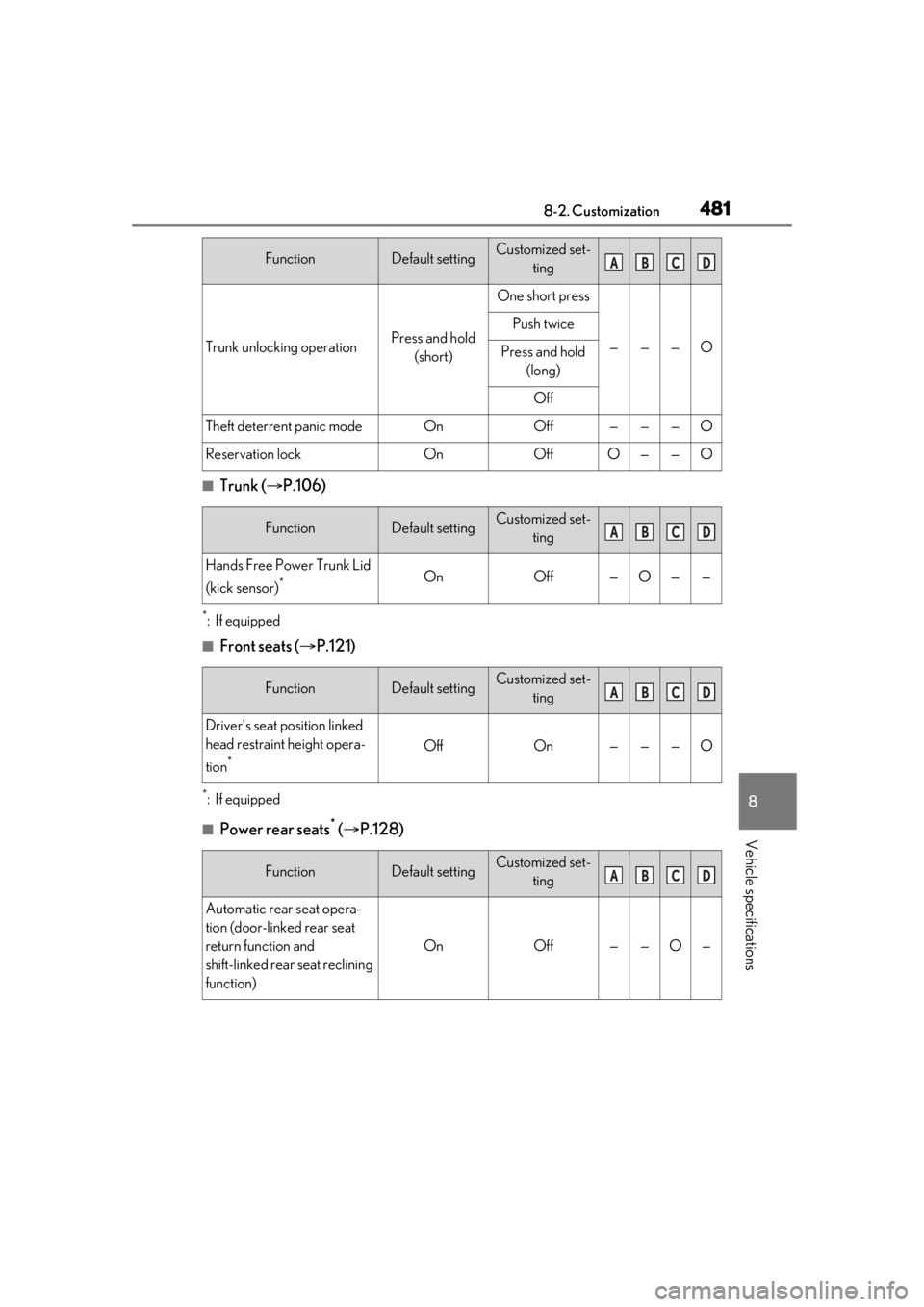
4818-2. Customization
8
Vehicle specifications
■Trunk (P.106)
*:If equipped
■Front seats ( P.121)
*:If equipped
■Power rear seats* ( P.128)
Trunk unlocking operationPress and hold
(short)
One short press
———O
Push twice
Press and hold (long)
Off
Theft deterrent panic modeOnOff———O
Reservation lockOnOffO——O
FunctionDefault settingCustomized set- ting
Hands Free Power Trunk Lid
(kick sensor)
*OnOff—O——
FunctionDefault settingCustomized set-ting
Driver’s seat position linked
head restraint height opera-
tion
*OffOn———O
FunctionDefault settingCustomized set-ting
Automatic rear seat opera-
tion (door-linked rear seat
return function and
shift-linked rear seat reclining
function)
OnOff——O—
FunctionDefault settingCustomized set- tingABCD
ABCD
ABCD
ABCD
Page 510 of 520

510Alphabetical Index
If a warning light turns on ...................... 427
If a warning message is displayed..... 436
If the battery is discharged .................... 444
If the electronic key does not operate properly....................................................... 442
If the engine will not start ....................... 439
If the fuel filler door cannot be opened ........................................................................... 441
If the vehicle is trapped in rising water ...........................................................................419
If you have a flat tire ..................................438
If you lose your keys................................... 441
If you think something is wrong ......... 425
If your vehicle becomes stuck............. 452
If your vehicle has to be stopped in an
emergency ................................................. 418
If your vehicle needs to be towed ....... 421
If your vehicle overheats ........................ 449
Engine ACCESSORY mode ............................... 177
Compartment .............................................383
Engine compartment cover .................384
Engine cover................................................384
Engine switch................................................. 174
Fuel pump shut off system .................... 426
Hood................................................................. 381
How to start the engine............................ 174
Identification number ............................... 457
If the engine will not start ....................... 439
If your vehicle has to be stopped in an
emergency ................................................. 418
Ignition switch (engine switch) ............. 174
Overheating................................................. 449
Tachometer ............................................ 75, 78
Engine compartment cover .................... 384
Engine coolant Capacity .........................................................459
Checking ...................................................... 388
Preparing and checking before winter.........................................................................309
Engine coolant temperature gauge 75, 78
Engine cover ................................................. 384 Engine immobilizer system ........................ 64
Engine oil
Capacity ........................................................ 458
Checking ...................................................... 386
Preparing and checking before winter......................................................................... 309
Warning light ...............................................428
Engine oil maintenance data .................. 387
Engine switch .................................................. 174 Auto power off function............................ 177
Changing the engine switch modes .. 177
If your vehicle has to be stopped in an emergency .................................................. 418
EPS (Electric Power Steering) .............. 304 Warning light .............................................. 430
Event data recorder (E DR) ........................... 8
F
FCTA (Front Cross Traffic Alert) ......... 235
First-aid kit storage belt ............................350
Flat tire
Tire pressure warning system ............ 395
Floor mats ...........................................................22
Fluid Automatic transmission ......................... 460
Brake ................................................................. 461
Washer .......................................................... 390
Footwell light ................................................. 340
Front automatic air conditioning system .......................................................................... 323
Front Cross Traffic Alert (FCTA) ......... 235
Front passenger occupant classification system .............................................................. 40
Front seats Adjustment ....................................................... 121
Cleaning ...........................................................371
Correct driving posture ............................ 23
Driving position memory ........................ 133
Head restraints............................................. 138
Memory recall function............................ 135
Power easy access system .................... 133
Refresh system ..............................................126