warning light LEXUS LS500 2021 Workshop Manual
[x] Cancel search | Manufacturer: LEXUS, Model Year: 2021, Model line: LS500, Model: LEXUS LS500 2021Pages: 520, PDF Size: 9.81 MB
Page 205 of 520
2054-5. Using the driving support systems
4
Driving
WARNING
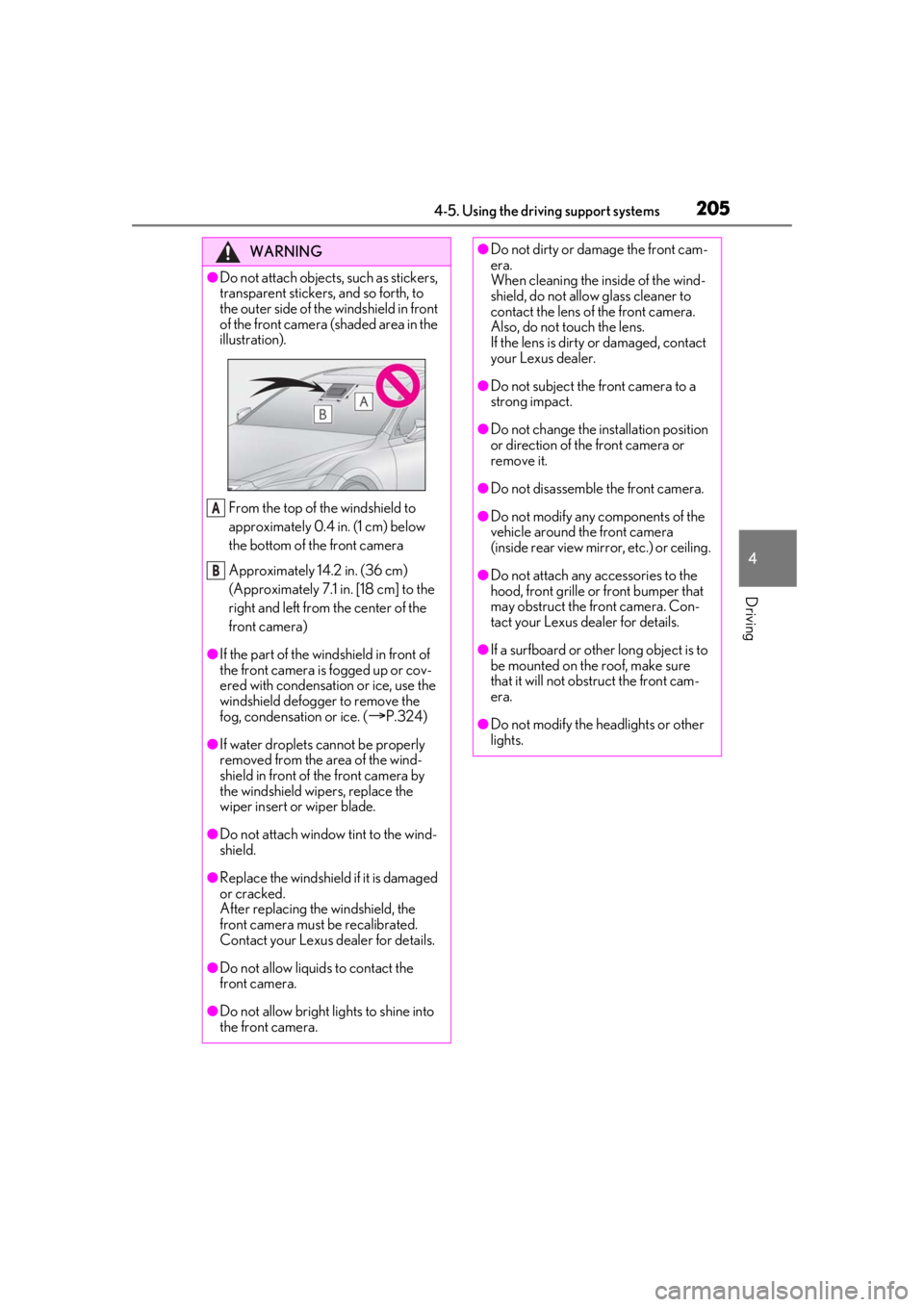
●Do not attach objects, such as stickers,
transparent stickers, and so forth, to
the outer side of the windshield in front
of the front camera (shaded area in the
illustration).From the top of the windshield to
approximately 0.4 in. (1 cm) below
the bottom of the front camera
Approximately 14.2 in. (36 cm)
(Approximately 7.1 in. [18 cm] to the
right and left from the center of the
front camera)
●If the part of the windshield in front of
the front camera is fogged up or cov-
ered with condensation or ice, use the
windshield defogger to remove the
fog, condensation or ice. (
P.324)
●If water droplets cannot be properly
removed from the area of the wind-
shield in front of the front camera by
the windshield wipers, replace the
wiper insert or wiper blade.
●Do not attach window tint to the wind-
shield.
●Replace the windshield if it is damaged
or cracked.
After replacing the windshield, the
front camera must be recalibrated.
Contact your Lexus dealer for details.
●Do not allow liquids to contact the
front camera.
●Do not allow bright lights to shine into
the front camera.
A
B
●Do not dirty or damage the front cam-
era.
When cleaning the inside of the wind-
shield, do not allow glass cleaner to
contact the lens of the front camera.
Also, do not touch the lens.
If the lens is dirty or damaged, contact
your Lexus dealer.
●Do not subject the front camera to a
strong impact.
●Do not change the installation position
or direction of the front camera or
remove it.
●Do not disassemble the front camera.
●Do not modify any components of the
vehicle around the front camera
(inside rear view mirror, etc.) or ceiling.
●Do not attach any accessories to the
hood, front grille or front bumper that
may obstruct the front camera. Con-
tact your Lexus dealer for details.
●If a surfboard or other long object is to
be mounted on the roof, make sure
that it will not obstruct the front cam-
era.
●Do not modify the headlights or other
lights.
Page 211 of 520
2114-5. Using the driving support systems
4
Driving
WARNING
●If the part of the windshield in front of
the front camera is fogged up or cov-
ered with condensation, or ice, use the
windshield defogger to remove the
fog, condensation, or ice. (P.324)
●If water droplets cannot be properly
removed from the area of the wind-
shield in front of the front camera by
the windshield wipers, replace the
wiper insert or wiper blade.
●Do not attach window tint to the wind-
shield.
●Replace the windshield if it is damaged
or cracked.
After replacing the windshield, the
front camera must be recalibrated.
Contact your Lexus dealer for details.
●Do not allow liquids to contact the
front camera.
●Do not allow bright lights to shine into
the front camera.
●Do not dirty or damage the front cam-
era.
When cleaning the inside of the wind-
shield, do not allow glass cleaner to
contact the lens of the front camera.
Also, do not touch the lens.
If the lens is dirty or damaged, contact
your Lexus dealer.
●Do not subject the front camera to a
strong impact.
●Do not change the installation position
or direction of the front camera or
remove it.
●Do not disassemble the front camera.
●Do not modify any components of the
vehicle around the front camera
(inside rear view mirror, etc.) or ceiling.
●Do not attach any accessories to the
hood, front grille or front bumper that
may obstruct the front camera. Con-
tact your Lexus dealer.
●If a surfboard or other long object is to
be mounted on the roof, make sure
that it will not obstruct the front cam-
era.
●Do not modify the headlights or other
lights.
Page 218 of 520
2184-5. Using the driving support systems
■Enabling/disabling the pre-colli-
sion system
The pre-collision system can be
enabled/disabled on ( P.82) of
the multi-information display.
The system is automa tically enabled each
time the engine switch is turned to IGNI-
TION ON mode.
If the system is disabled, the PCS warn-
WARNING
• In some situations, while the active steering assist is operating, operation
of the function may be canceled if the
accelerator pedal is depressed
strongly or the steering wheel is turned
and the system determines that the
driver is taking evasive action.
• When the active steering assist is operating, if the stee ring wheel is held
firmly or is operated in the opposite
direction to that which the system is
generating torque, the function may be
canceled.
• If the brake pedal is depressed, the sys- tem may determine that the driver is
taking evasive action and the active
steering assist operation may be
delayed.
■Active Asssit for seat belts
If the Active Assist has operated and the
seat belts are locked in a retracted posi-
tion, immediately stop the vehicle in a
safe place, release and retract the seat
belts to unlock them and then fasten
them again.
Also, if a seat belt can be loosened, it can
be unlocked by slightly retracting it with-
out releasing it.
■When to disable the pre-collision sys-
tem
In the following situations, disable the
system, as it may not operate properly,
possibly leading to an accident resulting
in death or serious injury:
●When the vehicle is being towed
●When your vehicle is towing another
vehicle
●When transporting the vehicle via
truck, boat, train or similar means of
transportation
●When the vehicle is raised on a lift with
the engine running and the tires are
allowed to rotate freely
●When inspecting the vehicle using a
drum tester such as a chassis dyna-
mometer or speedometer tester, or
when using an on vehicle wheel bal-
ancer
●When a strong impact has been
applied to the front bumper, rear
bumper or front grille, due to an acci-
dent or other reasons
●If the vehicle cannot be driven in a sta-
ble manner, such as when the vehicle
has been in an accid ent or is malfunc-
tioning
●When the vehicle is driven in a sporty
manner or off-road
●When the tires are not properly
inflated
●When the tires are very worn
●When tires of a size other than speci-
fied are installed
●When tire chains are installed
●When a compact spare tire or an
emergency tire punctu re repair kit is
used
●If equipment (snow plow, etc.) that may
obstruct a radar sensor or the front
camera is temporarily installed to the
vehicle
Changing settings of the pre-col-
lision system
Page 219 of 520
2194-5. Using the driving support systems
4
Driving
ing light will turn on and a message will
be displayed on the multi-information
display.
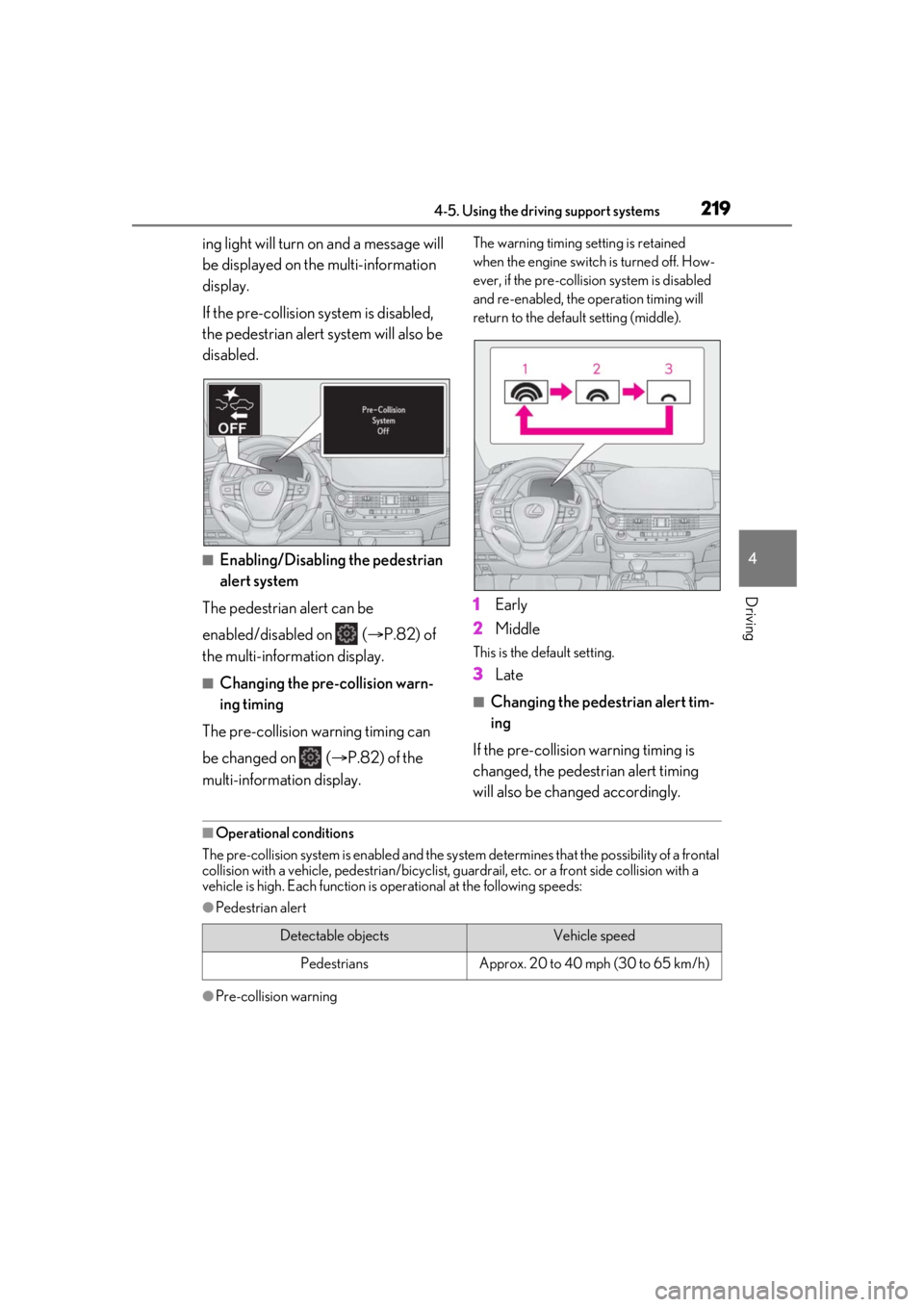
If the pre-collision system is disabled,
the pedestrian alert system will also be
disabled.
■Enabling/Disabling the pedestrian
alert system
The pedestrian alert can be
enabled/disabled on ( P.82) of
the multi-information display.
■Changing the pre-collision warn-
ing timing
The pre-collision warning timing can
be changed on ( P.82) of the
multi-information display.
The warning timing setting is retained
when the engine switch is turned off. How-
ever, if the pre-collision system is disabled
and re-enabled, the operation timing will
return to the default setting (middle).
1 Early
2 Middle
This is the default setting.
3Late
■Changing the pedestrian alert tim-
ing
If the pre-collision warning timing is
changed, the pedestrian alert timing
will also be changed accordingly.
■Operational conditions
The pre-collision system is enabled and the system determines that the possibility of a frontal
collision with a vehicle, pedestri an/bicyclist, guardrail, etc. or a front side collision with a
vehicle is high. Each function is operational at the following speeds:
●Pedestrian alert
●Pre-collision warning
Detectable objectsVehicle speed
PedestriansApprox. 20 to 40 mph (30 to 65 km/h)
Page 220 of 520
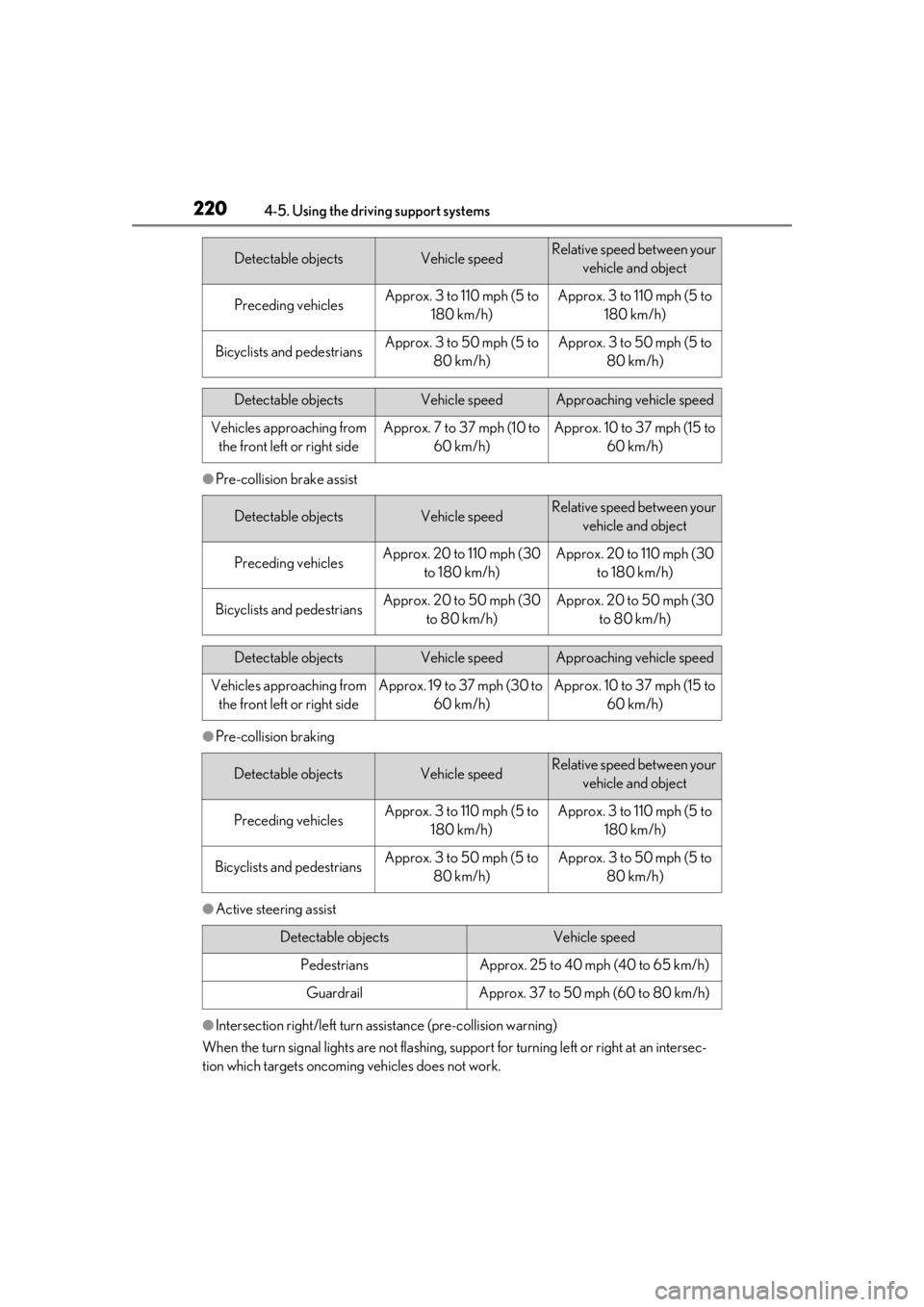
2204-5. Using the driving support systems
●Pre-collision brake assist
●Pre-collision braking
●Active steering assist
●Intersection right/left turn assistance (pre-collision warning)
When the turn signal lights are not flashing, support for turning left or right at an intersec-
tion which targets oncoming vehicles does not work.
Detectable objectsVehicle speedRelative speed between your
vehicle and object
Preceding vehiclesApprox. 3 to 110 mph (5 to 180 km/h)Approx. 3 to 110 mph (5 to 180 km/h)
Bicyclists and pedestriansApprox. 3 to 50 mph (5 to 80 km/h)Approx. 3 to 50 mph (5 to 80 km/h)
Detectable objectsVehicle speedApproaching vehicle speed
Vehicles approaching from the front left or right sideApprox. 7 to 37 mph (10 to 60 km/h)Approx. 10 to 37 mph (15 to 60 km/h)
Detectable objectsVehicle speedRelative speed between your vehicle and object
Preceding vehiclesApprox. 20 to 110 mph (30 to 180 km/h)Approx. 20 to 110 mph (30 to 180 km/h)
Bicyclists and pedestriansApprox. 20 to 50 mph (30 to 80 km/h)Approx. 20 to 50 mph (30 to 80 km/h)
Detectable objectsVehicle speedApproaching vehicle speed
Vehicles approaching from the front left or right sideApprox. 19 to 37 mph (30 to 60 km/h)Approx. 10 to 37 mph (15 to 60 km/h)
Detectable objectsVehicle speedRelative speed between your vehicle and object
Preceding vehiclesApprox. 3 to 110 mph (5 to 180 km/h)Approx. 3 to 110 mph (5 to 180 km/h)
Bicyclists and pedestriansApprox. 3 to 50 mph (5 to 80 km/h)Approx. 3 to 50 mph (5 to 80 km/h)
Detectable objectsVehicle speed
PedestriansApprox. 25 to 40 mph (40 to 65 km/h)
GuardrailApprox. 37 to 50 mph (60 to 80 km/h)
Page 221 of 520
2214-5. Using the driving support systems
4
Driving
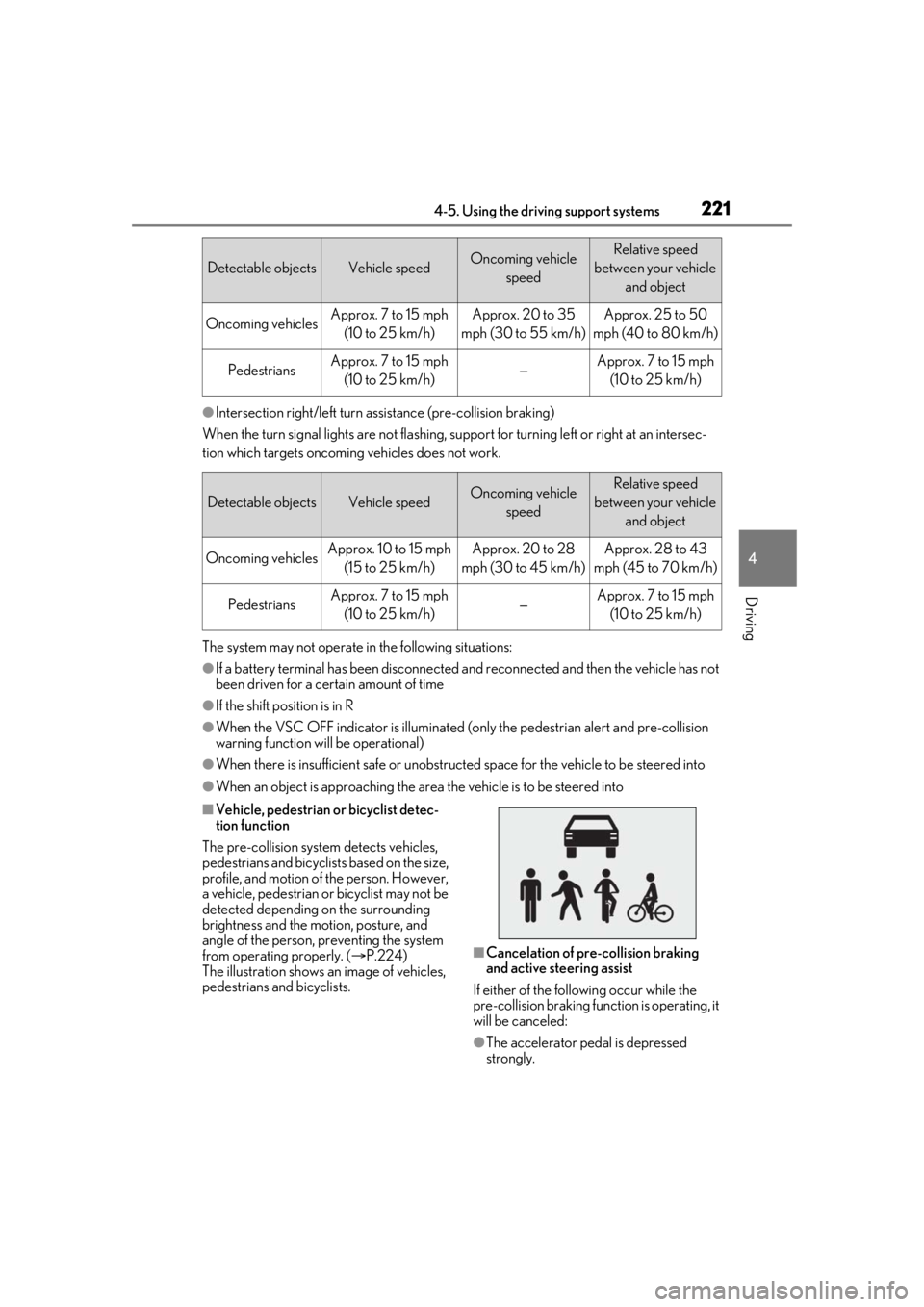
●Intersection right/left turn assistance (pre-collision braking)
When the turn signal lights are not flashing, support for turning left or right at an intersec-
tion which targets oncoming vehicles does not work.
The system may not operate in the following situations:
●If a battery terminal has been disconnected and reconnected and then the vehicle has not
been driven for a certain amount of time
●If the shift position is in R
●When the VSC OFF indicator is illuminated (only the pedest rian alert and pre-collision
warning function will be operational)
●When there is insufficient safe or unobstructed space for the vehicle to be steered into
●When an object is approaching the area the vehicle is to be steered into
■Vehicle, pedestrian or bicyclist detec-
tion function
The pre-collision system detects vehicles,
pedestrians and bicyclists based on the size,
profile, and motion of the person. However,
a vehicle, pedestrian or bicyclist may not be
detected depending on the surrounding
brightness and the motion, posture, and
angle of the person, preventing the system
from operating properly. ( P.224)
The illustration shows an image of vehicles,
pedestrians and bicyclists.
■Cancelation of pre-collision braking
and active steering assist
If either of the following occur while the
pre-collision braking function is operating, it
will be canceled:
●The accelerator pedal is depressed
strongly.
Detectable objectsVehicle speedOncoming vehicle speedRelative speed
between your vehicle and object
Oncoming vehiclesApprox. 7 to 15 mph (10 to 25 km/h)Approx. 20 to 35
mph (30 to 55 km/h)Approx. 25 to 50
mph (40 to 80 km/h)
PedestriansApprox. 7 to 15 mph (10 to 25 km/h)—Approx. 7 to 15 mph (10 to 25 km/h)
Detectable objectsVehicle speedOncoming vehicle speedRelative speed
between your vehicle and object
Oncoming vehiclesApprox. 10 to 15 mph (15 to 25 km/h)Approx. 20 to 28
mph (30 to 45 km/h)Approx. 28 to 43
mph (45 to 70 km/h)
PedestriansApprox. 7 to 15 mph (10 to 25 km/h)—Approx. 7 to 15 mph (10 to 25 km/h)
Page 226 of 520
2264-5. Using the driving support systems
emerge from behind a vehicle or large
object
• Pedestrians and bicyclists which are
extremely close to the side of the vehicle
(outside rear view mirror, etc.)
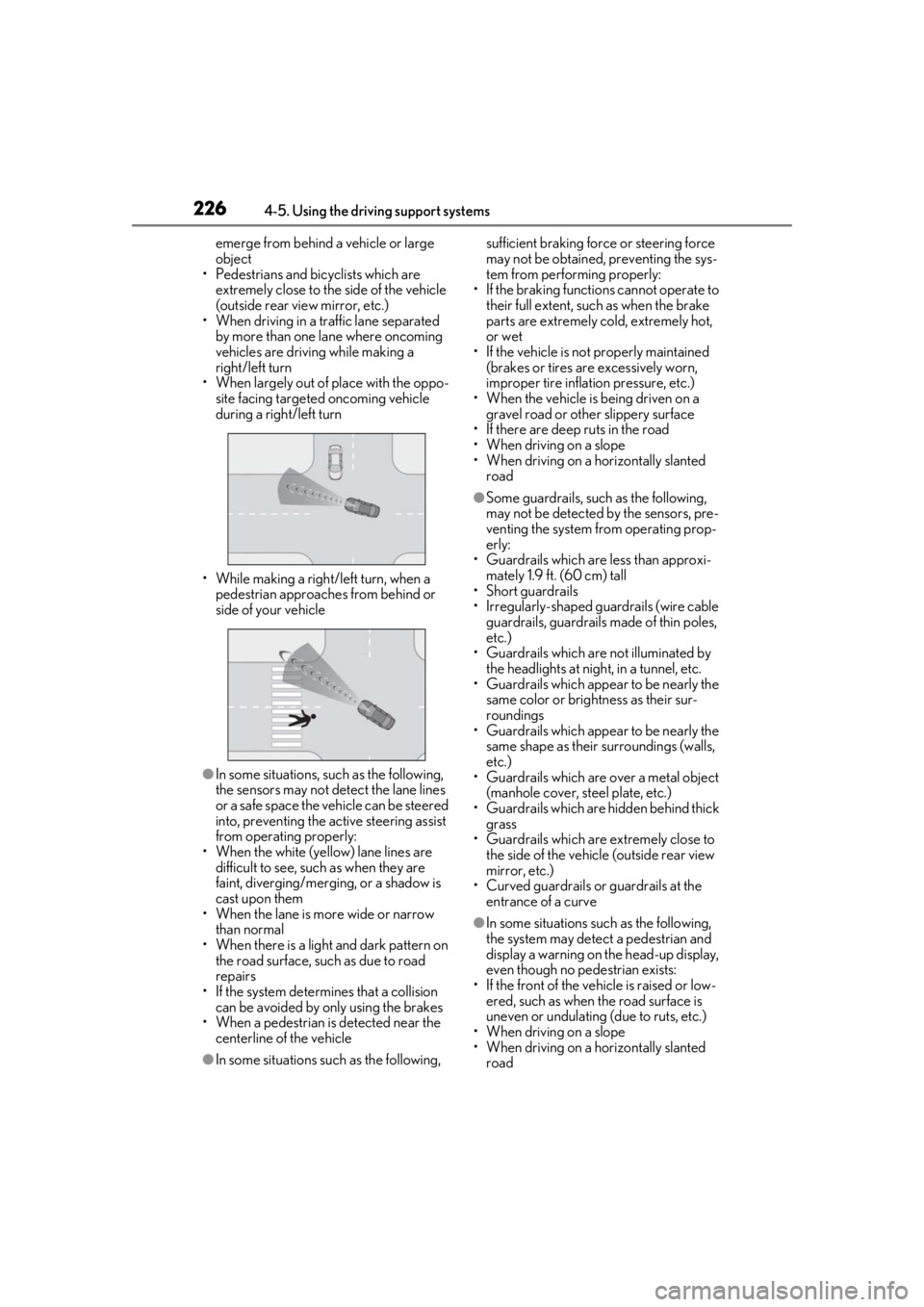
• When driving in a tr affic lane separated
by more than one lane where oncoming
vehicles are driving while making a
right/left turn
• When largely out of place with the oppo- site facing targeted oncoming vehicle
during a right/left turn
• While making a right/left turn, when a pedestrian approaches from behind or
side of your vehicle
●In some situations, such as the following,
the sensors may not detect the lane lines
or a safe space the vehicle can be steered
into, preventing the ac tive steering assist
from operating properly:
• When the white (yellow) lane lines are difficult to see, such as when they are
faint, diverging/merging, or a shadow is
cast upon them
• When the lane is more wide or narrow
than normal
• When there is a light and dark pattern on the road surface, such as due to road
repairs
• If the system determines that a collision can be avoided by only using the brakes
• When a pedestrian is detected near the
centerline of the vehicle
●In some situations such as the following, sufficient braking forc
e or steering force
may not be obtained, preventing the sys-
tem from performing properly:
• If the braking functions cannot operate to their full extent, such as when the brake
parts are extremely cold, extremely hot,
or wet
• If the vehicle is not properly maintained (brakes or tires are excessively worn,
improper tire inflation pressure, etc.)
• When the vehicle is being driven on a gravel road or other slippery surface
• If there are deep ruts in the road
• When driving on a slope
• When driving on a horizontally slanted road
●Some guardrails, such as the following,
may not be detected by the sensors, pre-
venting the system from operating prop-
erly:
• Guardrails which are less than approxi- mately 1.9 ft. (60 cm) tall
• Short guardrails
• Irregularly-shaped gu ardrails (wire cable
guardrails, guardrails made of thin poles,
etc.)
• Guardrails which are not illuminated by the headlights at nigh t, in a tunnel, etc.
• Guardrails which appear to be nearly the
same color or brightness as their sur-
roundings
• Guardrails which appear to be nearly the
same shape as their surroundings (walls,
etc.)
• Guardrails which are over a metal object
(manhole cover, steel plate, etc.)
• Guardrails which are hidden behind thick grass
• Guardrails which are extremely close to the side of the vehicle (outside rear view
mirror, etc.)
• Curved guardrails or guardrails at the entrance of a curve
●In some situations su ch as the following,
the system may detect a pedestrian and
display a warning on the head-up display,
even though no pedestrian exists:
• If the front of the vehicle is raised or low- ered, such as when the road surface is
uneven or undulating (due to ruts, etc.)
• When driving on a slope
• When driving on a horizontally slanted road
Page 227 of 520
2274-5. Using the driving support systems
4
Driving
• If the driver’s posture (driver seat posi-tion) is extreme, such as excessively
reclined
• If the head-up display position is set extremely high
■If VSC is disabled
●If VSC is disabled ( P.304), the
pre-collision brake assist and pre-colli-
sion braking functions are also disabled.
●The PCS warning light will turn on and
“VSC Turned Off Pre-Collision Brake
System Unavailable” will be displayed on
the multi-information display.
The system can detect the following:
Vehicles
Bicyclists
Pedestrians
■Pre-collision warning
When the system determines that the
possibility of a frontal collision is high, a
buzzer will sound and a warning mes-
PCS (Pre-Collision System)
(vehicles with Lexus Safety
System + 2.0)
The pre-collision system uses a
radar sensor and front camera to
detect objects ( P.227) in front of
the vehicle. When the system
determines that the possibility of a
frontal collision with an object is
high, a warning operates to urge
the driver to take evasive action
and the potential brake pressure is
increased to help the driver avoid
the collision. If the system deter-
mines that the possibility of a frontal
collision with an object is extremely
high, the brakes are automatically
applied to help avoi d the collision or
help reduce the impact of the colli-
sion.
The pre-collision system can be dis-
abled/enabled and the warning tim-
ing can be changed. ( P.230)
Detectable objects
System functions
Page 230 of 520
2304-5. Using the driving support systems
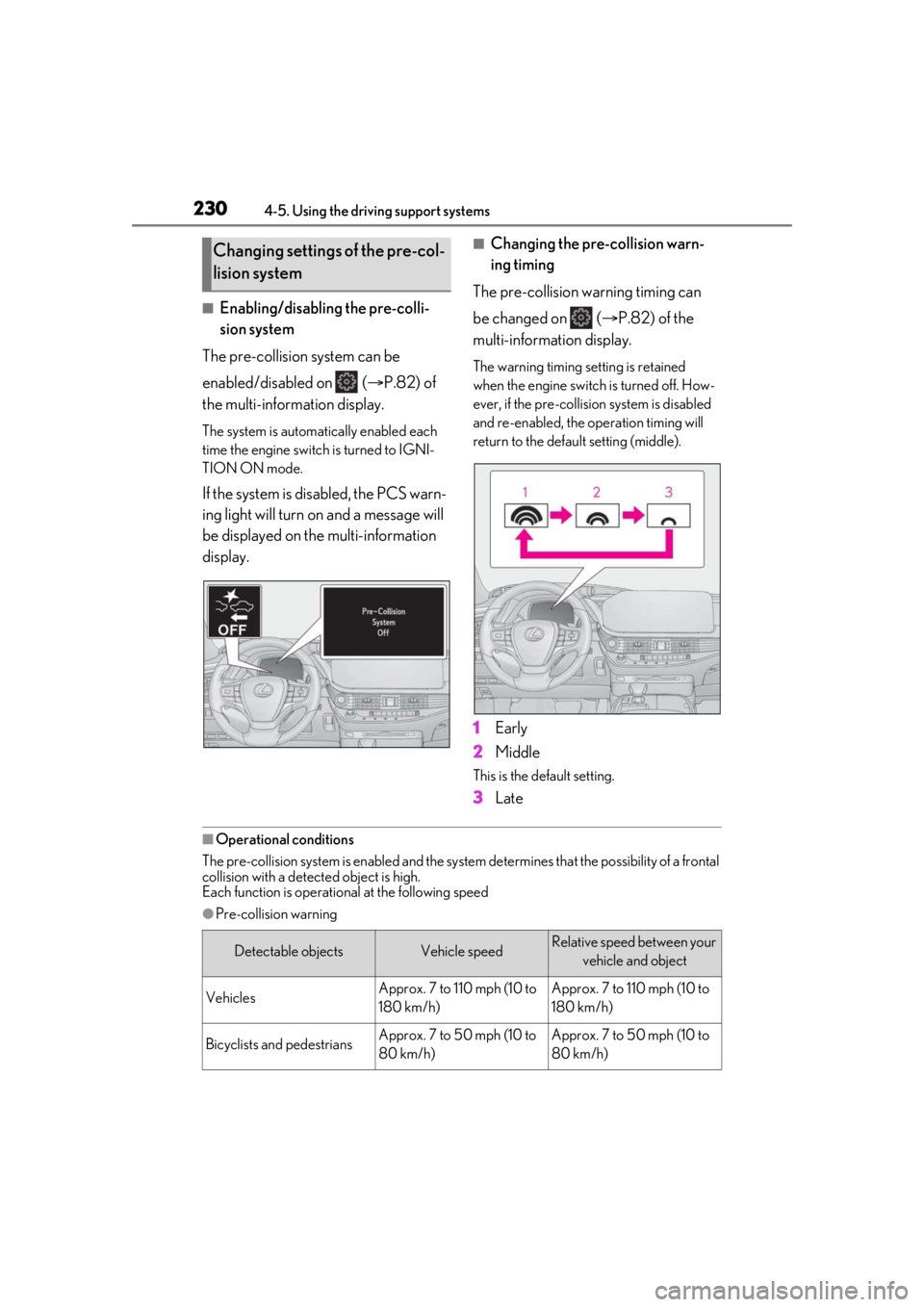
■Enabling/disabling the pre-colli-
sion system
The pre-collision system can be
enabled/disabled on ( P.82) of
the multi-information display.
The system is automatically enabled each
time the engine switch is turned to IGNI-
TION ON mode.
If the system is disabled, the PCS warn-
ing light will turn on and a message will
be displayed on the multi-information
display.
■Changing the pre-collision warn-
ing timing
The pre-collision warning timing can
be changed on ( P.82) of the
multi-information display.
The warning timing setting is retained
when the engine switch is turned off. How-
ever, if the pre-collision system is disabled
and re-enabled, the operation timing will
return to the default setting (middle).
1 Early
2 Middle
This is the default setting.
3Late
■Operational conditions
The pre-collision system is enabled and the system determines that the possibility of a frontal
collision with a detect ed object is high.
Each function is operational at the following speed
●Pre-collision warning
Changing settings of the pre-col-
lision system
Detectable objectsVehicle speedRelative speed between your
vehicle and object
VehiclesApprox. 7 to 110 mph (10 to
180 km/h)Approx. 7 to 110 mph (10 to
180 km/h)
Bicyclists and pedestriansApprox. 7 to 50 mph (10 to
80 km/h)Approx. 7 to 50 mph (10 to
80 km/h)
Page 234 of 520
2344-5. Using the driving support systems
as heavy rain, fog, snow or a sandstorm
• When driving through steam or smoke
• When the surrounding area is dim, such as at dawn or dusk, or while at night or in
a tunnel, making a detectable object
appear to be nearly the same color as its
surroundings
• When driving in a place where the sur- rounding brightness changes suddenly,
such as at the entrance or exit of a tunnel
• After the engine has started the vehicle has not been driven for a certain amount
of time
• While making a left/right turn and for a few seconds after makin g a left/right turn
• While driving on a curve and for a few seconds after driving on a curve
• If your vehicle is skidding
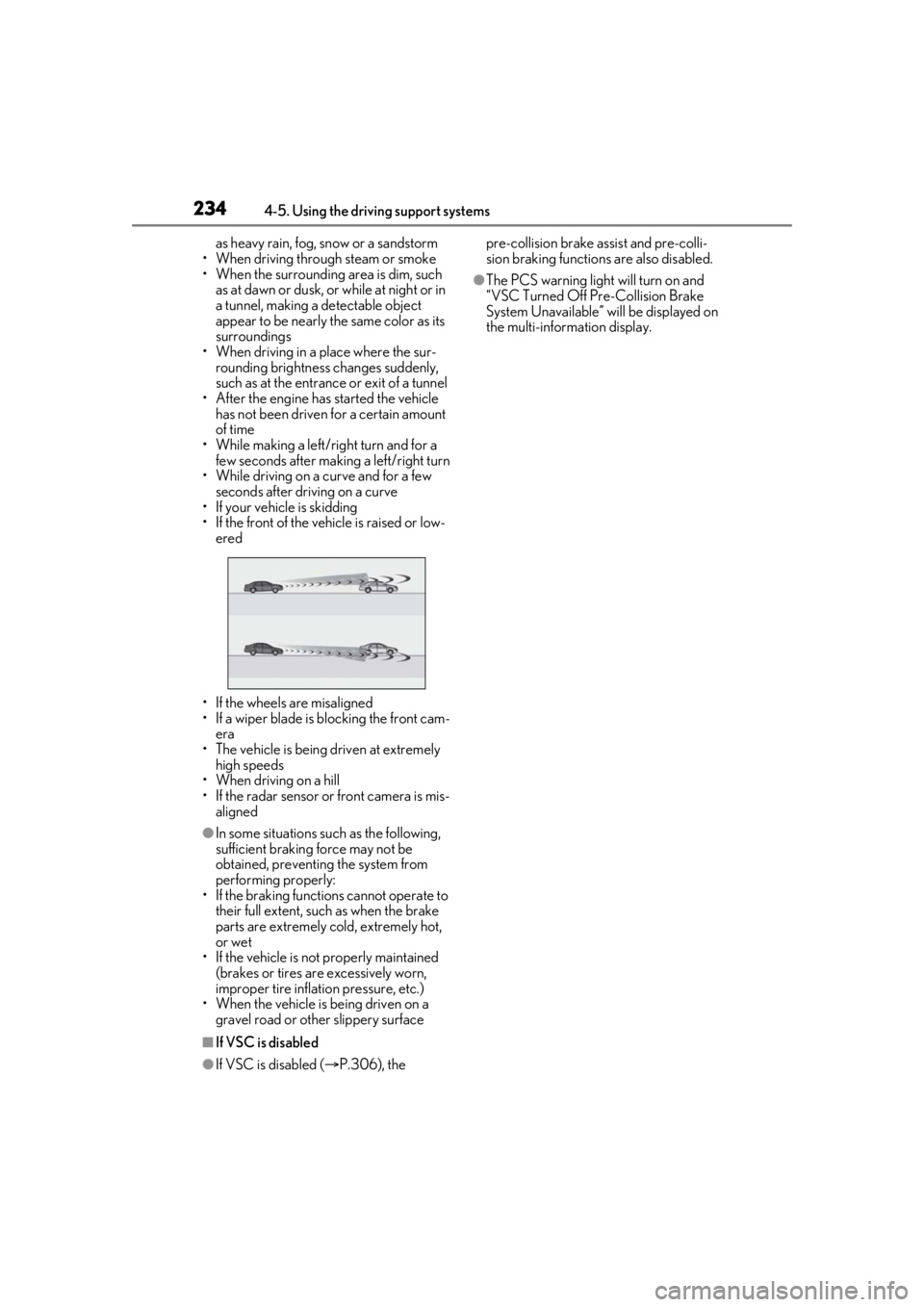
• If the front of the vehicle is raised or low-
ered
• If the wheels are misaligned
• If a wiper blade is blocking the front cam- era
• The vehicle is being driven at extremely high speeds
• When driving on a hill
• If the radar sensor or front camera is mis-
aligned
●In some situations such as the following,
sufficient braking force may not be
obtained, preventing the system from
performing properly:
• If the braking functions cannot operate to their full extent, such as when the brake
parts are extremely cold, extremely hot,
or wet
• If the vehicle is not properly maintained
(brakes or tires are excessively worn,
improper tire inflation pressure, etc.)
• When the vehicle is being driven on a gravel road or other slippery surface
■If VSC is disabled
●If VSC is disabled ( P.306), the pre-collision brake assist and pre-colli-
sion braking functions are also disabled.
●The PCS warning light will turn on and
“VSC Turned Off Pre-Collision Brake
System Unavailable” will be displayed on
the multi-information display.