lane LEXUS LS500 2021 Owners Manual
[x] Cancel search | Manufacturer: LEXUS, Model Year: 2021, Model line: LS500, Model: LEXUS LS500 2021Pages: 520, PDF Size: 9.81 MB
Page 3 of 520
3TABLE OF CONTENTS
1
2
3
4
5
6
7
8
9
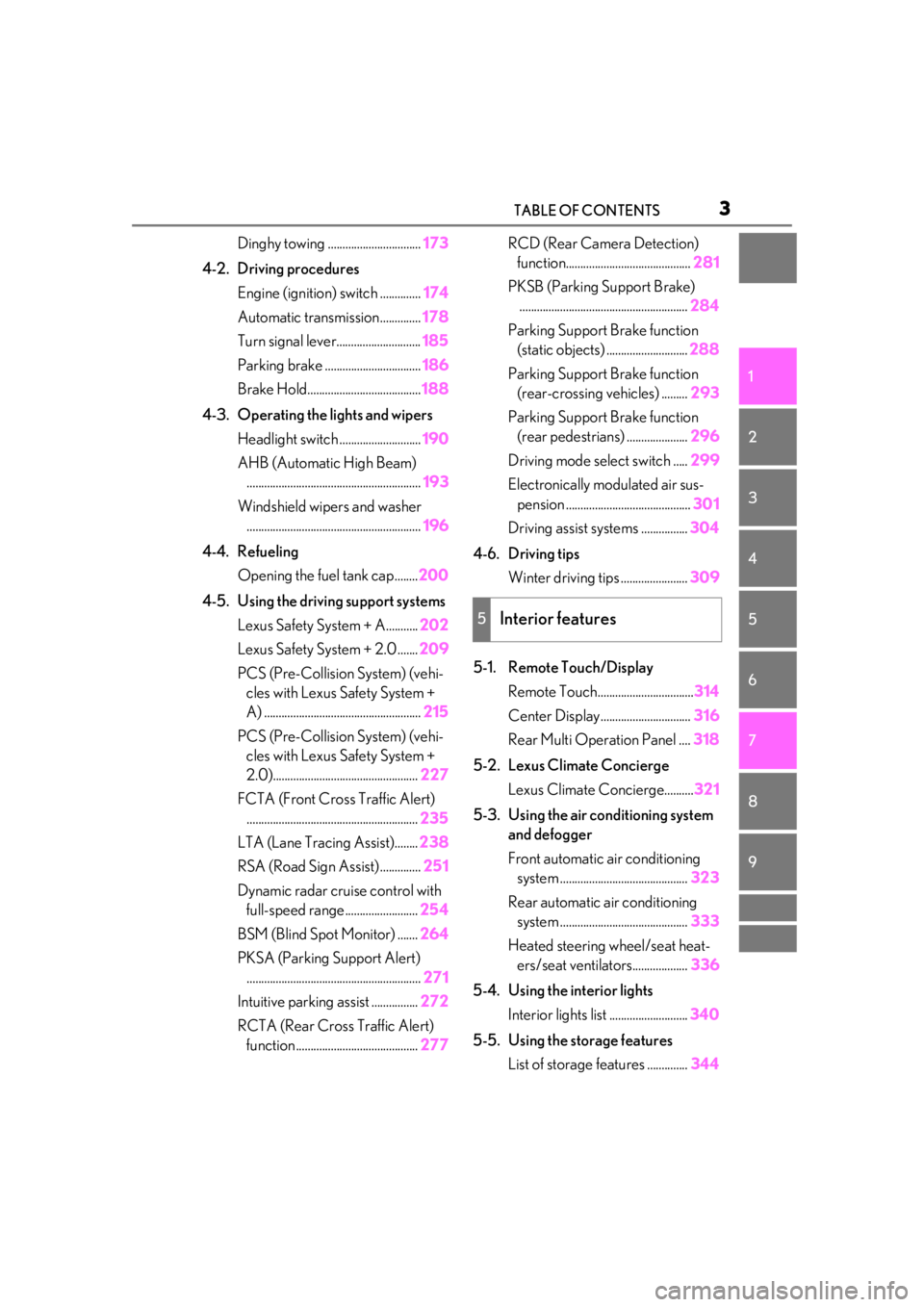
Dinghy towing ................................173
4-2. Driving procedures Engine (ignition) switch .............. 174
Automatic transmission.............. 178
Turn signal lever............................. 185
Parking brake ................................. 186
Brake Hold....................................... 188
4-3. Operating the lights and wipers Headlight switch ............................ 190
AHB (Automatic High Beam) ............................................................ 193
Windshield wipers and washer ............................................................ 196
4-4. Refueling Opening the fuel tank cap........ 200
4-5. Using the driving support systems Lexus Safety System + A........... 202
Lexus Safety System + 2.0 ....... 209
PCS (Pre-Collision System) (vehi- cles with Lexus Safety System +
A) ...................................................... 215
PCS (Pre-Collision System) (vehi- cles with Lexus Safety System +
2.0).................................................. 227
FCTA (Front Cross Traffic Alert) ........................................................... 235
LTA (Lane Tracing Assist)........ 238
RSA (Road Sign Assist) .............. 251
Dynamic radar crui se control with
full-speed range......................... 254
BSM (Blind Spot Monitor) ....... 264
PKSA (Parking Support Alert) ............................................................ 271
Intuitive parking assist ................ 272
RCTA (Rear Cross Traffic Alert) function .......................................... 277RCD (Rear Camera Detection)
function........................................... 281
PKSB (Parking Support Brake) .......................................................... 284
Parking Support Brake function (static objects) ............................ 288
Parking Support Brake function (rear-crossing vehicles) ......... 293
Parking Support Brake function (rear pedestrians) ..................... 296
Driving mode select switch ..... 299
Electronically modulated air sus- pension ........................................... 301
Driving assist systems ................ 304
4-6. Driving tips Winter driving tips ....................... 309
5-1. Remote Touch/Display Remote Touch.................................314
Center Display............................... 316
Rear Multi Operation Panel .... 318
5-2. Lexus Climate Concierge Lexus Climate Concierge.......... 321
5-3. Using the air conditioning system and defogger
Front automatic air conditioning
system ............................................ 323
Rear automatic air conditioning system ............................................ 333
Hea t
ed steering wheel/seat heat-
ers/seat ventilators................... 336
5-4. Using the interior lights Interior lights list ........................... 340
5-5. Using the storage features List of storage features .............. 344
5Interior features
Page 18 of 520
18Pictorial index
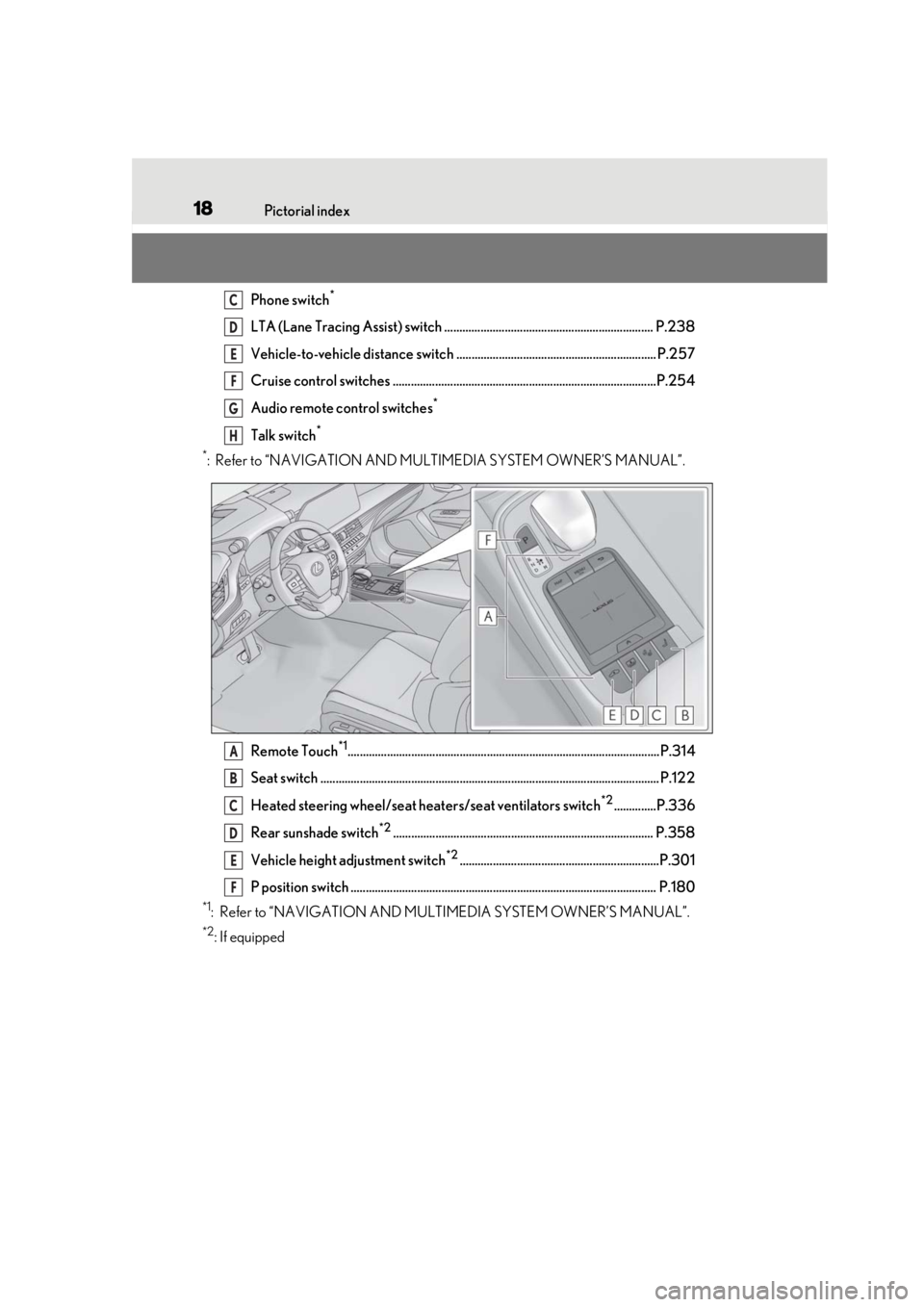
Phone switch*
LTA (Lane Tracing Assist) switch ..................................................................... P.238
Vehicle-to-vehicle distance switch .................................................................. P.257
Cruise control switches .......................................................................................P.254
Audio remote control switches
*
Talk switch*
*
: Refer to “NAVIGATION AND MULTIMEDIA SYSTEM OWNER’S MANUAL”.
Remote Touch
*1....................................................................................................... P.314
Seat switch ................................................................................................................ P.12 2
Heated steering wheel/seat he aters/seat ventilators switch
*2..............P.336
Rear sunshade switch
*2...................................................................................... P.358
Vehicle height adjustment switch
*2..................................................................P.301
P position switch ..................................................................................................... P.180
*1: Refer to “NAVIGATION AND MULTIMEDIA SYSTEM OWNER’S MANUAL”.
*2: If equipped
C
D
E
F
G
H
A
B
C
D
E
F
Page 87 of 520
872-1. Instrument cluster
2
Vehicle status information and indicators
tion system-linked information.
Route guidance to destination
Compass display (heading-up dis-
play)
■Route guidance to destination display
When the route guidance to destination
display is enabled on the head-up display, it
will not be displayed on the multi-informa-
tion display. (P.91)
Select to enable selection of an audio
source or track on the meter using the
meter control switches.
Select to display the operational status
of the following systems:
LTA (Lane Tracing Assist)
( P.238)
Dynamic radar cruise control with
full-speed range ( P.254)
RSA (Road Sign Assist) (if
equipped) ( P.251)
■Meter display settings that can be
changed
Language
Select to change th e language displayed.
Units
Select to change the units of measure dis-
played.
Speedometer display (except F SPORT models)
Select to set the display of the speedome-
ter to digital/analog/both digital and ana-
log.
Drive information 1/Drive informa-
tion 2
Select to select up to 2 items ( P.84) that
will be displayed on each Drive information
screen (Drive information 1 screen and
Drive information 2 sc reen) respectively.
Clock
Select to switch between 12-hour display
and 24-hour display.
Pop-up display
Select to enable/disable pop-up displays
for each relevant system.
Accent color
Select to change the accent color on the
screen, such as the cursor color.
Rev indicator (F SPORT models)
• Select to enable/disable the rev indica-
tor.
• Select to set the engine speed at which the rev indicator (amber) will begin to be
displayed.
Rev peak (F SPORT models)
Select to enable/disable the rev peak.
Eco Driving Indicator Light
Select to enable/disable the Eco Driving
Indicator Light.
Default setting
Select to reset the meter display settings to
the default setting.
■Vehicle functions and settings that
can be changed
P.476
Audio system-linked display
Driving support system informa-
tion display
Settings display
Page 92 of 520
922-1. Instrument cluster
Displays the operational status of the
following systems:
LTA (Lane Tracing Assist)
( P.238)
Dynamic radar cruise control with
full-speed range ( P.254)
Details of content displayed on the
head-up display may differ from that dis-
played on the multi-information display. For
details, refer to the explanation of each sys-
tem.
Pop-up displays for the following sys-
tems will be displayed when necessary.
■Driving support systems
Displays a warning/suggestion/advice
message or the operating state of a rel-
evant system.
PCS (Pre-Collision System)
( P.215, 227)
FCTA (Front Cross Traffic Alert) (if
equipped) ( P.235)
Intuitive parking assist (if equipped)
( P.272)
Parking Support Brake function (for
static objects) (if equipped)
( P.288)
Brake Override System ( P.165)
Drive-Start Control ( P.170)
Details of content displayed on the
head-up display may differ from that dis-
played on the multi-information display. For details, refer to the explanation of each sys-
tem.
■/ icons
These icons are linked to the
multi-information display
: Master warning icon
Displayed when a warn ing message is dis-
played on the multi-information display.
( P.436)
: Information icon
Displayed when a suggestion pop-up dis-
play ( P.88) or advice pop-up display is
displayed on the multi-information display.
■Warning message
Some warning messages are displayed
when necessary, according to certain
conditions.
Details of content displayed on the
head-up display may differ from that dis-
played on the multi-information display.
■Audio system operation status
Displayed when an audio remote con-
trol switch on the steering wheel is
operated.
■Hands-free system status
Displayed when the hands-free system
is operated.
■When a pop-up display is displayed
When a pop-up display is displayed, a cur-
rent display may no long er be displayed. In
this case, the display will return after the
pop-up display disappears.
Driving support system display
area
Pop-up display
Page 163 of 520
163
4
4
Driving
Driving
.4-1. Before drivingDriving the vehicle ..................... 164
Cargo and luggage ................... 170
Vehicle load limits ...................... 172
Trailer towing ............................... 173
Dinghy towing ............................. 173
4-2. Driving procedures Engine (ignition) switch ........... 174
Automatic transmission........... 178
Turn signal lever.......................... 185
Parking brake .............................. 186
Brake Hold.................................... 188
4-3. Operating the lights and wipers Headlight switch ......................... 190
AHB (Automatic High Beam) ......................................................... 193
Windshield wipers and washer ......................................................... 196
4-4. Refueling Opening the fuel tank cap..... 200
4-5. Using the driving support sys- tems
Lexus Safety System + A........ 202
Lexus Safety System + 2.0 .... 209
PCS (Pre-Collision System) (vehi- cles with Lexus Safety System +
A) ................................................... 215
PCS (Pre-Collision System) (vehi- cles with Lexus Safety System +
2.0)............................................... 227FCTA (Front Cross Traffic Alert)
....................................................... 235
LTA (Lane Tracing Assist) .... 238
RSA (Road Sign Assist)........... 251
Dynamic radar cruise control with full-speed range...................... 254
BSM (Blind Spot Monitor) .... 264
PKSA (Parking Support Alert) ......................................................... 271
Intuitive parking assist .............. 272
RCTA (Rear Cross Traffic Alert) function....................................... 277
RCD (Rear Camera Detection) function........................................ 281
PKSB (Parking Support Brake) ....................................................... 284
Parking Support Brake function (static objects) ......................... 288
Parking Support Brake function (rear-crossing vehicles) ...... 293
Parking Support Brake function (rear pedestrians) .................. 296
Driving mode select switch .. 299
Electronically modulated air sus- pension ........................................ 301
Driving assist systems.............. 304
4-6. Driving tips Winter driving tips .................... 309
Page 185 of 520
1854-2. Driving procedures
4
Driving
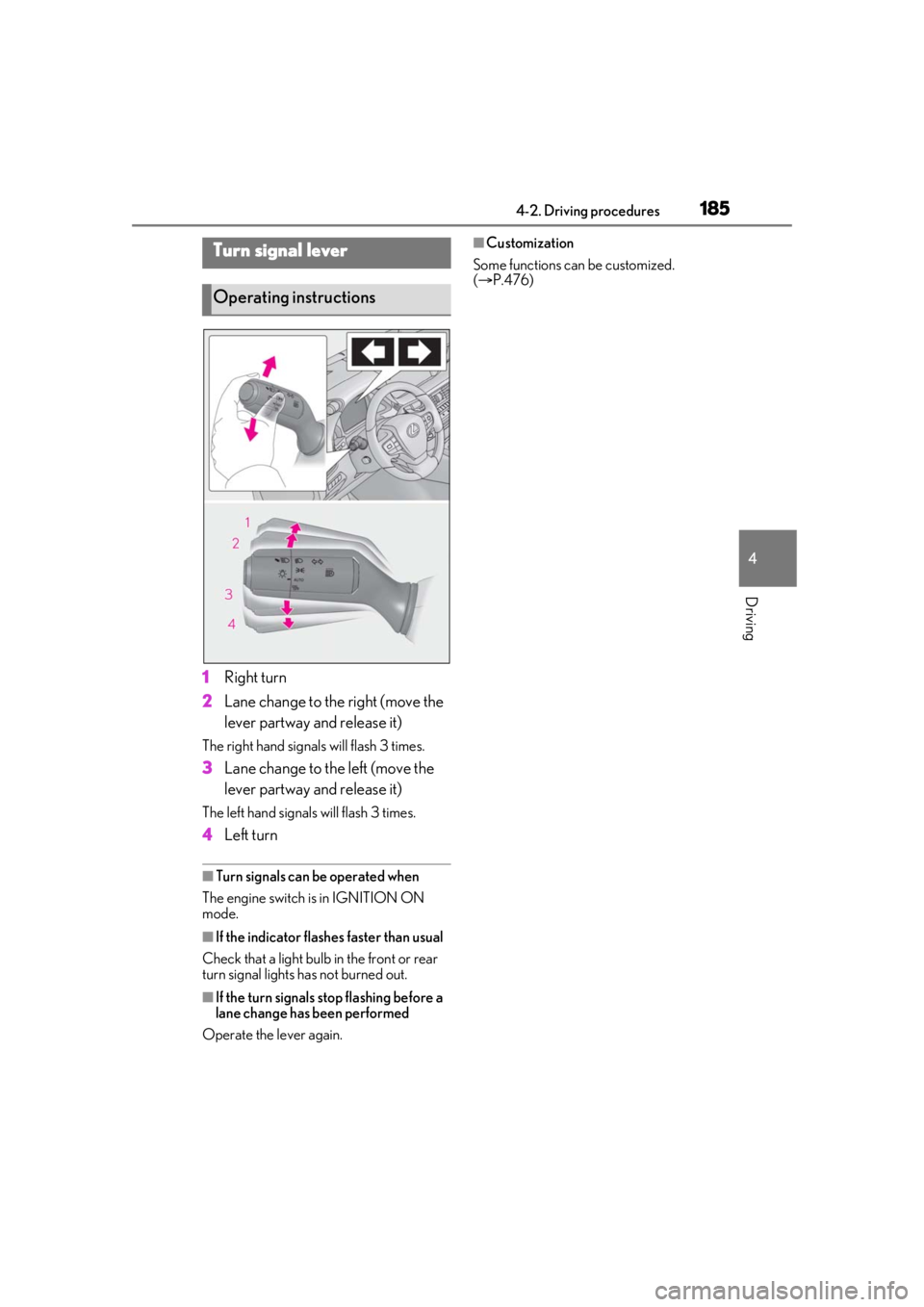
1Right turn
2 Lane change to the right (move the
lever partway and release it)
The right hand signals will flash 3 times.
3Lane change to the left (move the
lever partway and release it)
The left hand signals will flash 3 times.
4Left turn
■Turn signals can be operated when
The engine switch is in IGNITION ON
mode.
■If the indicator flashes faster than usual
Check that a light bulb in the front or rear
turn signal lights has not burned out.
■If the turn signals stop flashing before a
lane change has been performed
Operate the lever again.
■Customization
Some functions can be customized.
( P.476)Turn signal lever
Operating instructions
Page 193 of 520
1934-3. Operating the lights and wipers
4
Driving
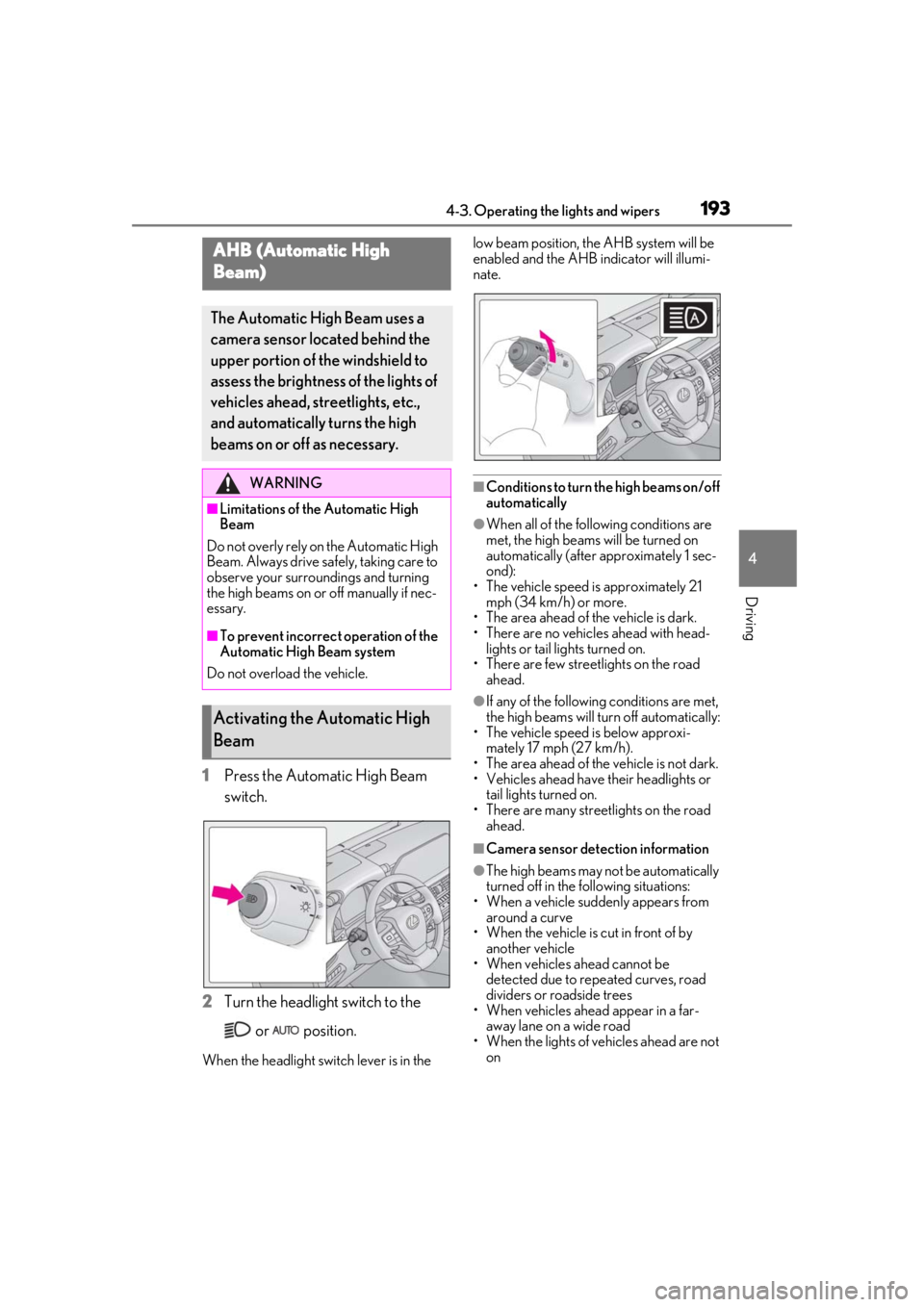
1Press the Automatic High Beam
switch.
2 Turn the headlight switch to the
or position.
When the headlight swit ch lever is in the low beam position, the AHB system will be
enabled and the AHB indicator will illumi-
nate.
■Conditions to turn the high beams on/off
automatically
●When all of the follo
wing conditions are
met, the high beams will be turned on
automatically (after approximately 1 sec-
ond):
• The vehicle speed is approximately 21 mph (34 km/h) or more.
• The area ahead of the vehicle is dark.
• There are no vehicles ahead with head-
lights or tail lights turned on.
• There are few streetlights on the road
ahead.
●If any of the following conditions are met,
the high beams will turn off automatically:
• The vehicle speed is below approxi- mately 17 mph (27 km/h).
• The area ahead of the vehicle is not dark.
• Vehicles ahead have their headlights or
tail lights turned on.
• There are many streetlights on the road ahead.
■Camera sensor dete ction information
●The high beams may not be automatically
turned off in the following situations:
• When a vehicle suddenly appears from
around a curve
• When the vehicle is cut in front of by another vehicle
• When vehicles ahead cannot be
detected due to repeated curves, road
dividers or roadside trees
• When vehicles ahead appear in a far-
away lane on a wide road
• When the lights of vehicles ahead are not on
AHB (Automatic High
Beam)
The Automatic High Beam uses a
camera sensor located behind the
upper portion of the windshield to
assess the brightness of the lights of
vehicles ahead, streetlights, etc.,
and automatically turns the high
beams on or off as necessary.
WARNING
■Limitations of the Automatic High
Beam
Do not overly rely on the Automatic High
Beam. Always drive sa fely, taking care to
observe your surroundings and turning
the high beams on or off manually if nec-
essary.
■To prevent incorrect operation of the
Automatic High Beam system
Do not overload the vehicle.
Activating the Automatic High
Beam
Page 202 of 520
2024-5. Using the driving support systems
4-5.Using the driving support systems
*:If equipped
■PCS (Pre-Collision System) (vehi-
cles with Lexus Safety System + A)
P.215
■FCTA (Front Cross Traffic Alert)
P.235
■LTA (Lane Tracing Assist)
P.238
■AHB (Automatic High Beam)
P.193
■RSA (Road Sign Assist)*
*:If equipped
P.251
■Dynamic radar cruise control with
full-speed range
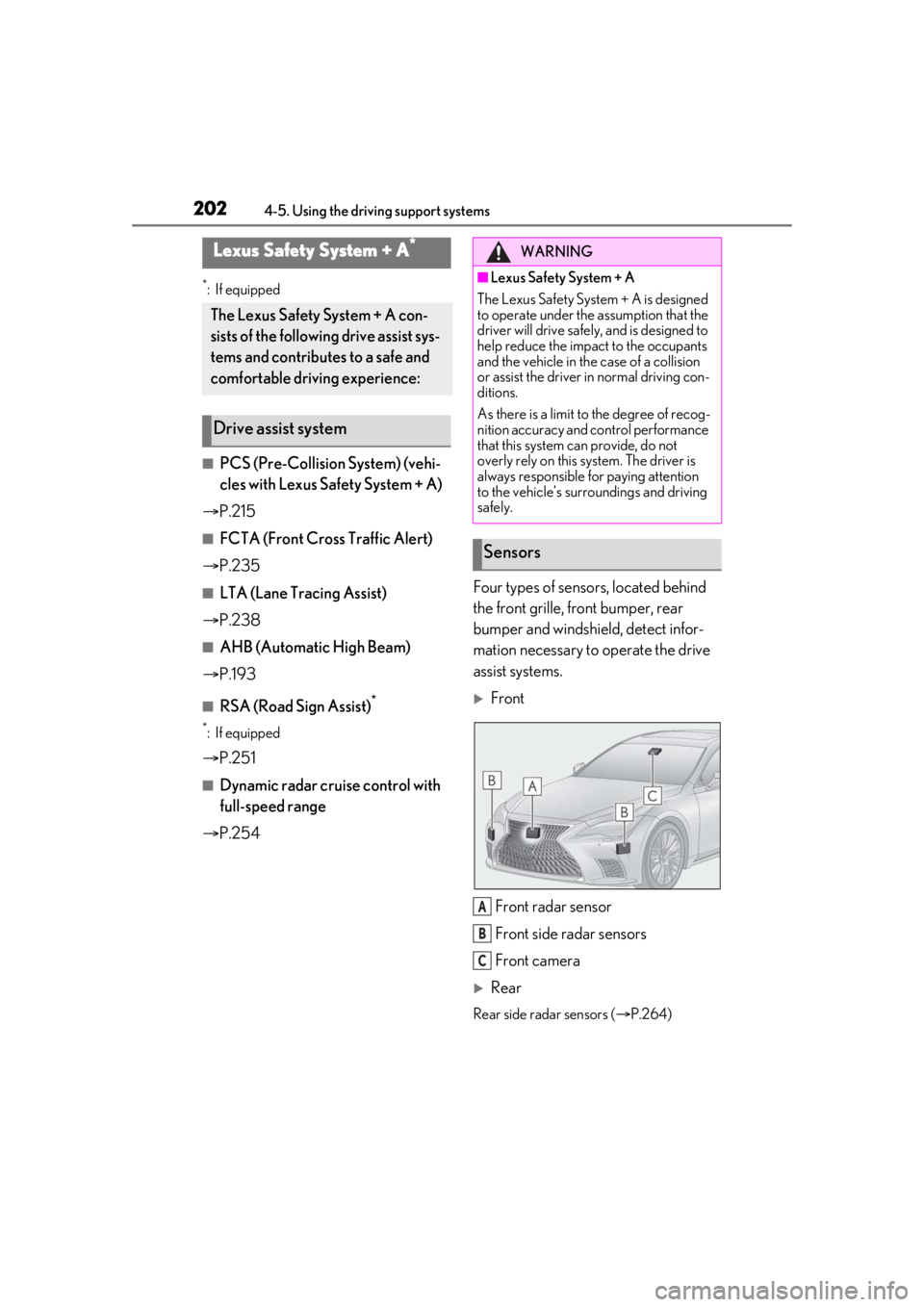
P.254 Four types of sensors, located behind
the front grille, front bumper, rear
bumper and windshield, detect infor-
mation necessary to operate the drive
assist systems.
Front
Front radar sensor
Front side radar sensors
Front camera
Rear
Rear side radar sensors ( P.264)
Lexus Safety System + A*
The Lexus Safety System + A con-
sists of the following drive assist sys-
tems and contributes to a safe and
comfortable driving experience:
Drive assist system
WARNING
■Lexus Safety System + A
The Lexus Safety System + A is designed
to operate under the assumption that the
driver will drive safely , and is designed to
help reduce the impact to the occupants
and the vehicle in the case of a collision
or assist the driver in normal driving con-
ditions.
As there is a limit to the degree of recog-
nition accuracy and control performance
that this system can provide, do not
overly rely on this system. The driver is
always responsible for paying attention
to the vehicle’s surroundings and driving
safely.
Sensors
A
B
C
Page 209 of 520
2094-5. Using the driving support systems
4
Driving
*:If equipped
■PCS (Pre-Collision System) (vehi-
cles with Lexus Safety System +
2.0)
P.227
■LTA (Lane Tracing Assist)
P.238
■AHB (Automatic High Beam)
P.193
■RSA (Road Sign Assist)*
P.251
*:If equipped
■Dynamic radar cruise control with
full-speed range
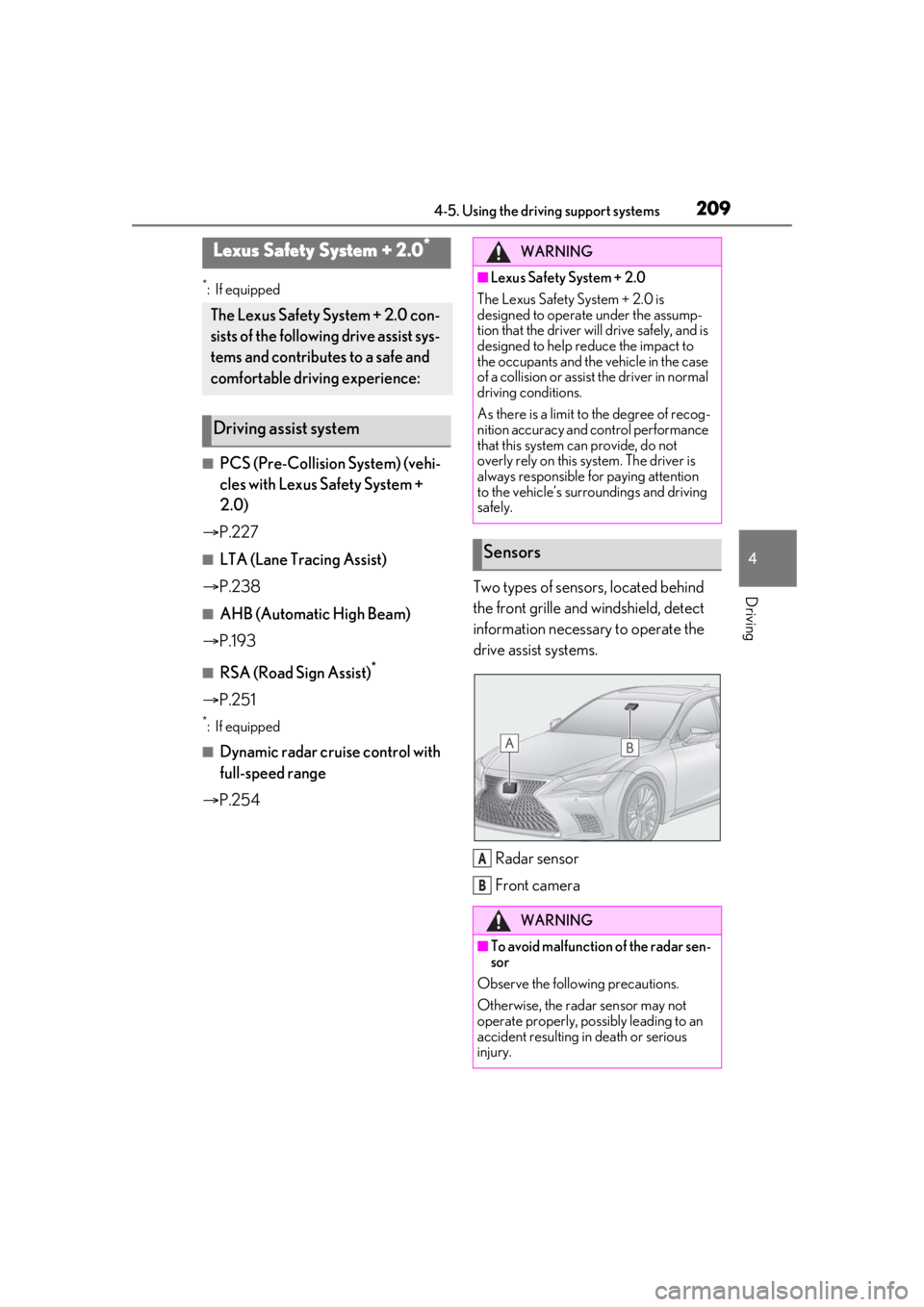
P.254 Two types of sensors, located behind
the front grille and windshield, detect
information necessary to operate the
drive assist systems.
Radar sensor
Front camera
Lexus Safety System + 2.0*
The Lexus Safety System + 2.0 con-
sists of the following drive assist sys-
tems and contributes to a safe and
comfortable driving experience:
Driving assist system
WARNING
■Lexus Safety System + 2.0
The Lexus Safety System + 2.0 is
designed to operate under the assump-
tion that the driver will drive safely, and is
designed to help reduce the impact to
the occupants and the vehicle in the case
of a collision or assist the driver in normal
driving conditions.
As there is a limit to the degree of recog-
nition accuracy and control performance
that this system can provide, do not
overly rely on this system. The driver is
always responsible for paying attention
to the vehicle’s surroundings and driving
safely.
Sensors
WARNING
■To avoid malfunction of the radar sen-
sor
Observe the following precautions.
Otherwise, the radar sensor may not
operate properly, possibly leading to an
accident resulting in death or serious
injury.
A
B
Page 222 of 520
2224-5. Using the driving support systems
●The steering wheel is turned sharply or
abruptly.
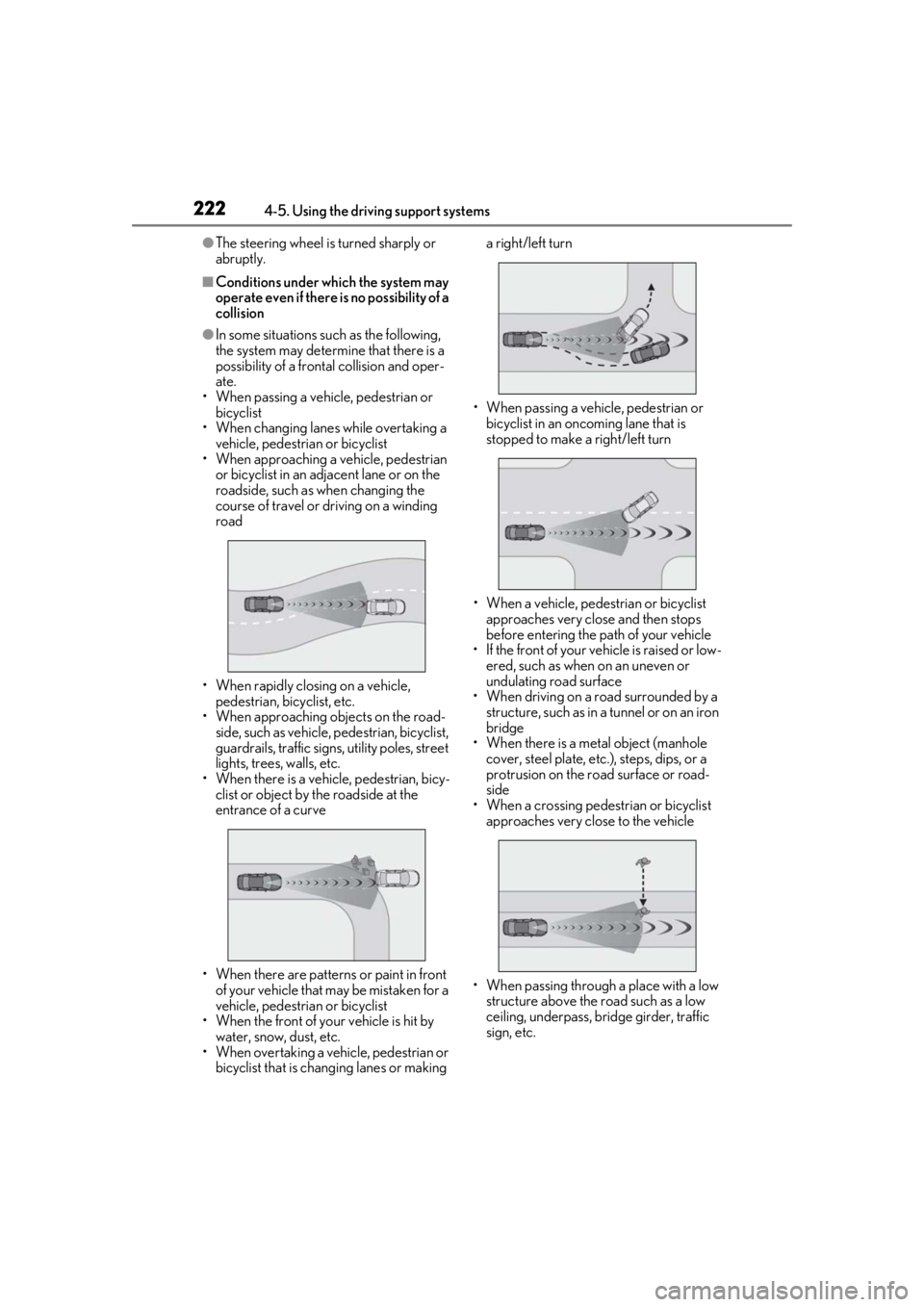
■Conditions under which the system may
operate even if there is no possibility of a
collision
●In some situations such as the following,
the system may determine that there is a
possibility of a frontal collision and oper-
ate.
• When passing a vehicle, pedestrian or bicyclist
• When changing lane s while overtaking a
vehicle, pedestrian or bicyclist
• When approaching a vehicle, pedestrian or bicyclist in an adjacent lane or on the
roadside, such as when changing the
course of travel or driving on a winding
road
• When rapidly closing on a vehicle, pedestrian, bicyclist, etc.
• When approaching objects on the road- side, such as vehicle, pedestrian, bicyclist,
guardrails, traffic signs, utility poles, street
lights, trees, walls, etc.
• When there is a vehicle, pedestrian, bicy- clist or object by the roadside at the
entrance of a curve
• When there are patterns or paint in front of your vehicle that may be mistaken for a
vehicle, pedestrian or bicyclist
• When the front of your vehicle is hit by water, snow, dust, etc.
• When overtaking a vehicle, pedestrian or bicyclist that is changing lanes or making a right/left turn
• When passing a vehicle, pedestrian or bicyclist in an oncoming lane that is
stopped to make a right/left turn
• When a vehicle, pedestrian or bicyclist approaches very close and then stops
before entering the pa th of your vehicle
• If the front of your vehicle is raised or low- ered, such as when on an uneven or
undulating road surface
• When driving on a road surrounded by a structure, such as in a tunnel or on an iron
bridge
• When there is a metal object (manhole cover, steel plate, etc.), steps, dips, or a
protrusion on the road surface or road-
side
• When a crossing pedestrian or bicyclist approaches very close to the vehicle
• When passing through a place with a low structure above the road such as a low
ceiling, underpass, bridge girder, traffic
sign, etc.