lock LEXUS LS500H 2018 Owners Manual
[x] Cancel search | Manufacturer: LEXUS, Model Year: 2018, Model line: LS500H, Model: LEXUS LS500H 2018Pages: 528, PDF Size: 10.8 MB
Page 445 of 528
4457-2. Steps to take in an emergency
LS500h_OM_OM50F42U_(U) 7
When trouble arises
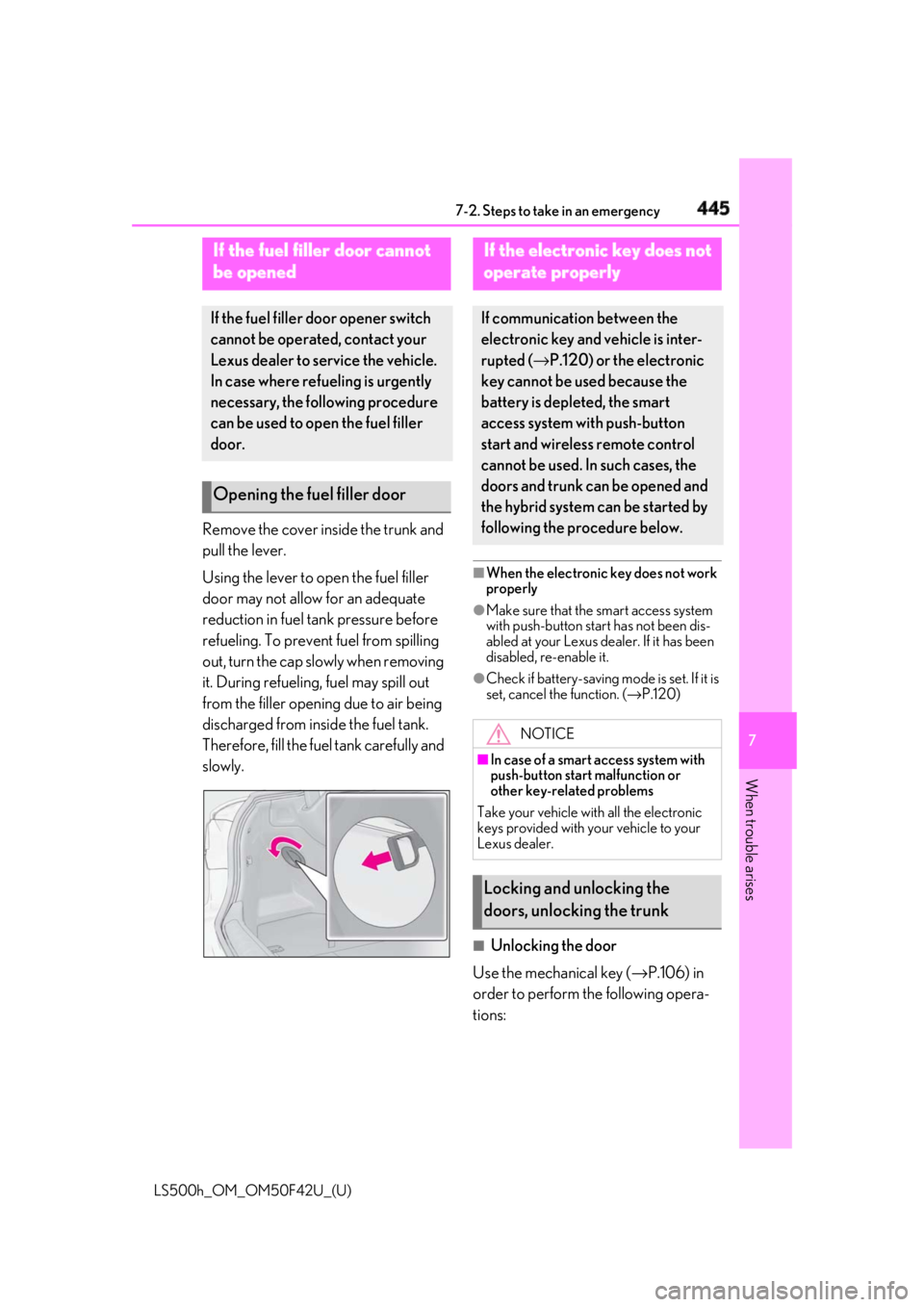
Remove the cover inside the trunk and
pull the lever.
Using the lever to open the fuel filler
door may not allow for an adequate
reduction in fuel tank pressure before
refueling. To prevent fuel from spilling
out, turn the cap slowly when removing
it. During refueling, fuel may spill out
from the filler opening due to air being
discharged from inside the fuel tank.
Therefore, fill the fuel tank carefully and
slowly. ■
When the electronic key does not work
properly ●
Make sure that the smart access system
with push-button star t has not been dis-
abled at your Lexus dealer. If it has been
disabled, re-enable it. ●
Check if battery-saving mo de is set. If it is
set, cancel the function. ( → P.120)
■
Unlocking the door
Use the mechanical key ( → P.106) in
order to perform th e following opera-
tions:If the fuel filler door cannot
be opened If the fuel filler door opener switch
cannot be operated, contact your
Lexus dealer to service the vehicle.
In case where refueling is urgently
necessary, the following procedure
can be used to open the fuel filler
door.
Opening the fuel filler door If the electronic key does not
operate properly If communication between the
electronic key and vehicle is inter-
rupted ( → P.120) or the electronic
key cannot be used because the
battery is depleted, the smart
access system with push-button
start and wireless remote control
cannot be used. In such cases, the
doors and trunk can be opened and
the hybrid system can be started by
following the procedure below.
NOTICE■
In case of a smart access system with
push-button start malfunction or
other key-rela ted problems
Take your vehicle with all the electronic
keys provided with your vehicle to your
Lexus dealer.
Locking and unlocking the
doors, unlocking the trunk
Page 446 of 528
446 7-2. Steps to take in an emergency
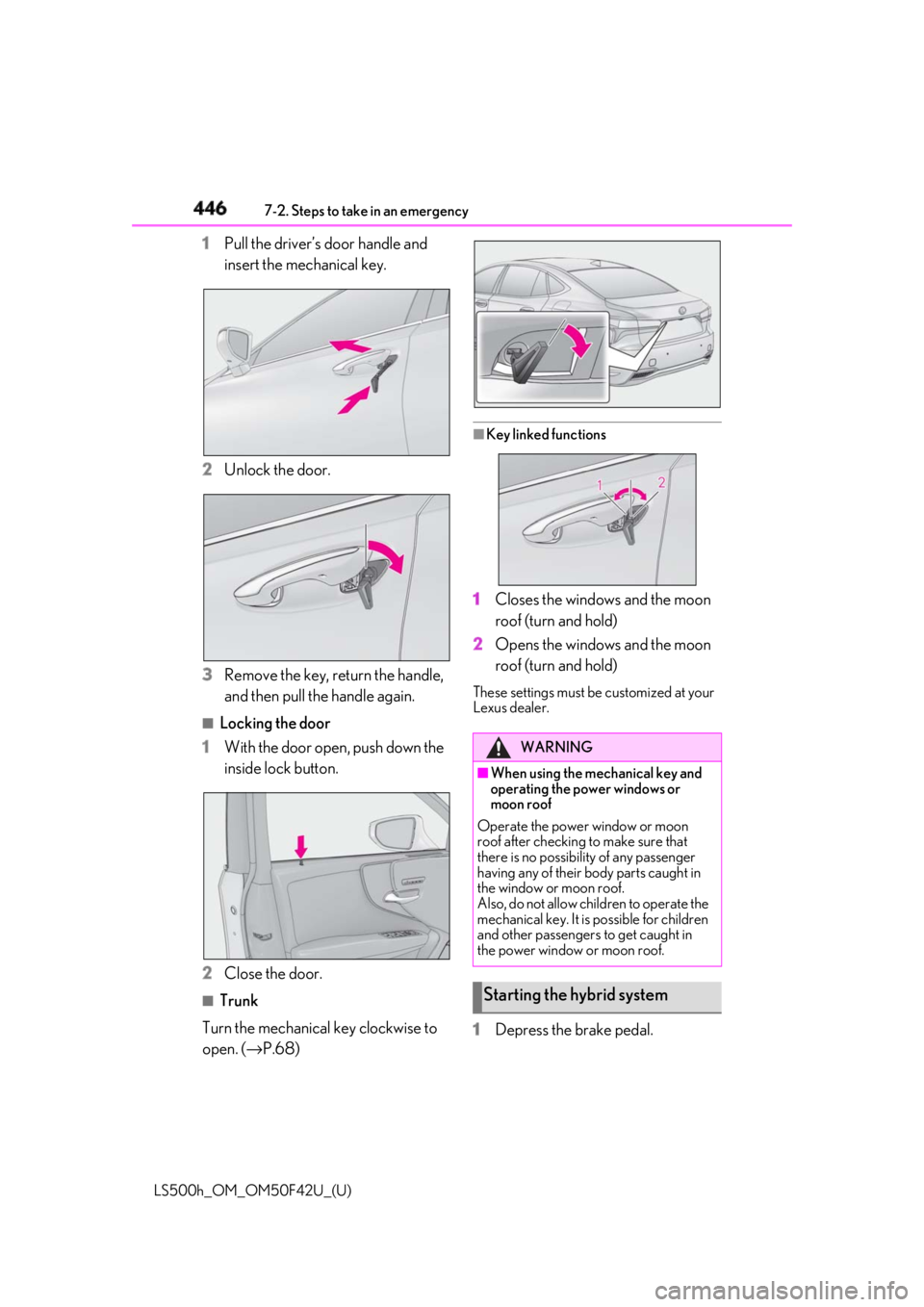
LS500h_OM_OM50F42U_(U) 1 Pull the driver’s door handle and
insert the mechanical key.
2 Unlock the door.
3 Remove the key, return the handle,
and then pull the handle again. ■
Locking the door
1 With the door open, push down the
inside lock button.
2 Close the door. ■
Trunk
Turn the mechanical key clockwise to
open. ( → P.68) ■
Key linked functions
1 Closes the windows and the moon
roof (turn and hold)
2 Opens the windows and the moon
roof (turn and hold) These settings must be customized at your
Lexus dealer.
1 Depress the brake pedal. WARNING■
When using the mechanical key and
operating the power windows or
moon roof
Operate the power window or moon
roof after checking to make sure that
there is no possibility of any passenger
having any of their body parts caught in
the window or moon roof.
Also, do not allow children to operate the
mechanical key. It is possible for children
and other passengers to get caught in
the power window or moon roof.
Starting the hybrid system
Page 447 of 528
4477-2. Steps to take in an emergency
LS500h_OM_OM50F42U_(U) 7
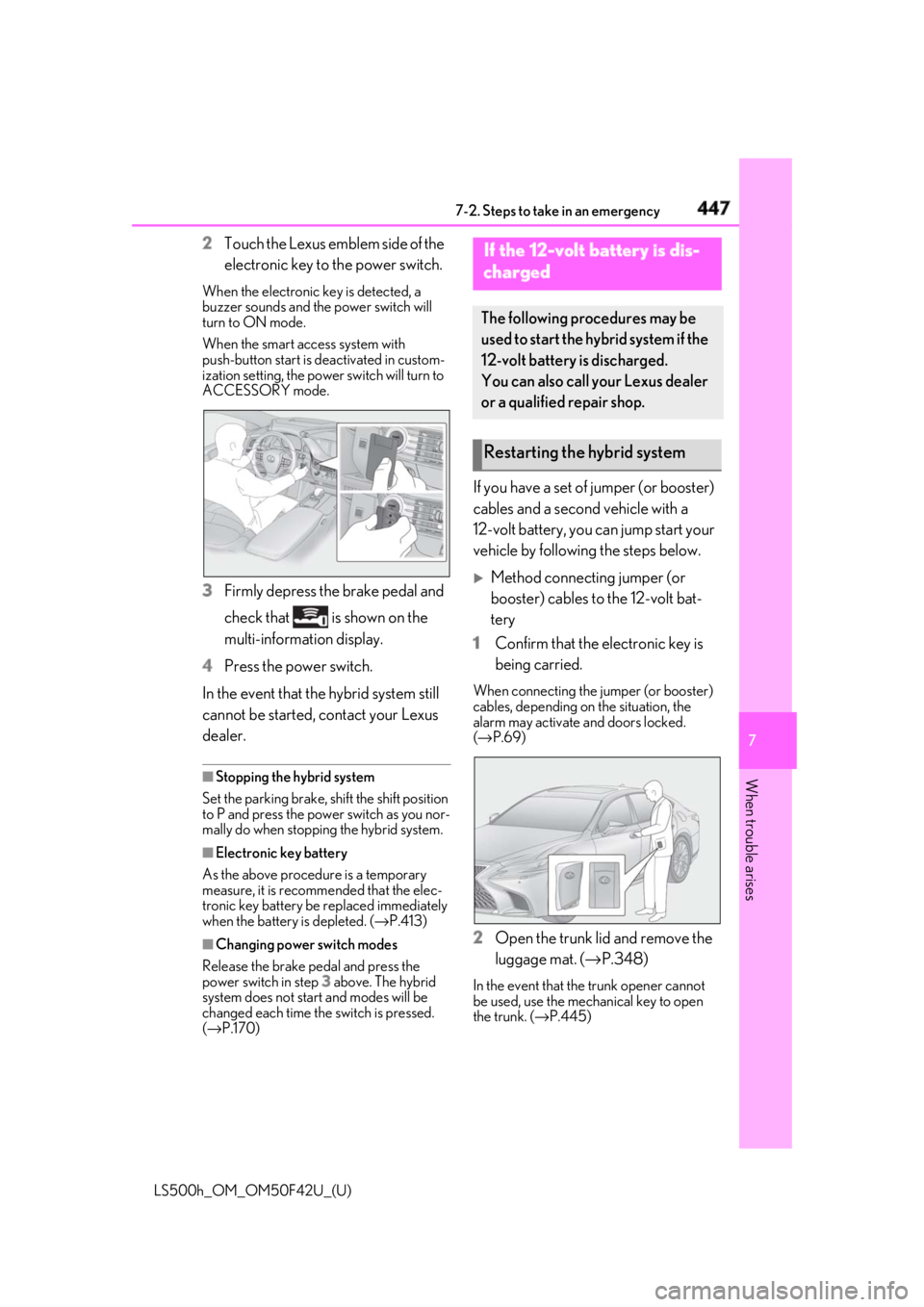
When trouble arises 2 Touch the Lexus emblem side of the
electronic key to the power switch.When the electronic key is detected, a
buzzer sounds and the power switch will
turn to ON mode.
When the smart access system with
push-button start is de activated in custom-
ization setting, the powe r switch will turn to
ACCESSORY mode.
3 Firmly depress the brake pedal and
check that is shown on the
multi-information display.
4 Press the power switch.
In the event that the hybrid system still
cannot be started, contact your Lexus
dealer. ■
Stopping the hybrid system
Set the parking brake, shift the shift position
to P and press the power switch as you nor-
mally do when stopping the hybrid system.
■
Electronic key battery
As the above procedure is a temporary
measure, it is recomme nded that the elec-
tronic key battery be replaced immediately
when the battery is depleted. ( → P.413)
■
Changing power switch modes
Release the brake pedal and press the
power switch in step 3 above. The hybrid
system does not start and modes will be
changed each time the switch is pressed.
( → P.170) If you have a set of jumper (or booster)
cables and a second vehicle with a
12-volt battery, you can jump start your
vehicle by following the steps below.
Method connecting jumper (or
booster) cables to the 12-volt bat-
tery
1 Confirm that the electronic key is
being carried. When connecting the jumper (or booster)
cables, depending on the situation, the
alarm may activate and doors locked.
( → P.69)
2 Open the trunk lid and remove the
luggage mat. ( → P.348)In the event that the trunk opener cannot
be used, use the mechanical key to open
the trunk. ( → P.445)If the 12-volt battery is dis-
charged The following procedures may be
used to start the hybrid system if the
12-volt battery is discharged.
You can also call your Lexus dealer
or a qualified repair shop.
Restarting the hybrid system
Page 448 of 528
448 7-2. Steps to take in an emergency
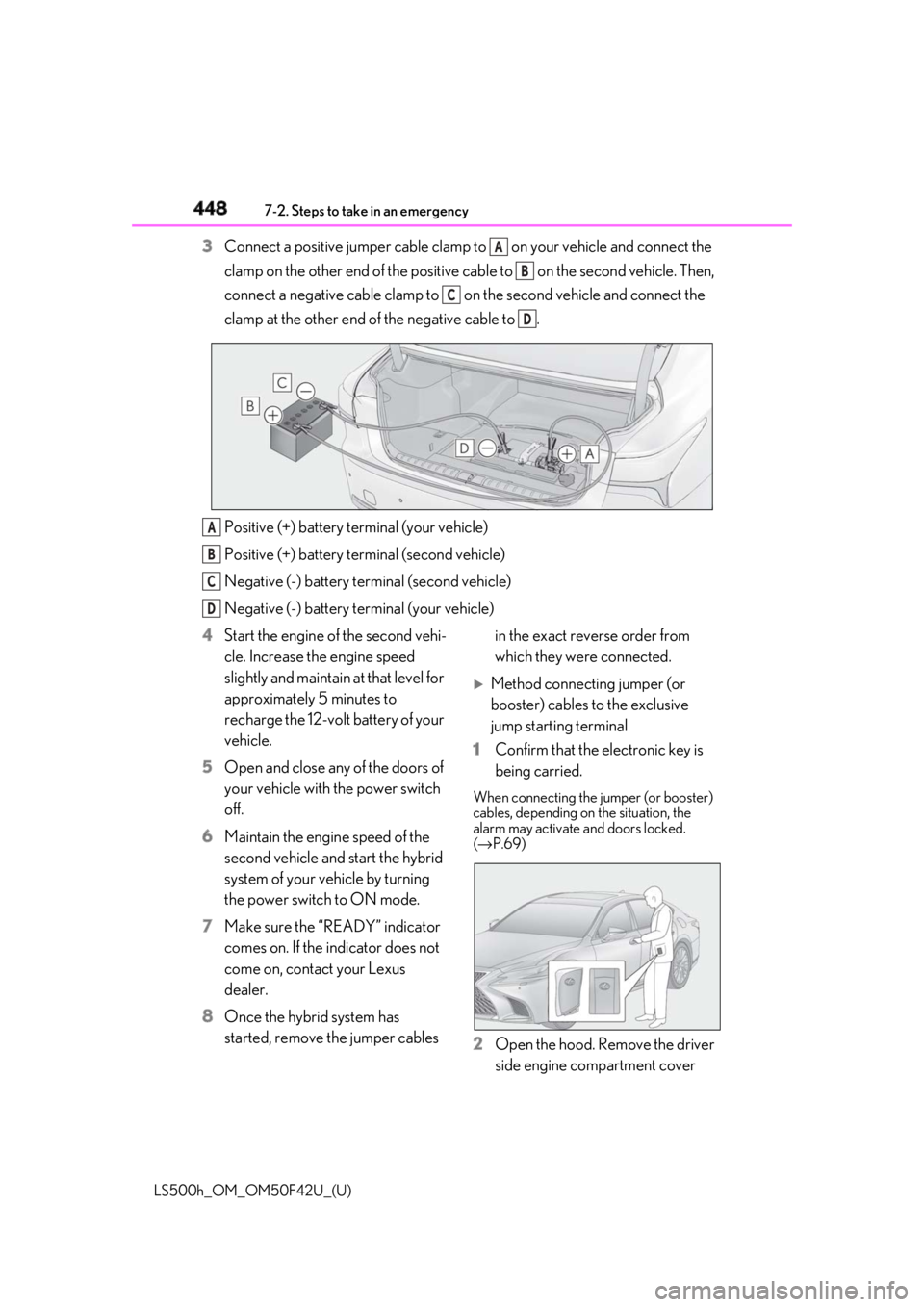
LS500h_OM_OM50F42U_(U) 3 Connect a positive jumper cable clamp to on your vehicle and connect the
clamp on the other end of the positive cab le to on the second vehicle. Then,
connect a negative cable clamp to on the second vehicle and connect the
clamp at the other end of the negative cable to .
Positive (+) battery terminal (your vehicle)
Positive (+) battery terminal (second vehicle)
Negative (-) battery terminal (second vehicle)
Negative (-) battery terminal (your vehicle)
4 Start the engine of the second vehi-
cle. Increase the engine speed
slightly and maintain at that level for
approximately 5 minutes to
recharge the 12-volt battery of your
vehicle.
5 Open and close any of the doors of
your vehicle with the power switch
off.
6 Maintain the engine speed of the
second vehicle and start the hybrid
system of your vehicle by turning
the power switch to ON mode.
7 Make sure the “READY” indicator
comes on. If the indicator does not
come on, contact your Lexus
dealer.
8 Once the hybrid system has
started, remove the jumper cables in the exact reverse order from
which they were connected.
Method connecting jumper (or
booster) cables to the exclusive
jump starting terminal
1 Confirm that the electronic key is
being carried. When connecting the jumper (or booster)
cables, depending on the situation, the
alarm may activate and doors locked.
( → P.69)
2 Open the hood. Remove the driver
side engine compartment cover A
B
C
D
A
B
C
D
Page 450 of 528

450 7-2. Steps to take in an emergency
LS500h_OM_OM50F42U_(U) 6 Open and close any of the doors of
your vehicle with the power switch
off.
7 Maintain the engine speed of the
second vehicle and start the hybrid
system of your vehicle by turning
the power switch to ON mode.
8 Make sure the “READY” indicator
comes on. If the indicator does not
come on, contact your Lexus
dealer.
9 Once the hybrid system has
started, remove the jumper cables
in the exact reverse order from
which they were connected.
10 Close the exclusive jump starting
terminal cover and install the fuse
box cover and en gine compart-
ment cover.
Once the hybrid system starts, have
the vehicle inspected at your Lexus
dealer as soon as possible. ■
Starting the hybrid system when the
12-volt battery is discharged
The hybrid system cannot be started by
push-starting. ■
To prevent 12-volt battery discharge●
Turn off the headlights and the audio sys-
tem while the hybrid system is off.
●
Turn off any unnecessary electrical com-
ponents when the vehicle is running at a
low speed for an extended period, such
as in heavy traffic.
■
When the 12-volt battery is removed or
discharged
●
Information stored in the ECU is cleared.
When the 12-volt battery is depleted,
have the vehicle inspected at your Lexus
dealer.
●
Some systems may require initialization. ( → P.495)■
When removing the 12-volt battery ter-
minals
When the 12-volt battery terminals are
removed, the information stored in the
ECU is cleared. Before removing the
12-volt battery terminals, contact your
Lexus dealer. ■
Charging the 12-volt battery
The electricity stored in the 12-volt battery
will discharge gradually even when the
vehicle is not in use, due to natural dis-
charge and the draining effects of certain
electrical appliances. If the vehicle is left for
a long time, the 12-volt battery may dis-
charge, and the hybrid system may be
unable to start. (The 12-volt battery
recharges automatically while the hybrid
system is operating.) ■
When recharging or replacing the
12-volt battery ●
In some cases, it may not be possible to
unlock the doors using the smart access
system with push-button start when the
12-volt battery is discharged. Use the
wireless remote control or the mechani-
cal key to lock or unlock the doors. ●
The hybrid system may not start on the
first attempt after the 12-volt battery has
recharged but will start normally after the
second attempt. This is not a malfunction. ●
The power switch mode is memorized by
the vehicle. When the 12-volt battery is
reconnected, the system will return to the
mode it was in before the 12-volt battery
was discharged. Before disconnecting
the 12-volt battery, turn the power switch
off.
If you are unsure what mode the power
switch was in before the 12-volt battery
discharged, be especially careful when
reconnecting the 12-volt battery.
■
When replacing the 12-volt battery
●
Use a Central Degassing type 12-volt
battery (European Regulations).
●
Use a 12-volt battery with the same case
size as the previous 12-volt battery and an
epuivalent 20 hour rate capacity (20HR)
or greater.
Page 461 of 528
4618-1. Specifications
LS500h_OM_OM50F42U_(U) 8
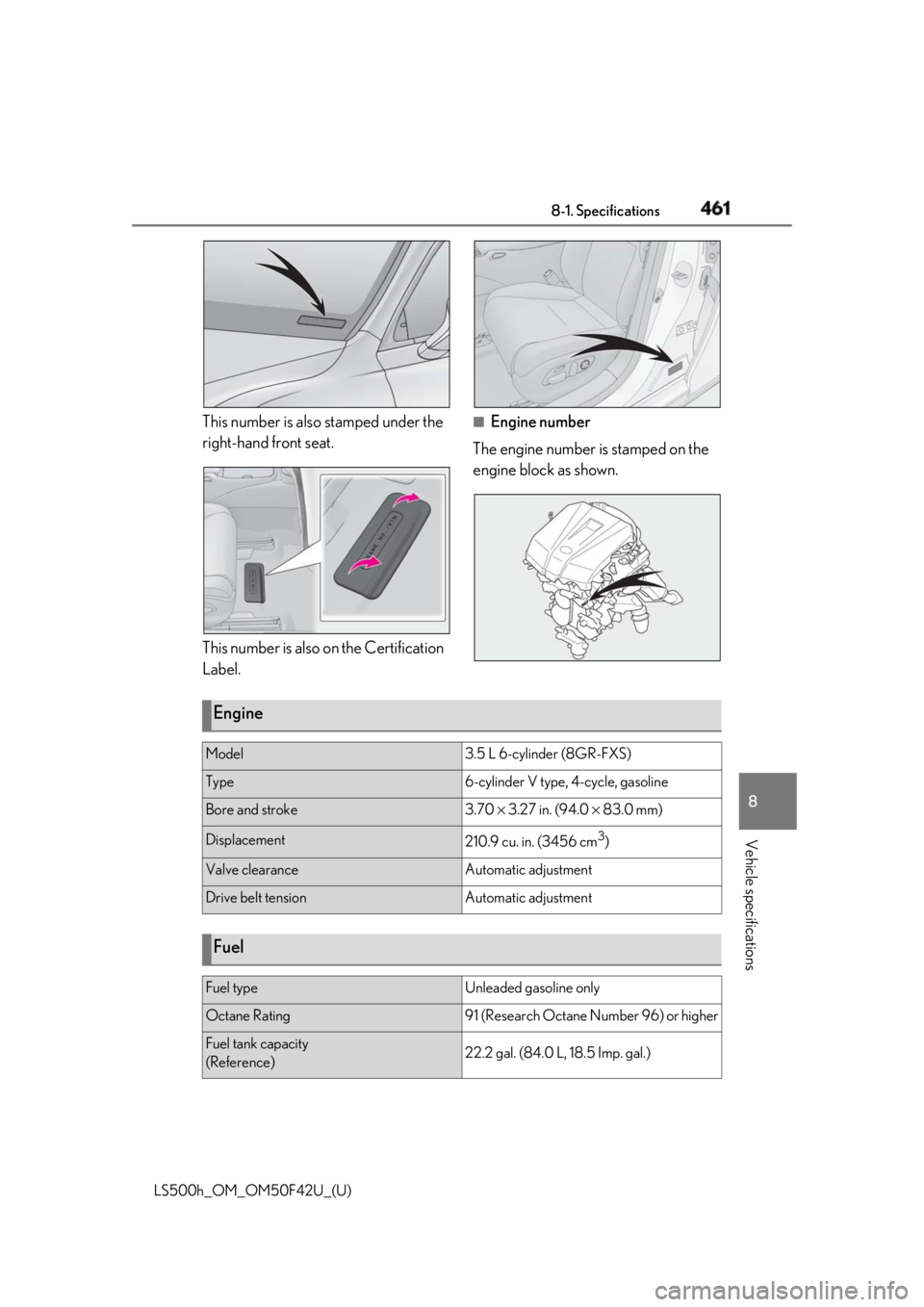
Vehicle specifications This number is also stamped under the
right-hand front seat.
This number is also on the Certification
Label. ■
Engine number
The engine number is stamped on the
engine block as shown.
Engine Model 3.5 L 6-cylinder (8GR-FXS)
Type 6-cylinder V type, 4-cycle, gasoline
Bore and stroke 3.70 × 3.27 in. (94.0 × 83.0 mm)
Displacement
210.9 cu. in. (3456 cm 3
)
Valve clearance Automatic adjustment
Drive belt tension Automatic adjustment
Fuel Fuel type Unleaded gasoline only
Octane Rating 91 (Research Octane Number 96) or higher
Fuel tank capacity
(Reference) 22.2 gal. (84.0 L, 18.5 Imp. gal.)
Page 483 of 528
4838-2. Customization
LS500h_OM_OM50F42U_(U) 8
Vehicle specifications
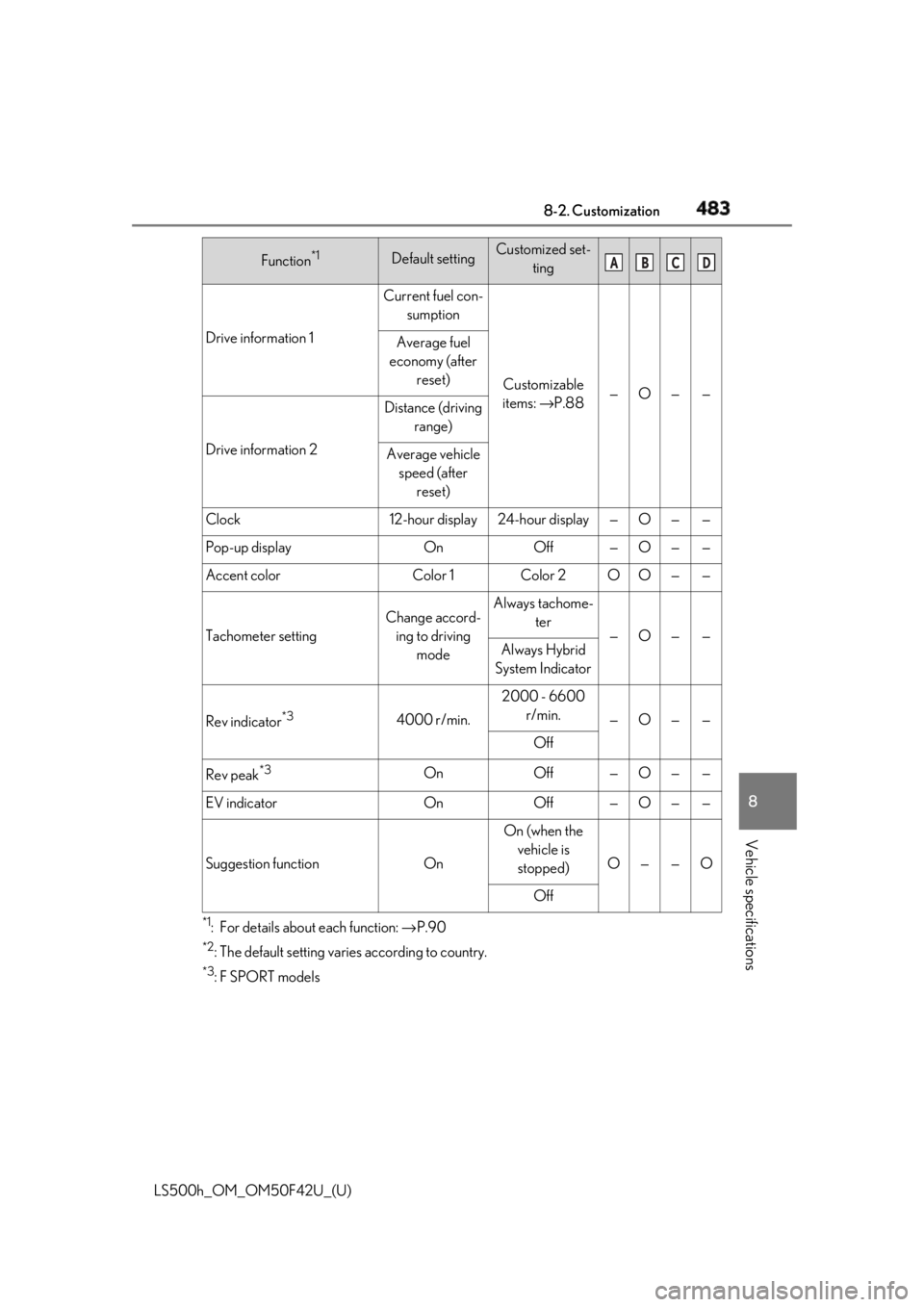
*1
: For details about each function: → P.90*2
: The default setting varies according to country. *3
:F SPORT modelsDrive information 1 Current fuel con-
sumption
Customizable
items: → P.88 — O — —Average fuel
economy (after
reset)
Drive information 2 Distance (driving
range)
Average vehicle
speed (after
reset)
Clock 12-hour display 24-hour display — O — —
Pop-up display On Off — O — —
Accent color Color 1 Color 2 O O — —
Tachometer setting Change accord-
ing to driving
mode Always tachome-
ter
— O — —
Always Hybrid
System Indicator
Rev indicator *3
4000 r/min. 2000 - 6600
r/min.
— O — —
Off
Rev peak *3
On Off — O — —
EV indicator On Off — O — —
Suggestion function On On (when the
vehicle is
stopped) O — — O
OffFunction *1
Default setting Customized set-
ting A B C D
Page 484 of 528
484 8-2. Customization
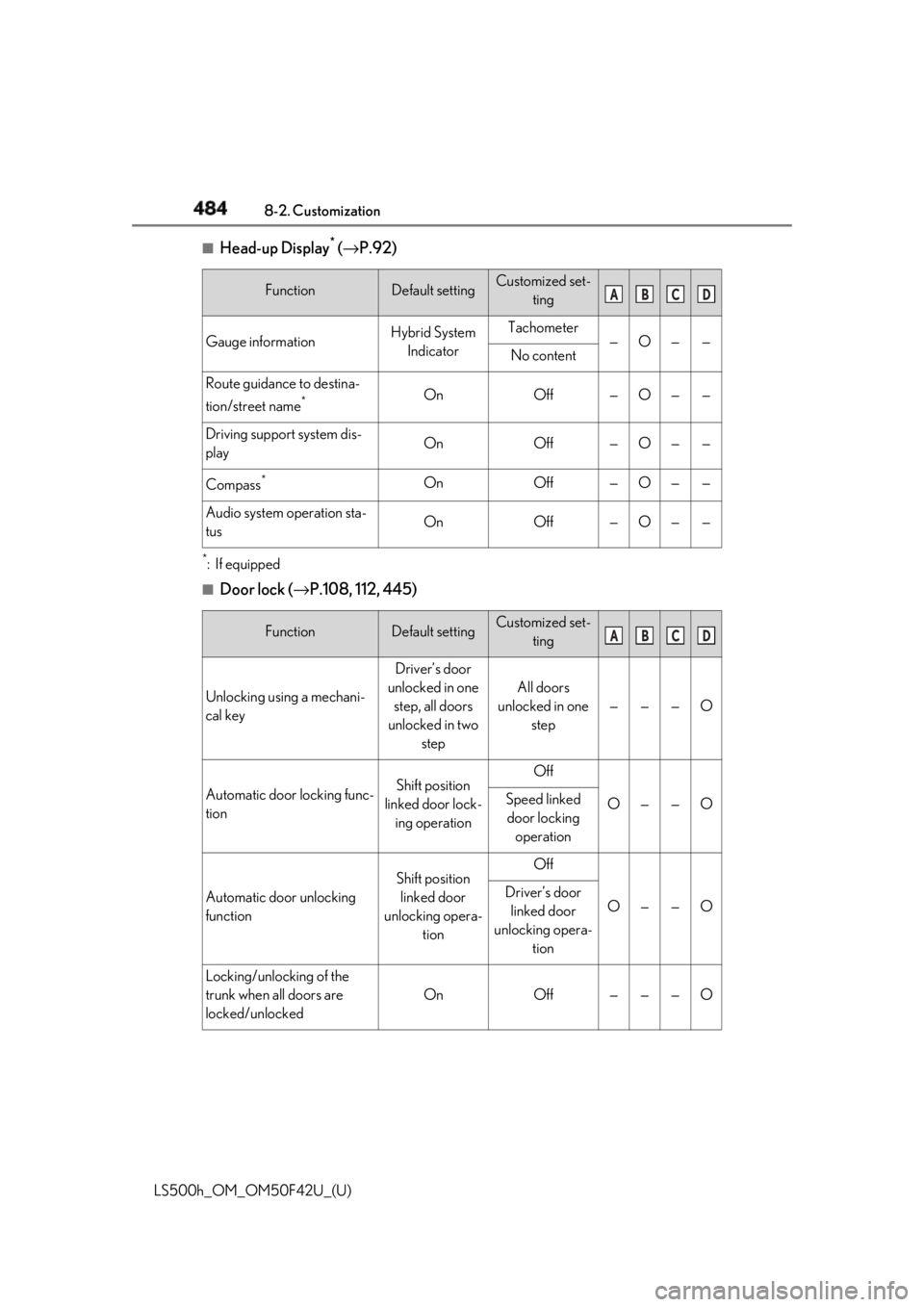
LS500h_OM_OM50F42U_(U) ■
Head-up Display *
( → P.92)
*
:If equipped ■
Door lock ( → P.108, 112, 445)Function Default setting Customized set-
ting
Gauge information Hybrid System
Indicator Tachometer
— O — —
No content
Route guidance to destina-
tion/street name *
On Off — O — —
Driving support system dis-
play On Off — O — —
Compass *
On Off — O — —
Audio system operation sta-
tus On Off — O — —
Function Default setting Customized set-
ting
Unlocking using a mechani-
cal key Driver’s door
unlocked in one
step, all doors
unlocked in two
step All doors
unlocked in one
step — — — O
Automatic door locking func-
tion Shift position
linked door lock-
ing operation Off
O — — OSpeed linked
door locking
operation
Automatic door unlocking
function Shift position
linked door
unlocking opera-
tion Off
O — — ODriver’s door
linked door
unlocking opera-
tion
Locking/unlocking of the
trunk when all doors are
locked/unlocked On Off — — — O A B C D
A B C D
Page 485 of 528
4858-2. Customization
LS500h_OM_OM50F42U_(U) 8
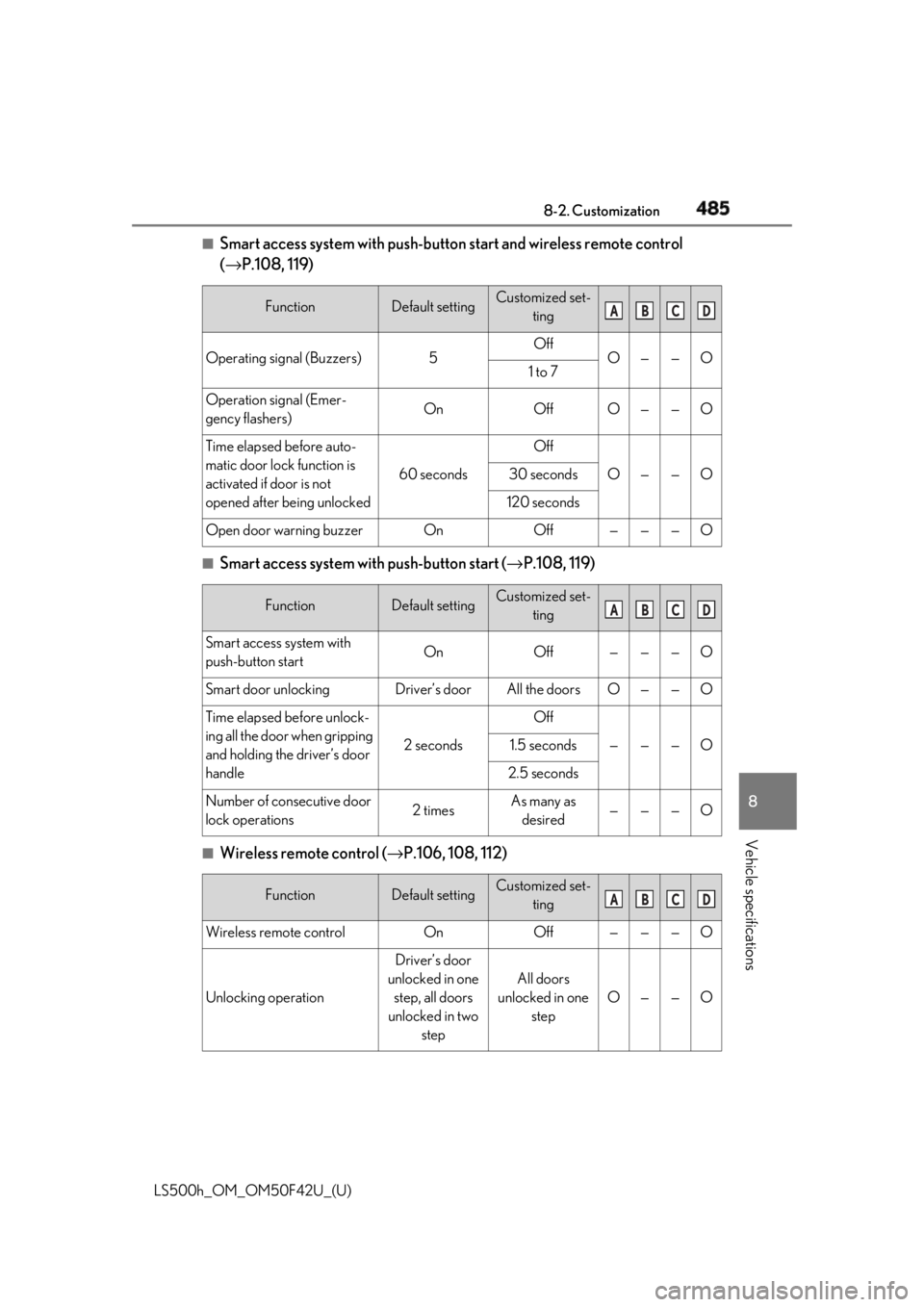
Vehicle specifications ■
Smart access system with push-butto n start and wireless remote control
( → P.108, 119)
■
Smart access system with push-button start ( → P.108, 119)
■
Wireless remote control ( → P.106, 108, 112)Function Default setting Customized set-
ting
Operating signal (Buzzers) 5 Off
O — — O
1 to 7
Operation signal (Emer-
gency flashers) On Off O — — O
Time elapsed before auto-
matic door lock function is
activated if door is not
opened after being unlocked 60 seconds Off
O — — O30 seconds
120 seconds
Open door warning buzzer On Off — — — O
Function Default setting Customized set-
ting
Smart access system with
push-button start On Off — — — O
Smart door unlocking Driver’s door All the doors O — — O
Time elapsed before unlock-
ing all the door when gripping
and holding the driver’s door
handle 2 seconds Off
— — — O1.5 seconds
2.5 seconds
Number of consecutive door
lock operations 2 times As many as
desired — — — O
Function Default setting Customized set-
ting
Wireless remote control On Off — — — O
Unlocking operation Driver’s door
unlocked in one
step, all doors
unlocked in two
step All doors
unlocked in one
step O — — O A B C D
A B C D
A B C D
Page 486 of 528
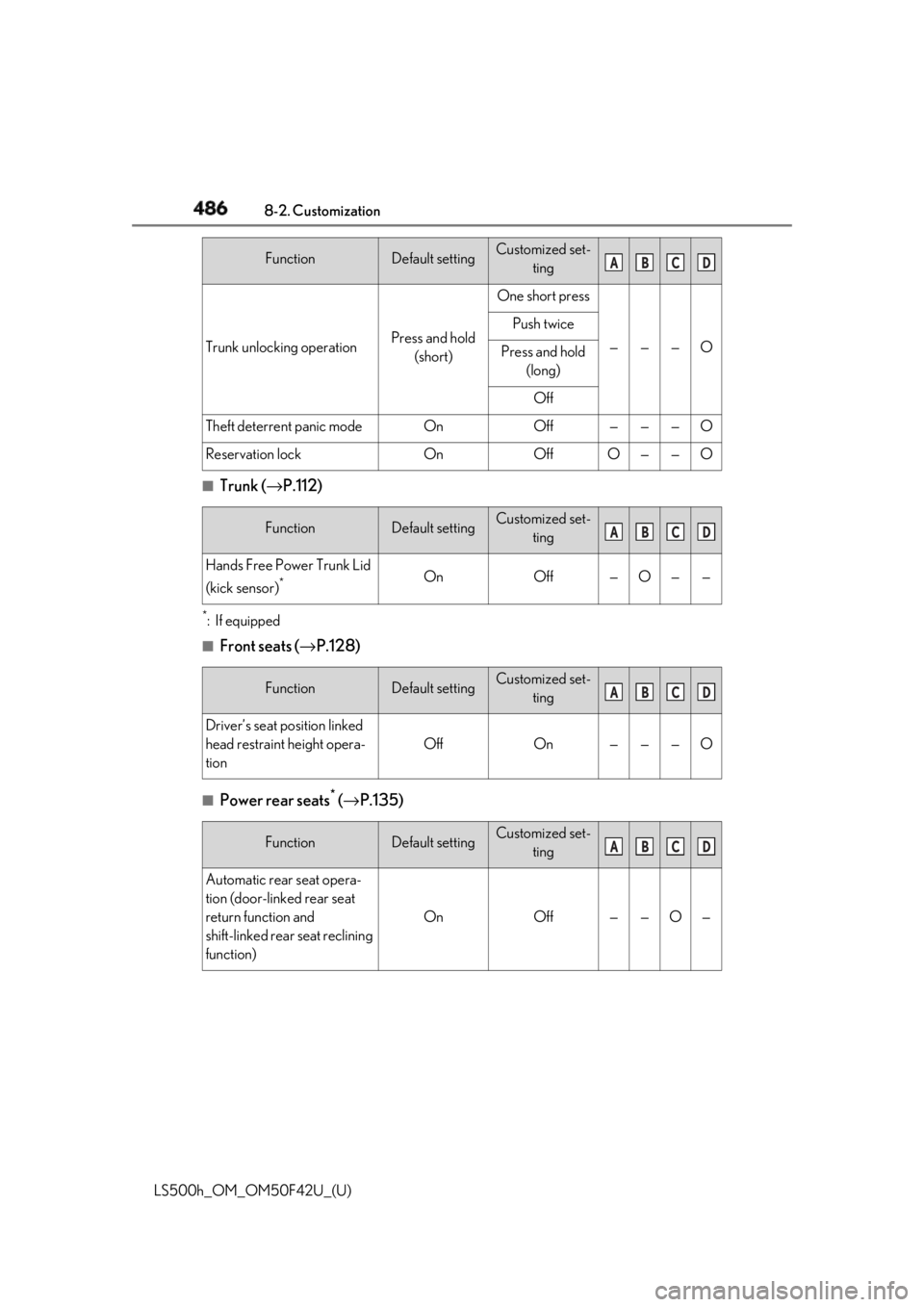
486 8-2. Customization
LS500h_OM_OM50F42U_(U) ■
Trunk ( → P.112)*
:If equipped ■
Front seats ( → P.128)
■
Power rear seats *
( → P.135)Trunk unlocking operation Press and hold
(short) One short press
— — — OPush twice
Press and hold
(long)
Off
Theft deterrent panic mode On Off — — — O
Reservation lock On Off O — — O
Function Default setting Customized set-
ting
Hands Free Power Trunk Lid
(kick sensor) *
On Off — O — —
Function Default setting Customized set-
ting
Driver’s seat position linked
head restraint height opera-
tion Off On — — — O
Function Default setting Customized set-
ting
Automatic rear seat opera-
tion (door-linked rear seat
return function and
shift-linked rear seat reclining
function) On Off — — O —Function Default setting Customized set-
ting A B C D
A B C D
A B C D
A B C D