display LEXUS LS500H 2018 Owners Manual
[x] Cancel search | Manufacturer: LEXUS, Model Year: 2018, Model line: LS500H, Model: LEXUS LS500H 2018Pages: 528, PDF Size: 10.8 MB
Page 282 of 528
282 4-5. Using the driving support systems
LS500h_OM_OM50F42U_(U) Center Display (Panoramic view monitor):
“Press Brake Pedal”
Multi-information display: “Switch to
Brake” (If the accelerator pedal is not
depressed, “Press Brake Pedal” will be dis- played.)
PKSB OFF indicator: Illuminated
Buzzer: Short beep
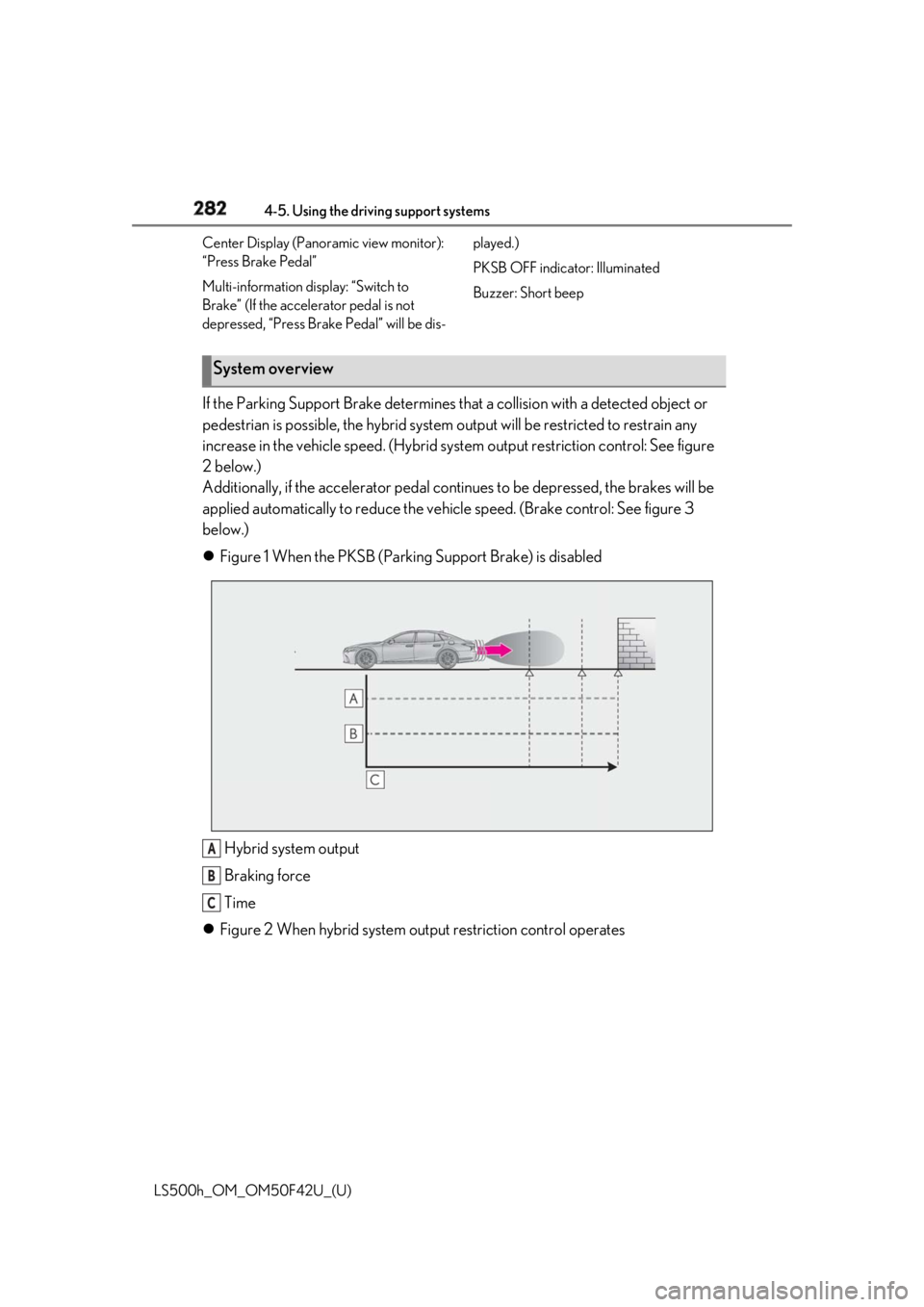
If the Parking Support Brake determines that a collision with a detected object or
pedestrian is possible, the hybrid system output will be restricted to restrain any
increase in the vehicle speed. (Hybrid system output restriction control: See figure
2 below.)
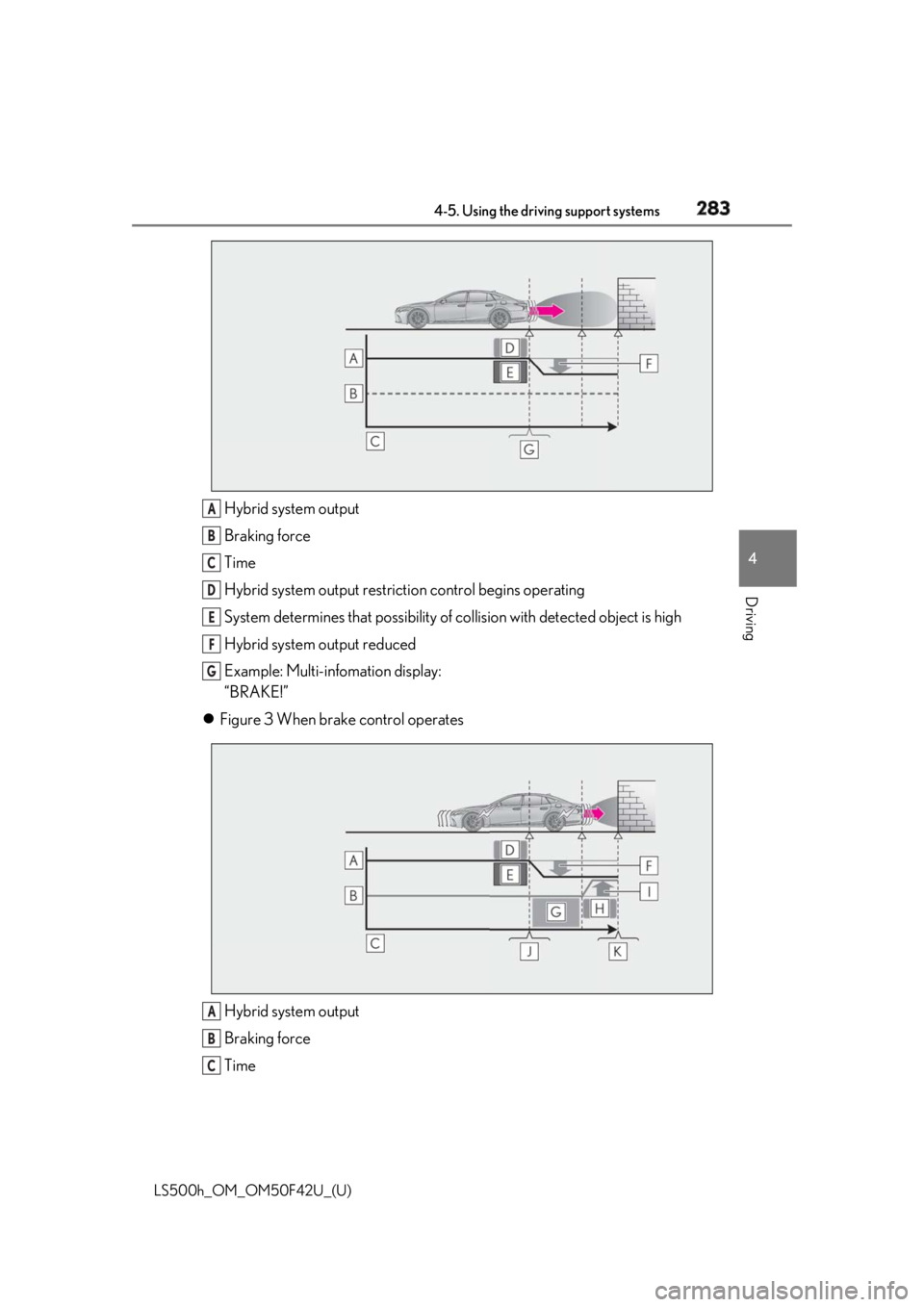
Additionally, if the accelerator pedal contin ues to be depressed, the brakes will be
applied automatically to re duce the vehicle speed. (Brake control: See figure 3
below.)
Figure 1 When the PKSB (Parki ng Support Brake) is disabled
Hybrid system output
Braking force
Time
Figure 2 When hybrid system ou tput restriction control operatesSystem overview
A
B
C
Page 283 of 528
2834-5. Using the driving support systems
LS500h_OM_OM50F42U_(U) 4
Driving Hybrid system output
Braking force
Time
Hybrid system output restrict ion control begins operating
System determines that po ssibility of collision with detected object is high
Hybrid system output reduced
Example: Multi-infomation display:
“BRAKE!”
Figure 3 When brake control operates
Hybrid system output
Braking force
Time A
B
C
D
E
F
G
A
B
C
Page 284 of 528

284 4-5. Using the driving support systems
LS500h_OM_OM50F42U_(U) Hybrid system output restrict ion control begins operating
System determines that po ssibility of collision with detected object is high
Hybrid system output reduced
System determines that possibility of col lision with detected object is extremely
high
Brake control begins operating
Brake control strength increased
Example: Multi-infomation display:
“BRAKE!”
Example: Multi-infomation display: “Switch to Brake”■
If the Parking Support Brake has oper-
ated
If the vehicle is stopped due to operation of
the Parking Support Brake, the Parking
Support Brake will be disabled and the
PKSB OFF indicator will illuminate. If the
Parking Support Brake operates unneces-
sarily, brake control can be canceled by
depressing the brake pedal or waiting for
approximately 2 seconds for it to automati-
cally be canceled. Then, the vehicle can be
operated by depressing the accelerator
pedal. ■
Re-enabling the Park ing Support Brake
To re-enable the Parking Support Brake
when it is disabled due to operation of the
Parking Support Brake, either enable the
system again ( → P.281), or turn the power
switch off and then back to ON mode.
Additionally, if the ob ject becomes no lon-
ger in the traveling direction of the vehicle
or if the traveling direction of the vehicle
changes (such as changing from moving
forward to backing up, or from backing up
to moving forward), the system will be
re-enabled automatically.
■
If “Parking Support Brake Unavailable”
is displayed on th e multi-information
display and the PKSB OFF indicator is
flashing
If the vehicle is stopped due to operation of
the Parking Support Brake, the Parking
Support Brake will be disabled and the
PKSB OFF indicator will illuminate. ●
A sensor may be cove red with ice, snow,
dirt, etc. Remove the ice, snow, dirt, etc.,
from the sensor to return the system to
normal.
Also, due to ice forming on a sensor at
low temperatures, a warning message
may be displayed or the sensor may not
be able to detect an object. Once the ice
melts, the system wi ll return to normal.●
If this message is di splayed only when the
R shift position is selected, the rear cam-
era lens may be dirty. Clean the camera
lens. If this message is displayed in any
forward shift position , a sensor on the
front or rear bumper may be dirty. Clean
the sensors and their surrounding area
on the bumpers. ●
If this message continues to be displayed
even after cleaning the sensor, or is dis-
played even though the sensor is clean,
have the vehicle inspected by your Lexus
dealer. ●
Initialization may not have been per-
formed after a 12-volt battery terminal
was disconnected and reconnected. Ini-
tialize the system. ( → P.284)
If this message continues to be displayed
even after initializati on, have the vehicle
inspected by your Lexus dealer.
■
If a 12-volt battery terminal has been
disconnected and reconnected
The system needs to be initialized. To initial-
ize the system, drive the vehicle straight
ahead for 5 seconds or more at a speed of
approximately 22 mph (35 km/h) or more. D
E
F
G
H
I
J
K
Page 295 of 528
2954-5. Using the driving support systems
LS500h_OM_OM50F42U_(U) 4
Driving *
:If equipped
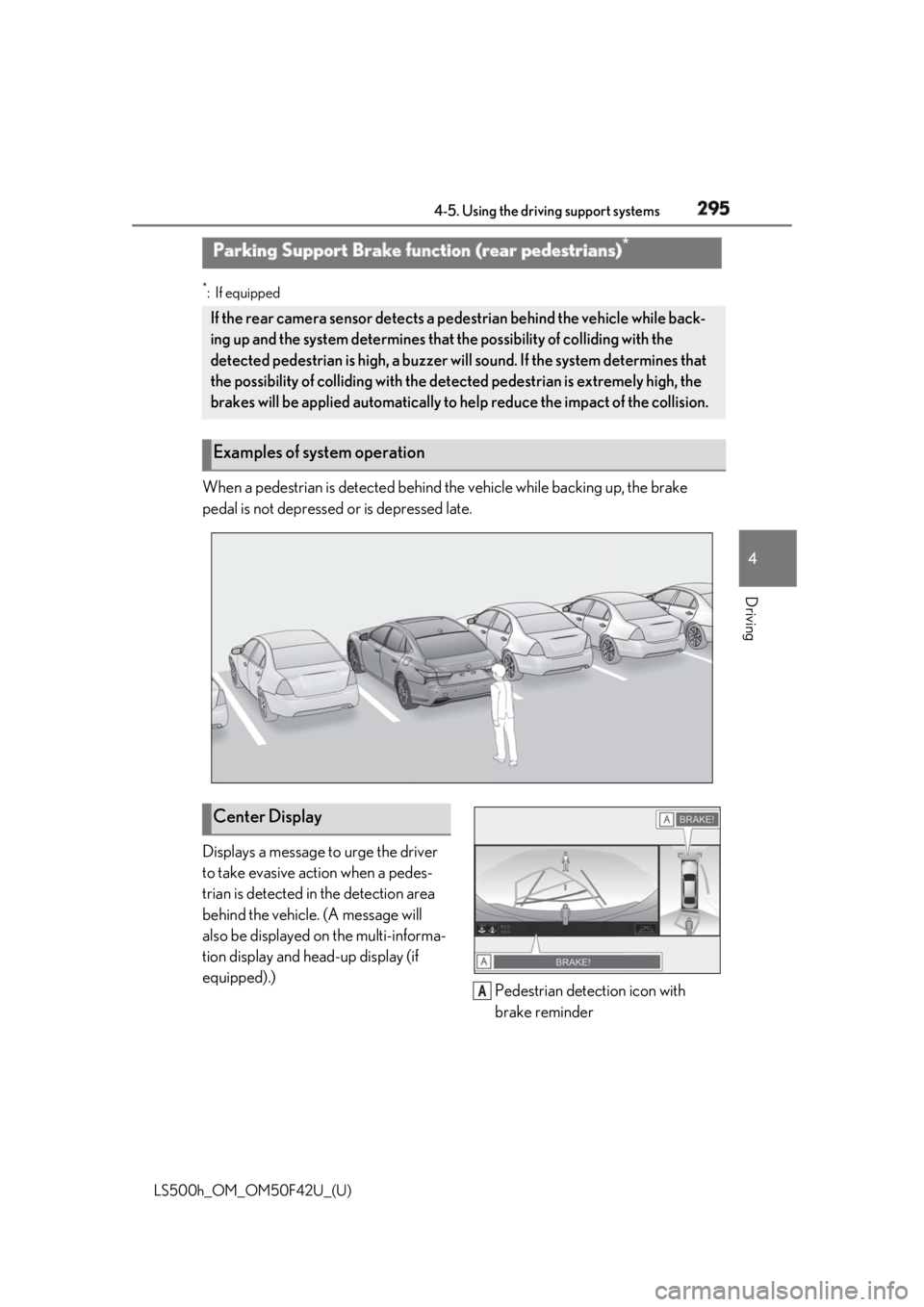
When a pedestrian is detected behind the vehicle while backing up, the brake
pedal is not depressed or is depressed late.
Displays a message to urge the driver
to take evasive action when a pedes-
trian is detected in the detection area
behind the vehicle. (A message will
also be displayed on the multi-informa-
tion display and head-up display (if
equipped).)
Pedestrian detection icon with
brake reminderParking Support Brake function (rear pedestrians) *
If the rear camera sensor detects a pe destrian behind the vehicle while back-
ing up and the system determines that the possibility of colliding with the
detected pedestrian is high, a buzzer will sound. If the system determines that
the possibility of colliding with the dete cted pedestrian is extremely high, the
brakes will be applied automatically to he lp reduce the impact of the collision.
Examples of system operation
Center Display
A
Page 298 of 528
298 4-5. Using the driving support systems
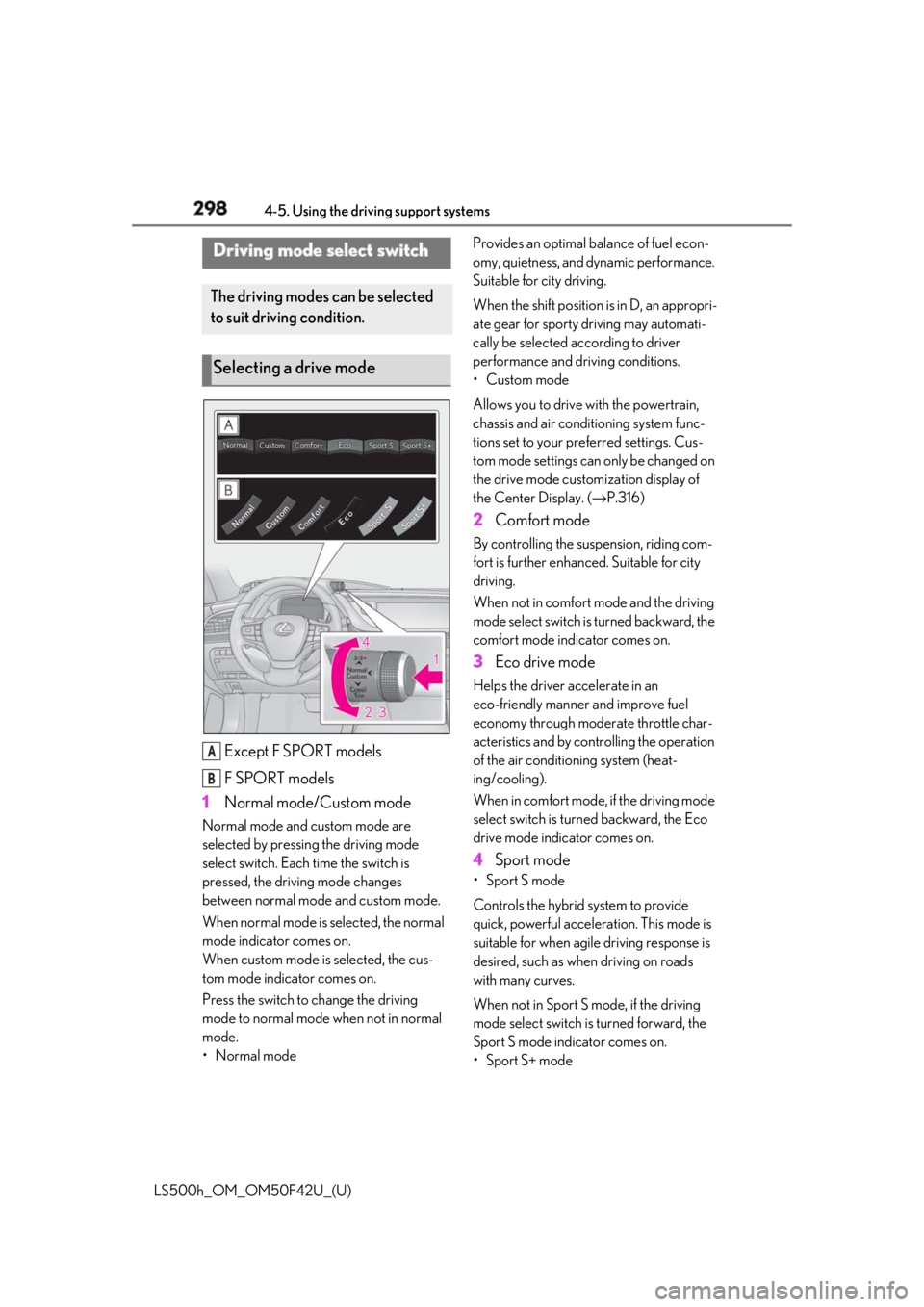
LS500h_OM_OM50F42U_(U) Except F SPORT models
F SPORT models
1 Normal mode/Custom modeNormal mode and custom mode are
selected by pressing the driving mode
select switch. Each time the switch is
pressed, the driving mode changes
between normal mode and custom mode.
When normal mode is selected, the normal
mode indicator comes on.
When custom mode is selected, the cus-
tom mode indicator comes on.
Press the switch to change the driving
mode to normal mode when not in normal
mode.
•Normal mode Provides an optimal ba lance of fuel econ-
omy, quietness, and dynamic performance.
Suitable for city driving.
When the shift position is in D, an appropri-
ate gear for sporty driving may automati-
cally be selected according to driver
performance and driving conditions.
• Custom mode
Allows you to drive with the powertrain,
chassis and air conditioning system func-
tions set to your preferred settings. Cus-
tom mode settings can only be changed on
the drive mode custom ization di splay of
the Center Display. ( → P.316)
2 Comfort mode By controlling the suspension, riding com-
fort is further enhanced. Suitable for city
driving.
When not in comfort mode and the driving
mode select switch is turned backward, the
comfort mode indicator comes on.
3 Eco drive mode Helps the driver ac celerate in an
eco-friendly manner and improve fuel
economy through moderate throttle char-
acteristics and by controlling the operation
of the air conditioning system (heat-
ing/cooling).
When in comfort mode, if the driving mode
select switch is turned backward, the Eco
drive mode indicator comes on.
4 Sport mode • Sport S mode
Controls the hybrid system to provide
quick, powerful acceleration. This mode is
suitable for when agile driving response is
desired, such as when driving on roads
with many curves.
When not in Sport S mode, if the driving
mode select switch is turned forward, the
Sport S mode indicator comes on.
•Sport S+ modeDriving mode select switch The driving modes can be selected
to suit driving condition.
Selecting a drive mode
A
B
Page 299 of 528
2994-5. Using the driving support systems
LS500h_OM_OM50F42U_(U) 4
Driving Helps to ensure stee ring performance and
driving stability by simultaneously con-
trolling the steering and suspension in
addition to the hybrid system. Suitable for
sportier driving.
When in Sport S mode, if the driving mode
select switch is turned forward, the Sport
S+ mode indicator comes on. ■
If the driving mode se lect switch is oper-
ated while the opening screen is being
displayed
If the driving mode sele ct switch is operated
while the opening screen is being displayed,
the driving mode will be changed and the
meter display will change accordingly after
the opening screen operation has com-
pleted. ■
Operation of the air conditioning sys-
tem in Eco drive mode
Eco drive mode controls the heating/cool-
ing operations and fan speed of the air con-
ditioning system to enhance fuel efficiency.
To improve air condit ioning performance,
perform the following operations: ●
Turn off eco air conditioning mode
( → P.327)●
Adjust the fan speed ( → P.323)●
Turn off Eco drive mode■
Automatic deactivation of sport mode
and custom mode
If the power switch is turned off after driving
in sport mode or custom mode, the drive
mode will be changed to normal mode.
■
Driving mode pop-up display
When the driving mode is changed, the
selected driving mode will be temporarily
displayed on the side display. ( → P.317) *
: If equipped
■
Situations in which the vehicle height
control may not operate properly ●
In the following situations, the vehicle
height may change slowly or may not
change to the correct height:
• When the vehicle comes into contact
with snow, ice, stone, etc.
• When the ambient temperature is low
• When the accumulator tank pressure is
low ●
In the following situations, the vehicle
height may not change:
• If the hood or trunk is not fully closed
• If the brake pedal depressed and the
vehicle is stopped
• When the vehicle is on a significantly
uneven or undulating road
• When the vehicle is on a slanted road or a
slope
■
Operating sound of the air suspension
compressor and valves
When the vehicle height is changed, such
as due to passengers entering the vehicle or
cargo being loaded, or when the vehicle
height is changed using the vehicle height
adjustment switch, the air suspension com-
pressor and valves may operate and a
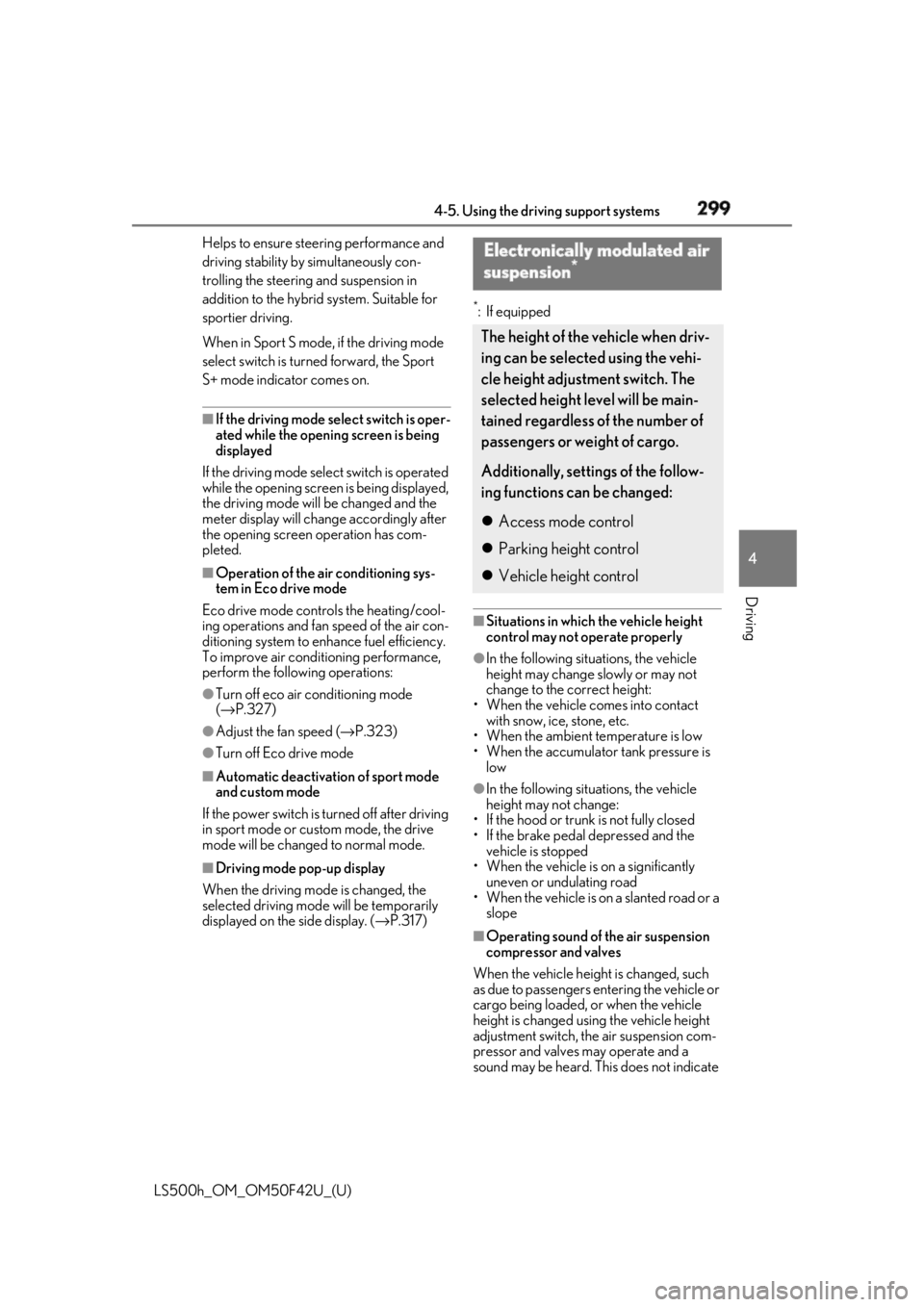
sound may be heard. This does not indicate Electronically modulated air
suspension *
The height of the vehicle when driv-
ing can be selected using the vehi-
cle height adjustment switch. The
selected height level will be main-
tained regardless of the number of
passengers or weight of cargo.
Additionally, settings of the follow-
ing functions can be changed:
Access mode control
Parking height control
Vehicle height control
Page 302 of 528
302 4-5. Using the driving support systems
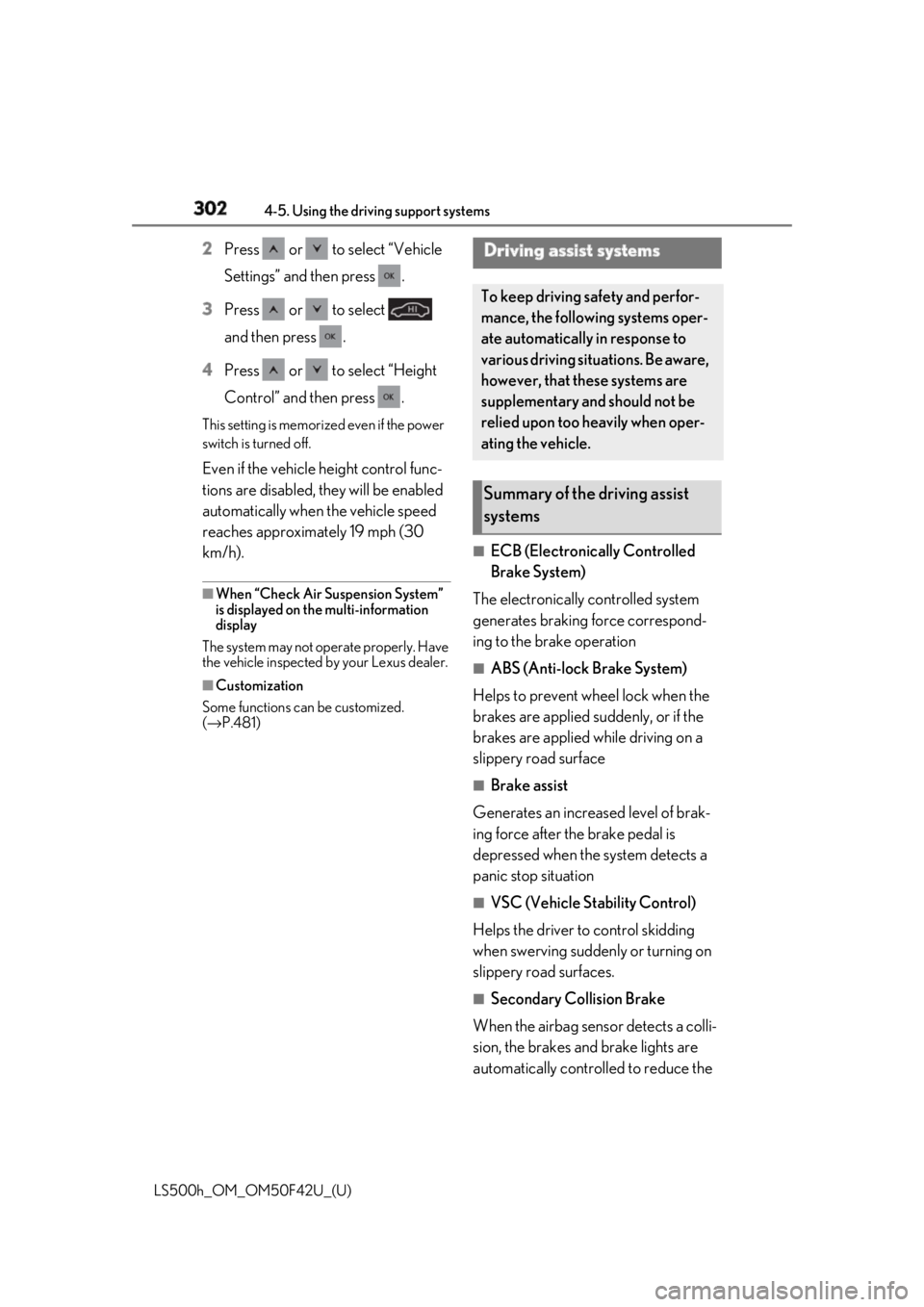
LS500h_OM_OM50F42U_(U) 2 Press or to select “Vehicle
Settings” and then press .
3 Press or to select
and then press .
4 Press or to select “Height
Control” and then press .This setting is memorized even if the power
switch is turned off.
Even if the vehicle height control func-
tions are disabled, they will be enabled
automatically when the vehicle speed
reaches approximately 19 mph (30
km/h). ■
When “Check Air Suspension System”
is displayed on th e multi-information
display
The system may not operate properly. Have
the vehicle inspected by your Lexus dealer. ■
Customization
Some functions can be customized.
( → P.481) ■
ECB (Electronically Controlled
Brake System)
The electronically controlled system
generates braking force correspond-
ing to the brake operation ■
ABS (Anti-lock Brake System)
Helps to prevent wheel lock when the
brakes are applied suddenly, or if the
brakes are applied while driving on a
slippery road surface ■
Brake assist
Generates an increased level of brak-
ing force after the brake pedal is
depressed when the system detects a
panic stop situation ■
VSC (Vehicle Stability Control)
Helps the driver to control skidding
when swerving sudden ly or turning on
slippery road surfaces. ■
Secondary Collision Brake
When the airbag sensor detects a colli-
sion, the brakes and brake lights are
automatically controlled to reduce the Driving assist systems To keep driving safety and perfor-
mance, the following systems oper-
ate automatically in response to
various driving situations. Be aware,
however, that these systems are
supplementary and should not be
relied upon too heavily when oper-
ating the vehicle.
Summary of the driving assist
systems
Page 304 of 528
304 4-5. Using the driving support systems
LS500h_OM_OM50F42U_(U) ■
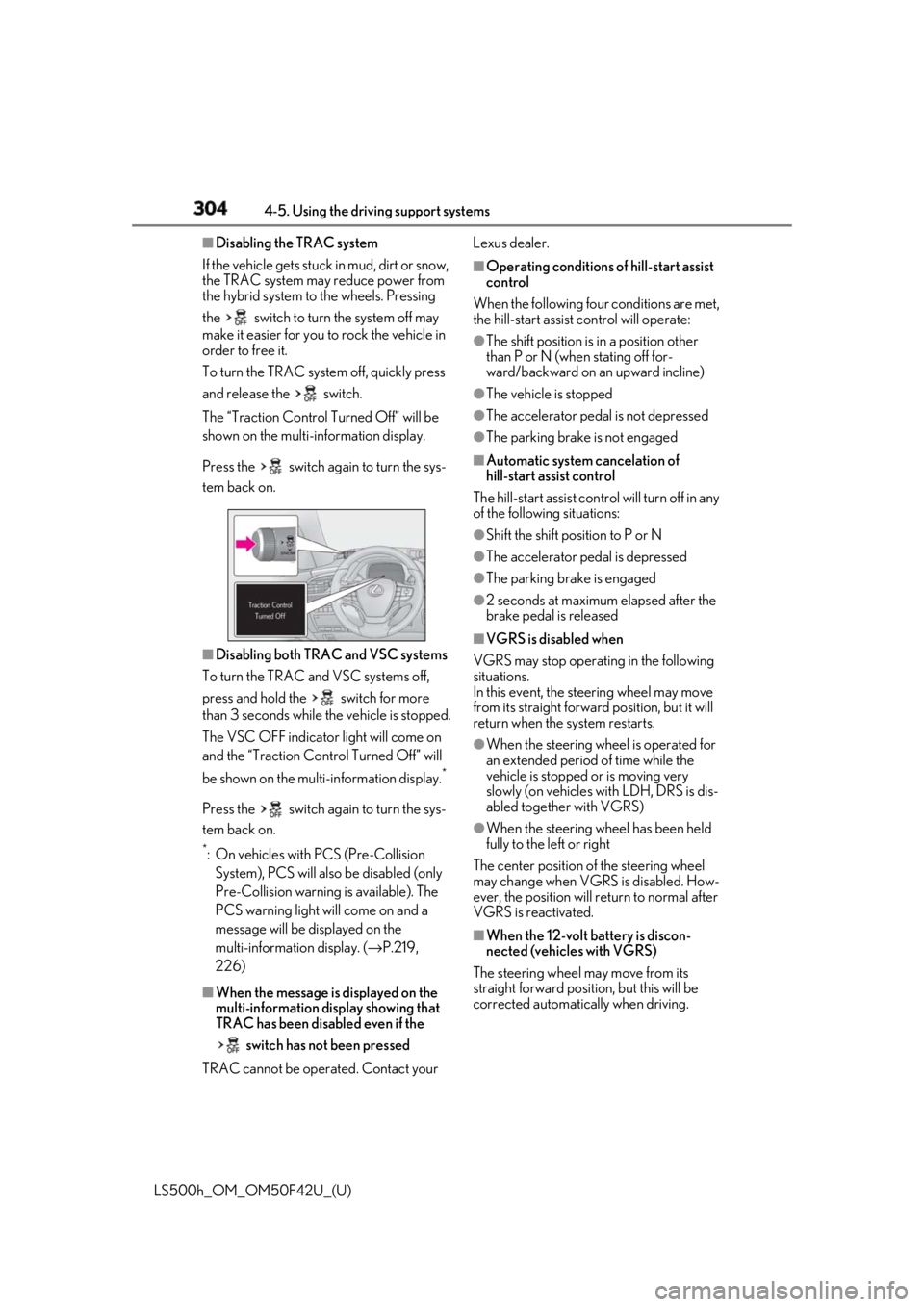
Disabling the TRAC system
If the vehicle gets stuck in mud, dirt or snow,
the TRAC system may reduce power from
the hybrid system to the wheels. Pressing
the switch to turn the system off may
make it easier for you to rock the vehicle in
order to free it.
To turn the TRAC system off, quickly press
and release the switch.
The “Traction Control Turned Off” will be
shown on the multi-information display.
Press the switch again to turn the sys-
tem back on.
■
Disabling both TRAC and VSC systems
To turn the TRAC and VSC systems off,
press and hold the switch for more
than 3 seconds while the vehicle is stopped.
The VSC OFF indicator light will come on
and the “Traction Cont rol Turned Off” will
be shown on the mult i-information display. *
Press the switch again to turn the sys-
tem back on. *
: On vehicles with PCS (Pre-Collision
System), PCS will also be disabled (only
Pre-Collision warning is available). The
PCS warning light will come on and a
message will be displayed on the
multi-information display. ( → P.219,
226)
■
When the message is displayed on the
multi-information display showing that
TRAC has been disabled even if the
switch has not been pressed
TRAC cannot be operated. Contact your Lexus dealer. ■
Operating conditions of hill-start assist
control
When the following four conditions are met,
the hill-start assist control will operate:●
The shift position is in a position other
than P or N (when stating off for-
ward/backward on an upward incline) ●
The vehicle is stopped ●
The accelerator pedal is not depressed ●
The parking brake is not engaged ■
Automatic system cancelation of
hill-start assist control
The hill-start assist control will turn off in any
of the following situations: ●
Shift the shift position to P or N ●
The accelerator pedal is depressed ●
The parking brake is engaged ●
2 seconds at maximum elapsed after the
brake pedal is released ■
VGRS is disabled when
VGRS may stop operat ing in the following
situations.
In this event, the steering wheel may move
from its straight forward position, but it will
return when the system restarts. ●
When the steering wheel is operated for
an extended period of time while the
vehicle is stopped or is moving very
slowly (on vehicles with LDH, DRS is dis-
abled together with VGRS) ●
When the steering wheel has been held
fully to the left or right
The center position of the steering wheel
may change when VGRS is disabled. How-
ever, the position will return to normal after
VGRS is reactivated.
■
When the 12-volt battery is discon-
nected (vehicles with VGRS)
The steering wheel may move from its
straight forward position, but this will be
corrected automatically when driving.
Page 305 of 528
3054-5. Using the driving support systems
LS500h_OM_OM50F42U_(U) 4
Driving ■
Sounds and vibrations caused by the
ABS, brake assist, VS C, TRAC, hill-start
assist control and VGRS systems●
A sound may be heard from the engine
compartment when the brake pedal is
depressed repeatedly, when the hybrid
system is started or just after the vehicle
begins to move. This sound does not indi-
cate that a malfunction has occurred in
any of these systems.●
Any of the following conditions may
occur when the above systems are oper-
ating. None of these indicates that a mal-
function has occurred.
• Vibrations may be felt through the vehicle
body and steering.
• A motor sound may be heard also after
the vehicle comes to a stop.■
ECB operating sound
ECB operating sound may be heard in the
following cases, but it does not indicate that
a malfunction has occurred. ●
Operating sound heard from the engine
compartment when the brake pedal is
operated.●
Motor sound of the brake system heard
from the front part of the vehicle when
the driver’s door is opened.●
Operating sound heard from the engine
compartment when one or two minutes
passed after the stop of the hybrid sys-
tem.■
EPS, VGRS and DRS operation sound
When the steering wheel is operated, a
motor sound (whirring sound) may be
heard. This does not indicate a malfunction.
■
Automatic reactivation of TRAC and
VSC systems
After turning the TRAC and VSC systems
off, the systems will be automatically
re-enabled in the following situations:
●
When the power switch is turned off
●
If only the TRAC system is turned off, the
TRAC will turn on when vehicle speed
increases
If both the TRAC and VSC systems are
turned off, automatic re-enabling will not
occur when vehicle speed increases. ■
Reduced effectiveness of the EPS sys-
tem
The effectiveness of the EPS system is
reduced to prevent the system from over-
heating when there is frequent steering
input over an extended period of time. The
steering wheel may feel heavy as a result.
Should this occur, re frain from excessive
steering input or stop the vehicle and turn
the hybrid system off. The EPS system
should return to normal within 10 minutes. ■
Secondary Collision Brake operating
conditions
The vehicle speed is approximately 6 mph
(10 km/h) or more and the airbag sensor
detects a collision. (The Secondary Colli-
sion Brake will not operate when the vehicle
speed is below approximately 6 mph [10
km/h].) ■
Secondary Collision Brake automatic
cancellation
The Secondary Collision Brake is automati-
cally canceled in the following situations: ●
The vehicle speed drops below approxi-
mately 6 mph (10 km/h) ●
A certain amount of time elapses during
operation ●
The accelerator pedal is depressed a
large amount ■
When “Check VGRS System” or
“CHECK DRS” is displayed on the
multi-information display
The VGRS or DRS may not operate prop-
erly. Have the vehicle inspected by your
Lexus dealer.
WARNING
■
The ABS does not operate effectively
when
●
The limits of tire gripping performance
have been exceeded (such as exces-
sively worn tires on a snow covered
road).
●
The vehicle hydroplanes while driving
at high speed on wet or slick roads.
Page 313 of 528
313
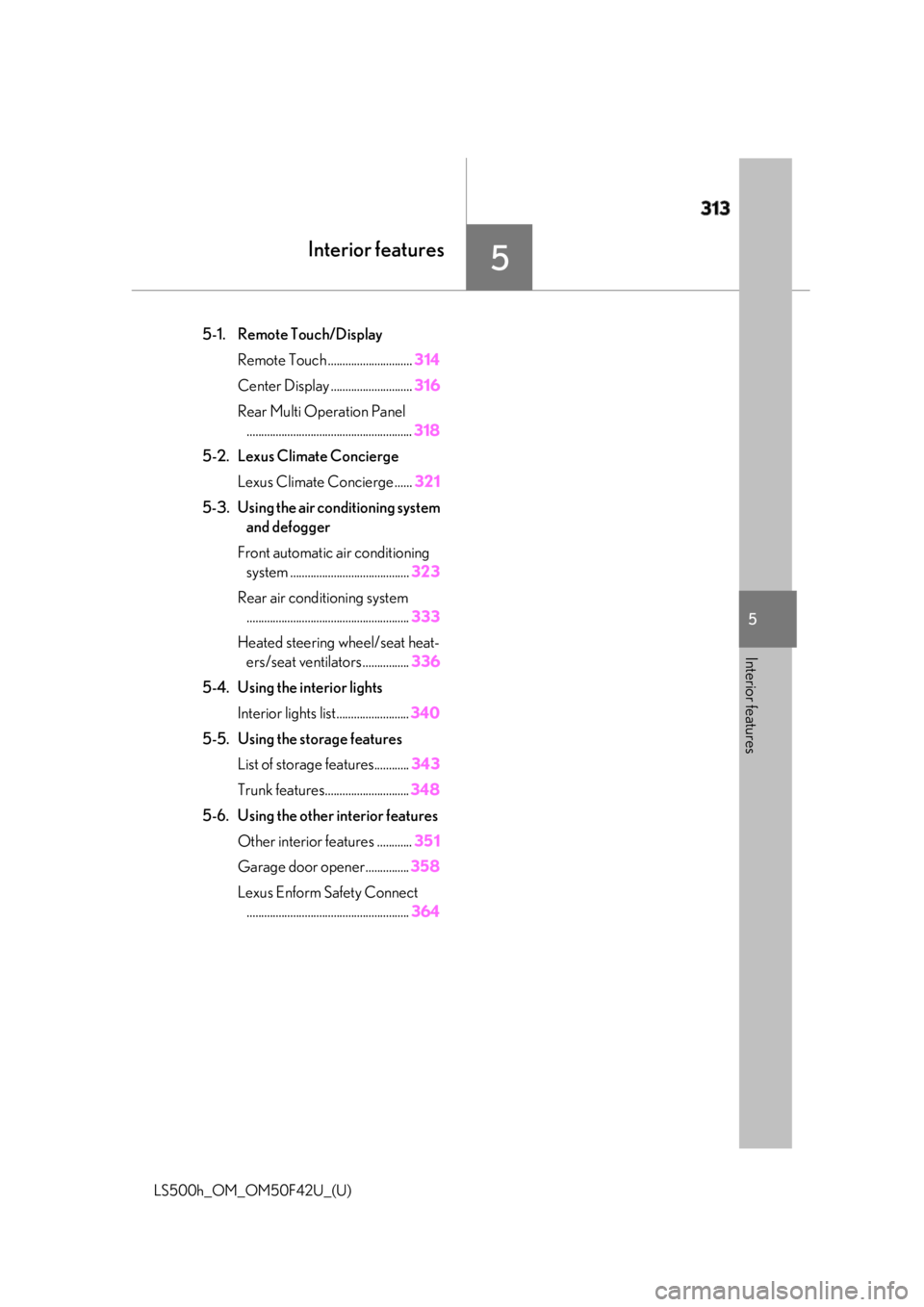
LS500h_OM_OM50F42U_(U) 5 5
Interior features Interior features .
5-1. Remote Touch/Display
Remote Touch ............................. 314
Center Display ............................ 316
Rear Multi Operation Panel
......................................................... 318
5-2. Lexus Climate Concierge
Lexus Climate Concierge ...... 321
5-3. Using the air conditioning system
and defogger
Front automatic air conditioning
system ......................................... 323
Rear air conditioning system
........................................................ 333
Heated steering wheel/seat heat-
ers/seat ventilators ................ 336
5-4. Using the interior lights
Interior lights list......................... 340
5-5. Using the storage features
List of storage features............ 343
Trunk features............................. 348
5-6. Using the other interior features
Other interior features ............ 351
Garage door opener............... 358
Lexus Enform Safety Connect
........................................................ 364