light LEXUS LS500H 2018 Owners Manual
[x] Cancel search | Manufacturer: LEXUS, Model Year: 2018, Model line: LS500H, Model: LEXUS LS500H 2018Pages: 528, PDF Size: 10.8 MB
Page 360 of 528
360 5-6. Using the other interior features
LS500h_OM_OM50F42U_(U) ■
Before programming HomeLink ®
During programming, it is possible
that garage doors, gates, or other
devices may operate. For this rea-
son, make sure that people and
objects are clear of the garage door
or other devices to prevent injury or
other potential harm.
It is recommended that a new bat-
tery be placed in the remote control
transmitter for more accurate pro-
gramming.
Garage door opener motors manu-
factured after 1995 may be
equipped with rolling code protec-
tion. If this is the case, you may need
a stepladder or other sturdy, safe
device to reach the “Learn” or
“Smart” button on the garage door
opener motor. ■
Programming HomeLink ®
Steps 1 through 3 must be performed
within 60 seconds, otherwise the indi-
cator light will stop flashing and pro-
gramming will not be able to be
completed.
1 Press and release the HomeLink ®
button you want to program and
check that the HomeLink ®
indica-
tor light flashes (orange).
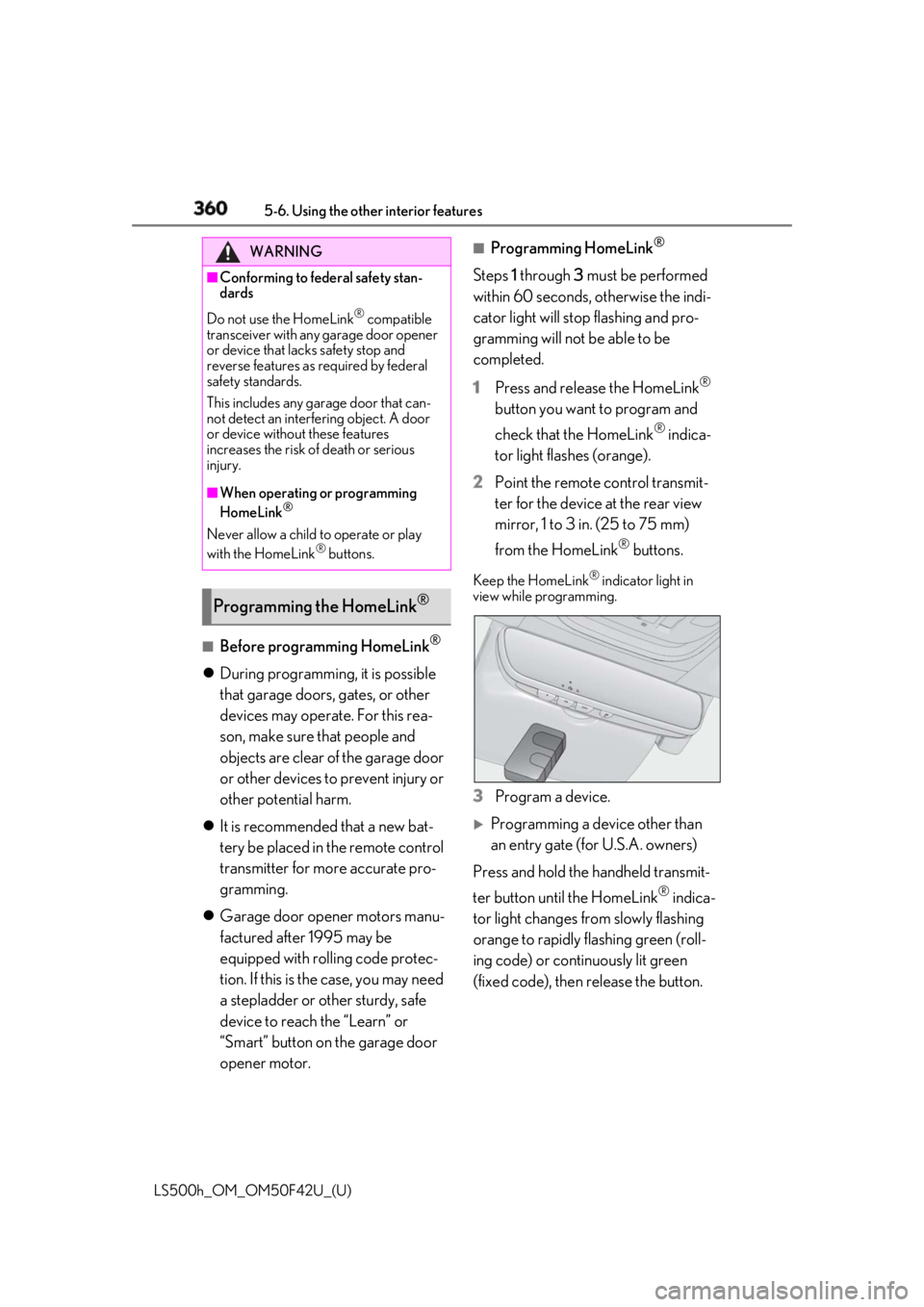
2 Point the remote control transmit-
ter for the device at the rear view
mirror, 1 to 3 in. (25 to 75 mm)
from the HomeLink ®
buttons.Keep the HomeLink ®
indicator light in
view while programming.
3 Program a device.
Programming a device other than
an entry gate (for U.S.A. owners)
Press and hold the handheld transmit-
ter button until the HomeLink ®
indica-
tor light changes from slowly flashing
orange to rapidly flashing green (roll-
ing code) or continuously lit green
(fixed code), then release the button.WARNING■
Conforming to federal safety stan-
dards
Do not use the HomeLink ®
compatible
transceiver with any garage door opener
or device that lacks safety stop and
reverse features as required by federal
safety standards.
This includes any garage door that can-
not detect an interfering object. A door
or device without these features
increases the risk of death or serious
injury. ■
When operating or programming
HomeLink ®
Never allow a child to operate or play
with the HomeLink ®
buttons.
Programming the HomeLink ®
Page 361 of 528
3615-6. Using the other interior features
LS500h_OM_OM50F42U_(U) 5
Interior features
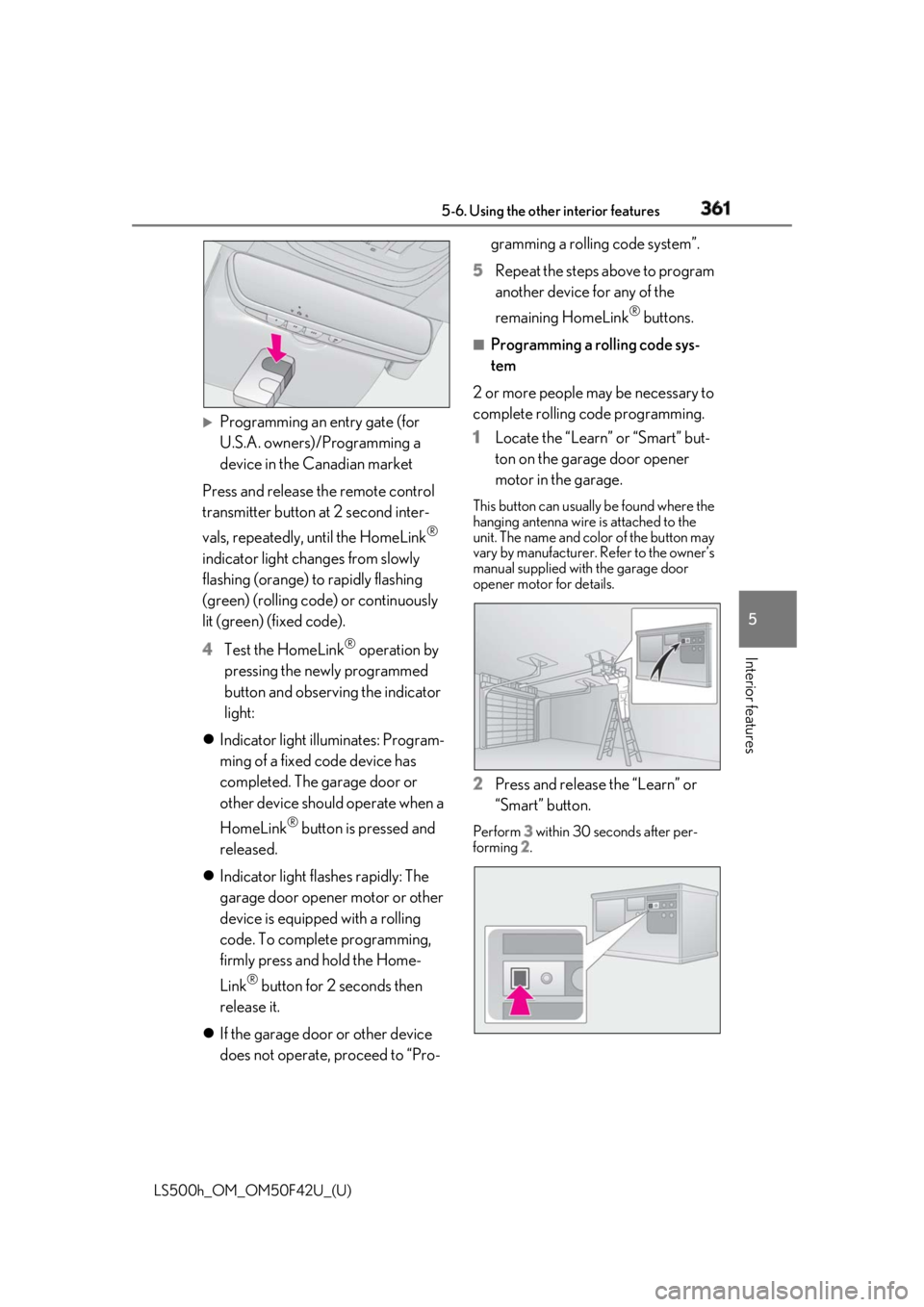
Programming an entry gate (for
U.S.A. owners)/Programming a
device in the Canadian market
Press and release th e remote control
transmitter button at 2 second inter-
vals, repeatedly, until the HomeLink ®
indicator light changes from slowly
flashing (orange) to rapidly flashing
(green) (rolling code ) or continuously
lit (green) (fixed code).
4 Test the HomeLink ®
operation by
pressing the newly programmed
button and observing the indicator
light:
Indicator light illuminates: Program-
ming of a fixed code device has
completed. The garage door or
other device should operate when a
HomeLink ®
button is pressed and
released.
Indicator light flashes rapidly: The
garage door opener motor or other
device is equipped with a rolling
code. To complete programming,
firmly press and hold the Home-
Link ®
button for 2 seconds then
release it.
If the garage door or other device
does not operate, proceed to “Pro- gramming a rolling code system”.
5 Repeat the steps above to program
another device for any of the
remaining HomeLink ®
buttons.■
Programming a rolling code sys-
tem
2 or more people may be necessary to
complete rolling code programming.
1 Locate the “Learn” or “Smart” but-
ton on the garage door opener
motor in the garage. This button can usually be found where the
hanging antenna wire is attached to the
unit. The name and color of the button may
vary by manufacturer. Refer to the owner’s
manual supplied with the garage door
opener motor for details.
2 Press and release the “Learn” or
“Smart” button. Perform 3 within 30 seconds after per-
forming 2 .
Page 362 of 528
362 5-6. Using the other interior features
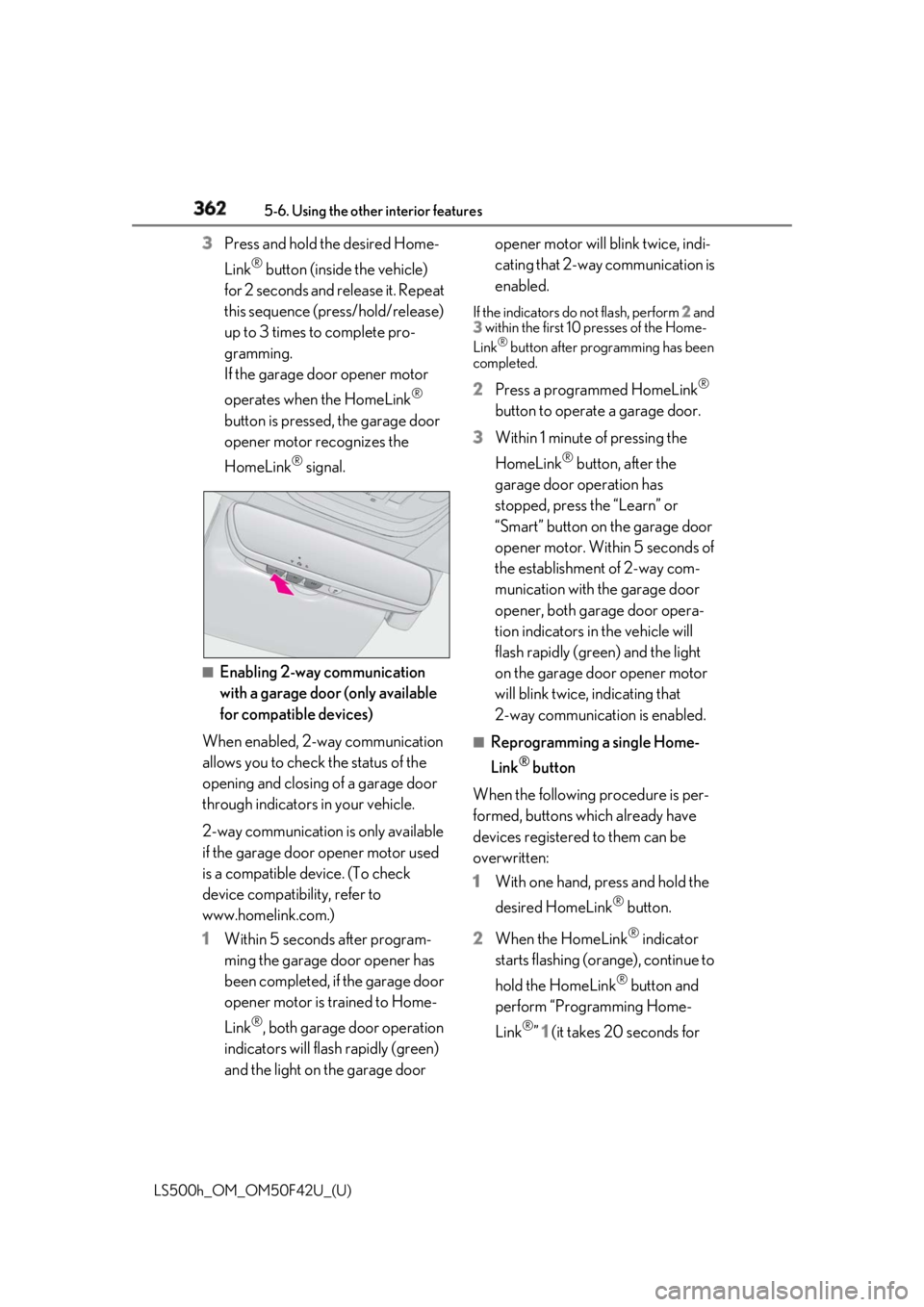
LS500h_OM_OM50F42U_(U) 3 Press and hold the desired Home-
Link ®
button (inside the vehicle)
for 2 seconds and release it. Repeat
this sequence (press/hold/release)
up to 3 times to complete pro-
gramming.
If the garage door opener motor
operates when the HomeLink ®
button is pressed, the garage door
opener motor recognizes the
HomeLink ®
signal.
■
Enabling 2-way communication
with a garage door (only available
for compatible devices)
When enabled, 2-way communication
allows you to check the status of the
opening and closing of a garage door
through indicators in your vehicle.
2-way communication is only available
if the garage door opener motor used
is a compatible device. (To check
device compatibility, refer to
www.homelink.com.)
1 Within 5 seconds after program-
ming the garage door opener has
been completed, if the garage door
opener motor is trained to Home-
Link ®
, both garage door operation
indicators will flash rapidly (green)
and the light on the garage door opener motor will blink twice, indi-
cating that 2-way communication is
enabled. If the indicators do not flash, perform 2 and
3 within the first 10 presses of the Home-
Link ®
button after programming has been
completed.
2 Press a programmed HomeLink ®
button to operate a garage door.
3 Within 1 minute of pressing the
HomeLink ®
button, after the
garage door operation has
stopped, press the “Learn” or
“Smart” button on the garage door
opener motor. Within 5 seconds of
the establishment of 2-way com-
munication with the garage door
opener, both garage door opera-
tion indicators in the vehicle will
flash rapidly (green) and the light
on the garage door opener motor
will blink twice, indicating that
2-way communication is enabled. ■
Reprogramming a single Home-
Link ®
button
When the following procedure is per-
formed, buttons which already have
devices registered to them can be
overwritten:
1 With one hand, press and hold the
desired HomeLink ®
button.
2 When the HomeLink ®
indicator
starts flashing (orange), continue to
hold the HomeLink ®
button and
perform “Programming Home-
Link ®
” 1 (it takes 20 seconds for
Page 363 of 528
3635-6. Using the other interior features
LS500h_OM_OM50F42U_(U) 5
Interior features the HomeLink ®
indicator to start
flashing). ■
Before programming●
Install a new battery in the transmitter.●
The battery side of the transmitter must
be pointed away from the HomeLink ®
.
Press the appropriate HomeLink ®
button. The HomeLink ®
indicator light
should turn on.
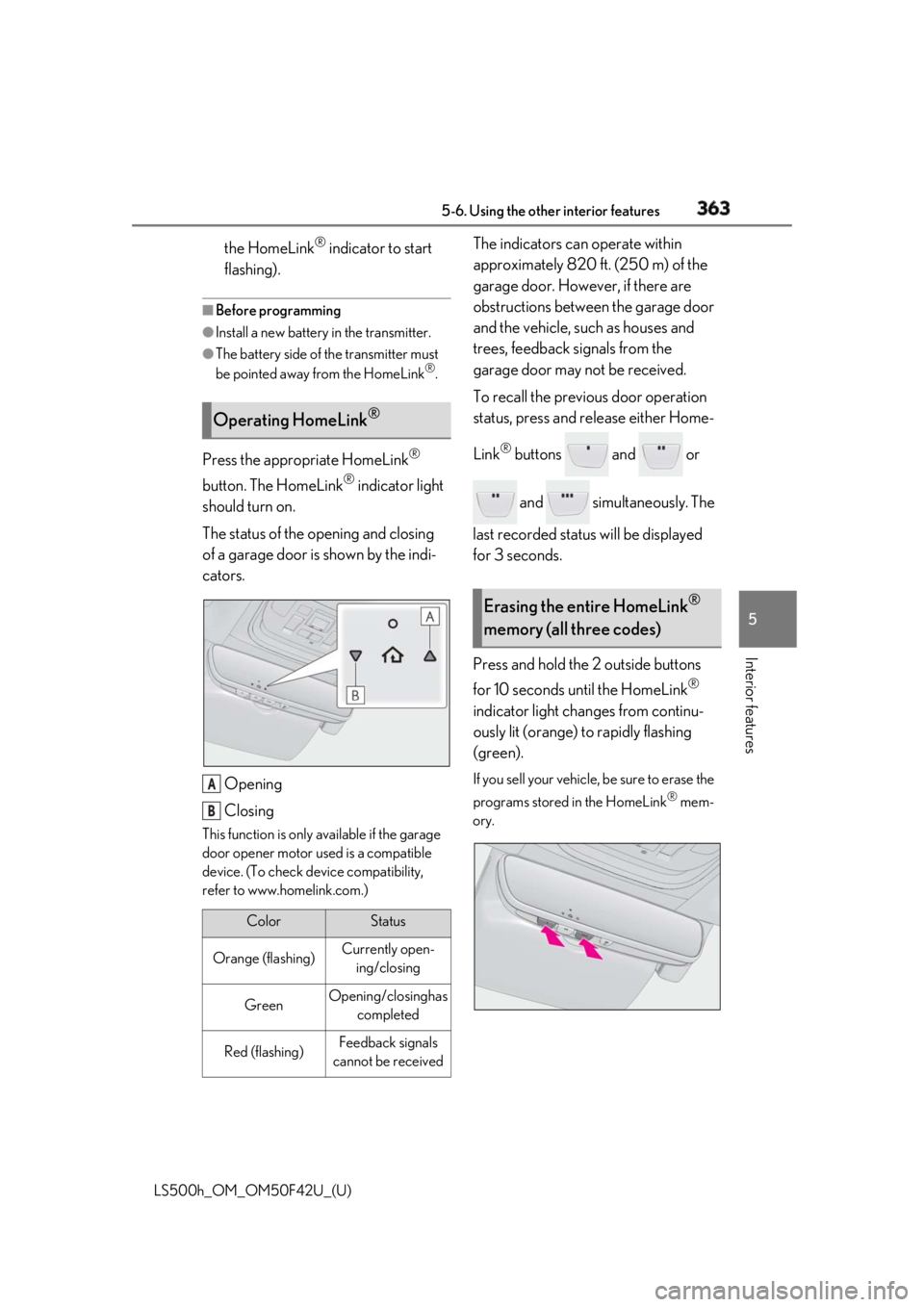
The status of the opening and closing
of a garage door is shown by the indi-
cators.
Opening
ClosingThis function is only available if the garage
door opener motor used is a compatible
device. (To check device compatibility,
refer to www.homelink.com.) The indicators can operate within
approximately 820 ft. (250 m) of the
garage door. However, if there are
obstructions between the garage door
and the vehicle, such as houses and
trees, feedback signals from the
garage door may not be received.
To recall the previous door operation
status, press and release either Home-
Link ®
buttons and or
and simultaneously. The
last recorded status will be displayed
for 3 seconds.
Press and hold the 2 outside buttons
for 10 seconds until the HomeLink ®
indicator light changes from continu-
ously lit (orange) to rapidly flashing
(green). If you sell your vehicle, be sure to erase the
programs stored in the HomeLink ®
mem-
ory.Operating HomeLink ®
Color Status
Orange (flashing) Currently open-
ing/closing
Green Opening/closing has
completed
Red (flashing) Feedback signals
cannot be receivedA
B Erasing the entire HomeLink ®
memory (all three codes)
Page 364 of 528
364 5-6. Using the other interior features
LS500h_OM_OM50F42U_(U) *
:If equipped
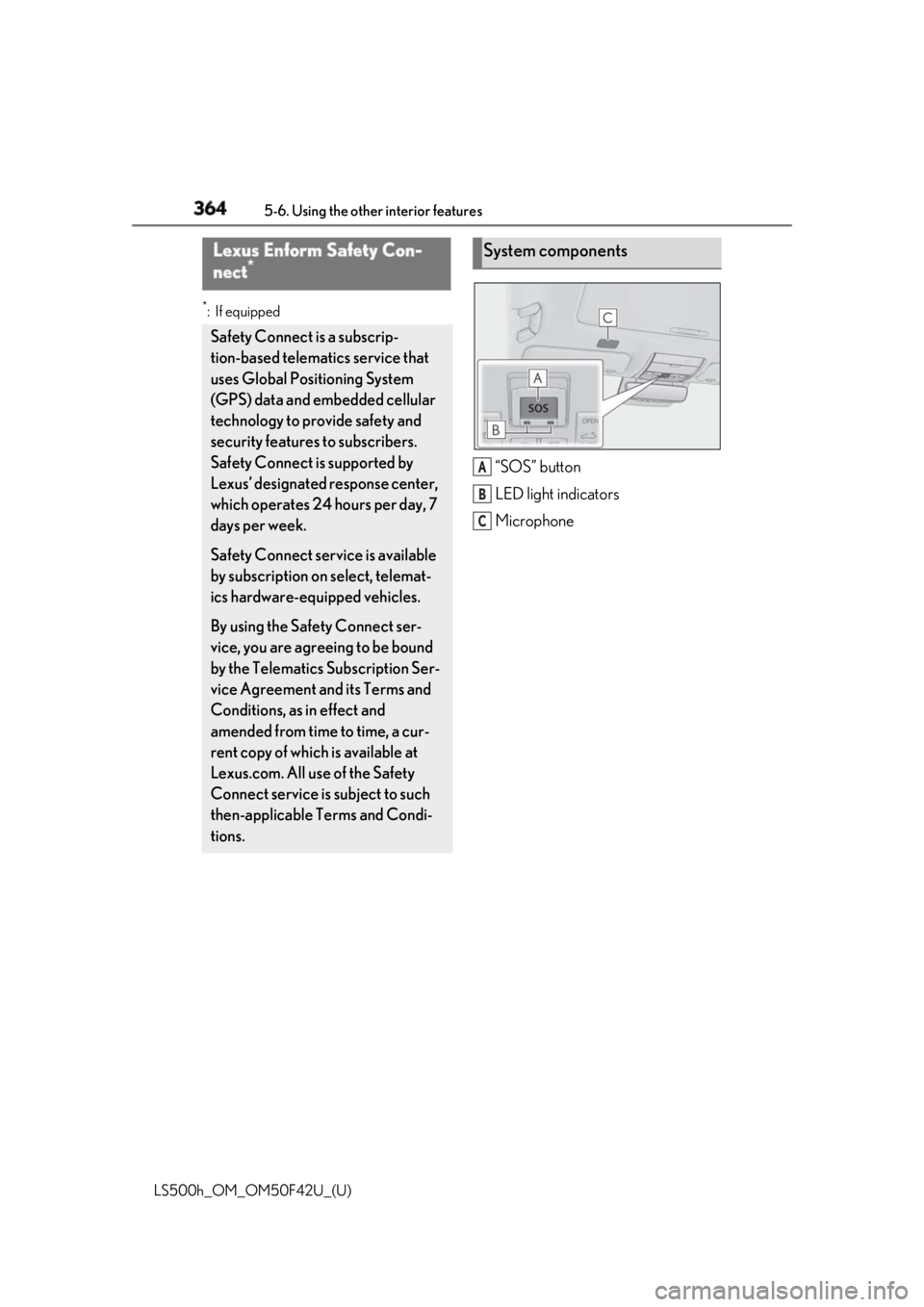
“SOS” button
LED light indicators
MicrophoneLexus Enform Safety Con-
nect *
Safety Connect is a subscrip-
tion-based telematics service that
uses Global Positioning System
(GPS) data and embedded cellular
technology to provide safety and
security features to subscribers.
Safety Connect is supported by
Lexus’ designated response center,
which operates 24 hours per day, 7
days per week.
Safety Connect service is available
by subscription on select, telemat-
ics hardware-equipped vehicles.
By using the Safety Connect ser-
vice, you are agreeing to be bound
by the Telematics Subscription Ser-
vice Agreement and its Terms and
Conditions, as in effect and
amended from time to time, a cur-
rent copy of which is available at
Lexus.com. All use of the Safety
Connect service is subject to such
then-applicable Terms and Condi-
tions. System components
A
B
C
Page 366 of 528
366 5-6. Using the other interior features
LS500h_OM_OM50F42U_(U) *
: U.S. Patent No. 7,508,298 B2
Stolen Vehicle Location Helps drivers in the event of vehicle theft.
( →
P.367 )
Emergency Assistance Button
(“SOS”) Connects drivers to response-center sup-
port. ( →
P.367 )
Enhanced Roadside Assistance Provides drivers various on-road assis-
tance. ( →
P.367 )
After you have signed the Telematics
Subscription Service Agreement and
are enrolled, you can begin receiving
services.
A variety of subscription terms is avail-
able for purchase. Contact your Lexus
dealer, call 1-800-25-LEXUS
(1-800-255-3987) in the Unites
States (1-877-539-8777 in Puerto
Rico, 1-800-26-LEXUS in Canada) or
push the “SOS” button in your vehicle
for further subscription details. ■
Safety Connect Serv ices Information●
Phone calls using the vehicles Blue-
tooth ®
technology will not be possible
during Safety Connect.
●
Safety Connect is available beginning Fall
2009 on select Lexus models (in the
contiguous United States only). Contact
with the Safety Connect response center
is dependent upon the telematics device
being in operative co ndition, cellular con-
nection availability, and GPS satellite sig-
nal reception, which ca n limit the ability to
reach the response center or receive
emergency service support. Enrollment
and Telematics Subscription Service Agreement required. A variety of sub-
scription terms is available; charges vary
by subscription term selected and loca-
tion. ●
Automatic Collision Notification, Emer-
gency Assistance and Stolen Vehicle
Location will function in the United
States, including Hawaii and Alaska,
Puerto Rico and in Canada, and
Enhanced Roadside Assistance will func-
tion in the United States, Puerto Rico and
in Canada. ●
Automatic Collision Notification, Emer-
gency Assistance, Stolen Vehicle Loca-
tion and Enhanced Roadside Assistance
will not function in the United States Vir-
gin Islands.
No Safety Connect services will function
outside of the United States in countries
other than Canada.
For vehicles first sold in the USVI, no
Safety Connect services will function in
and outside the United States Virgin
Islands. ●
Safety Connect services are not subject
to section 255 of the Telecommunica-
tions Act and the device is not TTY com-
patible. ■
Languages
The Safety Connect re sponse center will
offer support in mult iple languages. The
Safety Connect system will offer voice
prompts in English, Spanish, and French.
Please indicate your language of choice
when enrolling. ■
When contacting the response center
You may be unable to contact the response
center if the network is busy.
When the power switch is turned to
ON mode, the red indicator light
comes on for 2 seconds then turns off.
Afterward, the green indicator light
comes on, indicating that the service is
active.Subscription
Safety Connect LED light Indi-
cators
Page 367 of 528
3675-6. Using the other interior features
LS500h_OM_OM50F42U_(U) 5
Interior features The following indicator light patterns
indicate specific system usage condi-
tions:
Green indicator light on = Active
service
Green indicator light flashing =
Safety Connect call in process
Red indicator light (except at vehi-
cle start-up) = System malfunction
(contact your Lexus dealer)
No indicator light (off) = Safety
Connect service not active ■
Automatic Collision Notification
In case of either airbag deployment or
severe rear-end collision, the system is
designed to automatically call the
response center. The responding agent
receives the vehicle’s location and
attempts to speak with the vehicle
occupants to assess the level of emer-
gency. If the occupants are unable to
communicate, the ag ent automatically
treats the call as an emergency, con-
tacts the nearest emergency services
provider to describe the situation, and
requests that assistance be sent to the
location. ■
Stolen Vehicle Location
If your vehicle is stolen, Safety Connect
can work with local authorities to assist
them in locating and recovering the
vehicle. After filing a police report, call
the Safety Connect response center at
1-800-25-LEXUS
(1-800-255-3987) and follow the prompts for Safety Connect to initiate
this service.
In addition to assisting law enforce-
ment with recovery of a stolen vehicle,
Safety-Connect-equipped vehicle
location data may, under certain cir-
cumstances, be shared with third par-
ties to locate your vehicle. Further
information is available at Lexus.com. ■
Emergency Assistance Button
(“SOS”)
In the event of an emergency on the
road, push the “SOS” button to reach
the Safety Connect response center.
The answering agent will determine
your vehicle’s location, assess the
emergency, and dispatch the neces-
sary assistance required. If you accidentally press the “SOS” button,
tell the response-center agent that you are
not experiencing an emergency. ■
Enhanced Roadside Assistance
Enhanced Roadside Assistance adds
GPS data to the already included war-
ranty-based Lexus roadside service.
Subscribers can press the “SOS” but-
ton to reach a Safety Connect
response-center agent, who can help
with a wide range of needs, such as:
towing, flat tire, fuel delivery, etc. For a
description of the Roadside Assistance
services and their limitations, please
see the Safety Connect Terms and
Conditions, which are available at
Lexus.com.Safety Connect services
Page 369 of 528
369
LS500h_OM_OM50F42U_(U) 6 6
Maintenance and care Maintenance and care .
6-1. Maintenance and care
Cleaning and protecting the vehi-
cle exterior ................................ 370
Cleaning and protecting the vehi-
cle interior ................................. 373
6-2. Maintenance
Maintenance requirements
........................................................ 378
General maintenance ............. 379
Emission inspection and mainte-
nance (I/M) programs ......... 382
6-3. Do-it-yourself maintenance
Do-it-yourself service precautions
........................................................ 383
Hood............................................... 385
Positioning a floor jack............ 385
Engine compartment............... 387
12-volt battery............................. 393
Tires ................................................ 395
Replacing the tire ...................... 405
Tire inflation pressure .............. 408
Wheels............................................ 410
Air conditioning filter................. 411
Electronic key battery .............. 413
Checking and replacing fuses
......................................................... 414
Light bulbs ..................................... 417
Page 372 of 528
372 6-1. Maintenance and care
LS500h_OM_OM50F42U_(U) WARNING■
Precaution regarding the front
bumper (vehicles with Lexus Safety
System+A)
If the paint of the fr ont bumper is chipped
or scratched, the Lexus Safety System+A
may not function correctly. If this occurs,
consult your Lexus dealer. ■
Precaution regarding the rear
bumper
If the paint of the rear bumper is chipped
or scratched, the fo llowing systems may
not function correctly. If this occurs, con-
sult your Lexus dealer. ●
Lexus Safety System+A (if equipped)●
BSM●
RCTA●
PKSB
NOTICE■
To prevent paint deterioration and
corrosion on the body and compo-
nents (aluminum wheels, etc.)●
Wash the vehicle immediately in the
following cases:
• After driving near the sea coast
• After driving on salted roads
• If coal tar or tree sap is present on the
paint surface
• If dead insects, in sect droppings or
bird droppings are present on the
paint surface
• After driving in an area contaminated
with soot, oily smoke, mine dust, iron
powder or chemical substances
• If the vehicle becomes heavily soiled
with dust or mud
• If liquids such as benzene and gasoline
are spilled on the paint surface ●
If the paint is chipped or scratched,
have it repaired immediately. ●
To prevent the wheels from corroding,
remove any dirt and store in a place
with low humidity when storing the
wheels. ■
Cleaning the exterior lights ●
Wash carefully. Do not use organic
substances or scrub with a hard brush.
This may damage the surfaces of the
lights. ●
Do not apply wax to the surfaces of the
lights.
Wax may cause damage to the lenses. ■
When using an automatic car wash
Set the wiper switch to the off position.
If the wiper switch is in “AUTO”, the wip-
ers may operate and the wiper blades
may be damaged. ■
When using a high pressure car wash ●
When washing the vehicle, do not
spray the camera or its surrounding
area directly with a high pressure
washer. Shock applied from high pres-
sure water may cause the device to not
operate normally. ●
Do not bring the nozzle tip close to
boots (rubber or re sin manufactured
cover), connectors or the following
parts. The parts may be damaged if
they come into contact with high-pres-
sure water.
• Traction related parts
•Steering parts
• Suspension parts
• Brake parts
●
Do not wash the underside of the vehi-
cle using a high pressure car washer.
Page 374 of 528
374 6-1. Maintenance and care
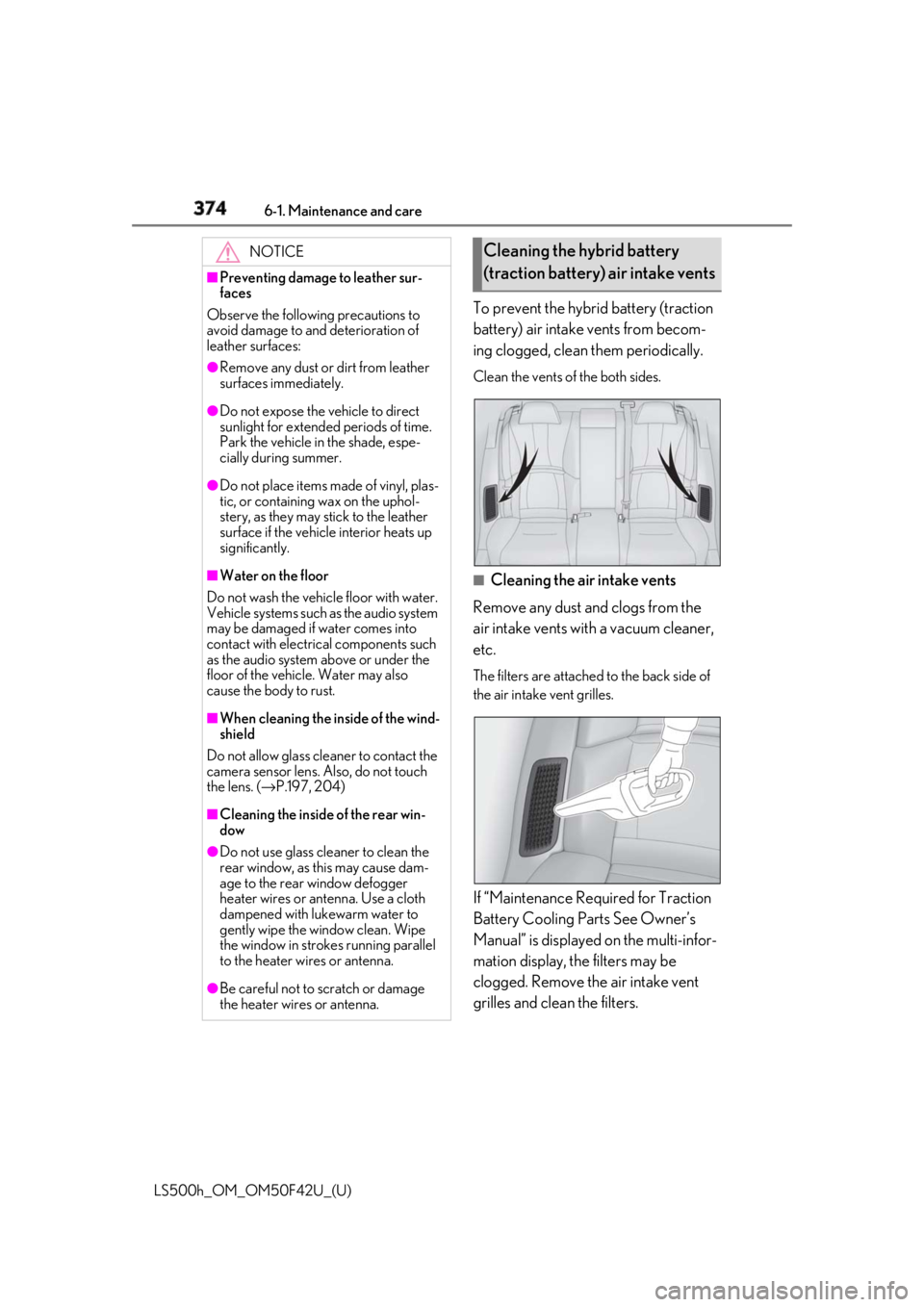
LS500h_OM_OM50F42U_(U) To prevent the hybrid battery (traction
battery) air intake vents from becom-
ing clogged, clean them periodically. Clean the vents of the both sides.
■
Cleaning the air intake vents
Remove any dust and clogs from the
air intake vents with a vacuum cleaner,
etc. The filters are attached to the back side of
the air intake vent grilles.
If “Maintenance Required for Traction
Battery Cooling Parts See Owner’s
Manual” is displayed on the multi-infor-
mation display, the filters may be
clogged. Remove the air intake vent
grilles and clean the filters.NOTICE■
Preventing damage to leather sur-
faces
Observe the following precautions to
avoid damage to and deterioration of
leather surfaces: ●
Remove any dust or dirt from leather
surfaces immediately.●
Do not expose the vehicle to direct
sunlight for extended periods of time.
Park the vehicle in the shade, espe-
cially during summer.●
Do not place items made of vinyl, plas-
tic, or containing wax on the uphol-
stery, as they may stick to the leather
surface if the vehicle interior heats up
significantly.■
Water on the floor
Do not wash the vehicle floor with water.
Vehicle systems such as the audio system
may be damaged if water comes into
contact with electrical components such
as the audio system above or under the
floor of the vehicle. Water may also
cause the body to rust. ■
When cleaning the inside of the wind-
shield
Do not allow glass cleaner to contact the
camera sensor lens. Also, do not touch
the lens. ( → P.197, 204)
■
Cleaning the inside of the rear win-
dow●
Do not use glass cleaner to clean the
rear window, as this may cause dam-
age to the rear window defogger
heater wires or antenna. Use a cloth
dampened with lukewarm water to
gently wipe the window clean. Wipe
the window in strokes running parallel
to the heater wires or antenna.
●
Be careful not to scratch or damage
the heater wires or antenna. Cleaning the hybrid battery
(traction battery) air intake vents