warning LEXUS LS500H 2018 Owners Manual
[x] Cancel search | Manufacturer: LEXUS, Model Year: 2018, Model line: LS500H, Model: LEXUS LS500H 2018Pages: 528, PDF Size: 10.8 MB
Page 311 of 528
3114-6. Driving tips
LS500h_OM_OM50F42U_(U) 4
Driving Regulations regarding the use of tire
chains vary depending on location and
type of road. Always check local regu-
lations before installing chains. ■
Tire chain installation
Observe the following precautions when
installing and removing chains: ●
Install and remove tire chains in a safe
location.●
Install tire chains on the rear tires. Do not
install tire chains on the front tires.●
Install tire chains on the rear tires as
tightly as possible. Retighten chains after
driving 1/4 ⎯ 1/2 mile (0.5 ⎯ 1.0 km).●
Install tire chains following the instruc-
tions provided with the tire chains.
To enable the windshield wipers to be
lifted when heavy snow or icy condi-
tions are expected, change the rest
position of the windshield wipers from
the retracted position below the hood
to the service position using the wiper
lever. ( → P.193)Regulations on the use of tire
chains
NOTICE■
Fitting tire chains
The tire pressure warning valves and
transmitters may not function correctly
when tire chains are fitted.
Windshield wipers
Page 325 of 528
3255-3. Using the air conditio ning system and defogger
LS500h_OM_OM50F42U_(U) 5
Interior features ●
When the power switch is turned off, the
current air conditioning settings will auto-
matically be registered to the electronic
key that was used to unlock the vehicle.●
The system may not operate correctly if
more than one electr onic key is in the
vicinity or if the smart access system with
push-button start is used to unlock a pas-
senger door.●
The doors that can recall the air condi-
tioning setting *
when unlocked using the
smart access system with push-button
start can be changed. For details, contact
your Lexus dealer. *
: The doors that can recall the driving
position memory are changed at the
same time.■
Operation of the air conditioning sys-
tem in Eco drive mode
In Eco drive mode, the air conditioning sys-
tem is controlled as follows to prioritize fuel
efficiency: ●
Engine speed and compressor operation
controlled to restri ct heating/cooling
capacity●
Fan speed restricted when automatic
mode is selected
To improve air condit ioning performance,
perform the following operations: ●
Turn off eco air conditioning mode
( → P.326) ●
Adjust the fan speed●
Turn off Eco drive mode ( → P.298)
■
When the outside temperature falls to
nearly 32°F (0°C)
The dehumidification function may not
operate even when “A/C” is selected.
■
Ventilation and air conditioning odors
●
To let fresh air in, set the air conditioning
system to the outside air mode.
●
During use, various odors from inside and
outside the vehicle may enter into and
accumulate in the air conditioning sys-
tem. This may then cause odor to be
emitted from the vents.
●
To reduce potential odors from occur- ring:
• It is recommended that the air condition-
ing system be set to outside air mode
prior to turning the vehicle off.
• The start timing of the blower may be
delayed for a short pe riod of time imme-
diately after the air conditioning system is
started in automatic mode or with the
micro dust and pollen filter on. ●
When parking, the system automatically
switches to outside air mode to encour-
age better air circulation throughout the
vehicle, helping to reduce odors that
occur when starting the vehicle. ■
Using the voice command system
Air conditioning system can be operated
using voice commands. For details, refer to
the “NAVIGATION AND MULTIMEDIA
SYSTEM OWNER’S MANUAL”. ■
Air conditioning filter
→ P.411 ■
Customization
Some functions can be customized.
( → P.481)
WARNING■
To prevent the windshield from fog-
ging up
Do not use the windshield defogger
switch during cool air operation in
extremely humid weather. The difference
between the temperature of the outside
air and that of the windshield can cause
the outer surface of the windshield to fog
up, blocking your vision.
■
When the outside rear view mirror
defoggers are operating
Do not touch the outside rear view mir-
ror surfaces, as they can become very
hot and burn you.
Page 330 of 528
330 5-3. Using the air conditioning system and defogger
LS500h_OM_OM50F42U_(U) switch to (recirculated air) mode.
Pollen is filtered even if the micro dust and
pollen filter is turned off.
1 Press the automatic mode switch or
select “AUTO” on the sub function
menu. ( → P.326)
2 Press the outside/recirculated air
mode switch to switch to automatic
air intake mode.The air conditioning system automatically
switches between outside air and recircu-
lated air modes.
3 Adjust the temperature setting.
4 To stop the operation, press the off
switch or select “OFF” on the sub
function menu. ( → P.326)If the fan speed settin g or air flow modes
are operated, the automatic mode indica-
tor goes off. However, automatic mode for
functions other than th at operated is main-
tained.
■
Using automatic mode
Fan speed is adjusted automatically accord-
ing to the temperature setting and the
ambient conditions.
Therefore, the fan may stop for a while until
warm or cool air is ready to flow immedi-
ately after the automatic mode switch is
pressed or “AUTO” is selected.
Cool air may blow around the upper body
even when the heater is on due to sunlight. ■
Windshield fog detection function
When automatic mode is set, the humidity
sensor detects fog on the windshield and
controls the air condit ioning system to pre-
vent fog. ■
Automatic mode for air intake control
In automatic mode, the system detects
exhaust gas and other pollutants and auto-
matically switches between outside air and
recirculated air modes.
When the dehumidification function is off,
and the fan is operating, turning automatic
mode on will activate the dehumidification
function.
In S-FLOW mode, priority for the air-
flow is given to the front seats, reducing
the airflow and air co nditioning effect
on the rear seats.
The system determines whether or not WARNING■
To prevent burns (vehicles with wind-
shield wiper de-icer)
Do not touch the glass at lower part of
the windshield or to the side of the front
pillars when the wind shield wiper de-icer
is on.
Using automatic mode NOTICE■
Humidity sensor
In order to detect fog on the windshield,
a sensor which monitors the temperature
of the windshield, the surround humidity,
etc. is installed.
Follow these points to avoid damaging
the sensor: ●
Do not disassemble the sensor ●
Do not spray glass cleaner on the sen-
sor or subject it to strong impacts ●
Do not stick anything on the sensor
S-FLOW mode
Page 333 of 528
3335-3. Using the air conditio ning system and defogger
LS500h_OM_OM50F42U_(U) 5
Interior features *
: If equipped
■
Center Display
Using the touchpad of the Remote
Touch, select the button on the screen.WARNING■
To prevent the windshield defogger
from operating improperly
Do not place anything on the instrument
panel which may cover the air outlets.
Otherwise, air flow may be obstructed,
preventing the windshield defoggers
from defogging.
Rear air conditioning sys-
tem *
The air outlets and fan speed are
automatically adjusted according
to the temperature setting.
The rear air conditioning system
can be operated using the Center
Display and Rear Multi Operation
Panel.
Center Display Press the “MENU” button on the
Remote Touch to display the main menu
and move the cursor to to display
the climate control shortcut buttons.
Then, select
to display the rear air
conditioning control screen.
Rear Multi Operation Panel *
Touch “Climate” on the home screen to
display the rear air conditioning control
screen.( →
P.318 )
Touching the shortc ut button on the
home screen will also display operation
buttons for some of the rear air condi-
tioning system functions. *
: The Rear Multi Op eration Panel can-
not be used to operate the rear air
conditioning system if the function is
disabled. ( → P.333)
Rear air conditioning control
screen
Page 337 of 528
3375-3. Using the air conditio ning system and defogger
LS500h_OM_OM50F42U_(U) 5
Interior features ■
Center Display
Main screen
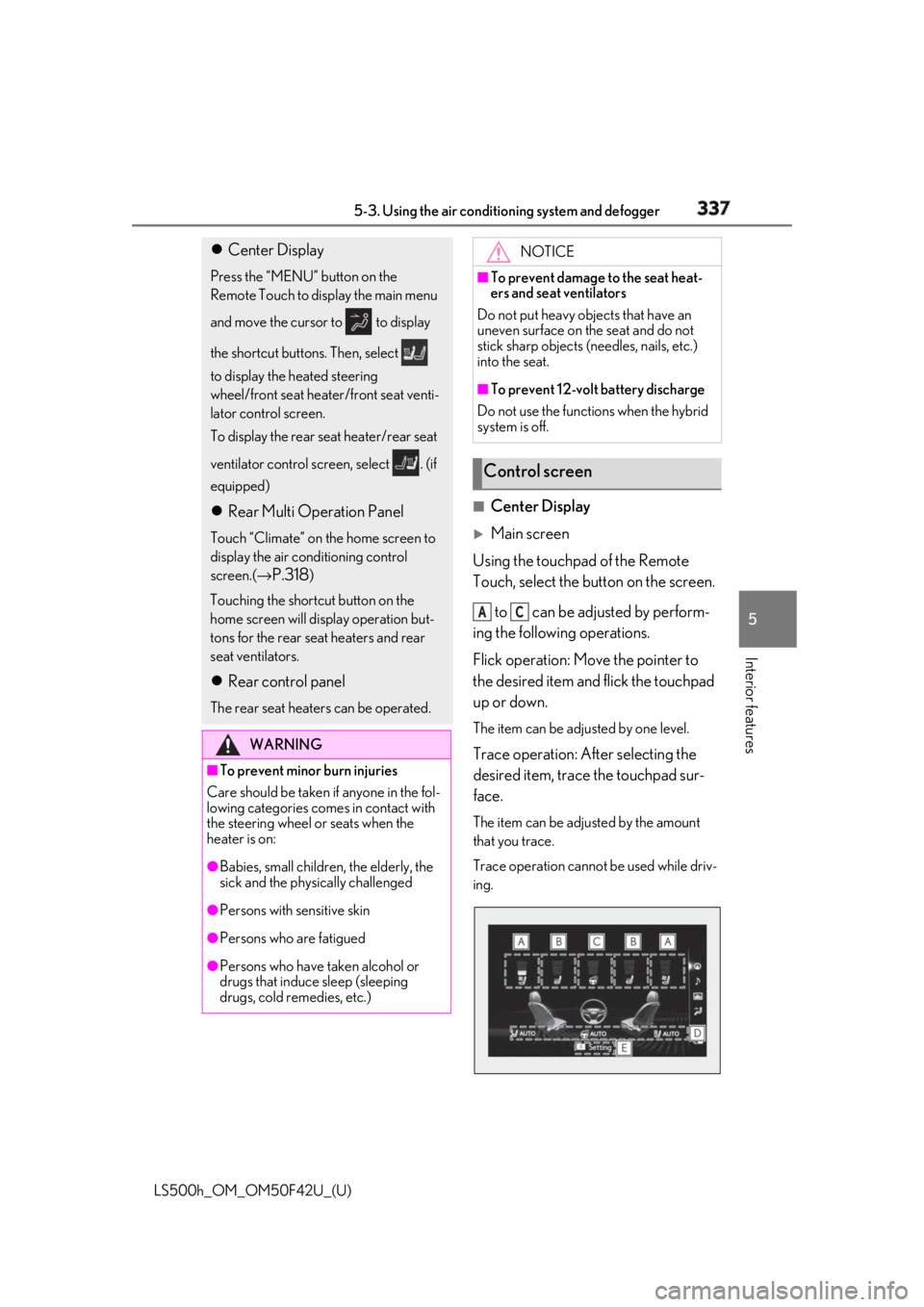
Using the touchpad of the Remote
Touch, select the button on the screen.
to can be adjusted by perform-
ing the following operations.
Flick operation: Move the pointer to
the desired item and flick the touchpad
up or down. The item can be adjusted by one level.
Trace operation: After selecting the
desired item, trace the touchpad sur-
face. The item can be adjusted by the amount
that you trace.
Trace operation cannot be used while driv-
ing. Center Display Press the “MENU” button on the
Remote Touch to display the main menu
and move the cursor to to display
the shortcut buttons. Then, select
to display the heated steering
wheel/front seat heater/front seat venti-
lator control screen.
To display the rear seat heater/rear seat
ventilator control screen, select . (if
equipped)
Rear Multi Operation Panel Touch “Climate” on the home screen to
display the air conditioning control
screen.( →
P.318 )
Touching the shortcut button on the
home screen will display operation but-
tons for the rear seat heaters and rear
seat ventilators.
Rear control panel The rear seat heaters can be operated.
WARNING■
To prevent minor burn injuries
Care should be taken if anyone in the fol-
lowing categories comes in contact with
the steering wheel or seats when the
heater is on:
●
Babies, small children, the elderly, the
sick and the phys ically challenged
●
Persons with sensitive skin
●
Persons who are fatigued
●
Persons who have taken alcohol or
drugs that induce sleep (sleeping
drugs, cold remedies, etc.) NOTICE■
To prevent damage to the seat heat-
ers and seat ventilators
Do not put heavy objects that have an
uneven surface on the seat and do not
stick sharp objects (n eedles, nails, etc.)
into the seat. ■
To prevent 12-volt battery discharge
Do not use the functions when the hybrid
system is off.
Control screen A C
Page 339 of 528
3395-3. Using the air conditio ning system and defogger
LS500h_OM_OM50F42U_(U) 5
Interior features speed level and leve l indicator (blue)
change as follows:
AUTO → Hi → Mid → Lo → OFF
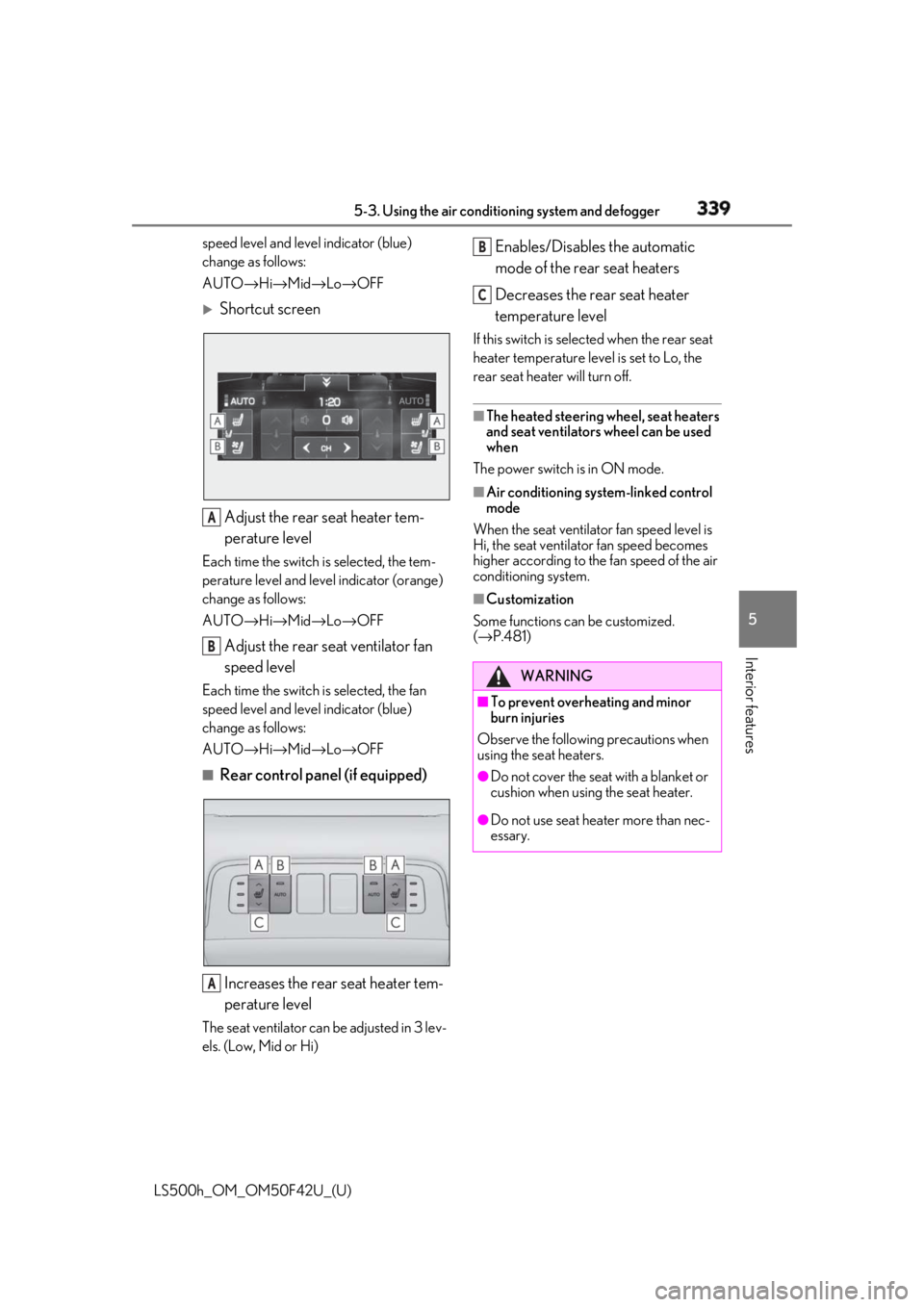
Shortcut screen
Adjust the rear seat heater tem-
perature levelEach time the switch is selected, the tem-
perature level and leve l indicator (orange)
change as follows:
AUTO → Hi → Mid → Lo → OFF
Adjust the rear seat ventilator fan
speed levelEach time the switch is selected, the fan
speed level and leve l indicator (blue)
change as follows:
AUTO → Hi → Mid → Lo → OFF■
Rear control panel (if equipped)
Increases the rear seat heater tem-
perature levelThe seat ventilator can be adjusted in 3 lev-
els. (Low, Mid or Hi) Enables/Disables the automatic
mode of the rear seat heaters
Decreases the rear seat heater
temperature level If this switch is select ed when the rear seat
heater temperature level is set to Lo, the
rear seat heater will turn off. ■
The heated steering wheel, seat heaters
and seat ventilators wheel can be used
when
The power switch is in ON mode. ■
Air conditioning system-linked control
mode
When the seat ventilator fan speed level is
Hi, the seat ventilato r fan speed becomes
higher according to the fan speed of the air
conditioning system. ■
Customization
Some functions can be customized.
( → P.481)A
B
A WARNING■
To prevent overheating and minor
burn injuries
Observe the following precautions when
using the seat heaters. ●
Do not cover the seat with a blanket or
cushion when using the seat heater.
●
Do not use seat heater more than nec-
essary. B
C
Page 344 of 528
344 5-5. Using the storage features
LS500h_OM_OM50F42U_(U)
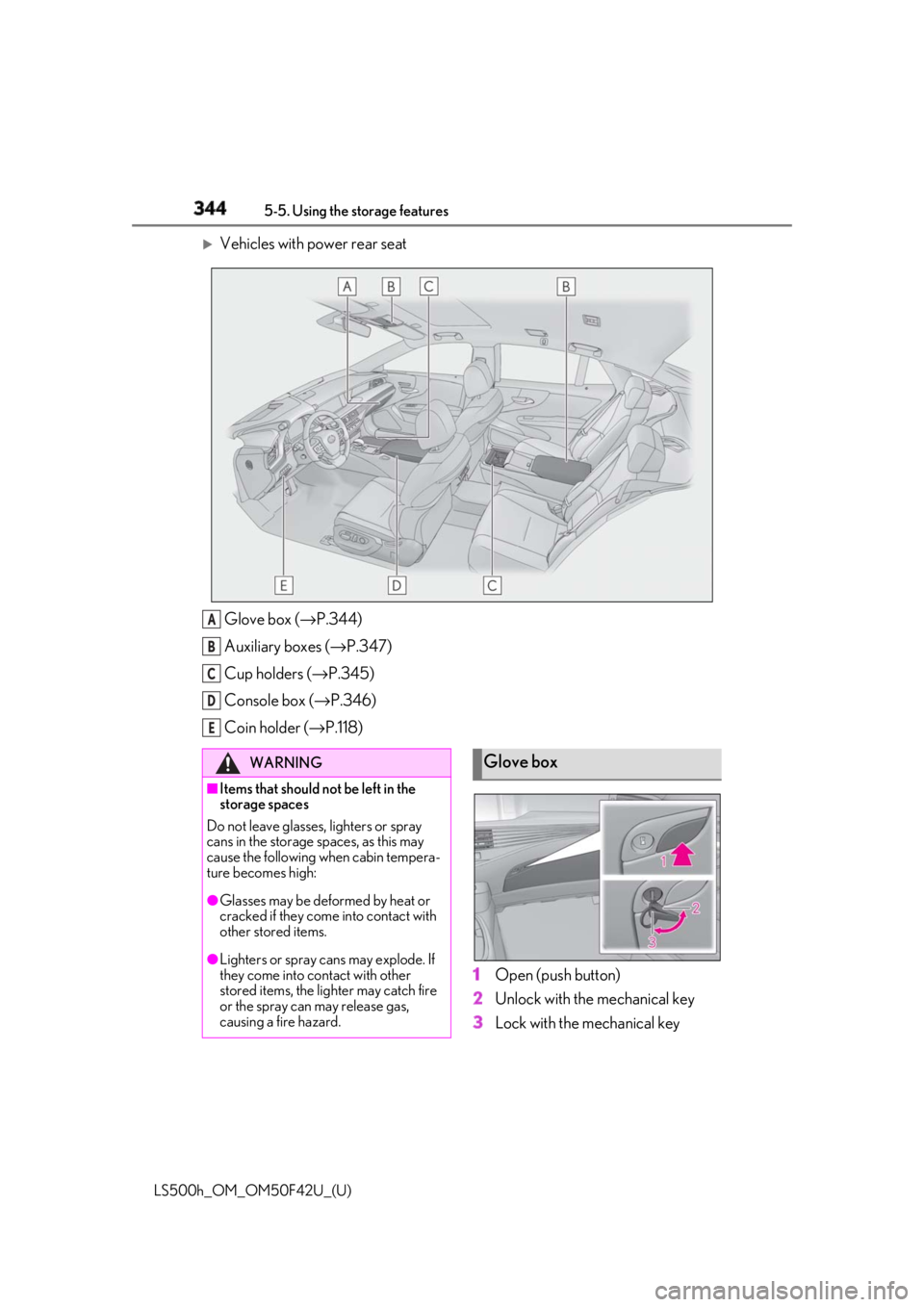
Vehicles with power rear seat
Glove box ( → P.344)
Auxiliary boxes ( → P.347)
Cup holders ( → P.345)
Console box ( → P.346)
Coin holder ( → P.118)
1 Open (push button)
2 Unlock with the mechanical key
3 Lock with the mechanical keyA
B
C
D
E
WARNING■
Items that should not be left in the
storage spaces
Do not leave glasses, lighters or spray
cans in the storage spaces, as this may
cause the following when cabin tempera-
ture becomes high:
●
Glasses may be deformed by heat or
cracked if they come into contact with
other stored items.
●
Lighters or spray cans may explode. If
they come into contact with other
stored items, the lighter may catch fire
or the spray can may release gas,
causing a fire hazard. Glove box
Page 345 of 528
3455-5. Using the storage features
LS500h_OM_OM50F42U_(U) 5
Interior features ■
Glove box light
The glove box light turns on when the tail
lights are on. ■
Trunk opener main switch
The trunk opener main switch is located in
the glove box. ( → P.118)■
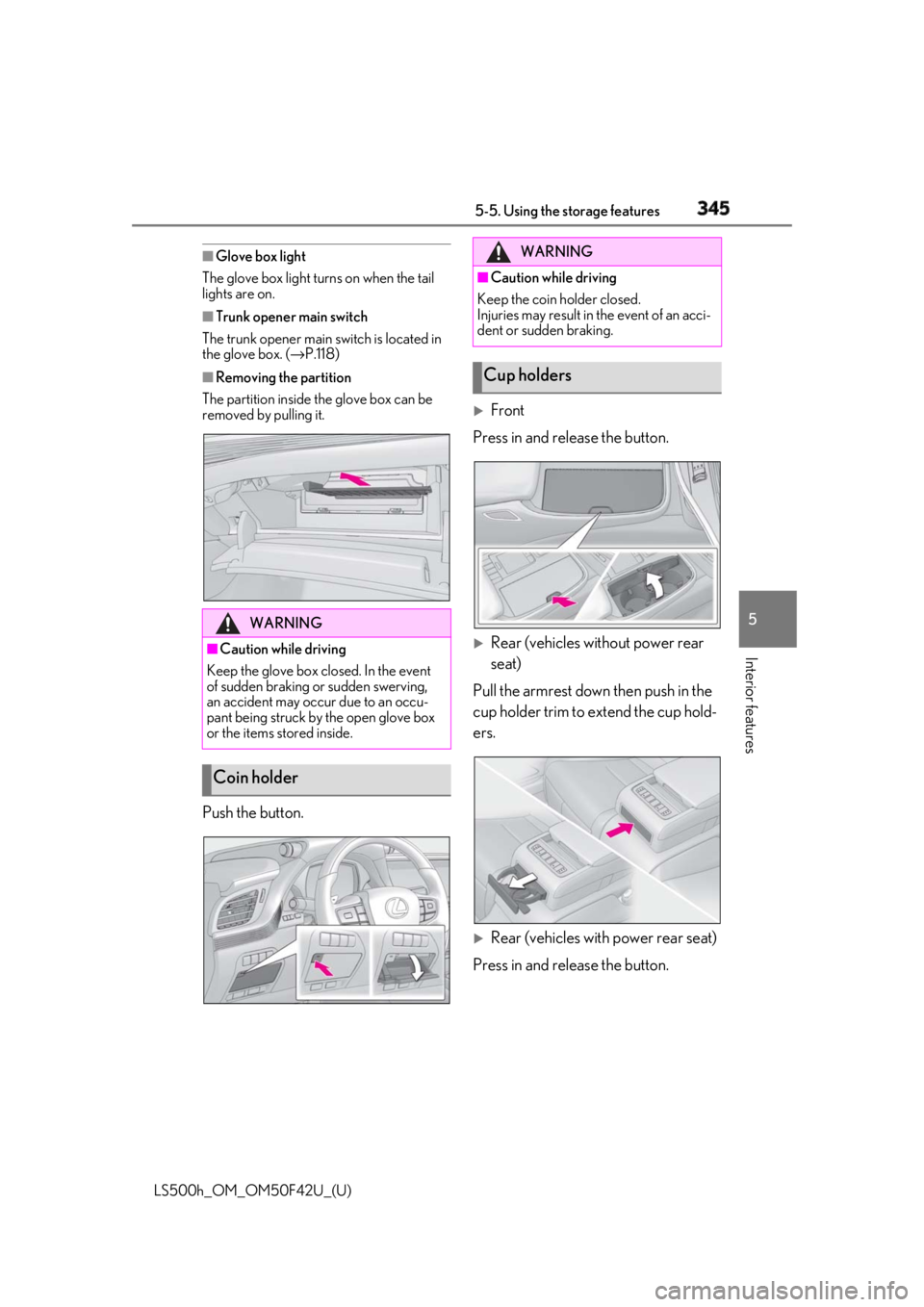
Removing the partition
The partition inside the glove box can be
removed by pulling it.
Push the button.
Front
Press in and release the button.
Rear (vehicles without power rear
seat)
Pull the armrest down then push in the
cup holder trim to extend the cup hold-
ers.
Rear (vehicles with power rear seat)
Press in and release the button.WARNING■
Caution while driving
Keep the glove box closed. In the event
of sudden braking or sudden swerving,
an accident may occur due to an occu-
pant being struck by the open glove box
or the items stored inside.
Coin holder WARNING■
Caution while driving
Keep the coin holder closed.
Injuries may result in the event of an acci-
dent or sudden braking.
Cup holders
Page 346 of 528
346 5-5. Using the storage features
LS500h_OM_OM50F42U_(U) ■
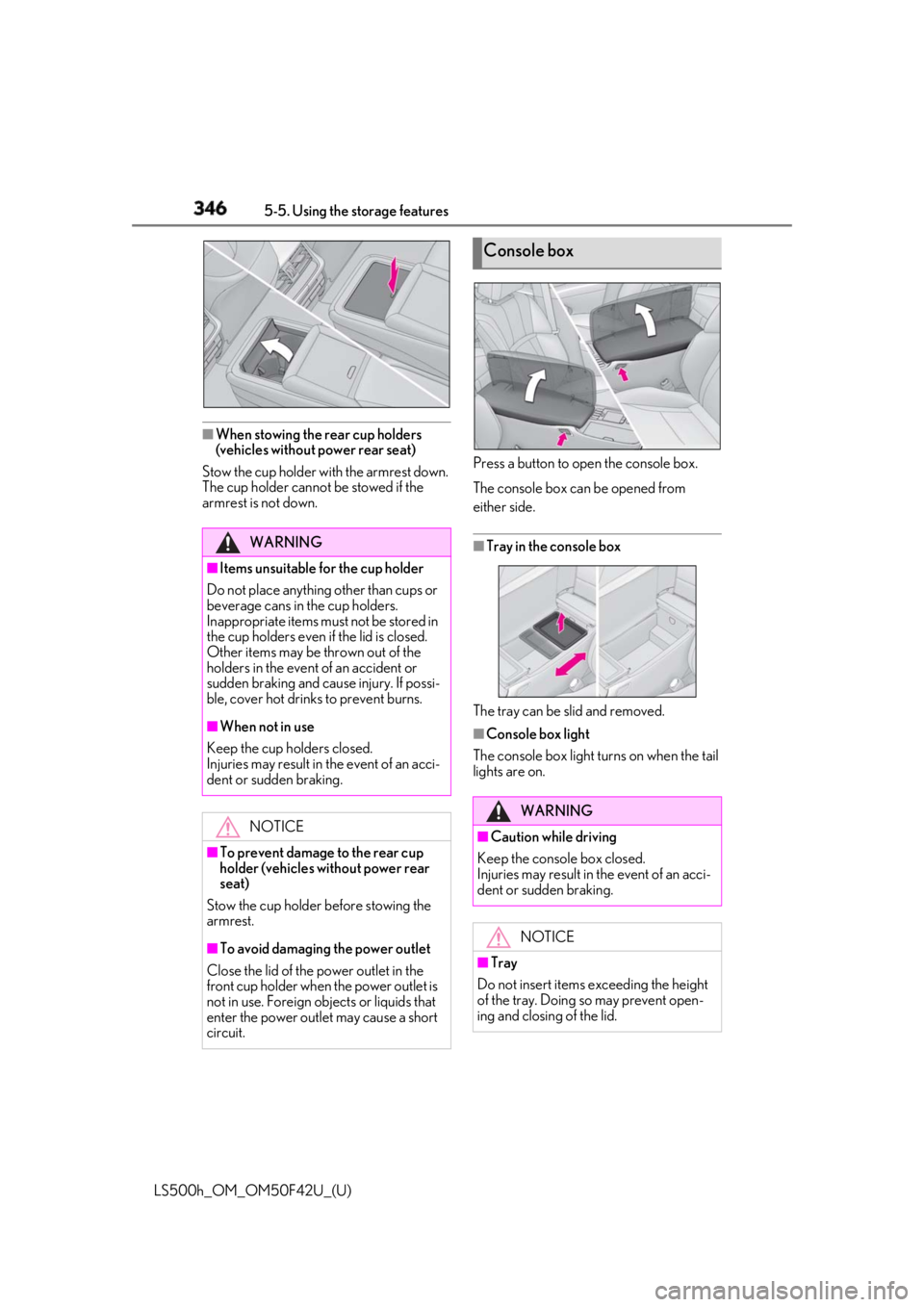
When stowing the rear cup holders
(vehicles without power rear seat)
Stow the cup holder with the armrest down.
The cup holder cannot be stowed if the
armrest is not down. Press a button to open the console box.
The console box can be opened from
either side.
■
Tray in the console box
The tray can be slid and removed. ■
Console box light
The console box light turns on when the tail
lights are on.WARNING■
Items unsuitable for the cup holder
Do not place anything other than cups or
beverage cans in the cup holders.
Inappropriate items must not be stored in
the cup holders even if the lid is closed.
Other items may be thrown out of the
holders in the event of an accident or
sudden braking and cause injury. If possi-
ble, cover hot drinks to prevent burns. ■
When not in use
Keep the cup holders closed.
Injuries may result in the event of an acci-
dent or sudden braking.
NOTICE
■
To prevent damage to the rear cup
holder (vehicles without power rear
seat)
Stow the cup holder before stowing the
armrest.
■
To avoid damaging the power outlet
Close the lid of the power outlet in the
front cup holder when the power outlet is
not in use. Foreign ob jects or liquids that
enter the power outlet may cause a short
circuit. Console box
WARNING
■
Caution while driving
Keep the console box closed.
Injuries may result in the event of an acci-
dent or sudden braking.
NOTICE
■
Tray
Do not insert items exceeding the height
of the tray. Doing so may prevent open-
ing and closing of the lid.
Page 347 of 528
3475-5. Using the storage features
LS500h_OM_OM50F42U_(U) 5
Interior features
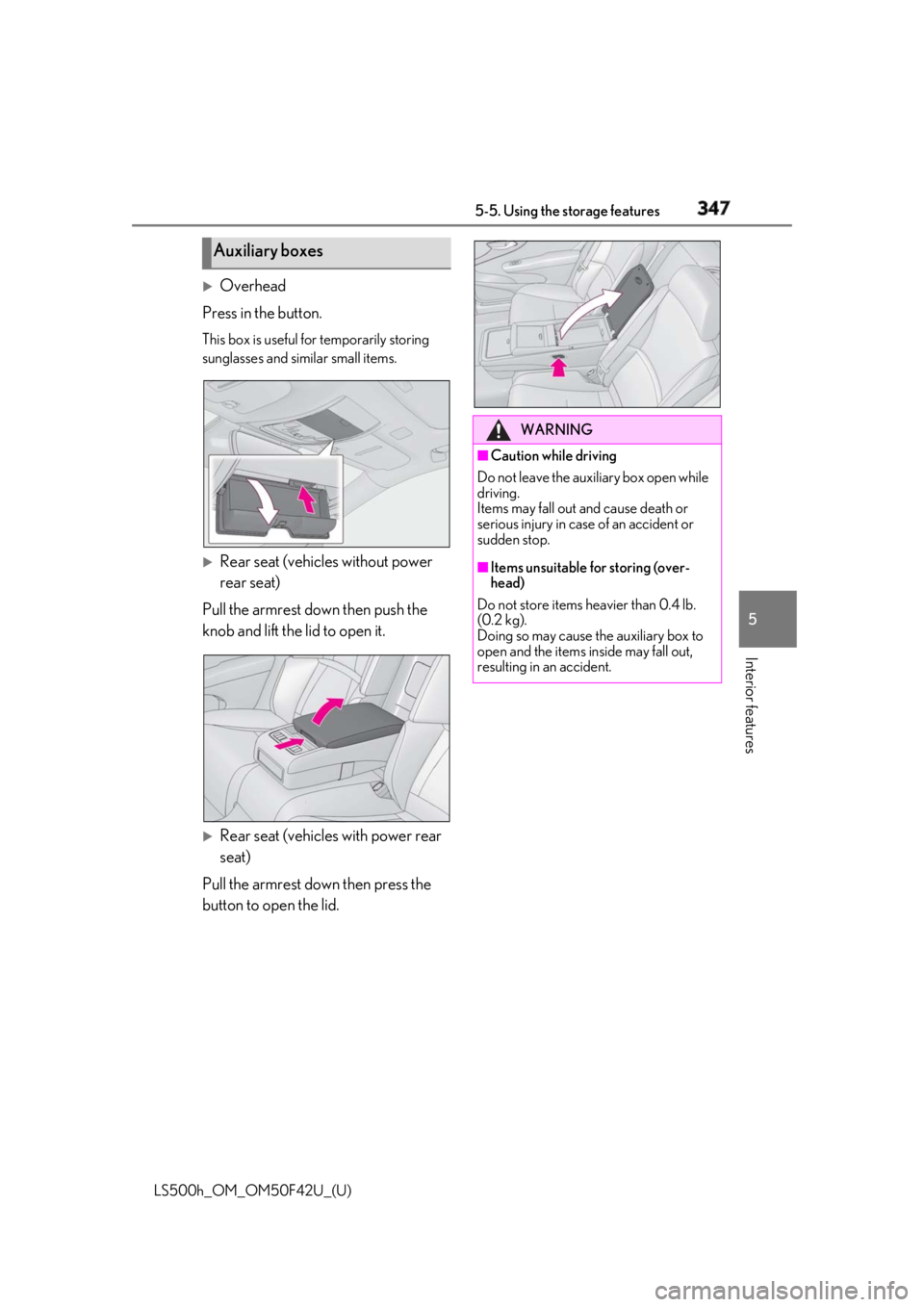
Overhead
Press in the button. This box is useful for temporarily storing
sunglasses and similar small items.
Rear seat (vehicles without power
rear seat)
Pull the armrest down then push the
knob and lift the lid to open it.
Rear seat (vehicles with power rear
seat)
Pull the armrest down then press the
button to open the lid.Auxiliary boxes WARNING■
Caution while driving
Do not leave the aux iliary box open while
driving.
Items may fall out and cause death or
serious injury in case of an accident or
sudden stop. ■
Items unsuitable for storing (over-
head)
Do not store items heavier than 0.4 lb.
(0.2 kg).
Doing so may cause the auxiliary box to
open and the items inside may fall out,
resulting in an accident.