brake light LEXUS LS500H 2018 User Guide
[x] Cancel search | Manufacturer: LEXUS, Model Year: 2018, Model line: LS500H, Model: LEXUS LS500H 2018Pages: 528, PDF Size: 10.8 MB
Page 181 of 528
1814-2. Driving procedures
LS500h_OM_OM50F42U_(U) 4
Driving ■
Using the manual mode
The parking brake can be set and
released manually.
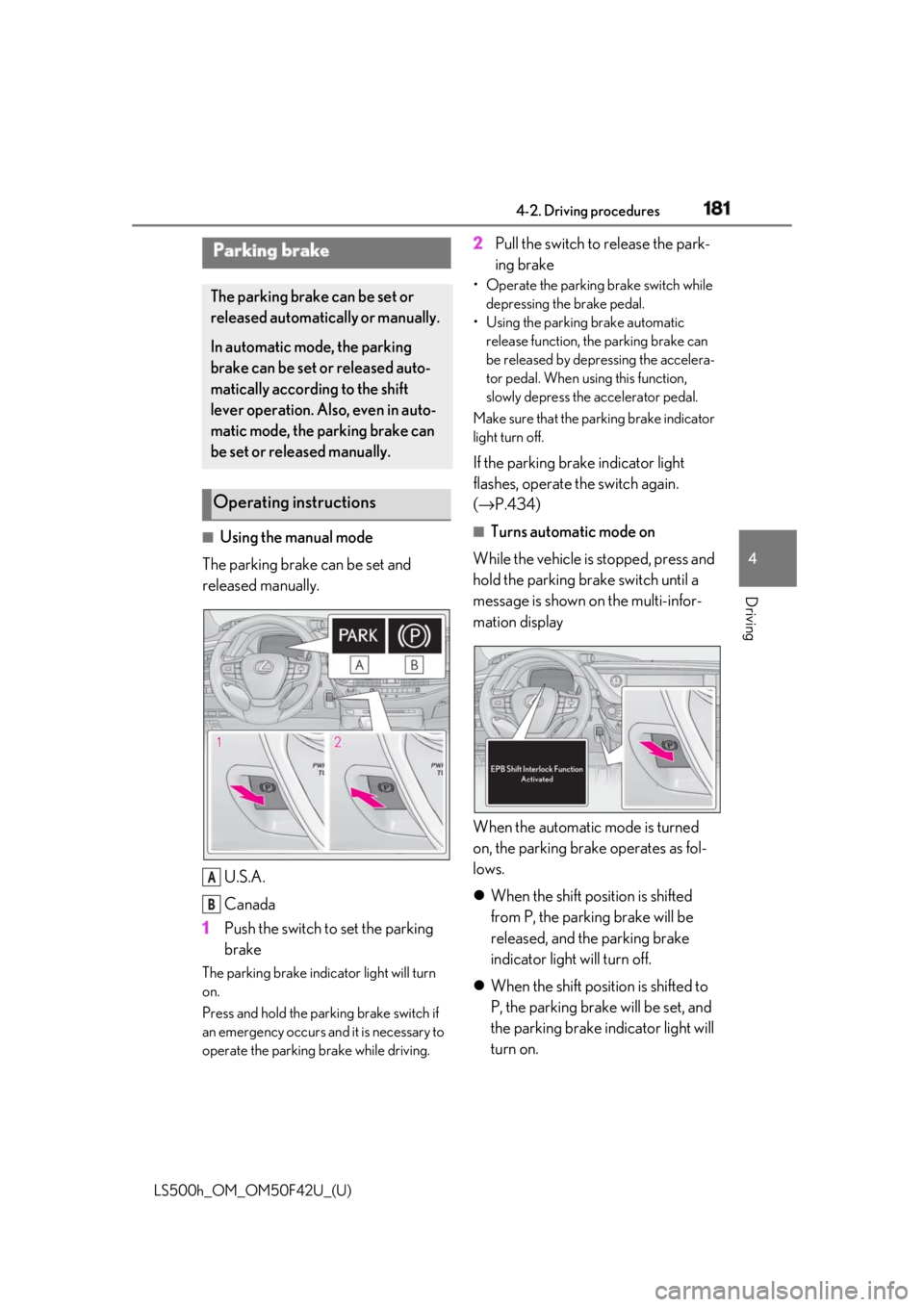
U.S.A.
Canada
1 Push the switch to set the parking
brakeThe parking brake indicator light will turn
on.
Press and hold the parking brake switch if
an emergency occurs and it is necessary to
operate the parking brake while driving. 2 Pull the switch to release the park-
ing brake • Operate the parking brake switch while
depressing the brake pedal.
• Using the parking brake automatic
release function, the parking brake can
be released by depressing the accelera-
tor pedal. When using this function,
slowly depress the accelerator pedal.
Make sure that the pa rking brake indicator
light turn off.
If the parking brake indicator light
flashes, operate the switch again.
( → P.434) ■
Turns automatic mode on
While the vehicle is stopped, press and
hold the parking brake switch until a
message is shown on the multi-infor-
mation display
When the automatic mode is turned
on, the parking brake operates as fol-
lows.
When the shift position is shifted
from P, the parking brake will be
released, and the parking brake
indicator light will turn off.
When the shift position is shifted to
P, the parking brake will be set, and
the parking brake indicator light will
turn on.Parking brake The parking brake can be set or
released automatically or manually.
In automatic mode, the parking
brake can be set or released auto-
matically according to the shift
lever operation. Also, even in auto-
matic mode, the parking brake can
be set or released manually.
Operating instructions
A
B
Page 182 of 528
182 4-2. Driving procedures
LS500h_OM_OM50F42U_(U) Operate the shift lever and P position
switch with the vehicle stopped and the
brake pedal depressed. ■
Turns automatic mode off
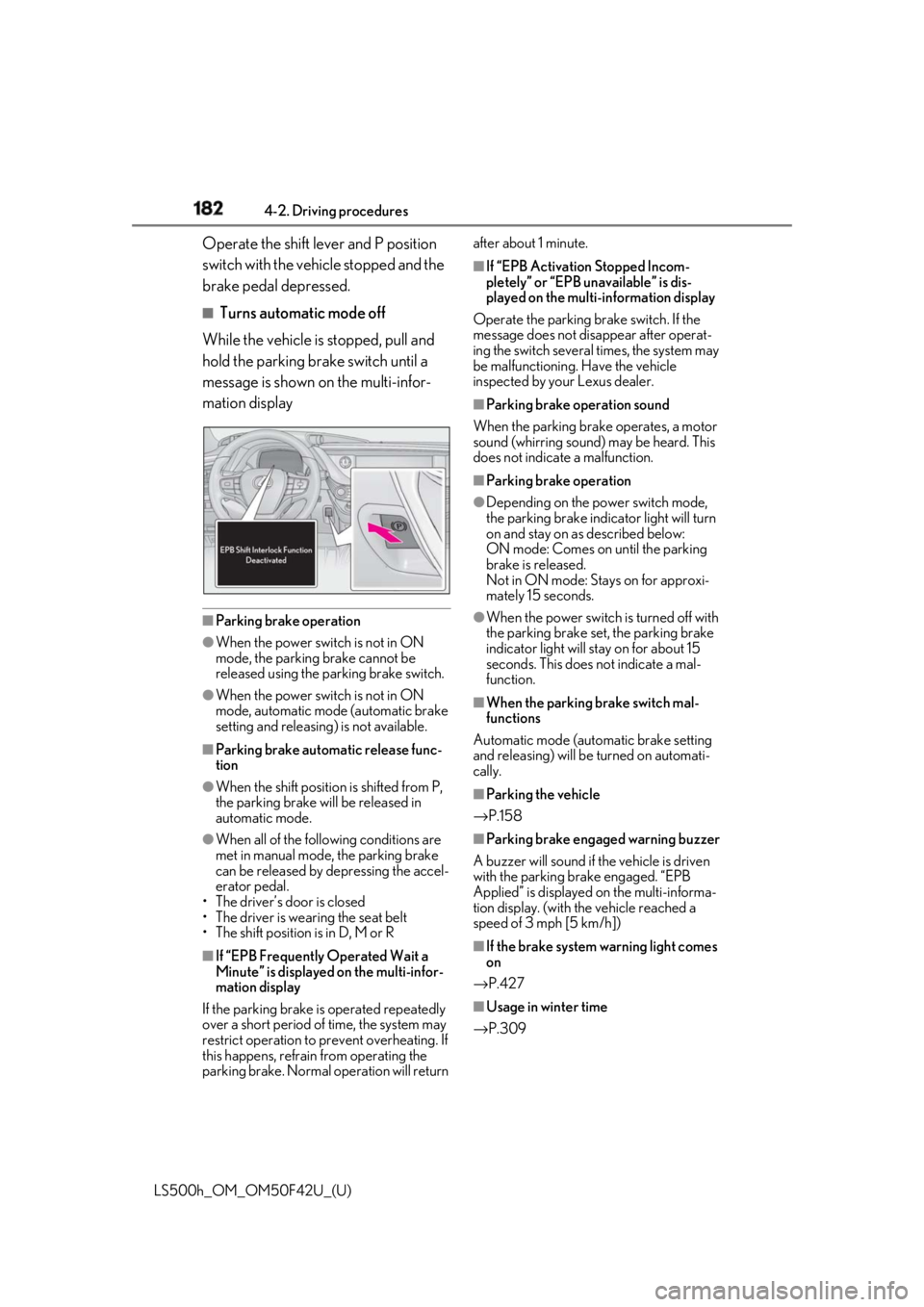
While the vehicle is stopped, pull and
hold the parking brake switch until a
message is shown on the multi-infor-
mation display
■
Parking brake operation●
When the power switch is not in ON
mode, the parking brake cannot be
released using the parking brake switch.●
When the power switch is not in ON
mode, automatic mode (automatic brake
setting and releasing) is not available. ■
Parking brake automatic release func-
tion●
When the shift position is shifted from P,
the parking brake will be released in
automatic mode.●
When all of the foll owing conditions are
met in manual mode, the parking brake
can be released by depressing the accel-
erator pedal.
• The driver’s door is closed
• The driver is wearing the seat belt
• The shift position is in D, M or R
■
If “EPB Frequently Operated Wait a
Minute” is displayed on the multi-infor-
mation display
If the parking brake is operated repeatedly
over a short period of time, the system may
restrict operation to prevent overheating. If
this happens, refrain from operating the
parking brake. Normal operation will return after about 1 minute. ■
If “EPB Activation Stopped Incom-
pletely” or “EPB unavailable” is dis-
played on the multi-information display
Operate the parking brake switch. If the
message does not disappear after operat-
ing the switch several times, the system may
be malfunctioning. Have the vehicle
inspected by your Lexus dealer. ■
Parking brake operation sound
When the parking brake operates, a motor
sound (whirring sound) may be heard. This
does not indicate a malfunction. ■
Parking brake operation ●
Depending on the power switch mode,
the parking brake indicator light will turn
on and stay on as described below:
ON mode: Comes on until the parking
brake is released.
Not in ON mode: Stays on for approxi-
mately 15 seconds. ●
When the power switch is turned off with
the parking brake set, the parking brake
indicator light will stay on for about 15
seconds. This does not indicate a mal-
function. ■
When the parking brake switch mal-
functions
Automatic mode (automatic brake setting
and releasing) will be turned on automati-
cally. ■
Parking the vehicle
→ P.158 ■
Parking brake engaged warning buzzer
A buzzer will sound if the vehicle is driven
with the parking brake engaged. “EPB
Applied” is displayed on the multi-informa-
tion display. (with the vehicle reached a
speed of 3 mph [5 km/h])
■
If the brake system warning light comes
on
→ P.427
■
Usage in winter time
→ P.309
Page 183 of 528
1834-2. Driving procedures
LS500h_OM_OM50F42U_(U) 4
Driving
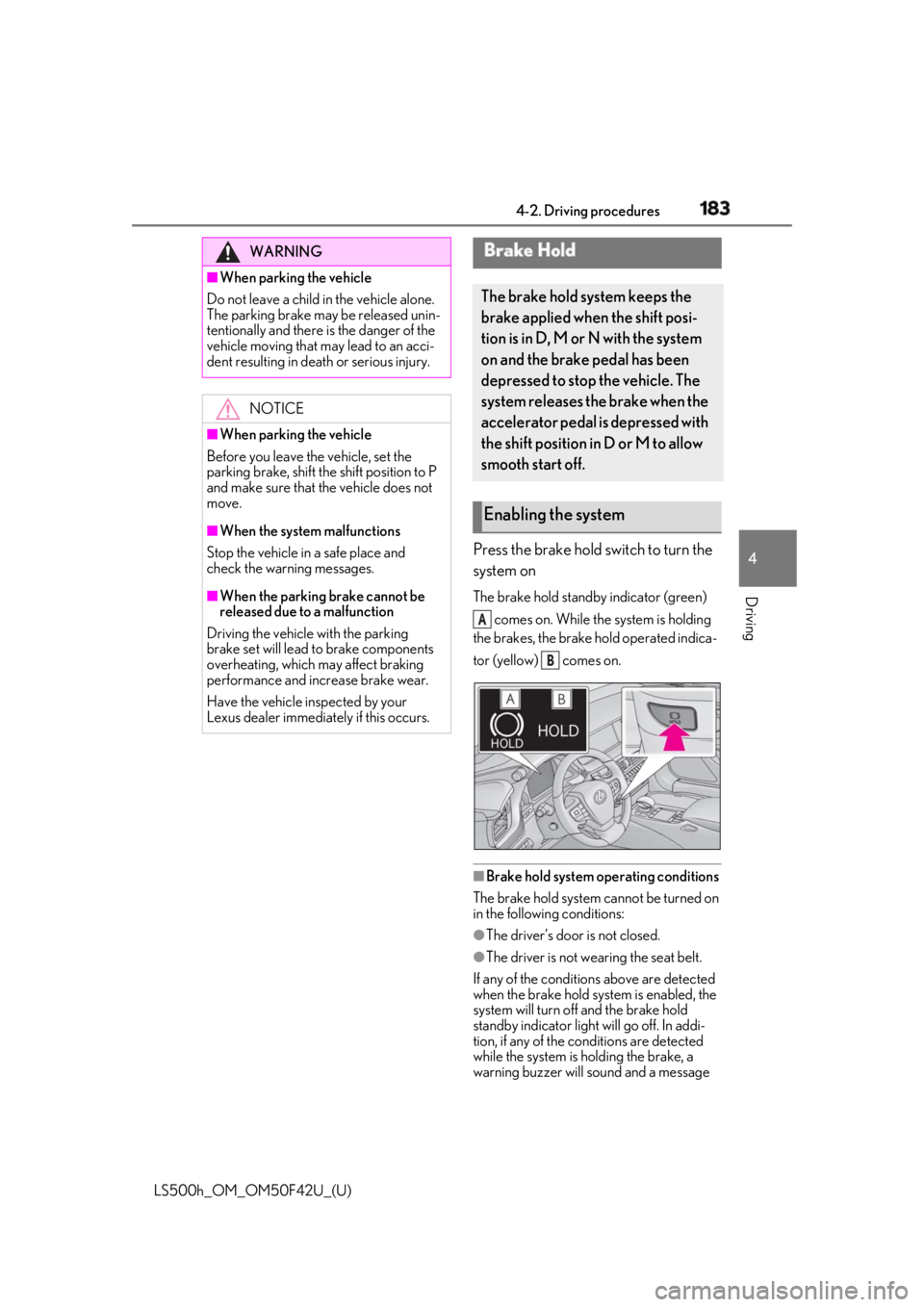
Press the brake hold switch to turn the
system on The brake hold standby indicator (green)
comes on. While the system is holding
the brakes, the brake hold operated indica-
tor (yellow) comes on.
■
Brake hold system operating conditions
The brake hold system cannot be turned on
in the following conditions:
●
The driver’s door is not closed.
●
The driver is not wearing the seat belt.
If any of the conditions above are detected
when the brake hold system is enabled, the
system will turn off and the brake hold
standby indicator light will go off. In addi-
tion, if any of the co nditions are detected
while the system is holding the brake, a
warning buzzer will sound and a message WARNING■
When parking the vehicle
Do not leave a child in the vehicle alone.
The parking brake may be released unin-
tentionally and there is the danger of the
vehicle moving that may lead to an acci-
dent resulting in death or serious injury.
NOTICE■
When parking the vehicle
Before you leave the vehicle, set the
parking brake, shift the shift position to P
and make sure that the vehicle does not
move. ■
When the system malfunctions
Stop the vehicle in a safe place and
check the warning messages. ■
When the parking brake cannot be
released due to a malfunction
Driving the vehicle with the parking
brake set will lead to brake components
overheating, which may affect braking
performance and increase brake wear.
Have the vehicle inspected by your
Lexus dealer immediately if this occurs. Brake Hold The brake hold system keeps the
brake applied when the shift posi-
tion is in D, M or N with the system
on and the brake pedal has been
depressed to stop the vehicle. The
system releases the brake when the
accelerator pedal is depressed with
the shift position in D or M to allow
smooth start off.
Enabling the system A
B
Page 184 of 528
184 4-2. Driving procedures
LS500h_OM_OM50F42U_(U) will be shown on the multi-information dis-
play. The parking brake will then be set
automatically. ■
Brake hold function●
If the brake pedal is left released for a
period of about 3 minutes after the sys-
tem has started holding the brake, the
parking brake will be set automatically. In
this case, a warning buzzer sounds and a
message is shown on the multi-informa-
tion display.●
To turn the system off while the system is
holding the brake, firmly depress the
brake pedal and press the button again.●
The brake hold function may not hold the
vehicle when the vehicle is on a steep
incline. In this situation, it may be neces-
sary for the driver to apply the brakes. A
warning buzzer will sound and the
multi-information display will inform the
driver of this situation. If a warning mes-
sage is shown on the multi-information
display, read the message and follow the
instructions.■
When the parking brake is set automati-
cally while the system is holding the
brakes
Perform any of the follo wing operations to
release the parking brake. ●
Depress the accelerator pedal. (The
parking brake will not be released auto-
matically if the seat belt is not fastened.)●
Operate the parking brake switch with
the brake pedal depressed.
Make sure that the pa rking brake indicator
light goes off. ( → P.181)
■
When an inspection at your Lexus
dealer is necessary
When the brake hold standby indicator
(green) does not illuminate even when the
brake hold switch is pressed with the brake
hold system operating conditions met, the
system may be malfun ctioning. Have the
vehicle inspected at your Lexus dealer. ■
If “Brake Hold Fault Depress Brake to
Deactivate Visit Your Dealer” or “Brake
Hold Malfunction Visit Your Dealer” is
displayed on the multiinformation dis-
play
The system may be ma lfunctioning. Have
the vehicle inspected by your Lexus dealer. ■
Warning messages and buzzers
Warning messages and buzzers are used to
indicate a system malfunction or to inform
the driver of the need for caution. If a warn-
ing message is shown on the multi-informa-
tion display, read the message and follow
the instructions. ■
If the brake hold operated indicator
flashes
→ P.434
WARNING■
When the vehicle is on a steep incline
When using the brake hold system on a
steep incline exercise caution. The brake
hold function may not hold the vehicle in
such a situation. ■
When stopped on a slippery road
The system cannot stop the vehicle when
the gripping ability of the tires has been
exceeded. Do not use the system when
stopped on a slippery road.
NOTICE
■
When parking the vehicle
The brake hold system is not designed
for use when parking the vehicle for a
long period of time. Turning the power
switch off while the system is holding the
brake may release the brake, which
would cause the vehicle to move. When
operating the power switch, depress the
brake pedal, shift the shift position to P
and set the parking brake.
Page 185 of 528
1854-3. Operating the lights and wipers
LS500h_OM_OM50F42U_(U) 4
Driving 4-3.Operating the lights and wipers
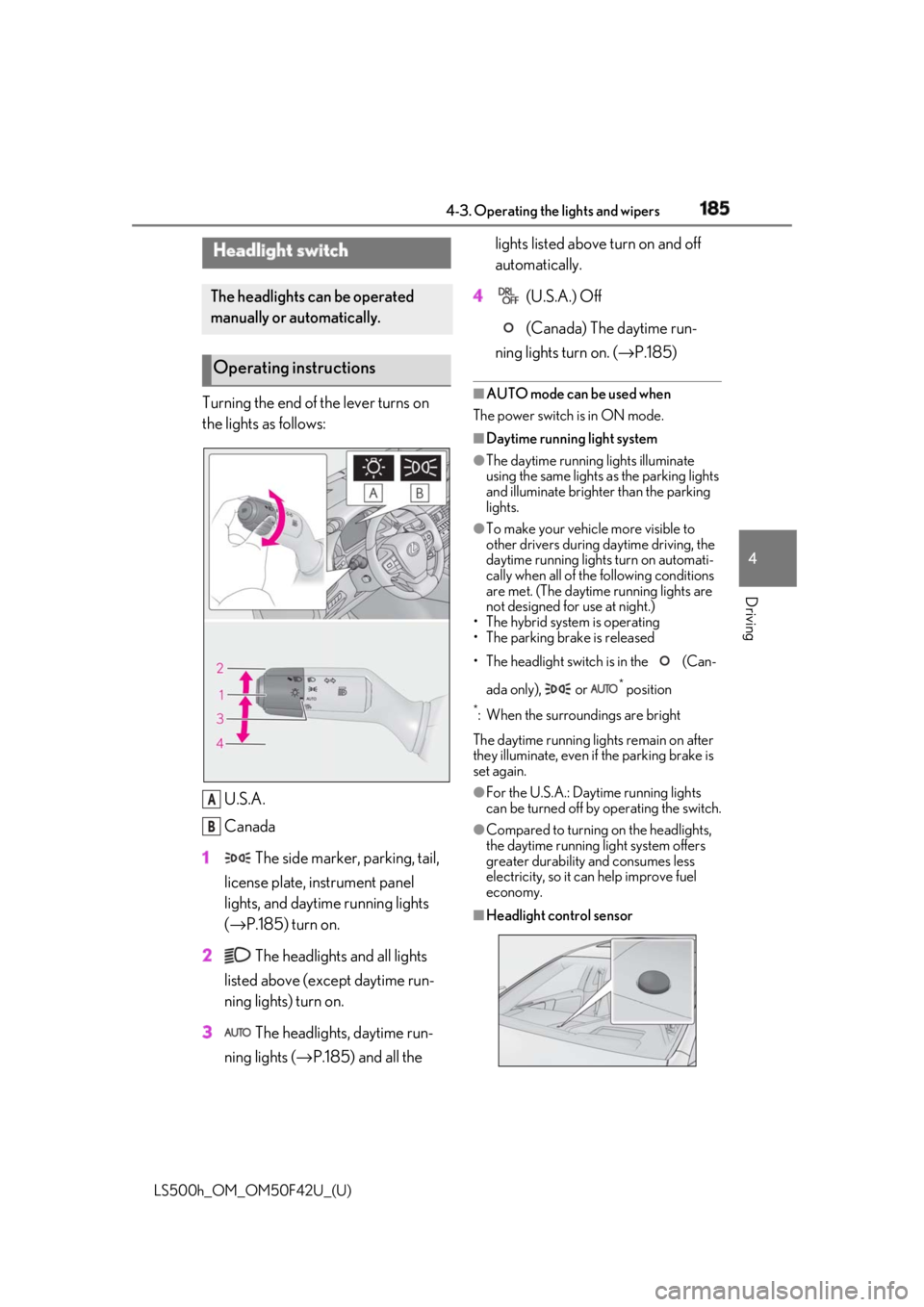
Turning the end of the lever turns on
the lights as follows:
U.S.A.
Canada
1 The side marker, parking, tail,
license plate, instrument panel
lights, and daytime running lights
( → P.185) turn on.
2 The headlights and all lights
listed above (except daytime run-
ning lights) turn on.
3 The headlights, daytime run-
ning lights ( → P.185) and all the lights listed above turn on and off
automatically.
4 (U.S.A.) Off
(Canada) The daytime run-
ning lights turn on. ( → P.185)■
AUTO mode can be used when
The power switch is in ON mode. ■
Daytime running light system ●
The daytime running lights illuminate
using the same lights as the parking lights
and illuminate brighter than the parking
lights. ●
To make your vehicle more visible to
other drivers during daytime driving, the
daytime running lights turn on automati-
cally when all of the following conditions
are met. (The daytime running lights are
not designed for use at night.)
• The hybrid system is operating
• The parking brake is released
• The headlight switch is in the (Can-
ada only), or *
position*
: When the surroundings are bright
The daytime running lights remain on after
they illuminate, even if the parking brake is
set again. ●
For the U.S.A.: Daytime running lights
can be turned off by operating the switch. ●
Compared to turning on the headlights,
the daytime running light system offers
greater durability and consumes less
electricity, so it can help improve fuel
economy.
■
Headlight control sensorHeadlight switch The headlights can be operated
manually or automatically.
Operating instructions
A
B
Page 211 of 528
2114-5. Using the driving support systems
LS500h_OM_OM50F42U_(U) 4
Driving WARNING■
Pre-collision braking●
When the pre-collision braking func-
tion is operating, a large amount of
braking force will be applied.●
If the vehicle is stopped by the opera-
tion of the pre-collision braking func-
tion, the pre-collision braking function
operation will be canceled after
approximately 2 seco nds. Depress the
brake pedal as necessary.●
The pre-collision braking function may
not operate if certain operations are
performed by the driver. If the acceler-
ator pedal is being depressed strongly
or the steering wheel is being turned,
the system may determine that the
driver is taking evasive action and may
prevent the pre-collision braking func-
tion from operating.●
In some situations, while the pre-colli-
sion braking function is operating,
operation of the function may be can-
celed if the accelerator pedal is
depressed strongly or the steering
wheel is turned and the system deter-
mines that the driver is taking evasive
action.
●
If the brake pedal is being depressed,
the system may determine that the
driver is taking evasive action and pos-
sibly delay the operation timing of the
pre-collision braking function.
■
Active steering assist●
The steering wheel may turn automati-
cally when active steering assist is
operating.
●
As active steering assist operation will
be canceled when the system deter-
mines that a collision has been
avoided, operate the steering wheel as
necessary. ●
In the following situations, the system
may determine that th e driver is taking
evasive action. In this case, the active
steering assist may not operate or may
be canceled.
• If the accelerator pedal is being
depressed strongly or the steering
wheel is being operat ed. In this case
the system may determine that the
driver is taking evasive action and the
pre-collision braking may not operate.
• In some situations, while the active
steering assist is operating, operation
of the function may be canceled if the
accelerator pedal is depressed
strongly or the steering wheel is turned
and the system determines that the
driver is taking evasive action.
• When the active steering assist is
operating, if the stee ring wheel is held
firmly or is operated in the opposite
direction to that which the system is
generating torque, the function may be
canceled.
• If the brake pedal is depressed, the sys-
tem may determine that the driver is
taking evasive action and the active
steering assist operation may be
delayed.
■
Pre-collision seat belts with comfort
function
If the pre-collision se at belts have oper-
ated and the seat belts are locked in a
retracted position, immediately stop the
vehicle in a safe place, release and
retract the seat belts to unlock them and
then fasten them again.
Also, if a seat belt ca n be loosened, it can
be unlocked by slightly retracting it with-
out releasing it.
■
When to disable the pre-collision sys-
tem
In the following situations, disable the
system, as it may not operate properly,
possibly leading to an accident resulting
in death or serious injury:
●
When the vehicle is being towed
Page 218 of 528

218 4-5. Using the driving support systems
LS500h_OM_OM50F42U_(U) into, preventing the ac tive steering assist
from operating properly:
• When the white (yellow) lane lines are
difficult to see, such as when they are
faint, diverging/merging, or a shadow is
cast upon them
• When the lane is more wide or narrow
than normal
• When there is a light and dark pattern on
the road surface , such as due to road
repairs
• If the system determines that a collision
can be avoided by only using the brakes
• When a pedestrian is detected near the
centerline of the vehicle●
In some situations such as the following,
sufficient braking force or steering force
may not be obtained, preventing the sys-
tem from performing properly:
• If the braking functions cannot operate to
their full extent, such as when the brake
parts are extremely cold, extremely hot,
or wet
• If the vehicle is not properly maintained
(brakes or tires are excessively worn,
improper tire inflation pressure, etc.)
• When the vehicle is being driven on a
gravel road or other slippery surface
• If there are deep ruts in the road
• When driving on a slope
• When driving on a horizontally slanted
road●
Some pedestrians and bicyclists, such as
the following, may not be detected by the
sensors, preventing the system from
operating properly:
• Pedestrians and bicyclists shorter than
approximately 3.2 ft. (1 m) or taller than
approximately 6.5 ft. (2 m)
• Bicyclists riding on unusual bicycles
(bicycles for small children, tricycles,
folding bicycles, BMX bicycles, tandem
bicycles, etc.)
• Pedestrians and bicyclists who are wear-
ing white and look extremely bright
• Pedestrians and bicyclists which are not
illuminated by the headli ghts at night, in a
tunnel, etc.
• Pedestrians whose clothing appears to
be nearly the same co lor or brightness as
their surroundings
• Pedestrians and bicy clists near walls,
fences, guardrails, or large objects • Pedestrians and bicyclists which are on a
metal object (manhole cover, steel plate,
etc.) on the road
• Pedestrians and bicyclists which are mov-
ing fast
• Pedestrians and bicyclists which change
speed or direction abruptly
• Pedestrians and bicyclists which suddenly
emerge from behind a vehicle or large
object
• Pedestrians and bicyclists which are
extremely close to the side of the vehicle
(outside rear view mirror, etc.)
• Pedestrians and bicyclists wearing over-
sized clothing, such as a rain coat, long
skirt, etc., making their silhouette obscure
• Pedestrians and bicyclists who are carry-
ing large baggage, ho lding an umbrella,
etc., hiding part of their body
• Pedestrians and bicyclists behind an
object that hides part of their body
• Pedestrians and bicyclists who are bend-
ing forward or squatting
• Pedestrians who are pushing a stroller,
wheelchair, bicycle or other vehicle
• Groups of pedestrians/bicyclists which
are close together ●
Some guardrails, such as the following,
may not be detected by the sensors, pre-
venting the system from operating prop-
erly:
• Guardrails which are less than approxi-
mately 1.9 ft. (60 cm) tall
• Short guardrails
• Irregularly-shaped gu ardrails (wire cable
guardrails, guardrails made of thin poles,
etc.)
• Guardrails which are not illuminated by
the headlights at nigh t, in a tunnel, etc.
• Guardrails which appear to be nearly the
same color or brightness as their sur-
roundings
• Guardrails which appear to be nearly the
same shape as their surroundings (walls,
etc.)
• Guardrails which are over a metal object
(manhole cover, steel plate, etc.)
• Guardrails which are hidden behind thick
grass
• Guardrails which are extremely close to
the side of the vehicle (outside rear view
mirror, etc.)
• Curved guardrails or guardrails at the
entrance of a curve
Page 219 of 528

2194-5. Using the driving support systems
LS500h_OM_OM50F42U_(U) 4
Driving ●
In some situations such as the following,
the system may detect a pedestrian and
display a warning on the head-up display,
even though no pedestrian exists:
• If the front of the vehicle is raised or low-
ered, such as when the road surface is
uneven or undulating (due to ruts, etc.)
• When driving on a slope
• When driving on a horizontally slanted
road
• If the driver’s posture (driver seat posi-
tion) is extreme, such as excessively
reclined
• If the head-up display position is set
extremely high■
If the PCS warning light flashes or illumi-
nates and a warning message is dis-
played on the multi-information display
The pre-collision system may be temporar-
ily unavailable or there may be a malfunc-
tion in the system. ●
In the following situations, the warning
light will turn off, the message will disap-
pear and the system will become opera-
tional when normal operating conditions
return:
• When a sensor or the area around a sen-
sor is hot, such as in the sun
• When a sensor or the area around a sen-
sor is cold, such as in an extremely cold
environment
• When a sensor is dirty or covered with
snow, etc.
• When the part of the windshield in front
of the camera sensor is fogged up or cov-
ered with condensation or ice (Defog-
ging the windshield: → P.324)
• If the camera sensor is obstructed, such
as when the hood is open or a sticker is
attached to the windshield near the cam-
era sensor
●
If the PCS warning ligh t continues to flash
or remains illuminated or the warning
message does not disappear even
though the vehicle has returned to nor-
mal, the system may be malfunctioning.
Have the vehicle inspected by your Lexus
dealer immediately.
■
If VSC is disabled
●
If VSC is disabled ( → P.302), the
pre-collision brake assist and pre-colli- sion braking functions are also disabled. ●
The PCS warning light will turn on and
“VSC Turned Off Pre-Collision Brake
System Unavailable” will be displayed on
the multi-information display.
Page 226 of 528

226 4-5. Using the driving support systems
LS500h_OM_OM50F42U_(U) • The vehicle is wobbling.
• The vehicle is being driven at extremely
high speeds.
• When driving on a hill
• If the radar sensor or camera sensor is
misaligned●
In some situations such as the following,
sufficient braking force may not be
obtained, preventing the system from
performing properly:
• If the braking functions cannot operate to
their full extent, such as when the brake
parts are extremely cold, extremely hot,
or wet
• If the vehicle is not properly maintained
(brakes or tires are excessively worn,
improper tire inflation pressure, etc.)
• When the vehicle is being driven on a
gravel road or other slippery surface●
Some pedestrians such as the following
may not be detected by the radar sensor
and camera sensor, preventing the sys-
tem from operating properly:
• Pedestrians shorter than approximately
3.2 ft. (1 m) or tall er than approximately
6.5 ft. (2 m)
• Pedestrians wearing oversized clothing
(a rain coat, long skir t, etc.), making their
silhouette obscure
• Pedestrians who are carrying large bag-
gage, holding an umbrella, etc., hiding
part of their body
• Pedestrians who are bending forward or
squatting
• Pedestrians who are pushing a stroller,
wheelchair, bicycle or other vehicle
• Groups of pedestrians which are close
together
• Pedestrians who are wearing white and
look extremely bright
• Pedestrians in the dark, such as at night
or while in a tunnel
• Pedestrians whose clothing appears to
be nearly the same co lor or brightness as
their surroundings
• Pedestrians near walls , fences, guardrails,
or large objects
• Pedestrians who are on a metal object
(manhole cover, steel plate, etc.) on the
road
• Pedestrians who are walking fast
• Pedestrians who are changing speed
abruptly • Pedestrians running out from behind a
vehicle or a large object
• Pedestrians who are extremely close to
the side of the vehicle (outside rear view
mirror, etc.) ■
If the PCS warning light flashes or illumi-
nates and a warning message is dis-
played on the multi-information display
The pre-collision system may be temporar-
ily unavailable or there may be a malfunc-
tion in the system. ●
In the following situations, the warning
light will turn off, the message will disap-
pear and the system will become opera-
tional when normal operating conditions
return:
• When the radar sensor or camera sensor
or the area around either sensor is hot,
such as in the sun
• When the radar sensor or camera sensor
or the area around either sensor is cold,
such as in an extremely cold environment
• When a front sensor is dirty or covered
with snow, etc.
• When the part of the windshield in front
of the camera sensor is fogged up or cov-
ered with condensation or ice (Defog-
ging the windshield: → P.324)
• If the camera sensor is obstructed, such
as when the hood is open or a sticker is
attached to the windshield near the cam-
era sensor ●
If the PCS warning light continues to flash
or remains illuminated or the warning
message does not disappear even
though the vehicle has returned to nor-
mal, the system may be malfunctioning.
Have the vehicle inspected by your Lexus
dealer immediately.
■
If VSC is disabled
●
If VSC is disabled ( → P.302), the
pre-collision brake assist and pre-colli-
sion braking functions are also disabled.
●
The PCS warning light will turn on and
“VSC Turned Off Pre-Collision Brake
System Unavailable” will be displayed on
the multi-information display.
Page 228 of 528
228 4-5. Using the driving support systems
LS500h_OM_OM50F42U_(U) ●
Setting for “PCS” and “CAUTION” in
( → P.86) of the multi-information
display.●
A shift position other than P or R is
selected. ●
Your vehicle is approaching an intersec-
tion at approximately 9 mph (15 km/h) or
lower.●
A vehicle is approaching from the left or
right in front of your vehicle at a speed
between approximately 6 mph (10 km/h)
and 37 mph (60 km/h).●
There are no preceding vehicles ahead of
your vehicle.●
The accelerator pedal is not strongly
depressed.●
The brake pedal is not being strongly
depressed.■
Situations in which the system may
operate even though no vehicles are
approaching
In certain situations, such as the following,
the system may operate even though no
vehicles are approaching: ●
When approaching objects on the road-
side, such as guardrails, traffic signs, util-
ity poles, street lig hts, trees, or walls●
When driving near a TV tower, broad-
casting station, electric power plant, or
other location where strong radio waves
or electrical noise may be present●
When passing an object on the side of the
road, such as a parked vehicle●
When a vehicle or pedestrian is
approaching from the le ft or right in front
of your vehicle from far away
●
When a vehicle or pedestrian is moving
within a parking spot, et c. next to the lane
your vehicle is driving in
●
When a pedestrian or bicyclist is moving
on a sidewalk
●
When a vehicle or pedestrian is moving
away from your vehicle
●
When a vehicle approaching from the left
or right in front of your vehicle is deceler-
ating or stops
●
When a vehicle approaching from the left or right in front of your vehicle makes a
left/right turn immediat ely in front of your
vehicle ●
When a pedestrian is approaching your
vehicle ●
When an oncoming vehicle makes a
left/right turn ●
When your vehicle enters an intersection
before a vehicle approaching from the
left or right in front of your vehicle ●
When stopped at traffic light and a vehi-
cle approaches from the left or right in
front of your vehicle ●
When driving in a location where there
are objects which reflect radar, such as
vehicles, guardrails, walls, traffic signs,
etc. ●
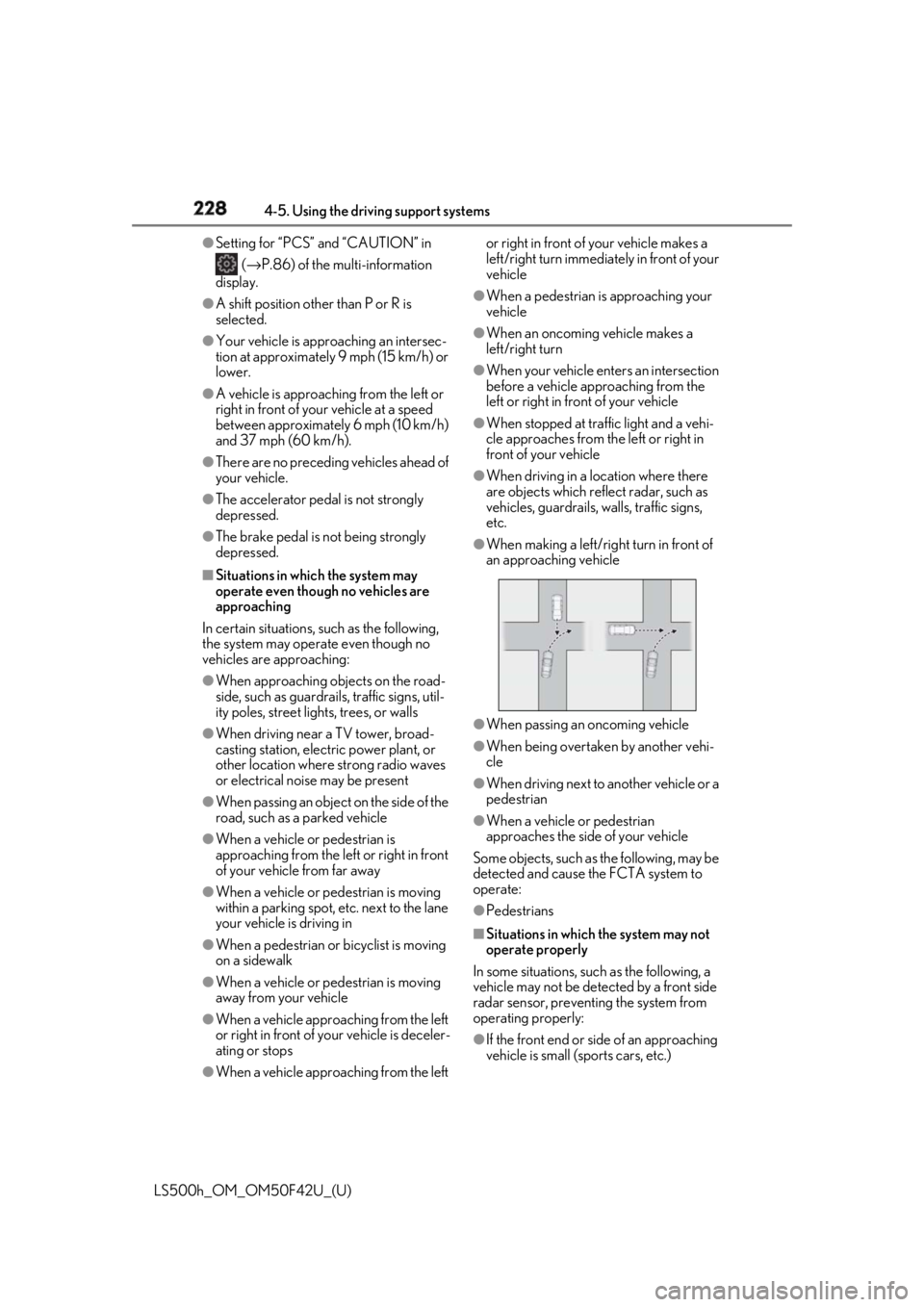
When making a left/right turn in front of
an approaching vehicle
●
When passing an oncoming vehicle ●
When being overtaken by another vehi-
cle ●
When driving next to another vehicle or a
pedestrian ●
When a vehicle or pedestrian
approaches the side of your vehicle
Some objects, such as the following, may be
detected and cause the FCTA system to
operate:
●
Pedestrians
■
Situations in which the system may not
operate properly
In some situations, such as the following, a
vehicle may not be detected by a front side
radar sensor, preventing the system from
operating properly:
●
If the front end or side of an approaching
vehicle is small (sports cars, etc.)