change wheel LEXUS LS500H 2018 User Guide
[x] Cancel search | Manufacturer: LEXUS, Model Year: 2018, Model line: LS500H, Model: LEXUS LS500H 2018Pages: 528, PDF Size: 10.8 MB
Page 217 of 528
2174-5. Using the driving support systems
LS500h_OM_OM50F42U_(U) 4
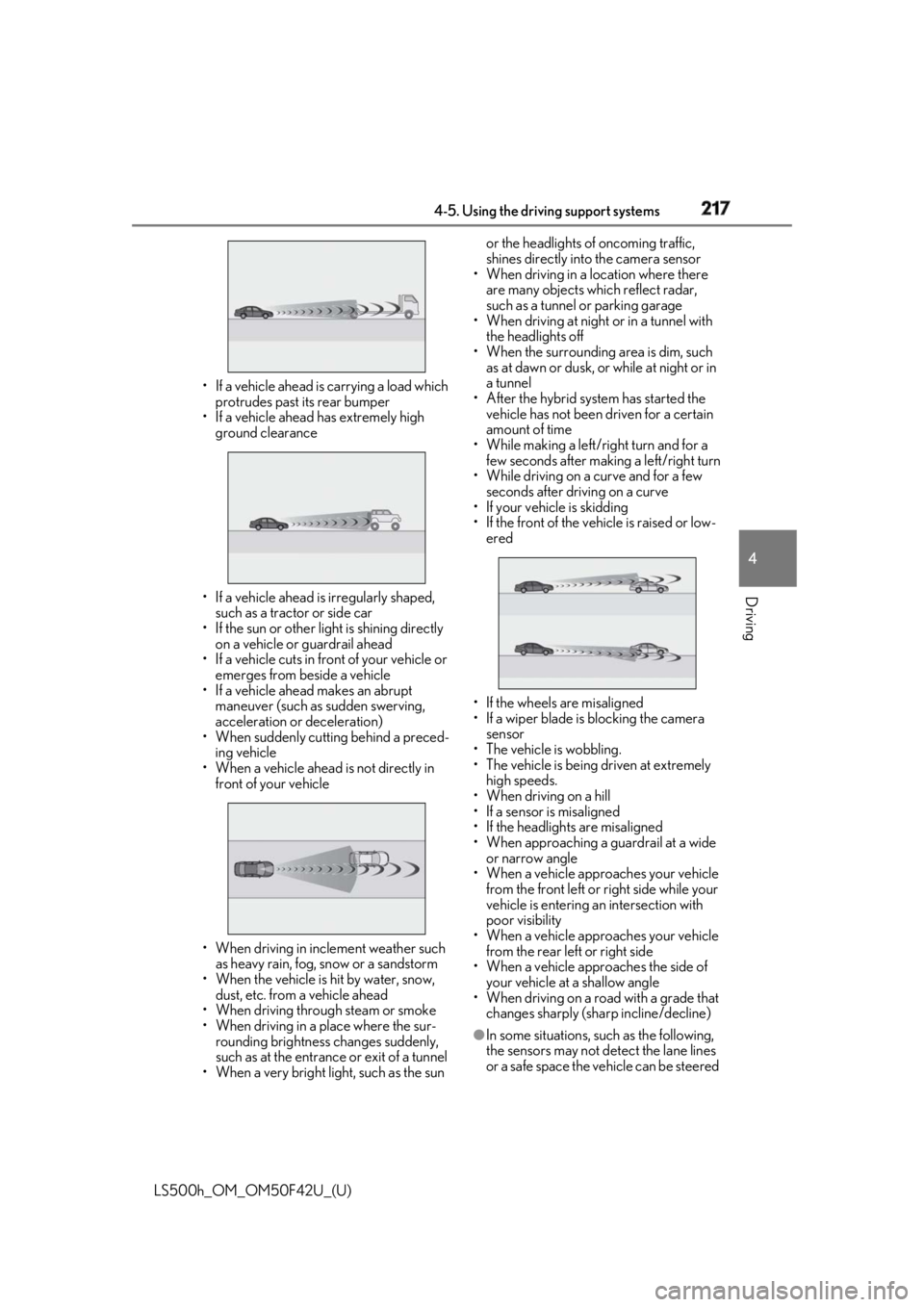
Driving • If a vehicle ahead is carrying a load which
protrudes past its rear bumper
• If a vehicle ahead has extremely high
ground clearance
• If a vehicle ahead is irregularly shaped,
such as a tractor or side car
• If the sun or other light is shining directly
on a vehicle or guardrail ahead
• If a vehicle cuts in front of your vehicle or
emerges from beside a vehicle
• If a vehicle ahead makes an abrupt
maneuver (such as sudden swerving,
acceleration or deceleration)
• When suddenly cutting behind a preced-
ing vehicle
• When a vehicle ahead is not directly in
front of your vehicle
• When driving in incl ement weather such
as heavy rain, fog, snow or a sandstorm
• When the vehicle is hit by water, snow,
dust, etc. from a vehicle ahead
• When driving through steam or smoke
• When driving in a place where the sur-
rounding brightness changes suddenly,
such as at the entrance or exit of a tunnel
• When a very bright light, such as the sun or the headlights of oncoming traffic,
shines directly into the camera sensor
• When driving in a location where there
are many objects which reflect radar,
such as a tunnel or parking garage
• When driving at night or in a tunnel with
the headlights off
• When the surrounding area is dim, such
as at dawn or dusk, or while at night or in
a tunnel
• After the hybrid system has started the
vehicle has not been driven for a certain
amount of time
• While making a left/r ight turn and for a
few seconds after making a left/right turn
• While driving on a curve and for a few
seconds after driving on a curve
• If your vehicle is skidding
• If the front of the vehicle is raised or low-
ered
• If the wheels are misaligned
• If a wiper blade is blocking the camera
sensor
• The vehicle is wobbling.
• The vehicle is being driven at extremely
high speeds.
• When driving on a hill
• If a sensor is misaligned
• If the headlights are misaligned
• When approaching a guardrail at a wide
or narrow angle
• When a vehicle approaches your vehicle
from the front left or right side while your
vehicle is entering an intersection with
poor visibility
• When a vehicle approaches your vehicle
from the rear left or right side
• When a vehicle approaches the side of
your vehicle at a shallow angle
• When driving on a road with a grade that
changes sharply (sha rp incline/decline)
●
In some situations, such as the following,
the sensors may not detect the lane lines
or a safe space the vehicle can be steered
Page 218 of 528

218 4-5. Using the driving support systems
LS500h_OM_OM50F42U_(U) into, preventing the ac tive steering assist
from operating properly:
• When the white (yellow) lane lines are
difficult to see, such as when they are
faint, diverging/merging, or a shadow is
cast upon them
• When the lane is more wide or narrow
than normal
• When there is a light and dark pattern on
the road surface , such as due to road
repairs
• If the system determines that a collision
can be avoided by only using the brakes
• When a pedestrian is detected near the
centerline of the vehicle●
In some situations such as the following,
sufficient braking force or steering force
may not be obtained, preventing the sys-
tem from performing properly:
• If the braking functions cannot operate to
their full extent, such as when the brake
parts are extremely cold, extremely hot,
or wet
• If the vehicle is not properly maintained
(brakes or tires are excessively worn,
improper tire inflation pressure, etc.)
• When the vehicle is being driven on a
gravel road or other slippery surface
• If there are deep ruts in the road
• When driving on a slope
• When driving on a horizontally slanted
road●
Some pedestrians and bicyclists, such as
the following, may not be detected by the
sensors, preventing the system from
operating properly:
• Pedestrians and bicyclists shorter than
approximately 3.2 ft. (1 m) or taller than
approximately 6.5 ft. (2 m)
• Bicyclists riding on unusual bicycles
(bicycles for small children, tricycles,
folding bicycles, BMX bicycles, tandem
bicycles, etc.)
• Pedestrians and bicyclists who are wear-
ing white and look extremely bright
• Pedestrians and bicyclists which are not
illuminated by the headli ghts at night, in a
tunnel, etc.
• Pedestrians whose clothing appears to
be nearly the same co lor or brightness as
their surroundings
• Pedestrians and bicy clists near walls,
fences, guardrails, or large objects • Pedestrians and bicyclists which are on a
metal object (manhole cover, steel plate,
etc.) on the road
• Pedestrians and bicyclists which are mov-
ing fast
• Pedestrians and bicyclists which change
speed or direction abruptly
• Pedestrians and bicyclists which suddenly
emerge from behind a vehicle or large
object
• Pedestrians and bicyclists which are
extremely close to the side of the vehicle
(outside rear view mirror, etc.)
• Pedestrians and bicyclists wearing over-
sized clothing, such as a rain coat, long
skirt, etc., making their silhouette obscure
• Pedestrians and bicyclists who are carry-
ing large baggage, ho lding an umbrella,
etc., hiding part of their body
• Pedestrians and bicyclists behind an
object that hides part of their body
• Pedestrians and bicyclists who are bend-
ing forward or squatting
• Pedestrians who are pushing a stroller,
wheelchair, bicycle or other vehicle
• Groups of pedestrians/bicyclists which
are close together ●
Some guardrails, such as the following,
may not be detected by the sensors, pre-
venting the system from operating prop-
erly:
• Guardrails which are less than approxi-
mately 1.9 ft. (60 cm) tall
• Short guardrails
• Irregularly-shaped gu ardrails (wire cable
guardrails, guardrails made of thin poles,
etc.)
• Guardrails which are not illuminated by
the headlights at nigh t, in a tunnel, etc.
• Guardrails which appear to be nearly the
same color or brightness as their sur-
roundings
• Guardrails which appear to be nearly the
same shape as their surroundings (walls,
etc.)
• Guardrails which are over a metal object
(manhole cover, steel plate, etc.)
• Guardrails which are hidden behind thick
grass
• Guardrails which are extremely close to
the side of the vehicle (outside rear view
mirror, etc.)
• Curved guardrails or guardrails at the
entrance of a curve
Page 221 of 528
2214-5. Using the driving support systems
LS500h_OM_OM50F42U_(U) 4
Driving the Adaptive Variable Suspension Sys-
tem ( → P.303) will control the damp-
ing force of the shock absorbers to
help maintain an appropriate vehicle
posture. ■
Steering control
When the system determines that the
possibility of a frontal collision is high
and the driver is operating the steering
wheel, the LDH system ( → P.303) will
control the turning angle of the front
and rear wheels and effort necessary
to turn the steering wheel to help
enhance steering responsiveness. WARNING■
Limitations of the pre-collision system●
The driver is solely responsible for safe
driving. Always drive safely, taking
care to observe your surroundings.
Do not use the pre-collision system
instead of normal braking operations
under any circumstances. This system
will not prevent collisions or lessen col-
lision damage or injury in every situa-
tion. Do not overly rely on this system.
Failure to do so may lead to an acci-
dent, resulting in death or serious
injury.
●
Although this system is designed to
help avoid a collision or help reduce
the impact of the coll ision, its effective-
ness may change according to various
conditions, therefore the system may
not always be able to achieve the same
level of performance.
Read the following conditions care-
fully. Do not overly rely on this system
and always drive carefully.
• Conditions under which the system
may operate even if there is no possi-
bility of a collision: → P.223
• Conditions under which the system
may not operate properly: → P.225 ●
Do not attempt to test the operation of
the pre-collision system yourself, as the
system may not operate properly, pos-
sibly leading to an accident. ■
Pre-collision braking ●
When the pre-collision braking func-
tion is operating, a large amount of
braking force will be applied. ●
If the vehicle is stopped by the opera-
tion of the pre-collision braking func-
tion, the pre-collision braking function
operation will be canceled after
approximately 2 seco nds. Depress the
brake pedal as necessary. ●
The pre-collision braking function may
not operate if certain operations are
performed by the driver. If the acceler-
ator pedal is being depressed strongly
or the steering wheel is being turned,
the system may determine that the
driver is taking evasive action and pos-
sibly prevent the pre-collision braking
function from operating. ●
In some situations, while the pre-colli-
sion braking function is operating,
operation of the function may be can-
celed if the accelerator pedal is
depressed strongly or the steering
wheel is turned and the system deter-
mines that the driver is taking evasive
action.
●
If the brake pedal is being depressed,
the system may determine that the
driver is taking evasive action and pos-
sibly delay the operat ion timing of the
pre-collision braking function.
■
When to disable the pre-collision sys-
tem
In the following situations, disable the
system, as it may not operate properly,
possibly leading to an accident resulting
in death or serious injury:
●
When the vehicle is being towed
●
When your vehicle is towing another
vehicle
Page 222 of 528
222 4-5. Using the driving support systems
LS500h_OM_OM50F42U_(U) ■
Enabling/disabling the pre-colli-
sion system
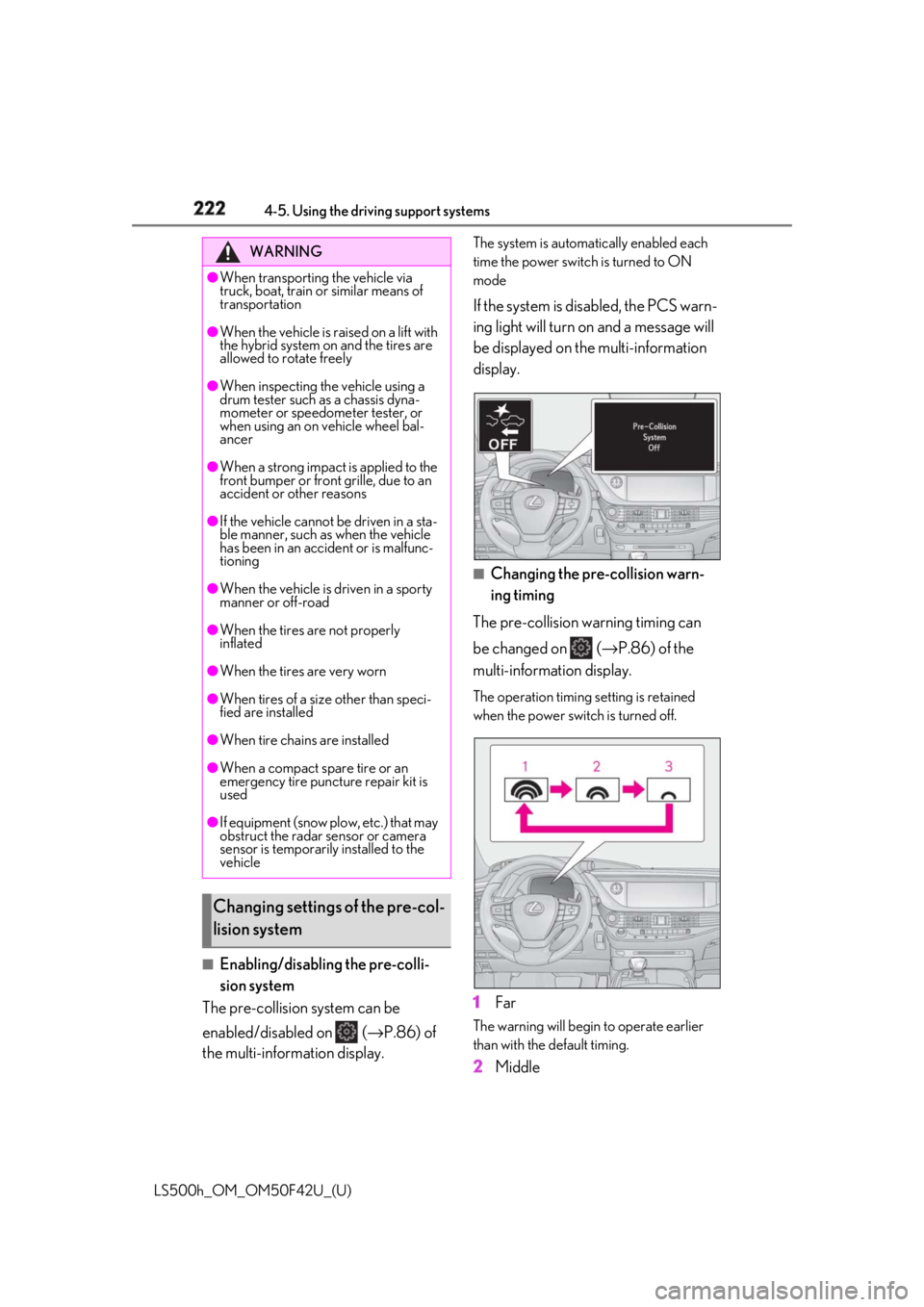
The pre-collision system can be
enabled/disabled on ( → P.86) of
the multi-information display. The system is automa tically enabled each
time the power switch is turned to ON
mode
If the system is disabled, the PCS warn-
ing light will turn on and a message will
be displayed on the multi-information
display.
■
Changing the pre-collision warn-
ing timing
The pre-collision warning timing can
be changed on ( → P.86) of the
multi-information display. The operation timing setting is retained
when the power switch is turned off.
1 Far The warning will begin to operate earlier
than with the default timing.
2 MiddleWARNING●
When transporting the vehicle via
truck, boat, train or similar means of
transportation●
When the vehicle is raised on a lift with
the hybrid system on and the tires are
allowed to rotate freely●
When inspecting the vehicle using a
drum tester such as a chassis dyna-
mometer or speedometer tester, or
when using an on vehicle wheel bal-
ancer●
When a strong impact is applied to the
front bumper or front grille, due to an
accident or other reasons●
If the vehicle cannot be driven in a sta-
ble manner, such as when the vehicle
has been in an accident or is malfunc-
tioning●
When the vehicle is driven in a sporty
manner or off-road●
When the tires are not properly
inflated●
When the tires are very worn●
When tires of a size other than speci-
fied are installed●
When tire chains are installed
●
When a compact spare tire or an
emergency tire puncture repair kit is
used
●
If equipment (snow plow, etc.) that may
obstruct the radar sensor or camera
sensor is temporarily installed to the
vehicle
Changing settings of the pre-col-
lision system
Page 225 of 528
2254-5. Using the driving support systems
LS500h_OM_OM50F42U_(U) 4
Driving road or a wall that may be mistaken for a
vehicle or pedestrian
• When driving near an object that reflects
radio waves, such as a large truck or
guardrail
• When driving near a TV tower, broad-
casting station, electric power plant, or
other location where strong radio waves
or electrical noise may be present■
Situations in which the system may not
operate properly●
In some situations such as the following, a
vehicle may not be detected by the radar
sensor and camera sensor, preventing
the system from operating properly:
• If an oncoming vehicle is approaching
your vehicle
• If a vehicle ahead is a motorcycle or bicy-
cle
• When approaching the side or front of a
vehicle
• If a preceding vehicle has a small rear
end, such as an unloaded truck
• If a preceding vehicle has a low rear end,
such as a low bed trailer
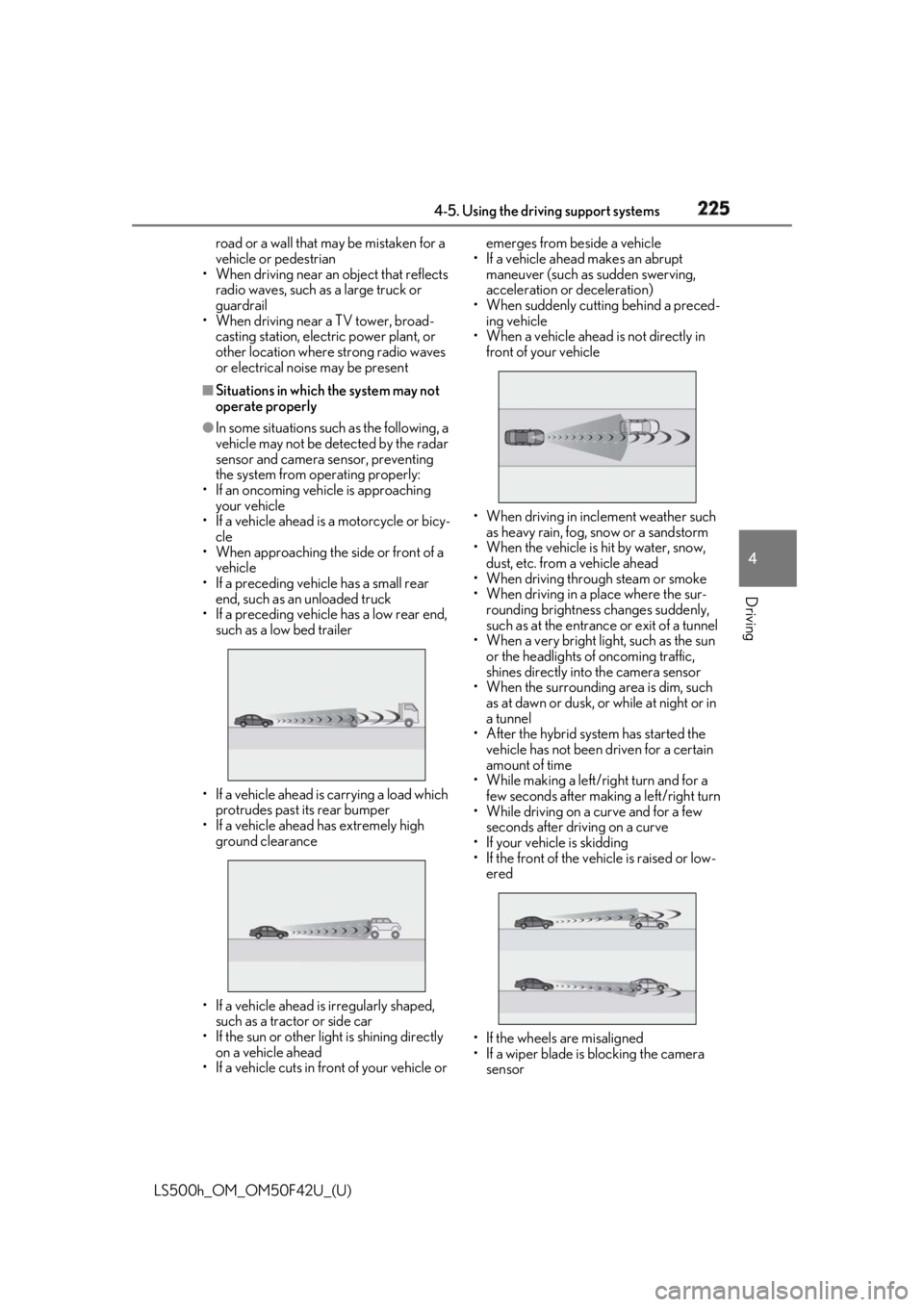
• If a vehicle ahead is carrying a load which
protrudes past its rear bumper
• If a vehicle ahead has extremely high
ground clearance
• If a vehicle ahead is irregularly shaped,
such as a tractor or side car
• If the sun or other light is shining directly
on a vehicle ahead
• If a vehicle cuts in front of your vehicle or emerges from beside a vehicle
• If a vehicle ahead makes an abrupt
maneuver (such as sudden swerving,
acceleration or deceleration)
• When suddenly cutting behind a preced-
ing vehicle
• When a vehicle ahead is not directly in
front of your vehicle
• When driving in incl ement weather such
as heavy rain, fog, snow or a sandstorm
• When the vehicle is hit by water, snow,
dust, etc. from a vehicle ahead
• When driving through steam or smoke
• When driving in a place where the sur-
rounding brightness changes suddenly,
such as at the entrance or exit of a tunnel
• When a very bright light, such as the sun
or the headlights of oncoming traffic,
shines directly into the camera sensor
• When the surrounding area is dim, such
as at dawn or dusk, or while at night or in
a tunnel
• After the hybrid system has started the
vehicle has not been driven for a certain
amount of time
• While making a left/r ight turn and for a
few seconds after making a left/right turn
• While driving on a curve and for a few
seconds after driving on a curve
• If your vehicle is skidding
• If the front of the vehicle is raised or low-
ered
• If the wheels are misaligned
• If a wiper blade is blocking the camera
sensor
Page 232 of 528
232 4-5. Using the driving support systems
LS500h_OM_OM50F42U_(U) ■
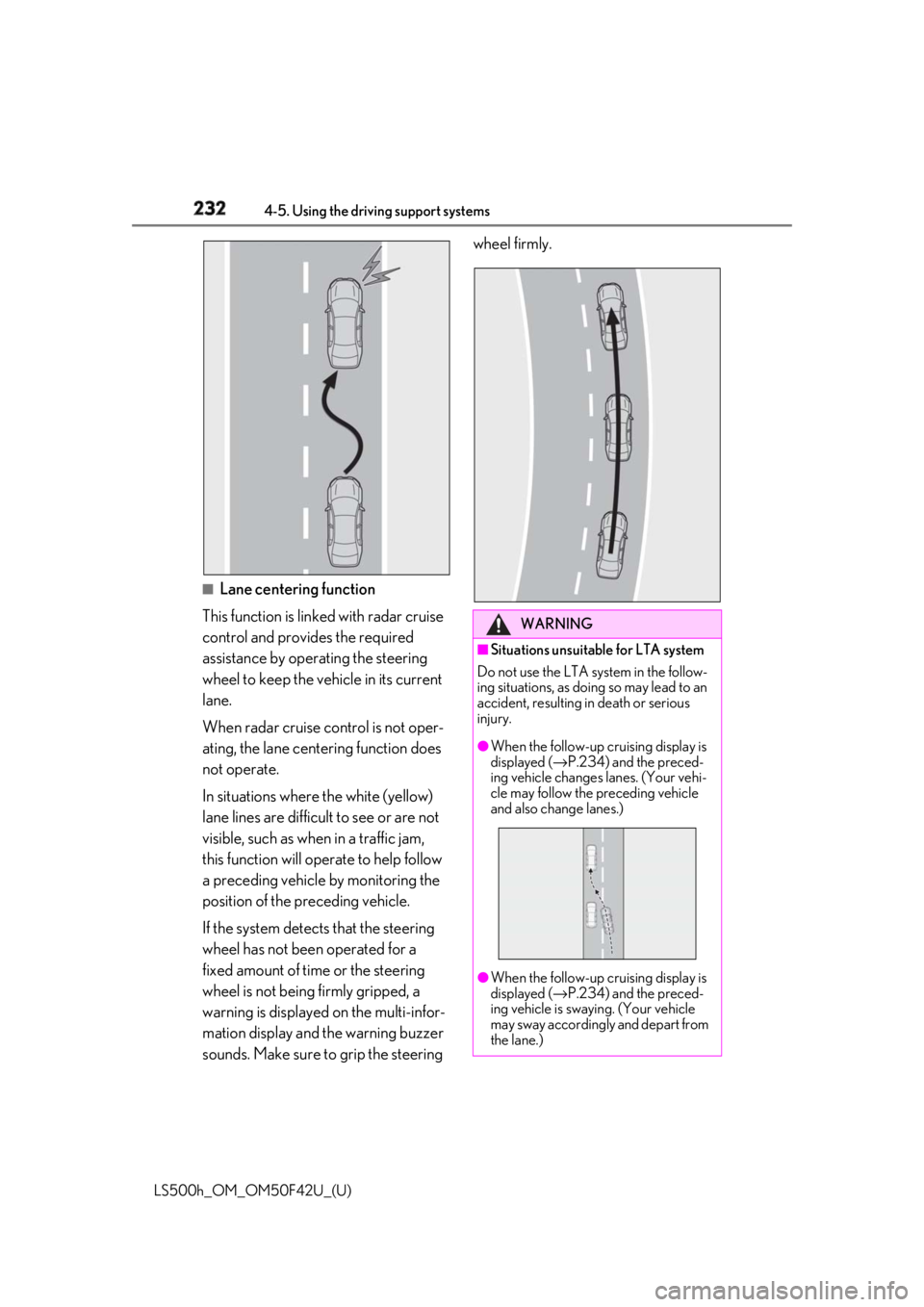
Lane centering function
This function is linked with radar cruise
control and provides the required
assistance by operating the steering
wheel to keep the vehicle in its current
lane.
When radar cruise control is not oper-
ating, the lane centering function does
not operate.
In situations where the white (yellow)
lane lines are difficult to see or are not
visible, such as when in a traffic jam,
this function will op erate to help follow
a preceding vehicle by monitoring the
position of the preceding vehicle.
If the system detects that the steering
wheel has not been operated for a
fixed amount of time or the steering
wheel is not being firmly gripped, a
warning is displayed on the multi-infor-
mation display and the warning buzzer
sounds. Make sure to grip the steering wheel firmly.
WARNING■
Situations unsuitable for LTA system
Do not use the LTA system in the follow-
ing situations, as doing so may lead to an
accident, resulting in death or serious
injury. ●
When the follow-up cruising display is
displayed ( → P.234) and the preced-
ing vehicle changes lanes. (Your vehi-
cle may follow the preceding vehicle
and also change lanes.)
●
When the follow-up cruising display is
displayed ( → P.234) and the preced-
ing vehicle is swaying. (Your vehicle
may sway accordingly and depart from
the lane.)
Page 235 of 528
2354-5. Using the driving support systems
LS500h_OM_OM50F42U_(U) 4
Driving centering function).
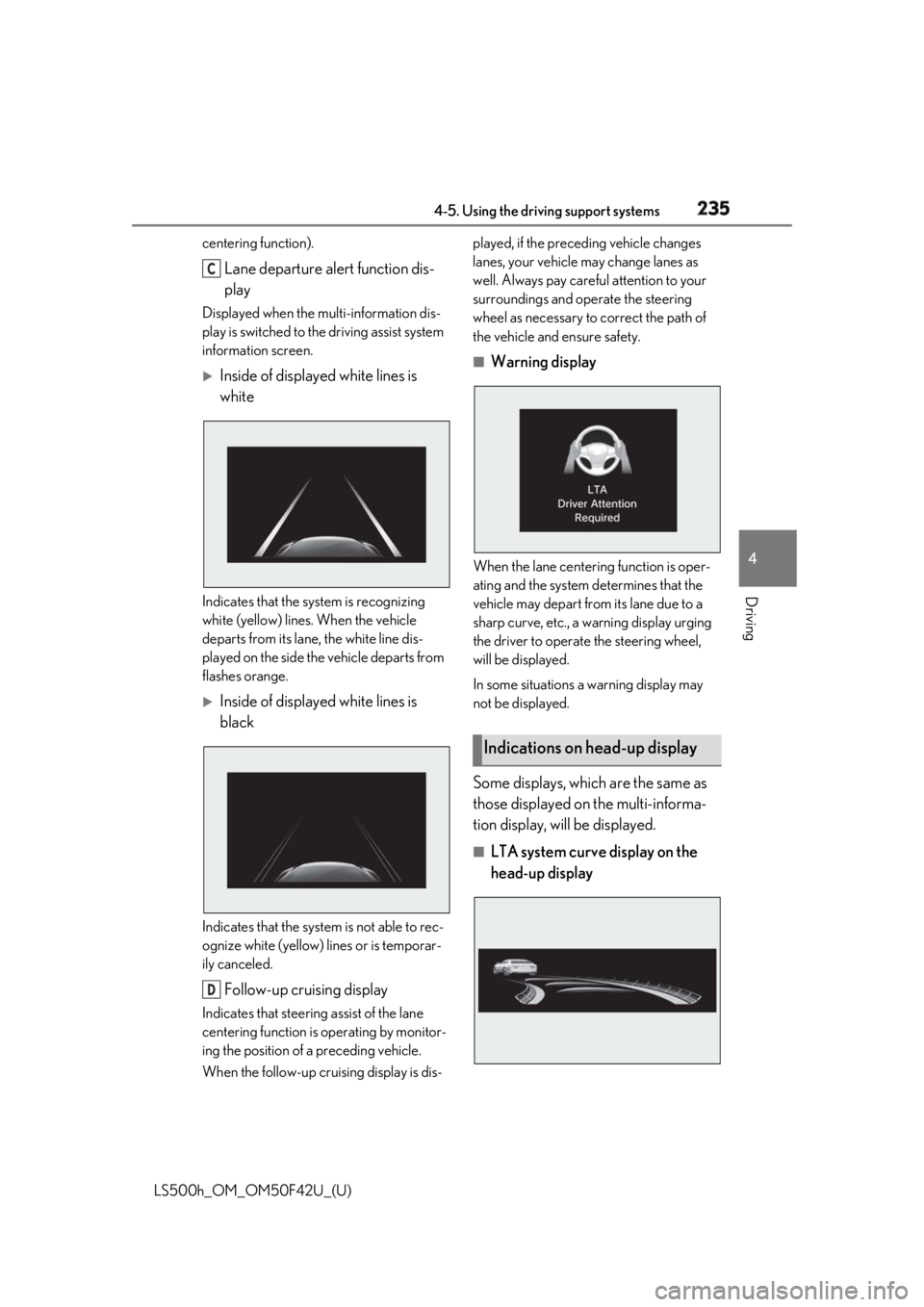
Lane departure alert function dis-
playDisplayed when the mu lti-information dis-
play is switched to the driving assist system
information screen.
Inside of displayed white lines is
white
Indicates that the system is recognizing
white (yellow) lines. When the vehicle
departs from its lane , the white line dis-
played on the side the vehicle departs from
flashes orange.
Inside of displayed white lines is
black
Indicates that the system is not able to rec-
ognize white (yellow) lines or is temporar-
ily canceled.
Follow-up cruising displayIndicates that steering assist of the lane
centering function is operating by monitor-
ing the position of a preceding vehicle.
When the follow-up cruising display is dis- played, if the preceding vehicle changes
lanes, your vehicle may change lanes as
well. Always pay carefu l attention to your
surroundings and operate the steering
wheel as necessary to correct the path of
the vehicle and ensure safety. ■
Warning display
When the lane centerin g function is oper-
ating and the system determines that the
vehicle may depart from its lane due to a
sharp curve, etc., a warning display urging
the driver to operate the steering wheel,
will be displayed.
In some situations a warning display may
not be displayed.
Some displays, which are the same as
those displayed on the multi-informa-
tion display, will be displayed. ■
LTA system curve display on the
head-up displayC
D Indications on head-up display
Page 236 of 528

236 4-5. Using the driving support systems
LS500h_OM_OM50F42U_(U) The curve display on the head-up display
changes according to the direction and
curvature of the curve. ■
Operation conditions of each function●
Lane departure alert function
This function operates when all of the fol-
lowing conditions are met.
• LTA is turned on.
• Vehicle speed is approximately 32 mph
(50 km/h) or more.
•System recognizes wh ite (yellow) lane
lines. (When a white [yellow] line is rec-
ognized on only one side, the system will
operate only for the recognized side.)
• Width of traffic lane is approximately 9.8
ft. (3 m) or more.
• Turn signal lever is not operated. (Except
when a vehicle is in the lane on the side
the turn signal was operated)
• Vehicle is not being driven around a
sharp curve.
• No system malfunctions are detected.
( → P.238)●
Steering assist function
This function operates when all of the fol-
lowing conditions are me t in addition to the
operation conditions for the lane depar-
ture alert function.
•Setting for “Steering Assist” in of the
multi-information display is set to “On”.
( → P.86)
• Vehicle is not accelerated or decelerated
by a fixed amount or more.
• Steering wheel is not operated with a
steering force level su itable for changing
lanes.
• ABS, VSC, TRAC and PCS are not oper-
ating.
• TRAC or VSC is not turned off.
• Hands off steering wheel alert is not dis-
played. ( → P.237)
●
Vehicle sway warning function
This function operates when all of the fol-
lowing conditions are met.
• Setting for “Sway Warning” in of the
multi-information display is set to “On”.
( → P.86) • Vehicle speed is ap proximately 32 mph
(50 km/h) or more.
• Width of traffic lane is approximately 9.8
ft. (3 m) or more.
• No system malfunctions are detected.
( → P.238)●
Lane centering function
This function operates when all of the fol-
lowing conditions are met.
• LTA is turned on.
• Setting for “Steering Assist” and “Lane
Center” in of the multi-information
display are set to “On”. ( → P.86)
• This function recognizes white (yellow)
lane lines or the position of a preceding
vehicle (except when the preceding vehi-
cle is small, such as a motorcycle).
• The dynamic radar cruise control with
full-speed range is operating in vehi-
cle-to-vehicle distance control mode.
• Width of traffic lane is approximately 10
to 13 ft. (3 to 4 m).
• Turn signal lever is not operated.
• Vehicle is not being driven around a
sharp curve.
• No system malfunctions are detected.
( → P.238)
• Vehicle does not ac celerate or deceler-
ate by a fixed amount or more.
• Steering wheel is not operated with a
steering force level su itable for changing
lanes.
• ABS, VSC, TRAC and PCS are not oper-
ating.
• TRAC or VSC is not turned off.
• Hands off steering wheel alert is not dis-
played. ( → P.237)
• The driver has one or both hands on the
steering wheel.
• The vehicle is being driven in the center
of a lane.
• Steering assist function is not operating.
■
Temporary cancellation of functions
When operation condit ions are no longer
met, a function may be temporarily can-
celed. However, when the operation condi-
tions are met again, operation of the
function is automatically restored.
( → P.236)
If the operating conditions are no longer
met while the lane ce ntering function is
Page 238 of 528
238 4-5. Using the driving support systems
LS500h_OM_OM50F42U_(U) ●
The traffic lines are yellow (which may be
more difficult to recognize than lines that
are white).●
The white (yellow) lines cross over a curb,
etc.●
The vehicle is driven on a bright surface,
such as concrete.●
If the edge of the road is not clear or
straight.●
The vehicle is driven on a surface that is
bright due to reflected light, etc.●
The vehicle is driven in an area where the
brightness changes suddenly, such as at
the entrances and exits of tunnels, etc.●
Light from the headlights of an oncoming
vehicle, the sun, etc. enters the camera.●
The vehicle is driven on a slope.●
The vehicle is driven on a road which tilts
left or right, or a winding road.●
The vehicle is driven on an unpaved or
rough road.●
The vehicle is driven around a sharp
curve.●
The traffic lane is ex cessively narrow or
wide.●
The vehicle is extremely tilted due to car-
rying heavy luggage or having improper
tire pressure.●
The distance to the preceding vehicle is
extremely short.●
The preceding vehicle changes lanes.
(Your vehicle may follow the preceding
vehicle and also change lanes.)●
The preceding vehicle is swaying. (Your
vehicle may sway accordingly and depart
from the lane.)
●
The vehicle is moving up and down a
large amount due to road conditions
during driving (poor roads or road
seams).
●
When driving in a tunnel or at night with
the headlights off or when a headlight is
dim due to its lens being dirty or it being
misaligned.
●
The vehicle is struck by a crosswind.
●
The vehicle has just changed lanes through operation of the steering wheel
by the driver or crossed an intersection. ●
Snow tires, etc. are equipped. ●
The vehicle is being driven at extremely
high speeds. ■
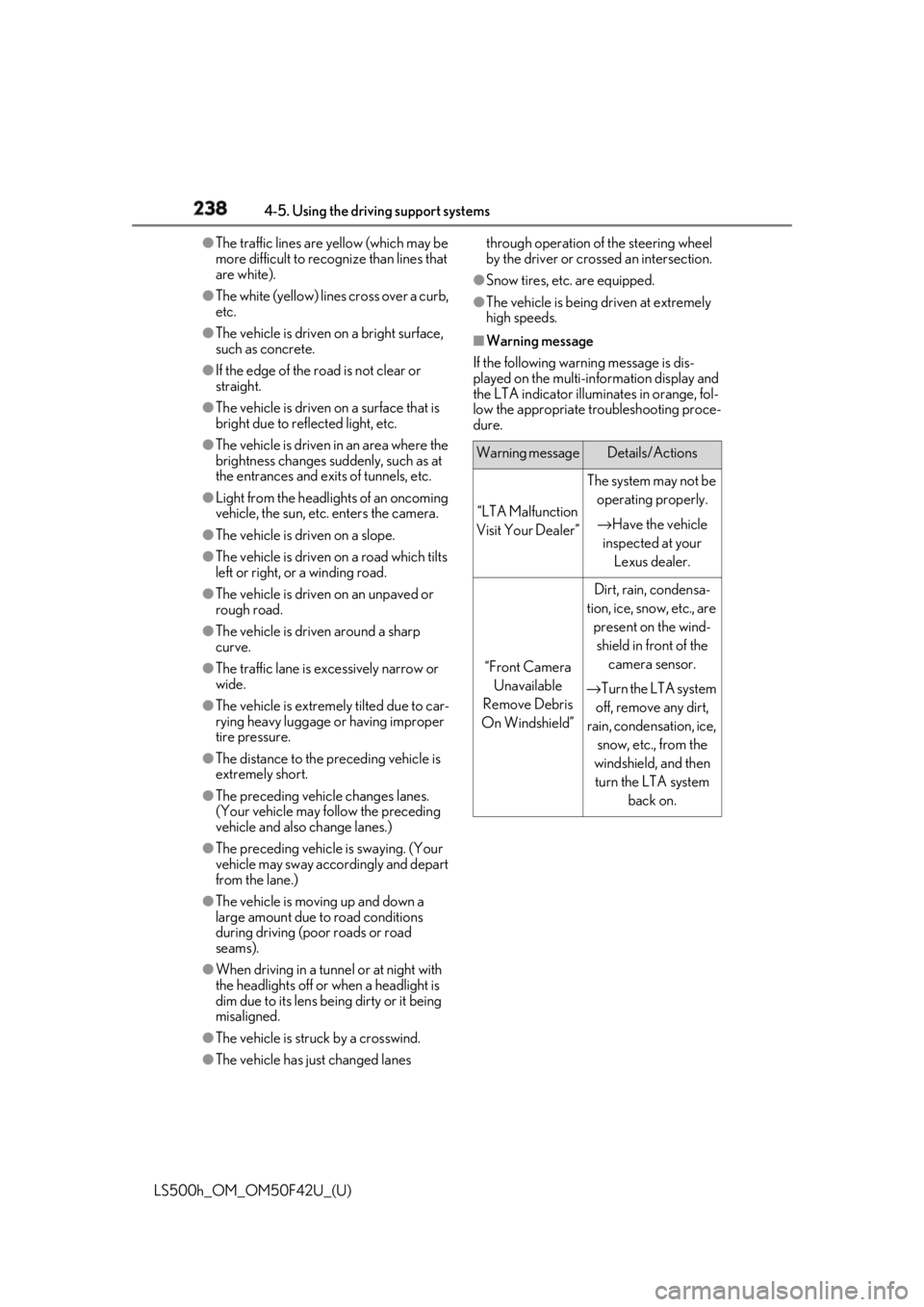
Warning message
If the following warning message is dis-
played on the multi-in formation display and
the LTA indicator illuminates in orange, fol-
low the appropriate troubleshooting proce-
dure.
Warning message Details/Actions
“LTA Malfunction
Visit Your Dealer” The system may not be
operating properly.
→ Have the vehicle
inspected at your
Lexus dealer.
“Front Camera
Unavailable
Remove Debris
On Windshield” Dirt, rain, condensa-
tion, ice, snow, etc., are
present on the wind-
shield in front of the
camera sensor.
→ Turn the LTA system
off, remove any dirt,
rain, condensation, ice,
snow, etc., from the
windshield, and then
turn the LTA system
back on.
Page 239 of 528
2394-5. Using the driving support systems
LS500h_OM_OM50F42U_(U) 4
Driving
If a different warning message is displayed,
follow the instructions displayed on the
screen.
■
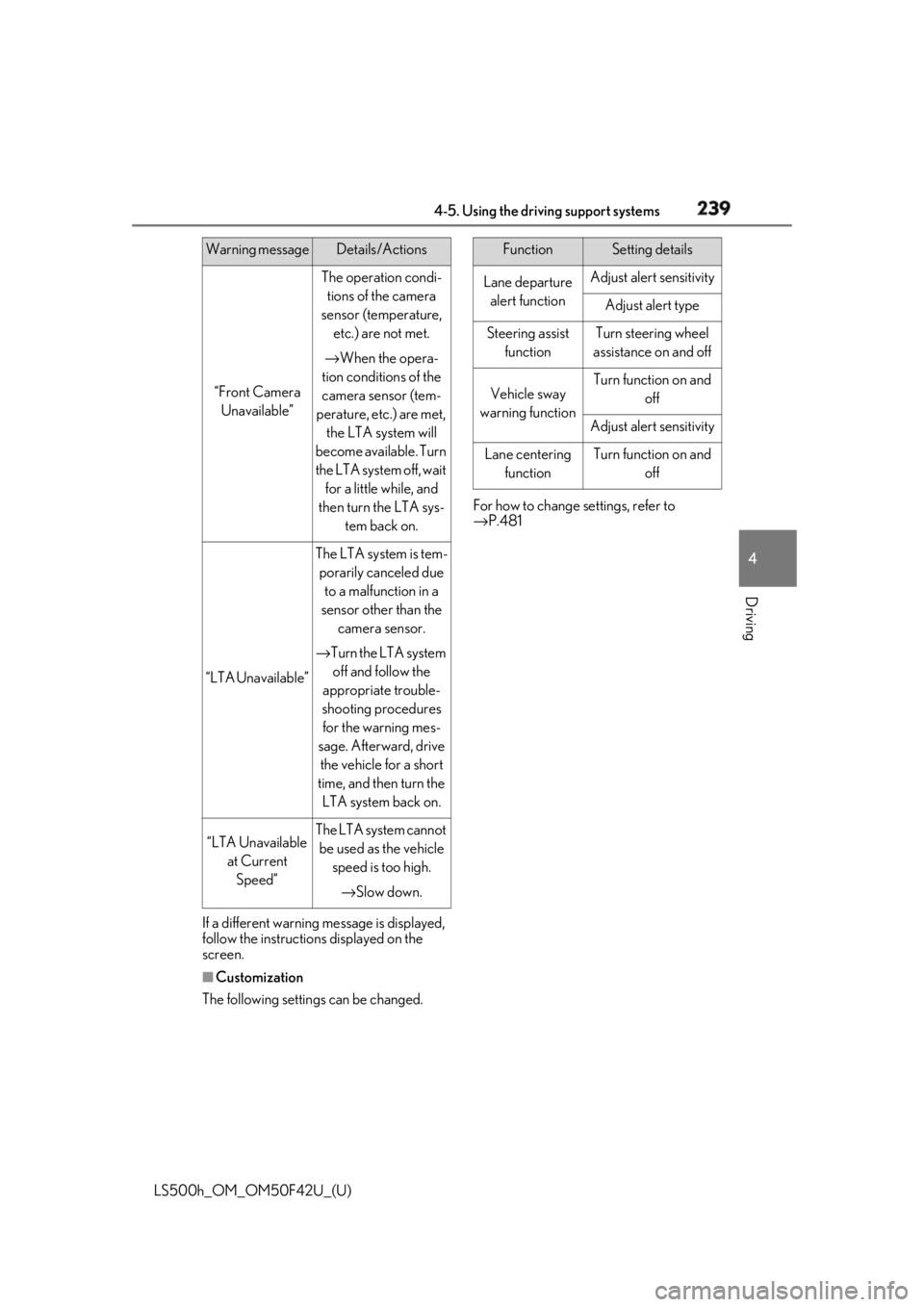
Customization
The following settings can be changed. For how to change settings, refer to
→ P.481“Front Camera
Unavailable” The operation condi-
tions of the camera
sensor (temperature,
etc.) are not met.
→ When the opera-
tion conditions of the
camera sensor (tem-
perature, etc.) are met,
the LTA system will
become available. Turn
the LTA system off, wait
for a little while, and
then turn the LTA sys-
tem back on.
“LTA Unavailable” The LTA system is tem-
porarily canceled due
to a malfunction in a
sensor other than the
camera sensor.
→ Turn the LTA system
off and follow the
appropriate trouble-
shooting procedures
for the warning mes-
sage. Afterward, drive
the vehicle for a short
time, and then turn the
LTA system back on.
“LTA Unavailable
at Current
Speed” The LTA system cannot
be used as the vehicle
speed is too high.
→ Slow down.Warning message Details/Actions Function Setting details
Lane departure
alert function Adjust alert sensitivity
Adjust alert type
Steering assist
function Turn steering wheel
assistance on and off
Vehicle sway
warning function Turn function on and
off
Adjust alert sensitivity
Lane centering
function Turn function on and
off