engine LEXUS LS500H 2018 User Guide
[x] Cancel search | Manufacturer: LEXUS, Model Year: 2018, Model line: LS500H, Model: LEXUS LS500H 2018Pages: 528, PDF Size: 10.8 MB
Page 79 of 528
792-1. Instrument cluster
LS500h_OM_OM50F42U_(U) 2
Vehicle status information and indicators
■
Display items
Odometer Displays the total distance the vehicle has
been driven.
Trip meter A/trip meter B Displays the distance the vehicle has been
driven since the meter was last reset. Trip
meters A and B can be used to record and
display different distances independently.
Distance until next engine oil
change Displays the distance the vehicle can be
driven until an oil change is necessary.
■
Changing the display
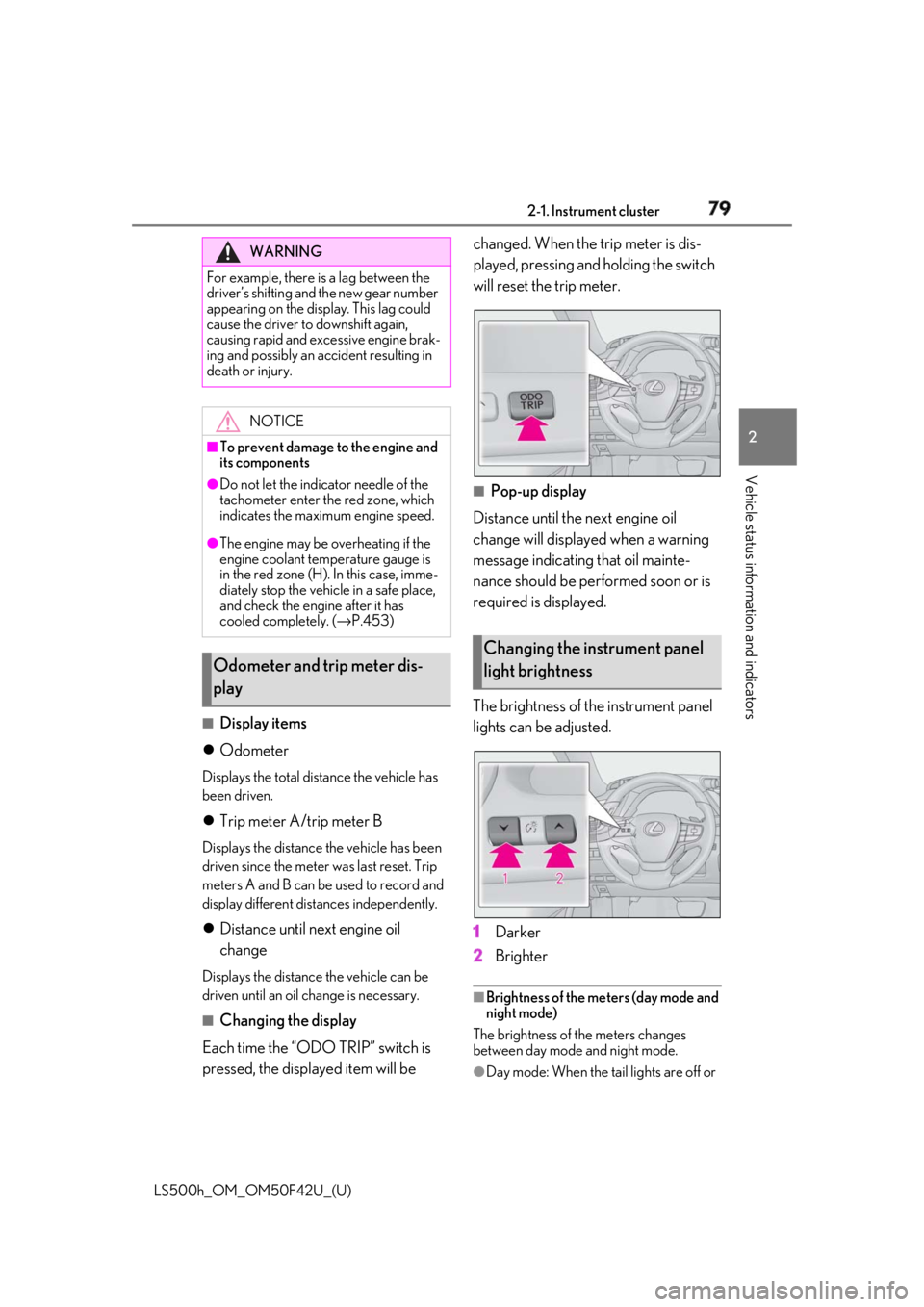
Each time the “ODO TRIP” switch is
pressed, the displayed item will be changed. When the trip meter is dis-
played, pressing and holding the switch
will reset the trip meter.
■
Pop-up display
Distance until the next engine oil
change will displayed when a warning
message indicating that oil mainte-
nance should be performed soon or is
required is displayed.
The brightness of the instrument panel
lights can be adjusted.
1 Darker
2 Brighter ■
Brightness of the meters (day mode and
night mode)
The brightness of the meters changes
between day mode and night mode.
●
Day mode: When the tail lights are off or WARNING
For example, there is a lag between the
driver’s shifting and the new gear number
appearing on the display. This lag could
cause the driver to downshift again,
causing rapid and excessive engine brak-
ing and possibly an accident resulting in
death or injury.
NOTICE■
To prevent damage to the engine and
its components●
Do not let the indicator needle of the
tachometer enter the red zone, which
indicates the maximum engine speed.●
The engine may be overheating if the
engine coolant temperature gauge is
in the red zone (H). In this case, imme-
diately stop the vehicle in a safe place,
and check the engine after it has
cooled completely. ( → P.453)
Odometer and trip meter dis-
play Changing the instrument panel
light brightness
Page 81 of 528
812-1. Instrument cluster
LS500h_OM_OM50F42U_(U) 2
Vehicle status information and indicators ■
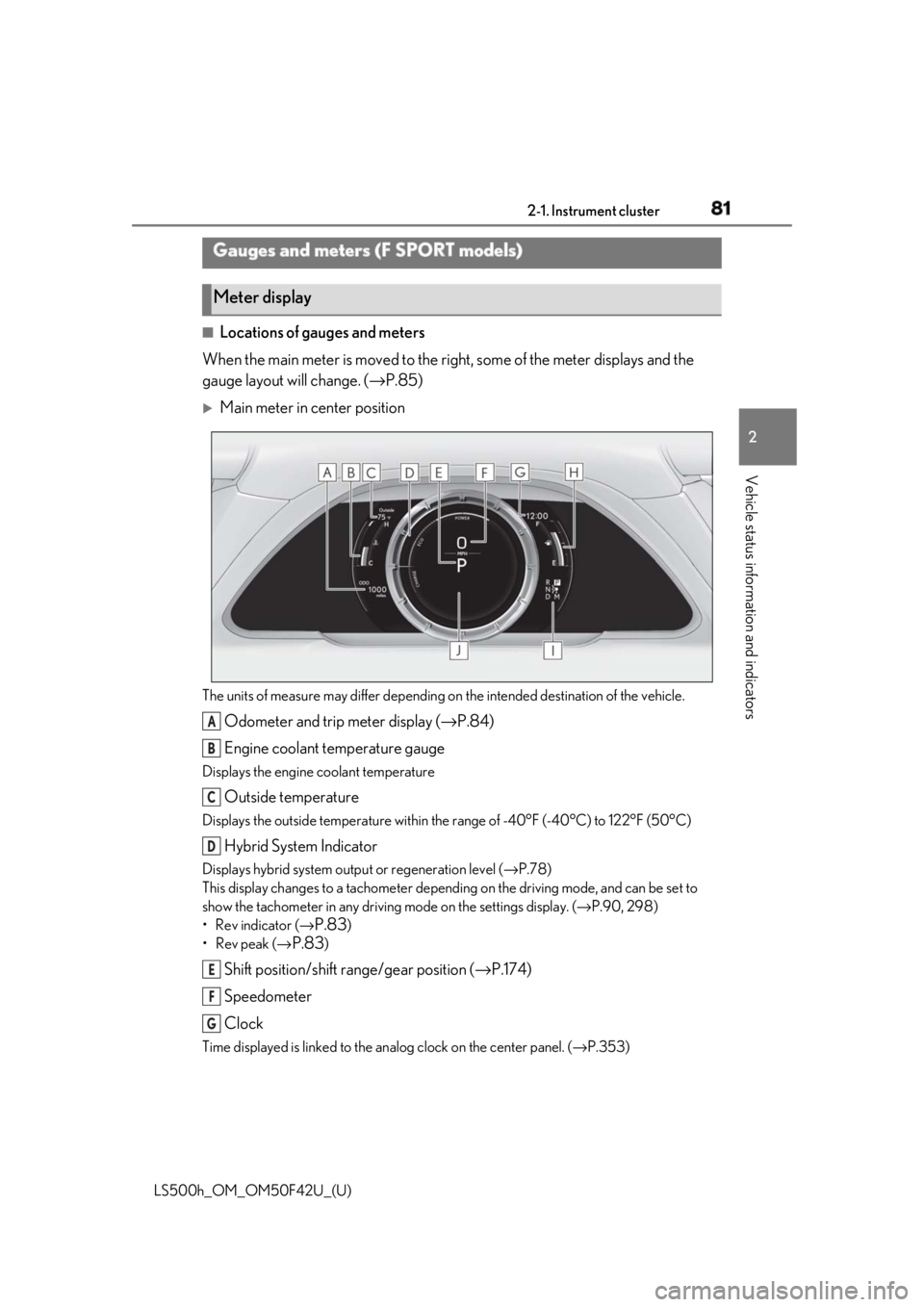
Locations of gauges and meters
When the main meter is moved to the righ t, some of the meter displays and the
gauge layout will change. ( → P.85)
Main meter in center position
The units of measure may differ depending on the intended destination of the vehicle.
Odometer and trip meter display ( → P.84)
Engine coolant temperature gaugeDisplays the engine coolant temperature
Outside temperatureDisplays the outside temperature within the range of -40°F (-40°C) to 122°F (50°C)
Hybrid System IndicatorDisplays hybrid system outp ut or regeneration level ( → P.78)
This display changes to a tachometer depending on the driving mode, and can be set to
show the tachometer in any driving mode on the settings display. ( → P.90, 298)
• Rev indicator ( →
P.83 )
•Rev peak ( →
P.83 )
Shift position/shift range/gear position ( → P.174)
Speedometer
ClockTime displayed is linked to the analog clock on the center panel. ( → P.353)Gauges and meters (F SPORT models)
Meter display
A
B
C
D
E
F
G
Page 83 of 528
832-1. Instrument cluster
LS500h_OM_OM50F42U_(U) 2
Vehicle status information and indicators Engine coolant temperature gaugeDisplays the engine coolant temperature
Multi-information displayPresents the driver with a variety of vehicle data ( → P.86)
Displays warning messages if a malfunction occurs ( → P.437)■
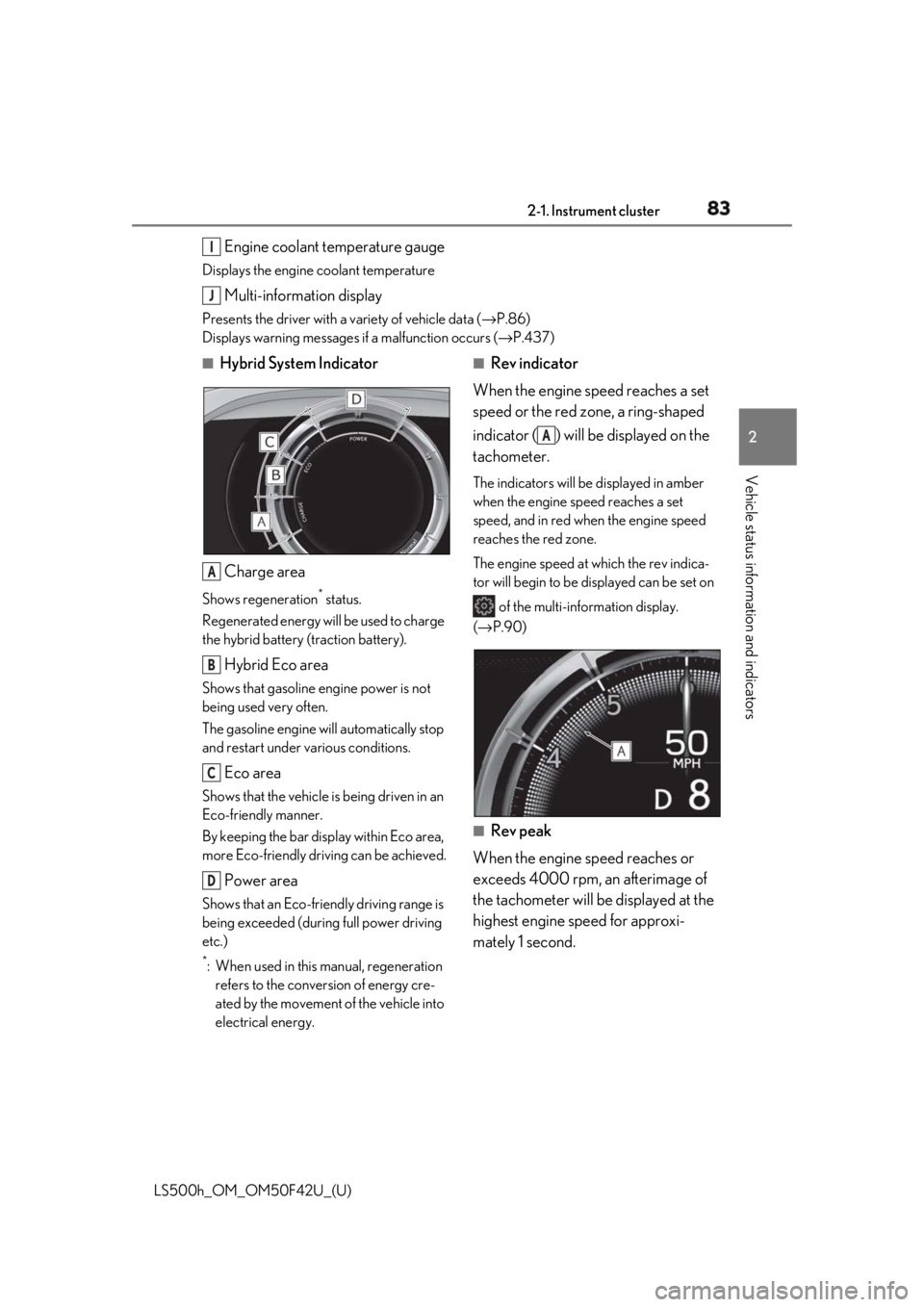
Hybrid System Indicator
Charge areaShows regeneration *
status.
Regenerated energy will be used to charge
the hybrid battery (traction battery).
Hybrid Eco areaShows that gasoline engine power is not
being used very often.
The gasoline engine will automatically stop
and restart under various conditions.
Eco areaShows that the vehicle is being driven in an
Eco-friendly manner.
By keeping the bar display within Eco area,
more Eco-friendly driv ing can be achieved.
Power areaShows that an Eco-friendly driving range is
being exceeded (durin g full power driving
etc.) *
: When used in this manual, regeneration
refers to the conversion of energy cre-
ated by the movement of the vehicle into
electrical energy. ■
Rev indicator
When the engine speed reaches a set
speed or the red zone, a ring-shaped
indicator ( ) will be displayed on the
tachometer. The indicators will be displayed in amber
when the engine speed reaches a set
speed, and in red when the engine speed
reaches the red zone.
The engine speed at which the rev indica-
tor will begin to be displayed can be set on
of the multi-information display.
( → P.90)
■
Rev peak
When the engine speed reaches or
exceeds 4000 rpm, an afterimage of
the tachometer will be displayed at the
highest engine speed for approxi-
mately 1 second.I
J
A
B
C
D A
Page 84 of 528
84 2-1. Instrument cluster
LS500h_OM_OM50F42U_(U) ■
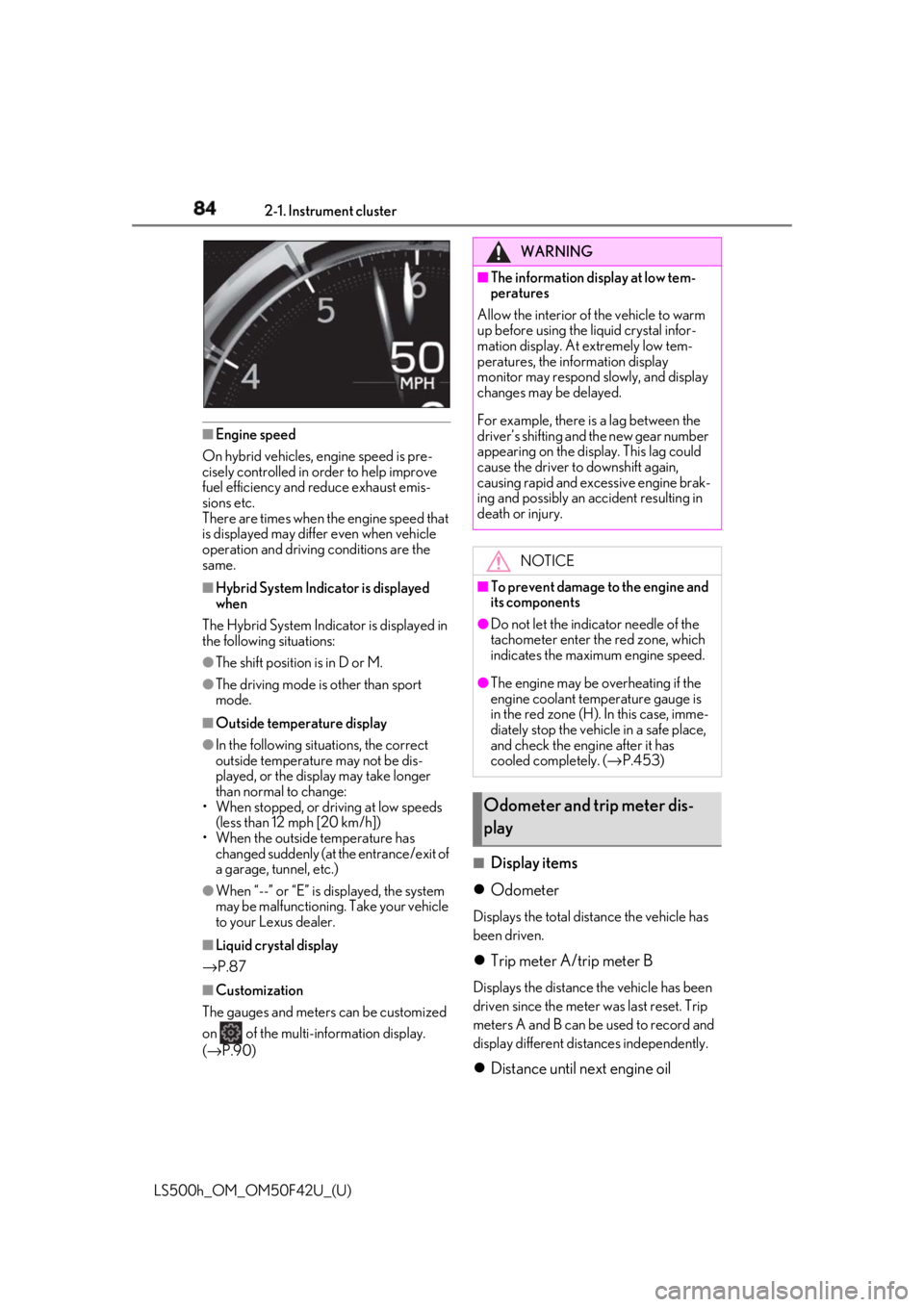
Engine speed
On hybrid vehicles, engine speed is pre-
cisely controlled in order to help improve
fuel efficiency and reduce exhaust emis-
sions etc.
There are times when the engine speed that
is displayed may differ even when vehicle
operation and driving conditions are the
same. ■
Hybrid System Indicator is displayed
when
The Hybrid System Indicator is displayed in
the following situations: ●
The shift position is in D or M.●
The driving mode is other than sport
mode.■
Outside temperature display●
In the following situations, the correct
outside temperature may not be dis-
played, or the display may take longer
than normal to change:
• When stopped, or driving at low speeds
(less than 12 mph [20 km/h])
• When the outside temperature has
changed suddenly (at the entrance/exit of
a garage, tunnel, etc.)
●
When “--” or “E” is displayed, the system
may be malfunctioning. Take your vehicle
to your Lexus dealer.
■
Liquid crystal display
→ P.87
■
Customization
The gauges and meters can be customized
on of the multi-information display.
( → P.90) ■
Display items
Odometer Displays the total distance the vehicle has
been driven.
Trip meter A/trip meter B Displays the distance the vehicle has been
driven since the meter was last reset. Trip
meters A and B can be used to record and
display different distances independently.
Distance until next engine oil WARNING■
The information display at low tem-
peratures
Allow the interior of the vehicle to warm
up before using the liquid crystal infor-
mation display. At extremely low tem-
peratures, the information display
monitor may respond slowly, and display
changes may be delayed.
For example, there is a lag between the
driver’s shifting and the new gear number
appearing on the display. This lag could
cause the driver to downshift again,
causing rapid and excessive engine brak-
ing and possibly an accident resulting in
death or injury.
NOTICE■
To prevent damage to the engine and
its components ●
Do not let the indicator needle of the
tachometer enter the red zone, which
indicates the maximum engine speed. ●
The engine may be overheating if the
engine coolant temperature gauge is
in the red zone (H). In this case, imme-
diately stop the vehicle in a safe place,
and check the engine after it has
cooled completely. ( → P.453)
Odometer and trip meter dis-
play
Page 85 of 528
852-1. Instrument cluster
LS500h_OM_OM50F42U_(U) 2
Vehicle status information and indicators change Displays the distance the vehicle can be
driven until an oil change is necessary.■
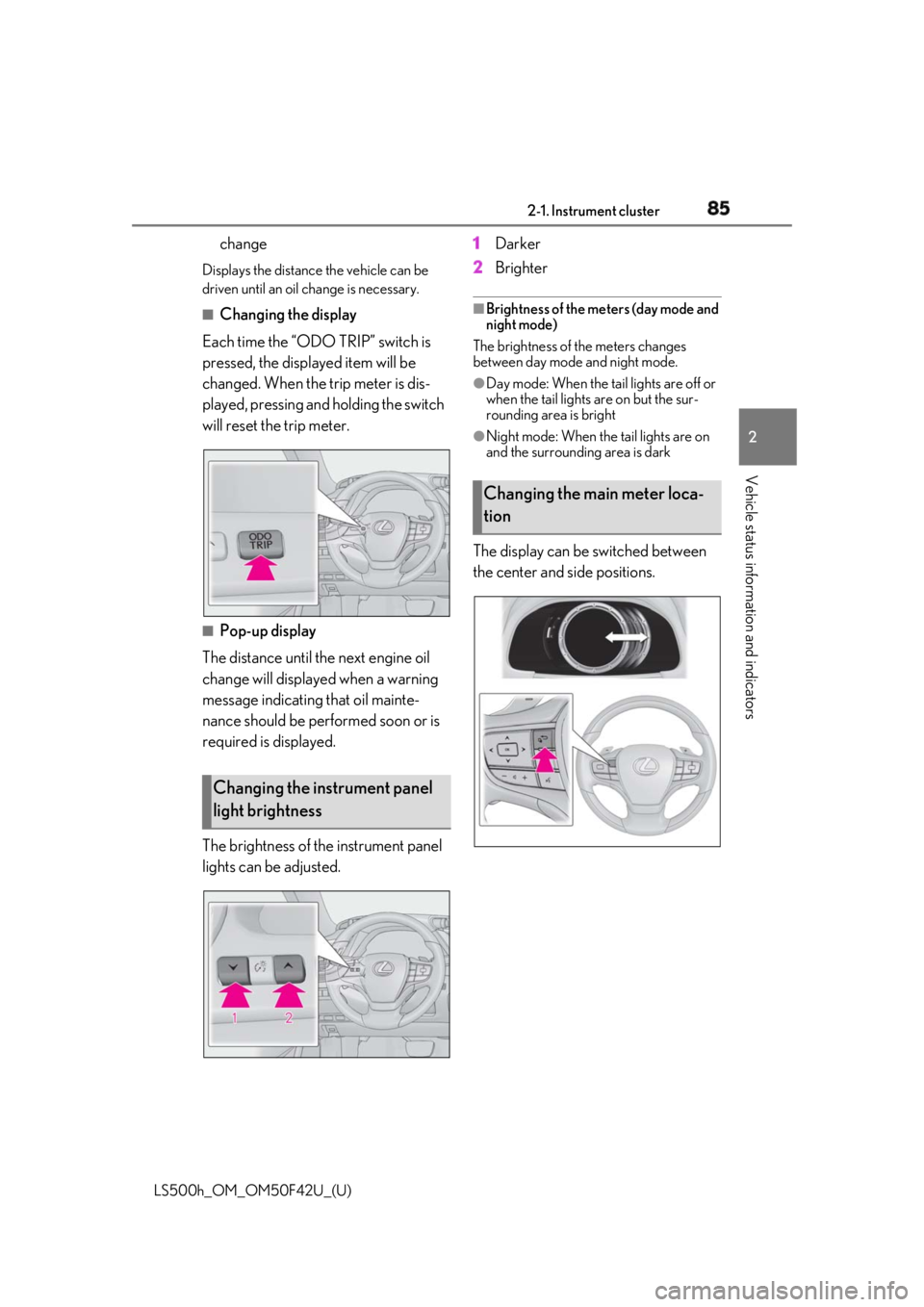
Changing the display
Each time the “ODO TRIP” switch is
pressed, the displayed item will be
changed. When the trip meter is dis-
played, pressing and holding the switch
will reset the trip meter.
■
Pop-up display
The distance until the next engine oil
change will displayed when a warning
message indicating that oil mainte-
nance should be performed soon or is
required is displayed.
The brightness of the instrument panel
lights can be adjusted. 1 Darker
2 Brighter ■
Brightness of the meters (day mode and
night mode)
The brightness of the meters changes
between day mode and night mode. ●
Day mode: When the tail lights are off or
when the tail lights are on but the sur-
rounding area is bright ●
Night mode: When the tail lights are on
and the surrounding area is dark
The display can be switched between
the center and side positions.
Changing the instrument panel
light brightness Changing the main meter loca-
tion
Page 90 of 528
90 2-1. Instrument cluster
LS500h_OM_OM50F42U_(U) will not be displayed on the multi-informa-
tion display. ( → P.94)
Select to enable selection of an audio
source or track on the meter using the
meter control switches.
Select to display the operational status
of the following systems:
LTA (Lane Tracing Assist) (if
equipped) ( → P.230)
LKA (Lane-Keeping Assist) (if
equipped) ( → P.240)
Dynamic radar cruise control with
full-speed range ( → P.250)
RSA (Road Sign Assist) (if
equipped) ( → P.247)■
Meter display settings that can be
changed
Language Select to change th e language displayed.
Units Select to change the units of measure dis-
played.
Speedometer display (except F
SPORT models) Select to set the display of the speedome-
ter to digital/analog/both digital and ana-
log.
Drive information 1/Drive informa- tion 2 Select to select up to 2 items ( → P.88) that
will be displayed on each Drive information
screen (Drive information 1 screen and
Drive information 2 sc reen) respectively.
Clock Select to switch between 12-hour display
and 24-hour display.
Pop-up display Select to enable/disable pop-up displays
for each relevant system.
Accent color Select to change the accent color on the
screen, such as the cursor color.
Tachometer setting Select to set the display of the Hybrid Sys-
tem Indicator or tachometer for each driv-
ing mode.
Rev indicator (F SPORT models) • Select to enable/disable the rev indica-
tor.
• Select to set the engine speed at which
the rev indicator (amber) will begin to be
displayed.
Rev peak (F SPORT models) Select to enable/disable the rev peak.
EV indicator Select to enable/disable the EV indicator.
Default setting Select to reset the meter display settings to
the default setting.
■
Vehicle functions and settings that
can be changed
→ P.481
■
Suspension of the settings display
●
Some settings cannot be changed while Audio system-linked display
Driving support system informa-
tion display
Settings display
Page 96 of 528
96 2-1. Instrument cluster
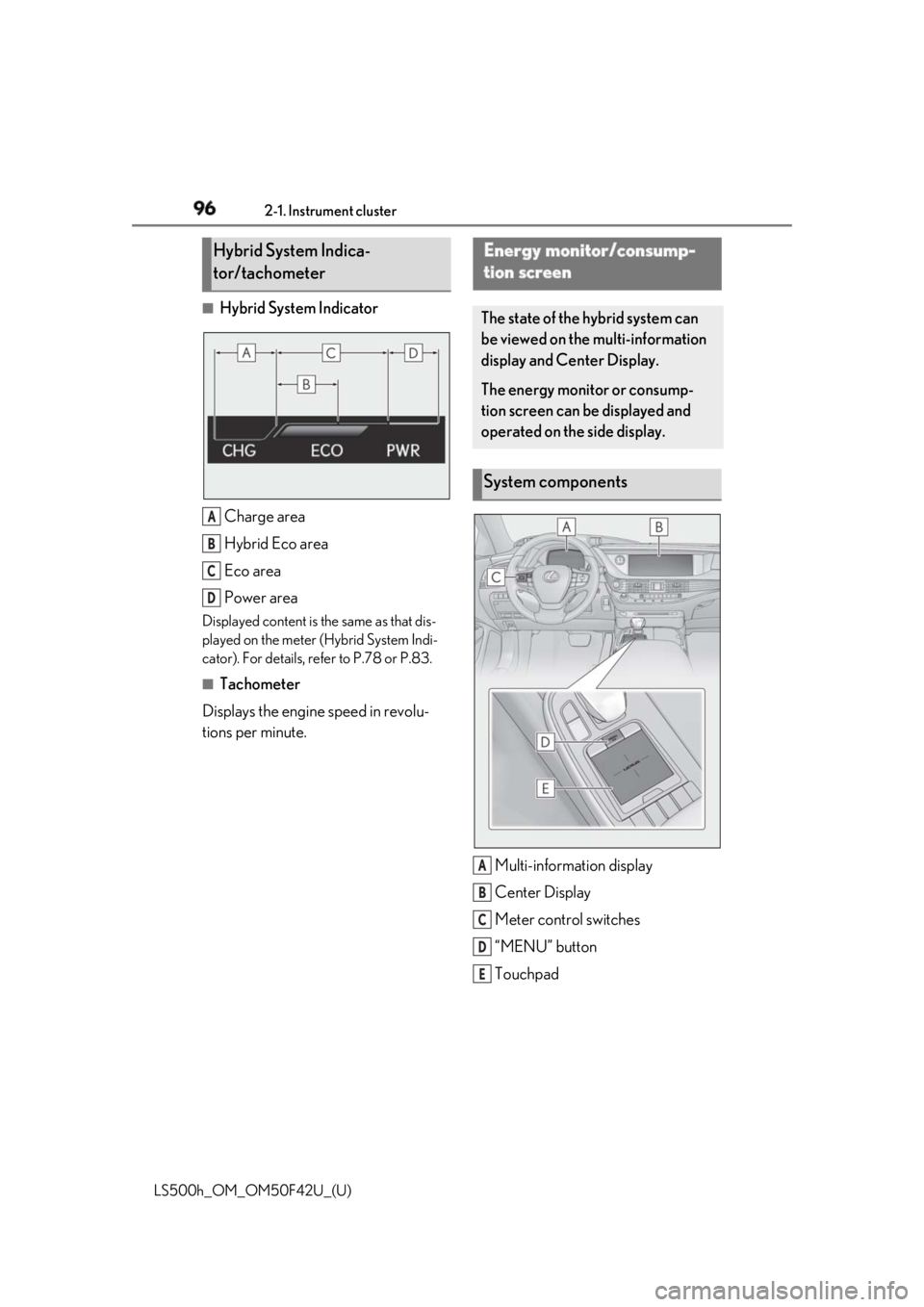
LS500h_OM_OM50F42U_(U) ■
Hybrid System Indicator
Charge area
Hybrid Eco area
Eco area
Power areaDisplayed content is the same as that dis-
played on the meter (Hybrid System Indi-
cator). For details, refer to P.78 or P.83. ■
Tachometer
Displays the engine speed in revolu-
tions per minute.
Multi-information display
Center Display
Meter control switches
“MENU” button
TouchpadHybrid System Indica-
tor/tachometer
A
B
C
D Energy monitor/consump-
tion screen The state of the hybrid system can
be viewed on the multi-information
display and Center Display.
The energy monitor or consump-
tion screen can be displayed and
operated on the side display.
System components
A
B
C
D
E
Page 97 of 528
972-1. Instrument cluster
LS500h_OM_OM50F42U_(U) 2
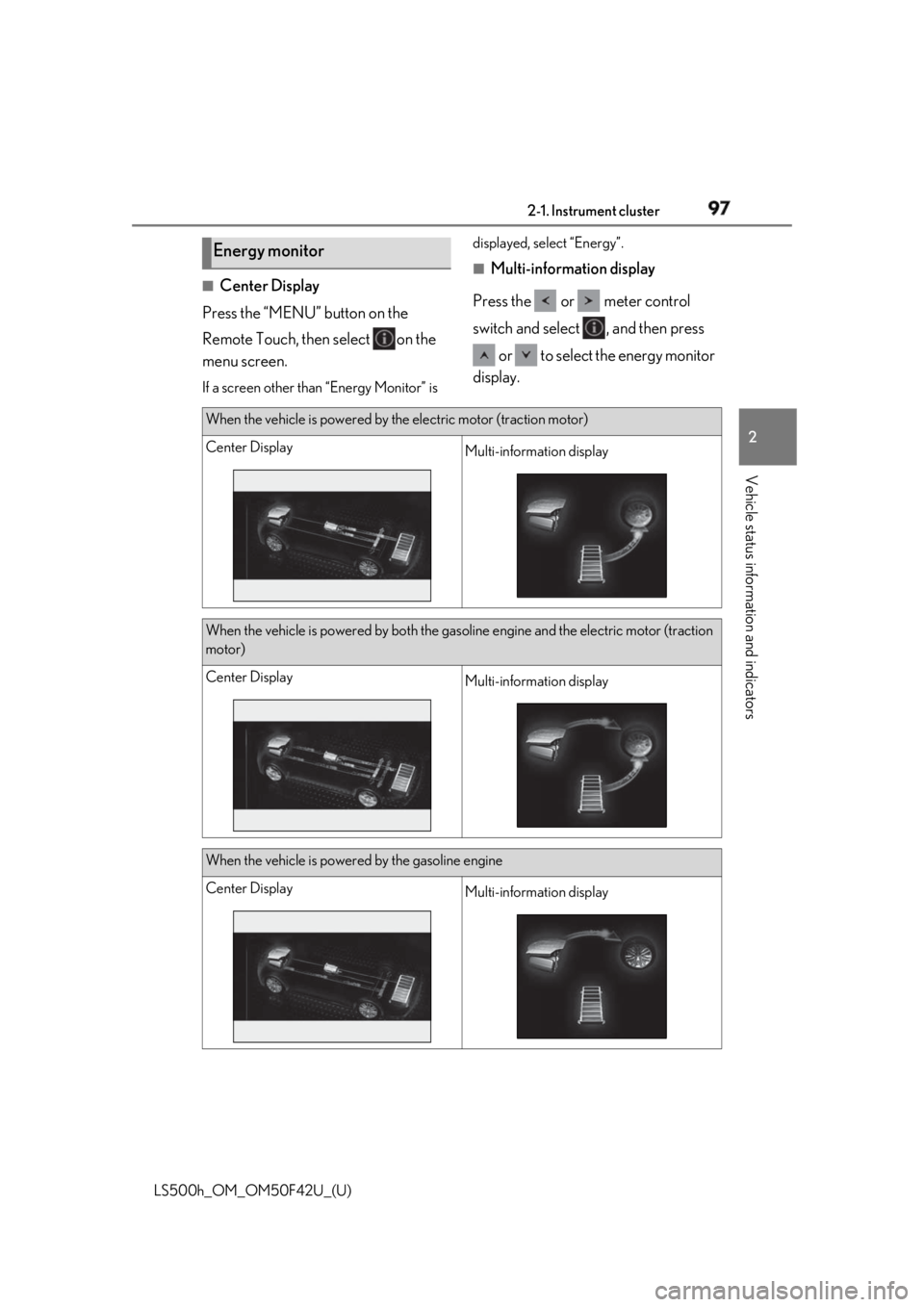
Vehicle status information and indicators ■
Center Display
Press the “MENU” button on the
Remote Touch, then select on the
menu screen. If a screen other than “Energy Monitor” is displayed, select “Energy”. ■
Multi-information display
Press the or meter control
switch and select , and then press
or to select the energy monitor
display.Energy monitor When the vehicle is powered by the electric motor (traction motor)
Center Display
Multi-information display
When the vehicle is powered by both the gaso line engine and the electric motor (traction
motor)
Center Display
Multi-information display
When the vehicle is powered by the gasoline engine
Center Display
Multi-information display
Page 158 of 528
158 4-1. Before driving
LS500h_OM_OM50F42U_(U) 4-1.Before driving
■
Starting the hybrid system
→ P.168 ■
Driving
1 With the brake pedal depressed,
shift the shift position to D. ( → P.174)Check that the shift position indicator
shows D.
2 If the parking brake is in manual
mode, release the parking brake.
( → P.181)
3 Gradually release the brake pedal
and gently depress the accelerator
pedal to accelerate the vehicle. ■
Stopping
1 With the shift position in D, depress
the brake pedal.
2 If necessary, set the parking brake.If the vehicle is to be stopped for an
extended period of time, shift the shift posi-
tion to P. ( → P.176)
■
Parking the vehicle
1 With the shift position in D, depress
the brake pedal to stop the vehicle
completely.
2 If the parking brake is in manual
mode, set the parking brake.
( → P.181)
3 Shift the shift position to P. ( → P.176)
4 Press the power switch to stop the
hybrid system. 5 Slowly release the brake pedal.
6 Lock the door, making sure that you
have the electronic key on your
person. If parking on a hill, block the wheels as
needed. ■
Starting off on a steep uphill
1 Make sure that the parking brake is
set and shift the shift position to D. Hill-start assist control will operate.
( → P.303)
2 Gently depress the accelerator
pedal.
3 Release the parking brake. ■
For fuel-efficient driving
Keep in mind that hybr id vehicles are similar
to conventional vehicles, and it is necessary
to refrain from activi ties such as sudden
acceleration. ( → P.307)■
Driving in the rain ●
Drive carefully when it is raining, because
visibility will be reduced, the windows
may become fogged-up, and the road
will be slippery. ●
Drive carefully when it starts to rain,
because the road surface will be espe-
cially slippery. ●
Refrain from high speeds when driving on
an expressway in the rain, because there
may be a layer of wa ter between the tires
and the road surface, preventing the
steering and brakes from operating prop-
erly.
■
Engine speed while driving
In the following conditions, the engine
speed may become high while driving. This
is due to automatic up-shifting control or
down-shifting implementation to meet driv-
ing conditions. It does not indicate sudden
acceleration.
●
The vehicle is judged to be driving uphill
or downhill
●
When the accelerato r pedal is releasedDriving the vehicle The following procedures should be
observed to ensure safe driving:
Driving procedure
Page 160 of 528
160 4-1. Before driving
LS500h_OM_OM50F42U_(U) WARNING
• Make sure to keep a correct driving
posture even when moving the vehicle
only slightly. This allows you to depress
the brake and accelerator pedals
properly.
• Depress the brake pedal using your
right foot. Depressing the brake pedal
using your left foot may delay
response in an emergency, resulting in
an accident.●
The driver should pay extra attention
to pedestrians when the vehicle is
powered only by the electric motor
(traction motor). As there is no engine
noise, the pedestrians may misjudge
the vehicle’s movement. Even with the
vehicle proximity notification system
activate, drive with care as pedestrians
in the vicinity may still not notice the
vehicle if the surrounding area is noisy.●
Do not drive the vehicle over or stop
the vehicle near flammable materials.
The exhaust system and exhaust gases
can be extremely hot. These hot parts
may cause a fire if there is any flamma-
ble material nearby.●
During normal driving, do not turn off
the hybrid system. Turning the hybrid
system off while driving will not cause
loss of steering or braking control,
however, power assist to the steering
will be lost. This will make it more diffi-
cult to steer smoothly, so you should
pull over and stop the vehicle as soon
as it is safe to do so.
In the event of an emergency, such as if
it becomes impossible to stop the vehi-
cle in the normal way: → P.420
●
Use engine braking (downshift) to
maintain a safe speed when driving
down a steep hill.
Using the brakes continuously may
cause the brakes to overheat and lose
effectiveness. ( → P.174) ●
Do not adjust the positions of the
steering wheel, the seat, or the inside
or outside rear view mirrors while driv-
ing.
Doing so may result in a loss of vehicle
control. ●
Always check that all passengers’
arms, heads or other parts of their
body are not outside the vehicle. ●
Do not drive in excess of the speed
limit. Even if the legal speed limit per-
mits it, do not drive over 85 mph (140
km/h) unless your vehicle has
high-speed capability tires. Driving
over 85 mph (140 km /h) may result in
tire failure, loss of control and possible
injury. Be sure to consult a tire dealer
to determine whether the tires on your
vehicle are high-speed capability tires
or not before driving at such speeds. ■
When driving on slippery road sur-
faces ●
Sudden braking, acceleration and
steering may cause tire slippage and
reduce your ability to control the vehi-
cle. ●
Sudden acceleration, engine braking
due to shifting, or changes in engine
speed could cause the vehicle to skid.
●
After driving through a puddle, lightly
depress the brake pedal to make sure
that the brakes are functioning prop-
erly. Wet brake pads may prevent the
brakes from functioning properly. If the
brakes on only one side are wet and
not functioning properly, steering con-
trol may be affected.
■
When shifting the shift position
●
Do not let the vehicle roll backward
while a forward driving position is
selected, or roll forw ard while the shift
position is in R.
Doing so may result in an accident or
damage to the vehicle.