heater LEXUS LS500H 2018 User Guide
[x] Cancel search | Manufacturer: LEXUS, Model Year: 2018, Model line: LS500H, Model: LEXUS LS500H 2018Pages: 528, PDF Size: 10.8 MB
Page 335 of 528
3355-3. Using the air conditio ning system and defogger
LS500h_OM_OM50F42U_(U) 5
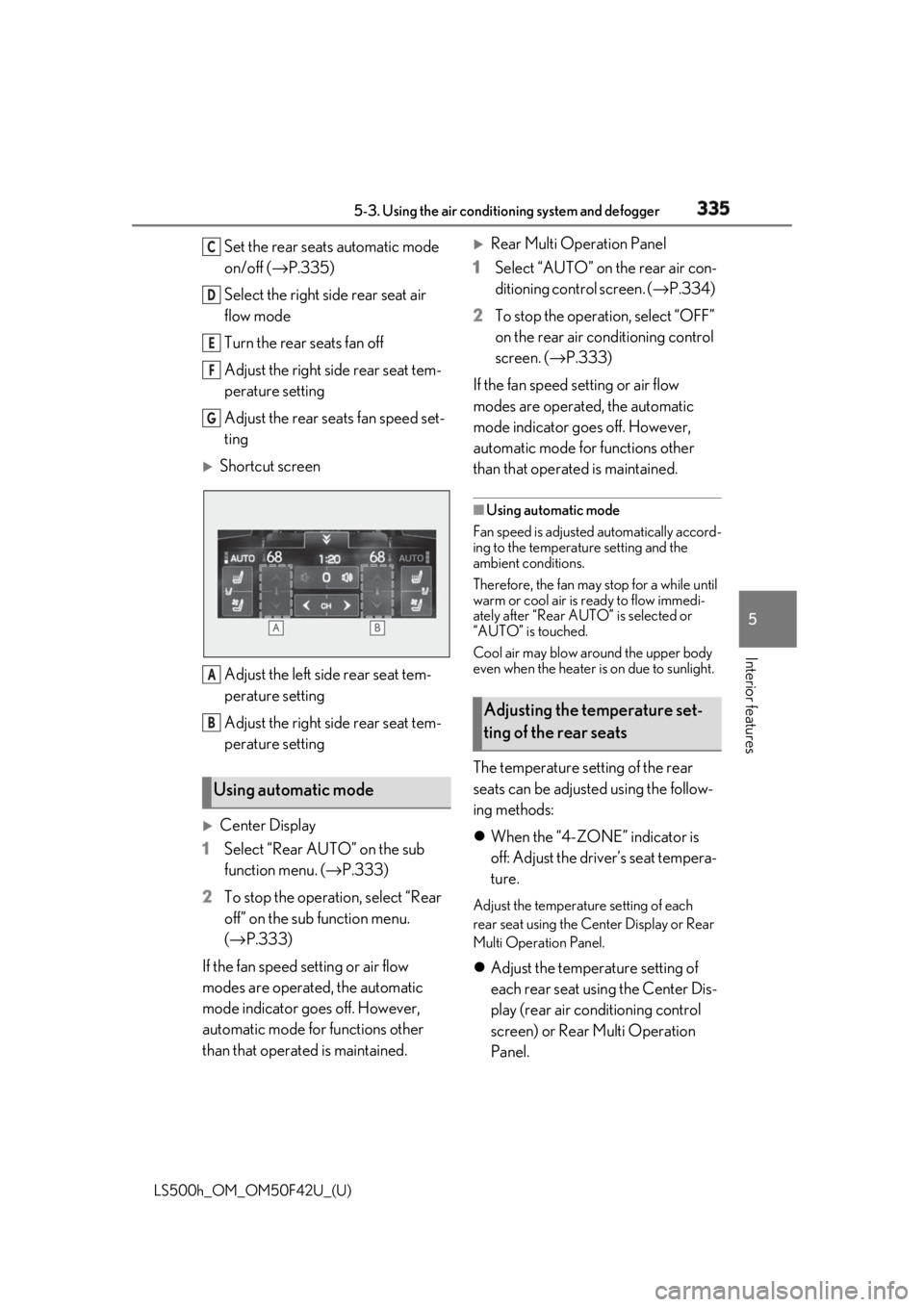
Interior features Set the rear seats automatic mode
on/off ( → P.335)
Select the right side rear seat air
flow mode
Turn the rear seats fan off
Adjust the right side rear seat tem-
perature setting
Adjust the rear seats fan speed set-
ting
Shortcut screen
Adjust the left side rear seat tem-
perature setting
Adjust the right side rear seat tem-
perature setting
Center Display
1 Select “Rear AUTO” on the sub
function menu. ( → P.333)
2 To stop the operat ion, select “Rear
off” on the sub function menu.
( → P.333)
If the fan speed setting or air flow
modes are operated , the automatic
mode indicator goes off. However,
automatic mode for functions other
than that operated is maintained.
Rear Multi Operation Panel
1 Select “AUTO” on the rear air con-
ditioning control screen. ( → P.334)
2 To stop the operation, select “OFF”
on the rear air conditioning control
screen. ( → P.333)
If the fan speed setting or air flow
modes are operated, the automatic
mode indicator goes off. However,
automatic mode for functions other
than that operated is maintained. ■
Using automatic mode
Fan speed is adjusted automatically accord-
ing to the temperature setting and the
ambient conditions.
Therefore, the fan may stop for a while until
warm or cool air is ready to flow immedi-
ately after “Rear AUTO” is selected or
“AUTO” is touched.
Cool air may blow around the upper body
even when the heater is on due to sunlight.
The temperature setting of the rear
seats can be adjusted using the follow-
ing methods:
When the “4-ZONE” indicator is
off: Adjust the driver’s seat tempera-
ture. Adjust the temperature setting of each
rear seat using the Ce nter Display or Rear
Multi Operation Panel.
Adjust the temperature setting of
each rear seat using the Center Dis-
play (rear air conditioning control
screen) or Rear Multi Operation
Panel.Using automatic mode C
D
E
F
G
A
B
Adjusting the temperature set-
ting of the rear seats
Page 336 of 528
336 5-3. Using the air conditioning system and defogger
LS500h_OM_OM50F42U_(U) The temperature setting of each rear seat
can be changed independently.
■
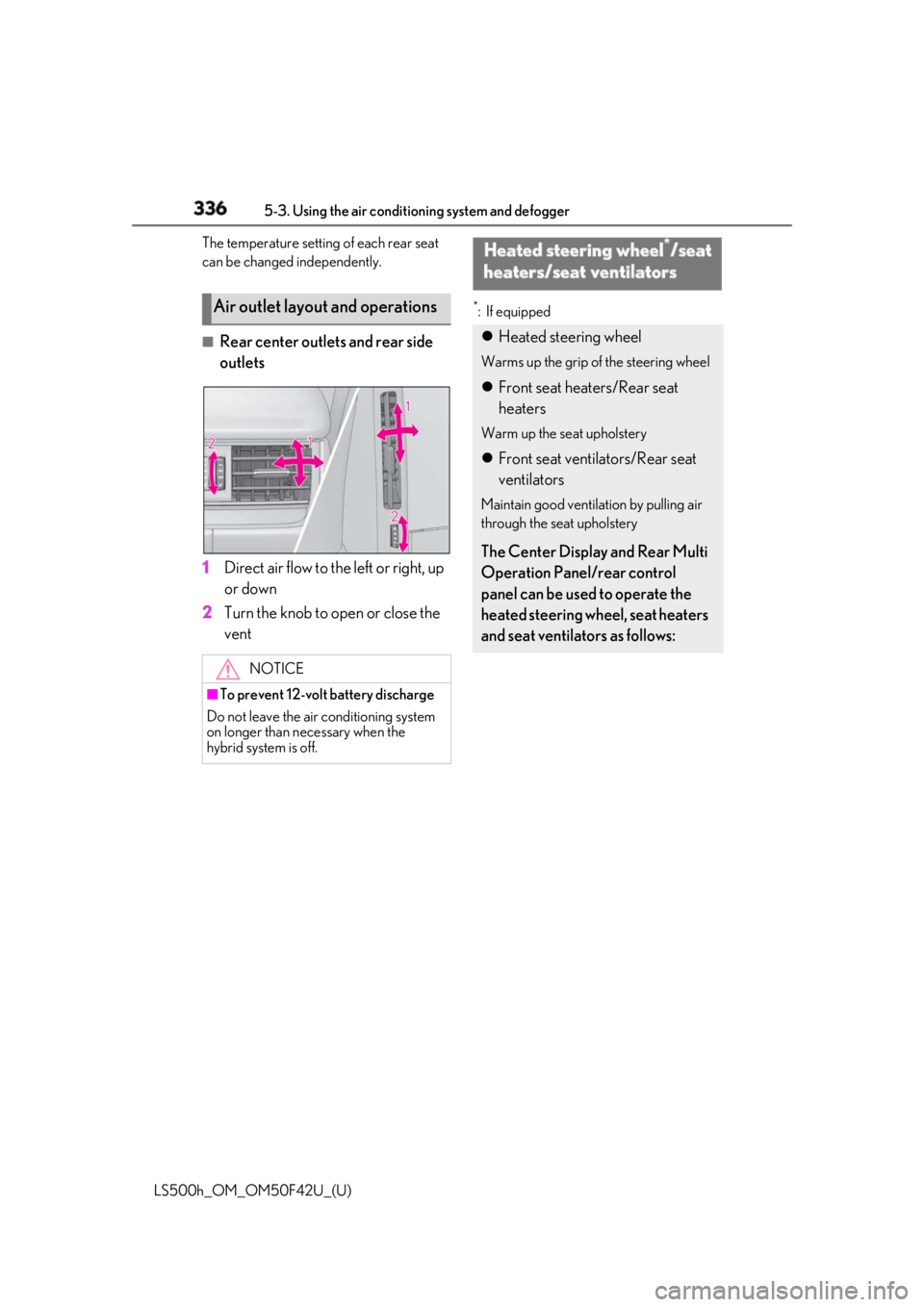
Rear center outlets and rear side
outlets
1 Direct air flow to the left or right, up
or down
2 Turn the knob to open or close the
vent *
: If equipped
Air outlet layout and operations
NOTICE■
To prevent 12-volt battery discharge
Do not leave the air conditioning system
on longer than necessary when the
hybrid system is off. Heated steering wheel *
/seat
heaters/seat ventilators Heated steering wheel Warms up the grip of the steering wheel
Front seat heaters/Rear seat
heaters Warm up the seat upholstery
Front seat ventilators/Rear seat
ventilators Maintain good ventilation by pulling air
through the seat upholstery
The Center Display and Rear Multi
Operation Panel/rear control
panel can be used to operate the
heated steering wheel, seat heaters
and seat ventilators as follows:
Page 337 of 528
3375-3. Using the air conditio ning system and defogger
LS500h_OM_OM50F42U_(U) 5
Interior features ■
Center Display
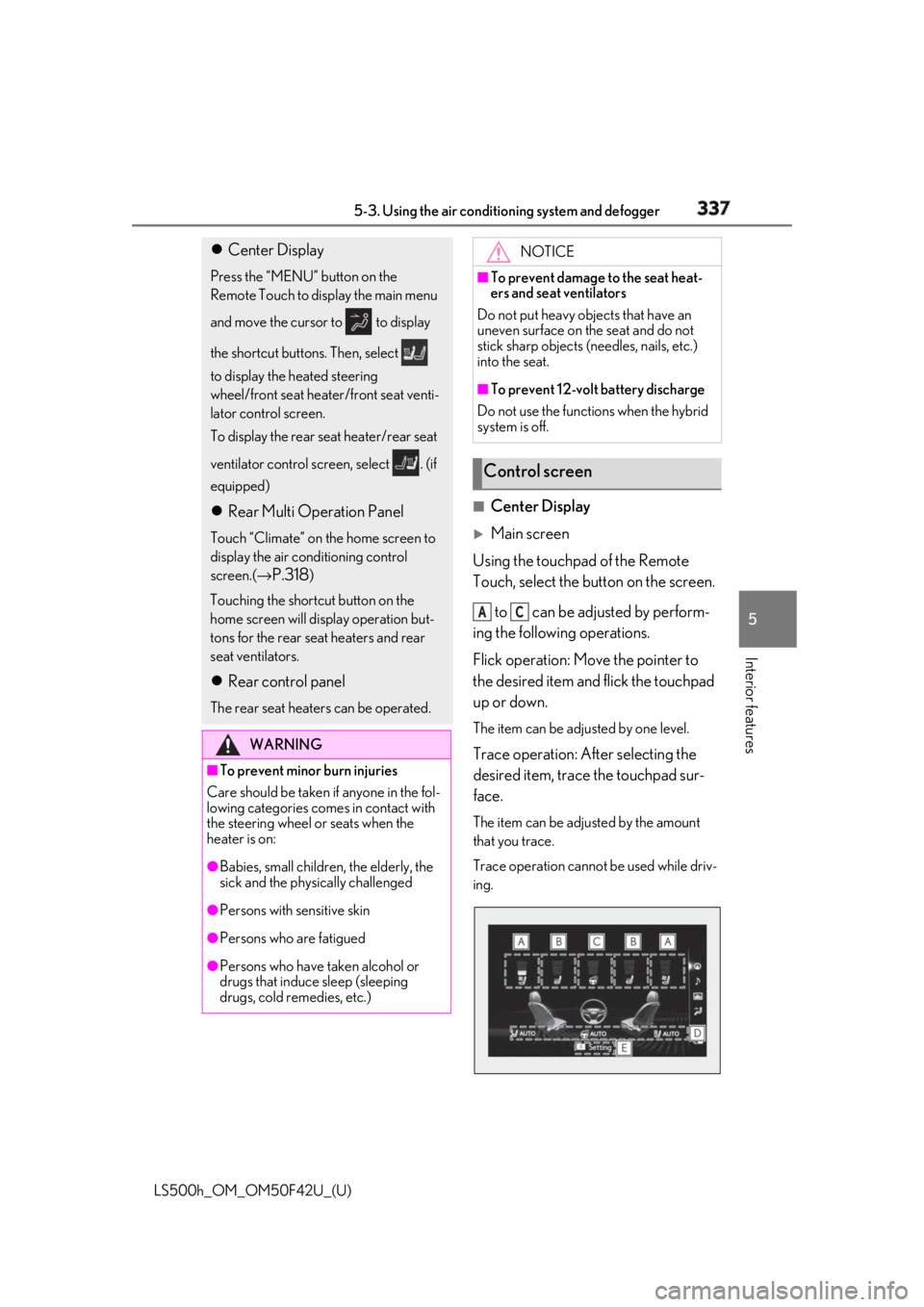
Main screen
Using the touchpad of the Remote
Touch, select the button on the screen.
to can be adjusted by perform-
ing the following operations.
Flick operation: Move the pointer to
the desired item and flick the touchpad
up or down. The item can be adjusted by one level.
Trace operation: After selecting the
desired item, trace the touchpad sur-
face. The item can be adjusted by the amount
that you trace.
Trace operation cannot be used while driv-
ing. Center Display Press the “MENU” button on the
Remote Touch to display the main menu
and move the cursor to to display
the shortcut buttons. Then, select
to display the heated steering
wheel/front seat heater/front seat venti-
lator control screen.
To display the rear seat heater/rear seat
ventilator control screen, select . (if
equipped)
Rear Multi Operation Panel Touch “Climate” on the home screen to
display the air conditioning control
screen.( →
P.318 )
Touching the shortcut button on the
home screen will display operation but-
tons for the rear seat heaters and rear
seat ventilators.
Rear control panel The rear seat heaters can be operated.
WARNING■
To prevent minor burn injuries
Care should be taken if anyone in the fol-
lowing categories comes in contact with
the steering wheel or seats when the
heater is on:
●
Babies, small children, the elderly, the
sick and the phys ically challenged
●
Persons with sensitive skin
●
Persons who are fatigued
●
Persons who have taken alcohol or
drugs that induce sleep (sleeping
drugs, cold remedies, etc.) NOTICE■
To prevent damage to the seat heat-
ers and seat ventilators
Do not put heavy objects that have an
uneven surface on the seat and do not
stick sharp objects (n eedles, nails, etc.)
into the seat. ■
To prevent 12-volt battery discharge
Do not use the functions when the hybrid
system is off.
Control screen A C
Page 338 of 528
338 5-3. Using the air conditioning system and defogger
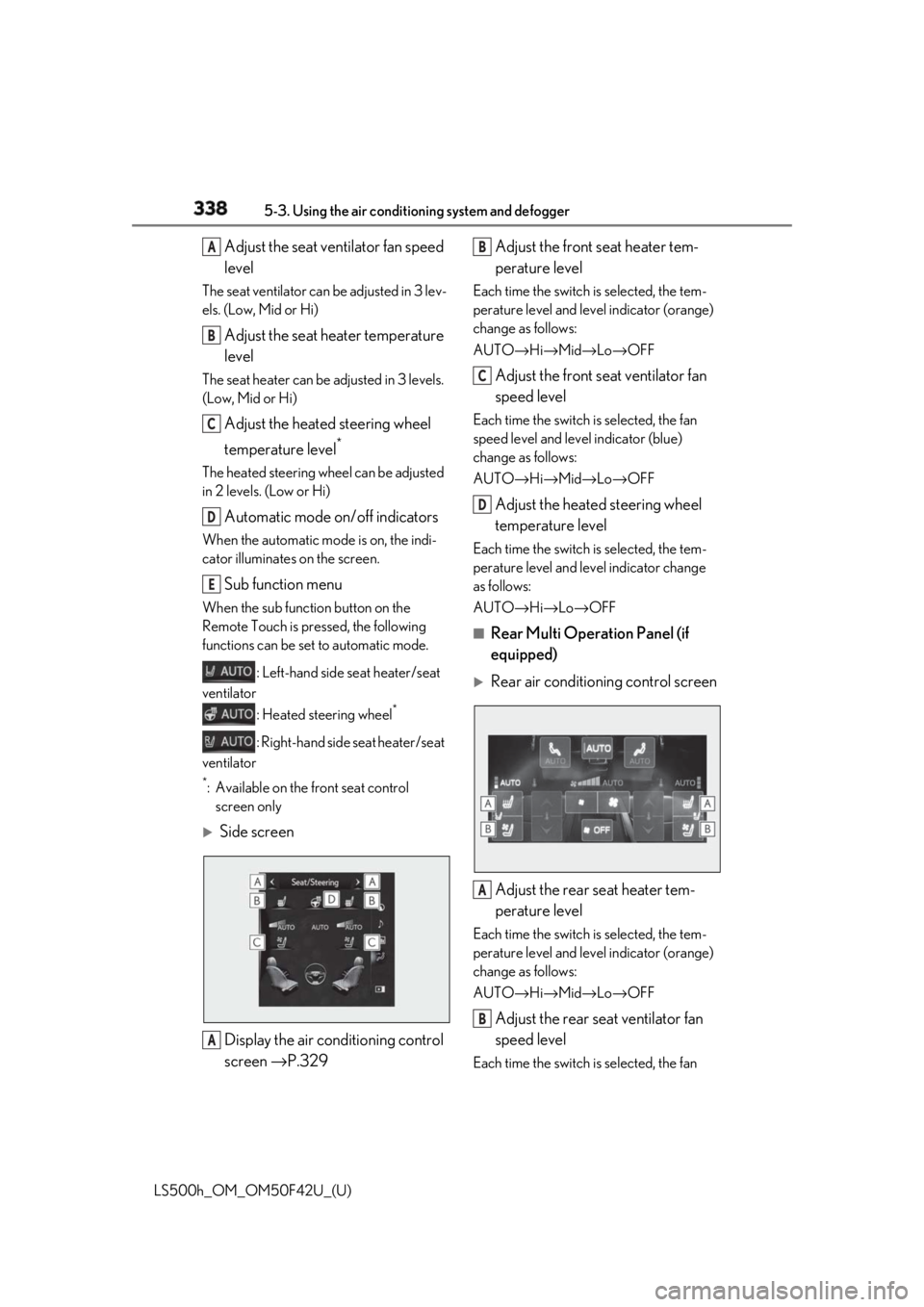
LS500h_OM_OM50F42U_(U) Adjust the seat ventilator fan speed
levelThe seat ventilator can be adjusted in 3 lev-
els. (Low, Mid or Hi)
Adjust the seat heater temperature
levelThe seat heater can be adjusted in 3 levels.
(Low, Mid or Hi)
Adjust the heated steering wheel
temperature level *
The heated steering wheel can be adjusted
in 2 levels. (Low or Hi)
Automatic mode on/off indicatorsWhen the automatic mode is on, the indi-
cator illuminates on the screen.
Sub function menu When the sub function button on the
Remote Touch is pressed, the following
functions can be set to automatic mode.
: Left-hand side seat heater/seat
ventilator
: Heated steering wheel *
: Right-hand side seat heater/seat
ventilator *
: Available on the front seat control
screen only
Side screen
Display the air conditioning control
screen → P.329 Adjust the front seat heater tem-
perature level Each time the switch is selected, the tem-
perature level and level indicator (orange)
change as follows:
AUTO → Hi → Mid → Lo → OFF
Adjust the front seat ventilator fan
speed level Each time the switch is selected, the fan
speed level and level indicator (blue)
change as follows:
AUTO → Hi → Mid → Lo → OFF
Adjust the heated steering wheel
temperature level Each time the switch is selected, the tem-
perature level and le vel indicator change
as follows:
AUTO → Hi → Lo → OFF■
Rear Multi Operation Panel (if
equipped)
Rear air conditioning control screen
Adjust the rear seat heater tem-
perature level Each time the switch is selected, the tem-
perature level and level indicator (orange)
change as follows:
AUTO → Hi → Mid → Lo → OFF
Adjust the rear seat ventilator fan
speed level Each time the switch is selected, the fan A
B
C
D
E
A B
C
D
A
B
Page 339 of 528
3395-3. Using the air conditio ning system and defogger
LS500h_OM_OM50F42U_(U) 5
Interior features speed level and leve l indicator (blue)
change as follows:
AUTO → Hi → Mid → Lo → OFF
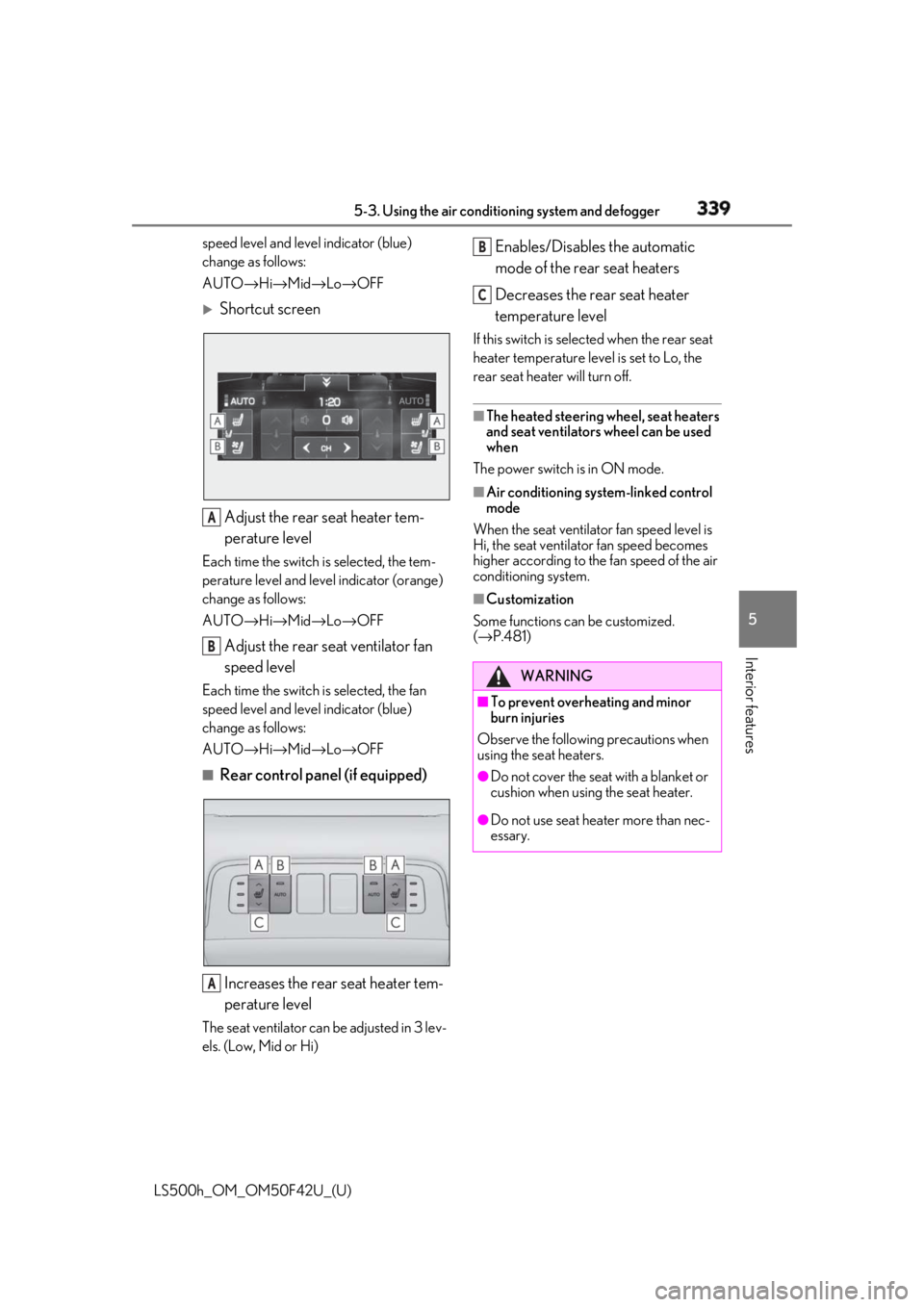
Shortcut screen
Adjust the rear seat heater tem-
perature levelEach time the switch is selected, the tem-
perature level and leve l indicator (orange)
change as follows:
AUTO → Hi → Mid → Lo → OFF
Adjust the rear seat ventilator fan
speed levelEach time the switch is selected, the fan
speed level and leve l indicator (blue)
change as follows:
AUTO → Hi → Mid → Lo → OFF■
Rear control panel (if equipped)
Increases the rear seat heater tem-
perature levelThe seat ventilator can be adjusted in 3 lev-
els. (Low, Mid or Hi) Enables/Disables the automatic
mode of the rear seat heaters
Decreases the rear seat heater
temperature level If this switch is select ed when the rear seat
heater temperature level is set to Lo, the
rear seat heater will turn off. ■
The heated steering wheel, seat heaters
and seat ventilators wheel can be used
when
The power switch is in ON mode. ■
Air conditioning system-linked control
mode
When the seat ventilator fan speed level is
Hi, the seat ventilato r fan speed becomes
higher according to the fan speed of the air
conditioning system. ■
Customization
Some functions can be customized.
( → P.481)A
B
A WARNING■
To prevent overheating and minor
burn injuries
Observe the following precautions when
using the seat heaters. ●
Do not cover the seat with a blanket or
cushion when using the seat heater.
●
Do not use seat heater more than nec-
essary. B
C
Page 374 of 528
374 6-1. Maintenance and care
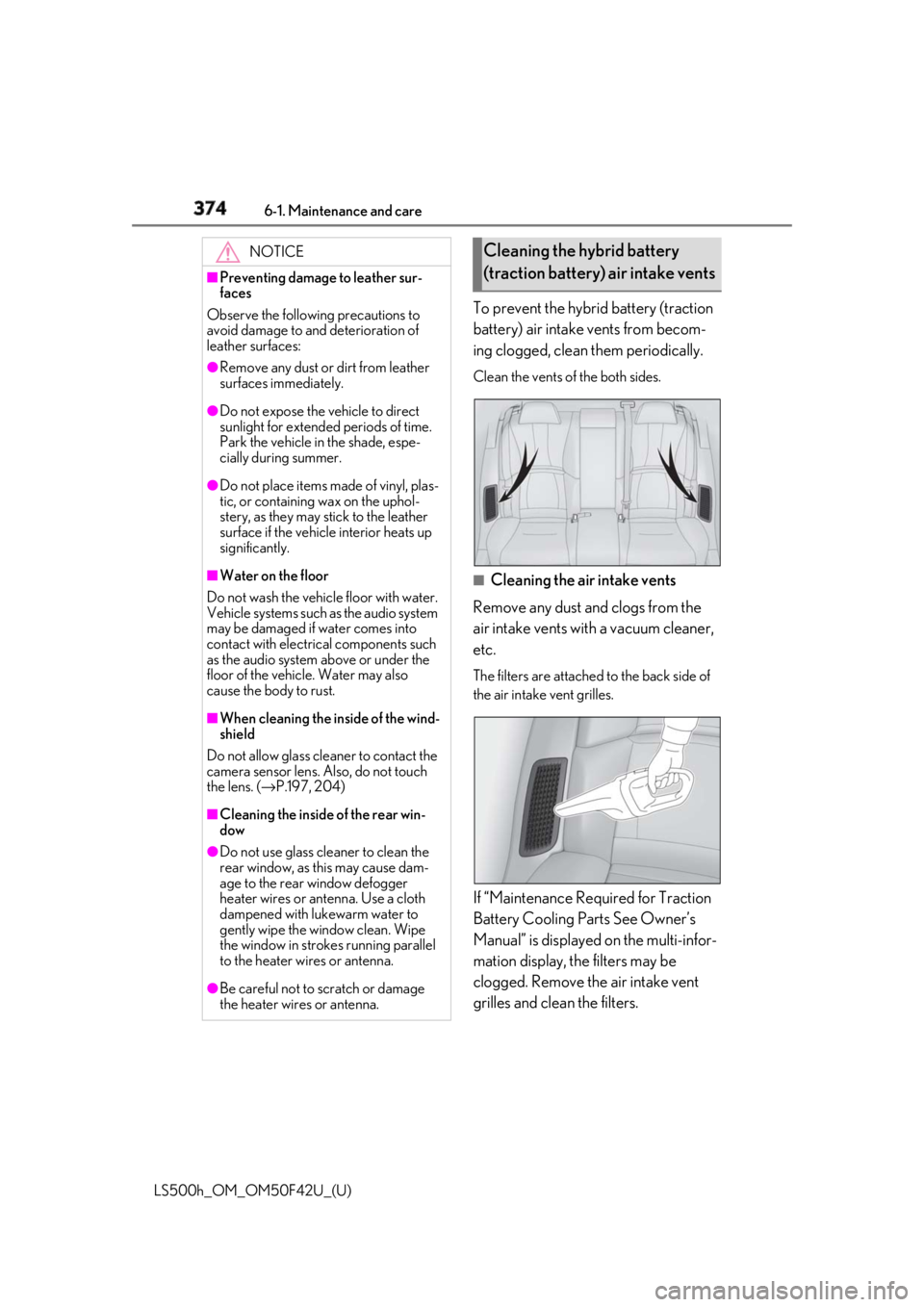
LS500h_OM_OM50F42U_(U) To prevent the hybrid battery (traction
battery) air intake vents from becom-
ing clogged, clean them periodically. Clean the vents of the both sides.
■
Cleaning the air intake vents
Remove any dust and clogs from the
air intake vents with a vacuum cleaner,
etc. The filters are attached to the back side of
the air intake vent grilles.
If “Maintenance Required for Traction
Battery Cooling Parts See Owner’s
Manual” is displayed on the multi-infor-
mation display, the filters may be
clogged. Remove the air intake vent
grilles and clean the filters.NOTICE■
Preventing damage to leather sur-
faces
Observe the following precautions to
avoid damage to and deterioration of
leather surfaces: ●
Remove any dust or dirt from leather
surfaces immediately.●
Do not expose the vehicle to direct
sunlight for extended periods of time.
Park the vehicle in the shade, espe-
cially during summer.●
Do not place items made of vinyl, plas-
tic, or containing wax on the uphol-
stery, as they may stick to the leather
surface if the vehicle interior heats up
significantly.■
Water on the floor
Do not wash the vehicle floor with water.
Vehicle systems such as the audio system
may be damaged if water comes into
contact with electrical components such
as the audio system above or under the
floor of the vehicle. Water may also
cause the body to rust. ■
When cleaning the inside of the wind-
shield
Do not allow glass cleaner to contact the
camera sensor lens. Also, do not touch
the lens. ( → P.197, 204)
■
Cleaning the inside of the rear win-
dow●
Do not use glass cleaner to clean the
rear window, as this may cause dam-
age to the rear window defogger
heater wires or antenna. Use a cloth
dampened with lukewarm water to
gently wipe the window clean. Wipe
the window in strokes running parallel
to the heater wires or antenna.
●
Be careful not to scratch or damage
the heater wires or antenna. Cleaning the hybrid battery
(traction battery) air intake vents
Page 441 of 528
4417-2. Steps to take in an emergency
LS500h_OM_OM50F42U_(U) 7
When trouble arises ■
If “Oil Maintenance Required” is dis-
played
Indicates that the engine oil should be
changed.
Check and change the en gine oil, and oil fil-
ter by your Lexus deal er. After changing the
engine oil, make sure to reset the message.
( → P.390)■
If “Shift System Malfunction Driving
Unavailable” is displayed
There is a malfunction in the shift control
system. Have the vehicle inspected by your
Lexus dealer immediately. ■
If a message that in dicates the need for
the shift lever oper ation is displayed
To prevent the shift lever from being oper-
ated incorrectly or the vehicle from moving
unexpectedly, a message that requires shift-
ing the shift position may be displayed on
the multi-information display. In that case,
follow the instruction of the message and
shift the shift position. ■
If a message that in dicates the need for
visiting your Lexus dealer is displayed
The system or part shown on the
multi-information display is malfunctioning.
Have the vehicle inspected by your Lexus
dealer immediately. ■
If a message that in dicates the need for
referring to Owner’s Manual is dis-
played●
If any of the following messages are
shown on the multi-information display,
follow the instructions.
• “Engine Coolant Temp High” ( → P.453)
•“Battery Low” ( → P.447)
• “Transmission Fluid Temp High” ( → P.175)
●
If any of the following messages are
shown on the multi-information display, it
may indicate a malfunction. Have the
vehicle inspected by your Lexus dealer
immediately.
• “Access System with Elec. Key Malfunc-
tion”
• “Shift System Malfunction”
• “P Switch Malfunction”
• “Shift System Unavailable”
• “Hybrid System Malfunction”
•“Check Engine” • “Hybrid Battery System Malfunction”
• “Accelerator System Malfunction” ●
If any of the following messages are
shown on the multi-info rmation display, it
may indicate a malfun ction. Immediately
stop the vehicle and contact your Lexus
dealer.
• “Braking Power Low”
• “Charging System Malfunction”
• “Oil Pressure Low” ●
If “Maintenance Required for Traction
Battery Cooling Parts” is shown, the fil-
ters may be clogged, the air intake vents
may be blocked, or there may be a gap in
the duct. Therefore, perform the follow-
ing correction procedure.
• If the air intake vent s and filters of the
hybrid battery (traction battery) are dirty,
perform the procedure on P.374 to clean
them.
• If the warning message is shown when
the air intake vents and filters of the
hybrid battery (traction battery) are not
dirty, have the vehicle inspected by your
Lexus dealer.
NOTICE■
If “High Power Consumption Partial
Limit On AC/Heater Operation” is
displayed frequently
There is a possible malfunction relating
to the charging system or the 12-volt bat-
tery may be deteriorating. Have the vehi-
cle inspected by your Lexus dealer.
■
If “Have Traction Battery Inspected”
is displayed
This message indicates that the hybrid
battery (traction battery) may require
inspection or replacement. Have the
vehicle inspected by your Lexus dealer
immediately.
Do not continue driving the vehicle, as
the hybrid system may become not able
to be started again.
Page 475 of 528
4758-1. Specifications
LS500h_OM_OM50F42U_(U) 8
Vehicle specifications ■
Traction AA, A, B, C
The traction grades, from highest to
lowest, are AA, A, B and C, and they
represent the tire’s ability to stop on
wet pavement as measured under con-
trolled conditions on specified govern-
ment test surfaces of asphalt and
concrete. A tire marked C may have poor traction
performance.
Warning: The traction grade assigned to
this tire is based on braking (straight
ahead) traction tests and does not include
cornering (turning) traction. ■
Temperature A, B, C
The temperature grades are A (the
highest), B, and C, representing the
tire’s resistance to the generation of
heat and its ability to dissipate heat when tested under controlled condi-
tions on a specified indoor laboratory
test wheel. Sustained high temperature can cause the
material of the tire to degenerate and
reduce tire life, and excessive temperature
can lead to sudd en tire failure.
Grade C corresponds to a level of perfor-
mance which all passenger car tires must
meet under the Fede ral Motor Vehicle
Safety Standard No. 109.
Grades B and A represent higher levels of
performance on the laboratory test wheel
than the minimum required by law.
Warning: The temperature grades of a tire
assume that it is prop erly inflated and not
overloaded.
Excessive speed, unde rinflation, or exces-
sive loading, either separately or in combi-
nation, can cause heat buildup and
possible tire failure.
Glossary of tire terminology Tire related term Meaning
Cold tire inflation pressure Tire pressure when the vehicle has been parked for
three hours or more, or has not been driven more
than 1 mile or 1.5 km under that condition
Maximum inflation pressure The maximum cold inflated pressure to which a tire
may be inflated, shown on the sidewall of the tire
Recommended inflation pressure Cold tire inflation pressure recommended by a
manufacturer
Accessory weight The combined weight (in excess of those standard
items which may be replaced) of hybrid transmis-
sion, power steering, power brakes, power win-
dows, power seats, radio and heater, to the extent
that these items are available as factory-installed
equipment (whether installed or not)
Page 492 of 528
492 8-2. Customization
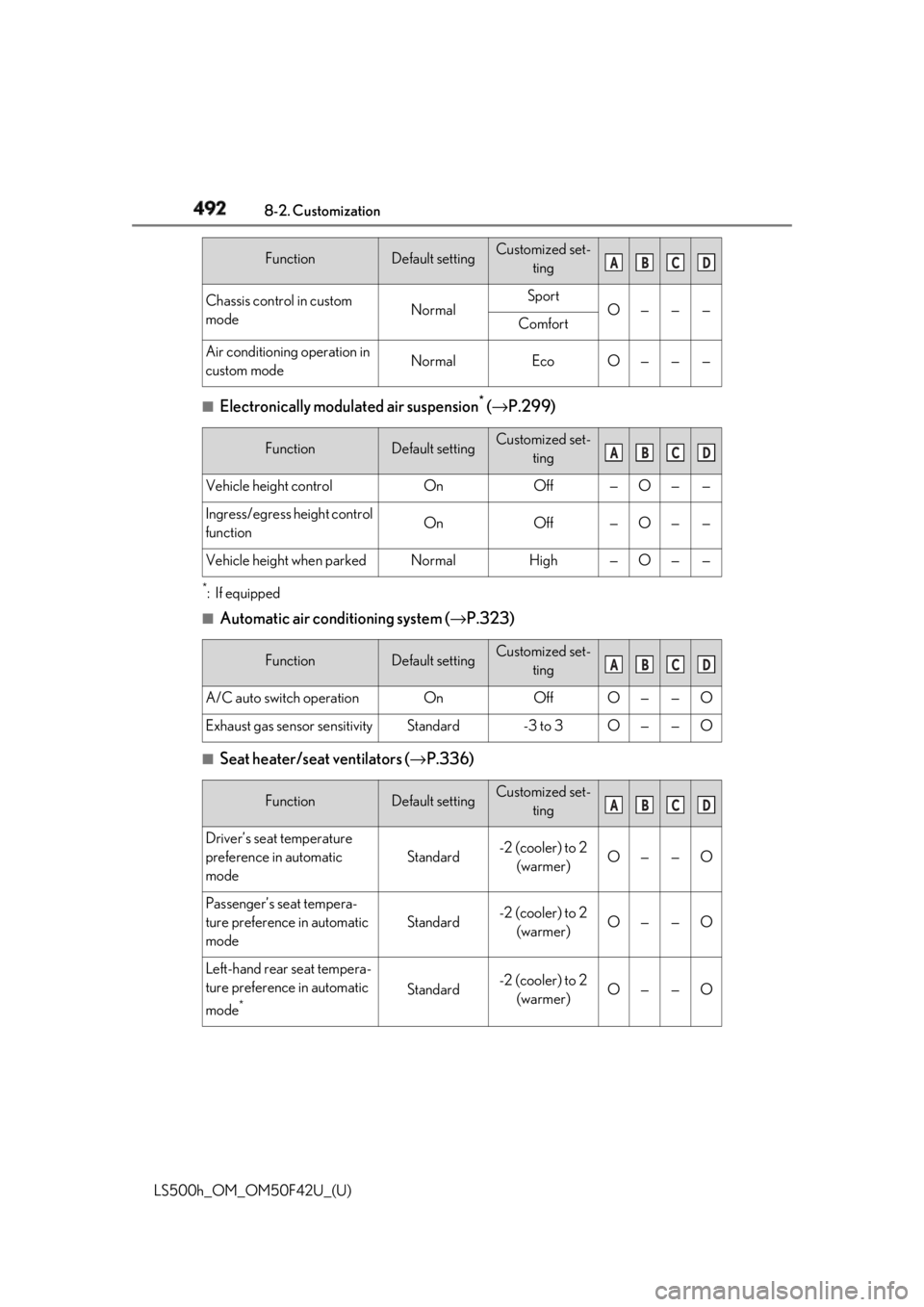
LS500h_OM_OM50F42U_(U) ■
Electronically modulated air suspension *
( → P.299)*
:If equipped ■
Automatic air conditioning system ( → P.323)
■
Seat heater/seat ventilators ( → P.336)Chassis control in custom
mode Normal Sport
O — — —
Comfort
Air conditioning operation in
custom mode Normal Eco O — — —
Function Default setting Customized set-
ting
Vehicle height control On Off — O — —
Ingress/egress height control
function On Off — O — —
Vehicle height when parked Normal High — O — —
Function Default setting Customized set-
ting
A/C auto switch operation On Off O — — O
Exhaust gas sensor sensitivity Standard -3 to 3 O — — O
Function Default setting Customized set-
ting
Driver’s seat temperature
preference in automatic
mode Standard -2 (cooler) to 2
(warmer) O — — O
Passenger’s seat tempera-
ture preference in automatic
mode Standard -2 (cooler) to 2
(warmer) O — — O
Left-hand rear seat tempera-
ture preference in automatic
mode *
Standard -2 (cooler) to 2
(warmer) O — — OFunction Default setting Customized set-
ting A B C D
A B C D
A B C D
A B C D
Page 493 of 528
4938-2. Customization
LS500h_OM_OM50F42U_(U) 8
Vehicle specifications *
:If equipped ■
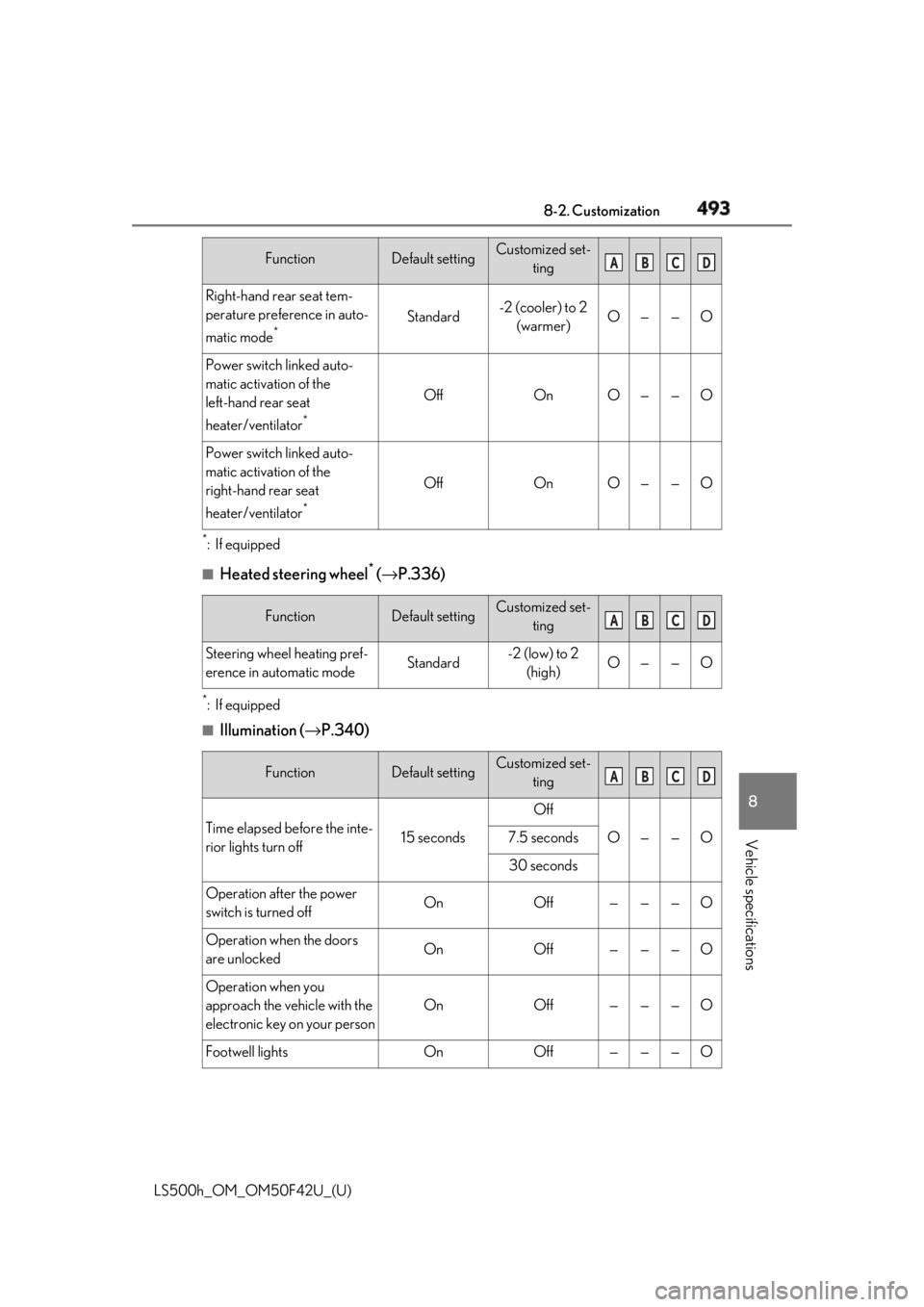
Heated steering wheel *
( → P.336)*
:If equipped ■
Illumination ( → P.340)Right-hand rear seat tem-
perature preference in auto-
matic mode *
Standard -2 (cooler) to 2
(warmer) O — — O
Power switch linked auto-
matic activation of the
left-hand rear seat
heater/ventilator *
Off On O — — O
Power switch linked auto-
matic activation of the
right-hand rear seat
heater/ventilator *
Off On O — — O
Function Default setting Customized set-
ting
Steering wheel heating pref-
erence in automatic mode Standard -2 (low) to 2
(high) O — — O
Function Default setting Customized set-
ting
Time elapsed before the inte-
rior lights turn off 15 seconds Off
O — — O7.5 seconds
30 seconds
Operation after the power
switch is turned off On Off — — — O
Operation when the doors
are unlocked On Off — — — O
Operation when you
approach the vehicle with the
electronic key on your person On Off — — — O
Footwell lights On Off — — — OFunction Default setting Customized set-
ting A B C D
A B C D
A B C D