radio LEXUS LS500H 2018 User Guide
[x] Cancel search | Manufacturer: LEXUS, Model Year: 2018, Model line: LS500H, Model: LEXUS LS500H 2018Pages: 528, PDF Size: 10.8 MB
Page 121 of 528

1213-2. Opening, closing and locking the doors and trunk
LS500h_OM_OM50F42U_(U) 3
Before driving airport or other faci lity that generates
strong radio waves or electrical noise●
When carrying a portable radio, cellular
phone, cordless phone or other wireless
communication device●
When the electronic key is in contact
with, or is covered by the following metal-
lic objects
• Cards to which aluminum foil is attached
• Cigarette boxes that have aluminum foil
inside
• Metallic wallets or bags
•Coins
• Hand warmers made of metal
• Media such as CDs and DVDs ●
When other wireless ke ys (that emit radio
waves) are being used nearby●
When carrying the electronic key
together with the following devices that
emit radio waves
• Another vehicle’s electronic key or a
wireless key that emits radio waves
• Personal computers or personal digital
assistants (PDAs)
• Digital audio players
• Portable game systems ●
If window tint with a metallic content or
metallic objects are attached to the rear
window●
When the electronic key is placed near a
battery charger or electronic devices●
When the vehicle is parked in a pay park-
ing spot where radio waves are emitted.■
Note for the entry function●
Even when the electronic key is within the
effective range (detection areas), the sys-
tem may not operate properly in the fol-
lowing cases:
• The electronic key is too close to the win-
dow or outside door handle, near the
ground, or in a high place when the doors
are locked or unlocked.
• The electronic key is near the ground or
in a high place, or too close to the center
of the rear bumper when the trunk is
opened.
• The electronic key is on the instrument
panel, rear package tray or floor, or in the
door pockets or glove box when the
hybrid system is star ted or power switch modes are changed. ●
Do not leave the electronic key on top of
the instrument panel or near the door
pockets when exiting the vehicle.
Depending on the radio wave reception
conditions, it may be detected by the
antenna outside the cabin and the doors
will become lockable from the outside,
possibly trapping the electronic key
inside the vehicle. ●
As long as the electronic key is within the
effective range, the doors may be locked
or unlocked by anyone. However, only
the doors detecting the electronic key
can be used to unlock the vehicle. ●
Even if the electronic key is not inside the
vehicle, it may be po ssible to start the
hybrid system if the el ectronic key is near
the window. ●
The doors may unlock or lock if a large
amount of water splashes on the door
handle, such as in the rain or in a car
wash, when the electronic key is within
the effective range. (The doors will auto-
matically be locked after approximately
60 seconds if the doors are not opened
and closed.) ●
If the wireless remote control is used to
lock the doors when the electronic key is
near the vehicle, there is a possibility that
the door may not be unlocked by the
entry function. (Use the wireless remote
control to unlock the doors.) ●
Touching the door lock sensor while
wearing gloves may delay or prevent lock
operation. ●
When the lock operation is performed
using the lock sensor, recognition signals
will be shown up to two consecutive
times. After this, no recognition signals
will be given.
●
If the door handle becomes wet while the
electronic key is within the effective
range, the door may lock and unlock
repeatedly. In this case, follow the follow-
ing correction procedures to wash the
vehicle:
• Place the electronic key in a location 6 ft.
(2 m) or more away from the vehicle.
(Take care to ensure that the key is not
stolen.)
Page 122 of 528

122 3-2. Opening, closing and locking the doors and trunk
LS500h_OM_OM50F42U_(U) • Set the electronic key to battery-saving
mode to disable the smart access system
with push-button start. ( → P.120)●
If the electronic key is inside the vehicle
and a door handle becomes wet during a
car wash, a message may be shown on
the multi-information display and a
buzzer will sound outside the vehicle. To
turn off the alarm, lock all the doors.●
The lock sensor may not work properly if
it comes into contact with ice, snow, mud,
etc. Clean the lock sensor and attempt to
operate it again.●
A sudden approach to the effective
range or door handle may prevent the
doors from being unlocked. In this case,
return the door handle to the original
position and check that the doors unlock
before pulling the door handle again.●
If there is another electronic key in the
detection area, it may take slightly longer
to unlock the doors after the door handle
is gripped.■
When the vehicle is not driven for
extended periods●
To prevent theft of the vehicle, do not
leave the electronic key within 6 ft. (2 m)
of the vehicle.●
The smart access syst em with push-but-
ton start can be deactivated in advance.●
Setting the electronic key to battery-sav-
ing mode helps to reduce key battery
depletion. ( → P.120)■
To operate the system properly●
Make sure to carry the electronic key
when operating the system. Do not get
the electronic key too close to the vehicle
when operating the system from the out-
side of the vehicle.
Depending on the position and holding
condition of the electronic key, the key may
not be detected correctly and the system
may not operate properly. (The alarm may
go off accidentally, or the door lock pre-
vention function may not operate.)
●
Do not leave the electronic key inside the
trunk.
The key confinement prevention function may not operate, depending on the loca-
tion of the key (the inside edge of the
Trunk), conditions (i nside a metal bag,
close to metallic objects) and the radio
waves in the surrounding area. ( → P.116)■
If the smart access system with
push-button start does not operate
properly ●
Locking and unloc king the doors and
trunk: → P.445●
Starting the hybrid system: → P.446■
Customization
Some functions can be customized.
( → P.481) ■
If the smart access system with
push-button start has been deactivated
in a customized setting ●
Locking and unloc king the doors and
opening the trunk:
Use the wireless remote control or
mechanical key. ( → P.108, 115, 445)●
Starting the hybrid system and changing
power switch modes: → P.446●
Stopping the hybrid system: → P.170
Page 127 of 528

1273-2. Opening, closing and locking the doors and trunk
LS500h_OM_OM50F42U_(U) 3
Before driving WARNING■
Caution regarding interference with
electronic devices●
People with implantable cardiac pace-
makers, cardiac resynchronization
therapy-pacemakers or implantable
cardioverter defibrillators should keep
away from the smart access system
with push-button start antennas.
( → P.119)
The radio waves may affect the opera-
tion of such devices. If necessary, the
entry function can be disabled. Ask
your Lexus dealer for details, such as
the frequency of radio waves and tim-
ing of the emitted radio waves. Then,
consult your doctor to see if you
should disable the entry function.●
Users of any electrical medical device
other than implantable cardiac pace-
makers, cardiac resynchronization
therapy-pacemakers or implantable
cardioverter defibrillators should con-
sult the manufacturer of the device for
information about its operation under
the influence of radio waves.
Radio waves could have unexpected
effects on the operation of such medi-
cal devices.
Ask your Lexus dealer for details on dis-
abling the entry function.
Page 216 of 528
216 4-5. Using the driving support systems
LS500h_OM_OM50F42U_(U) • When there are patterns or paint on the
road, a wall, or billboa rd that may be mis-
taken for a vehicle, pedestrian, or bicy-
clist
• When driving near an object that reflects
radio waves, such as a large truck or
guardrail
• When driving near a TV tower, broad-
casting station, electric power plant, or
other location where strong radio waves
or electrical noise may be present
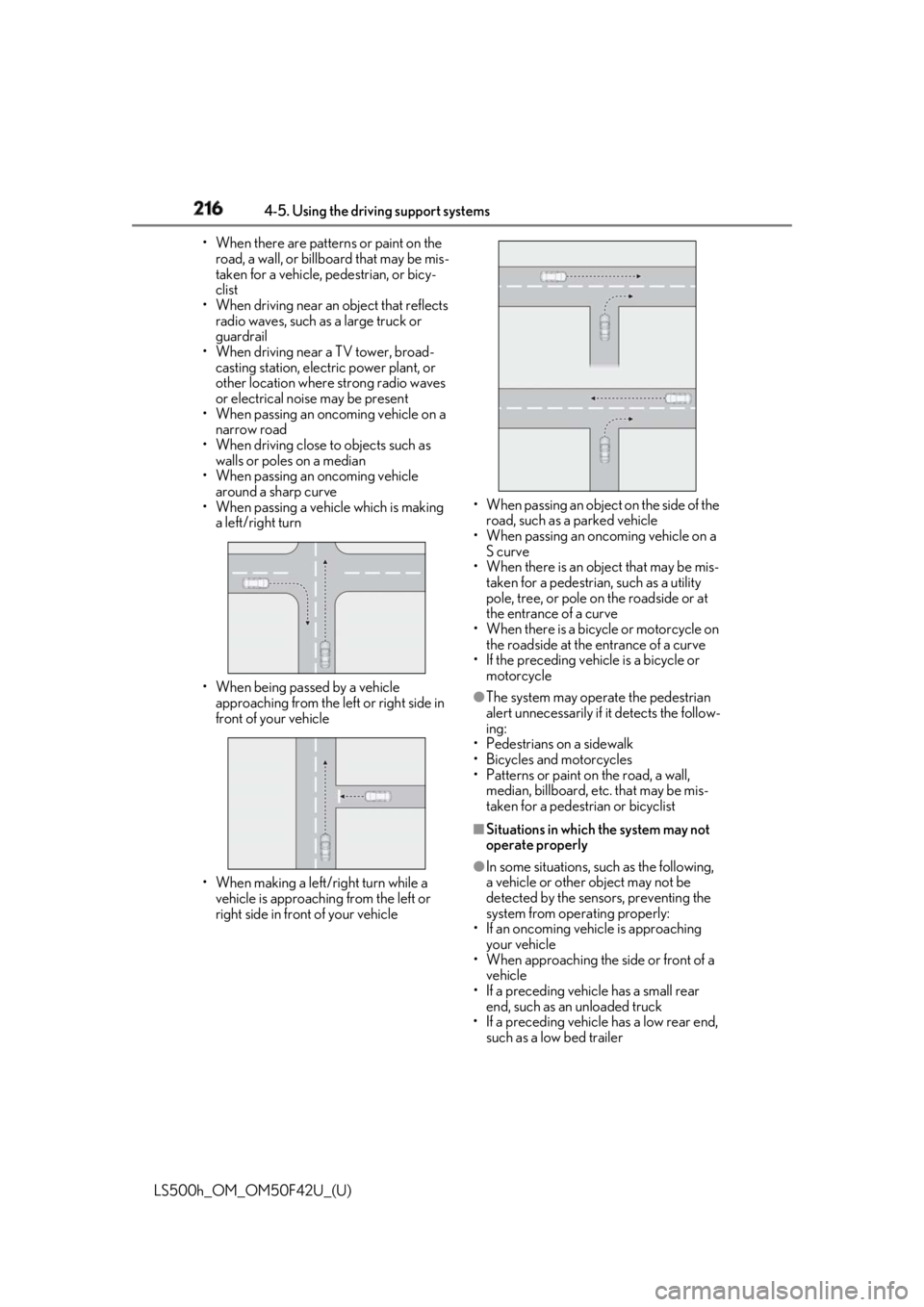
• When passing an oncoming vehicle on a
narrow road
• When driving close to objects such as
walls or poles on a median
• When passing an oncoming vehicle
around a sharp curve
• When passing a vehicle which is making
a left/right turn
• When being passed by a vehicle
approaching from the le ft or right side in
front of your vehicle
• When making a left/right turn while a
vehicle is approaching from the left or
right side in front of your vehicle • When passing an object on the side of the
road, such as a parked vehicle
• When passing an oncoming vehicle on a
S curve
• When there is an obje ct that may be mis-
taken for a pedestrian, such as a utility
pole, tree, or pole on the roadside or at
the entrance of a curve
• When there is a bicycle or motorcycle on
the roadside at the entrance of a curve
• If the preceding vehicle is a bicycle or
motorcycle ●
The system may operate the pedestrian
alert unnecessarily if it detects the follow-
ing:
• Pedestrians on a sidewalk
• Bicycles and motorcycles
• Patterns or paint on the road, a wall,
median, billboard, etc. that may be mis-
taken for a pedestrian or bicyclist ■
Situations in which the system may not
operate properly ●
In some situations, such as the following,
a vehicle or other object may not be
detected by the sensors, preventing the
system from operating properly:
• If an oncoming vehicle is approaching
your vehicle
• When approaching the side or front of a
vehicle
• If a preceding vehicle has a small rear
end, such as an unloaded truck
• If a preceding vehicle has a low rear end,
such as a low bed trailer
Page 225 of 528
2254-5. Using the driving support systems
LS500h_OM_OM50F42U_(U) 4
Driving road or a wall that may be mistaken for a
vehicle or pedestrian
• When driving near an object that reflects
radio waves, such as a large truck or
guardrail
• When driving near a TV tower, broad-
casting station, electric power plant, or
other location where strong radio waves
or electrical noise may be present■
Situations in which the system may not
operate properly●
In some situations such as the following, a
vehicle may not be detected by the radar
sensor and camera sensor, preventing
the system from operating properly:
• If an oncoming vehicle is approaching
your vehicle
• If a vehicle ahead is a motorcycle or bicy-
cle
• When approaching the side or front of a
vehicle
• If a preceding vehicle has a small rear
end, such as an unloaded truck
• If a preceding vehicle has a low rear end,
such as a low bed trailer
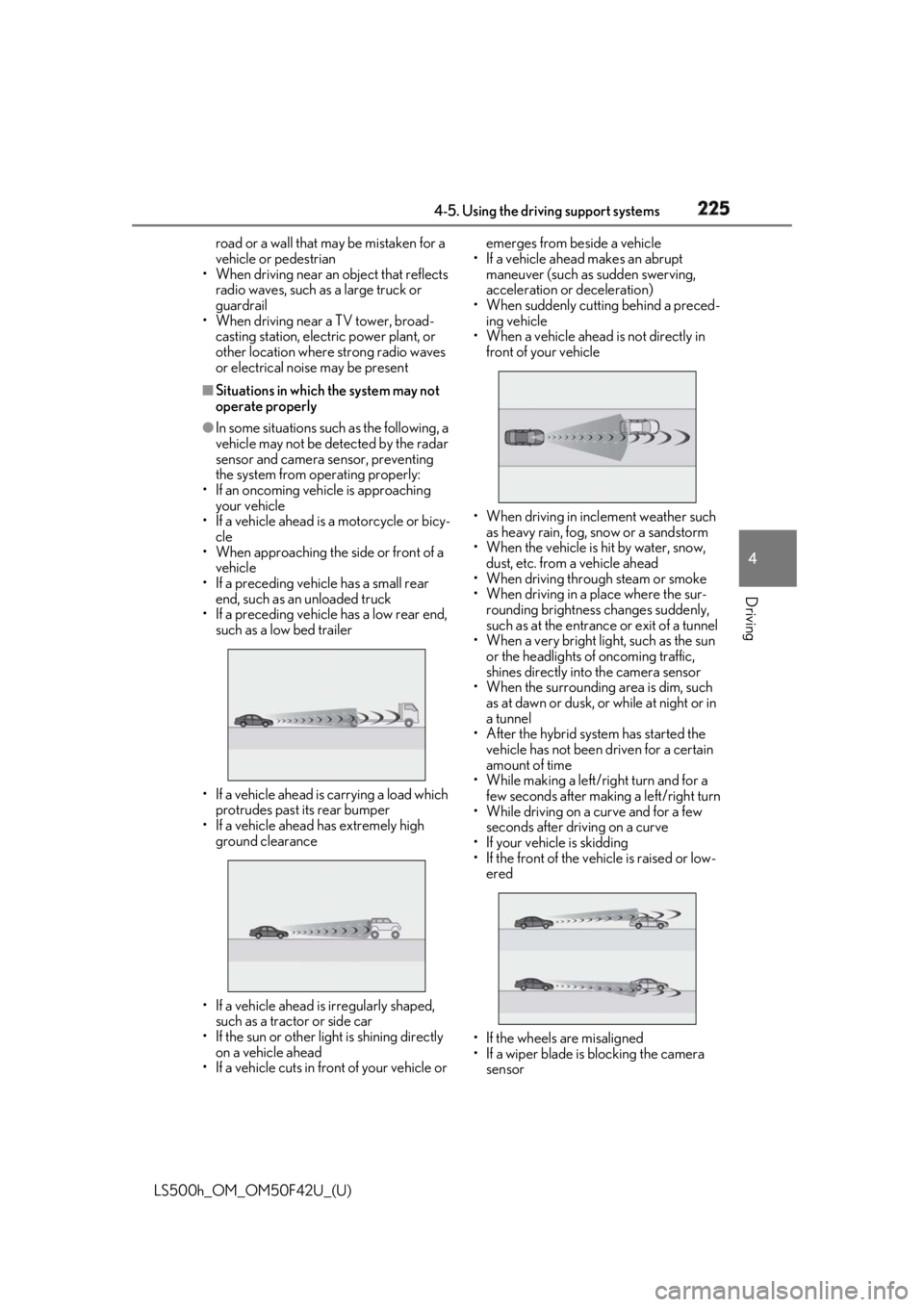
• If a vehicle ahead is carrying a load which
protrudes past its rear bumper
• If a vehicle ahead has extremely high
ground clearance
• If a vehicle ahead is irregularly shaped,
such as a tractor or side car
• If the sun or other light is shining directly
on a vehicle ahead
• If a vehicle cuts in front of your vehicle or emerges from beside a vehicle
• If a vehicle ahead makes an abrupt
maneuver (such as sudden swerving,
acceleration or deceleration)
• When suddenly cutting behind a preced-
ing vehicle
• When a vehicle ahead is not directly in
front of your vehicle
• When driving in incl ement weather such
as heavy rain, fog, snow or a sandstorm
• When the vehicle is hit by water, snow,
dust, etc. from a vehicle ahead
• When driving through steam or smoke
• When driving in a place where the sur-
rounding brightness changes suddenly,
such as at the entrance or exit of a tunnel
• When a very bright light, such as the sun
or the headlights of oncoming traffic,
shines directly into the camera sensor
• When the surrounding area is dim, such
as at dawn or dusk, or while at night or in
a tunnel
• After the hybrid system has started the
vehicle has not been driven for a certain
amount of time
• While making a left/r ight turn and for a
few seconds after making a left/right turn
• While driving on a curve and for a few
seconds after driving on a curve
• If your vehicle is skidding
• If the front of the vehicle is raised or low-
ered
• If the wheels are misaligned
• If a wiper blade is blocking the camera
sensor
Page 228 of 528

228 4-5. Using the driving support systems
LS500h_OM_OM50F42U_(U) ●
Setting for “PCS” and “CAUTION” in
( → P.86) of the multi-information
display.●
A shift position other than P or R is
selected. ●
Your vehicle is approaching an intersec-
tion at approximately 9 mph (15 km/h) or
lower.●
A vehicle is approaching from the left or
right in front of your vehicle at a speed
between approximately 6 mph (10 km/h)
and 37 mph (60 km/h).●
There are no preceding vehicles ahead of
your vehicle.●
The accelerator pedal is not strongly
depressed.●
The brake pedal is not being strongly
depressed.■
Situations in which the system may
operate even though no vehicles are
approaching
In certain situations, such as the following,
the system may operate even though no
vehicles are approaching: ●
When approaching objects on the road-
side, such as guardrails, traffic signs, util-
ity poles, street lig hts, trees, or walls●
When driving near a TV tower, broad-
casting station, electric power plant, or
other location where strong radio waves
or electrical noise may be present●
When passing an object on the side of the
road, such as a parked vehicle●
When a vehicle or pedestrian is
approaching from the le ft or right in front
of your vehicle from far away
●
When a vehicle or pedestrian is moving
within a parking spot, et c. next to the lane
your vehicle is driving in
●
When a pedestrian or bicyclist is moving
on a sidewalk
●
When a vehicle or pedestrian is moving
away from your vehicle
●
When a vehicle approaching from the left
or right in front of your vehicle is deceler-
ating or stops
●
When a vehicle approaching from the left or right in front of your vehicle makes a
left/right turn immediat ely in front of your
vehicle ●
When a pedestrian is approaching your
vehicle ●
When an oncoming vehicle makes a
left/right turn ●
When your vehicle enters an intersection
before a vehicle approaching from the
left or right in front of your vehicle ●
When stopped at traffic light and a vehi-
cle approaches from the left or right in
front of your vehicle ●
When driving in a location where there
are objects which reflect radar, such as
vehicles, guardrails, walls, traffic signs,
etc. ●
When making a left/right turn in front of
an approaching vehicle
●
When passing an oncoming vehicle ●
When being overtaken by another vehi-
cle ●
When driving next to another vehicle or a
pedestrian ●
When a vehicle or pedestrian
approaches the side of your vehicle
Some objects, such as the following, may be
detected and cause the FCTA system to
operate:
●
Pedestrians
■
Situations in which the system may not
operate properly
In some situations, such as the following, a
vehicle may not be detected by a front side
radar sensor, preventing the system from
operating properly:
●
If the front end or side of an approaching
vehicle is small (sports cars, etc.)
Page 316 of 528
316 5-1. Remote Touch/Display
LS500h_OM_OM50F42U_(U) ■
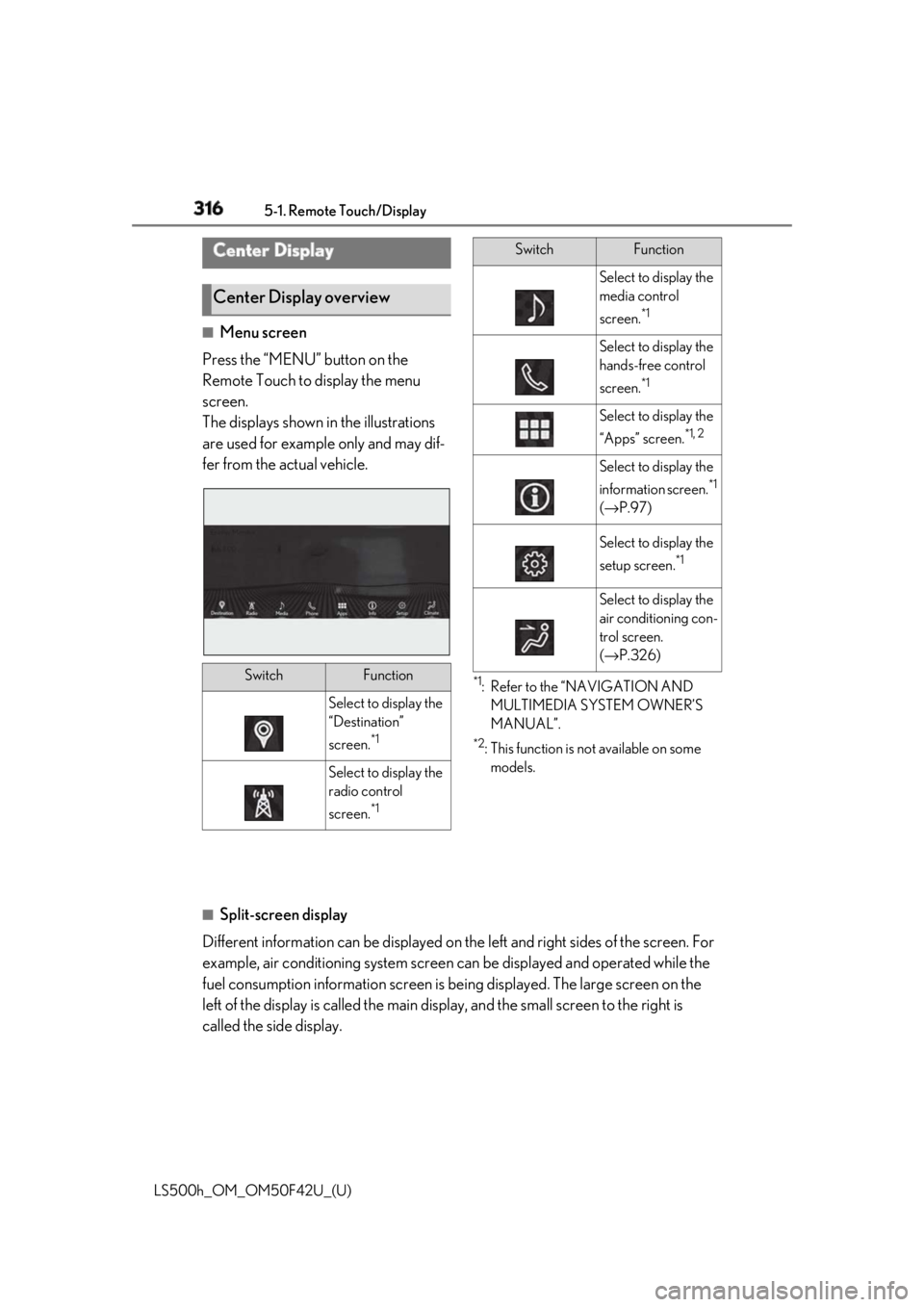
Menu screen
Press the “MENU” button on the
Remote Touch to display the menu
screen.
The displays shown in the illustrations
are used for example only and may dif-
fer from the actual vehicle. *1
: Refer to the “NAVIGATION AND
MULTIMEDIA SYSTEM OWNER’S
MANUAL”. *2
: This function is not available on some
models.
■
Split-screen display
Different information can be displayed on the left and right sides of the screen. For
example, air conditioning system screen can be displayed and operated while the
fuel consumption information screen is be ing displayed. The large screen on the
left of the display is called the main display, and the small screen to the right is
called the side display.Center Display
Center Display overview
Switch Function
Select to display the
“Destination”
screen. *1
Select to display the
radio control
screen. *1 Select to display the
media control
screen. *1
Select to display the
hands-free control
screen. *1
Select to display the
“Apps” screen. *1, 2
Select to display the
information screen. *1
( → P.97)
Select to display the
setup screen. *1
Select to display the
air conditioning con-
trol screen.
( → P.326)Switch Function
Page 368 of 528

368 5-6. Using the other interior features
LS500h_OM_OM50F42U_(U) Important! Read this information about
exposure to radio frequency signals
before using Safety Connect;
The Safety Connect system installed in
your vehicle is a low-power radio trans-
mitter and receiver. It receives and also
sends out radio frequency (RF) signals.
In August 1996, the Federal Commu-
nications Commission (FCC) adopted
RF exposure guidelines with safety lev-
els for mobile wireless phones. Those
guidelines are consistent with the
safety standards previously set by the
following U.S. and international stan-
dards bodies.
ANSI (American National Stan-
dards Institute) C95.1 [1992]
NCRP (National Council on Radia-
tion Protection and Measurement)
Report 86 [1986]
ICNIRP (International Commission
on Non-Ionizing Radiation Protec-
tion) [1996]
Those standards were based on com-
prehensive and periodic evaluations of
the relevant scientific literature. Over
120 scientists, engi neers, and physi-
cians from universi ties, and govern-
ment health agencies and industries
reviewed the available body of
research to develop the ANSI Stan-
dard (C95.1).
The design of Safety Connect com-
plies with the FCC guidelines in addi-
tion to those standards.Safety information for Safety
Connect
Page 398 of 528
398 6-3. Do-it-yourself maintenance
LS500h_OM_OM50F42U_(U) before serious problems arise.
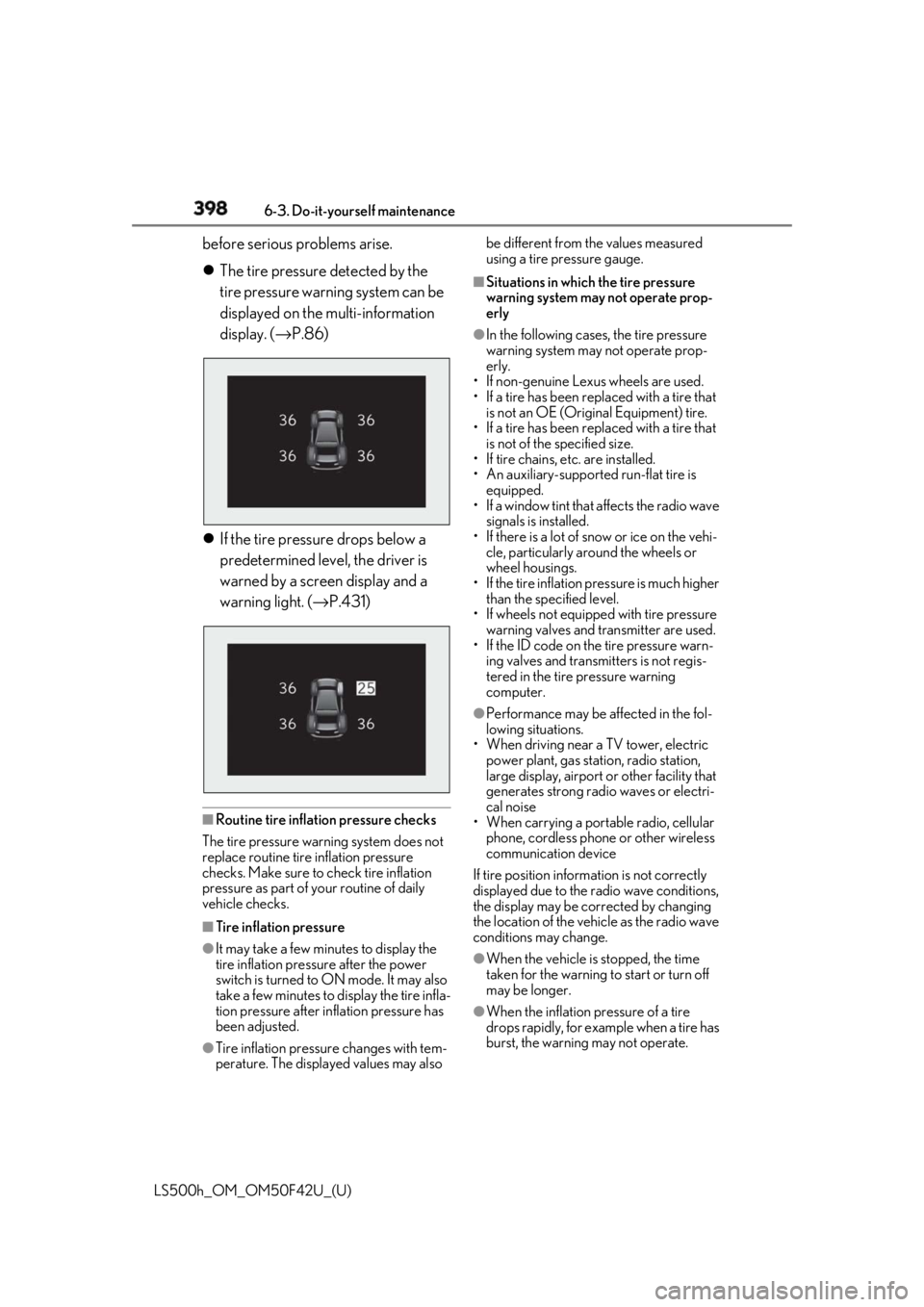
The tire pressure detected by the
tire pressure warning system can be
displayed on the multi-information
display. ( → P.86)
If the tire pressure drops below a
predetermined level, the driver is
warned by a screen display and a
warning light. ( → P.431)
■
Routine tire inflation pressure checks
The tire pressure warning system does not
replace routine tire inflation pressure
checks. Make sure to check tire inflation
pressure as part of your routine of daily
vehicle checks.
■
Tire inflation pressure
●
It may take a few minutes to display the
tire inflation pressure after the power
switch is turned to ON mode. It may also
take a few minutes to display the tire infla-
tion pressure after inflation pressure has
been adjusted.
●
Tire inflation pressu re changes with tem-
perature. The displayed values may also be different from the values measured
using a tire pressure gauge. ■
Situations in which the tire pressure
warning system may not operate prop-
erly ●
In the following cases, the tire pressure
warning system may not operate prop-
erly.
• If non-genuine Lexus wheels are used.
• If a tire has been replaced with a tire that
is not an OE (Original Equipment) tire.
• If a tire has been replaced with a tire that
is not of the specified size.
• If tire chains, etc. are installed.
• An auxiliary-supported run-flat tire is
equipped.
• If a window tint that affects the radio wave
signals is installed.
• If there is a lot of snow or ice on the vehi-
cle, particularly around the wheels or
wheel housings.
• If the tire inflation pressure is much higher
than the specified level.
• If wheels not equipped with tire pressure
warning valves and transmitter are used.
• If the ID code on the tire pressure warn-
ing valves and transmitters is not regis-
tered in the tire pressure warning
computer. ●
Performance may be af fected in the fol-
lowing situations.
• When driving near a TV tower, electric
power plant, gas stat ion, radio station,
large display, airport or other facility that
generates strong radi o waves or electri-
cal noise
• When carrying a portable radio, cellular
phone, cordless phone or other wireless
communication device
If tire position information is not correctly
displayed due to the radio wave conditions,
the display may be corrected by changing
the location of the vehicle as the radio wave
conditions may change.
●
When the vehicle is stopped, the time
taken for the warning to start or turn off
may be longer.
●
When the inflation pressure of a tire
drops rapidly, for example when a tire has
burst, the warning may not operate.
Page 475 of 528
4758-1. Specifications
LS500h_OM_OM50F42U_(U) 8
Vehicle specifications ■
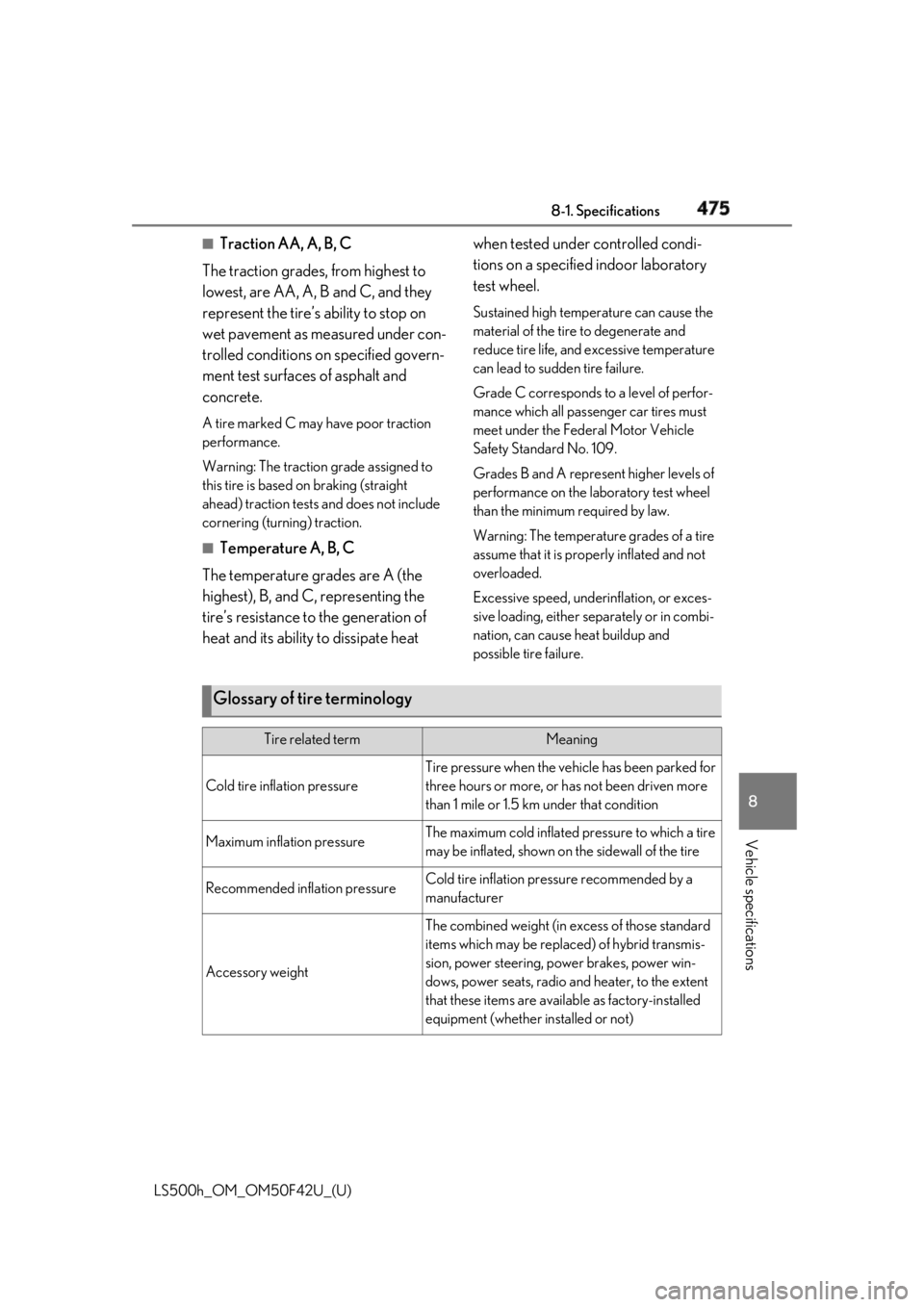
Traction AA, A, B, C
The traction grades, from highest to
lowest, are AA, A, B and C, and they
represent the tire’s ability to stop on
wet pavement as measured under con-
trolled conditions on specified govern-
ment test surfaces of asphalt and
concrete. A tire marked C may have poor traction
performance.
Warning: The traction grade assigned to
this tire is based on braking (straight
ahead) traction tests and does not include
cornering (turning) traction. ■
Temperature A, B, C
The temperature grades are A (the
highest), B, and C, representing the
tire’s resistance to the generation of
heat and its ability to dissipate heat when tested under controlled condi-
tions on a specified indoor laboratory
test wheel. Sustained high temperature can cause the
material of the tire to degenerate and
reduce tire life, and excessive temperature
can lead to sudd en tire failure.
Grade C corresponds to a level of perfor-
mance which all passenger car tires must
meet under the Fede ral Motor Vehicle
Safety Standard No. 109.
Grades B and A represent higher levels of
performance on the laboratory test wheel
than the minimum required by law.
Warning: The temperature grades of a tire
assume that it is prop erly inflated and not
overloaded.
Excessive speed, unde rinflation, or exces-
sive loading, either separately or in combi-
nation, can cause heat buildup and
possible tire failure.
Glossary of tire terminology Tire related term Meaning
Cold tire inflation pressure Tire pressure when the vehicle has been parked for
three hours or more, or has not been driven more
than 1 mile or 1.5 km under that condition
Maximum inflation pressure The maximum cold inflated pressure to which a tire
may be inflated, shown on the sidewall of the tire
Recommended inflation pressure Cold tire inflation pressure recommended by a
manufacturer
Accessory weight The combined weight (in excess of those standard
items which may be replaced) of hybrid transmis-
sion, power steering, power brakes, power win-
dows, power seats, radio and heater, to the extent
that these items are available as factory-installed
equipment (whether installed or not)