roof LEXUS LS500H 2018 User Guide
[x] Cancel search | Manufacturer: LEXUS, Model Year: 2018, Model line: LS500H, Model: LEXUS LS500H 2018Pages: 528, PDF Size: 10.8 MB
Page 103 of 528
103
LS500h_OM_OM50F42U_(U) 3 3
Before driving Before driving .
3-1. Key information
Keys ................................................. 104
3-2. Opening, closing and locking the
doors and trunk
Doors............................................... 108
Trunk................................................. 112
Smart access system with
push-button start ...................... 119
3-3. Adjusting the seats
Front seats ..................................... 128
Power rear seat........................... 135
Driving position memory ........ 139
Rear seat position memory .... 143
Head restraints............................ 144
3-4. Adjusting the steering wheel and
mirrors
Steering wheel............................. 147
Inside rear view mirror............. 148
Outside rear view mirrors ...... 149
3-5. Opening, closing the windows
and moon roof
Power windows............................ 151
Moon roof ..................................... 153
Page 104 of 528
104 3-1. Key information
LS500h_OM_OM50F42U_(U) 3-1.Key information
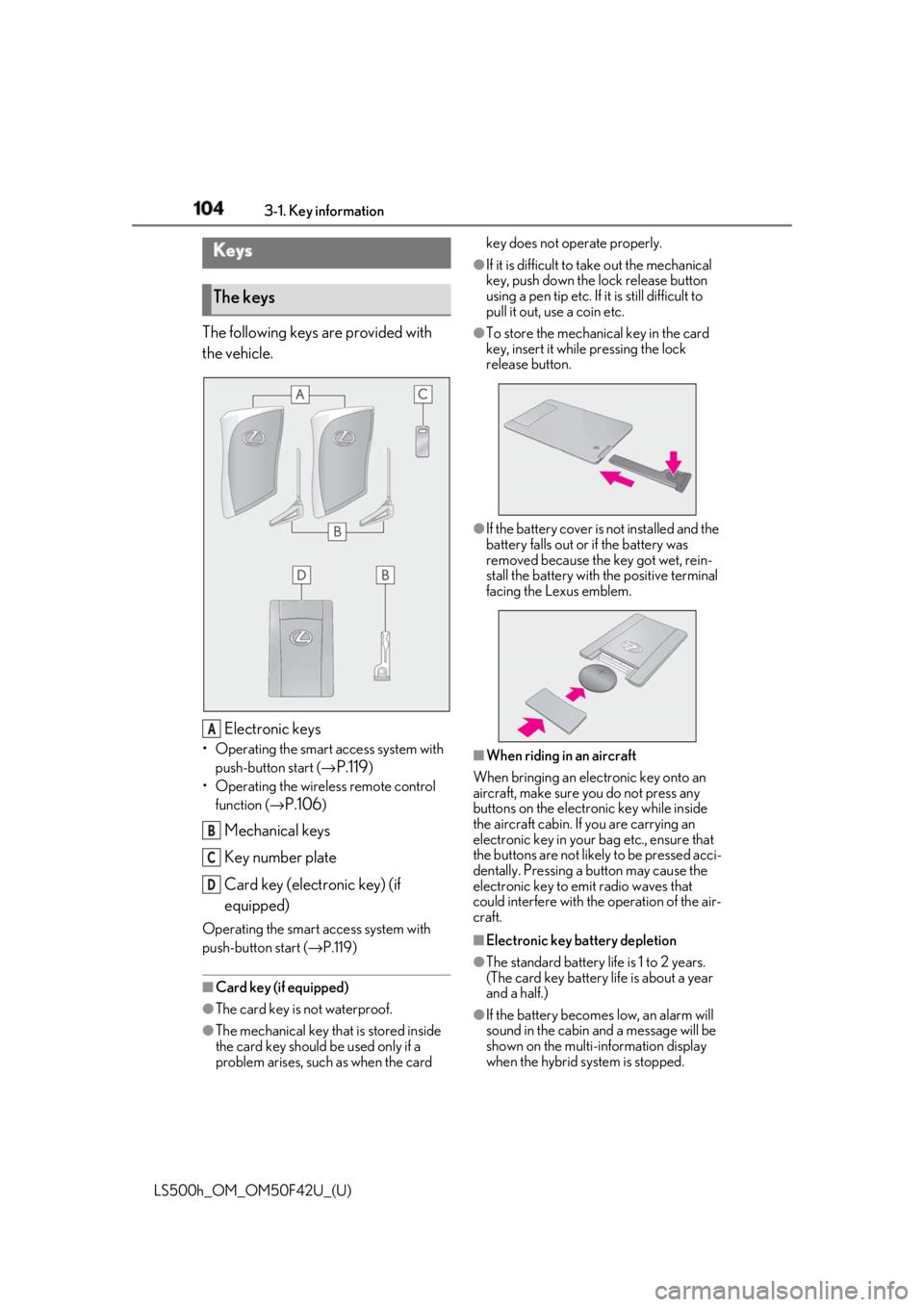
The following keys are provided with
the vehicle.
Electronic keys• Operating the smart access system with
push-button start ( →
P.119 )
• Operating the wireless remote control
function ( →
P.106 )
Mechanical keys
Key number plate
Card key (electronic key) (if
equipped)Operating the smart access system with
push-button start ( → P.119)
■
Card key (if equipped)
●
The card key is not waterproof.
●
The mechanical key that is stored inside
the card key should be used only if a
problem arises, such as when the card key does not operate properly. ●
If it is difficult to take out the mechanical
key, push down the lock release button
using a pen tip etc. If it is still difficult to
pull it out, use a coin etc. ●
To store the mechanical key in the card
key, insert it while pressing the lock
release button.
●
If the battery cover is not installed and the
battery falls out or if the battery was
removed because the key got wet, rein-
stall the battery with the positive terminal
facing the Lexus emblem.
■
When riding in an aircraft
When bringing an electronic key onto an
aircraft, make sure you do not press any
buttons on the electronic key while inside
the aircraft cabin. If you are carrying an
electronic key in your bag etc., ensure that
the buttons are not likely to be pressed acci-
dentally. Pressing a button may cause the
electronic key to em it radio waves that
could interfere with the operation of the air-
craft.
■
Electronic key battery depletion
●
The standard battery life is 1 to 2 years.
(The card key battery life is about a year
and a half.)
●
If the battery becomes low, an alarm will
sound in the cabin and a message will be
shown on the multi-information display
when the hybrid system is stopped.Keys
The keys
A
B
C
D
Page 106 of 528
106 3-1. Key information
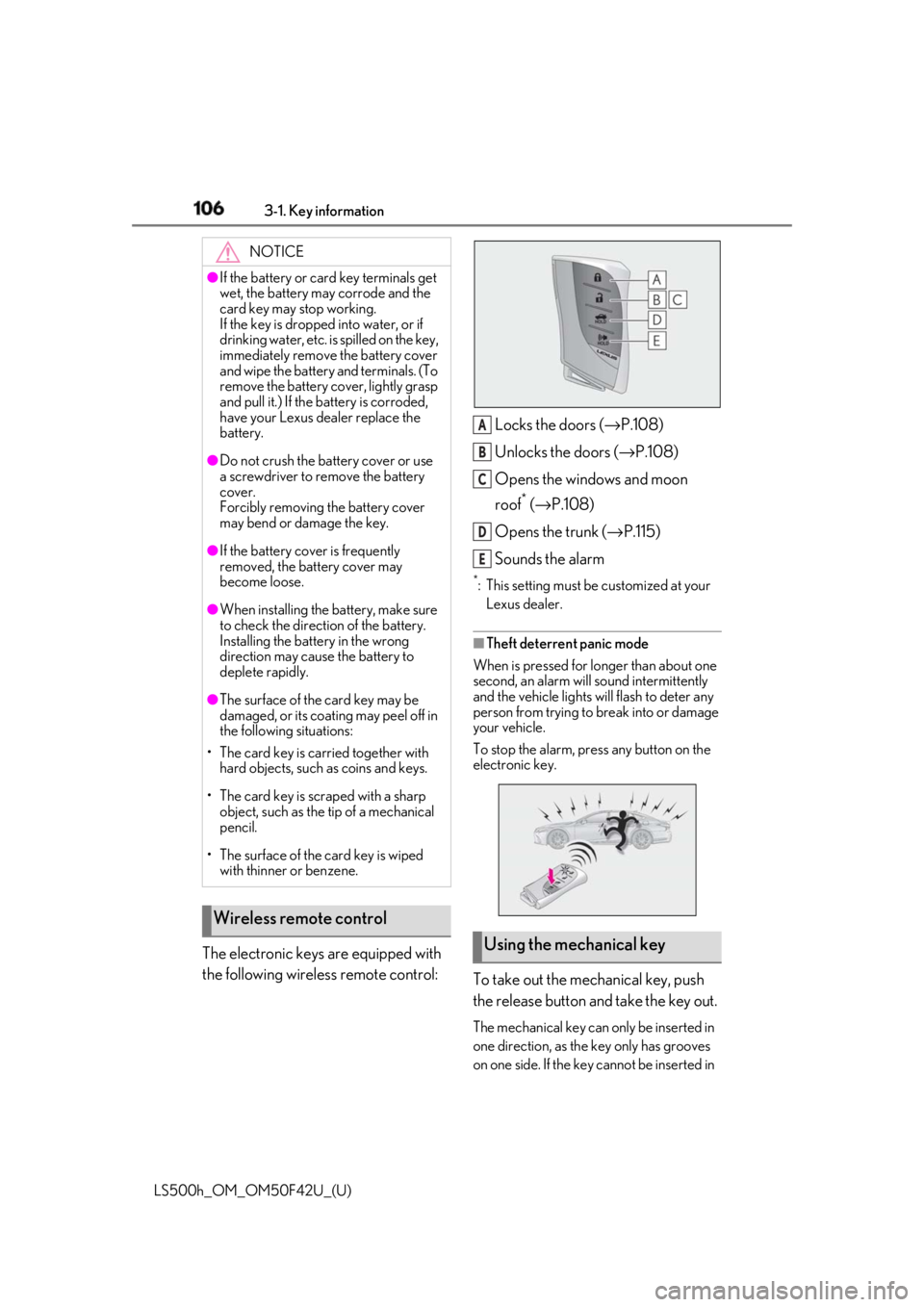
LS500h_OM_OM50F42U_(U) The electronic keys are equipped with
the following wireless remote control: Locks the doors ( → P.108)
Unlocks the doors ( → P.108)
Opens the windows and moon
roof *
( → P.108)
Opens the trunk ( → P.115)
Sounds the alarm *
: This setting must be customized at your
Lexus dealer.
■
Theft deterrent panic mode
When is pressed for longer than about one
second, an alarm will sound intermittently
and the vehicle lights will flash to deter any
person from trying to break into or damage
your vehicle.
To stop the alarm, press any button on the
electronic key.
To take out the mechanical key, push
the release button and take the key out. The mechanical key can only be inserted in
one direction, as the key only has grooves
on one side. If the key cannot be inserted in NOTICE●
If the battery or card key terminals get
wet, the battery may corrode and the
card key may stop working.
If the key is dropped into water, or if
drinking water, etc. is spilled on the key,
immediately remove the battery cover
and wipe the battery and terminals. (To
remove the battery co ver, lightly grasp
and pull it.) If the battery is corroded,
have your Lexus dealer replace the
battery.●
Do not crush the battery cover or use
a screwdriver to remove the battery
cover.
Forcibly removing the battery cover
may bend or damage the key.●
If the battery cover is frequently
removed, the battery cover may
become loose.●
When installing the ba ttery, make sure
to check the direction of the battery.
Installing the battery in the wrong
direction may cause the battery to
deplete rapidly.●
The surface of the card key may be
damaged, or its coating may peel off in
the following situations:
• The card key is carried together with
hard objects, such as coins and keys.
• The card key is scraped with a sharp
object, such as the tip of a mechanical
pencil.
• The surface of the card key is wiped
with thinner or benzene.
Wireless remote control
Using the mechanical key A
B
C
D
E
Page 108 of 528
108 3-2. Opening, closing and locking the doors and trunk
LS500h_OM_OM50F42U_(U) 3-2.Opening, closing and locking the doors and trunk
■
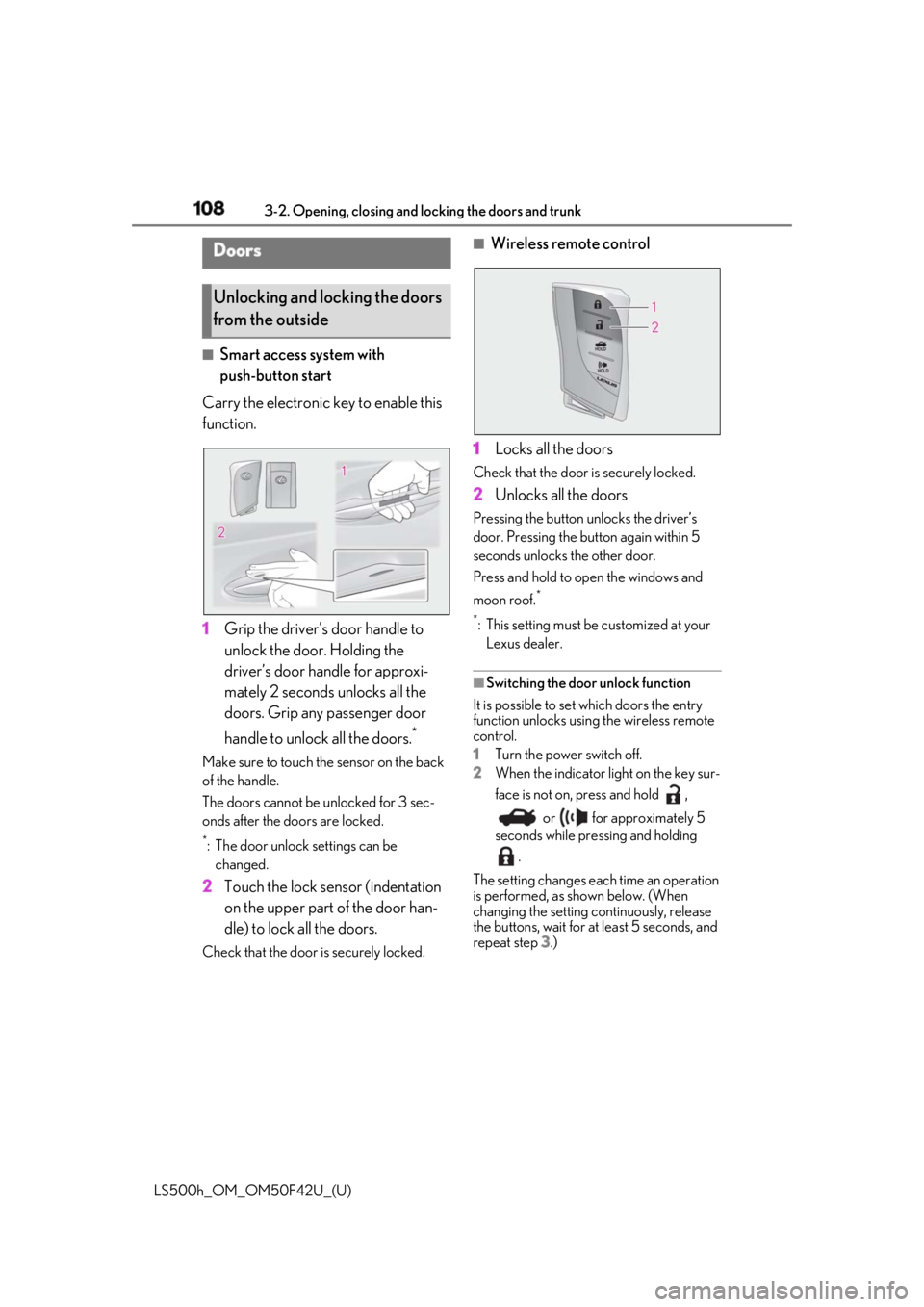
Smart access system with
push-button start
Carry the electronic key to enable this
function.
1 Grip the driver’s door handle to
unlock the door. Holding the
driver’s door ha ndle for approxi-
mately 2 seconds unlocks all the
doors. Grip any passenger door
handle to unlock all the doors. *
Make sure to touch the sensor on the back
of the handle.
The doors cannot be unlocked for 3 sec-
onds after the doors are locked. *
: The door unlock settings can be
changed.
2 Touch the lock sensor (indentation
on the upper part of the door han-
dle) to lock all the doors.Check that the door is securely locked. ■
Wireless remote control
1 Locks all the doors Check that the door is securely locked.
2 Unlocks all the doors Pressing the button unlocks the driver’s
door. Pressing the button again within 5
seconds unlocks the other door.
Press and hold to open the windows and
moon roof. *
*
: This setting must be customized at your
Lexus dealer.
■
Switching the door unlock function
It is possible to set which doors the entry
function unlocks using the wireless remote
control.
1 Turn the power switch off.
2 When the indicator light on the key sur-
face is not on, press and hold ,
or for approximately 5
seconds while pre ssing and holding
.
The setting changes each time an operation
is performed, as shown below. (When
changing the setting continuously, release
the buttons, wait for at least 5 seconds, and
repeat step 3 .)Doors
Unlocking and locking the doors
from the outside
Page 109 of 528
1093-2. Opening, closing and locking the doors and trunk
LS500h_OM_OM50F42U_(U) 3
Before driving
To prevent unintended triggering of the
alarm, unlock the doors using the wireless
remote control and open and close a door
once after the settings have been changed.
(If a door is not opened within 60 seconds
after is pressed, the doors will be
locked again and the alarm will automati-
cally be set.)
In a case that the alarm is triggered, imme-
diately stop the alarm. ( → P.68)■
Impact detection door lock release sys-
tem
In the event that the vehicle is subject to a
strong impact, all the doors are unlocked.
Depending on the force of the impact or the
type of accident, however, the system may
not operate.
■
Operation signals
A buzzer sounds and the emergency flash-
ers flash to indicate that the doors have
been locked/unlocked. (Locked: once;
Unlocked: twice)
A buzzer sounds to indicate that the win-
dows and moon roof are operating.
■
Security feature
If a door is not opened within approximately
60 seconds after the vehicle is unlocked, the security feature automatically locks the
vehicle again. ■
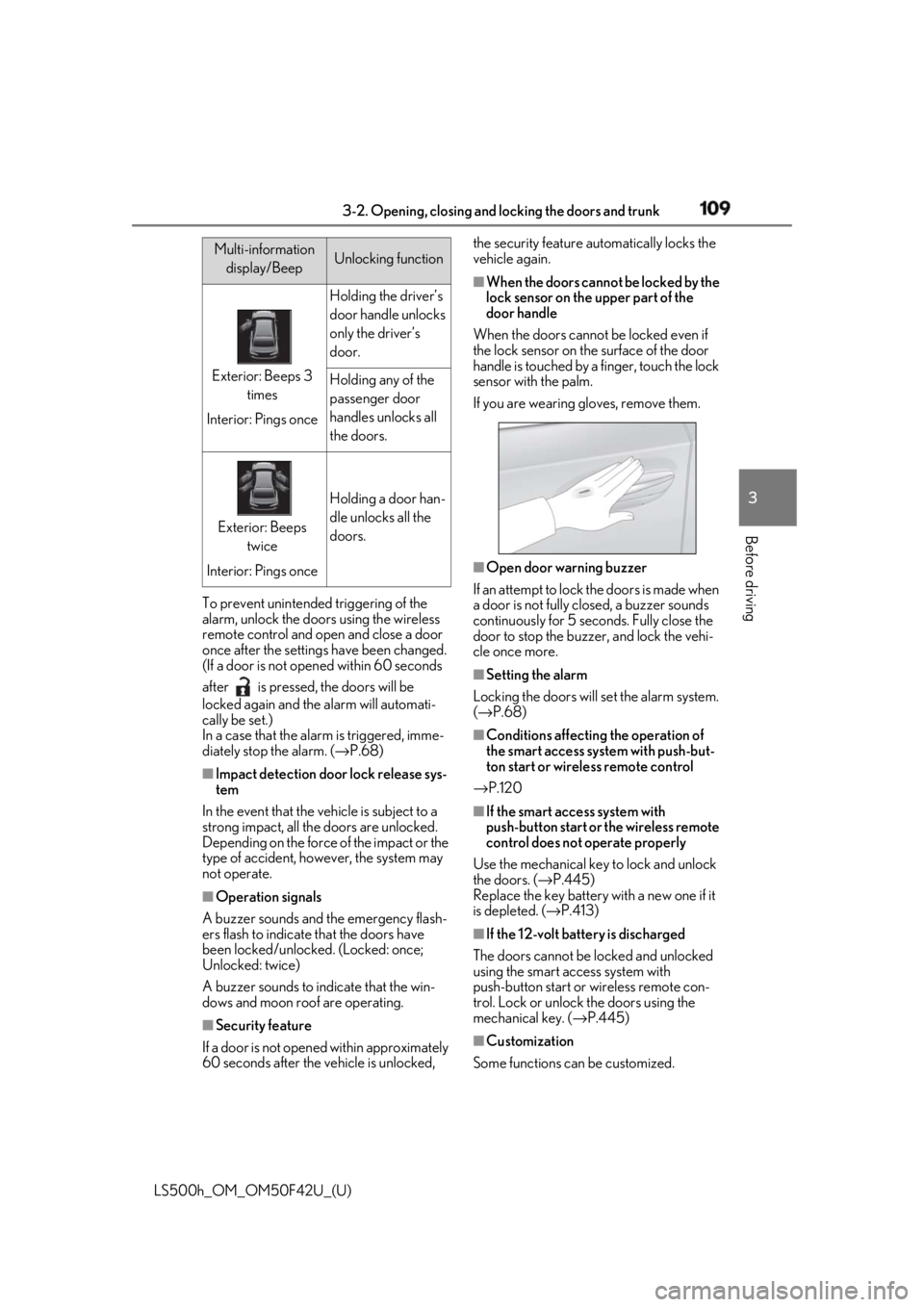
When the doors cannot be locked by the
lock sensor on the upper part of the
door handle
When the doors cannot be locked even if
the lock sensor on the surface of the door
handle is touched by a finger, touch the lock
sensor with the palm.
If you are wearing gloves, remove them.
■
Open door warning buzzer
If an attempt to lock the doors is made when
a door is not fully closed, a buzzer sounds
continuously for 5 seconds. Fully close the
door to stop the buzzer, and lock the vehi-
cle once more. ■
Setting the alarm
Locking the doors will set the alarm system.
( → P.68) ■
Conditions affecting the operation of
the smart access system with push-but-
ton start or wireless remote control
→ P.120 ■
If the smart access system with
push-button start or the wireless remote
control does not operate properly
Use the mechanical key to lock and unlock
the doors. ( → P.445)
Replace the key battery with a new one if it
is depleted. ( → P.413)
■
If the 12-volt batte ry is discharged
The doors cannot be locked and unlocked
using the smart access system with
push-button start or wireless remote con-
trol. Lock or unlock the doors using the
mechanical key. ( → P.445)
■
Customization
Some functions can be customized. Multi-information
display/Beep Unlocking function
Exterior: Beeps 3
times
Interior: Pings once Holding the driver’s
door handle unlocks
only the driver’s
door.
Holding any of the
passenger door
handles unlocks all
the doors.
Exterior: Beeps
twice
Interior: Pings once Holding a door han-
dle unlocks all the
doors.
Page 151 of 528
1513-5. Opening, closing the windows and moon roof
LS500h_OM_OM50F42U_(U) 3
Before driving 3-5.Opening, closing the windows and moon roof
The power windows can be opened
and closed using the switches.
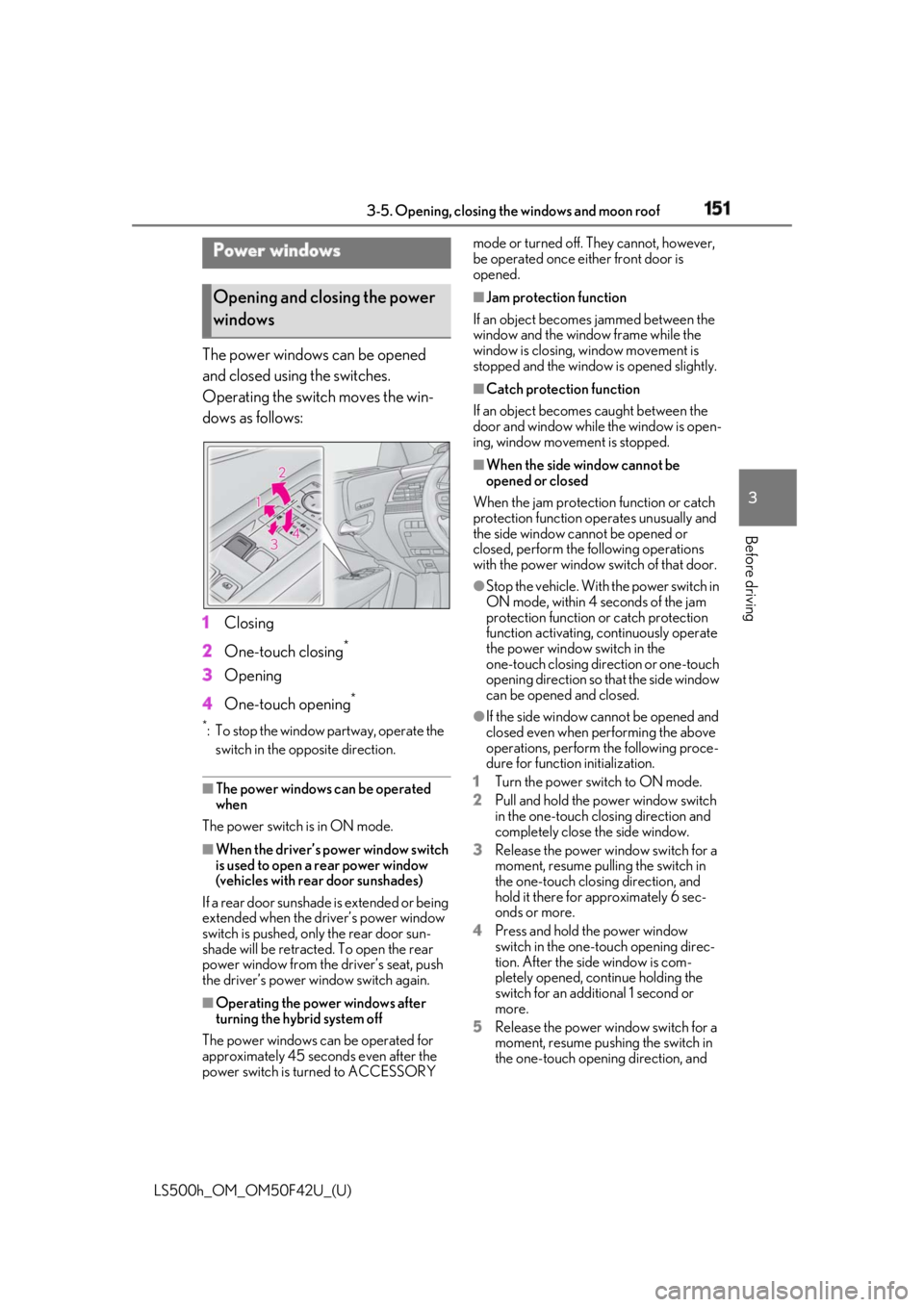
Operating the switch moves the win-
dows as follows:
1 Closing
2 One-touch closing *
3 Opening
4 One-touch opening **
: To stop the window partway, operate the
switch in the op posite direction.
■
The power windows can be operated
when
The power switch is in ON mode.
■
When the driver’s power window switch
is used to open a rear power window
(vehicles with rear door sunshades)
If a rear door sunshade is extended or being
extended when the driver’s power window
switch is pushed, only the rear door sun-
shade will be retracted. To open the rear
power window from the driver’s seat, push
the driver’s power window switch again.
■
Operating the power windows after
turning the hybrid system off
The power windows can be operated for
approximately 45 seconds even after the
power switch is turned to ACCESSORY mode or turned off. They cannot, however,
be operated once either front door is
opened. ■
Jam protection function
If an object becomes jammed between the
window and the window frame while the
window is closing, window movement is
stopped and the window is opened slightly. ■
Catch protection function
If an object becomes caught between the
door and window while the window is open-
ing, window movement is stopped. ■
When the side window cannot be
opened or closed
When the jam protection function or catch
protection function operates unusually and
the side window cannot be opened or
closed, perform the following operations
with the power window switch of that door.●
Stop the vehicle. With the power switch in
ON mode, within 4 seconds of the jam
protection function or catch protection
function activating, continuously operate
the power window switch in the
one-touch closing direction or one-touch
opening direction so that the side window
can be opened and closed. ●
If the side window cannot be opened and
closed even when performing the above
operations, perform the following proce-
dure for function initialization.
1 Turn the power switch to ON mode.
2 Pull and hold the power window switch
in the one-touch closing direction and
completely close the side window.
3 Release the power window switch for a
moment, resume pulling the switch in
the one-touch closing direction, and
hold it there for approximately 6 sec-
onds or more.
4 Press and hold the power window
switch in the one-touch opening direc-
tion. After the side window is com-
pletely opened, continue holding the
switch for an additional 1 second or
more.
5 Release the power window switch for a
moment, resume pushing the switch in
the one-touch opening direction, and Power windows
Opening and closing the power
windows
Page 152 of 528
152 3-5. Opening, closing the windows and moon roof
LS500h_OM_OM50F42U_(U) hold it there for approximately 4 sec-
onds or more.
6 Pull and hold the power window switch
in the one-touch closing direction
again. After the side window is com-
pletely closed, continue holding the
switch for a further 1 second or more.
If you release the switch while the window is
moving, start again from the beginning.
If the window reverses and cannot be fully
closed or opened, have the vehicle
inspected by your Lexus dealer. ■
Door lock linked window operation●
The power windows can be opened and
closed using the mechanical key. *
( → P.446)●
The power windows can be opened using
the wireless remote control. *
( → P.108)*
: These settings must be customized at
your Lexus dealer.■
Power windows open warning buzzer
A buzzer sounds and a message is shown
on the multi-information display in the
instrument cluster when the power switch is
turned off and the driver’s door is opened
with the power windows open. ■
Customization
Some functions can be customized.
( → P.481)
WARNING
Observe the following precautions.
Failure to do so may result in death or
serious injury.
■
Closing the windows
●
The driver is responsible for all the
power window operations, including
the operation for the passengers. In
order to prevent accidental operation,
especially by a child, do not let a child
operate the power windows. It is possi-
ble for children an d other passengers
to have body parts caught in the power
window. Also, when riding with a child,
it is recommended to use the window
lock switch. ( → P.153) ●
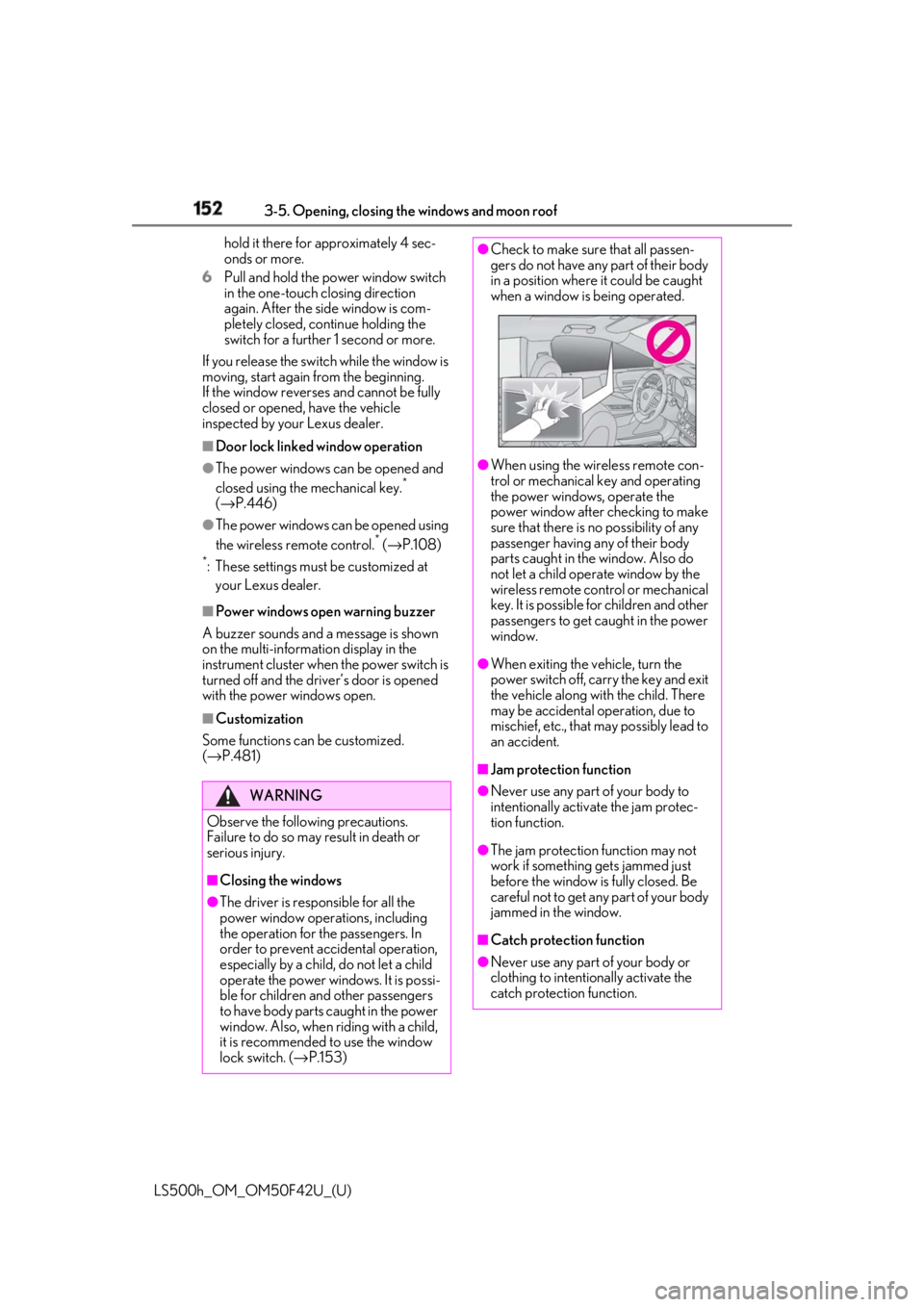
Check to make sure that all passen-
gers do not have any part of their body
in a position where it could be caught
when a window is being operated.
●
When using the wireless remote con-
trol or mechanical key and operating
the power windows, operate the
power window after checking to make
sure that there is no possibility of any
passenger having any of their body
parts caught in the window. Also do
not let a child operate window by the
wireless remote control or mechanical
key. It is possible for children and other
passengers to get caught in the power
window. ●
When exiting the vehicle, turn the
power switch off, carry the key and exit
the vehicle along with the child. There
may be accidental operation, due to
mischief, etc., that may possibly lead to
an accident.
■
Jam protection function ●
Never use any part of your body to
intentionally activa te the jam protec-
tion function.
●
The jam protection function may not
work if something gets jammed just
before the window is fully closed. Be
careful not to get any part of your body
jammed in the window.
■
Catch protection function
●
Never use any part of your body or
clothing to intentionally activate the
catch protection function.
Page 153 of 528
1533-5. Opening, closing the windows and moon roof
LS500h_OM_OM50F42U_(U) 3
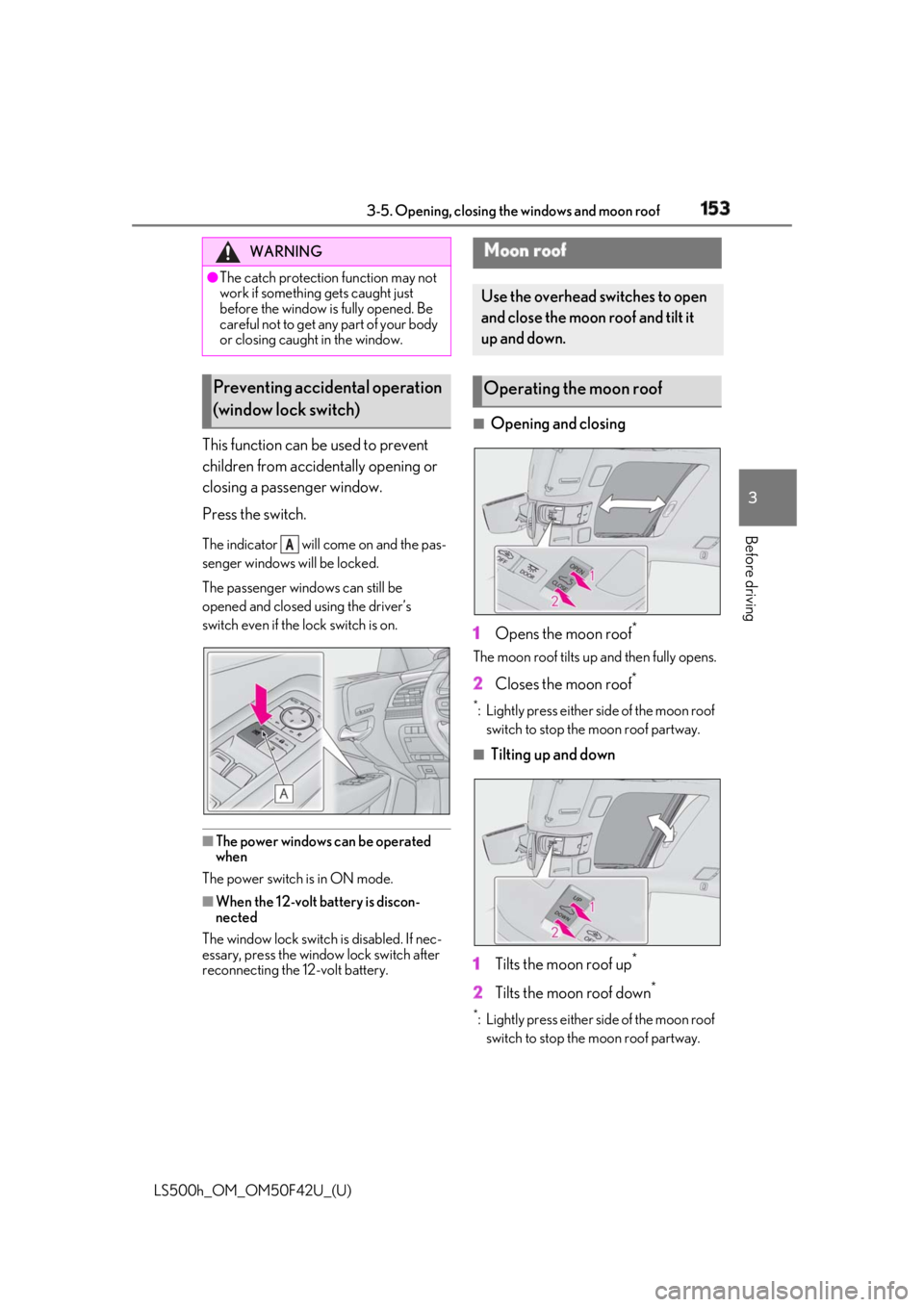
Before driving This function can be used to prevent
children from accidentally opening or
closing a passenger window.
Press the switch. The indicator will come on and the pas-
senger windows will be locked.
The passenger wind ows can still be
opened and closed using the driver’s
switch even if the lock switch is on.
■
The power windows can be operated
when
The power switch is in ON mode.
■
When the 12-volt battery is discon-
nected
The window lock switch is disabled. If nec-
essary, press the window lock switch after
reconnecting the 12-volt battery. ■
Opening and closing
1 Opens the moon roof *
The moon roof tilts up and then fully opens.
2 Closes the moon roof **
: Lightly press either side of the moon roof
switch to stop the moon roof partway. ■
Tilting up and down
1 Tilts the moon roof up *
2 Tilts the moon roof down **
: Lightly press either side of the moon roof
switch to stop the moon roof partway.WARNING●
The catch protection function may not
work if something gets caught just
before the window is fully opened. Be
careful not to get any part of your body
or closing caught in the window.
Preventing accidental operation
(window lock switch) A Moon roof Use the overhead switches to open
and close the moon roof and tilt it
up and down.
Operating the moon roof
Page 154 of 528
154 3-5. Opening, closing the windows and moon roof
LS500h_OM_OM50F42U_(U) ■
The moon roof can be operated when
The power switch is in ON mode. ■
Operating the moon roof after turning
the hybrid system off
The moon roof can be operated for approx-
imately 45 seconds after the power switch
is turned to ACCESSORY mode or turned
off. It cannot, however, be operated once
either front door is opened. ■
Jam protection function
If an object is detected between the moon
roof and the frame while the moon roof is
closing or tilting down, travel is stopped and
the moon roof opens slightly. ■
Sunshade
The sunshade can be opened and closed
manually. However, the sunshade will open
automatically when the moon roof is
opened. ■
Door lock linked moon roof operation●
The moon roof can be opened and
closed using the mechanical key. *
( → P.446)●
The moon roof can be opened using the
wireless remote control. *
( → P.108)*
: These settings must be customized at
your Lexus dealer.■
When the moon roof does not close nor-
mally
Perform the following procedure:
1 Stop the vehicle.
2 Press and hold the “CLOSE” switch. *
The moon roof will close, reopen and pause
for approximately 10 se conds. Then it will
close again and stop at the completely
closed position.
3 Check to make sure that the moon roof
is completely closed and then release
the switch. *
: If the switch is released at the incorrect
time, the procedure will have to be per-
formed again from the beginning.
If the moon roof does not fully close even
after performing the above procedure cor- rectly, have the vehicle inspected by your
Lexus dealer. ■
If the moon roof does not move normally
If the moon roof does not open or close
normally or the automatic opening function
does not operate, perform the following ini-
tialization procedure.
1 Stop the vehicle.
2 Press and hold the “DOWN” switch. *
The moon roof will stop at the tilt-up posi-
tion. After that, it will open, close, tilt up, tilt
down, and stop at the fully closed position.
3 Confirm that the moon roof has com-
pletely stopped and release the switch. *
:If you release the sw itch while the moon
roof is moving, perform the procedure
again from the beginning.
If, after performing the above procedures
correctly, the moon roof still does not open
or close normally or the automatic opening
function does not operate, have the vehicle
inspected by your Lexus dealer. ■
Moon roof open warning buzzer
A buzzer sounds and a message is shown
on the multi-informat ion display in the
instrument cluster when the power switch is
turned off and the driver’s door is opened
with the moon roof open. ■
Customization
Some functions can be customized.
( → P.481)
WARNING
Observe the following precautions.
Failure to do so may cause death or seri-
ous injury.
■
Opening the moon roof
●
Do not allow any passengers to put
their hands or heads outside the vehi-
cle while it is moving.
●
Do not sit on top of the moon roof.
Page 155 of 528
1553-5. Opening, closing the windows and moon roof
LS500h_OM_OM50F42U_(U) 3
Before driving WARNING■
Opening and closing the moon roof●
The driver is responsible for moon roof
opening and closing operations.
In order to prevent accidental opera-
tion, especially by a child, do not let a
child operate the moon roof. It is possi-
ble for children an d other passengers
to have body parts caught in the moon
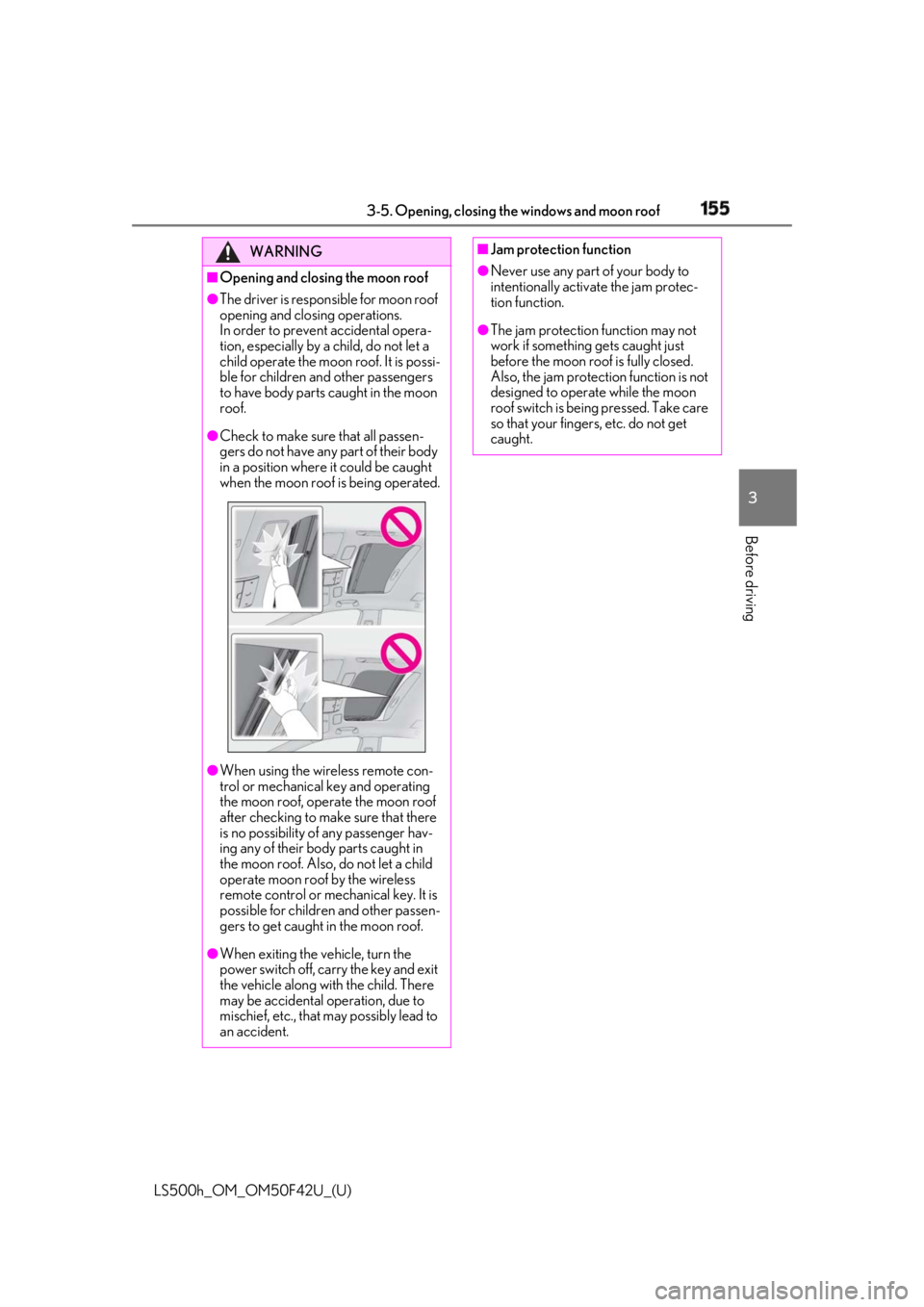
roof.●
Check to make sure that all passen-
gers do not have any part of their body
in a position where it could be caught
when the moon roof is being operated.
●
When using the wireless remote con-
trol or mechanical key and operating
the moon roof, operate the moon roof
after checking to make sure that there
is no possibility of any passenger hav-
ing any of their body parts caught in
the moon roof. Also, do not let a child
operate moon roof by the wireless
remote control or mechanical key. It is
possible for children and other passen-
gers to get caught in the moon roof.
●
When exiting the vehicle, turn the
power switch off, carry the key and exit
the vehicle along with the child. There
may be accidental operation, due to
mischief, etc., that may possibly lead to
an accident. ■
Jam protection function ●
Never use any part of your body to
intentionally activa te the jam protec-
tion function. ●
The jam protection function may not
work if something gets caught just
before the moon roof is fully closed.
Also, the jam protection function is not
designed to operate while the moon
roof switch is being pressed. Take care
so that your fingers, etc. do not get
caught.