stop start LEXUS LS500H 2018 User Guide
[x] Cancel search | Manufacturer: LEXUS, Model Year: 2018, Model line: LS500H, Model: LEXUS LS500H 2018Pages: 528, PDF Size: 10.8 MB
Page 66 of 528
66 1-4. Theft deterrent system
LS500h_OM_OM50F42U_(U) 1-4.Theft deterrent system
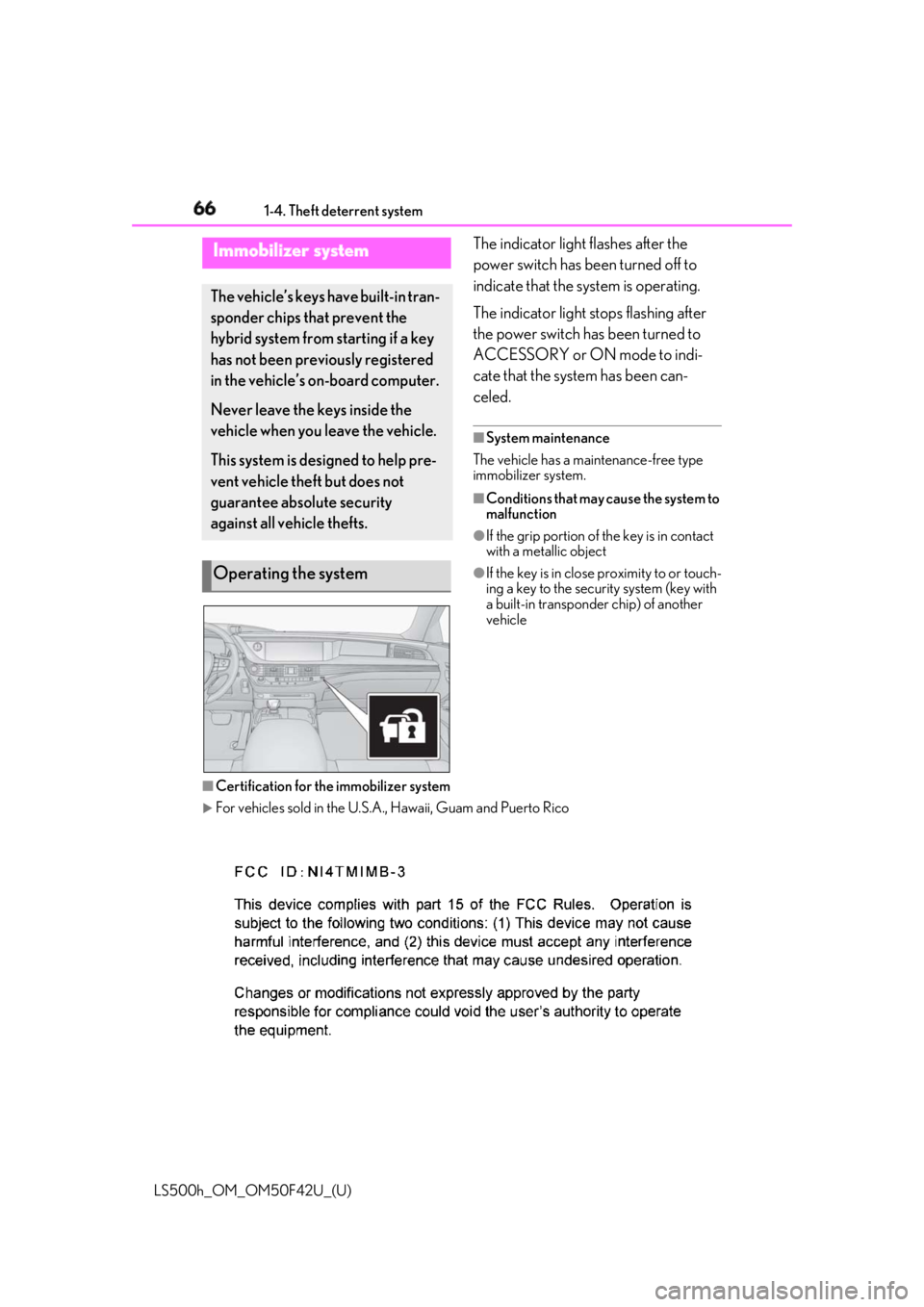
The indicator light flashes after the
power switch has been turned off to
indicate that the system is operating.
The indicator light stops flashing after
the power switch has been turned to
ACCESSORY or ON mode to indi-
cate that the system has been can-
celed. ■
System maintenance
The vehicle has a maintenance-free type
immobilizer system. ■
Conditions that may cause the system to
malfunction ●
If the grip portion of the key is in contact
with a metallic object ●
If the key is in close proximity to or touch-
ing a key to the security system (key with
a built-in transponder chip) of another
vehicle
■
Certification for the immobilizer system
For vehicles sold in the U.S.A. , Hawaii, Guam and Puerto RicoImmobilizer system The vehicle’s keys have built-in tran-
sponder chips that prevent the
hybrid system from starting if a key
has not been previously registered
in the vehicle’s on-board computer.
Never leave the keys inside the
vehicle when you leave the vehicle.
This system is designed to help pre-
vent vehicle theft but does not
guarantee absolute security
against all vehicle thefts.
Operating the system
Page 68 of 528
68 1-4. Theft deterrent system
LS500h_OM_OM50F42U_(U) ■
Items to check before locking the
vehicle
To prevent unexpected triggering of
the alarm and vehicle theft, make sure
of the following:
Nobody is in the vehicle.
The windows and moon roof are
closed before the alarm is set.
No valuables or other personal
items are left in the vehicle. ■
Setting
Close the doors, trunk and hood, and
lock all the doors. The system will be
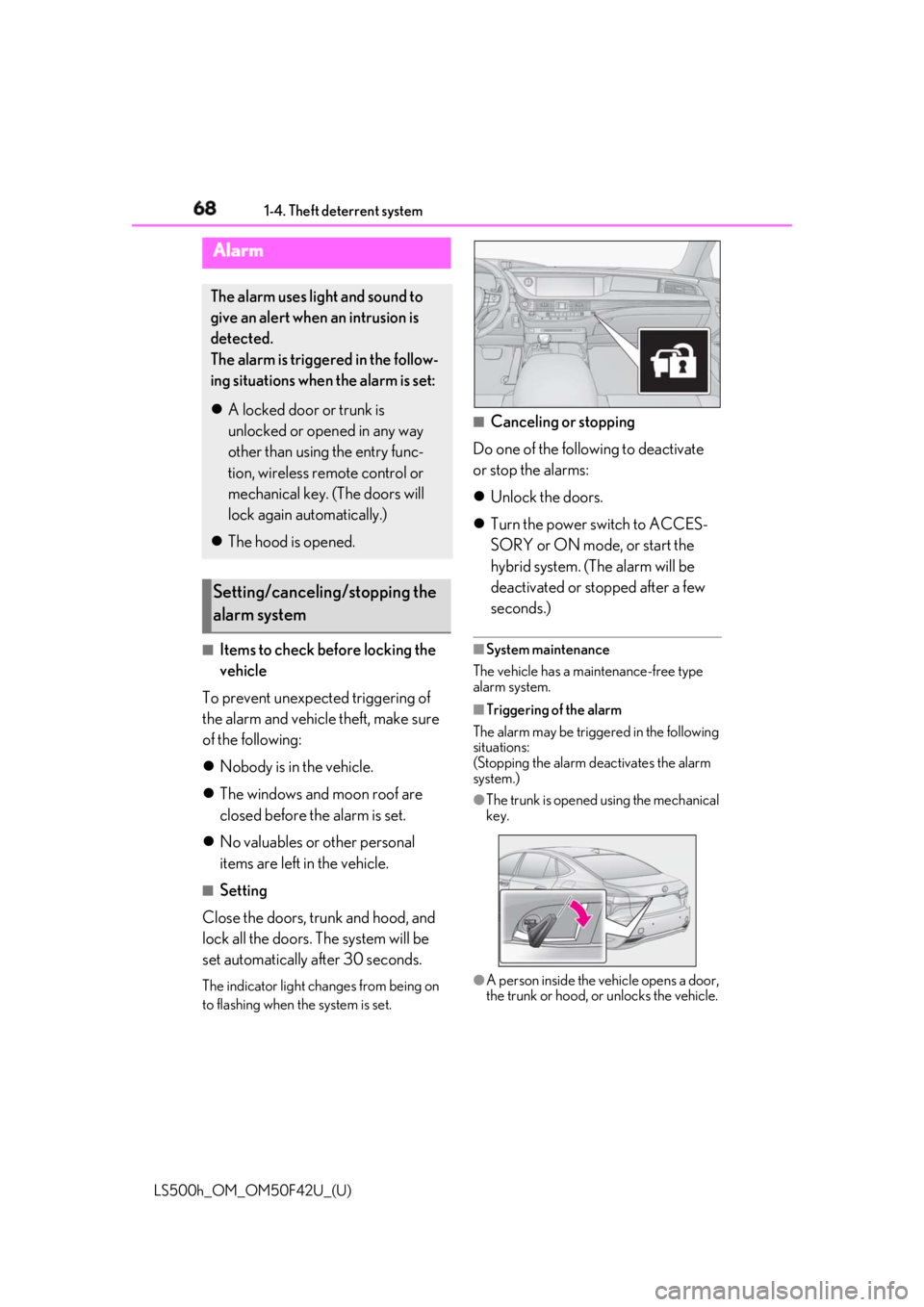
set automatically after 30 seconds. The indicator light changes from being on
to flashing when the system is set. ■
Canceling or stopping
Do one of the following to deactivate
or stop the alarms:
Unlock the doors.
Turn the power switch to ACCES-
SORY or ON mode, or start the
hybrid system. (The alarm will be
deactivated or stopped after a few
seconds.) ■
System maintenance
The vehicle has a maintenance-free type
alarm system. ■
Triggering of the alarm
The alarm may be triggered in the following
situations:
(Stopping the alarm deactivates the alarm
system.) ●
The trunk is opened using the mechanical
key.
●
A person inside the vehicle opens a door,
the trunk or hood, or unlocks the vehicle.Alarm The alarm uses light and sound to
give an alert when an intrusion is
detected.
The alarm is triggered in the follow-
ing situations when the alarm is set:
A locked door or trunk is
unlocked or opened in any way
other than using the entry func-
tion, wireless remote control or
mechanical key. (The doors will
lock again automatically.)
The hood is opened.
Setting/canceling/stopping the
alarm system
Page 78 of 528
78 2-1. Instrument cluster
LS500h_OM_OM50F42U_(U) Displays warning messages if a malfunction occurs ( → P.437)■
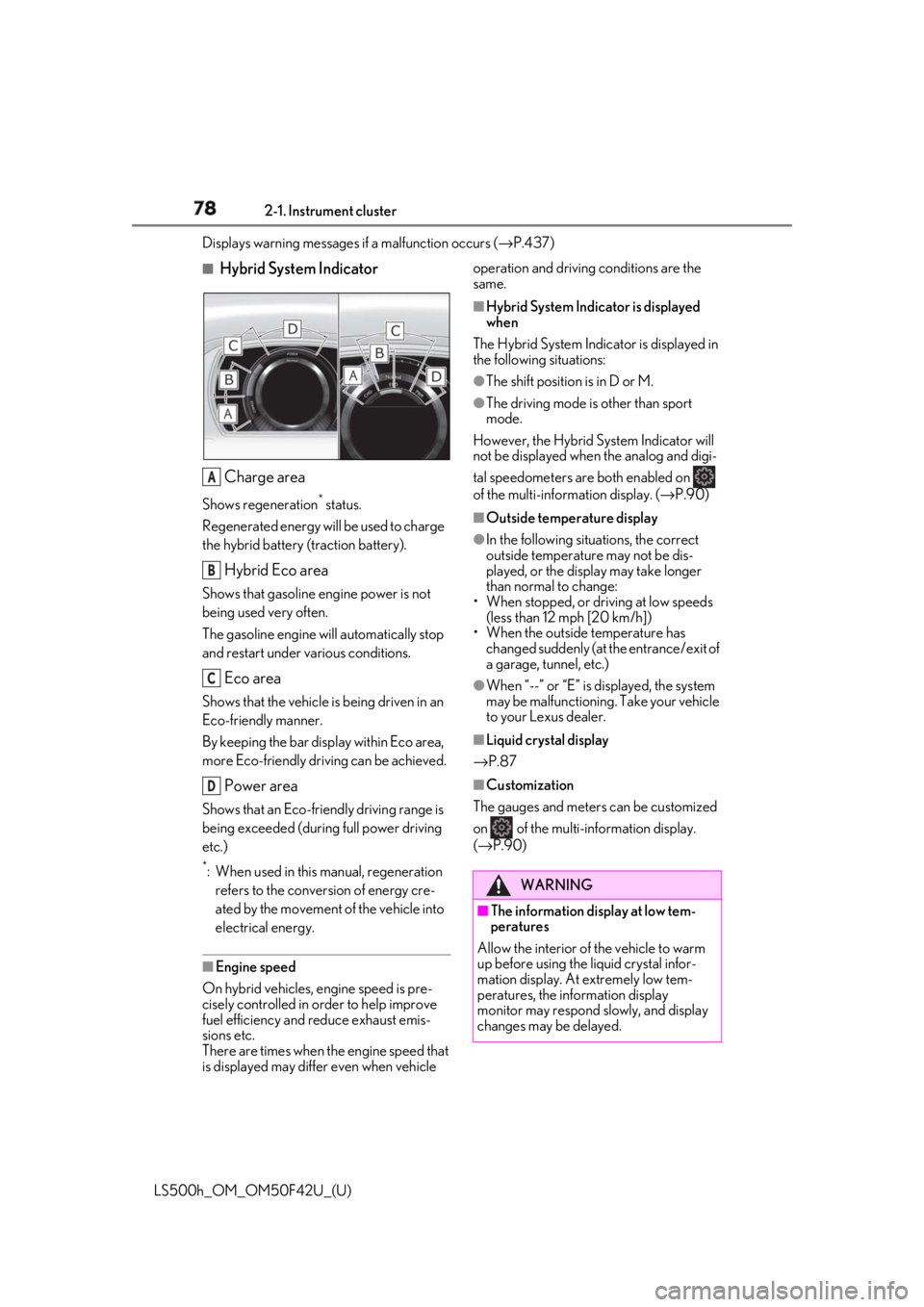
Hybrid System Indicator
Charge areaShows regeneration *
status.
Regenerated energy will be used to charge
the hybrid battery (traction battery).
Hybrid Eco areaShows that gasoline engine power is not
being used very often.
The gasoline engine will automatically stop
and restart under various conditions.
Eco areaShows that the vehicle is being driven in an
Eco-friendly manner.
By keeping the bar display within Eco area,
more Eco-friendly driv ing can be achieved.
Power areaShows that an Eco-friendly driving range is
being exceeded (durin g full power driving
etc.) *
: When used in this manual, regeneration
refers to the conversion of energy cre-
ated by the movement of the vehicle into
electrical energy.
■
Engine speed
On hybrid vehicles, engine speed is pre-
cisely controlled in order to help improve
fuel efficiency and reduce exhaust emis-
sions etc.
There are times when the engine speed that
is displayed may differ even when vehicle operation and driving conditions are the
same. ■
Hybrid System Indicator is displayed
when
The Hybrid System Indicator is displayed in
the following situations: ●
The shift position is in D or M. ●
The driving mode is other than sport
mode.
However, the Hybrid System Indicator will
not be displayed when the analog and digi-
tal speedometers are both enabled on
of the multi-information display. ( → P.90)■
Outside temperature display ●
In the following situations, the correct
outside temperature may not be dis-
played, or the display may take longer
than normal to change:
• When stopped, or driving at low speeds
(less than 12 mph [20 km/h])
• When the outside temperature has
changed suddenly (at the entrance/exit of
a garage, tunnel, etc.) ●
When “--” or “E” is displayed, the system
may be malfunctioning. Take your vehicle
to your Lexus dealer. ■
Liquid crystal display
→ P.87 ■
Customization
The gauges and meters can be customized
on of the multi-information display.
( → P.90)A
B
C
D
WARNING
■
The information display at low tem-
peratures
Allow the interior of the vehicle to warm
up before using the liquid crystal infor-
mation display. At extremely low tem-
peratures, the information display
monitor may respond slowly, and display
changes may be delayed.
Page 83 of 528
832-1. Instrument cluster
LS500h_OM_OM50F42U_(U) 2
Vehicle status information and indicators Engine coolant temperature gaugeDisplays the engine coolant temperature
Multi-information displayPresents the driver with a variety of vehicle data ( → P.86)
Displays warning messages if a malfunction occurs ( → P.437)■
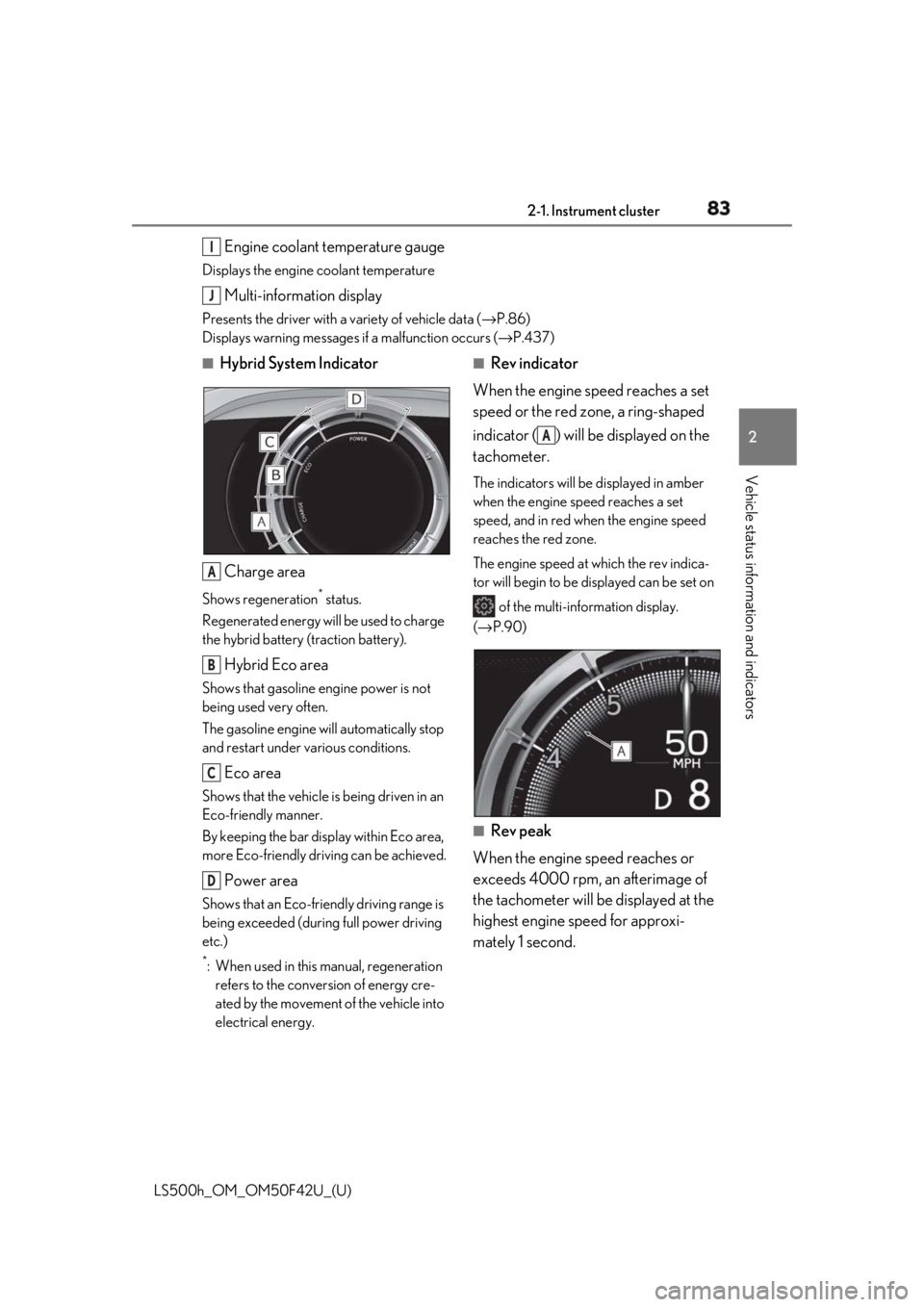
Hybrid System Indicator
Charge areaShows regeneration *
status.
Regenerated energy will be used to charge
the hybrid battery (traction battery).
Hybrid Eco areaShows that gasoline engine power is not
being used very often.
The gasoline engine will automatically stop
and restart under various conditions.
Eco areaShows that the vehicle is being driven in an
Eco-friendly manner.
By keeping the bar display within Eco area,
more Eco-friendly driv ing can be achieved.
Power areaShows that an Eco-friendly driving range is
being exceeded (durin g full power driving
etc.) *
: When used in this manual, regeneration
refers to the conversion of energy cre-
ated by the movement of the vehicle into
electrical energy. ■
Rev indicator
When the engine speed reaches a set
speed or the red zone, a ring-shaped
indicator ( ) will be displayed on the
tachometer. The indicators will be displayed in amber
when the engine speed reaches a set
speed, and in red when the engine speed
reaches the red zone.
The engine speed at which the rev indica-
tor will begin to be displayed can be set on
of the multi-information display.
( → P.90)
■
Rev peak
When the engine speed reaches or
exceeds 4000 rpm, an afterimage of
the tachometer will be displayed at the
highest engine speed for approxi-
mately 1 second.I
J
A
B
C
D A
Page 104 of 528
104 3-1. Key information
LS500h_OM_OM50F42U_(U) 3-1.Key information
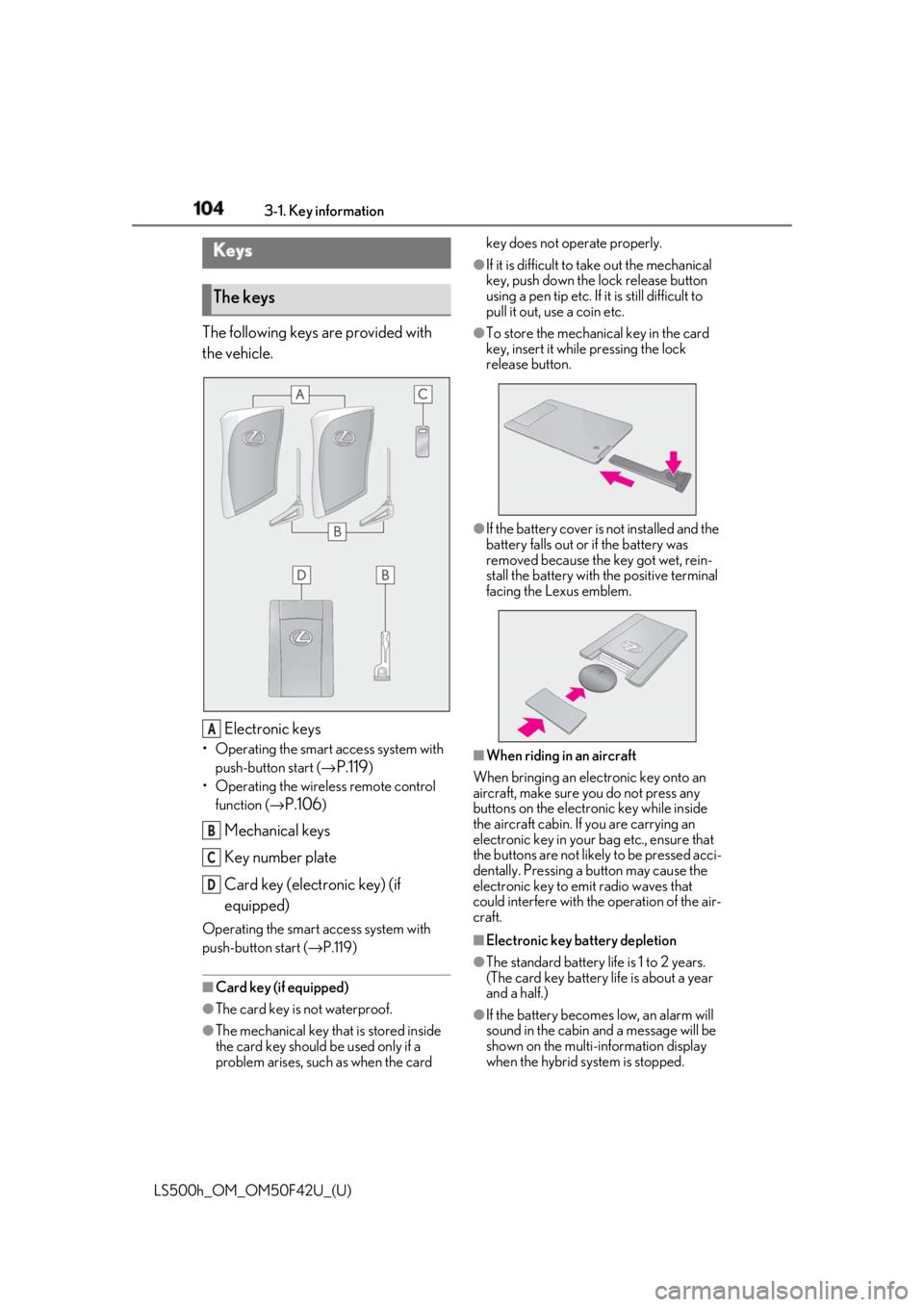
The following keys are provided with
the vehicle.
Electronic keys• Operating the smart access system with
push-button start ( →
P.119 )
• Operating the wireless remote control
function ( →
P.106 )
Mechanical keys
Key number plate
Card key (electronic key) (if
equipped)Operating the smart access system with
push-button start ( → P.119)
■
Card key (if equipped)
●
The card key is not waterproof.
●
The mechanical key that is stored inside
the card key should be used only if a
problem arises, such as when the card key does not operate properly. ●
If it is difficult to take out the mechanical
key, push down the lock release button
using a pen tip etc. If it is still difficult to
pull it out, use a coin etc. ●
To store the mechanical key in the card
key, insert it while pressing the lock
release button.
●
If the battery cover is not installed and the
battery falls out or if the battery was
removed because the key got wet, rein-
stall the battery with the positive terminal
facing the Lexus emblem.
■
When riding in an aircraft
When bringing an electronic key onto an
aircraft, make sure you do not press any
buttons on the electronic key while inside
the aircraft cabin. If you are carrying an
electronic key in your bag etc., ensure that
the buttons are not likely to be pressed acci-
dentally. Pressing a button may cause the
electronic key to em it radio waves that
could interfere with the operation of the air-
craft.
■
Electronic key battery depletion
●
The standard battery life is 1 to 2 years.
(The card key battery life is about a year
and a half.)
●
If the battery becomes low, an alarm will
sound in the cabin and a message will be
shown on the multi-information display
when the hybrid system is stopped.Keys
The keys
A
B
C
D
Page 109 of 528
1093-2. Opening, closing and locking the doors and trunk
LS500h_OM_OM50F42U_(U) 3
Before driving
To prevent unintended triggering of the
alarm, unlock the doors using the wireless
remote control and open and close a door
once after the settings have been changed.
(If a door is not opened within 60 seconds
after is pressed, the doors will be
locked again and the alarm will automati-
cally be set.)
In a case that the alarm is triggered, imme-
diately stop the alarm. ( → P.68)■
Impact detection door lock release sys-
tem
In the event that the vehicle is subject to a
strong impact, all the doors are unlocked.
Depending on the force of the impact or the
type of accident, however, the system may
not operate.
■
Operation signals
A buzzer sounds and the emergency flash-
ers flash to indicate that the doors have
been locked/unlocked. (Locked: once;
Unlocked: twice)
A buzzer sounds to indicate that the win-
dows and moon roof are operating.
■
Security feature
If a door is not opened within approximately
60 seconds after the vehicle is unlocked, the security feature automatically locks the
vehicle again. ■
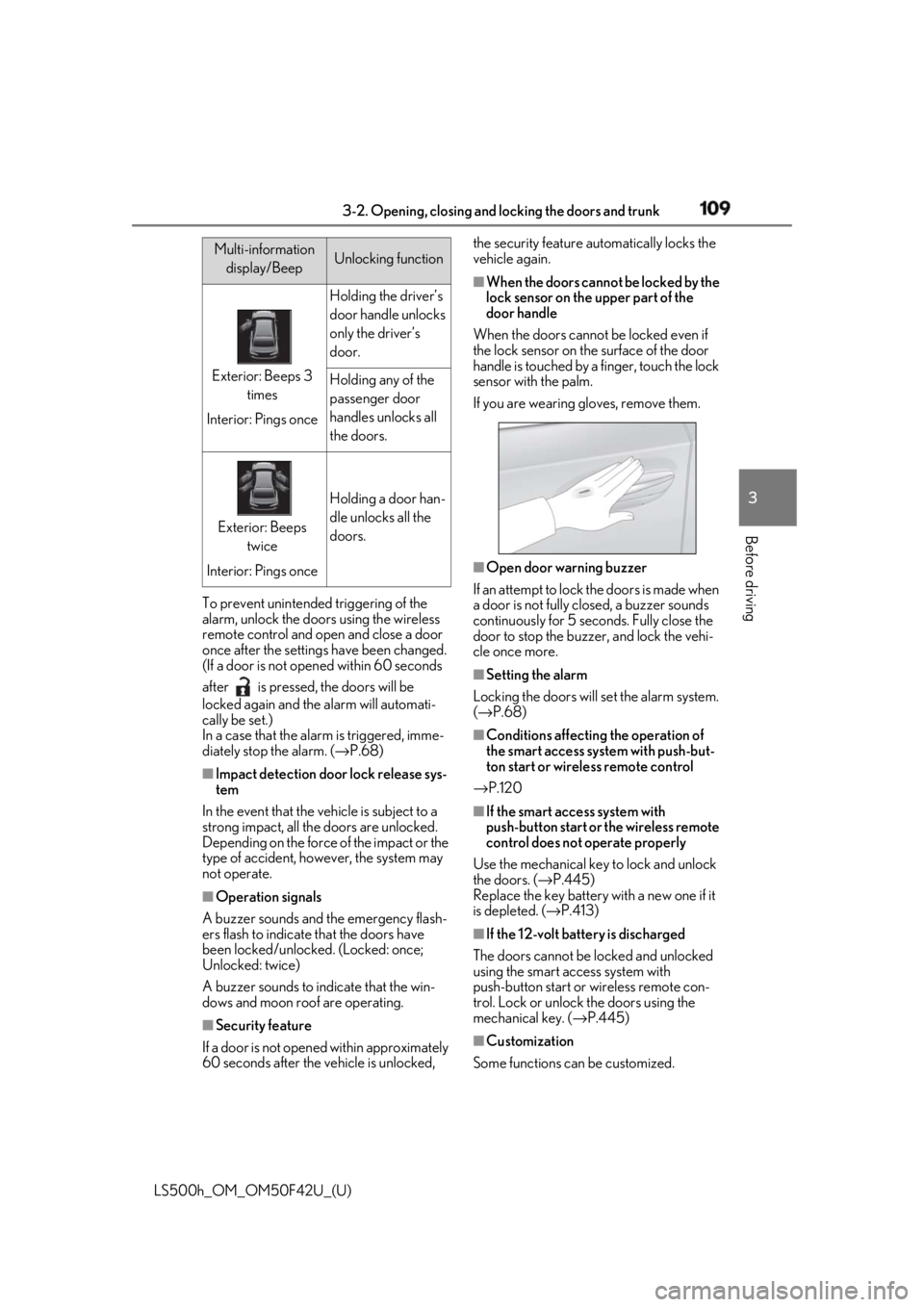
When the doors cannot be locked by the
lock sensor on the upper part of the
door handle
When the doors cannot be locked even if
the lock sensor on the surface of the door
handle is touched by a finger, touch the lock
sensor with the palm.
If you are wearing gloves, remove them.
■
Open door warning buzzer
If an attempt to lock the doors is made when
a door is not fully closed, a buzzer sounds
continuously for 5 seconds. Fully close the
door to stop the buzzer, and lock the vehi-
cle once more. ■
Setting the alarm
Locking the doors will set the alarm system.
( → P.68) ■
Conditions affecting the operation of
the smart access system with push-but-
ton start or wireless remote control
→ P.120 ■
If the smart access system with
push-button start or the wireless remote
control does not operate properly
Use the mechanical key to lock and unlock
the doors. ( → P.445)
Replace the key battery with a new one if it
is depleted. ( → P.413)
■
If the 12-volt batte ry is discharged
The doors cannot be locked and unlocked
using the smart access system with
push-button start or wireless remote con-
trol. Lock or unlock the doors using the
mechanical key. ( → P.445)
■
Customization
Some functions can be customized. Multi-information
display/Beep Unlocking function
Exterior: Beeps 3
times
Interior: Pings once Holding the driver’s
door handle unlocks
only the driver’s
door.
Holding any of the
passenger door
handles unlocks all
the doors.
Exterior: Beeps
twice
Interior: Pings once Holding a door han-
dle unlocks all the
doors.
Page 114 of 528
114 3-2. Opening, closing and locking the doors and trunk
LS500h_OM_OM50F42U_(U) ■
Trunk opener switch
Press the trunk opener switch. The trunk lid will fully open.WARNING●
On an incline, the trunk lid may sud-
denly shut after it opens automatically.
Make sure the trunk lid is fully open
and secure before using the trunk.●
In the following situations, the power
trunk opener and closer may detect an
abnormality and automatic operation
may be stopped. In this case, the trunk
lid has to be operated manually. Take
extra care in this situation, as the
stopped trunk lid ma y suddenly shut,
causing an accident.
• When the trunk lid contacts an obsta-
cle
• When the 12-volt battery voltage sud-
denly drops, such as when the power
switch is turned to ON mode or the
hybrid system is started during auto-
matic operation●
Do not attach any accessories other
than genuine Lexus parts to the trunk
lid. The power trunk opener and closer
may not operate, caus ing itself to mal-
function, or the trun k lid may suddenly
shut again after it is opened.■
Hands Free Power Trunk Lid (if
equipped)
Observe the following precautions.
Failure to do so may cause serious injury.
●
Exhaust gasses cause the exhaust
pipes to become quite hot. When
operating the Hands Free Power Trunk
Lid, be careful not to touch the exhaust
pipe.
●
Do not operate the Hands Free Power
Trunk Lid if there is little space under
the rear bumper.
■
Jam protection function
Observe the following precautions.
Failure to do so may cause serious injury.
●
Never use any part of your body to
intentionally activate the jam protec-
tion function. ●
The jam protection function may not
work if something gets caught just
before the trunk lid fully closes. Be
careful not to catch fingers or anything
else in the trunk lid. ●
The jam protection function may not
work depending on the shape of the
object that is caught. Be careful not to
catch fingers or anything else.
NOTICE■
To prevent trunk easy closer malfunc-
tions
Do not apply force to the trunk lid while
the trunk easy closer is operating. ■
To prevent damage to the power
trunk opener and closer ●
Make sure that there is no luggage or
snow on the trunk lid before operating
the power trunk opener and closer. In
addition, make sure that there is no ice
between the trunk lid and frame that
prevents movement of the trunk lid.
Operating the power trunk opener
and closer when excessive load is
present on the trunk lid may cause a
malfunction. ●
Do not apply excessive force to the
trunk lid while the power trunk opener
and closer is operating.
Opening/closing the trunk
Page 115 of 528
1153-2. Opening, closing and locking the doors and trunk
LS500h_OM_OM50F42U_(U) 3
Before driving ■
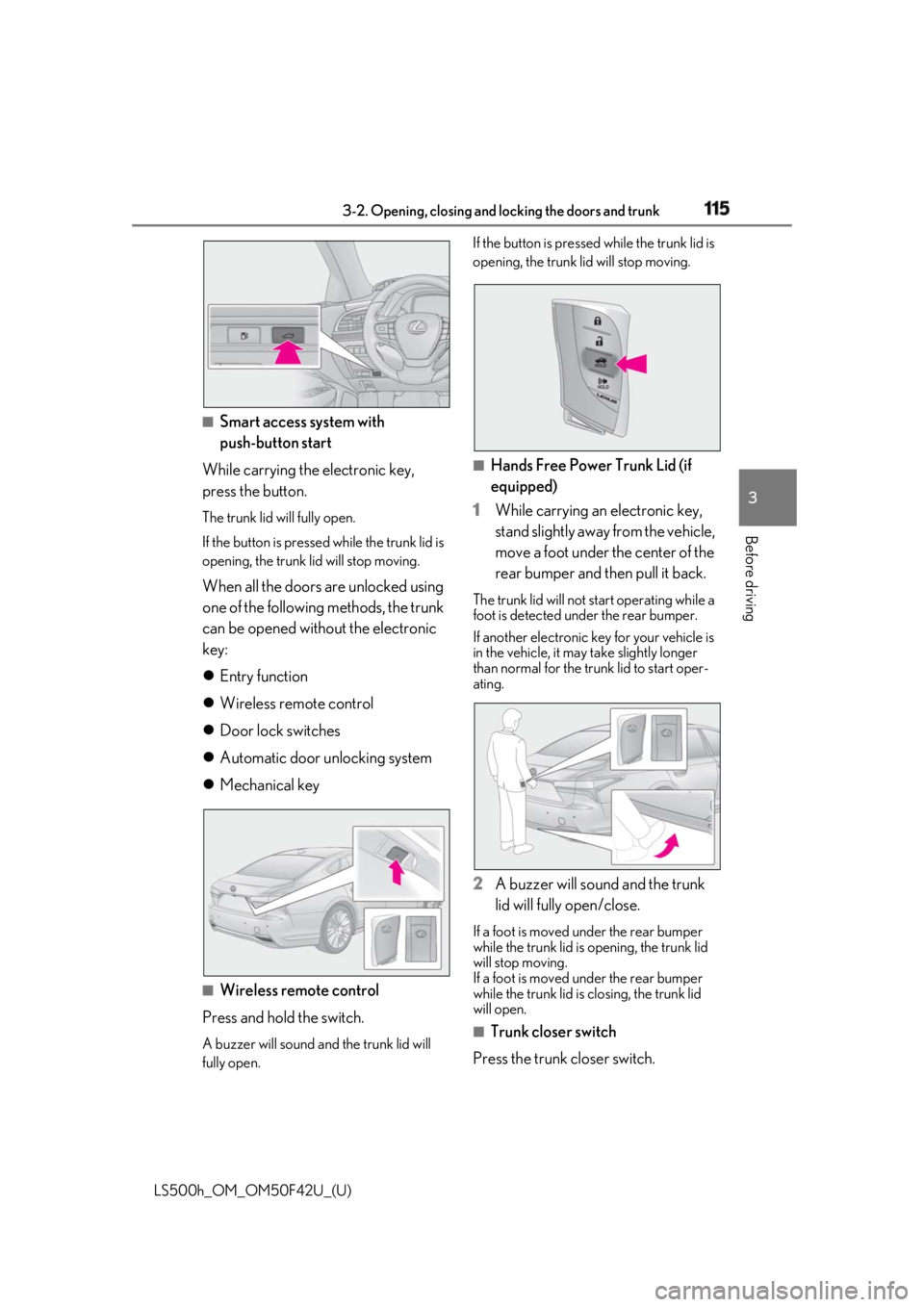
Smart access system with
push-button start
While carrying the electronic key,
press the button. The trunk lid will fully open.
If the button is presse d while the trunk lid is
opening, the trunk lid will stop moving.
When all the doors are unlocked using
one of the following methods, the trunk
can be opened without the electronic
key:
Entry function
Wireless remote control
Door lock switches
Automatic door unlocking system
Mechanical key
■
Wireless remote control
Press and hold the switch. A buzzer will sound and the trunk lid will
fully open. If the button is presse d while the trunk lid is
opening, the trunk lid will stop moving.
■
Hands Free Power Trunk Lid (if
equipped)
1 While carrying an electronic key,
stand slightly away from the vehicle,
move a foot under the center of the
rear bumper and then pull it back. The trunk lid will not start operating while a
foot is detected under the rear bumper.
If another electronic key for your vehicle is
in the vehicle, it may take slightly longer
than normal for the trunk lid to start oper-
ating.
2 A buzzer will sound and the trunk
lid will fully open/close. If a foot is moved under the rear bumper
while the trunk lid is opening, the trunk lid
will stop moving.
If a foot is moved under the rear bumper
while the trunk lid is closing, the trunk lid
will open.
■
Trunk closer switch
Press the trunk closer switch.
Page 120 of 528
120 3-2. Opening, closing and locking the doors and trunk
LS500h_OM_OM50F42U_(U) ●
When an interior alarm sounds continu-
ously
■
If “Key Detected in Vehicle” is shown on
the multi-inform ation display
An attempt was made to lock the doors
using the smart access system with push-
button start while the electronic key was still
inside the vehicle. Retrieve the electronic
key from the vehicle and lock the doors
again.
■
Battery-saving function
The battery-saving fu nction will be acti-
vated in order to prevent the electronic key
battery and the 12-volt battery from being
discharged while the vehicle is not in opera-
tion for a long time.
●
In the following situations, the smart
access system with pu sh-button start may take some time to unlock the doors.
• The electronic key has been left in an
area of approximately 6 ft. (2 m) of the
outside of the vehicle for 10 minutes or
longer.
• The smart access system with push-but-
ton start has not been used for 5 days or
longer. ●
If the smart access system with push-but-
ton start has not been used for 14 days or
longer, the doors cann ot be unlocked at
any doors except the dr iver’s door. In this
case, take hold of th e driver’s door han-
dle, or use the wireless remote control or
the mechanical key, to unlock the doors. ■
Turning an electronic key to bat-
tery-saving mode
When battery-saving mode is set, battery
depletion is minimized by stopping the elec-
tronic key from receiving radio waves.
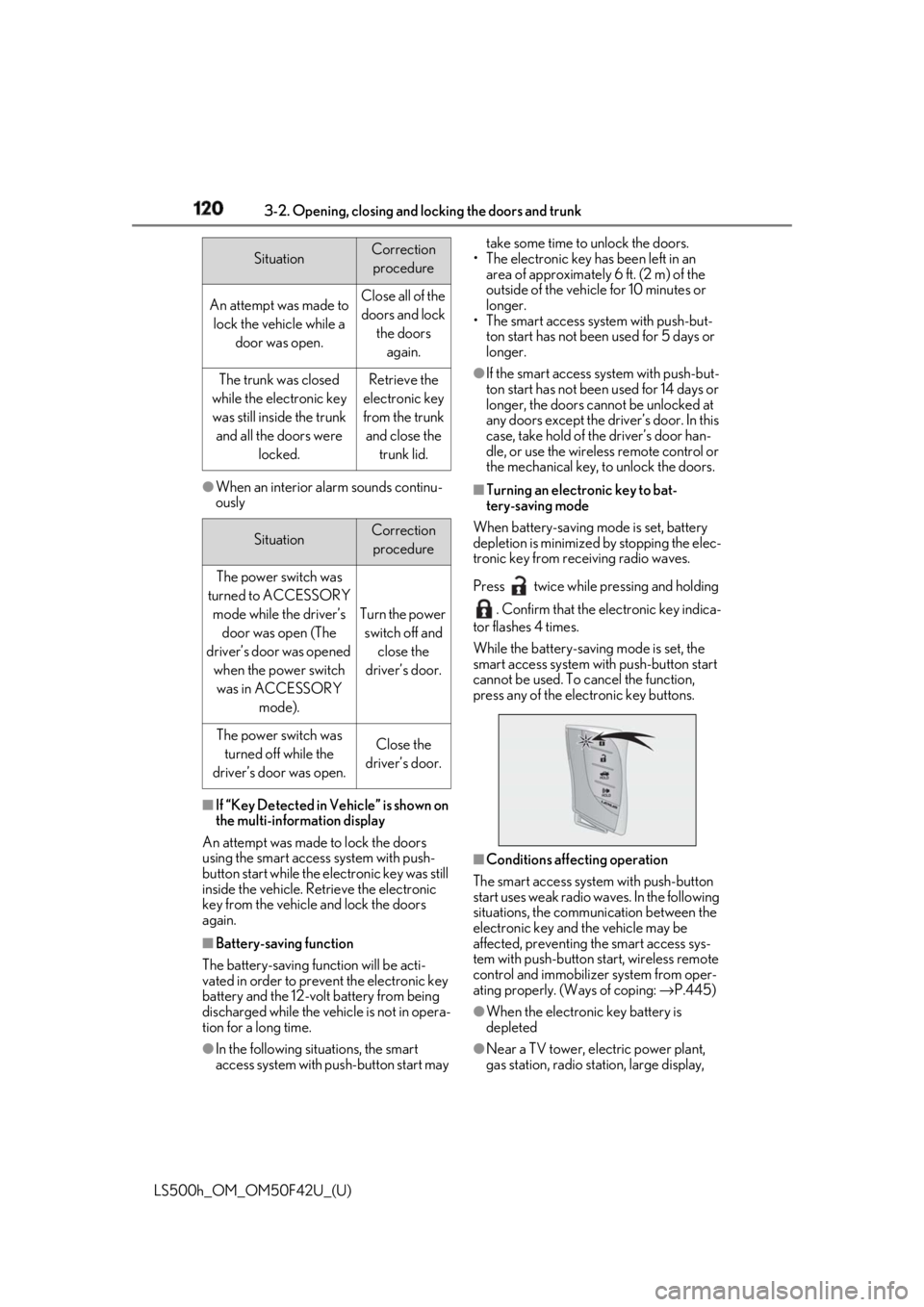
Press twice while pressing and holding
. Confirm that the electronic key indica-
tor flashes 4 times.
While the battery-saving mode is set, the
smart access system with push-button start
cannot be used. To cancel the function,
press any of the electronic key buttons.
■
Conditions affecting operation
The smart access system with push-button
start uses weak radio waves. In the following
situations, the communication between the
electronic key and the vehicle may be
affected, preventing the smart access sys-
tem with push-button start, wireless remote
control and immobilizer system from oper-
ating properly. (Ways of coping: → P.445)
●
When the electronic key battery is
depleted
●
Near a TV tower, electric power plant,
gas station, radio stat ion, large display, Situation Correction
procedure
An attempt was made to
lock the vehicle while a
door was open. Close all of the
doors and lock
the doors
again.
The trunk was closed
while the electronic key
was still inside the trunk
and all the doors were
locked. Retrieve the
electronic key
from the trunk
and close the
trunk lid.
Situation Correction
procedure
The power switch was
turned to ACCESSORY
mode while the driver’s
door was open (The
driver’s door was opened
when the power switch
was in ACCESSORY
mode). Turn the power
switch off and
close the
driver’s door.
The power switch was
turned off while the
driver’s door was open. Close the
driver’s door.
Page 122 of 528

122 3-2. Opening, closing and locking the doors and trunk
LS500h_OM_OM50F42U_(U) • Set the electronic key to battery-saving
mode to disable the smart access system
with push-button start. ( → P.120)●
If the electronic key is inside the vehicle
and a door handle becomes wet during a
car wash, a message may be shown on
the multi-information display and a
buzzer will sound outside the vehicle. To
turn off the alarm, lock all the doors.●
The lock sensor may not work properly if
it comes into contact with ice, snow, mud,
etc. Clean the lock sensor and attempt to
operate it again.●
A sudden approach to the effective
range or door handle may prevent the
doors from being unlocked. In this case,
return the door handle to the original
position and check that the doors unlock
before pulling the door handle again.●
If there is another electronic key in the
detection area, it may take slightly longer
to unlock the doors after the door handle
is gripped.■
When the vehicle is not driven for
extended periods●
To prevent theft of the vehicle, do not
leave the electronic key within 6 ft. (2 m)
of the vehicle.●
The smart access syst em with push-but-
ton start can be deactivated in advance.●
Setting the electronic key to battery-sav-
ing mode helps to reduce key battery
depletion. ( → P.120)■
To operate the system properly●
Make sure to carry the electronic key
when operating the system. Do not get
the electronic key too close to the vehicle
when operating the system from the out-
side of the vehicle.
Depending on the position and holding
condition of the electronic key, the key may
not be detected correctly and the system
may not operate properly. (The alarm may
go off accidentally, or the door lock pre-
vention function may not operate.)
●
Do not leave the electronic key inside the
trunk.
The key confinement prevention function may not operate, depending on the loca-
tion of the key (the inside edge of the
Trunk), conditions (i nside a metal bag,
close to metallic objects) and the radio
waves in the surrounding area. ( → P.116)■
If the smart access system with
push-button start does not operate
properly ●
Locking and unloc king the doors and
trunk: → P.445●
Starting the hybrid system: → P.446■
Customization
Some functions can be customized.
( → P.481) ■
If the smart access system with
push-button start has been deactivated
in a customized setting ●
Locking and unloc king the doors and
opening the trunk:
Use the wireless remote control or
mechanical key. ( → P.108, 115, 445)●
Starting the hybrid system and changing
power switch modes: → P.446●
Stopping the hybrid system: → P.170