wiper LEXUS LS500H 2018 User Guide
[x] Cancel search | Manufacturer: LEXUS, Model Year: 2018, Model line: LS500H, Model: LEXUS LS500H 2018Pages: 528, PDF Size: 10.8 MB
Page 189 of 528
1894-3. Operating the lights and wipers
LS500h_OM_OM50F42U_(U) 4
Driving vehicle ahead that is using fog lights with-
out its headlights turned on is detected.●
House lights, street lig hts, traffic signals,
and illuminated billboards or signs and
other reflective objects may cause the
high beams to change to the low beams,
or the low beams to remain on.●
The following factors may affect the
amount of time taken for the high beams
to turn on or off:
• The brightness of the headlights, fog
lights, and tail lights of vehicles ahead
• The movement and direction of vehicles
ahead
• When a vehicle ahead only has opera-
tional lights on one side
• When a vehicle ahead is a two-wheeled
vehicle
• The condition of the road (gradient,
curve, condition of th e road surface, etc.)
• The number of passengers and amount of
luggage in the vehicle●
The high beams may turn on or off unex-
pectedly.●
Bicycles or similar vehicles may not be
detected.●
In the following situations the system may
not be able to correctly detect the sur-
rounding brightness le vel. This may cause
the low beams to remain on or the high
beams to flash or dazzle pedestrians or
vehicles ahead. In such a case, it is neces-
sary to manually switch between the high
and low beams.
• When driving in inclement weather
(heavy rain, snow, fog, sandstorms, etc.)
• When the windshield is obscured by fog,
mist, ice, dirt, etc.
• When the windshield is cracked or dam-
aged
• When the camera sensor is deformed or
dirty
• When the temperature of the camera
sensor is extremely high
• When the surrounding brightness level is
equal to that of head lights, tail lights or
fog lights
• When headlights or tail lights of vehicles
ahead are turned off, dirty, changing
color, or not aimed properly
• When the vehicle is hit by water, snow,
dust, etc. from a preceding vehicle • When driving through an area of inter-
mittently changing brightness and dark-
ness
• When frequently and repeatedly driving
ascending/descending roads, or roads
with rough, bumpy or uneven surfaces
(such as stone-paved roads, gravel roads,
etc.)
• When frequently and repeatedly taking
curves or driving on a winding road
• When there is a highly reflective object
ahead of the vehicle, such as a sign or
mirror
• When the back of a preceding vehicle is
highly reflective, such as a container on a
truck
• When the vehicle’s headlights are dam-
aged or dirty, or are not aimed properly
• When the vehicle is listing or titling due to
a flat tire, a trailer being towed, etc.
• When the headlights are changed
between the high beams and low beams
repeatedly in an abnormal manner
• When the driver believes that the high
beams may be flashing or dazzling
pedestrians or other drivers ■
Temporarily lowering sensor sensitivity
The sensitivity of the sensor can be tempo-
rarily lowered.
1 Turn the power switch on while the fol-
lowing conditions are met.
●
The headlight switch is in or . ●
The headlight switch lever is in high beam
position. ●
Automatic High Beam switch is on.
2 Turn the power switch to ON mode.
3 Within 30 seconds after step 2 , repeat
pulling the headlight switch lever to the
original position then pushing it to the
high beam position quickly 10 times,
then leave the lever in high beam posi-
tion.
4 If the sensitivity is changed, the AHB
indicator is turn on and off 3 times.
Automatic High Beam (headlights) may
turn on even when the vehicle is stopped.
Page 190 of 528
190 4-3. Operating the lights and wipers
LS500h_OM_OM50F42U_(U) ■
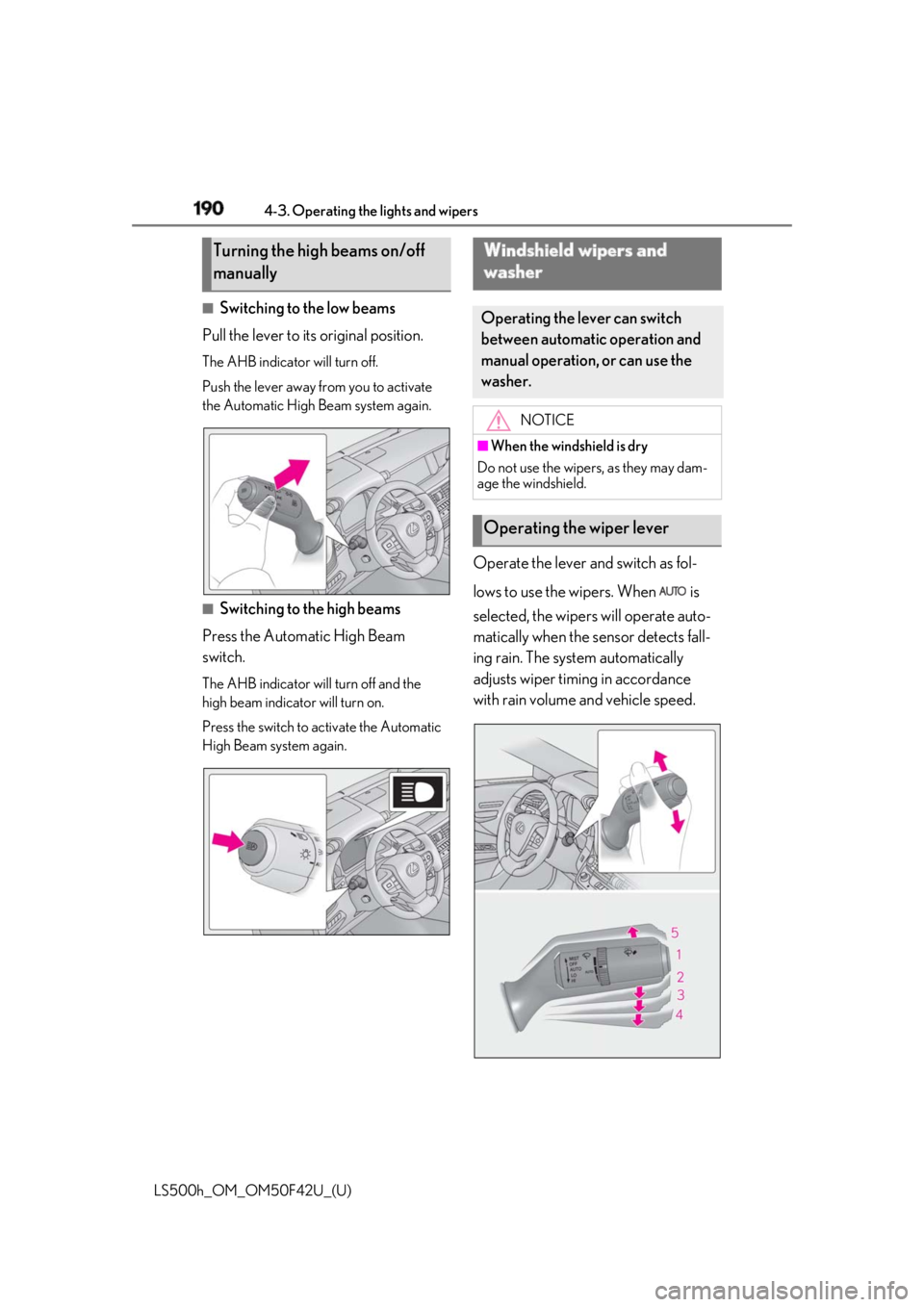
Switching to the low beams
Pull the lever to its original position. The AHB indicator will turn off.
Push the lever away from you to activate
the Automatic High Beam system again.
■
Switching to the high beams
Press the Automatic High Beam
switch. The AHB indicator will turn off and the
high beam indicator will turn on.
Press the switch to activate the Automatic
High Beam system again. Operate the lever and switch as fol-
lows to use the wipers. When is
selected, the wipers will operate auto-
matically when the sensor detects fall-
ing rain. The system automatically
adjusts wiper timing in accordance
with rain volume and vehicle speed.Turning the high beams on/off
manually Windshield wipers and
washer Operating the lever can switch
between automatic operation and
manual operation, or can use the
washer. NOTICE■
When the windshield is dry
Do not use the wipers, as they may dam-
age the windshield.
Operating the wiper lever
Page 191 of 528
1914-3. Operating the lights and wipers
LS500h_OM_OM50F42U_(U) 4
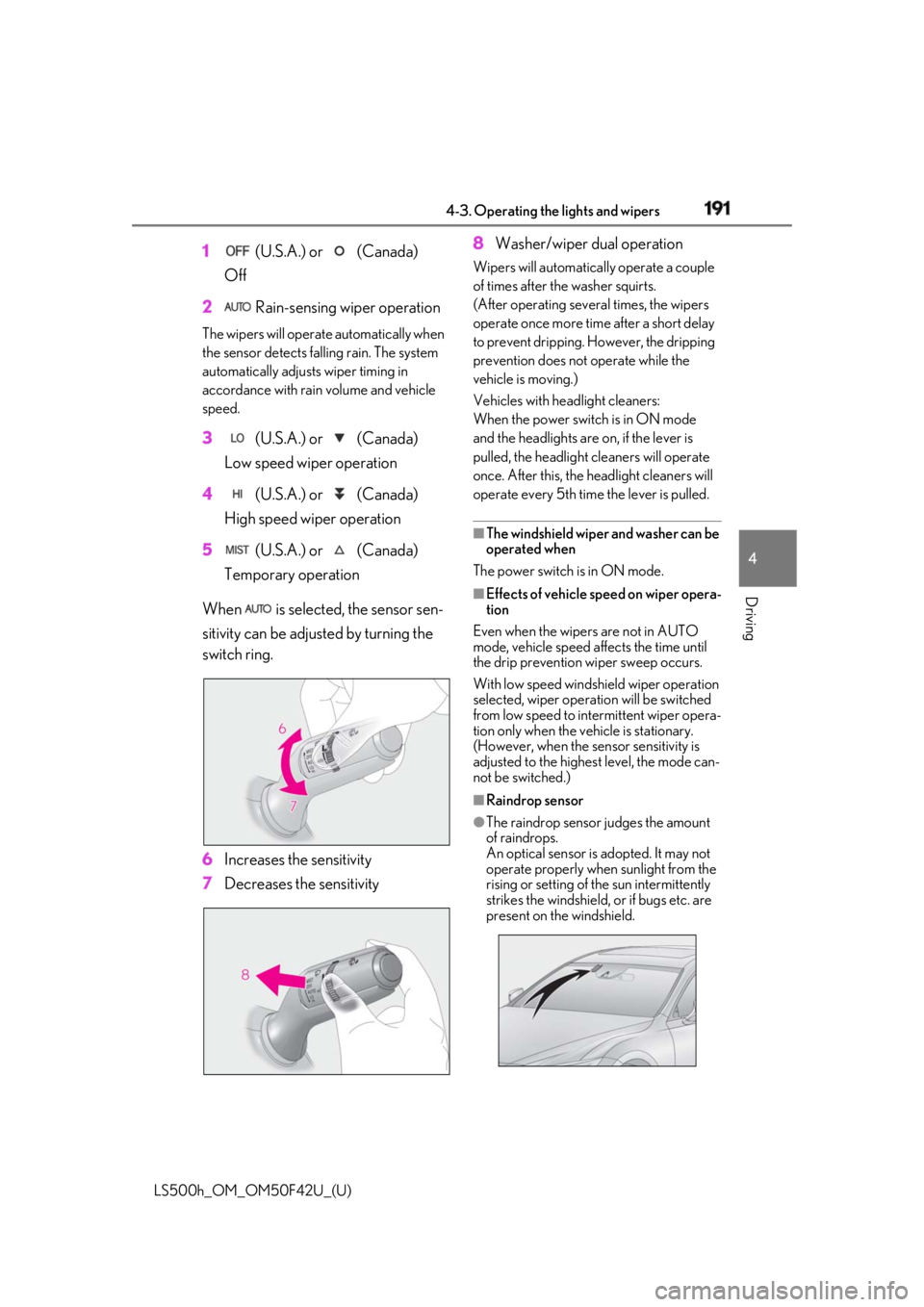
Driving 1 (U.S.A.) or (Canada)
Off
2 Rain-sensing wiper operationThe wipers will operate automatically when
the sensor detects falling rain. The system
automatically adjusts wiper timing in
accordance with rain volume and vehicle
speed.
3 (U.S.A.) or (Canada)
Low speed wiper operation
4 (U.S.A.) or (Canada)
High speed wiper operation
5 (U.S.A.) or (Canada)
Temporary operation
When is selected, the sensor sen-
sitivity can be adjusted by turning the
switch ring.
6 Increases the sensitivity
7 Decreases the sensitivity 8 Washer/wiper dual operation Wipers will automatically operate a couple
of times after th e washer squirts.
(After operating several times, the wipers
operate once more time after a short delay
to prevent dripping. However, the dripping
prevention does not operate while the
vehicle is moving.)
Vehicles with headlight cleaners:
When the power switch is in ON mode
and the headlights are on, if the lever is
pulled, the headlight cleaners will operate
once. After this, the he adlight cleaners will
operate every 5th time the lever is pulled.
■
The windshield wiper and washer can be
operated when
The power switch is in ON mode. ■
Effects of vehicle speed on wiper opera-
tion
Even when the wipers are not in AUTO
mode, vehicle speed affects the time until
the drip prevention wiper sweep occurs.
With low speed windsh ield wiper operation
selected, wiper operation will be switched
from low speed to intermittent wiper opera-
tion only when the vehicle is stationary.
(However, when the sensor sensitivity is
adjusted to the highes t level, the mode can-
not be switched.) ■
Raindrop sensor ●
The raindrop sensor judges the amount
of raindrops.
An optical sensor is adopted. It may not
operate properly when sunlight from the
rising or setting of the sun intermittently
strikes the windshield, or if bugs etc. are
present on the windshield.
Page 192 of 528
192 4-3. Operating the lights and wipers
LS500h_OM_OM50F42U_(U) ●
If the wiper is turned to AUTO mode
while the power switch is in ON mode,
the wipers will operate once to show that
AUTO mode is activated.●
If the temperature of the raindrop sensor
is 185°F (85°C) or higher, or 5°F
(-15°C) or lower, automatic operation
may not occur. In this case, operate the
wipers in any mode other than AUTO
mode.■
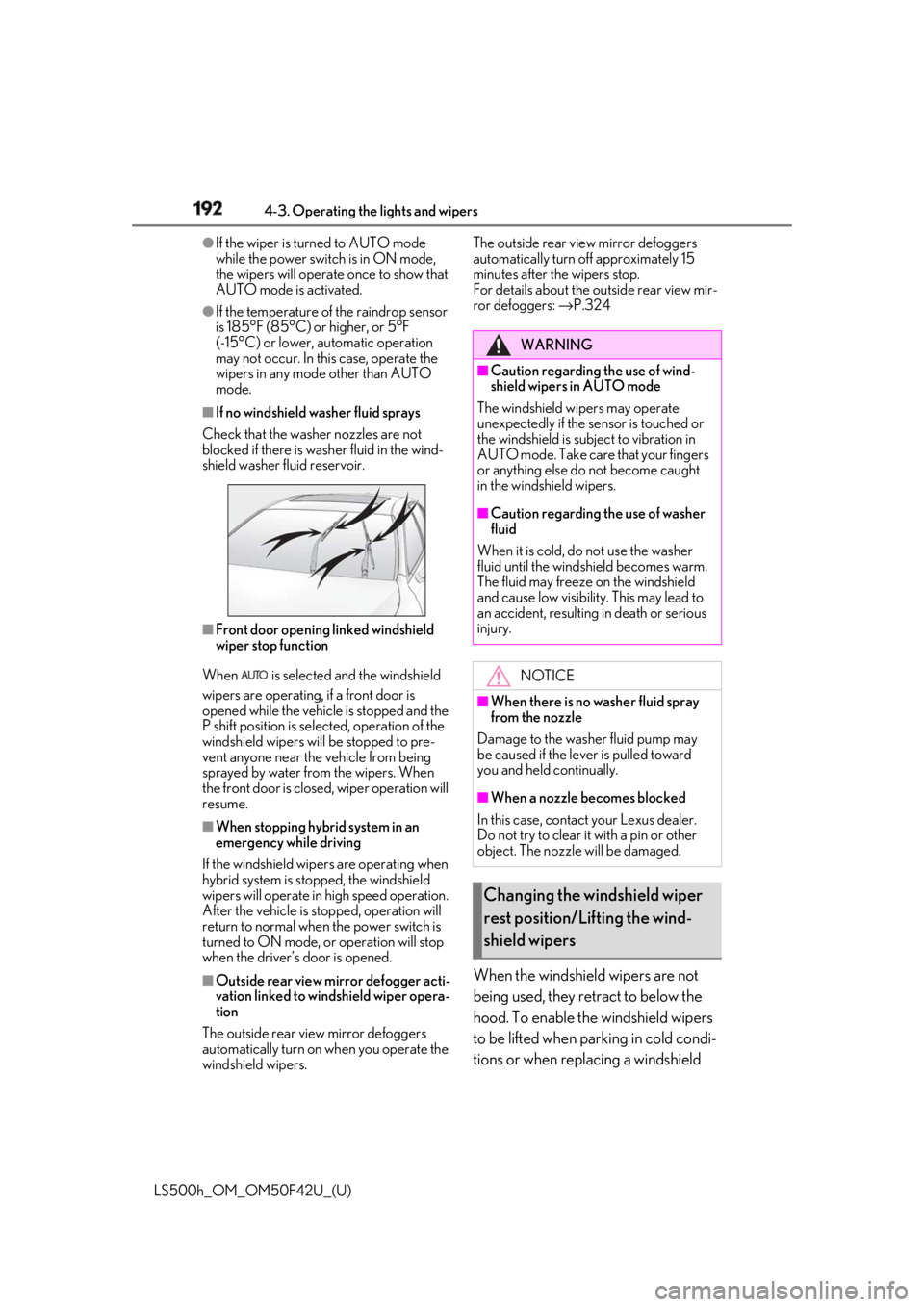
If no windshield washer fluid sprays
Check that the washer nozzles are not
blocked if there is wash er fluid in the wind-
shield washer fluid reservoir.
■
Front door opening linked windshield
wiper stop function
When is selected and the windshield
wipers are operating, if a front door is
opened while the vehicle is stopped and the
P shift position is sele cted, operation of the
windshield wipers w ill be stopped to pre-
vent anyone near the vehicle from being
sprayed by water from the wipers. When
the front door is closed, wiper operation will
resume. ■
When stopping hybrid system in an
emergency while driving
If the windshield wipers are operating when
hybrid system is stop ped, the windshield
wipers will operate in high speed operation.
After the vehicle is stopped, operation will
return to normal when the power switch is
turned to ON mode, or operation will stop
when the driver’s door is opened.
■
Outside rear view mirror defogger acti-
vation linked to windshield wiper opera-
tion
The outside rear view mirror defoggers
automatically turn on when you operate the
windshield wipers. The outside rear view mirror defoggers
automatically turn off approximately 15
minutes after the wipers stop.
For details about the outside rear view mir-
ror defoggers: → P.324
When the windshield wipers are not
being used, they retract to below the
hood. To enable the windshield wipers
to be lifted when parking in cold condi-
tions or when replacing a windshield WARNING■
Caution regarding the use of wind-
shield wipers in AUTO mode
The windshield wipers may operate
unexpectedly if the sensor is touched or
the windshield is subj ect to vibration in
AUTO mode. Take care that your fingers
or anything else do not become caught
in the windshield wipers. ■
Caution regarding the use of washer
fluid
When it is cold, do not use the washer
fluid until the windshield becomes warm.
The fluid may freeze on the windshield
and cause low visibility. This may lead to
an accident, resulting in death or serious
injury.
NOTICE■
When there is no washer fluid spray
from the nozzle
Damage to the washer fluid pump may
be caused if the lever is pulled toward
you and held continually.
■
When a nozzle becomes blocked
In this case, contact your Lexus dealer.
Do not try to clear it with a pin or other
object. The nozzle will be damaged.
Changing the windshield wiper
rest position/Lifting the wind-
shield wipers
Page 193 of 528
1934-3. Operating the lights and wipers
LS500h_OM_OM50F42U_(U) 4
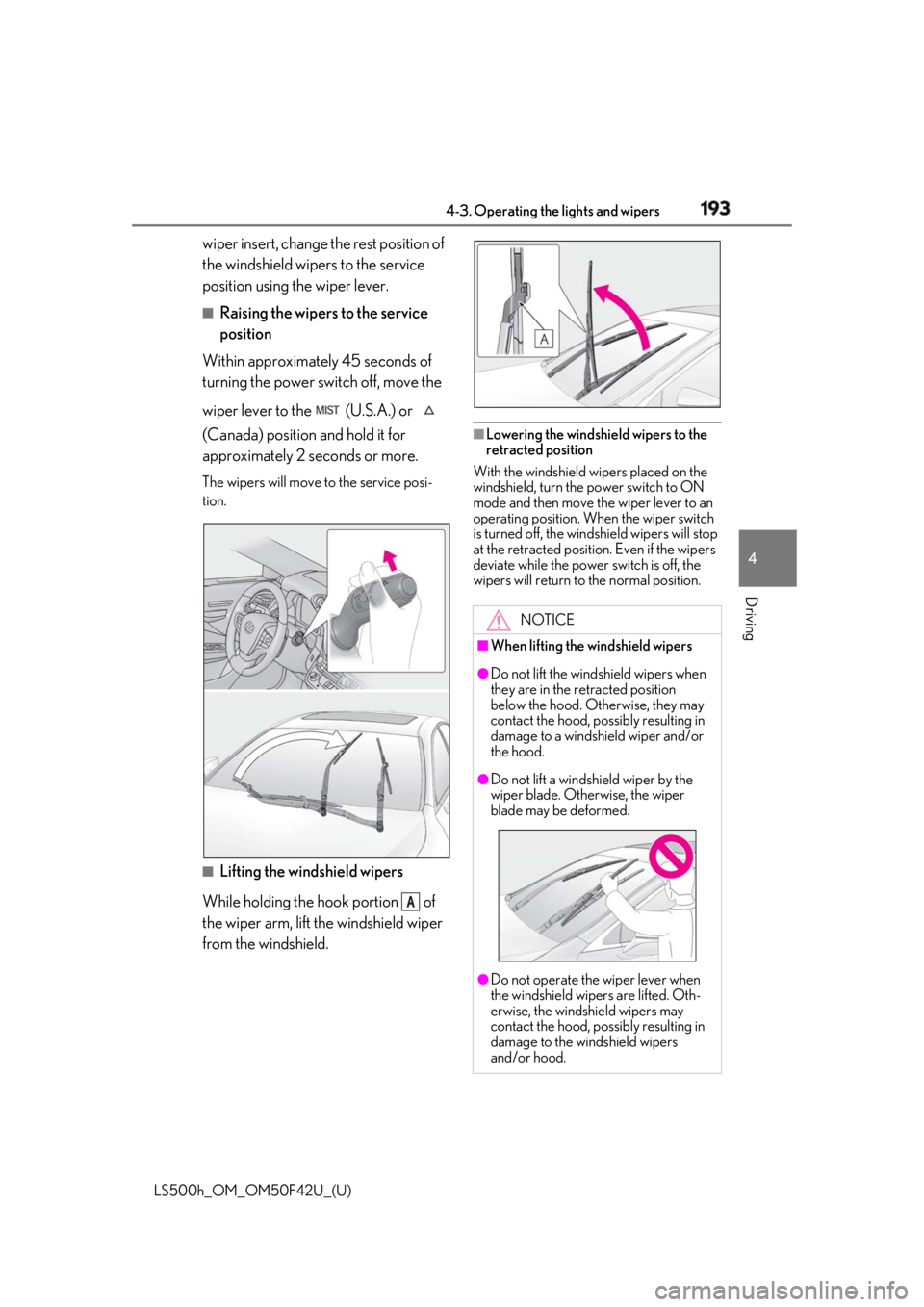
Driving wiper insert, change the rest position of
the windshield wipers to the service
position using the wiper lever. ■
Raising the wipers to the service
position
Within approximately 45 seconds of
turning the power switch off, move the
wiper lever to the (U.S.A.) or
(Canada) position and hold it for
approximately 2 se conds or more.The wipers will move to the service posi-
tion.
■
Lifting the windshield wipers
While holding the hook portion of
the wiper arm, lift the windshield wiper
from the windshield. ■
Lowering the windshield wipers to the
retracted position
With the windshield wipers placed on the
windshield, turn the power switch to ON
mode and then move the wiper lever to an
operating position. Wh en the wiper switch
is turned off, the windshield wipers will stop
at the retracted position. Even if the wipers
deviate while the power switch is off, the
wipers will return to the normal position.
ANOTICE■
When lifting the windshield wipers ●
Do not lift the wind shield wipers when
they are in the retracted position
below the hood. Otherwise, they may
contact the hood, possibly resulting in
damage to a windshield wiper and/or
the hood.
●
Do not lift a windshield wiper by the
wiper blade. Otherwise, the wiper
blade may be deformed.
●
Do not operate the wiper lever when
the windshield wipe rs are lifted. Oth-
erwise, the windshield wipers may
contact the hood, possibly resulting in
damage to the windshield wipers
and/or hood.
Page 201 of 528
2014-5. Using the driving support systems
LS500h_OM_OM50F42U_(U) 4
Driving WARNING●
Do not subject a radar sensor or its
surrounding area on the front bumper
to a strong impact.
If a radar sensor is moved even slightly
off position, the system may malfunction
and vehicles may not be detected cor-
rectly.
In the following situations, have your
vehicle inspected by your Lexus dealer.
• If a radar sensor or its surrounding
area is subject to a strong impact
• If the area on the front bumper around
a radar sensor is scratched or dented,
or the front bumper has become par-
tially disengaged ●
Do not disassemble the radar sensors.●
Do not modify the radar sensors or
their surrounding area on the front
bumper.●
If a radar sensor or the front bumper
needs to be removed and installed, or
replaced, contact your Lexus dealer.●
Do not paint the front bumper any
color other than an official Lexus color.
■
To avoid malfunction of the camera
sensor
Observe the following precautions.
Otherwise, the camera sensor may not
operate properly, possibly leading to an
accident resulting in death or serious
injury.
●
Keep the windshield clean at all times.
• If the windshield is dirty or covered
with an oily film, water droplets, snow,
etc., clear the windshield.
• As some glass coating agents may
affect the detection performance of
the camera sensor, consult your Lexus
dealer when using a glass coating
agent. • If a glass coating agent is applied to the
windshield, it will still be necessary to
use the windshield wipers to remove
water droplets, etc. from the area of
the windshield in front of the camera
sensor.
• If the inner side of the windshield
where the camera sens or is installed is
dirty, contact your Lexus dealer. ●
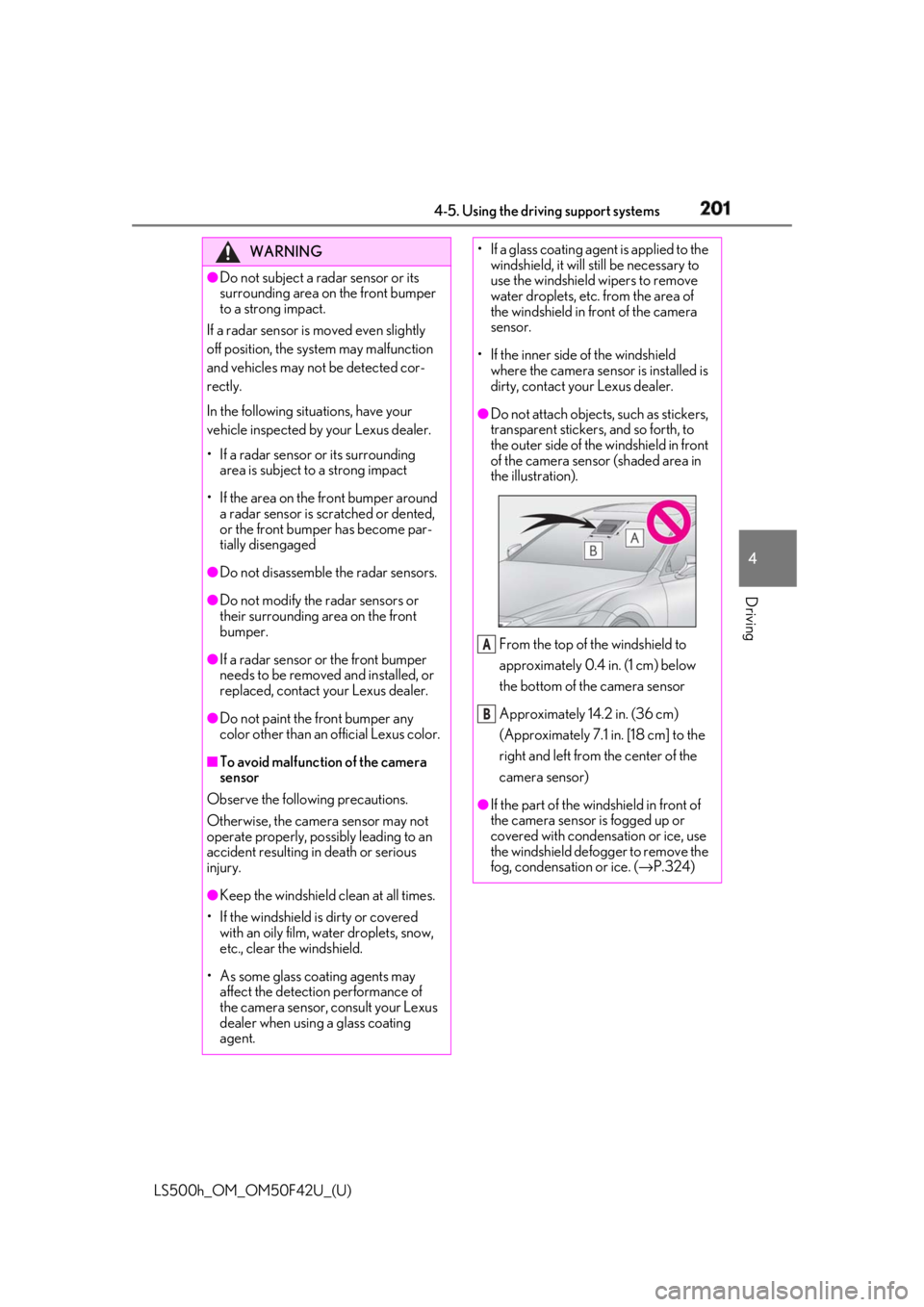
Do not attach objects, such as stickers,
transparent stickers, and so forth, to
the outer side of the windshield in front
of the camera sensor (shaded area in
the illustration).
From the top of the windshield to
approximately 0.4 in. (1 cm) below
the bottom of the camera sensor
Approximately 14.2 in. (36 cm)
(Approximately 7.1 in. [18 cm] to the
right and left from the center of the
camera sensor)
●
If the part of the wi ndshield in front of
the camera sensor is fogged up or
covered with condensation or ice, use
the windshield defogger to remove the
fog, condensation or ice. ( → P.324)A
B
Page 202 of 528
202 4-5. Using the driving support systems
LS500h_OM_OM50F42U_(U) WARNING●
If water droplets cannot be properly
removed from the area of the wind-
shield in front of the camera sensor by
the windshield wipers, replace the
wiper insert or wiper blade.
If the wiper inserts or wiper blades need
to be replaced, contact your Lexus
dealer. ●
Do not attach window tinting to the
windshield.●
Replace the windshield if it is damaged
or cracked.
If the windshield needs to be replaced,
contact your Lexus dealer.●
Do not get the camera sensor wet.●
Do not allow bright lights to shine into
the camera sensor.●
Do not dirty or damage the camera
sensor.
When cleaning the inside of the wind-
shield, do not allow glass cleaner to
contact the lens. Also, do not touch the
lens.
If the lens is dirty or damaged, contact
your Lexus dealer.
●
Do not subject the camera sensor to a
strong impact.
●
Do not change the installation position
or direction of the camera sensor or
remove it.
●
Do not disassemble the camera sen-
sor.
●
Do not modify any components of the
vehicle around the camera sensor
(inside rear view mirror, etc.) or ceiling.
●
Do not attach any accessories that
may obstruct the camera sensor to the
hood, front grille or front bumper.
Contact your Lexus dealer. ●
If a surfboard or other long object is to
be mounted on the roof, make sure
that it will not obstruct the camera sen-
sor. ●
Do not modify the headlights or other
lights.
Page 207 of 528
2074-5. Using the driving support systems
LS500h_OM_OM50F42U_(U) 4
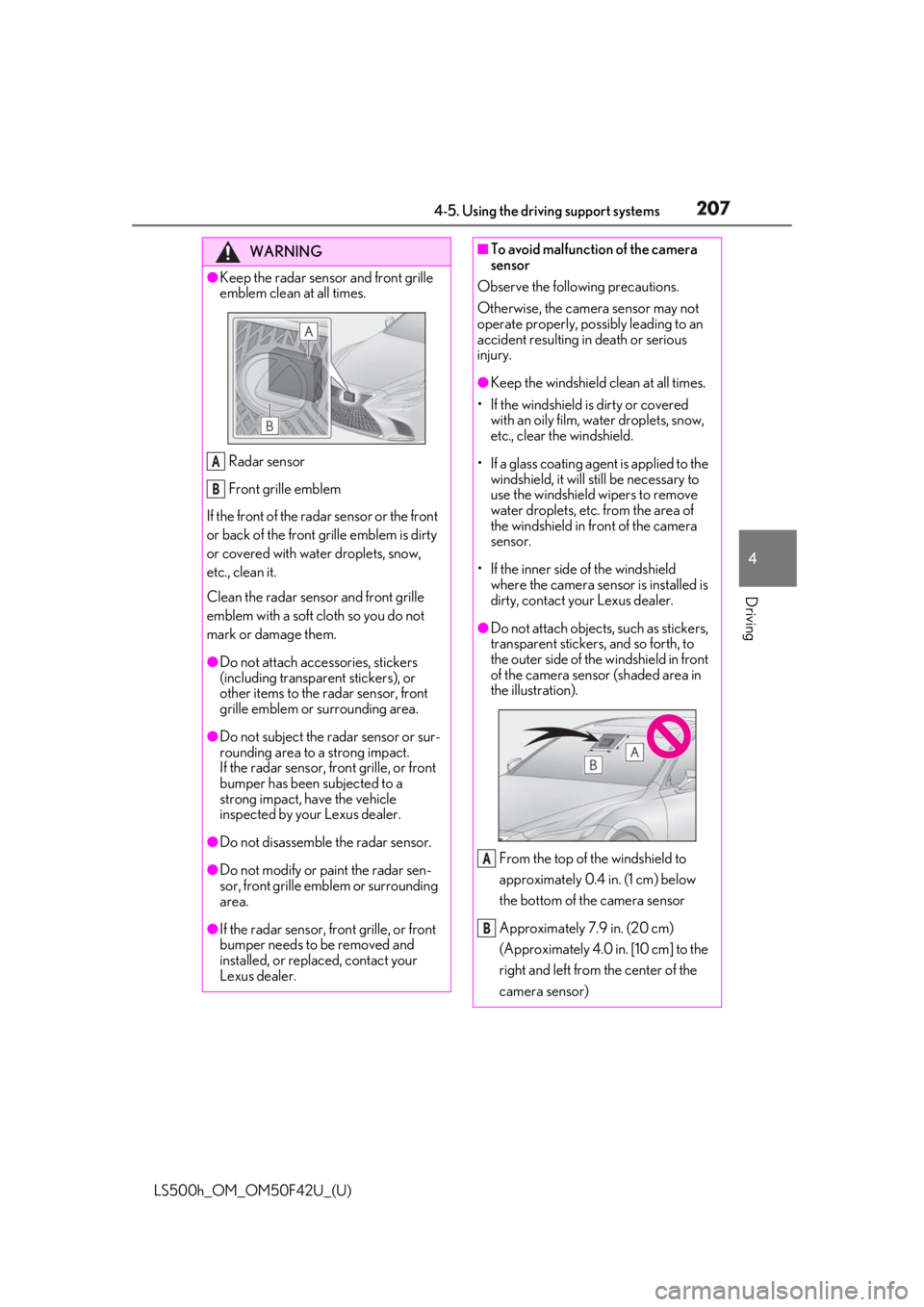
Driving WARNING●
Keep the radar sensor and front grille
emblem clean at all times.
Radar sensor
Front grille emblem
If the front of the rada r sensor or the front
or back of the front grille emblem is dirty
or covered with water droplets, snow,
etc., clean it.
Clean the radar sensor and front grille
emblem with a soft cloth so you do not
mark or damage them. ●
Do not attach accessories, stickers
(including transpar ent stickers), or
other items to the radar sensor, front
grille emblem or surrounding area.●
Do not subject the radar sensor or sur-
rounding area to a strong impact.
If the radar sensor, front grille, or front
bumper has been subjected to a
strong impact, have the vehicle
inspected by your Lexus dealer.
●
Do not disassemble the radar sensor.
●
Do not modify or paint the radar sen-
sor, front grille emblem or surrounding
area.
●
If the radar sensor, front grille, or front
bumper needs to be removed and
installed, or replaced, contact your
Lexus dealer. A
B ■
To avoid malfunction of the camera
sensor
Observe the following precautions.
Otherwise, the camera sensor may not
operate properly, possibly leading to an
accident resulting in death or serious
injury. ●
Keep the windshield clean at all times.
• If the windshield is dirty or covered
with an oily film, water droplets, snow,
etc., clear the windshield.
• If a glass coating agent is applied to the
windshield, it will still be necessary to
use the windshield wipers to remove
water droplets, etc. from the area of
the windshield in front of the camera
sensor.
• If the inner side of the windshield
where the camera sens or is installed is
dirty, contact your Lexus dealer. ●
Do not attach objects, such as stickers,
transparent stickers, and so forth, to
the outer side of the windshield in front
of the camera sensor (shaded area in
the illustration).
From the top of the windshield to
approximately 0.4 in. (1 cm) below
the bottom of the camera sensor
Approximately 7.9 in. (20 cm)
(Approximately 4.0 in. [10 cm] to the
right and left from the center of the
camera sensor) A
B
Page 208 of 528
208 4-5. Using the driving support systems
LS500h_OM_OM50F42U_(U) WARNING●
If the part of the windshield in front of
the camera sensor is fogged up or
covered with condensation or ice, use
the windshield defogger to remove the
fog, condensation or ice. ( → P.324)●
If water droplets cannot be properly
removed from the area of the wind-
shield in front of the camera sensor by
the windshield wipers, replace the
wiper insert or wiper blade.
If the wiper inserts or wiper blades need
to be replaced, contact your Lexus
dealer. ●
Do not attach window tinting to the
windshield.●
Replace the windshield if it is damaged
or cracked.
If the windshield needs to be replaced,
contact your Lexus dealer.●
Do not get the camera sensor wet.●
Do not allow bright lights to shine into
the camera sensor.●
Do not dirty or damage the camera
sensor.
When cleaning the inside of the wind-
shield, do not allow glass cleaner to
contact the lens. Also, do not touch the
lens.
If the lens is dirty or damaged, contact
your Lexus dealer.
●
Do not subject the camera sensor to a
strong impact.
●
Do not change the installation position
or direction of the camera sensor or
remove it.
●
Do not disassemble the camera sen-
sor.
●
Do not modify any components of the
vehicle around the camera sensor
(inside rear view mirror, etc.) or ceiling. ●
Do not attach any accessories that
may obstruct the camera sensor to the
hood, front grille or front bumper.
Contact your Lexus dealer. ●
If a surfboard or other long object is to
be mounted on the roof, make sure
that it will not obstruct the camera sen-
sor. ●
Do not modify the headlights or other
lights.
Page 217 of 528
2174-5. Using the driving support systems
LS500h_OM_OM50F42U_(U) 4
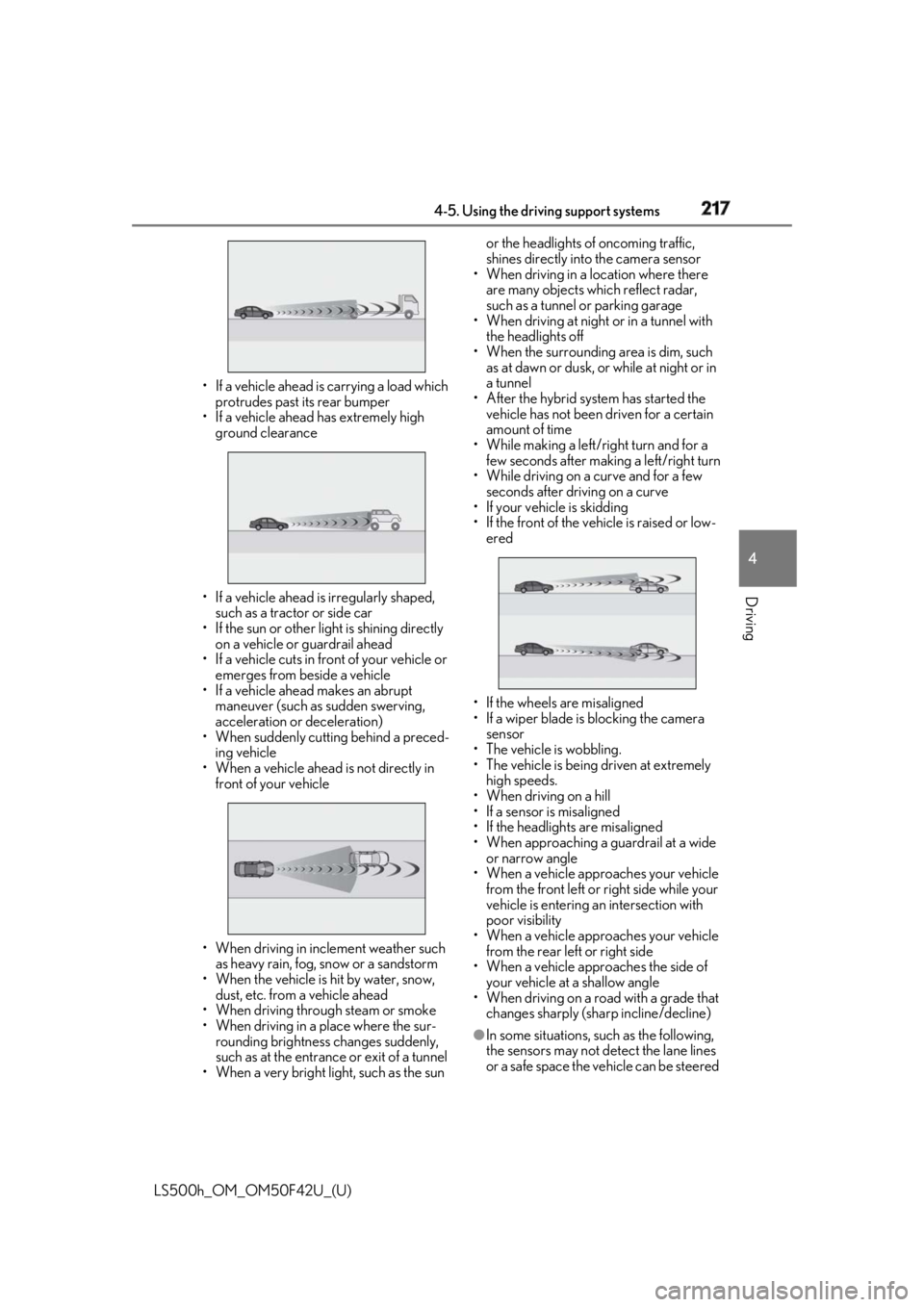
Driving • If a vehicle ahead is carrying a load which
protrudes past its rear bumper
• If a vehicle ahead has extremely high
ground clearance
• If a vehicle ahead is irregularly shaped,
such as a tractor or side car
• If the sun or other light is shining directly
on a vehicle or guardrail ahead
• If a vehicle cuts in front of your vehicle or
emerges from beside a vehicle
• If a vehicle ahead makes an abrupt
maneuver (such as sudden swerving,
acceleration or deceleration)
• When suddenly cutting behind a preced-
ing vehicle
• When a vehicle ahead is not directly in
front of your vehicle
• When driving in incl ement weather such
as heavy rain, fog, snow or a sandstorm
• When the vehicle is hit by water, snow,
dust, etc. from a vehicle ahead
• When driving through steam or smoke
• When driving in a place where the sur-
rounding brightness changes suddenly,
such as at the entrance or exit of a tunnel
• When a very bright light, such as the sun or the headlights of oncoming traffic,
shines directly into the camera sensor
• When driving in a location where there
are many objects which reflect radar,
such as a tunnel or parking garage
• When driving at night or in a tunnel with
the headlights off
• When the surrounding area is dim, such
as at dawn or dusk, or while at night or in
a tunnel
• After the hybrid system has started the
vehicle has not been driven for a certain
amount of time
• While making a left/r ight turn and for a
few seconds after making a left/right turn
• While driving on a curve and for a few
seconds after driving on a curve
• If your vehicle is skidding
• If the front of the vehicle is raised or low-
ered
• If the wheels are misaligned
• If a wiper blade is blocking the camera
sensor
• The vehicle is wobbling.
• The vehicle is being driven at extremely
high speeds.
• When driving on a hill
• If a sensor is misaligned
• If the headlights are misaligned
• When approaching a guardrail at a wide
or narrow angle
• When a vehicle approaches your vehicle
from the front left or right side while your
vehicle is entering an intersection with
poor visibility
• When a vehicle approaches your vehicle
from the rear left or right side
• When a vehicle approaches the side of
your vehicle at a shallow angle
• When driving on a road with a grade that
changes sharply (sha rp incline/decline)
●
In some situations, such as the following,
the sensors may not detect the lane lines
or a safe space the vehicle can be steered