lane assist LEXUS LS500H 2018 Owner's Manual
[x] Cancel search | Manufacturer: LEXUS, Model Year: 2018, Model line: LS500H, Model: LEXUS LS500H 2018Pages: 528, PDF Size: 10.8 MB
Page 243 of 528
2434-5. Using the driving support systems
LS500h_OM_OM50F42U_(U) 4
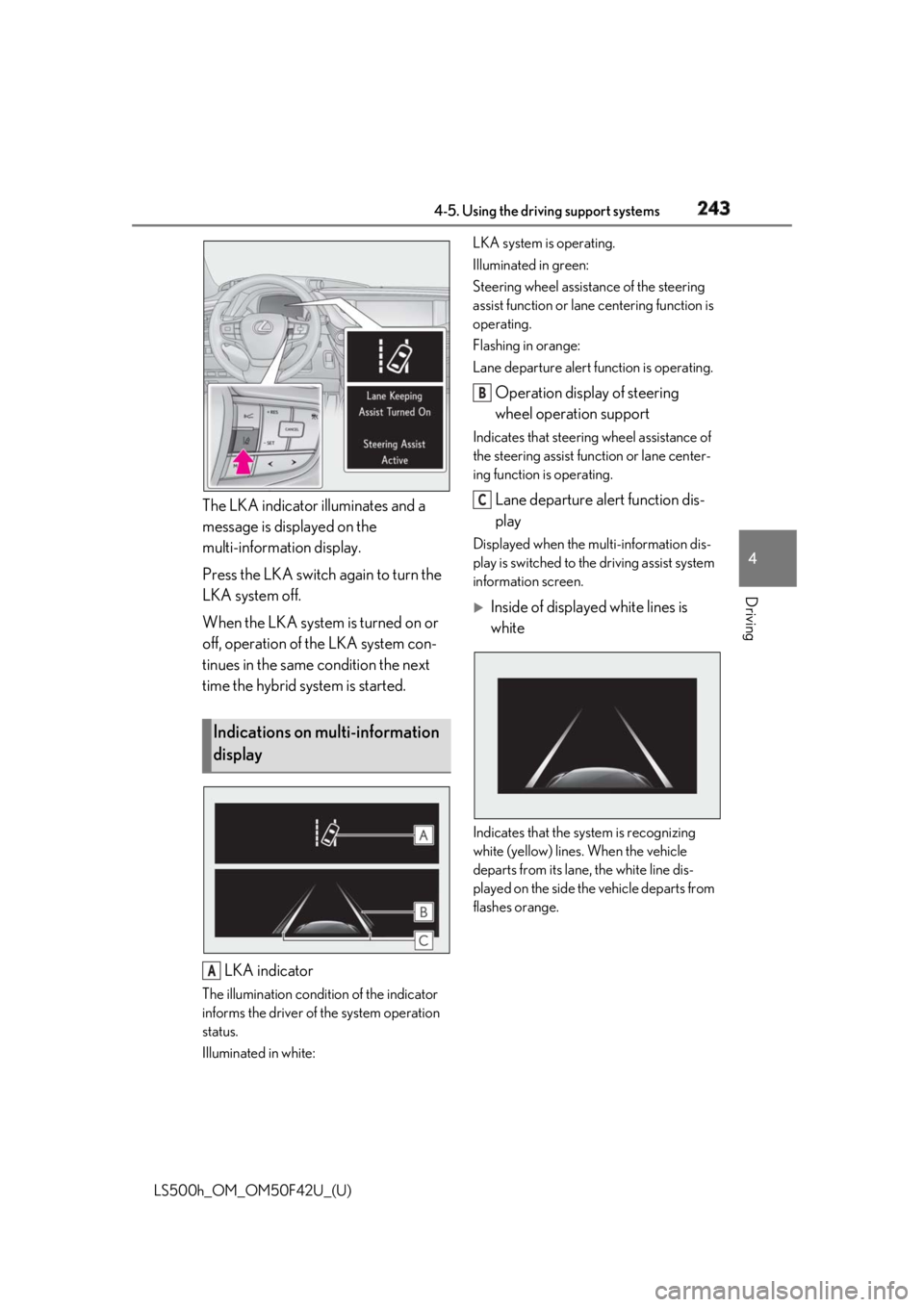
Driving The LKA indicator illuminates and a
message is displayed on the
multi-information display.
Press the LKA switch again to turn the
LKA system off.
When the LKA system is turned on or
off, operation of the LKA system con-
tinues in the same condition the next
time the hybrid system is started.
LKA indicatorThe illumination condition of the indicator
informs the driver of the system operation
status.
Illuminated in white: LKA system is operating.
Illuminated in green:
Steering wheel assistan ce of the steering
assist function or lane centering function is
operating.
Flashing in orange:
Lane departure alert function is operating.
Operation display of steering
wheel operation support Indicates that steering wheel assistance of
the steering assist function or lane center-
ing function is operating.
Lane departure alert function dis-
play Displayed when the multi-information dis-
play is switched to th e driving assist system
information screen.
Inside of displayed white lines is
white
Indicates that the system is recognizing
white (yellow) lines . When the vehicle
departs from its lane , the white line dis-
played on the side the vehicle departs from
flashes orange.Indications on multi-information
display
A B
C
Page 244 of 528
244 4-5. Using the driving support systems
LS500h_OM_OM50F42U_(U)
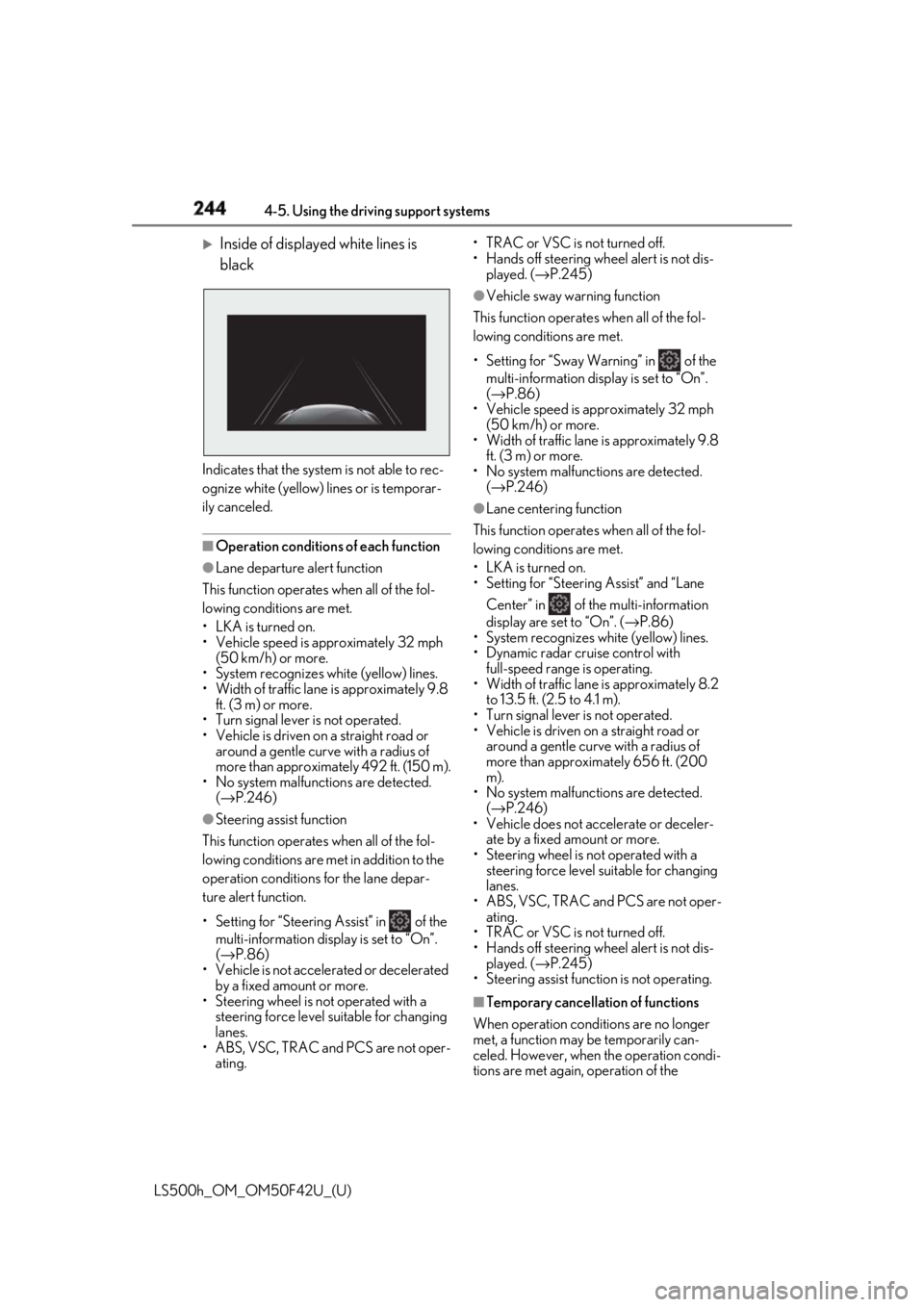
Inside of displayed white lines is
black
Indicates that the system is not able to rec-
ognize white (yellow) lines or is temporar-
ily canceled.
■
Operation conditions of each function●
Lane departure alert function
This function operates when all of the fol-
lowing conditions are met.
• LKA is turned on.
• Vehicle speed is approximately 32 mph
(50 km/h) or more.
• System recognizes white (yellow) lines.
• Width of traffic lane is approximately 9.8
ft. (3 m) or more.
• Turn signal lever is not operated.
• Vehicle is driven on a straight road or
around a gentle curve with a radius of
more than approximately 492 ft. (150 m).
• No system malfunctions are detected.
( → P.246)●
Steering assist function
This function operates when all of the fol-
lowing conditions are me t in addition to the
operation conditions for the lane depar-
ture alert function.
•Setting for “Steering Assist” in of the
multi-information display is set to “On”.
( → P.86)
• Vehicle is not accelerated or decelerated
by a fixed amount or more.
• Steering wheel is not operated with a
steering force level su itable for changing
lanes.
• ABS, VSC, TRAC and PCS are not oper-
ating. • TRAC or VSC is not turned off.
• Hands off steering wheel alert is not dis-
played. ( → P.245)●
Vehicle sway warning function
This function operates when all of the fol-
lowing conditions are met.
• Setting for “Sway Warning” in of the
multi-information display is set to “On”.
( → P.86)
• Vehicle speed is ap proximately 32 mph
(50 km/h) or more.
• Width of traffic lane is approximately 9.8
ft. (3 m) or more.
• No system malfunctions are detected.
( → P.246)●
Lane centering function
This function operates when all of the fol-
lowing conditions are met.
• LKA is turned on.
• Setting for “Steering Assist” and “Lane
Center” in of the multi-information
display are set to “On”. ( → P.86)
• System recognizes white (yellow) lines.
• Dynamic radar cruise control with
full-speed range is operating.
• Width of traffic lane is approximately 8.2
to 13.5 ft. (2.5 to 4.1 m).
• Turn signal lever is not operated.
• Vehicle is driven on a straight road or
around a gentle curve with a radius of
more than approximately 656 ft. (200
m).
• No system malfunctions are detected.
( → P.246)
• Vehicle does not ac celerate or deceler-
ate by a fixed amount or more.
• Steering wheel is not operated with a
steering force level su itable for changing
lanes.
• ABS, VSC, TRAC and PCS are not oper-
ating.
• TRAC or VSC is not turned off.
• Hands off steering wheel alert is not dis-
played. ( → P.245)
• Steering assist function is not operating.
■
Temporary cancellation of functions
When operation condit ions are no longer
met, a function may be temporarily can-
celed. However, when the operation condi-
tions are met again, operation of the
Page 245 of 528
2454-5. Using the driving support systems
LS500h_OM_OM50F42U_(U) 4
Driving function is automatically restored.
( → P.244)■
Steering assist function/lane centering
function
Depending on the vehicle speed, lane
departure situation, ro ad conditions, etc.,
the driver may not feel the function is oper-
ating or the function may not operate at all.■
Lane departure alert function
The warning buzzer may be difficult to hear
due to external noise, audio playback, etc.
Also, it may be difficult to feel steering
wheel vibrations due to the road conditions,
etc. ■
Hands off steering wheel alert
When the system determines that the driver
has removed the hands from the steering
wheel while the steering assist function or
lane centering function is operating, a warn-
ing message is displaye d on the multi-infor-
mation display. If the driver continues to
keep the hands off of the steering wheel, a
warning message is displayed and the func-
tion is temporarily canceled. This alert also
operates in the same way when the driver
continuously operates the steering wheel
only a small amount. However, depending
on the road conditions , etc., the function
may not cancel. ■
White (yellow) lines ar e only on one side
of road
The LKA system will not operate for the
side on which white (yellow) lines could not
be recognized. ■
Conditions in whic h functions may not
operate properly
In the following situations, the camera sen-
sor may not detect white (yellow) lines and
various functions may not operate normally.
●
There are shadows on the road that run
parallel with, or cover, the white (yellow)
lines.
●
The vehicle is driven in an area without
white (yellow) lines, such as in front of a
tollgate or checkpoint, or at an intersec-
tion, etc.
●
The white (yellow) lines are cracked,
“Botts’ dots”, “Raised pavement marker” or stones are present. ●
The white (yellow) lines cannot be seen
or are difficult to see due to sand, etc. ●
The vehicle is driven on a road surface
that is wet due to rain, puddles, etc. ●
The traffic lines are yellow (which may be
more difficult to reco gnize than lines that
are white). ●
The white (yellow) lines cross over a curb,
etc. ●
The vehicle is driven on a bright surface,
such as concrete. ●
The vehicle is driven on a surface that is
bright due to reflected light, etc. ●
The vehicle is driven in an area where the
brightness changes sudd enly, such as at
the entrances and exits of tunnels, etc. ●
Light from the headlights of an oncoming
vehicle, the sun, etc. enters the camera. ●
The vehicle is driven where the road
diverges, merges, etc. ●
The vehicle is driven on a slope. ●
The vehicle is driven on a road which tilts
left or right, or a winding road. ●
The vehicle is driven on an unpaved or
rough road. ●
The vehicle is driven around a sharp
curve. ●
The traffic lane is excessively narrow or
wide. ●
The vehicle is extremely tilted due to car-
rying heavy luggage or having improper
tire pressure. ●
The distance to the preceding vehicle is
extremely short.
●
The vehicle is moving up and down a
large amount due to road conditions
during driving (poor roads or road
seams).
●
The headlight lenses are dirty and emit a
faint amount of light at night, or the beam
axis has deviated.
●
The vehicle is struck by a crosswind.
●
The vehicle has just changed lanes or
crossed an intersection.
●
Snow tires, etc. are equipped.
Page 246 of 528
246 4-5. Using the driving support systems
LS500h_OM_OM50F42U_(U) ■
Warning message
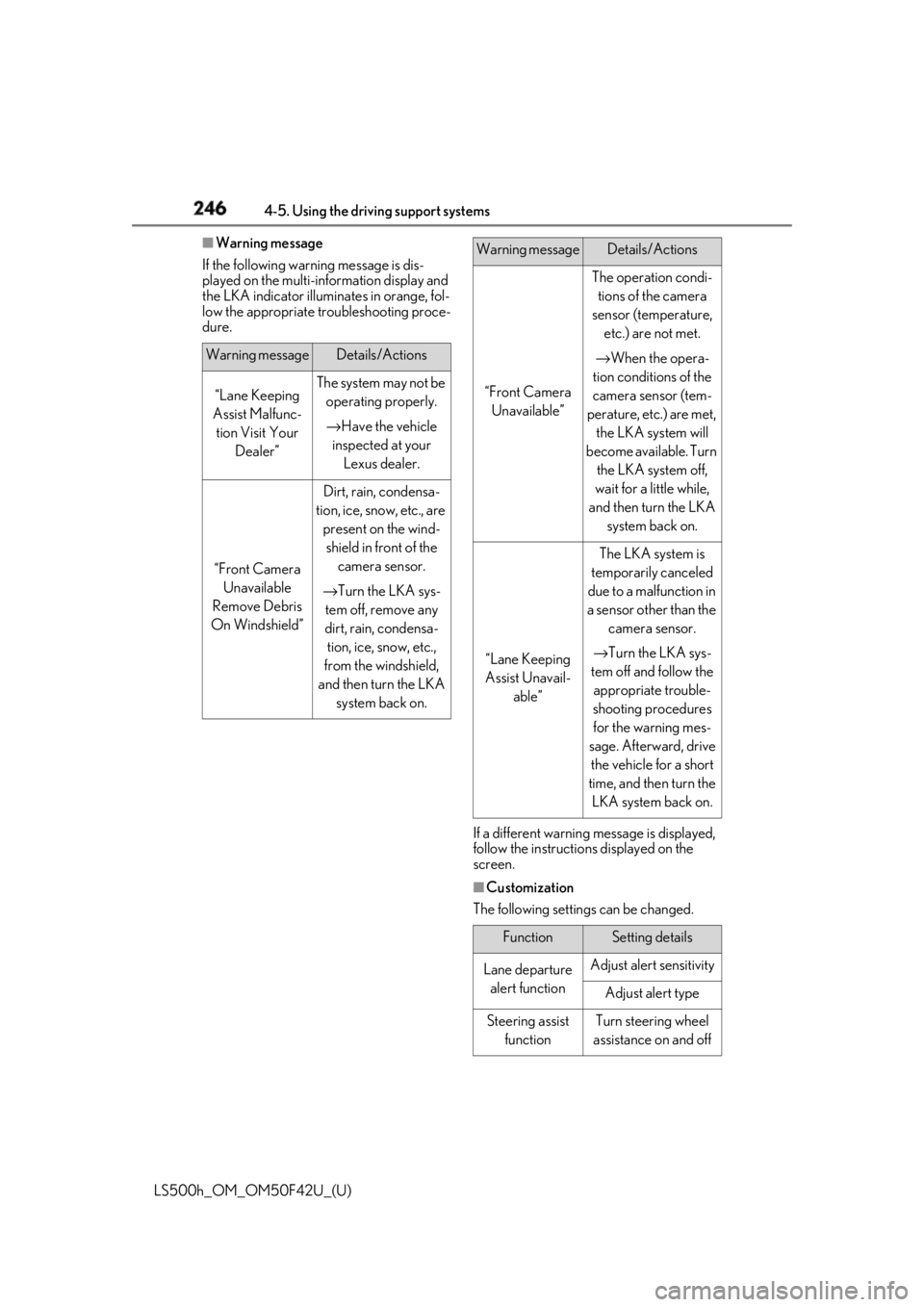
If the following warning message is dis-
played on the multi-information display and
the LKA indicator illumi nates in orange, fol-
low the appropriate troubleshooting proce-
dure.
If a different warning message is displayed,
follow the instructio ns displayed on the
screen.
■
Customization
The following settings can be changed.Warning message Details/Actions
“Lane Keeping
Assist Malfunc-
tion Visit Your
Dealer” The system may not be
operating properly.
→ Have the vehicle
inspected at your
Lexus dealer.
“Front Camera
Unavailable
Remove Debris
On Windshield” Dirt, rain, condensa-
tion, ice, snow, etc., are
present on the wind-
shield in front of the
camera sensor.
→ Turn the LKA sys-
tem off, remove any
dirt, rain, condensa-
tion, ice, snow, etc.,
from the windshield,
and then turn the LKA
system back on. “Front Camera
Unavailable” The operation condi-
tions of the camera
sensor (temperature,
etc.) are not met.
→ When the opera-
tion conditions of the
camera sensor (tem-
perature, etc.) are met,
the LKA system will
become available. Turn
the LKA system off,
wait for a little while,
and then turn the LKA
system back on.
“Lane Keeping
Assist Unavail-
able” The LKA system is
temporarily canceled
due to a malfunction in
a sensor other than the
camera sensor.
→ Turn the LKA sys-
tem off and follow the
appropriate trouble-
shooting procedures
for the warning mes-
sage. Afterward, drive
the vehicle for a short
time, and then turn the
LKA system back on.
Function Setting details
Lane departure
alert function Adjust alert sensitivity
Adjust alert type
Steering assist
function Turn steering wheel
assistance on and offWarning message Details/Actions
Page 247 of 528
2474-5. Using the driving support systems
LS500h_OM_OM50F42U_(U) 4
Driving For how to change settings, refer to
→ P.481 *
: If equipped
Vehicle sway
warning function Turn function on and
off
Adjust alert sensitivity
Lane centering
function Turn function on and
offFunction Setting details
RSA (Road Sign Assist) *
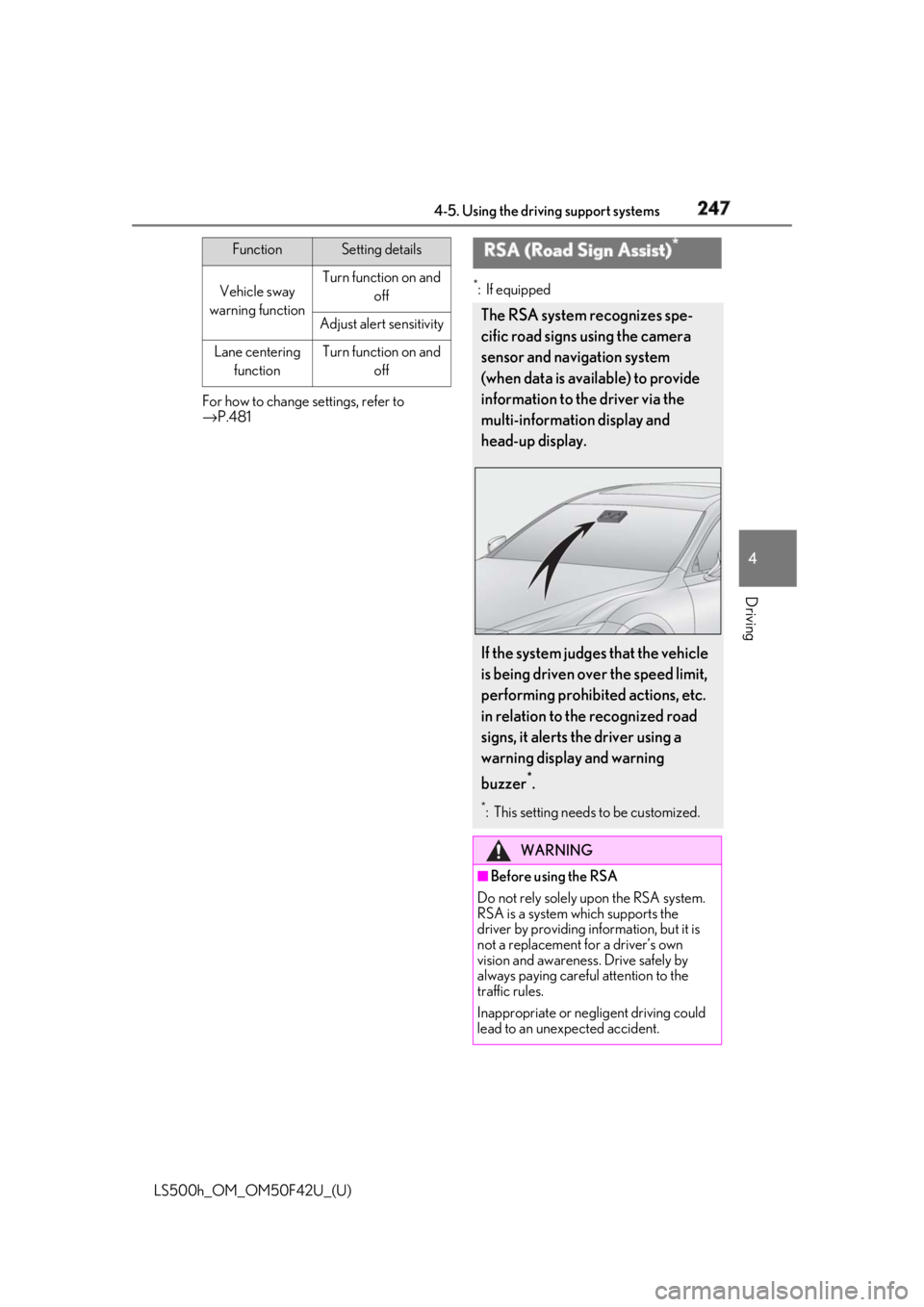
The RSA system recognizes spe-
cific road signs using the camera
sensor and navigation system
(when data is available) to provide
information to the driver via the
multi-information display and
head-up display.
If the system judges that the vehicle
is being driven over the speed limit,
performing prohibited actions, etc.
in relation to the recognized road
signs, it alerts the driver using a
warning display and warning
buzzer *
. *
: This setting needs to be customized.
WARNING
■
Before using the RSA
Do not rely solely upon the RSA system.
RSA is a system which supports the
driver by providing information, but it is
not a replacement for a driver’s own
vision and awareness. Drive safely by
always paying careful attention to the
traffic rules.
Inappropriate or neg ligent driving could
lead to an unexpected accident.
Page 253 of 528
2534-5. Using the driving support systems
LS500h_OM_OM50F42U_(U) 4
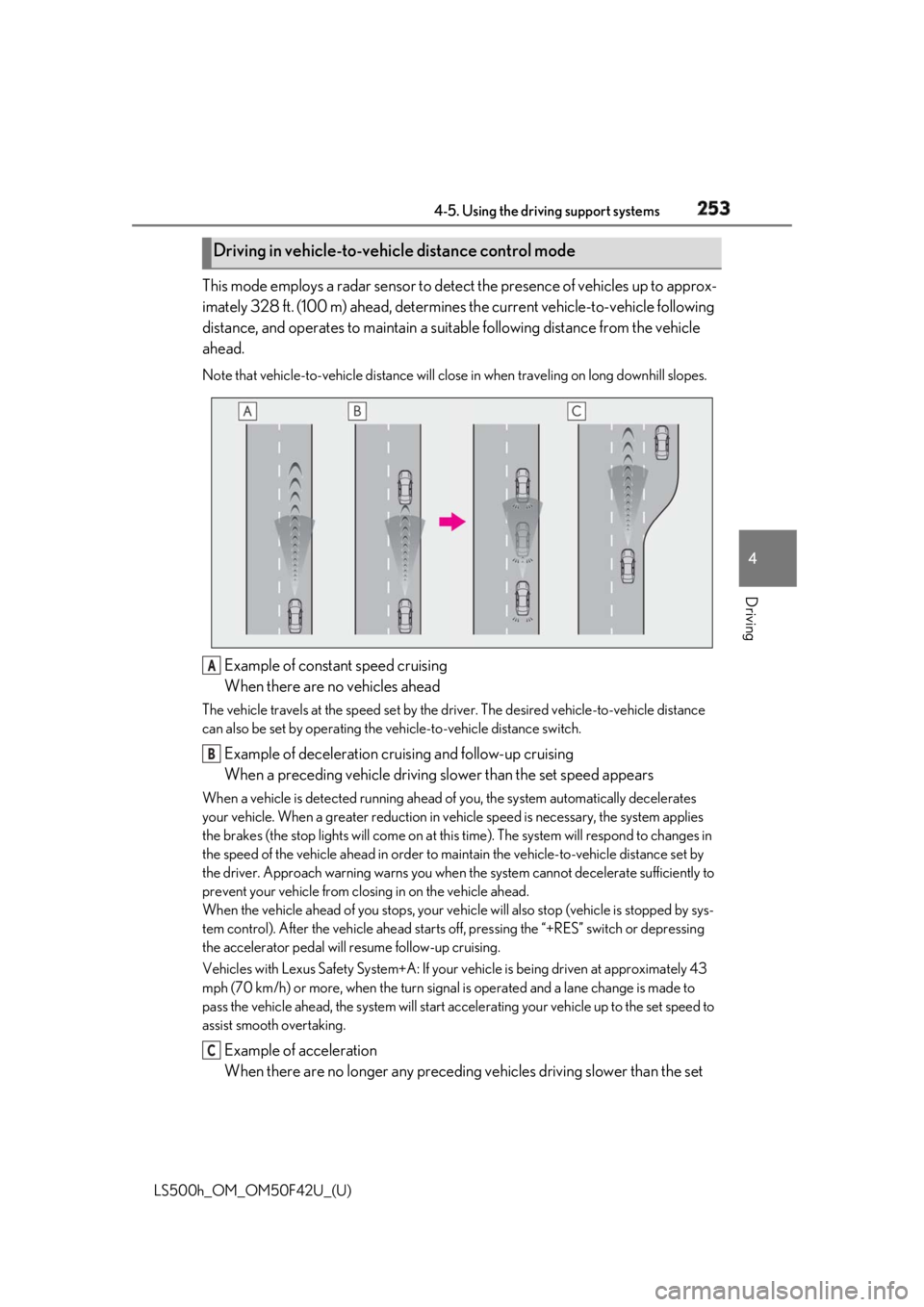
Driving This mode employs a radar sensor to detect the presence of vehicles up to approx-
imately 328 ft. (100 m) ahead, determines the current vehicle-to-vehicle following
distance, and operates to maintain a suit able following distance from the vehicle
ahead. Note that vehicle-to-vehicle di stance will close in when trav eling on long downhill slopes.
Example of constant speed cruising
When there are no vehicles aheadThe vehicle travels at the speed set by the driver. The desired vehicle-to-vehicle distance
can also be set by operating the ve hicle-to-vehicle distance switch.
Example of deceleration cruising and follow-up cruising
When a preceding vehicle driving slower than the set speed appearsWhen a vehicle is detected running ahead of you, the system automatically decelerates
your vehicle. When a greater reduction in vehicle speed is necessary, the system applies
the brakes (the stop lights will come on at this time). The sy stem will respond to changes in
the speed of the vehicle ahead in order to maintain the vehicle-to-vehicle distance set by
the driver. Approach warning warns you when th e system cannot decelera te sufficiently to
prevent your vehicle from closing in on the vehicle ahead.
When the vehicle ahead of you stops, your vehi cle will also stop (vehicle is stopped by sys-
tem control). After the vehicle ahead starts off, pressing the “+RES” switch or depressing
the accelerator pedal will resume follow-up cruising.
Vehicles with Lexus Safety System+A: If your vehicle is being driven at approximately 43
mph (70 km/h) or more, when the turn signal is operated and a lane change is made to
pass the vehicle ahead, the system will start acce lerating your vehicle up to the set speed to
assist smooth overtaking.
Example of acceleration
When there are no longer any preceding vehicles driving slower than the set Driving in vehicle-to-vehicle distance control mode
A
B
C
Page 260 of 528
260 4-5. Using the driving support systems
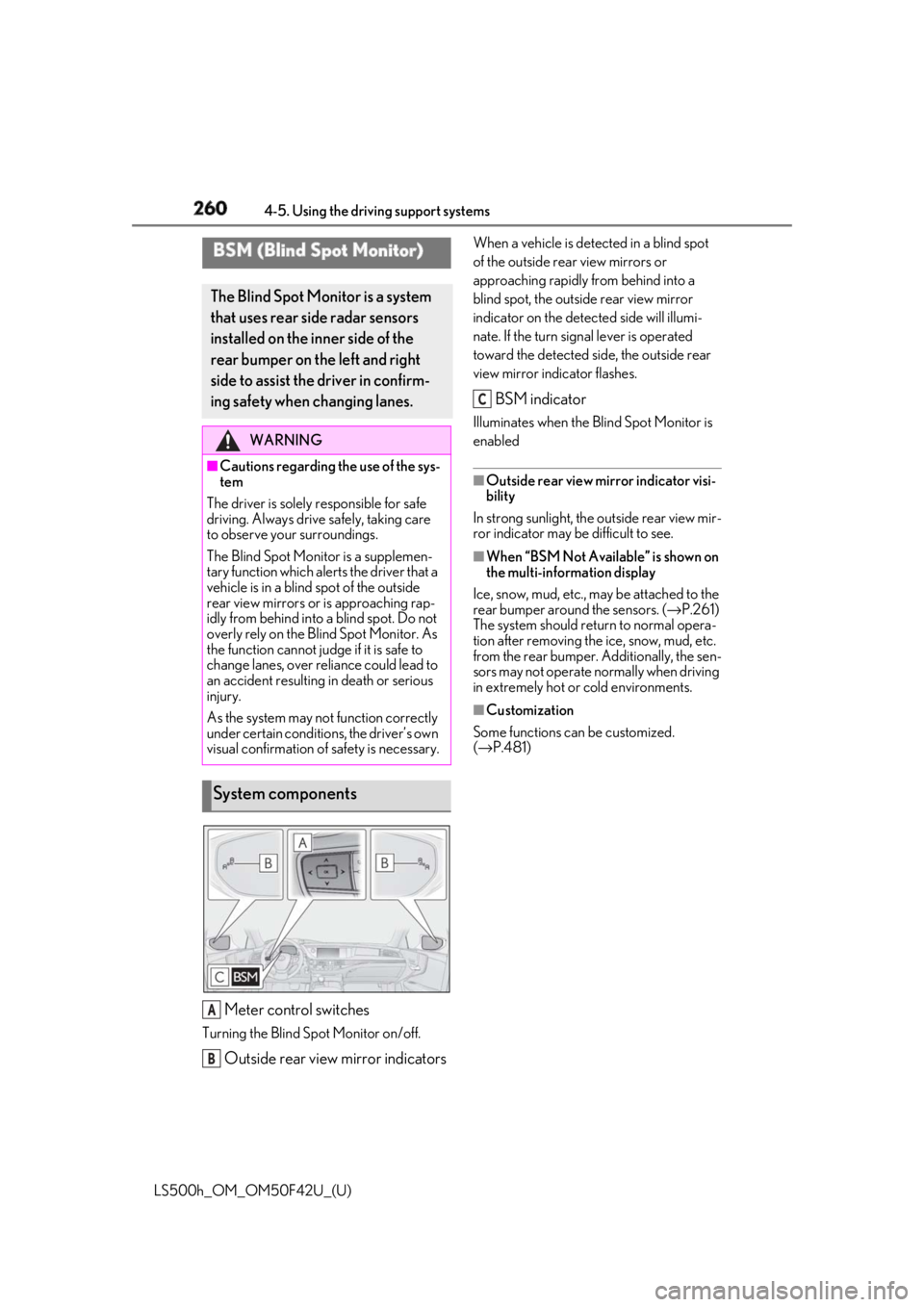
LS500h_OM_OM50F42U_(U) Meter control switchesTurning the Blind Spot Monitor on/off.
Outside rear view mirror indicators When a vehicle is dete cted in a blind spot
of the outside rear view mirrors or
approaching rapidly from behind into a
blind spot, the outside rear view mirror
indicator on the detected side will illumi-
nate. If the turn signal lever is operated
toward the detected side, the outside rear
view mirror indicator flashes.
BSM indicator Illuminates when the Blind Spot Monitor is
enabled ■
Outside rear view mirror indicator visi-
bility
In strong sunlight, the outside rear view mir-
ror indicator may be difficult to see. ■
When “BSM Not Available” is shown on
the multi-information display
Ice, snow, mud, etc., may be attached to the
rear bumper around the sensors. ( → P.261)
The system should return to normal opera-
tion after removing the ice, snow, mud, etc.
from the rear bumper. Additionally, the sen-
sors may not operate normally when driving
in extremely hot or cold environments. ■
Customization
Some functions can be customized.
( → P.481)BSM (Blind Spot Monitor) The Blind Spot Monitor is a system
that uses rear side radar sensors
installed on the inner side of the
rear bumper on the left and right
side to assist the driver in confirm-
ing safety when changing lanes. WARNING■
Cautions regarding the use of the sys-
tem
The driver is solely responsible for safe
driving. Always driv e safely, taking care
to observe your surroundings.
The Blind Spot Monitor is a supplemen-
tary function which alerts the driver that a
vehicle is in a blind spot of the outside
rear view mirrors or is approaching rap-
idly from behind into a blind spot. Do not
overly rely on the Blind Spot Monitor. As
the function cannot judge if it is safe to
change lanes, over reliance could lead to
an accident resulting in death or serious
injury.
As the system may not function correctly
under certain conditions, the driver’s own
visual confirmation of safety is necessary.
System components
A
B C
Page 265 of 528
2654-5. Using the driving support systems
LS500h_OM_OM50F42U_(U) 4
Driving rounding area
• When the distance between your vehicle
and a guardrail, wall, etc. that enters the
detection area is short
• When driving up an d down consecutive
steep inclines, such as hills, dips in the
road, etc.
• When vehicle lanes are narrow, or when
driving on the edge of a lane, and a vehi-
cle traveling in a lane other than the adja-
cent lanes enters the detection area
• When driving on roads with sharp bends,
consecutive curves, or uneven surfaces
• When the tires are slipping or spinning
• When the distance between your vehicle
and a following vehicle is short
• When an accessory (such as a bicycle
carrier) is installed to the rear of the vehi-
cle *
: If equipped
■
Intuitive parking assist
Ultrasonic sensors are used to detect
static objects in the detection area
when driving at a low speed or backing
up. ( → P.266) ■
RCTA (Rear Cross Traffic Alert)
function
Radar sensors are used to detect
approaching vehicles in the detection
areas behind the vehicle when backing
up. ( → P.273) ■
RCD (Rear camera detection)
function (if equipped)
A rear camera sensor is used to detect
pedestrians in the detection area
behind the vehicle when backing up.
( → P.277)PKSA (Parking Support
Alert) *
The Parking Support Alert system
consists of the following functions
that operate when driving at a low
speed or backing up, such as when
parking. When the system deter-
mines that a collision with a
detected object, such as a wall, or
pedestrian is high, a warning oper-
ates to urge the driver to take eva-
sive action.
PKSA (Parking Support Alert)
system
Page 305 of 528
3054-5. Using the driving support systems
LS500h_OM_OM50F42U_(U) 4
Driving ■
Sounds and vibrations caused by the
ABS, brake assist, VS C, TRAC, hill-start
assist control and VGRS systems●
A sound may be heard from the engine
compartment when the brake pedal is
depressed repeatedly, when the hybrid
system is started or just after the vehicle
begins to move. This sound does not indi-
cate that a malfunction has occurred in
any of these systems.●
Any of the following conditions may
occur when the above systems are oper-
ating. None of these indicates that a mal-
function has occurred.
• Vibrations may be felt through the vehicle
body and steering.
• A motor sound may be heard also after
the vehicle comes to a stop.■
ECB operating sound
ECB operating sound may be heard in the
following cases, but it does not indicate that
a malfunction has occurred. ●
Operating sound heard from the engine
compartment when the brake pedal is
operated.●
Motor sound of the brake system heard
from the front part of the vehicle when
the driver’s door is opened.●
Operating sound heard from the engine
compartment when one or two minutes
passed after the stop of the hybrid sys-
tem.■
EPS, VGRS and DRS operation sound
When the steering wheel is operated, a
motor sound (whirring sound) may be
heard. This does not indicate a malfunction.
■
Automatic reactivation of TRAC and
VSC systems
After turning the TRAC and VSC systems
off, the systems will be automatically
re-enabled in the following situations:
●
When the power switch is turned off
●
If only the TRAC system is turned off, the
TRAC will turn on when vehicle speed
increases
If both the TRAC and VSC systems are
turned off, automatic re-enabling will not
occur when vehicle speed increases. ■
Reduced effectiveness of the EPS sys-
tem
The effectiveness of the EPS system is
reduced to prevent the system from over-
heating when there is frequent steering
input over an extended period of time. The
steering wheel may feel heavy as a result.
Should this occur, re frain from excessive
steering input or stop the vehicle and turn
the hybrid system off. The EPS system
should return to normal within 10 minutes. ■
Secondary Collision Brake operating
conditions
The vehicle speed is approximately 6 mph
(10 km/h) or more and the airbag sensor
detects a collision. (The Secondary Colli-
sion Brake will not operate when the vehicle
speed is below approximately 6 mph [10
km/h].) ■
Secondary Collision Brake automatic
cancellation
The Secondary Collision Brake is automati-
cally canceled in the following situations: ●
The vehicle speed drops below approxi-
mately 6 mph (10 km/h) ●
A certain amount of time elapses during
operation ●
The accelerator pedal is depressed a
large amount ■
When “Check VGRS System” or
“CHECK DRS” is displayed on the
multi-information display
The VGRS or DRS may not operate prop-
erly. Have the vehicle inspected by your
Lexus dealer.
WARNING
■
The ABS does not operate effectively
when
●
The limits of tire gripping performance
have been exceeded (such as exces-
sively worn tires on a snow covered
road).
●
The vehicle hydroplanes while driving
at high speed on wet or slick roads.
Page 309 of 528
3094-6. Driving tips
LS500h_OM_OM50F42U_(U) 4
Driving Use fluids that are appropriate to
the prevailing outside temperatures. •Engine oil
• Engine/power control unit coolant
•Washer fluid
Have a service technician inspect
the condition of the 12-volt battery.
Have the vehicle fitted with four
snow tires or purchase a set of tire
chains for the rear tires. *
Ensure that all tires are the specified size
and brand, and that chains match the size
of the tires. *
: Tire chains cannot be mounted on vehi-
cles with front and rear tires of differing
sizes.Winter driving tips Carry out the necessary prepara-
tions and inspections before driving
the vehicle in winter. Always drive
the vehicle in a manner appropriate
to the prevailing weather condi-
tions.
Preparation for winter
WARNING
■
Driving with snow tires
Observe the following precautions to
reduce the risk of accidents.
Failure to do so may result in a loss of
vehicle control and cause death or seri-
ous injury.
●
Use tires of the specified size.
●
Maintain the recommended level of air
pressure. ●
Do not drive in excess of 75 mph (120
km/h), regardless of the type of snow
tires being used. ●
Use snow tires on all, not just some
wheels. ■
When installing tire chains
Before installing tire chains, make sure to
disable all functions of the vehicle height
control of the electronically modulated
air suspension. Otherwise, the vehicle
height may change while installing the
tire chains and part or your body may be
caught under the vehicle, possibly caus-
ing injury. ( → P.301)■
Driving with tire chains
Observe the following precautions to
reduce the risk of accidents.
Failure to do so may result in the vehicle
being unable to be driven safely, and may
cause death or serious injury. ●
Do not drive in excess of the speed
limit specified for the tire chains being
used, or 30 mph (50 km/h), which-
ever is lower. ●
Avoid driving on bumpy road surfaces
or over potholes. ●
Avoid sudden acceleration, abrupt
steering, sudden br aking and shifting
operations that cause sudden engine
braking.
●
Slow down sufficiently before entering
a curve to ensure that vehicle control is
maintained.
●
Do not use LTA (Lane Tracing Assist)
system. (if equipped)
●
Do not use LKA (Lane-Keeping
Assist) system. (if equipped)