ECU LEXUS LS500H 2018 Service Manual
[x] Cancel search | Manufacturer: LEXUS, Model Year: 2018, Model line: LS500H, Model: LEXUS LS500H 2018Pages: 528, PDF Size: 10.8 MB
Page 161 of 528
1614-1. Before driving
LS500h_OM_OM50F42U_(U) 4
Driving WARNING●
Do not shift the shift position to P while
the vehicle is moving.
Doing so can damage the transmission
and may result in a loss of vehicle con-
trol.●
Do not shift the shift position to R while
the vehicle is moving forward.
Doing so can damage the transmission
and may result in a loss of vehicle con-
trol.●
Do not shift the shift position to a driv-
ing position while the vehicle is moving
backward.
Doing so can damage the transmission
and may result in a loss of vehicle con-
trol.●
Changing the shift position to N while
the vehicle is moving will disengage
the hybrid system. Engine braking is
not available with the hybrid system
disengaged.●
Be careful not to change the shift posi-
tion with the accelerator pedal
depressed. Changing the shift posi-
tion to any positions other than P or N
may lead to unexpected rapid acceler-
ation of the vehicle that may cause an
accident and result in death or serious
injury.
After changing the shift position, make
sure to confirm the current shift posi-
tion displayed on the shift position indi-
cator inside the meter.
■
Brake pad wear
If any of the following situations occurs,
have the brake pads visually checked and
replaced by your Lexus dealer as soon as
possible.
●
If the thickness of the brake pads
exceeds the brake pad wear limit when
visually checking all four brake pads
(for the brake pad wear limit, refer to
P.465) ●
If a warning message is displayed on
the multi-information display (only the
right-side pads can be detected)
Rotor damage may result if the pads are
not replaced when needed.
F SPORT models: Moderate levels of the
brake pad and disc wear allow enhanced
braking power. As a result, the discs may
wear more quickly than conventional
brake discs. Therefore, when replacing
the brake pads, Lexus recommends that
you also have the thickness of the discs
measured.
It is dangerous to drive the vehicle when
the wear limits of the brake pads and/or
those of the brake discs are exceeded. ■
When the vehicle is stopped ●
Do not depress the accelerator pedal
unnecessarily.
If the shift position is any position other
than P or N, the vehicle may acceler-
ate suddenly and unexpectedly, caus-
ing an accident. ●
In order to prevent accidents due to
the vehicle rolling away, always keep
depressing the brake pedal while
stopped with the “READY” indicator is
illuminated, and apply the parking
brake as necessary.
●
If the vehicle is stopped on an incline,
in order to prevent accidents caused
by the vehicle rolling forward or back-
ward, always depress the brake pedal
and securely apply the parking brake
as needed.
●
Avoid revving or racing the engine.
Running the engine at high speed
while the vehicle is stopped may cause
the exhaust system to overheat, which
could result in a fire if combustible
material is nearby.
Page 162 of 528
162 4-1. Before driving
LS500h_OM_OM50F42U_(U) WARNING■
When the vehicle is parked●
Do not leave glasses, cigarette lighters,
spray cans, or soft drink cans in the
vehicle when it is in the sun.
Doing so may result in the following:
• Gas may leak from a cigarette lighter
or spray can, and may lead to a fire.
• The temperature inside the vehicle
may cause the plastic lenses and plas-
tic material of glasses to deform or
crack.
• Soft drink cans may fracture, causing
the contents to spray over the interior
of the vehicle, and may also cause a
short circuit in the vehicle’s electrical
components.●
Do not leave cigarette lighters in the
vehicle. If a cigarette lighter is in a
place such as the glove box or on the
floor, it may be lit accidentally when
luggage is loaded or the seat is
adjusted, causing a fire.●
Do not attach adhesive discs to the
windshield or windows. Do not place
containers such as air fresheners on
the instrument pane l or dashboard.
Adhesive discs or containers may act
as lenses, causing a fire in the vehicle.
●
Do not leave a door or window open if
the curved glass is coated with a met-
allized film such as a silver-colored
one. Reflected sunlight may cause the
glass to act as a lens, causing a fire.
●
Always apply the parking brake, shift
the shift position to P, stop the hybrid
system and lock the vehicle.
Do not leave the vehicle unattended
while the “READY” indicator is illumi-
nated.
●
Do not touch the exhaust pipes while
the “READY” indicator is illuminated
or immediately after turning the hybrid
system off.
Doing so may cause burns. ■
When taking a nap in the vehicle
Always turn the hybrid system off. Other-
wise, if you accident ally move the shift
lever or depress the accelerator pedal,
this could cause an accident or fire due
to hybrid system overheating. Addition-
ally, if the vehicle is parked in a poorly
ventilated area, exhaust gases may col-
lect and enter the vehicle, leading to
death or a serious health hazard. ■
When braking ●
When the brakes are wet, drive more
cautiously.
Braking distance in creases when the
brakes are wet, and this may cause one
side of the vehicle to brake differently
than the other side. Also, the parking
brake may not securely hold the vehi-
cle. ●
If the electronically controlled brake
system does not operate, do not follow
other vehicles closely and avoid hills or
sharp turns that require braking.
In this case, braking is still possible, but
the brake pedal should be depressed
more firmly than usual. Also, the brak-
ing distance will in crease. Have your
brakes fixed immediately. ●
The brake system consists of 2 or more
individual hydraulic systems; if one of
the systems fails, the other(s) will still
operate. In this case, the brake pedal
should be depressed more firmly than
usual and the braking distance will
increase. Have your brakes fixed
immediately.
■
If the vehicle becomes stuck
Do not spin the wheels excessively when
a driven wheel is up in the air, or the vehi-
cle is stuck in sand, mud, etc. This may
damage the driveline components or
propel the vehicle forward or backward,
causing an accident.
Page 165 of 528
1654-1. Before driving
LS500h_OM_OM50F42U_(U) 4
Driving *3
: C =Available cargo and luggage load
In this condition, if 3 more passengers with
the combined weight of D lb. (kg) get on,
the available cargo and luggage load will
be reduced E lb. (kg) as follows:
C lb. (kg) - D *4
lb. (kg) = E *5
lb. (kg)*4
: D =Additional weight of people *5
: E =Available cargo and luggage load
As shown in the example above, if the
number of occupants increases, the
cargo and luggage load will be
reduced by an amount that equals the
increased weight due to the additional
occupants. In other words, if an
increase in the number of occupants
causes an excess of the total load
capacity (combined weight of occu-
pants plus cargo and luggage load),
you must reduce the cargo and lug-
gage on your vehicle. WARNING■
Things that must not be carried in the
trunk
The following things may cause a fire if
loaded in the trunk:
●
Receptacles containing gasoline
●
Aerosol cans
■
Storage precautions
Observe the following precautions.
Failure to do so may prevent the pedals
from being depressed properly, may
block the driver’s vision, or may result in
items hitting the driver or passengers,
possibly causing an accident.
●
Stow cargo and luggage in the trunk
whenever possible. ●
Do not place cargo or luggage in or on
the following locations.
• At the feet of the driver
• On the front passenger or rear seats
(when stacking items)
• On the package tray
• On the instrument panel
•On the dashboard
• In front of the Center Display ●
Secure all items in the occupant com-
partment. ■
Capacity and distribution ●
Do not exceed the maximum axle
weight rating or the total vehicle
weight rating. ●
Even if the total load of occupant’s
weight and the cargo load is less than
the total load capacity, do not apply the
load unevenly. Improper loading may
cause deterioration of steering or
braking control which may cause
death or serious injury.
Page 176 of 528
176 4-2. Driving procedures
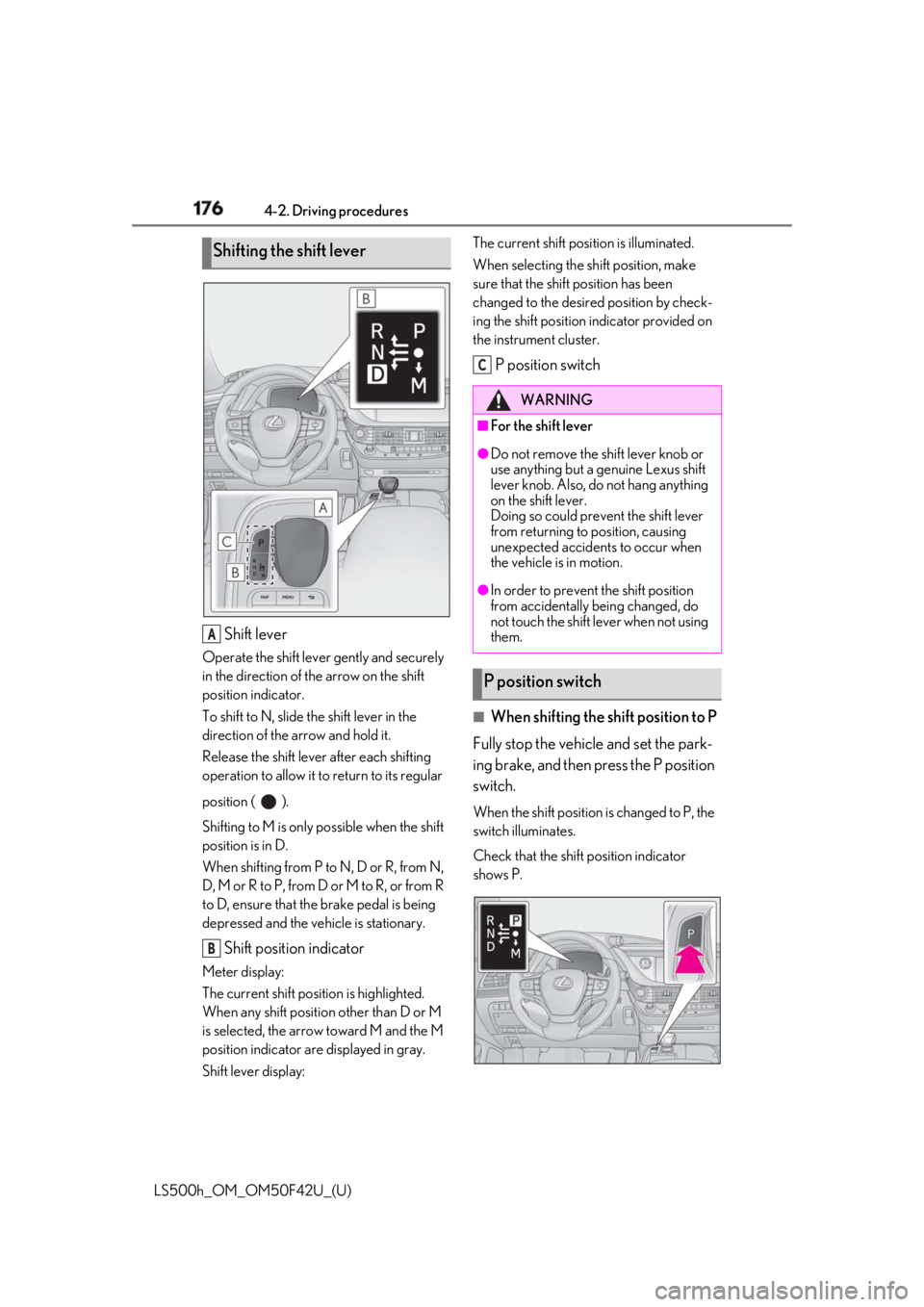
LS500h_OM_OM50F42U_(U) Shift leverOperate the shift lever gently and securely
in the direction of the arrow on the shift
position indicator.
To shift to N, slide the shift lever in the
direction of the arrow and hold it.
Release the shift lever after each shifting
operation to allow it to return to its regular
position ( ).
Shifting to M is only possible when the shift
position is in D.
When shifting from P to N, D or R, from N,
D, M or R to P, from D or M to R, or from R
to D, ensure that the brake pedal is being
depressed and the vehicle is stationary.
Shift position indicatorMeter display:
The current shift position is highlighted.
When any shift position other than D or M
is selected, the arrow toward M and the M
position indicator are displayed in gray.
Shift lever display: The current shift posi tion is illuminated.
When selecting the sh ift position, make
sure that the shift position has been
changed to the desired position by check-
ing the shift position indicator provided on
the instrument cluster.
P position switch
■
When shifting the shift position to P
Fully stop the vehicle and set the park-
ing brake, and then press the P position
switch. When the shift position is changed to P, the
switch illuminates.
Check that the shift position indicator
shows P.Shifting the shift lever
A
B WARNING■
For the shift lever ●
Do not remove the shift lever knob or
use anything but a genuine Lexus shift
lever knob. Also, do not hang anything
on the shift lever.
Doing so could prevent the shift lever
from returning to position, causing
unexpected accidents to occur when
the vehicle is in motion. ●
In order to prevent the shift position
from accidentally being changed, do
not touch the shift lever when not using
them.
P position switch C
Page 187 of 528

1874-3. Operating the lights and wipers
LS500h_OM_OM50F42U_(U) 4
Driving Pull the lever toward you to the center
position to turn the high beams off.
2 Pull the lever toward you and
release it to flash the high beams
once.You can flash the high beams with the
headlights on or off.
AFS (Adaptive Front-lighting System)
secures excellent visibility at intersec-
tions and on curves by automatically
adjusting the direction of the light axis
of the headlights according to vehicle
speed and the degree of the tire’s angle
as controlled by steering input. AFS operates at speed s of approximately
6 mph (10 km/h) or higher.
■
Customization
Some functions can be customized.
( → P.481)
When the steering wheel or turn
signal lever is operated while the
headlights are on (low beam), a cor-
nering light will turn on and light up
the direction of movement of the
vehicle. The cornering lights are
designed to ensure excellent visibil-
ity when making a turn at an inter-
section. However, when vehicle speed is approxi-
mately 22 mph (35 km/h) or higher, the
cornering lights will not turn on.
When the shift position is in R while the headlights are on (low beam),
both cornering lights will turn on.
This is designed to enhance visibility
when parking. ■
Cornering lights
When the cornering lights are on for more
than 30 minutes, they will turn off automati-
cally.
AFS (Adaptive Front-lighting
System) (if equipped)
Cornering lights
Page 194 of 528
194 4-4. Refueling
LS500h_OM_OM50F42U_(U) 4-4.Refueling
Close all the doors and windows,
and turn the power switch off.
Confirm the type of fuel. ■
Fuel types
→ P.470■
Fuel tank opening for unleaded gasoline
To help prevent incorrect fueling, your vehi-
cle has a fuel tank opening that only accom-
modates the special nozzle on unleaded
fuel pumps.Opening the fuel tank cap The fuel tank of your vehicle has a
special structure, which requires a
reduction in fuel tank pressure
before refueling. After the opener
switch has been pressed, it will take
several seconds until the vehicle is
ready for refueling.
Before refueling the vehicle
WARNING■
When refueling the vehicle
Observe the following precautions while
refueling the vehicle. Failure to do so may
result in death or serious injury.
●
After exiting the ve hicle and before
opening the fuel door, touch an
unpainted metal surface to discharge
any static electricity. It is important to
discharge static electricity before refu-
eling because sparks resulting from
static electricity can cause fuel vapors
to ignite while refueling. ●
Always hold the grips on the fuel tank
cap and turn it slowly to remove it.
A whooshing sound may be heard
when the fuel tank cap is loosened.
Wait until the sound cannot be heard
before fully removing the cap. In hot
weather, pressurized fuel may spray
out the filler neck and cause injury. ●
Do not allow anyone that has not dis-
charged static electricity from their
body to come close to an open fuel
tank. ●
Do not inhale vaporized fuel.
Fuel contains substances that are
harmful if inhaled. ●
Do not smoke while refueling the vehi-
cle.
Doing so may cause the fuel to ignite
and cause a fire. ●
Do not return to the vehicle or touch
any person or object that is statically
charged.
This may cause static electricity to
build up, resulting in a possible ignition
hazard. ■
When refueling
Observe the following precautions to
prevent fuel overflowing from the fuel
tank:
●
Securely insert the fuel nozzle into the
fuel filler neck.
●
Stop filling the tank after the fuel noz-
zle automatically clicks off.
●
Do not top off the fuel tank.
Page 264 of 528

264 4-5. Using the driving support systems
LS500h_OM_OM50F42U_(U) the farther away the vehicle will be detected, caus ing the outside rear view mirror indi-
cator to illuminate or flash.■
The Blind Spot Monitor is operational
when
The Blind Spot Monitor is operational when
all of the following conditions are met: ●
The Blind Spot Monitor is on.●
The shift position is in a position other
than R.●
The vehicle speed is greater than approx-
imately 10 mph (16 km/h).■
The Blind Spot Monitor will detect a
vehicle when
The Blind Spot Monitor will detect a vehicle
present in the detection area in the follow-
ing situations: ●
A vehicle in an adj acent lane overtakes
your vehicle.●
You overtake a vehicle in adjacent lane
slowly.●
Another vehicle enters the detection
area when it changes lanes.■
Conditions under wh ich the Blind Spot
Monitor will not detect a vehicle
The Blind Spot Monitor is not designed to
detect the following types of vehicles and/or
objects: ●
Small motorcycles, bicycles, pedestrians,
etc. *
●
Vehicles traveling in the opposite direc-
tion●
Guardrails, walls, signs, parked vehicles
and similar stationary objects *
●
Following vehicles th at are in the same
lane *
●
Vehicles traveling 2 lanes away from your
vehicle *
*
: Depending on the conditions, detection
of a vehicle and/or object may occur.
■
Conditions under wh ich the Blind Spot
Monitor may not fu nction correctly
●
The Blind Spot Monitor may not detect
vehicles correctly in the following situa- tions:
• When the sensor is misaligned due to a
strong impact to the sensor or its sur-
rounding area
• When mud, snow, ice, a sticker, etc. is
covering the sensor or surrounding area
on the rear bumper
• When driving on a road surface that is
wet with standing water during bad
weather, such as heavy rain, snow, or fog
• When multiple vehicles are approaching
with only a small gap between each vehi-
cle
• When the distance between your vehicle
and a following vehicle is short
• When there is a significant difference in
speed between your vehicle and the vehi-
cle that enters the detection area
• Vehicles which are being overtaken rap-
idly by your vehicle.
• When the difference in speed between
your vehicle and another vehicle is
changing
• When a vehicle enters a detection area
traveling at about the same speed as your
vehicle
• As your vehicle starts from a stop, a vehi-
cle remains in the detection area
• When driving up and down consecutive
steep inclines, such as hills, dips in the
road, etc.
• When driving on roads with sharp bends,
consecutive curves, or uneven surfaces
• When vehicle lanes are wide, or when
driving on the edge of a lane, and the
vehicle in an adjacent lane is far away
from your vehicle
• When an accessory (such as a bicycle
carrier) is installed to the rear of the vehi-
cle
• When there is a significant difference in
height between your vehicle and the
vehicle that enters the detection area
• Immediately after the Blind Spot Monitor
is turned on
●
Instances of the Blind Spot Monitor
unnecessarily detecting a vehicle and/or
object may increase in the following situ-
ations:
• When the sensor is misaligned due to a
strong impact to the sensor or its sur-
Page 265 of 528
2654-5. Using the driving support systems
LS500h_OM_OM50F42U_(U) 4
Driving rounding area
• When the distance between your vehicle
and a guardrail, wall, etc. that enters the
detection area is short
• When driving up an d down consecutive
steep inclines, such as hills, dips in the
road, etc.
• When vehicle lanes are narrow, or when
driving on the edge of a lane, and a vehi-
cle traveling in a lane other than the adja-
cent lanes enters the detection area
• When driving on roads with sharp bends,
consecutive curves, or uneven surfaces
• When the tires are slipping or spinning
• When the distance between your vehicle
and a following vehicle is short
• When an accessory (such as a bicycle
carrier) is installed to the rear of the vehi-
cle *
: If equipped
■
Intuitive parking assist
Ultrasonic sensors are used to detect
static objects in the detection area
when driving at a low speed or backing
up. ( → P.266) ■
RCTA (Rear Cross Traffic Alert)
function
Radar sensors are used to detect
approaching vehicles in the detection
areas behind the vehicle when backing
up. ( → P.273) ■
RCD (Rear camera detection)
function (if equipped)
A rear camera sensor is used to detect
pedestrians in the detection area
behind the vehicle when backing up.
( → P.277)PKSA (Parking Support
Alert) *
The Parking Support Alert system
consists of the following functions
that operate when driving at a low
speed or backing up, such as when
parking. When the system deter-
mines that a collision with a
detected object, such as a wall, or
pedestrian is high, a warning oper-
ates to urge the driver to take eva-
sive action.
PKSA (Parking Support Alert)
system
Page 348 of 528
348 5-5. Using the storage features
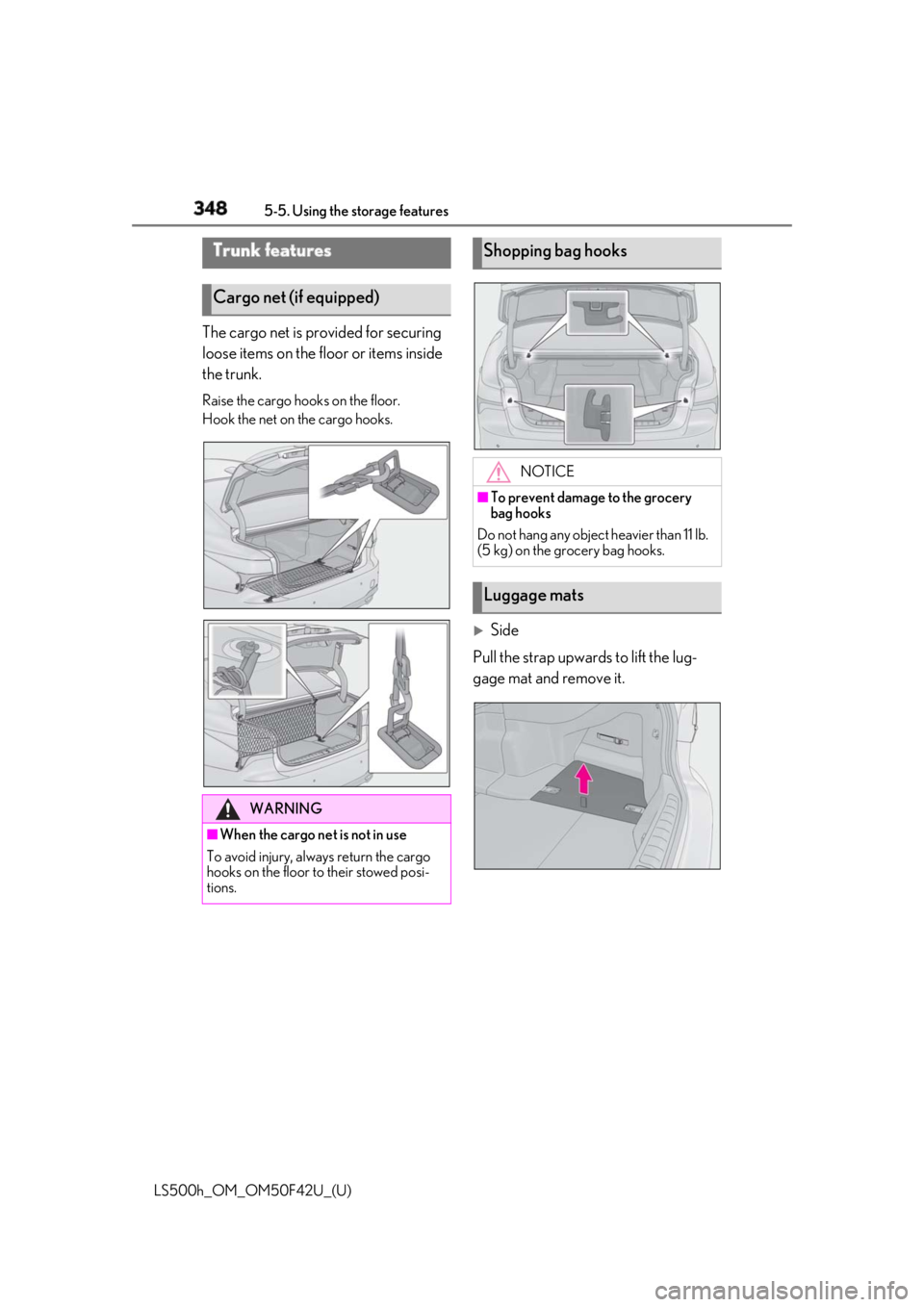
LS500h_OM_OM50F42U_(U) The cargo net is provided for securing
loose items on the floor or items inside
the trunk. Raise the cargo hooks on the floor.
Hook the net on the cargo hooks.
Side
Pull the strap upwards to lift the lug-
gage mat and remove it.Trunk features
Cargo net (if equipped)
WARNING
■
When the cargo net is not in use
To avoid injury, always return the cargo
hooks on the floor to their stowed posi-
tions. Shopping bag hooks
NOTICE■
To prevent damage to the grocery
bag hooks
Do not hang any object heavier than 11 lb.
(5 kg) on the grocery bag hooks.
Luggage mats
Page 350 of 528
350 5-5. Using the storage features
LS500h_OM_OM50F42U_(U) 2 Pass the belt through the clip
3 Tighten the beltDepending on the size and shape of an
object, such as the case of a warning
reflector, the object may not be able to be
secured with the belts or stowed in an aux-
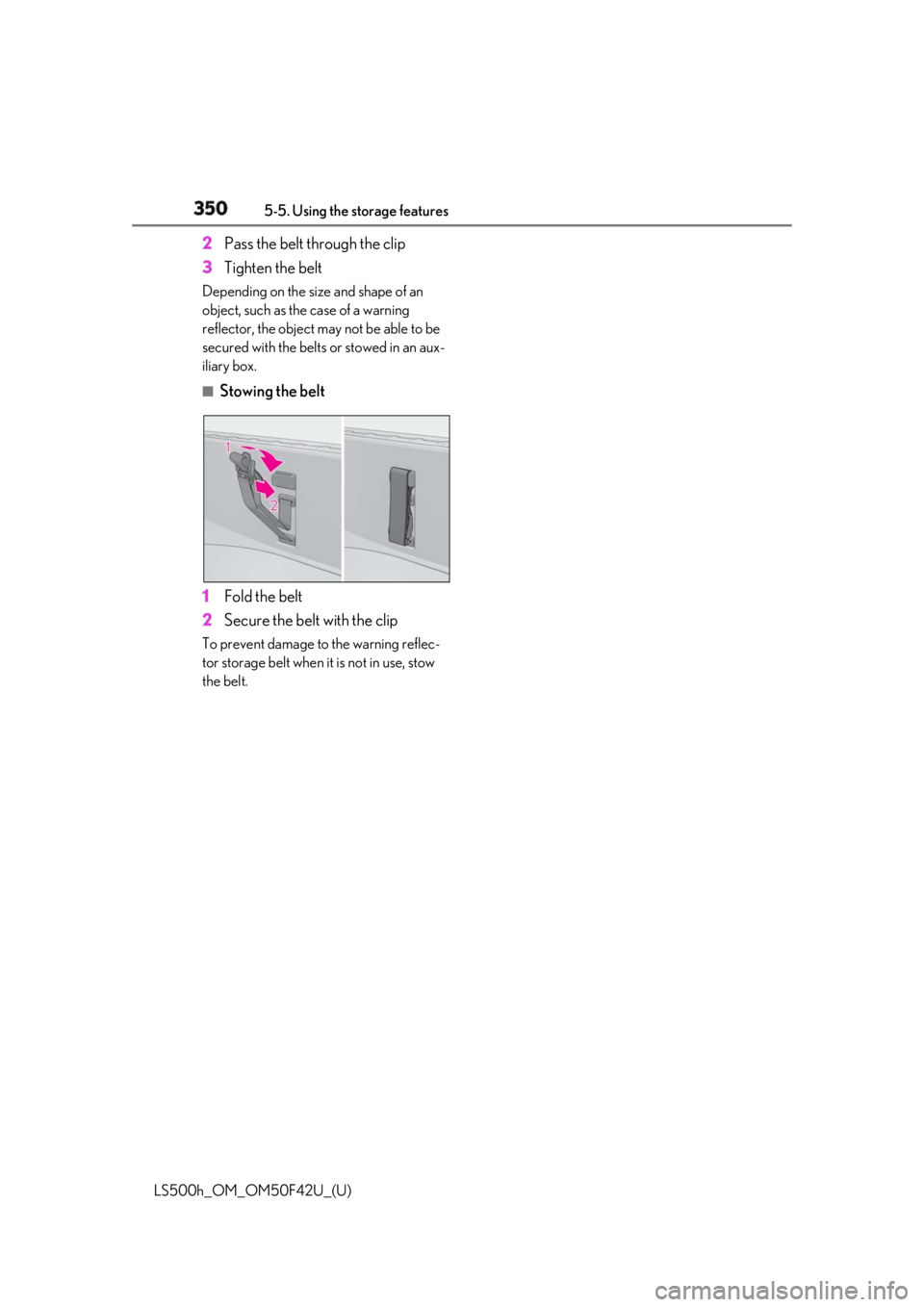
iliary box. ■
Stowing the belt
1 Fold the belt
2 Secure the belt with the clipTo prevent damage to the warning reflec-
tor storage belt when it is not in use, stow
the belt.