air condition LEXUS LS500H 2018 Service Manual
[x] Cancel search | Manufacturer: LEXUS, Model Year: 2018, Model line: LS500H, Model: LEXUS LS500H 2018Pages: 528, PDF Size: 10.8 MB
Page 335 of 528
3355-3. Using the air conditio ning system and defogger
LS500h_OM_OM50F42U_(U) 5
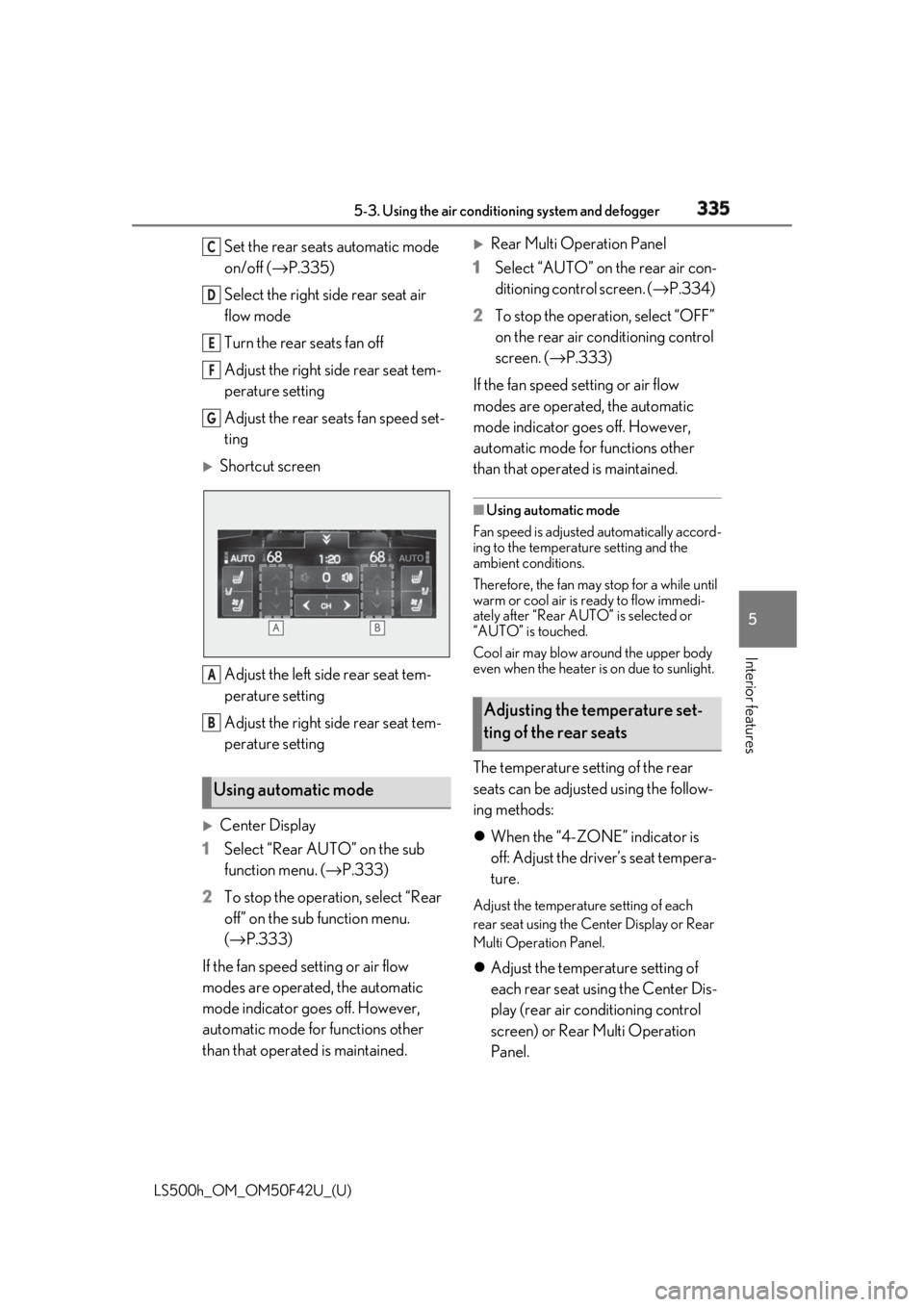
Interior features Set the rear seats automatic mode
on/off ( → P.335)
Select the right side rear seat air
flow mode
Turn the rear seats fan off
Adjust the right side rear seat tem-
perature setting
Adjust the rear seats fan speed set-
ting
Shortcut screen
Adjust the left side rear seat tem-
perature setting
Adjust the right side rear seat tem-
perature setting
Center Display
1 Select “Rear AUTO” on the sub
function menu. ( → P.333)
2 To stop the operat ion, select “Rear
off” on the sub function menu.
( → P.333)
If the fan speed setting or air flow
modes are operated , the automatic
mode indicator goes off. However,
automatic mode for functions other
than that operated is maintained.
Rear Multi Operation Panel
1 Select “AUTO” on the rear air con-
ditioning control screen. ( → P.334)
2 To stop the operation, select “OFF”
on the rear air conditioning control
screen. ( → P.333)
If the fan speed setting or air flow
modes are operated, the automatic
mode indicator goes off. However,
automatic mode for functions other
than that operated is maintained. ■
Using automatic mode
Fan speed is adjusted automatically accord-
ing to the temperature setting and the
ambient conditions.
Therefore, the fan may stop for a while until
warm or cool air is ready to flow immedi-
ately after “Rear AUTO” is selected or
“AUTO” is touched.
Cool air may blow around the upper body
even when the heater is on due to sunlight.
The temperature setting of the rear
seats can be adjusted using the follow-
ing methods:
When the “4-ZONE” indicator is
off: Adjust the driver’s seat tempera-
ture. Adjust the temperature setting of each
rear seat using the Ce nter Display or Rear
Multi Operation Panel.
Adjust the temperature setting of
each rear seat using the Center Dis-
play (rear air conditioning control
screen) or Rear Multi Operation
Panel.Using automatic mode C
D
E
F
G
A
B
Adjusting the temperature set-
ting of the rear seats
Page 336 of 528
336 5-3. Using the air conditioning system and defogger
LS500h_OM_OM50F42U_(U) The temperature setting of each rear seat
can be changed independently.
■
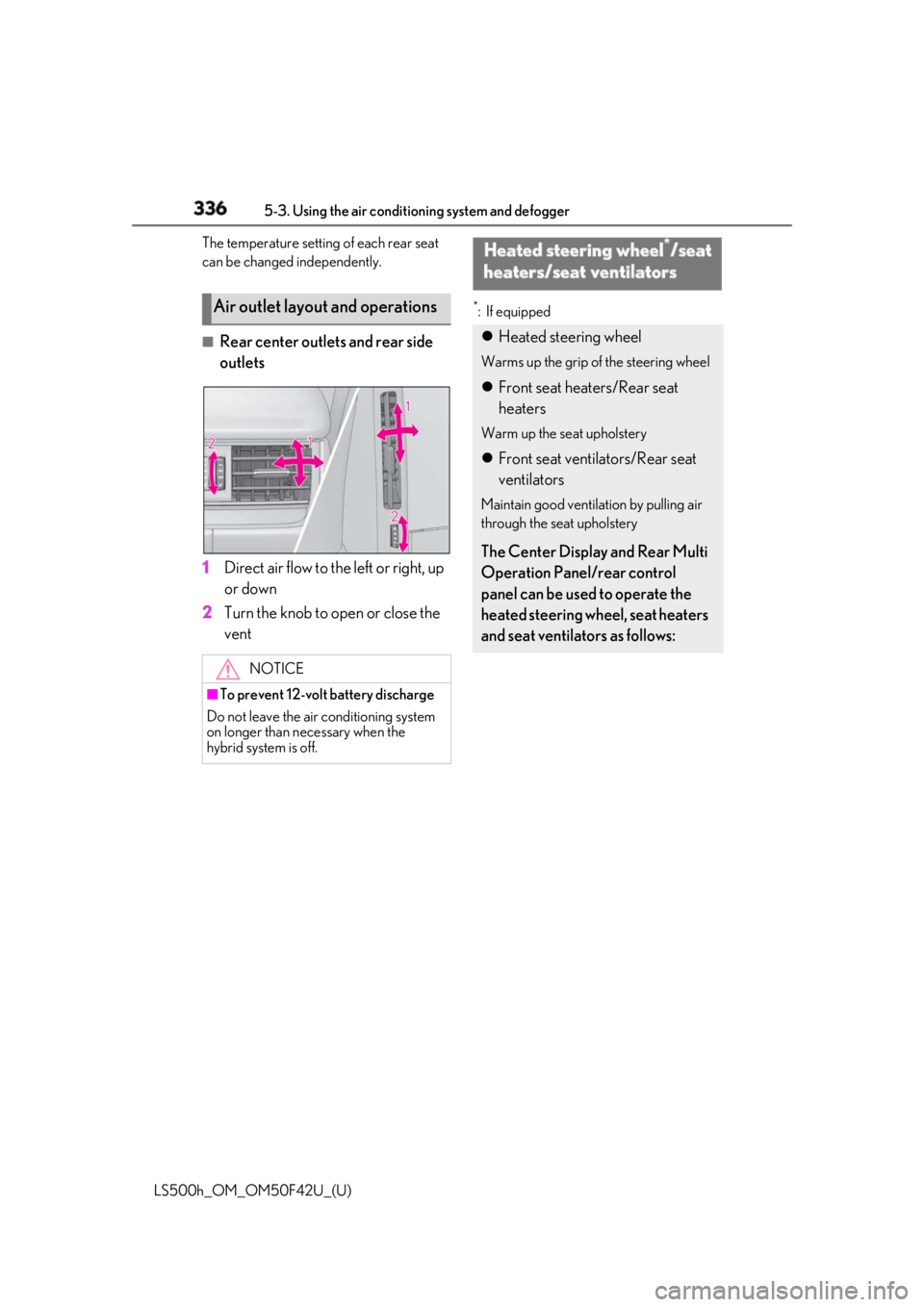
Rear center outlets and rear side
outlets
1 Direct air flow to the left or right, up
or down
2 Turn the knob to open or close the
vent *
: If equipped
Air outlet layout and operations
NOTICE■
To prevent 12-volt battery discharge
Do not leave the air conditioning system
on longer than necessary when the
hybrid system is off. Heated steering wheel *
/seat
heaters/seat ventilators Heated steering wheel Warms up the grip of the steering wheel
Front seat heaters/Rear seat
heaters Warm up the seat upholstery
Front seat ventilators/Rear seat
ventilators Maintain good ventilation by pulling air
through the seat upholstery
The Center Display and Rear Multi
Operation Panel/rear control
panel can be used to operate the
heated steering wheel, seat heaters
and seat ventilators as follows:
Page 337 of 528
3375-3. Using the air conditio ning system and defogger
LS500h_OM_OM50F42U_(U) 5
Interior features ■
Center Display
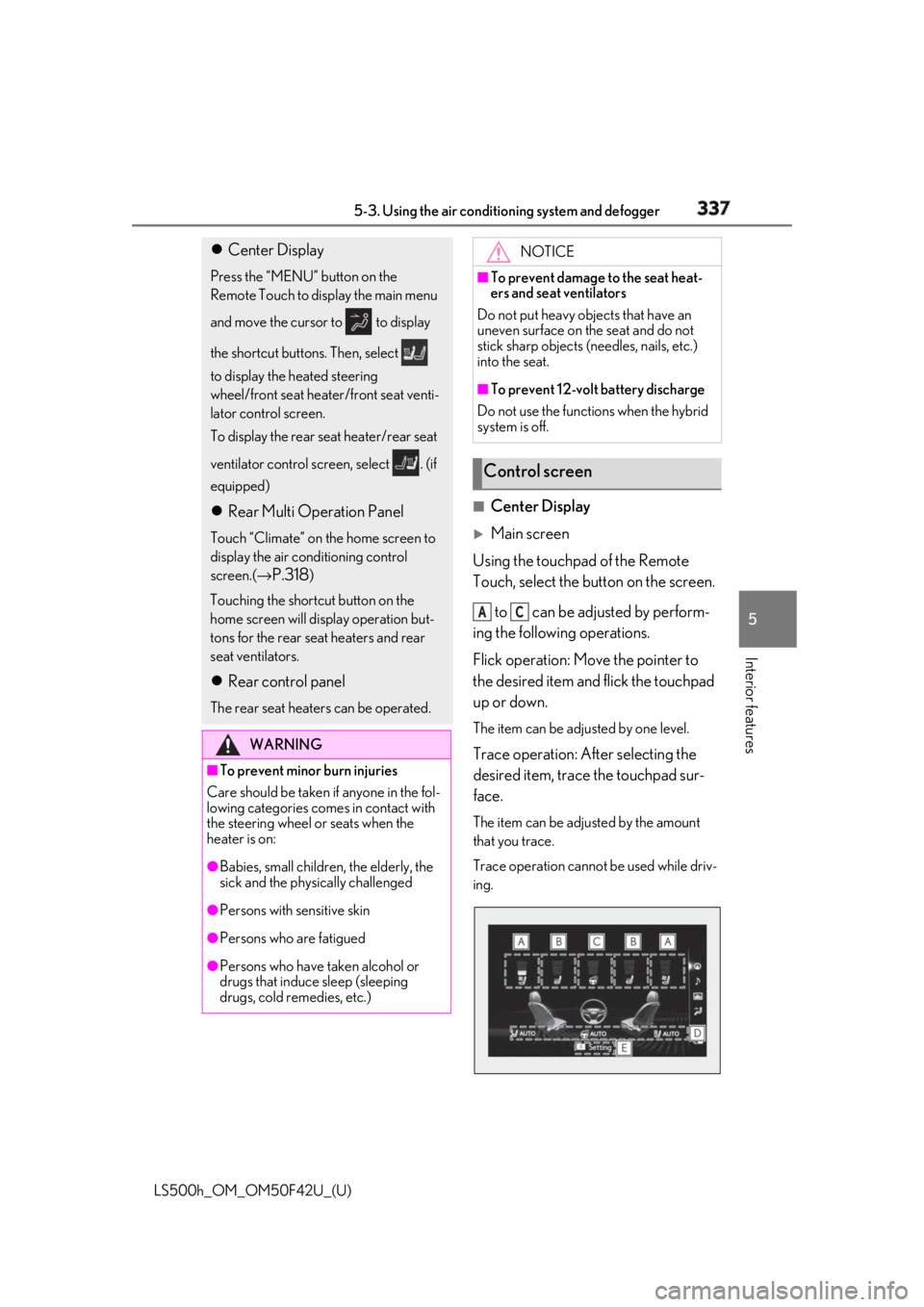
Main screen
Using the touchpad of the Remote
Touch, select the button on the screen.
to can be adjusted by perform-
ing the following operations.
Flick operation: Move the pointer to
the desired item and flick the touchpad
up or down. The item can be adjusted by one level.
Trace operation: After selecting the
desired item, trace the touchpad sur-
face. The item can be adjusted by the amount
that you trace.
Trace operation cannot be used while driv-
ing. Center Display Press the “MENU” button on the
Remote Touch to display the main menu
and move the cursor to to display
the shortcut buttons. Then, select
to display the heated steering
wheel/front seat heater/front seat venti-
lator control screen.
To display the rear seat heater/rear seat
ventilator control screen, select . (if
equipped)
Rear Multi Operation Panel Touch “Climate” on the home screen to
display the air conditioning control
screen.( →
P.318 )
Touching the shortcut button on the
home screen will display operation but-
tons for the rear seat heaters and rear
seat ventilators.
Rear control panel The rear seat heaters can be operated.
WARNING■
To prevent minor burn injuries
Care should be taken if anyone in the fol-
lowing categories comes in contact with
the steering wheel or seats when the
heater is on:
●
Babies, small children, the elderly, the
sick and the phys ically challenged
●
Persons with sensitive skin
●
Persons who are fatigued
●
Persons who have taken alcohol or
drugs that induce sleep (sleeping
drugs, cold remedies, etc.) NOTICE■
To prevent damage to the seat heat-
ers and seat ventilators
Do not put heavy objects that have an
uneven surface on the seat and do not
stick sharp objects (n eedles, nails, etc.)
into the seat. ■
To prevent 12-volt battery discharge
Do not use the functions when the hybrid
system is off.
Control screen A C
Page 338 of 528
338 5-3. Using the air conditioning system and defogger
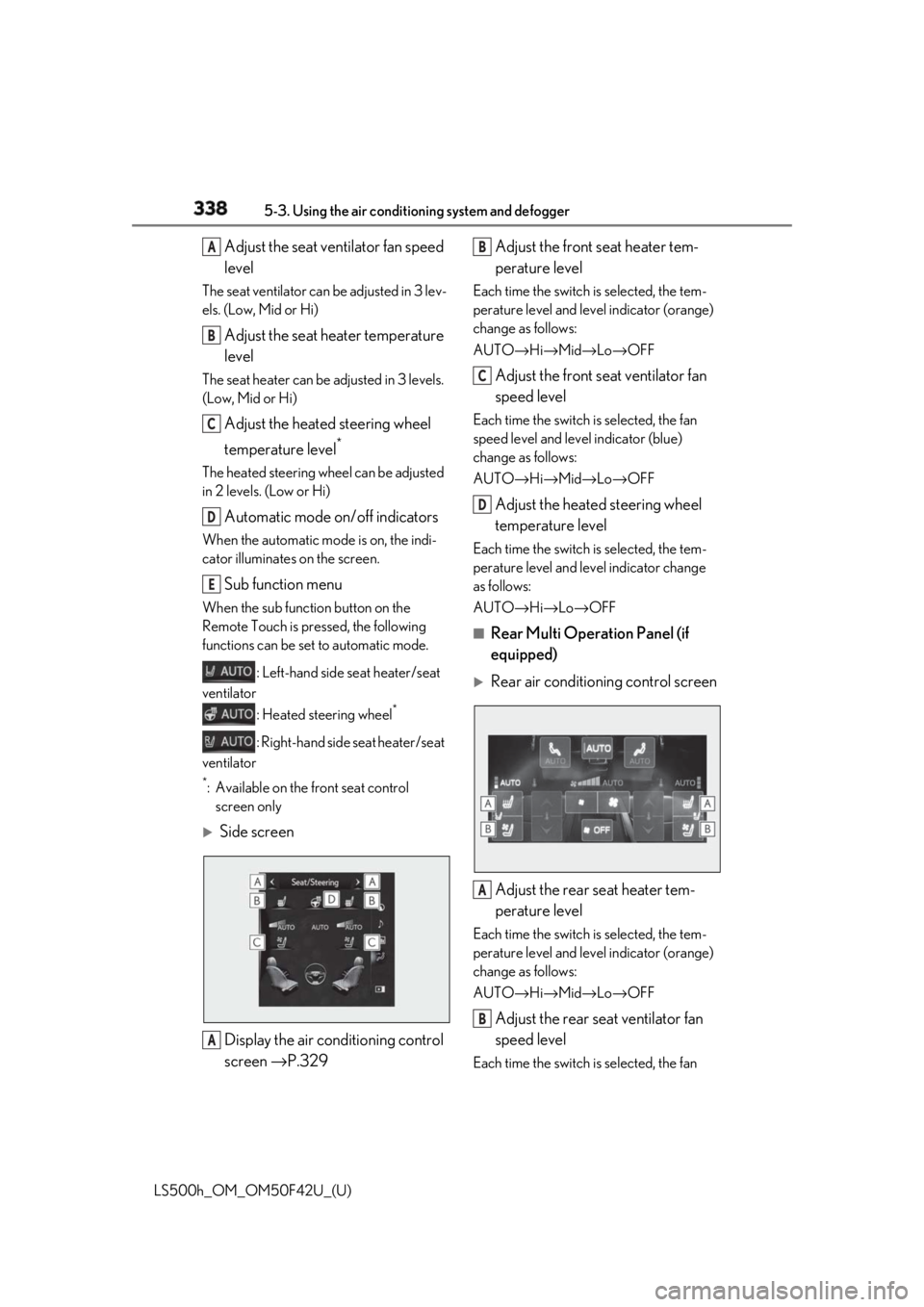
LS500h_OM_OM50F42U_(U) Adjust the seat ventilator fan speed
levelThe seat ventilator can be adjusted in 3 lev-
els. (Low, Mid or Hi)
Adjust the seat heater temperature
levelThe seat heater can be adjusted in 3 levels.
(Low, Mid or Hi)
Adjust the heated steering wheel
temperature level *
The heated steering wheel can be adjusted
in 2 levels. (Low or Hi)
Automatic mode on/off indicatorsWhen the automatic mode is on, the indi-
cator illuminates on the screen.
Sub function menu When the sub function button on the
Remote Touch is pressed, the following
functions can be set to automatic mode.
: Left-hand side seat heater/seat
ventilator
: Heated steering wheel *
: Right-hand side seat heater/seat
ventilator *
: Available on the front seat control
screen only
Side screen
Display the air conditioning control
screen → P.329 Adjust the front seat heater tem-
perature level Each time the switch is selected, the tem-
perature level and level indicator (orange)
change as follows:
AUTO → Hi → Mid → Lo → OFF
Adjust the front seat ventilator fan
speed level Each time the switch is selected, the fan
speed level and level indicator (blue)
change as follows:
AUTO → Hi → Mid → Lo → OFF
Adjust the heated steering wheel
temperature level Each time the switch is selected, the tem-
perature level and le vel indicator change
as follows:
AUTO → Hi → Lo → OFF■
Rear Multi Operation Panel (if
equipped)
Rear air conditioning control screen
Adjust the rear seat heater tem-
perature level Each time the switch is selected, the tem-
perature level and level indicator (orange)
change as follows:
AUTO → Hi → Mid → Lo → OFF
Adjust the rear seat ventilator fan
speed level Each time the switch is selected, the fan A
B
C
D
E
A B
C
D
A
B
Page 339 of 528
3395-3. Using the air conditio ning system and defogger
LS500h_OM_OM50F42U_(U) 5
Interior features speed level and leve l indicator (blue)
change as follows:
AUTO → Hi → Mid → Lo → OFF
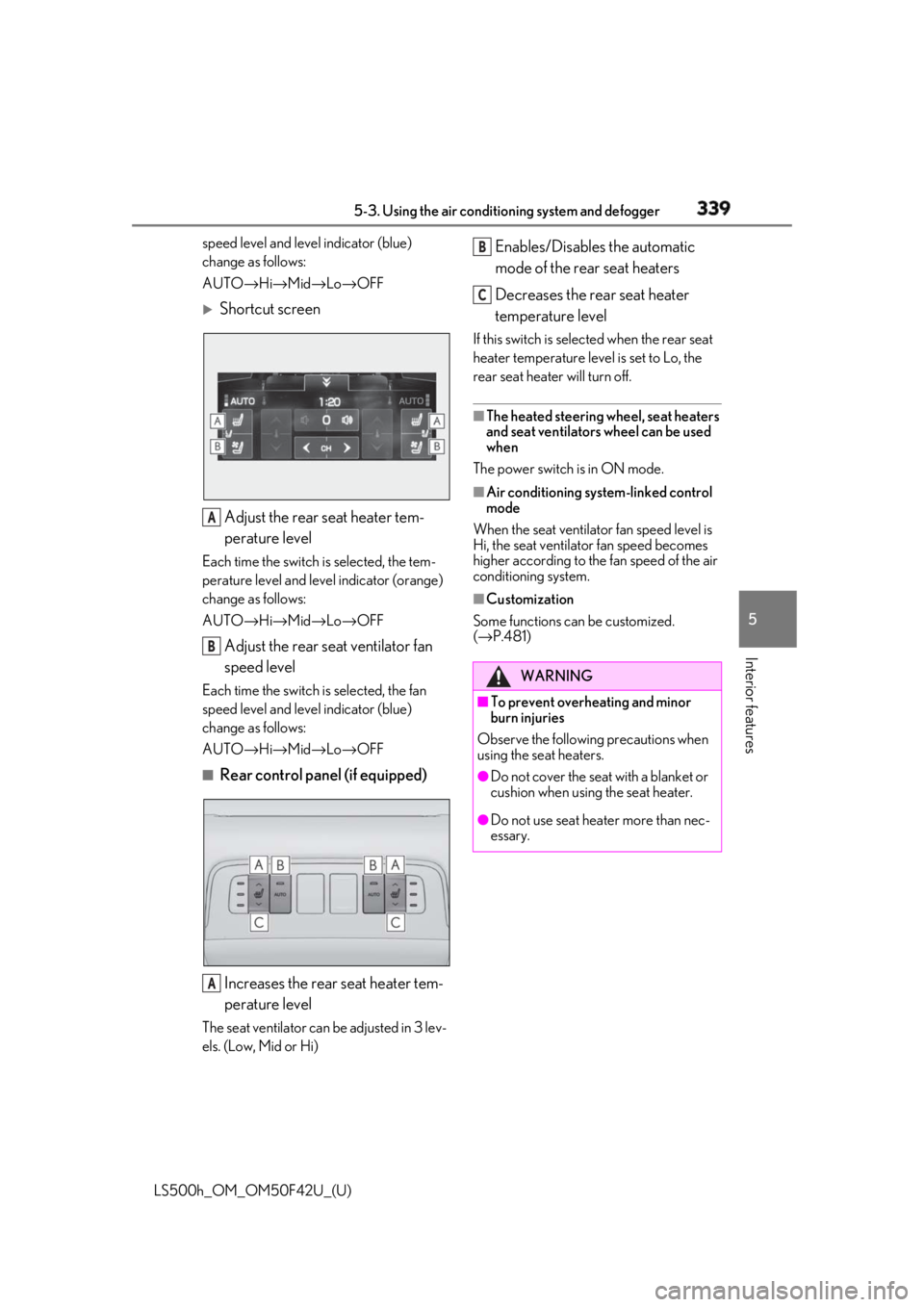
Shortcut screen
Adjust the rear seat heater tem-
perature levelEach time the switch is selected, the tem-
perature level and leve l indicator (orange)
change as follows:
AUTO → Hi → Mid → Lo → OFF
Adjust the rear seat ventilator fan
speed levelEach time the switch is selected, the fan
speed level and leve l indicator (blue)
change as follows:
AUTO → Hi → Mid → Lo → OFF■
Rear control panel (if equipped)
Increases the rear seat heater tem-
perature levelThe seat ventilator can be adjusted in 3 lev-
els. (Low, Mid or Hi) Enables/Disables the automatic
mode of the rear seat heaters
Decreases the rear seat heater
temperature level If this switch is select ed when the rear seat
heater temperature level is set to Lo, the
rear seat heater will turn off. ■
The heated steering wheel, seat heaters
and seat ventilators wheel can be used
when
The power switch is in ON mode. ■
Air conditioning system-linked control
mode
When the seat ventilator fan speed level is
Hi, the seat ventilato r fan speed becomes
higher according to the fan speed of the air
conditioning system. ■
Customization
Some functions can be customized.
( → P.481)A
B
A WARNING■
To prevent overheating and minor
burn injuries
Observe the following precautions when
using the seat heaters. ●
Do not cover the seat with a blanket or
cushion when using the seat heater.
●
Do not use seat heater more than nec-
essary. B
C
Page 367 of 528
3675-6. Using the other interior features
LS500h_OM_OM50F42U_(U) 5
Interior features The following indicator light patterns
indicate specific system usage condi-
tions:
Green indicator light on = Active
service
Green indicator light flashing =
Safety Connect call in process
Red indicator light (except at vehi-
cle start-up) = System malfunction
(contact your Lexus dealer)
No indicator light (off) = Safety
Connect service not active ■
Automatic Collision Notification
In case of either airbag deployment or
severe rear-end collision, the system is
designed to automatically call the
response center. The responding agent
receives the vehicle’s location and
attempts to speak with the vehicle
occupants to assess the level of emer-
gency. If the occupants are unable to
communicate, the ag ent automatically
treats the call as an emergency, con-
tacts the nearest emergency services
provider to describe the situation, and
requests that assistance be sent to the
location. ■
Stolen Vehicle Location
If your vehicle is stolen, Safety Connect
can work with local authorities to assist
them in locating and recovering the
vehicle. After filing a police report, call
the Safety Connect response center at
1-800-25-LEXUS
(1-800-255-3987) and follow the prompts for Safety Connect to initiate
this service.
In addition to assisting law enforce-
ment with recovery of a stolen vehicle,
Safety-Connect-equipped vehicle
location data may, under certain cir-
cumstances, be shared with third par-
ties to locate your vehicle. Further
information is available at Lexus.com. ■
Emergency Assistance Button
(“SOS”)
In the event of an emergency on the
road, push the “SOS” button to reach
the Safety Connect response center.
The answering agent will determine
your vehicle’s location, assess the
emergency, and dispatch the neces-
sary assistance required. If you accidentally press the “SOS” button,
tell the response-center agent that you are
not experiencing an emergency. ■
Enhanced Roadside Assistance
Enhanced Roadside Assistance adds
GPS data to the already included war-
ranty-based Lexus roadside service.
Subscribers can press the “SOS” but-
ton to reach a Safety Connect
response-center agent, who can help
with a wide range of needs, such as:
towing, flat tire, fuel delivery, etc. For a
description of the Roadside Assistance
services and their limitations, please
see the Safety Connect Terms and
Conditions, which are available at
Lexus.com.Safety Connect services
Page 369 of 528
369
LS500h_OM_OM50F42U_(U) 6 6
Maintenance and care Maintenance and care .
6-1. Maintenance and care
Cleaning and protecting the vehi-
cle exterior ................................ 370
Cleaning and protecting the vehi-
cle interior ................................. 373
6-2. Maintenance
Maintenance requirements
........................................................ 378
General maintenance ............. 379
Emission inspection and mainte-
nance (I/M) programs ......... 382
6-3. Do-it-yourself maintenance
Do-it-yourself service precautions
........................................................ 383
Hood............................................... 385
Positioning a floor jack............ 385
Engine compartment............... 387
12-volt battery............................. 393
Tires ................................................ 395
Replacing the tire ...................... 405
Tire inflation pressure .............. 408
Wheels............................................ 410
Air conditioning filter................. 411
Electronic key battery .............. 413
Checking and replacing fuses
......................................................... 414
Light bulbs ..................................... 417
Page 375 of 528
3756-1. Maintenance and care
LS500h_OM_OM50F42U_(U) 6
Maintenance and care ■
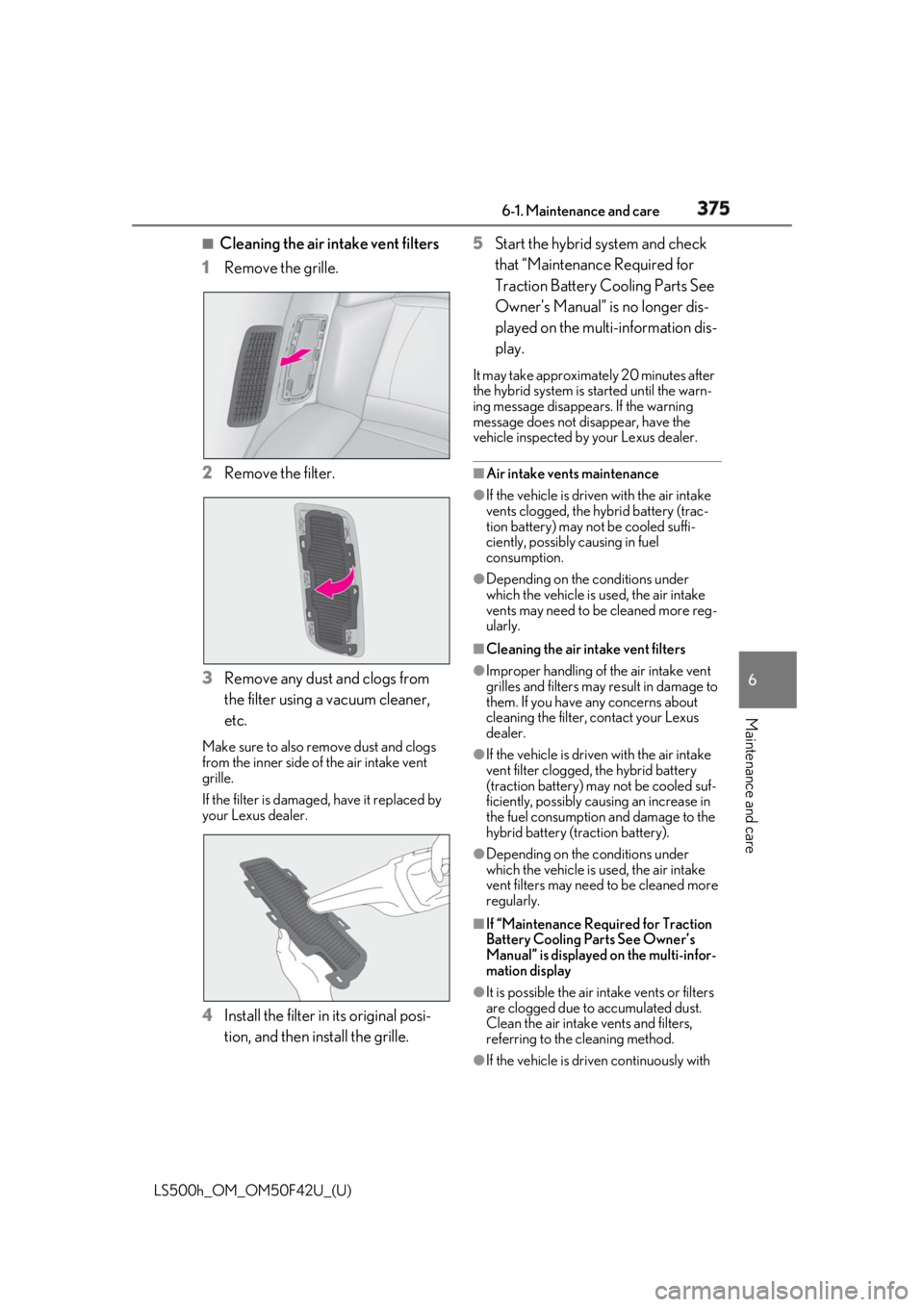
Cleaning the air in take vent filters
1 Remove the grille.
2 Remove the filter.
3 Remove any dust and clogs from
the filter using a vacuum cleaner,
etc.Make sure to also remove dust and clogs
from the inner side of the air intake vent
grille.
If the filter is damaged, have it replaced by
your Lexus dealer.
4 Install the filter in its original posi-
tion, and then install the grille. 5 Start the hybrid system and check
that “Maintenance Required for
Traction Battery Cooling Parts See
Owner’s Manual” is no longer dis-
played on the multi-information dis-
play. It may take approximately 20 minutes after
the hybrid system is started until the warn-
ing message disappea rs. If the warning
message does not disappear, have the
vehicle inspected by your Lexus dealer. ■
Air intake vents maintenance ●
If the vehicle is driven with the air intake
vents clogged, the hybrid battery (trac-
tion battery) may not be cooled suffi-
ciently, possibly causing in fuel
consumption. ●
Depending on the conditions under
which the vehicle is used, the air intake
vents may need to be cleaned more reg-
ularly. ■
Cleaning the air intake vent filters ●
Improper handling of the air intake vent
grilles and filters may result in damage to
them. If you have any concerns about
cleaning the filter, contact your Lexus
dealer. ●
If the vehicle is driven with the air intake
vent filter clogged, the hybrid battery
(traction battery) ma y not be cooled suf-
ficiently, possibly causing an increase in
the fuel consumption and damage to the
hybrid battery (traction battery). ●
Depending on the conditions under
which the vehicle is used, the air intake
vent filters may need to be cleaned more
regularly.
■
If “Maintenance Required for Traction
Battery Cooling Parts See Owner’s
Manual” is displayed on the multi-infor-
mation display
●
It is possible the air intake vents or filters
are clogged due to accumulated dust.
Clean the air intake vents and filters,
referring to the cleaning method.
●
If the vehicle is driven continuously with
Page 384 of 528
384 6-3. Do-it-yourself maintenance
LS500h_OM_OM50F42U_(U) Tire inflation pres-
sure ( → P.408) • Tire pressure gauge
•Compressed air
source
Washer fluid
( → P.392) • Water or washer
fluid containing anti-
freeze (for winter
use)
• Funnel (used only for
adding water or
washer fluid)
WARNING
The engine compartment contains many
mechanisms and fluids that may move
suddenly, become hot, or become elec-
trically energized. To avoid death or seri-
ous injury, observe the following
precautions. ■
When working on the engine com-
partment●
Make sure that the “ACCESSORY” or
“IGNITION ON” on the multi-infor-
mation display and the “READY” indi-
cator are both off.●
Keep hands, clothi ng and tools away
from the moving fan and engine drive
belt.
●
Be careful not to touch the engine,
power control unit, radiator, exhaust
manifold, etc. right after driving as they
may be hot. Oil and other fluids may
also be hot.
●
Do not leave anything that may burn
easily, such as paper and rags, in the
engine compartment.
●
Do not smoke, cause sparks or expose
an open flame to fuel. Fuel fumes are
flammable. Items Parts and tools ■
When working near the electric cool-
ing fan or radiator grille
Be sure the power switch is off.
With the power switch in ON mode, the
electric cooling fan may automatically
start to run if the air conditioning is on
and/or the coolant temperature is high.
( → P.391) ■
Safety glasses
Wear safety glasses to prevent flying or
falling material, fluid spray, etc. from get-
ting in your eyes.
NOTICE■
If you remove the air cleaner filter
Driving with the air cleaner filter
removed may cause excessive engine
wear due to dirt in the air.
Page 396 of 528
396 6-3. Do-it-yourself maintenance
LS500h_OM_OM50F42U_(U) ■
When to replace your vehicle’s tires
Tires should be replaced if: ●
The treadwear indicators are showing on
a tire.●
You have tire damage such as cuts, splits,
cracks deep enough to expose the fabric,
and bulges indicating internal damage●
A tire goes flat repeatedly or cannot be
properly repaired due to the size or loca-
tion of a cut or other damage
If you are not sure, consult with your Lexus
dealer. ■
Tire life
Any tire over 6 years old must be checked
by a qualified technician even if it has sel-
dom or never been used or damage is not
obvious. ■
Maximum load of tire
Check that the maximum load of the
replacement tire is greater than 1/2 of the
Gross Axle Weight Ratings (GAWR) of
either the front axle or the rear axle, which-
ever is greater.
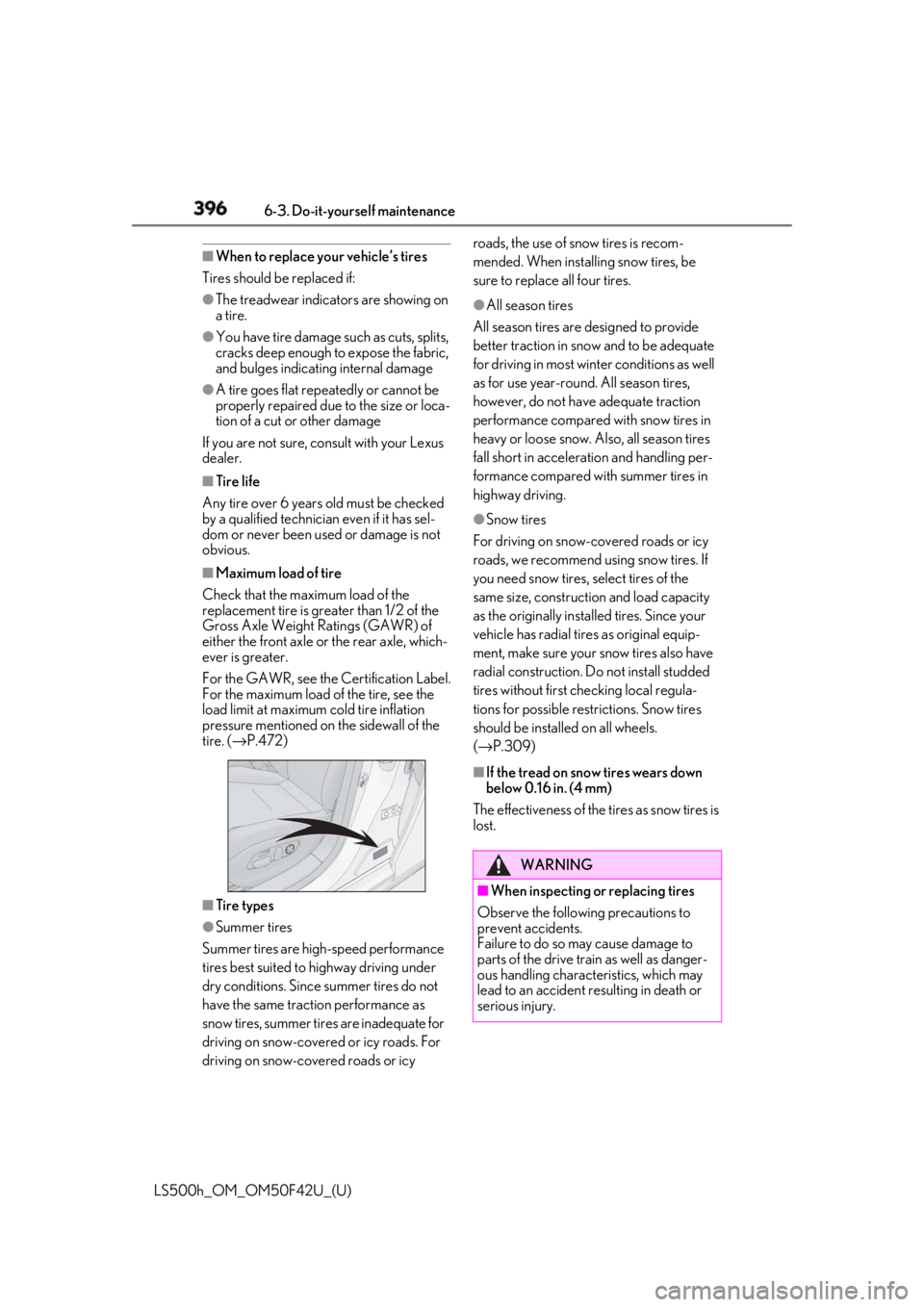
For the GAWR, see the Certification Label.
For the maximum load of the tire, see the
load limit at maximum cold tire inflation
pressure mentioned on the sidewall of the
tire. ( → P.472)
■
Tire types
●
Summer tires
Summer tires are high-speed performance
tires best suited to highway driving under
dry conditions. Since summer tires do not
have the same traction performance as
snow tires, summer tires are inadequate for
driving on snow-covered or icy roads. For
driving on snow-covered roads or icy roads, the use of snow tires is recom-
mended. When installing snow tires, be
sure to replace all four tires. ●
All season tires
All season tires are designed to provide
better traction in snow and to be adequate
for driving in most winter conditions as well
as for use year-round. All season tires,
however, do not have adequate traction
performance compared with snow tires in
heavy or loose snow. Also, all season tires
fall short in accelerati on and handling per-
formance compared with summer tires in
highway driving. ●
Snow tires
For driving on snow-covered roads or icy
roads, we recommend using snow tires. If
you need snow tires, select tires of the
same size, construction and load capacity
as the originally instal led tires. Since your
vehicle has radial tires as original equip-
ment, make sure your snow tires also have
radial construction. Do not install studded
tires without first checking local regula-
tions for possible restrictions. Snow tires
should be installed on all wheels.
( → P.309) ■
If the tread on snow tires wears down
below 0.16 in. (4 mm)
The effectiveness of the tires as snow tires is
lost.
WARNING
■
When inspecting or replacing tires
Observe the following precautions to
prevent accidents.
Failure to do so may cause damage to
parts of the drive train as well as danger-
ous handling characteristics, which may
lead to an accident resulting in death or
serious injury.