rear seats LEXUS LS500H 2018 Service Manual
[x] Cancel search | Manufacturer: LEXUS, Model Year: 2018, Model line: LS500H, Model: LEXUS LS500H 2018Pages: 528, PDF Size: 10.8 MB
Page 328 of 528
328 5-3. Using the air conditioning system and defogger
LS500h_OM_OM50F42U_(U) When the function is on, the indicator illu-
minates on the screen.
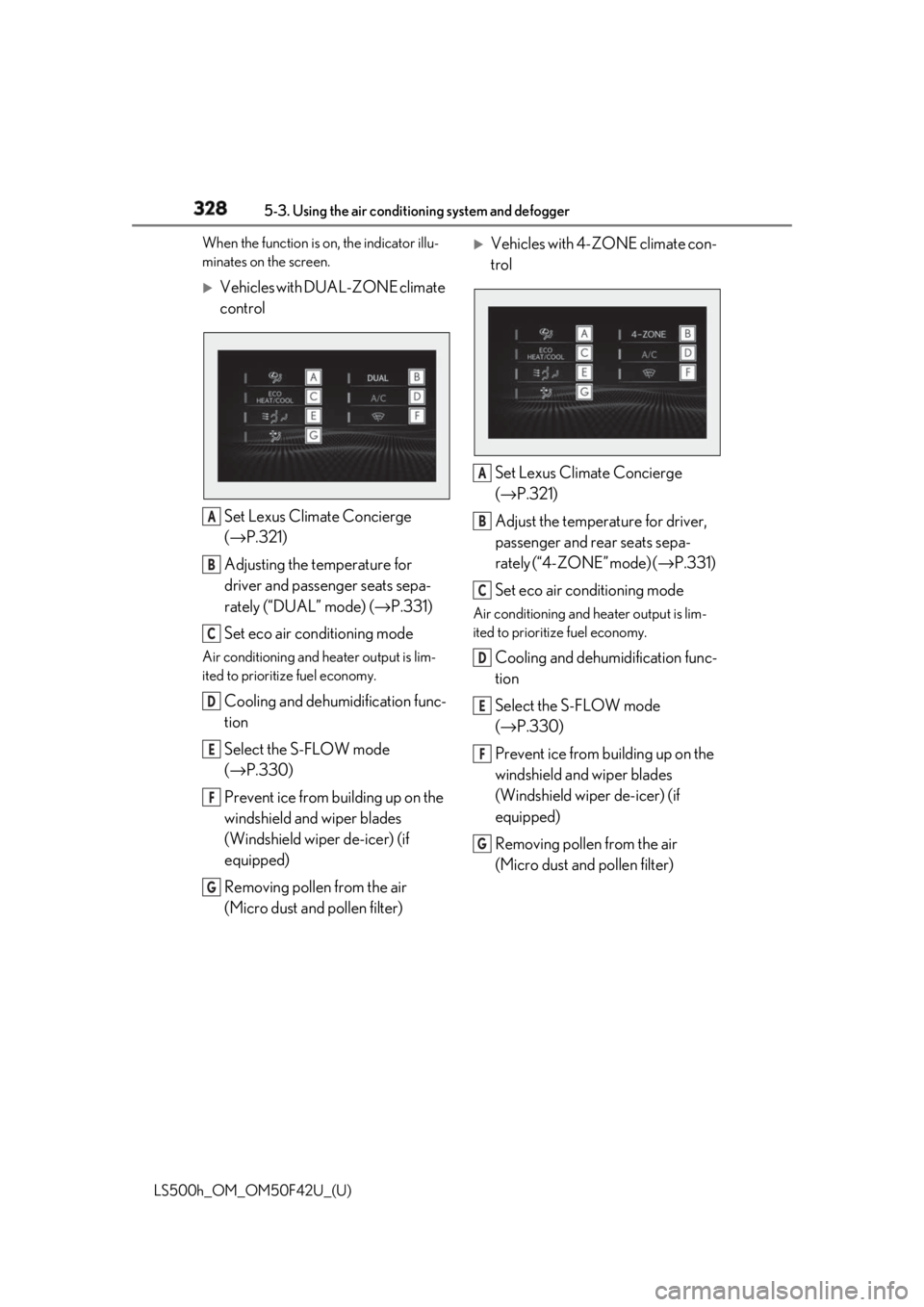
Vehicles with DUAL-ZONE climate
control
Set Lexus Climate Concierge
( → P.321)
Adjusting the temperature for
driver and passenger seats sepa-
rately (“DUAL” mode) ( → P.331)
Set eco air conditioning modeAir conditioning and heater output is lim-
ited to prioritize fuel economy.
Cooling and dehumidification func-
tion
Select the S-FLOW mode
( → P.330)
Prevent ice from building up on the
windshield and wiper blades
(Windshield wiper de-icer) (if
equipped)
Removing pollen from the air
(Micro dust and pollen filter)
Vehicles with 4-ZONE climate con-
trol
Set Lexus Climate Concierge
( → P.321)
Adjust the temperature for driver,
passenger and rear seats sepa-
rately (“4-ZONE” mode) ( → P.331)
Set eco air conditioning mode Air conditioning and heater output is lim-
ited to prioritize fuel economy.
Cooling and dehumidification func-
tion
Select the S-FLOW mode
( → P.330)
Prevent ice from building up on the
windshield and wiper blades
(Windshield wiper de-icer) (if
equipped)
Removing pollen from the air
(Micro dust and pollen filter) A
B
C
D
E
F
G A
B
C
D
E
F
G
Page 329 of 528
3295-3. Using the air conditio ning system and defogger
LS500h_OM_OM50F42U_(U) 5
Interior features ■
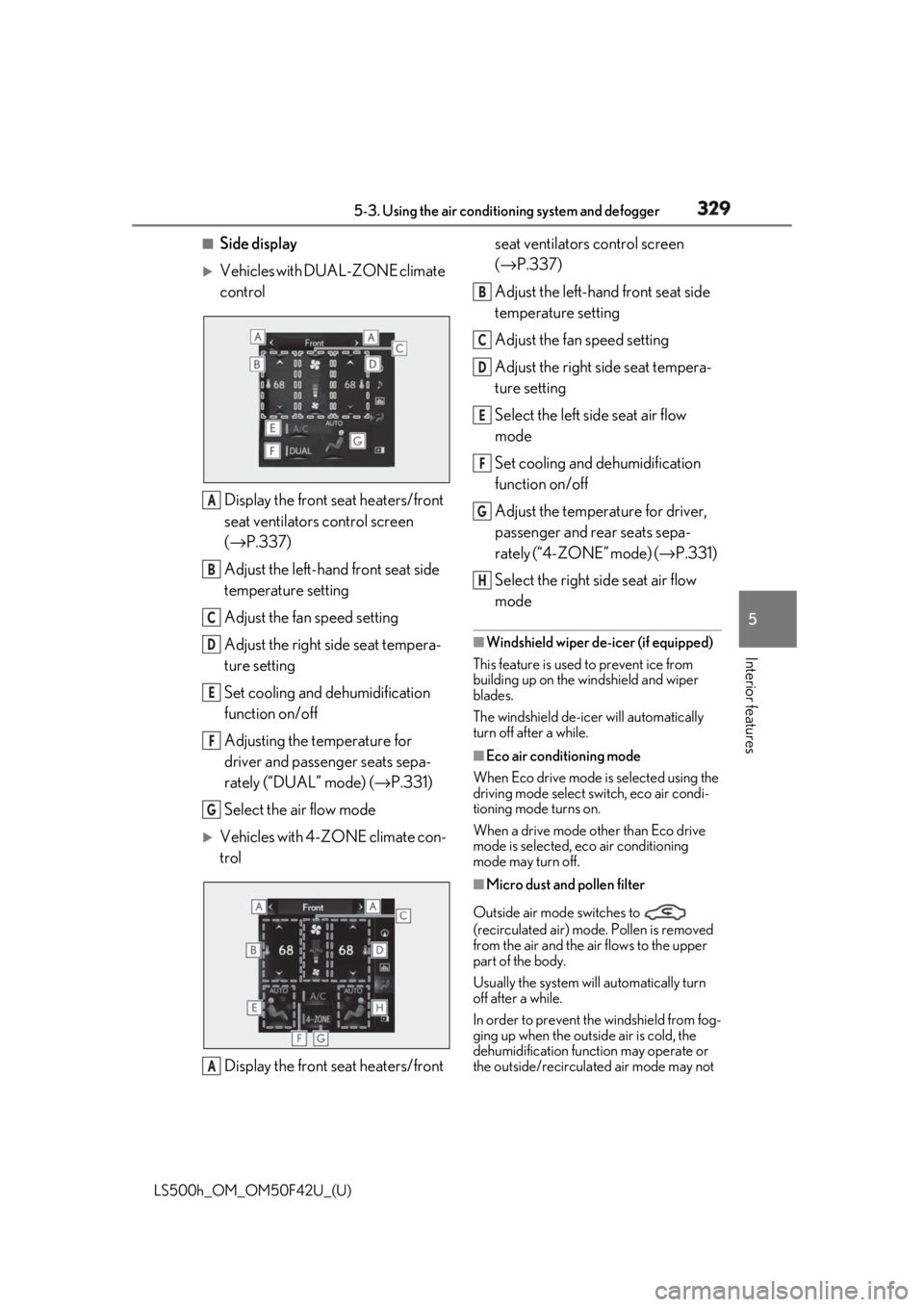
Side display
Vehicles with DUAL-ZONE climate
control
Display the front seat heaters/front
seat ventilators control screen
( → P.337)
Adjust the left-hand front seat side
temperature setting
Adjust the fan speed setting
Adjust the right side seat tempera-
ture setting
Set cooling and dehumidification
function on/off
Adjusting the temperature for
driver and passenger seats sepa-
rately (“DUAL” mode) ( → P.331)
Select the air flow mode
Vehicles with 4-ZONE climate con-
trol
Display the front seat heaters/front seat ventilators control screen
( → P.337)
Adjust the left-hand front seat side
temperature setting
Adjust the fan speed setting
Adjust the right side seat tempera-
ture setting
Select the left side seat air flow
mode
Set cooling and dehumidification
function on/off
Adjust the temperature for driver,
passenger and rear seats sepa-
rately (“4-ZONE” mode) ( → P.331)
Select the right side seat air flow
mode ■
Windshield wiper de-icer (if equipped)
This feature is used to prevent ice from
building up on the windshield and wiper
blades.
The windshield de-icer will automatically
turn off after a while. ■
Eco air conditioning mode
When Eco drive mode is selected using the
driving mode select switch, eco air condi-
tioning mode turns on.
When a drive mode other than Eco drive
mode is selected, eco air conditioning
mode may turn off.
■
Micro dust and pollen filter
Outside air mode switches to
(recirculated air) mode. Pollen is removed
from the air and the air flows to the upper
part of the body.
Usually the system will automatically turn
off after a while.
In order to prevent the windshield from fog-
ging up when the outside air is cold, the
dehumidification function may operate or
the outside/recirculated air mode may not A
B
C
D
E
F
G
A B
C
D
E
F
G
H
Page 330 of 528
330 5-3. Using the air conditioning system and defogger
LS500h_OM_OM50F42U_(U) switch to (recirculated air) mode.
Pollen is filtered even if the micro dust and
pollen filter is turned off.
1 Press the automatic mode switch or
select “AUTO” on the sub function
menu. ( → P.326)
2 Press the outside/recirculated air
mode switch to switch to automatic
air intake mode.The air conditioning system automatically
switches between outside air and recircu-
lated air modes.
3 Adjust the temperature setting.
4 To stop the operation, press the off
switch or select “OFF” on the sub
function menu. ( → P.326)If the fan speed settin g or air flow modes
are operated, the automatic mode indica-
tor goes off. However, automatic mode for
functions other than th at operated is main-
tained.
■
Using automatic mode
Fan speed is adjusted automatically accord-
ing to the temperature setting and the
ambient conditions.
Therefore, the fan may stop for a while until
warm or cool air is ready to flow immedi-
ately after the automatic mode switch is
pressed or “AUTO” is selected.
Cool air may blow around the upper body
even when the heater is on due to sunlight. ■
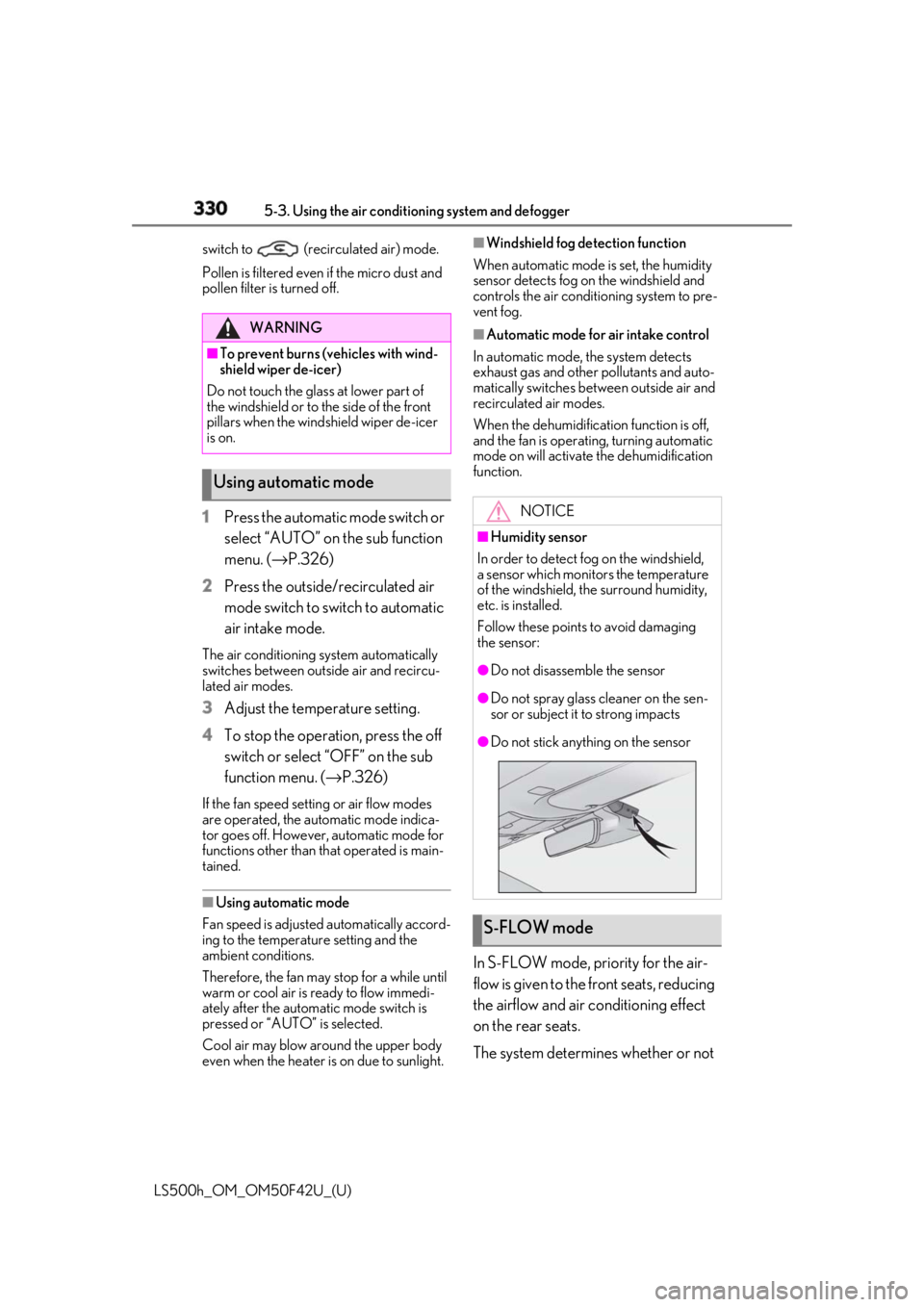
Windshield fog detection function
When automatic mode is set, the humidity
sensor detects fog on the windshield and
controls the air condit ioning system to pre-
vent fog. ■
Automatic mode for air intake control
In automatic mode, the system detects
exhaust gas and other pollutants and auto-
matically switches between outside air and
recirculated air modes.
When the dehumidification function is off,
and the fan is operating, turning automatic
mode on will activate the dehumidification
function.
In S-FLOW mode, priority for the air-
flow is given to the front seats, reducing
the airflow and air co nditioning effect
on the rear seats.
The system determines whether or not WARNING■
To prevent burns (vehicles with wind-
shield wiper de-icer)
Do not touch the glass at lower part of
the windshield or to the side of the front
pillars when the wind shield wiper de-icer
is on.
Using automatic mode NOTICE■
Humidity sensor
In order to detect fog on the windshield,
a sensor which monitors the temperature
of the windshield, the surround humidity,
etc. is installed.
Follow these points to avoid damaging
the sensor: ●
Do not disassemble the sensor ●
Do not spray glass cleaner on the sen-
sor or subject it to strong impacts ●
Do not stick anything on the sensor
S-FLOW mode
Page 331 of 528
3315-3. Using the air conditio ning system and defogger
LS500h_OM_OM50F42U_(U) 5
Interior features a front passenger is in the vehicle by
the opening and closing of the front
passenger’s door.
When a front passenger is determined
not to be in the vehicle, the tempera-
ture indicator and air flow indicator for
the front passenger side will turn off. In
this case, depending on the set tem-
perature and ambient temperature,
priority for the airflow will be given to
the driver’s seat only.
The following S-FLOW modes are
available:
Automatic S-FLOW mode
In this mode, the system determines
whether or not a rear passenger is in
the vehicle by the opening and closing
of a rear door. When a rear passenger
is determined to be in the vehicle,
S-FLOW mode will be automatically
disabled. The indicator will illuminate on the air con-
ditioning control screen when S-FLOW
mode is enabled.
To enable/disable S-FLOW mode and
enter manual S-FLOW mode, select the
S-FLOW mode switch.
Manual S-FLOW mode
When the S-FLOW mode switch is
selected, S-FLOW mode will be manu-
ally enabled/ disabled. The indicator will illuminate on the air con-
ditioning control screen when S-FLOW
mode is enabled.
■
Operation of the air conditioning sys-
tem in S-FLOW mode
If the front passenger’s door or a rear door
is opened then closed, the air conditioning system determines that a passenger is in the
vehicle. In this case, priority for the airflow
will be changed from the driver’s seat only
to the front seats only or all seats, respec-
tively.
(Depending on the set temperature or
ambient temperature, priority for the air-
flow may not be given to the driver’s seat
only.)
If a passenger is judged to be in the vehicle,
the system will retain the judgement for a
certain amount of time after the power
switch is turned off. ■
Operation of automatic S-FLOW mode
When the system is operating in automatic
S-FLOW mode, if a rear door is opened
and then closed, S-FLOW mode will be dis-
abled. To enable S-FL OW mode, select the
S-FLOW mode switch. ■
Changing from manual S-FLOW mode
to automatic S-FLOW mode
1 Select the S-FLOW mode switch to dis-
able S-FLOW mode.
2 Turn the power switch off.
3 After 60 minutes have elapsed, change
the power switch to ON mode.
Vehicles with DUAL-ZONE climate
control
To turn on the “DUAL” mode, perform
any of the following procedures:
Select “DUAL” on the sub function
menu. ( → P.326)
Select “DUAL” on the option con-
trol screen.
Adjust the passenger’s side tem-
perature setting. The indicator on the main control screen
comes on when the “DUAL” mode is on. Adjusting the temperature for
the driver and passenger seats
separately
Page 334 of 528
334 5-3. Using the air conditioning system and defogger
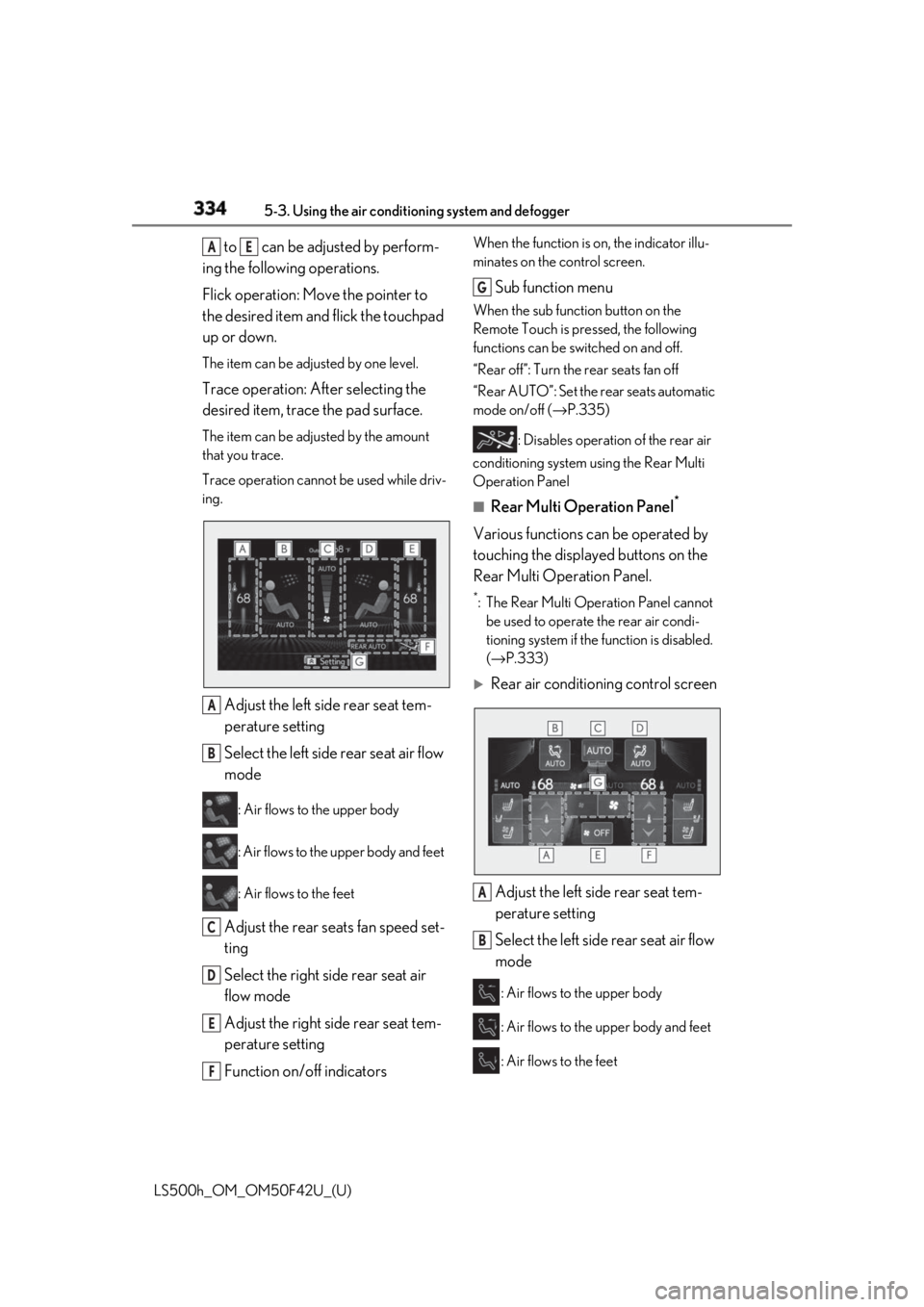
LS500h_OM_OM50F42U_(U) to can be adjusted by perform-
ing the following operations.
Flick operation: Move the pointer to
the desired item and flick the touchpad
up or down. The item can be adjusted by one level.
Trace operation: After selecting the
desired item, trace the pad surface. The item can be adjusted by the amount
that you trace.
Trace operation cannot be used while driv-
ing.
Adjust the left side rear seat tem-
perature setting
Select the left side rear seat air flow
mode : Air flows to the upper body
: Air flows to the upper body and feet
: Air flows to the feet
Adjust the rear seats fan speed set-
ting
Select the right side rear seat air
flow mode
Adjust the right side rear seat tem-
perature setting
Function on/off indicators When the function is on, the indicator illu-
minates on the control screen.
Sub function menu When the sub function button on the
Remote Touch is pressed, the following
functions can be switched on and off.
“Rear off”: Turn the rear seats fan off
“Rear AUTO”: Set the rear seats automatic
mode on/off ( → P.335)
: Disables operation of the rear air
conditioning system using the Rear Multi
Operation Panel ■
Rear Multi Operation Panel *
Various functions can be operated by
touching the displayed buttons on the
Rear Multi Operation Panel. *
: The Rear Multi Op eration Panel cannot
be used to operate the rear air condi-
tioning system if the function is disabled.
( → P.333)
Rear air conditioning control screen
Adjust the left side rear seat tem-
perature setting
Select the left side rear seat air flow
mode : Air flows to the upper body
: Air flows to the upper body and feet
: Air flows to the feetA E
A
B
C
D
E
F G
A
B
Page 335 of 528
3355-3. Using the air conditio ning system and defogger
LS500h_OM_OM50F42U_(U) 5
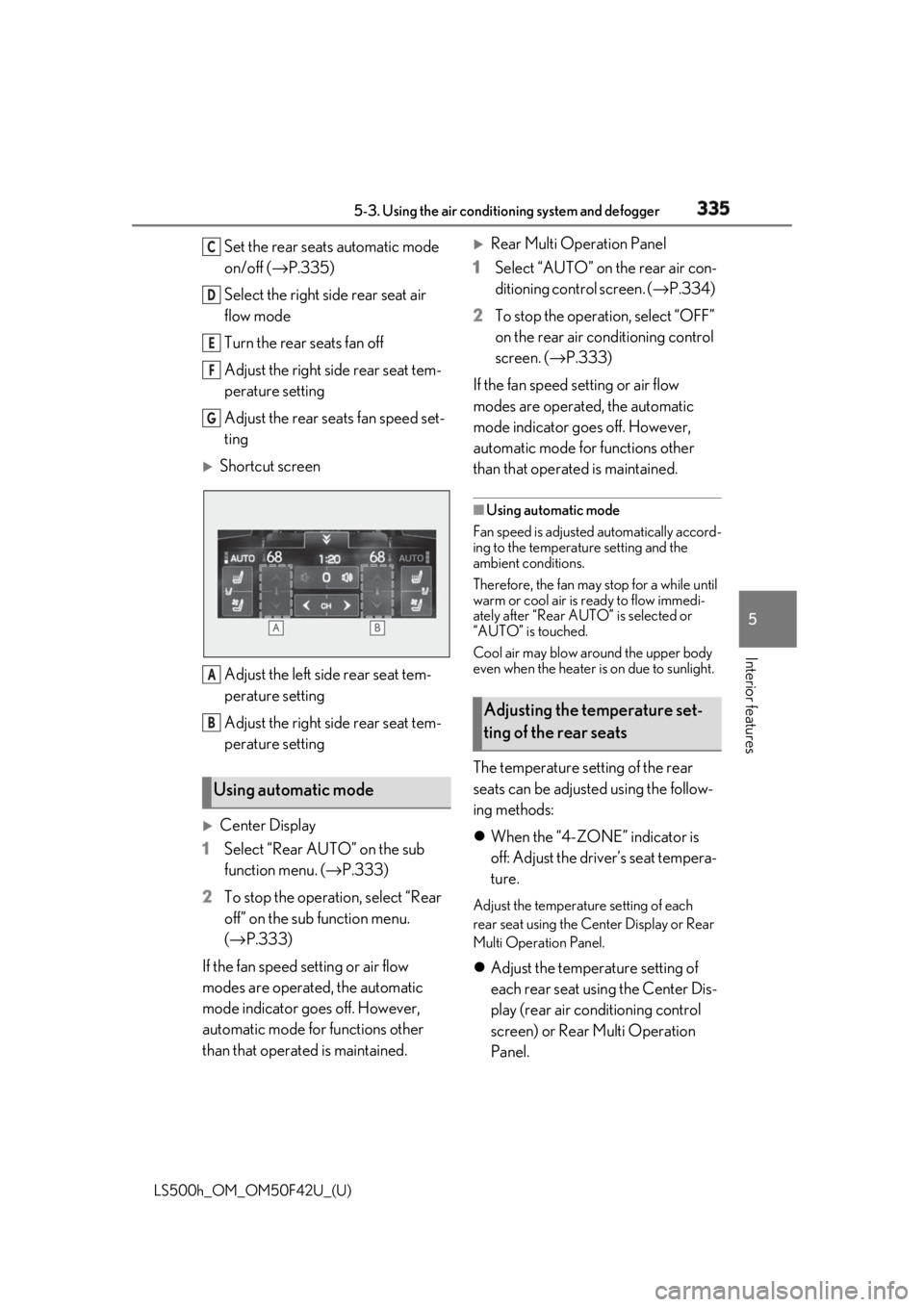
Interior features Set the rear seats automatic mode
on/off ( → P.335)
Select the right side rear seat air
flow mode
Turn the rear seats fan off
Adjust the right side rear seat tem-
perature setting
Adjust the rear seats fan speed set-
ting
Shortcut screen
Adjust the left side rear seat tem-
perature setting
Adjust the right side rear seat tem-
perature setting
Center Display
1 Select “Rear AUTO” on the sub
function menu. ( → P.333)
2 To stop the operat ion, select “Rear
off” on the sub function menu.
( → P.333)
If the fan speed setting or air flow
modes are operated , the automatic
mode indicator goes off. However,
automatic mode for functions other
than that operated is maintained.
Rear Multi Operation Panel
1 Select “AUTO” on the rear air con-
ditioning control screen. ( → P.334)
2 To stop the operation, select “OFF”
on the rear air conditioning control
screen. ( → P.333)
If the fan speed setting or air flow
modes are operated, the automatic
mode indicator goes off. However,
automatic mode for functions other
than that operated is maintained. ■
Using automatic mode
Fan speed is adjusted automatically accord-
ing to the temperature setting and the
ambient conditions.
Therefore, the fan may stop for a while until
warm or cool air is ready to flow immedi-
ately after “Rear AUTO” is selected or
“AUTO” is touched.
Cool air may blow around the upper body
even when the heater is on due to sunlight.
The temperature setting of the rear
seats can be adjusted using the follow-
ing methods:
When the “4-ZONE” indicator is
off: Adjust the driver’s seat tempera-
ture. Adjust the temperature setting of each
rear seat using the Ce nter Display or Rear
Multi Operation Panel.
Adjust the temperature setting of
each rear seat using the Center Dis-
play (rear air conditioning control
screen) or Rear Multi Operation
Panel.Using automatic mode C
D
E
F
G
A
B
Adjusting the temperature set-
ting of the rear seats
Page 337 of 528
3375-3. Using the air conditio ning system and defogger
LS500h_OM_OM50F42U_(U) 5
Interior features ■
Center Display
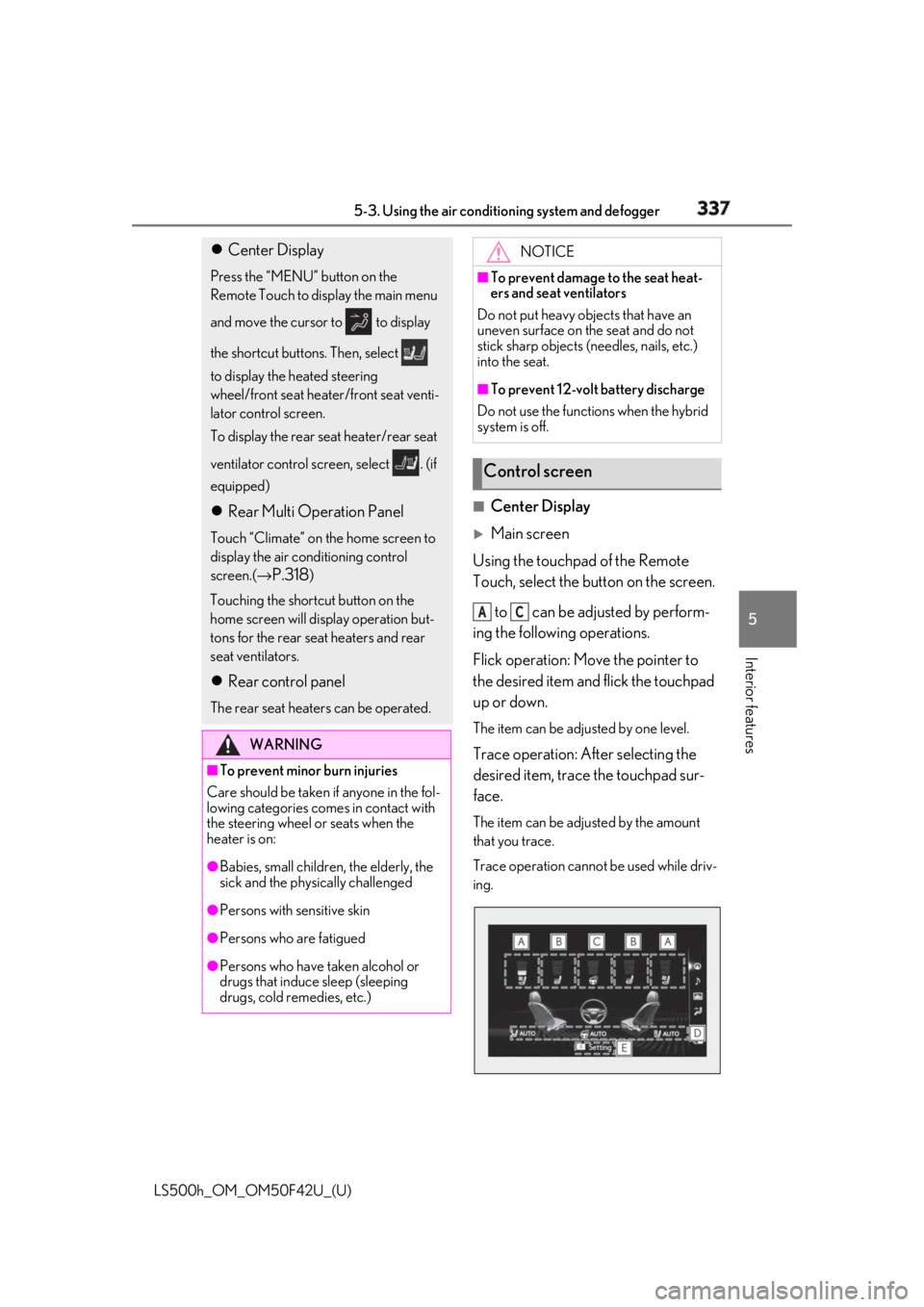
Main screen
Using the touchpad of the Remote
Touch, select the button on the screen.
to can be adjusted by perform-
ing the following operations.
Flick operation: Move the pointer to
the desired item and flick the touchpad
up or down. The item can be adjusted by one level.
Trace operation: After selecting the
desired item, trace the touchpad sur-
face. The item can be adjusted by the amount
that you trace.
Trace operation cannot be used while driv-
ing. Center Display Press the “MENU” button on the
Remote Touch to display the main menu
and move the cursor to to display
the shortcut buttons. Then, select
to display the heated steering
wheel/front seat heater/front seat venti-
lator control screen.
To display the rear seat heater/rear seat
ventilator control screen, select . (if
equipped)
Rear Multi Operation Panel Touch “Climate” on the home screen to
display the air conditioning control
screen.( →
P.318 )
Touching the shortcut button on the
home screen will display operation but-
tons for the rear seat heaters and rear
seat ventilators.
Rear control panel The rear seat heaters can be operated.
WARNING■
To prevent minor burn injuries
Care should be taken if anyone in the fol-
lowing categories comes in contact with
the steering wheel or seats when the
heater is on:
●
Babies, small children, the elderly, the
sick and the phys ically challenged
●
Persons with sensitive skin
●
Persons who are fatigued
●
Persons who have taken alcohol or
drugs that induce sleep (sleeping
drugs, cold remedies, etc.) NOTICE■
To prevent damage to the seat heat-
ers and seat ventilators
Do not put heavy objects that have an
uneven surface on the seat and do not
stick sharp objects (n eedles, nails, etc.)
into the seat. ■
To prevent 12-volt battery discharge
Do not use the functions when the hybrid
system is off.
Control screen A C
Page 376 of 528
376 6-1. Maintenance and care
LS500h_OM_OM50F42U_(U) this message displayed, the hybrid bat-
tery (traction battery) may not be cooled
sufficiently, which may lead to the driving
distance by the electric motor becoming
shorter and damage to the hybrid battery
(traction battery). Clean the air intake
vents periodically to prevent dust, etc.,
from collecting in the air intake vents and
filters.●
If the massage in the multi-information
display does not turn off, even if the air
intake vents are cleaned, have the vehicle
inspected at your Lexus dealer.
Remove dirt using a water-damp-
ened soft cloth or synthetic chamois.
Wipe the surface with a dry, soft
cloth to remove any remaining
moisture. ■
Cleaning the areas with satin-finish
metal accents
The metal areas use a layer of real metal for
the surface. It is necessary to clean them
regularly. If dirty areas are left uncleaned for
long periods of time, they may be difficult to
clean. Remove dirt and dust using a vac-
uum cleaner.
Wipe off any excess dirt and dust
with a soft cloth dampened with
diluted detergent. Use a diluted water solution of approxi-
mately 5% neutral wool detergent.
Wring out any excess water from
the cloth and thoroughly wipe off all
remaining traces of detergent.
Wipe the surface with a dry, soft
cloth to remove any remaining
moisture. Allow the leather to dry in
a shaded and ventilated area. ■
Caring for leather areas
Lexus recommends cleani ng the interior of
the vehicle at least twice a year to maintain
the quality of the vehicle’s interior.
Remove dirt and dust using a vac-
uum cleaner.
Wipe it off with a soft cloth damp-
ened with neutral detergent diluted
to approximately 1%.
Wring out any excess water from
the cloth and thoroughly wipe off
remaining traces of detergent and
water.
To remove dust from the fabric, use WARNING■
When cleaning the hybrid battery
(traction battery) air intake vents/fil-
ters●
Do not use water or other liquids to
clean the air intake vents/filters. If
water is applied to the hybrid battery
(traction battery) or other compo-
nents, a malfunction or fire may occur.●
When the air intake vent grilles,
located near the rear seats are to be
removed, make sure to turn the power
switch off to stop the hybrid system.
Cleaning the areas with satin-fin-
ish metal accents Cleaning the leather areas
Cleaning the synthetic leather
areas
Cleaning fabric portions of the
instrument panel
Page 486 of 528
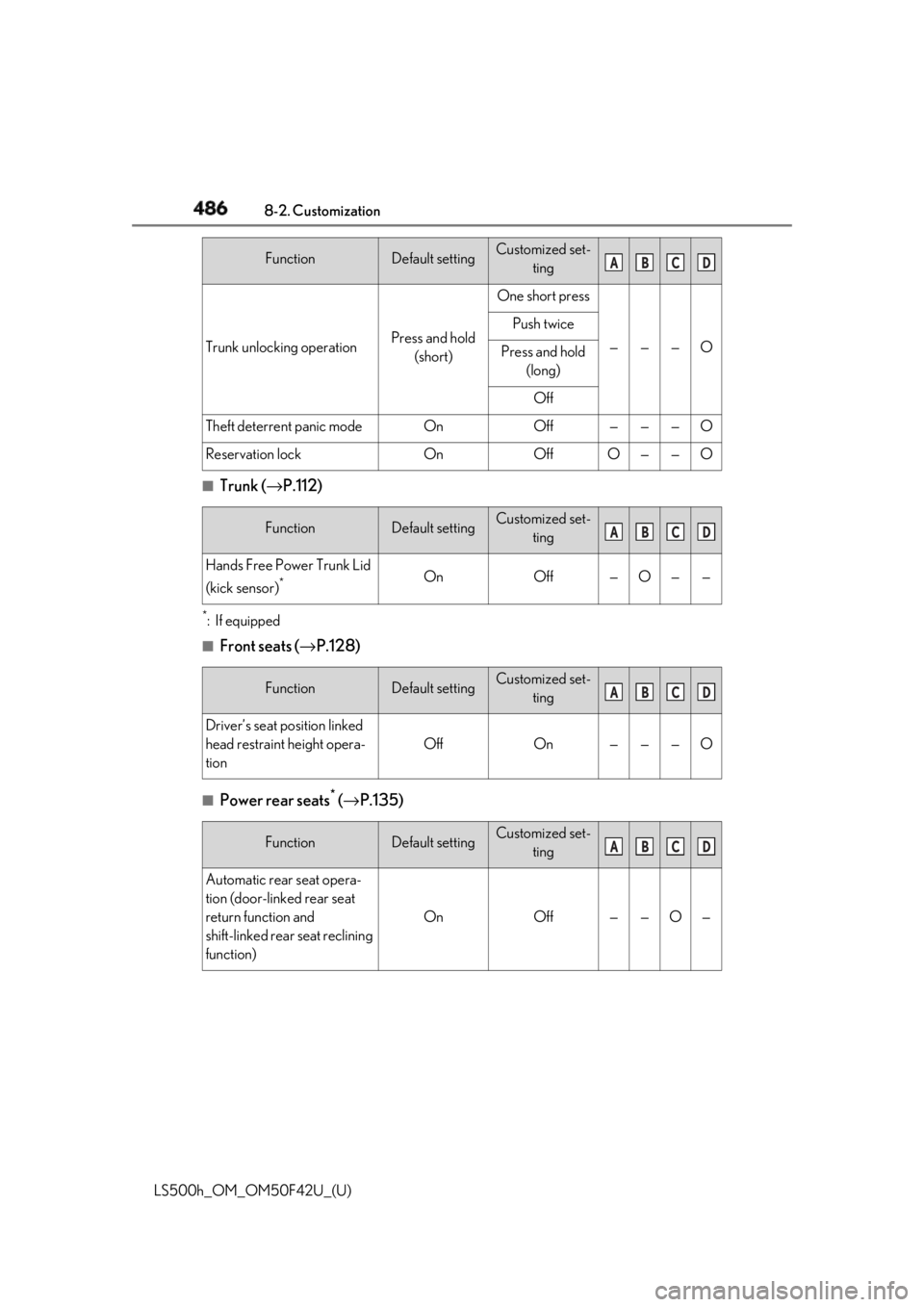
486 8-2. Customization
LS500h_OM_OM50F42U_(U) ■
Trunk ( → P.112)*
:If equipped ■
Front seats ( → P.128)
■
Power rear seats *
( → P.135)Trunk unlocking operation Press and hold
(short) One short press
— — — OPush twice
Press and hold
(long)
Off
Theft deterrent panic mode On Off — — — O
Reservation lock On Off O — — O
Function Default setting Customized set-
ting
Hands Free Power Trunk Lid
(kick sensor) *
On Off — O — —
Function Default setting Customized set-
ting
Driver’s seat position linked
head restraint height opera-
tion Off On — — — O
Function Default setting Customized set-
ting
Automatic rear seat opera-
tion (door-linked rear seat
return function and
shift-linked rear seat reclining
function) On Off — — O —Function Default setting Customized set-
ting A B C D
A B C D
A B C D
A B C D
Page 519 of 528
5191-1. What to do if... (Troubleshooting)
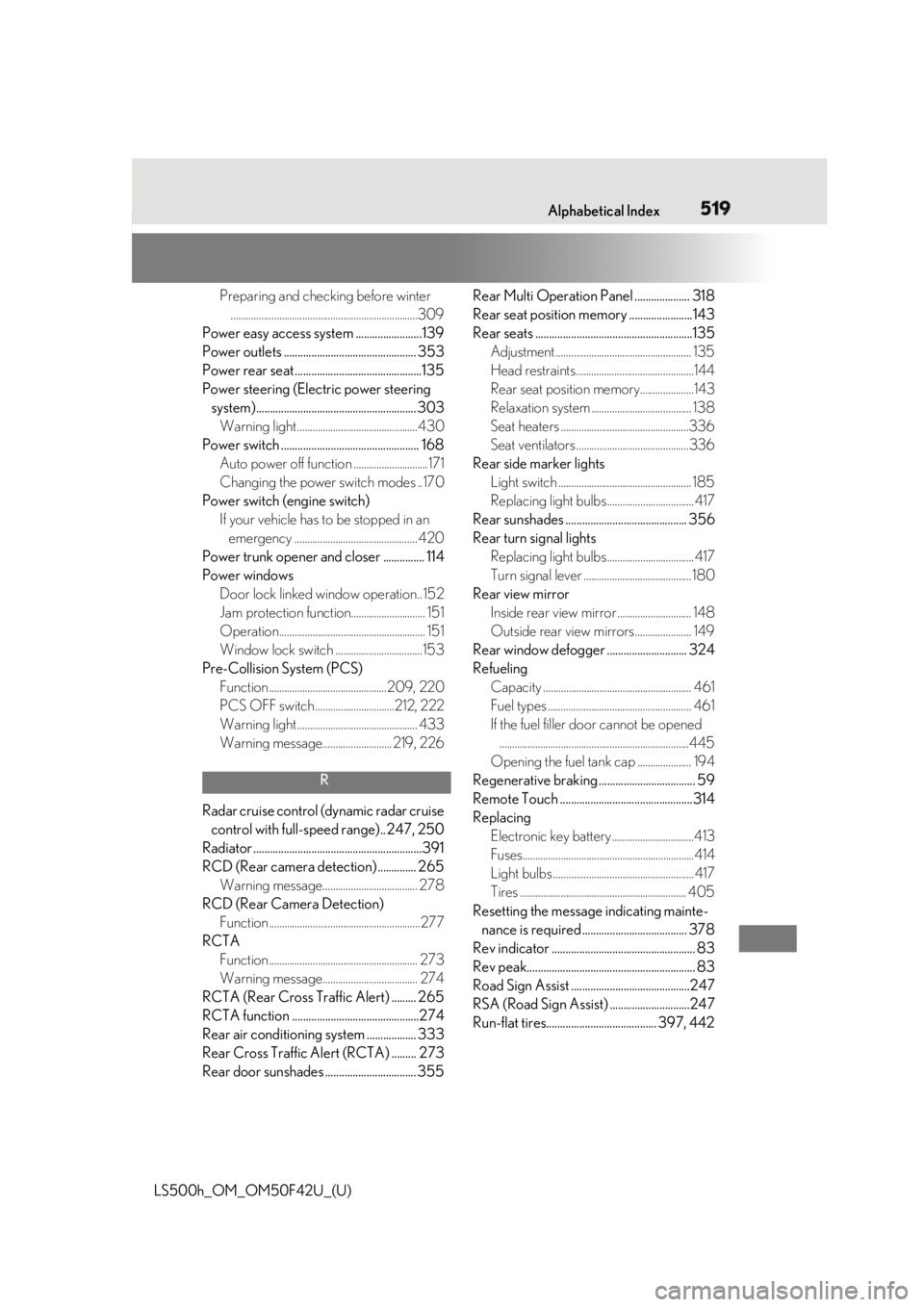
LS500h_OM_OM50F42U_(U) 519Alphabetical Index
Preparing and checking before winter
.........................................................................309
Power easy access system ........................139
Power outlets ................................................ 353
Power rear seat ..............................................135
Power steering (Elect ric power steering
system).......................................................... 303
Warning light ...............................................430
Power switch .................................................. 168
Auto power off function .............................171
Changing the power switch modes ..170
Power switch (engine switch)
If your vehicle has to be stopped in an
emergency ................................................ 420
Power trunk opener and closer ............... 114
Power windows
Door lock linked window operation..152
Jam protection function............................. 151
Operation......................................................... 151
Window lock switch ..................................153
Pre-Collision System (PCS)
Function ..............................................209, 220
PCS OFF switch ...............................212, 222
Warning light ............................................... 433
Warning message........................... 219, 226
R
Radar cruise control (dynamic radar cruise
control with full-speed range).. 247, 250
Radiator .............................................................391
RCD (Rear camera detection) .............. 265
Warning message..................................... 278
RCD (Rear Camera Detection)
Function ...........................................................277
RCTA
Function .......................................................... 273
Warning message..................................... 274
RCTA (Rear Cross Traffic Alert) ......... 265
RCTA function ..............................................274
Rear air conditioning system .................. 333
Rear Cross Traffic Alert (RCTA) ......... 273
Rear door sunshades ..... ............................ 355 Rear Multi Operation Pa nel .................... 318
Rear seat position memory .......................143
Rear seats .........................................................135
Adjustment ..................................................... 135
Head restraints..............................................144
Rear seat position memory.....................143
Relaxation system ....................................... 138
Seat heaters ..................................................336
Seat ventilators ............................................336
Rear side marker lights
Light switch .................................................... 185
Replacing light bulbs ..................................417
Rear sunshades ............................................ 356
Rear turn signal lights
Replacing light bulbs ..................................417
Turn signal lever .......................................... 180
Rear view mirror
Inside rear view mirror ............................. 148
Outside rear view mirrors...................... 149
Rear window defogger ............................. 324
Refueling
Capacity .......................................................... 461
Fuel types ........................................................ 461
If the fuel filler do or cannot be opened
..........................................................................445
Opening the fuel tank cap ..................... 194
Regenerative braking ................................... 59
Remote Touch ................................................314
Replacing
Electronic key battery ................................413
Fuses...................................................................414
Light bulbs .......................................................417
Tires ................................................................. 405
Resetting the message indicating mainte-
nance is required ...................................... 378
Rev indicator .................................................... 83
Rev peak............................................................. 83
Road Sign Assist ...........................................247
RSA (Road Sign Assist) .............................247
Run-flat tires........................................ 397, 442