warning light LEXUS LS500H 2018 Workshop Manual
[x] Cancel search | Manufacturer: LEXUS, Model Year: 2018, Model line: LS500H, Model: LEXUS LS500H 2018Pages: 528, PDF Size: 10.8 MB
Page 211 of 528
2114-5. Using the driving support systems
LS500h_OM_OM50F42U_(U) 4
Driving WARNING■
Pre-collision braking●
When the pre-collision braking func-
tion is operating, a large amount of
braking force will be applied.●
If the vehicle is stopped by the opera-
tion of the pre-collision braking func-
tion, the pre-collision braking function
operation will be canceled after
approximately 2 seco nds. Depress the
brake pedal as necessary.●
The pre-collision braking function may
not operate if certain operations are
performed by the driver. If the acceler-
ator pedal is being depressed strongly
or the steering wheel is being turned,
the system may determine that the
driver is taking evasive action and may
prevent the pre-collision braking func-
tion from operating.●
In some situations, while the pre-colli-
sion braking function is operating,
operation of the function may be can-
celed if the accelerator pedal is
depressed strongly or the steering
wheel is turned and the system deter-
mines that the driver is taking evasive
action.
●
If the brake pedal is being depressed,
the system may determine that the
driver is taking evasive action and pos-
sibly delay the operation timing of the
pre-collision braking function.
■
Active steering assist●
The steering wheel may turn automati-
cally when active steering assist is
operating.
●
As active steering assist operation will
be canceled when the system deter-
mines that a collision has been
avoided, operate the steering wheel as
necessary. ●
In the following situations, the system
may determine that th e driver is taking
evasive action. In this case, the active
steering assist may not operate or may
be canceled.
• If the accelerator pedal is being
depressed strongly or the steering
wheel is being operat ed. In this case
the system may determine that the
driver is taking evasive action and the
pre-collision braking may not operate.
• In some situations, while the active
steering assist is operating, operation
of the function may be canceled if the
accelerator pedal is depressed
strongly or the steering wheel is turned
and the system determines that the
driver is taking evasive action.
• When the active steering assist is
operating, if the stee ring wheel is held
firmly or is operated in the opposite
direction to that which the system is
generating torque, the function may be
canceled.
• If the brake pedal is depressed, the sys-
tem may determine that the driver is
taking evasive action and the active
steering assist operation may be
delayed.
■
Pre-collision seat belts with comfort
function
If the pre-collision se at belts have oper-
ated and the seat belts are locked in a
retracted position, immediately stop the
vehicle in a safe place, release and
retract the seat belts to unlock them and
then fasten them again.
Also, if a seat belt ca n be loosened, it can
be unlocked by slightly retracting it with-
out releasing it.
■
When to disable the pre-collision sys-
tem
In the following situations, disable the
system, as it may not operate properly,
possibly leading to an accident resulting
in death or serious injury:
●
When the vehicle is being towed
Page 212 of 528
212 4-5. Using the driving support systems
LS500h_OM_OM50F42U_(U) ■
Enabling/disabling the pre-colli-
sion system
The pre-collision system can be
enabled/disabled on ( → P.86) of
the multi-information display. The system is automa tically enabled each
time the power switch is turned to ON
mode
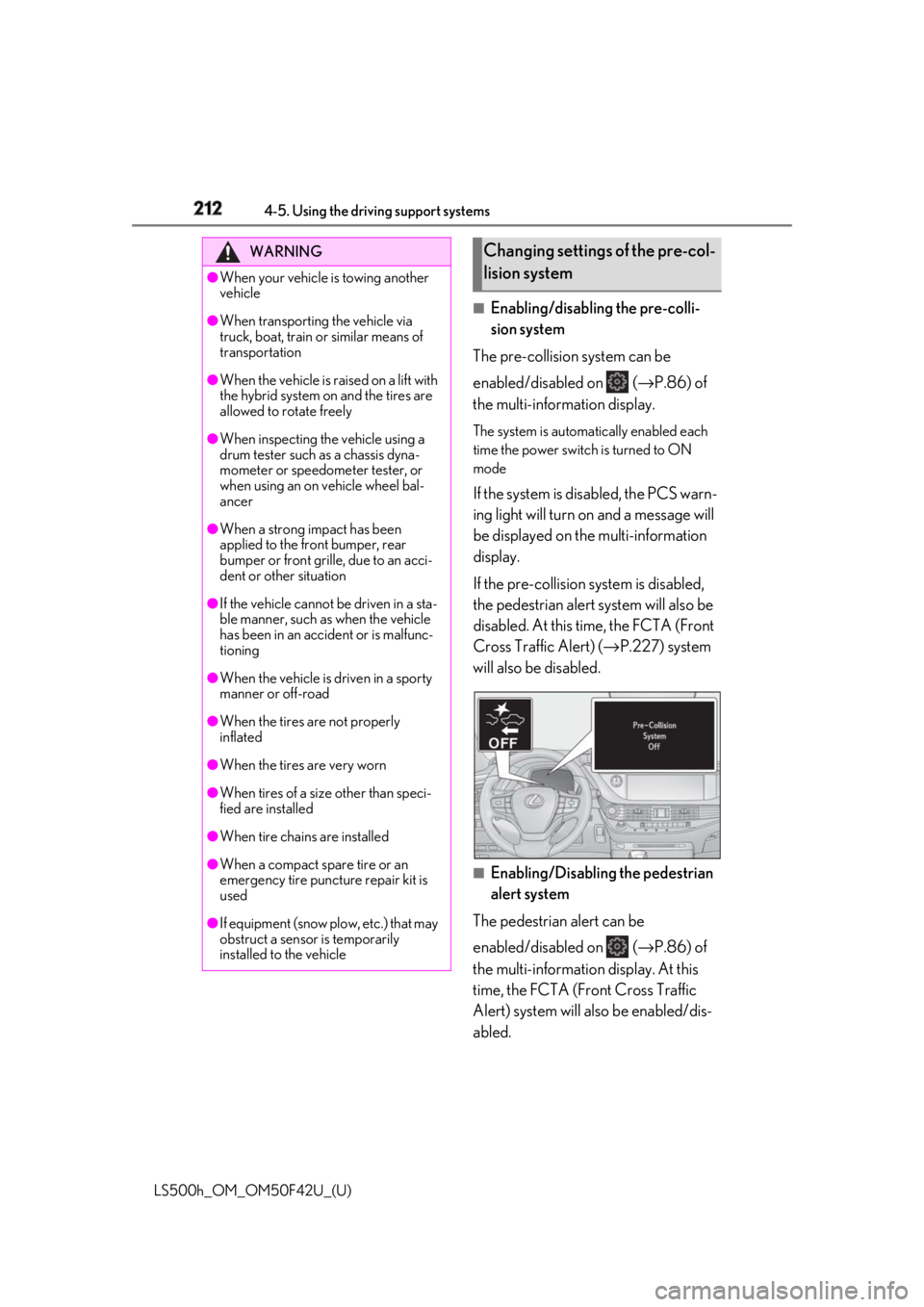
If the system is disabled, the PCS warn-
ing light will turn on and a message will
be displayed on the multi-information
display.
If the pre-collision sy stem is disabled,
the pedestrian alert system will also be
disabled. At this time, the FCTA (Front
Cross Traffic Alert) ( → P.227) system
will also be disabled.
■
Enabling/Disabling the pedestrian
alert system
The pedestrian alert can be
enabled/disabled on ( → P.86) of
the multi-information display. At this
time, the FCTA (Front Cross Traffic
Alert) system will also be enabled/dis-
abled.WARNING●
When your vehicle is towing another
vehicle●
When transporting the vehicle via
truck, boat, train or similar means of
transportation●
When the vehicle is raised on a lift with
the hybrid system on and the tires are
allowed to rotate freely●
When inspecting the vehicle using a
drum tester such as a chassis dyna-
mometer or speedometer tester, or
when using an on vehicle wheel bal-
ancer●
When a strong impact has been
applied to the front bumper, rear
bumper or front grille, due to an acci-
dent or other situation●
If the vehicle cannot be driven in a sta-
ble manner, such as when the vehicle
has been in an accident or is malfunc-
tioning●
When the vehicle is driven in a sporty
manner or off-road●
When the tires are not properly
inflated
●
When the tires are very worn
●
When tires of a size other than speci-
fied are installed
●
When tire chains are installed
●
When a compact spare tire or an
emergency tire puncture repair kit is
used
●
If equipment (snow plow, etc.) that may
obstruct a sensor is temporarily
installed to the vehicle Changing settings of the pre-col-
lision system
Page 219 of 528

2194-5. Using the driving support systems
LS500h_OM_OM50F42U_(U) 4
Driving ●
In some situations such as the following,
the system may detect a pedestrian and
display a warning on the head-up display,
even though no pedestrian exists:
• If the front of the vehicle is raised or low-
ered, such as when the road surface is
uneven or undulating (due to ruts, etc.)
• When driving on a slope
• When driving on a horizontally slanted
road
• If the driver’s posture (driver seat posi-
tion) is extreme, such as excessively
reclined
• If the head-up display position is set
extremely high■
If the PCS warning light flashes or illumi-
nates and a warning message is dis-
played on the multi-information display
The pre-collision system may be temporar-
ily unavailable or there may be a malfunc-
tion in the system. ●
In the following situations, the warning
light will turn off, the message will disap-
pear and the system will become opera-
tional when normal operating conditions
return:
• When a sensor or the area around a sen-
sor is hot, such as in the sun
• When a sensor or the area around a sen-
sor is cold, such as in an extremely cold
environment
• When a sensor is dirty or covered with
snow, etc.
• When the part of the windshield in front
of the camera sensor is fogged up or cov-
ered with condensation or ice (Defog-
ging the windshield: → P.324)
• If the camera sensor is obstructed, such
as when the hood is open or a sticker is
attached to the windshield near the cam-
era sensor
●
If the PCS warning ligh t continues to flash
or remains illuminated or the warning
message does not disappear even
though the vehicle has returned to nor-
mal, the system may be malfunctioning.
Have the vehicle inspected by your Lexus
dealer immediately.
■
If VSC is disabled
●
If VSC is disabled ( → P.302), the
pre-collision brake assist and pre-colli- sion braking functions are also disabled. ●
The PCS warning light will turn on and
“VSC Turned Off Pre-Collision Brake
System Unavailable” will be displayed on
the multi-information display.
Page 222 of 528
222 4-5. Using the driving support systems
LS500h_OM_OM50F42U_(U) ■
Enabling/disabling the pre-colli-
sion system
The pre-collision system can be
enabled/disabled on ( → P.86) of
the multi-information display. The system is automa tically enabled each
time the power switch is turned to ON
mode
If the system is disabled, the PCS warn-
ing light will turn on and a message will
be displayed on the multi-information
display.
■
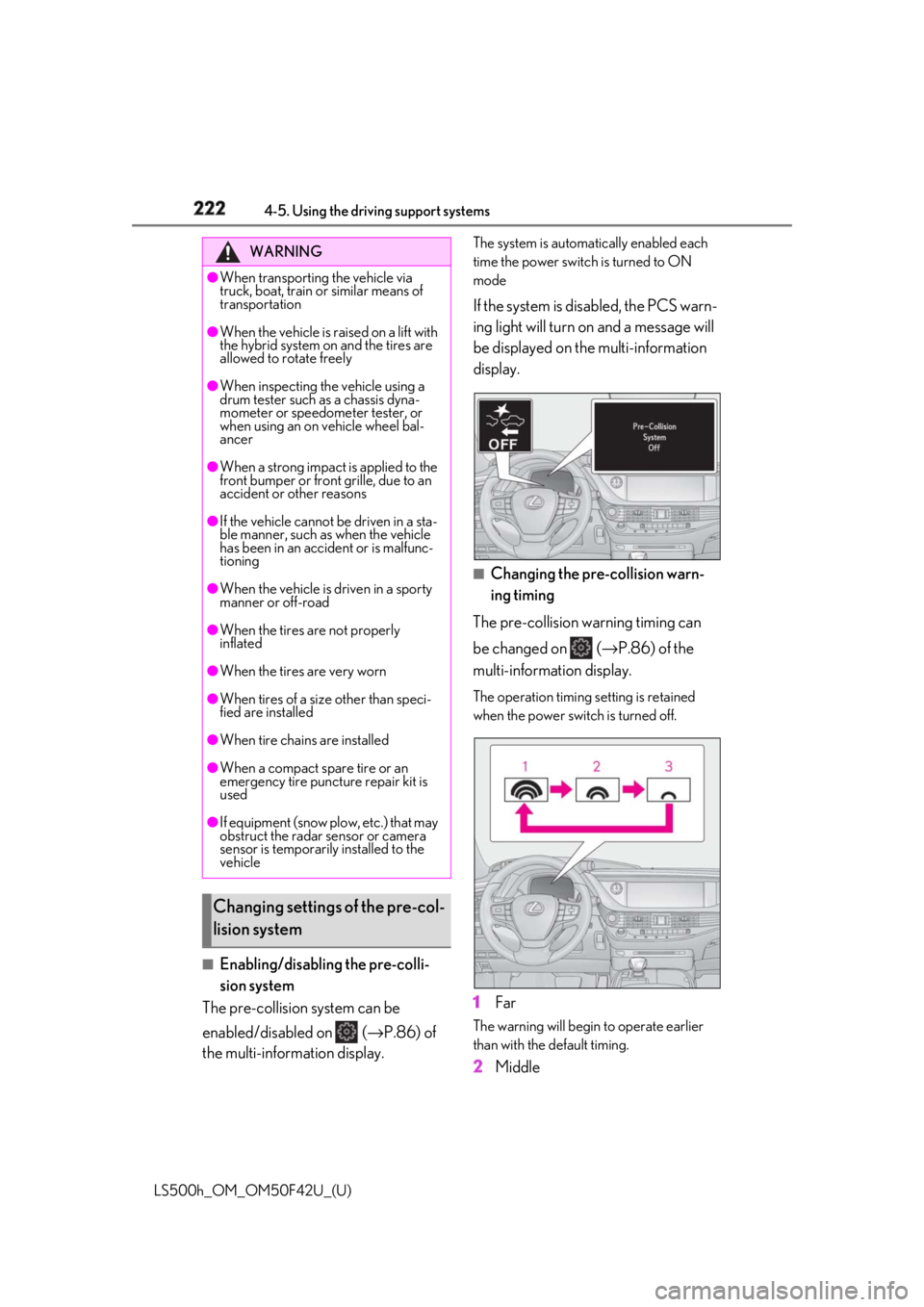
Changing the pre-collision warn-
ing timing
The pre-collision warning timing can
be changed on ( → P.86) of the
multi-information display. The operation timing setting is retained
when the power switch is turned off.
1 Far The warning will begin to operate earlier
than with the default timing.
2 MiddleWARNING●
When transporting the vehicle via
truck, boat, train or similar means of
transportation●
When the vehicle is raised on a lift with
the hybrid system on and the tires are
allowed to rotate freely●
When inspecting the vehicle using a
drum tester such as a chassis dyna-
mometer or speedometer tester, or
when using an on vehicle wheel bal-
ancer●
When a strong impact is applied to the
front bumper or front grille, due to an
accident or other reasons●
If the vehicle cannot be driven in a sta-
ble manner, such as when the vehicle
has been in an accident or is malfunc-
tioning●
When the vehicle is driven in a sporty
manner or off-road●
When the tires are not properly
inflated●
When the tires are very worn●
When tires of a size other than speci-
fied are installed●
When tire chains are installed
●
When a compact spare tire or an
emergency tire puncture repair kit is
used
●
If equipment (snow plow, etc.) that may
obstruct the radar sensor or camera
sensor is temporarily installed to the
vehicle
Changing settings of the pre-col-
lision system
Page 226 of 528

226 4-5. Using the driving support systems
LS500h_OM_OM50F42U_(U) • The vehicle is wobbling.
• The vehicle is being driven at extremely
high speeds.
• When driving on a hill
• If the radar sensor or camera sensor is
misaligned●
In some situations such as the following,
sufficient braking force may not be
obtained, preventing the system from
performing properly:
• If the braking functions cannot operate to
their full extent, such as when the brake
parts are extremely cold, extremely hot,
or wet
• If the vehicle is not properly maintained
(brakes or tires are excessively worn,
improper tire inflation pressure, etc.)
• When the vehicle is being driven on a
gravel road or other slippery surface●
Some pedestrians such as the following
may not be detected by the radar sensor
and camera sensor, preventing the sys-
tem from operating properly:
• Pedestrians shorter than approximately
3.2 ft. (1 m) or tall er than approximately
6.5 ft. (2 m)
• Pedestrians wearing oversized clothing
(a rain coat, long skir t, etc.), making their
silhouette obscure
• Pedestrians who are carrying large bag-
gage, holding an umbrella, etc., hiding
part of their body
• Pedestrians who are bending forward or
squatting
• Pedestrians who are pushing a stroller,
wheelchair, bicycle or other vehicle
• Groups of pedestrians which are close
together
• Pedestrians who are wearing white and
look extremely bright
• Pedestrians in the dark, such as at night
or while in a tunnel
• Pedestrians whose clothing appears to
be nearly the same co lor or brightness as
their surroundings
• Pedestrians near walls , fences, guardrails,
or large objects
• Pedestrians who are on a metal object
(manhole cover, steel plate, etc.) on the
road
• Pedestrians who are walking fast
• Pedestrians who are changing speed
abruptly • Pedestrians running out from behind a
vehicle or a large object
• Pedestrians who are extremely close to
the side of the vehicle (outside rear view
mirror, etc.) ■
If the PCS warning light flashes or illumi-
nates and a warning message is dis-
played on the multi-information display
The pre-collision system may be temporar-
ily unavailable or there may be a malfunc-
tion in the system. ●
In the following situations, the warning
light will turn off, the message will disap-
pear and the system will become opera-
tional when normal operating conditions
return:
• When the radar sensor or camera sensor
or the area around either sensor is hot,
such as in the sun
• When the radar sensor or camera sensor
or the area around either sensor is cold,
such as in an extremely cold environment
• When a front sensor is dirty or covered
with snow, etc.
• When the part of the windshield in front
of the camera sensor is fogged up or cov-
ered with condensation or ice (Defog-
ging the windshield: → P.324)
• If the camera sensor is obstructed, such
as when the hood is open or a sticker is
attached to the windshield near the cam-
era sensor ●
If the PCS warning light continues to flash
or remains illuminated or the warning
message does not disappear even
though the vehicle has returned to nor-
mal, the system may be malfunctioning.
Have the vehicle inspected by your Lexus
dealer immediately.
■
If VSC is disabled
●
If VSC is disabled ( → P.302), the
pre-collision brake assist and pre-colli-
sion braking functions are also disabled.
●
The PCS warning light will turn on and
“VSC Turned Off Pre-Collision Brake
System Unavailable” will be displayed on
the multi-information display.
Page 229 of 528
2294-5. Using the driving support systems
LS500h_OM_OM50F42U_(U) 4
Driving ●
If the front end of an approaching vehicle
is low (low-slung sports cars, etc.)●
If the ground clearance of an approach-
ing vehicle is extremely high●
If the shape of an approaching vehicle is
unusual (tractors, motorcycles with side-
cars, etc.)●
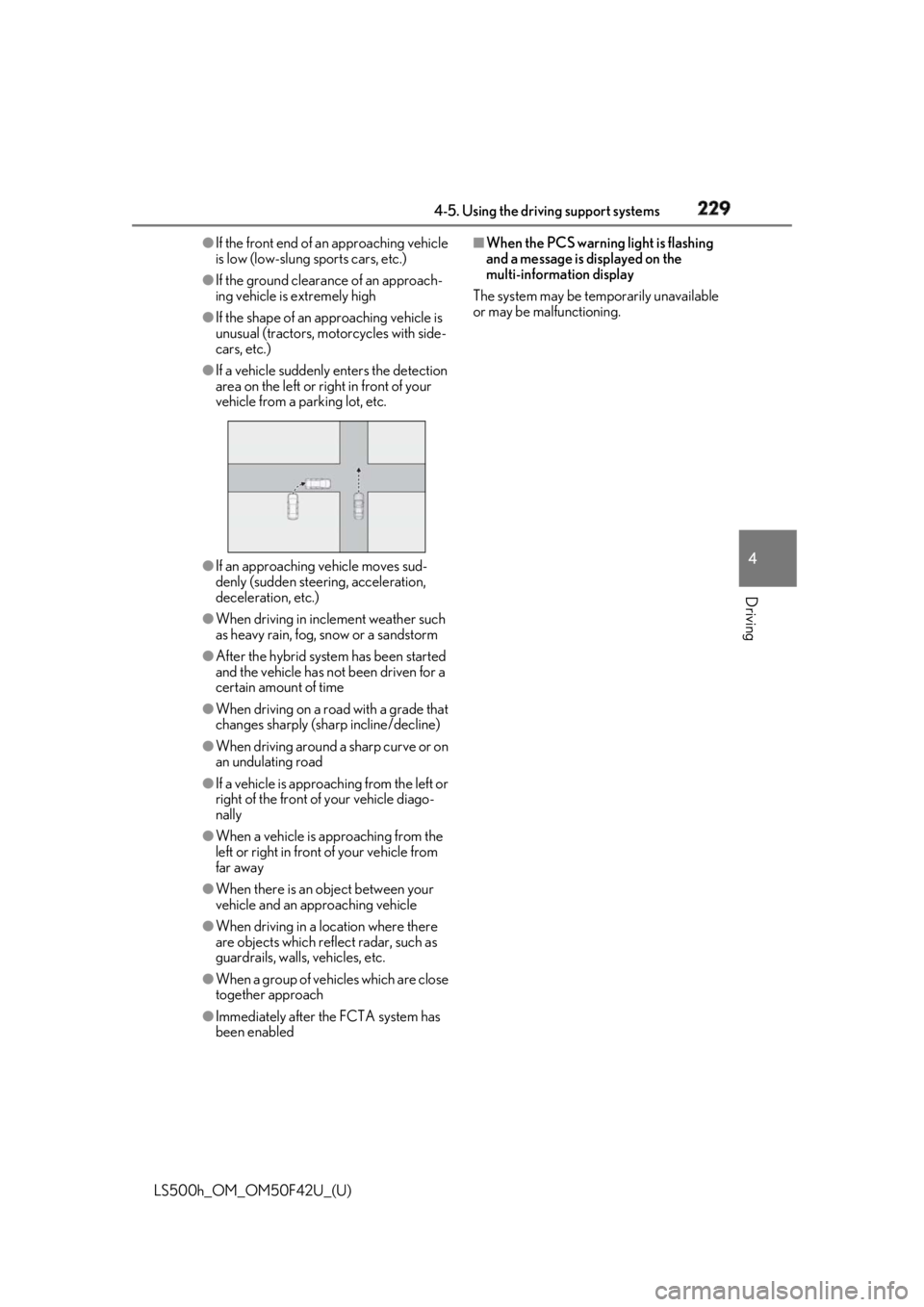
If a vehicle suddenly enters the detection
area on the left or ri ght in front of your
vehicle from a parking lot, etc.
●
If an approaching vehicle moves sud-
denly (sudden steering, acceleration,
deceleration, etc.)●
When driving in incl ement weather such
as heavy rain, fog, snow or a sandstorm●
After the hybrid syst em has been started
and the vehicle has not been driven for a
certain amount of time●
When driving on a road with a grade that
changes sharply (sharp incline/decline)●
When driving around a sharp curve or on
an undulating road●
If a vehicle is approaching from the left or
right of the front of your vehicle diago-
nally●
When a vehicle is approaching from the
left or right in front of your vehicle from
far away
●
When there is an object between your
vehicle and an approaching vehicle
●
When driving in a lo cation where there
are objects which reflect radar, such as
guardrails, walls, vehicles, etc.
●
When a group of vehicles which are close
together approach
●
Immediately after the FCTA system has
been enabled ■
When the PCS warning light is flashing
and a message is displayed on the
multi-information display
The system may be te mporarily unavailable
or may be malfunctioning.
Page 233 of 528
2334-5. Using the driving support systems
LS500h_OM_OM50F42U_(U) 4
Driving WARNING●
When the follow-up cruising display is
displayed ( → P.234) and the preced-
ing vehicle is being driven extremely
close to the left/right lane line. (Your
vehicle may follow the preceding vehi-
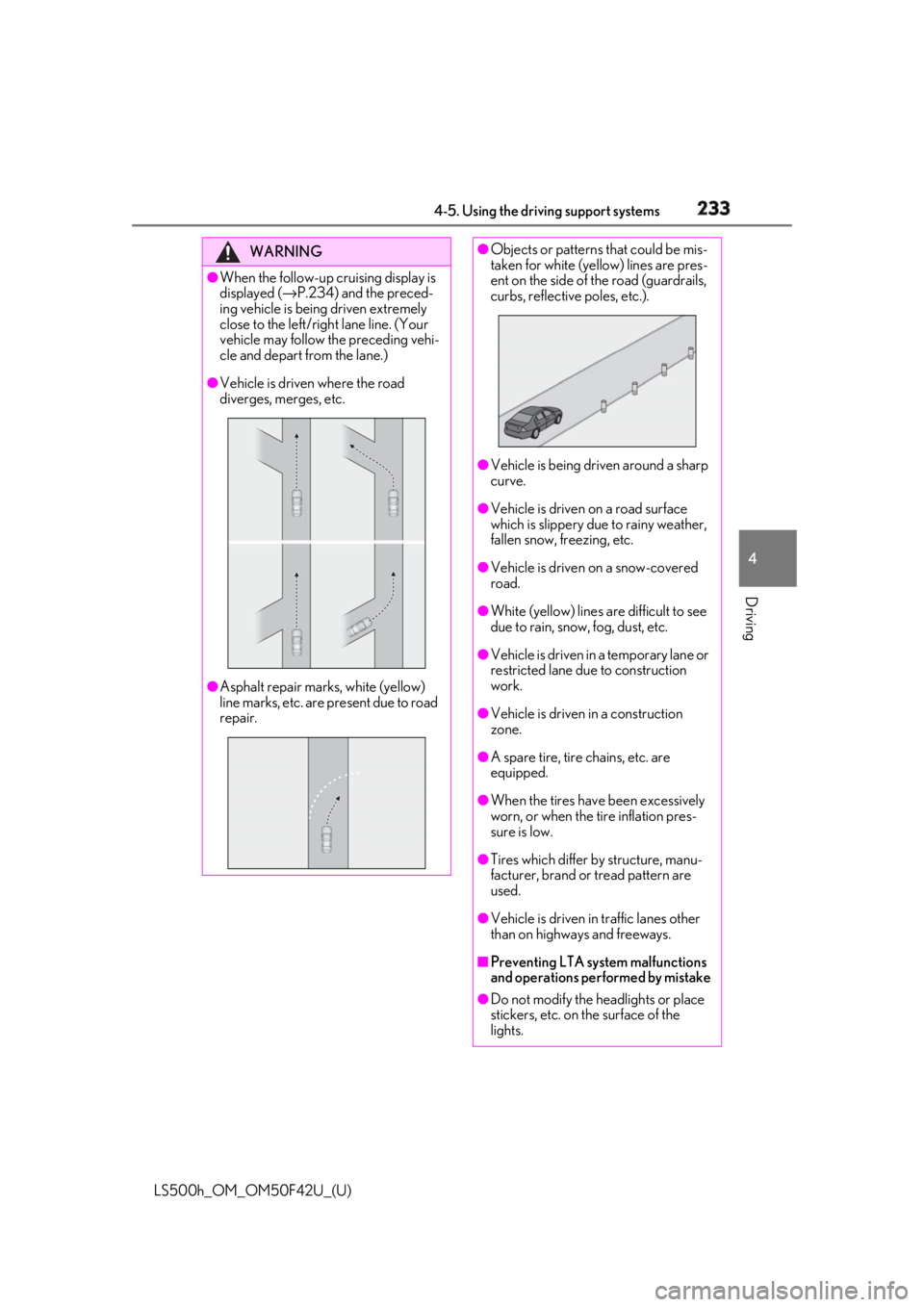
cle and depart from the lane.)●
Vehicle is driven where the road
diverges, merges, etc.
●
Asphalt repair marks, white (yellow)
line marks, etc. are present due to road
repair. ●
Objects or patterns that could be mis-
taken for white (yellow) lines are pres-
ent on the side of the road (guardrails,
curbs, reflective poles, etc.).
●
Vehicle is being driven around a sharp
curve. ●
Vehicle is driven on a road surface
which is slippery due to rainy weather,
fallen snow, freezing, etc. ●
Vehicle is driven on a snow-covered
road. ●
White (yellow) lines are difficult to see
due to rain, snow, fog, dust, etc. ●
Vehicle is driven in a temporary lane or
restricted lane due to construction
work. ●
Vehicle is driven in a construction
zone.
●
A spare tire, tire chains, etc. are
equipped.
●
When the tires have been excessively
worn, or when the tire inflation pres-
sure is low.
●
Tires which differ by structure, manu-
facturer, brand or tread pattern are
used.
●
Vehicle is driven in traffic lanes other
than on highways and freeways.
■
Preventing LTA system malfunctions
and operations performed by mistake
●
Do not modify the headlights or place
stickers, etc. on the surface of the
lights.
Page 238 of 528
238 4-5. Using the driving support systems
LS500h_OM_OM50F42U_(U) ●
The traffic lines are yellow (which may be
more difficult to recognize than lines that
are white).●
The white (yellow) lines cross over a curb,
etc.●
The vehicle is driven on a bright surface,
such as concrete.●
If the edge of the road is not clear or
straight.●
The vehicle is driven on a surface that is
bright due to reflected light, etc.●
The vehicle is driven in an area where the
brightness changes suddenly, such as at
the entrances and exits of tunnels, etc.●
Light from the headlights of an oncoming
vehicle, the sun, etc. enters the camera.●
The vehicle is driven on a slope.●
The vehicle is driven on a road which tilts
left or right, or a winding road.●
The vehicle is driven on an unpaved or
rough road.●
The vehicle is driven around a sharp
curve.●
The traffic lane is ex cessively narrow or
wide.●
The vehicle is extremely tilted due to car-
rying heavy luggage or having improper
tire pressure.●
The distance to the preceding vehicle is
extremely short.●
The preceding vehicle changes lanes.
(Your vehicle may follow the preceding
vehicle and also change lanes.)●
The preceding vehicle is swaying. (Your
vehicle may sway accordingly and depart
from the lane.)
●
The vehicle is moving up and down a
large amount due to road conditions
during driving (poor roads or road
seams).
●
When driving in a tunnel or at night with
the headlights off or when a headlight is
dim due to its lens being dirty or it being
misaligned.
●
The vehicle is struck by a crosswind.
●
The vehicle has just changed lanes through operation of the steering wheel
by the driver or crossed an intersection. ●
Snow tires, etc. are equipped. ●
The vehicle is being driven at extremely
high speeds. ■
Warning message
If the following warning message is dis-
played on the multi-in formation display and
the LTA indicator illuminates in orange, fol-
low the appropriate troubleshooting proce-
dure.
Warning message Details/Actions
“LTA Malfunction
Visit Your Dealer” The system may not be
operating properly.
→ Have the vehicle
inspected at your
Lexus dealer.
“Front Camera
Unavailable
Remove Debris
On Windshield” Dirt, rain, condensa-
tion, ice, snow, etc., are
present on the wind-
shield in front of the
camera sensor.
→ Turn the LTA system
off, remove any dirt,
rain, condensation, ice,
snow, etc., from the
windshield, and then
turn the LTA system
back on.
Page 242 of 528
242 4-5. Using the driving support systems
LS500h_OM_OM50F42U_(U) Press the LKA switch to turn the LKA
system on.WARNING■
Before using LKA system
Do not rely solely upon the LKA system.
The LKA system does not automatically
drive the vehicle or reduce the amount of
attention that must be paid to the area in
front of the vehicle. The driver must
always assume full responsibility for driv-
ing safely by paying careful attention to
the surrounding conditions and operat-
ing the steering wheel to correct the path
of the vehicle. Also, the driver must take
adequate breaks when fatigued, such as
from driving for a long period of time.
Failure to perform appropriate driving
operations and pay careful attention may
lead to an accident, resulting in death or
serious injury. ■
To avoid operating LKA system by
mistake
When not using the LKA system, use the
LKA switch to turn the system off. ■
Situations unsuitab le for LKA system
Do not use the LKA system in the follow-
ing situations.
The system may not operate properly
and lead to an accident, resulting in
death or serious injury.
●
A spare tire, tire chains, etc. are
equipped.
●
When the tires have been excessively
worn, or when the tire inflation pres-
sure is low.
●
Tires which differ by structure, manu-
facturer, brand or tread pattern are
used.
●
Objects or patterns that could be mis-
taken for white (yellow) lines are pres-
ent on the side of th e road (guardrails,
curbs, reflective poles, etc.).
●
Vehicle is driven on a snow-covered
road.
●
White (yellow) lines are difficult to see
due to rain, snow, fog, dust, etc. ●
Asphalt repair marks, white (yellow)
line marks, etc. are present due to road
repair. ●
Vehicle is driven in a temporary lane or
restricted lane due to construction
work. ●
Vehicle is driven on a road surface
which is slippery due to rainy weather,
fallen snow, freezing, etc. ●
Vehicle is driven in traffic lanes other
than on highways and freeways. ●
Vehicle is driven in a construction
zone. ■
Preventing LKA system malfunctions
and operations performed by mistake ●
Do not modify the headlights or place
stickers, etc. on the surface of the
lights. ●
Do not modify the suspension etc. If
the suspension etc. needs to be
replaced, contact your Lexus dealer. ●
Do not install or place anything on the
hood or grille. Also, do not install a
grille guard (bull bars, kangaroo bar,
etc.). ●
If your windshield needs repairs, con-
tact your Lexus dealer.
Turning LKA system on
Page 245 of 528
2454-5. Using the driving support systems
LS500h_OM_OM50F42U_(U) 4
Driving function is automatically restored.
( → P.244)■
Steering assist function/lane centering
function
Depending on the vehicle speed, lane
departure situation, ro ad conditions, etc.,
the driver may not feel the function is oper-
ating or the function may not operate at all.■
Lane departure alert function
The warning buzzer may be difficult to hear
due to external noise, audio playback, etc.
Also, it may be difficult to feel steering
wheel vibrations due to the road conditions,
etc. ■
Hands off steering wheel alert
When the system determines that the driver
has removed the hands from the steering
wheel while the steering assist function or
lane centering function is operating, a warn-
ing message is displaye d on the multi-infor-
mation display. If the driver continues to
keep the hands off of the steering wheel, a
warning message is displayed and the func-
tion is temporarily canceled. This alert also
operates in the same way when the driver
continuously operates the steering wheel
only a small amount. However, depending
on the road conditions , etc., the function
may not cancel. ■
White (yellow) lines ar e only on one side
of road
The LKA system will not operate for the
side on which white (yellow) lines could not
be recognized. ■
Conditions in whic h functions may not
operate properly
In the following situations, the camera sen-
sor may not detect white (yellow) lines and
various functions may not operate normally.
●
There are shadows on the road that run
parallel with, or cover, the white (yellow)
lines.
●
The vehicle is driven in an area without
white (yellow) lines, such as in front of a
tollgate or checkpoint, or at an intersec-
tion, etc.
●
The white (yellow) lines are cracked,
“Botts’ dots”, “Raised pavement marker” or stones are present. ●
The white (yellow) lines cannot be seen
or are difficult to see due to sand, etc. ●
The vehicle is driven on a road surface
that is wet due to rain, puddles, etc. ●
The traffic lines are yellow (which may be
more difficult to reco gnize than lines that
are white). ●
The white (yellow) lines cross over a curb,
etc. ●
The vehicle is driven on a bright surface,
such as concrete. ●
The vehicle is driven on a surface that is
bright due to reflected light, etc. ●
The vehicle is driven in an area where the
brightness changes sudd enly, such as at
the entrances and exits of tunnels, etc. ●
Light from the headlights of an oncoming
vehicle, the sun, etc. enters the camera. ●
The vehicle is driven where the road
diverges, merges, etc. ●
The vehicle is driven on a slope. ●
The vehicle is driven on a road which tilts
left or right, or a winding road. ●
The vehicle is driven on an unpaved or
rough road. ●
The vehicle is driven around a sharp
curve. ●
The traffic lane is excessively narrow or
wide. ●
The vehicle is extremely tilted due to car-
rying heavy luggage or having improper
tire pressure. ●
The distance to the preceding vehicle is
extremely short.
●
The vehicle is moving up and down a
large amount due to road conditions
during driving (poor roads or road
seams).
●
The headlight lenses are dirty and emit a
faint amount of light at night, or the beam
axis has deviated.
●
The vehicle is struck by a crosswind.
●
The vehicle has just changed lanes or
crossed an intersection.
●
Snow tires, etc. are equipped.