30 minutes LEXUS LS500H 2018 Owners Manual
[x] Cancel search | Manufacturer: LEXUS, Model Year: 2018, Model line: LS500H, Model: LEXUS LS500H 2018Pages: 528, PDF Size: 10.8 MB
Page 6 of 528
6
LS500h_OM_OM50F42U_(U) Please note that this manual applies to
all models and explains all equipment,
including options. Therefore, you may
find some explanat ions for equipment
not installed on your vehicle.
All specifications provided in this man-
ual are current at the time of printing.
However, because of the Lexus policy
of continual product improvement, we
reserve the right to make changes at
any time without notice.
Depending on specifications, the vehi-
cle shown in the illustrations may differ
from your vehicle in terms of color and
equipment.
Approximately five hours after the
hybrid system is turned off, you may
hear sound coming from under the
vehicle for several minutes. This is the
sound of a fuel evaporation leakage
check and, it does not indicate a mal-
function.
A wide variety of non-genuine spare
parts and accessories for Lexus vehi-
cles are currently available in the mar-
ket. You should know that Toyota does
not warrant these products and is not
responsible for their performance, repair, or replacement, or for any dam-
age they may cause to, or adverse
effect they may have on, your Lexus
vehicle.
This vehicle should not be modified
with non-genuine Lexus products.
Modification with non-genuine Lexus
products could affect its performance,
safety or durability, and may even vio-
late governmental regulations. In addi-
tion, damage or performance
problems resulting from the modifica-
tion may not be covered under war-
ranty.
The installation of a mobile two-way
radio system in your vehicle could
affect electronic systems such as:
Hybrid system
Multiport fuel injection sys-
tem/sequential multiport fuel injec-
tion system
Lexus Safety System+A
Lexus Safety System+
Anti-lock brake system
Vehicle dynamics integrated man-
agement
SRS airbag system
Seat belt pretensioner system
Be sure to check with your Lexus
dealer for precautionary measures or
special instructions regarding installa-
tion of a mobile two-way radio system.
High voltage parts and cables on the For your information Main Owner’s Manual
Noise from under vehicle after turn-
ing off the hybrid system
Accessories, spare parts and modifi-
cation of your Lexus Installation of a mobile two-way radio
system
Page 31 of 528
311-1. For safe use
LS500h_OM_OM50F42U_(U) 1
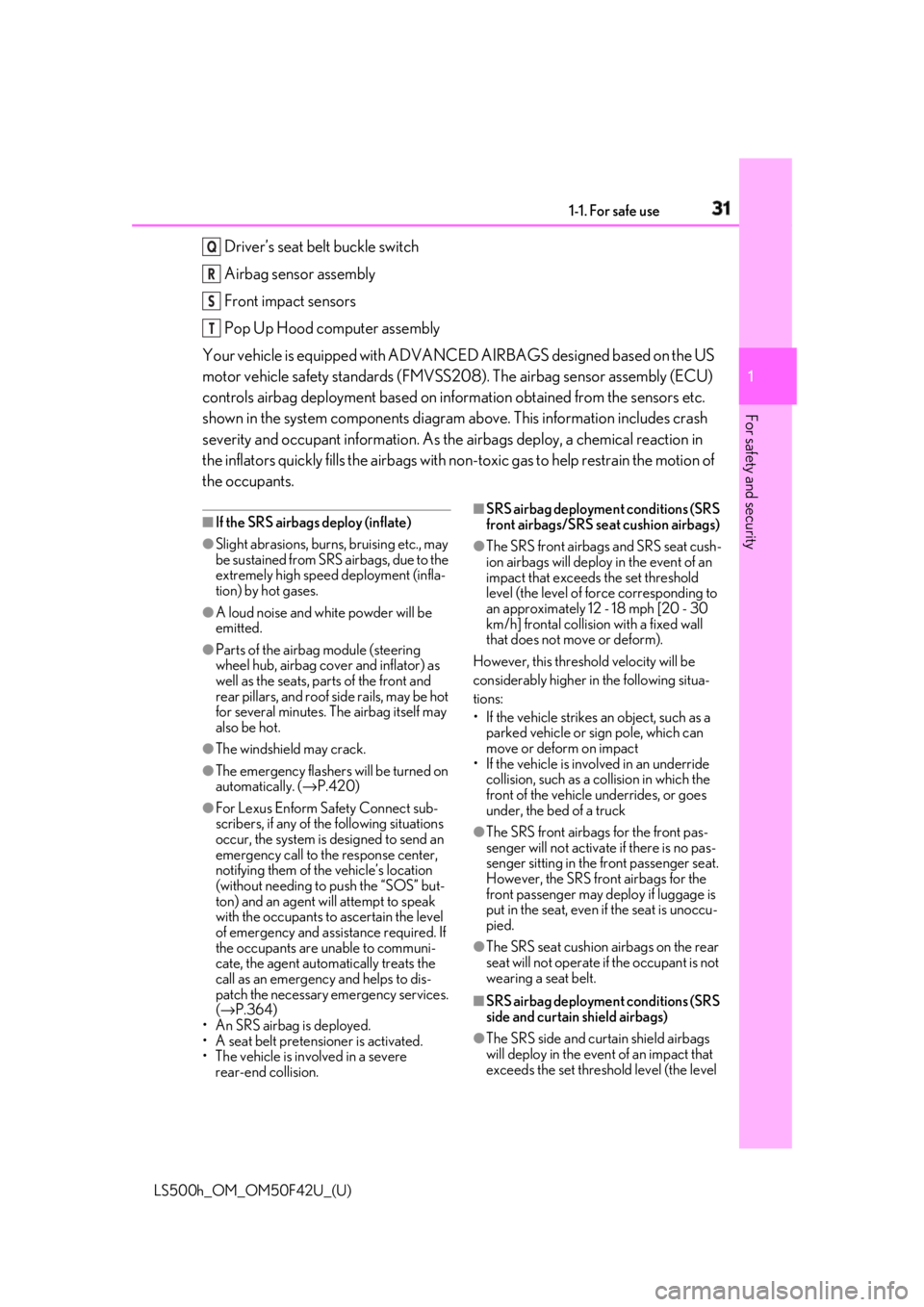
For safety and security Driver’s seat belt buckle switch
Airbag sensor assembly
Front impact sensors
Pop Up Hood computer assembly
Your vehicle is equipped with ADVANCED AIRBAGS designed based on the US
motor vehicle safety standards (FMVSS208). The airbag sensor assembly (ECU)
controls airbag deployment based on information obtained from the sensors etc.
shown in the system components diagram above. This information includes crash
severity and occupant information. As the airbags deploy, a chemical reaction in
the inflators quickly fills the airbags with no n-toxic gas to help restrain the motion of
the occupants. ■
If the SRS airbags deploy (inflate)●
Slight abrasions, burns, bruising etc., may
be sustained from SRS airbags, due to the
extremely high speed deployment (infla-
tion) by hot gases.●
A loud noise and white powder will be
emitted.●
Parts of the airbag module (steering
wheel hub, airbag cover and inflator) as
well as the seats, parts of the front and
rear pillars, and roof side rails, may be hot
for several minutes. The airbag itself may
also be hot.●
The windshield may crack.●
The emergency flashers will be turned on
automatically. ( → P.420)●
For Lexus Enform Safety Connect sub-
scribers, if any of the following situations
occur, the system is designed to send an
emergency call to the response center,
notifying them of the vehicle’s location
(without needing to push the “SOS” but-
ton) and an agent will attempt to speak
with the occupants to ascertain the level
of emergency and assi stance required. If
the occupants are unable to communi-
cate, the agent automatically treats the
call as an emergency and helps to dis-
patch the necessary emergency services.
( → P.364)
• An SRS airbag is deployed.
• A seat belt pretensioner is activated.
• The vehicle is involved in a severe
rear-end collision. ■
SRS airbag deployment conditions (SRS
front airbags/SRS seat cushion airbags) ●
The SRS front airbags and SRS seat cush-
ion airbags will deploy in the event of an
impact that exceed s the set threshold
level (the level of fo rce corresponding to
an approximately 12 - 18 mph [20 - 30
km/h] frontal collision with a fixed wall
that does not move or deform).
However, this threshol d velocity will be
considerably higher in the following situa-
tions:
• If the vehicle strikes an object, such as a
parked vehicle or sign pole, which can
move or deform on impact
• If the vehicle is involved in an underride
collision, such as a collision in which the
front of the vehicle underrides, or goes
under, the bed of a truck ●
The SRS front airbags for the front pas-
senger will not activate if there is no pas-
senger sitting in the front passenger seat.
However, the SRS front airbags for the
front passenger may deploy if luggage is
put in the seat, even if the seat is unoccu-
pied.
●
The SRS seat cushion airbags on the rear
seat will not operate if the occupant is not
wearing a seat belt.
■
SRS airbag deployment conditions (SRS
side and curtain shield airbags)
●
The SRS side and curtain shield airbags
will deploy in the event of an impact that
exceeds the set threshold level (the level Q
R
S
T
Page 99 of 528
992-1. Instrument cluster
LS500h_OM_OM50F42U_(U) 2
Vehicle status information and indicators
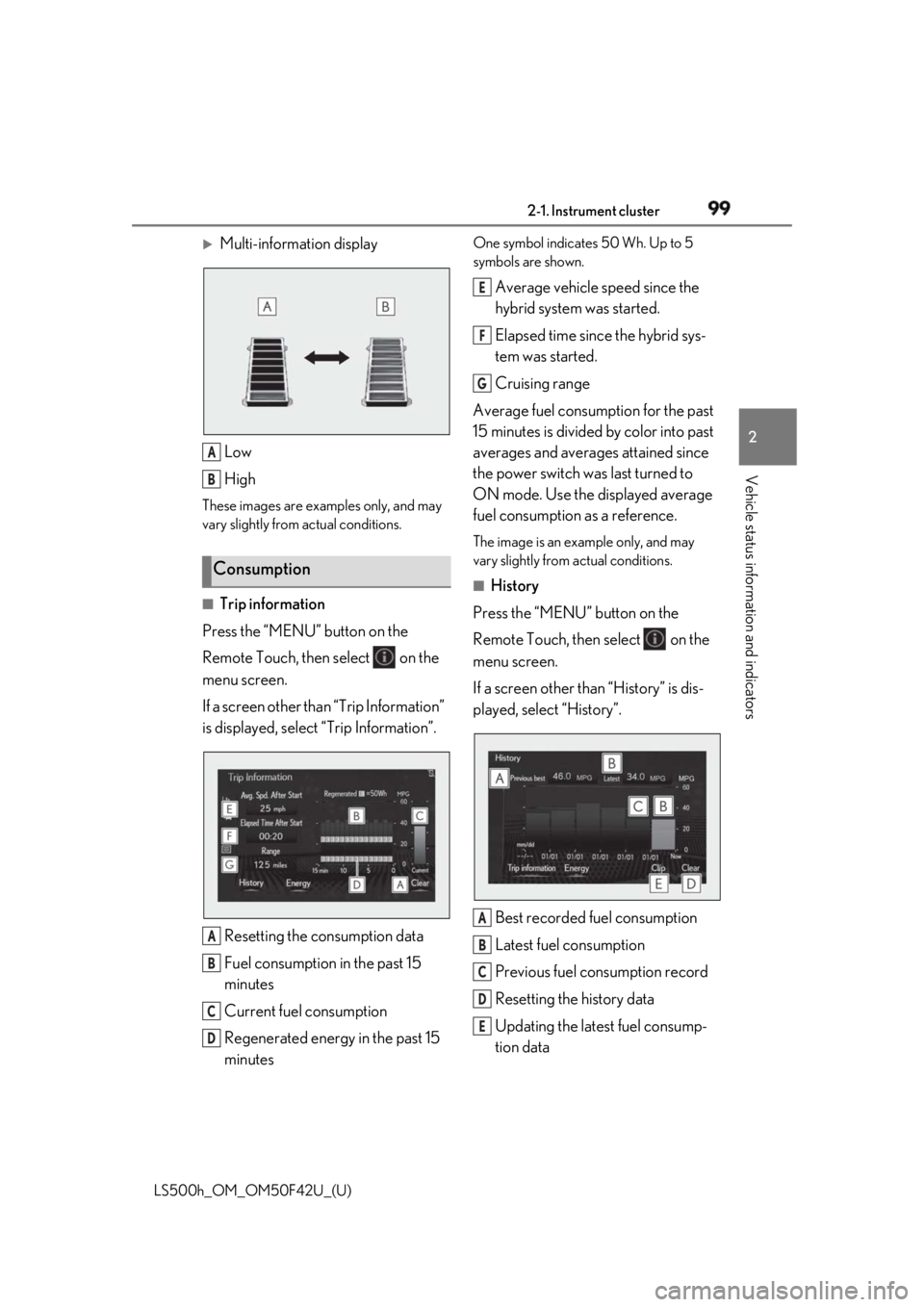
Multi-information display
Low
HighThese images are examples only, and may
vary slightly from actual conditions.
■
Trip information
Press the “MENU” button on the
Remote Touch, then select on the
menu screen.
If a screen other than “Trip Information”
is displayed, select “Trip Information”.
Resetting the consumption data
Fuel consumption in the past 15
minutes
Current fuel consumption
Regenerated energy in the past 15
minutes One symbol indicates 50 Wh. Up to 5
symbols are shown.
Average vehicle speed since the
hybrid system was started.
Elapsed time since the hybrid sys-
tem was started.
Cruising range
Average fuel consumption for the past
15 minutes is divided by color into past
averages and averages attained since
the power switch was last turned to
ON mode. Use the displayed average
fuel consumption as a reference. The image is an example only, and may
vary slightly from actual conditions. ■
History
Press the “MENU” button on the
Remote Touch, then select on the
menu screen.
If a screen other than “History” is dis-
played, select “History”.
Best recorded fuel consumption
Latest fuel consumption
Previous fuel consumption record
Resetting the history data
Updating the latest fuel consump-
tion dataConsumption A
B
A
B
C
D E
F
G
A
B
C
D
E
Page 100 of 528
100 2-1. Instrument cluster
LS500h_OM_OM50F42U_(U) The average fuel consumption history
is divided by color into past averages
and the average fuel consumption
since the last updated. Use the dis-
played average fuel consumption as a
reference. The image is an example only, and may
vary slightly from actual conditions. ■
Updating the history data
Update the latest fuel consumption by
selecting “Clip” to measure the current fuel
consumption again. ■
Resetting the data
The fuel consumption data can be deleted
by selecting “Clear”. ■
Cruising range
Displays the estimated maximum distance
that can be driven with the quantity of fuel
remaining.
This distance is comp uted based on your
average fuel consumption.
As a result, the actual distance that can be
driven may differ from that displayed.
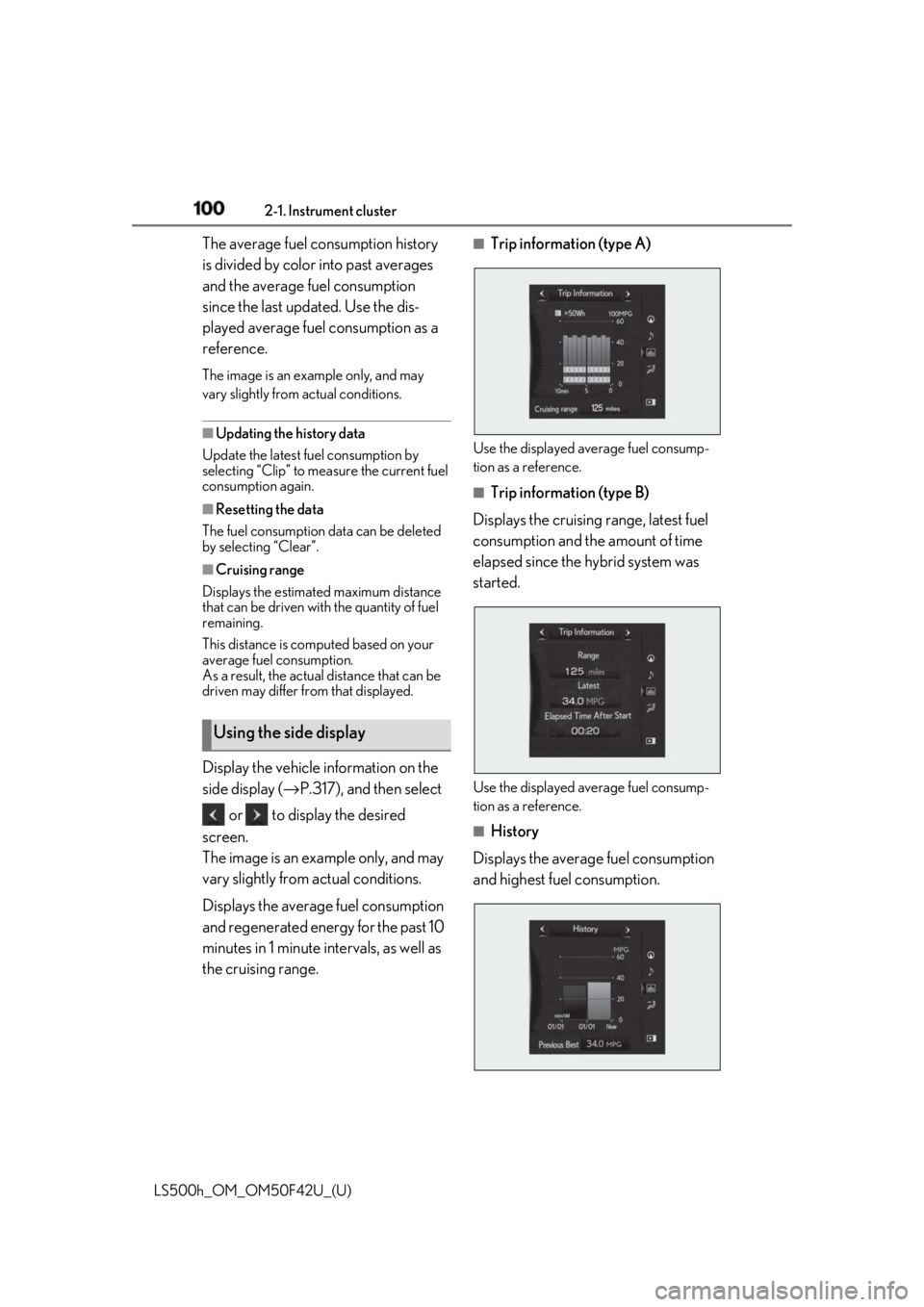
Display the vehicle information on the
side display ( → P.317), and then select
or to display the desired
screen.
The image is an example only, and may
vary slightly from actual conditions.
Displays the average fuel consumption
and regenerated energy for the past 10
minutes in 1 minute intervals, as well as
the cruising range. ■
Trip information (type A)
Use the displayed average fuel consump-
tion as a reference. ■
Trip information (type B)
Displays the cruising range, latest fuel
consumption and the amount of time
elapsed since the hybrid system was
started.
Use the displayed average fuel consump-
tion as a reference.
■
History
Displays the average fuel consumption
and highest fuel consumption.Using the side display
Page 116 of 528
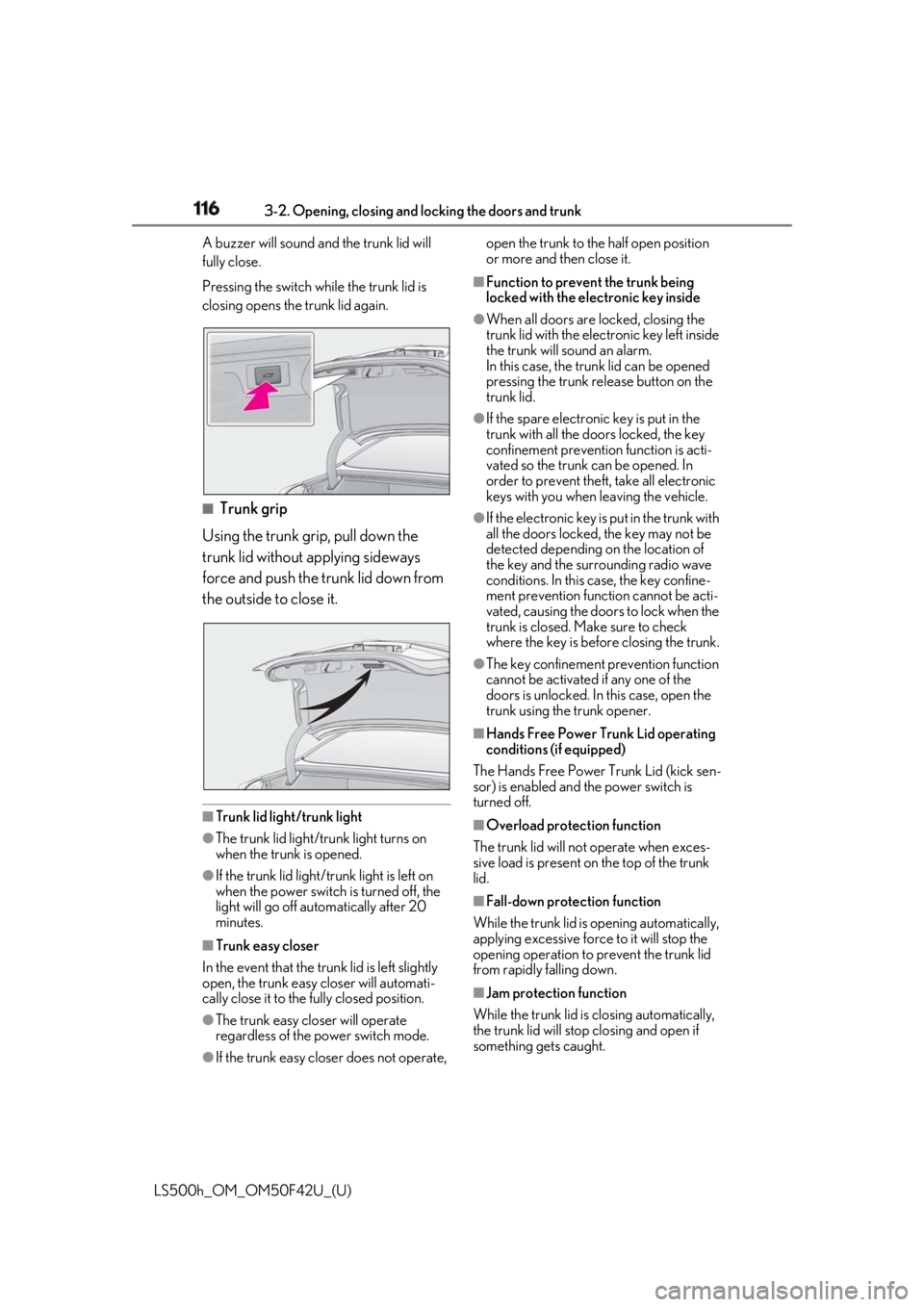
116 3-2. Opening, closing and locking the doors and trunk
LS500h_OM_OM50F42U_(U) A buzzer will sound and the trunk lid will
fully close.
Pressing the switch while the trunk lid is
closing opens the trunk lid again.
■
Trunk grip
Using the trunk grip, pull down the
trunk lid without applying sideways
force and push the trunk lid down from
the outside to close it.
■
Trunk lid light/trunk light●
The trunk lid light/tru nk light turns on
when the trunk is opened.
●
If the trunk lid light/tru nk light is left on
when the power switch is turned off, the
light will go off automatically after 20
minutes.
■
Trunk easy closer
In the event that the trun k lid is left slightly
open, the trunk easy closer will automati-
cally close it to the fully closed position.
●
The trunk easy closer will operate
regardless of the po wer switch mode.
●
If the trunk easy closer does not operate, open the trunk to the half open position
or more and then close it. ■
Function to prevent the trunk being
locked with the electronic key inside ●
When all doors are locked, closing the
trunk lid with the electronic key left inside
the trunk will sound an alarm.
In this case, the trun k lid can be opened
pressing the trunk release button on the
trunk lid. ●
If the spare electronic key is put in the
trunk with all the doors locked, the key
confinement prevention function is acti-
vated so the trunk can be opened. In
order to prevent theft, take all electronic
keys with you when leaving the vehicle. ●
If the electronic key is put in the trunk with
all the doors locked, the key may not be
detected depending on the location of
the key and the surrounding radio wave
conditions. In this case, the key confine-
ment prevention function cannot be acti-
vated, causing the doors to lock when the
trunk is closed. Make sure to check
where the key is before closing the trunk. ●
The key confinement prevention function
cannot be activated if any one of the
doors is unlocked. In this case, open the
trunk using the trunk opener. ■
Hands Free Power Trunk Lid operating
conditions (if equipped)
The Hands Free Power Trunk Lid (kick sen-
sor) is enabled and the power switch is
turned off. ■
Overload protection function
The trunk lid will not operate wh en exces-
sive load is present on the top of the trunk
lid.
■
Fall-down protection function
While the trunk lid is opening automatically,
applying excessive forc e to it will stop the
opening operation to prevent the trunk lid
from rapidly falling down.
■
Jam protection function
While the trunk lid is closing automatically,
the trunk lid will stop closing and open if
something gets caught.
Page 120 of 528
120 3-2. Opening, closing and locking the doors and trunk
LS500h_OM_OM50F42U_(U) ●
When an interior alarm sounds continu-
ously
■
If “Key Detected in Vehicle” is shown on
the multi-inform ation display
An attempt was made to lock the doors
using the smart access system with push-
button start while the electronic key was still
inside the vehicle. Retrieve the electronic
key from the vehicle and lock the doors
again.
■
Battery-saving function
The battery-saving fu nction will be acti-
vated in order to prevent the electronic key
battery and the 12-volt battery from being
discharged while the vehicle is not in opera-
tion for a long time.
●
In the following situations, the smart
access system with pu sh-button start may take some time to unlock the doors.
• The electronic key has been left in an
area of approximately 6 ft. (2 m) of the
outside of the vehicle for 10 minutes or
longer.
• The smart access system with push-but-
ton start has not been used for 5 days or
longer. ●
If the smart access system with push-but-
ton start has not been used for 14 days or
longer, the doors cann ot be unlocked at
any doors except the dr iver’s door. In this
case, take hold of th e driver’s door han-
dle, or use the wireless remote control or
the mechanical key, to unlock the doors. ■
Turning an electronic key to bat-
tery-saving mode
When battery-saving mode is set, battery
depletion is minimized by stopping the elec-
tronic key from receiving radio waves.
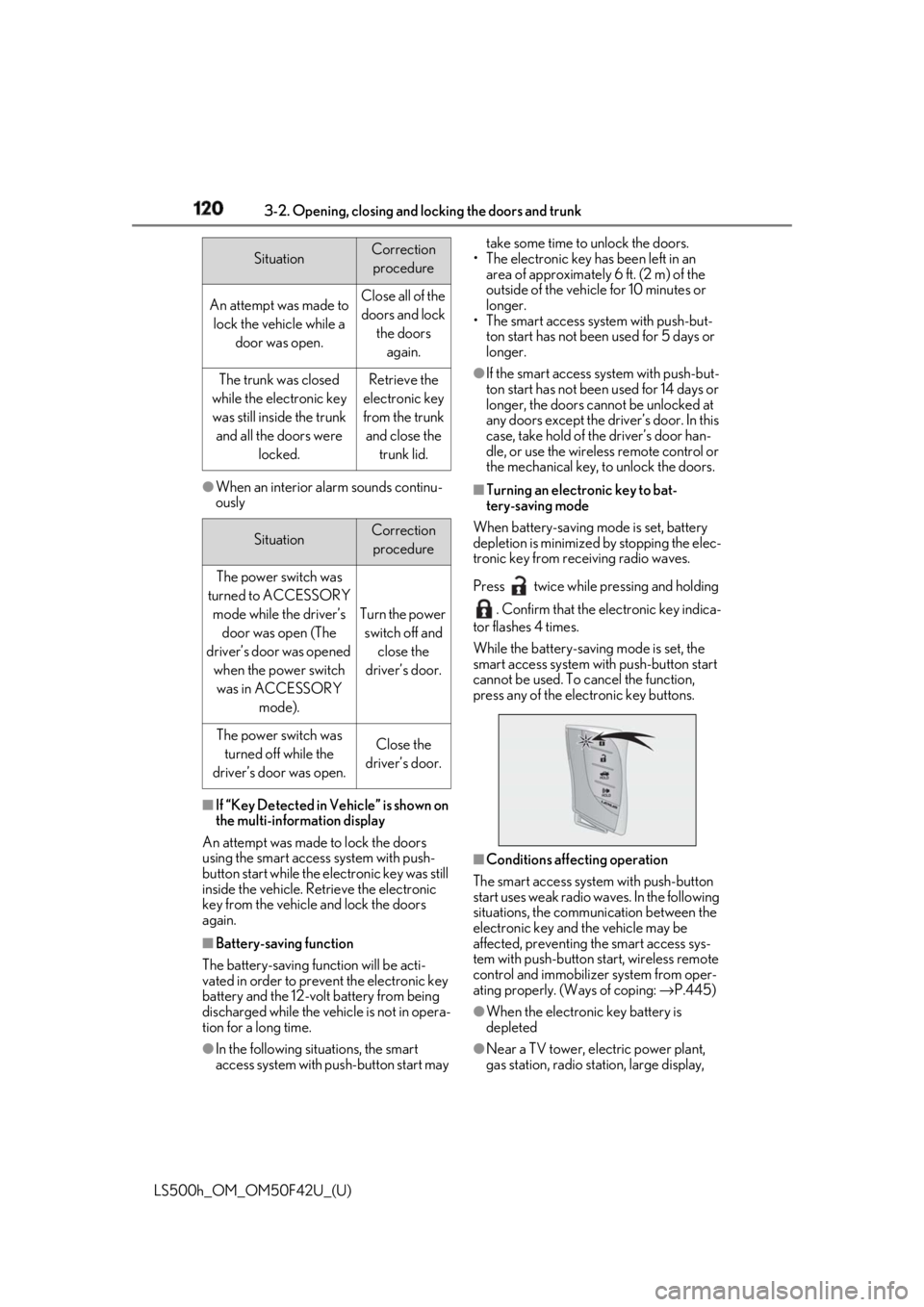
Press twice while pressing and holding
. Confirm that the electronic key indica-
tor flashes 4 times.
While the battery-saving mode is set, the
smart access system with push-button start
cannot be used. To cancel the function,
press any of the electronic key buttons.
■
Conditions affecting operation
The smart access system with push-button
start uses weak radio waves. In the following
situations, the communication between the
electronic key and the vehicle may be
affected, preventing the smart access sys-
tem with push-button start, wireless remote
control and immobilizer system from oper-
ating properly. (Ways of coping: → P.445)
●
When the electronic key battery is
depleted
●
Near a TV tower, electric power plant,
gas station, radio stat ion, large display, Situation Correction
procedure
An attempt was made to
lock the vehicle while a
door was open. Close all of the
doors and lock
the doors
again.
The trunk was closed
while the electronic key
was still inside the trunk
and all the doors were
locked. Retrieve the
electronic key
from the trunk
and close the
trunk lid.
Situation Correction
procedure
The power switch was
turned to ACCESSORY
mode while the driver’s
door was open (The
driver’s door was opened
when the power switch
was in ACCESSORY
mode). Turn the power
switch off and
close the
driver’s door.
The power switch was
turned off while the
driver’s door was open. Close the
driver’s door.
Page 134 of 528
134 3-3. Adjusting the seats
LS500h_OM_OM50F42U_(U) Applies pressure sequentially from the bot-
tom to the top of the seatback
“Lower Body” Applies pressure sequentially from the
front to the back of the seat cushion
“Lumbar” Applies pressure sequentially from the bot-
tom to the top of the lumbar area of the
seatback
4 Select the desired intensity and
then confirm the setting.The intensity can be adjusted in 5 steps.
To stop the operation select “Stop”.
If a seat is not occupi ed, do not operate the
front seat refresh system for that seat.
■
Refresh system●
Operating conditions
• The power switch is in ON mode.
• The temperature in the cabin is not
extremely high.
• For the front passenger’s seat: The weight
of an occupant is detected on the front
passenger’s seat or the front passenger’s
seat belt is fastened.
Once weight is detect ed on the seat, the
seat will be judged as occupied until the
front passenger’s door is opened then
closed or the power switch is turned off.
●
Automatic stop function
• The operation will be canceled automati-
cally after approximately 15 minutes.
•If the power easy ac cess system begins
operating, the front seat refresh system
will stop.
WARNING
■
Important points while driving
Do not adjust the driver’s seat refresh
system while driving.
Using it may affect your ability to control
the vehicle, possibly leading to an acci-
dent resulting in death or serious injury. ■
Using the refresh system ●
Those who are pregnant, have recently
given birth, or suffer from ailments
requiring rest (heart disease etc.)
should consult a doctor before use. ●
Do not allow children to use the
refresh function. ●
Do not use immediately after consum-
ing a meal or alcohol, or for an
extended period of time. ●
If you feel sick while using the refresh
function, immediately discontinue use.
Page 139 of 528
1393-3. Adjusting the seats
LS500h_OM_OM50F42U_(U) 3
Before driving rear seat relaxation system for that seat. ■
Relaxation system●
Operating conditions
• The power switch is in ON mode.
• The temperature in the cabin is not
extremely high.
• The weight of an occupant is detected on
the rear seat or the rear seat belt is fas-
tened.
Once weight is detect ed on the seat, the
seat will be judged as occupied until the
rear door is opened then closed or the
power switch is turned off. ●
Automatic stop function
• The operation will be canceled automati-
cally after approximately 15 minutes.
• If the door for a seat that the relaxation
system is currently being used is opened,
the relaxation system will stop operating.
The seat and steering wheel are auto-
matically adjusted to allow the driver to
enter and exit the vehicle easily.
Driver’s seat
When all of the following have been
performed, the seat and steering
wheel are automatically adjusted to a
position that allows driver to enter and
exit the vehicle easily.
• The shift position has been shifted to
P.
• The power switch has been turned
off.
• The driver’s seat belt has been
unfastened. When the driver’s seat adjustment
switches are in front passenger mode
( → P.130), the seat and steering wheel will
not move.WARNING■
Using the relaxation system●
Those who are pregnant, have recently
given birth, or suffer from ailments
requiring rest (heart disease etc.)
should consult a doctor before use.●
Do not allow children to use the relax-
ation function.
●
Do not use immediately after consum-
ing a meal or alcohol, or for an
extended period of time.
●
If you feel sick while using the relax-
ation function, immediately discon-
tinue use. Driving position memory This feature automatically adjusts
the positions of the front seats,
steering wheel, outside rear view
mirrors and head-up display (if
equipped) to make entering and
exiting the vehicle easier or to suit
your preferences.
Up to 3 different driving positions
can be recorded.
Each electronic key (including a
card key) can be registered to
recall your preferred driving posi-
tion.
Power easy access system
Page 171 of 528
1714-2. Driving procedures
LS500h_OM_OM50F42U_(U) 4
Driving
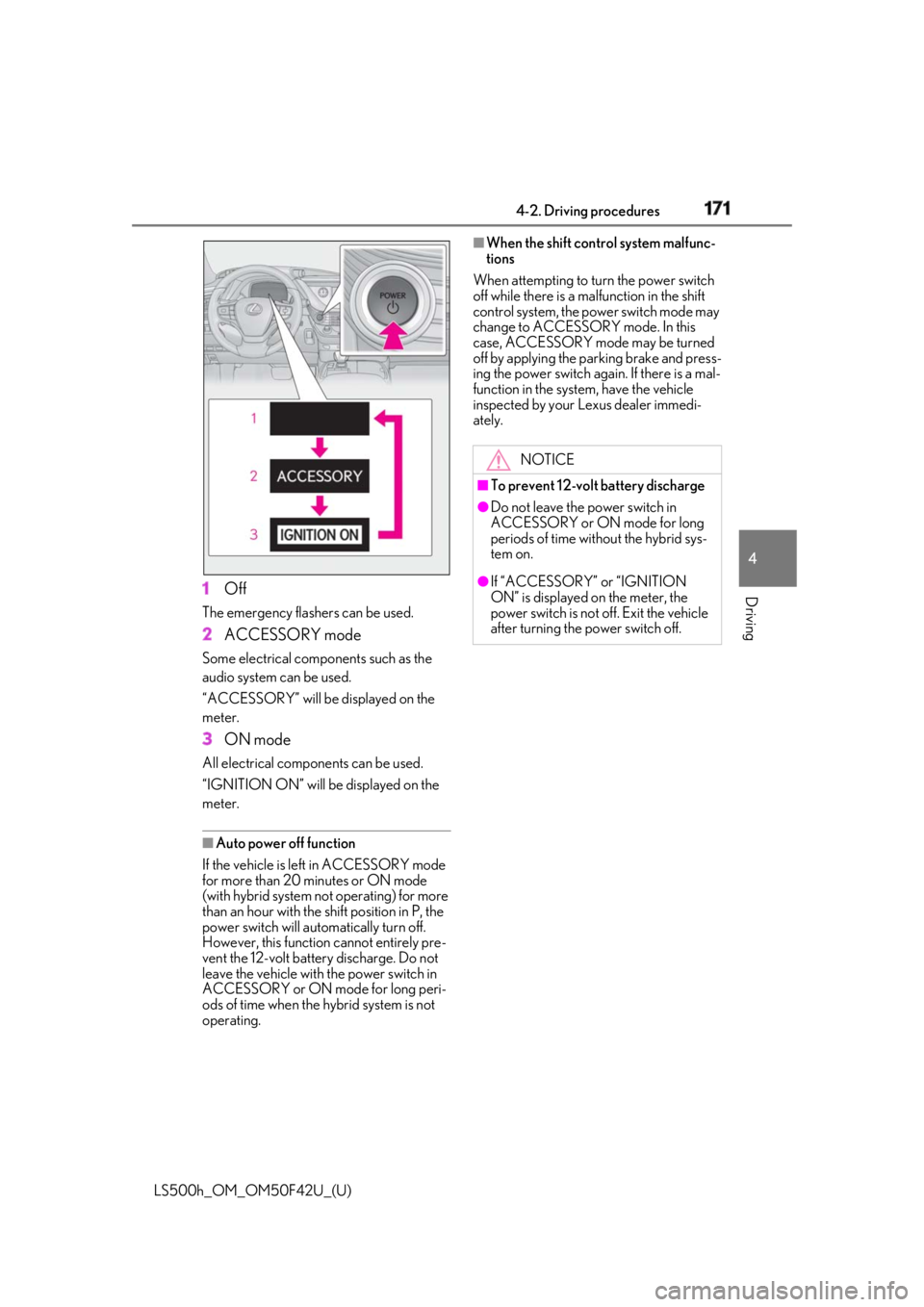
1 OffThe emergency flashers can be used.
2 ACCESSORY modeSome electrical components such as the
audio system can be used.
“ACCESSORY” will be displayed on the
meter.
3 ON modeAll electrical components can be used.
“IGNITION ON” will be displayed on the
meter.
■
Auto power off function
If the vehicle is left in ACCESSORY mode
for more than 20 minutes or ON mode
(with hybrid system not operating) for more
than an hour with the shift position in P, the
power switch will automatically turn off.
However, this function cannot entirely pre-
vent the 12-volt battery discharge. Do not
leave the vehicle with the power switch in
ACCESSORY or ON mode for long peri-
ods of time when the hybrid system is not
operating. ■
When the shift control system malfunc-
tions
When attempting to turn the power switch
off while there is a ma lfunction in the shift
control system, the power switch mode may
change to ACCESSORY mode. In this
case, ACCESSORY mode may be turned
off by applying the parking brake and press-
ing the power switch again. If there is a mal-
function in the system, have the vehicle
inspected by your Lexus dealer immedi-
ately.
NOTICE■
To prevent 12-volt battery discharge ●
Do not leave the power switch in
ACCESSORY or ON mode for long
periods of time without the hybrid sys-
tem on. ●
If “ACCESSORY” or “IGNITION
ON” is displayed on the meter, the
power switch is not off. Exit the vehicle
after turning the power switch off.
Page 184 of 528
184 4-2. Driving procedures
LS500h_OM_OM50F42U_(U) will be shown on the multi-information dis-
play. The parking brake will then be set
automatically. ■
Brake hold function●
If the brake pedal is left released for a
period of about 3 minutes after the sys-
tem has started holding the brake, the
parking brake will be set automatically. In
this case, a warning buzzer sounds and a
message is shown on the multi-informa-
tion display.●
To turn the system off while the system is
holding the brake, firmly depress the
brake pedal and press the button again.●
The brake hold function may not hold the
vehicle when the vehicle is on a steep
incline. In this situation, it may be neces-
sary for the driver to apply the brakes. A
warning buzzer will sound and the
multi-information display will inform the
driver of this situation. If a warning mes-
sage is shown on the multi-information
display, read the message and follow the
instructions.■
When the parking brake is set automati-
cally while the system is holding the
brakes
Perform any of the follo wing operations to
release the parking brake. ●
Depress the accelerator pedal. (The
parking brake will not be released auto-
matically if the seat belt is not fastened.)●
Operate the parking brake switch with
the brake pedal depressed.
Make sure that the pa rking brake indicator
light goes off. ( → P.181)
■
When an inspection at your Lexus
dealer is necessary
When the brake hold standby indicator
(green) does not illuminate even when the
brake hold switch is pressed with the brake
hold system operating conditions met, the
system may be malfun ctioning. Have the
vehicle inspected at your Lexus dealer. ■
If “Brake Hold Fault Depress Brake to
Deactivate Visit Your Dealer” or “Brake
Hold Malfunction Visit Your Dealer” is
displayed on the multiinformation dis-
play
The system may be ma lfunctioning. Have
the vehicle inspected by your Lexus dealer. ■
Warning messages and buzzers
Warning messages and buzzers are used to
indicate a system malfunction or to inform
the driver of the need for caution. If a warn-
ing message is shown on the multi-informa-
tion display, read the message and follow
the instructions. ■
If the brake hold operated indicator
flashes
→ P.434
WARNING■
When the vehicle is on a steep incline
When using the brake hold system on a
steep incline exercise caution. The brake
hold function may not hold the vehicle in
such a situation. ■
When stopped on a slippery road
The system cannot stop the vehicle when
the gripping ability of the tires has been
exceeded. Do not use the system when
stopped on a slippery road.
NOTICE
■
When parking the vehicle
The brake hold system is not designed
for use when parking the vehicle for a
long period of time. Turning the power
switch off while the system is holding the
brake may release the brake, which
would cause the vehicle to move. When
operating the power switch, depress the
brake pedal, shift the shift position to P
and set the parking brake.