garage door opener LEXUS LS500H 2018 Owners Manual
[x] Cancel search | Manufacturer: LEXUS, Model Year: 2018, Model line: LS500H, Model: LEXUS LS500H 2018Pages: 528, PDF Size: 10.8 MB
Page 4 of 528
4 TABLE OF CONTENTS
LS500h_OM_OM50F42U_(U) 5-5. Using the storage features
List of storage features............... 343
Trunk features................................ 348
5-6. Using the other interior features
Other interior features ............... 351
Garage door opener.................. 358
Lexus Enform Safety Connect
........................................................... 364
6-1. Maintenance and care
Cleaning and protecting the vehi-
cle exterior ................................... 370
Cleaning and protecting the vehi-
cle interior .................................... 373
6-2. Maintenance
Maintenance requirements ..... 378
General maintenance ................ 379
Emission inspection and mainte-
nance (I/M) programs ............ 382
6-3. Do-it-yourself maintenance
Do-it-yourself service precautions
........................................................... 383
Hood.................................................. 385
Positioning a floor jack............... 385
Engine compartment.................. 387
12-volt battery................................ 393
Tires ................................................... 395
Replacing the tire ......................... 405
Tire inflation pressure ................. 408
Wheels............................................... 410
Air conditioning filter.................... 411
Electronic key battery ................. 413
Checking and replacing fuses
............................................................ 414 Light bulbs......................................... 417
7-1. Essential information
Emergency flashers .................... 420
If your vehicle has to be stopped in
an emergency ............................ 420
7-2. Steps to take in an emergency
If your vehicle needs to be towed
........................................................... 422
If you think something is wrong
.......................................................... 426
If a warning light turns on or a warn-
ing buzzer sounds...................... 427
If a warning messa ge is displayed
.......................................................... 437
If you have a flat tire ..................... 442
If the hybrid syst em will not start
.......................................................... 443
If you lose your keys.................... 444
If the fuel filler door cannot be
opened .......................................... 445
If the electronic key does not oper-
ate properly ................................. 445
If the 12-volt battery is discharged
.......................................................... 447
If your vehicle overheats ........... 453
If the vehicle becomes stuck ... 457
8-1. Specifications
Maintenance data (fuel, oil level,
etc.) ................................................. 460
Fuel information
. ........................... 470
Tire information ............................. 4726
Maintenance and care 7
When trouble arises
8
Vehicle specifications
Page 20 of 528
20 Pictorial index
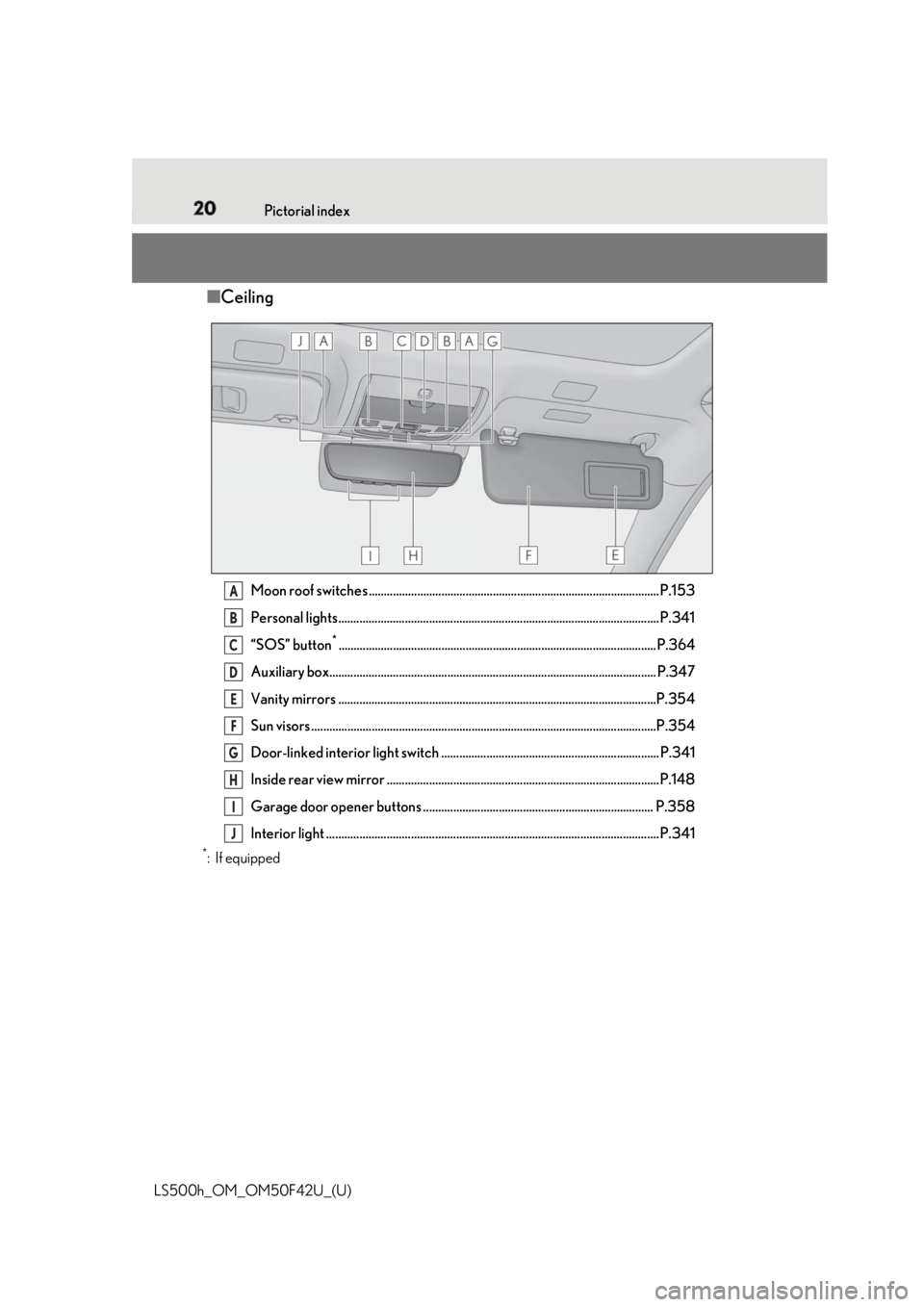
LS500h_OM_OM50F42U_(U) ■ Ceiling
Moon roof switches ................................................................................................P.153
Personal lights.......................................................................................................... P.341
“SOS” button *
.........................................................................................................P.364
Auxiliary box............................................................................................................ P.347
Vanity mirrors .........................................................................................................P.354
Sun visors ..................................................................................................................P.3 54
Door-linked interior light switch ........................................................................ P.341
Inside rear view mirror ..........................................................................................P.148
Garage door opener buttons ............................................................................ P.358
Interior light .............................................................................................................. P.3 41*
:If equipped A
B
C
D
E
F
G
H
I
J
Page 313 of 528
313
LS500h_OM_OM50F42U_(U) 5 5
Interior features Interior features .
5-1. Remote Touch/Display
Remote Touch ............................. 314
Center Display ............................ 316
Rear Multi Operation Panel
......................................................... 318
5-2. Lexus Climate Concierge
Lexus Climate Concierge ...... 321
5-3. Using the air conditioning system
and defogger
Front automatic air conditioning
system ......................................... 323
Rear air conditioning system
........................................................ 333
Heated steering wheel/seat heat-
ers/seat ventilators ................ 336
5-4. Using the interior lights
Interior lights list......................... 340
5-5. Using the storage features
List of storage features............ 343
Trunk features............................. 348
5-6. Using the other interior features
Other interior features ............ 351
Garage door opener............... 358
Lexus Enform Safety Connect
........................................................ 364
Page 358 of 528
358 5-6. Using the other interior features
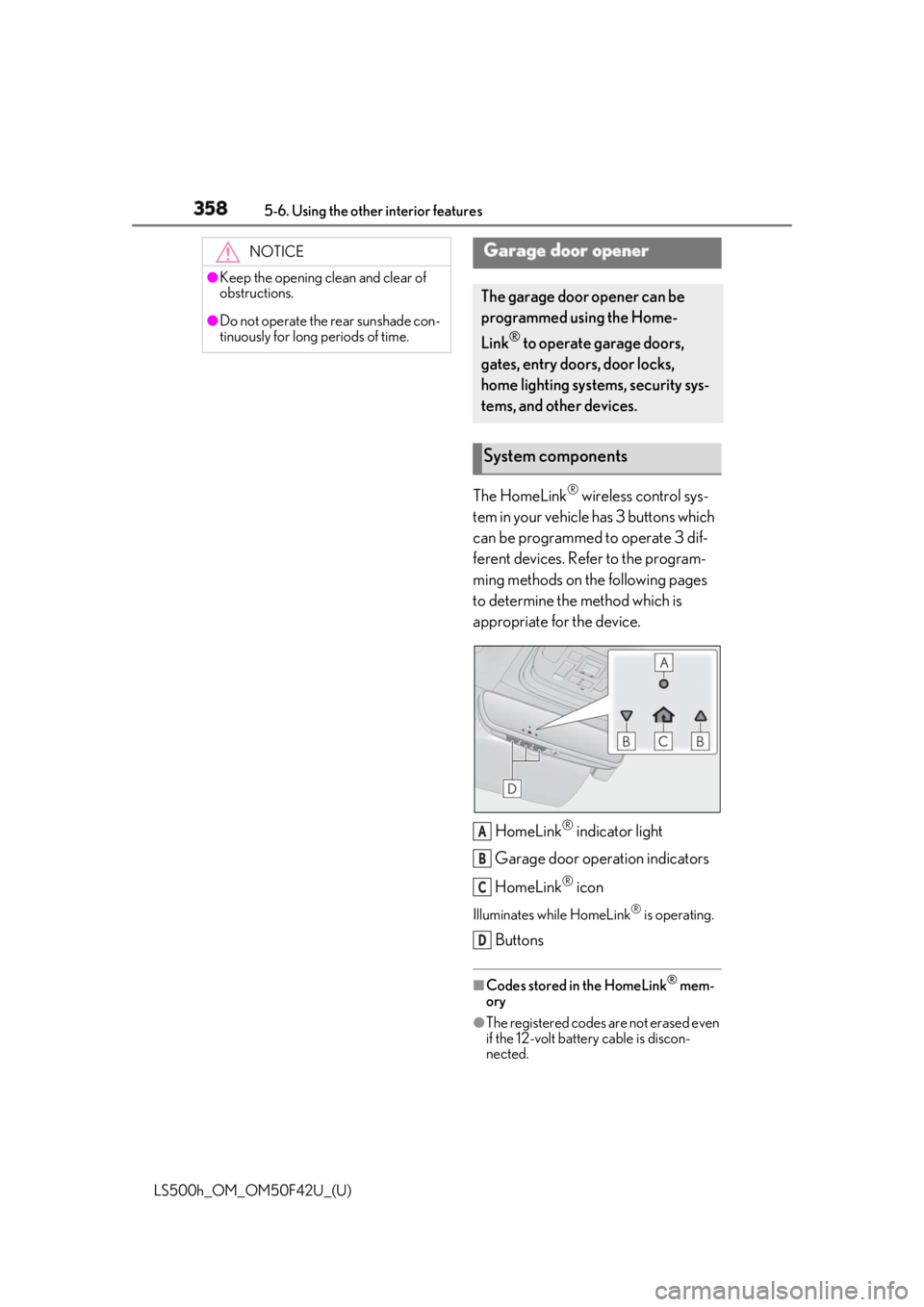
LS500h_OM_OM50F42U_(U) The HomeLink ®
wireless control sys-
tem in your vehicle has 3 buttons which
can be programmed to operate 3 dif-
ferent devices. Refer to the program-
ming methods on the following pages
to determine the method which is
appropriate for the device.
HomeLink ®
indicator light
Garage door operation indicators
HomeLink ®
iconIlluminates while HomeLink ®
is operating.
Buttons ■
Codes stored in the HomeLink ®
mem-
ory
●
The registered codes are not erased even
if the 12-volt battery cable is discon-
nected.NOTICE●
Keep the opening clean and clear of
obstructions.●
Do not operate the rear sunshade con-
tinuously for long periods of time.
Garage door opener The garage door opener can be
programmed using the Home-
Link ®
to operate garage doors,
gates, entry doors, door locks,
home lighting systems, security sys-
tems, and other devices.
System components
A
B
C
D
Page 359 of 528
3595-6. Using the other interior features
LS500h_OM_OM50F42U_(U) 5
Interior features ●
If learning failed wh en registering a dif-
ferent code to a HomeLink ®
button that
already has a code registered to it, the already registered code will not be
erased.■
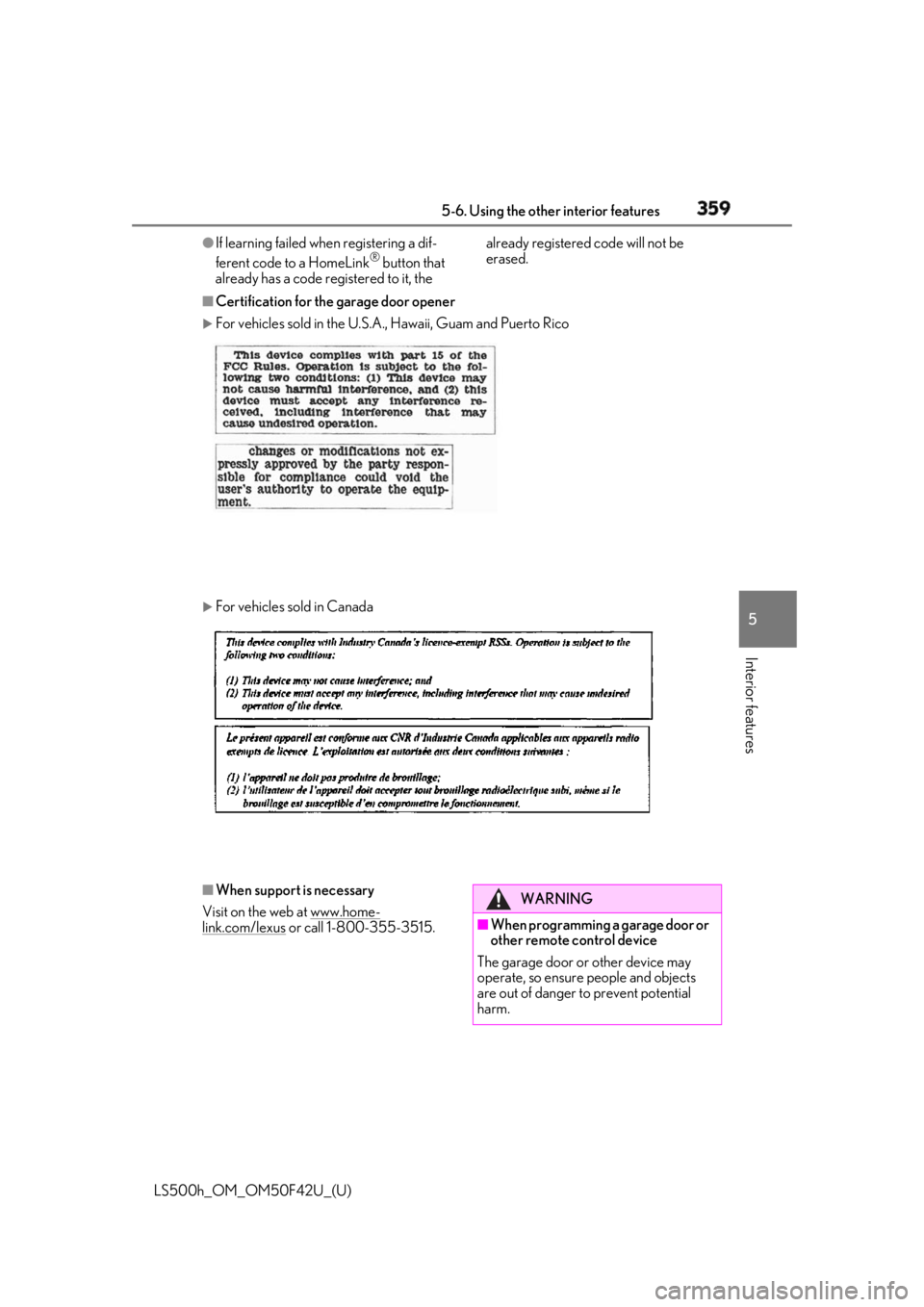
Certification for the garage door opener
For vehicles sold in the U.S.A. , Hawaii, Guam and Puerto Rico
For vehicles sold in Canada
■
When support is necessary
Visit on the web at www.home-
link.com/lexus or call 1-800-355-3515. WARNING
■
When programming a garage door or
other remote control device
The garage door or other device may
operate, so ensure people and objects
are out of danger to prevent potential
harm.
Page 360 of 528
360 5-6. Using the other interior features
LS500h_OM_OM50F42U_(U) ■
Before programming HomeLink ®
During programming, it is possible
that garage doors, gates, or other
devices may operate. For this rea-
son, make sure that people and
objects are clear of the garage door
or other devices to prevent injury or
other potential harm.
It is recommended that a new bat-
tery be placed in the remote control
transmitter for more accurate pro-
gramming.
Garage door opener motors manu-
factured after 1995 may be
equipped with rolling code protec-
tion. If this is the case, you may need
a stepladder or other sturdy, safe
device to reach the “Learn” or
“Smart” button on the garage door
opener motor. ■
Programming HomeLink ®
Steps 1 through 3 must be performed
within 60 seconds, otherwise the indi-
cator light will stop flashing and pro-
gramming will not be able to be
completed.
1 Press and release the HomeLink ®
button you want to program and
check that the HomeLink ®
indica-
tor light flashes (orange).
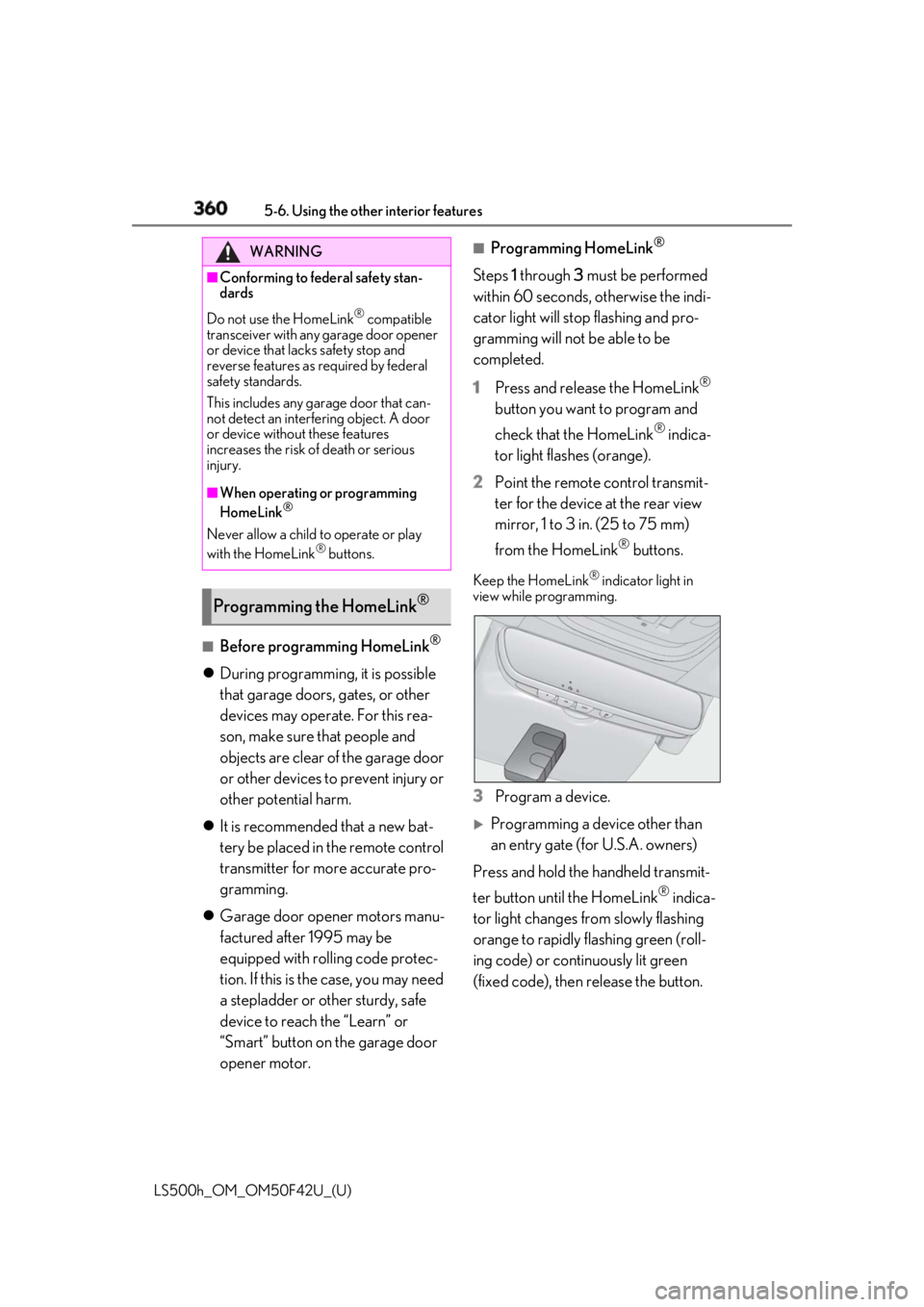
2 Point the remote control transmit-
ter for the device at the rear view
mirror, 1 to 3 in. (25 to 75 mm)
from the HomeLink ®
buttons.Keep the HomeLink ®
indicator light in
view while programming.
3 Program a device.
Programming a device other than
an entry gate (for U.S.A. owners)
Press and hold the handheld transmit-
ter button until the HomeLink ®
indica-
tor light changes from slowly flashing
orange to rapidly flashing green (roll-
ing code) or continuously lit green
(fixed code), then release the button.WARNING■
Conforming to federal safety stan-
dards
Do not use the HomeLink ®
compatible
transceiver with any garage door opener
or device that lacks safety stop and
reverse features as required by federal
safety standards.
This includes any garage door that can-
not detect an interfering object. A door
or device without these features
increases the risk of death or serious
injury. ■
When operating or programming
HomeLink ®
Never allow a child to operate or play
with the HomeLink ®
buttons.
Programming the HomeLink ®
Page 361 of 528
3615-6. Using the other interior features
LS500h_OM_OM50F42U_(U) 5
Interior features
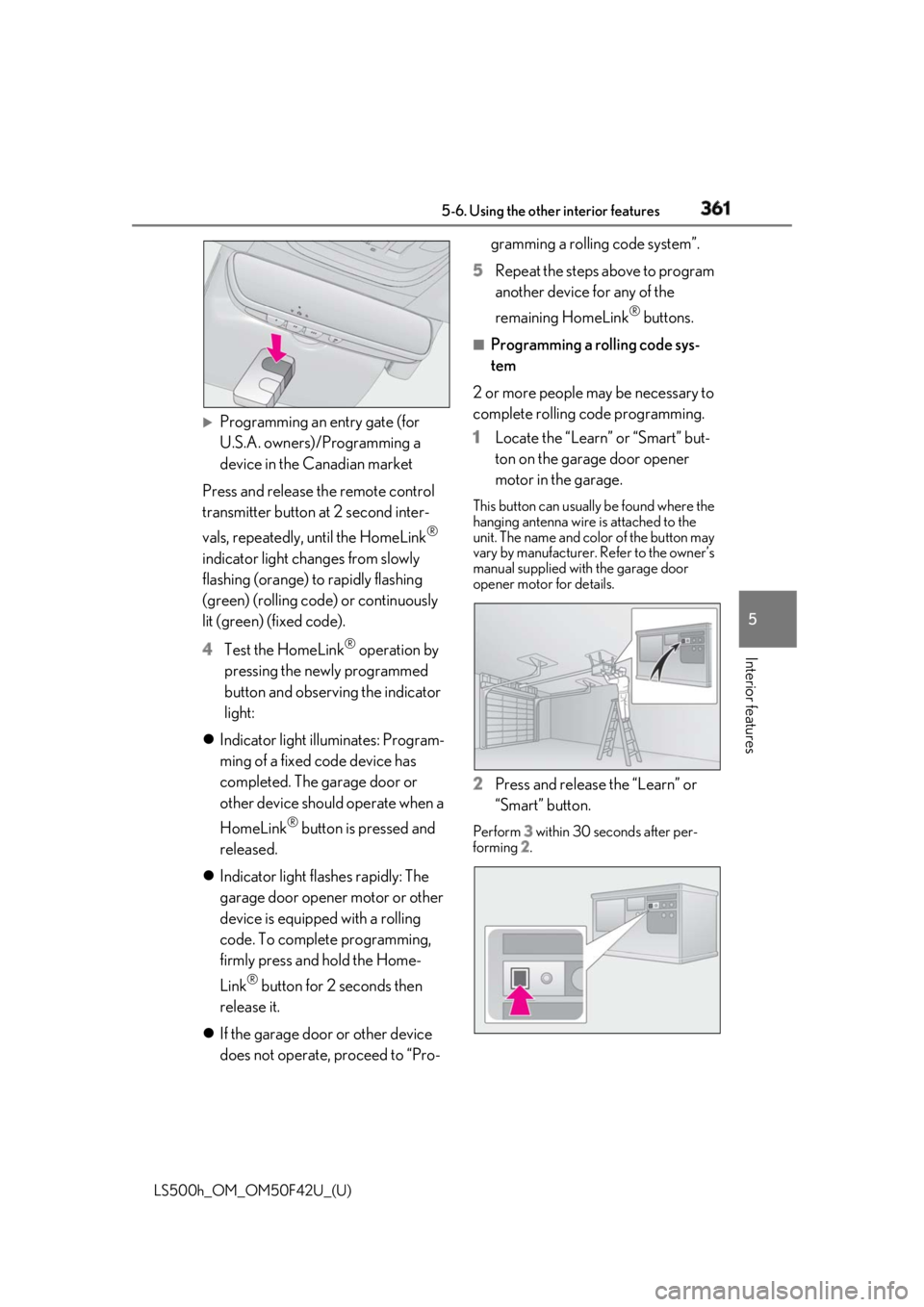
Programming an entry gate (for
U.S.A. owners)/Programming a
device in the Canadian market
Press and release th e remote control
transmitter button at 2 second inter-
vals, repeatedly, until the HomeLink ®
indicator light changes from slowly
flashing (orange) to rapidly flashing
(green) (rolling code ) or continuously
lit (green) (fixed code).
4 Test the HomeLink ®
operation by
pressing the newly programmed
button and observing the indicator
light:
Indicator light illuminates: Program-
ming of a fixed code device has
completed. The garage door or
other device should operate when a
HomeLink ®
button is pressed and
released.
Indicator light flashes rapidly: The
garage door opener motor or other
device is equipped with a rolling
code. To complete programming,
firmly press and hold the Home-
Link ®
button for 2 seconds then
release it.
If the garage door or other device
does not operate, proceed to “Pro- gramming a rolling code system”.
5 Repeat the steps above to program
another device for any of the
remaining HomeLink ®
buttons.■
Programming a rolling code sys-
tem
2 or more people may be necessary to
complete rolling code programming.
1 Locate the “Learn” or “Smart” but-
ton on the garage door opener
motor in the garage. This button can usually be found where the
hanging antenna wire is attached to the
unit. The name and color of the button may
vary by manufacturer. Refer to the owner’s
manual supplied with the garage door
opener motor for details.
2 Press and release the “Learn” or
“Smart” button. Perform 3 within 30 seconds after per-
forming 2 .
Page 362 of 528
362 5-6. Using the other interior features
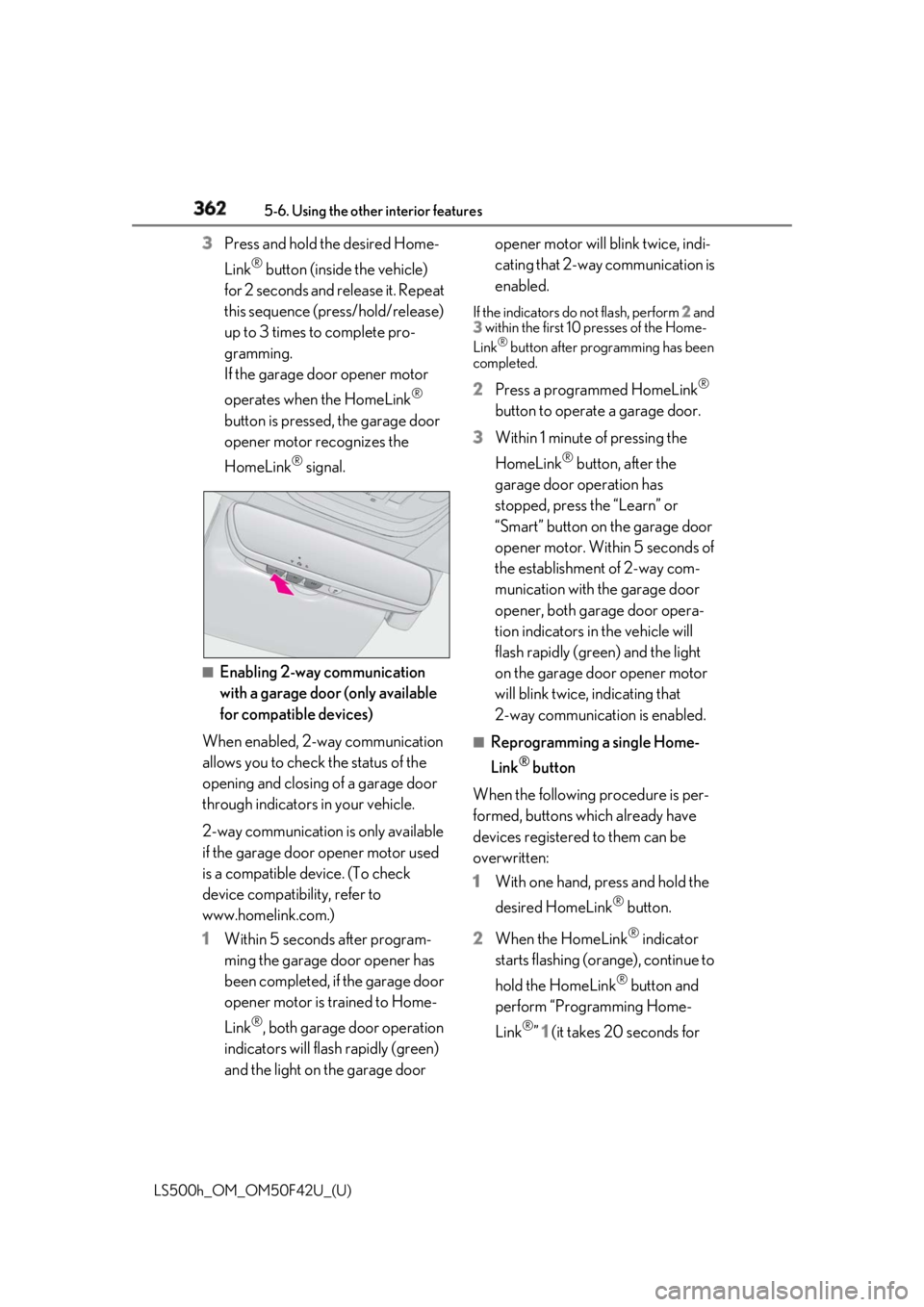
LS500h_OM_OM50F42U_(U) 3 Press and hold the desired Home-
Link ®
button (inside the vehicle)
for 2 seconds and release it. Repeat
this sequence (press/hold/release)
up to 3 times to complete pro-
gramming.
If the garage door opener motor
operates when the HomeLink ®
button is pressed, the garage door
opener motor recognizes the
HomeLink ®
signal.
■
Enabling 2-way communication
with a garage door (only available
for compatible devices)
When enabled, 2-way communication
allows you to check the status of the
opening and closing of a garage door
through indicators in your vehicle.
2-way communication is only available
if the garage door opener motor used
is a compatible device. (To check
device compatibility, refer to
www.homelink.com.)
1 Within 5 seconds after program-
ming the garage door opener has
been completed, if the garage door
opener motor is trained to Home-
Link ®
, both garage door operation
indicators will flash rapidly (green)
and the light on the garage door opener motor will blink twice, indi-
cating that 2-way communication is
enabled. If the indicators do not flash, perform 2 and
3 within the first 10 presses of the Home-
Link ®
button after programming has been
completed.
2 Press a programmed HomeLink ®
button to operate a garage door.
3 Within 1 minute of pressing the
HomeLink ®
button, after the
garage door operation has
stopped, press the “Learn” or
“Smart” button on the garage door
opener motor. Within 5 seconds of
the establishment of 2-way com-
munication with the garage door
opener, both garage door opera-
tion indicators in the vehicle will
flash rapidly (green) and the light
on the garage door opener motor
will blink twice, indicating that
2-way communication is enabled. ■
Reprogramming a single Home-
Link ®
button
When the following procedure is per-
formed, buttons which already have
devices registered to them can be
overwritten:
1 With one hand, press and hold the
desired HomeLink ®
button.
2 When the HomeLink ®
indicator
starts flashing (orange), continue to
hold the HomeLink ®
button and
perform “Programming Home-
Link ®
” 1 (it takes 20 seconds for
Page 363 of 528
3635-6. Using the other interior features
LS500h_OM_OM50F42U_(U) 5
Interior features the HomeLink ®
indicator to start
flashing). ■
Before programming●
Install a new battery in the transmitter.●
The battery side of the transmitter must
be pointed away from the HomeLink ®
.
Press the appropriate HomeLink ®
button. The HomeLink ®
indicator light
should turn on.
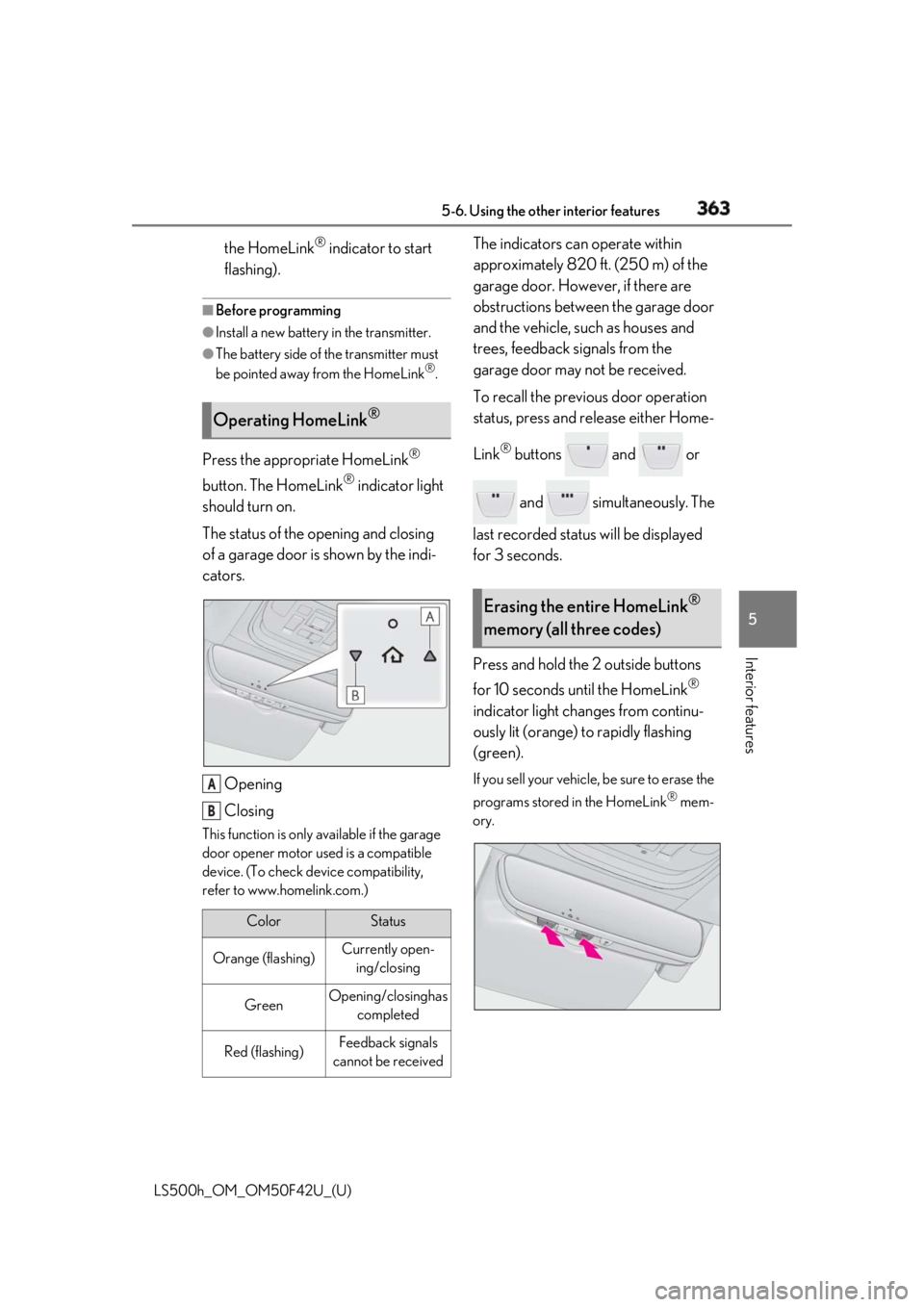
The status of the opening and closing
of a garage door is shown by the indi-
cators.
Opening
ClosingThis function is only available if the garage
door opener motor used is a compatible
device. (To check device compatibility,
refer to www.homelink.com.) The indicators can operate within
approximately 820 ft. (250 m) of the
garage door. However, if there are
obstructions between the garage door
and the vehicle, such as houses and
trees, feedback signals from the
garage door may not be received.
To recall the previous door operation
status, press and release either Home-
Link ®
buttons and or
and simultaneously. The
last recorded status will be displayed
for 3 seconds.
Press and hold the 2 outside buttons
for 10 seconds until the HomeLink ®
indicator light changes from continu-
ously lit (orange) to rapidly flashing
(green). If you sell your vehicle, be sure to erase the
programs stored in the HomeLink ®
mem-
ory.Operating HomeLink ®
Color Status
Orange (flashing) Currently open-
ing/closing
Green Opening/closing has
completed
Red (flashing) Feedback signals
cannot be receivedA
B Erasing the entire HomeLink ®
memory (all three codes)
Page 515 of 528
5151-1. What to do if... (Troubleshooting)
LS500h_OM_OM50F42U_(U) 515Alphabetical Index
Fuel consumption
Average fuel economy ..............................88
Current fuel consumption........................88
Fuel filler door
If the fuel filler door cannot be opened
......................................................................... 445
Refueling ..........................................................194
Fuel gauge ...................................................77, 81
Fuses ...................................................................414 G
Garage door opener .................................358
Gauges .........................................................77, 81
Gear Position................................................... 89
G-force............................................................... 89
Glove box ....................................................... 344
Glove box light ............................................. 345
H
Hands Free Power Trunk Lid .................... 115
Head restraints ...............................................144
Headlights
Adaptive Front-lighting System (AFS)
...........................................................................187
Automatic High Beam system............. 188
Light switch .................................................... 185
Replacing light bulbs.................................. 417
Head-up display.............................................. 92
Driving information display area........... 92
Driving support system display area .. 95
HUD (Head-up display) switch............ 94
Hybrid System Indicator ........................... 96
Navigation system-linked display ........ 92
Pop-up display............................................... 95
Settings .............................................................. 94
Heated steering wheel .............................. 336
Heaters
Front air conditioning system .............. 323
Heated steering wheel............................ 336
Outside rear view mirrors .................... 324
Rear air conditioning system ............... 333 Seat heaters ..................................................336
Height control
Electronically modulated air suspension
......................................................................... 300
High-voltage components ........................... 61
Hill-start assist control ............................... 303
Hood
Open............................................................... 385
Pop Up Hood.................................................38
Hooks
Coat hooks ...................................................352
Retaining hooks (floor mat) ..................... 22
Horn .................................................................... 147
HUD (Head-up display) switch ................ 94
Hybrid battery (traction battery)
Location ...............................................................61
Specification ................................................. 462
Warning message ........................................ 64
Hybrid battery (traction battery) air vents
............................................................................. 64
Hybrid system .................................................. 58
Emergency shut off system...................... 64
Energy monitor/consumption screen96
EV drive mode.............................................. 172
High voltage components .........................61
Hybrid system precautions........................61
If the hybrid system will not start ........ 443
Overheating .................................................454
Power (ignition) switch ............................ 168
Regenerative braking .................................59
Starting the hybrid system ...................... 168
Vehicle proximity noti fication system.60
Hybrid System Indicator............. 78, 83, 96
Hybrid transmission...................................... 174
M mode ............................................................179
Paddle shift switches ....................... 178, 179
Snow mode..................................................... 177
Hybrid vehicle driving tips ....................... 307
I
I/M test ............................................................ 382