suspension LEXUS LS500H 2018 Owners Manual
[x] Cancel search | Manufacturer: LEXUS, Model Year: 2018, Model line: LS500H, Model: LEXUS LS500H 2018Pages: 528, PDF Size: 10.8 MB
Page 39 of 528
391-1. For safe use
LS500h_OM_OM50F42U_(U) 1
For safety and security WARNING■
When the Pop Up Hood is operated●
Do not pull the hood lock release lever.
Doing so after the Pop Up Hood has
operated will further raise the hood
and may cause an injury. Do not drive
with the hood raised, as doing so may
block the driver’s vision, possibly caus-
ing an accident.●
Do not forcibly push down the hood.
As the popped up hood cannot be
lowered by hand, doing so may deform
the hood or cause an injury.●
If the Pop Up Hood has operated, have
it replaced by your Lexus dealer. If the
Pop Up Hood has operated, stop the
vehicle in a safe place and contact
your Lexus dealer.●
Do not touch the lifters immediately
after the Pop Up Hood has operated,
as the lifters may be hot and burn you.
NOTICE■
Pop Up Hood precautions●
Make sure to close the hood before
driving, as the system may not operate
properly if the hood is not fully closed.
●
Make sure that all 4 tires are of the
specified size and inflated to the speci-
fied tire pressure. If tires of a different
size are used, the system may not
operate properly.
●
If something has hit the area around
the front bumper, the sensors may be
damaged even if the Pop Up Hood has
not operated. Have the vehicle
inspected by your Lexus dealer.
●
Do not remove or repair the parts or
wiring of the Pop Up Hood, as doing
so may cause accidental operation or
prevent the system from operating
properly. If repair or replacement is
necessary, contact your Lexus dealer. ●
Do not remove such components as
the front bumper, hood or suspension,
or replace them with non-genuine
parts, as doing so may prevent the sys-
tem from operating properly. ●
Do not install anything to the front
bumper or hood, as doing so may pre-
vent the sensors fr om detecting an
impact correctly and prevent the sys-
tem from operating properly. ●
Do not close the hood with force or
apply load to the lifters, as doing so
may damage the lifters and prevent the
system from operating properly. ●
Do not modify the suspension, as
changes made to the vehicle height
may prevent the system from operat-
ing properly.
Page 90 of 528
90 2-1. Instrument cluster
LS500h_OM_OM50F42U_(U) will not be displayed on the multi-informa-
tion display. ( → P.94)
Select to enable selection of an audio
source or track on the meter using the
meter control switches.
Select to display the operational status
of the following systems:
LTA (Lane Tracing Assist) (if
equipped) ( → P.230)
LKA (Lane-Keeping Assist) (if
equipped) ( → P.240)
Dynamic radar cruise control with
full-speed range ( → P.250)
RSA (Road Sign Assist) (if
equipped) ( → P.247)■
Meter display settings that can be
changed
Language Select to change th e language displayed.
Units Select to change the units of measure dis-
played.
Speedometer display (except F
SPORT models) Select to set the display of the speedome-
ter to digital/analog/both digital and ana-
log.
Drive information 1/Drive informa- tion 2 Select to select up to 2 items ( → P.88) that
will be displayed on each Drive information
screen (Drive information 1 screen and
Drive information 2 sc reen) respectively.
Clock Select to switch between 12-hour display
and 24-hour display.
Pop-up display Select to enable/disable pop-up displays
for each relevant system.
Accent color Select to change the accent color on the
screen, such as the cursor color.
Tachometer setting Select to set the display of the Hybrid Sys-
tem Indicator or tachometer for each driv-
ing mode.
Rev indicator (F SPORT models) • Select to enable/disable the rev indica-
tor.
• Select to set the engine speed at which
the rev indicator (amber) will begin to be
displayed.
Rev peak (F SPORT models) Select to enable/disable the rev peak.
EV indicator Select to enable/disable the EV indicator.
Default setting Select to reset the meter display settings to
the default setting.
■
Vehicle functions and settings that
can be changed
→ P.481
■
Suspension of the settings display
●
Some settings cannot be changed while Audio system-linked display
Driving support system informa-
tion display
Settings display
Page 110 of 528
110 3-2. Opening, closing and locking the doors and trunk
LS500h_OM_OM50F42U_(U) ( → P.481)
■
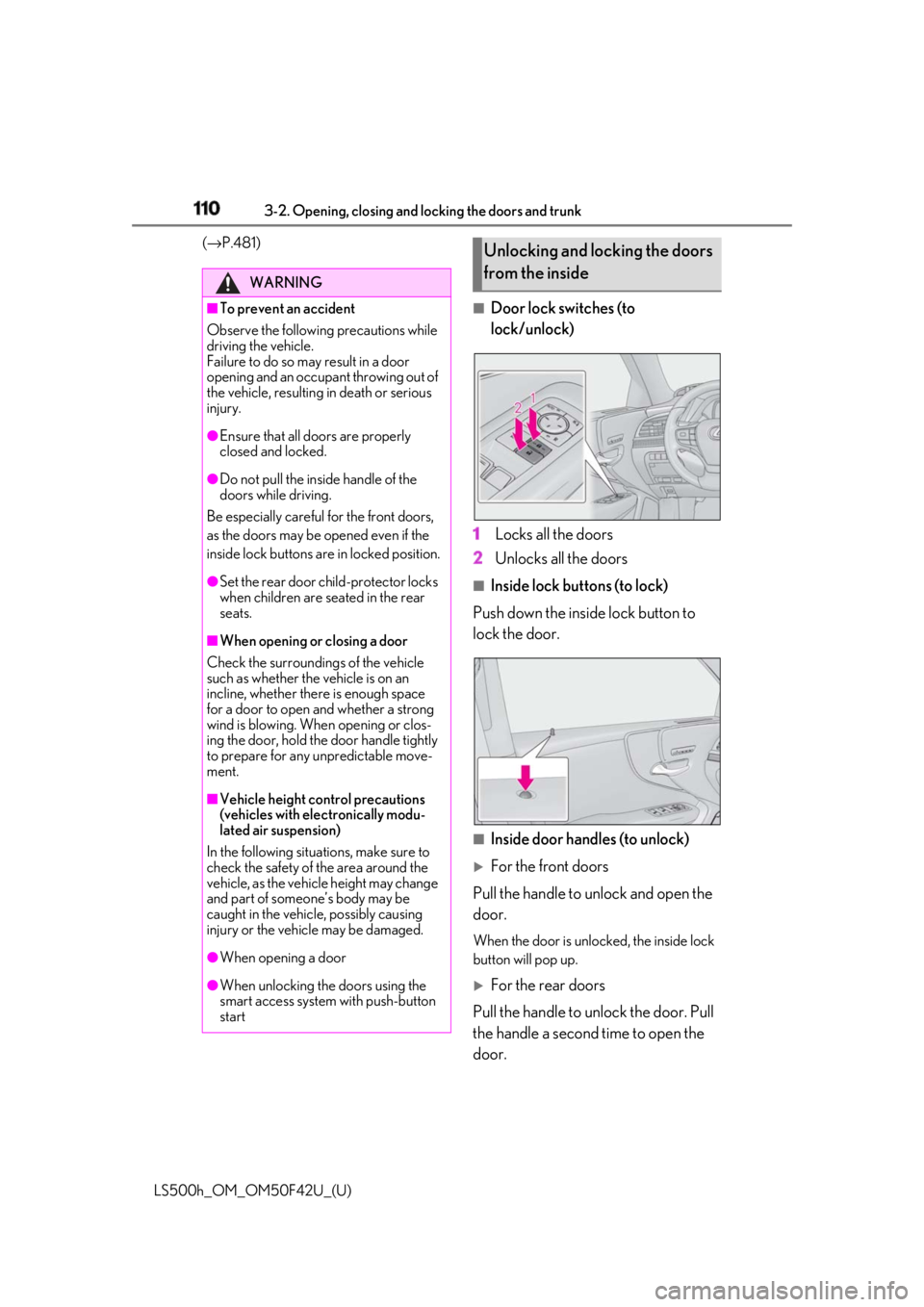
Door lock switches (to
lock/unlock)
1 Locks all the doors
2 Unlocks all the doors ■
Inside lock buttons (to lock)
Push down the inside lock button to
lock the door.
■
Inside door handles (to unlock)
For the front doors
Pull the handle to unlock and open the
door. When the door is unlo cked, the inside lock
button will pop up.
For the rear doors
Pull the handle to unlock the door. Pull
the handle a second time to open the
door.WARNING■
To prevent an accident
Observe the following precautions while
driving the vehicle.
Failure to do so may result in a door
opening and an occupant throwing out of
the vehicle, resulting in death or serious
injury. ●
Ensure that all doors are properly
closed and locked.●
Do not pull the inside handle of the
doors while driving.
Be especially careful for the front doors,
as the doors may be opened even if the
inside lock buttons are in locked position. ●
Set the rear door ch ild-protector locks
when children are seated in the rear
seats.■
When opening or closing a door
Check the surroundings of the vehicle
such as whether the vehicle is on an
incline, whether ther e is enough space
for a door to open and whether a strong
wind is blowing. When opening or clos-
ing the door, hold the door handle tightly
to prepare for any unpredictable move-
ment.
■
Vehicle height co ntrol precautions
(vehicles with electronically modu-
lated air suspension)
In the following situations, make sure to
check the safety of the area around the
vehicle, as the vehicle height may change
and part of someone’s body may be
caught in the vehicle, possibly causing
injury or the vehicle may be damaged.
●
When opening a door
●
When unlocking the doors using the
smart access system with push-button
start Unlocking and locking the doors
from the inside
Page 163 of 528
1634-1. Before driving
LS500h_OM_OM50F42U_(U) 4
Driving NOTICE■
When driving the vehicle●
Do not depress the accelerator and
brake pedals at the same time during
driving, as this may restrain the hybrid
system output.●
Do not use the accelerator pedal or
depress the accelerator and brake
pedals at the same time to hold the
vehicle on a hill.■
When parking the vehicle
Always set the parking brake, and shift
the shift position to P. Failure to do so
may cause the vehicle to move or the
vehicle may accelerate suddenly if the
accelerator pedal is accidentally
depressed. ■
Avoiding damage to vehicle parts●
Do not turn the steering wheel fully in
either direction and hold it there for an
extended period of time.
Doing so may damage the power
steering motor.●
When driving over bumps in the road,
drive as slowly as possible to avoid
damaging the wheels, underside of the
vehicle, etc.
■
If you get a flat tire while driving
A flat or damaged ti re may cause the fol-
lowing situations. Hold the steering
wheel firmly and gradually depress the
brake pedal to slow down the vehicle.
●
It may be difficult to control your vehi-
cle.
●
The vehicle will make abnormal
sounds or vibrations.
●
The vehicle will lean abnormally.
Information on what to do in case of a flat
tire ( → P.442) ■
When encountering flooded roads
Do not drive on a road that has flooded
after heavy rain etc. Doing so may cause
the following serious damage to the vehi-
cle: ●
Engine stalling ●
Short in electrical components ●
Engine damage caused by water
immersion
In the event that you drive on a flooded
road and the vehicle is flooded, be sure
to have your Lexus dealer check the fol-
lowing: ●
Brake function ●
Changes in quantity and quality of oil
and fluid used for the engine, hybrid
transmission, transfer (AWD models),
differential, etc. ●
Lubricant condition for the propeller
shaft, bearings and suspension joints
(where possible), and the function of
all joints, bearings, etc.
If the shift control system is damaged by
flooding, it may not be possible to shift
the shift position to P, or from P to other
positions. In this case, contact your Lexus
dealer.
■
When parking the vehicle
Always set the parking brake, and shift
the shift position to P. Failure to do so
may cause the vehicle to move or the
vehicle may accelerate suddenly if the
accelerator pedal is accidentally
depressed.
Page 210 of 528

210 4-5. Using the driving support systems
LS500h_OM_OM50F42U_(U) ■
Active steering assist
If the system determines that the possi-
bility of a collision with an object, such
as a guardrail, or pedestrian is high,
even though the brakes are applied,
and that the collision may be avoidable
through steering control, the system
will steer the vehicle automatically to
help avoid the collision or help reduce
the impact of the collision. ■
Pre-collision seat belts (front seat
only)
If the system determines that the possi-
bility of a frontal collision is high, the
system will retract the seat belts. Addi-
tionally, the system may retract the seat
belts if the brakes are applied suddenly
or control of the vehicle is lost. ■
Pre-collision seatbacks (front pas-
senger’s seat / power rear seat [if
equipped])
If the system determines that the possi-
bility of a frontal collision is high, it may
move the seatbacks of the front pas-
senger’s seat and power rear seats to
the upright position automatically, if
reclined. If a seat is being ad justed, it may not be
moved by the pre-collision seat function.
■
Suspension control
When the system determines that the
possibility of a frontal collision is high,
the Adaptive Variable Suspension Sys-
tem ( → P.303) will control the damp-
ing force of the shock absorbers to
help maintain an appropriate vehicle
posture. ■
Steering control
When the system determines that the
possibility of a frontal collision is high
and the driver is op erating the steering
wheel, the LDH system ( → P.303) will
control the turning angle of the front
and rear wheels and effort necessary
to turn the steering wheel to help
enhance steering responsiveness. WARNING■
Limitations of the pre-collision system ●
The driver is solely responsible for safe
driving. Always drive safely, taking
care to observe your surroundings.
Do not use the pre-collision system
instead of normal braking operations
under any circumstances. This system
will not prevent collisions or lessen col-
lision damage or injury in every situa-
tion. Do not overly rely on this system.
Failure to do so may lead to an acci-
dent, resulting in death or serious
injury. ●
Although this system is designed to
help avoid a collision or help reduce
the impact of the collision, its effective-
ness may change according to various
conditions, therefore the system may
not always be able to achieve the same
level of performance.
Read the following conditions care-
fully. Do not overly rely on this system
and always drive carefully.
• Conditions under which the system
may operate even if there is no possi-
bility of a collision: → P.214
• Conditions under which the system
may not operate properly: → P.216
●
Do not attempt to test the operation of
the pre-collision system yourself, as the
system may not operate properly, pos-
sibly leading to an accident.
Page 220 of 528
220 4-5. Using the driving support systems
LS500h_OM_OM50F42U_(U) ■
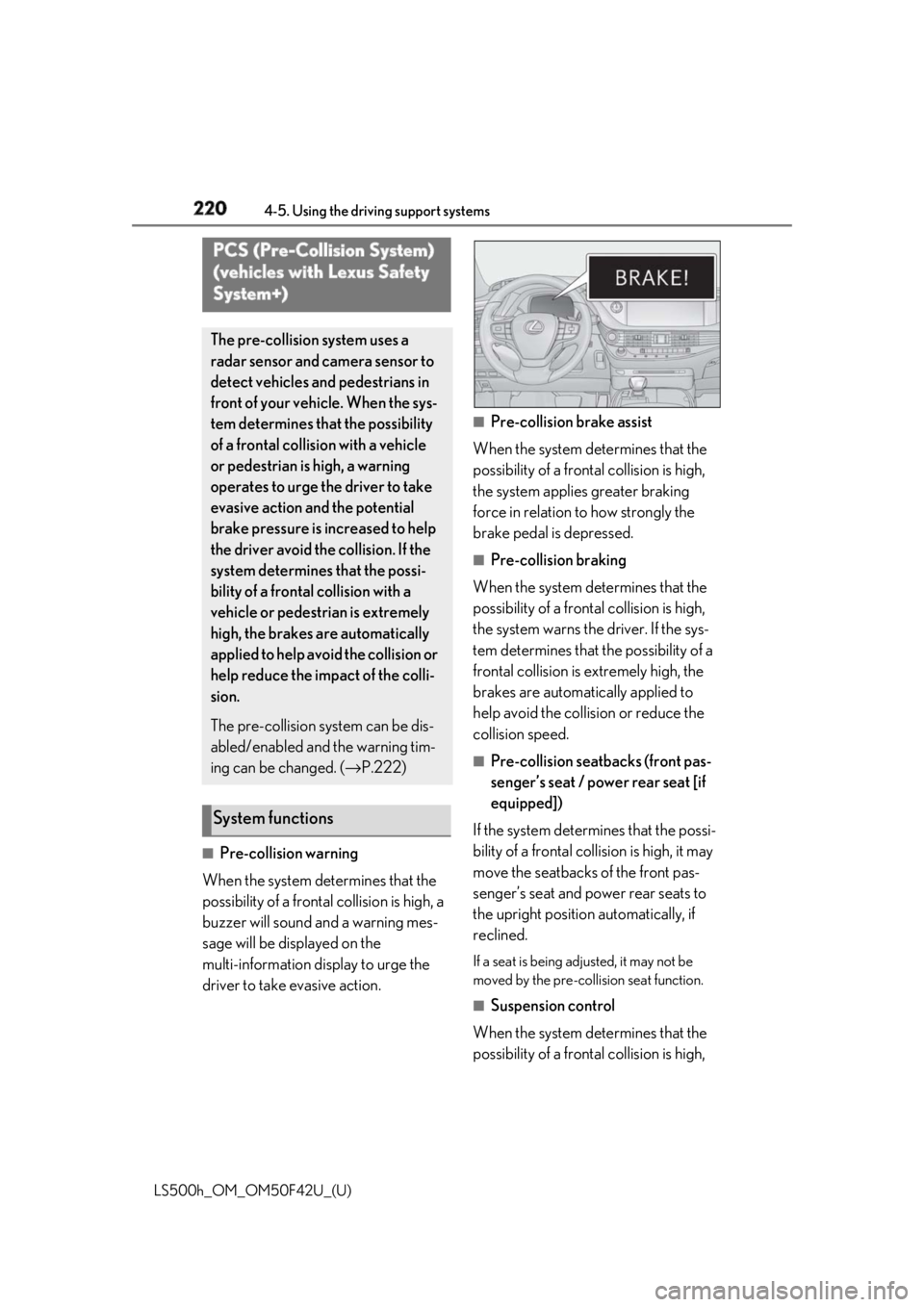
Pre-collision warning
When the system determines that the
possibility of a frontal collision is high, a
buzzer will sound and a warning mes-
sage will be displayed on the
multi-information display to urge the
driver to take evasive action. ■
Pre-collision brake assist
When the system determines that the
possibility of a frontal collision is high,
the system applies greater braking
force in relation to how strongly the
brake pedal is depressed. ■
Pre-collision braking
When the system determines that the
possibility of a frontal collision is high,
the system warns the driver. If the sys-
tem determines that the possibility of a
frontal collision is extremely high, the
brakes are automatically applied to
help avoid the collision or reduce the
collision speed. ■
Pre-collision seatbacks (front pas-
senger’s seat / power rear seat [if
equipped])
If the system determines that the possi-
bility of a frontal collision is high, it may
move the seatbacks of the front pas-
senger’s seat and power rear seats to
the upright position automatically, if
reclined. If a seat is being adjusted, it may not be
moved by the pre-collis ion seat function.
■
Suspension control
When the system determines that the
possibility of a frontal collision is high, PCS (Pre-Collision System)
(vehicles with Lexus Safety
System+) The pre-collision system uses a
radar sensor and camera sensor to
detect vehicles and pedestrians in
front of your vehicle. When the sys-
tem determines that the possibility
of a frontal collision with a vehicle
or pedestrian is high, a warning
operates to urge the driver to take
evasive action and the potential
brake pressure is increased to help
the driver avoid the collision. If the
system determines that the possi-
bility of a frontal collision with a
vehicle or pedestrian is extremely
high, the brakes are automatically
applied to help avoid the collision or
help reduce the impact of the colli-
sion.
The pre-collision system can be dis-
abled/enabled and the warning tim-
ing can be changed. ( → P.222)
System functions
Page 221 of 528
2214-5. Using the driving support systems
LS500h_OM_OM50F42U_(U) 4
Driving the Adaptive Variable Suspension Sys-
tem ( → P.303) will control the damp-
ing force of the shock absorbers to
help maintain an appropriate vehicle
posture. ■
Steering control
When the system determines that the
possibility of a frontal collision is high
and the driver is operating the steering
wheel, the LDH system ( → P.303) will
control the turning angle of the front
and rear wheels and effort necessary
to turn the steering wheel to help
enhance steering responsiveness. WARNING■
Limitations of the pre-collision system●
The driver is solely responsible for safe
driving. Always drive safely, taking
care to observe your surroundings.
Do not use the pre-collision system
instead of normal braking operations
under any circumstances. This system
will not prevent collisions or lessen col-
lision damage or injury in every situa-
tion. Do not overly rely on this system.
Failure to do so may lead to an acci-
dent, resulting in death or serious
injury.
●
Although this system is designed to
help avoid a collision or help reduce
the impact of the coll ision, its effective-
ness may change according to various
conditions, therefore the system may
not always be able to achieve the same
level of performance.
Read the following conditions care-
fully. Do not overly rely on this system
and always drive carefully.
• Conditions under which the system
may operate even if there is no possi-
bility of a collision: → P.223
• Conditions under which the system
may not operate properly: → P.225 ●
Do not attempt to test the operation of
the pre-collision system yourself, as the
system may not operate properly, pos-
sibly leading to an accident. ■
Pre-collision braking ●
When the pre-collision braking func-
tion is operating, a large amount of
braking force will be applied. ●
If the vehicle is stopped by the opera-
tion of the pre-collision braking func-
tion, the pre-collision braking function
operation will be canceled after
approximately 2 seco nds. Depress the
brake pedal as necessary. ●
The pre-collision braking function may
not operate if certain operations are
performed by the driver. If the acceler-
ator pedal is being depressed strongly
or the steering wheel is being turned,
the system may determine that the
driver is taking evasive action and pos-
sibly prevent the pre-collision braking
function from operating. ●
In some situations, while the pre-colli-
sion braking function is operating,
operation of the function may be can-
celed if the accelerator pedal is
depressed strongly or the steering
wheel is turned and the system deter-
mines that the driver is taking evasive
action.
●
If the brake pedal is being depressed,
the system may determine that the
driver is taking evasive action and pos-
sibly delay the operat ion timing of the
pre-collision braking function.
■
When to disable the pre-collision sys-
tem
In the following situations, disable the
system, as it may not operate properly,
possibly leading to an accident resulting
in death or serious injury:
●
When the vehicle is being towed
●
When your vehicle is towing another
vehicle
Page 234 of 528
234 4-5. Using the driving support systems
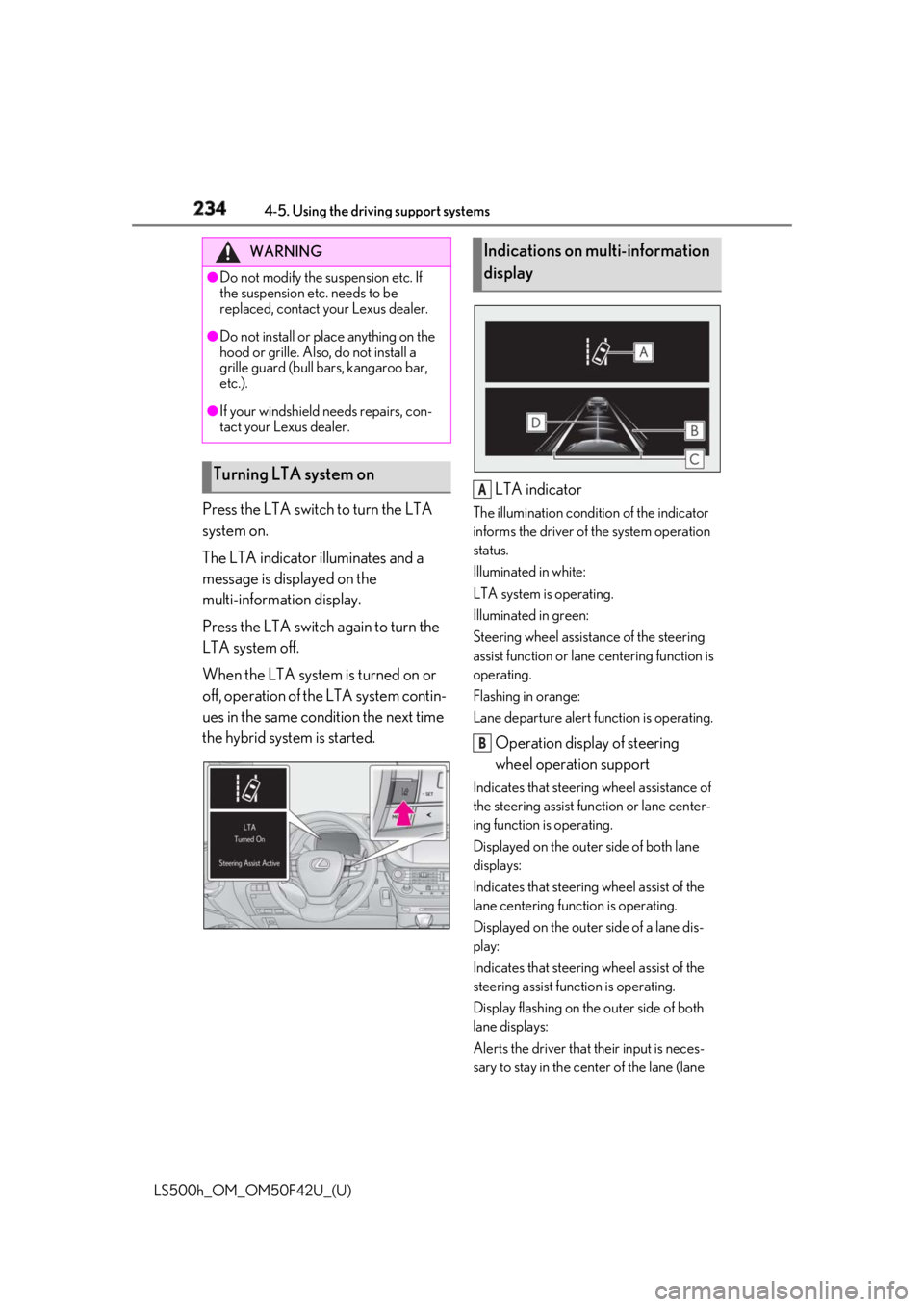
LS500h_OM_OM50F42U_(U) Press the LTA switch to turn the LTA
system on.
The LTA indicator illuminates and a
message is displayed on the
multi-information display.
Press the LTA switch again to turn the
LTA system off.
When the LTA system is turned on or
off, operation of the LTA system contin-
ues in the same condition the next time
the hybrid system is started. LTA indicator The illumination condition of the indicator
informs the driver of the system operation
status.
Illuminated in white:
LTA system is operating.
Illuminated in green:
Steering wheel assistan ce of the steering
assist function or lane centering function is
operating.
Flashing in orange:
Lane departure alert function is operating.
Operation display of steering
wheel operation support Indicates that steering wheel assistance of
the steering assist function or lane center-
ing function is operating.
Displayed on the outer side of both lane
displays:
Indicates that steering wheel assist of the
lane centering function is operating.
Displayed on the outer side of a lane dis-
play:
Indicates that steering wheel assist of the
steering assist func tion is operating.
Display flashing on the outer side of both
lane displays:
Alerts the driver that their input is neces-
sary to stay in the center of the lane (lane WARNING●
Do not modify the suspension etc. If
the suspension etc. needs to be
replaced, contact your Lexus dealer.●
Do not install or place anything on the
hood or grille. Also, do not install a
grille guard (bull bars, kangaroo bar,
etc.).●
If your windshield needs repairs, con-
tact your Lexus dealer.
Turning LTA system on Indications on multi-information
display
A
B
Page 242 of 528
242 4-5. Using the driving support systems
LS500h_OM_OM50F42U_(U) Press the LKA switch to turn the LKA
system on.WARNING■
Before using LKA system
Do not rely solely upon the LKA system.
The LKA system does not automatically
drive the vehicle or reduce the amount of
attention that must be paid to the area in
front of the vehicle. The driver must
always assume full responsibility for driv-
ing safely by paying careful attention to
the surrounding conditions and operat-
ing the steering wheel to correct the path
of the vehicle. Also, the driver must take
adequate breaks when fatigued, such as
from driving for a long period of time.
Failure to perform appropriate driving
operations and pay careful attention may
lead to an accident, resulting in death or
serious injury. ■
To avoid operating LKA system by
mistake
When not using the LKA system, use the
LKA switch to turn the system off. ■
Situations unsuitab le for LKA system
Do not use the LKA system in the follow-
ing situations.
The system may not operate properly
and lead to an accident, resulting in
death or serious injury.
●
A spare tire, tire chains, etc. are
equipped.
●
When the tires have been excessively
worn, or when the tire inflation pres-
sure is low.
●
Tires which differ by structure, manu-
facturer, brand or tread pattern are
used.
●
Objects or patterns that could be mis-
taken for white (yellow) lines are pres-
ent on the side of th e road (guardrails,
curbs, reflective poles, etc.).
●
Vehicle is driven on a snow-covered
road.
●
White (yellow) lines are difficult to see
due to rain, snow, fog, dust, etc. ●
Asphalt repair marks, white (yellow)
line marks, etc. are present due to road
repair. ●
Vehicle is driven in a temporary lane or
restricted lane due to construction
work. ●
Vehicle is driven on a road surface
which is slippery due to rainy weather,
fallen snow, freezing, etc. ●
Vehicle is driven in traffic lanes other
than on highways and freeways. ●
Vehicle is driven in a construction
zone. ■
Preventing LKA system malfunctions
and operations performed by mistake ●
Do not modify the headlights or place
stickers, etc. on the surface of the
lights. ●
Do not modify the suspension etc. If
the suspension etc. needs to be
replaced, contact your Lexus dealer. ●
Do not install or place anything on the
hood or grille. Also, do not install a
grille guard (bull bars, kangaroo bar,
etc.). ●
If your windshield needs repairs, con-
tact your Lexus dealer.
Turning LKA system on
Page 268 of 528
268 4-5. Using the driving support systems
LS500h_OM_OM50F42U_(U) ■
The system can be operated when ●
The power switch is in ON mode. ●
Intuitive parking assist function is on. ●
The vehicle speed is less than about 6
mph (10 km/h).
●
A shift position other than P is selected.
■
Setting the buzzer volume
The buzzer volume can be adjusted on the
multi-information display. ( → P.266)
■
If “Parking Assist Unavailable Clean
Parking Assist Sensor” is displayed on
the multi-information display
A sensor may be covered with ice, snow,
dirt, etc. Remove the ice, snow, dirt, etc.,
from the sensor to return the system to nor-WARNING■
When using the intuitive parking
assist
Observe the following precautions.
Failing to do so may result in the vehicle
being unable to be driven safely and pos-
sibly cause an accident. ●
Do not use the sensor at speeds in
excess of 6 mph (10 km/h).●
The sensors’ detection areas and reac-
tion times are limited. When moving
forward or reversing, check the areas
surrounding the vehicle (especially the
sides of the vehicle) for safety, and
drive slowly, using the brake to control
the vehicle’s speed.●
Do not install accessories within the
sensors’ detection areas.●
The area directly under the bumpers is
not detected.■
When to disable the function
In the following situations, disable the
function as it may operate even though
there is no possibility of a collision. ●
The vehicle is equipped with a fender
pole or wireless antenna.●
The front or rear bu mper or a sensor
receives a strong impact.●
A non-genuine Lexus suspension
(lowered suspension, etc.) is installed.●
Towing eyelets are installed.●
A backlit licence pl ate is installed.
■
When using intuitive parking assist
In the following situations, the system
may not function correctly due to a sen-
sor malfunction, etc. Have the vehicle
checked by your Lexus dealer.
●
The intuitive parking assist operation
display flashes or shows continuously,
and a buzzer sounds when no objects
are detected. ●
If the area around a sensor collides
with something, or is subjected to
strong impact. ●
If the bumper or grille collides with
something. ●
If the display flashes or is displayed
continuously and a buzzer does not
sound, except when the mute function
has been turned on. ●
If a display error oc curs, first check the
sensor.
If the error occurs even when there is
no ice, snow or mud on the sensor, it is
likely that the sensor is malfunctioning.■
Notes when washing the vehicle
Do not apply intensive bursts of water or
steam to the sensor area.
Doing so may result in the sensor mal-
functioning. ●
When using a high pressure washer to
wash the vehicle, do not spray the sen-
sors directly, as doing so may cause a
sensor to malfunction. ●
When using steam to clean the vehicle,
do not direct steam too close to the
sensors as doing so may cause a sen-
sor to malfunction.