ECO mode LEXUS LS500H 2019 User Guide
[x] Cancel search | Manufacturer: LEXUS, Model Year: 2019, Model line: LS500H, Model: LEXUS LS500H 2019Pages: 523, PDF Size: 15.79 MB
Page 93 of 523

932-1. Instrument cluster
LS500h_OM_(U)_1809
2
Vehicle status information and indicators
■G-force (F SPORT models)
Displays lateral G-forces on the vehi-
cle. Also displays, around the periph-
ery of the G-force display, the left and
right steering amount, accelerator
pedal input, and brake fluid pressure.
Acceleration G-force on the vehi-
cle
Current G-force value (analyzed
value of front/rear and left/right
G-forces)
Record of the maximum G-forces
Accelerator pedal input
Brake fluid pressure
Steering amount
This display is intended for use as a guide-
line. Depending on factors such as the road
surface condition, temperature and vehicle
speed, the display may not show the actual
condition of the vehicle.
Resetting the record of maximum
G-forces
Press and hold of the meter control
switch to reset the record.
Peak hold function
If lateral G-forces of 0.5 G or greater are
generated, the G-forc e value display will
turn amber and be held for 2 seconds.
■Gear Position (F SPORT models)
Displays the current shift range or gear
position when the shift position is in D
or M.
■Units (F SPORT models)
The units of measure used can be
changed while driving.
Unlike the units sett ing performed on the
settings display, th e units setting per-
formed on the drive information display
can be changed while driving.
Select to display the following naviga-
tion system-linked information.
Route guidance to destination
Compass display (heading-up dis-
play)
■Route guidance to destination display
When the route guidance to destination
display is enabled on th e head-up display, it
will not be displayed on the multi-informa-
tion display. ( P.98)
Select to enable se lection of an audio
source or track on the meter using the
meter control switches.
Select to display the operational status
of the following systems:
A
B
C
D
E
F
Navigation system-linked dis-
play (if equipped)
Audio system-linked display
Driving support system informa-
tion display
Page 97 of 523

972-1. Instrument cluster
LS500h_OM_(U)_1809
2
Vehicle status information and indicators
Displays the following items:
• Speedometer
• Shift position/shift range/gear position (
P.176)
Hybrid System Indicator/tachometer display area ( P.100)
HUD (Head-up display) switch
■Head-up display will operate when
The power switch is in ON mode.
■When using the head-up display
The head-up display may seem dark or hard
to see when viewed through sunglasses,
especially polarized su nglasses. Adjust the
brightness of the head-up display or
remove your sunglasses.
■Street name display
Only street names whic h are included in the
map data will be displayed.
■Outside temperature display
●When the ambient temperature is
approximately 37°F (3°C) or lower, the
low outside temperature indicator will
flash for approximately 10 seconds and
the outside temperature display will turn
off. In this case, the display will be dis-
played again when the outside tempera-
ture becomes approximately 41°F (5°C)
or higher.
●In the following situations, the correct
outside temperature may not be dis-
played, or the display may take longer
than normal to change:
• When stopped, or driving at low speeds
(less than 12 mph [20 km/h])
• When the outside temperature has changed suddenly (at the entrance/exit of
a garage, tunnel, etc.)
●When “--” or “E” is displayed, the system
may be malfunctioning. Take your vehicle
to your Lexus dealer.
F
G
WARNING
■When using the head-up display
●Check that the position and brightness
of the head-up display image does not
interfere with safe driving. Incorrect
adjustment of the image’s position or
brightness may obstruct the driver’s
view and lead to an accident, resulting
in death or serious injury.
●Do not continuously look at the
head-up display while driving as you
may fail to see pedestrians, objects on
the road, etc. ahead of the vehicle.
NOTICE
■Head-up display projector
●Do not place any drinks near the
head-up display projector. If the pro-
jector gets wet, electrical malfunctions
may result.
●Do not place anything on or put stick-
ers onto the head-up display projector.
Doing so could interrupt head-up dis-
play indications.
●Do not touch the inside of the head-up
display projector or thrust sharp edges
or the like into the projector.
Doing so could cause mechanical mal-
functions.
Page 98 of 523

982-1. Instrument cluster
LS500h_OM_(U)_1809
■Enabling/disabling the head-up dis-
play
Press the HUD switch.
■Changing settings of the head-up
display
The following settings can be changed
on of the multi-information display.
( P.479)
Brightness and vertical position of
the head-up display
Select to adjust the brightness or vertical
position of the head-up display.
Hybrid System Indicator/tachome-
ter
Select to display the Hybrid System Indica-
tor, tachometer or no content.
Display content
Select to enable/dis able the following
items:
• Route guidance to destination/street
name
• Driving support system display
*
• Compass (heading-up display)
• Audio system operation status
*: Make sure to enable this display when using the driving support systems
Display angle
Select to adjust the angle of the head-up
display.
■Enabling/disabling of the head-up dis-
play
If the head-up display is disabled, it will
remain disabled when the power switch is
turned off then back to ON mode.
■Display brightness
The brightness of the head-up display can
be adjusted on of the multi-information
display. Also, it is automatically adjusted
according to the ambient brightness.
■Head-up display automatic position
adjustment
If the display position is recorded into mem-
ory, the head-up display will be automati-
cally adjusted to th e desired position.
( P.142)
■When the 12-volt battery is discon-
nected
The customize settings of the head-up dis-
play will be reset.
Using the head-up display
WARNING
■Caution for changing settings of the
head-up display
As the hybrid system needs to be operat-
ing while changing th e settings of the
head-up display, ensure that the vehicle
is parked in a place with adequate venti-
lation. In a closed area such as a garage,
exhaust gases including harmful carbon
monoxide (CO) may collect and enter
the vehicle. This may lead to death or a
serious health hazard.
NOTICE
■When changing the settings of the
head-up display
To prevent 12-volt battery discharge,
ensure that the hybrid system is operat-
ing while the changing the settings of the
head-up display.
Page 103 of 523

1032-1. Instrument cluster
LS500h_OM_(U)_1809
2
Vehicle status information and indicators
Multi-information display Low
High
These images are examples only, and may
vary slightly from actual conditions.
■Trip information
Press the “MENU” button on the
Remote Touch, then select on the
menu screen.
If a screen other than “Trip Information”
is displayed, select “Trip Information”.
Resetting the consumption data
Fuel consumption in the past 15
minutes
Current fuel consumption
Regenerated energy in the past 15
minutes
One symbol indicates 50 Wh. Up to 5
symbols are shown.
Average vehicle speed since the
hybrid system was started.
Elapsed time since the hybrid sys-
tem was started.
Cruising range
Average fuel consumption for the past
15 minutes is divided by color into past
averages and averages attained since
the power switch was last turned to
ON mode. Use the displayed average
fuel consumption as a reference.
The image is an example only, and may
vary slightly from actual conditions.
■History
Press the “MENU” button on the
Remote Touch, then select on the
menu screen.
If a screen other than “History” is dis-
played, select “History”.
Best recorded fuel consumption
Latest fuel consumption
Previous fuel consumption record
Resetting the history data
Updating the latest fuel consump-
tion data
Consumption
A
B
A
B
C
D
E
F
G
A
B
C
D
E
Page 109 of 523
1093-1. Key information
LS500h_OM_(U)_1809
3
Before driving
●To reduce key battery depletion when the
electronic key is to not be used for long
periods of time, set the electronic key to
the battery-saving mode. ( P.125)
●As the electronic ke y always receives
radio waves, the battery will become
depleted even if the electronic key is not
used. The following symptoms indicate
that the electronic key battery may be
depleted. Replace the battery when nec-
essary.
• The smart access system with push-but- ton start or the wireless remote control
does not operate.
• The detection area becomes smaller.
•The LED indicator on the key surface does not turn on.
●To avoid serious deterioration, do not
leave the electronic ke y within 3 ft. (1 m)
of the following electr ical appliances that
produce a magnetic field:
•TVs
• Personal computers
• Cellular phones, cordless phones and battery chargers
• Recharging cellular phones or cordless
phones
• Table lamps
• Induction cookers
■Replacing the battery
P.409
■Confirmation of the number of regis-
tered keys
The number of keys already registered to
the vehicle can be confirmed. Ask your
Lexus dealer for details.
■If “A New Key has been Registered
Contact Your Dealer for Details” is
shown on the multi-information display
This message will be displayed each time
the driver’s door is opened when the doors
are unlocked from the outside for approxi-
mately 10 days after a new electronic key
has been registered.
If this message is disp layed but you have not
had a new electronic key registered, ask
your Lexus dealer to check if an unknown
electronic key (other than those in your
possession) has been registered.
NOTICE
■To prevent key damage
●Do not drop the keys, subject them to
strong shocks or bend them.
●Do not expose the keys to high tem-
peratures for a long period of time.
●Do not get the keys wet or wash them
in an ultrasonic washer etc.
●Do not attach metallic or magnetic
materials to the keys or place the keys
close to such materials.
●Do not disassemble the keys.
●Do not attach a sticker or anything else
to the surface of the electronic key.
●Do not place the keys near objects that
produce magnetic fields, such as TVs,
audio systems and induction cookers,
or medical electrical equipment, such
as low-frequency therapy equipment.
■Carrying the electronic key on your
person
Carry the electronic key 3.9 in. (10 cm)
or more away from electric appliances
that are turned on. Radio waves emitted
from electric applianc es within 3.9 in. (10
cm) of the electronic key may interfere
with the key, causing the key to not func-
tion properly.
■In case of a smart access system with
push-button start malfunction or
other key-rela ted problems
P.443
■When an electronic key is lost
P.442
■Handling the card key (if equipped)
●Do not apply excess force when insert-
ing the mechanical key into the card
key. Doing so may damage the card
key.
Page 110 of 523
1103-1. Key information
LS500h_OM_(U)_1809
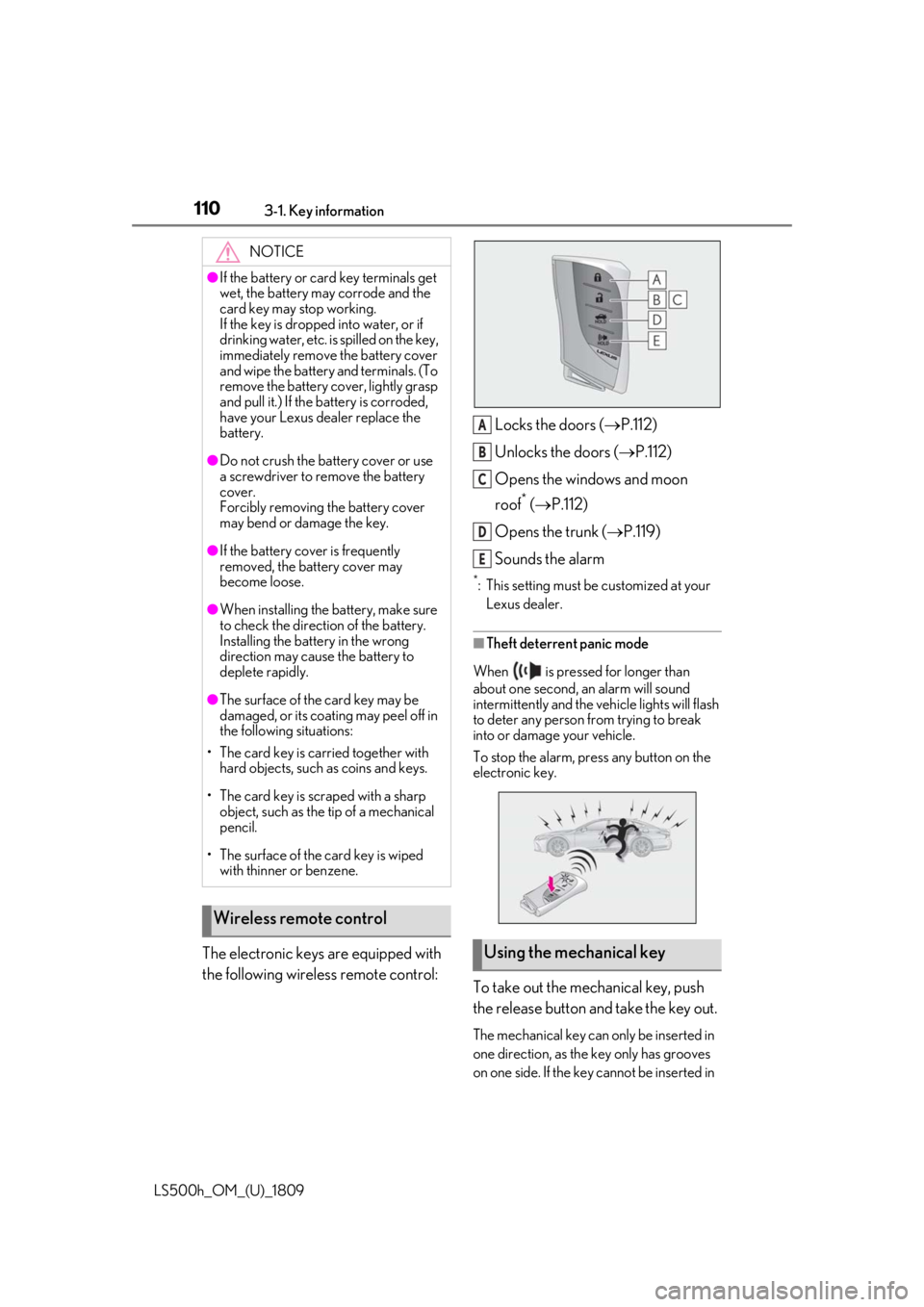
The electronic keys are equipped with
the following wireless remote control:Locks the doors (
P.112)
Unlocks the doors ( P.112)
Opens the windows and moon
roof
* ( P.112)
Opens the trunk ( P.119)
Sounds the alarm
*: This setting must be customized at your Lexus dealer.
■Theft deterrent panic mode
When is pressed for longer than
about one second, an alarm will sound
intermittently and the vehicle lights will flash
to deter any person from trying to break
into or damage your vehicle.
To stop the alarm, press any button on the
electronic key.
To take out the mechanical key, push
the release button and take the key out.
The mechanical key can only be inserted in
one direction, as the key only has grooves
on one side. If the key cannot be inserted in
NOTICE
●If the battery or card key terminals get
wet, the battery may corrode and the
card key may stop working.
If the key is dropped into water, or if
drinking water, etc. is spilled on the key,
immediately remove the battery cover
and wipe the battery and terminals. (To
remove the battery co ver, lightly grasp
and pull it.) If the battery is corroded,
have your Lexus dealer replace the
battery.
●Do not crush the battery cover or use
a screwdriver to remove the battery
cover.
Forcibly removing the battery cover
may bend or damage the key.
●If the battery cover is frequently
removed, the battery cover may
become loose.
●When installing the ba ttery, make sure
to check the direction of the battery.
Installing the battery in the wrong
direction may cause the battery to
deplete rapidly.
●The surface of the card key may be
damaged, or its coating may peel off in
the following situations:
• The card key is carried together with hard objects, such as coins and keys.
• The card key is scraped with a sharp object, such as the tip of a mechanical
pencil.
• The surface of the card key is wiped with thinner or benzene.
Wireless remote control
Using the mechanical key
A
B
C
D
E
Page 115 of 523

1153-2. Opening, closing and locking the doors and trunk
LS500h_OM_(U)_1809
3
Before driving
When the door is unlocked, the inside lock
button will pop up.
■Locking the front doors from the outside
without a key
1 Push down the inside lock button.
2 Close the door.
The door cannot be locked if the power
switch is in ACCESSORY or ON mode, or
the electronic key is le ft inside the vehicle.
However, the key may not be detected cor-
rectly and the door may be locked.
■Door closer
In the event that a door is left slightly open,
the door closer will automatically close it to
the fully closed position.
●The door closer will operate regardless
of the power switch mode.
●The door closer will not function if the
door has been clos ed while pulling the
inside or outside door handle.
●The door can be opened by pulling the
inside or outside door handle, even when
the door closer is operating (except
when the lock button is in the lock posi-
tion or the child-protector lock is set).
●A motor sound may be heard for several
seconds after the door closer closes the
door. This does not indicate a malfunc-
tion.
■Open door warning buzzer
If a door or the trunk is not fully closed, a
buzzer will sound when the vehicle speed
reaches 3 mph (5 km/h).
The open door(s) or trunk is indicated on
the multi-information display.
The door cannot be opened from
inside the vehicle when the lock is set.
1 Unlock
WARNING
■Door closer
In the event that a d oor is left slightly
open, the door closer will automatically
close it to the fully closed position. It
takes several second s before the door
easy closer begins to operate.
If the child-protector lock is set, the door
closer will not stop during operation even
if an attempt is made to open the door
from inside the vehicle. Be careful not to
catch fingers or anything else in the door.
Failure to do so may result in serious
injury.
NOTICE
■To prevent door closer malfunction
Do not frequently repeat opening and
closing of doors, or apply excessive force
to a door while the door closer is operat-
ing.
Rear door child-protector lock
Page 118 of 523

1183-2. Opening, closing and locking the doors and trunk
LS500h_OM_(U)_1809
■Trunk opener switch
Press the trunk opener switch.
The trunk lid will fully open.
WARNING
●On an incline, the trunk lid may sud-
denly shut after it opens automatically.
Make sure the trunk lid is fully open
and secure before using the trunk.
●In the following situations, the power
trunk opener and closer may detect an
abnormality and automatic operation
may be stopped. In this case, the trunk
lid has to be operated manually. Take
extra care in this situation, as the
stopped trunk lid ma y suddenly shut,
causing an accident.
• When the trunk lid contacts an obsta- cle
• When the 12-volt battery voltage sud- denly drops, such as when the power
switch is turned to ON mode or the
hybrid system is started during auto-
matic operation
●Do not attach any accessories other
than genuine Lexus parts to the trunk
lid. The power trunk opener and closer
may not operate, caus ing itself to mal-
function, or the trun k lid may suddenly
shut again after it is opened.
■Hands Free Power Trunk Lid (if
equipped)
Observe the following precautions.
Failure to do so may cause serious injury.
●Exhaust gasses cause the exhaust
pipes to become quite hot. When
operating the Hands Free Power Trunk
Lid, be careful not to touch the exhaust
pipe.
●Do not operate the Hands Free Power
Trunk Lid if there is little space under
the rear bumper.
■Jam protection function
Observe the following precautions.
Failure to do so may cause serious injury.
●Never use any part of your body to
intentionally activate the jam protec-
tion function.
●The jam protection function may not
work if something gets caught just
before the trunk lid fully closes. Be
careful not to catch fingers or anything
else in the trunk lid.
●The jam protection function may not
work depending on the shape of the
object that is caught. Be careful not to
catch fingers or anything else.
NOTICE
■To prevent trunk easy closer malfunc-
tions
Do not apply force to the trunk lid while
the trunk easy closer is operating.
■To prevent damage to the power
trunk opener and closer
●Make sure that there is no luggage or
snow on the trunk lid before operating
the power trunk opener and closer. In
addition, make sure that there is no ice
between the trunk lid and frame that
prevents movement of the trunk lid.
Operating the power trunk opener
and closer when excessive load is
present on the trunk lid may cause a
malfunction.
●Do not apply excessive force to the
trunk lid while the power trunk opener
and closer is operating.
Opening/closing the trunk
Page 120 of 523
1203-2. Opening, closing and locking the doors and trunk
LS500h_OM_(U)_1809
within 1 second.
• The trunk lid will not start operating while a foot is detected under the
rear bumper.
• Operate the Hands Free Power Trunk Lid without contacting the
rear bumper with your foot.
• If another electronic key is in the cabin or trunk, it may take slightly
longer than normal for the opera-
tion to begin.
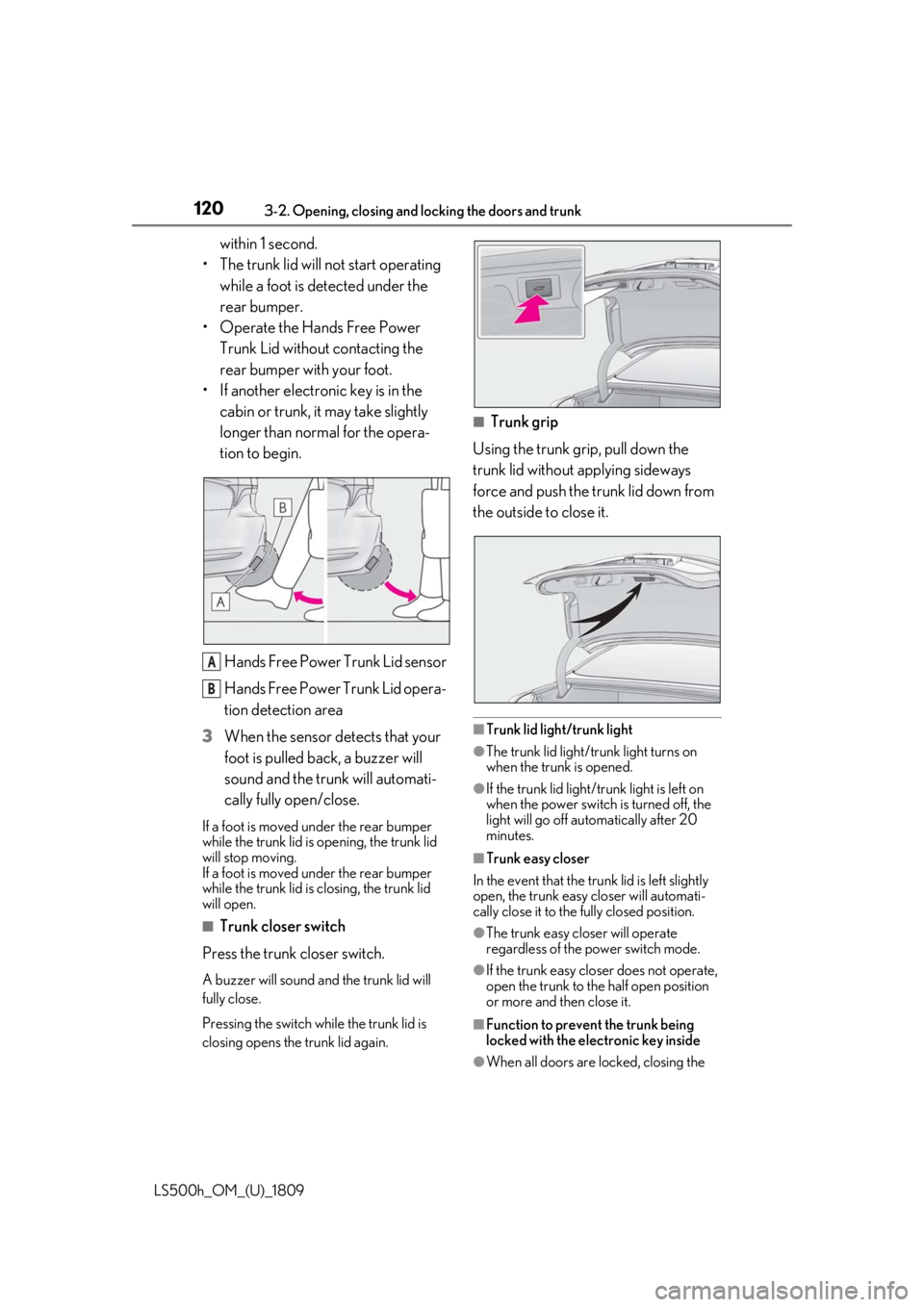
Hands Free Power Trunk Lid sensor
Hands Free Power Trunk Lid opera-
tion detection area
3 When the sensor detects that your
foot is pulled back, a buzzer will
sound and the trunk will automati-
cally fully open/close.
If a foot is moved under the rear bumper
while the trunk lid is opening, the trunk lid
will stop moving.
If a foot is moved under the rear bumper
while the trunk lid is closing, the trunk lid
will open.
■Trunk closer switch
Press the trunk closer switch.
A buzzer will sound and the trunk lid will
fully close.
Pressing the switch while the trunk lid is
closing opens the trunk lid again.
■Trunk grip
Using the trunk grip, pull down the
trunk lid without applying sideways
force and push the trunk lid down from
the outside to close it.
■Trunk lid light/trunk light
●The trunk lid light/trunk light turns on
when the trunk is opened.
●If the trunk lid light/trunk light is left on
when the power switch is turned off, the
light will go off automatically after 20
minutes.
■Trunk easy closer
In the event that the trun k lid is left slightly
open, the trunk easy closer will automati-
cally close it to the fully closed position.
●The trunk easy closer will operate
regardless of the power switch mode.
●If the trunk easy closer does not operate,
open the trunk to the half open position
or more and then close it.
■Function to prevent the trunk being
locked with the electronic key inside
●When all doors are locked, closing the
A
B
Page 124 of 523
1243-2. Opening, closing and locking the doors and trunk
LS500h_OM_(U)_1809
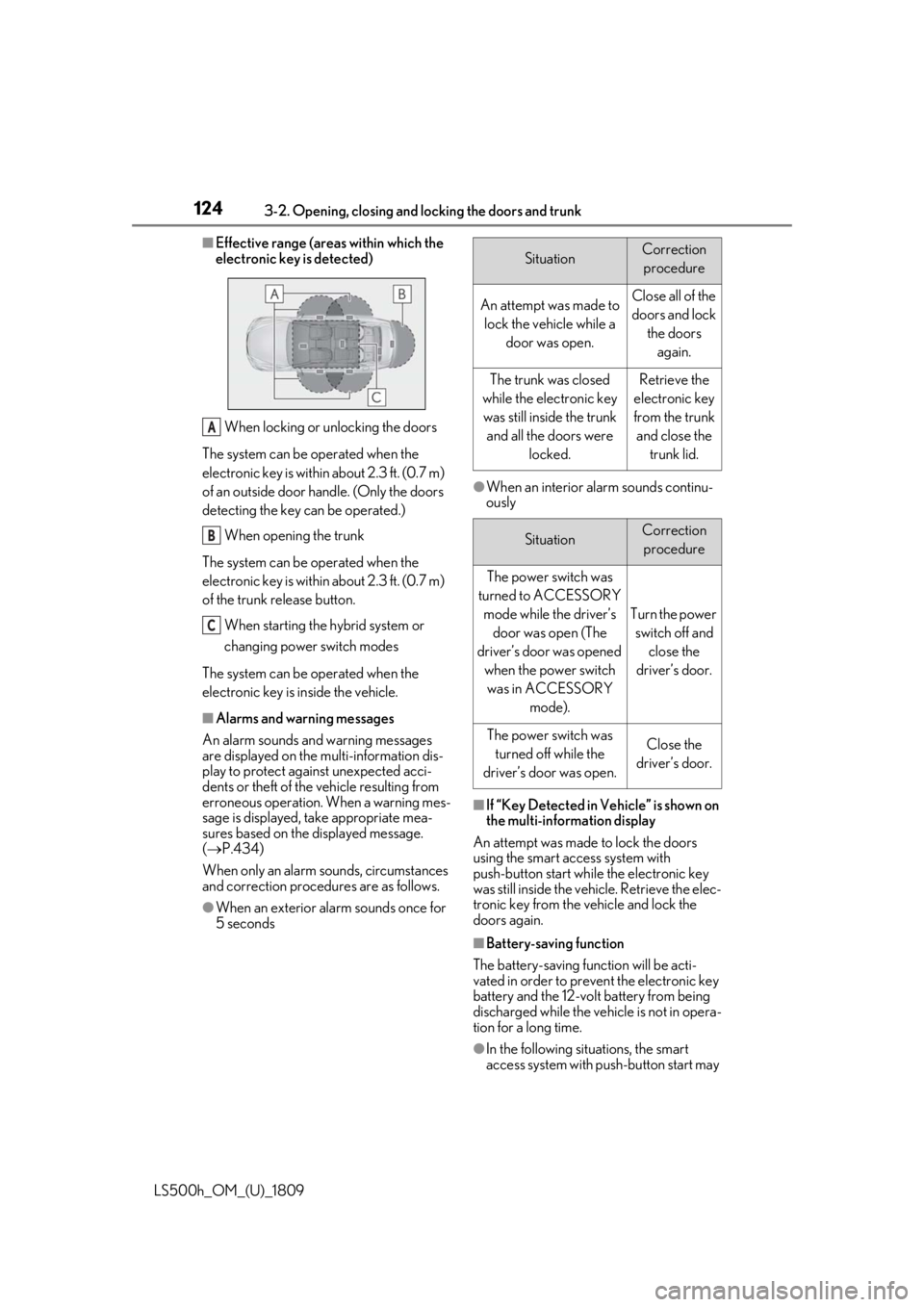
■Effective range (areas within which the
electronic key is detected)When locking or unlocking the doors
The system can be operated when the
electronic key is within about 2.3 ft. (0.7 m)
of an outside door handle. (Only the doors
detecting the key can be operated.) When opening the trunk
The system can be operated when the
electronic key is within about 2.3 ft. (0.7 m)
of the trunk release button. When starting the hybrid system or
changing power switch modes
The system can be operated when the
electronic key is inside the vehicle.
■Alarms and warning messages
An alarm sounds and warning messages
are displayed on the multi-information dis-
play to protect against unexpected acci-
dents or theft of the vehicle resulting from
erroneous operation. When a warning mes-
sage is displayed, take appropriate mea-
sures based on the displayed message.
( P.434)
When only an alarm sounds, circumstances
and correction procedures are as follows.
●When an exterior alarm sounds once for
5 seconds
●When an interior alarm sounds continu-
ously
■If “Key Detected in Vehicle” is shown on
the multi-information display
An attempt was made to lock the doors
using the smart access system with
push-button start while the electronic key
was still inside the vehicle. Retrieve the elec-
tronic key from the vehicle and lock the
doors again.
■Battery-saving function
The battery-saving function will be acti-
vated in order to prevent the electronic key
battery and the 12-volt battery from being
discharged while the vehicle is not in opera-
tion for a long time.
●In the following situations, the smart
access system with pu sh-button start may
A
B
C
SituationCorrection
procedure
An attempt was made to lock the vehicle while a door was open.Close all of the doors and lock the doors again.
The trunk was closed
while the electronic key was still inside the trunk and all the doors were locked.Retrieve the
electronic key
from the trunk and close the trunk lid.
SituationCorrection procedure
The power switch was
turned to ACCESSORY mode while the driver’s door was open (The
driver’s door was opened when the power switch was in ACCESSORY mode).
Turn the power switch off and close the
driver’s door.
The power switch was turned off while the
driver’s door was open.Close the
driver’s door.