suspension LEXUS LS500H 2019 User Guide
[x] Cancel search | Manufacturer: LEXUS, Model Year: 2019, Model line: LS500H, Model: LEXUS LS500H 2019Pages: 523, PDF Size: 15.79 MB
Page 286 of 523
2864-5. Using the driving support systems
LS500h_OM_(U)_1809
■The Parking Support Brake function
(static object) will operate when
The function will operate when the PKSB
OFF indicator is not illuminated or flashing
( P.77, 78) and all of the following condi-
tions are met:
●Hybrid system output restriction control
• The Parking Support Brake is enabled.
• The vehicle speed is 9 mph (15 km/h) or less.
• There is a static object in the traveling direction of the vehicle and 6 to 13 ft. (2
to 4 m) away.
• The Parking Support Brake determines
that a stronger-than-normal brake opera-
tion is necessary to avoid a collision.
●Brake control
• Hybrid system output restriction control is operating.
• The Parking Support Brake determines that an immediate brake operation is nec-
essary to avoid a collision.
■The Parking Support Brake function
(static objects) will stop operating when
The function will stop operating if any of the
following conditions are met:
●Hybrid system output restriction control
• The Parking Support Brake is disabled.
• The system determines that the collision
WARNING
●If the area around a radar sensor is
subjected to an impact, the system
may not operate properly due to a
sensor malfunction. Have the vehicle
inspected by your Lexus dealer.
■Handling the suspension
Do not modify the suspension, as
changes to the height or inclination of the
vehicle may prevent the sensors from
detecting objects correctly or cause the
system to not operate or operate unnec-
essarily.
■If the Parking Support Brake function
(static objects) operates unnecessar-
ily, such as at a railroad crossing
In the event that the Parking Support
Brake function (static objects) operates
unnecessarily, such as at a railroad cross-
ing, brake control w ill be canceled after
approximately 2 seconds, allowing you
to proceed forward and leave the area,
brake control can also be canceled by
depressing the brake pedal. Depressing
the accelerator pedal after brake control
is canceled will allow you to proceed for-
ward and leave the area.
■Notes when washing the vehicle
Do not apply intensive bursts of water or
steam to the sensor area.
Doing so may result in the sensor mal-
functioning.
●When using a high pressure washer to
wash the vehicle, do not spray the sen-
sors directly, as doing so may cause a
sensor to malfunction.
●When using steam to clean the vehicle,
do not direct steam too close to the
sensors as doing so may cause a sen-
sor to malfunction.
■When to disable the Parking Support
Brake
In the following situations, disable the
Parking Support Brake as the system
may operate even though there is no
possibility of a collision.
●When inspecting the vehicle using a
chassis roller, chassis dynamo or free
roller
●When loading the vehicle onto a boat,
truck or other transport vessel
●If the suspension has been modified or
tires of a size othe r than specified are
installed
●If the front of the vehicle is raised or
lowered due to the carried load
●When equipment that may obstruct a
sensor is installed, such as a towing
eyelet, bumper protector (an addi-
tional trim strip, etc.), bicycle carrier, or
snow plow
●When using an automatic car wash
Page 289 of 523

2894-5. Using the driving support systems
LS500h_OM_(U)_1809
4
Driving
such as a backlit license plate (especially
fluorescent type), fog lights, fender pole
or wireless antenna is installed near a
sensor
●Changes in the vehicle posture
• If the vehicle is significantly tilted
• If the front of the vehicle is raised or low- ered due to the carried load
• If the orientation of a sensor has been changed due to a collision or other
impact
• When equipment that may obstruct a sensor is installed, such as a bumper pro-
tector (an additional trim strip, etc.), bicy-
cle carrier, or snow plow
• If the suspension has been modified or tires of a size other than specified are
installed
• If a sensor has been painted or covered with a sticker, etc.
Page 293 of 523
2934-5. Using the driving support systems
LS500h_OM_(U)_1809
4
Driving
●When equipment that may obstruct a
sensor is installed, such as a towing eye-
let, bumper protector (an additional trim
strip, etc.), bicycle carrier, or snow plow
●If the suspension has been modified or
tires of a size other than specified are
installed
●If the front of the vehicle is raised or low-
ered due to the carried load
●If an electronic component, such as a
backlit license plate (especially fluores-
cent type), fog lights, fender pole or wire-
less antenna is installed near a radar
sensor
●If the orientation of a radar sensor has
been changed
●When multiple vehicles are approaching
with only a small gap between each vehi-
cle
●If a vehicle is approaching the rear of
your vehicle rapidly
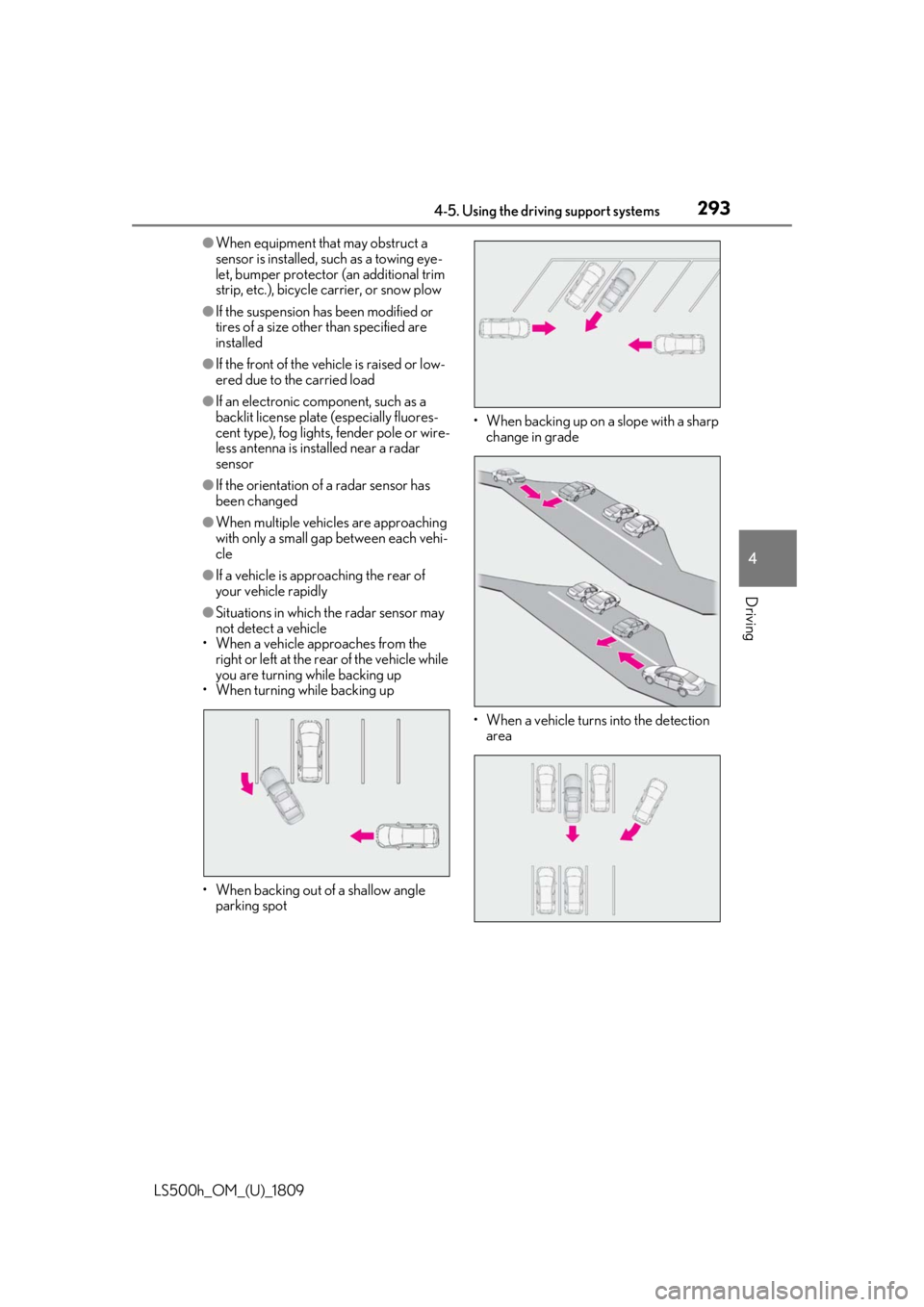
●Situations in which the radar sensor may
not detect a vehicle
• When a vehicle approaches from the right or left at the rear of the vehicle while
you are turning while backing up
• When turning while backing up
• When backing out of a shallow angle parking spot • When backing up on
a slope with a sharp
change in grade
• When a vehicle turns into the detection area
Page 296 of 523

2964-5. Using the driving support systems
LS500h_OM_(U)_1809• People riding a bicycle, skateboard, or
other light vehicle
• Pedestrians wearing oversized clothing
such as a rain coat, long skirt, etc., making
their silhouette obscure
• Pedestrians whose body is partially hid-
den by an object, such as a cart or
umbrella
• Pedestrians which are obscured by dark-
ness, such as at night
●In some situations, such as the following,
pedestrians may not be detected by the
Parking Support Brake function (rear
pedestrians), preventing the function
from operating properly:
• When backing up in inclement weather (rain, snow, fog, etc.)
• When the rear camera is obscured (dirt, snow, ice, etc. are attached) or scratched
• When a very bright light, such as the sun,
or the headlights of another vehicle,
shines directly into the rear camera
• When backing up in a place where the
surrounding brightness changes sud-
denly, such as at the entrance or exit of a
garage or underground parking lot
• When backing up in a dim environment such as during dusk or in an underground
parking lot
●Even though there are no pedestrians in
the detection area, some objects, such as
the following, may be detected, possibly
causing the Parking Support Brake func-
tion (rear pedestri ans) to operate.
• Three dimensional objects, such as a pole, traffic cone, fence, or parked vehi-
cle
• Moving objects, such as a car or motor- cycle
• Objects moving toward your vehicle
when backing up, such as flags or pud-
dles (or airborne matter, such as smoke,
steam, rain, or snow)
• Cobblestone or gravel roads, tram rails, road repairs, white lines, pedestrian
crossings or fallen leaves on the road
• Metal covers (gratings), such as those
used for drainage ditches
• Objects reflected in a puddle or on a wet road surface
• The roadside or bumps on the road
•Shadows on the road
●In some situations, such as the following, the Parking Support Brake function (rear
pedestrians) may operate even though
there are no pedestrians in the detection
area.
• When backing up toward the roadside or a bump on the road
• If the vehicle is signif icantly tilted, such as
when carrying a heavy load
• When backing up toward an
incline/decline
• If the suspension has been modified or tires of a size othe r than specified are
installed
• If the rear of the vehicle is raised or low- ered due to the carried load
• If an electronic component, such as a backlit license plate or rear fog light, is
installed near the rear camera
• If a bumper protector, such as an addi- tional trim strip, is installed to the rear
bumper
• If the orientation of the rear camera has been changed
• If a towing eyelet is in stalled to the rear of
the vehicle
• When water is flowing over the rear cam- era lens
• When the rear camera is obscured (dirt,
snow, ice, etc. are at tached) or scratched
• If there is a flashing light in the detection
area, such as the emergency flashers of
another vehicle
Page 297 of 523
2974-5. Using the driving support systems
LS500h_OM_(U)_1809
4
Driving
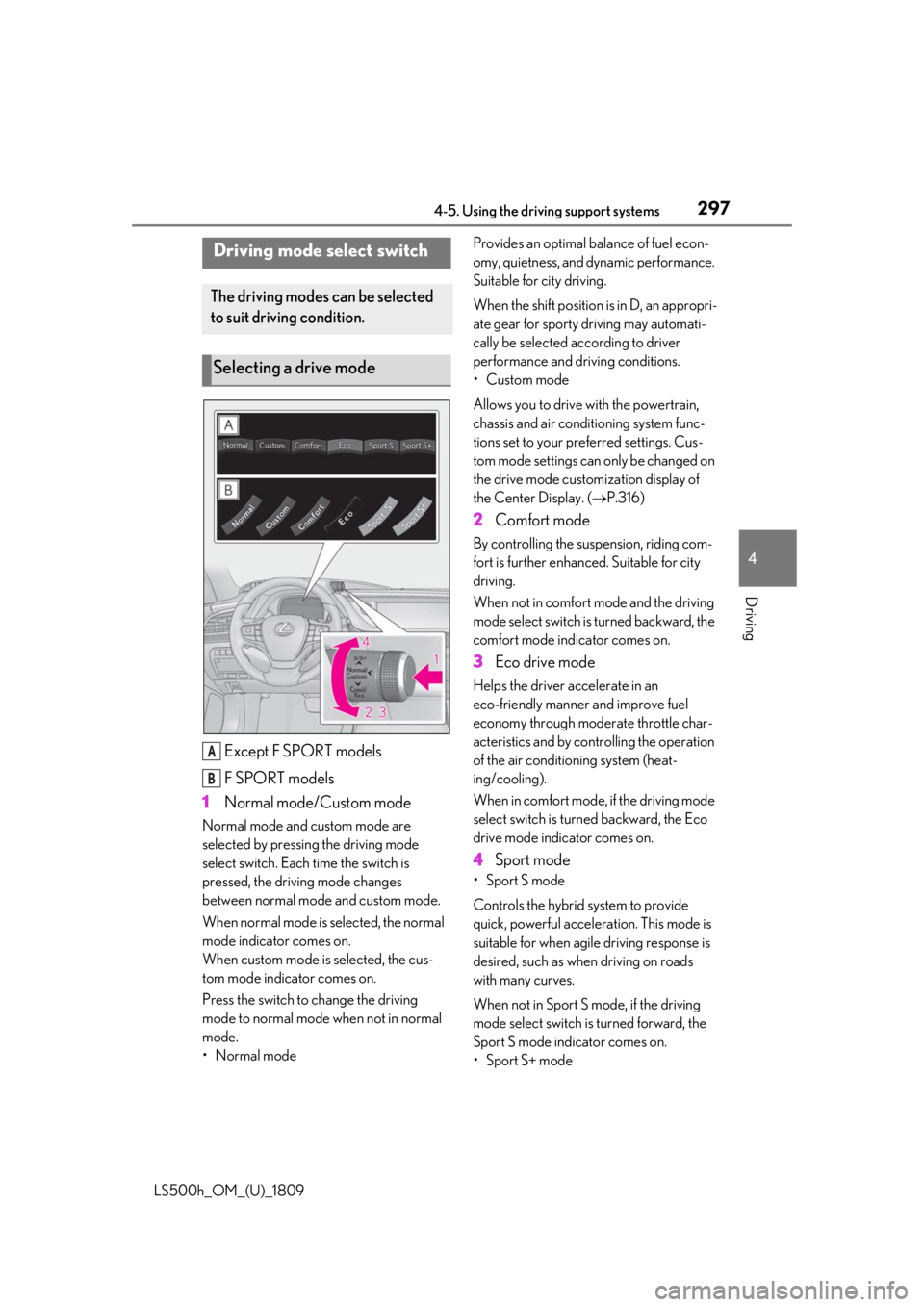
Except F SPORT models
F SPORT models
1 Normal mode/Custom mode
Normal mode and custom mode are
selected by pressing the driving mode
select switch. Each time the switch is
pressed, the driving mode changes
between normal mode and custom mode.
When normal mode is selected, the normal
mode indicator comes on.
When custom mode is selected, the cus-
tom mode indicator comes on.
Press the switch to change the driving
mode to normal mode when not in normal
mode.
•Normal mode Provides an optimal ba
lance of fuel econ-
omy, quietness, and dynamic performance.
Suitable for city driving.
When the shift position is in D, an appropri-
ate gear for sporty driving may automati-
cally be selected according to driver
performance and driving conditions.
• Custom mode
Allows you to drive with the powertrain,
chassis and air conditioning system func-
tions set to your preferred settings. Cus-
tom mode settings can only be changed on
the drive mode custom ization display of
the Center Display. ( P.316)
2 Comfort mode
By controlling the suspension, riding com-
fort is further enhanced. Suitable for city
driving.
When not in comfort mode and the driving
mode select switch is turned backward, the
comfort mode indicator comes on.
3 Eco drive mode
Helps the driver ac celerate in an
eco-friendly manner and improve fuel
economy through moderate throttle char-
acteristics and by controlling the operation
of the air conditioning system (heat-
ing/cooling).
When in comfort mode, if the driving mode
select switch is turned backward, the Eco
drive mode indicator comes on.
4 Sport mode
• Sport S mode
Controls the hybrid system to provide
quick, powerful acceleration. This mode is
suitable for when agile driving response is
desired, such as when driving on roads
with many curves.
When not in Sport S mode, if the driving
mode select switch is turned forward, the
Sport S mode indicator comes on.
•Sport S+ mode
Driving mode select switch
The driving modes can be selected
to suit driving condition.
Selecting a drive mode
A
B
Page 298 of 523
2984-5. Using the driving support systems
LS500h_OM_(U)_1809Helps to ensure stee
ring performance and
driving stability by simultaneously con-
trolling the steering and suspension in
addition to the hybrid system. Suitable for
sportier driving.
When in Sport S mode, if the driving mode
select switch is turned forward, the Sport
S+ mode indicator comes on.
■If the driving mode se lect switch is oper-
ated while the opening screen is being
displayed
If the driving mode sele ct switch is operated
while the opening screen is being displayed,
the driving mode will be changed and the
meter display will change accordingly after
the opening screen operation has com-
pleted.
■Operation of the air conditioning sys-
tem in Eco drive mode
Eco drive mode controls the heating/cool-
ing operations and fan speed of the air con-
ditioning system to enhance fuel efficiency.
To improve air condit ioning performance,
perform the following operations:
●Turn off eco air conditioning mode
( P.328)
●Adjust the fan speed ( P.323)
●Turn off Eco drive mode
■Automatic deactivation of sport mode
and custom mode
If the power switch is turned off after driving
in sport mode or custom mode, the drive
mode will be changed to normal mode.
■Driving mode pop-up display
When the driving mode is changed, the
selected driving mode will be temporarily
displayed on the side display. ( P.317)
*: If equipped
■Situations in which the vehicle height
control may not operate properly
●In the following situations, the vehicle
height may change slowly or may not
change to the correct height:
• When the vehicle comes into contact with snow, ice, stone, etc.
• When the ambient temperature is low
• When the accumulator tank pressure is low
●In the following situations, the vehicle
height may not change:
• If the hood or trunk is not fully closed
• If the brake pedal depressed and the
vehicle is stopped
• When the vehicle is on a significantly
uneven or undulating road
• When the vehicle is on a slanted road or a slope
■Operating sound of the air suspension
compressor and valves
When the vehicle height is changed, such
as due to passengers entering the vehicle or
cargo being loaded, or when the vehicle
height is changed using the vehicle height
adjustment switch, the air suspension com-
pressor and valves may operate and a
Electronically modulated air
suspension*
The height of the vehicle when driv-
ing can be selected using the vehi-
cle height adjustment switch. The
selected height level will be main-
tained regardless of the number of
passengers or weight of cargo.
Additionally, settings of the follow-
ing functions can be changed:
Enabling/Disabling controls of
access mode
Temporarily disabling vehicle
height control
Page 299 of 523
2994-5. Using the driving support systems
LS500h_OM_(U)_1809
4
Driving
sound may be heard. This does not indicate
a malfunction.
■When the accumulator tank pressure is
low
When the accumulator tank pressure is low,
the air suspension compressor and valves
may operate repeatedly even though the
vehicle height is not being changed. This
does not indicate a malfunction.
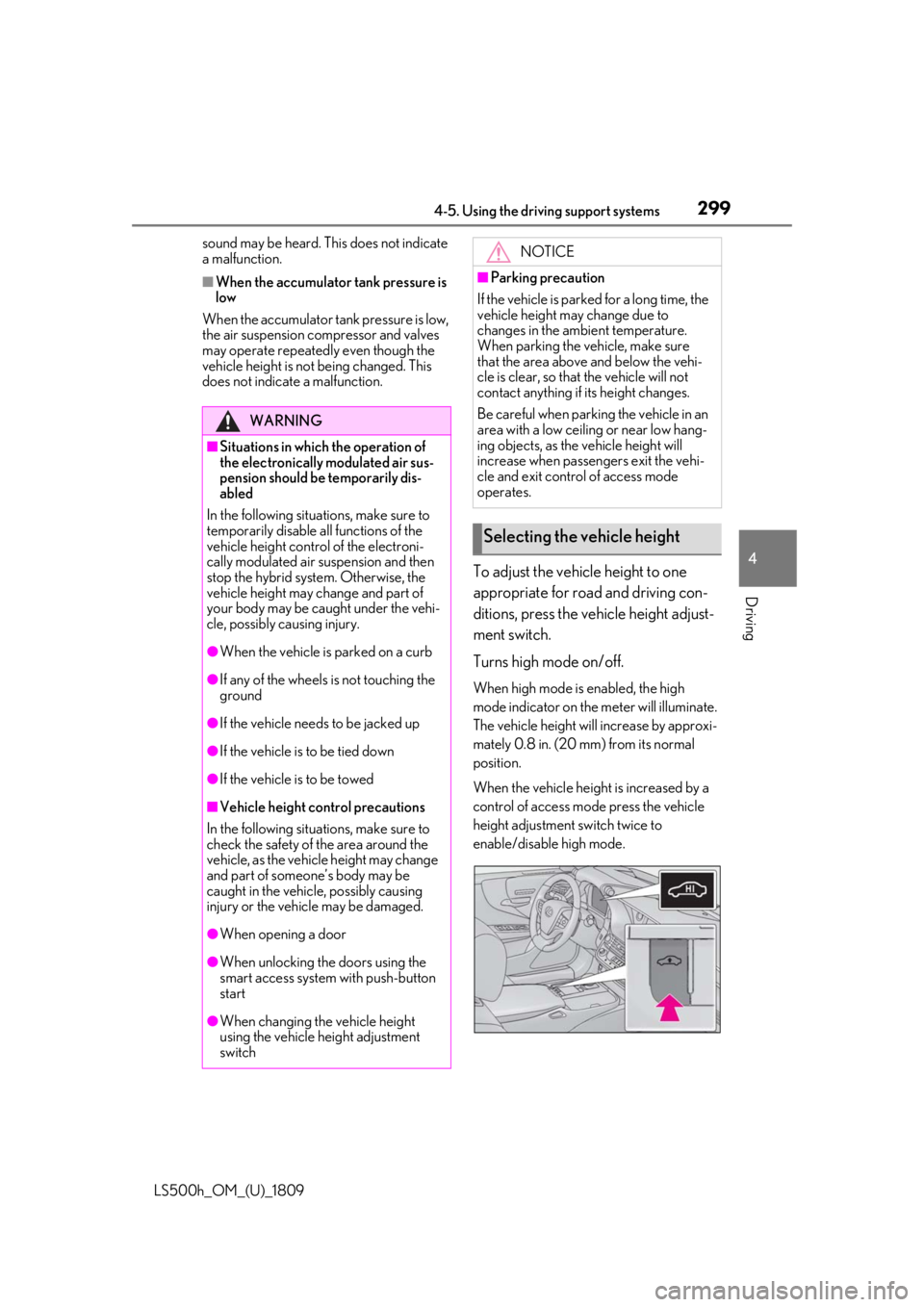
To adjust the vehicle height to one
appropriate for road and driving con-
ditions, press the vehicle height adjust-
ment switch.
Turns high mode on/off.
When high mode is enabled, the high
mode indicator on the meter will illuminate.
The vehicle height will increase by approxi-
mately 0.8 in. (20 mm) from its normal
position.
When the vehicle height is increased by a
control of access mode press the vehicle
height adjustment switch twice to
enable/disable high mode.
WARNING
■Situations in which the operation of
the electronically modulated air sus-
pension should be temporarily dis-
abled
In the following situations, make sure to
temporarily disable al l functions of the
vehicle height control of the electroni-
cally modulated air suspension and then
stop the hybrid system. Otherwise, the
vehicle height may change and part of
your body may be caught under the vehi-
cle, possibly causing injury.
●When the vehicle is parked on a curb
●If any of the wheels is not touching the
ground
●If the vehicle needs to be jacked up
●If the vehicle is to be tied down
●If the vehicle is to be towed
■Vehicle height co ntrol precautions
In the following situations, make sure to
check the safety of the area around the
vehicle, as the vehicle height may change
and part of someone’s body may be
caught in the vehicle, possibly causing
injury or the vehicle may be damaged.
●When opening a door
●When unlocking the doors using the
smart access system with push-button
start
●When changing the vehicle height
using the vehicle height adjustment
switch
NOTICE
■Parking precaution
If the vehicle is parked for a long time, the
vehicle height may change due to
changes in the ambient temperature.
When parking the vehicle, make sure
that the area above and below the vehi-
cle is clear, so that the vehicle will not
contact anything if its height changes.
Be careful when parking the vehicle in an
area with a low ceiling or near low hang-
ing objects, as the vehicle height will
increase when passengers exit the vehi-
cle and exit control of access mode
operates.
Selecting the vehicle height
Page 301 of 523
3014-5. Using the driving support systems
LS500h_OM_(U)_1809
4
Driving
meter control switch is pressed.
■When the vehicle height has been
increased by a control of access mode
Press the vehicle height adjustment switch
with the power switch in any mode to return
the vehicle to its previous vehicle height.
■Access mode operation
●Access mode will not operate if the vehi-
cle is not parked on a level road surface.
●When the P shift position is selected, if
the doors are not locked and any door is
opened from the outside, exit control will
operate.
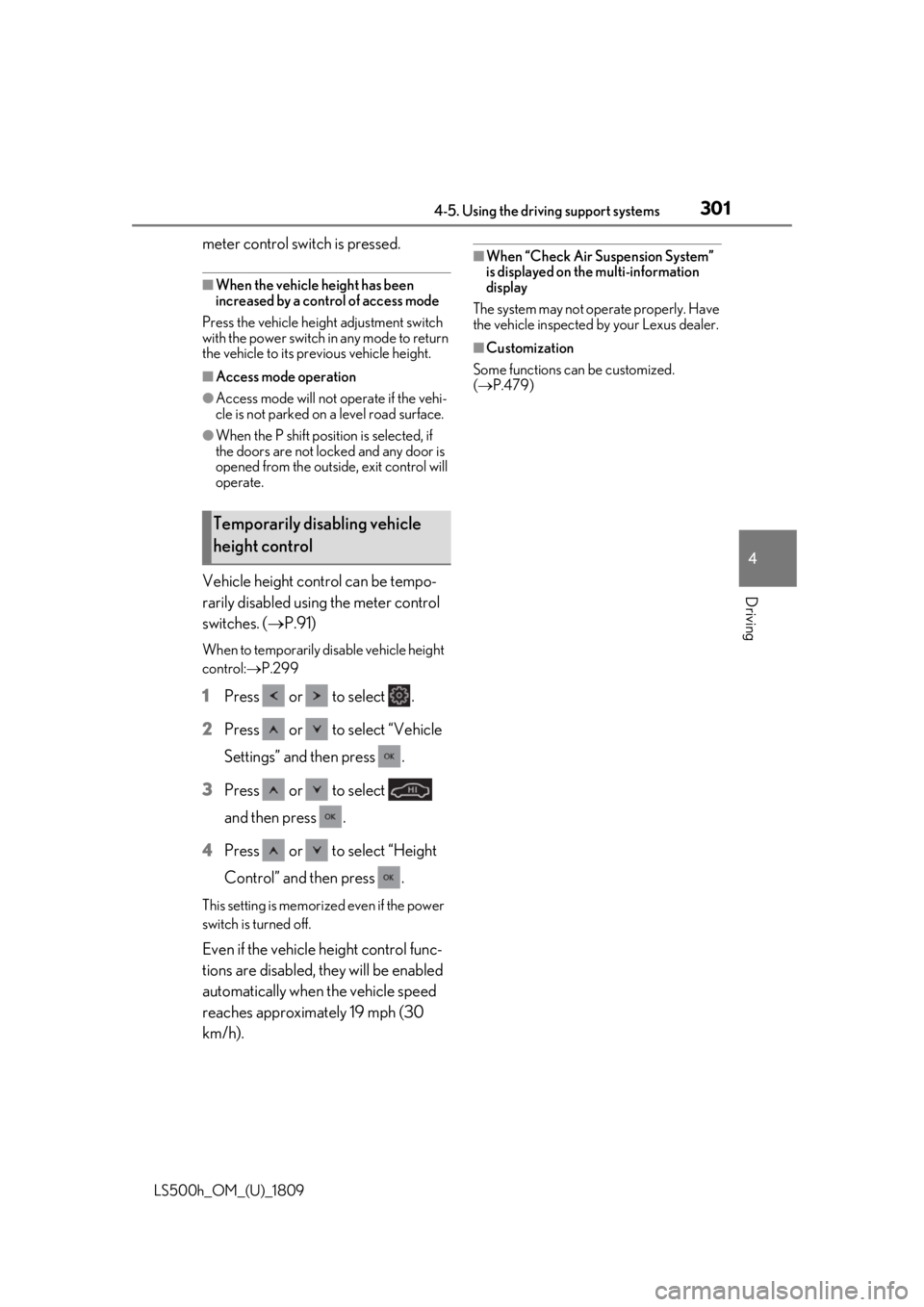
Vehicle height control can be tempo-
rarily disabled using the meter control
switches. ( P.91)
When to temporarily disable vehicle height
control: P.299
1 Press or to select .
2 Press or to select “Vehicle
Settings” and then press .
3 Press or to select
and then press .
4 Press or to select “Height
Control” and then press .
This setting is memorized even if the power
switch is turned off.
Even if the vehicle height control func-
tions are disabled, they will be enabled
automatically when the vehicle speed
reaches approximately 19 mph (30
km/h).
■When “Check Air Suspension System”
is displayed on th e multi-information
display
The system may not operate properly. Have
the vehicle inspected by your Lexus dealer.
■Customization
Some functions can be customized.
( P.479)
Temporarily disabling vehicle
height control
Page 302 of 523
3024-5. Using the driving support systems
LS500h_OM_(U)_1809
■ECB (Electronically Controlled
Brake System)
The electronically controlled system
generates braking force correspond-
ing to the brake operation
■ABS (Anti-lock Brake System)
Helps to prevent wheel lock when the
brakes are applied suddenly, or if the
brakes are applied while driving on a
slippery road surface
■Brake assist
Generates an increased level of brak-
ing force after the brake pedal is
depressed when the system detects a
panic stop situation
■VSC (Vehicle Stability Control)
Helps the driver to control skidding
when swerving sudden ly or turning on
slippery road surfaces.
■Secondary Collision Brake
When the airbag sensor detects a colli-
sion, the brakes and stop lights are
automatically controlled to reduce the vehicle speed and that helps reduce
the possibility of further damage due to
a secondary collision.
■TRAC (Traction Control)
Helps to maintain drive power and pre-
vent the drive wheels from spinning
when starting the vehicle or accelerat-
ing on slippery roads
■Hill-start assist control
Helps to reduce the backward move-
ment of the vehicle when starting on an
uphill
■VGRS (Variable Gear Ratio Steer-
ing) (if equipped)
Adjusts the front wheel turning angle in
accordance with the vehicle speed and
steering wheel movement
■DRS (Dynamic Rear Steering) (if
equipped)
Contributes to the turning characteris-
tics and responsiveness of the vehicle
by adjusting the rear wheel angle of the
vehicle in accordance with steering
wheel movement.
■EPS (Electric Power Steering)
Employs an electric motor to reduce
the amount of effort needed to turn the
steering wheel.
■Adaptive Variable Suspension Sys-
tem
By independently controlling the
damping force of th e shock absorbers
for each of the 4 wheels according to
the road and driving conditions, this
system helps riding comfort with supe-
rior vehicle stability, and helps good
Driving assist systems
To keep driving safety and perfor-
mance, the following systems oper-
ate automatically in response to
various driving situations. Be aware,
however, that these systems are
supplementary and should not be
relied upon too heavily when oper-
ating the vehicle.
Summary of the driving assist
systems
Page 303 of 523
3034-5. Using the driving support systems
LS500h_OM_(U)_1809
4
Driving
vehicle posture.
Also, the damping force changes
depending on the selected driving
mode. ( P.297)
■LDH (Lexus Dynamic Handling
system) (if equipped)
Provides integrated control of the
VGRS, DRS and EPS. Contributes to
turning characteristics at low speeds,
responsiveness at medium speeds and
safety at high speeds by controlling the
steering angle of the front and rear
wheels in accordance with the steering
wheel operation and vehicle speed.
■VDIM (Vehicle Dynamics Inte-
grated Management)
Provides integrated control of the
ABS, brake assist, TRAC, VSC,
hill-start assist control, EPS, VGRS (if
equipped), DRS (if equipped) and
Adaptive Variable Suspension System
Helps to maintain vehicle stability when
swerving on slippery road surfaces by
controlling the brakes, hybrid system
output, steering assist, and steering
ratio
■When the TRAC/VSC/ABS systems are
operating
The slip indicator light will flash while the
TRAC/VSC/ABS systems are operating.
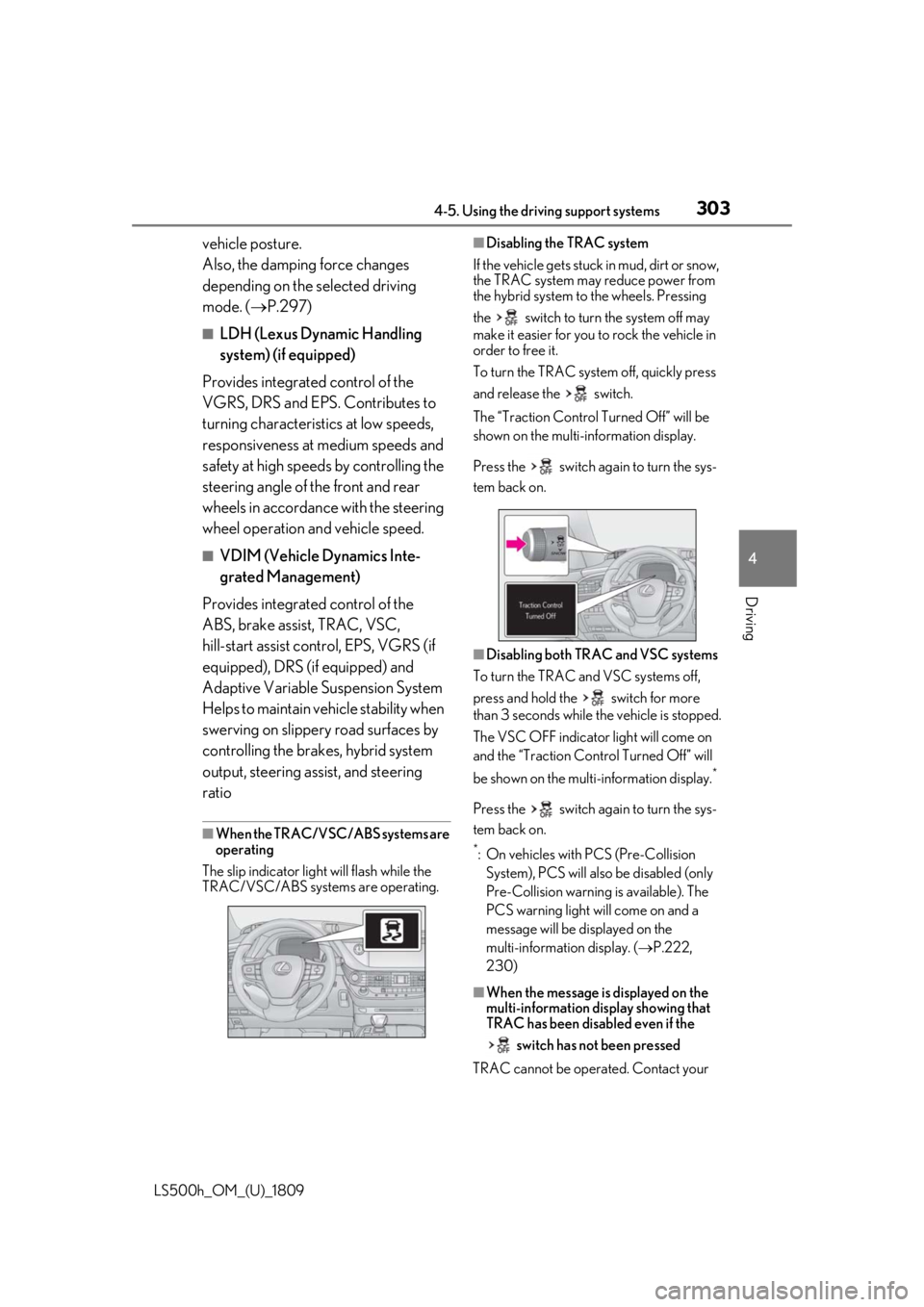
■Disabling the TRAC system
If the vehicle gets stuck in mud, dirt or snow,
the TRAC system may reduce power from
the hybrid system to the wheels. Pressing
the switch to turn the system off may
make it easier for you to rock the vehicle in
order to free it.
To turn the TRAC system off, quickly press
and release the switch.
The “Traction Co ntrol Turned Off” will be
shown on the multi-information display.
Press the switch ag ain to turn the sys-
tem back on.
■Disabling both TRAC and VSC systems
To turn the TRAC and VSC systems off,
press and hold the switch for more
than 3 seconds while the vehicle is stopped.
The VSC OFF indicator light will come on
and the “Traction Control Turned Off” will
be shown on the multi-information display.
*
Press the switch ag ain to turn the sys-
tem back on.
*: On vehicles with PCS (Pre-Collision System), PCS will also be disabled (only
Pre-Collision warning is available). The
PCS warning light will come on and a
message will be di splayed on the
multi-information display. ( P.222,
230)
■When the message is displayed on the
multi-information display showing that
TRAC has been disabled even if the
switch has not been pressed
TRAC cannot be oper ated. Contact your