brake sensor LEXUS LS500H 2019 Owner's Manual
[x] Cancel search | Manufacturer: LEXUS, Model Year: 2019, Model line: LS500H, Model: LEXUS LS500H 2019Pages: 523, PDF Size: 15.79 MB
Page 294 of 523
2944-5. Using the driving support systems
LS500h_OM_(U)_1809
*:If equipped
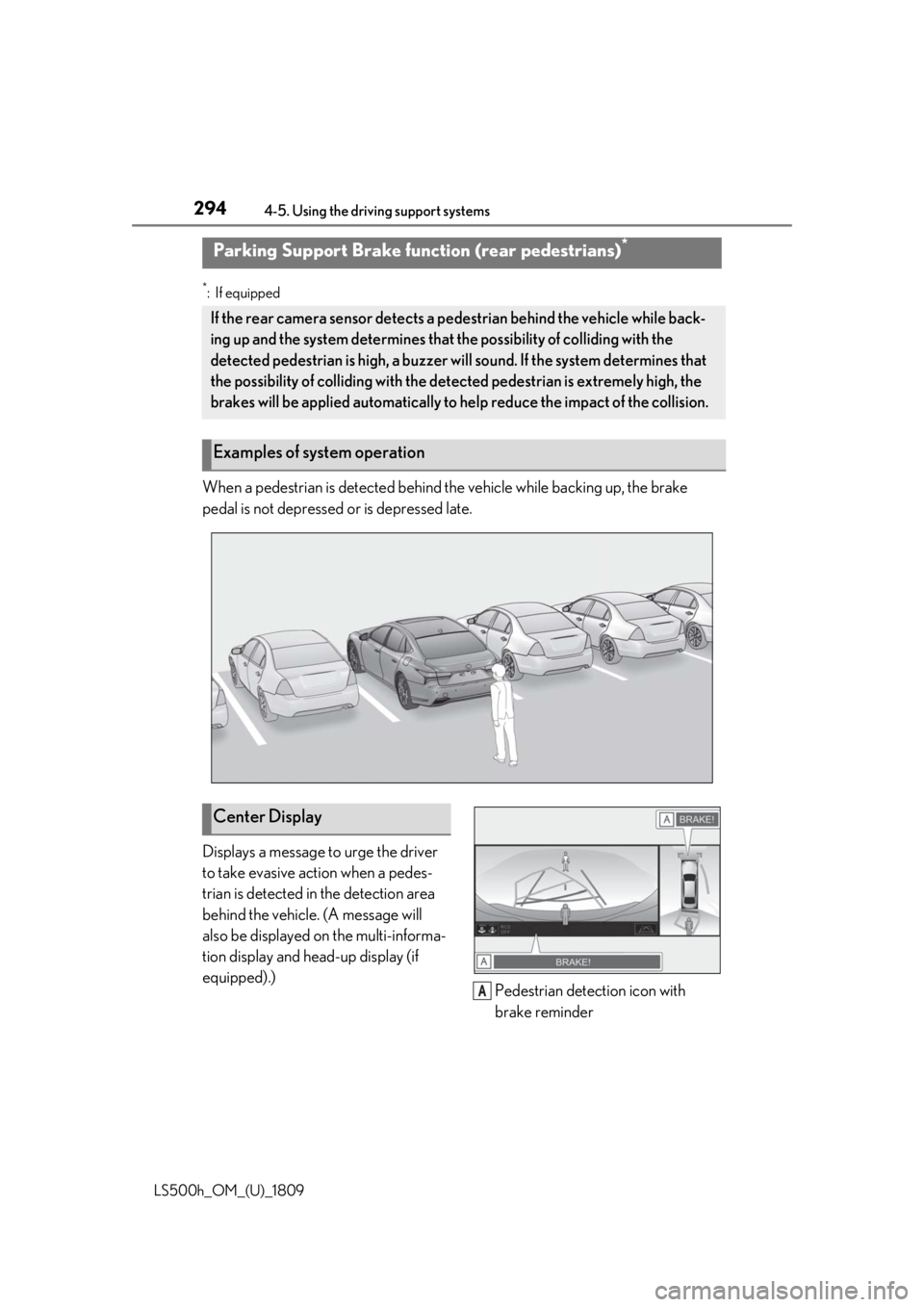
When a pedestrian is detected behind the vehicle while backing up, the brake
pedal is not depressed or is depressed late.
Displays a message to urge the driver
to take evasive action when a pedes-
trian is detected in the detection area
behind the vehicle. (A message will
also be displayed on the multi-informa-
tion display and head-up display (if
equipped).)Pedestrian detection icon with
brake reminder
Parking Support Brake function (rear pedestrians)*
If the rear camera sensor detects a pe destrian behind the vehicle while back-
ing up and the system determines that the possibility of colliding with the
detected pedestrian is high, a buzzer will sound. If the system determines that
the possibility of colliding with the dete cted pedestrian is extremely high, the
brakes will be applied automatically to he lp reduce the impact of the collision.
Examples of system operation
Center Display
A
Page 295 of 523
2954-5. Using the driving support systems
LS500h_OM_(U)_1809
4
Driving
■Parking Support Brake function (rear
pedestrians) will operate when
The function will oper ate when the PKSB
OFF indicator is not illuminated or flashing
( P.77, 78) and all of the following condi-
tions are met:
●Hybrid system output restriction control
• The Parking Support Brake is enabled.
• The vehicle speed is 9 mph (15 km/h) or less.
• The shift position is in R.
• The rear camera sensor detects a pedes- trian behind the vehicle while backing up
and the system determines that the possi-
bility of colliding with the detected
pedestrian is high.
●Brake control
• Hybrid system output restriction control is operating. • The Parking Support Brake determines
that an emergency brake operation is
necessary to avoid a collision with a
pedestrians.
■The Parking Support Brake function
(rear pedestrians) will stop operating
when
The function will stop operating if any of the
following conditions are met:
●Hybrid system output restriction control
• The Parking Support Brake is disabled.
• The collision becomes avoidable with
normal brake operation.
• The pedestrian is no longer detected
behind your vehicle.
●Brake control
• The Parking Support Brake is disabled.
• Approximately 2 seconds have elapsed since the vehicle was stopped by brake
control.
• The brake pedal is depressed after the vehicle is stopped by brake control.
• The pedestrian is no longer detected behind your vehicle.
■Re-enabling the Parking Support Brake
function (rear pedestrians)
P.282
■Detection area of the Parking Support
Brake function (rear pedestrians)
The detection area of the Parking Support
Brake function (rear pedestrians) differs
from the detection area of the RCD func-
tion ( P.276). Therefore, even if the RCD
function detects a vehicle and provides an
alert, the Parking Support Brake function
(rear-crossing vehicles) may not start oper-
ating.
■Situations in which the system may not
operate properly
●Some pedestrians, such as the following,
may not be detected by the Parking Sup-
port Brake function (rear pedestrians),
preventing the function from operating
properly:
• Pedestrians who are bending forward or squatting
• Pedestrians who are lying down
• Pedestrians who are running
• Pedestrians who suddenly enter the detection area
WARNING
■If the Parking Support Brake function
(rear pedestrians) operates unneces-
sarily
Depress the brake pedal immediately
after the Parking Support Brake function
(rear pedestrians) operates. (Operation
of the function is canceled by depressing
the brake pedal.)
■Correct use of the Parking Support
Brake function (rear pedestrians)
Do not overly rely on the Parking Sup-
port Brake function (rear pedestrians).
Depending on the road conditions, vehi-
cle conditions and weather, this function
may not operate correctly. As the detec-
tion performance of the rear camera is
limited, always drive safely, taking care to
observe your surroundings.
Additionally, if the PKSB OFF indictor is
flashing or a warning message is dis-
played on the center display indicating
that the Parking Support Brake function
(rear pedestrians) is unavailable, the
function cannot be used. Even if these
warnings are not output, the driver is
always responsible for paying attention
to the vehicle’s surro undings and driving
safely.
Page 302 of 523
3024-5. Using the driving support systems
LS500h_OM_(U)_1809
■ECB (Electronically Controlled
Brake System)
The electronically controlled system
generates braking force correspond-
ing to the brake operation
■ABS (Anti-lock Brake System)
Helps to prevent wheel lock when the
brakes are applied suddenly, or if the
brakes are applied while driving on a
slippery road surface
■Brake assist
Generates an increased level of brak-
ing force after the brake pedal is
depressed when the system detects a
panic stop situation
■VSC (Vehicle Stability Control)
Helps the driver to control skidding
when swerving sudden ly or turning on
slippery road surfaces.
■Secondary Collision Brake
When the airbag sensor detects a colli-
sion, the brakes and stop lights are
automatically controlled to reduce the vehicle speed and that helps reduce
the possibility of further damage due to
a secondary collision.
■TRAC (Traction Control)
Helps to maintain drive power and pre-
vent the drive wheels from spinning
when starting the vehicle or accelerat-
ing on slippery roads
■Hill-start assist control
Helps to reduce the backward move-
ment of the vehicle when starting on an
uphill
■VGRS (Variable Gear Ratio Steer-
ing) (if equipped)
Adjusts the front wheel turning angle in
accordance with the vehicle speed and
steering wheel movement
■DRS (Dynamic Rear Steering) (if
equipped)
Contributes to the turning characteris-
tics and responsiveness of the vehicle
by adjusting the rear wheel angle of the
vehicle in accordance with steering
wheel movement.
■EPS (Electric Power Steering)
Employs an electric motor to reduce
the amount of effort needed to turn the
steering wheel.
■Adaptive Variable Suspension Sys-
tem
By independently controlling the
damping force of th e shock absorbers
for each of the 4 wheels according to
the road and driving conditions, this
system helps riding comfort with supe-
rior vehicle stability, and helps good
Driving assist systems
To keep driving safety and perfor-
mance, the following systems oper-
ate automatically in response to
various driving situations. Be aware,
however, that these systems are
supplementary and should not be
relied upon too heavily when oper-
ating the vehicle.
Summary of the driving assist
systems
Page 305 of 523
3054-5. Using the driving support systems
LS500h_OM_(U)_1809
4
Driving
■Reduced effectiveness of the EPS sys-
tem
The effectiveness of the EPS system is
reduced to prevent the system from over-
heating when there is frequent steering
input over an extended period of time. The
steering wheel may feel heavy as a result.
Should this occur, re frain from excessive
steering input or stop the vehicle and turn
the hybrid system off. The EPS system
should return to normal within 10 minutes.
■Secondary Collision Brake operating
conditions
The vehicle speed is approximately 6 mph
(10 km/h) or more and the airbag sensor
detects a collision. (The Secondary Colli-
sion Brake will not operate when the vehicle
speed is below approximately 6 mph [10
km/h].)
■Secondary Collision Brake automatic
cancellation
The Secondary Collision Brake is automati-
cally canceled in the following situations:
●The vehicle speed drops below approxi-
mately 6 mph (10 km/h)
●A certain amount of time elapses during
operation
●The accelerator pedal is depressed a
large amount
■When “Check VGRS System” or
“CHECK DRS” is displayed on the
multi-information display
The VGRS or DRS may not operate prop-
erly. Have the vehicle inspected by your
Lexus dealer.
WARNING
■The ABS does not operate effectively
when
●The limits of tire gripping performance
have been exceeded (such as exces-
sively worn tires on a snow covered
road).
●The vehicle hydroplanes while driving
at high speed on wet or slick roads.
■Stopping distance when the ABS is
operating may exceed that of normal
conditions
The ABS is not designed to shorten the
vehicle’s stopping di stance. Always main-
tain a safe distance from the vehicle in
front of you, especially in the following
situations:
●When driving on dirt, gravel or
snow-covered roads
●When driving with tire chains
●When driving over bumps in the road
●When driving over roads with potholes
or uneven surfaces
■TRAC/VSC may not operate effec-
tively when
Directional control and power may not
be achievable while driving on slippery
road surfaces, even if the TRAC/VSC
system is operating. Drive the vehicle
carefully in conditions where stability and
power may be lost.
■Hill-start assist control does not oper-
ate effectively when
●Do not overly rely on hill-start assist
control. Hill-start assist control may
not operate effectively on steep
inclines and roads covered with ice.
●Unlike the parking brake, hill-start
assist control is not intended to hold
the vehicle stationary for an extended
period of time. Do not attempt to use
hill-start assist control to hold the vehi-
cle on an incline, as doing so may lead
to an accident.
■When the TRAC/ABS/VSC is acti-
vated
The slip indicator light flashes. Always
drive carefully. Reckless driving may
cause an accident. Exercise particular
care when the indicator light flashes.
Page 369 of 523

3696-1. Maintenance and care
LS500h_OM_(U)_1809
6
Maintenance and care
■Brake caliper coating (F SPORT mod-
els)
●When using detergent, use neutral deter-
gent. Do not use hard brushes or abra-
sive cleaners, as they will damage the
coating.
●Do not use detergent on the brake cali-
pers when they are hot.
●Wash detergent off immediately after
use.
■Bumpers and side moldings
Do not scrub with abrasive cleaners.
■Front side windows water-repellent
coating (if equipped)
●The following precautions can extend the
effectiveness of the water-repellent coat-
ing.
• Remove any dirt, etc. from the front side
windows regularly.
• Do not allow dirt and dust to accumulate on the windows for a long period.
Clean the windows with a soft, damp
cloth as soon as possible.
• Do not use wax or glass cleaners that
contain abrasives when cleaning the win-
dows.
• Do not use any metallic objects to
remove condensation build up.
●When the water-repellent performance
has become insufficie nt, the coating can
be repaired. Contact your Lexus dealer.
■Plated portions
If dirt cannot be removed, clean the parts as
follows:
●Use a soft cloth dampened with an
approximately 5% solution of neutral
detergent and water to clean the dirt off.
●Wipe the surface with a dry, soft cloth to
remove any remaining moisture.
●To remove oily deposits, use alcohol wet
wipes or a similar product.
WARNING
■When washing the vehicle
Do not apply water to the inside of the
engine compartment. Doing so may
cause the electrical components, etc. to
catch fire.
■When cleaning the windshield
Set the wiper switch to off.
If the wiper switch is in “AUTO”, the wip-
ers may operate unexpectedly in the fol-
lowing situations, and may result in hands
being caught or other serious injuries
and cause damage to the wiper blades.
Off
AUTO
●When the upper part of the windshield
where the raindrop sensor is located is
touched by hand
●When a wet rag or similar is held close
to the raindrop sensor
●If something bumps against the wind-
shield
●If you directly touch the raindrop sen-
sor body or if something bumps into
the raindrop sensor
■Precautions regarding the exhaust
pipes
Exhaust gasses cause the exhaust pipes
to become quite hot.
When washing the vehicle, be careful not
to touch the pipes until it has cooled suffi-
ciently, as touching a hot exhaust pipes
can cause burns.
A
B
Page 430 of 523
4307-2. Steps to take in an emergency
LS500h_OM_(U)_1809
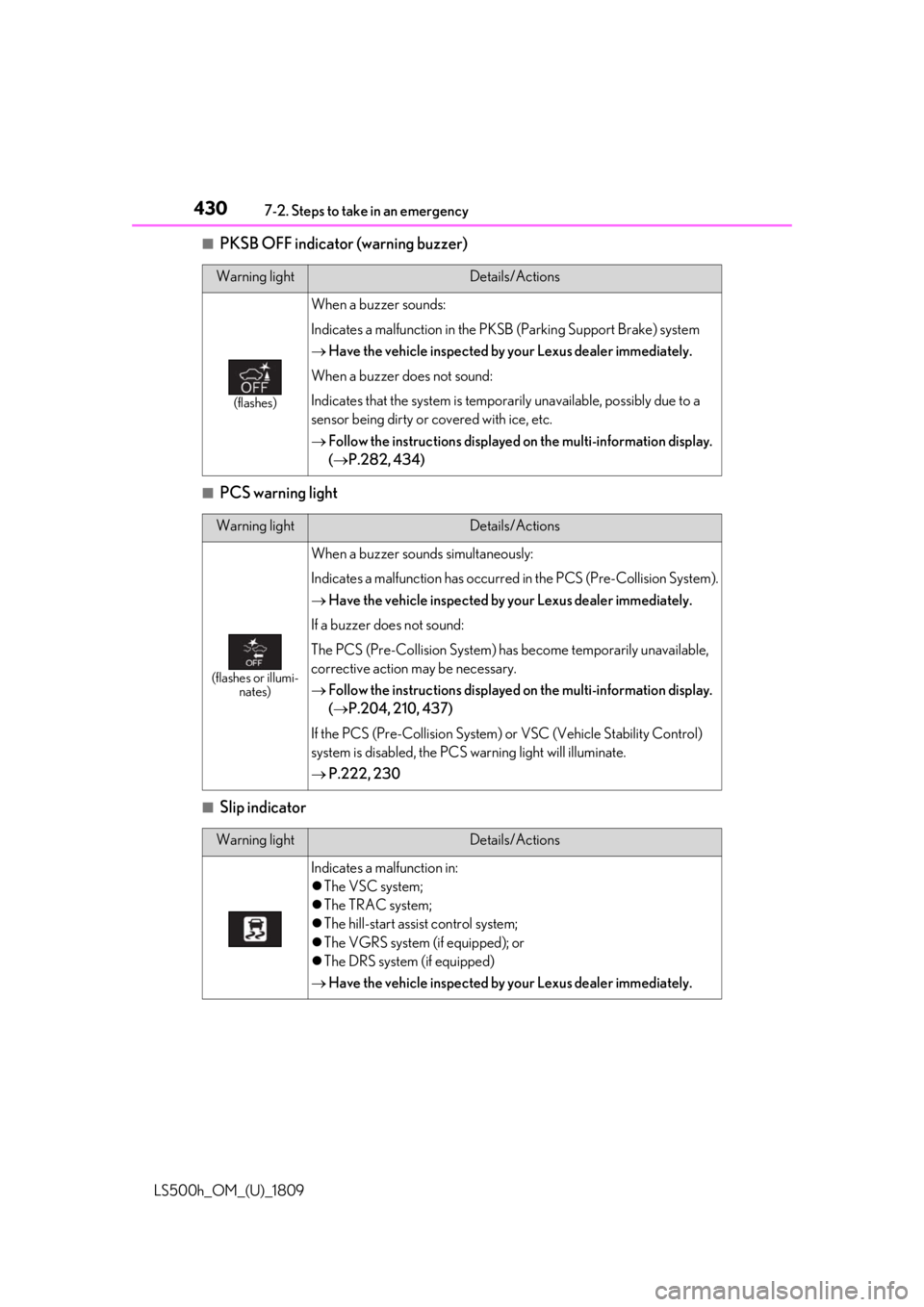
■PKSB OFF indicator (warning buzzer)
■PCS warning light
■Slip indicator
Warning lightDetails/Actions
(flashes)
When a buzzer sounds:
Indicates a malfunction in the PKSB (Parking Support Brake) system
Have the vehicle inspected by your Lexus dealer immediately.
When a buzzer does not sound:
Indicates that the system is temporarily unavailable, possibly due to a
sensor being dirty or covered with ice, etc.
Follow the instructions displayed on the multi-information display.
( P.282, 434)
Warning lightDetails/Actions
(flashes or illumi-
nates)
When a buzzer sounds simultaneously:
Indicates a malfunction has occurred in the PCS (Pre-Collision System).
Have the vehicle inspected by your Lexus dealer immediately.
If a buzzer does not sound:
The PCS (Pre-Collision System) has become temporarily unavailable,
corrective action may be necessary.
Follow the instructions displayed on the multi-information display.
( P.204, 210, 437)
If the PCS (Pre-Collision System) or VSC (Vehicle Stability Control)
system is disabled, the PCS warning light will illuminate.
P.222, 230
Warning lightDetails/Actions
Indicates a malfunction in:
The VSC system;
The TRAC system;
The hill-start assist control system;
The VGRS system (if equipped); or
The DRS system (if equipped)
Have the vehicle inspected by your Lexus dealer immediately.
Page 431 of 523
4317-2. Steps to take in an emergency
LS500h_OM_(U)_1809
7
When trouble arises
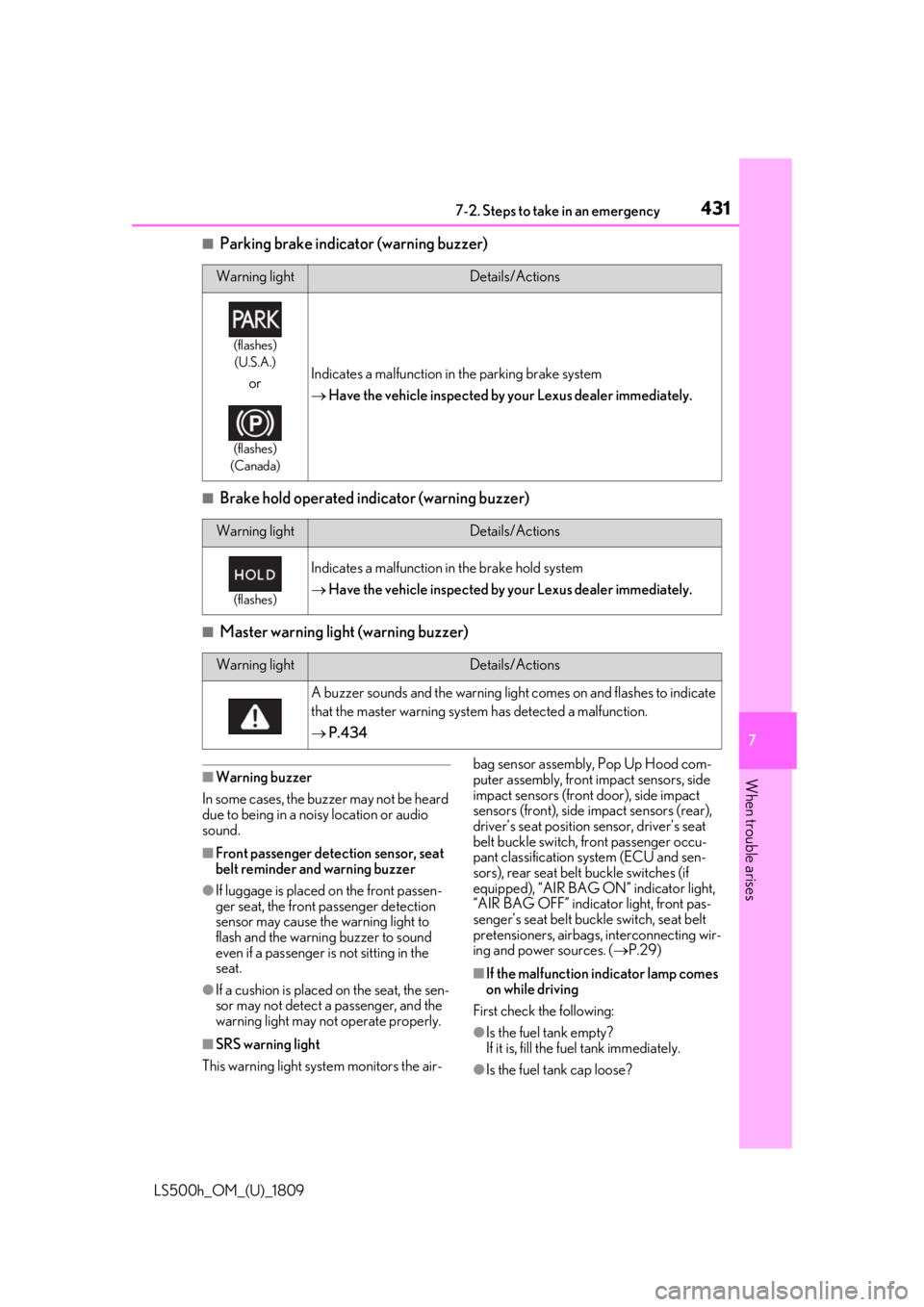
■Parking brake indicator (warning buzzer)
■Brake hold operated indicator (warning buzzer)
■Master warning light (warning buzzer)
■Warning buzzer
In some cases, the bu zzer may not be heard
due to being in a noisy location or audio
sound.
■Front passenger detection sensor, seat
belt reminder and warning buzzer
●If luggage is placed on the front passen-
ger seat, the front passenger detection
sensor may cause th e warning light to
flash and the warning buzzer to sound
even if a passenger is not sitting in the
seat.
●If a cushion is placed on the seat, the sen-
sor may not detect a passenger, and the
warning light may not operate properly.
■SRS warning light
This warning light system monitors the air- bag sensor assembly, Pop Up Hood com-
puter assembly, front impact sensors, side
impact sensors (front door), side impact
sensors (front), side
impact sensors (rear),
driver’s seat position sensor, driver’s seat
belt buckle switch, front passenger occu-
pant classification system (ECU and sen-
sors), rear seat belt buckle switches (if
equipped), “AIR BAG ON” indicator light,
“AIR BAG OFF” indicator light, front pas-
senger’s seat belt buckle switch, seat belt
pretensioners, airbags, interconnecting wir-
ing and power sources. ( P.29)
■If the malfunction indicator lamp comes
on while driving
First check the following:
●Is the fuel tank empty?
If it is, fill the fuel tank immediately.
●Is the fuel tank cap loose?
Warning lightDetails/Actions
(flashes) (U.S.A.)
or
(flashes)
(Canada)
Indicates a malfunction in the parking brake system
Have the vehicle inspected by your Lexus dealer immediately.
Warning lightDetails/Actions
(flashes)
Indicates a malfunction in the brake hold system
Have the vehicle inspected by your Lexus dealer immediately.
Warning lightDetails/Actions
A buzzer sounds and the warning light comes on and flashes to indicate
that the master warning system has detected a malfunction.
P.434
Page 490 of 523
4908-2. Customization
LS500h_OM_(U)_1809
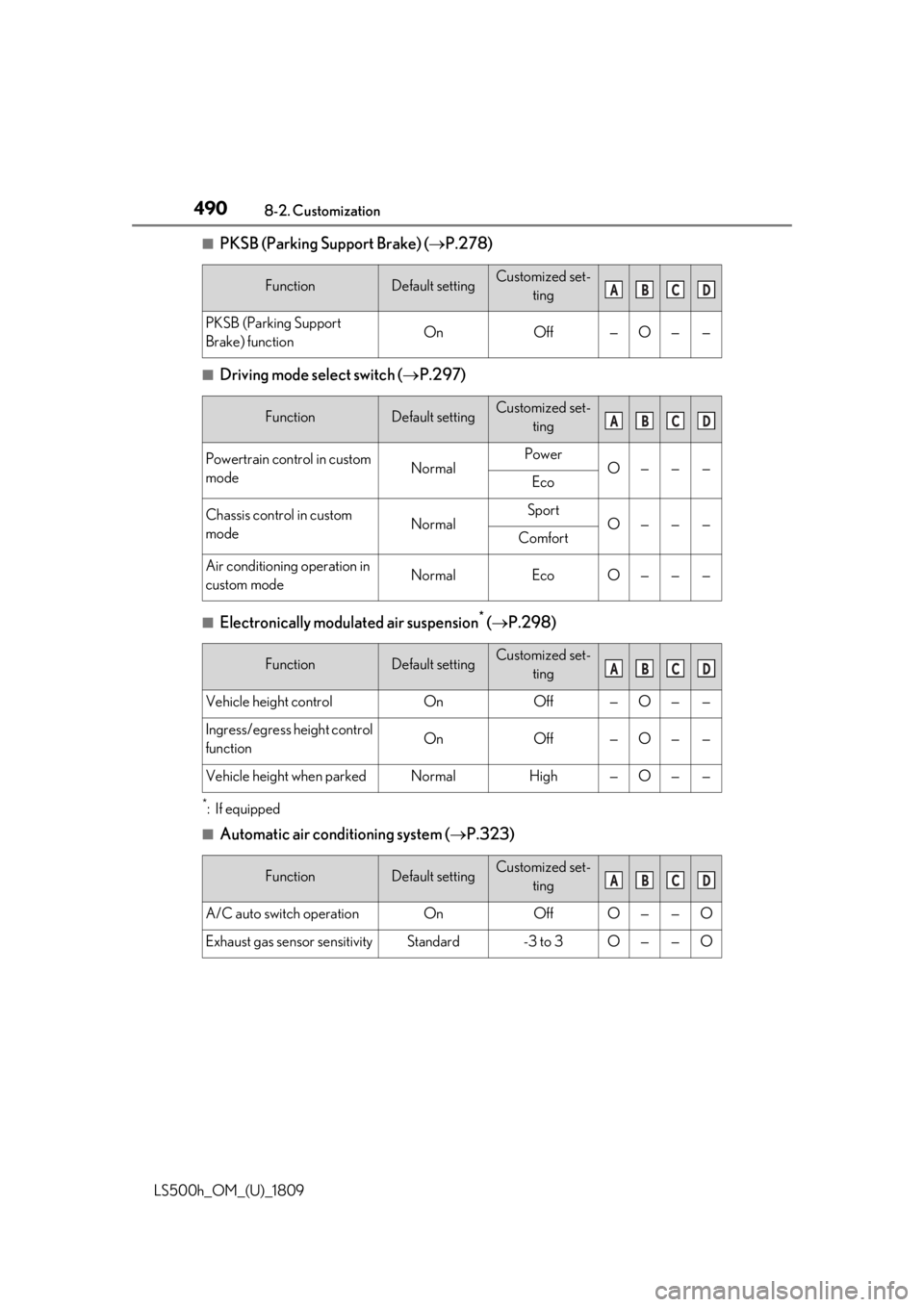
■PKSB (Parking Support Brake) (P.278)
■Driving mode select switch ( P.297)
■Electronically modulated air suspension* ( P.298)
*:If equipped
■Automatic air conditioning system ( P.323)
FunctionDefault settingCustomized set-
ting
PKSB (Parking Support
Brake) functionOnOff—O——
FunctionDefault settingCustomized set-ting
Powertrain control in custom
modeNormalPowerO———Eco
Chassis control in custom
modeNormalSportO———Comfort
Air conditioning operation in
custom modeNormalEcoO———
FunctionDefault settingCustomized set-ting
Vehicle height controlOnOff—O——
Ingress/egress height control
functionOnOff—O——
Vehicle height when parkedNormalHigh—O——
FunctionDefault settingCustomized set-ting
A/C auto switch operationOnOffO——O
Exhaust gas sensor sensitivityStandard-3 to 3O——O
ABCD
ABCD
ABCD
ABCD
Page 507 of 523
5071-1. What to do if... (Troubleshooting)
LS500h_OM_(U)_1809507What to do if... (Troubleshooting)
started in a temporary way. (
P.444)
Is the 12-volt battery discharged?
( P.445)
It is locked automatically to prevent
theft of the vehicle. ( P.171)
Is the window lock switch pressed?
The power window except for the one at
the driver’s seat cannot be operated if the
window lock switch is pressed. (
P.156)
The auto power off function will be
operated if the vehicle is left in
ACCESSORY mode for a period of
time. ( P.173)
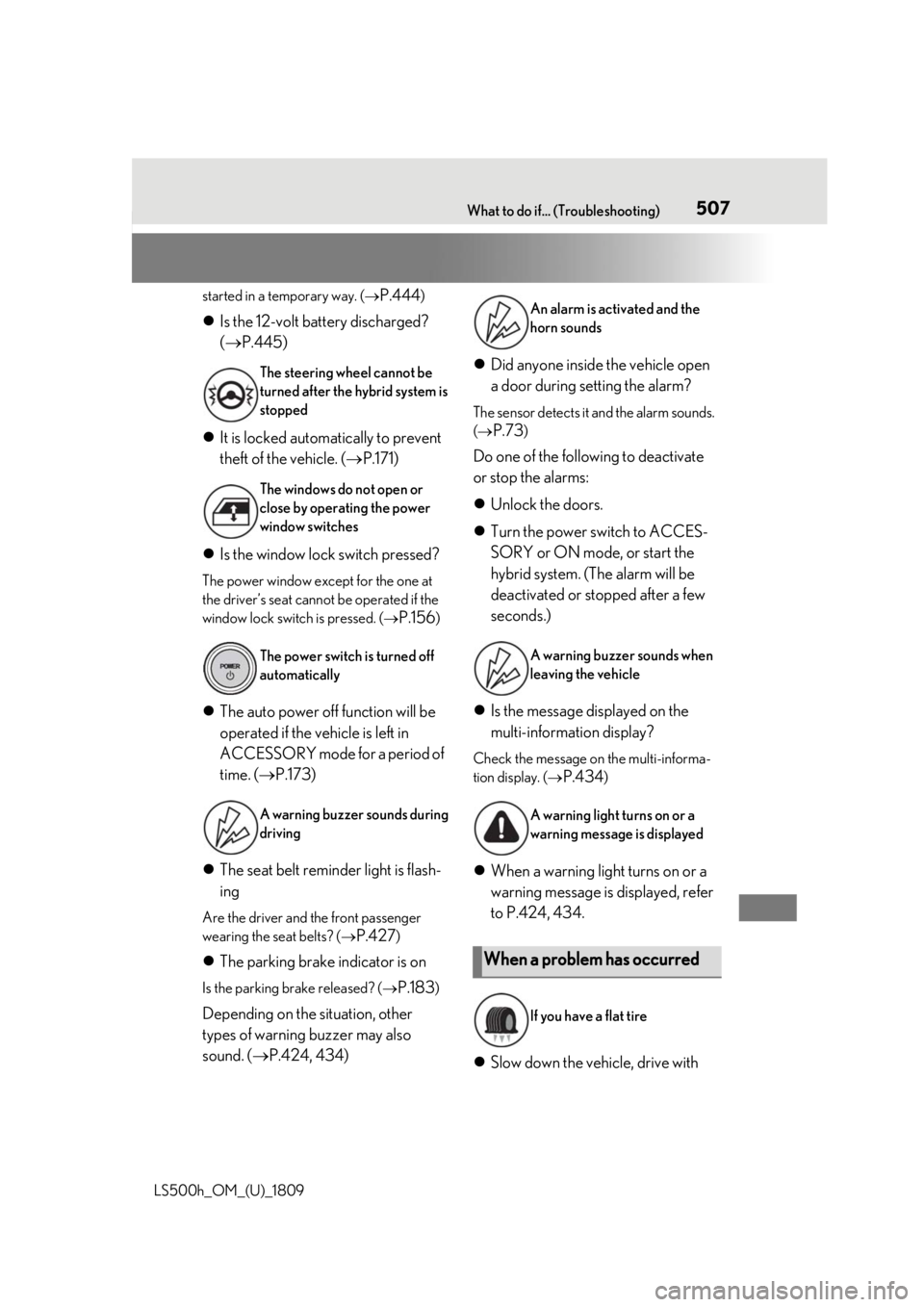
The seat belt reminder light is flash-
ing
Are the driver and the front passenger
wearing the seat belts? (
P.427)
The parking brake indicator is on
Is the parking brake released? ( P.183)
Depending on the situation, other
types of warning buzzer may also
sound. (P.424, 434)
Did anyone inside the vehicle open
a door during setting the alarm?
The sensor detects it and the alarm sounds.
(
P.73)
Do one of the following to deactivate
or stop the alarms:
Unlock the doors.
Turn the power switch to ACCES-
SORY or ON mode, or start the
hybrid system. (The alarm will be
deactivated or stopped after a few
seconds.)
Is the message displayed on the
multi-information display?
Check the message on the multi-informa-
tion display. (
P.434)
When a warning light turns on or a
warning message is displayed, refer
to P.424, 434.
Slow down the vehicle, drive with
The steering wheel cannot be
turned after the hybrid system is
stopped
The windows do not open or
close by operating the power
window switches
The power switch is turned off
automatically
A warning buzzer sounds during
driving
An alarm is activated and the
horn sounds
A warning buzzer sounds when
leaving the vehicle
A warning light turns on or a
warning message is displayed
When a problem has occurred
If you have a flat tire
Page 516 of 523

516Alphabetical Index
LS500h_OM_(U)_1809
Dynamic radar cruise control with full-speed range ...................................... 245
Energy monitor.............................................. 101
Gear Position ................................................. 93
G-force.............................................................. 93
LTA (Lane Tracing Assist).................... 239
Menu icons ...................................................... 90
Meter control switches ................................ 91
Navigation system-linked display ........ 93
Pop-up display............................................... 90
Settings .............................................................. 94
Suggestion function..................................... 95
Tire pressure ................................................ 394
Units .................................................................... 93
Warning message..................................... 434
N
Navigation system-linked display.... 93, 96
Noise from under vehicle ...............................6
O
“ODO TRIP” switch ............................. 83, 89
Odometer ................................................ 83, 88
Odometer and trip meter display Display items ......................................... 83, 88
“ODO TRIP” switch ...........................83, 89
Pop-up display......................................83, 89
Oil Engine oil .......................................................460
Front differential oil ................................... 463
Rear differential oil .................................... 463
Opener Fuel filler door................................................ 197
Hood................................................................ 382
Trunk ................................................................... 118
Outer foot lights Location............................................................ 341
Outside door handle lights........................341
Outside rear view mirrors Adjustment......................................................152
BSM (Blind Sport Monitor) .................258 Folding.............................................................. 153
Linked mirror functi
on when reversing
........................................................................... 152
Mirror position memory ...........................142
Outside rear view mirror defoggers324
RCTA function .............................................. 271
Outside temperature............................. 81, 85
Overheating .................................................. 450
P
Paddle shift switches .......................... 180, 181
Panic mode ....................................................... 110
Parking assist sensors (intuitive parking assist) ............................................................. 265
Parking brake Operation ....................................................... 183
Parking brake engaged warning buzzer........................................................................... 184
Warning light .................................................431
Warning message ...................................... 184
Parking lights Light switch .................................................... 187
Replacing light bulbs ..................................414
Parking Support Brake function (for rear-crossing vehicles) .......................... 290Function ......................................................... 290
Parking Support Brake function (rear pedestrians) ..................................... 278, 294Function .......................................................... 294
Parking Support Brake function (rear-crossing vehicles)......................... 278
Parking Support Brake function (static objects) ..............................................278, 284Function ..........................................................284
PCS (Pre-Collision System) Function ................................................ 212, 223
PCS OFF switch ..............................215, 225
Warning light .............................................. 430
Personal lights.................................................341
PKSA (Parking Support Alert) .............. 263
PKSB (Parking Support Brake)............. 278 Warning message .....................................282