lights LEXUS LS500H 2019 Owner's Guide
[x] Cancel search | Manufacturer: LEXUS, Model Year: 2019, Model line: LS500H, Model: LEXUS LS500H 2019Pages: 523, PDF Size: 15.79 MB
Page 192 of 523
1924-3. Operating the lights and wipers
LS500h_OM_(U)_1809
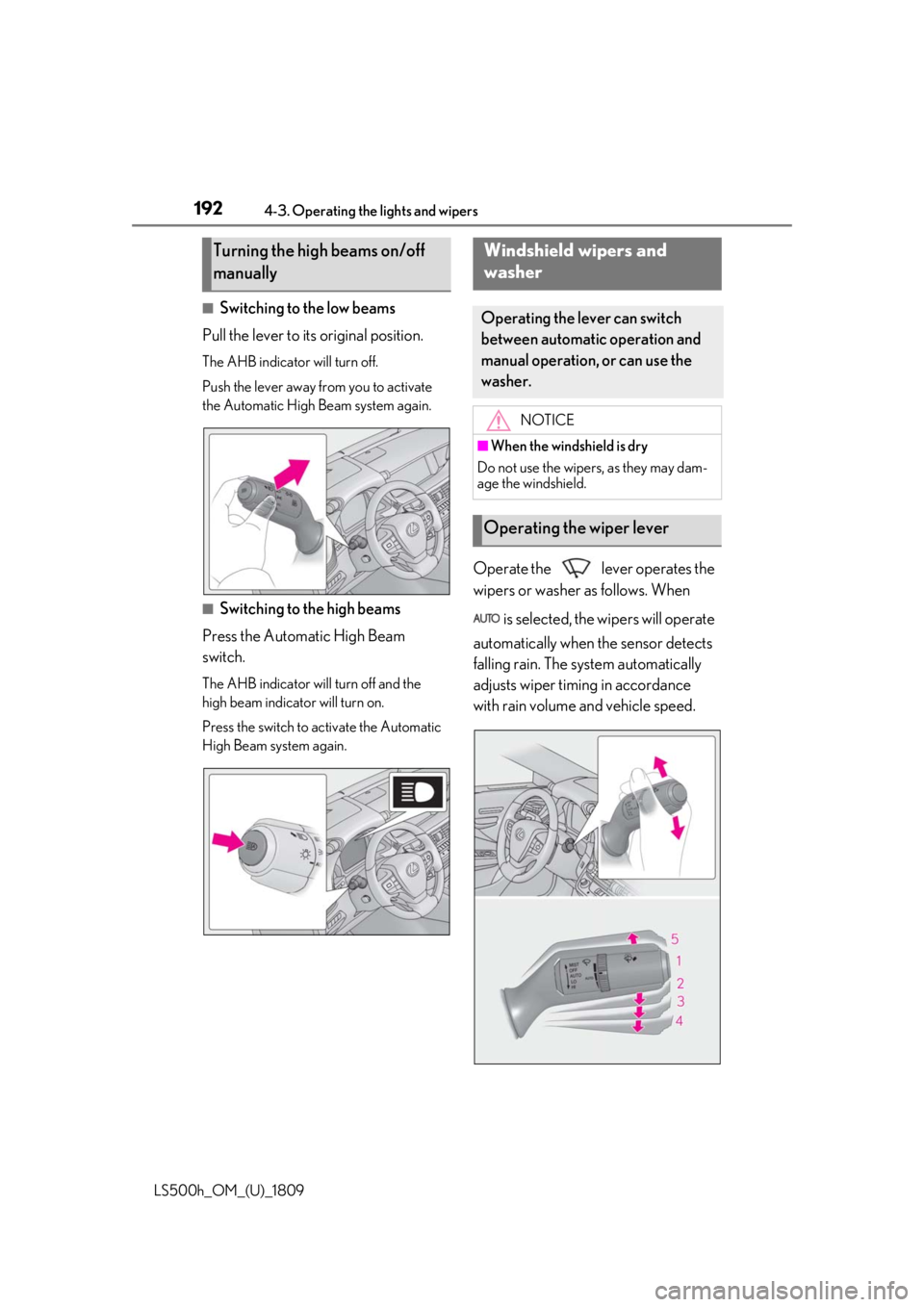
■Switching to the low beams
Pull the lever to its original position.
The AHB indicator will turn off.
Push the lever away from you to activate
the Automatic High Beam system again.
■Switching to the high beams
Press the Automatic High Beam
switch.
The AHB indicator will turn off and the
high beam indicator will turn on.
Press the switch to activate the Automatic
High Beam system again.
Operate the lever operates the
wipers or washer as follows. When
is selected, the wipers will operate
automatically when the sensor detects
falling rain. The system automatically
adjusts wiper timing in accordance
with rain volume and vehicle speed.
Turning the high beams on/off
manuallyWindshield wipers and
washer
Operating the lever can switch
between automatic operation and
manual operation, or can use the
washer.
NOTICE
■When the windshield is dry
Do not use the wipers, as they may dam-
age the windshield.
Operating the wiper lever
Page 193 of 523
1934-3. Operating the lights and wipers
LS500h_OM_(U)_1809
4
Driving
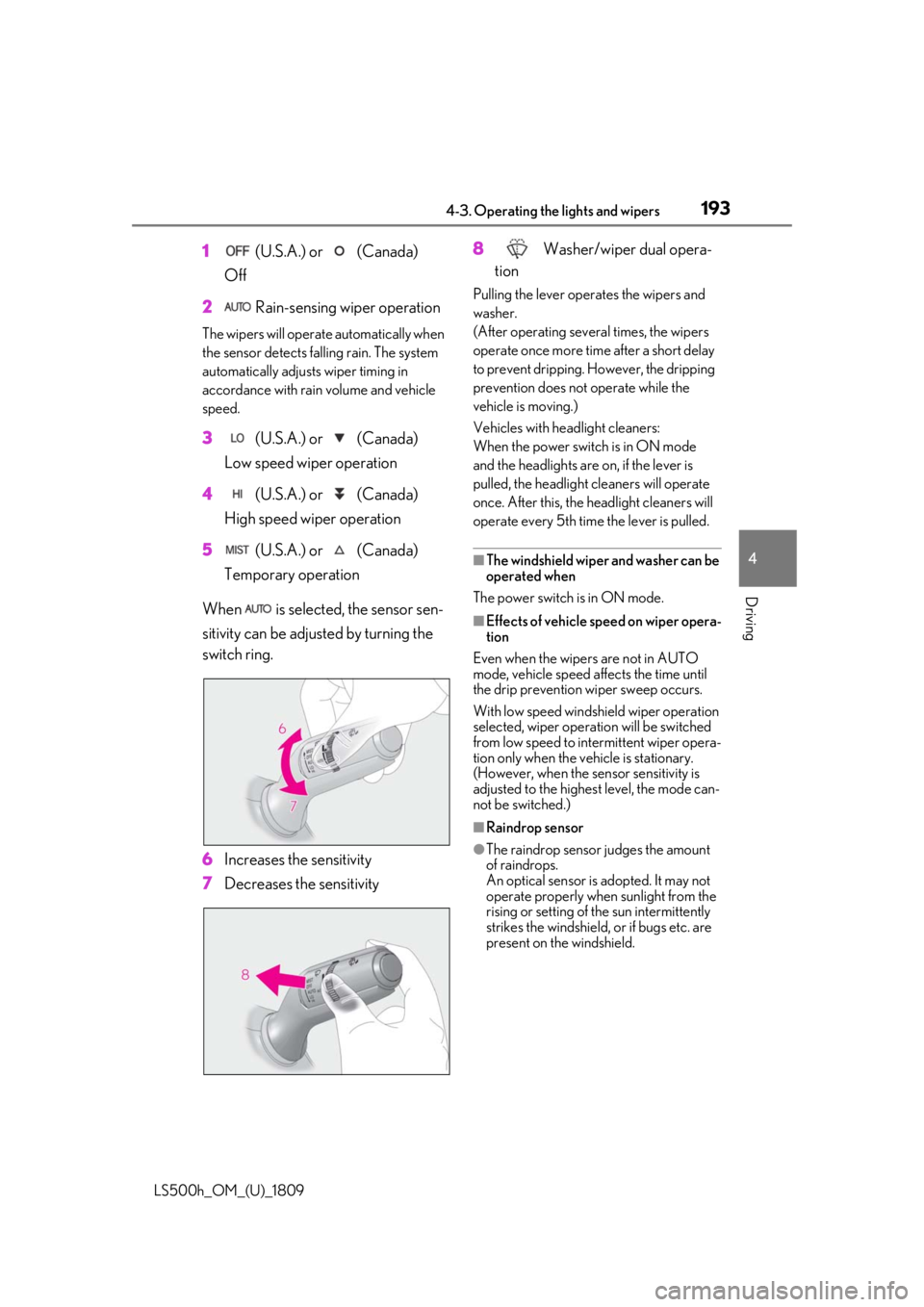
1 (U.S.A.) or (Canada)
Off
2 Rain-sensing wiper operation
The wipers will operate automatically when
the sensor detects falling rain. The system
automatically adjusts wiper timing in
accordance with rain volume and vehicle
speed.
3 (U.S.A.) or (Canada)
Low speed wiper operation
4 (U.S.A.) or (Canada)
High speed wiper operation
5 (U.S.A.) or (Canada)
Temporary operation
When is selected, the sensor sen-
sitivity can be adjusted by turning the
switch ring.
6 Increases the sensitivity
7 Decreases the sensitivity 8
Washer/wiper dual opera-
tion
Pulling the lever operates the wipers and
washer.
(After operating several times, the wipers
operate once more time after a short delay
to prevent dripping. However, the dripping
prevention does not operate while the
vehicle is moving.)
Vehicles with headlight cleaners:
When the power switch is in ON mode
and the headlights are on, if the lever is
pulled, the headlight cleaners will operate
once. After this, the he adlight cleaners will
operate every 5th time the lever is pulled.
■The windshield wiper and washer can be
operated when
The power switch is in ON mode.
■Effects of vehicle speed on wiper opera-
tion
Even when the wipers are not in AUTO
mode, vehicle speed affects the time until
the drip prevention wiper sweep occurs.
With low speed windsh ield wiper operation
selected, wiper operation will be switched
from low speed to intermittent wiper opera-
tion only when the vehicle is stationary.
(However, when the sensor sensitivity is
adjusted to the highes t level, the mode can-
not be switched.)
■Raindrop sensor
●The raindrop sensor judges the amount
of raindrops.
An optical sensor is adopted. It may not
operate properly when sunlight from the
rising or setting of the sun intermittently
strikes the windshield, or if bugs etc. are
present on the windshield.
Page 194 of 523
1944-3. Operating the lights and wipers
LS500h_OM_(U)_1809
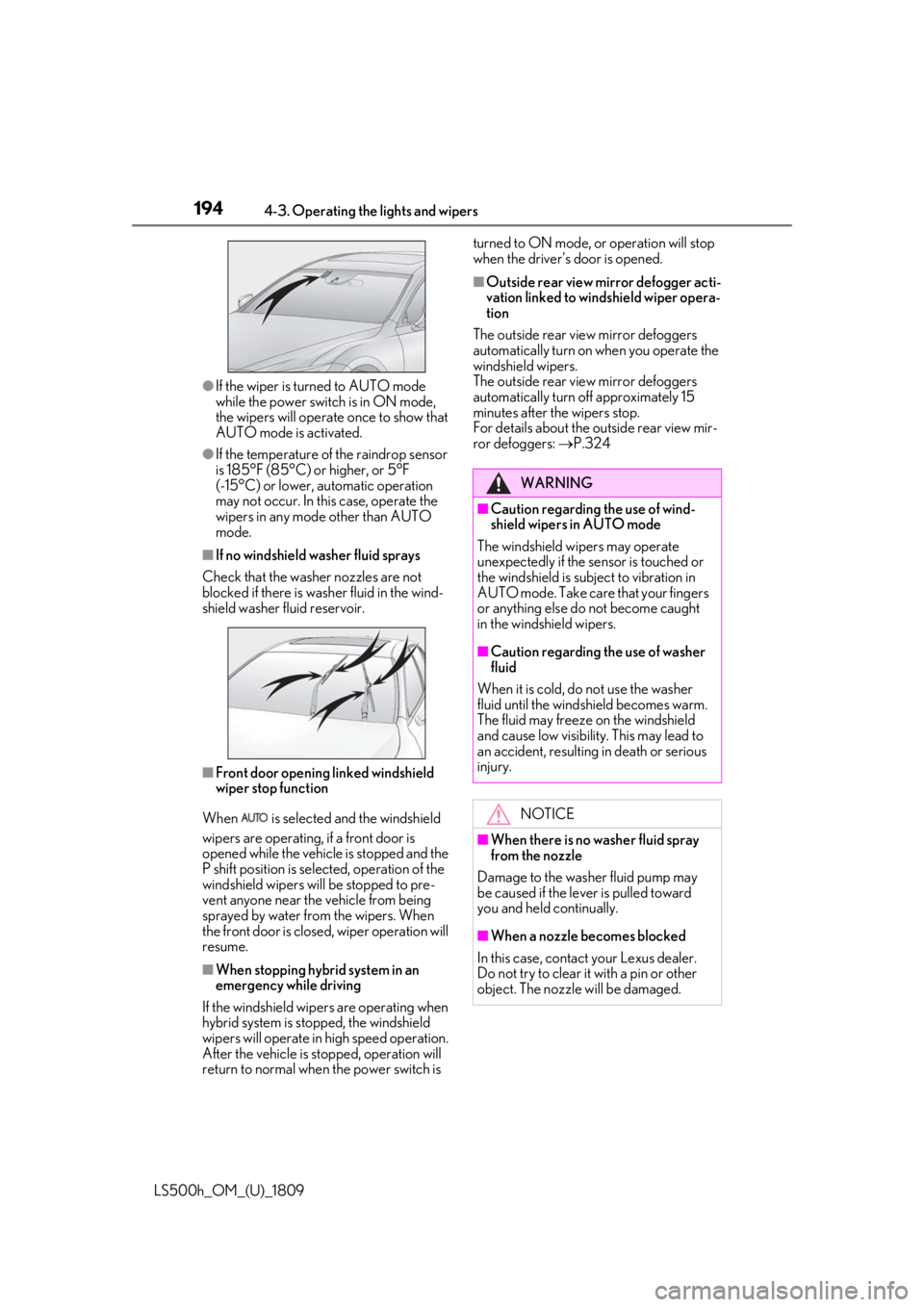
●If the wiper is turned to AUTO mode
while the power switch is in ON mode,
the wipers will operate once to show that
AUTO mode is activated.
●If the temperature of the raindrop sensor
is 185°F (85°C) or higher, or 5°F
(-15°C) or lower, automatic operation
may not occur. In this case, operate the
wipers in any mode other than AUTO
mode.
■If no windshield washer fluid sprays
Check that the washer nozzles are not
blocked if there is wash er fluid in the wind-
shield washer fluid reservoir.
■Front door opening linked windshield
wiper stop function
When is selected and the windshield
wipers are operating, if a front door is
opened while the vehicle is stopped and the
P shift position is sele cted, operation of the
windshield wipers w ill be stopped to pre-
vent anyone near the vehicle from being
sprayed by water from the wipers. When
the front door is closed, wiper operation will
resume.
■When stopping hybrid system in an
emergency while driving
If the windshield wipers are operating when
hybrid system is stop ped, the windshield
wipers will operate in high speed operation.
After the vehicle is stopped, operation will
return to normal when the power switch is turned to ON mode, or operation will stop
when the driver’s door is opened.
■Outside rear view mirror defogger acti-
vation linked to windshield wiper opera-
tion
The outside rear view mirror defoggers
automatically turn on when you operate the
windshield wipers.
The outside rear view mirror defoggers
automatically turn off approximately 15
minutes after the wipers stop.
For details about the outside rear view mir-
ror defoggers: P.324
WARNING
■Caution regarding the use of wind-
shield wipers in AUTO mode
The windshield wipers may operate
unexpectedly if the sensor is touched or
the windshield is subj ect to vibration in
AUTO mode. Take care that your fingers
or anything else do not become caught
in the windshield wipers.
■Caution regarding the use of washer
fluid
When it is cold, do not use the washer
fluid until the windshield becomes warm.
The fluid may freeze on the windshield
and cause low visibility. This may lead to
an accident, resulting in death or serious
injury.
NOTICE
■When there is no washer fluid spray
from the nozzle
Damage to the washer fluid pump may
be caused if the lever is pulled toward
you and held continually.
■When a nozzle becomes blocked
In this case, contact your Lexus dealer.
Do not try to clear it with a pin or other
object. The nozzle will be damaged.
Page 195 of 523
1954-3. Operating the lights and wipers
LS500h_OM_(U)_1809
4
Driving
When the windshield wipers are not
being used, they retract to below the
hood. To enable the windshield wipers
to be lifted when parking in cold condi-
tions or when replacing a windshield
wiper insert, change the rest position of
the windshield wipers to the service
position using the wiper lever.
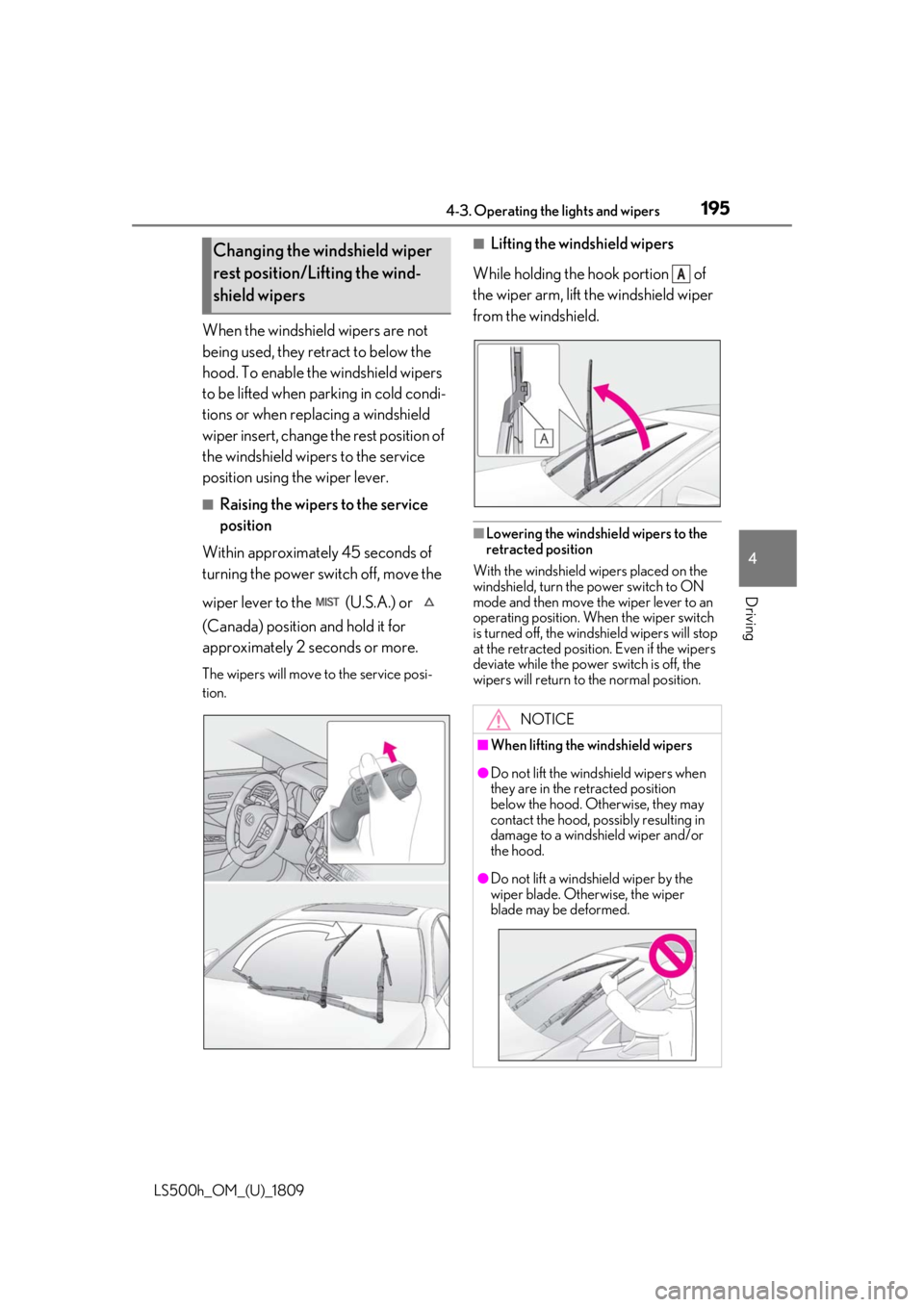
■Raising the wipers to the service
position
Within approximately 45 seconds of
turning the power switch off, move the
wiper lever to the (U.S.A.) or
(Canada) position and hold it for
approximately 2 se conds or more.
The wipers will move to the service posi-
tion.
■Lifting the windshield wipers
While holding the hook portion of
the wiper arm, lift the windshield wiper
from the windshield.
■Lowering the windshield wipers to the
retracted position
With the windshield wipers placed on the
windshield, turn the power switch to ON
mode and then move the wiper lever to an
operating position. Wh en the wiper switch
is turned off, the windshield wipers will stop
at the retracted position. Even if the wipers
deviate while the power switch is off, the
wipers will return to the normal position.
Changing the windshield wiper
rest position/Lifting the wind-
shield wipers
NOTICE
■When lifting the windshield wipers
●Do not lift the wind shield wipers when
they are in the retracted position
below the hood. Otherwise, they may
contact the hood, possibly resulting in
damage to a windshield wiper and/or
the hood.
●Do not lift a windshield wiper by the
wiper blade. Otherwise, the wiper
blade may be deformed.
A
Page 196 of 523

1964-3. Operating the lights and wipers
LS500h_OM_(U)_1809
NOTICE
●Do not operate the wiper lever when
the windshield wipers are lifted. Oth-
erwise, the windshield wipers may
contact the hood, possibly resulting in
damage to the windshield wipers
and/or hood.
Page 202 of 523
2024-5. Using the driving support systems
LS500h_OM_(U)_1809
WARNING
• If the inner side of the windshield where the front camera is installed is
dirty, contact your Lexus dealer.
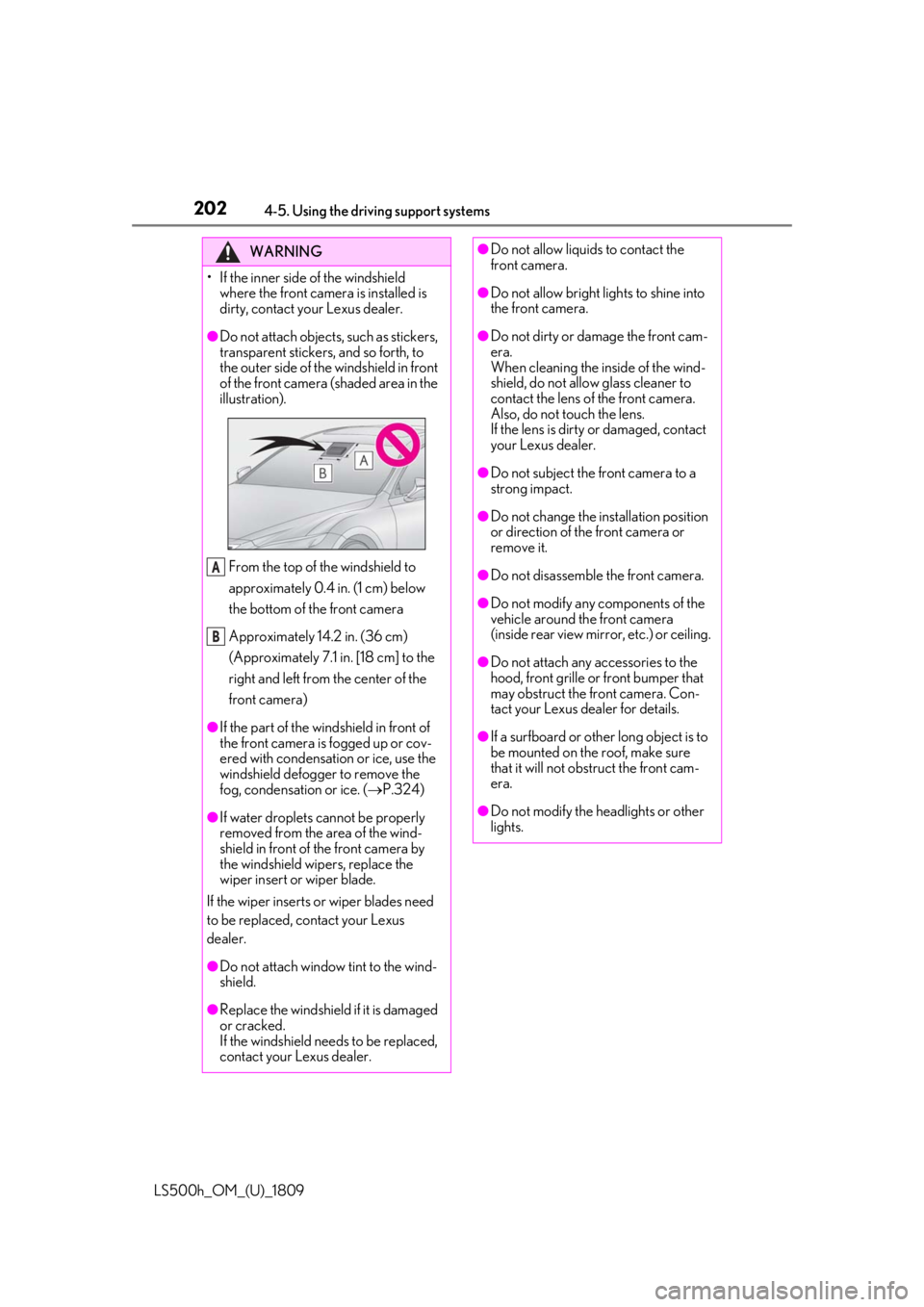
●Do not attach objects, such as stickers,
transparent stickers, and so forth, to
the outer side of the windshield in front
of the front camera (shaded area in the
illustration).
From the top of the windshield to
approximately 0.4 in. (1 cm) below
the bottom of the front camera
Approximately 14.2 in. (36 cm)
(Approximately 7.1 in. [18 cm] to the
right and left from the center of the
front camera)
●If the part of the windshield in front of
the front camera is fogged up or cov-
ered with condensation or ice, use the
windshield defogger to remove the
fog, condensation or ice. ( P.324)
●If water droplets cannot be properly
removed from the area of the wind-
shield in front of the front camera by
the windshield wipers, replace the
wiper insert or wiper blade.
If the wiper inserts or wiper blades need
to be replaced, contact your Lexus
dealer.
●Do not attach window tint to the wind-
shield.
●Replace the windshield if it is damaged
or cracked.
If the windshield needs to be replaced,
contact your Lexus dealer.
A
B
●Do not allow liquids to contact the
front camera.
●Do not allow bright lights to shine into
the front camera.
●Do not dirty or damage the front cam-
era.
When cleaning the inside of the wind-
shield, do not allow glass cleaner to
contact the lens of the front camera.
Also, do not touch the lens.
If the lens is dirty or damaged, contact
your Lexus dealer.
●Do not subject the front camera to a
strong impact.
●Do not change the installation position
or direction of the front camera or
remove it.
●Do not disassemble the front camera.
●Do not modify any components of the
vehicle around the front camera
(inside rear view mirror, etc.) or ceiling.
●Do not attach any accessories to the
hood, front grille or front bumper that
may obstruct the front camera. Con-
tact your Lexus dealer for details.
●If a surfboard or other long object is to
be mounted on the roof, make sure
that it will not obstruct the front cam-
era.
●Do not modify the headlights or other
lights.
Page 205 of 523
2054-5. Using the driving support systems
LS500h_OM_(U)_1809
4
Driving
●In the following situations, if the situation has changed (or the vehicle has been driven for
some time) and the normal operating conditio ns are detected, the message will disappear
and the system will become operational.
If the message does not disappear, contact your Lexus dealer.
• When the temperature around the radar sensor is outside of the operational range, such
as when the vehicle is in the sun or in an extremely cold environment
• When the front camera cannot detect objects in front of the vehicle, such as when driving
in the dark, snow, or fog, or when brig ht lights are shining into the front camera
When the temperature around the front
camera is outside of the operational range,
such as when the vehicle is in the sun or in an
extremely cold environment
If the front camera is hot, such as after the
vehicle had been parked in the sun, use the
air conditioning system to decrease the tem-
perature around the front camera.
If a sunshade was used when the vehicle
was parked, depending on its type, the sun-
light reflected from the surface of the sun-
shade may cause the temperature of the
front camera to become excessively high.
If the front camera is cold, such after the
vehicle is parked in an extremely cold envi-
ronment, use the air conditioning system to
increase the temperature around the front
camera.
The area in front of the front camera is
obstructed, such as when the hood is open
or a sticker is attached to the part of the
windshield in front of the front camera.
Close the hood, remove the sticker, etc. to
clear the obstruction.
SituationActions
Page 208 of 523
2084-5. Using the driving support systems
LS500h_OM_(U)_1809
WARNING
●If the part of the windshield in front of
the front camera is fogged up or cov-
ered with condensation, or ice, use the
windshield defogger to remove the
fog, condensation, or ice. (P.324)
●If water droplets cannot be properly
removed from the area of the wind-
shield in front of the front camera by
the windshield wipers, replace the
wiper insert or wiper blade.
If the wiper inserts or wiper blades need
to be replaced, contact your Lexus
dealer.
●Do not attach window tint to the wind-
shield.
●Replace the windshield if it is damaged
or cracked.
If the windshield needs to be replaced,
contact your Lexus dealer.
●Do not allow liquids to contact the
front camera.
●Do not allow bright lights to shine into
the front camera.
●Do not dirty or damage the front cam-
era.
When cleaning the inside of the wind-
shield, do not allow glass cleaner to
contact the lens of the front camera.
Also, do not touch the lens.
If the lens is dirty or damaged, contact
your Lexus dealer.
●Do not subject the front camera to a
strong impact.
●Do not change the installation position
or direction of the front camera or
remove it.
●Do not disassemble the front camera.
●Do not modify any components of the
vehicle around the front camera
(inside rear view mirror, etc.) or ceiling.
●Do not attach any accessories to the
hood, front grille or front bumper that
may obstruct the front camera. Con-
tact your Lexus dealer.
●If a surfboard or other long object is to
be mounted on the roof, make sure
that it will not obstruct the front cam-
era.
●Do not modify the headlights or other
lights.
Page 211 of 523
2114-5. Using the driving support systems
LS500h_OM_(U)_1809
4
Driving
●In the following situations, if the situation has changed (or the vehicle has been driven for
some time) and the normal operating conditio ns are detected, the message will disappear
and the system will become operational.
If the message does not disappear, contact your Lexus dealer.
• When the temperature around the radar sensor is outside of the operational range, such
as when the vehicle is in the sun or in an extremely cold environment
• When the front camera cannot detect objects in front of the vehicle, such as when driving
in the dark, snow, or fog, or when brig ht lights are shining into the front camera
When the temperature around the front
camera is outside of the operational range,
such as when the vehicle is in the sun or in an
extremely cold environment
If the front camera is hot, such as after the
vehicle had been parked in the sun, use the
air conditioning system to decrease the tem-
perature around the front camera.
If a sunshade was used when the vehicle
was parked, depending on its type, the sun-
light reflected from the surface of the sun-
shade may cause the temperature of the
front camera to become excessively high.
If the front camera is cold, such after the
vehicle is parked in an extremely cold envi-
ronment, use the air conditioning system to
increase the temperature around the front
camera.
The area in front of the front camera is
obstructed, such as when the hood is open
or a sticker is attached to the part of the
windshield in front of the front camera.
Close the hood, remove the sticker, etc. to
clear the obstruction.
SituationActions
Page 218 of 523
2184-5. Using the driving support systems
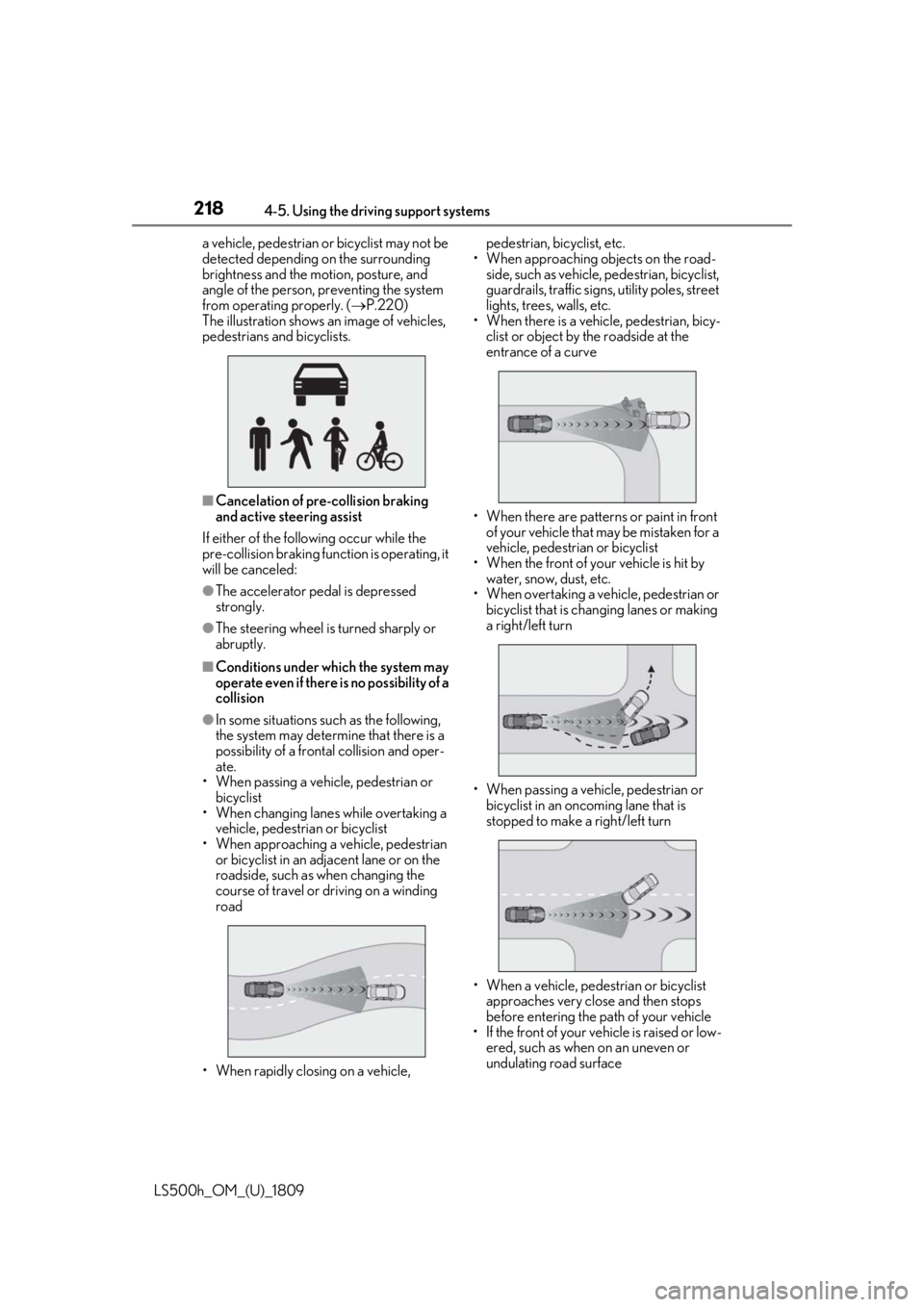
LS500h_OM_(U)_1809a vehicle, pedestrian or bicyclist may not be
detected depending on the surrounding
brightness and the motion, posture, and
angle of the person, preventing the system
from operating properly. (
P.220)
The illustration shows an image of vehicles,
pedestrians and bicyclists.
■Cancelation of pre-collision braking
and active steering assist
If either of the following occur while the
pre-collision braking function is operating, it
will be canceled:
●The accelerator pedal is depressed
strongly.
●The steering wheel is turned sharply or
abruptly.
■Conditions under which the system may
operate even if there is no possibility of a
collision
●In some situations such as the following,
the system may determine that there is a
possibility of a frontal collision and oper-
ate.
• When passing a vehicle, pedestrian or bicyclist
• When changing lane s while overtaking a
vehicle, pedestrian or bicyclist
• When approaching a vehicle, pedestrian or bicyclist in an adjacent lane or on the
roadside, such as when changing the
course of travel or driving on a winding
road
• When rapidly closing on a vehicle, pedestrian, bicyclist, etc.
• When approaching objects on the road- side, such as vehicle, pedestrian, bicyclist,
guardrails, traffic signs, utility poles, street
lights, trees, walls, etc.
• When there is a vehicle, pedestrian, bicy-
clist or object by the roadside at the
entrance of a curve
• When there are patterns or paint in front of your vehicle that may be mistaken for a
vehicle, pedestrian or bicyclist
• When the front of your vehicle is hit by water, snow, dust, etc.
• When overtaking a vehicle, pedestrian or
bicyclist that is changing lanes or making
a right/left turn
• When passing a vehicle, pedestrian or bicyclist in an oncoming lane that is
stopped to make a right/left turn
• When a vehicle, pedestrian or bicyclist approaches very close and then stops
before entering the pa th of your vehicle
• If the front of your vehicle is raised or low- ered, such as when on an uneven or
undulating road surface