change wheel LEXUS LS500H 2020 Owner's Manual
[x] Cancel search | Manufacturer: LEXUS, Model Year: 2020, Model line: LS500H, Model: LEXUS LS500H 2020Pages: 516, PDF Size: 10.38 MB
Page 235 of 516

2354-5. Using the driving support systems
4
Driving
*1: The function operates even if the vehi-cle speed is less than approximately 32
mph (50 km/h) when the lane center-
ing function is operating.
*2: Boundary between asphalt and the side of the road, such as grass, soil, or a curb
●Steering assist function
This function operates when all of the fol-
lowing conditions are me t in addition to the
operation conditions for the lane depar-
ture alert function.
•Setting for “Steering Assist” in of the
multi-information display is set to “ON”.
( P.80)
• Vehicle is not accelerated or decelerated by a fixed amount or more.
• Steering wheel is not operated with a steering force level su itable for changing
lanes.
• ABS, VSC, TRAC and PCS are not oper- ating.
• TRAC or VSC is not turned off.
• Hands off steering wheel warning is not
displayed. ( P.237)
●Vehicle sway warning function
This function operates when all of the fol-
lowing conditions are met.
• Setting for “Sway Warning” in of the multi-information display is set to “ON”.
( P.80)
• Vehicle speed is approximately 32 mph (50 km/h) or more.
• Width of traffic lane is approximately 9.8
ft. (3 m) or more.
• No system malfunctions are detected. ( P.238)
●Lane centering function
This function operates when all of the fol-
lowing conditions are met.
• LTA is turned on.
• Setting for “Steering Assist” and “Lane Center” in of the multi-information
display are set to “ON”. ( P.80)
• This function recognizes white (yellow) lane lines or the position of a preceding
vehicle (except when the preceding vehi-
cle is small, such as a motorcycle).
• The dynamic radar cruise control with full-speed range is operating in vehi-
cle-to-vehicle distance control mode.
• Width of traffic lane is approximately 10
to 13 ft. (3 to 4 m).
• Turn signal lever is not operated.
• Vehicle is not being driven around a sharp curve.
• No system malfunctions are detected. ( P.238)
• Vehicle does not ac celerate or deceler-
ate by a fixed amount or more.
• Steering wheel is not operated with a
steering force level su itable for changing
lanes.
• ABS, VSC, TRAC and PCS are not oper-
ating.
• TRAC or VSC is not turned off.
• Hands off steering wheel warning is not displayed. ( P.237)
• The driver has one or both hands on the steering wheel. (vehicles with Lexus
Safety System + A)
• The vehicle is being driven in the center of a lane.
• Steering assist function is not operating.
●Lane change assist fu nction (vehicles with
Lexus Safety System + A)
This function will operate when all of the
following conditions are met:
• The lane centering function is operating.
• “Lane Change Assist” is set to “ON” in of the multi-information dis-
play.( P.80)
• The vehicle speed is between approxi- mately 57 and 85 mph (90 and 140
km/h).
• White (yellow) lane lines are detected by
the system.
• A broken white line is detected between your vehicle and the lane toward which
the turn signal is operated.
• The turn signal lever is held partway (lane change position) for approximately 1 sec-
ond.
• A vehicle is not overtaking your vehicle
or detected in the lane toward which the
turn signal is operated.
• The vehicle is being driven straight or
around a slight curve.
• The vehicle is not a ccelerating or decel-
erating more than a certain amount.
• The steering wheel is not being turned sufficiently to perf orm a lane change.
Page 236 of 516

2364-5. Using the driving support systems
• ABS, VSC, TRAC and PCS are not oper-ating.
• TRAC or VSC is not turned off.
• Hands off steering wheel warning is not
displayed. ( P.237)
• The dynamic radar cruise control with
full-speed range approach warning is not
operating.
• The lane departure alert function is not
operating.
• The curve speed reduction function ( P.247) is not operating.
■Temporary cancelation of functions
●When operation conditions are no longer
met, a function may be temporarily can-
celed. However, when the operation con-
ditions are met again, operation of the
function is automa tically restored.
( P.234)
●If the operation conditions ( P.234) are
no longer met while the lane centering
function is operating, the steering wheel
may vibrate and the buzzer may sound to
indicate that the function has been tem-
porarily canceled. However, if the “Alert”
customization setting is set to ,
the system will notify the driver by vibrat-
ing the steering wheel instead of sound-
ing the buzzer.
●If the operating conditions ( P.234) are
no longer met, the lane change assist
function will be canceled. (vehicles with
Lexus Safety System + A)
If a message urging operation of the steer-
ing wheel is displayed, operate the steering
wheel.
■Steering assist function/lane centering
function
●Depending on the vehicle speed, lane
departure situation, road conditions, etc.,
the driver may not feel the function is
operating or the function may not oper-
ate at all.
●Even if the curve speed reduction func-
tion ( P.247) operates, the lane center-
ing function may not be able to drive the
vehicle around a curve successfully.
(vehicles with Lexus Safety System + A)
●The steering control of the function is
overridden by the driver’s steering wheel operation.
●When the vehicle speed is approximately
31 mph (50 km/h) or less, the warning
display of the lane ce
ntering function will
not operate.
●Do not attempt to test the operation of
the steering assist function.
●The steering assist function may operate
when attempting to cut closely in front of
another vehicle while changing lanes.
■Lane departure alert function
●The warning buzzer may be difficult to
hear due to external noise, audio play-
back, etc. Also, it may be difficult to feel
steering wheel vibrations due to the road
conditions, etc.
●If the edge of the course* is not clear or
straight, the lane departure alert function
may not operate.
●Vehicle with BSM: It may not be possible
for the system to determine if there is a
danger of a collision with a vehicle in an
adjacent lane.
●Do not attempt to test the operation of
the lane departure alert function.
●This function may operate if, when chang-
ing lanes, your vehicle cuts closely in front
of another vehicle.
*: Boundary between asphalt and the side
of the road, such as grass, soil, or a curb
■Lane change assist function (vehicles
with Lexus Safety System + A)
Depending on the vehicle speed, vehicle
condition, road conditions, or conditions of
the area around the vehicle, the lane
change assist function may not operate or it
may be difficult to recognize that it has
operated.
If steering control oper ation is excessive or
insufficient, it can be corrected by the
driver’s operation of the steering wheel.
In situations such as the following, the lane
change assist function may be canceled:
●When the system no longer detects white
(yellow) lane lines
●When the turn signal lever is operated
fully (right/left turn position)
Page 237 of 516
2374-5. Using the driving support systems
4
Driving
●When the vehicle speed is outside of the
operational range of the function
●When the system detects operation of
the steering wheel, brake or accelerator
pedal by the driver
While the lane change assist function is
operating, if the system detects that a vehi-
cle is quickly approaching in the lane
toward which the turn signal is operated,
the steering assist may slightly steer the
vehicle away from the lane while a buzzer is
sounding, the steering wheel is vibrating,
and a warning display is displayed on the
multi-information display, to help prevent
the vehicle from entering the lane and alert
the driver of the approaching vehicle.
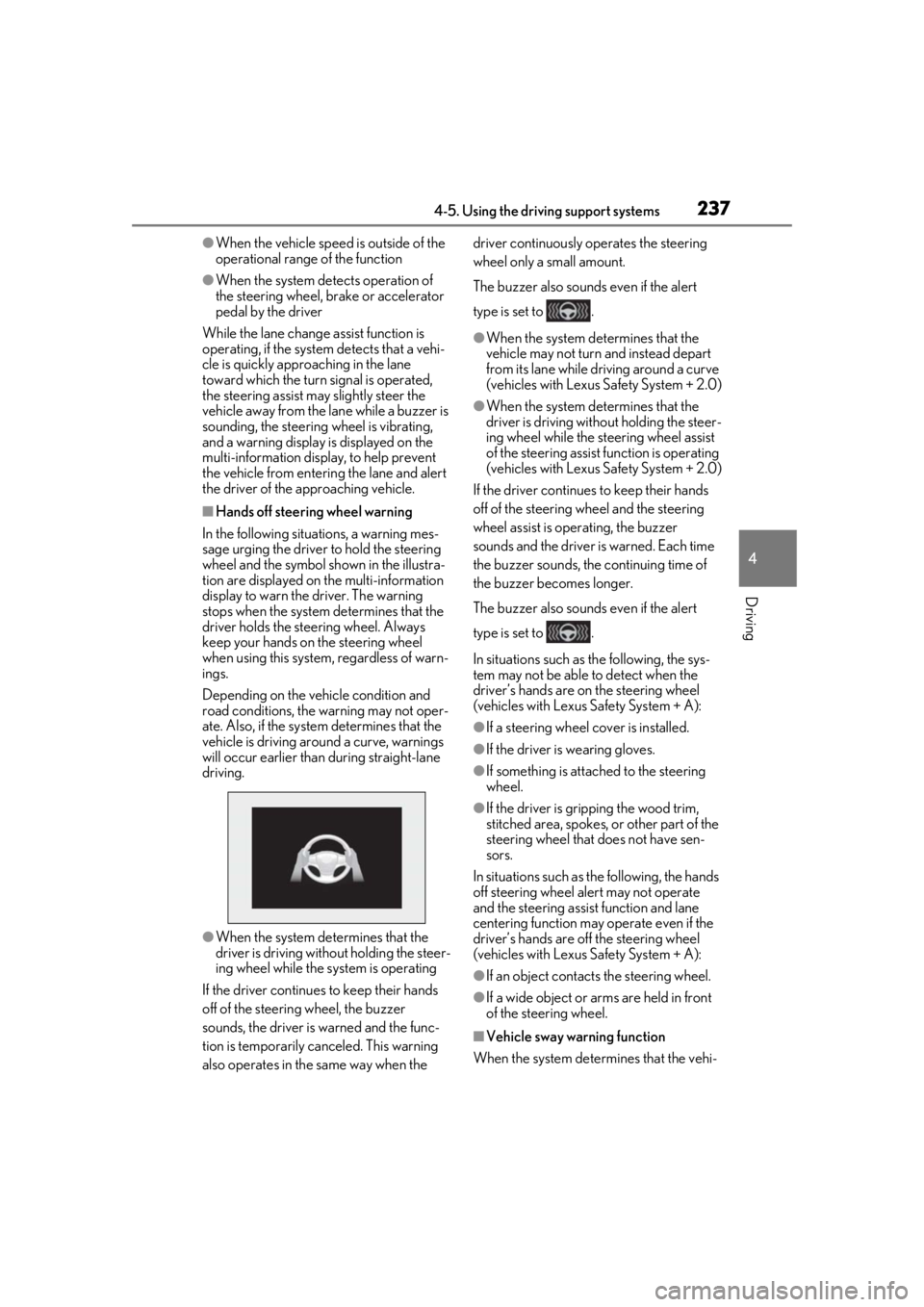
■Hands off steering wheel warning
In the following situations, a warning mes-
sage urging the driver to hold the steering
wheel and the symbol shown in the illustra-
tion are displayed on the multi-information
display to warn the driver. The warning
stops when the system determines that the
driver holds the steering wheel. Always
keep your hands on the steering wheel
when using this system, regardless of warn-
ings.
Depending on the vehicle condition and
road conditions, the warning may not oper-
ate. Also, if the system determines that the
vehicle is driving around a curve, warnings
will occur earlier than during straight-lane
driving.
●When the system determines that the
driver is driving without holding the steer-
ing wheel while the sy stem is operating
If the driver continue s to keep their hands
off of the steering wheel, the buzzer
sounds, the driver is warned and the func-
tion is temporarily ca nceled. This warning
also operates in the same way when the driver continuously operates the steering
wheel only a small amount.
The buzzer also sounds even if the alert
type is set to .
●When the system determines that the
vehicle may not turn and instead depart
from its lane while driving around a curve
(vehicles with Lexus Safety System + 2.0)
●When the system determines that the
driver is driving with
out holding the steer-
ing wheel while the st eering wheel assist
of the steering assist function is operating
(vehicles with Lexus Safety System + 2.0)
If the driver continues to keep their hands
off of the steering wheel and the steering
wheel assist is operating, the buzzer
sounds and the driver is warned. Each time
the buzzer sounds, the continuing time of
the buzzer becomes longer.
The buzzer also sounds even if the alert
type is set to .
In situations such as the following, the sys-
tem may not be able to detect when the
driver’s hands are on the steering wheel
(vehicles with Lexus Safety System + A):
●If a steering wheel cover is installed.
●If the driver is wearing gloves.
●If something is attached to the steering
wheel.
●If the driver is gripping the wood trim,
stitched area, spokes, or other part of the
steering wheel that does not have sen-
sors.
In situations such as the following, the hands
off steering wheel alert may not operate
and the steering assist function and lane
centering function may operate even if the
driver’s hands are off the steering wheel
(vehicles with Lexus Safety System + A):
●If an object contacts the steering wheel.
●If a wide object or ar ms are held in front
of the steering wheel.
■Vehicle sway warning function
When the system determines that the vehi-
Page 251 of 516
2514-5. Using the driving support systems
4
Driving
●When the course of the vehicle differs
from the shape of the curve
●When the vehicle speed is excessively
high when entering a curve
●When the steering wheel is suddenly
operated
*: If equipped
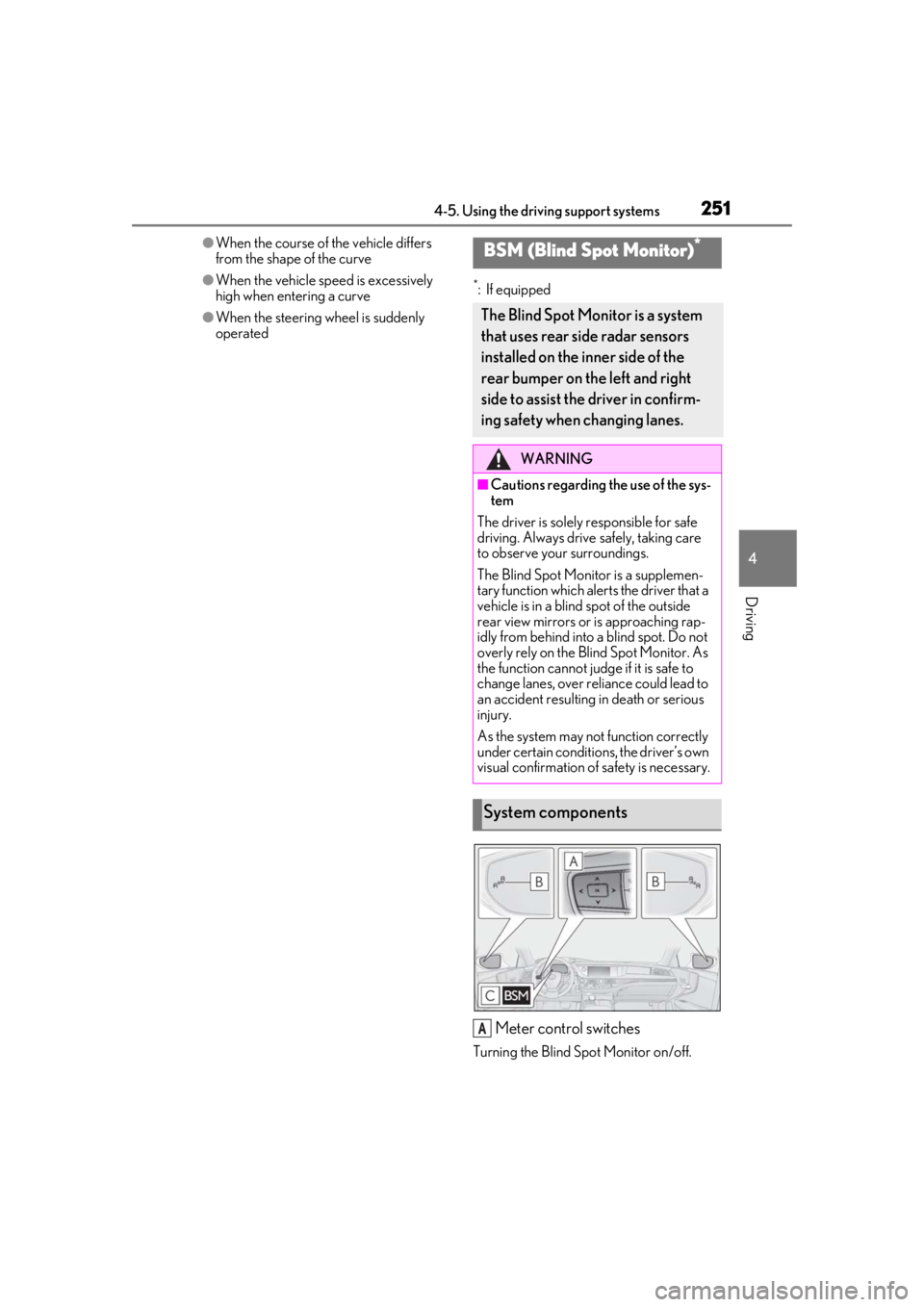
Meter control switches
Turning the Blind Spot Monitor on/off.
BSM (Blind Spot Monitor)*
The Blind Spot Monitor is a system
that uses rear side radar sensors
installed on the inner side of the
rear bumper on the left and right
side to assist the driver in confirm-
ing safety when changing lanes.
WARNING
■Cautions regarding the use of the sys-
tem
The driver is solely responsible for safe
driving. Always drive safely, taking care
to observe your surroundings.
The Blind Spot Monitor is a supplemen-
tary function which alerts the driver that a
vehicle is in a blind spot of the outside
rear view mirrors or is approaching rap-
idly from behind into a blind spot. Do not
overly rely on the Blind Spot Monitor. As
the function cannot judge if it is safe to
change lanes, over reliance could lead to
an accident resulting in death or serious
injury.
As the system may not function correctly
under certain conditio ns, the driver’s own
visual confirmation of safety is necessary.
System components
A
Page 294 of 516

2944-5. Using the driving support systems
*: If equipped
■Situations in which the vehicle height
control may not operate properly
●In the following situations, the vehicle
height may change slowly or may not
change to the correct height:
• When the vehicle comes into contact with snow, ice, stone, etc.
• When the ambient temperature is low
• When the accumulator tank pressure is low
●In the following situations, the vehicle
height may not change:
• If the hood or trunk is not fully closed
• If the brake pedal depressed and the
vehicle is stopped
• When the vehicle is on a significantly
uneven or undulating road
• When the vehicle is on a slanted road or a slope
■Operating sound of the air suspension
compressor and valves
In the following situations the air suspension
compressor and valves may operate and a
sound may be heard, but this does not indi-
cate a malfunction.
●When passengers enter or exit the vehi-
cle or cargo is loaded or unloaded, caus- ing the vehicle height to change
●When the height of the vehicle is
changed using the vehicle height adjust-
ment switch
●When the doors are opened/closed
●When the doors are locked/unlocked
■When the accumulator tank pressure is
low
When the accumulator tank pressure is low,
the air suspension compressor and valves
may operate repeatedly even though the
vehicle height is not being changed. This
does not indicate a malfunction.
■When “Check Air Suspension System”
is displayed on the multi-information
display
The system may not operate properly. Have
the vehicle inspected by your Lexus dealer.
■Customization
Some functions can be customized.
( P.470)
Electronically modulated air
s
uspension*
The height of the vehicle when driv-
ing can be selected using the vehi-
cle height adjustment switch. The
selected height level will be main-
tained regardless of the number of
passengers or weight of cargo.
Additionally, setti ngs of the follow-
ing functions can be changed:
Enabling/Disabling controls of
access mode
Temporarily disabling vehicle
height control
WARNING
■Situations in whic h the operation of
the electronically modulated air sus-
pension should be temporarily dis-
abled
In the following situations, make sure to
temporarily disable all functions of the
vehicle height control of the electroni-
cally modulated air suspension and then
stop the engine. Otherwise, the vehicle
height may change and part of your body
may be caught under the vehicle, possi-
bly causing injury.
●When the vehicle is parked on a curb
●If any of the wheels is not touching the
ground
●If the vehicle needs to be jacked up
●If the vehicle is to be tied down
●If the vehicle is to be towed
Page 298 of 516

2984-5. Using the driving support systems
automatically controlled to reduce the
vehicle speed and that helps reduce
the possibility of further damage due to
a secondary collision.
■TRAC (Traction Control)
Helps to maintain drive power and pre-
vent the drive wheels from spinning
when starting the vehicle or accelerat-
ing on slippery roads
■Hill-start assist control
Helps to reduce the backward move-
ment of the vehicle when starting on an
uphill
■VGRS (Variable Gear Ratio Steer-
ing) (if equipped)
Adjusts the front wheel turning angle in
accordance with the vehicle speed and
steering wheel movement
■DRS (Dynamic Rear Steering) (if
equipped)
Contributes to the turning characteris-
tics and responsiveness of the vehicle
by adjusting the rear wheel angle of the
vehicle in accordance with steering
wheel movement.
■EPS (Electric Power Steering)
Employs an electric motor to reduce
the amount of effort needed to turn the
steering wheel.
■Active stabilizer suspension sys-
tem (if equipped)
Reduces sway when cornering accord-
ing to steering wheel movement in
order to maintain a stable vehicle pos-
ture.
■Adaptive Variable Suspension Sys-
tem (if equipped)
By independently controlling the
damping force of th e shock absorbers
for each of the 4 wheels according to
the road and driving conditions, this
system helps riding comfort with supe-
rior vehicle stability, and helps good
vehicle posture.
Also, the damping force changes
depending on the selected driving
mode. ( P.292)
■LDH (Lexus Dynamic Handling
system) (if equipped)
Provides integrated control of the
VGRS, DRS and EPS. Contributes to
turning characteristics at low speeds,
responsiveness at medium speeds and
safety at high speeds by controlling the
steering angle of the front and rear
wheels in accordance with the steering
wheel operation and vehicle speed.
■VDIM (Vehicle Dynamics Inte-
grated Management)
Provides integrated control of the
ABS, brake assist, TRAC, VSC,
hill-start assist control, EPS, VGRS (if
equipped), DRS (if equipped), active
stabilizer suspension system (if
equipped) and Adaptive Variable Sus-
pension System (if equipped)
Helps to maintain vehicle stability when
swerving on slippery road surfaces by
controlling the brakes, engine output,
steering assist, and steering ratio
Page 300 of 516

3004-5. Using the driving support systems
of the following situations:
●Shift the shift position to P or N
●The accelerator pedal is depressed
●The parking brake is engaged
●2 seconds at maximum elapsed after the
brake pedal is released
■VGRS is disabled when
VGRS may stop operating in the following
situations.
In this event, the steering wheel may move
from its straight forward position, but it will
return when the system restarts.
●When the steering wheel is operated for
an extended period of time while the
vehicle is stopped or is moving very
slowly (on vehicles with LDH, DRS is dis-
abled together with VGRS)
●When the steering wheel has been held
fully to the left or right
The center position of the steering wheel
may change when VGRS is disabled. How-
ever, the position will return to normal after
VGRS is reactivated.
■When the battery is disconnected (vehi-
cles with VGRS)
The steering wheel may move from its
straight forward position, but this will be
corrected automatically when driving.
■Sounds and vibrations caused by the
ABS, brake assist, VS C, TRAC, hill-start
assist control and VGRS systems
●A sound may be heard from the engine
compartment when the brake pedal is
depressed repeatedly, when the engine is
started or just after the vehicle begins to
move. This sound does not indicate that a
malfunction has occurred in any of these
systems.
●Any of the following conditions may
occur when the above systems are oper-
ating. None of these indicates that a mal-
function has occurred.
• Vibrations may be felt through the vehicle body and steering.
• A motor sound may be heard also after the vehicle comes to a stop.
• Vehicles without Lexus Safety System +
A: The brake pedal may pulsate slightly after the ABS is activated.
• Vehicles without Lexus Safety System + A: The brake pedal may move down
slightly after the ABS is activated.
■ECB operating sound
ECB operating sound may be heard in the
following cases, but it does not indicate that
a malfunction has occurred.
●Operating sound heard from the engine
compartment when the brake pedal is
operated.
●Motor sound of the brake system heard
from the front part of the vehicle when
the driver’s door is opened.
●Operating sound heard from the engine
compartment when one or two minutes
passed after the stop of the engine.
■EPS, VGRS and DRS operation sound
When the steering wheel is operated, a
motor sound (whirring sound) may be
heard. This does not indicate a malfunction.
■Automatic reactivation of TRAC and
VSC systems
After turning the TRAC and VSC systems
off, the systems will be automatically
re-enabled in the following situations:
●When the engine switch is turned off
●If only the TRAC system is turned off, the
TRAC will turn on when vehicle speed
increases
If both the TRAC and VSC systems are
turned off, automatic re-enabling will not
occur when vehicle speed increases.
■Reduced effectiveness of the EPS sys-
tem
The effectiveness of the EPS system is
reduced to prevent the system from over-
heating when there is frequent steering
input over an extended period of time. The
steering wheel may feel heavy as a result.
Should this occur, re frain from excessive
steering input or stop the vehicle and turn
the engine off. The EPS system should
return to normal within 10 minutes.
■Secondary Collision Brake operating
conditions
The vehicle speed is approximately 6 mph
Page 302 of 516

3024-5. Using the driving support systems
WARNING
■Secondary Collision Brake
Do not overly rely on the Secondary Col-
lision Brake. This system is designed to
help reduce the possibility of further
damage due to a secondary collision,
however, that effect changes according
to various conditions. Overly relying on
the system may result in death or serious
injury.
■Replacing tires
Make sure that all ti res are of the speci-
fied size, brand, tread pattern and total
load capacity. In addition, make sure that
the tires are inflated to the recom-
mended tire inflation pressure level.
The ABS, TRAC and VSC systems will
not function correctly if different tires are
installed on the vehicle.
Contact your Lexus dealer for further
information when replacing tires or
wheels.
■Handling of tires and the suspension
Using tires with any kind of problem or
modifying the suspension will affect the
driving assist systems, and may cause a
system to malfunction.
Page 303 of 516
3034-6. Driving tips
4
Driving
4-6.Driving tips
Use fluids that are appropriate to
the prevailing outside temperatures.
• Engine oil
• Engine coolant
• Washer fluid
Have a service technician inspect
the condition of the battery.
Have the vehicle fitted with four
snow tires or purchase a set of tire
chains for the rear tires.
*
Ensure that all tires are the specified size
and brand, and that chains match the size
of the tires.
*: Tire chains cannot be mounted on vehi-
cles with front and rear tires of differing
sizes.
Winter driving tips
Carry out the necessary prepara-
tions and inspections before driving
the vehicle in winter. Always drive
the vehicle in a manner appropriate
to the prevailing weather condi-
tions.
Preparation for winter
WARNING
■Driving with snow tires
Observe the following precautions to
reduce the risk of accidents.
Failure to do so may result in a loss of
vehicle control and cause death or seri-
ous injury.
●Use tires of the specified size.
●Maintain the recommended level of air
pressure.
●Do not drive in excess of 75 mph (120
km/h), regardless of the type of snow
tires being used.
●Use snow tires on all, not just some
wheels.
■When installing tire chains
Before installing tire chains, make sure to
disable all functions of the vehicle height
control of the electronically modulated
air suspension. Otherwise, the vehicle
height may change while installing the
tire chains and part or your body may be
caught under the vehicle, possibly caus-
ing injury. ( P.297)
■Driving with tire chains
Observe the following precautions to
reduce the risk of accidents.
Failure to do so may result in the vehicle
being unable to be driven safely, and may
cause death or serious injury.
●Do not drive in excess of the speed
limit specified for the tire chains being
used, or 30 mph (50 km/h), which-
ever is lower.
●Avoid driving on bumpy road surfaces
or over potholes.
●Avoid sudden acceleration, abrupt
steering, sudden br aking and shifting
operations that cause sudden engine
braking.
●Slow down sufficiently before entering
a curve to ensure that vehicle control is
maintained.
●Do not use LTA (Lane Tracing Assist)
system.
Page 331 of 516
3315-3. Using the air conditioning system and defogger
5
Interior features
that you trace.
Trace operation cannot be used while driv-
ing.
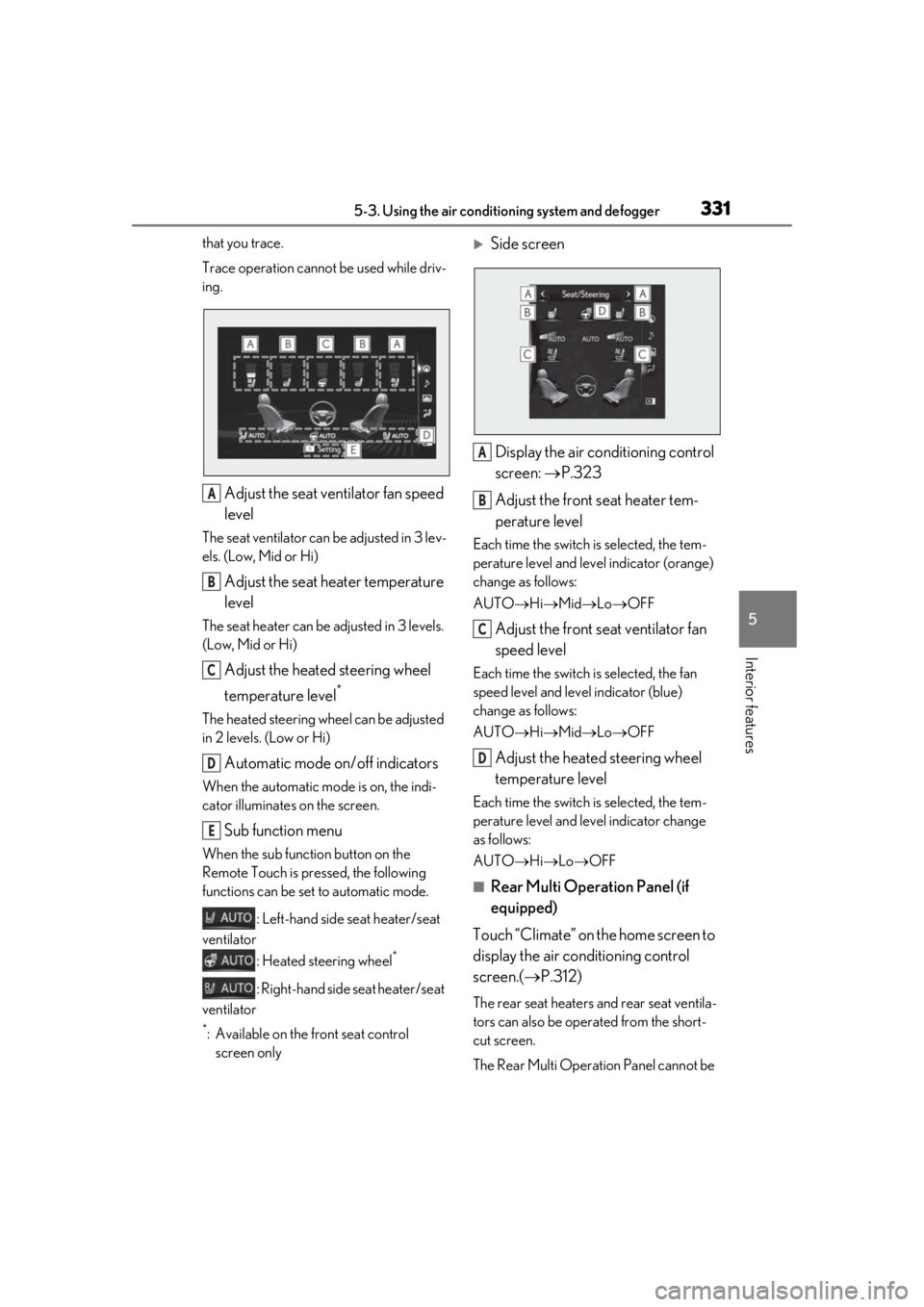
Adjust the seat ventilator fan speed
level
The seat ventilator can be adjusted in 3 lev-
els. (Low, Mid or Hi)
Adjust the seat heater temperature
level
The seat heater can be adjusted in 3 levels.
(Low, Mid or Hi)
Adjust the heated steering wheel
temperature level
*
The heated steering wheel can be adjusted
in 2 levels. (Low or Hi)
Automatic mode on/off indicators
When the automatic mode is on, the indi-
cator illuminates on the screen.
Sub function menu
When the sub function button on the
Remote Touch is pressed, the following
functions can be set to automatic mode.
: Left-hand side seat heater/seat
ventilator
: Heated steering wheel
*
: Right-hand side seat heater/seat
ventilator
*: Available on the front seat control screen only
Side screen
Display the air conditioning control
screen: P.323
Adjust the front seat heater tem-
perature level
Each time the switch is selected, the tem-
perature level and level indicator (orange)
change as follows:
AUTO Hi Mid Lo OFF
Adjust the front seat ventilator fan
speed level
Each time the switch is selected, the fan
speed level and level indicator (blue)
change as follows:
AUTO Hi Mid Lo OFF
Adjust the heated steering wheel
temperature level
Each time the switch is selected, the tem-
perature level and le vel indicator change
as follows:
AUTO Hi Lo OFF
■Rear Multi Operation Panel (if
equipped)
Touch “Climate” on the home screen to
display the air conditioning control
screen.( P.312)
The rear seat heaters and rear seat ventila-
tors can also be operated from the short-
cut screen.
The Rear Multi Operat ion Panel cannot be
A
B
C
D
E
A
B
C
D