park assist LEXUS LS500H 2020 Owner's Manual
[x] Cancel search | Manufacturer: LEXUS, Model Year: 2020, Model line: LS500H, Model: LEXUS LS500H 2020Pages: 516, PDF Size: 10.38 MB
Page 297 of 516

2974-5. Using the driving support systems
4
Driving
■When the vehicle height has been
increased by a control of access mode
Press the vehicle height adjustment switch
with the engine switch in any mode to return
the vehicle to its previous vehicle height.
■Access mode operation
●Access mode will not operate if the vehi-
cle is not parked on a level road surface.
●When the P shift position is selected, if
the doors are not locked and any door is
opened from the outside, exit control will
operate.
●If the doors are locked and unlocked
repeatedly, the system may not operate
temporarily.
Vehicle height control can be tempo-
rarily disabled using the meter control
switches. ( P.81)
When to temporarily disable vehicle height
control: P.294
1 Press or to select .
2 Press or to select “Vehicle
Settings” and then press .
3 Press or to select
and then press .
4 Press or to select “Height
Control” and then press .
This setting is memorized even if the
engine switch is turned off.
Even if the vehicle height control func-
tions are disabled, they will be enabled
automatically when the vehicle speed
reaches approximately 19 mph (30
km/h).
■ECB (Electronically Controlled
Brake System) (vehicles with Lexus
Safety System + A)
The electronically controlled system
generates braking force correspond-
ing to the brake operation
■ABS (Anti-lock Brake System)
Helps to prevent wheel lock when the
brakes are applied suddenly, or if the
brakes are applied while driving on a
slippery road surface
■Brake assist
Generates an increased level of brak-
ing force after the brake pedal is
depressed when the system detects a
panic stop situation
■VSC (Vehicle Stability Control)
Helps the driver to control skidding
when swerving sudden ly or turning on
slippery road surfaces.
■Secondary Collision Brake
When the airbag sensor detects a colli-
sion, the brakes and stop lights are
Temporarily disabling vehicle
height control
Driving assist systems
To keep driving safety and perfor-
mance, the following systems oper-
ate automatically in response to
various driving situations. Be aware,
however, that these systems are
supplementary and should not be
relied upon too heavily when oper-
ating the vehicle.
Summary of the driving assist
systems
Page 299 of 516
2994-5. Using the driving support systems
4
Driving
■When the TRAC/VSC systems are
operating (vehicles without Lexus
Safety System + A)
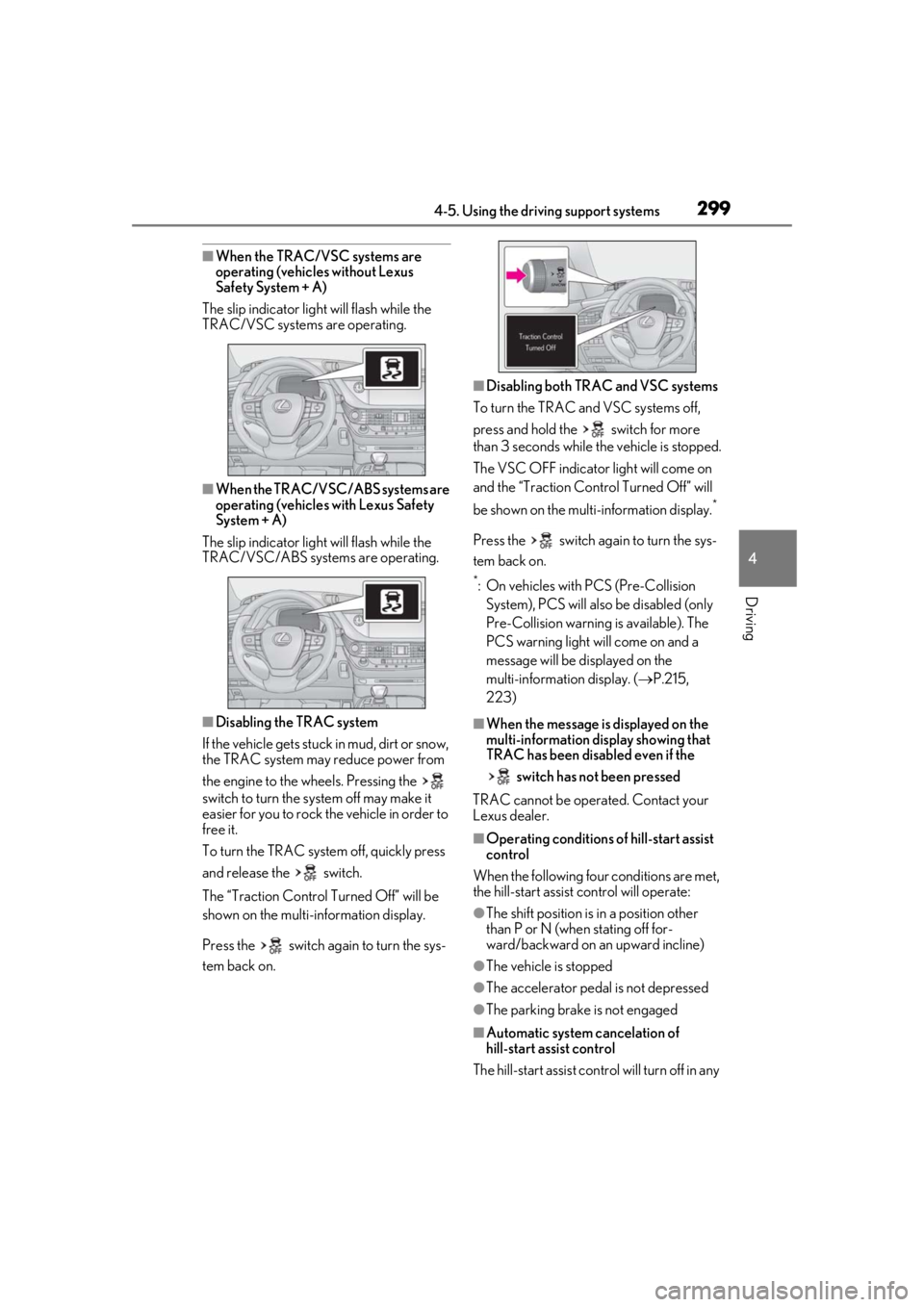
The slip indicator light will flash while the
TRAC/VSC systems are operating.
■When the TRAC/VSC/ABS systems are
operating (vehicles with Lexus Safety
System + A)
The slip indicator light will flash while the
TRAC/VSC/ABS systems are operating.
■Disabling the TRAC system
If the vehicle gets stuck in mud, dirt or snow,
the TRAC system may reduce power from
the engine to the wheels. Pressing the
switch to turn the system off may make it
easier for you to rock the vehicle in order to
free it.
To turn the TRAC system off, quickly press
and release the switch.
The “Traction Control Turned Off” will be
shown on the multi-information display.
Press the switch again to turn the sys-
tem back on.
■Disabling both TRAC and VSC systems
To turn the TRAC and VSC systems off,
press and hold the switch for more
than 3 seconds while the vehicle is stopped.
The VSC OFF indicator light will come on
and the “Traction Control Turned Off” will
be shown on the multi-information display.
*
Press the switch ag ain to turn the sys-
tem back on.
*: On vehicles with PCS (Pre-Collision System), PCS will also be disabled (only
Pre-Collision warning is available). The
PCS warning light will come on and a
message will be di splayed on the
multi-information display. ( P.215,
223)
■When the message is displayed on the
multi-information display showing that
TRAC has been disabled even if the
switch has not been pressed
TRAC cannot be operated. Contact your
Lexus dealer.
■Operating conditions of hill-start assist
control
When the following four conditions are met,
the hill-start assist control will operate:
●The shift position is in a position other
than P or N (when stating off for-
ward/backward on an upward incline)
●The vehicle is stopped
●The accelerator pedal is not depressed
●The parking brake is not engaged
■Automatic system cancelation of
hill-start assist control
The hill-start assist control will turn off in any
Page 300 of 516

3004-5. Using the driving support systems
of the following situations:
●Shift the shift position to P or N
●The accelerator pedal is depressed
●The parking brake is engaged
●2 seconds at maximum elapsed after the
brake pedal is released
■VGRS is disabled when
VGRS may stop operating in the following
situations.
In this event, the steering wheel may move
from its straight forward position, but it will
return when the system restarts.
●When the steering wheel is operated for
an extended period of time while the
vehicle is stopped or is moving very
slowly (on vehicles with LDH, DRS is dis-
abled together with VGRS)
●When the steering wheel has been held
fully to the left or right
The center position of the steering wheel
may change when VGRS is disabled. How-
ever, the position will return to normal after
VGRS is reactivated.
■When the battery is disconnected (vehi-
cles with VGRS)
The steering wheel may move from its
straight forward position, but this will be
corrected automatically when driving.
■Sounds and vibrations caused by the
ABS, brake assist, VS C, TRAC, hill-start
assist control and VGRS systems
●A sound may be heard from the engine
compartment when the brake pedal is
depressed repeatedly, when the engine is
started or just after the vehicle begins to
move. This sound does not indicate that a
malfunction has occurred in any of these
systems.
●Any of the following conditions may
occur when the above systems are oper-
ating. None of these indicates that a mal-
function has occurred.
• Vibrations may be felt through the vehicle body and steering.
• A motor sound may be heard also after the vehicle comes to a stop.
• Vehicles without Lexus Safety System +
A: The brake pedal may pulsate slightly after the ABS is activated.
• Vehicles without Lexus Safety System + A: The brake pedal may move down
slightly after the ABS is activated.
■ECB operating sound
ECB operating sound may be heard in the
following cases, but it does not indicate that
a malfunction has occurred.
●Operating sound heard from the engine
compartment when the brake pedal is
operated.
●Motor sound of the brake system heard
from the front part of the vehicle when
the driver’s door is opened.
●Operating sound heard from the engine
compartment when one or two minutes
passed after the stop of the engine.
■EPS, VGRS and DRS operation sound
When the steering wheel is operated, a
motor sound (whirring sound) may be
heard. This does not indicate a malfunction.
■Automatic reactivation of TRAC and
VSC systems
After turning the TRAC and VSC systems
off, the systems will be automatically
re-enabled in the following situations:
●When the engine switch is turned off
●If only the TRAC system is turned off, the
TRAC will turn on when vehicle speed
increases
If both the TRAC and VSC systems are
turned off, automatic re-enabling will not
occur when vehicle speed increases.
■Reduced effectiveness of the EPS sys-
tem
The effectiveness of the EPS system is
reduced to prevent the system from over-
heating when there is frequent steering
input over an extended period of time. The
steering wheel may feel heavy as a result.
Should this occur, re frain from excessive
steering input or stop the vehicle and turn
the engine off. The EPS system should
return to normal within 10 minutes.
■Secondary Collision Brake operating
conditions
The vehicle speed is approximately 6 mph
Page 301 of 516
3014-5. Using the driving support systems
4
Driving
(10 km/h) or more and the airbag sensor
detects a collision. (The Secondary Colli-
sion Brake will not operate when the vehicle
speed is below approximately 6 mph [10
km/h].)
■Secondary Collision Brake automatic
cancellation
The Secondary Collision Brake is automati-
cally canceled in the following situations:
●The vehicle speed drops below approxi-
mately 6 mph (10 km/h)
●A certain amount of time elapses during
operation
●The accelerator pedal is depressed a
large amount
■When “Check VGRS System” or
“CHECK DRS” is displayed on the
multi-information display
The VGRS or DRS may not operate prop-
erly. Have the vehicle inspected by your
Lexus dealer.
WARNING
■The ABS does not operate effectively
when
●The limits of tire gripping performance
have been exceeded (such as exces-
sively worn tires on a snow covered
road).
●The vehicle hydroplanes while driving
at high speed on wet or slick roads.
■Stopping distance when the ABS is
operating may exceed that of normal
conditions
The ABS is not designed to shorten the
vehicle’s stopping di stance. Always main-
tain a safe distance from the vehicle in
front of you, especially in the following
situations:
●When driving on dirt, gravel or
snow-covered roads
●When driving with tire chains
●When driving over bumps in the road
●When driving over roads with potholes
or uneven surfaces
■TRAC/VSC may not operate effec-
tively when
Directional control and power may not
be achievable while driving on slippery
road surfaces, even if the TRAC/VSC
system is operating. Drive the vehicle
carefully in conditions where stability and
power may be lost.
■Hill-start assist control does not oper-
ate effectively when
●Do not overly rely on hill-start assist
control. Hill-start assist control may
not operate effectively on steep
inclines and roads covered with ice.
●Unlike the parking brake, hill-start
assist control is not intended to hold
the vehicle stationary for an extended
period of time. Do not attempt to use
hill-start assist control to hold the vehi-
cle on an incline, as doing so may lead
to an accident.
■When the TRAC/VSC is activated
(vehicles without Lexus Safety Sys-
tem + A)
The slip indicator light flashes. Always
drive carefully. Reckless driving may
cause an accident. Exercise particular
care when the indicator light flashes.
■When the TRAC/ABS/VSC is acti-
vated (vehicles with Lexus Safety Sys-
tem + A)
The slip indicator light flashes. Always
drive carefully. Reckless driving may
cause an accident. Exercise particular
care when the indicator light flashes.
■When the TRAC/VSC systems are
turned off
Be especially careful and drive at a speed
appropriate to the road conditions. As
these are the systems to help ensure
vehicle stability and driving force, do not
turn the TRAC/VSC systems off unless
necessary.
Page 418 of 516
4167-2. Steps to take in an emergency
wheels, drive train, axles, steering and
brakes must be in good condition.
To have your vehicle towed by another
vehicle, the towing eyelet must be
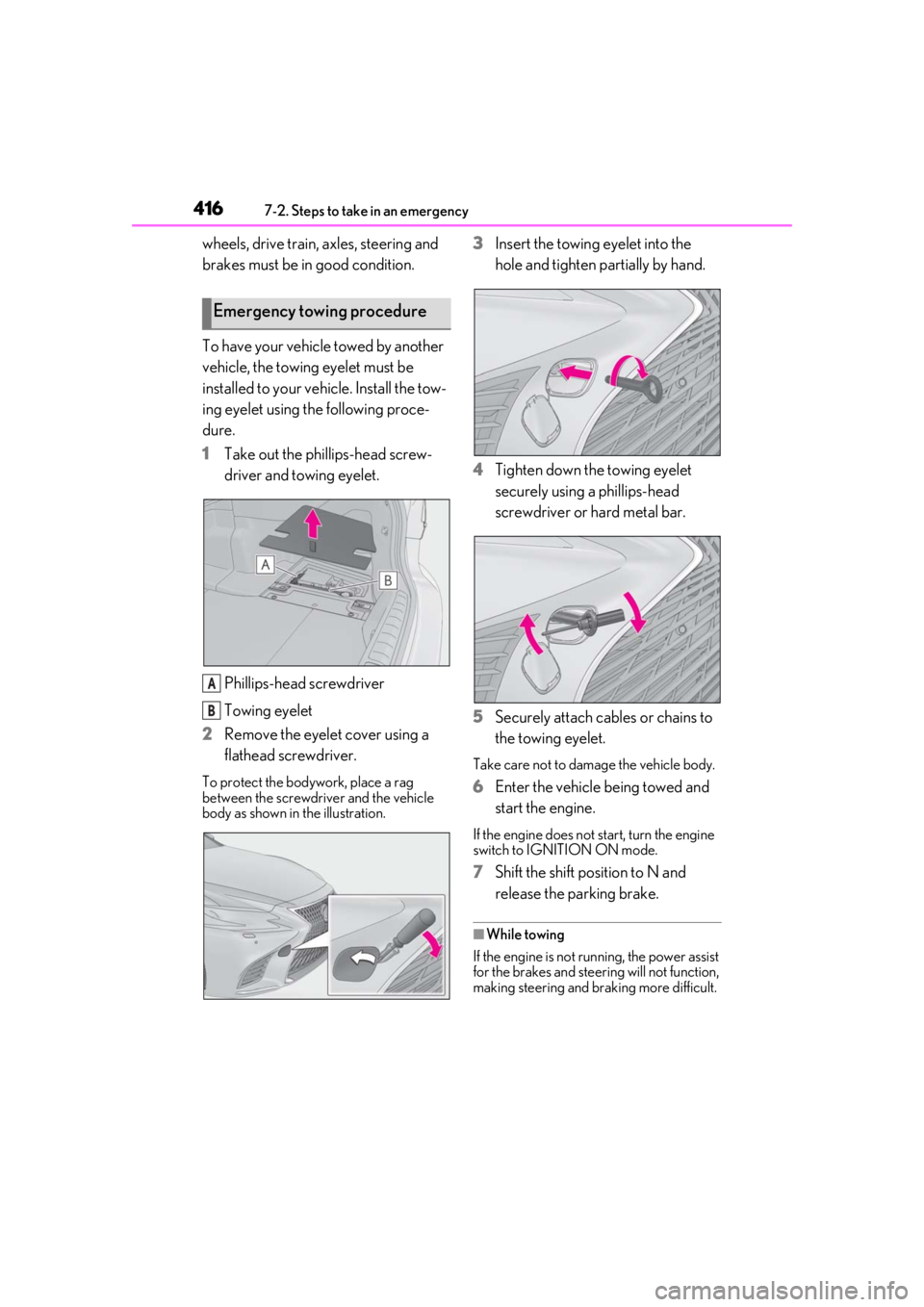
installed to your vehicle. Install the tow-
ing eyelet using the following proce-
dure.
1Take out the phillips-head screw-
driver and towing eyelet.
Phillips-head screwdriver
Towing eyelet
2 Remove the eyelet cover using a
flathead screwdriver.
To protect the bodywork, place a rag
between the screwdriver and the vehicle
body as shown in the illustration.
3Insert the towing eyelet into the
hole and tighten partially by hand.
4 Tighten down the towing eyelet
securely using a phillips-head
screwdriver or hard metal bar.
5 Securely attach cables or chains to
the towing eyelet.
Take care not to damage the vehicle body.
6Enter the vehicle being towed and
start the engine.
If the engine does not start, turn the engine
switch to IGNITION ON mode.
7Shift the shift position to N and
release the parking brake.
■While towing
If the engine is not running, the power assist
for the brakes and steering will not function,
making steering and braking more difficult.
Emergency towing procedure
A
B
Page 423 of 516
4217-2. Steps to take in an emergency
7
When trouble arises
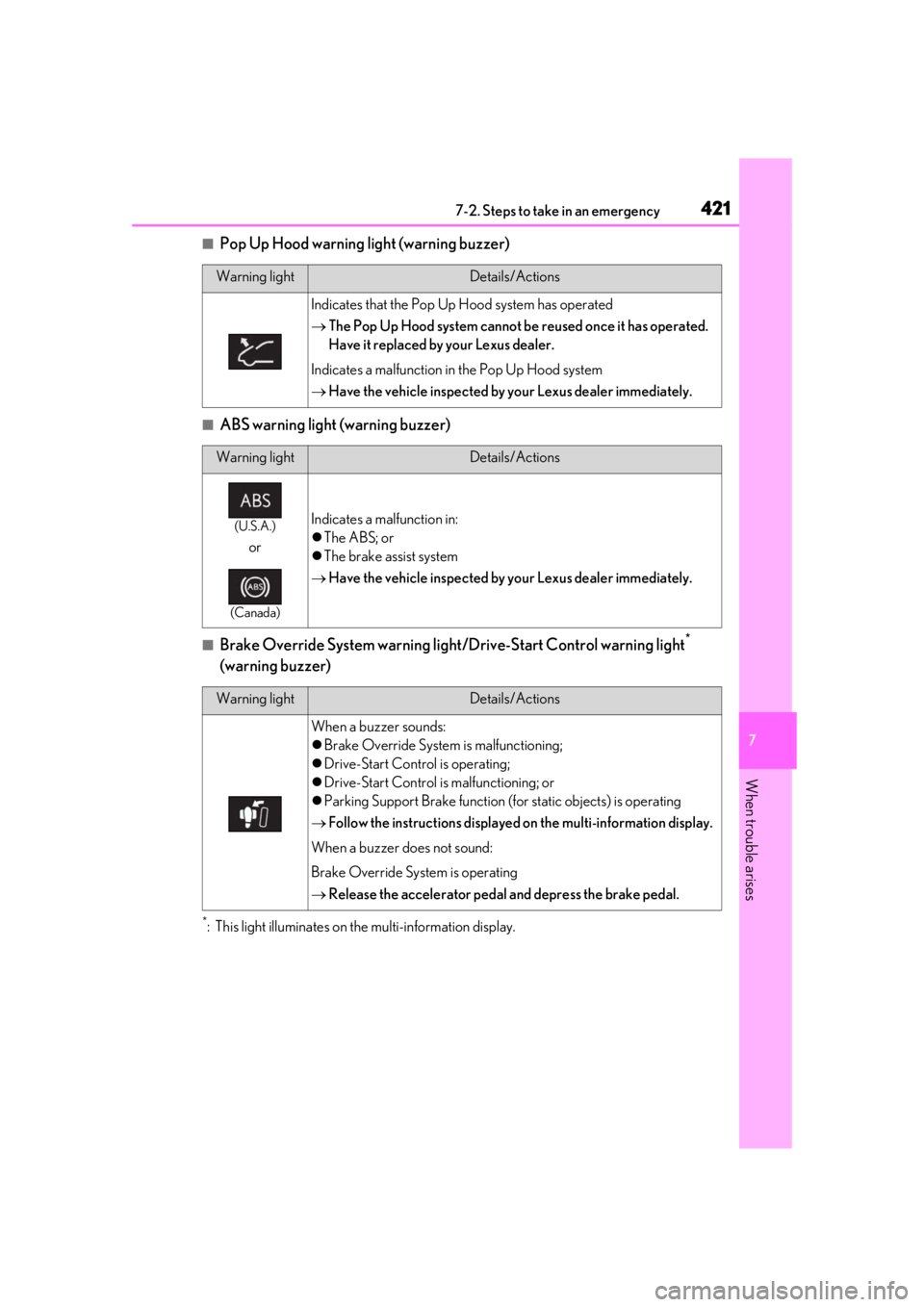
■Pop Up Hood warning light (warning buzzer)
■ABS warning light (warning buzzer)
■Brake Override System warning light/Drive-Start Control warning light*
(warning buzzer)
*: This light illuminates on the multi-information display.
Warning lightDetails/Actions
Indicates that the Pop Up Hood system has operated
The Pop Up Hood system cannot be reused once it has operated.
Have it replaced by your Lexus dealer.
Indicates a malfunction in the Pop Up Hood system
Have the vehicle inspected by your Lexus dealer immediately.
Warning lightDetails/Actions
(U.S.A.)
or
(Canada)
Indicates a malfunction in:
The ABS; or
The brake assist system
Have the vehicle inspected by your Lexus dealer immediately.
Warning lightDetails/Actions
When a buzzer sounds:
Brake Override System is malfunctioning;
Drive-Start Control is operating;
Drive-Start Control is malfunctioning; or
Parking Support Brake function (for static objects) is operating
Follow the instructions displayed on the multi-information display.
When a buzzer does not sound:
Brake Override System is operating
Release the accelerator pedal and depress the brake pedal.
Page 425 of 516
4237-2. Steps to take in an emergency
7
When trouble arises
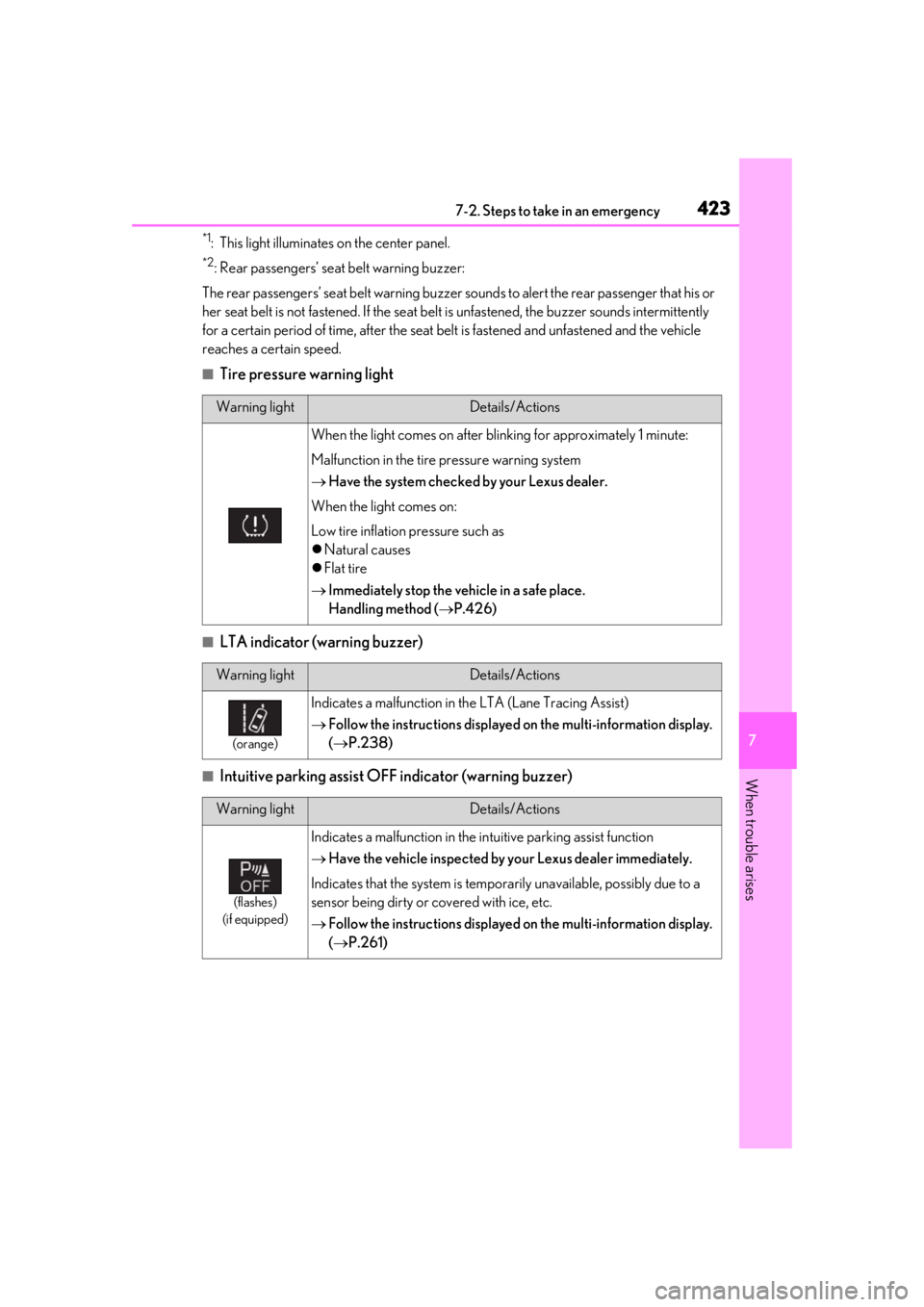
*1: This light illuminates on the center panel.
*2: Rear passengers’ seat belt warning buzzer:
The rear passengers’ seat belt warning buzzer sounds to alert the rear passenger that his or
her seat belt is not fastened. If the seat belt is unfastened, the buzzer sounds intermittently
for a certain period of time, af ter the seat belt is fastened and unfastened and the vehicle
reaches a certain speed.
■Tire pressure warning light
■LTA indicator (warning buzzer)
■Intuitive parking assist OFF indicator (warning buzzer)
Warning lightDetails/Actions
When the light comes on after blinking for approximately 1 minute:
Malfunction in the tire pressure warning system
Have the system checked by your Lexus dealer.
When the light comes on:
Low tire inflation pressure such as
Natural causes
Flat tire
Immediately stop the vehicle in a safe place.
Handling method ( P.426)
Warning lightDetails/Actions
(orange)
Indicates a malfunction in th e LTA (Lane Tracing Assist)
Follow the instructions displayed on the multi-information display.
( P.238)
Warning lightDetails/Actions
(flashes)
(if equipped)
Indicates a malfunction in the in tuitive parking assist function
Have the vehicle inspected by your Lexus dealer immediately.
Indicates that the system is temporarily unavailable, possibly due to a
sensor being dirty or covered with ice, etc.
Follow the instructions displayed on the multi-information display.
( P.261)
Page 427 of 516
4257-2. Steps to take in an emergency
7
When trouble arises
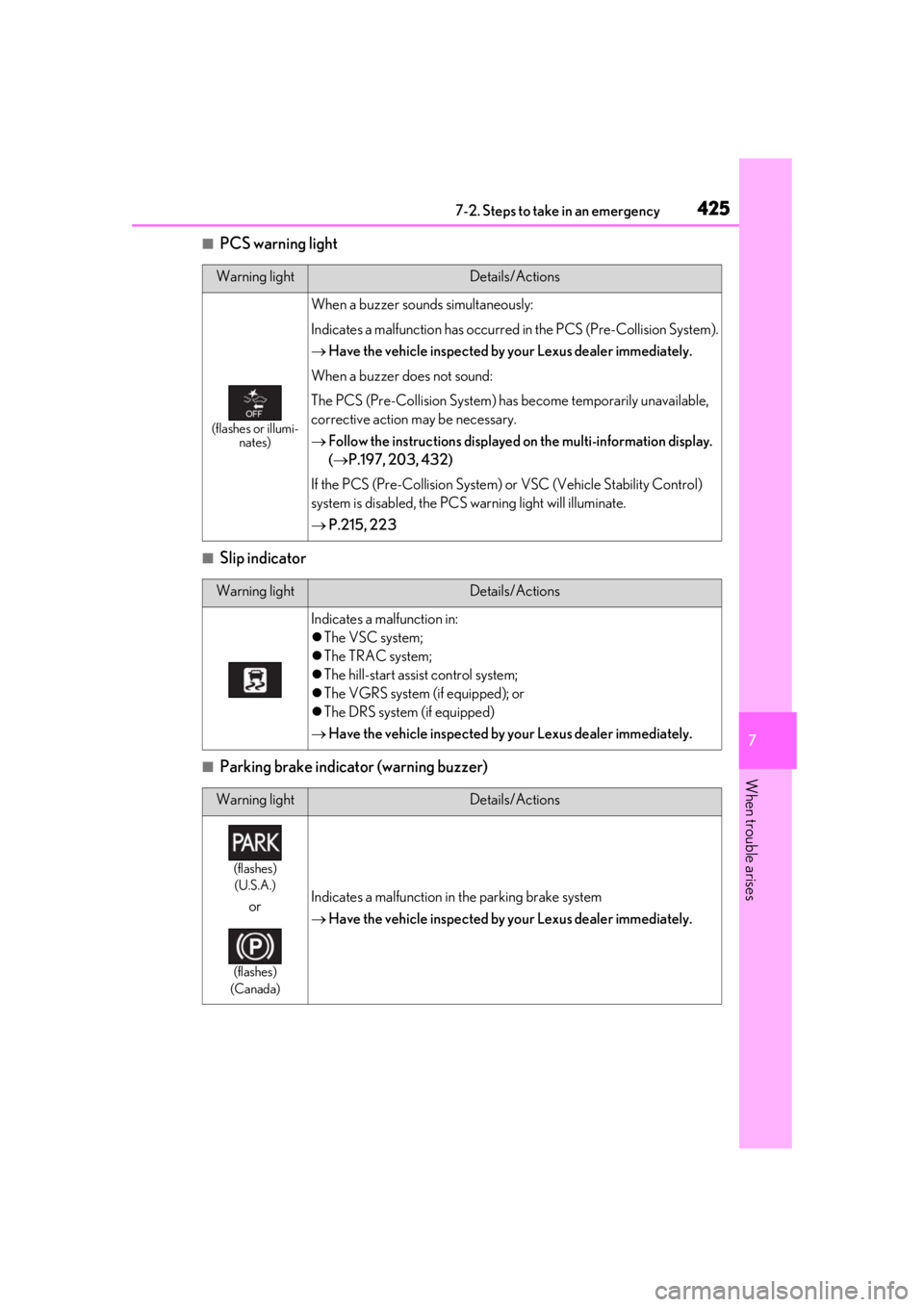
■PCS warning light
■Slip indicator
■Parking brake indicator (warning buzzer)
Warning lightDetails/Actions
(flashes or illumi-nates)
When a buzzer sounds simultaneously:
Indicates a malfunction has occurred in the PCS (Pre-Collision System).
Have the vehicle inspected by your Lexus dealer immediately.
When a buzzer does not sound:
The PCS (Pre-Collision System) has become temporarily unavailable,
corrective action may be necessary.
Follow the instructions displayed on the multi-information display.
( P.197, 203, 432)
If the PCS (Pre-Collision System) or VSC (Vehicle Stability Control)
system is disabled, the PCS warning light will illuminate.
P.215, 223
Warning lightDetails/Actions
Indicates a malfunction in:
The VSC system;
The TRAC system;
The hill-start assist control system;
The VGRS system (if equipped); or
The DRS system (if equipped)
Have the vehicle inspected by your Lexus dealer immediately.
Warning lightDetails/Actions
(flashes)
(U.S.A.)
or
(flashes)
(Canada)
Indicates a malfunction in the parking brake system
Have the vehicle inspected by your Lexus dealer immediately.
Page 482 of 516
4808-2. Customization
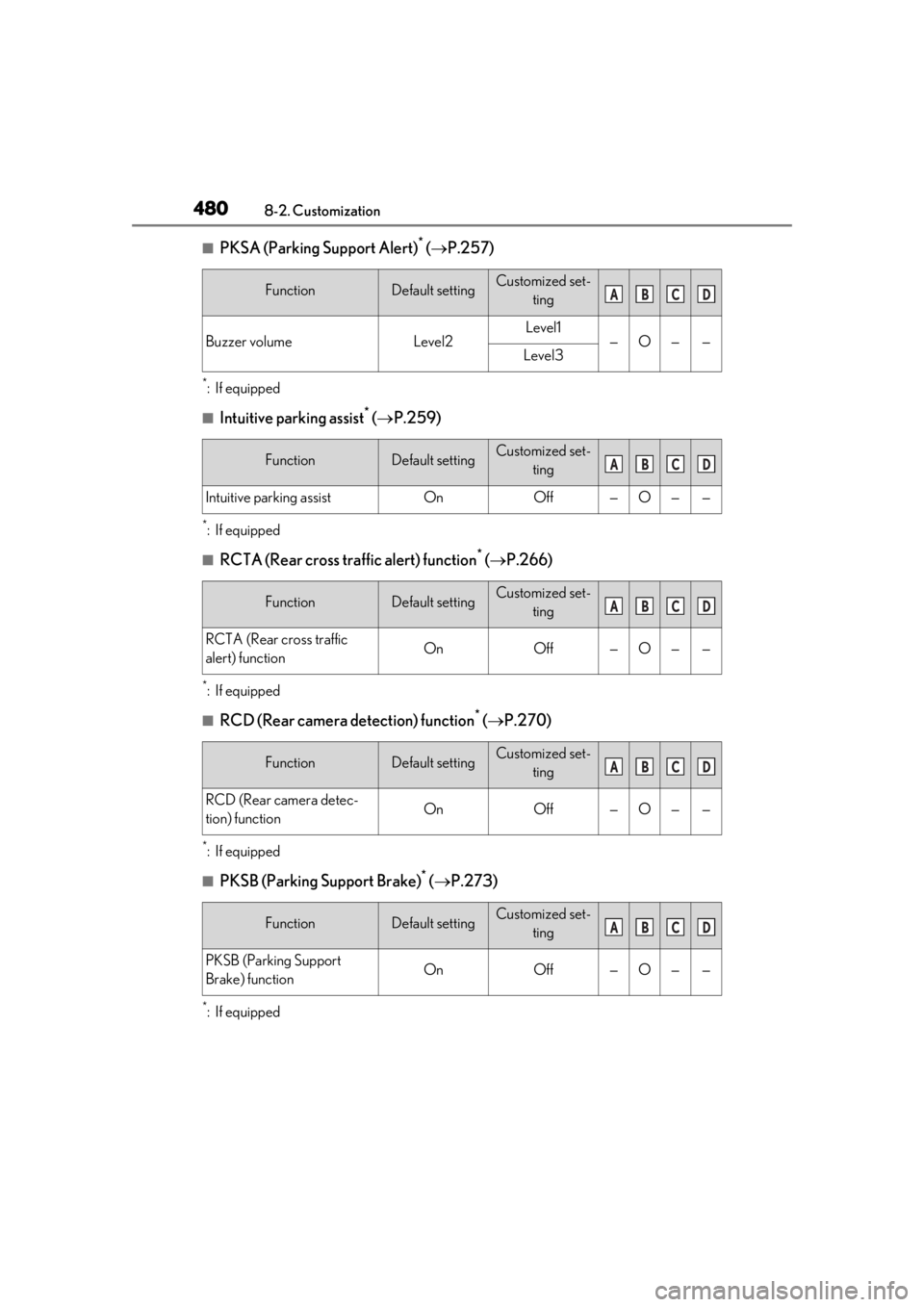
■PKSA (Parking Support Alert)* ( P.257)
*:If equipped
■Intuitive parking assist* ( P.259)
*:If equipped
■RCTA (Rear cross traffic alert) function* ( P.266)
*:If equipped
■RCD (Rear camera detection) function* ( P.270)
*:If equipped
■PKSB (Parking Support Brake)* ( P.273)
*:If equipped
FunctionDefault settingCustomized set-
ting
Buzzer volumeLevel2Level1—O——Level3
FunctionDefault settingCustomized set-ting
Intuitive parking assistOnOff—O——
FunctionDefault settingCustomized set-ting
RCTA (Rear cross traffic
alert) functionOnOff—O——
FunctionDefault settingCustomized set-ting
RCD (Rear camera detec-
tion) functionOnOff—O——
FunctionDefault settingCustomized set-ting
PKSB (Parking Support
Brake) functionOnOff—O——
ABCD
ABCD
ABCD
ABCD
ABCD
Page 486 of 516
4848-3. Initialization
8-3.Initialization
*:If equipped
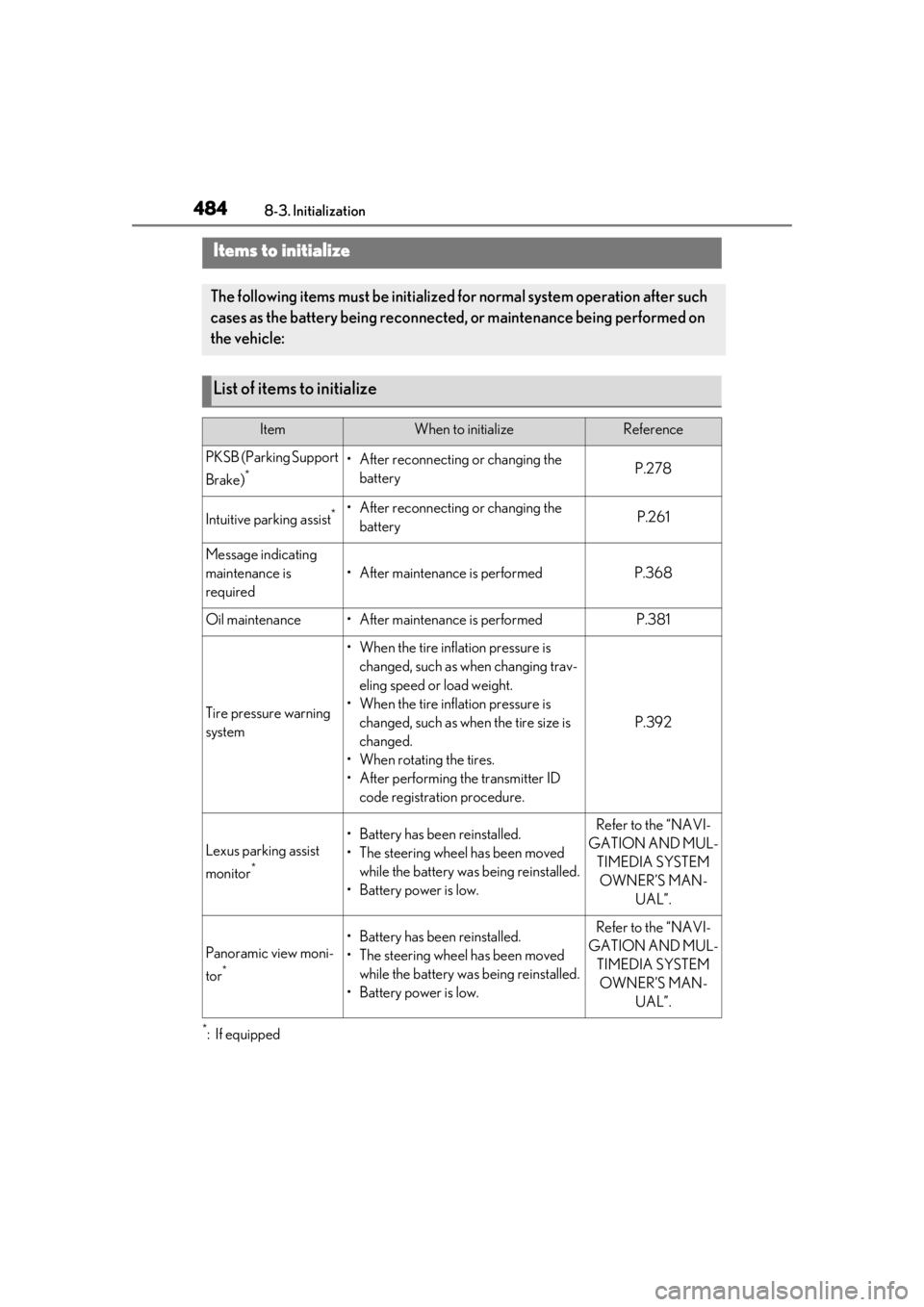
Items to initialize
The following items must be initialized for normal system operation after such
cases as the battery being reconnected, or maintenance being performed on
the vehicle:
List of items to initialize
ItemWhen to initializeReference
PKSB (Parking Support
Brake)
*• After reconnecting or changing the batteryP.278
Intuitive parking assist*• After reconnecting or changing the batteryP.261
Message indicating
maintenance is
required
• After maintenance is performedP.368
Oil maintenance• After maintenance is performedP.381
Tire pressure warning
system
• When the tire inflation pressure is changed, such as when changing trav-
eling speed or load weight.
• When the tire inflation pressure is changed, such as when the tire size is
changed.
• When rotating the tires.
• After performing the transmitter ID code registration procedure.
P.392
Lexus parking assist
monitor
*
• Battery has been reinstalled.
• The steering wheel has been moved while the battery was being reinstalled.
• Battery power is low.Refer to the “NAVI-
GATION AND MUL- TIMEDIA SYSTEM OWNER’S MAN- UAL”.
Panoramic view moni-
tor
*
• Battery has been reinstalled.
• The steering wheel has been moved while the battery was being reinstalled.
• Battery power is low.Refer to the “NAVI-
GATION AND MUL- TIMEDIA SYSTEM OWNER’S MAN- UAL”.