warning lights LEXUS LS500H 2020 Owner's Manual
[x] Cancel search | Manufacturer: LEXUS, Model Year: 2020, Model line: LS500H, Model: LEXUS LS500H 2020Pages: 516, PDF Size: 10.38 MB
Page 201 of 516
2014-5. Using the driving support systems
4
Driving
WARNING
●If the part of the windshield in front of
the front camera is fogged up or cov-
ered with condensation, or ice, use the
windshield defogger to remove the
fog, condensation, or ice. (P.318)
●If water droplets cannot be properly
removed from the area of the wind-
shield in front of the front camera by
the windshield wipers, replace the
wiper insert or wiper blade.
If the wiper inserts or wiper blades need
to be replaced, contact your Lexus
dealer.
●Do not attach window tint to the wind-
shield.
●Replace the windshield if it is damaged
or cracked.
If the windshield needs to be replaced,
contact your Lexus dealer.
●Do not allow liquids to contact the
front camera.
●Do not allow bright lights to shine into
the front camera.
●Do not dirty or damage the front cam-
era.
When cleaning the inside of the wind-
shield, do not allow glass cleaner to
contact the lens of the front camera.
Also, do not touch the lens.
If the lens is dirty or damaged, contact
your Lexus dealer.
●Do not subject the front camera to a
strong impact.
●Do not change the installation position
or direction of the front camera or
remove it.
●Do not disassemble the front camera.
●Do not modify any components of the
vehicle around the front camera
(inside rear view mirror, etc.) or ceiling.
●Do not attach any accessories to the
hood, front grille or front bumper that
may obstruct the front camera. Con-
tact your Lexus dealer.
●If a surfboard or other long object is to
be mounted on the roof, make sure
that it will not obstruct the front cam-
era.
●Do not modify the headlights or other
lights.
Page 215 of 516
2154-5. Using the driving support systems
4
Driving
●In some situations, such as the following,
the sensors may not detect the lane lines
or a safe space the vehicle can be steered
into, preventing the active steering assist
from operating properly:
• When the white (yellow) lane lines are
difficult to see, such as when they are
faint, diverging/merging, or a shadow is
cast upon them
• When the lane is more wide or narrow than normal
• When there is a light and dark pattern on
the road surface, such as due to road
repairs
• If the system determines that a collision
can be avoided by only using the brakes
• When a pedestrian is detected near the centerline of the vehicle
●In some situations such as the following,
sufficient braking force or steering force
may not be obtained, preventing the sys-
tem from performing properly:
• If the braking functions cannot operate to
their full extent, such as when the brake
parts are extremely cold, extremely hot,
or wet
• If the vehicle is not properly maintained (brakes or tires are excessively worn,
improper tire inflation pressure, etc.)
• When the vehicle is being driven on a gravel road or other slippery surface
• If there are deep ruts in the road
• When driving on a slope
• When driving on a horizontally slanted road
●Some guardrails, such as the following,
may not be detected by the sensors, pre-
venting the system from operating prop-
erly:
• Guardrails which are less than approxi-
mately 1.9 ft. (60 cm) tall
• Short guardrails
• Irregularly-shaped guardrails (wire cable guardrails, guardrails made of thin poles,
etc.)
• Guardrails which are not illuminated by the headlights at night, in a tunnel, etc.
• Guardrails which appear to be nearly the
same color or brightness as their sur-
roundings
• Guardrails which appear to be nearly the
same shape as their surroundings (walls,
etc.) • Guardrails which are over a metal object
(manhole cover, steel plate, etc.)
• Guardrails which are hidden behind thick
grass
• Guardrails which are extremely close to the side of the vehicle (outside rear view
mirror, etc.)
• Curved guardrails or guardrails at the entrance of a curve
●In some situations su ch as the following,
the system may detect a pedestrian and
display a warning on the head-up display,
even though no pedestrian exists:
• If the front of the vehicle is raised or low-
ered, such as when the road surface is
uneven or undulating (due to ruts, etc.)
• When driving on a slope
• When driving on a horizontally slanted
road
• If the driver’s posture (driver seat posi-
tion) is extreme, such as excessively
reclined
• If the head-up display position is set
extremely high
■If VSC is disabled
●If VSC is disabled ( P.297), the pre-col-
lision brake assist and pre-collision brak-
ing functions are also disabled.
●The PCS warning light will turn on and
“VSC Turned Off Pre-Collision Brake
System Unavailable” will be displayed on
the multi-information display.
Page 224 of 516
2244-5. Using the driving support systems
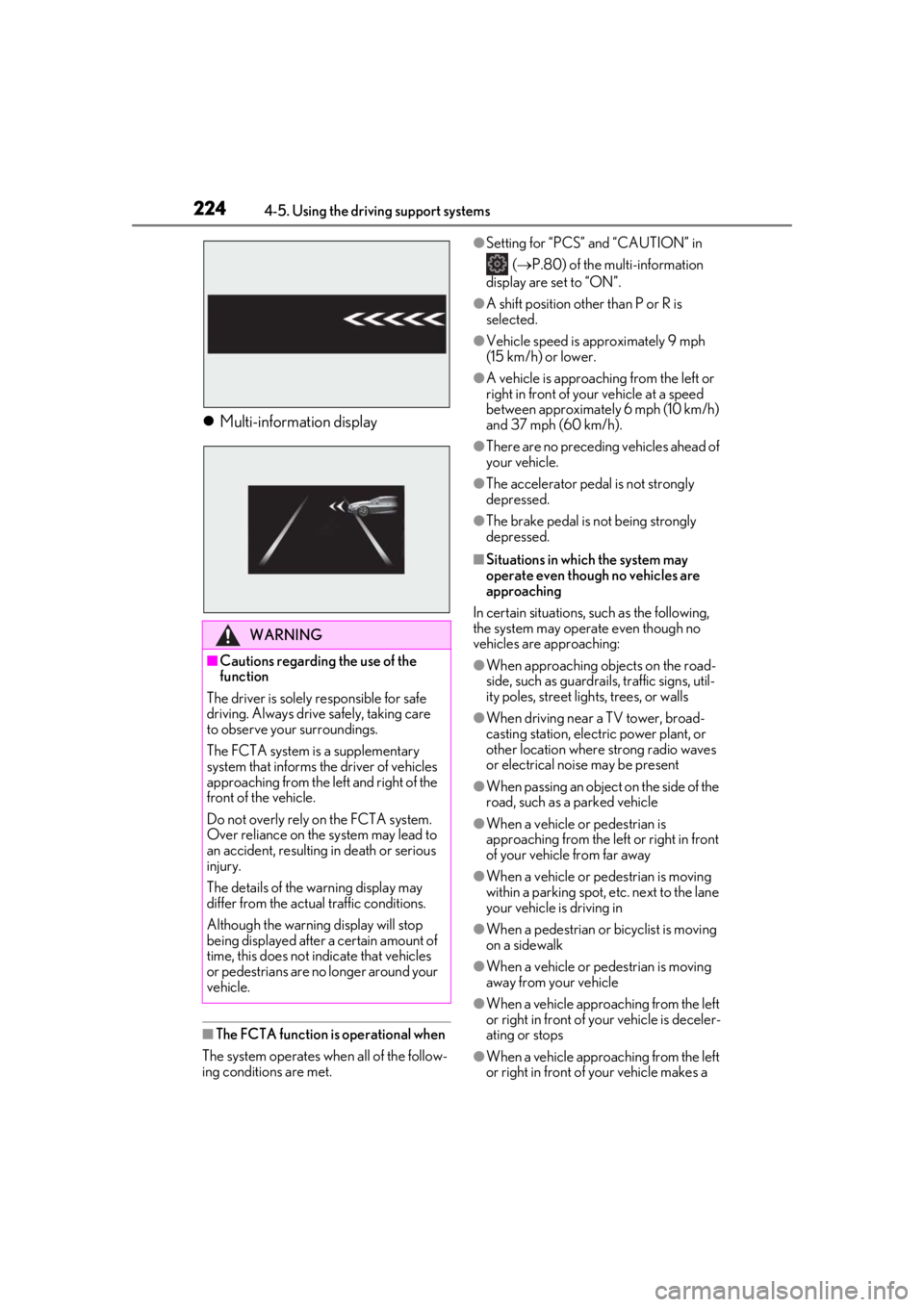
Multi-information display
■The FCTA function is operational when
The system operates when all of the follow-
ing conditions are met.
●Setting for “PCS” and “CAUTION” in ( P.80) of the multi-information
display are set to “ON”.
●A shift position other than P or R is
selected.
●Vehicle speed is approximately 9 mph
(15 km/h) or lower.
●A vehicle is approaching from the left or
right in front of your vehicle at a speed
between approximately 6 mph (10 km/h)
and 37 mph (60 km/h).
●There are no preceding vehicles ahead of
your vehicle.
●The accelerator pedal is not strongly
depressed.
●The brake pedal is not being strongly
depressed.
■Situations in which the system may
operate even though no vehicles are
approaching
In certain situations, such as the following,
the system may operate even though no
vehicles are approaching:
●When approaching objects on the road-
side, such as guardrails, traffic signs, util-
ity poles, street lights, trees, or walls
●When driving near a TV tower, broad-
casting station, electric power plant, or
other location where strong radio waves
or electrical noise may be present
●When passing an object on the side of the
road, such as a parked vehicle
●When a vehicle or pedestrian is
approaching from the left or right in front
of your vehicle from far away
●When a vehicle or pedestrian is moving
within a parking spot, etc. next to the lane
your vehicle is driving in
●When a pedestrian or bicyclist is moving
on a sidewalk
●When a vehicle or pedestrian is moving
away from your vehicle
●When a vehicle approaching from the left
or right in front of your vehicle is deceler-
ating or stops
●When a vehicle approaching from the left
or right in front of your vehicle makes a
WARNING
■Cautions regarding the use of the
function
The driver is solely responsible for safe
driving. Always driv e safely, taking care
to observe your surroundings.
The FCTA system is a supplementary
system that informs the driver of vehicles
approaching from the left and right of the
front of the vehicle.
Do not overly rely on the FCTA system.
Over reliance on the system may lead to
an accident, resulting in death or serious
injury.
The details of the warning display may
differ from the actual traffic conditions.
Although the warnin g display will stop
being displayed after a certain amount of
time, this does not indicate that vehicles
or pedestrians are no longer around your
vehicle.
Page 227 of 516
2274-5. Using the driving support systems
4
Driving
WARNING
■Before using LTA system
●Do not rely solely upon the LTA sys-
tem. The LTA system does not auto-
matically drive the vehicle or reduce
the amount of attention that must be
paid to the area in front of the vehicle.
The driver must always assume full
responsibility for driving safely by pay-
ing careful attention to the surround-
ing conditions and operating the
steering wheel to correct the path of
the vehicle. Also, the driver must take
adequate breaks when fatigued, such
as from driving for a long period of
time.
●Failure to perform appropriate driving
operations and pay careful attention
may lead to an accident, resulting in
death or serious injury.
●When not using the LTA system, use
the LTA switch to turn the system off.
■Situations unsuitable for LTA system
In the following situations, use the LTA
switch to turn the system off. Failure to do
so may lead to an acc ident, resulting in
death or serious injury.
●Vehicle is driven on a road surface
which is slippery due to rainy weather,
fallen snow, freezing, etc.
●Vehicle is driven on a snow-covered
road.
●White (yellow) lines are difficult to see
due to rain, snow, fog, dust, etc.
●Vehicle is driven in a temporary lane or
restricted lane due to construction
work.
●Vehicle is driven in a construction
zone.
●A spare tire, tire chains, etc. are
equipped.
●When the tires have been excessively
worn, or when the tire inflation pres-
sure is low.
●When tires of a size other than speci-
fied are installed.
●Vehicle is driven in traffic lanes other
than that highways and freeways.
●During emergency towing.
■Situations in whic h the lane change
assist function should not be used
●When driving on a one lane road or
road without lane markers
●When there is no broken white line
between your vehicle and the lane
toward which the turn signal is oper-
ated
■Preventing LTA system malfunctions
and operations performed by mistake
●Do not modify the headlights or place
stickers, etc. on the surface of the
lights.
●Do not modify the suspension etc. If
the suspension etc. needs to be
replaced, contact your Lexus dealer.
●Do not install or place anything on the
hood or grille. Also, do not install a
grille guard (bull bars, kangaroo bar,
etc.).
●If your windshield needs repairs, con-
tact your Lexus dealer.
■Conditions in which functions may
not operate properly
In the following situations, the functions
may not operate properly and the vehicle
may depart from its la ne. Drive safely by
always paying careful attention to your
surroundings and operate the steering
wheel to correct the path of the vehicle
without relying solely on the functions.
Page 229 of 516

2294-5. Using the driving support systems
4
Driving
■Lane departure alert function
When the system determines that the
vehicle might depart from its lane or
course
*, a warning is displayed on the
multi-information display, and either a
warning buzzer will sound or the steer-
ing wheel will vibrate to alert the driver.
When the warning buzzer sounds or the
steering wheel vibrates, check the area
around your vehicle and carefully operate
the steering wheel to move the vehicle
back to the center of the lane.
Vehicle with BSM: When the system deter-
mines that the vehicle might depart from its
lane and that the po ssibility of a collision
with an overtaking vehicle in the adjacent
lane is high, the lane departure alert will
operate even if the turn signals are operat-
ing.
*: Boundary between asphalt and the side of the road, such as grass, soil, or a curb
WARNING
●The traffic lines are yellow (which may
be more difficult to recognize than
lines that are white).
●The white (yellow) lines cross over a
curb, etc.
●The vehicle is driven on a bright sur-
face, such as concrete.
●If the edge of the road is not clear or
straight.
●The vehicle is driven on a surface that
is bright due to reflected light, etc.
●The vehicle is driven in an area where
the brightness changes suddenly, such
as at the entrances and exits of tunnels,
etc.
●Light from the headlights of an oncom-
ing vehicle, the sun, etc. enters the
camera.
●The vehicle is driven on a slope.
●The vehicle is driven on a road which
tilts left or right, or a winding road.
●The vehicle is driven on an unpaved or
rough road.
●The traffic lane is excessively narrow
or wide.
●The vehicle is extremely tilted due to
carrying heavy luggage or having
improper tire pressure.
●The distance to the preceding vehicle
is extremely short.
●The vehicle is moving up and down a
large amount due to road conditions
during driving (poor roads or road
seams).
●When driving in a tunnel or at night
with the headlights off or when a head-
light is dim due to its lens being dirty or
it being misaligned.
●The vehicle is struck by a crosswind.
●The vehicle is affected by wind from a
vehicle driven in a nearby lane.
●The vehicle has just changed lanes
through operation of the steering
wheel by the driver or crossed an
intersection.
●Tires which differ by structure, manu-
facturer, brand or tread pattern are
used.
●Snow tires, etc. are equipped.
●The vehicle is being driven at
extremely high speeds.
Functions included in LTA system
Page 244 of 516
2444-5. Using the driving support systems
Example of deceleration cruising and follow-up cruising
When a preceding vehicle driving slower than the set speed appears
When a vehicle is detected running ahead of you, the system automatically decelerates
your vehicle. When a greater reduction in vehicle speed is necessary, the system applies
the brakes (the stop lights will come on at this time). The sy stem will respond to changes in
the speed of the vehicle ahead in order to maintain the vehicle-to-vehicle distance set by
the driver. Approach warning warns you when th e system cannot decelerate sufficiently to
prevent your vehicle from closing in on the vehicle ahead.
When the vehicle ahead of you stops, your vehi cle will also stop (vehicle is stopped by sys-
tem control). After the vehicle ahead starts off, pressing the “+RES” switch or depressing
the accelerator pedal (start-off operation) will resume follow-up cruising. If the start-off
operation is not performed, system contro l continues to keep your vehicle stopped.
When the turn signal lever is operated and your vehicle moves to a left lane while driving at
50 mph (80 km/h) or more, the vehicle will quickly accelerate to help to overtake a pass-
ing vehicle.
Example of acceleration
When there are no longer any preceding vehicles driving slower than the set
speed
The system accelerates until the set speed is re ached. The system then returns to constant
speed cruising.
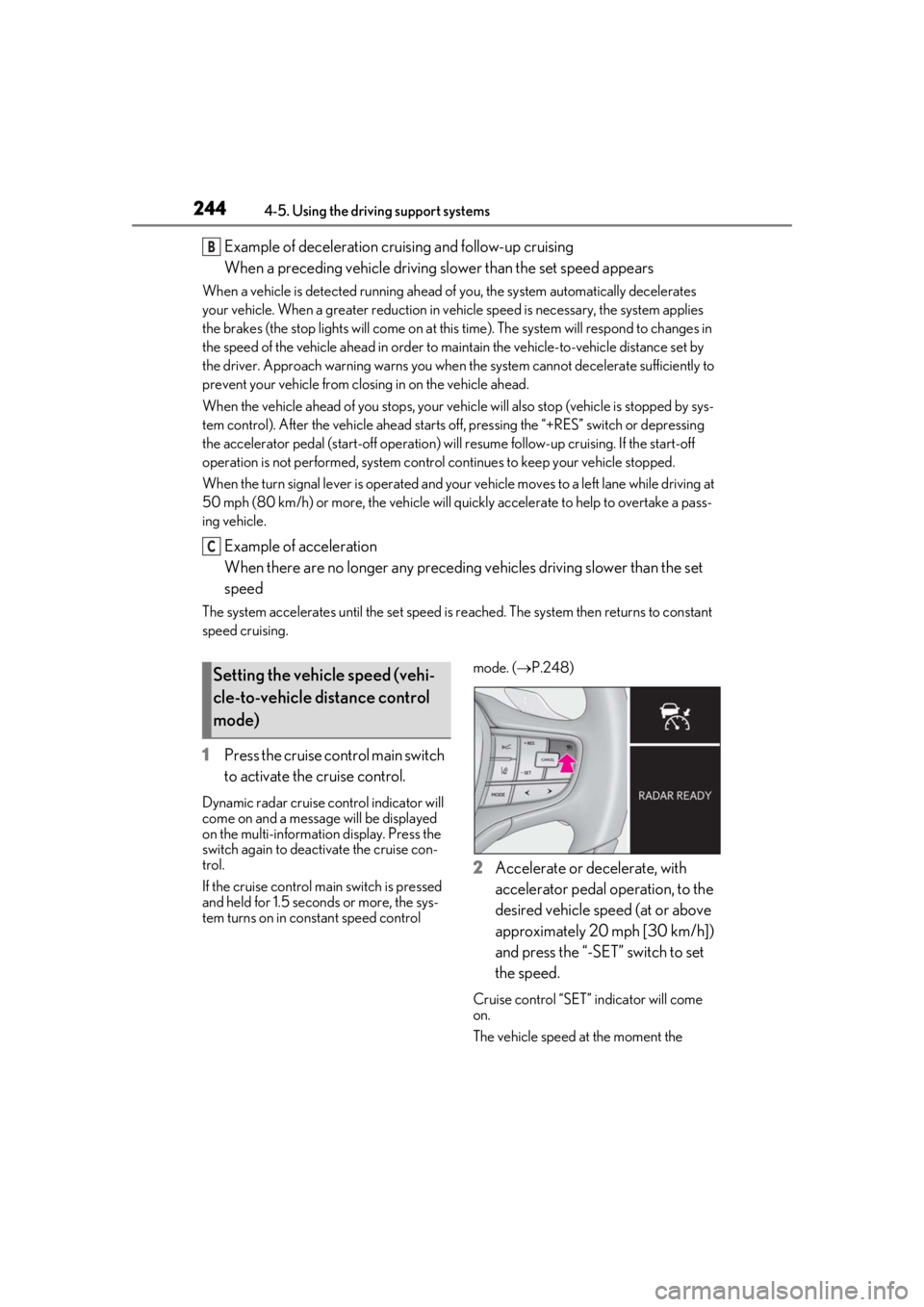
1 Press the cruise control main switch
to activate the cruise control.
Dynamic radar cruise control indicator will
come on and a message will be displayed
on the multi-information display. Press the
switch again to deactivate the cruise con-
trol.
If the cruise control ma in switch is pressed
and held for 1.5 seconds or more, the sys-
tem turns on in constant speed control mode. (
P.248)
2 Accelerate or decelerate, with
accelerator pedal operation, to the
desired vehicle speed (at or above
approximately 20 mph [30 km/h])
and press the “-SET” switch to set
the speed.
Cruise control “SET” indicator will come
on.
The vehicle speed at the moment the
B
C
Setting the vehicle speed (vehi-
cle-to-vehicle distance control
mode)
Page 260 of 516
2604-5. Using the driving support systems
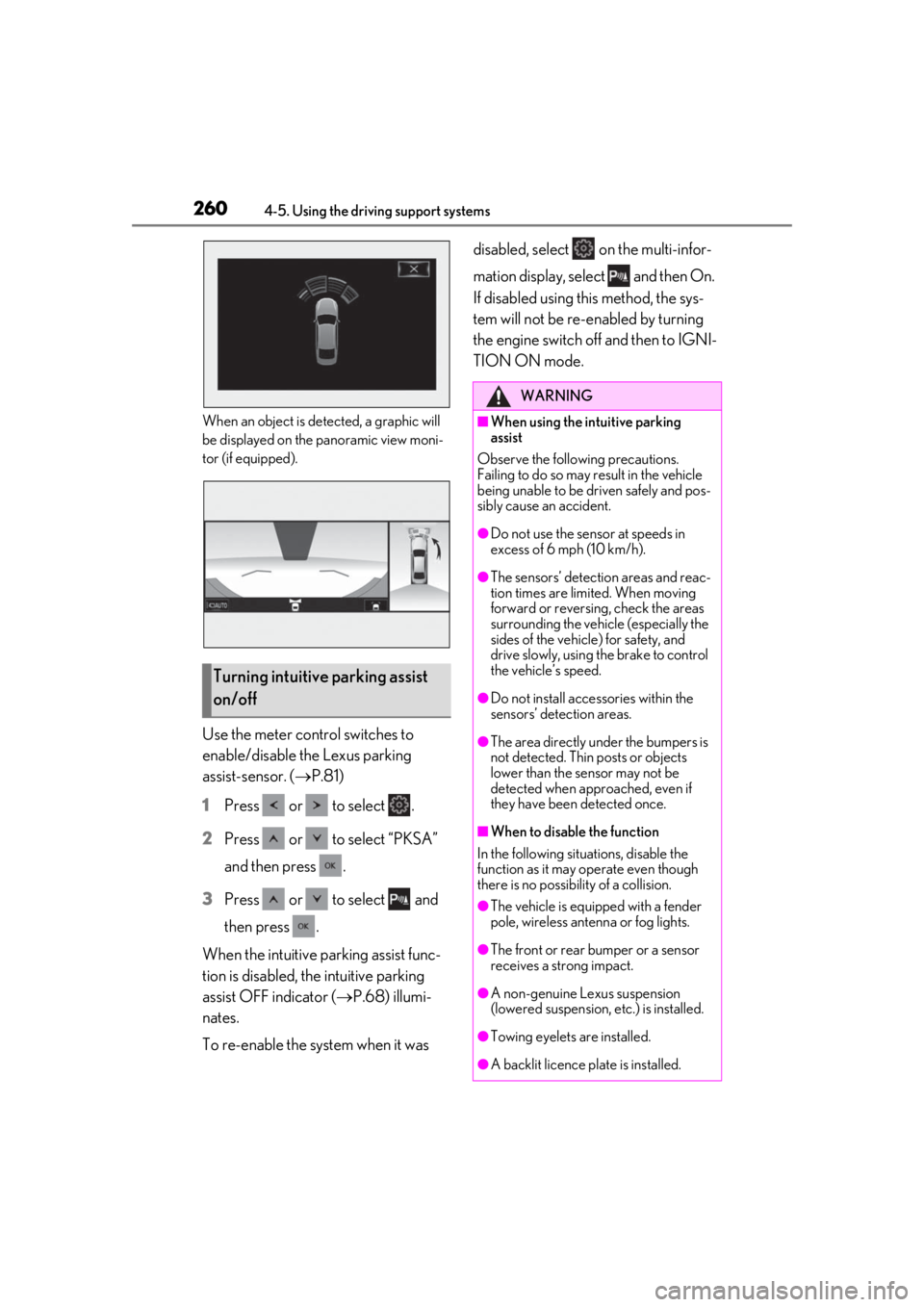
When an object is detected, a graphic will
be displayed on the panoramic view moni-
tor (if equipped).
Use the meter control switches to
enable/disable the Lexus parking
assist-sensor. (P.81)
1
Press or to select .
2
Press or to select “PKSA”
and then press .
3
Press or to select and
then press .
When the intuitive parking assist func-
tion is disabled, the intuitive parking
assist OFF indicator ( P.68) illumi-
nates.
To re-enable the system when it was disabled, select on the multi-infor-
mation display, select and then On.
If disabled using this method, the sys-
tem will not be re-enabled by turning
the engine switch off and then to IGNI-
TION ON mode.
Turning intuitive parking assist
on/off
WARNING
■When using the intuitive parking
assist
Observe the following precautions.
Failing to do so may result in the vehicle
being unable to be driven safely and pos-
sibly cause an accident.
●Do not use the sensor at speeds in
excess of 6 mph (10 km/h).
●The sensors’ detection areas and reac-
tion times are limited. When moving
forward or reversin g, check the areas
surrounding the vehicle (especially the
sides of the vehicle) for safety, and
drive slowly, using the brake to control
the vehicle’s speed.
●Do not install accessories within the
sensors’ detection areas.
●The area directly under the bumpers is
not detected. Thin posts or objects
lower than the sensor may not be
detected when approached, even if
they have been detected once.
■When to disable the function
In the following situations, disable the
function as it may operate even though
there is no possibility of a collision.
●The vehicle is equipped with a fender
pole, wireless antenna or fog lights.
●The front or rear bumper or a sensor
receives a strong impact.
●A non-genuine Lexus suspension
(lowered suspension, etc.) is installed.
●Towing eyelets are installed.
●A backlit licence pl ate is installed.
Page 304 of 516
3044-6. Driving tips
Perform the following according to the
driving conditions:
Do not try to forcib ly open a window
or move a wiper that is frozen. Pour
warm water over the frozen area to
melt the ice. Wipe away the water
immediately to prevent it from
freezing.
To ensure proper operation of the
climate control system fan, remove
any snow that has accumulated on
the air inlet vents in front of the
windshield.
Check for and remove any excess
ice or snow that may have accumu-
lated on the exterior lights, vehicle’s
roof, chassis, around the tires or on
the brakes.
Remove any snow or mud from the
bottom of your shoes before getting
in the vehicle.
Accelerate the vehicle slowly, keep a
safe distance between you and the
vehicle ahead, and drive at a reduced
speed suitable to road conditions. Park the vehicle and shift the shift posi-
tion to P without setting the parking
brake. The parking brake may freeze
up, preventing it from being released. If
the vehicle is parked without setting
the parking brake, make sure to block
the wheels.
Failure to do so may be dangerous
because it may cause the vehicle to
move unexpectedly, possibly leading to
an accident.
Vehicles with front and rear tires of
the same size
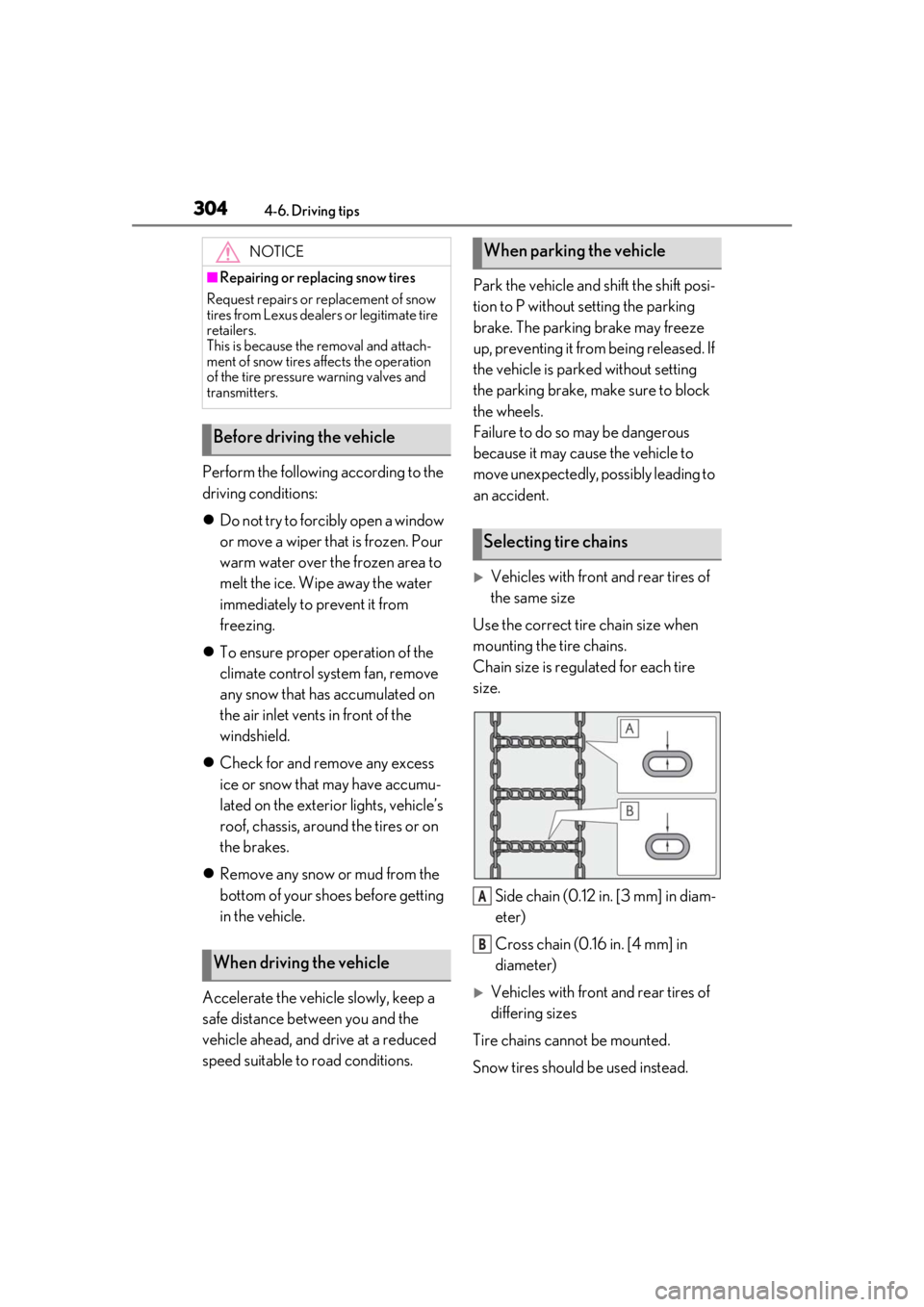
Use the correct tire chain size when
mounting the tire chains.
Chain size is regulated for each tire
size.
Side chain (0.12 in. [3 mm] in diam-
eter)
Cross chain (0.16 in. [4 mm] in
diameter)
Vehicles with front and rear tires of
differing sizes
Tire chains cannot be mounted.
Snow tires should be used instead.
NOTICE
■Repairing or replacing snow tires
Request repairs or replacement of snow
tires from Lexus dealers or legitimate tire
retailers.
This is because the removal and attach-
ment of snow tires affects the operation
of the tire pressure warning valves and
transmitters.
Before driving the vehicle
When driving the vehicle
When parking the vehicle
Selecting tire chains
A
B
Page 340 of 516
3405-5. Using the storage features
■Glove box light
The glove box light turns on when the tail
lights are on.
■Trunk opener main switch
The trunk opener main switch is located in
the glove box. ( P.110)
■Removing the partition
The partition inside the glove box can be
removed by pulling it.
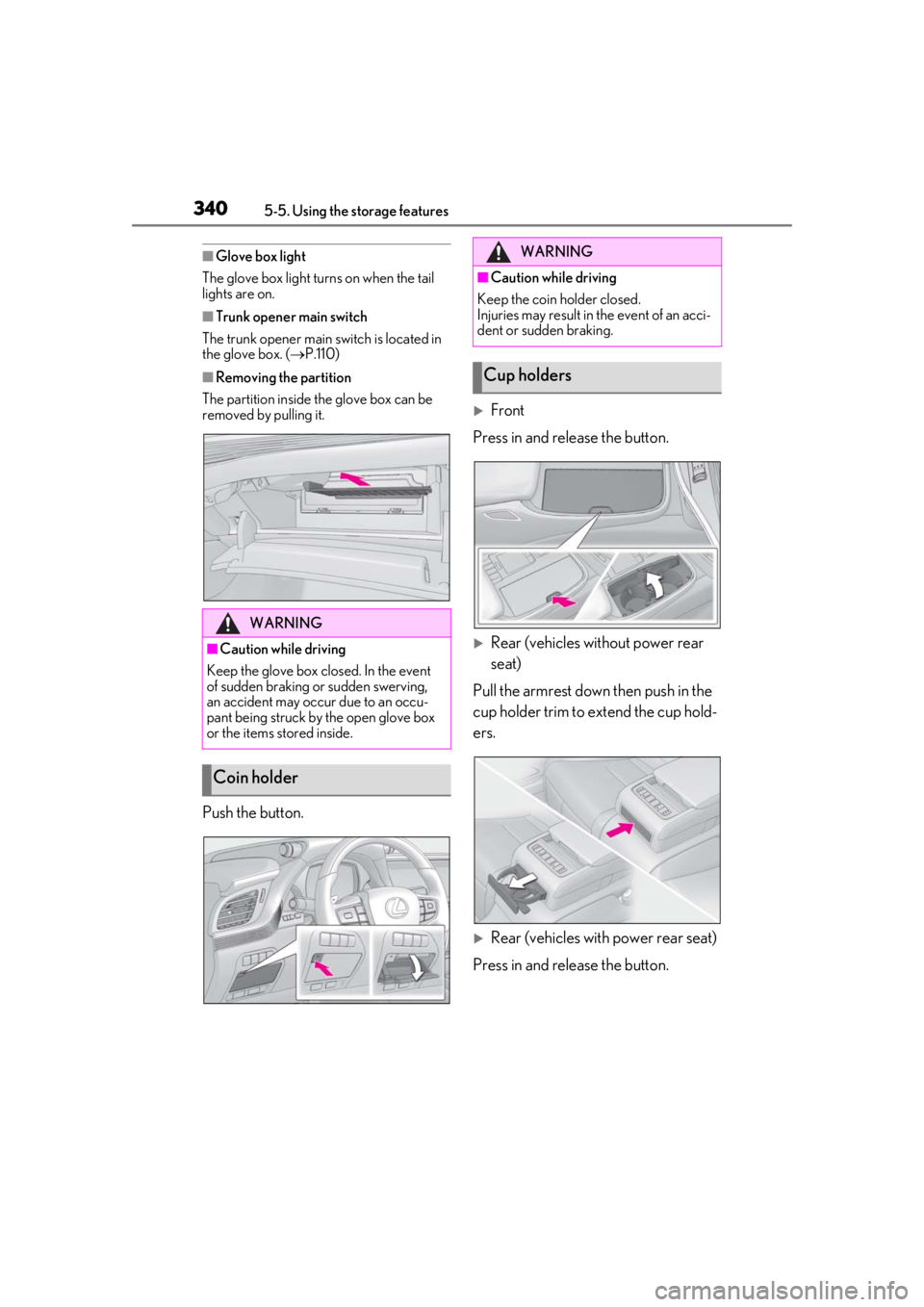
Push the button.
Front
Press in and release the button.
Rear (vehicles without power rear
seat)
Pull the armrest down then push in the
cup holder trim to extend the cup hold-
ers.
Rear (vehicles with power rear seat)
Press in and release the button.
WARNING
■Caution while driving
Keep the glove box closed. In the event
of sudden braking or sudden swerving,
an accident may occur due to an occu-
pant being struck by the open glove box
or the items stored inside.
Coin holder
WARNING
■Caution while driving
Keep the coin holder closed.
Injuries may result in the event of an acci-
dent or sudden braking.
Cup holders
Page 341 of 516
3415-5. Using the storage features
5
Interior features
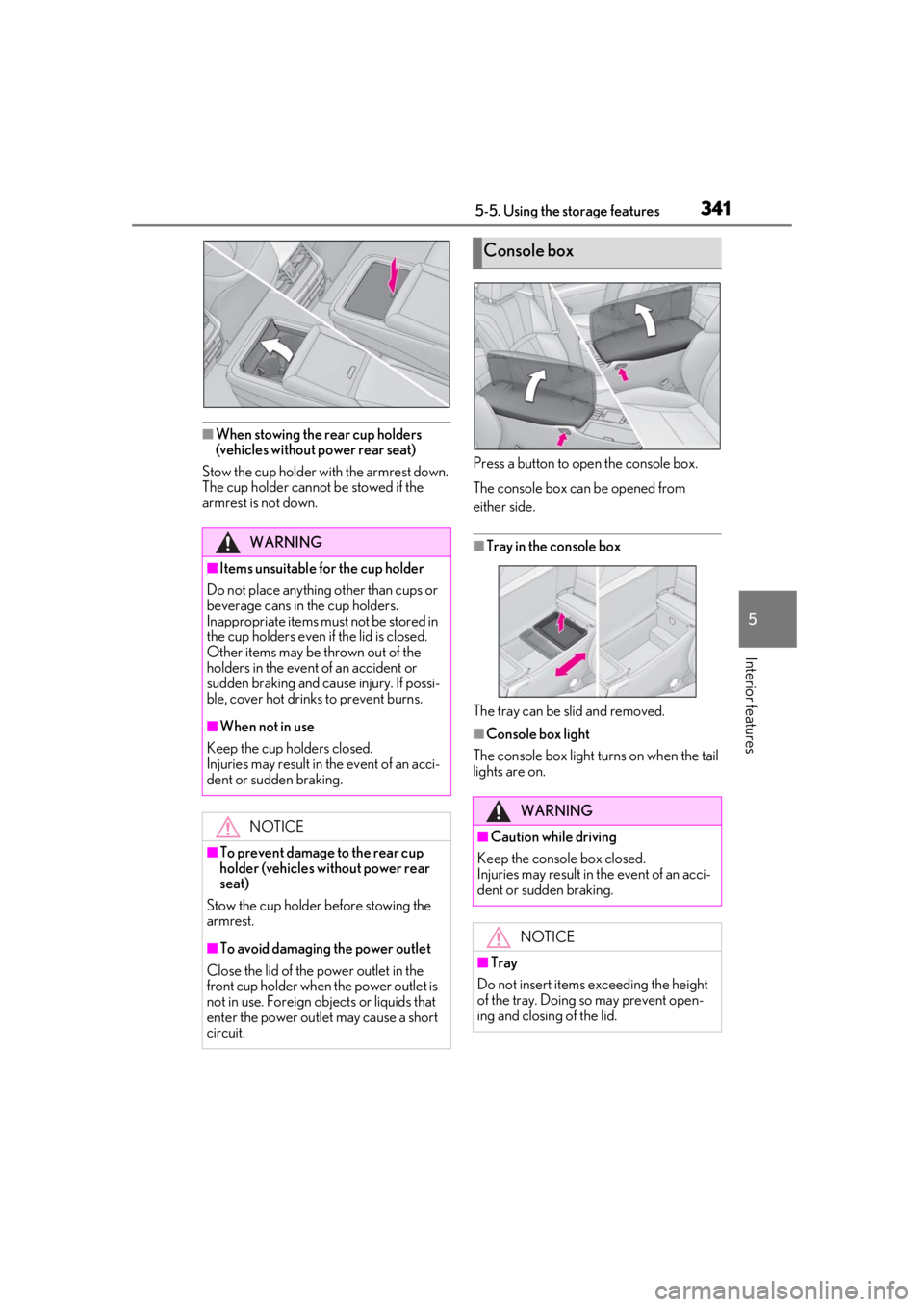
■When stowing the rear cup holders
(vehicles without power rear seat)
Stow the cup holder with the armrest down.
The cup holder cannot be stowed if the
armrest is not down. Press a button to open the console box.
The console box can be opened from
either side.
■Tray in the console box
The tray can be slid and removed.
■Console box light
The console box light turns on when the tail
lights are on.
WARNING
■Items unsuitable for the cup holder
Do not place anything other than cups or
beverage cans in the cup holders.
Inappropriate items must not be stored in
the cup holders even if the lid is closed.
Other items may be thrown out of the
holders in the event of an accident or
sudden braking and cause injury. If possi-
ble, cover hot drinks to prevent burns.
■When not in use
Keep the cup holders closed.
Injuries may result in the event of an acci-
dent or sudden braking.
NOTICE
■To prevent damage to the rear cup
holder (vehicles without power rear
seat)
Stow the cup holder before stowing the
armrest.
■To avoid damaging the power outlet
Close the lid of the power outlet in the
front cup holder when the power outlet is
not in use. Foreign ob jects or liquids that
enter the power outlet may cause a short
circuit.
Console box
WARNING
■Caution while driving
Keep the console box closed.
Injuries may result in the event of an acci-
dent or sudden braking.
NOTICE
■Tray
Do not insert items exceeding the height
of the tray. Doing so may prevent open-
ing and closing of the lid.