air condition LEXUS LS500H 2020 Owner's Guide
[x] Cancel search | Manufacturer: LEXUS, Model Year: 2020, Model line: LS500H, Model: LEXUS LS500H 2020Pages: 516, PDF Size: 10.38 MB
Page 319 of 516
3195-3. Using the air conditioning system and defogger
5
Interior features
■Registering air conditioning settings to
electronic keys
●Unlocking the vehicle using an electronic
key and turning the engine switch to
IGNITION ON mode will recall that
key’s registered air conditioning settings.
●When the engine switch is turned off, the
current air conditioning settings will auto-
matically be registered to the electronic
key that was used to unlock the vehicle.
●The system may not operate correctly if
more than one electronic key is in the
vicinity or if the smart access system with
push-button start is used to unlock a pas-
senger door.
●The doors that can recall the air condi-
tioning setting* when unlocked using the
smart access system with push-button
start can be changed. For details, contact
your Lexus dealer.
*: The doors that can recall the driving
position memory are changed at the
same time.
■Operation of the air conditioning sys-
tem in Eco drive mode
In Eco drive mode, the air conditioning sys-
tem is controlled as follows to prioritize fuel
efficiency:
●Engine speed and compressor operation
controlled to restri ct heating/cooling
capacity
●Fan speed restricted when automatic
mode is selected
To improve air conditioning performance,
perform the following operations:
●Turn off eco air conditioning mode
( P.320)
●Adjust the fan speed
●Turn off Eco drive mode ( P.292)
■When the outside temperature falls to
nearly 32°F (0°C)
The dehumidification function may not
operate even when “A/C” is selected.
■Ventilation and air conditioning odors
●To let fresh air in, set the air conditioning
system to the outside air mode.
●During use, various odors from inside and
outside the vehicle may enter into and
accumulate in the air conditioning sys-
tem. This may then cause odor to be
emitted from the vents.
●To reduce potential odors from occur-
ring:
• It is recommended that the air condition-
ing system be set to outside air mode
prior to turning the vehicle off.
• The start timing of the blower may be
delayed for a short period of time imme-
diately after the air conditioning system is
started in automatic mode or with the
micro dust and pollen filter on.
●When parking, the system automatically
switches to outside air mode to encour-
age better air circulation throughout the
vehicle, helping to reduce odors that
occur when starting the vehicle.
■Using the voice command system
Air conditioning system can be operated
using voice commands. For details, refer to
the “NAVIGATION AND MULTIMEDIA
SYSTEM OWNER’S MANUAL”.
■Air conditioning filter
P.402
■Customization
Some functions can be customized.
( P.470)
WARNING
■To prevent the windshield from fog-
ging up
Do not use the windshield defogger
switch during cool air operation in
extremely humid weather. The difference
between the temperature of the outside
air and that of the windshield can cause
the outer surface of the windshield to fog
up, blocking your vision.
■When the outside rear view mirror
defoggers are operating
Do not touch the outside rear view mir-
ror surfaces, as they can become very
hot and burn you.
Page 320 of 516
3205-3. Using the air conditioning system and defogger
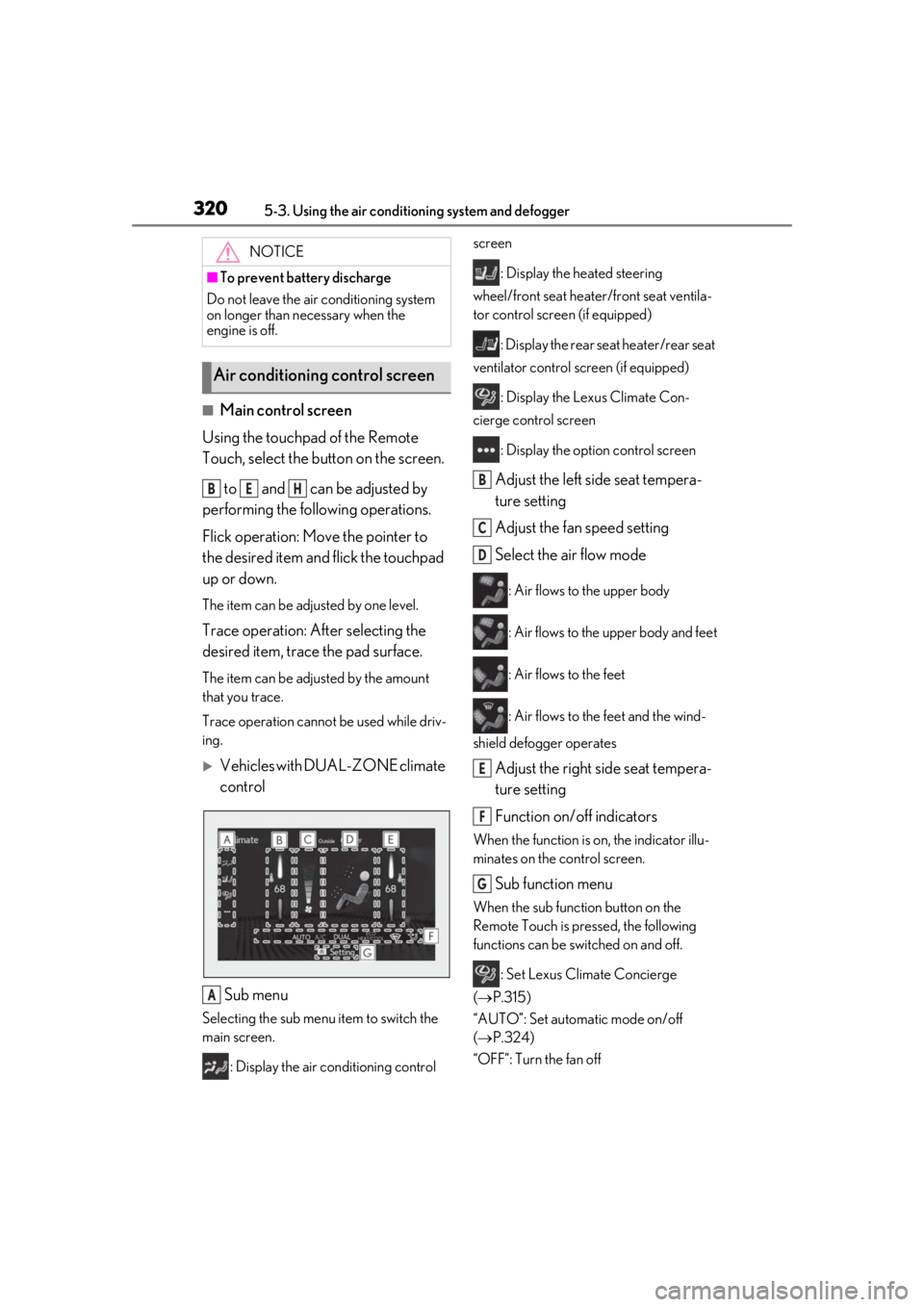
■Main control screen
Using the touchpad of the Remote
Touch, select the button on the screen.
to and can be adjusted by
performing the following operations.
Flick operation: Move the pointer to
the desired item and flick the touchpad
up or down.
The item can be adjusted by one level.
Trace operation: After selecting the
desired item, trace the pad surface.
The item can be adjusted by the amount
that you trace.
Trace operation cannot be used while driv-
ing.
Vehicles with DUAL-ZONE climate
control
Sub menu
Selecting the sub menu item to switch the
main screen. : Display the air conditioning control screen
: Display the heated steering
wheel/front seat heater /front seat ventila-
tor control screen (if equipped)
: Display the rear seat heater/rear seat
ventilator control screen (if equipped)
: Display the Lexus Climate Con-
cierge control screen
: Display the option control screen
Adjust the left side seat tempera-
ture setting
Adjust the fan speed setting
Select the air flow mode
: Air flows to the upper body
: Air flows to the upper body and feet
: Air flows to the feet
: Air flows to the feet and the wind-
shield defogger operates
Adjust the right side seat tempera-
ture setting
Function on/off indicators
When the function is on, the indicator illu-
minates on the control screen.
Sub function menu
When the sub function button on the
Remote Touch is pressed, the following
functions can be switched on and off.
: Set Lexus Climate Concierge
( P.315)
“AUTO”: Set automatic mode on/off
( P.324)
“OFF”: Turn the fan off
NOTICE
■To prevent battery discharge
Do not leave the air conditioning system
on longer than necessary when the
engine is off.
Air conditioning control screen
BEH
A
B
C
D
E
F
G
Page 321 of 516
3215-3. Using the air conditioning system and defogger
5
Interior features
“A/C”: Set cooling and dehumidification
function
If the “A/C” display is turned off, the system
will blow ambient temperature airor
heated air.
“DUAL”: Adjust the temperature for driver
and passenger seats separately (“DUAL”
mode) (P.325)
: Set eco air conditioning mode
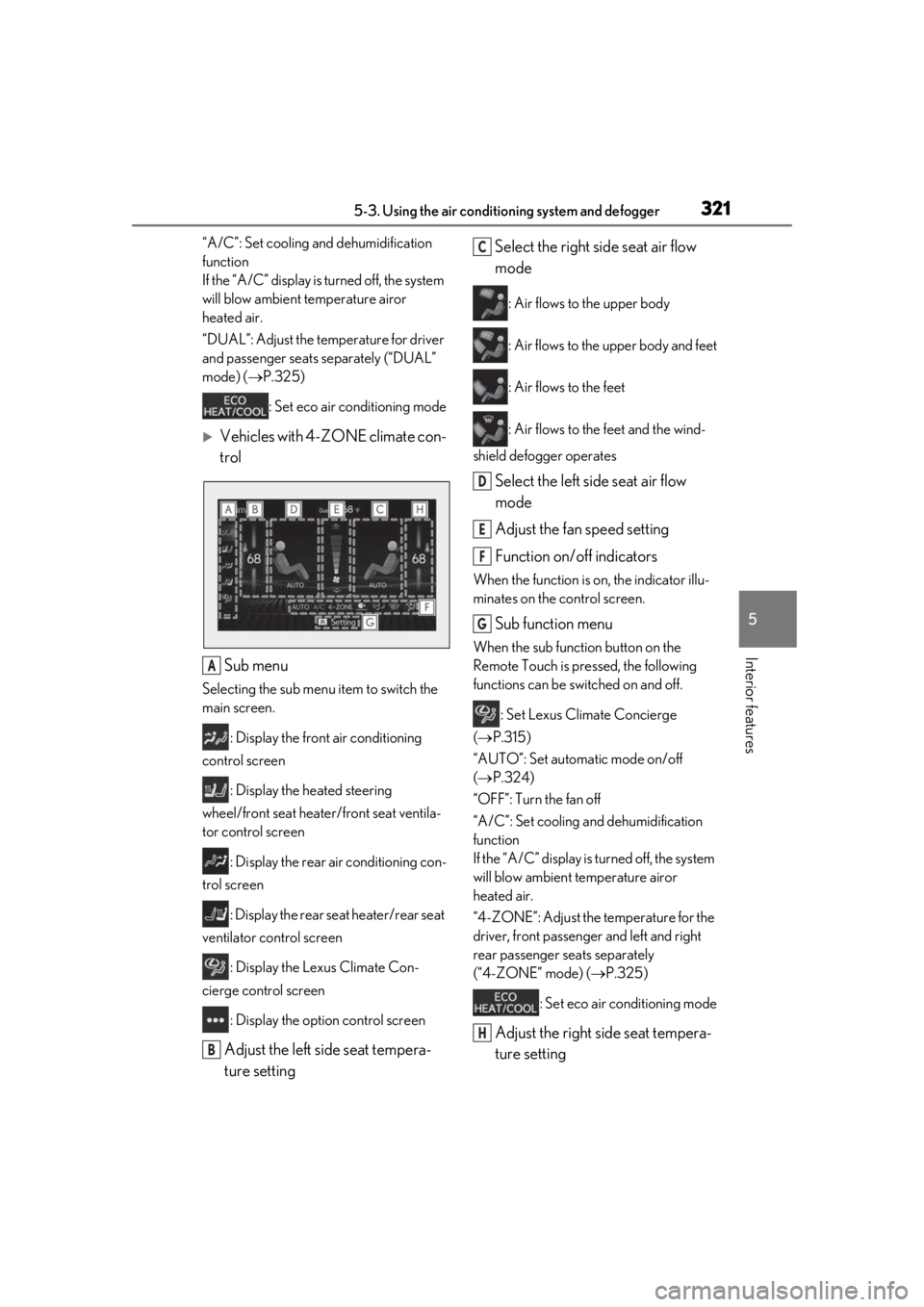
Vehicles with 4-ZONE climate con-
trol
Sub menu
Selecting the sub menu item to switch the
main screen. : Display the front air conditioning
control screen
: Display the heated steering
wheel/front seat heater/front seat ventila-
tor control screen
: Display the rear air conditioning con-
trol screen
: Display the rear seat heater/rear seat
ventilator control screen
: Display the Lexus Climate Con-
cierge control screen
: Display the option control screen
Adjust the left side seat tempera-
ture setting Select the right side seat air flow
mode
: Air flows to the upper body
: Air flows to the upper body and feet
: Air flows to the feet
: Air flows to the feet and the wind-
shield defogger operates
Select the left side seat air flow
mode
Adjust the fan speed setting
Function on/off indicators
When the function is on, the indicator illu-
minates on the control screen.
Sub function menu
When the sub function button on the
Remote Touch is pressed, the following
functions can be switched on and off.
: Set Lexus Climate Concierge
( P.315)
“AUTO”: Set automatic mode on/off
( P.324)
“OFF”: Turn the fan off
“A/C”: Set cooling and dehumidification
function
If the “A/C” display is turned off, the system
will blow ambient temperature airor
heated air.
“4-ZONE”: Adjust the temperature for the
driver, front passenger and left and right
rear passenger se ats separately
(“4-ZONE” mode) ( P.325)
: Set eco air conditioning mode
Adjust the right side seat tempera-
ture setting
A
B
C
D
E
F
G
H
Page 322 of 516
3225-3. Using the air conditioning system and defogger
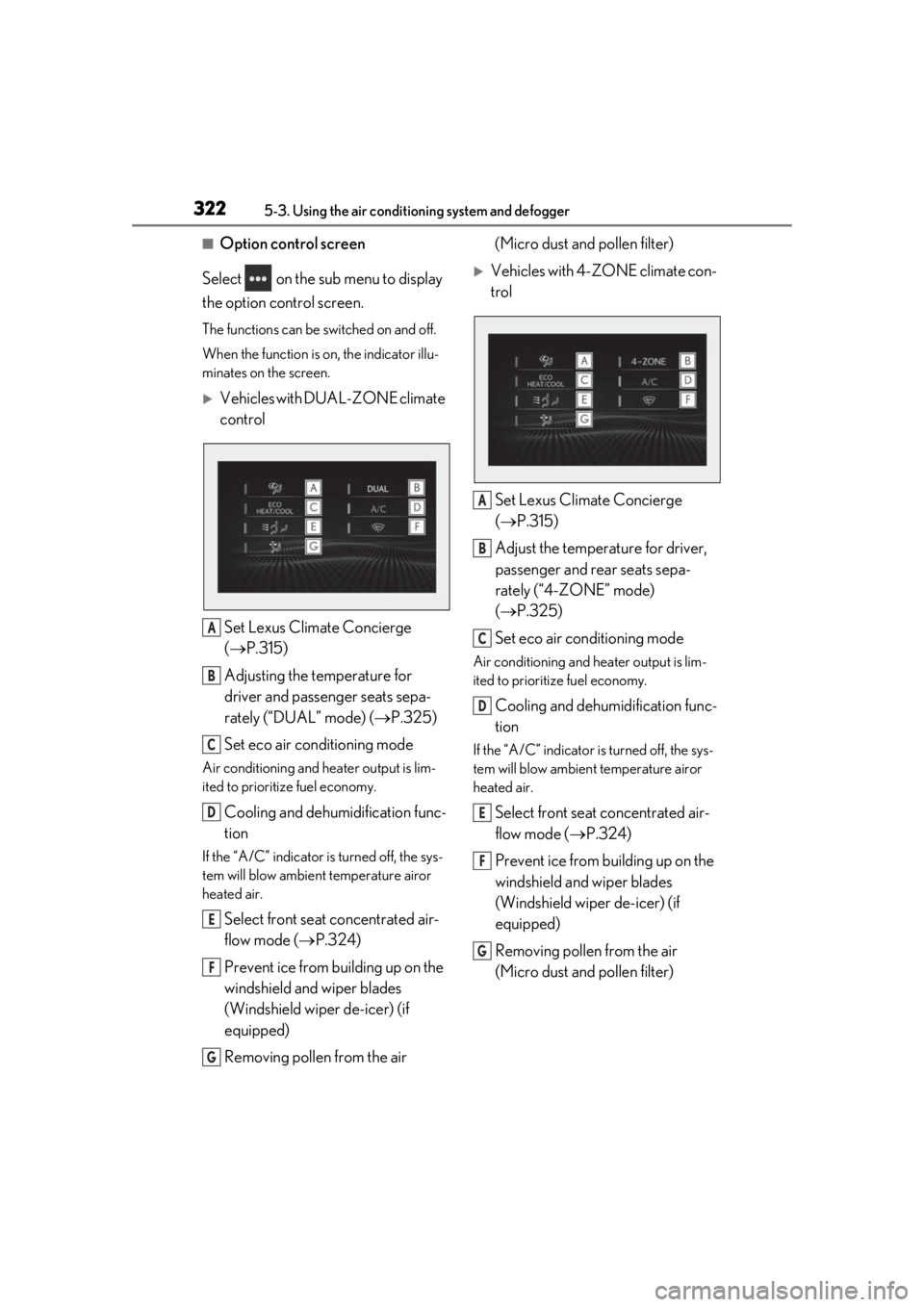
■Option control screen
Select on the sub menu to display
the option control screen.
The functions can be switched on and off.
When the function is on, the indicator illu-
minates on the screen.
Vehicles with DUAL-ZONE climate
control
Set Lexus Climate Concierge
( P.315)
Adjusting the temperature for
driver and passenger seats sepa-
rately (“DUAL” mode) ( P.325)
Set eco air conditioning mode
Air conditioning and heater output is lim-
ited to prioritize fuel economy.
Cooling and dehumidification func-
tion
If the “A/C” indicator is turned off, the sys-
tem will blow ambient temperature airor
heated air.
Select front seat concentrated air-
flow mode ( P.324)
Prevent ice from building up on the
windshield and wiper blades
(Windshield wiper de-icer) (if
equipped)
Removing pollen from the air (Micro dust and pollen filter)
Vehicles with 4-ZONE climate con-
trol
Set Lexus Climate Concierge
( P.315)
Adjust the temperature for driver,
passenger and rear seats sepa-
rately (“4-ZONE” mode)
( P.325)
Set eco air conditioning mode
Air conditioning and heater output is lim-
ited to prioritize fuel economy.
Cooling and dehumidification func-
tion
If the “A/C” indicator is turned off, the sys-
tem will blow ambient temperature airor
heated air.
Select front seat concentrated air-
flow mode ( P.324)
Prevent ice from building up on the
windshield and wiper blades
(Windshield wiper de-icer) (if
equipped)
Removing pollen from the air
(Micro dust and pollen filter)
A
B
C
D
E
F
G
A
B
C
D
E
F
G
Page 323 of 516
3235-3. Using the air conditioning system and defogger
5
Interior features
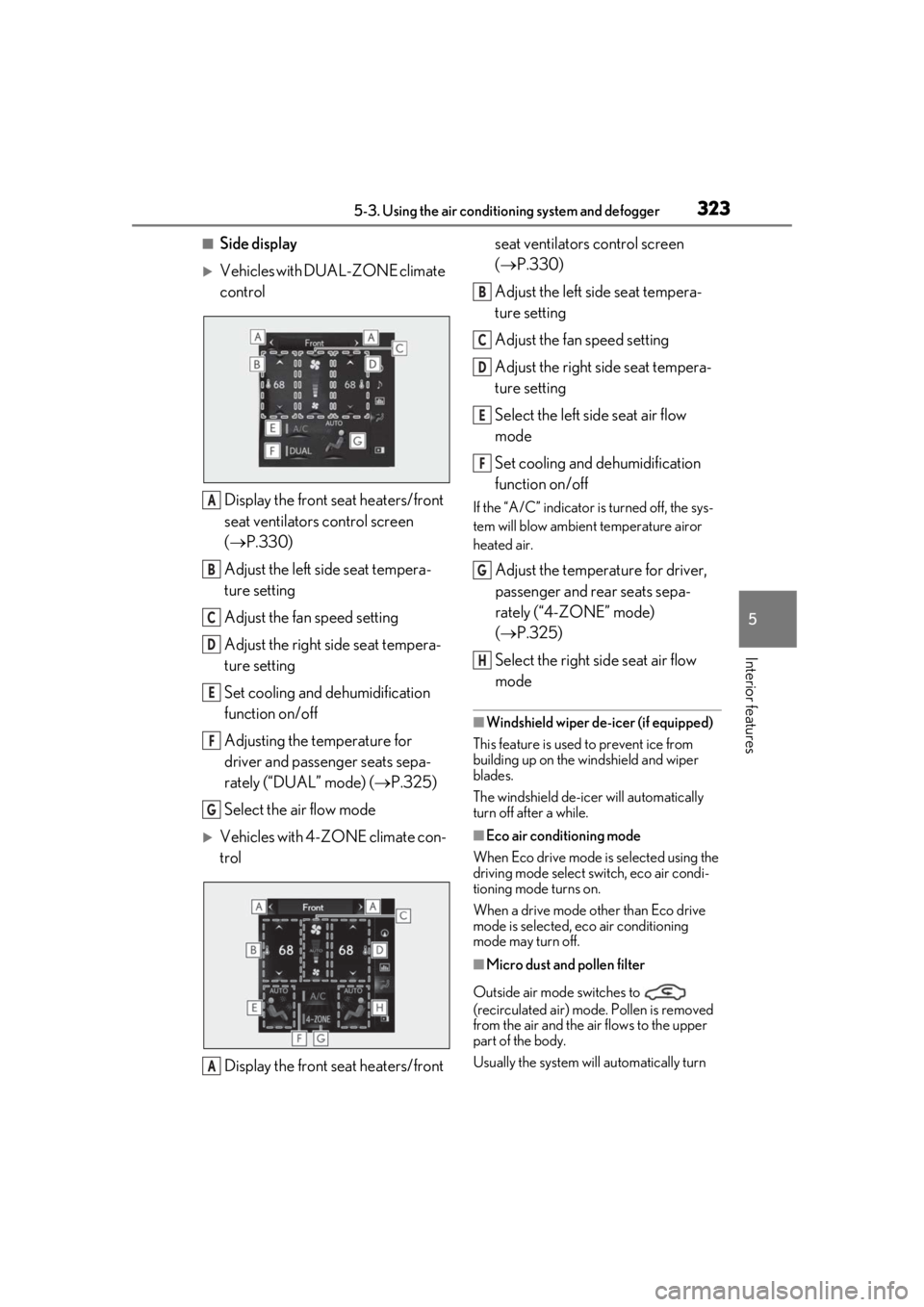
■Side display
Vehicles with DUAL-ZONE climate
control
Display the front seat heaters/front
seat ventilators control screen
( P.330)
Adjust the left side seat tempera-
ture setting
Adjust the fan speed setting
Adjust the right side seat tempera-
ture setting
Set cooling and dehumidification
function on/off
Adjusting the temperature for
driver and passenger seats sepa-
rately (“DUAL” mode) ( P.325)
Select the air flow mode
Vehicles with 4-ZONE climate con-
trol
Display the front seat heaters/front seat ventilators control screen
(
P.330)
Adjust the left side seat tempera-
ture setting
Adjust the fan speed setting
Adjust the right side seat tempera-
ture setting
Select the left side seat air flow
mode
Set cooling and dehumidification
function on/off
If the “A/C” indicator is turned off, the sys-
tem will blow ambient temperature airor
heated air.
Adjust the temperature for driver,
passenger and rear seats sepa-
rately (“4-ZONE” mode)
( P.325)
Select the right side seat air flow
mode
■Windshield wiper de-icer (if equipped)
This feature is used to prevent ice from
building up on the windshield and wiper
blades.
The windshield de-icer will automatically
turn off after a while.
■Eco air conditioning mode
When Eco drive mode is selected using the
driving mode select switch, eco air condi-
tioning mode turns on.
When a drive mode other than Eco drive
mode is selected, eco air conditioning
mode may turn off.
■Micro dust and pollen filter
Outside air mode switches to
(recirculated air) mode. Pollen is removed
from the air and the air flows to the upper
part of the body.
Usually the system will automatically turn
A
B
C
D
E
F
G
A
B
C
D
E
F
G
H
Page 324 of 516
3245-3. Using the air conditioning system and defogger
off after a while.
In order to prevent the windshield from fog-
ging up when the outside air is cold, the
dehumidification function may operate or
the outside/recirculated air mode may not
switch to (recirculated air) mode.
Pollen is filtered even if the micro dust and
pollen filter is turned off.
1Press the automatic mode switch or
select “AUTO” on the sub function
menu. ( P.320)
2
Press the outside/recirculated air
mode switch to switch to automatic
air intake mode.
The air conditioning system automatically
switches between outside air and recircu-
lated air modes.
3Adjust the temperature setting.
4
To stop the operation, press the off
switch or select “OFF” on the sub
function menu. ( P.320)
If the fan speed settin g or air flow modes
are operated, the automatic mode indica-
tor goes off. However, automatic mode for
functions other than th at operated is main-
tained.
■Using automatic mode
Fan speed is adjusted automatically accord-
ing to the temperature setting and the
ambient conditions.
Therefore, the fan may stop for a while until warm or cool air is ready to flow immedi-
ately after the automatic mode switch is
pressed or “AUTO” is selected.
Cool air may blow around the upper body
even when the heater is on due to sunlight.
■Automatic mode for air intake control
In automatic mode, the system detects
exhaust gas and other pollutants and auto-
matically switches between outside air and
recirculated air modes.
When the dehumidification function is off,
and the fan is operating, turning automatic
mode on will activate the dehumidification
function.
This function automatically controls the
air conditioning airflo w so that priority
is given to the front seats. When the
front passenger seat is not occupied,
airflow may switch to only the driver's
seat. Unnecessary air conditioning is
suppressed, contributing to increased
fuel efficiency.
Front seat concentrated airflow mode
operates in the following situations.
No passengers are detected in the
rear seats
The windshield defogger is not
operating
Pollen removal mode is not operat-
ing
While operating, illumi-
nates.
■Manually turning front seat con-
centrated airflow mode on/off
In front seat concentrated airflow
WARNING
■To prevent burns (vehicles with wind-
shield wiper de-icer)
Do not touch the glass at lower part of
the windshield or to the side of the front
pillars when the wind shield wiper de-icer
is on.
Using automatic mode
Front seat concentrated airflow
mode (S-FLOW mode)
Page 325 of 516
3255-3. Using the air conditioning system and defogger
5
Interior features
mode, directing airflow to the front
seats only and to all seats can be
switched via switch operation. When
the mode has been switched manually,
automatic airflow control stops operat-
ing.
Select on the option control
screen (P.322) and switch the air-
flow.
Indicator illuminated: Airflow to the
front seat only
Indicator off: Airflow to all the seats.
■Operation of automatic airflow mode
●In order to maintain a comfortable inte-
rior, airflow may be directed to seats
without passengers immediately after the
engine is started and at other times
depending on the outside temperature.
●After the engine is st arted, if passengers
move around inside or enter/exit the vehi-
cle, the system cannot accurately detect
the presence of passengers and auto-
matic airflow control will not operate.
■Operation of manual airflow control
Even if the function is manually switched to
directing airflow to only the front seats,
when a rear seat is occupied, it may auto-
matically direct airflow to all seats.
■To return to automa tic airflow control
1 With the indicator off, turn the engine
switch off.
2 After 60 minutes or more elapse,
change the engine switch to IGNITION
ON mode.
Vehicles with DUAL-ZONE climate
control
To turn on the “DUAL” mode, perform
any of the following procedures:
Select “DUAL” on the sub function
menu. ( P.320)
Select “DUAL” on the option con-
trol screen.
Adjust the passenger’s side tem-
perature setting.
The indicator on the main control screen
comes on when the “DUAL” mode is on.
Vehicles with 4-ZONE climate con-
trol
To turn on the “4-ZONE” mode, per-
form any of the following procedures:
Select “4-ZONE” on the sub func-
tion menu. ( P.320)
Select “4-ZONE” on the option
control screen.
Adjust a passenger seat tempera-
ture setting.
The indicator on the main control screen
comes on when the “4-ZONE” mode is on.
■Location of air outlets
The air outlets and air volume changes
according to the selected air flow
mode.
Adjusting the temperature for
the driver and passenger seats
separately
Air outlet layout and operations
Page 326 of 516
3265-3. Using the air conditioning system and defogger
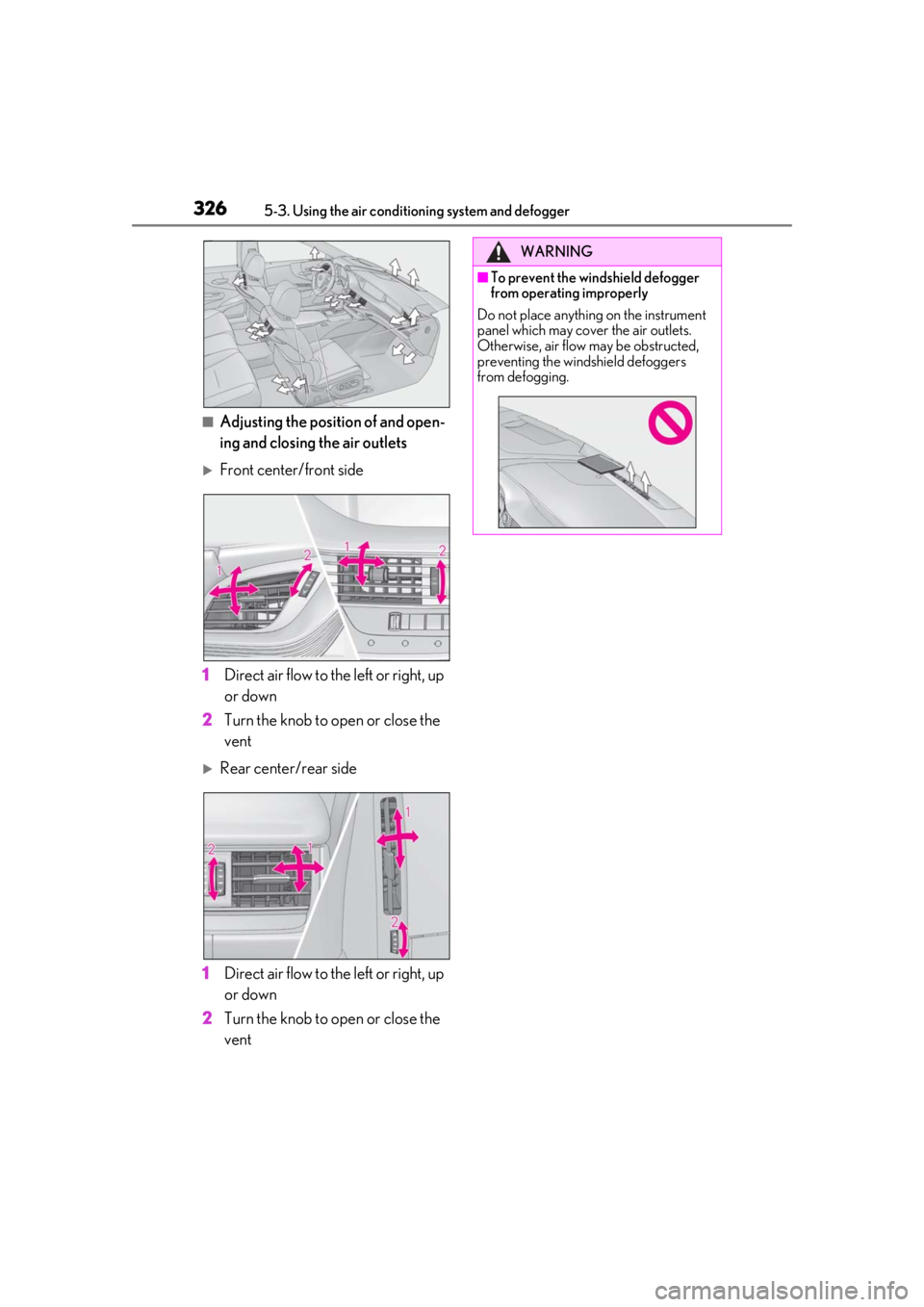
■Adjusting the position of and open-
ing and closing the air outlets
Front center/front side
1
Direct air flow to the left or right, up
or down
2
Turn the knob to open or close the
vent
Rear center/rear side
1
Direct air flow to the left or right, up
or down
2
Turn the knob to open or close the
vent
WARNING
■To prevent the windshield defogger
from operating improperly
Do not place anything on the instrument
panel which may cover the air outlets.
Otherwise, air flow may be obstructed,
preventing the windshield defoggers
from defogging.
Page 327 of 516
3275-3. Using the air conditioning system and defogger
5
Interior features
*:If equipped
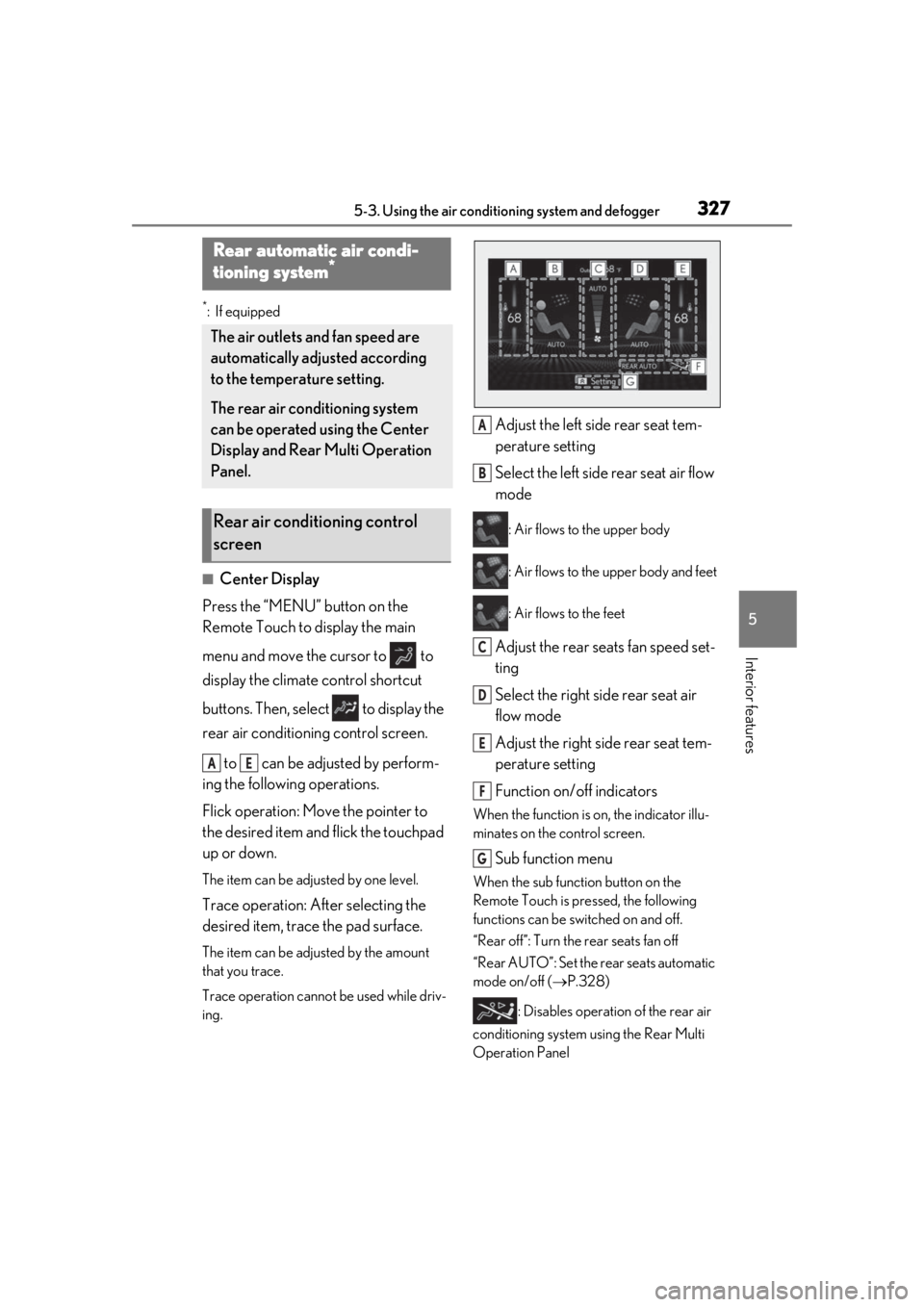
■Center Display
Press the “MENU” button on the
Remote Touch to display the main
menu and move the cursor to to
display the climate control shortcut
buttons. Then, select to display the
rear air conditioning control screen.
to can be adjusted by perform-
ing the following operations.
Flick operation: Move the pointer to
the desired item and flick the touchpad
up or down.
The item can be adjusted by one level.
Trace operation: After selecting the
desired item, trace the pad surface.
The item can be adjusted by the amount
that you trace.
Trace operation cannot be used while driv-
ing.
Adjust the left side rear seat tem-
perature setting
Select the left side rear seat air flow
mode
: Air flows to the upper body
: Air flows to the upper body and feet
: Air flows to the feet
Adjust the rear seats fan speed set-
ting
Select the right side rear seat air
flow mode
Adjust the right side rear seat tem-
perature setting
Function on/off indicators
When the function is on, the indicator illu-
minates on the control screen.
Sub function menu
When the sub function button on the
Remote Touch is pressed, the following
functions can be switched on and off.
“Rear off”: Turn the rear seats fan off
“Rear AUTO”: Set the rear seats automatic
mode on/off ( P.328)
: Disables operation of the rear air
conditioning system using the Rear Multi
Operation Panel
Rear automatic air condi-
tioning system*
The air outlets and fan speed are
automatically adjusted according
to the temperature setting.
The rear air conditioning system
can be operated using the Center
Display and Rear Multi Operation
Panel.
Rear air conditioning control
screen
AE
A
B
C
D
E
F
G
Page 328 of 516
3285-3. Using the air conditioning system and defogger
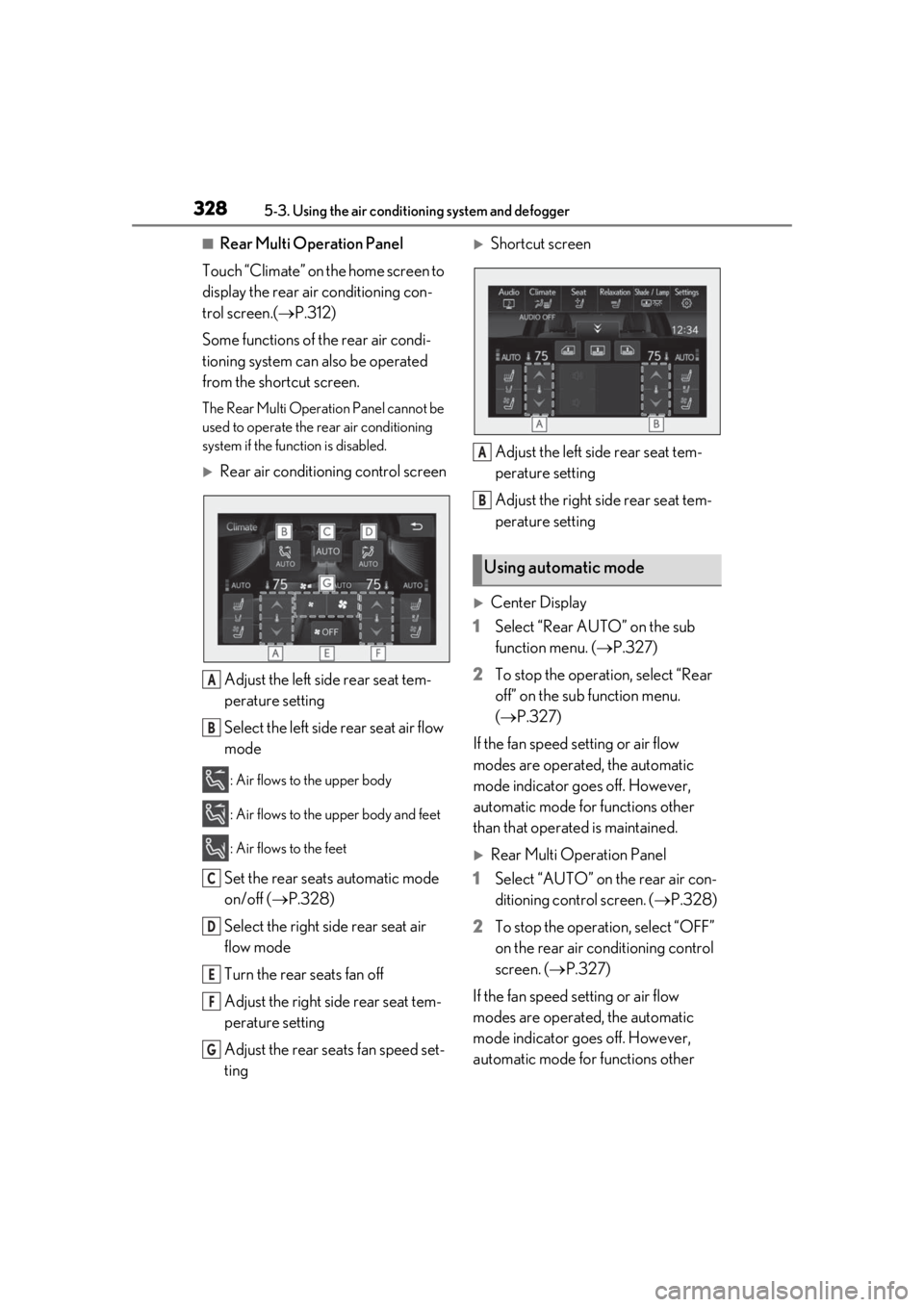
■Rear Multi Operation Panel
Touch “Climate” on the home screen to
display the rear air conditioning con-
trol screen.( P.312)
Some functions of the rear air condi-
tioning system can also be operated
from the shortcut screen.
The Rear Multi Operat ion Panel cannot be
used to operate the rear air conditioning
system if the function is disabled.
Rear air conditioning control screen
Adjust the left side rear seat tem-
perature setting
Select the left side rear seat air flow
mode
: Air flows to the upper body
: Air flows to the upper body and feet
: Air flows to the feet
Set the rear seats automatic mode
on/off ( P.328)
Select the right side rear seat air
flow mode
Turn the rear seats fan off
Adjust the right side rear seat tem-
perature setting
Adjust the rear seats fan speed set-
ting
Shortcut screen
Adjust the left side rear seat tem-
perature setting
Adjust the right side rear seat tem-
perature setting
Center Display
1 Select “Rear AUTO” on the sub
function menu. ( P.327)
2 To stop the operation, select “Rear
off” on the sub function menu.
(P.327)
If the fan speed setting or air flow
modes are operated, the automatic
mode indicator goes off. However,
automatic mode for functions other
than that operated is maintained.
Rear Multi Operation Panel
1 Select “AUTO” on the rear air con-
ditioning control screen. ( P.328)
2 To stop the operation, select “OFF”
on the rear air conditioning control
screen. ( P.327)
If the fan speed setting or air flow
modes are operated, the automatic
mode indicator goes off. However,
automatic mode for functions other
A
B
C
D
E
F
G
Using automatic mode
A
B