interior lights LEXUS LS500H 2020 Owners Manual
[x] Cancel search | Manufacturer: LEXUS, Model Year: 2020, Model line: LS500H, Model: LEXUS LS500H 2020Pages: 516, PDF Size: 10.38 MB
Page 3 of 516
3TABLE OF CONTENTS
1
2
3
4
5
6
7
8
9
4-2. Driving proceduresEngine (ignition) switch .............. 165
Automatic transmission.............. 169
Turn signal lever............................. 175
Parking brake ................................. 176
Brake Hold....................................... 178
4-3. Operating the lights and wipers Headlight switch ............................ 180
AHB (Automatic High Beam) ............................................................ 183
Windshield wipers and washer ............................................................ 185
4-4. Refueling Opening the fuel tank cap......... 190
4-5. Using the driving support systems Lexus Safety System + A............ 192
Lexus Safety System + 2.0 ........ 199
PCS (Pre-Collision System) (vehi- cles with Lexus Safety System +
A) ..................................................... 205
PCS (Pre-Collision System) (vehi- cles with Lexus Safety System +
2.0)................................................... 216
FCTA (Front Cross Traffic Alert) ........................................................... 223
LTA (Lane Tracing Assist)........ 226
RSA (Road Sign Assist) ............. 238
Dynamic radar crui se control with
full-speed range.......................... 241
BSM (Blind Spot Monitor) ........ 251
PKSA (Parking Support Alert) ........................................................... 257
Intuitive parking assist ................ 259
RCTA (Rear cross traffic alert) function .......................................... 266
RCD (Rear Camera Detection) function .......................................... 270PKSB (Parking Support Brake)
.......................................................... 273
Parking Support Brake function (static objects) ............................ 279
Parking Support Brake function (rear-crossing vehicles) ......... 285
Parking Support Brake function (rear pedestrians) ..................... 289
Driving mode select switch ......292
Electronically modulated air sus- pension .......................................... 294
Driving assist systems ................ 297
4-6. Driving tips Winter driving tips ....................... 303
5-1. Remote Touch/Display Remote Touch............................... 308
Center Display............................... 310
Rear Multi Operation Panel ..... 312
5-2. Lexus Climate Concierge Lexus Climate Concierge......... 315
5-3. Using the air conditioning system and defogger
Front automatic air conditioning system .............................................. 317
Rear automatic air conditioning system ............................................ 327
Heated steering wheel/seat heat- ers/seat ventilators................... 33
0
5-4. Using the interior lights Interior lights list ........................... 334
5-5. Using the storage features List of storage features .............. 338
Trunk features ............................... 343
5Interior features
Page 20 of 516
20Pictorial index
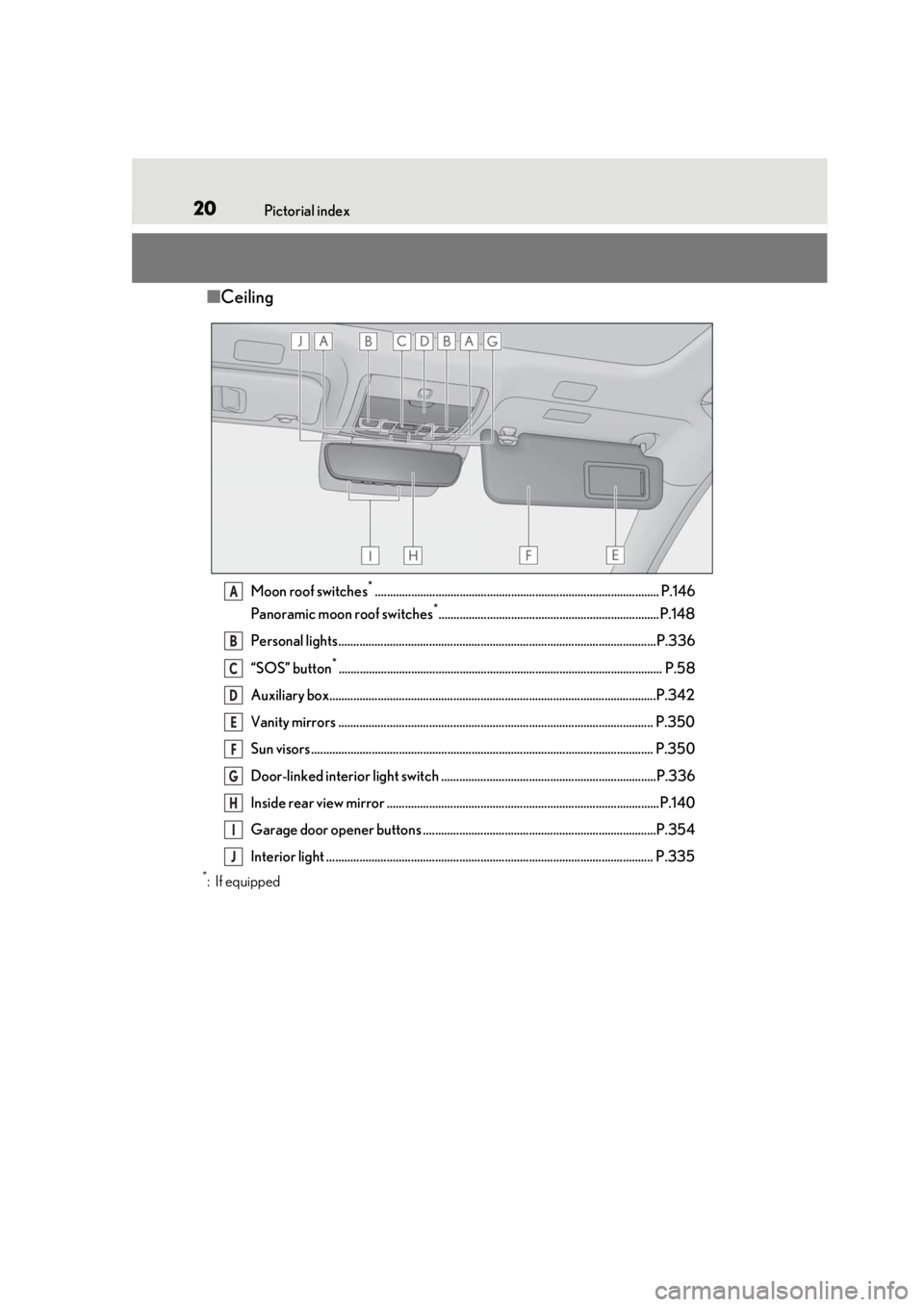
■Ceiling
Moon roof switches*.............................................................................................. P.146
Panoramic moon roof switches
*.........................................................................P.148
Personal lights.........................................................................................................P.336
“SOS” button
*........................................................................................................... P.58
Auxiliary box............................................................................................................P.342
Vanity mirrors ........................................................................................................ P.350
Sun visors ................................................................................................................. P.35 0
Door-linked interior light switch .......................................................................P.336
Inside rear view mirror ..........................................................................................P.140
Garage door opener buttons .............................................................................P.354
Interior light ............................................................................................................ P.335
*:If equipped
A
B
C
D
E
F
G
H
I
J
Page 31 of 516
311-1. For safe use
1
For safety and security
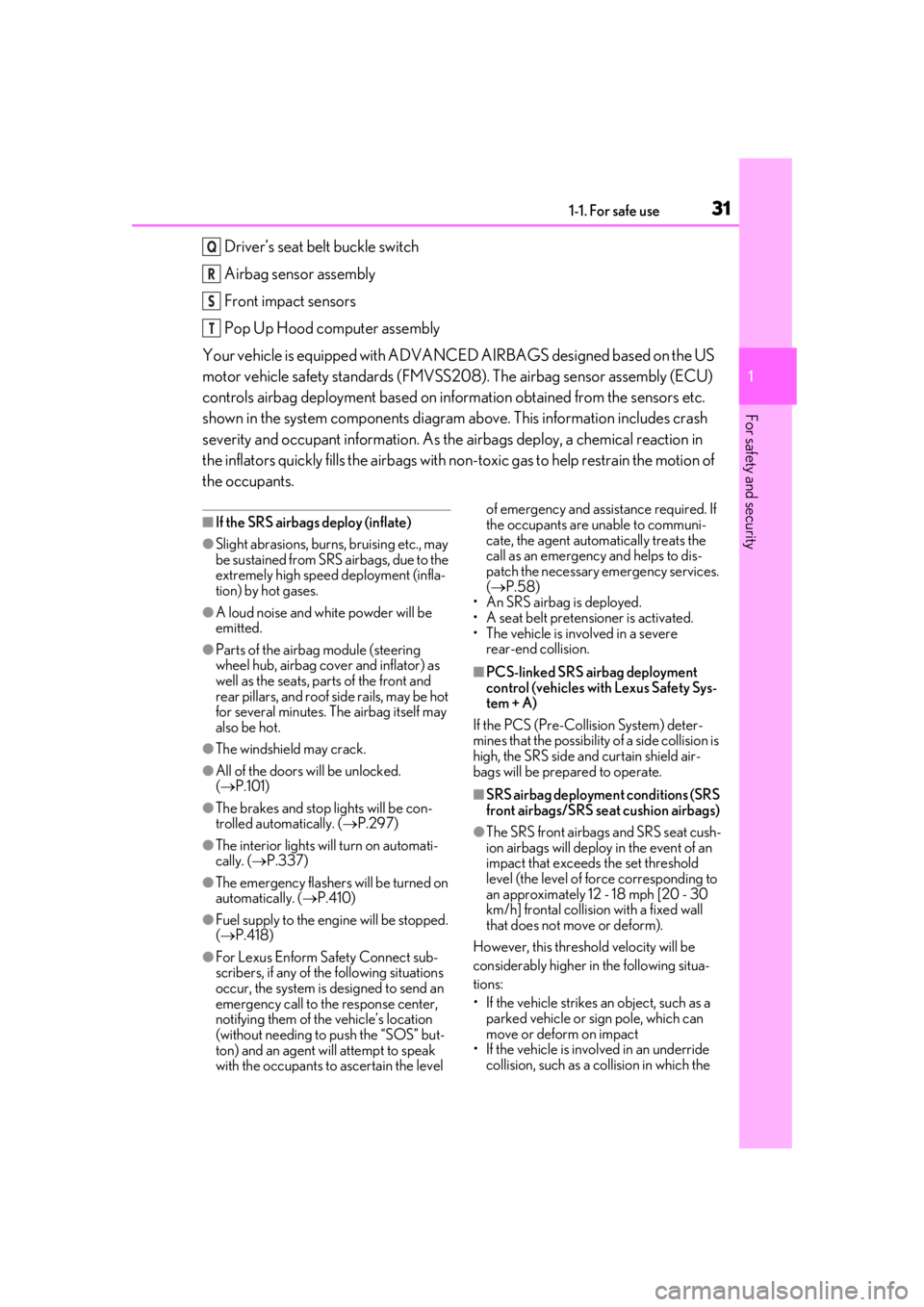
Driver’s seat belt buckle switch
Airbag sensor assembly
Front impact sensors
Pop Up Hood computer assembly
Your vehicle is equipped with ADVANCED AIRBAGS designed based on the US
motor vehicle safety standards (FMVSS208). The airbag sensor assembly (ECU)
controls airbag deployment based on information obtained from the sensors etc.
shown in the system components diagram above. This information includes crash
severity and occupant information. As the airbags deploy, a chemical reaction in
the inflators quickly fills the airbags with no n-toxic gas to help restrain the motion of
the occupants.
■If the SRS airbags deploy (inflate)
●Slight abrasions, burns, bruising etc., may
be sustained from SRS airbags, due to the
extremely high speed deployment (infla-
tion) by hot gases.
●A loud noise and white powder will be
emitted.
●Parts of the airbag module (steering
wheel hub, airbag cover and inflator) as
well as the seats, parts of the front and
rear pillars, and roof side rails, may be hot
for several minutes. The airbag itself may
also be hot.
●The windshield may crack.
●All of the doors will be unlocked.
( P.101)
●The brakes and stop lights will be con-
trolled automatically. ( P.297)
●The interior lights will turn on automati-
cally. ( P.337)
●The emergency flashers will be turned on
automatically. ( P.410)
●Fuel supply to the engine will be stopped.
( P.418)
●For Lexus Enform Safety Connect sub-
scribers, if any of the following situations
occur, the system is designed to send an
emergency call to the response center,
notifying them of the vehicle’s location
(without needing to push the “SOS” but-
ton) and an agent will attempt to speak
with the occupants to ascertain the level of emergency and assistance required. If
the occupants are unable to communi-
cate, the agent automatically treats the
call as an emergency and helps to dis-
patch the necessary emergency services.
(
P.58)
• An SRS airbag is deployed.
• A seat belt pretensioner is activated.
• The vehicle is involved in a severe rear-end collision.
■PCS-linked SRS airbag deployment
control (vehicles with Lexus Safety Sys-
tem + A)
If the PCS (Pre-Collision System) deter-
mines that the possibility of a side collision is
high, the SRS side and curtain shield air-
bags will be prepared to operate.
■SRS airbag deployment conditions (SRS
front airbags/SRS seat cushion airbags)
●The SRS front airbags and SRS seat cush-
ion airbags will deploy in the event of an
impact that exceed s the set threshold
level (the level of fo rce corresponding to
an approximately 12 - 18 mph [20 - 30
km/h] frontal collision with a fixed wall
that does not move or deform).
However, this threshol d velocity will be
considerably higher in the following situa-
tions:
• If the vehicle strikes an object, such as a parked vehicle or sign pole, which can
move or deform on impact
• If the vehicle is involved in an underride
collision, such as a collision in which the
Q
R
S
T
Page 307 of 516
307
5
5
Interior features
Interior features
.5-1. Remote Touch/DisplayRemote Touch ............................ 308
Center Display ............................ 310
Rear Multi Operation Panel ......................................................... 312
5-2. Lexus Climate Concierge Lexus Climate Concierge ...... 315
5-3. Using the air conditioning system and defogger
Front automatic air conditioning system .......................................... 317
Rear automatic air conditioning system ......................................... 327
Heated steering wheel/seat heat- ers/seat ventilators ................ 330
5-4. Using the interior lights Interior lights list......................... 334
5-5. Using the storage features List of storage features............ 338
Trunk features............................. 343
5-6. Using the other interior features Other interior features ........... 346
Garage door opener............... 354
Page 312 of 516
3125-1. Remote Touch/Display
*:If equipped
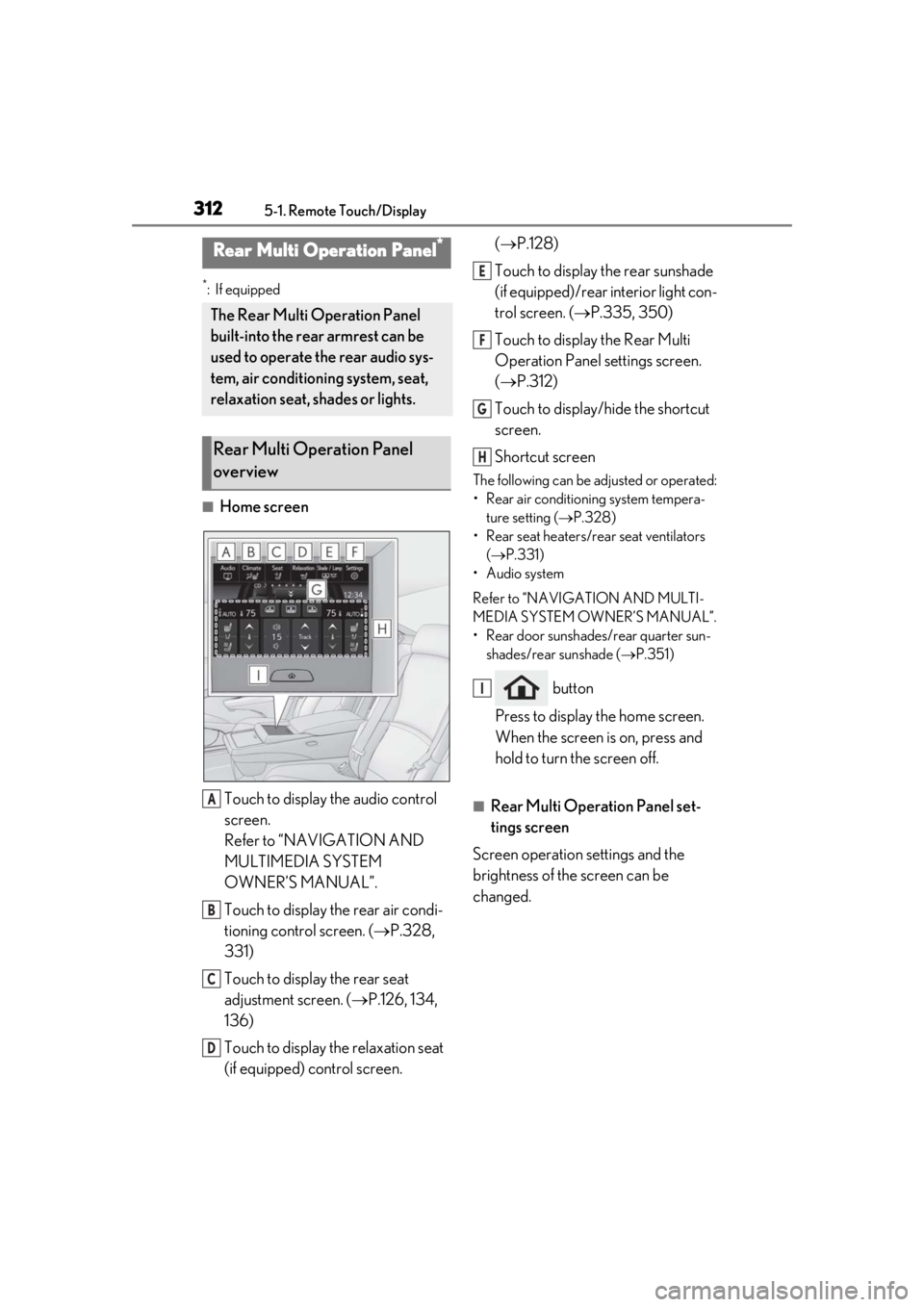
■Home screenTouch to display the audio control
screen.
Refer to “NAVIGATION AND
MULTIMEDIA SYSTEM
OWNER’S MANUAL”.
Touch to display the rear air condi-
tioning control screen. ( P.328,
331)
Touch to display the rear seat
adjustment screen. ( P.126, 134,
136)
Touch to display the relaxation seat
(if equipped) control screen. (
P.128)
Touch to display the rear sunshade
(if equipped)/rear interior light con-
trol screen. ( P.335, 350)
Touch to display the Rear Multi
Operation Panel settings screen.
( P.312)
Touch to display/hide the shortcut
screen.
Shortcut screen
The following can be adjusted or operated:
• Rear air conditioning system tempera- ture setting ( P.328)
• Rear seat heaters/rear seat ventilators ( P.331)
• Audio system
Refer to “NAVIGATION AND MULTI-
MEDIA SYSTEM OWNER’S MANUAL”.
• Rear door sunshades/rear quarter sun- shades/rear sunshade ( P.351)
button
Press to display the home screen.
When the screen is on, press and
hold to turn the screen off.
■Rear Multi Operation Panel set-
tings screen
Screen operation settings and the
brightness of the screen can be
changed.
Rear Multi Operation Panel*
The Rear Multi Operation Panel
built-into the rear armrest can be
used to operate the rear audio sys-
tem, air conditioning system, seat,
relaxation seat, shades or lights.
Rear Multi Operation Panel
overview
A
B
C
D
E
F
G
H
I
Page 334 of 516
3345-4. Using the interior lights
5-4.Using the interior lights
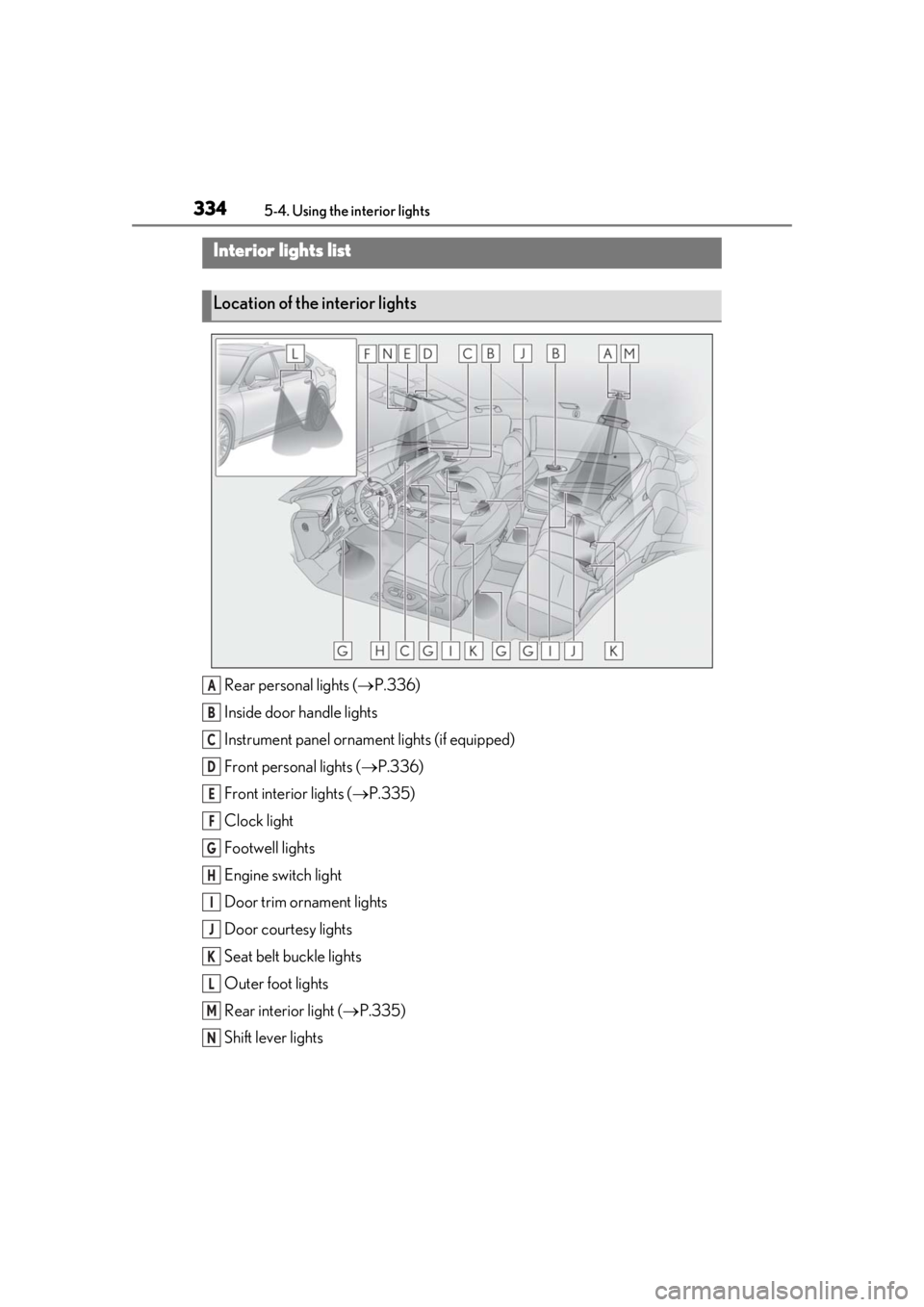
Rear personal lights ( P.336)
Inside door handle lights
Instrument panel orname nt lights (if equipped)
Front personal lights ( P.336)
Front interi or lights ( P.335)
Clock light
Footwell lights
Engine switch light
Door trim ornament lights
Door courtesy lights
Seat belt buckle lights
Outer foot lights
Rear interior light ( P.335)
Shift lever lights
Interior lights list
Location of the interior lights
A
B
C
D
E
F
G
H
I
J
K
L
M
N
Page 335 of 516
3355-4. Using the interior lights
5
Interior features
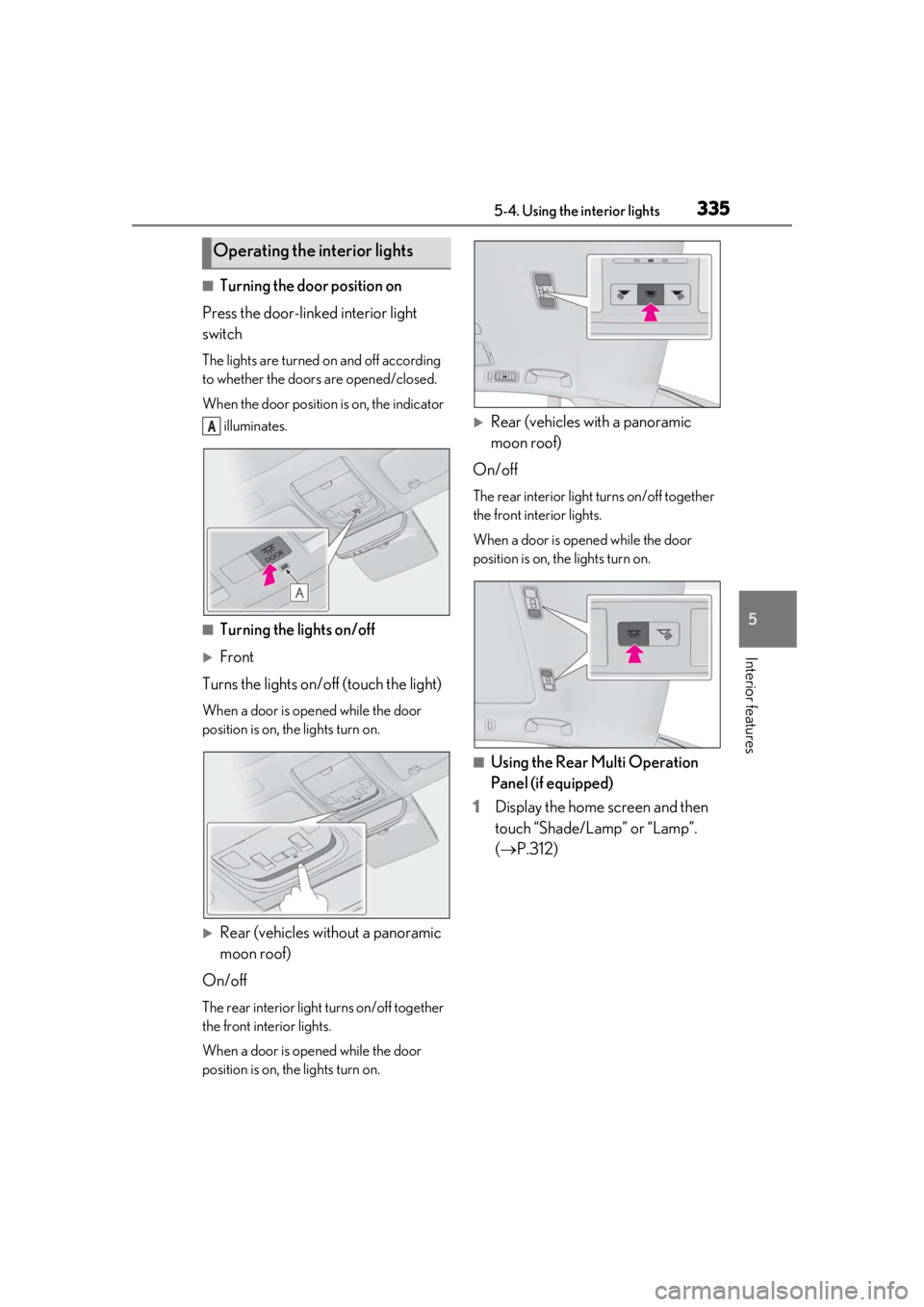
■Turning the door position on
Press the door-linked interior light
switch
The lights are turned on and off according
to whether the doors are opened/closed.
When the door position is on, the indicator illuminates.
■Turning the lights on/off
Front
Turns the lights on/off (touch the light)
When a door is opened while the door
position is on, the lights turn on.
Rear (vehicles without a panoramic
moon roof)
On/off
The rear interior light turns on/off together
the front interior lights.
When a door is opened while the door
position is on, the lights turn on.
Rear (vehicles with a panoramic
moon roof)
On/off
The rear interior light turns on/off together
the front interior lights.
When a door is opened while the door
position is on, the lights turn on.
■Using the Rear Multi Operation
Panel (if equipped)
1 Display the home screen and then
touch “Shade/Lamp” or “Lamp”.
(P.312)
Operating the interior lights
A
Page 336 of 516
3365-4. Using the interior lights
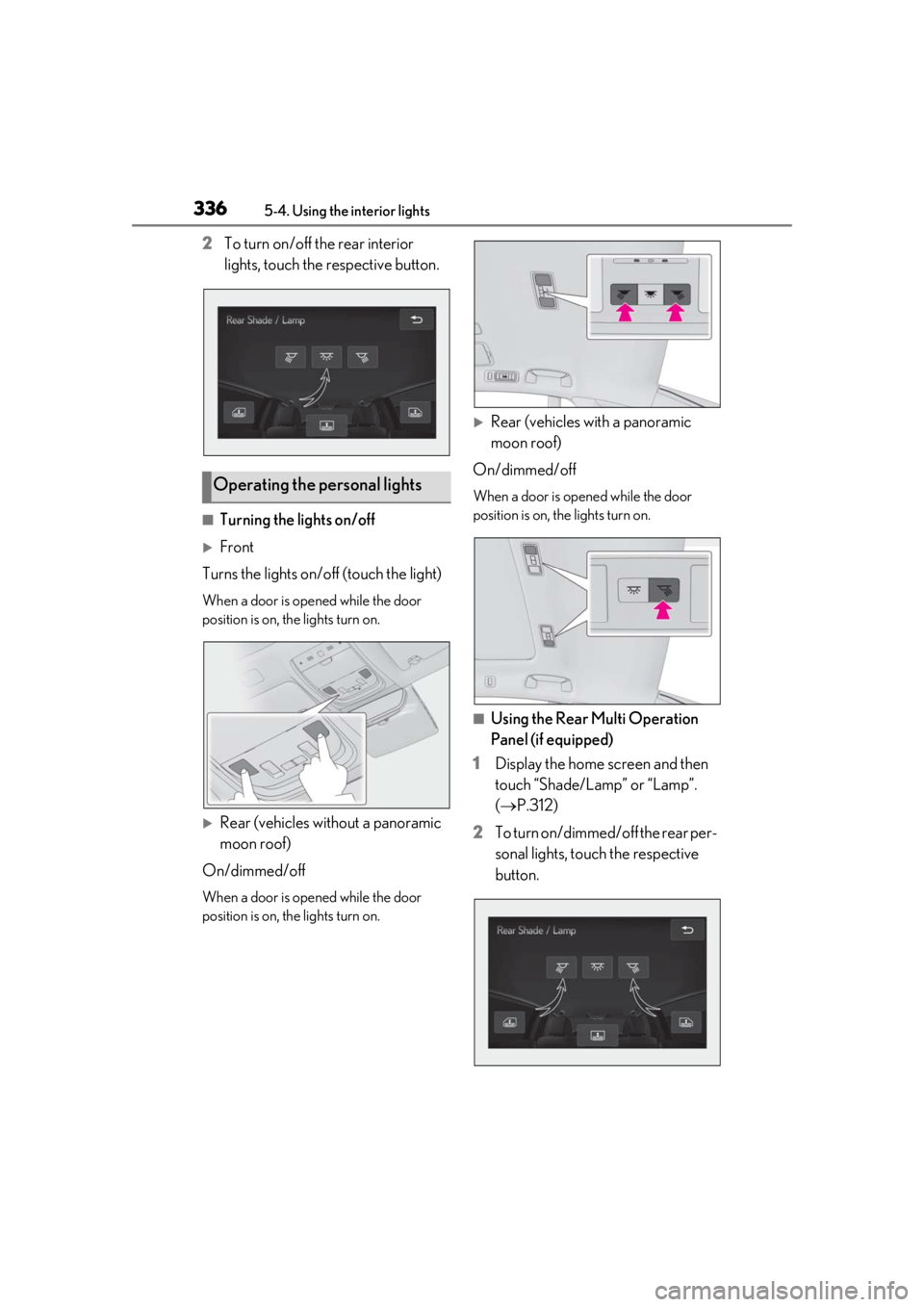
2To turn on/off the rear interior
lights, touch the respective button.
■Turning the lights on/off
Front
Turns the lights on/off (touch the light)
When a door is opened while the door
position is on, the lights turn on.
Rear (vehicles without a panoramic
moon roof)
On/dimmed/off
When a door is opened while the door
position is on, the lights turn on.
Rear (vehicles with a panoramic
moon roof)
On/dimmed/off
When a door is opened while the door
position is on, the lights turn on.
■Using the Rear Multi Operation
Panel (if equipped)
1 Display the home screen and then
touch “Shade/Lamp” or “Lamp”.
(P.312)
2 To turn on/dimmed/off the rear per-
sonal lights, touch the respective
button.
Operating the personal lights
Page 337 of 516
3375-4. Using the interior lights
5
Interior features
■Illuminated entry system
The lights automatically turn on/off accord-
ing to the engine switch mode, the pres-
ence of the electronic key, whether the
doors are locked/unlocked, and whether
the doors are opened/closed.
■To prevent the battery from being dis-
charged
If the interior lights remain on when the
engine switch is turned off, the lights will go
off automatically after 20 minutes.
■When front interior light or front per-
sonal lights do not respond as normal
●When water, dirt, et c., have adhered to
the lens surface
●When operated with a wet hand
●When wearing gloves, etc.
■The interior lights may turn on automati-
cally when
If any of the SRS airbags deploy (inflate) or
in the event of a strong rear impact, the inte-
rior lights will turn on automatically.
The interior lights will turn off automatically
after approximately 20minutes.
The interior lights can be turned off manu-
ally. However, in order to help prevent fur-
ther collisions, it is recommended that they
be left on until safety can be ensured.
(The interior lights may not turn on auto-
matically depending on the force of the
impact and conditions of the collision.)
■Customization
Some functions can be customized.
( P.470)
NOTICE
■To prevent battery discharge
Do not leave the lights on longer than
necessary when the engine is not run-
ning.
■Removing light lenses
Never remove th e lens for the front inte-
rior light and front personal lights. Other-
wise, the lights will be damaged. If a lens
needs to be removed, contact your Lexus
dealer.
Page 341 of 516
3415-5. Using the storage features
5
Interior features
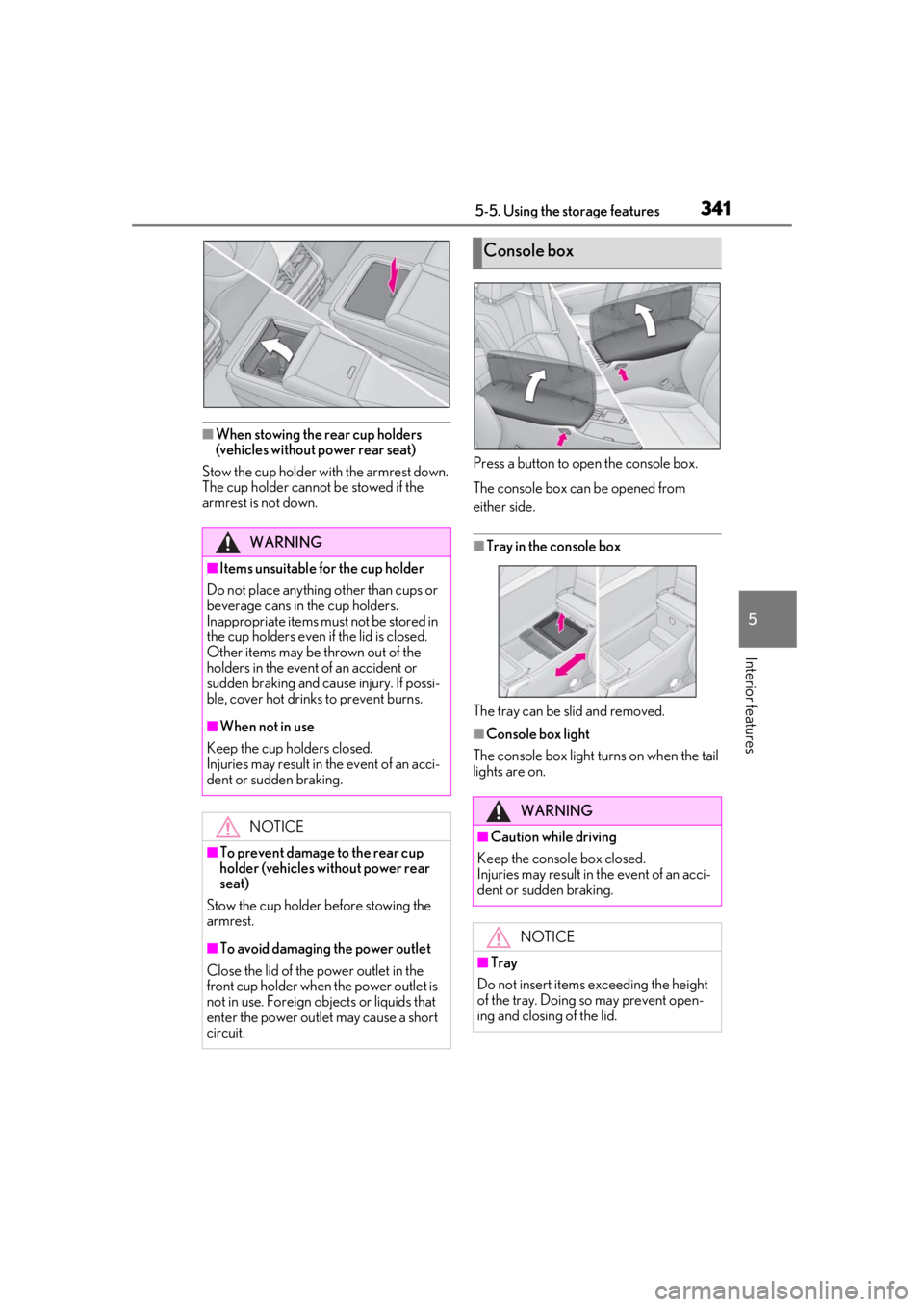
■When stowing the rear cup holders
(vehicles without power rear seat)
Stow the cup holder with the armrest down.
The cup holder cannot be stowed if the
armrest is not down. Press a button to open the console box.
The console box can be opened from
either side.
■Tray in the console box
The tray can be slid and removed.
■Console box light
The console box light turns on when the tail
lights are on.
WARNING
■Items unsuitable for the cup holder
Do not place anything other than cups or
beverage cans in the cup holders.
Inappropriate items must not be stored in
the cup holders even if the lid is closed.
Other items may be thrown out of the
holders in the event of an accident or
sudden braking and cause injury. If possi-
ble, cover hot drinks to prevent burns.
■When not in use
Keep the cup holders closed.
Injuries may result in the event of an acci-
dent or sudden braking.
NOTICE
■To prevent damage to the rear cup
holder (vehicles without power rear
seat)
Stow the cup holder before stowing the
armrest.
■To avoid damaging the power outlet
Close the lid of the power outlet in the
front cup holder when the power outlet is
not in use. Foreign ob jects or liquids that
enter the power outlet may cause a short
circuit.
Console box
WARNING
■Caution while driving
Keep the console box closed.
Injuries may result in the event of an acci-
dent or sudden braking.
NOTICE
■Tray
Do not insert items exceeding the height
of the tray. Doing so may prevent open-
ing and closing of the lid.