audio LEXUS LS500H 2021 User Guide
[x] Cancel search | Manufacturer: LEXUS, Model Year: 2021, Model line: LS500H, Model: LEXUS LS500H 2021Pages: 108, PDF Size: 6.47 MB
Page 65 of 108
64
LS500h_QG_U
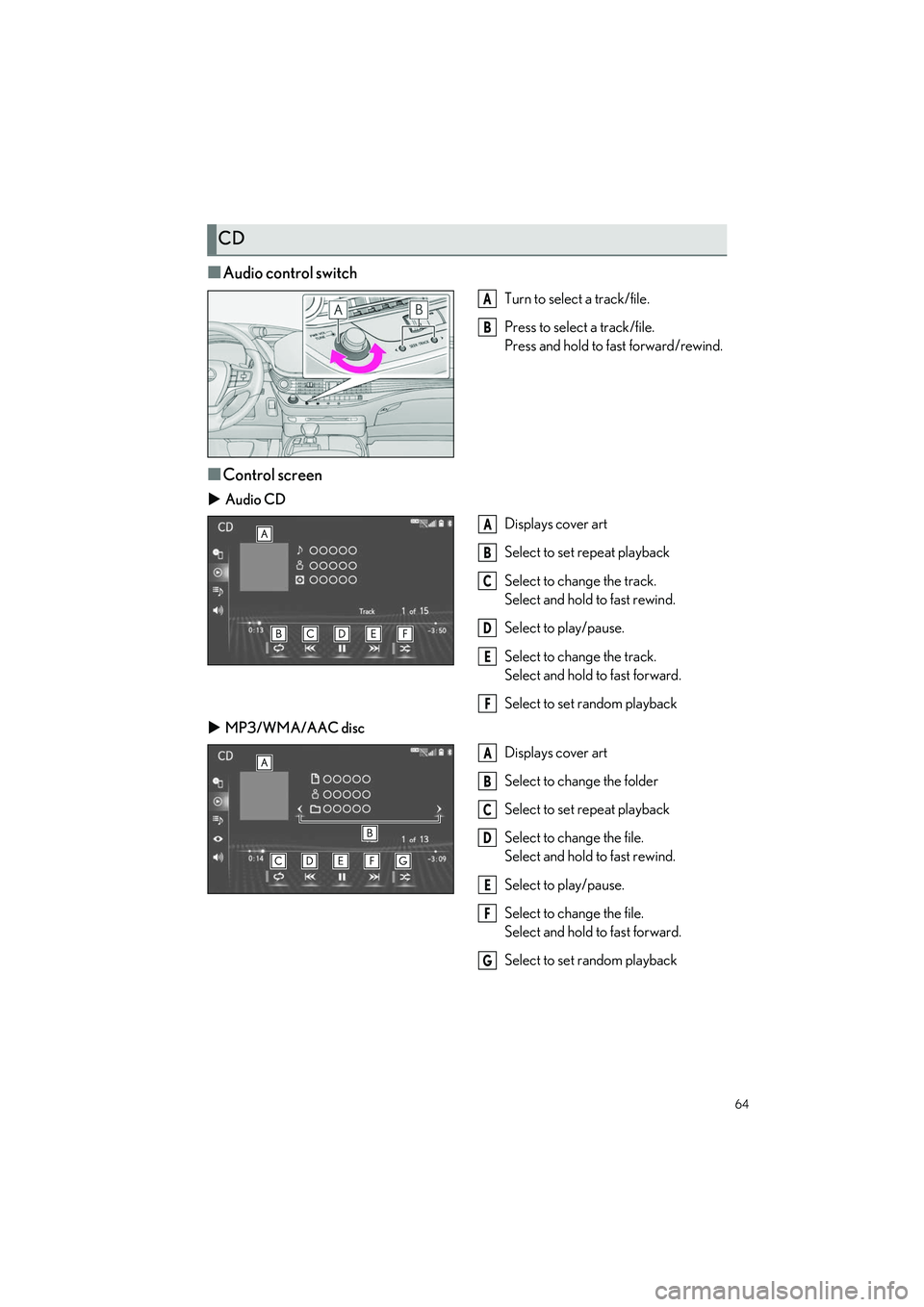
■Audio control switch
Turn to select a track/file.
Press to select a track/file.
Press and hold to fast forward/rewind.
■Control screen
Audio CD
Displays cover art
Select to set repeat playback
Select to change the track.
Select and hold to fast rewind.
Select to play/pause.
Select to change the track.
Select and hold to fast forward.
Select to set random playback
MP3/WMA/AAC disc
Displays cover art
Select to change the folder
Select to set repeat playback
Select to change the file.
Select and hold to fast rewind.
Select to play/pause.
Select to change the file.
Select and hold to fast forward.
Select to set random playback
CD
A
B
A
B
C
D
E
F
A
B
C
D
E
F
G
Page 66 of 108
65
LS500h_QG_U
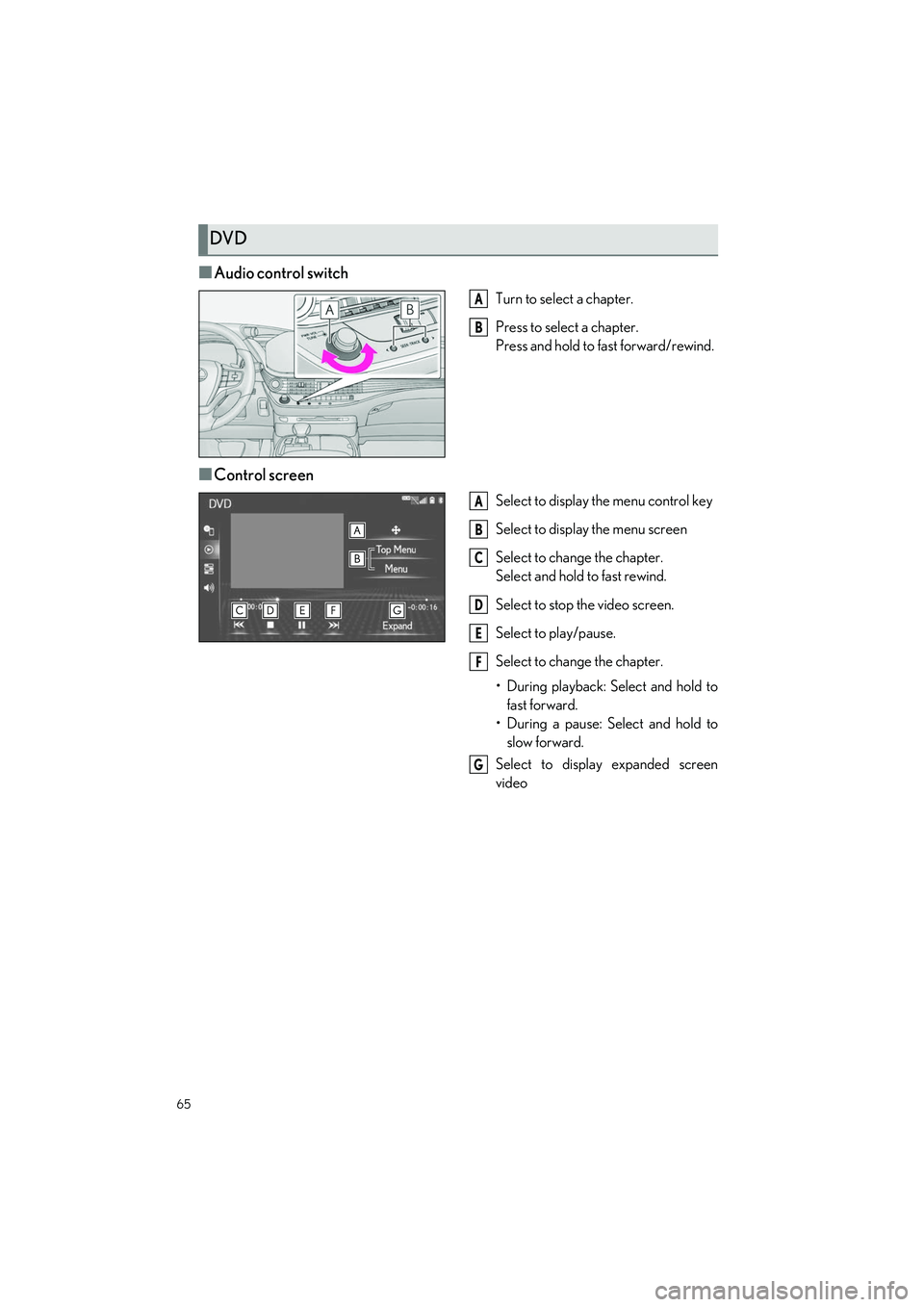
■Audio control switch
Turn to select a chapter.
Press to select a chapter.
Press and hold to fast forward/rewind.
■Control screen
Select to display the menu control key
Select to display the menu screen
Select to change the chapter.
Select and hold to fast rewind.
Select to stop the video screen.
Select to play/pause.
Select to change the chapter.
• During playback: Select and hold to
fast forward.
• During a pause: Select and hold to slow forward.
Select to display expanded screen
video
DVD
A
B
A
B
C
D
E
F
G
Page 67 of 108
66
LS500h_QG_U
Apple CarPlay is not available in some countries or areas.
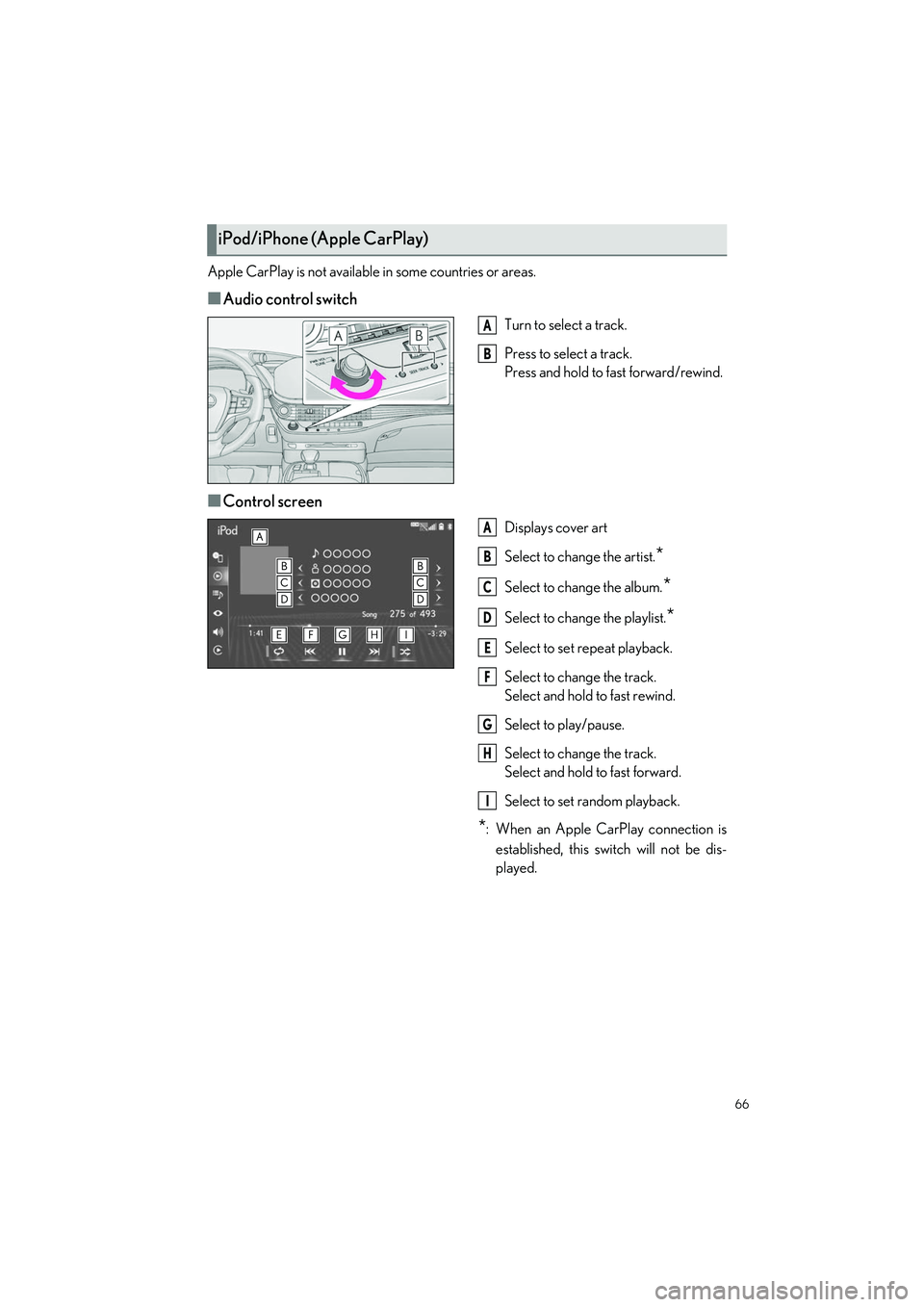
■Audio control switch
Turn to select a track.
Press to select a track.
Press and hold to fast forward/rewind.
■Control screen
Displays cover art
Select to change the artist.
*
Select to change the album.*
Select to change the playlist.*
Select to set repeat playback.
Select to change the track.
Select and hold to fast rewind.
Select to play/pause.
Select to change the track.
Select and hold to fast forward.
Select to set random playback.
*: When an Apple CarPlay connection is
established, this switch will not be dis-
played.
iPod/iPhone (Apple CarPlay)
A
B
A
B
C
D
E
F
G
H
I
Page 68 of 108
67
LS500h_QG_U
Android Auto is not available in some countries or areas.
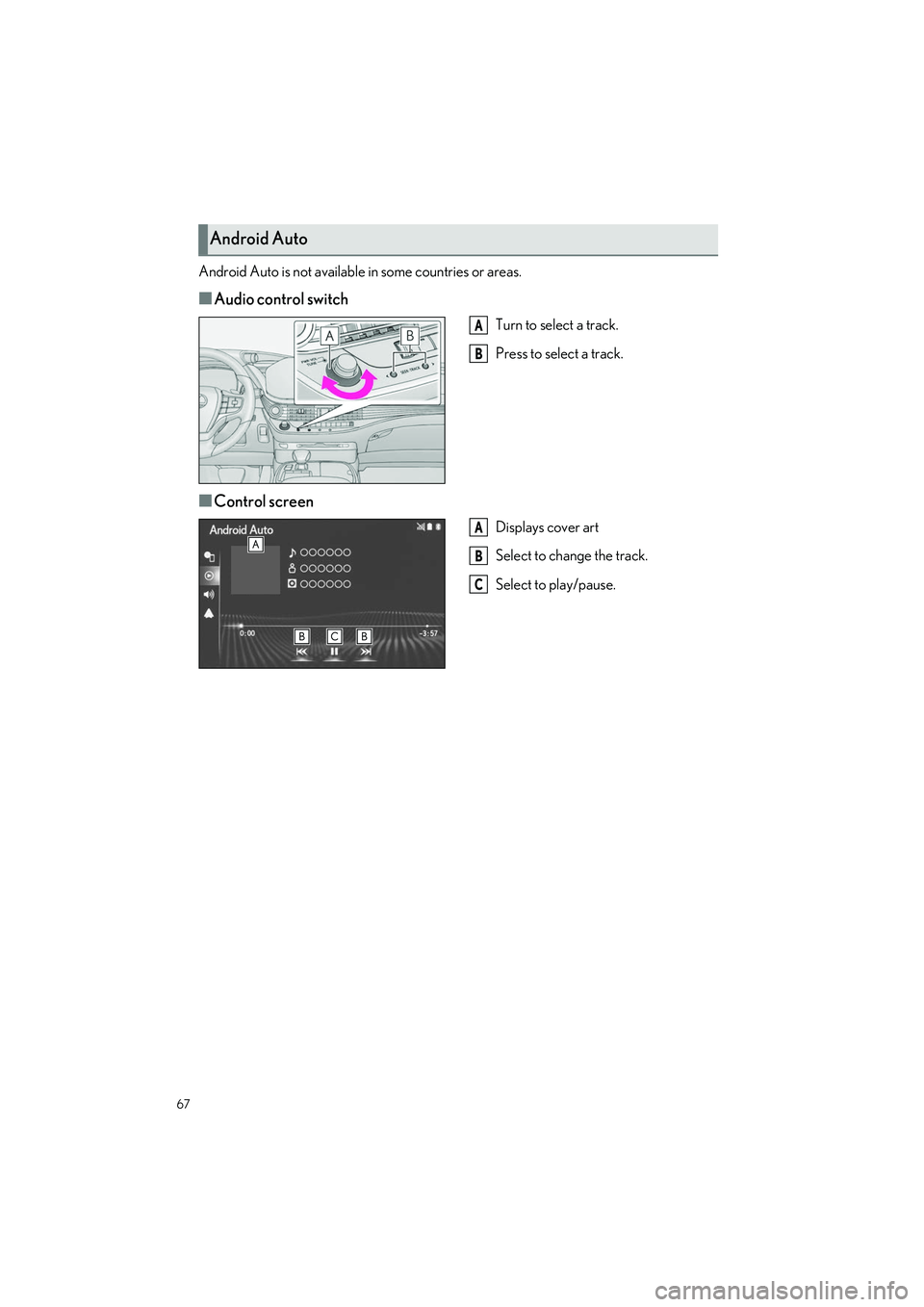
■Audio control switch
Turn to select a track.
Press to select a track.
■Control screen
Displays cover art
Select to change the track.
Select to play/pause.
Android Auto
A
B
A
B
C
Page 76 of 108
75
LS500h_QG_U
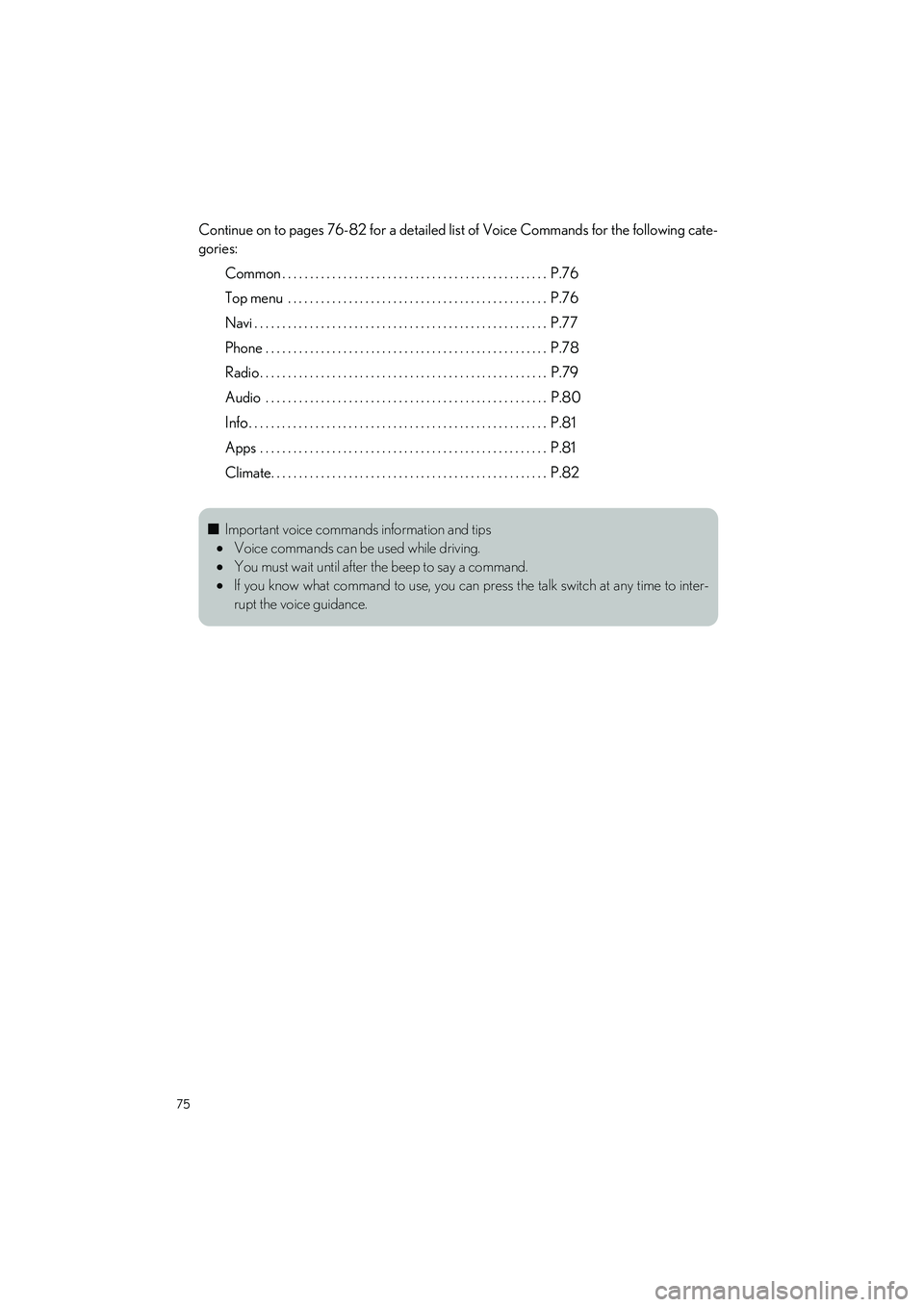
Continue on to pages 76-82 for a detailed list of Voice Commands for the following cate-
gories:
Common . . . . . . . . . . . . . . . . . . . . . . . . . . . . . . . . . . . . . . . . . . . . . . . . P.76
Top menu . . . . . . . . . . . . . . . . . . . . . . . . . . . . . . . . . . . . . . . . . . . . . . . P.76
Navi . . . . . . . . . . . . . . . . . . . . . . . . . . . . . . . . . . . . . . . . . . . . . . . . . . . . . P.77
Phone . . . . . . . . . . . . . . . . . . . . . . . . . . . . . . . . . . . . . . . . . . . . . . . . . . . P.78
Radio . . . . . . . . . . . . . . . . . . . . . . . . . . . . . . . . . . . . . . . . . . . . . . . . . . . . P.79
Audio . . . . . . . . . . . . . . . . . . . . . . . . . . . . . . . . . . . . . . . . . . . . . . . . . . . P.80
Info. . . . . . . . . . . . . . . . . . . . . . . . . . . . . . . . . . . . . . . . . . . . . . . . . . . . . . P.81
Apps . . . . . . . . . . . . . . . . . . . . . . . . . . . . . . . . . . . . . . . . . . . . . . . . . . . . P.81
Climate. . . . . . . . . . . . . . . . . . . . . . . . . . . . . . . . . . . . . . . . . . . . . . . . . . P.82
■ Important voice commands information and tips
Voice commands can be used while driving.
You must wait until after the beep to say a command.
If you know what command to use, you can pr ess the talk switch at any time to inter-
rupt the voice guidance.
Page 81 of 108
80
LS500h_QG_U
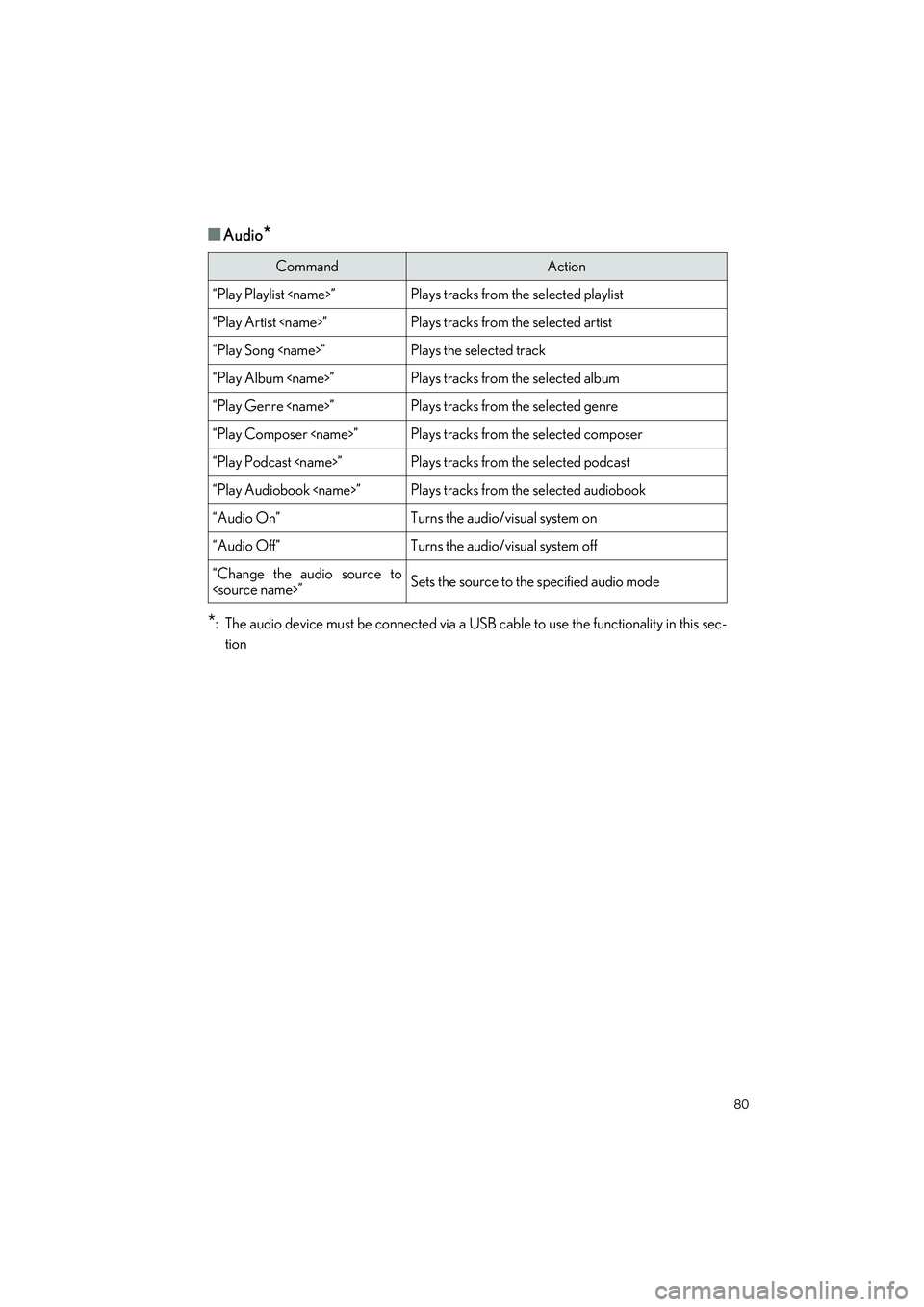
■Audio*
*
: The audio device must be connected via a USB cable to use the functionality in this sec- tion
CommandAction
“Play Playlist
“Play Artist
“Play Song
“Play Album
“Play Genre
“Play Composer
“Play Podcast
“Play Audiobook
“Audio On”Turns the audio/visual system on
“Audio Off”Turns the audio/visual system off
“Change the audio source to