door lock LEXUS LS500H 2021 Owners Manual
[x] Cancel search | Manufacturer: LEXUS, Model Year: 2021, Model line: LS500H, Model: LEXUS LS500H 2021Pages: 108, PDF Size: 6.47 MB
Page 2 of 108
1
LS500h_QG_U
AHB (Automatic High Beam)........................................................................................................ 41
Audio System
*
Audio control screen ........................................................................................................... ......... 61
Selecting an audio source ...................................................................................................... ..... 61
Steering switch operation ...................................................................................................... .... 62
Radio ...................................................................................................................................................63
CD........................................................................................................................................................ 64
DVD ....................................................................................................................................................65
iPod/iPhone (Apple CarPlay).................................................................................................. 66
Android Auto ................................................................................................................... ............... 67
Brake Hold .............................................................................................................................................35
Center Display ............................................................................................................................... ......48
Digital Rearview Mirror .................................................................................................................. 24
Door Locks .............................................................................................................................................93
Driving Mode Select Switch ..........................................................................................................45
Driving Position Memory ................................................................................................................ 22
Energy Monitor/Consumption Screen .................................................................................... 51
EV Drive Mode .................................................................................................................................... 27
Floor Mat Installation ...........................................................................................................................11
Front Automatic Air Conditioning System
*
Control panel .................................................................................................................. ................69
Air conditioning control screen...............................................................................................7 0
Using automatic mode ........................................................................................................... ..... 72
Front Seats ............................................................................................................................... ............... 19
Fuel Tank Cap .......................................................................................................................................96
Garage Door Opener ..................................................................................................................... 83
Hands-free System For Cellular Phone
*
Registering/connecting a Bluetooth® device .................................................................. 57
Contacts transfer .............................................................................................................. ............ 58
Registering the contacts in the favorites list .... ...................................................................59
Calling by favorites list ...................................................................................................... ...........59
Calling the message sender..................................................................................................... .59
Receiving a call ............................................................................................................... ................60
Steering switches .............................................................................................................. .............60
*: This feature may be operated by Voice command (See P.74)
Contents
The Quick Guide is not intended as a substitute for yourOWNER’S MANUAL. We strongly encourage you to review
the OWNER’S MANUAL and supplementary manuals so you
will have a better understandin g of your vehicle’s capabilities
and limitations.
Page 7 of 108
6
LS500h_QG_U
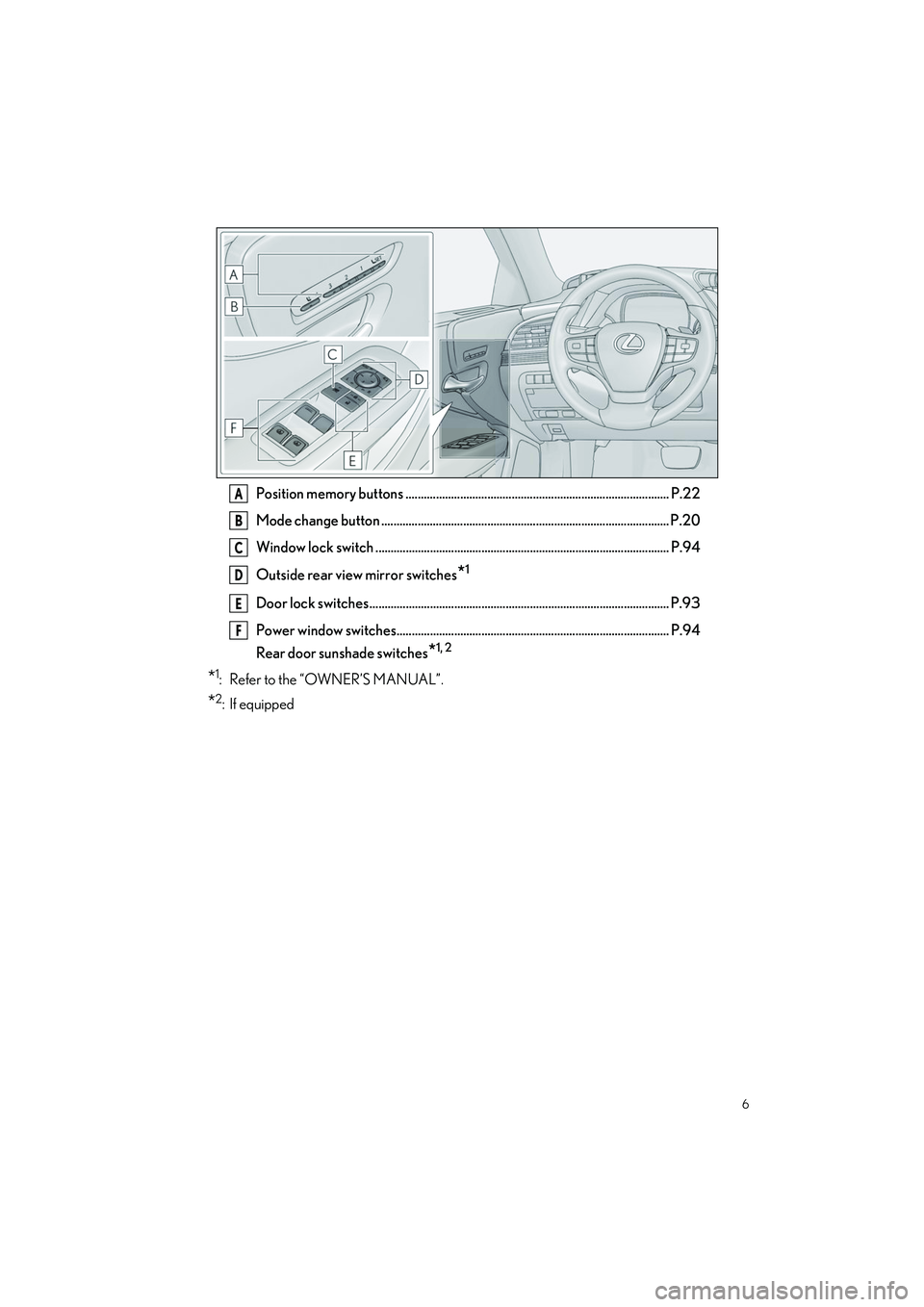
Position memory buttons ....................................................................................... P.22
Mode change button ............................................................................................... P.20
Window lock switch ................................................................................................. P.94
Outside rear view mirror switches
*1
Door lock switches ................................................................................................... P.93
Power window switches.......................................................................................... P.94
Rear door sunshade switches
*1, 2
*1: Refer to the “OWNER’S MANUAL”.
*2: If equipped
A
B
C
D
E
F
Page 16 of 108
15
LS500h_QG_U
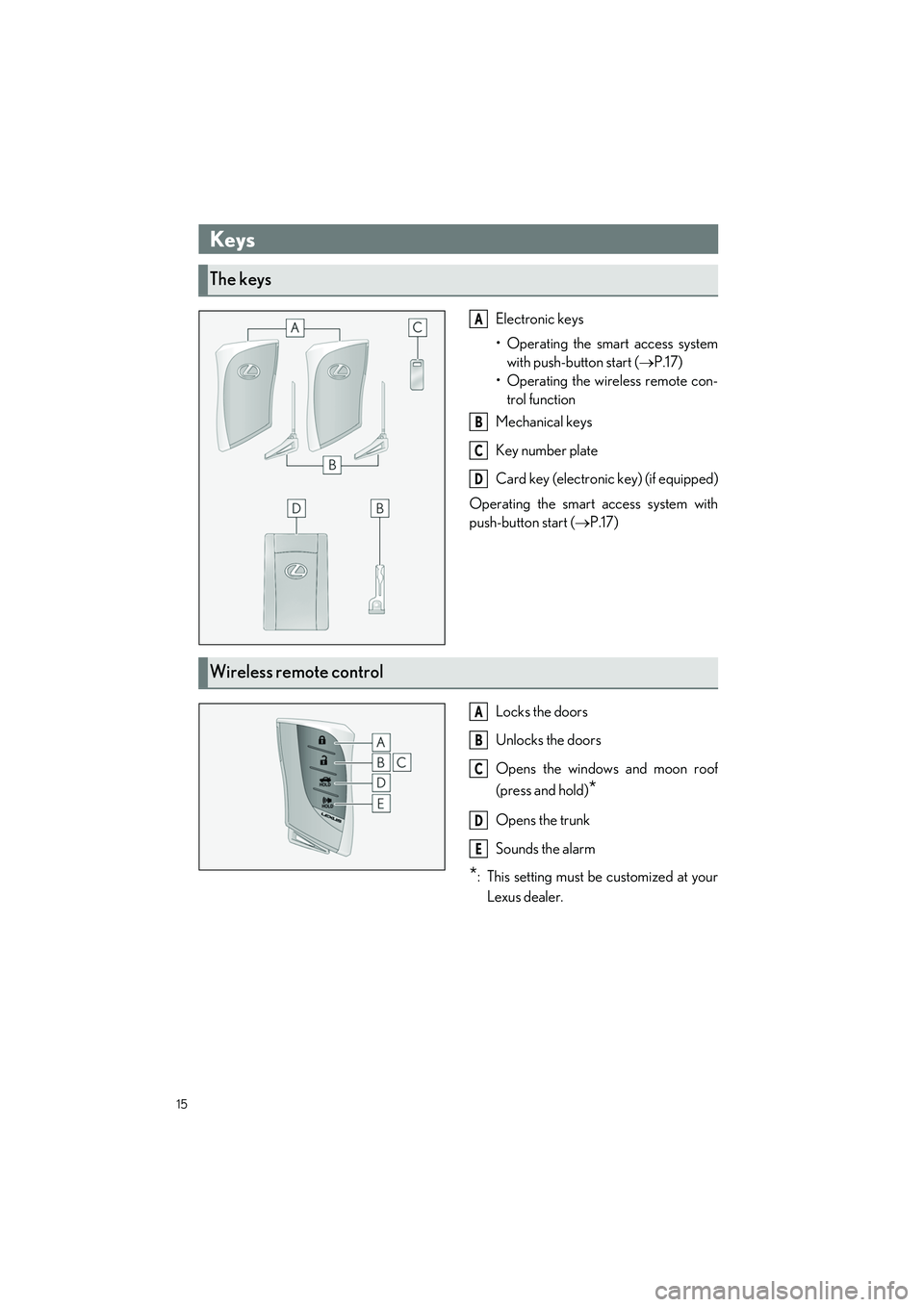
Electronic keys
• Operating the smart access systemwith push-button start ( P.17)
•Operating the wi reless remote con-
trol function
Mechanical keys
Key number plate
Card key (electronic key) (if equipped)
Operating the smart access system with
push-button start ( P.17)
Locks the doors
Unlocks the doors
Opens the windows and moon roof
(press and hold)
*
Opens the trunk
Sounds the alarm
*: This setting must be customized at your Lexus dealer.
Keys
The keys
A
B
C
D
Wireless remote control
A
B
C
D
E
Page 18 of 108
17
LS500h_QG_U
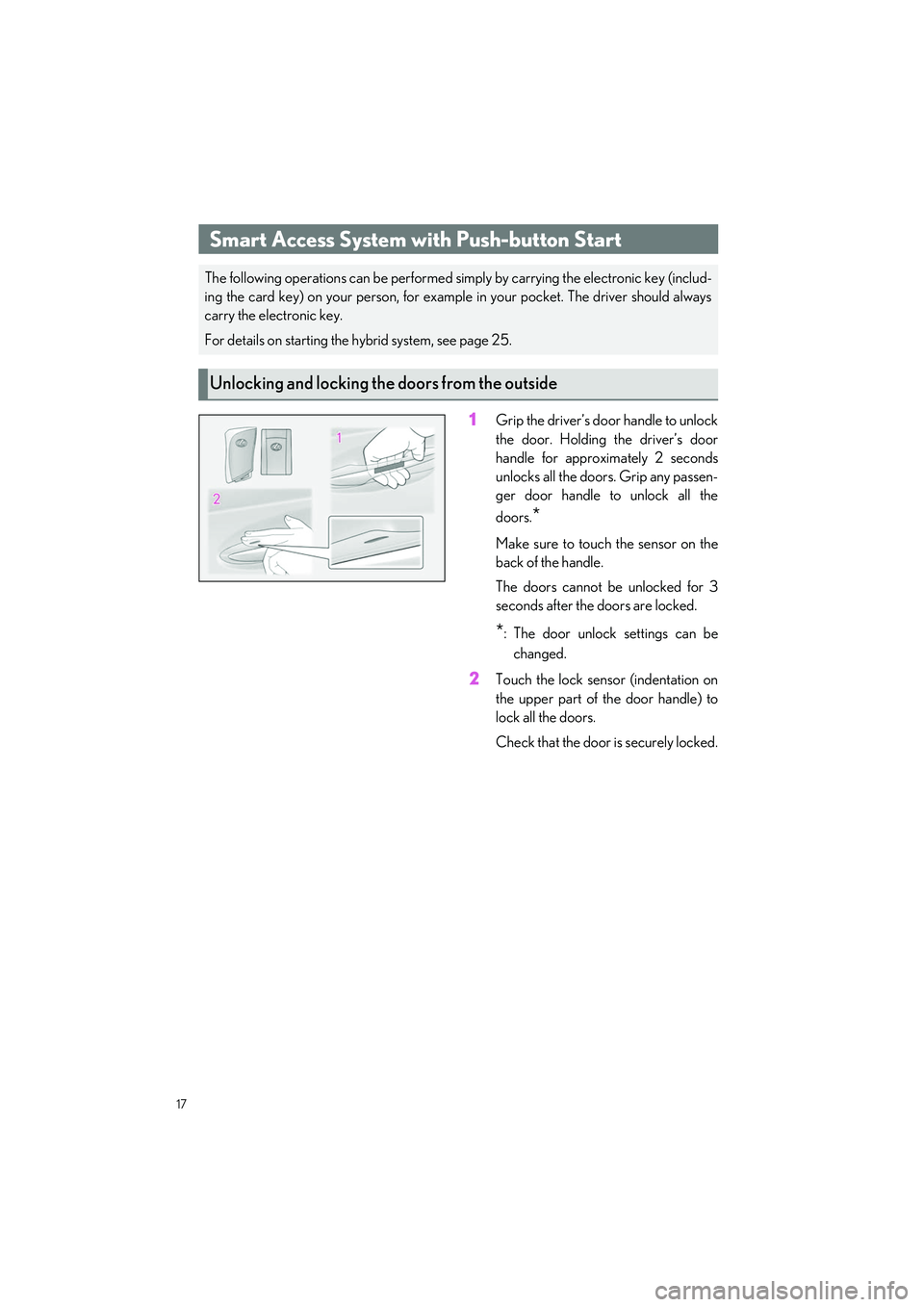
1Grip the driver’s door handle to unlock
the door. Holding the driver’s door
handle for approximately 2 seconds
unlocks all the door s. Grip any passen-
ger door handle to unlock all the
doors.
*
Make sure to touch the sensor on the
back of the handle.
The doors cannot be unlocked for 3
seconds after the doors are locked.
*: The door unlock settings can be
changed.
2Touch the lock sensor (indentation on
the upper part of the door handle) to
lock all the doors.
Check that the door is securely locked.
Smart Access System with Push-button Start
The following operations can be performed si mply by carrying the electronic key (includ-
ing the card key) on your person, for example in your pocket. The driver should always
carry the electronic key.
For details on starting the hybrid system, see page 25.
Unlocking and locking the doors from the outside
Page 19 of 108
18
LS500h_QG_U
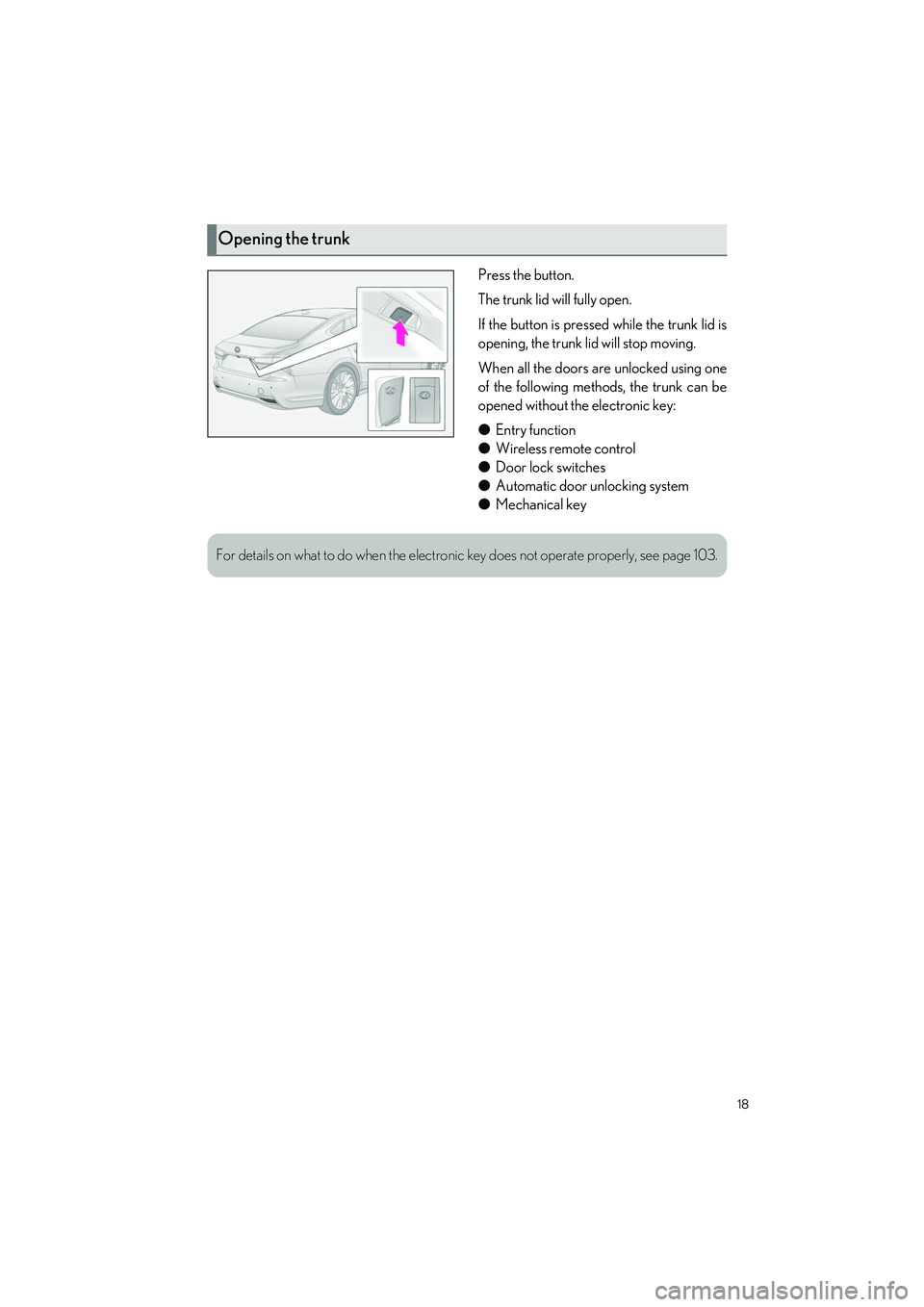
Press the button.
The trunk lid will fully open.
If the button is pressed while the trunk lid is
opening, the trunk lid will stop moving.
When all the doors are unlocked using one
of the following methods, the trunk can be
opened without the electronic key:
●Entry function
● Wireless remote control
● Door lock switches
● Automatic door unlocking system
● Mechanical key
Opening the trunk
For details on what to do when the electronic key does not operate properly, see page 103.
Page 24 of 108
23
LS500h_QG_U
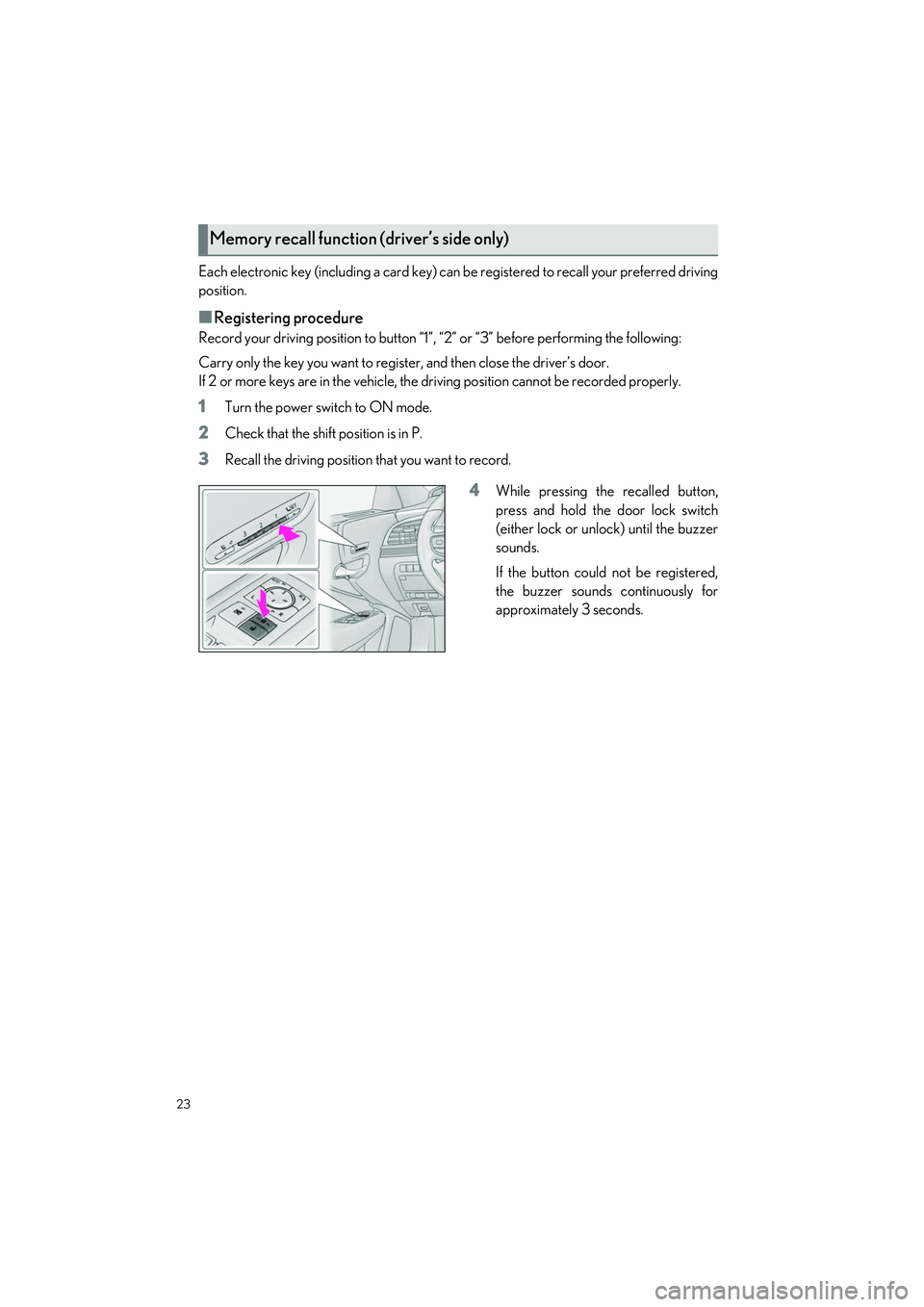
Each electronic key (including a card key) can be registered to recall your preferred driving
position.
■Registering procedure
Record your driving position to button “1”, “2” or “3” before performing the following:
Carry only the key you want to regist er, and then close the driver’s door.
If 2 or more keys are in the vehicle, the driving position cannot be recorded properly.
1Turn the power switch to ON mode.
2Check that the shift position is in P.
3Recall the driving position that you want to record.
4While pressing the recalled button,
press and hold the door lock switch
(either lock or unlock) until the buzzer
sounds.
If the button could not be registered,
the buzzer sounds continuously for
approximately 3 seconds.
Memory recall function (driver’s side only)
Page 84 of 108
83
LS500h_QG_U
2Connect a device.
The HomeLink
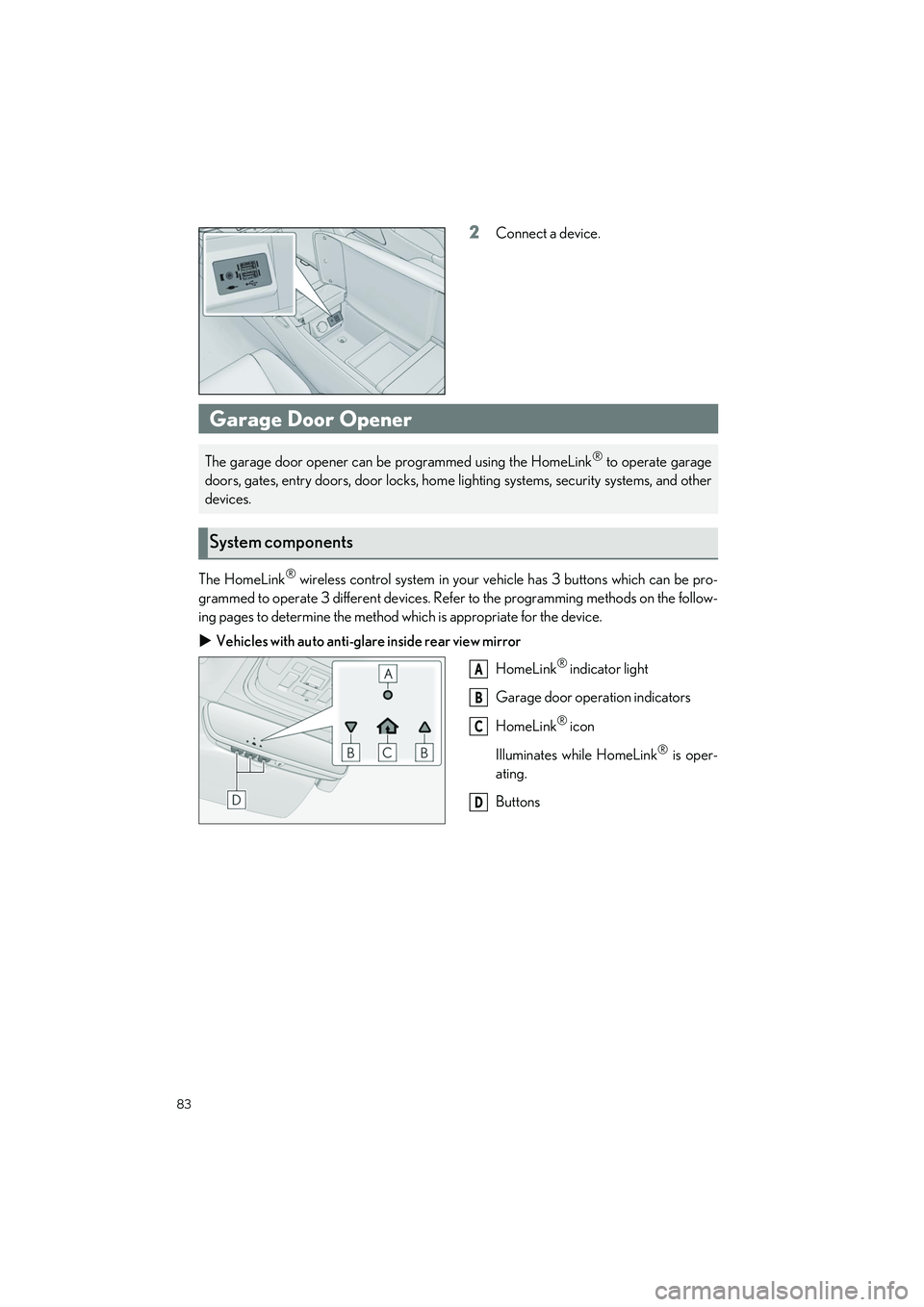
® wireless control system in your ve hicle has 3 buttons which can be pro-
grammed to operate 3 different devices. Refe r to the programming methods on the follow-
ing pages to determine the method wh ich is appropriate for the device.
Vehicles with auto anti-glare inside rear view mirror
HomeLink
® indicator light
Garage door operation indicators
HomeLink
® icon
Illuminates while HomeLink
® is oper-
ating.
Buttons
Garage Door Opener
The garage door opener can be programmed using the HomeLink® to operate garage
doors, gates, entry doors, door locks, home lighting systems, security systems, and other
devices.
System components
A
B
C
D
Page 94 of 108
93
LS500h_QG_U
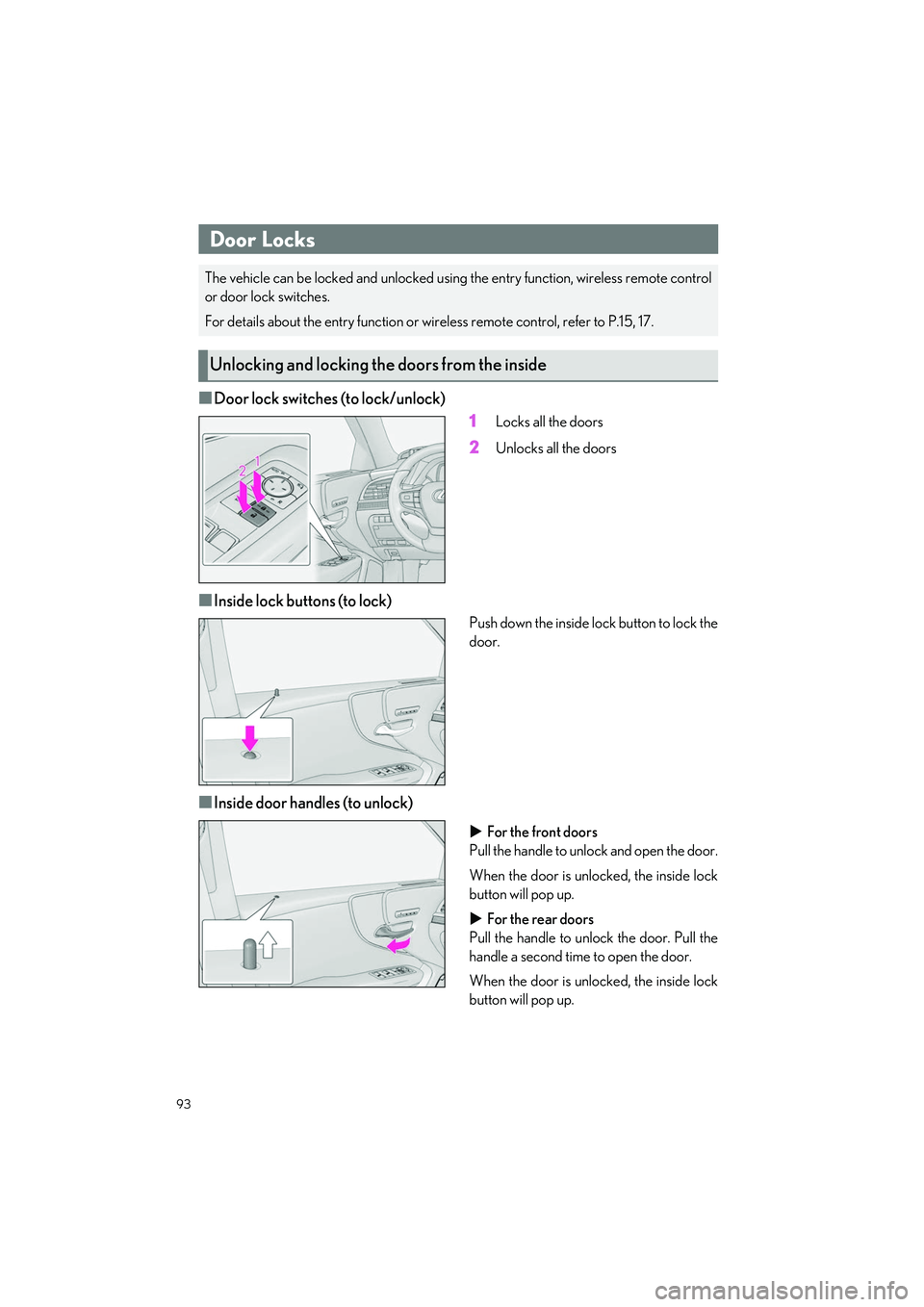
■Door lock switches (to lock/unlock)1
Locks all the doors
2Unlocks all the doors
■Inside lock buttons (to lock)
Push down the inside lock button to lock the
door.
■Inside door handles (to unlock)
For the front doors
Pull the handle to unlock and open the door.
When the door is unlocked, the inside lock
button will pop up.
For the rear doors
Pull the handle to unlo ck the door. Pull the
handle a second time to open the door.
When the door is unlocked, the inside lock
button will pop up.
Door Locks
The vehicle can be locked and unlocked usin g the entry function, wireless remote control
or door lock switches.
For details about the entry function or wire less remote control, refer to P.15, 17.
Unlocking and locking the doors from the inside
Page 95 of 108
94
LS500h_QG_U
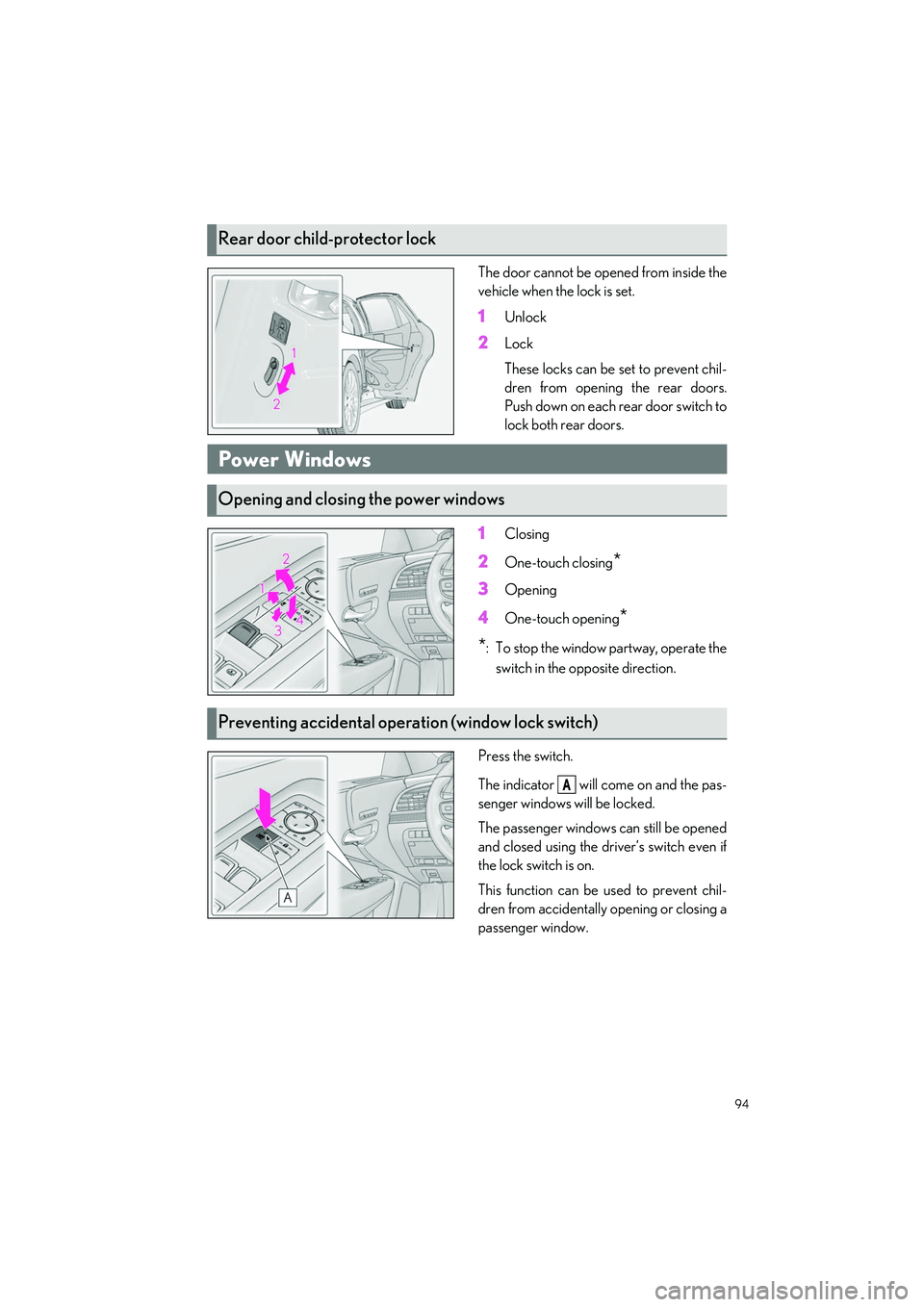
The door cannot be opened from inside the
vehicle when the lock is set.
1Unlock
2Lock
These locks can be set to prevent chil-
dren from opening the rear doors.
Push down on each rear door switch to
lock both rear doors.
1Closing
2One-touch closing*
3Opening
4One-touch opening*
*
: To stop the window partway, operate the switch in the opposite direction.
Press the switch.
The indicator will come on and the pas-
senger windows will be locked.
The passenger windows can still be opened
and closed using the driver’s switch even if
the lock switch is on.
This function can be used to prevent chil-
dren from accidentally opening or closing a
passenger window.
Rear door child-protector lock
Power Windows
Opening and closing the power windows
Preventing accidental op eration (window lock switch)
A
Page 104 of 108
What to do if...
103
LS500h_QG_U
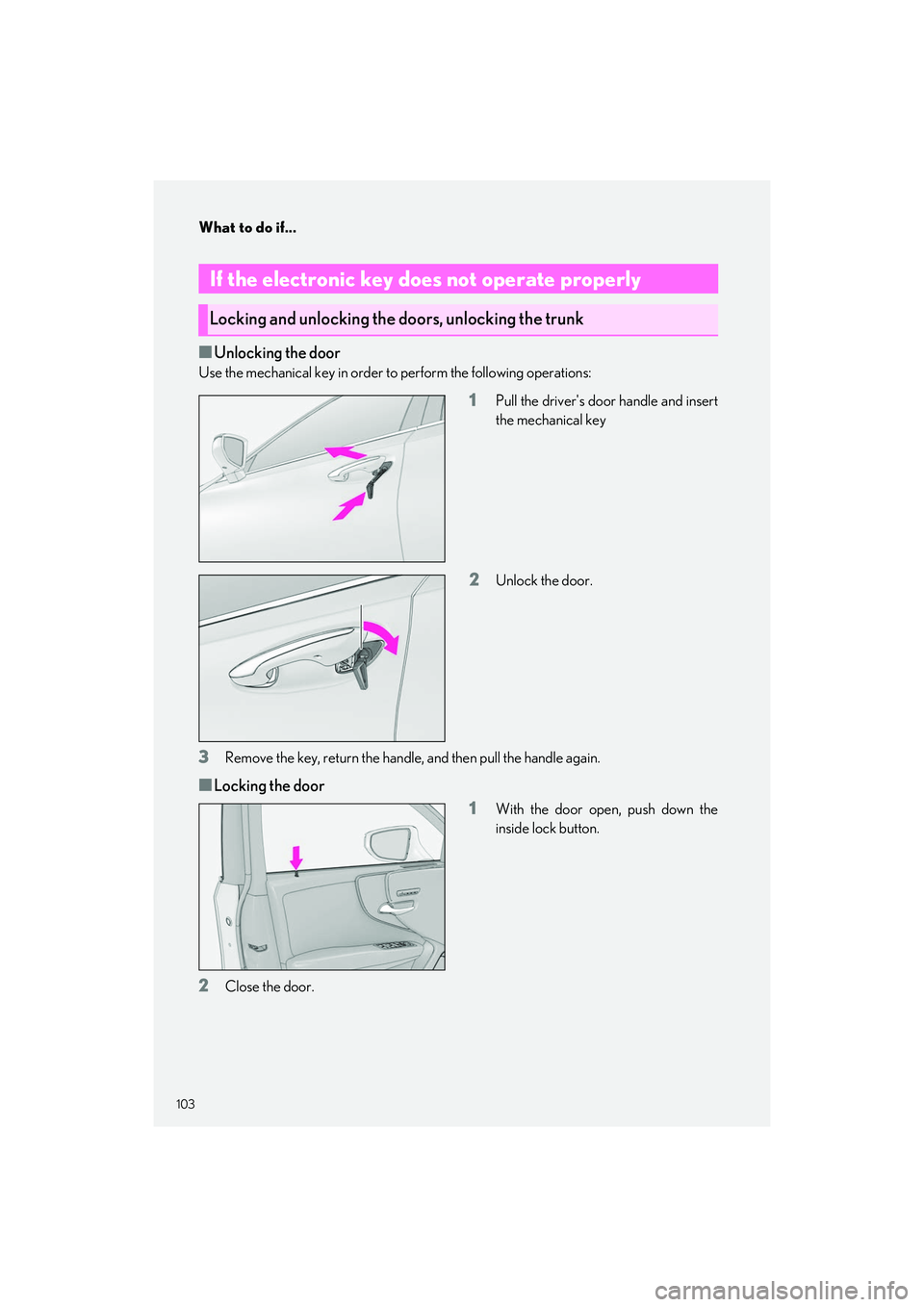
■Unlocking the door
Use the mechanical key in order to perform the following operations:
1Pull the driver's door handle and insert
the mechanical key
2Unlock the door.
3Remove the key, return the handle, and then pull the handle again.
■Locking the door
1
With the door open, push down the
inside lock button.
2Close the door.
If the electronic key does not operate properly
Locking and unlocking the doors, unlocking the trunk