phone LEXUS LS500H 2021 Owners Manual
[x] Cancel search | Manufacturer: LEXUS, Model Year: 2021, Model line: LS500H, Model: LEXUS LS500H 2021Pages: 108, PDF Size: 6.47 MB
Page 2 of 108
1
LS500h_QG_U
AHB (Automatic High Beam)........................................................................................................ 41
Audio System
*
Audio control screen ........................................................................................................... ......... 61
Selecting an audio source ...................................................................................................... ..... 61
Steering switch operation ...................................................................................................... .... 62
Radio ...................................................................................................................................................63
CD........................................................................................................................................................ 64
DVD ....................................................................................................................................................65
iPod/iPhone (Apple CarPlay).................................................................................................. 66
Android Auto ................................................................................................................... ............... 67
Brake Hold .............................................................................................................................................35
Center Display ............................................................................................................................... ......48
Digital Rearview Mirror .................................................................................................................. 24
Door Locks .............................................................................................................................................93
Driving Mode Select Switch ..........................................................................................................45
Driving Position Memory ................................................................................................................ 22
Energy Monitor/Consumption Screen .................................................................................... 51
EV Drive Mode .................................................................................................................................... 27
Floor Mat Installation ...........................................................................................................................11
Front Automatic Air Conditioning System
*
Control panel .................................................................................................................. ................69
Air conditioning control screen...............................................................................................7 0
Using automatic mode ........................................................................................................... ..... 72
Front Seats ............................................................................................................................... ............... 19
Fuel Tank Cap .......................................................................................................................................96
Garage Door Opener ..................................................................................................................... 83
Hands-free System For Cellular Phone
*
Registering/connecting a Bluetooth® device .................................................................. 57
Contacts transfer .............................................................................................................. ............ 58
Registering the contacts in the favorites list .... ...................................................................59
Calling by favorites list ...................................................................................................... ...........59
Calling the message sender..................................................................................................... .59
Receiving a call ............................................................................................................... ................60
Steering switches .............................................................................................................. .............60
*: This feature may be operated by Voice command (See P.74)
Contents
The Quick Guide is not intended as a substitute for yourOWNER’S MANUAL. We strongly encourage you to review
the OWNER’S MANUAL and supplementary manuals so you
will have a better understandin g of your vehicle’s capabilities
and limitations.
Page 8 of 108
7
LS500h_QG_U
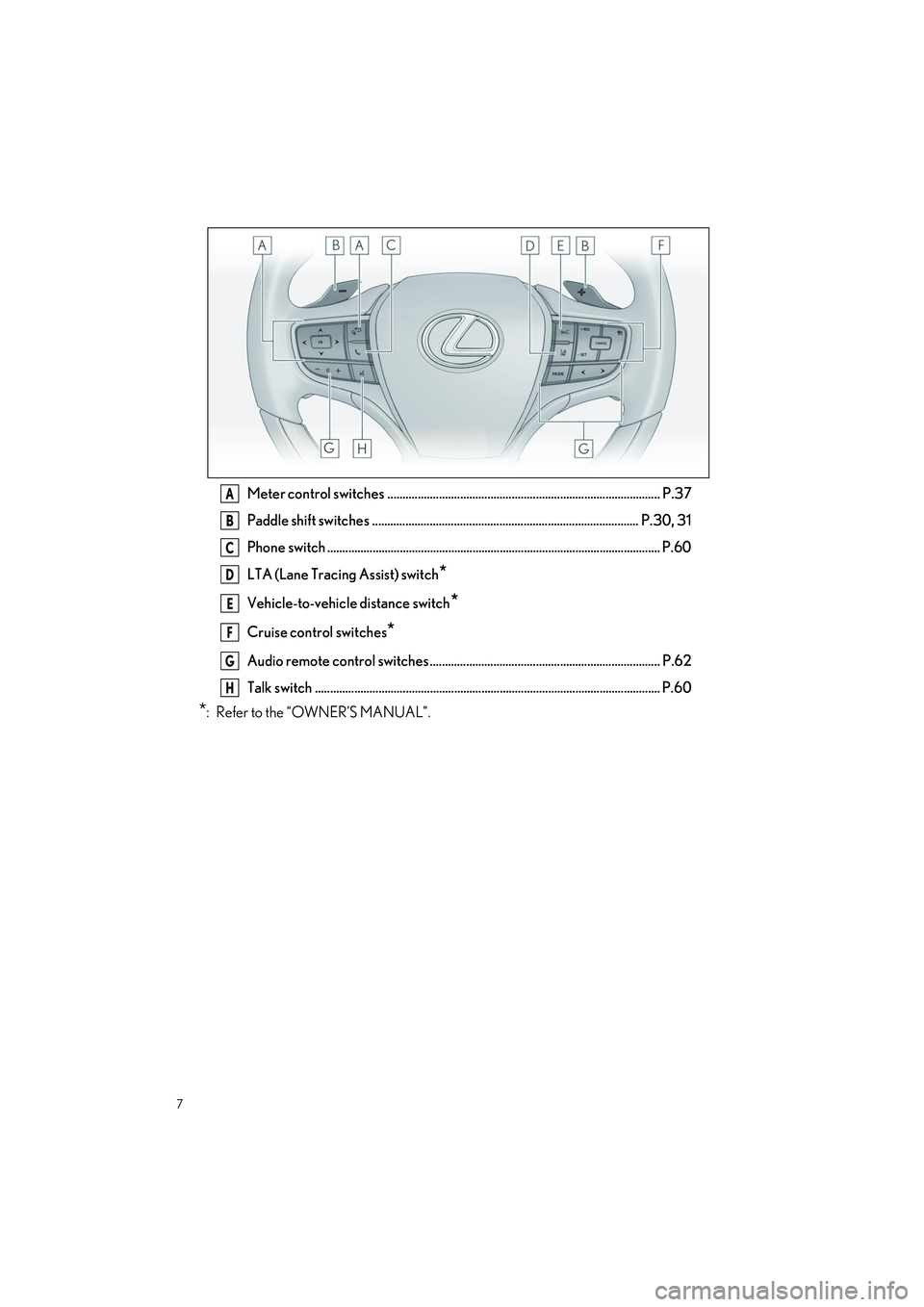
Meter control switches .......................................................................................... P.37
Paddle shift switches ........................................................................................ P.30, 31
Phone switch .............................................................................................................. P.60
LTA (Lane Tracing Assist) switch
*
Vehicle-to-vehicle distance switch*
Cruise control switches*
Audio remote control switches ............................................................................ P.62
Talk switch .................................................................................................................. P.60
*: Refer to the “OWNER’S MANUAL”.
A
B
C
D
E
F
G
H
Page 56 of 108
55
LS500h_QG_U
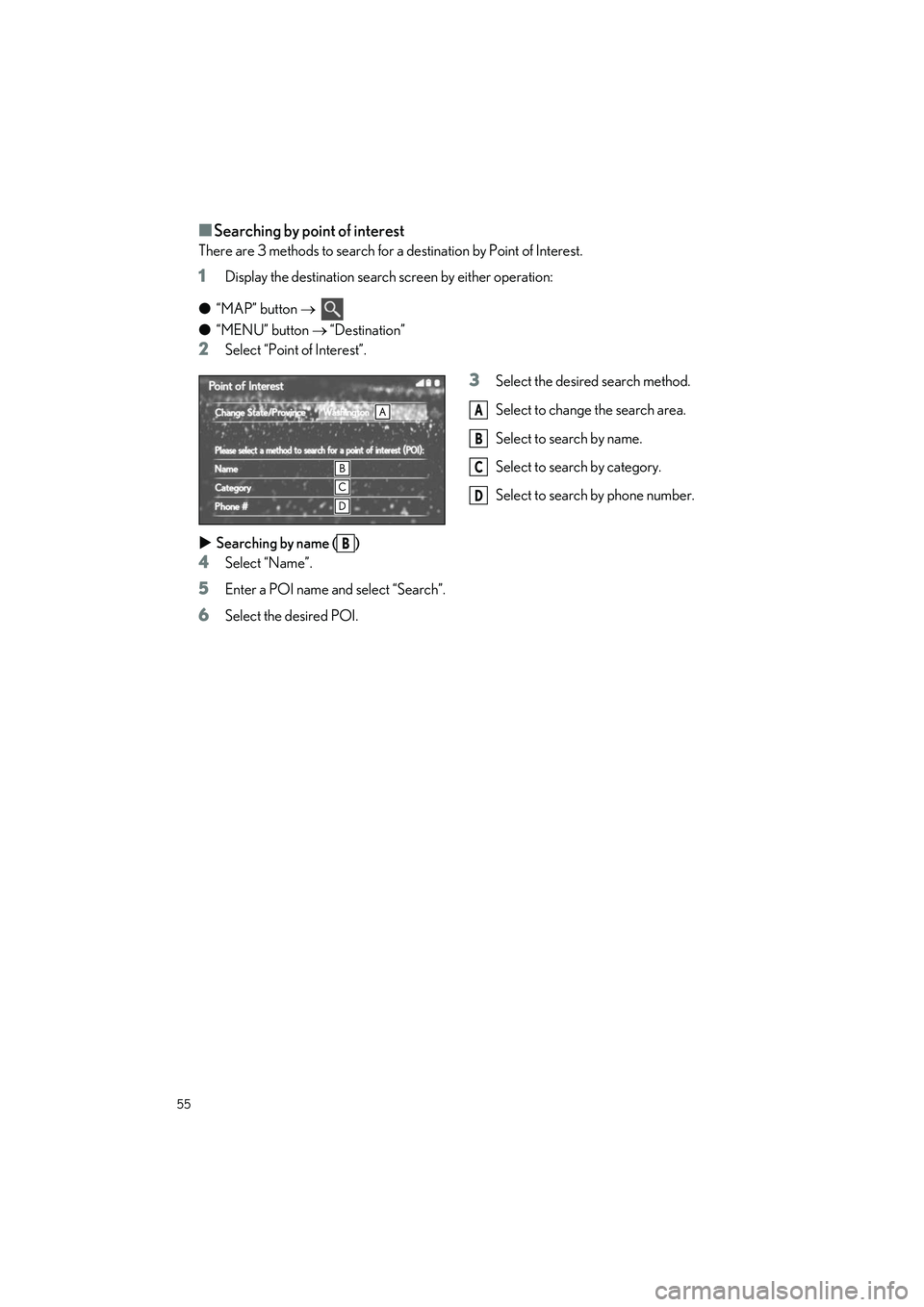
■Searching by point of interest
There are 3 methods to search for a destination by Point of Interest.
1Display the destination search screen by either operation:
● “MAP” button
●“MENU” button “Destination”
2Select “Point of Interest”.
3Select the desired search method.
Select to change the search area.
Select to search by name.
Select to search by category.
Select to search by phone number.
Searching by name ( )
4Select “Name”.
5Enter a POI name and select “Search”.
6Select the desired POI.
A
B
C
D
B
Page 57 of 108
56
LS500h_QG_U
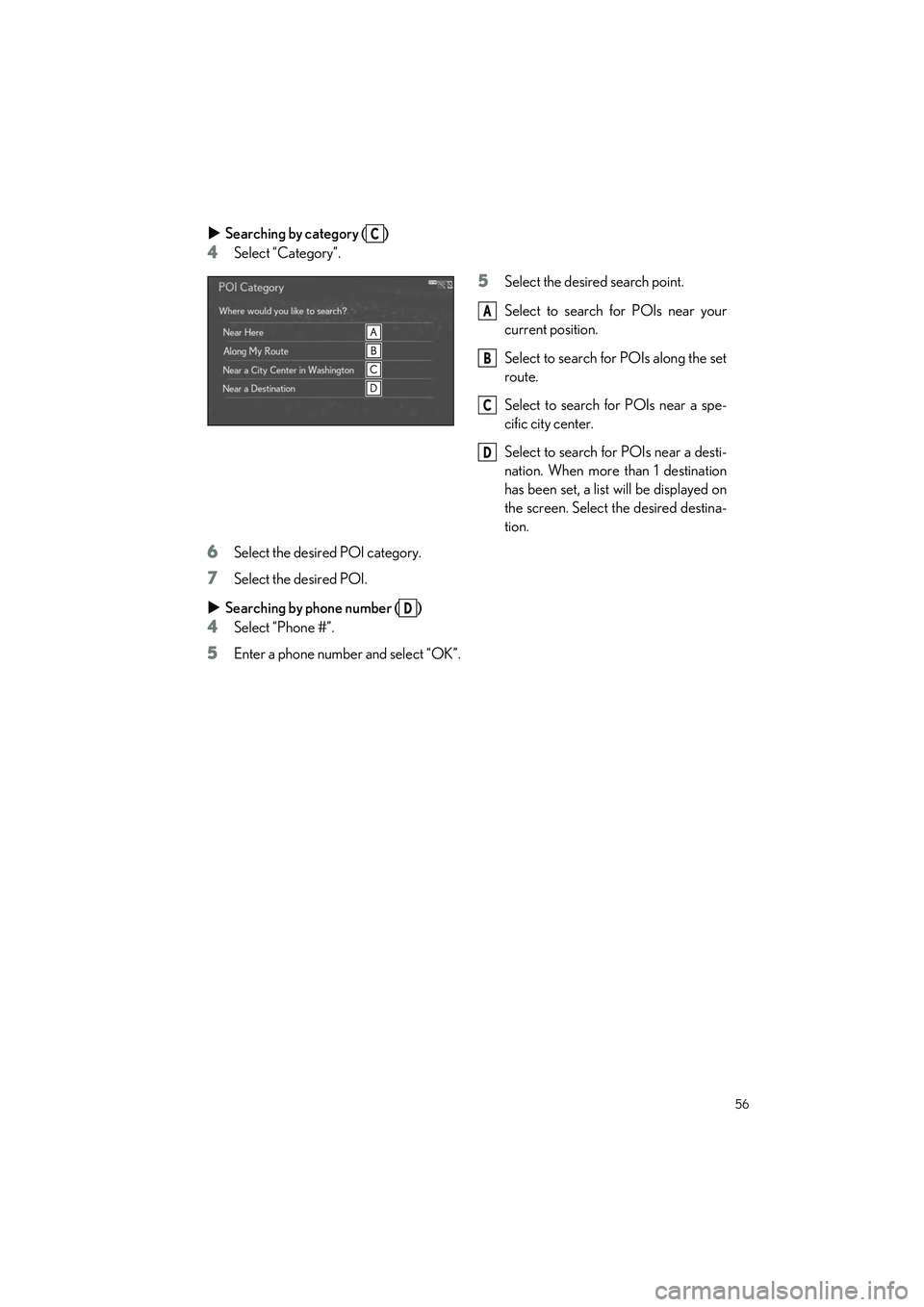
Searching by category ( )
4Select “Category”.
5Select the desire d search point.
Select to search for POIs near your
current position.
Select to search for POIs along the set
route.
Select to search for POIs near a spe-
cific city center.
Select to search for POIs near a desti-
nation. When more than 1 destination
has been set, a list will be displayed on
the screen. Select the desired destina-
tion.
6Select the desired POI category.
7Select the desired POI.
Searching by phone number ( )
4Select “Phone #”.
5Enter a phone number and select “OK”.
C
A
B
C
D
D
Page 58 of 108
57
LS500h_QG_U
To use the hands-free system, it is necessary to register a Bluetooth® phone with the system.
Please refer to the cellular phone manufacturer ’s user guide for pairing procedures, or go to
http://www.lexus.com/MobileLink
to find approved Bluetooth® phones for this system.
1Turn the Bluetooth® connection setting of your cellular phone on.
2Press the “MENU” button on the Remote Touch.
Please refer to P.47 for the Remote Touch operation.
3Select “Phone”.
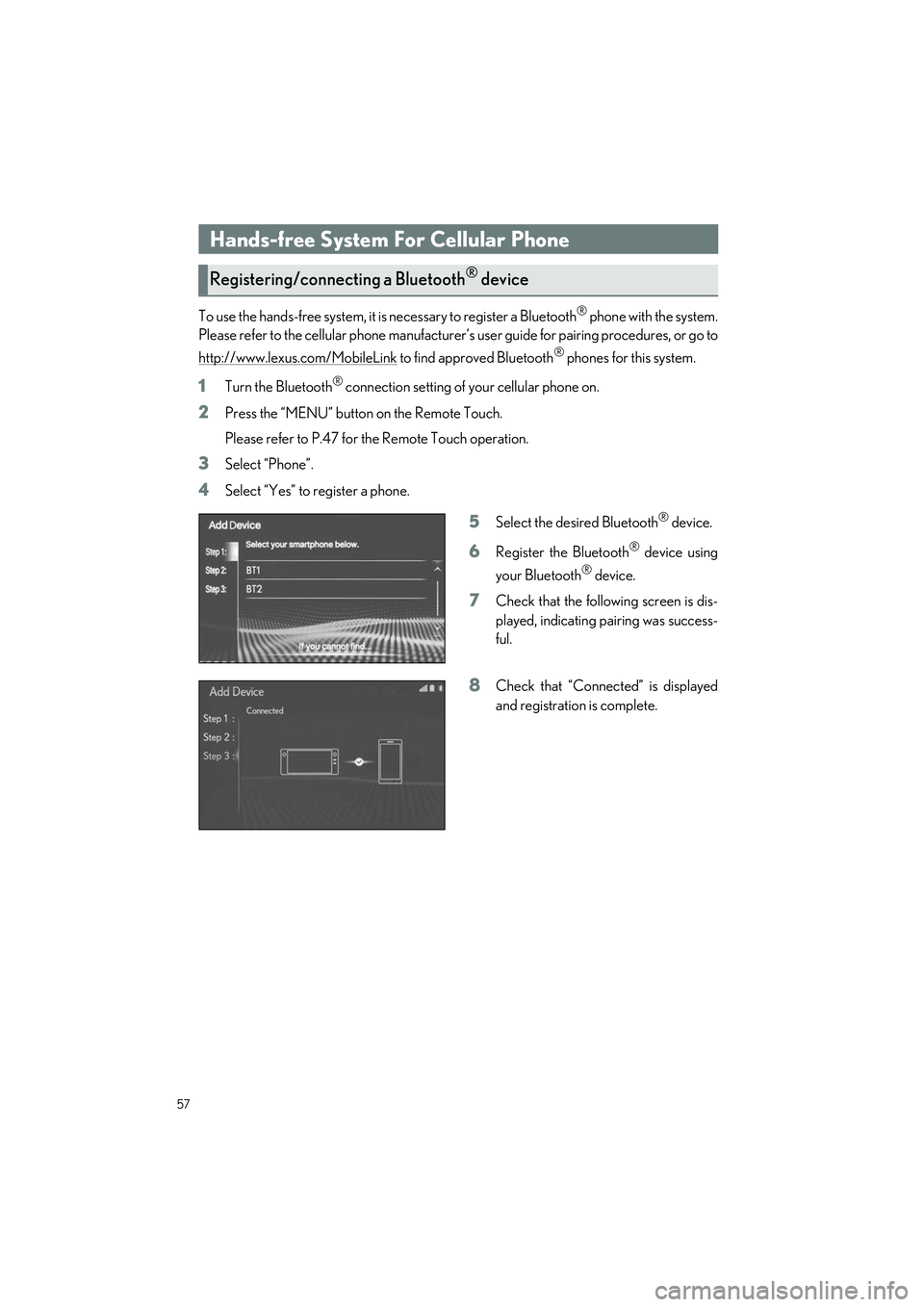
4Select “Yes” to register a phone.
5Select the desired Bluetooth® device.
6Register the Bluetooth® device using
your Bluetooth
® device.
7Check that the following screen is dis-
played, indicating pairing was success-
ful.
8Check that “Connect ed” is displayed
and registration is complete.
Hands-free System For Cellular Phone
Registering/connecting a Bluetooth® device
Page 59 of 108
58
LS500h_QG_U
1Press the “MENU” button on the Remote Touch.
Please refer to P.47 for the Remote Touch operation.
2Select “Setup”.
3Select “Phone” on the sub menu.
4Select “Contacts/Call History”.
5Select “Transfer Contacts from Device”.
6Select “From Phone (Bluetooth*)”.
7Transfer the contact data to the system using a Bluetooth® phone.
8Check that a confirmation screen is di splayed when the operation is complete.
*: The Bluetooth® word mark and logos are registered trademarks owned by Bluetooth
SIG, Inc.
Contacts transfer
Contacts transfer may not be possib le depending on the type of phone.
Page 60 of 108
59
LS500h_QG_U
1Press the “MENU” button on the Remote Touch.
Please refer to P.47 for the Remote Touch operation.
2Select “Setup”.
3Select “Phone” on the sub menu.
4Select “Contacts/Call History”.
5Select “Add Favorite”.
6Select the desired contact to add to the favorites list.
7Check that a confirmation screen is di splayed when the operation is complete.
1Press the “MENU” button on the Remote Touch.
Please refer to P.47 for the Remote Touch operation.
2Select “Phone”.
3Select “Favorites” on the sub me nu and select the desired contact.
4Select the desired number.
5Check that the dialing screen is displayed.
1Press the “MENU” button on the Remote Touch.
Please refer to P.47 for the Remote Touch operation.
2Select “Phone”.
3Select “Message” on the sub menu.
4Select a desired account name that is displayed on the left side of screen.
5Select the desired message from the list.
6Select , or press the swit ch on the steering wheel.
7Check that the dialing screen is displayed.
Registering the contacts in the favorites list
Calling by favorites list
Calling the message sender
Page 61 of 108
60
LS500h_QG_U
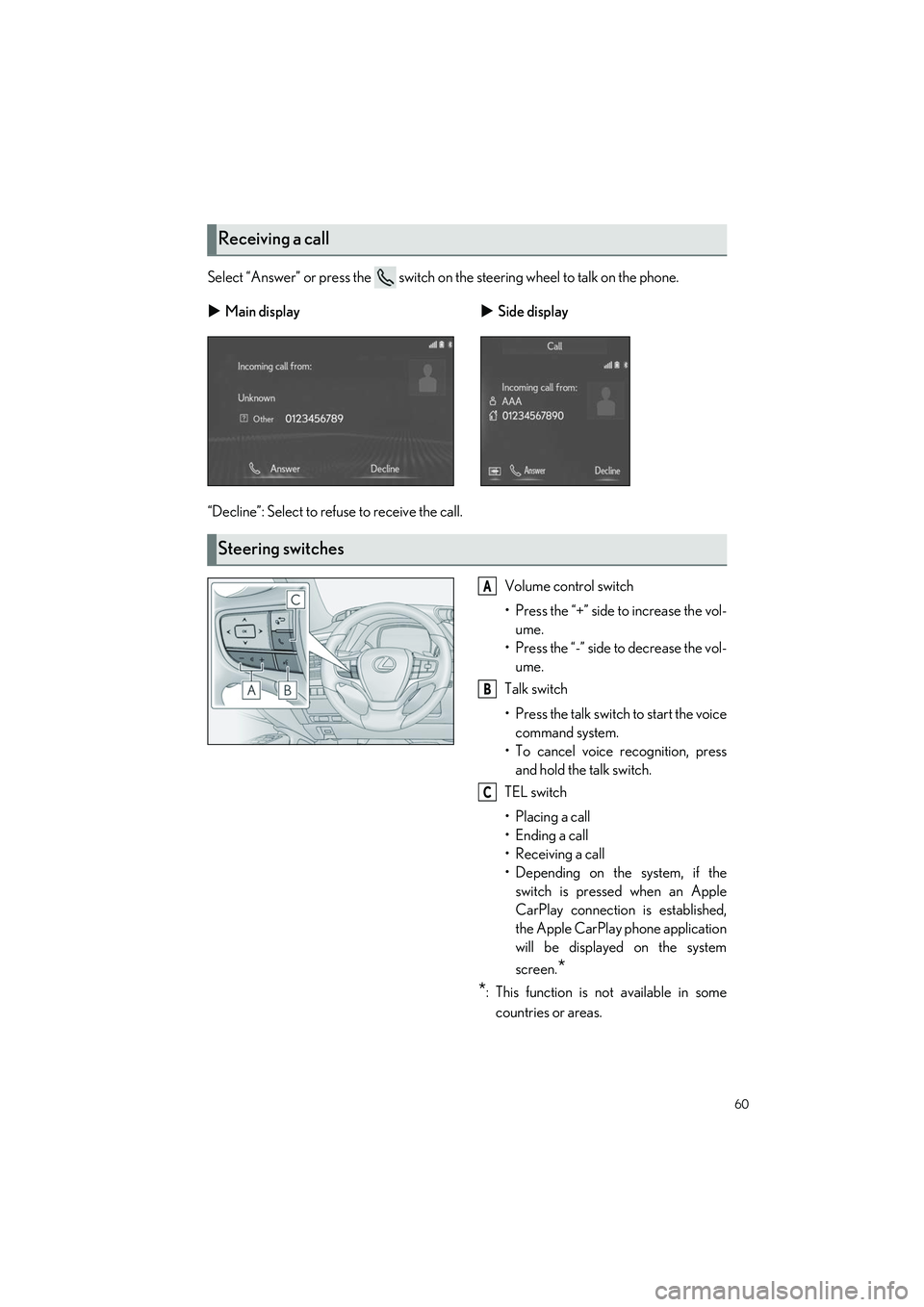
Select “Answer” or press the switch on the steering wheel to talk on the phone.
“Decline”: Select to refuse to receive the call.Volume control switch
• Press the “+” side to increase the vol-ume.
• Press the “-” side to decrease the vol- ume.
Talk switch
• Press the talk switch to start the voice command system.
• To cancel voice recognition, press and hold the talk switch.
TEL switch
• Placing a call
• Ending a call
• Receiving a call
• Depending on the system, if the switch is pressed when an Apple
CarPlay connection is established,
the Apple CarPlay phone application
will be displayed on the system
screen.
*
*
: This function is not available in some
countries or areas.
Receiving a call
Main display Side display
Steering switches
A
B
C
Page 63 of 108
62
LS500h_QG_U
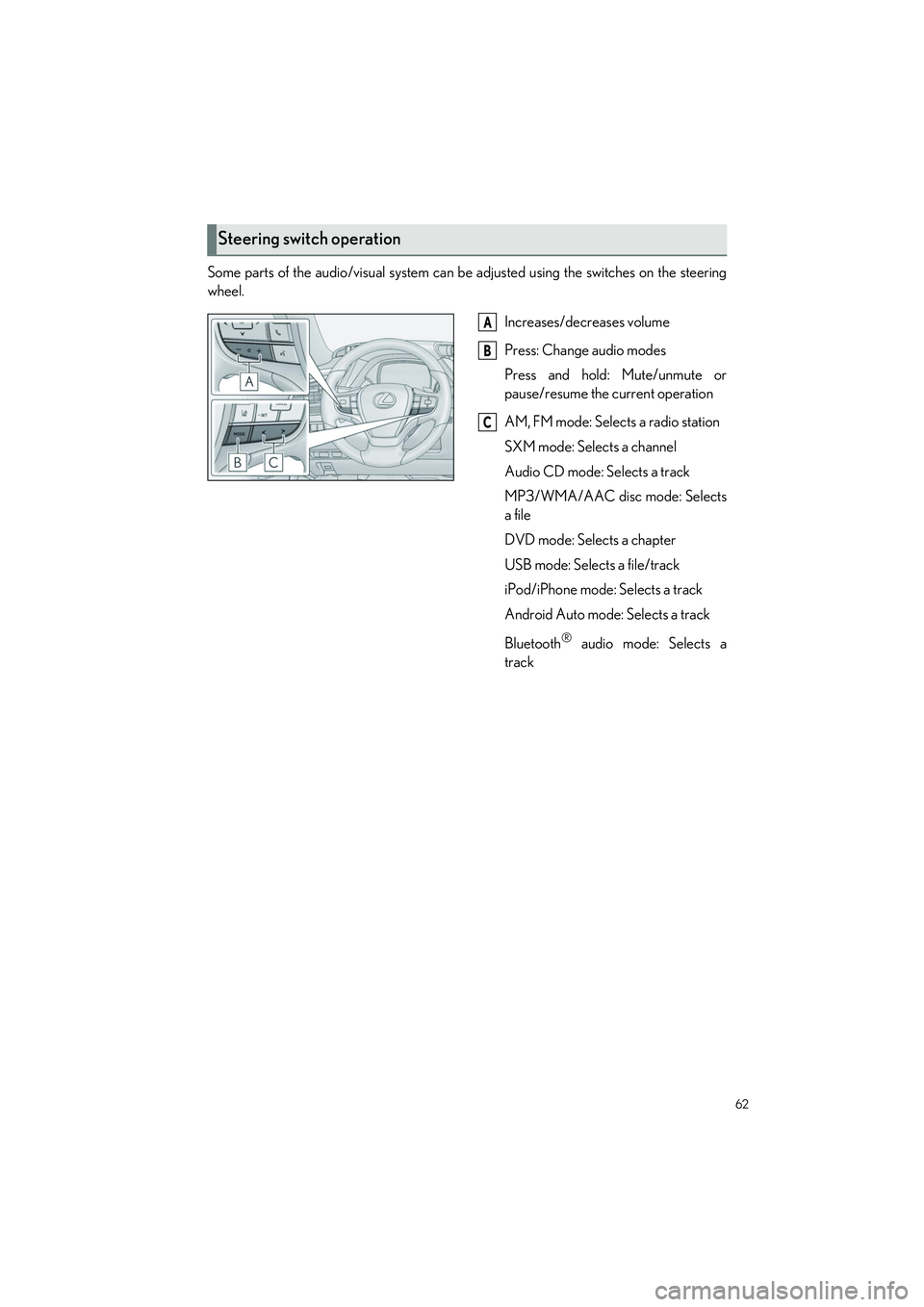
Some parts of the audio/visual system can be adjusted using the switches on the steering
wheel.
Increases/decreases volume
Press: Change audio modes
Press and hold: Mute/unmute or
pause/resume the current operation
AM, FM mode: Selects a radio station
SXM mode: Selects a channel
Audio CD mode: Selects a track
MP3/WMA/AAC disc mode: Selects
a file
DVD mode: Selects a chapter
USB mode: Selects a file/track
iPod/iPhone mode: Selects a track
Android Auto mode: Selects a track
Bluetooth
® audio mode: Selects a
track
Steering switch operation
A
B
C
Page 67 of 108
66
LS500h_QG_U
Apple CarPlay is not available in some countries or areas.
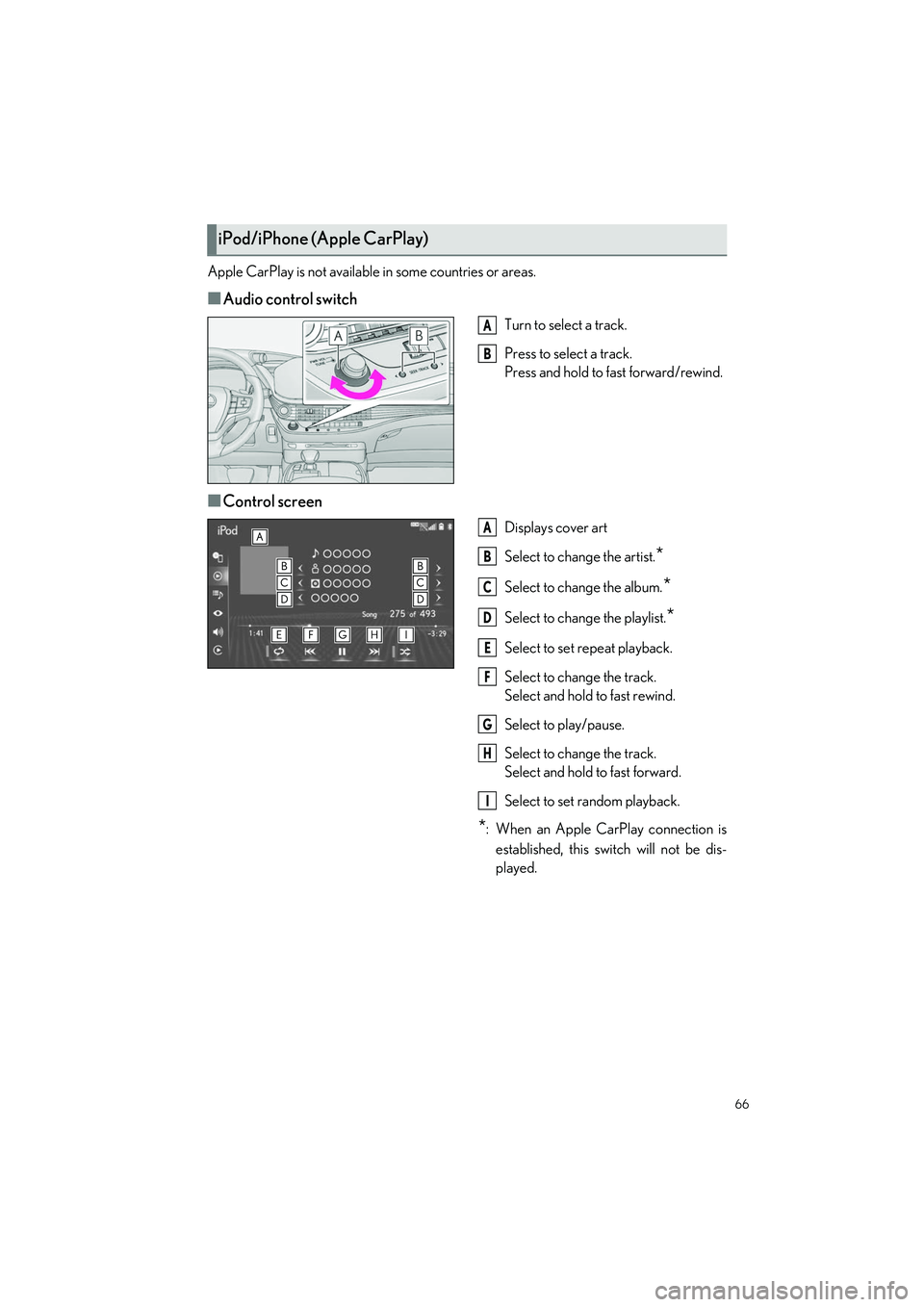
■Audio control switch
Turn to select a track.
Press to select a track.
Press and hold to fast forward/rewind.
■Control screen
Displays cover art
Select to change the artist.
*
Select to change the album.*
Select to change the playlist.*
Select to set repeat playback.
Select to change the track.
Select and hold to fast rewind.
Select to play/pause.
Select to change the track.
Select and hold to fast forward.
Select to set random playback.
*: When an Apple CarPlay connection is
established, this switch will not be dis-
played.
iPod/iPhone (Apple CarPlay)
A
B
A
B
C
D
E
F
G
H
I