steering LEXUS LS500H 2021 Owners Manual
[x] Cancel search | Manufacturer: LEXUS, Model Year: 2021, Model line: LS500H, Model: LEXUS LS500H 2021Pages: 108, PDF Size: 6.47 MB
Page 2 of 108
1
LS500h_QG_U
AHB (Automatic High Beam)........................................................................................................ 41
Audio System
*
Audio control screen ........................................................................................................... ......... 61
Selecting an audio source ...................................................................................................... ..... 61
Steering switch operation ...................................................................................................... .... 62
Radio ...................................................................................................................................................63
CD........................................................................................................................................................ 64
DVD ....................................................................................................................................................65
iPod/iPhone (Apple CarPlay).................................................................................................. 66
Android Auto ................................................................................................................... ............... 67
Brake Hold .............................................................................................................................................35
Center Display ............................................................................................................................... ......48
Digital Rearview Mirror .................................................................................................................. 24
Door Locks .............................................................................................................................................93
Driving Mode Select Switch ..........................................................................................................45
Driving Position Memory ................................................................................................................ 22
Energy Monitor/Consumption Screen .................................................................................... 51
EV Drive Mode .................................................................................................................................... 27
Floor Mat Installation ...........................................................................................................................11
Front Automatic Air Conditioning System
*
Control panel .................................................................................................................. ................69
Air conditioning control screen...............................................................................................7 0
Using automatic mode ........................................................................................................... ..... 72
Front Seats ............................................................................................................................... ............... 19
Fuel Tank Cap .......................................................................................................................................96
Garage Door Opener ..................................................................................................................... 83
Hands-free System For Cellular Phone
*
Registering/connecting a Bluetooth® device .................................................................. 57
Contacts transfer .............................................................................................................. ............ 58
Registering the contacts in the favorites list .... ...................................................................59
Calling by favorites list ...................................................................................................... ...........59
Calling the message sender..................................................................................................... .59
Receiving a call ............................................................................................................... ................60
Steering switches .............................................................................................................. .............60
*: This feature may be operated by Voice command (See P.74)
Contents
The Quick Guide is not intended as a substitute for yourOWNER’S MANUAL. We strongly encourage you to review
the OWNER’S MANUAL and supplementary manuals so you
will have a better understandin g of your vehicle’s capabilities
and limitations.
Page 5 of 108

4
LS500h_QG_U
Parking brake switch ............................................................................................... P.33
Applying/releasing the parking brake ........................................................................P.33
Precautions for winter season
*
Warning buzzer/messages*
Turn signal lever ........................................................................................................ P.32
Headlight switch ....................................................................................................... P.40
Headlights/parking lights/tail lights/license plate lights/
daytime running lights ........................................................................................................P.40
AHB (Automatic High Beam) ......................................................................................... P.41
Windshield wiper and washer switch ................................................................. P.43
Usage .......................................................................................................................... ..............P.43
Adding washer fluid
*
Warning messages*
Emergency flasher switch*
Hood lock release lever*
Tilt and telescopic steering control switch*
Adjustment*
Driving position memory .................................................................................................. P.22
Air conditioning system .......................................................................................... P.69
Usage .......................................................................................................................... ..............P.69
Rear window defogger ......................................................................................................P.69
Audio system............................................................................................................... P.61
Brake hold switch ..................................................................................................... P.35
Trunk opener main switch
*
*
: Refer to the “OWNER’S MANUAL”.
E
F
G
H
I
J
K
L
M
N
Page 9 of 108
8
LS500h_QG_U
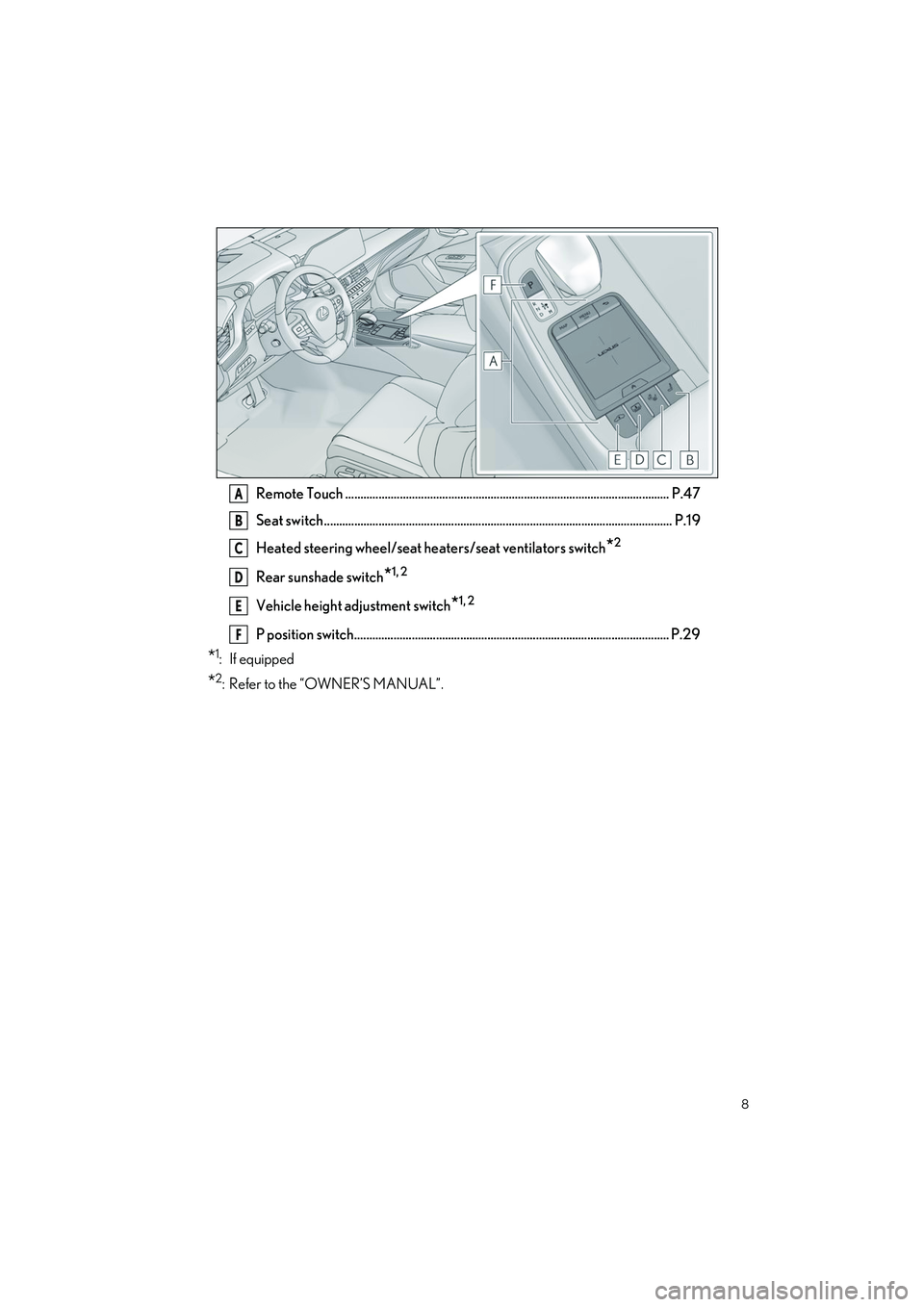
Remote Touch ........................................................................................................... P.47
Seat switch................................................................................................................... P.19
Heated steering wheel/seat he aters/seat ventilators switch
*2
Rear sunshade switch*1, 2
Vehicle height adjustment switch*1, 2
P position switch........................................................................................................ P.29
*1: If equipped
*2: Refer to the “OWNER’S MANUAL”.
A
B
C
D
E
F
Page 23 of 108
22
LS500h_QG_U
1Turn the power switch to ON mode.
2Check that the shift position is in P.
3Adjust the driver’s seat, steering wheel, outside rear view mirrors and head-up display
(if equipped) to the desired positions.
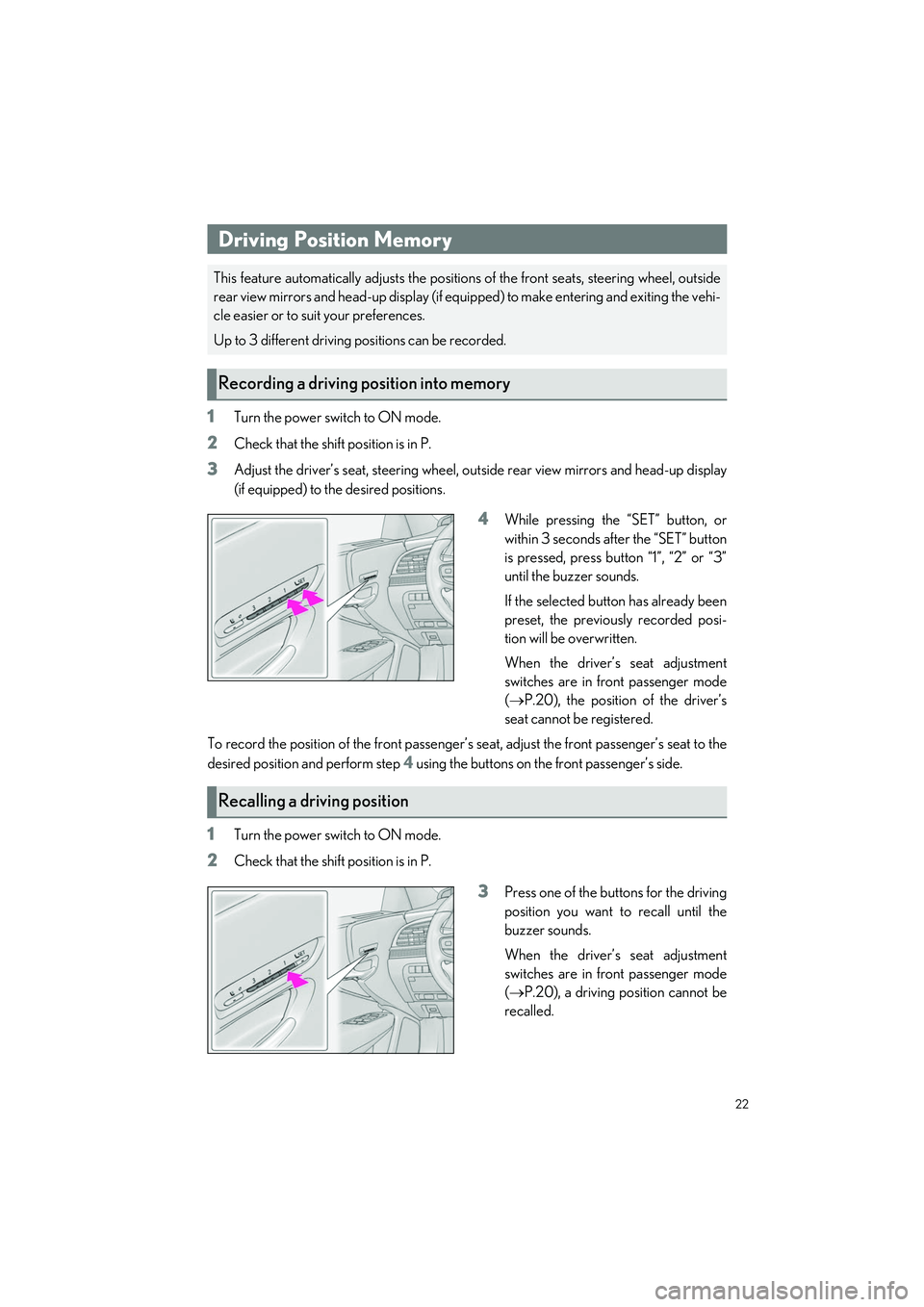
4While pressing the “SET” button, or
within 3 seconds after the “SET” button
is pressed, press button “1”, “2” or “3”
until the buzzer sounds.
If the selected button has already been
preset, the previously recorded posi-
tion will be overwritten.
When the driver’s seat adjustment
switches are in front passenger mode
( P.20), the position of the driver’s
seat cannot be registered.
To record the position of the front passenger’s seat, adjust the front passenger’s seat to the
desired position and perform step
4 using the buttons on the front passenger’s side.
1Turn the power switch to ON mode.
2Check that the shift position is in P.
3Press one of the buttons for the driving
position you want to recall until the
buzzer sounds.
When the driver’s seat adjustment
switches are in front passenger mode
( P.20), a driving position cannot be
recalled.
Driving Position Memory
This feature automatically adjust s the positions of the front seats, steering wheel, outside
rear view mirrors and head-up display (if equi pped) to make entering and exiting the vehi-
cle easier or to suit your preferences.
Up to 3 different driving positions can be recorded.
Recording a driving position into memory
Recalling a driving position
Page 47 of 108
46
LS500h_QG_U
3Eco drive mode
Helps the driver accelerate in an eco-friendly ma nner and improve fuel economy
through moderate throttle characteristics an d by controlling the operation of the air
conditioning system (heating/cooling).
When in comfort mode, if the driving mode select switch is turned backward, the Eco
drive mode indicator comes on.
4Sport mode
• Sport S mode Controls the hybrid system to provide quick, powerful acceleration. This mode is suit-
able for when agile driving re sponse is desired, such as when driving on roads with
many curves.
When not in Sport S mode, if the driving mo de select switch is turned forward, the
Sport S mode indicator comes on.
• Sport S+ mode Helps to ensure steering performance and driving stability by simultaneously con-
trolling the steering and suspension in addi tion to the hybrid system. Suitable for
sportier driving.
When in Sport S mode, if the driving mode se lect switch is turned forward, the Sport
S+ mode indicator comes on.
Page 60 of 108
59
LS500h_QG_U
1Press the “MENU” button on the Remote Touch.
Please refer to P.47 for the Remote Touch operation.
2Select “Setup”.
3Select “Phone” on the sub menu.
4Select “Contacts/Call History”.
5Select “Add Favorite”.
6Select the desired contact to add to the favorites list.
7Check that a confirmation screen is di splayed when the operation is complete.
1Press the “MENU” button on the Remote Touch.
Please refer to P.47 for the Remote Touch operation.
2Select “Phone”.
3Select “Favorites” on the sub me nu and select the desired contact.
4Select the desired number.
5Check that the dialing screen is displayed.
1Press the “MENU” button on the Remote Touch.
Please refer to P.47 for the Remote Touch operation.
2Select “Phone”.
3Select “Message” on the sub menu.
4Select a desired account name that is displayed on the left side of screen.
5Select the desired message from the list.
6Select , or press the swit ch on the steering wheel.
7Check that the dialing screen is displayed.
Registering the contacts in the favorites list
Calling by favorites list
Calling the message sender
Page 61 of 108
60
LS500h_QG_U
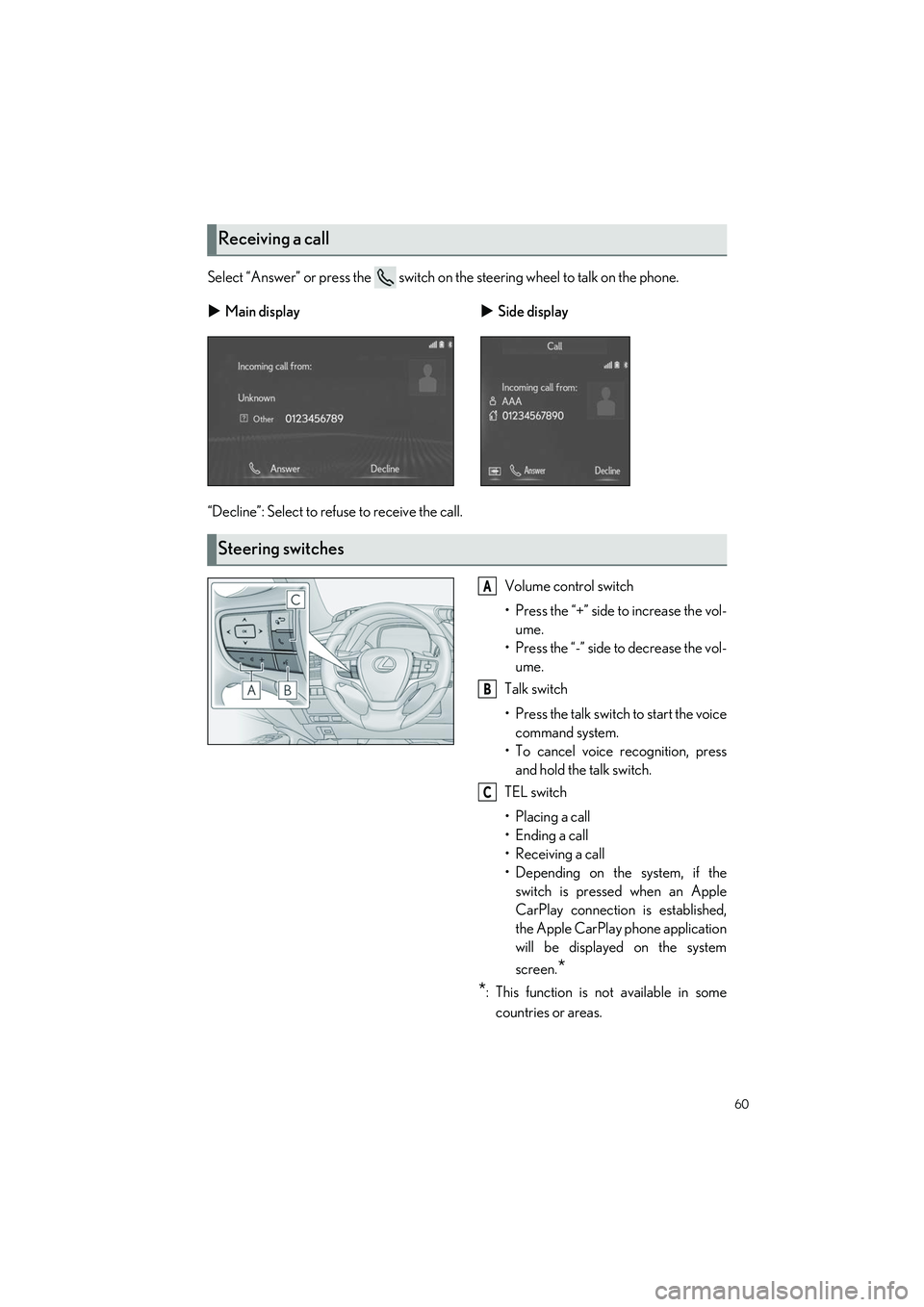
Select “Answer” or press the switch on the steering wheel to talk on the phone.
“Decline”: Select to refuse to receive the call.Volume control switch
• Press the “+” side to increase the vol-ume.
• Press the “-” side to decrease the vol- ume.
Talk switch
• Press the talk switch to start the voice command system.
• To cancel voice recognition, press and hold the talk switch.
TEL switch
• Placing a call
• Ending a call
• Receiving a call
• Depending on the system, if the switch is pressed when an Apple
CarPlay connection is established,
the Apple CarPlay phone application
will be displayed on the system
screen.
*
*
: This function is not available in some
countries or areas.
Receiving a call
Main display Side display
Steering switches
A
B
C
Page 63 of 108
62
LS500h_QG_U
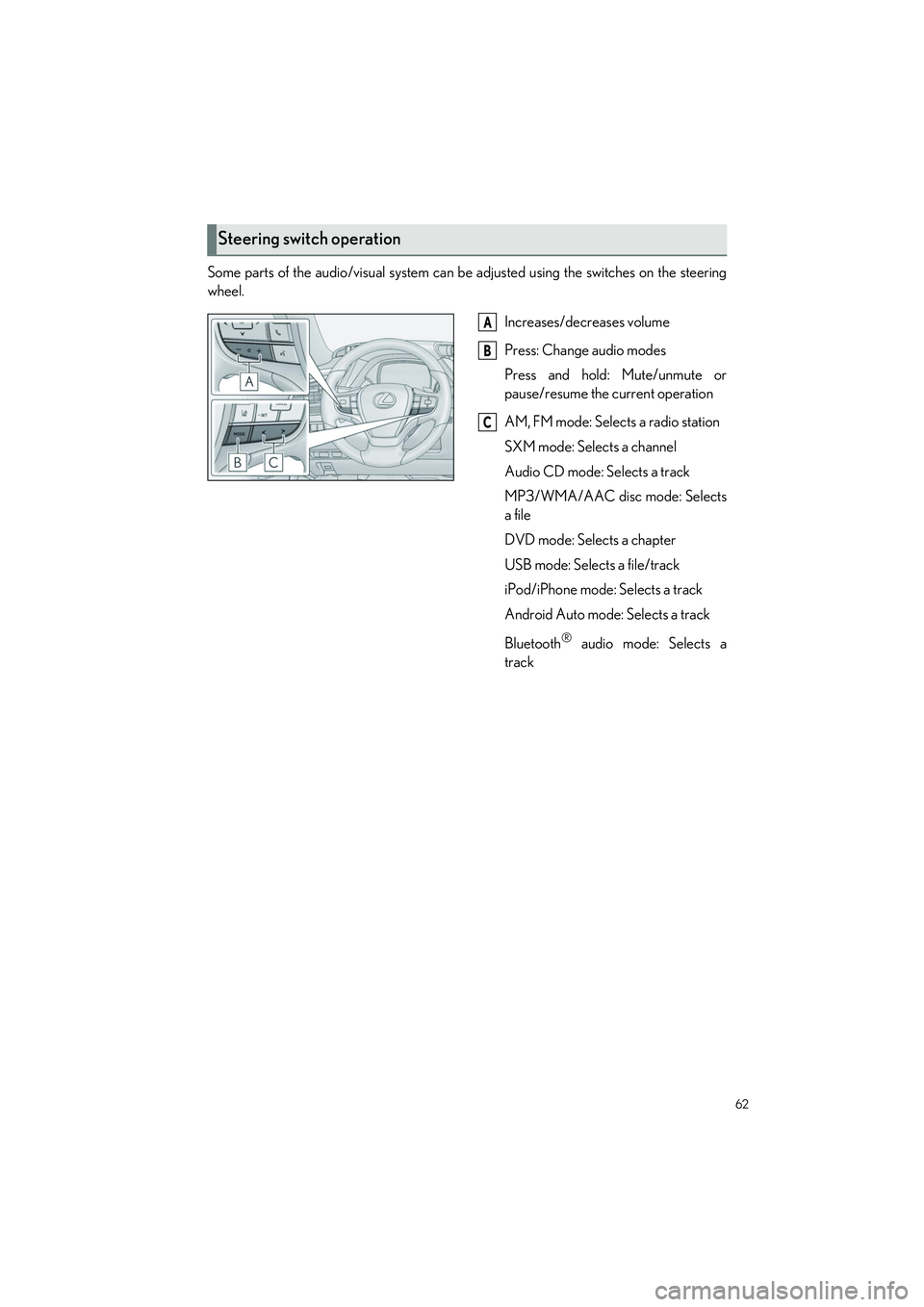
Some parts of the audio/visual system can be adjusted using the switches on the steering
wheel.
Increases/decreases volume
Press: Change audio modes
Press and hold: Mute/unmute or
pause/resume the current operation
AM, FM mode: Selects a radio station
SXM mode: Selects a channel
Audio CD mode: Selects a track
MP3/WMA/AAC disc mode: Selects
a file
DVD mode: Selects a chapter
USB mode: Selects a file/track
iPod/iPhone mode: Selects a track
Android Auto mode: Selects a track
Bluetooth
® audio mode: Selects a
track
Steering switch operation
A
B
C
Page 69 of 108
68
LS500h_QG_U
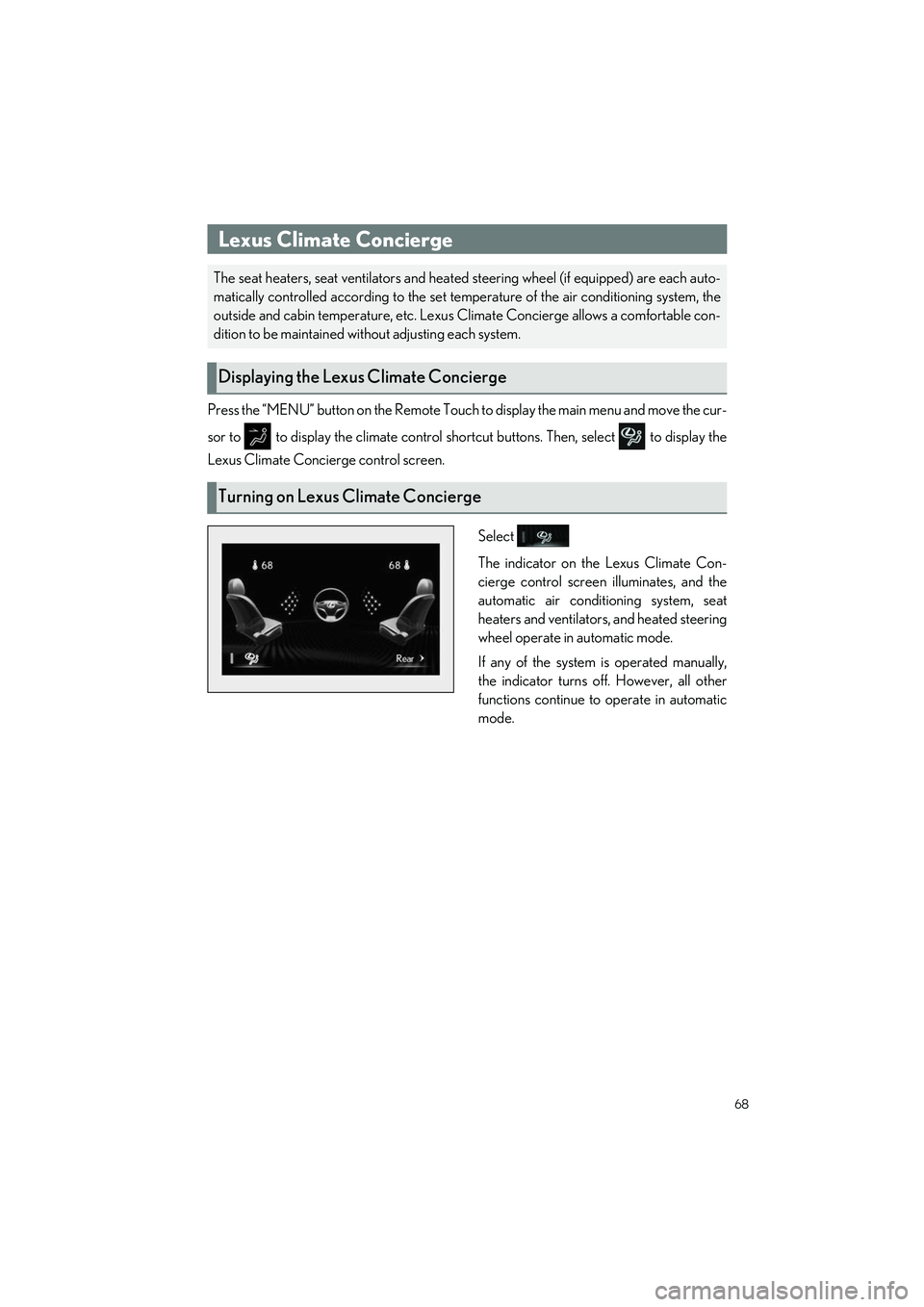
Press the “MENU” button on the Remote Touch to display the main menu and move the cur-
sor to to display the climate control shortcut buttons. Then, select to display the
Lexus Climate Concierge control screen.
Select
The indicator on the Lexus Climate Con-
cierge control screen illuminates, and the
automatic air conditioning system, seat
heaters and ventilators, and heated steering
wheel operate in automatic mode.
If any of the system is operated manually,
the indicator turns off. However, all other
functions continue to operate in automatic
mode.
Lexus Climate Concierge
The seat heaters, seat ventilators and heated steering wheel (if equipped) are each auto-
matically controlled according to the set temperature of the air conditioning system, the
outside and cabin temperature, etc. Lexus Climate Concierge allows a comfortable con-
dition to be maintained wi thout adjusting each system.
Displaying the Lexus Climate Concierge
Turning on Lexus Climate Concierge
Page 75 of 108
74
LS500h_QG_U
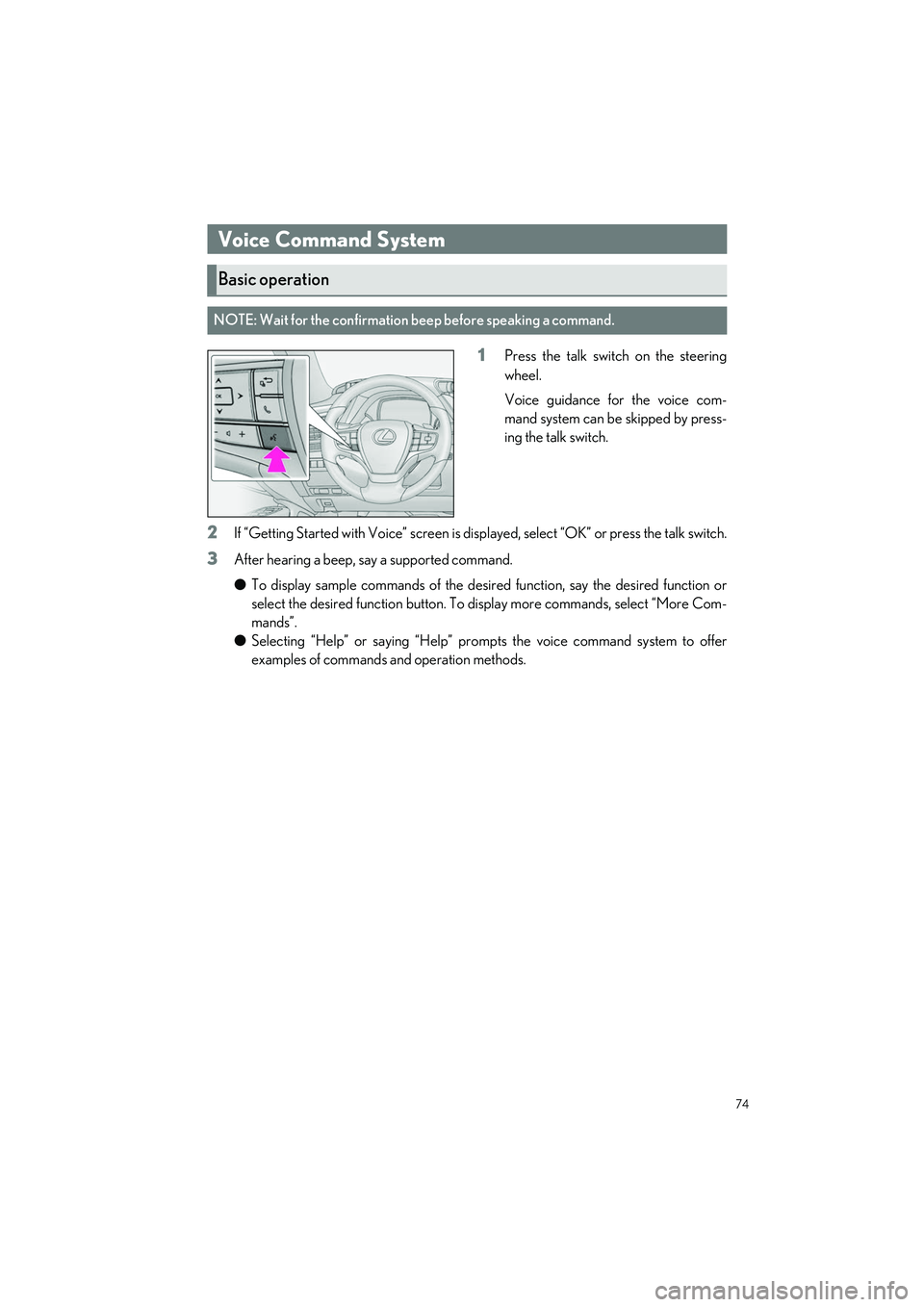
1Press the talk switch on the steering
wheel.
Voice guidance for the voice com-
mand system can be skipped by press-
ing the talk switch.
2If “Getting Started with Voice” screen is disp layed, select “OK” or press the talk switch.
3After hearing a beep, say a supported command.
●To display sample commands of the desired function, say the desired function or
select the desired function button. To display more commands, select “More Com-
mands”.
● Selecting “Help” or saying “Help” prom pts the voice command system to offer
examples of commands and operation methods.
Voice Command System
Basic operation
NOTE: Wait for the confirmation beep before speaking a command.