height LEXUS LS600H 2015 User Guide
[x] Cancel search | Manufacturer: LEXUS, Model Year: 2015, Model line: LS600H, Model: LEXUS LS600H 2015Pages: 620, PDF Size: 7.66 MB
Page 185 of 620
1833-4. Adjusting the steering wheel and mirrors
3
Operation of each component
LS600hL_U(OM50E41U)
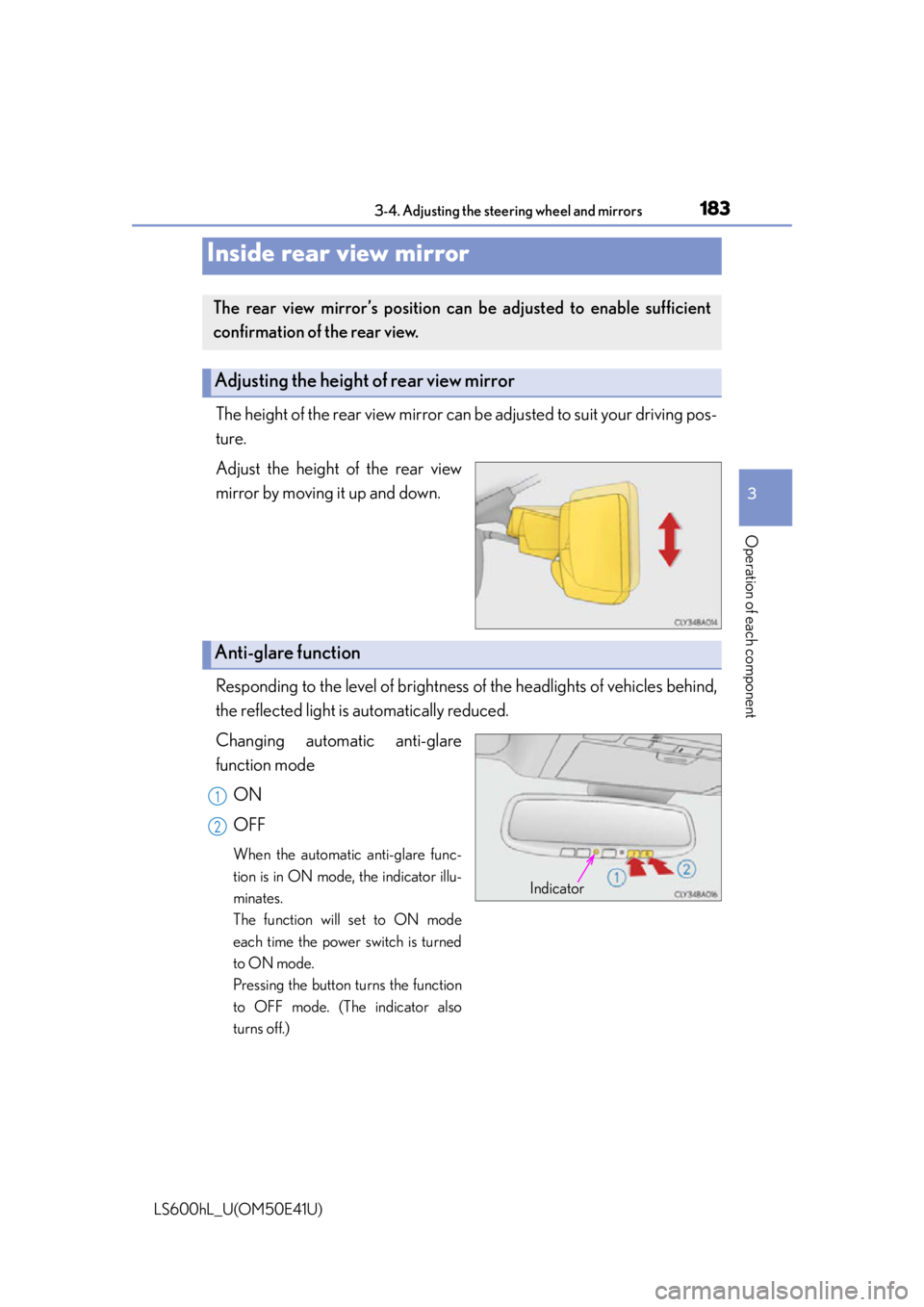
The height of the rear view mirror can be adjusted to suit your driving pos-
ture.
Adjust the height of the rear view
mirror by moving it up and down.
Responding to the level of brightness of the headlights of vehicles behind,
the reflected light is automatically reduced.
Changing automatic anti-glare
function mode
ON
OFF
When the automatic anti-glare func-
tion is in ON mode, the indicator illu-
minates.
The function will set to ON mode
each time the power switch is turned
to ON mode.
Pressing the button turns the function
to OFF mode. (The indicator also
turns off.)
Inside rear view mirror
The rear view mirror’s position can be adjusted to enable sufficient
confirmation of the rear view.
Adjusting the height of rear view mirror
Anti-glare function
Indicator
1
2
Page 289 of 620
2874-5. Using the driving support systems
4
Driving
LS600hL_U(OM50E41U)
The vehicle height is maintained at the selected level regardless of the
number of occupants and luggage weight.
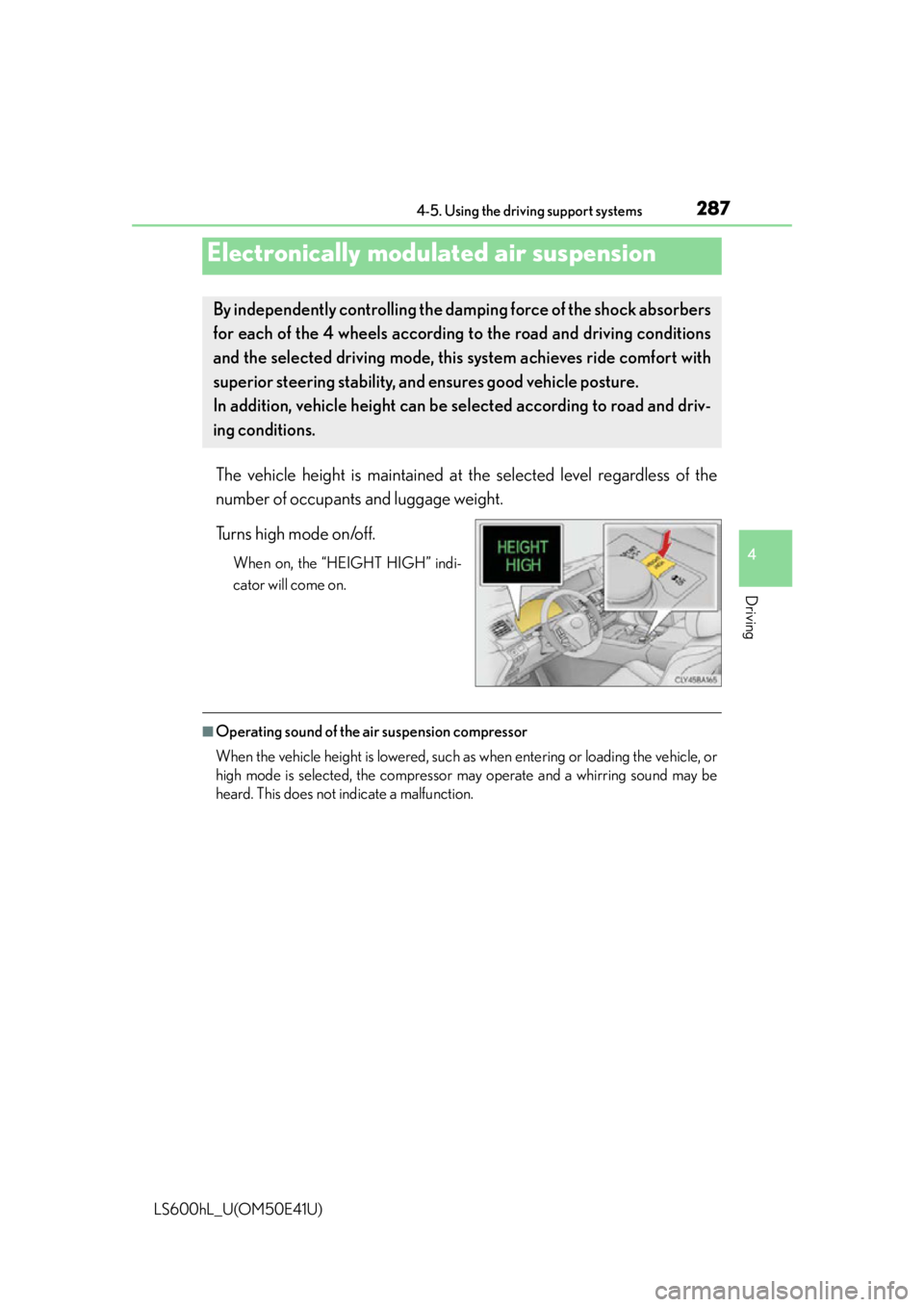
Turns high mode on/off.
When on, the “HEIGHT HIGH” indi-
cator will come on.
■Operating sound of the ai r suspension compressor
When the vehicle height is lowered, such as when entering or loading the vehicle, or
high mode is selected, the compressor may operate and a whirring sound may be
heard. This does not indicate a malfunction.
Electronically modulated air suspension
By independently controlling the da mping force of the shock absorbers
for each of the 4 wheels according to the road and driving conditions
and the selected driving mode, this system achieves ride comfort with
superior steering stability, and ensures good vehicle posture.
In addition, vehicle height can be selected according to road and driv-
ing conditions.
Page 290 of 620

2884-5. Using the driving support systems
LS600hL_U(OM50E41U)
CAUTION
■Be sure to stop the hybrid system in the following situations in order to stop oper-
ation of the electronically modulated air suspension:
●The vehicle is parked on a curb.
●Any of the wheels is stuck in a ditch.
●It is necessary to jack up the vehicle.
●It is necessary to tow the vehicle with part of it lifted.
If the power switch remains in ON mode, the vehicle height may change, and you
may catch part of your body in the vehicle, resulting in accidental damage.
Page 304 of 620

3024-5. Using the driving support systems
LS600hL_U(OM50E41U)
■Conditions that may trigger the system even if there is no danger of a collision
●When there is an object by the roadside at the entrance to a curve
●When passing an oncoming vehicle on a curve
●When driving over a narrow iron bridge
●When there is a metal object on the road surface
●When driving on an uneven road surface
●When passing an oncoming vehicle on a left-turn
●When your vehicle rapidly closes on the vehicle in front
●When a grade separation/interchange, sign , billboard, or other structure appears
to be directly in the vehicle’s line of travel
●When there is a metal plate in the road in front of the vehicle on a downhill slope
●When climbing a steep hill causes an overhead billboard or other metallic structure
to appear directly in the vehicle’s line of travel
●When driving under an overpass
●When an extreme change in vehicle height occurs
●When passing through certain toll gates
●When driving through a lump of steam or smoke
●When the radar sensor moves off position due to its surrounding area being sub-
jected to a strong impact
When the system is activated in the situations described above, there is also a possi-
bility that the seat belts will retract quickly and the brakes will be applied with a force
greater than normal. When the seat belt is locked in the retracted position, stop the
vehicle in a safe place, release the seat belt and refasten it.
■Obstacles not detected
The radar sensor cannot detect plastic obstacles such as traffic cones. There may
also be occasions when the sensor cannot detect pedestrians, animals, bicycles,
motorcycles, trees, or snowdrifts.
■A camera sensor cannot detect obstacles in the following situations:
●A camera sensor is directly receiving intense light, such as sunlight.
●Visibility is poor because of bad weather or other reasons.
●The sensor temperature is extremely high.
●The headlights are not turned on in dark ness such as at night or in a tunnel.
Page 305 of 620

3034-5. Using the driving support systems
4
Driving
LS600hL_U(OM50E41U)
■Situations in which the pre-collision system does not function properly
The system may not function effectively in situations such as the following:
●On roads with sharp bends or uneven surfaces
●If a vehicle suddenly moves in front of your vehicle, such as at an intersection
●If a vehicle suddenly cuts in front of your vehicle, such as when overtaking
●In inclement weather such as heavy rain, fog, snow or sand storms
●If the vehicle is skidding when VSC is not operating
●When an extreme change in vehicle height occurs
●When only part of your vehicle’s front en d collides with, or contacts, a vehicle or
object in a frontal collision
●When the radar sensor moves off position due to its surrounding area being sub-
jected to a strong impact
●If an obstacle in front of the vehicle is small
●When the system judges that the driver performed a collision avoidance operation
via the accelerator pedal, brake pedal, or steering wheel
■Automatic cancelation of the pre-collision system
When a malfunction occurs due to sensor co ntamination, etc. that results in the sen-
sors being unable to detect obstacles, the pre-collision system will be automatically
disabled. In this case, the system will not activate even if there is a collision possibility.
■When there is a malfunction in the system
The pre-collision system warning light will flash and warning messages will be dis-
played. ( P. 495, 503)
Page 316 of 620

3144-5. Using the driving support systems
LS600hL_U(OM50E41U)
■Conditions under which the Blind Spot Monitor function may not function cor-
rectly
●The Blind Spot Monitor function may not de tect vehicles correctly in the following
conditions:
• During bad weather such as heavy rain, fog, snow etc.
• When ice or mud etc. is attached to the rear bumper
• When driving on a road surface that is wet due to rain, standing water etc.
• When there is a significant difference in speed between your vehicle and the vehicle that enters the detection area
• When a vehicle is in the detection area from a stop and remains in the detection area as your vehicle accelerates
• When driving up or down consecutive steep inclines, such as hills, a dip in the road etc.
• When multiple vehicles approach with only a small gap between each vehicle
• When vehicle lanes are wide, and the vehicle in the next lane is too far away from your vehicle
• When the vehicle that enters the detect ion area is traveling at about the same
speed as your vehicle
• When there is a significant difference in height between your vehicle and the vehicle that enters the detection area
• Directly after the BSM main switch is set to on
●Instances of the Blind Spot Monitor functi on unnecessarily detecting a vehicle and/
or object may increase under the following conditions:
• When there is only a short distance between your vehicle and a guardrail, wall etc.
• When there is only a short distance between your vehicle and a following vehi- cle
• When vehicle lanes are narrow and a ve hicle driving 2 lanes across from your
vehicle enters the detection area
• When items such as a bicycle carrier are installed on the rear of the vehicle
Page 372 of 620
3705-5. Using the storage features
LS600hL_U(OM50E41U)
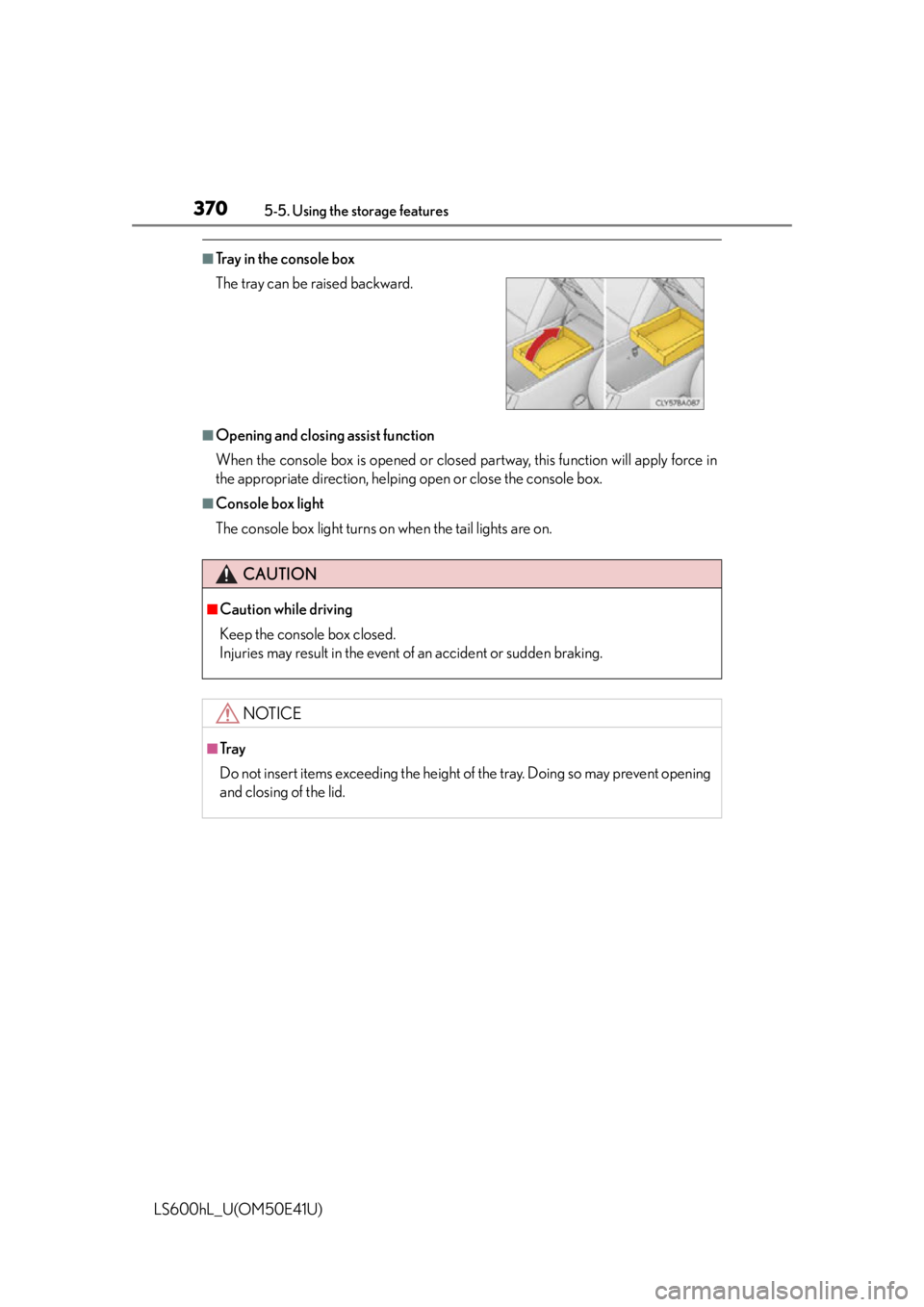
■Tray in the console box
■Opening and closing assist function
When the console box is opened or closed partway, this function will apply force in
the appropriate direction, helping open or close the console box.
■Console box light
The console box light turns on when the tail lights are on. The tray can be raised backward.
CAUTION
■Caution while driving
Keep the console box closed.
Injuries may result in the event of an accident or sudden braking.
NOTICE
■Tr a y
Do not insert items exceeding the height of the tray. Doing so may prevent opening
and closing of the lid.
Page 440 of 620
4386-3. Do-it-yourself maintenance
LS600hL_U(OM50E41U)
CAUTION
■When raising your vehicle
Make sure to observe the following precautions to reduce the possibility of death
or serious injury:
●When using a floor jack, follow the instructions of the manual provided with the
jack.
●Do not use the jack that was supplied with your vehicle.
●Do not put any part of your body underneath the vehicle when it is supported
only by the floor jack.
●Always use floor jack and/or automotive jack stands on a solid, flat, level surface.
●Do not start the hybrid system while the vehicle is supported by the floor jack.
●Stop the vehicle on level, firm ground, firmly set the parking brake and shift the
shift lever to P.
●Make sure to set the floor jack properly at the jack point.
Raising the vehicle with an improperly positioned floor jack will damage the vehi-
cle and may cause the vehicle to fall off the floor jack.
●Do not raise the vehicle while someone is in the vehicle.
●When raising the vehicle, do not place any object on top of or underneath the
floor jack.
●Be sure to turn off the height control an d stop the hybrid system. Otherwise, the
vehicle height may change in the automatic leveling function. ( P. 2 8 7 )
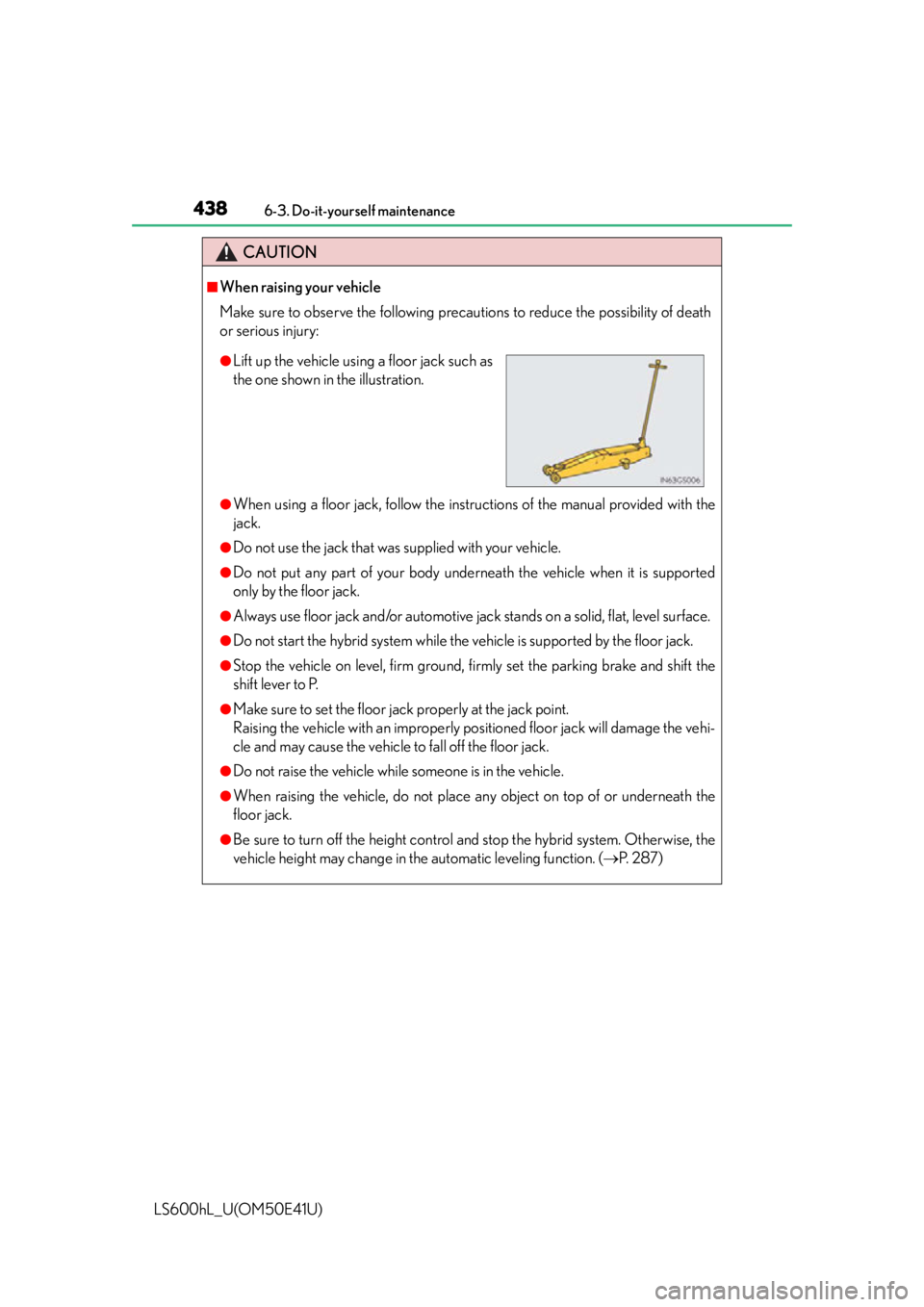
●Lift up the vehicle using a floor jack such as
the one shown in the illustration.
Page 510 of 620
5087-2. Steps to take in an emergency
LS600hL_U(OM50E41U)
CAUTION
■Using the tire jack
Observe the following precautions.
Improper use of the tire jack may cause the vehicle to suddenly fall off the jack,
leading to death or serious injury.
●Do not use the tire jack for any purpose other than replacing tires or installing and
removing tire chains.
●Only use the tire jack that comes with this vehicle for replacing a flat tire.
Do not use it on other vehicles, and do not use other tire jacks for replacing tires
on this vehicle.
●Put the jack properly in its jack point.
●Do not put any part of your body under the vehicle while it is supported by the
jack.
●Do not start the hybrid system or drive the vehicle while the vehicle is supported
by the jack.
●Do not raise the vehicle while someone is inside.
●When raising the vehicle, do not put an object on or under the jack.
●Do not raise the vehicle to a height greater than that required to replace the tire.
●Use a jack stand if it is necessary to get under the vehicle.
●Be sure to turn off the height control and stop the hybrid system.
●When lowering the vehicle, make sure that there is no-one near the vehicle. If
there are people nearby, warn them vocally before lowering.
Page 518 of 620
5167-2. Steps to take in an emergency
LS600hL_U(OM50E41U)
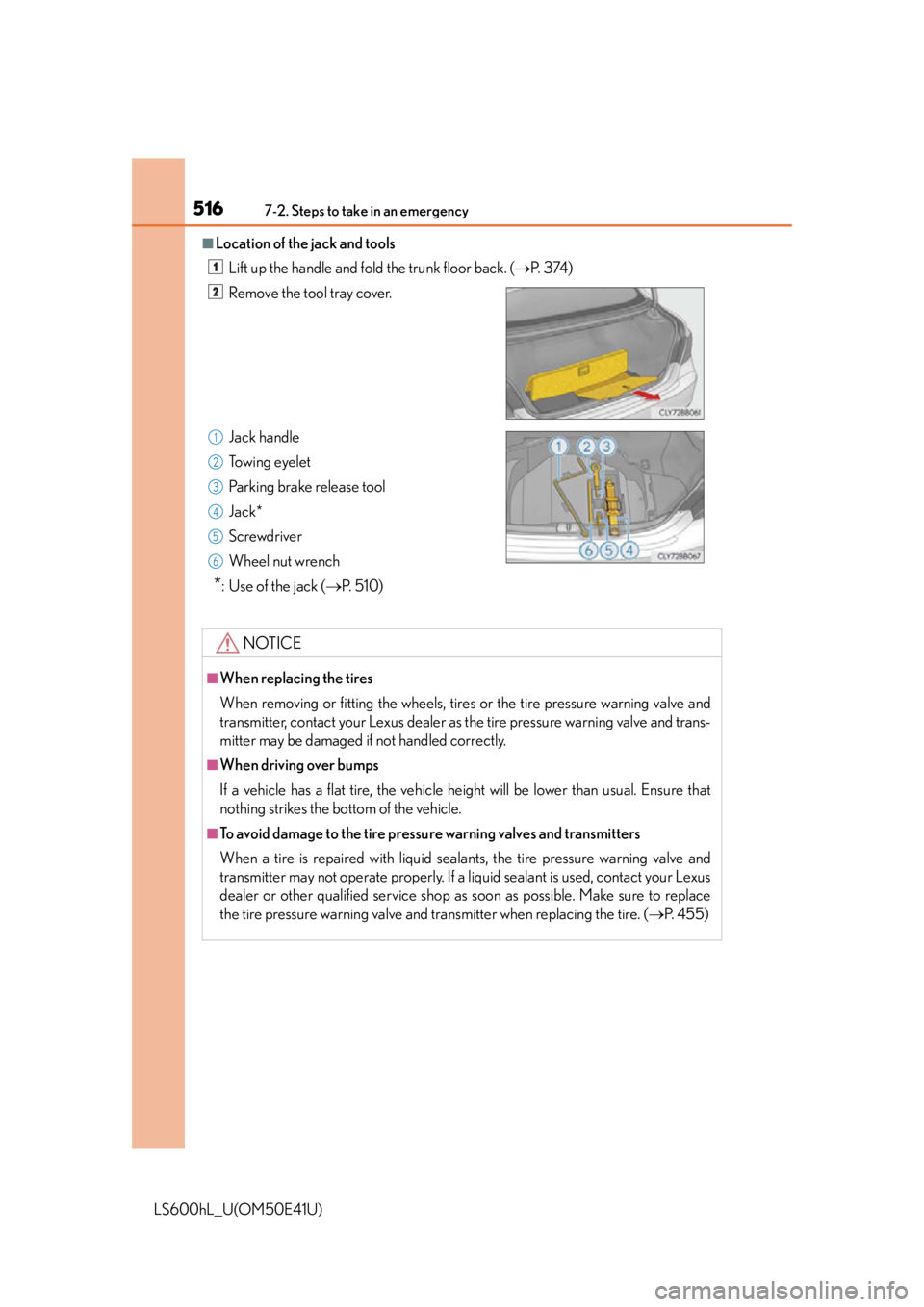
■Location of the jack and toolsLift up the handle and fold the trunk floor back. ( P. 3 74 )
Remove the tool tray cover.
Jack handle
Towing eyelet
Parking brake release tool
Jack*
Screwdriver
Wheel nut wrench
*: Use of the jack ( P. 5 1 0 )
NOTICE
■When replacing the tires
When removing or fitting the wheels, tire s or the tire pressure warning valve and
transmitter, contact your Lexus dealer as the tire pressure warning valve and trans-
mitter may be damaged if not handled correctly.
■When driving over bumps
If a vehicle has a flat tire, the vehicle height will be lower than usual. Ensure that
nothing strikes the bottom of the vehicle.
■To avoid damage to the tire pressu re warning valves and transmitters
When a tire is repaired with liquid seal ants, the tire pressure warning valve and
transmitter may not operate properly. If a liquid sealant is used, contact your Lexus
dealer or other qualified service shop as soon as possible. Make sure to replace
the tire pressure warning valve and transmitter when replacing the tire. ( P. 455)
1
2
1
2
3
4
5
6