park assist LEXUS LS600H 2015 User Guide
[x] Cancel search | Manufacturer: LEXUS, Model Year: 2015, Model line: LS600H, Model: LEXUS LS600H 2015Pages: 620, PDF Size: 7.66 MB
Page 281 of 620

2794-5. Using the driving support systems
4
Driving
LS600hL_U(OM50E41U)
■After the vehicle has been parked in the sun
The LKA system functions may not be available and a warning message (P. 5 0 3 )
will be displayed for a while after driving ha s started. In such cases, turn the LKA sys-
tem off and turn it on again after normal temperature returns. When the temperature
in the cabin decreases and the temperature around the camera sensor ( P. 2 7 3 )
becomes suitable for its operation, the functions will begin to operate.
■If there are lane markers on only one side of the vehicle
The lane keeping assist function will not operate. Also, the lane departure warning
will not operate for the side on which lane markers could not be recognized.
■Conditions in which the function may not operate correctly
In the following conditions, the LKA system functions may not operate, or it may not
be possible to ensure adequate performance. Also, the camera sensor may be
unable to recognize lane lines causing the lane departure warning function to oper-
ate incorrectly, or the lane keeping assist function may not operate properly. How-
ever, this does not indicate a malfunction.
●When driving through an area with no lane markers, such as a tollbooth, a crossing
or before a ticket checkpoint
●When driving on a sharp curve
●When lanes are extremely narrow or extremely wide
●When the vehicle leans to one side an unusual amount due to a heavy load or
improper tire inflation pressure
●When the following distance between your vehicle and the vehicle ahead is
extremely short
●When the lane markers are yellow (These may be more difficult for the system to
recognize compared to white markers.)
●When the lane markers are broken, “Botts’ dots”, “Raised pavement marker” or
stones
●When lane markers are obscured or pa rtially obscured by sand, dirt, etc.
●When there are shadows on the road running parallel with lane markers, or if a
shadow covers the lane markers
●When driving on a particularly bright road surface, such as concrete
●When driving on a road surface that is bright due to reflected light
●When driving in a location where the light level changes rapidly, such as the
entrance to or exit from a tunnel
●When sunlight or the headlights of oncoming vehicles are shining directly into the
camera lens
●When driving on roads that are branching or merging
Page 322 of 620
3204-5. Using the driving support systems
LS600hL_U(OM50E41U)
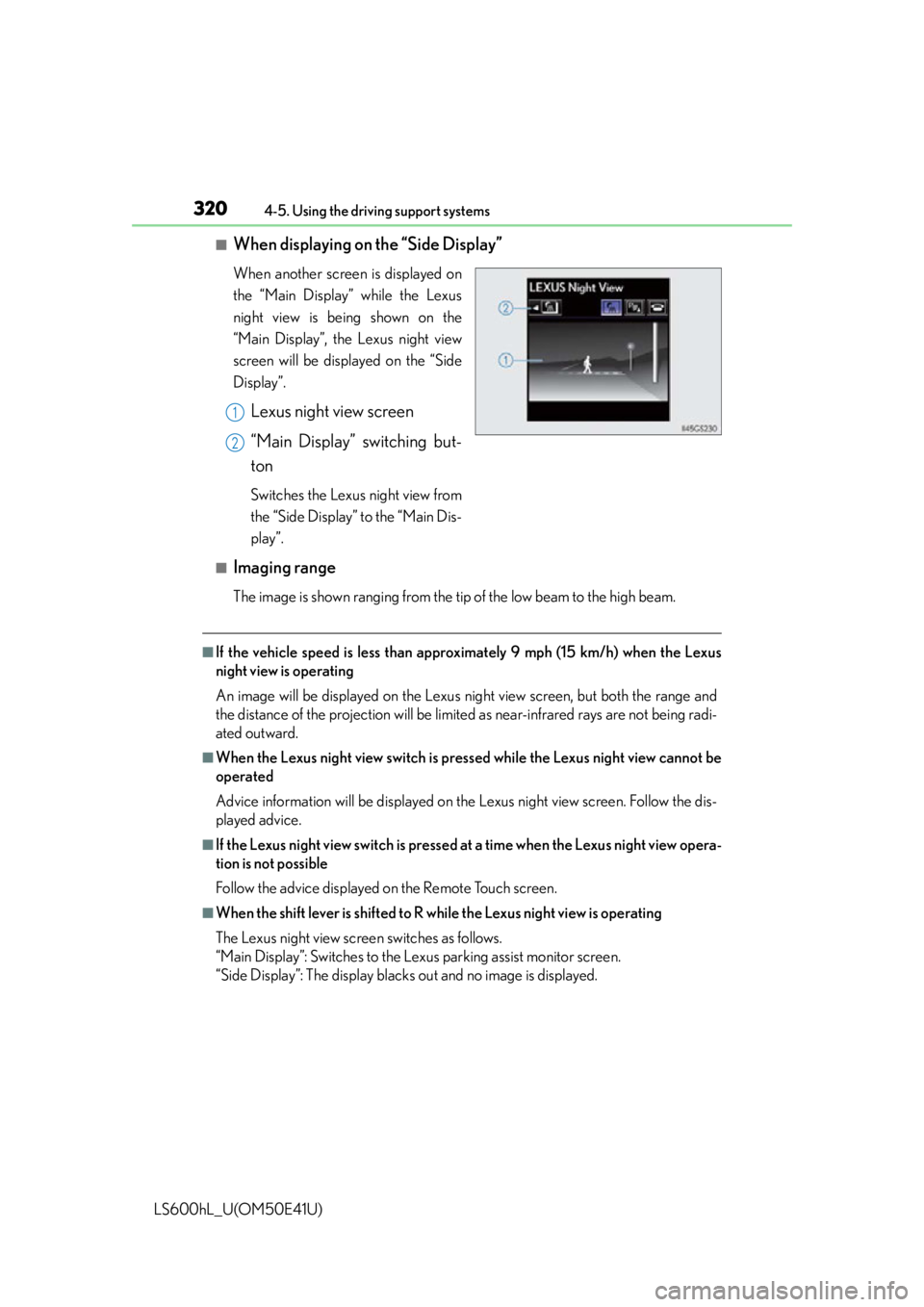
■When displaying on the “Side Display”
When another screen is displayed on
the “Main Display” while the Lexus
night view is being shown on the
“Main Display”, the Lexus night view
screen will be displayed on the “Side
Display”.
Lexus night view screen
“Main Display” switching but-
ton
Switches the Lexus night view from
the “Side Display” to the “Main Dis-
play”.
■Imaging range
The image is shown ranging from the ti p of the low beam to the high beam.
■If the vehicle speed is less than approximately 9 mph (15 km/h) when the Lexus
night view is operating
An image will be displayed on the Lexus night view screen, but both the range and
the distance of the projection will be limi ted as near-infrared rays are not being radi-
ated outward.
■When the Lexus night view switch is pressed while the Lexus night view cannot be
operated
Advice information will be displayed on the Lexus night view screen. Follow the dis-
played advice.
■If the Lexus night view switch is pressed at a time when the Lexus night view opera-
tion is not possible
Follow the advice displayed on the Remote Touch screen.
■When the shift lever is shifted to R wh ile the Lexus night view is operating
The Lexus night view screen switches as follows.
“Main Display”: Switches to the Le xus parking assist monitor screen.
“Side Display”: The display blacks out and no image is displayed.
1
2
Page 336 of 620
3345-1. Remote Touch screen
LS600hL_U(OM50E41U)
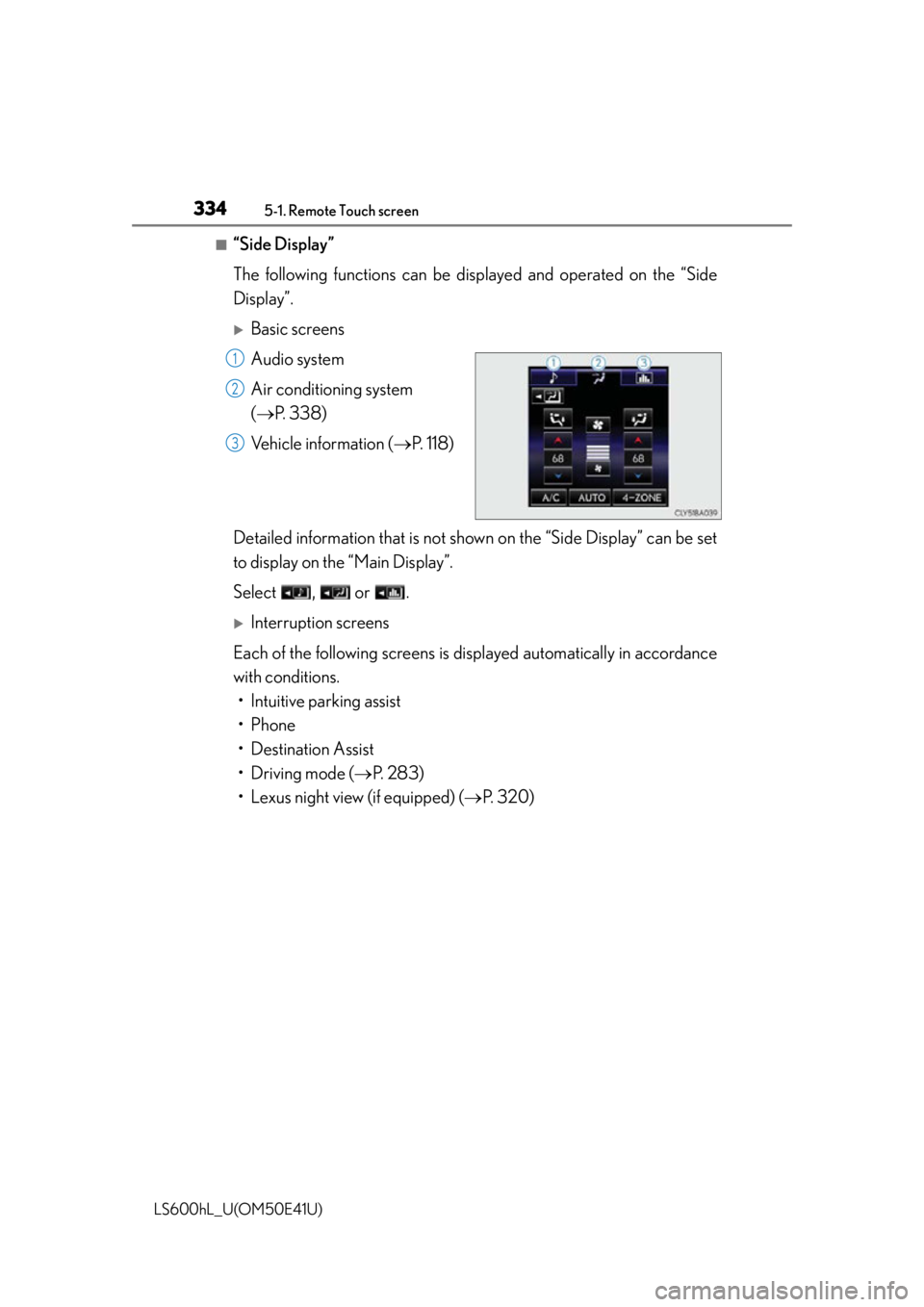
■“Side Display”
The following functions can be displayed and operated on the “Side
Display”.
Basic screens
Audio system
Air conditioning system
( P. 3 3 8 )
Vehicle information ( P. 118)
Detailed information that is not shown on the “Side Display” can be set
to display on th e “Main Display”.
Select , or .
Interruption screens
Each of the following screens is di splayed automatically in accordance
with conditions. • Intuitive parking assist
•Phone
• Destination Assist
• Driving mode ( P. 283)
• Lexus night view (if equipped) ( P. 320)
1
2
3
Page 426 of 620
4246-1. Maintenance and care
LS600hL_U(OM50E41U)
NOTICE
■Cleaning detergents
●Do not use the following types of detergent, as they may discolor the vehicle inte-
rior or cause streaks or damage to painted surfaces:
• Non-seat portions: Organic substances such as benzene or gasoline, alkalineor acidic solutions, dye, and bleach
• Seats: Alkaline or acidic solutions, such as thinner, benzene, and alcohol
●Do not use polish wax or polish cleaner. The instrument panel’s or other interior
part’s painted surf ace may be damaged.
■Preventing damage to leather surfaces
Observe the following precautions to avoid damage to and deterioration of
leather surfaces:
●Remove any dust or dirt from leather surfaces immediately.
●Do not expose the vehicle to direct sunlight for extended periods of time. Park
the vehicle in the shade, especially during summer.
●Do not place items made of vinyl, plastic, or containing wax on the upholstery, as
they may stick to the leather surface if the vehicle interior heats up significantly.
■Water on the floor
Do not wash the vehicle floor with water.
Vehicle systems such as the audio syst em may be damaged if water comes into
contact with electrical components such as the audio system above or under the
floor of the vehicle. Water may also cause the body to rust.
■When cleaning the inside of the windsh ield (vehicles with LKA [Lane-Keeping
Assist])
Be careful not to touch the camera sensor ( P. 273).
If the camera is accidentally scratched or hit, LKA may not operate properly or
may cause a malfunction.
■Cleaning the inside of the rear window
●Do not use glass cleaner to clean the rear window, as this may cause damage to
the rear window defogger heater wires or antenna. Use a cloth dampened with
lukewarm water to gently wipe the window clean. Wipe the window in strokes
running parallel to the heater wires or antenna.
●Be careful not to scratch or damage the heater wires or antenna.
Page 483 of 620
4816-3. Do-it-yourself maintenance
6
Maintenance and care
LS600hL_U(OM50E41U)
■LED Lights
The following lights consist of a number of LEDs. If any of the LEDs burn out, take
your vehicle to your Lexus dealer to have the light replaced.
●Headlight low beams
●Headlight low/high beams
●Headlight high beams (vehicles without LKA [Lane-Keeping Assist])
●Parking lights and daytime running lights
●Front side marker lights
●Front turn signal lights
●Front fog lights
●Side turn signal lights
●Outer foot lights
●Tail lights
●Stop lights
●Back-up lights
●Rear side marker lights
●Rear turn signal lights
●High mounted stoplight
●License plate lights
■Condensation build-up on the inside of the lens
Temporary condensation build-up on the insi de of the headlight lens does not indi-
cate a malfunction. Contact your Lexus dealer for more information in the following
situations:
●Large drops of water have built up on the inside of the lens.
●Water has built up inside the headlight.
Light bulbs
If any lights burn out, have it replaced by your Lexus dealer.
Page 497 of 620
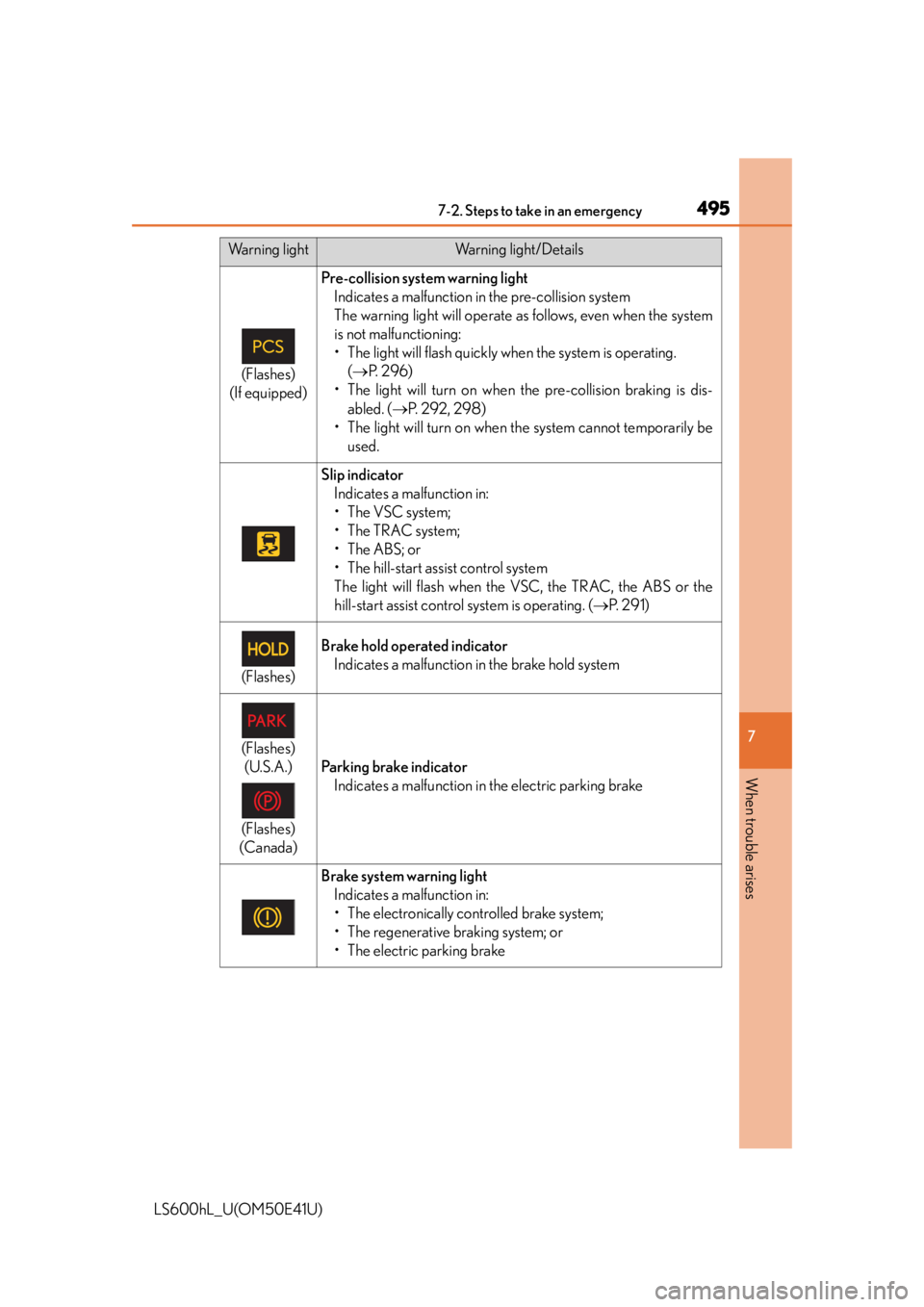
4957-2. Steps to take in an emergency
7
When trouble arises
LS600hL_U(OM50E41U)
(Flashes)
(If equipped)
Pre-collision system warning light Indicates a malfunction in the pre-collision system
The warning light will operate as follows, even when the system
is not malfunctioning:
• The light will flash quickly when the system is operating. ( P. 2 9 6 )
• The light will turn on when the pre-collision braking is dis-
abled. ( P. 2 9 2 , 2 9 8 )
• The light will turn on when the system cannot temporarily be used.
Slip indicatorIndicates a malfunction in:
• The VSC system;
•The TRAC system;
•The ABS; or
• The hill-start assist control system
The light will flash when the VSC, the TRAC, the ABS or the
hill-start assist control system is operating. ( P. 2 9 1 )
(Flashes)
Brake hold operated indicator
Indicates a malfunction in the brake hold system
(Flashes)(U.S.A.)
(Flashes)
(Canada)
Parking brake indicator Indicates a malfunction in the electric parking brake
Brake system warning light Indicates a malfunction in:
• The electronically controlled brake system;
• The regenerative braking system; or
• The electric parking brake
Warning lightWarning light/Details
Page 507 of 620
5057-2. Steps to take in an emergency
7
When trouble arises
LS600hL_U(OM50E41U)
■The LKA (Lane-Keeping Assist) lane departure warning function (if equipped)
In the following cases, the warning message will not be displayed even if a lane line is
crossed.
●When the vehicle speed deviates from the operating range of the LKA system
functions
●When the lane lines cannot be recognized
●When the steering wheel is turned as far as necessary to cause the vehicle to
change lanes
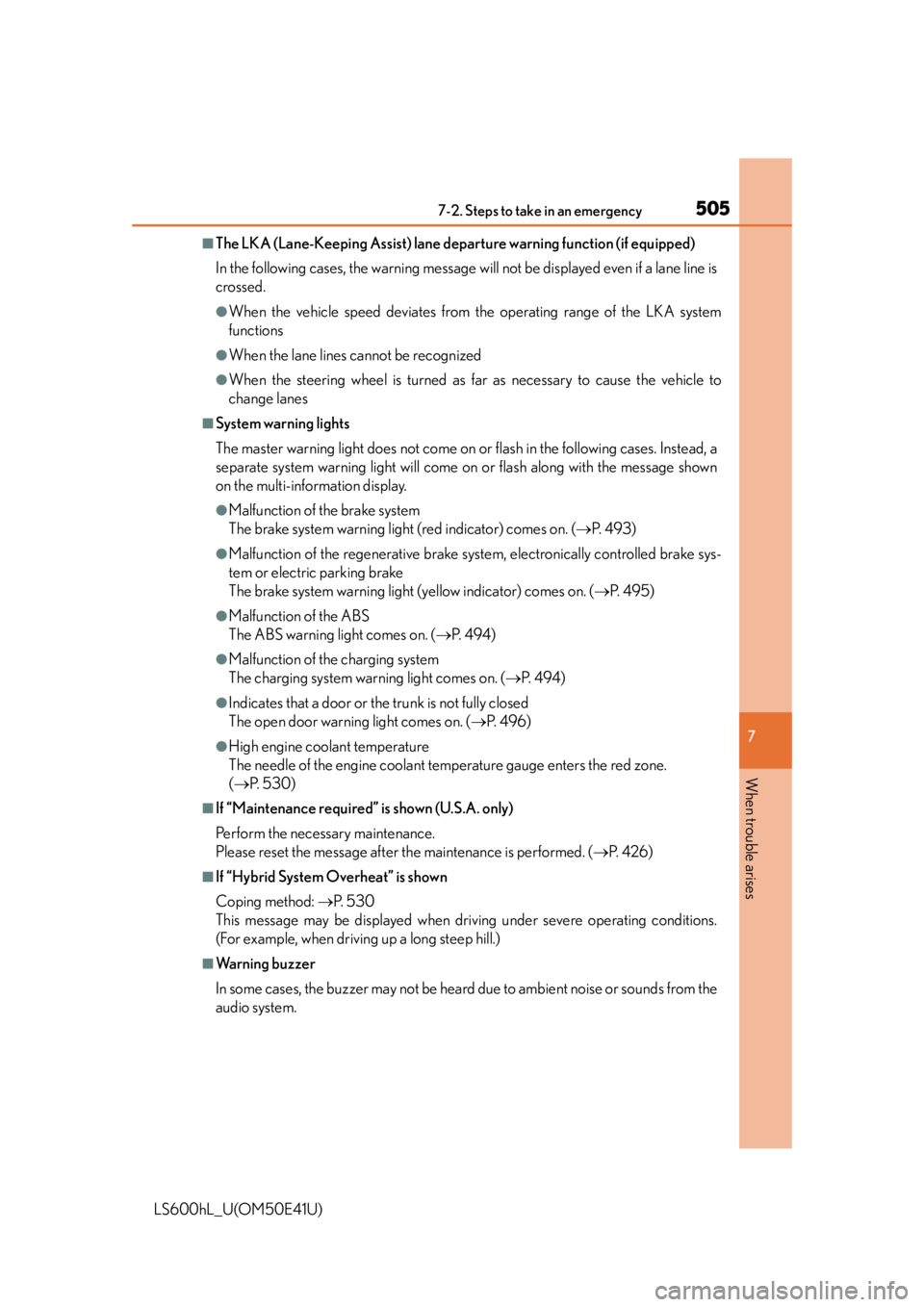
■System warning lights
The master warning light does not come on or flash in the following cases. Instead, a
separate system warning light will come on or flash along with the message shown
on the multi-information display.
●Malfunction of the brake system
The brake system warning light (red indicator) comes on. ( P. 4 9 3 )
●Malfunction of the regenerative brake syst em, electronically controlled brake sys-
tem or electric parking brake
The brake system warning light (yellow indicator) comes on. ( P. 495)
●Malfunction of the ABS
The ABS warning light comes on. ( P. 4 9 4 )
●Malfunction of the charging system
The charging system warning light comes on. ( P. 4 9 4 )
●Indicates that a door or the trunk is not fully closed
The open door warnin g light comes on. (P. 4 9 6 )
●High engine coolant temperature
The needle of the engine coolant temperature gauge enters the red zone.
( P. 5 3 0 )
■If “Maintenance required ” is shown (U.S.A. only)
Perform the necessary maintenance.
Please reset the message after the maintenance is performed. ( P. 4 2 6 )
■If “Hybrid System Overheat” is shown
Coping method: P. 5 3 0
This message may be displayed when driv ing under severe operating conditions.
(For example, when driving up a long steep hill.)
■Warning buzzer
In some cases, the buzzer may not be hear d due to ambient noise or sounds from the
audio system.
Page 571 of 620
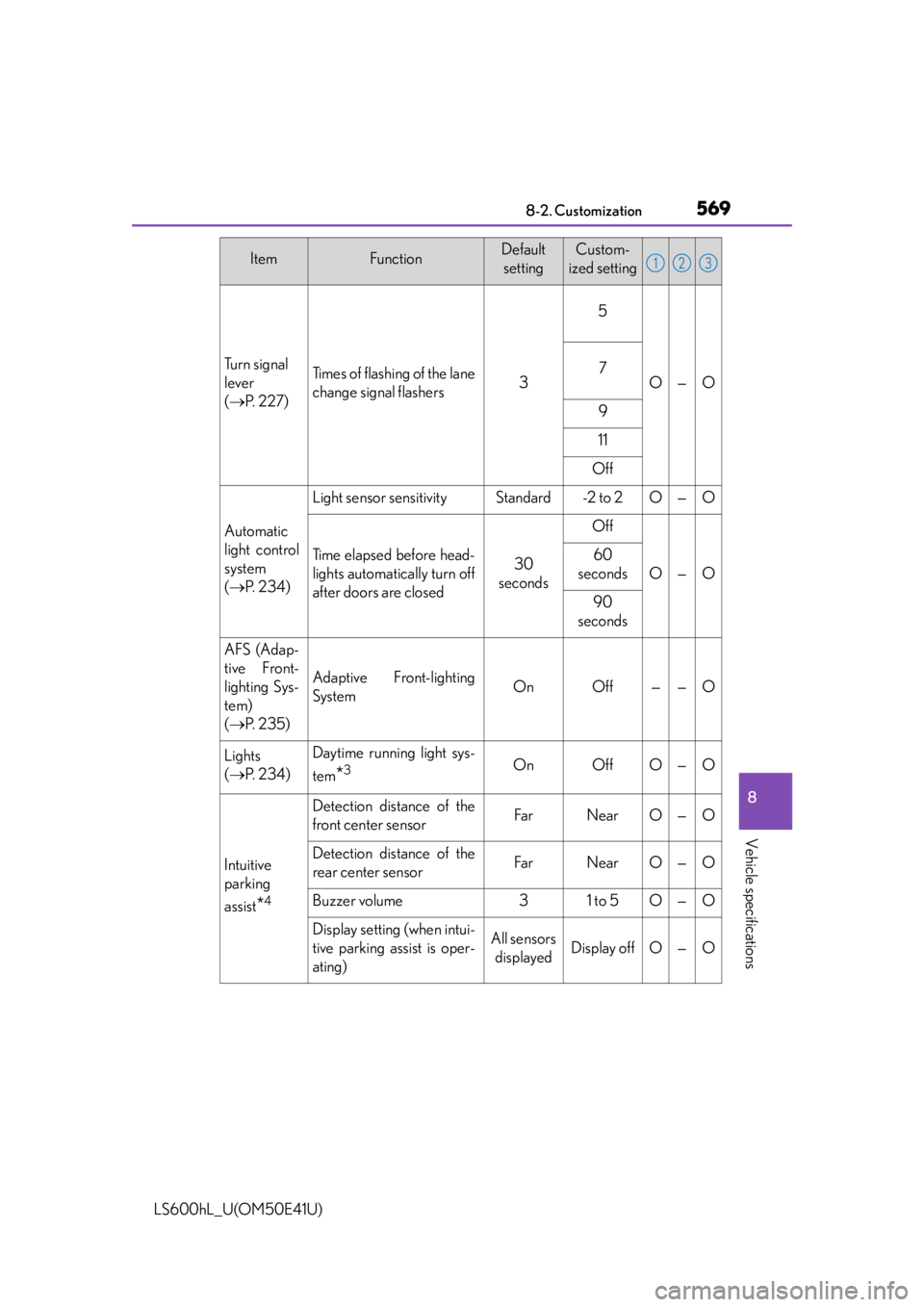
5698-2. Customization
8
Vehicle specifications
LS600hL_U(OM50E41U)
Tu r n s i g n a l
lever
( P. 2 2 7 )Times of flashing of the lane
change signal flashers3
5
O—O7
9
11
Off
Automatic
light control
system
( P. 2 3 4 )
Light sensor sensitivityStandard-2 to 2O—O
Time elapsed before head-
lights automatically turn off
after doors are closed30
seconds
Off
O—O
60
seconds
90
seconds
AFS (Adap-
tive Front-
lighting Sys-
tem)
( P. 235)
Adaptive Front-lighting
SystemOnOff——O
Lights
( P. 2 3 4 )Daytime running light sys-
tem
*3OnOffO—O
Intuitive
parking
assist
*4
Detection distance of the
front center sensorFarNearO—O
Detection distance of the
rear center sensorFarNearO—O
Buzzer volume31 to 5O—O
Display setting (when intui-
tive parking assist is oper-
ating)All sensors
displayedDisplay offO—O
ItemFunctionDefault settingCustom-
ized setting123
Page 593 of 620

591
Index
LS600hL_U(OM50E41U)What to do if...
(Troubleshooting)............................... 592
Alphabetical index.................................598
For information regarding the equipment listed below, refer to “NAVIGATION
AND MULTIMEDIA SYSTEM OWNER’S MANUAL”.
• Navigation system
• Audio/visual system
• Rear seat entertainment system • Intuitive parking assist
• Lexus parking
assist monitor
Page 601 of 620
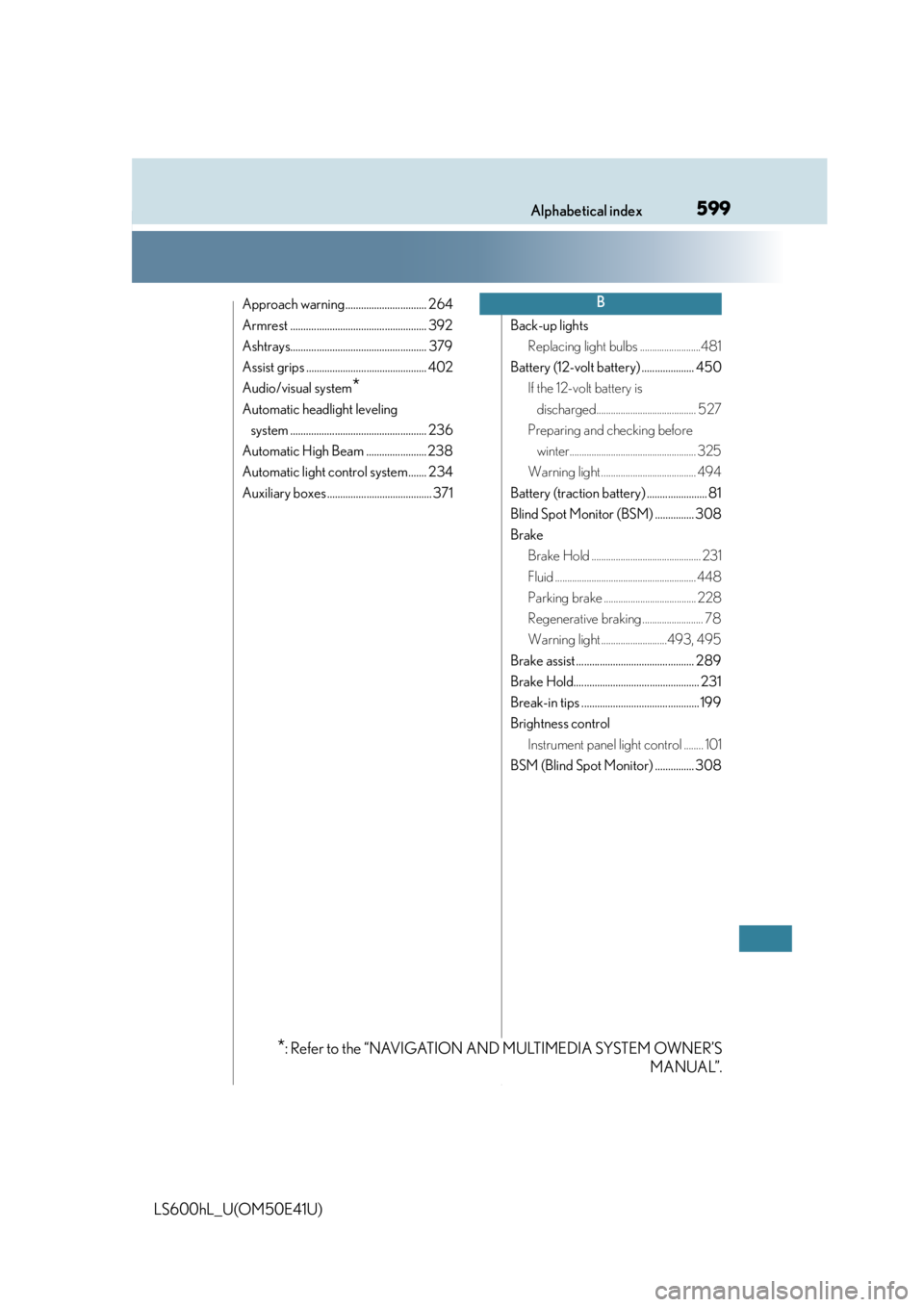
599Alphabetical index
LS600hL_U(OM50E41U)
Approach warning............................... 264
Armrest .................................................... 392
Ashtrays.................................................... 379
Assist grips .............................................. 402
Audio/visual system
*
Automatic headlight leveling system .................................................... 236
Automatic High Beam ....................... 238
Automatic light control system....... 234
Auxiliary boxes ........................................ 371 Back-up lights
Replacing light bulbs .........................481
Battery (12-volt battery) .................... 450 If the 12-volt battery is discharged......................................... 527
Preparing and checking before winter.................................................... 325
Warning light ....................................... 494
Battery (traction battery) ....................... 81
Blind Spot Monitor (BSM) ............... 308
Brake Brake Hold ............................................. 231
Fluid .......................................................... 448
Parking brake ...................................... 228
Regenerative braking ......................... 78
Warning light ...........................493, 495
Brake assist ............................................. 289
Brake Hold................................................ 231
Break-in tips ............................................. 199
Brightness control Instrument panel light control ........ 101
BSM (Blind Spot Monitor) ............... 308
B
*: Refer to the “NAVIGATION AND MULTIMEDIA SYSTEM OWNER’S MANUAL”.