lights LEXUS LS600H 2015 Owner's Manual
[x] Cancel search | Manufacturer: LEXUS, Model Year: 2015, Model line: LS600H, Model: LEXUS LS600H 2015Pages: 620, PDF Size: 7.66 MB
Page 103 of 620
1012. Instrument cluster
2
Instrument cluster
LS600hL_U(OM50E41U)
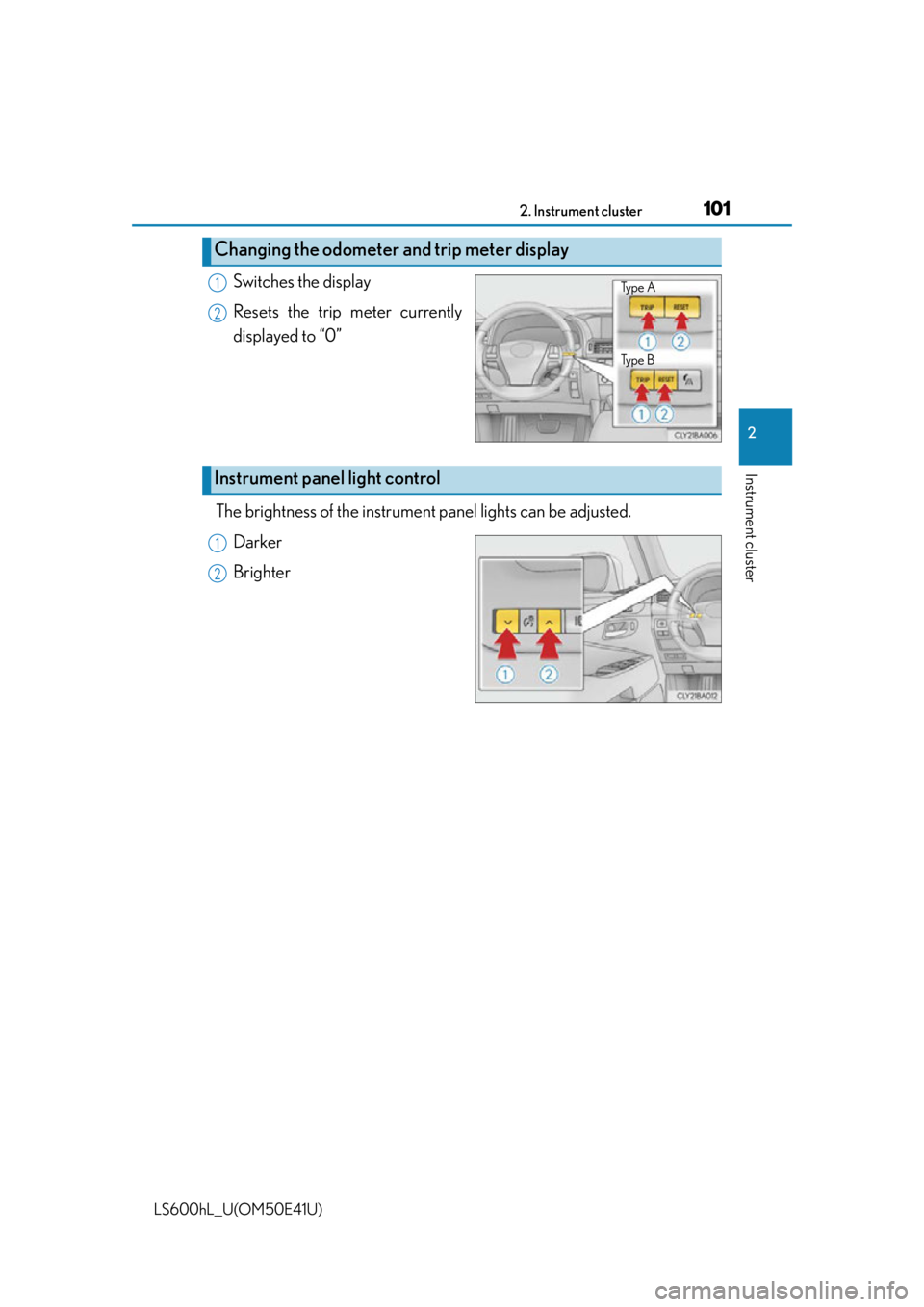
Switches the display
Resets the trip meter currently
displayed to “0”
The brightness of the instrument panel lights can be adjusted.
Darker
Brighter
Changing the odometer and trip meter display
Ty p e A
Ty p e B1
2
Instrument panel light control
1
2
Page 104 of 620

1022. Instrument cluster
LS600hL_U(OM50E41U)
■The meters and display illuminate when
The power switch is in ON mode.
■Instrument panel brightness adjustment
●Meters:
The brightness level of the meters when the surroundings are bright (day mode)
and dark (night mode) can be adjusted in dividually. However, when in day mode,
adjusting the brightness level will also ch ange the brightness level of night mode.
●Clock, air conditioning temperature display and switch lights:
The brightness level of the clock, air conditioning temperature display and switch
lights are linked with the brightness level of meter night mode.
■Light dimmer control (Changing to night mode)
The brightness level of the meter, clock and air conditioning temperature display
lights will change to night mode only wh en the surroundings are dark and the tail
lights are on.
■Automatic adjustment of the brightness level of the meters
The brightness level of the meters will be adjusted automatically according to the
brightness of the surroundings detected by the light sensor. However, the brightness
level of the meters will not be adjusted automatically in the following conditions.
●Day mode: When the brightness of the meter is adjusted to the brightest manually
●Night mode: When the brightness of the meter is adjusted to the brightest or dark-
est manually
Page 128 of 620

1263-2. Opening, closing and locking the doors and trunk
LS600hL_U(OM50E41U)
■Operation signals
Doors:
A buzzer sounds and the emergency flashe rs flash to indicate that the doors have
been locked/unlocked. (Locked: Once; Unlocked: Twice)
Tr u n k :
A buzzer sounds to indicate that the trunk has been unlocked.
Windows and moon roof:
A buzzer sounds to indicate that the windows and moon roof are operating.
■Security feature
If a door is not opened within approx imately 60 seconds after the vehicle is
unlocked, the security feature automatically locks the vehicle again.
■Welcome light illumination control
The side marker, parking, tail and license plate lights automatically turn on at night
when the doors are unlocked using the entr y function or wireless remote control if
the headlight switch is in the “AUTO” position.
Page 144 of 620
1423-2. Opening, closing and locking the doors and trunk
LS600hL_U(OM50E41U)
■Operation signals
Doors:
A buzzer sounds and the emergency flashe rs flash to indicate that the doors have
been locked/unlocked. (Locked: once; Unlocked: twice)
Tr u n k :
A buzzer sounds to indicate that the trunk has been opened.
Windows and moon roof:
A buzzer sounds to indicate that the windows and moon roof are operating.
■Welcome light illumination control
P. 1 2 6
■Door lock buzzer
If an attempt to lock the doors is made when a door is not fully closed, a buzzer
sounds continuously for 5 se conds. Fully close the door to stop the buzzer, and lock
the vehicle once more.
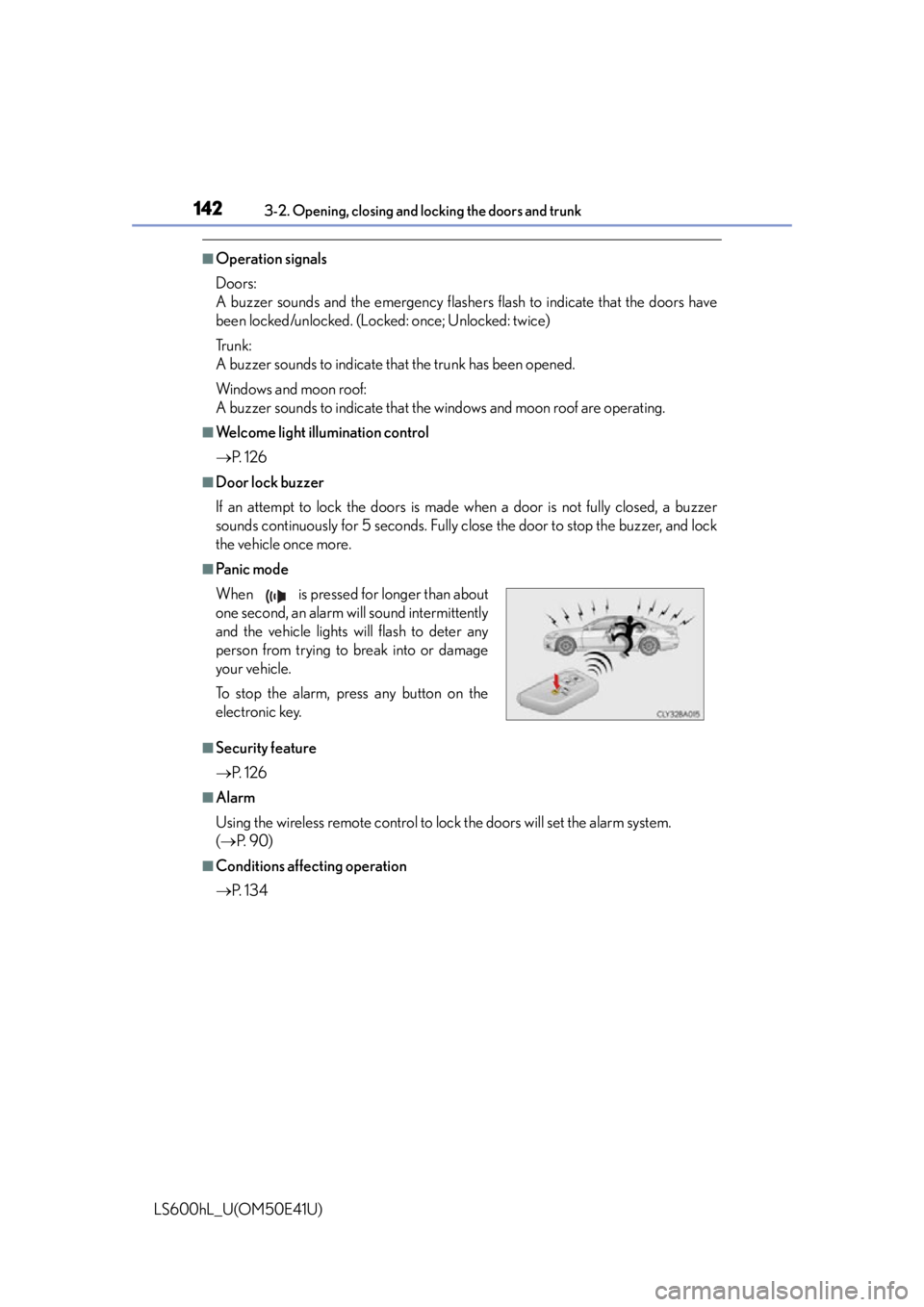
■Pa n i c m o d e
■Security feature
P. 1 2 6
■Alarm
Using the wireless remote control to lo ck the doors will set the alarm system.
( P. 9 0 )
■Conditions affecting operation
P. 1 3 4
When is pressed for longer than about
one second, an alarm will sound intermittently
and the vehicle lights will flash to deter any
person from trying to break into or damage
your vehicle.
To stop the alarm, press any button on the
electronic key.
Page 185 of 620
1833-4. Adjusting the steering wheel and mirrors
3
Operation of each component
LS600hL_U(OM50E41U)
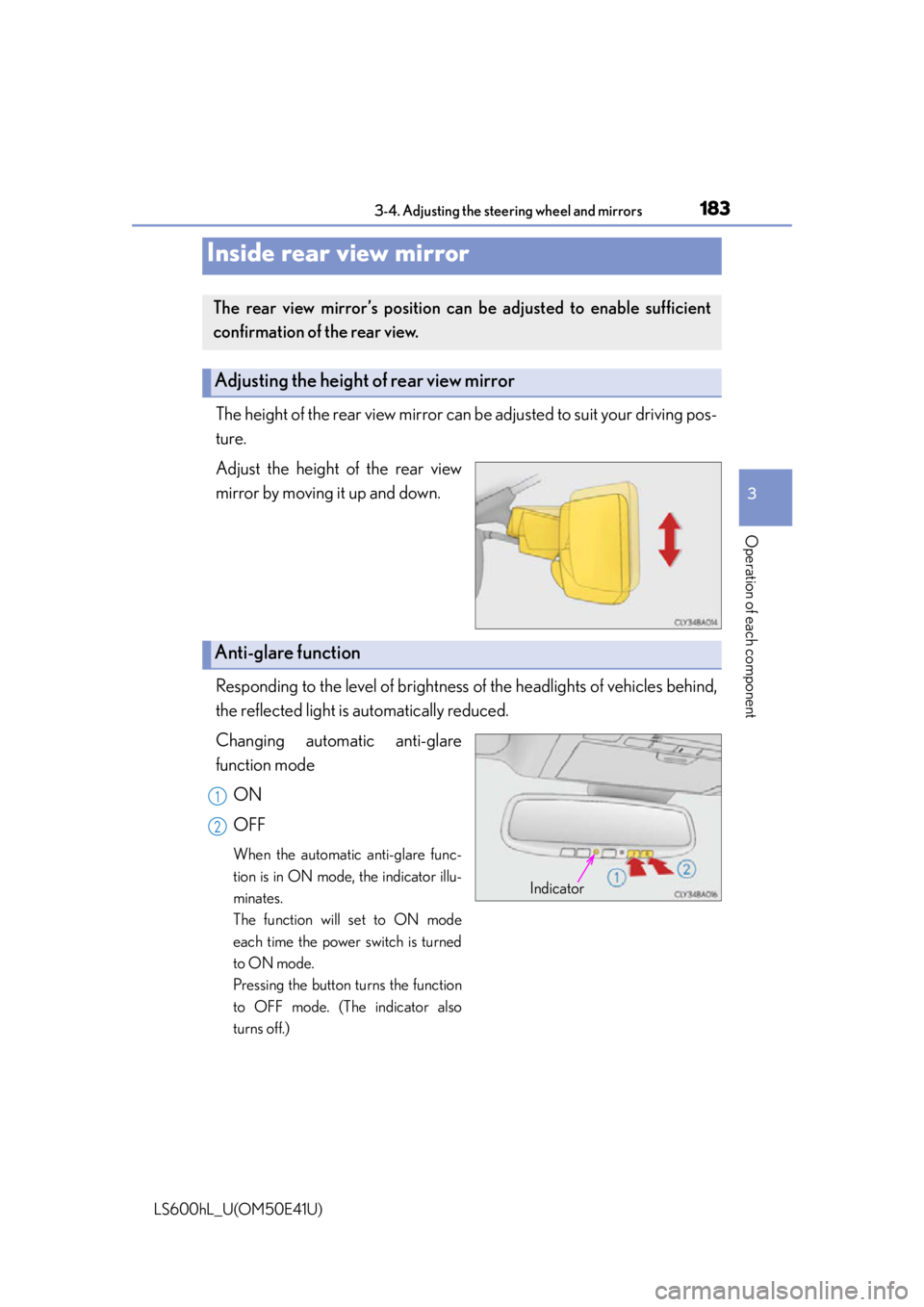
The height of the rear view mirror can be adjusted to suit your driving pos-
ture.
Adjust the height of the rear view
mirror by moving it up and down.
Responding to the level of brightness of the headlights of vehicles behind,
the reflected light is automatically reduced.
Changing automatic anti-glare
function mode
ON
OFF
When the automatic anti-glare func-
tion is in ON mode, the indicator illu-
minates.
The function will set to ON mode
each time the power switch is turned
to ON mode.
Pressing the button turns the function
to OFF mode. (The indicator also
turns off.)
Inside rear view mirror
The rear view mirror’s position can be adjusted to enable sufficient
confirmation of the rear view.
Adjusting the height of rear view mirror
Anti-glare function
Indicator
1
2
Page 199 of 620

197
Driving4
LS600hL_U(OM50E41U)4-1. Before driving
Driving the vehicle ......................198
Cargo and luggage .................. 209
Vehicle load limits ....................... 213
Trailer towing ................................. 214
Dinghy towing............................... 215
4-2. Driving procedures Power (ignition) switch.............. 216
EV drive mode ............................. 221
Hybrid transmission ..................223
Turn signal lever .......................... 227
Parking brake ...............................228
Brake Hold ..................................... 231
Horn.................................................233
4-3. Operating the lights and wipers
Headlight switch .........................234
Automatic High Beam ............ 238
Fog light switch............................ 243
Windshield wipers and washer.......................................... 244
Headlight cleaner switch ........248 4-4. Refueling
Opening the fuel tank cap....................................... 249
4-5. Using the driving support systems
Cruise control ............................. 253
Dynamic radar cruise control with full-speed
range ............................................ 257
LKA (Lane-Keeping Assist) ...........273
Driving mode select switch ........................................... 283
Electronically modulated air suspension ........................... 287
Driving assist systems............... 289
PCS (Pre-Collision System).......... 296
BSM (Blind Spot Moni tor)............. 308
• The Blind Spot Monitor function ..................................... 312
• The Rear Cross Traffic Alert function.......................... 315
Lexus night view .......................... 318
4-6. Driving tips Hybrid vehicle driving tips ................................................. 323
Winter driving tips ..................... 325
Page 229 of 620
2274-2. Driving procedures
4
Driving
LS600hL_U(OM50E41U)
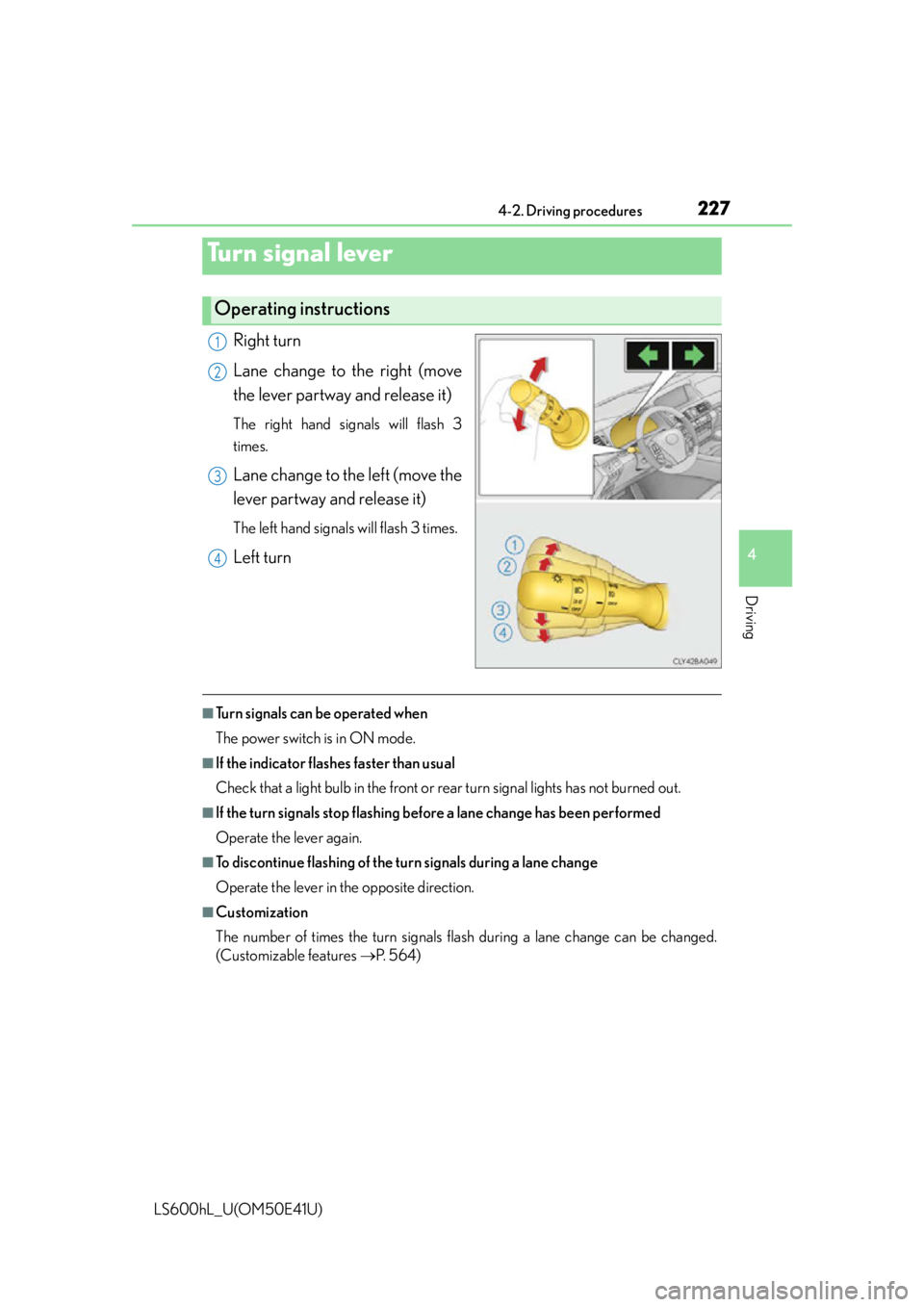
Right turn
Lane change to the right (move
the lever partway and release it)
The right hand signals will flash 3
times.
Lane change to the left (move the
lever partway and release it)
The left hand signals will flash 3 times.
Left turn
■Turn signals can be operated when
The power switch is in ON mode.
■If the indicator flashes faster than usual
Check that a light bulb in the front or rear turn signal lights has not burned out.
■If the turn signals stop flashing before a lane change has been performed
Operate the lever again.
■To discontinue flashing of the tu rn signals during a lane change
Operate the lever in the opposite direction.
■Customization
The number of times the turn signals flas h during a lane change can be changed.
(Customizable features P. 5 6 4 )
Turn signal lever
Operating instructions
1
2
3
4
Page 232 of 620

2304-2. Driving procedures
LS600hL_U(OM50E41U)
■Parking brake indicator light
●Depending on the power switch mode, the parking brake indicator light will come
on and stay on as described below:
ON mode: Comes on until the parking brake is released.
Not in ON mode: Stays on for approximately 15 seconds.
●When the power switch is turned off with the parking brake set, the parking brake
indicator light will stay on for about 15 seconds. This does not indicate a malfunc-
tion.
■Parking brake engaged warning buzzer
A buzzer will sound if the vehicle is dr iven at a speed of approximately 3 mph (5
km/h) or more with the parking brake engaged.
■When there is a malfunction in the system
Warning lights and/or warning message will turn on or flash. ( P. 495, 503)
Depending on the condition, the parking brake indicator light may flash.
■Usage in winter time
P. 3 2 6
NOTICE
■When parking the vehicle
Before you leave the vehicle, set the parking brake, shift the shift lever to P and
make sure that the vehicle does not move.
■When the system malfunctions
Stop the vehicle in a safe place and check the warning messages.
■When the parking brake cannot be released due to a malfunction
Use the parking brake release tool to manually release the parking brake.
( P. 5 2 0 )
Driving the vehicle with the parking brake set will lead to brake components over-
heating, which may affect braking performance and increase brake wear.
Page 234 of 620

2324-2. Driving procedures
LS600hL_U(OM50E41U)
■When the parking brake is set automatically while the system is holding the brakes
The parking brake will not be released automatically. Release the parking brake by
operating the parking brake switch, making sure that the parking brake indicator
light goes off. ( P. 2 2 8 )
■When there is a malfunction in the system
Warning lights and/or warning mess ages will turn on or flash. (P. 495, 503)
CAUTION
■When the vehicle is on a steep incline
When using the brake hold system on a steep incline exercise caution. The brake
hold function may not hold th e vehicle in such a situation.
■When stopped on a slippery road
The system cannot stop the vehicle when the gripping ability of the tires has been
exceeded. Do not use the system wh en stopped on a slippery road.
NOTICE
■When parking the vehicle
The brake hold system is not designed for use when parking the vehicle for a long
period of time. Turning the power switch off while the system is holding the brake
may release the brake, which would cause the vehicle to move. When operating
the power switch, depress the brake pedal, set the parking brake and shift the shift
lever to P.
Page 236 of 620
234
LS600hL_U(OM50E41U)
4-3. Operating the lights and wipers
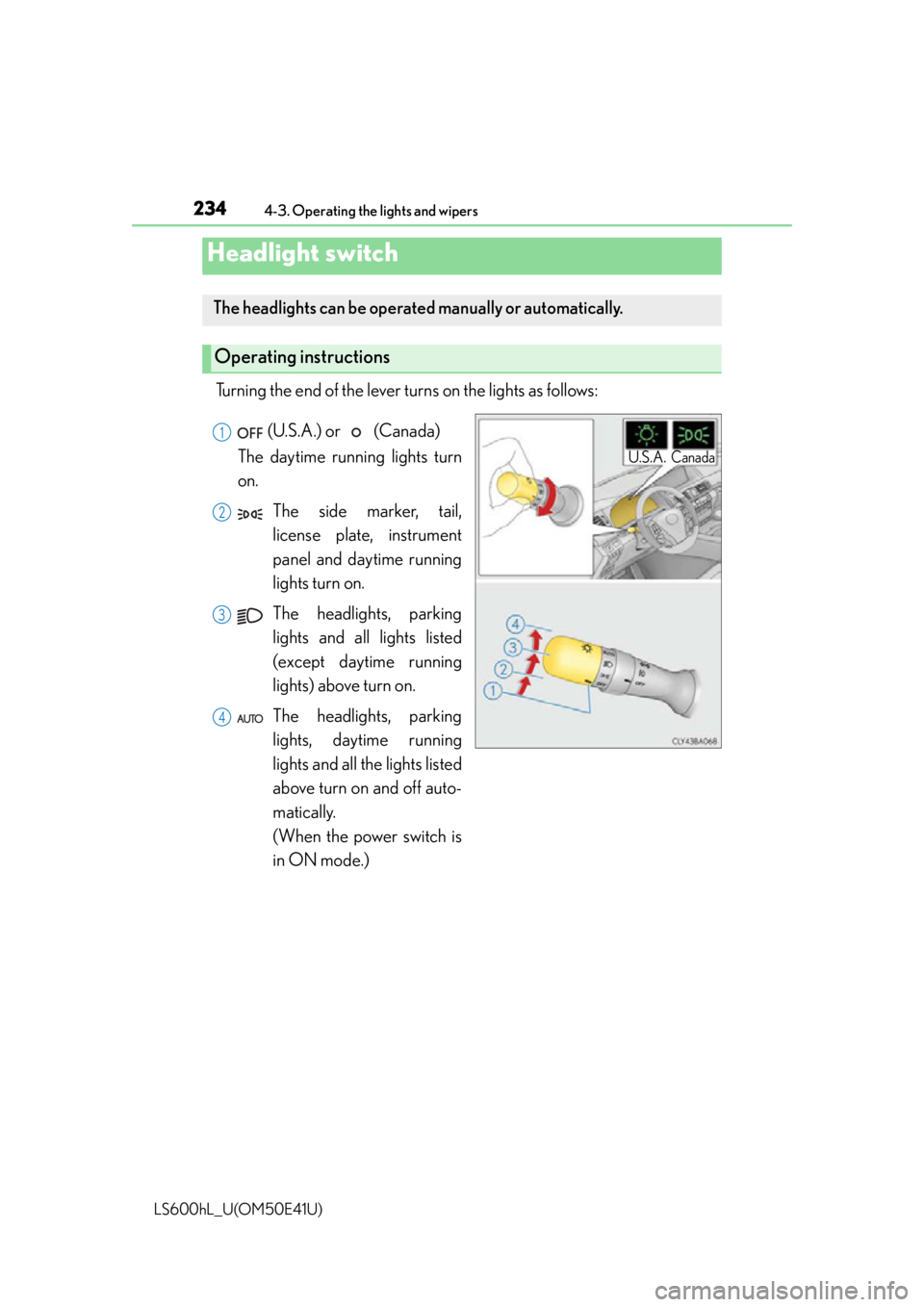
Turning the end of the lever turns on the lights as follows:
Headlight switch
The headlights can be operated manually or automatically.
Operating instructions
U.S.A.Canada
(U.S.A.) or (Canada)
The daytime running lights turn
on.
The side marker, tail,
license plate, instrument
panel and daytime running
lights turn on.
The headlights, parking
lights and all lights listed
(except daytime running
lights) above turn on.
The headlights, parking
lights, daytime running
lights and all the lights listed
above turn on and off auto-
matically.
(When the power switch is
in ON mode.)1
2
3
4